




Daten jede Stunde in JSON schreiben
-
Hi,
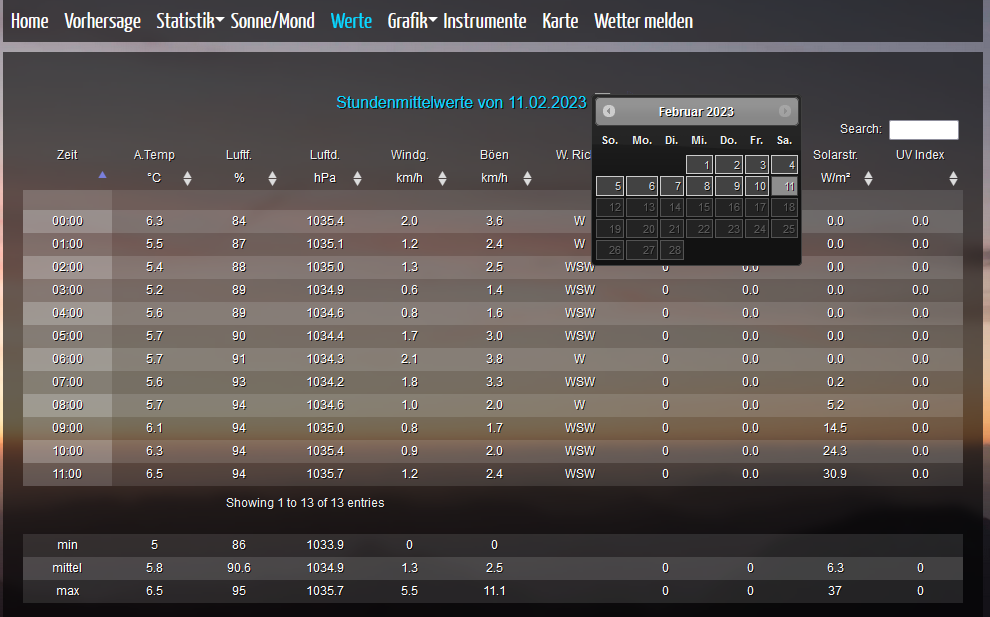
möchte bestimmte Daten zur jeden volle Stunde in ein JSON schreiben um sie später darstellen zukönnen, ähnlich wie auf Awekas.
ist das so okay, oder gibt es da eine besser Lösung?
// Reference the state objects for temperature, air pressure, and wind speed
var tempState = "javascript.0.Wetterstation.Aussentemperatur";
var pressureState = "javascript.0.Wetterstation.Druck_absolut";
var windState = "javascript.0.Wetterstation.Wind";
var weatherStatState = "0_userdata.0.JSON.WetterStatistikJedeStunde";

// Define a function to collect data and write to the weather statistics state
function collectData() {
    // Get the current date and time
    var date = new Date();
    var dateString = date.toLocaleDateString();
    var timeString = date.toLocaleTimeString();

    // Get the values of temperature, air pressure, and wind speed
    var temp = getState(tempState).val;
    var pressure = getState(pressureState).val;
    var wind = getState(windState).val;

    // Get the current value of the weather statistics state
    var currentData = getState(weatherStatState).val || '[]';

    // Convert the current data to an array
    currentData = JSON.parse(currentData);

    // Add the new data to the existing data
    currentData.push({
        date: dateString,
        time: timeString,
        temperature: temp,
        airPressure: pressure,
        windSpeed: wind
    });

    // Write the updated data to the weather statistics state
    setState(weatherStatState, JSON.stringify(currentData));
}

// Schedule the collectData function to run every hour
schedule("0 * * * *", collectData);
JSON
{
    "date": "11.2.2023",
    "time": "06:00:00",
    "temperature": 5.72,
    "airPressure": 1028.82,
    "windSpeed": 1.44
  },
  {
    "date": "11.2.2023",
    "time": "07:00:00",
    "temperature": 5.61,
    "airPressure": 1028.61,
    "windSpeed": 0
  },
  {
    "date": "11.2.2023",
    "time": "08:00:00",
    "temperature": 5.61,
    "airPressure": 1028.72,
    "windSpeed": 1.44
  },
  {
    "date": "11.2.2023",
    "time": "09:00:00",
    "temperature": 5.88,
    "airPressure": 1029.33,
    "windSpeed": 0
  },
  {
    "date": "11.2.2023",
    "time": "10:00:00",
    "temperature": 6.22,
    "airPressure": 1029.73,
    "windSpeed": 0.32
  },
  {
    "date": "11.2.2023",
    "time": "11:00:00",
    "temperature": 6.5,
    "airPressure": 1030.24,
    "windSpeed": 1.12
  }
]
Awekas
-
Hi,
möchte bestimmte Daten zur jeden volle Stunde in ein JSON schreiben um sie später darstellen zukönnen, ähnlich wie auf Awekas.
ist das so okay, oder gibt es da eine besser Lösung?
// Reference the state objects for temperature, air pressure, and wind speed
var tempState = "javascript.0.Wetterstation.Aussentemperatur";
var pressureState = "javascript.0.Wetterstation.Druck_absolut";
var windState = "javascript.0.Wetterstation.Wind";
var weatherStatState = "0_userdata.0.JSON.WetterStatistikJedeStunde";

// Define a function to collect data and write to the weather statistics state
function collectData() {
    // Get the current date and time
    var date = new Date();
    var dateString = date.toLocaleDateString();
    var timeString = date.toLocaleTimeString();

    // Get the values of temperature, air pressure, and wind speed
    var temp = getState(tempState).val;
    var pressure = getState(pressureState).val;
    var wind = getState(windState).val;

    // Get the current value of the weather statistics state
    var currentData = getState(weatherStatState).val || '[]';

    // Convert the current data to an array
    currentData = JSON.parse(currentData);

    // Add the new data to the existing data
    currentData.push({
        date: dateString,
        time: timeString,
        temperature: temp,
        airPressure: pressure,
        windSpeed: wind
    });

    // Write the updated data to the weather statistics state
    setState(weatherStatState, JSON.stringify(currentData));
}

// Schedule the collectData function to run every hour
schedule("0 * * * *", collectData);
JSON
{
    "date": "11.2.2023",
    "time": "06:00:00",
    "temperature": 5.72,
    "airPressure": 1028.82,
    "windSpeed": 1.44
  },
  {
    "date": "11.2.2023",
    "time": "07:00:00",
    "temperature": 5.61,
    "airPressure": 1028.61,
    "windSpeed": 0
  },
  {
    "date": "11.2.2023",
    "time": "08:00:00",
    "temperature": 5.61,
    "airPressure": 1028.72,
    "windSpeed": 1.44
  },
  {
    "date": "11.2.2023",
    "time": "09:00:00",
    "temperature": 5.88,
    "airPressure": 1029.33,
    "windSpeed": 0
  },
  {
    "date": "11.2.2023",
    "time": "10:00:00",
    "temperature": 6.22,
    "airPressure": 1029.73,
    "windSpeed": 0.32
  },
  {
    "date": "11.2.2023",
    "time": "11:00:00",
    "temperature": 6.5,
    "airPressure": 1030.24,
    "windSpeed": 1.12
  }
]
Awekas
@chris76e schau mal hier, da habe ich eine Vorlage für solche Aufgaben gepostet. Dabei wird nicht per CRON per getriggert, sondern auf jede Aktualisierung des JSON.
https://forum.iobroker.net/topic/62779/vorlage-script-json-datenpunkte-mit-sync?_=1676114744352
Wenn meine Antwort hilfreich war, dürft Ihr das gerne durch einen "Upvote" (der kleine "^" unten rechts) zum Ausdruck bringen.
-
@chris76e schau mal hier, da habe ich eine Vorlage für solche Aufgaben gepostet. Dabei wird nicht per CRON per getriggert, sondern auf jede Aktualisierung des JSON.
https://forum.iobroker.net/topic/62779/vorlage-script-json-datenpunkte-mit-sync?_=1676114744352
wenn ich dein script richtig verstehe, ist es doch was anderes. Ich möchte aus verschiedene DP stündlich ein JSON erstellen damit ich in meiner VIS eine Tabelle darstellen kann und diese nach Datum filtern.
-
wenn ich dein script richtig verstehe, ist es doch was anderes. Ich möchte aus verschiedene DP stündlich ein JSON erstellen damit ich in meiner VIS eine Tabelle darstellen kann und diese nach Datum filtern.
@chris76e sorry, falsch verstanden. Das kommt davon, wenn man schnell am Handy liest und dabei mit der Enkelin spielt 🙄

Hey! Du scheinst an dieser Unterhaltung interessiert zu sein, hast aber noch kein Konto.
Hast du es satt, bei jedem Besuch durch die gleichen Beiträge zu scrollen? Wenn du dich für ein Konto anmeldest, kommst du immer genau dorthin zurück, wo du zuvor warst, und kannst dich über neue Antworten benachrichtigen lassen (entweder per E-Mail oder Push-Benachrichtigung). Du kannst auch Lesezeichen speichern und Beiträge positiv bewerten, um anderen Community-Mitgliedern deine Wertschätzung zu zeigen.
Mit deinem Input könnte dieser Beitrag noch besser werden 💗
Registrieren AnmeldenSupport us
330
Online33.1k
Benutzende83.7k
Themen1.3m
Beiträge