




Fehlermeldungen bei Backup auf NAS [gelöst]

-
Hallo Leute,
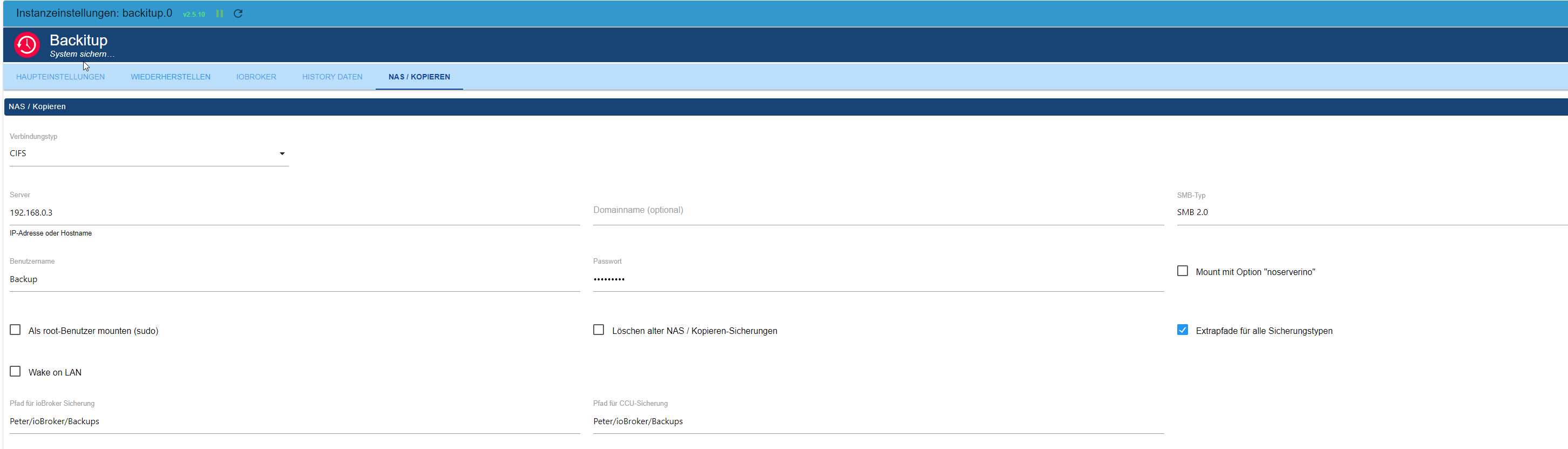
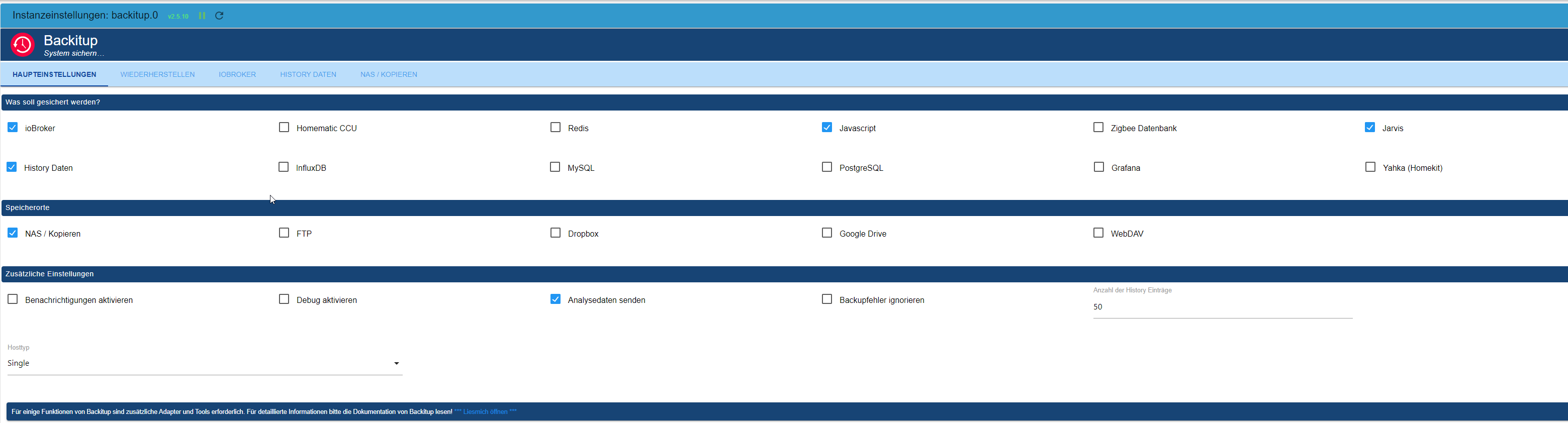
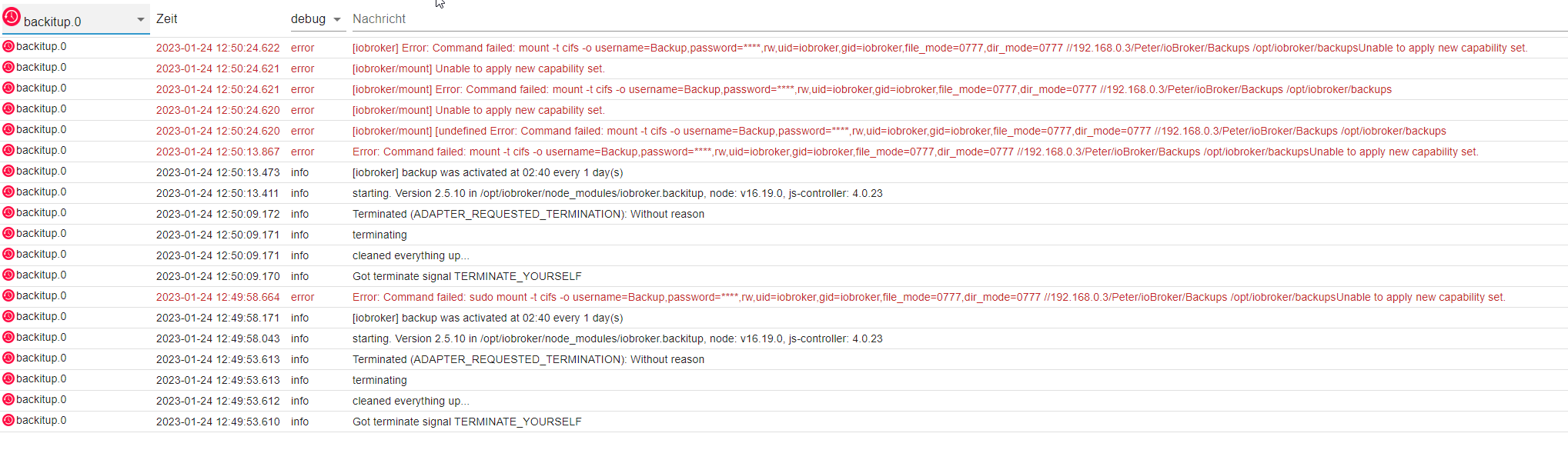
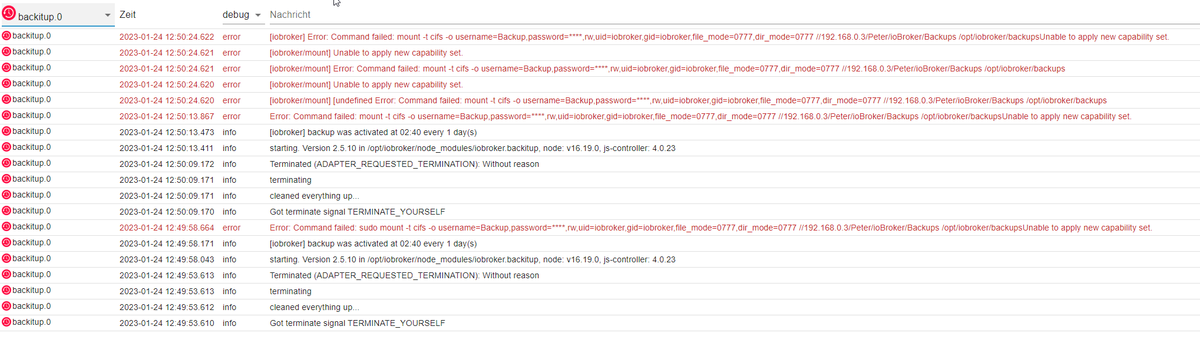
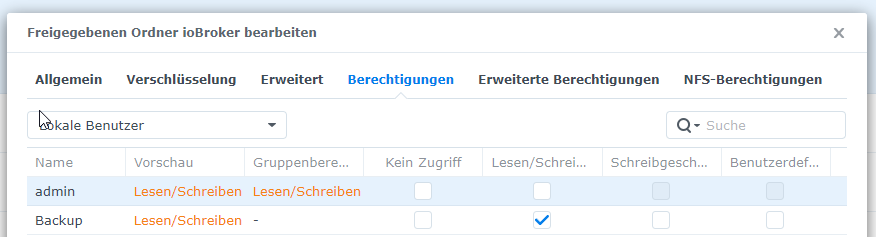
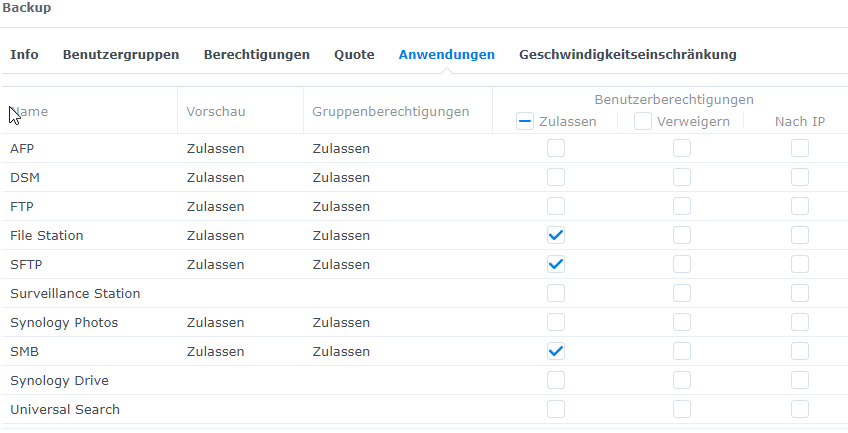
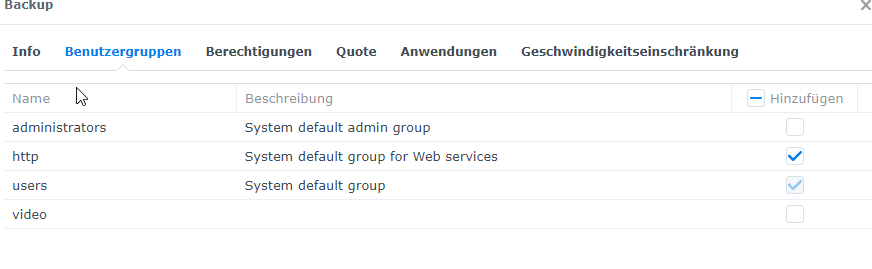
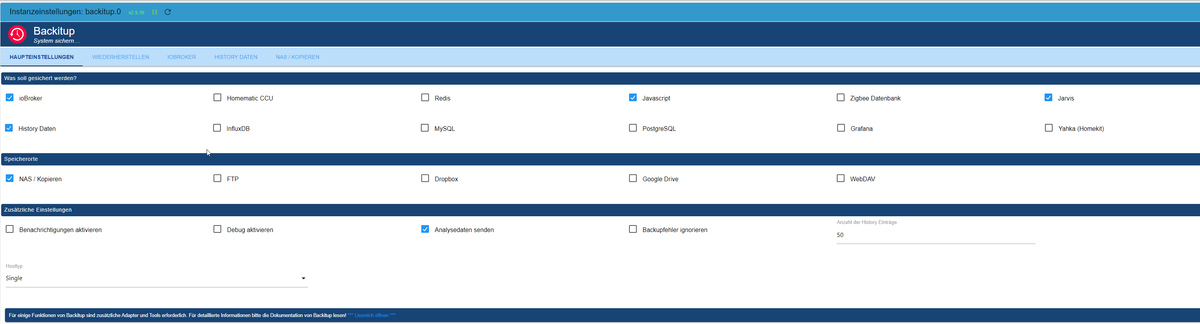
Ich würde gerne das ioBroker Backup auf mein NAS sichern. Habe dazu am NAS einen eigenen Benutzer angelegt mit den Schreib und Leserechten in den Backup Ordner. Im Backup Adapter wurde Benutzer und PW vom NAS Benutzer eingetragen. Wenn ich das Backup jetzt manuell anstoße kommen einige Fehlermeldungen:
Log:
Einstellung im NAS & Adapter:

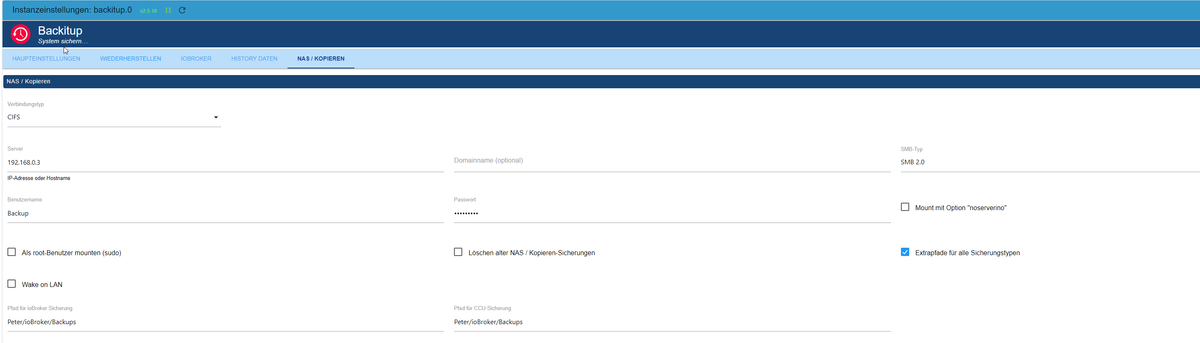
In der Hilfe steht was von CIFS Mount....was ist das?

LG Peter
Intel NUC i5 / 16GB RAM / 512GB SSD
Synology DS220+ 10GB RAM / 8TB -
Hallo Leute,
Ich würde gerne das ioBroker Backup auf mein NAS sichern. Habe dazu am NAS einen eigenen Benutzer angelegt mit den Schreib und Leserechten in den Backup Ordner. Im Backup Adapter wurde Benutzer und PW vom NAS Benutzer eingetragen. Wenn ich das Backup jetzt manuell anstoße kommen einige Fehlermeldungen:
Log:
Einstellung im NAS & Adapter:
In der Hilfe steht was von CIFS Mount....was ist das?
mounten muss (i.d.R.) als root gemacht werden. Anhaken in den Einstellungen.
sudo apt update
apt policy cifs-utils
sagt? Bitte keine Screenshots von Konsolentext.
smb-Version mal testweise auf v 3.1.1. setzen, das sollte mittlerweile Standard sein.
-
mounten muss (i.d.R.) als root gemacht werden. Anhaken in den Einstellungen.
sudo apt update
apt policy cifs-utils
sagt? Bitte keine Screenshots von Konsolentext.
smb-Version mal testweise auf v 3.1.1. setzen, das sollte mittlerweile Standard sein.
Habe root angehakt und smb auf 3.1.1 gestellt:

Was meinst du mit: sagt? Bitte keine Screenshots von Konsolentext.? Meinst du Log kopieren als Text und nicht als Foto?
LG Peter
Intel NUC i5 / 16GB RAM / 512GB SSD
Synology DS220+ 10GB RAM / 8TB -
Habe root angehakt und smb auf 3.1.1 gestellt:
Was meinst du mit: sagt? Bitte keine Screenshots von Konsolentext.? Meinst du Log kopieren als Text und nicht als Foto?
Ja, dann kann man das besser lesen, daraus zitieren usw.
-
Ja, dann kann man das besser lesen, daraus zitieren usw.
@thomas-braun

Also so? Oder die restlichen Sachen rauslöschen?

2023-01-24 12:44:57.248 - error: host.e73f64821262 Invalid request getRepository. "callback" or "from" is null
2023-01-24 12:45:00.060 - info: host.e73f64821262 instance system.adapter.daswetter.0 started with pid 22228
2023-01-24 12:45:01.280 - info: daswetter.0 (22228) starting. Version 3.1.4 in /opt/iobroker/node_modules/iobroker.daswetter, node: v16.19.0, js-controller: 4.0.23
2023-01-24 12:45:09.592 - info: daswetter.0 (22228) still wrong data structure from server received! repaired...
2023-01-24 12:45:11.841 - info: daswetter.0 (22228) Terminated (ADAPTER_REQUESTED_TERMINATION): All data handled, adapter stopped until next scheduled moment
2023-01-24 12:45:12.348 - info: daswetter.0 (22228) cleaned everything up...
2023-01-24 12:45:12.369 - info: host.e73f64821262 instance system.adapter.daswetter.0 terminated with code 11 (ADAPTER_REQUESTED_TERMINATION)
2023-01-24 12:48:19.854 - info: cloud.1 (849) User accessed from cloud: K-kYA9Klo_WrLGffATFY
2023-01-24 12:49:18.372 - info: cloud.1 (849) User disconnected from cloud: K-kYA9Klo_WrLGffATFY
2023-01-24 12:49:20.259 - info: cloud.1 (849) User accessed from cloud: xw-RPZCn509e9VYiATF7
2023-01-24 12:49:53.606 - info: host.e73f64821262 stopInstance system.adapter.backitup.0 (force=false, process=true)
2023-01-24 12:49:53.610 - info: backitup.0 (21654) Got terminate signal TERMINATE_YOURSELF
2023-01-24 12:49:53.612 - info: backitup.0 (21654) cleaned everything up...
2023-01-24 12:49:53.613 - info: backitup.0 (21654) terminating
2023-01-24 12:49:53.613 - info: backitup.0 (21654) Terminated (ADAPTER_REQUESTED_TERMINATION): Without reason
2023-01-24 12:49:53.649 - info: host.e73f64821262 stopInstance system.adapter.backitup.0 send kill signal
2023-01-24 12:49:54.160 - info: host.e73f64821262 instance system.adapter.backitup.0 terminated with code 11 (ADAPTER_REQUESTED_TERMINATION)
2023-01-24 12:49:56.751 - info: host.e73f64821262 instance system.adapter.backitup.0 started with pid 22504
2023-01-24 12:49:58.043 - info: backitup.0 (22504) starting. Version 2.5.10 in /opt/iobroker/node_modules/iobroker.backitup, node: v16.19.0, js-controller: 4.0.23
2023-01-24 12:49:58.171 - info: backitup.0 (22504) [iobroker] backup was activated at 02:40 every 1 day(s)
2023-01-24 12:49:58.664 - error: backitup.0 (22504) Error: Command failed: sudo mount -t cifs -o username=Backup,password=****,rw,uid=iobroker,gid=iobroker,file_mode=0777,dir_mode=0777 //192.168.0.3/Peter/ioBroker/Backups /opt/iobroker/backups
Unable to apply new capability set.
2023-01-24 12:50:09.166 - info: host.e73f64821262 stopInstance system.adapter.backitup.0 (force=false, process=true)
2023-01-24 12:50:09.170 - info: backitup.0 (22504) Got terminate signal TERMINATE_YOURSELF
2023-01-24 12:50:09.171 - info: backitup.0 (22504) cleaned everything up...
2023-01-24 12:50:09.171 - info: backitup.0 (22504) terminating
2023-01-24 12:50:09.172 - info: backitup.0 (22504) Terminated (ADAPTER_REQUESTED_TERMINATION): Without reason
2023-01-24 12:50:09.209 - info: host.e73f64821262 stopInstance system.adapter.backitup.0 send kill signal
2023-01-24 12:50:09.714 - info: host.e73f64821262 instance system.adapter.backitup.0 terminated with code 11 (ADAPTER_REQUESTED_TERMINATION)
2023-01-24 12:50:12.253 - info: host.e73f64821262 instance system.adapter.backitup.0 started with pid 22540
2023-01-24 12:50:13.411 - info: backitup.0 (22540) starting. Version 2.5.10 in /opt/iobroker/node_modules/iobroker.backitup, node: v16.19.0, js-controller: 4.0.23
2023-01-24 12:50:13.473 - info: backitup.0 (22540) [iobroker] backup was activated at 02:40 every 1 day(s)
2023-01-24 12:50:13.867 - error: backitup.0 (22540) Error: Command failed: mount -t cifs -o username=Backup,password=****,rw,uid=iobroker,gid=iobroker,file_mode=0777,dir_mode=0777 //192.168.0.3/Peter/ioBroker/Backups /opt/iobroker/backups
Unable to apply new capability set.
2023-01-24 12:50:24.620 - error: backitup.0 (22540) [iobroker/mount] [undefined Error: Command failed: mount -t cifs -o username=Backup,password=****,rw,uid=iobroker,gid=iobroker,file_mode=0777,dir_mode=0777 //192.168.0.3/Peter/ioBroker/Backups /opt/iobroker/backups
2023-01-24 12:50:24.620 - error: backitup.0 (22540) [iobroker/mount] Unable to apply new capability set.
2023-01-24 12:50:24.621 - error: backitup.0 (22540) [iobroker/mount] Error: Command failed: mount -t cifs -o username=Backup,password=****,rw,uid=iobroker,gid=iobroker,file_mode=0777,dir_mode=0777 //192.168.0.3/Peter/ioBroker/Backups /opt/iobroker/backups
2023-01-24 12:50:24.621 - error: backitup.0 (22540) [iobroker/mount] Unable to apply new capability set.
2023-01-24 12:50:24.622 - error: backitup.0 (22540) [iobroker] Error: Command failed: mount -t cifs -o username=Backup,password=****,rw,uid=iobroker,gid=iobroker,file_mode=0777,dir_mode=0777 //192.168.0.3/Peter/ioBroker/Backups /opt/iobroker/backups
Unable to apply new capability set.
2023-01-24 12:51:12.196 - info: cloud.1 (849) User disconnected from cloud: xw-RPZCn509e9VYiATF7
2023-01-24 12:51:25.737 - info: cloud.1 (849) User accessed from cloud: 3gwKk0kJePfRo1C5ATHI
2023-01-24 12:52:41.430 - warn: cloud.1 (849) User disconnected from cloud: 0 3gwKk0kJePfRo1C5ATHI
2023-01-24 12:52:41.431 - info: cloud.1 (849) User disconnected from cloud:
2023-01-24 12:57:39.273 - info: cloud.1 (849) received all objects
2023-01-24 12:59:04.419 - info: admin.0 (530) Request actual repository...
2023-01-24 12:59:04.732 - info: host.e73f64821262 Updating repository "stable" under "http://download.iobroker.net/sources-dist.json"
2023-01-24 12:59:05.842 - info: admin.0 (530) Repository received successfully.
2023-01-24 13:00:00.069 - info: host.e73f64821262 instance system.adapter.daswetter.0 started with pid 23095
2023-01-24 13:00:01.223 - info: daswetter.0 (23095) starting. Version 3.1.4 in /opt/iobroker/node_modules/iobroker.daswetter, node: v16.19.0, js-controller: 4.0.23
2023-01-24 13:00:02.051 - error: cloud.1 (849) Cannot request admin pages:
Cannot GET /socket.io/
2023-01-24 13:00:03.487 - error: cloud.1 (849) Cannot request admin pages:
Cannot GET /socket.io/
2023-01-24 13:00:04.095 - info: host.e73f64821262 instance system.adapter.fuelpricemonitor.0 started with pid 23110
2023-01-24 13:00:05.305 - error: cloud.1 (849) Cannot request admin pages:
Cannot GET /socket.io/
2023-01-24 13:00:06.086 - info: fuelpricemonitor.0 (23110) starting. Version 0.3.3 in /opt/iobroker/node_modules/iobroker.fuelpricemonitor, node: v16.19.0, js-controller: 4.0.23
2023-01-24 13:00:06.110 - info: fuelpricemonitor.0 (23110) Started with JSON-Explorer version 0.1.10
2023-01-24 13:00:10.404 - error: cloud.1 (849) Cannot request admin pages:
Cannot GET /socket.io/
2023-01-24 13:00:13.461 - info: fuelpricemonitor.0 (23110) Terminated (NO_ERROR): Without reason
2023-01-24 13:00:13.969 - info: fuelpricemonitor.0 (23110) cleaned everything up...
2023-01-24 13:00:13.985 - info: host.e73f64821262 instance system.adapter.fuelpricemonitor.0 terminated with code 0 (NO_ERROR)
2023-01-24 13:00:15.310 - info: daswetter.0 (23095) still wrong data structure from server received! repaired...
2023-01-24 13:00:17.533 - info: daswetter.0 (23095) Terminated (ADAPTER_REQUESTED_TERMINATION): All data handled, adapter stopped until next scheduled moment
2023-01-24 13:00:18.045 - info: daswetter.0 (23095) cleaned everything up...
2023-01-24 13:00:18.064 - info: host.e73f64821262 instance system.adapter.daswetter.0 terminated with code 11 (ADAPTER_REQUESTED_TERMINATION)
2023-01-24 13:00:19.559 - info: cloud.1 (849) User accessed from cloud: AZEXg8FpqhnWdZqAATLo
2023-01-24 13:00:22.020 - info: cloud.1 (849) User disconnected from cloud: AZEXg8FpqhnWdZqAATLo
2023-01-24 13:05:55.389 - info: cloud.1 (849) User accessed from cloud: MMm1qIvpysIQNsBUATOq
2023-01-24 13:13:17.305 - info: cloud.1 (849) User disconnected from cloud: MMm1qIvpysIQNsBUATOq
2023-01-24 13:13:17.311 - info: cloud.1 (849) User disconnected from cloud: NokHvXGAjLO20NjTATC_
2023-01-24 13:15:00.057 - info: host.e73f64821262 instance system.adapter.daswetter.0 started with pid 23905
2023-01-24 13:15:01.192 - info: daswetter.0 (23905) starting. Version 3.1.4 in /opt/iobroker/node_modules/iobroker.daswetter, node: v16.19.0, js-controller: 4.0.23
2023-01-24 13:15:09.230 - info: daswetter.0 (23905) still wrong data structure from server received! repaired...
2023-01-24 13:15:11.432 - info: daswetter.0 (23905) Terminated (ADAPTER_REQUESTED_TERMINATION): All data handled, adapter stopped until next scheduled moment
2023-01-24 13:15:11.940 - info: daswetter.0 (23905) cleaned everything up...
2023-01-24 13:15:11.960 - info: host.e73f64821262 instance system.adapter.daswetter.0 terminated with code 11 (ADAPTER_REQUESTED_TERMINATION)
2023-01-24 13:20:00.095 - info: host.e73f64821262 instance system.adapter.fuelpricemonitor.0 started with pid 24180
2023-01-24 13:20:01.317 - info: fuelpricemonitor.0 (24180) starting. Version 0.3.3 in /opt/iobroker/node_modules/iobroker.fuelpricemonitor, node: v16.19.0, js-controller: 4.0.23
2023-01-24 13:20:01.337 - info: fuelpricemonitor.0 (24180) Started with JSON-Explorer version 0.1.10
2023-01-24 13:20:06.683 - info: fuelpricemonitor.0 (24180) Terminated (NO_ERROR): Without reason
2023-01-24 13:20:07.191 - info: fuelpricemonitor.0 (24180) cleaned everything up...
2023-01-24 13:20:07.209 - info: host.e73f64821262 instance system.adapter.fuelpricemonitor.0 terminated with code 0 (NO_ERROR)
2023-01-24 13:22:21.568 - info: cloud.1 (849) User accessed from cloud: taDOa7y5WAhUpOs1ATVS
2023-01-24 13:23:29.644 - info: cloud.1 (849) User disconnected from cloud: taDOa7y5WAhUpOs1ATVS
2023-01-24 13:30:00.059 - info: host.e73f64821262 instance system.adapter.daswetter.0 started with pid 24711
2023-01-24 13:30:01.243 - info: daswetter.0 (24711) starting. Version 3.1.4 in /opt/iobroker/node_modules/iobroker.daswetter, node: v16.19.0, js-controller: 4.0.23
2023-01-24 13:30:07.530 - error: daswetter.0 (24711) exception in HourlyForecast [AxiosError: Request failed with status code 502]
2023-01-24 13:30:07.653 - error: daswetter.0 (24711) exception in getForecastDataHourlyJSON [AxiosError: Request failed with status code 502]
2023-01-24 13:30:07.654 - info: daswetter.0 (24711) Terminated (ADAPTER_REQUESTED_TERMINATION): All data handled, adapter stopped until next scheduled moment
2023-01-24 13:30:08.162 - info: daswetter.0 (24711) cleaned everything up...
2023-01-24 13:30:08.175 - info: host.e73f64821262 instance system.adapter.daswetter.0 terminated with code 11 (ADAPTER_REQUESTED_TERMINATION)
2023-01-24 13:39:36.607 - info: cloud.1 (849) User accessed from cloud: K6va0EGI5Fmv9Yk3ATcP
2023-01-24 13:39:45.764 - info: cloud.1 (849) User accessed from cloud: qbIfXHpE25svn3RPATcc
2023-01-24 13:39:59.789 - info: host.e73f64821262 stopInstance system.adapter.backitup.0 (force=false, process=true)
2023-01-24 13:39:59.794 - info: backitup.0 (22540) Got terminate signal TERMINATE_YOURSELF
2023-01-24 13:39:59.795 - info: backitup.0 (22540) cleaned everything up...
2023-01-24 13:39:59.795 - info: backitup.0 (22540) terminating
2023-01-24 13:39:59.796 - info: backitup.0 (22540) Terminated (ADAPTER_REQUESTED_TERMINATION): Without reason
2023-01-24 13:39:59.835 - info: host.e73f64821262 stopInstance system.adapter.backitup.0 send kill signal
2023-01-24 13:40:00.063 - info: host.e73f64821262 instance system.adapter.fuelpricemonitor.0 started with pid 25259
2023-01-24 13:40:00.340 - info: host.e73f64821262 instance system.adapter.backitup.0 terminated with code 11 (ADAPTER_REQUESTED_TERMINATION)
2023-01-24 13:40:01.497 - info: fuelpricemonitor.0 (25259) starting. Version 0.3.3 in /opt/iobroker/node_modules/iobroker.fuelpricemonitor, node: v16.19.0, js-controller: 4.0.23
2023-01-24 13:40:01.519 - info: fuelpricemonitor.0 (25259) Started with JSON-Explorer version 0.1.10
2023-01-24 13:40:03.420 - info: host.e73f64821262 instance system.adapter.backitup.0 started with pid 25274
2023-01-24 13:40:06.392 - info: backitup.0 (25274) starting. Version 2.5.10 in /opt/iobroker/node_modules/iobroker.backitup, node: v16.19.0, js-controller: 4.0.23
2023-01-24 13:40:06.453 - info: backitup.0 (25274) [iobroker] backup was activated at 02:40 every 1 day(s)
2023-01-24 13:40:06.993 - error: backitup.0 (25274) Error: Command failed: sudo mount -t cifs -o username=Backup,password=****,rw,uid=iobroker,gid=iobroker,file_mode=0777,dir_mode=0777 //192.168.0.3/Peter/ioBroker/Backups /opt/iobroker/backups
Unable to apply new capability set.
2023-01-24 13:40:07.591 - info: fuelpricemonitor.0 (25259) Terminated (NO_ERROR): Without reason
2023-01-24 13:40:08.099 - info: fuelpricemonitor.0 (25259) cleaned everything up...
2023-01-24 13:40:08.117 - info: host.e73f64821262 instance system.adapter.fuelpricemonitor.0 terminated with code 0 (NO_ERROR)
2023-01-24 13:40:23.585 - error: backitup.0 (25274) [iobroker/mount] [undefined Error: Command failed: sudo mount -t cifs -o username=Backup,password=****,rw,uid=iobroker,gid=iobroker,file_mode=0777,dir_mode=0777 //192.168.0.3/Peter/ioBroker/Backups /opt/iobroker/backups
2023-01-24 13:40:23.586 - error: backitup.0 (25274) [iobroker/mount] Unable to apply new capability set.
2023-01-24 13:40:23.586 - error: backitup.0 (25274) [iobroker/mount] Error: Command failed: sudo mount -t cifs -o username=Backup,password=****,rw,uid=iobroker,gid=iobroker,file_mode=0777,dir_mode=0777 //192.168.0.3/Peter/ioBroker/Backups /opt/iobroker/backups
2023-01-24 13:40:23.586 - error: backitup.0 (25274) [iobroker/mount] Unable to apply new capability set.
2023-01-24 13:40:23.587 - error: backitup.0 (25274) [iobroker] Error: Command failed: sudo mount -t cifs -o username=Backup,password=****,rw,uid=iobroker,gid=iobroker,file_mode=0777,dir_mode=0777 //192.168.0.3/Peter/ioBroker/Backups /opt/iobroker/backups
Unable to apply new capability set.
2023-01-24 13:40:54.515 - info: cloud.1 (849) User disconnected from cloud: qbIfXHpE25svn3RPATcc
2023-01-24 13:45:00.060 - info: host.e73f64821262 instance system.adapter.daswetter.0 started with pid 25574
2023-01-24 13:45:01.221 - info: daswetter.0 (25574) starting. Version 3.1.4 in /opt/iobroker/node_modules/iobroker.daswetter, node: v16.19.0, js-controller: 4.0.23
2023-01-24 13:45:03.863 - info: cloud.1 (849) User disconnected from cloud: K6va0EGI5Fmv9Yk3ATcP
2023-01-24 13:45:11.202 - info: daswetter.0 (25574) still wrong data structure from server received! repaired...
2023-01-24 13:45:13.381 - info: daswetter.0 (25574) Terminated (ADAPTER_REQUESTED_TERMINATION): All data handled, adapter stopped until next scheduled moment
2023-01-24 13:45:13.890 - info: daswetter.0 (25574) cleaned everything up...
2023-01-24 13:45:13.905 - info: host.e73f64821262 instance system.adapter.daswetter.0 terminated with code 11 (ADAPTER_REQUESTED_TERMINATION)
2023-01-24 13:59:47.962 - info: cloud.1 (849) User accessed from cloud: NS-F1bJvpGrmox7cATlj
LG Peter
Intel NUC i5 / 16GB RAM / 512GB SSD
Synology DS220+ 10GB RAM / 8TB -
@thomas-braun Also so? Oder die restlichen Sachen rauslöschen? 2023-01-24 12:44:57.248 - error: host.e73f64821262 Invalid request getRepository. "callback" or "from" is null 2023-01-24 12:45:00.060 - info: host.e73f64821262 instance system.adapter.daswetter.0 started with pid 22228 2023-01-24 12:45:01.280 - info: daswetter.0 (22228) starting. Version 3.1.4 in /opt/iobroker/node_modules/iobroker.daswetter, node: v16.19.0, js-controller: 4.0.23 2023-01-24 12:45:09.592 - info: daswetter.0 (22228) still wrong data structure from server received! repaired... 2023-01-24 12:45:11.841 - info: daswetter.0 (22228) Terminated (ADAPTER_REQUESTED_TERMINATION): All data handled, adapter stopped until next scheduled moment 2023-01-24 12:45:12.348 - info: daswetter.0 (22228) cleaned everything up... 2023-01-24 12:45:12.369 - info: host.e73f64821262 instance system.adapter.daswetter.0 terminated with code 11 (ADAPTER_REQUESTED_TERMINATION) 2023-01-24 12:48:19.854 - info: cloud.1 (849) User accessed from cloud: K-kYA9Klo_WrLGffATFY 2023-01-24 12:49:18.372 - info: cloud.1 (849) User disconnected from cloud: K-kYA9Klo_WrLGffATFY 2023-01-24 12:49:20.259 - info: cloud.1 (849) User accessed from cloud: xw-RPZCn509e9VYiATF7 2023-01-24 12:49:53.606 - info: host.e73f64821262 stopInstance system.adapter.backitup.0 (force=false, process=true) 2023-01-24 12:49:53.610 - info: backitup.0 (21654) Got terminate signal TERMINATE_YOURSELF 2023-01-24 12:49:53.612 - info: backitup.0 (21654) cleaned everything up... 2023-01-24 12:49:53.613 - info: backitup.0 (21654) terminating 2023-01-24 12:49:53.613 - info: backitup.0 (21654) Terminated (ADAPTER_REQUESTED_TERMINATION): Without reason 2023-01-24 12:49:53.649 - info: host.e73f64821262 stopInstance system.adapter.backitup.0 send kill signal 2023-01-24 12:49:54.160 - info: host.e73f64821262 instance system.adapter.backitup.0 terminated with code 11 (ADAPTER_REQUESTED_TERMINATION) 2023-01-24 12:49:56.751 - info: host.e73f64821262 instance system.adapter.backitup.0 started with pid 22504 2023-01-24 12:49:58.043 - info: backitup.0 (22504) starting. Version 2.5.10 in /opt/iobroker/node_modules/iobroker.backitup, node: v16.19.0, js-controller: 4.0.23 2023-01-24 12:49:58.171 - info: backitup.0 (22504) [iobroker] backup was activated at 02:40 every 1 day(s) 2023-01-24 12:49:58.664 - error: backitup.0 (22504) Error: Command failed: sudo mount -t cifs -o username=Backup,password=****,rw,uid=iobroker,gid=iobroker,file_mode=0777,dir_mode=0777 //192.168.0.3/Peter/ioBroker/Backups /opt/iobroker/backups Unable to apply new capability set. 2023-01-24 12:50:09.166 - info: host.e73f64821262 stopInstance system.adapter.backitup.0 (force=false, process=true) 2023-01-24 12:50:09.170 - info: backitup.0 (22504) Got terminate signal TERMINATE_YOURSELF 2023-01-24 12:50:09.171 - info: backitup.0 (22504) cleaned everything up... 2023-01-24 12:50:09.171 - info: backitup.0 (22504) terminating 2023-01-24 12:50:09.172 - info: backitup.0 (22504) Terminated (ADAPTER_REQUESTED_TERMINATION): Without reason 2023-01-24 12:50:09.209 - info: host.e73f64821262 stopInstance system.adapter.backitup.0 send kill signal 2023-01-24 12:50:09.714 - info: host.e73f64821262 instance system.adapter.backitup.0 terminated with code 11 (ADAPTER_REQUESTED_TERMINATION) 2023-01-24 12:50:12.253 - info: host.e73f64821262 instance system.adapter.backitup.0 started with pid 22540 2023-01-24 12:50:13.411 - info: backitup.0 (22540) starting. Version 2.5.10 in /opt/iobroker/node_modules/iobroker.backitup, node: v16.19.0, js-controller: 4.0.23 2023-01-24 12:50:13.473 - info: backitup.0 (22540) [iobroker] backup was activated at 02:40 every 1 day(s) 2023-01-24 12:50:13.867 - error: backitup.0 (22540) Error: Command failed: mount -t cifs -o username=Backup,password=****,rw,uid=iobroker,gid=iobroker,file_mode=0777,dir_mode=0777 //192.168.0.3/Peter/ioBroker/Backups /opt/iobroker/backups Unable to apply new capability set. 2023-01-24 12:50:24.620 - error: backitup.0 (22540) [iobroker/mount] [undefined Error: Command failed: mount -t cifs -o username=Backup,password=****,rw,uid=iobroker,gid=iobroker,file_mode=0777,dir_mode=0777 //192.168.0.3/Peter/ioBroker/Backups /opt/iobroker/backups 2023-01-24 12:50:24.620 - error: backitup.0 (22540) [iobroker/mount] Unable to apply new capability set. 2023-01-24 12:50:24.621 - error: backitup.0 (22540) [iobroker/mount] Error: Command failed: mount -t cifs -o username=Backup,password=****,rw,uid=iobroker,gid=iobroker,file_mode=0777,dir_mode=0777 //192.168.0.3/Peter/ioBroker/Backups /opt/iobroker/backups 2023-01-24 12:50:24.621 - error: backitup.0 (22540) [iobroker/mount] Unable to apply new capability set. 2023-01-24 12:50:24.622 - error: backitup.0 (22540) [iobroker] Error: Command failed: mount -t cifs -o username=Backup,password=****,rw,uid=iobroker,gid=iobroker,file_mode=0777,dir_mode=0777 //192.168.0.3/Peter/ioBroker/Backups /opt/iobroker/backups Unable to apply new capability set. 2023-01-24 12:51:12.196 - info: cloud.1 (849) User disconnected from cloud: xw-RPZCn509e9VYiATF7 2023-01-24 12:51:25.737 - info: cloud.1 (849) User accessed from cloud: 3gwKk0kJePfRo1C5ATHI 2023-01-24 12:52:41.430 - warn: cloud.1 (849) User disconnected from cloud: 0 3gwKk0kJePfRo1C5ATHI 2023-01-24 12:52:41.431 - info: cloud.1 (849) User disconnected from cloud: 2023-01-24 12:57:39.273 - info: cloud.1 (849) received all objects 2023-01-24 12:59:04.419 - info: admin.0 (530) Request actual repository... 2023-01-24 12:59:04.732 - info: host.e73f64821262 Updating repository "stable" under "http://download.iobroker.net/sources-dist.json" 2023-01-24 12:59:05.842 - info: admin.0 (530) Repository received successfully. 2023-01-24 13:00:00.069 - info: host.e73f64821262 instance system.adapter.daswetter.0 started with pid 23095 2023-01-24 13:00:01.223 - info: daswetter.0 (23095) starting. Version 3.1.4 in /opt/iobroker/node_modules/iobroker.daswetter, node: v16.19.0, js-controller: 4.0.23 2023-01-24 13:00:02.051 - error: cloud.1 (849) Cannot request admin pages: Cannot GET /socket.io/ 2023-01-24 13:00:03.487 - error: cloud.1 (849) Cannot request admin pages: Cannot GET /socket.io/ 2023-01-24 13:00:04.095 - info: host.e73f64821262 instance system.adapter.fuelpricemonitor.0 started with pid 23110 2023-01-24 13:00:05.305 - error: cloud.1 (849) Cannot request admin pages: Cannot GET /socket.io/ 2023-01-24 13:00:06.086 - info: fuelpricemonitor.0 (23110) starting. Version 0.3.3 in /opt/iobroker/node_modules/iobroker.fuelpricemonitor, node: v16.19.0, js-controller: 4.0.23 2023-01-24 13:00:06.110 - info: fuelpricemonitor.0 (23110) Started with JSON-Explorer version 0.1.10 2023-01-24 13:00:10.404 - error: cloud.1 (849) Cannot request admin pages: Cannot GET /socket.io/ 2023-01-24 13:00:13.461 - info: fuelpricemonitor.0 (23110) Terminated (NO_ERROR): Without reason 2023-01-24 13:00:13.969 - info: fuelpricemonitor.0 (23110) cleaned everything up... 2023-01-24 13:00:13.985 - info: host.e73f64821262 instance system.adapter.fuelpricemonitor.0 terminated with code 0 (NO_ERROR) 2023-01-24 13:00:15.310 - info: daswetter.0 (23095) still wrong data structure from server received! repaired... 2023-01-24 13:00:17.533 - info: daswetter.0 (23095) Terminated (ADAPTER_REQUESTED_TERMINATION): All data handled, adapter stopped until next scheduled moment 2023-01-24 13:00:18.045 - info: daswetter.0 (23095) cleaned everything up... 2023-01-24 13:00:18.064 - info: host.e73f64821262 instance system.adapter.daswetter.0 terminated with code 11 (ADAPTER_REQUESTED_TERMINATION) 2023-01-24 13:00:19.559 - info: cloud.1 (849) User accessed from cloud: AZEXg8FpqhnWdZqAATLo 2023-01-24 13:00:22.020 - info: cloud.1 (849) User disconnected from cloud: AZEXg8FpqhnWdZqAATLo 2023-01-24 13:05:55.389 - info: cloud.1 (849) User accessed from cloud: MMm1qIvpysIQNsBUATOq 2023-01-24 13:13:17.305 - info: cloud.1 (849) User disconnected from cloud: MMm1qIvpysIQNsBUATOq 2023-01-24 13:13:17.311 - info: cloud.1 (849) User disconnected from cloud: NokHvXGAjLO20NjTATC_ 2023-01-24 13:15:00.057 - info: host.e73f64821262 instance system.adapter.daswetter.0 started with pid 23905 2023-01-24 13:15:01.192 - info: daswetter.0 (23905) starting. Version 3.1.4 in /opt/iobroker/node_modules/iobroker.daswetter, node: v16.19.0, js-controller: 4.0.23 2023-01-24 13:15:09.230 - info: daswetter.0 (23905) still wrong data structure from server received! repaired... 2023-01-24 13:15:11.432 - info: daswetter.0 (23905) Terminated (ADAPTER_REQUESTED_TERMINATION): All data handled, adapter stopped until next scheduled moment 2023-01-24 13:15:11.940 - info: daswetter.0 (23905) cleaned everything up... 2023-01-24 13:15:11.960 - info: host.e73f64821262 instance system.adapter.daswetter.0 terminated with code 11 (ADAPTER_REQUESTED_TERMINATION) 2023-01-24 13:20:00.095 - info: host.e73f64821262 instance system.adapter.fuelpricemonitor.0 started with pid 24180 2023-01-24 13:20:01.317 - info: fuelpricemonitor.0 (24180) starting. Version 0.3.3 in /opt/iobroker/node_modules/iobroker.fuelpricemonitor, node: v16.19.0, js-controller: 4.0.23 2023-01-24 13:20:01.337 - info: fuelpricemonitor.0 (24180) Started with JSON-Explorer version 0.1.10 2023-01-24 13:20:06.683 - info: fuelpricemonitor.0 (24180) Terminated (NO_ERROR): Without reason 2023-01-24 13:20:07.191 - info: fuelpricemonitor.0 (24180) cleaned everything up... 2023-01-24 13:20:07.209 - info: host.e73f64821262 instance system.adapter.fuelpricemonitor.0 terminated with code 0 (NO_ERROR) 2023-01-24 13:22:21.568 - info: cloud.1 (849) User accessed from cloud: taDOa7y5WAhUpOs1ATVS 2023-01-24 13:23:29.644 - info: cloud.1 (849) User disconnected from cloud: taDOa7y5WAhUpOs1ATVS 2023-01-24 13:30:00.059 - info: host.e73f64821262 instance system.adapter.daswetter.0 started with pid 24711 2023-01-24 13:30:01.243 - info: daswetter.0 (24711) starting. Version 3.1.4 in /opt/iobroker/node_modules/iobroker.daswetter, node: v16.19.0, js-controller: 4.0.23 2023-01-24 13:30:07.530 - error: daswetter.0 (24711) exception in HourlyForecast [AxiosError: Request failed with status code 502] 2023-01-24 13:30:07.653 - error: daswetter.0 (24711) exception in getForecastDataHourlyJSON [AxiosError: Request failed with status code 502] 2023-01-24 13:30:07.654 - info: daswetter.0 (24711) Terminated (ADAPTER_REQUESTED_TERMINATION): All data handled, adapter stopped until next scheduled moment 2023-01-24 13:30:08.162 - info: daswetter.0 (24711) cleaned everything up... 2023-01-24 13:30:08.175 - info: host.e73f64821262 instance system.adapter.daswetter.0 terminated with code 11 (ADAPTER_REQUESTED_TERMINATION) 2023-01-24 13:39:36.607 - info: cloud.1 (849) User accessed from cloud: K6va0EGI5Fmv9Yk3ATcP 2023-01-24 13:39:45.764 - info: cloud.1 (849) User accessed from cloud: qbIfXHpE25svn3RPATcc 2023-01-24 13:39:59.789 - info: host.e73f64821262 stopInstance system.adapter.backitup.0 (force=false, process=true) 2023-01-24 13:39:59.794 - info: backitup.0 (22540) Got terminate signal TERMINATE_YOURSELF 2023-01-24 13:39:59.795 - info: backitup.0 (22540) cleaned everything up... 2023-01-24 13:39:59.795 - info: backitup.0 (22540) terminating 2023-01-24 13:39:59.796 - info: backitup.0 (22540) Terminated (ADAPTER_REQUESTED_TERMINATION): Without reason 2023-01-24 13:39:59.835 - info: host.e73f64821262 stopInstance system.adapter.backitup.0 send kill signal 2023-01-24 13:40:00.063 - info: host.e73f64821262 instance system.adapter.fuelpricemonitor.0 started with pid 25259 2023-01-24 13:40:00.340 - info: host.e73f64821262 instance system.adapter.backitup.0 terminated with code 11 (ADAPTER_REQUESTED_TERMINATION) 2023-01-24 13:40:01.497 - info: fuelpricemonitor.0 (25259) starting. Version 0.3.3 in /opt/iobroker/node_modules/iobroker.fuelpricemonitor, node: v16.19.0, js-controller: 4.0.23 2023-01-24 13:40:01.519 - info: fuelpricemonitor.0 (25259) Started with JSON-Explorer version 0.1.10 2023-01-24 13:40:03.420 - info: host.e73f64821262 instance system.adapter.backitup.0 started with pid 25274 2023-01-24 13:40:06.392 - info: backitup.0 (25274) starting. Version 2.5.10 in /opt/iobroker/node_modules/iobroker.backitup, node: v16.19.0, js-controller: 4.0.23 2023-01-24 13:40:06.453 - info: backitup.0 (25274) [iobroker] backup was activated at 02:40 every 1 day(s) 2023-01-24 13:40:06.993 - error: backitup.0 (25274) Error: Command failed: sudo mount -t cifs -o username=Backup,password=****,rw,uid=iobroker,gid=iobroker,file_mode=0777,dir_mode=0777 //192.168.0.3/Peter/ioBroker/Backups /opt/iobroker/backups Unable to apply new capability set. 2023-01-24 13:40:07.591 - info: fuelpricemonitor.0 (25259) Terminated (NO_ERROR): Without reason 2023-01-24 13:40:08.099 - info: fuelpricemonitor.0 (25259) cleaned everything up... 2023-01-24 13:40:08.117 - info: host.e73f64821262 instance system.adapter.fuelpricemonitor.0 terminated with code 0 (NO_ERROR) 2023-01-24 13:40:23.585 - error: backitup.0 (25274) [iobroker/mount] [undefined Error: Command failed: sudo mount -t cifs -o username=Backup,password=****,rw,uid=iobroker,gid=iobroker,file_mode=0777,dir_mode=0777 //192.168.0.3/Peter/ioBroker/Backups /opt/iobroker/backups 2023-01-24 13:40:23.586 - error: backitup.0 (25274) [iobroker/mount] Unable to apply new capability set. 2023-01-24 13:40:23.586 - error: backitup.0 (25274) [iobroker/mount] Error: Command failed: sudo mount -t cifs -o username=Backup,password=****,rw,uid=iobroker,gid=iobroker,file_mode=0777,dir_mode=0777 //192.168.0.3/Peter/ioBroker/Backups /opt/iobroker/backups 2023-01-24 13:40:23.586 - error: backitup.0 (25274) [iobroker/mount] Unable to apply new capability set. 2023-01-24 13:40:23.587 - error: backitup.0 (25274) [iobroker] Error: Command failed: sudo mount -t cifs -o username=Backup,password=****,rw,uid=iobroker,gid=iobroker,file_mode=0777,dir_mode=0777 //192.168.0.3/Peter/ioBroker/Backups /opt/iobroker/backups Unable to apply new capability set. 2023-01-24 13:40:54.515 - info: cloud.1 (849) User disconnected from cloud: qbIfXHpE25svn3RPATcc 2023-01-24 13:45:00.060 - info: host.e73f64821262 instance system.adapter.daswetter.0 started with pid 25574 2023-01-24 13:45:01.221 - info: daswetter.0 (25574) starting. Version 3.1.4 in /opt/iobroker/node_modules/iobroker.daswetter, node: v16.19.0, js-controller: 4.0.23 2023-01-24 13:45:03.863 - info: cloud.1 (849) User disconnected from cloud: K6va0EGI5Fmv9Yk3ATcP 2023-01-24 13:45:11.202 - info: daswetter.0 (25574) still wrong data structure from server received! repaired... 2023-01-24 13:45:13.381 - info: daswetter.0 (25574) Terminated (ADAPTER_REQUESTED_TERMINATION): All data handled, adapter stopped until next scheduled moment 2023-01-24 13:45:13.890 - info: daswetter.0 (25574) cleaned everything up... 2023-01-24 13:45:13.905 - info: host.e73f64821262 instance system.adapter.daswetter.0 terminated with code 11 (ADAPTER_REQUESTED_TERMINATION) 2023-01-24 13:59:47.962 - info: cloud.1 (849) User accessed from cloud: NS-F1bJvpGrmox7cATlj@peter666666
Nein - damit:
-
ioBroker im Container, ohne Privileged Mode?
-
@peter666666
Nein - damit:
@codierknecht erledigt :) - dachte das ist nur für Skript einfügen.
-
ioBroker im Container, ohne Privileged Mode?
@thomas-braun was ist Privileged Mode?
LG Peter
Intel NUC i5 / 16GB RAM / 512GB SSD
Synology DS220+ 10GB RAM / 8TB -
@thomas-braun was ist Privileged Mode?
Eine Konfiguratiosoption für einen Container.
-
Eine Konfiguratiosoption für einen Container.
@thomas-braun puhh -wo sehe ich das? Habe es lt. Anleitung https://mariushosting.com/how-to-install-iobroker-on-your-synology-nas/ gemacht.
LG Peter
Intel NUC i5 / 16GB RAM / 512GB SSD
Synology DS220+ 10GB RAM / 8TB -
@thomas-braun puhh -wo sehe ich das? Habe es lt. Anleitung https://mariushosting.com/how-to-install-iobroker-on-your-synology-nas/ gemacht.
Bei Containern bin ich raus.
-
@peter666666 sagte in Fehlermeldungen bei Backup auf NAS:
@thomas-braun was ist Privileged Mode?
Unable to apply new capability set.https://forum.iobroker.net/topic/44092/gelöst-backitup-unable-to-apply-new-capability-set
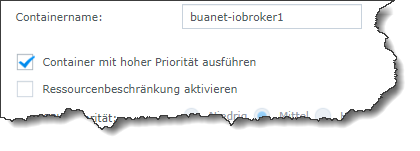
In der Syn Docker Oberfläche , Docker iobroker stoppen " Bearbeiten " Privileged anhaken .
Synology 918+ 16GB - ioBroker in Docker v9 , VISO auf Trekstor Primebook C13 13,3" , Hikvision Domkameras mit Surveillance Station .. CCU RaspberryMatic in Synology VM .. Zigbee CC2538+CC2592 .. Sonoff .. KNX .. Modbus ..
-
Eine Konfiguratiosoption für einen Container.
Große Frage , nutzt du auf deiner Synology den Benutzer " Admin " !?
-
@peter666666 sagte in Fehlermeldungen bei Backup auf NAS:
@thomas-braun was ist Privileged Mode?
Unable to apply new capability set.https://forum.iobroker.net/topic/44092/gelöst-backitup-unable-to-apply-new-capability-set
In der Syn Docker Oberfläche , Docker iobroker stoppen " Bearbeiten " Privileged anhaken .
@glasfaser sagte in Fehlermeldungen bei Backup auf NAS:
In der Syn Docker Oberfläche , Docker iobroker stoppen " Bearbeiten " Privileged anhaken .
In DSM 6 hieß das noch "Container mit hoher Priorität ausführen"
"Any fool can write code that a computer can understand. Good programmers write code that humans can understand." (Martin Fowler, "Refactoring")
Proxmox 9.1.1 LXC|8 GB|Core i7-6700
HmIP|ZigBee|Tasmota|Unifi
Zabbix Certified Specialist
Konnte ich Dir helfen? Dann benutze bitte das Voting unten rechts im Beitrag -
@glasfaser sagte in Fehlermeldungen bei Backup auf NAS:
In der Syn Docker Oberfläche , Docker iobroker stoppen " Bearbeiten " Privileged anhaken .
In DSM 6 hieß das noch "Container mit hoher Priorität ausführen"
@codierknecht sagte in Fehlermeldungen bei Backup auf NAS:
In DSM 6 hieß das noch "Container mit hoher Priorität ausführen"
Ist auch gleich geblieben ... bei DSM 7 ..
binn halt das Wort "Privileged " gewohnt ,
... es kann auch auch sein das er Portainer nutzt ... dort ist es "Privileged Mode" -
Große Frage , nutzt du auf deiner Synology den Benutzer " Admin " !?
@glasfaser Nein nutze ich nicht. Warum?
-
@peter666666 sagte in Fehlermeldungen bei Backup auf NAS:
@thomas-braun was ist Privileged Mode?
Unable to apply new capability set.https://forum.iobroker.net/topic/44092/gelöst-backitup-unable-to-apply-new-capability-set
In der Syn Docker Oberfläche , Docker iobroker stoppen " Bearbeiten " Privileged anhaken .
@glasfaser Habe ich gemacht (mit hoher Prio ausführen - root). Leider kommen wieder Fehlermeldungen:
2023-01-24 17:38:51.311 - info: admin.0 (148) ==> Connected system.user.admin from ::ffff:172.17.0.1 2023-01-24 17:38:59.746 - info: admin.0 (148) <== Disconnect system.user.admin from ::ffff:172.17.0.1 2023-01-24 17:39:02.751 - info: admin.0 (148) ==> Connected system.user.admin from ::ffff:172.17.0.1 2023-01-24 17:39:32.451 - error: backitup.0 (320) [iobroker/mount] [undefined Error: Command failed: sudo mount -t cifs -o username=Backup,password=****,rw,uid=iobroker,gid=iobroker,file_mode=0777,dir_mode=0777 //192.168.0.3/Peter/ioBroker/Backups /opt/iobroker/backups 2023-01-24 17:39:32.452 - error: backitup.0 (320) [iobroker/mount] mount error(13): Permission denied 2023-01-24 17:39:32.452 - error: backitup.0 (320) [iobroker/mount] Refer to the mount.cifs(8) manual page (e.g. man mount.cifs) and kernel log messages (dmesg) 2023-01-24 17:39:32.452 - error: backitup.0 (320) [iobroker/mount] Error: Command failed: sudo mount -t cifs -o username=Backup,password=****,rw,uid=iobroker,gid=iobroker,file_mode=0777,dir_mode=0777 //192.168.0.3/Peter/ioBroker/Backups /opt/iobroker/backups 2023-01-24 17:39:32.452 - error: backitup.0 (320) [iobroker/mount] mount error(13): Permission denied 2023-01-24 17:39:32.453 - error: backitup.0 (320) [iobroker/mount] Refer to the mount.cifs(8) manual page (e.g. man mount.cifs) and kernel log messages (dmesg) 2023-01-24 17:39:32.453 - error: backitup.0 (320) [iobroker] Error: Command failed: sudo mount -t cifs -o username=Backup,password=****,rw,uid=iobroker,gid=iobroker,file_mode=0777,dir_mode=0777 //192.168.0.3/Peter/ioBroker/Backups /opt/iobroker/backups mount error(13): Permission denied Refer to the mount.cifs(8) manual page (e.g. man mount.cifs) and kernel log messages (dmesg) 2023-01-24 17:39:56.571 - info: admin.0 (148) <== Disconnect system.user.admin from ::ffff:172.17.0.1 2023-01-24 17:40:00.055 - info: host.e73f64821262 instance system.adapter.fuelpricemonitor.0 started with pid 643 2023-01-24 17:40:01.279 - info: fuelpricemonitor.0 (643) starting. Version 0.3.3 in /opt/iobroker/node_modules/iobroker.fuelpricemonitor, node: v16.19.0, js-controller: 4.0.23 2023-01-24 17:40:01.302 - info: fuelpricemonitor.0 (643) Started with JSON-Explorer version 0.1.10 2023-01-24 17:40:07.364 - info: fuelpricemonitor.0 (643) Terminated (NO_ERROR): Without reason 2023-01-24 17:40:07.871 - info: fuelpricemonitor.0 (643) cleaned everything up... 2023-01-24 17:40:07.886 - info: host.e73f64821262 instance system.adapter.fuelpricemonitor.0 terminated with code 0 (NO_ERROR) -
Hallo Leute,
Ich würde gerne das ioBroker Backup auf mein NAS sichern. Habe dazu am NAS einen eigenen Benutzer angelegt mit den Schreib und Leserechten in den Backup Ordner. Im Backup Adapter wurde Benutzer und PW vom NAS Benutzer eingetragen. Wenn ich das Backup jetzt manuell anstoße kommen einige Fehlermeldungen:
Log:
Einstellung im NAS & Adapter:
In der Hilfe steht was von CIFS Mount....was ist das?
@peter666666 sagte in Fehlermeldungen bei Backup auf NAS:
Ich würde gerne das ioBroker Backup auf mein NAS sichern.
Sorry habe nicht den ganzen Beitrag gelesen , aber
du hast eine Syn Nas , auf der ist im Docker ioBroker und du möchtest das Backup auslagern ...
auf die selbe Syn Nas ....
Ist unlogisch , denn warum gehts du über CIFS bzw. so einen UMWEG !
Mounte den Backup Ordner von deiner Nas in den Einstellungen vom ioBroker Docker .
-
@peter666666 sagte in Fehlermeldungen bei Backup auf NAS:
Ich würde gerne das ioBroker Backup auf mein NAS sichern.
Sorry habe nicht den ganzen Beitrag gelesen , aber
du hast eine Syn Nas , auf der ist im Docker ioBroker und du möchtest das Backup auslagern ...
auf die selbe Syn Nas ....
Ist unlogisch , denn warum gehts du über CIFS bzw. so einen UMWEG !
Mounte den Backup Ordner von deiner Nas in den Einstellungen vom ioBroker Docker .
@glasfaser das hört sich einfacher an. Blöde Frage :) Wie Mounte ich den Ordner?
LG Peter
Intel NUC i5 / 16GB RAM / 512GB SSD
Synology DS220+ 10GB RAM / 8TB



Hello! It looks like you're interested in this conversation, but you don't have an account yet.
Getting fed up of having to scroll through the same posts each visit? When you register for an account, you'll always come back to exactly where you were before, and choose to be notified of new replies (either via email, or push notification). You'll also be able to save bookmarks and upvote posts to show your appreciation to other community members.
With your input, this post could be even better 💗
Register LoginSupport us
506
Online32.7k
Users82.6k
Topics1.3m
Posts