
NEWS




Iobroker tot nach Admin update 6.3.3 zu 6.3.4
-
Used repository: stable
Adapter    "admin"        : 6.3.5    , installed 6.3.5
Adapter    "alias-manager": 1.2.4    , installed 1.2.4
Adapter    "backitup"     : 2.5.9    , installed 2.5.9
Adapter    "chromecast"   : 2.3.1    , installed 3.0.3
Adapter    "cloud"        : 4.3.0    , installed 4.3.0
Adapter    "discovery"    : 3.1.0    , installed 3.1.0
Adapter    "echarts"      : 1.0.12   , installed 1.0.12
Adapter    "email"        : 1.1.4    , installed 1.1.4
Adapter    "fhem"         : 1.6.3    , installed 1.6.3
Adapter    "flot"         : 1.11.0   , installed 1.11.0
Adapter    "history"      : 2.2.4    , installed 2.2.4
Adapter    "hm-rega"      : 3.0.40   , installed 3.0.40
Adapter    "hm-rpc"       : 1.15.12  , installed 1.15.12
Adapter    "homeconnect"  : 1.1.1    , installed 1.1.1
Adapter    "info"         : 1.9.19   , installed 1.9.19
Adapter    "iot"          : 1.11.9   , installed 1.11.9
Adapter    "javascript"   : 6.1.4    , installed 6.1.4
Controller "js-controller": 4.0.23   , installed 4.0.23
Adapter    "meross"       : 1.14.0   , installed 1.14.0
Adapter    "net-tools"    : 0.2.0    , installed 0.2.0
Adapter    "netatmo"      : 2.0.5    , installed 2.0.5
Adapter    "sayit"        : 1.12.3   , installed 1.12.6
Adapter    "scenes"       : 2.3.9    , installed 2.3.9
Adapter    "shelly"       : 6.0.0    , installed 6.2.3
Adapter    "simple-api"   : 2.7.2    , installed 2.7.2
Adapter    "socketio"     : 4.2.0    , installed 4.2.0
Adapter    "sonoff"       : 2.5.1    , installed 2.5.1
Adapter    "telegram"     : 1.15.2   , installed 1.15.2
Adapter    "text2command" : 2.3.0    , installed 2.3.0
Adapter    "vis"          : 1.4.15   , installed 1.4.15
Adapter    "vis-bars"     : 0.1.4    , installed 0.1.4
Adapter    "vis-colorpicker": 1.2.0  , installed 1.2.0
Adapter    "vis-fancyswitch": 1.1.0  , installed 1.1.0
Adapter    "vis-hqwidgets": 1.3.0    , installed 1.3.0
Adapter    "vis-inventwo" : 3.3.1    , installed 3.3.1
Adapter    "vis-jqui-mfd" : 1.0.12   , installed 1.0.12
Adapter    "vis-metro"    : 1.2.0    , installed 1.2.0
Adapter    "web"          : 4.3.0    , installed 4.3.0
Adapter    "wled"         : 0.6.7    , installed 0.6.7
Adapter    "ws"           : 1.3.0    , installed 1.3.0
Adapter    "zigbee"       : 1.7.6    , installed 1.7.6
$ iob list instances system.adapter.admin.0 : admin : hohkeppelioblxc - disabled, port: 7777, bind: 0.0.0.0, run as: admin system.adapter.alias-manager.0 : alias-manager : hohkeppelioblxc - disabled + system.adapter.backitup.0 : backitup : hohkeppelioblxc - enabled + system.adapter.chromecast.0 : chromecast : hohkeppelioblxc - enabled + system.adapter.cloud.0 : cloud : hohkeppelioblxc - enabled system.adapter.discovery.0 : discovery : hohkeppelioblxc - disabled + system.adapter.echarts.0 : echarts : hohkeppelioblxc - enabled + system.adapter.email.0 : email : hohkeppelioblxc - enabled + system.adapter.fhem.0 : fhem : hohkeppelioblxc - enabled, port: 7072 system.adapter.flot.0 : flot : hohkeppelioblxc - disabled + system.adapter.history.0 : history : hohkeppelioblxc - enabled + system.adapter.hm-rega.0 : hm-rega : hohkeppelioblxc - enabled + system.adapter.hm-rpc.0 : hm-rpc : hohkeppelioblxc - enabled, port: 0 + system.adapter.homeconnect.0 : homeconnect : hohkeppelioblxc - enabled + system.adapter.info.0 : info : hohkeppelioblxc - enabled + system.adapter.iot.0 : iot : hohkeppelioblxc - enabled + system.adapter.javascript.0 : javascript : hohkeppelioblxc - enabled + system.adapter.meross.0 : meross : hohkeppelioblxc - enabled + system.adapter.net-tools.0 : net-tools : hohkeppelioblxc - enabled + system.adapter.netatmo.0 : netatmo : hohkeppelioblxc - enabled + system.adapter.sayit.0 : sayit : hohkeppelioblxc - enabled, port: 0 + system.adapter.sayit.1 : sayit : hohkeppelioblxc - enabled, port: 0 + system.adapter.scenes.0 : scenes : hohkeppelioblxc - enabled + system.adapter.shelly.0 : shelly : hohkeppelioblxc - enabled, port: 1882, bind: 0.0.0.0 + system.adapter.shelly.1 : shelly : hohkeppelioblxc - enabled, port: 1882, bind: 0.0.0.0 + system.adapter.simple-api.0 : simple-api : hohkeppelioblxc - enabled, port: 8087, bind: 0.0.0.0, run as: admin + system.adapter.socketio.0 : socketio : hohkeppelioblxc - enabled, port: 8084, bind: 0.0.0.0, run as: admin + system.adapter.sonoff.0 : sonoff : hohkeppelioblxc - enabled, port: 1883, bind: 0.0.0.0 + system.adapter.telegram.0 : telegram : hohkeppelioblxc - enabled, port: 8443, bind: 0.0.0.0 + system.adapter.text2command.0 : text2command : hohkeppelioblxc - enabled system.adapter.vis-bars.0 : vis-bars : hohkeppelioblxc - disabled system.adapter.vis-colorpicker.0 : vis-colorpicker : hohkeppelioblxc - disabled system.adapter.vis-fancyswitch.0 : vis-fancyswitch : hohkeppelioblxc - disabled system.adapter.vis-hqwidgets.0 : vis-hqwidgets : hohkeppelioblxc - disabled system.adapter.vis-jqui-mfd.0 : vis-jqui-mfd : hohkeppelioblxc - disabled system.adapter.vis-material.0 : vis-material : hohkeppelioblxc - disabled system.adapter.vis-metro.0 : vis-metro : hohkeppelioblxc - enabled system.adapter.vis.0 : vis : hohkeppelioblxc - enabled + system.adapter.web.0 : web : hohkeppelioblxc - enabled, port: 8082, bind: 0.0.0.0, run as: admin + system.adapter.wled.0 : wled : hohkeppelioblxc - enabled + system.adapter.zigbee.0 : zigbee : hohkeppelioblxc - enabled, port: /dev/ttyACM1 + instance is alive -
Used repository: stable
Adapter    "admin"        : 6.3.5    , installed 6.3.5
Adapter    "alias-manager": 1.2.4    , installed 1.2.4
Adapter    "backitup"     : 2.5.9    , installed 2.5.9
Adapter    "chromecast"   : 2.3.1    , installed 3.0.3
Adapter    "cloud"        : 4.3.0    , installed 4.3.0
Adapter    "discovery"    : 3.1.0    , installed 3.1.0
Adapter    "echarts"      : 1.0.12   , installed 1.0.12
Adapter    "email"        : 1.1.4    , installed 1.1.4
Adapter    "fhem"         : 1.6.3    , installed 1.6.3
Adapter    "flot"         : 1.11.0   , installed 1.11.0
Adapter    "history"      : 2.2.4    , installed 2.2.4
Adapter    "hm-rega"      : 3.0.40   , installed 3.0.40
Adapter    "hm-rpc"       : 1.15.12  , installed 1.15.12
Adapter    "homeconnect"  : 1.1.1    , installed 1.1.1
Adapter    "info"         : 1.9.19   , installed 1.9.19
Adapter    "iot"          : 1.11.9   , installed 1.11.9
Adapter    "javascript"   : 6.1.4    , installed 6.1.4
Controller "js-controller": 4.0.23   , installed 4.0.23
Adapter    "meross"       : 1.14.0   , installed 1.14.0
Adapter    "net-tools"    : 0.2.0    , installed 0.2.0
Adapter    "netatmo"      : 2.0.5    , installed 2.0.5
Adapter    "sayit"        : 1.12.3   , installed 1.12.6
Adapter    "scenes"       : 2.3.9    , installed 2.3.9
Adapter    "shelly"       : 6.0.0    , installed 6.2.3
Adapter    "simple-api"   : 2.7.2    , installed 2.7.2
Adapter    "socketio"     : 4.2.0    , installed 4.2.0
Adapter    "sonoff"       : 2.5.1    , installed 2.5.1
Adapter    "telegram"     : 1.15.2   , installed 1.15.2
Adapter    "text2command" : 2.3.0    , installed 2.3.0
Adapter    "vis"          : 1.4.15   , installed 1.4.15
Adapter    "vis-bars"     : 0.1.4    , installed 0.1.4
Adapter    "vis-colorpicker": 1.2.0  , installed 1.2.0
Adapter    "vis-fancyswitch": 1.1.0  , installed 1.1.0
Adapter    "vis-hqwidgets": 1.3.0    , installed 1.3.0
Adapter    "vis-inventwo" : 3.3.1    , installed 3.3.1
Adapter    "vis-jqui-mfd" : 1.0.12   , installed 1.0.12
Adapter    "vis-metro"    : 1.2.0    , installed 1.2.0
Adapter    "web"          : 4.3.0    , installed 4.3.0
Adapter    "wled"         : 0.6.7    , installed 0.6.7
Adapter    "ws"           : 1.3.0    , installed 1.3.0
Adapter    "zigbee"       : 1.7.6    , installed 1.7.6
$ iob list instances system.adapter.admin.0 : admin : hohkeppelioblxc - disabled, port: 7777, bind: 0.0.0.0, run as: admin system.adapter.alias-manager.0 : alias-manager : hohkeppelioblxc - disabled + system.adapter.backitup.0 : backitup : hohkeppelioblxc - enabled + system.adapter.chromecast.0 : chromecast : hohkeppelioblxc - enabled + system.adapter.cloud.0 : cloud : hohkeppelioblxc - enabled system.adapter.discovery.0 : discovery : hohkeppelioblxc - disabled + system.adapter.echarts.0 : echarts : hohkeppelioblxc - enabled + system.adapter.email.0 : email : hohkeppelioblxc - enabled + system.adapter.fhem.0 : fhem : hohkeppelioblxc - enabled, port: 7072 system.adapter.flot.0 : flot : hohkeppelioblxc - disabled + system.adapter.history.0 : history : hohkeppelioblxc - enabled + system.adapter.hm-rega.0 : hm-rega : hohkeppelioblxc - enabled + system.adapter.hm-rpc.0 : hm-rpc : hohkeppelioblxc - enabled, port: 0 + system.adapter.homeconnect.0 : homeconnect : hohkeppelioblxc - enabled + system.adapter.info.0 : info : hohkeppelioblxc - enabled + system.adapter.iot.0 : iot : hohkeppelioblxc - enabled + system.adapter.javascript.0 : javascript : hohkeppelioblxc - enabled + system.adapter.meross.0 : meross : hohkeppelioblxc - enabled + system.adapter.net-tools.0 : net-tools : hohkeppelioblxc - enabled + system.adapter.netatmo.0 : netatmo : hohkeppelioblxc - enabled + system.adapter.sayit.0 : sayit : hohkeppelioblxc - enabled, port: 0 + system.adapter.sayit.1 : sayit : hohkeppelioblxc - enabled, port: 0 + system.adapter.scenes.0 : scenes : hohkeppelioblxc - enabled + system.adapter.shelly.0 : shelly : hohkeppelioblxc - enabled, port: 1882, bind: 0.0.0.0 + system.adapter.shelly.1 : shelly : hohkeppelioblxc - enabled, port: 1882, bind: 0.0.0.0 + system.adapter.simple-api.0 : simple-api : hohkeppelioblxc - enabled, port: 8087, bind: 0.0.0.0, run as: admin + system.adapter.socketio.0 : socketio : hohkeppelioblxc - enabled, port: 8084, bind: 0.0.0.0, run as: admin + system.adapter.sonoff.0 : sonoff : hohkeppelioblxc - enabled, port: 1883, bind: 0.0.0.0 + system.adapter.telegram.0 : telegram : hohkeppelioblxc - enabled, port: 8443, bind: 0.0.0.0 + system.adapter.text2command.0 : text2command : hohkeppelioblxc - enabled system.adapter.vis-bars.0 : vis-bars : hohkeppelioblxc - disabled system.adapter.vis-colorpicker.0 : vis-colorpicker : hohkeppelioblxc - disabled system.adapter.vis-fancyswitch.0 : vis-fancyswitch : hohkeppelioblxc - disabled system.adapter.vis-hqwidgets.0 : vis-hqwidgets : hohkeppelioblxc - disabled system.adapter.vis-jqui-mfd.0 : vis-jqui-mfd : hohkeppelioblxc - disabled system.adapter.vis-material.0 : vis-material : hohkeppelioblxc - disabled system.adapter.vis-metro.0 : vis-metro : hohkeppelioblxc - enabled system.adapter.vis.0 : vis : hohkeppelioblxc - enabled + system.adapter.web.0 : web : hohkeppelioblxc - enabled, port: 8082, bind: 0.0.0.0, run as: admin + system.adapter.wled.0 : wled : hohkeppelioblxc - enabled + system.adapter.zigbee.0 : zigbee : hohkeppelioblxc - enabled, port: /dev/ttyACM1 + instance is alive@zgadgeter sagte in Iobroker tot nach Admin update 6.3.3 zu 6.3.4:
iobroker start adminAchtung! Geänderter Port!
-
Used repository: stable
Adapter    "admin"        : 6.3.5    , installed 6.3.5
Adapter    "alias-manager": 1.2.4    , installed 1.2.4
Adapter    "backitup"     : 2.5.9    , installed 2.5.9
Adapter    "chromecast"   : 2.3.1    , installed 3.0.3
Adapter    "cloud"        : 4.3.0    , installed 4.3.0
Adapter    "discovery"    : 3.1.0    , installed 3.1.0
Adapter    "echarts"      : 1.0.12   , installed 1.0.12
Adapter    "email"        : 1.1.4    , installed 1.1.4
Adapter    "fhem"         : 1.6.3    , installed 1.6.3
Adapter    "flot"         : 1.11.0   , installed 1.11.0
Adapter    "history"      : 2.2.4    , installed 2.2.4
Adapter    "hm-rega"      : 3.0.40   , installed 3.0.40
Adapter    "hm-rpc"       : 1.15.12  , installed 1.15.12
Adapter    "homeconnect"  : 1.1.1    , installed 1.1.1
Adapter    "info"         : 1.9.19   , installed 1.9.19
Adapter    "iot"          : 1.11.9   , installed 1.11.9
Adapter    "javascript"   : 6.1.4    , installed 6.1.4
Controller "js-controller": 4.0.23   , installed 4.0.23
Adapter    "meross"       : 1.14.0   , installed 1.14.0
Adapter    "net-tools"    : 0.2.0    , installed 0.2.0
Adapter    "netatmo"      : 2.0.5    , installed 2.0.5
Adapter    "sayit"        : 1.12.3   , installed 1.12.6
Adapter    "scenes"       : 2.3.9    , installed 2.3.9
Adapter    "shelly"       : 6.0.0    , installed 6.2.3
Adapter    "simple-api"   : 2.7.2    , installed 2.7.2
Adapter    "socketio"     : 4.2.0    , installed 4.2.0
Adapter    "sonoff"       : 2.5.1    , installed 2.5.1
Adapter    "telegram"     : 1.15.2   , installed 1.15.2
Adapter    "text2command" : 2.3.0    , installed 2.3.0
Adapter    "vis"          : 1.4.15   , installed 1.4.15
Adapter    "vis-bars"     : 0.1.4    , installed 0.1.4
Adapter    "vis-colorpicker": 1.2.0  , installed 1.2.0
Adapter    "vis-fancyswitch": 1.1.0  , installed 1.1.0
Adapter    "vis-hqwidgets": 1.3.0    , installed 1.3.0
Adapter    "vis-inventwo" : 3.3.1    , installed 3.3.1
Adapter    "vis-jqui-mfd" : 1.0.12   , installed 1.0.12
Adapter    "vis-metro"    : 1.2.0    , installed 1.2.0
Adapter    "web"          : 4.3.0    , installed 4.3.0
Adapter    "wled"         : 0.6.7    , installed 0.6.7
Adapter    "ws"           : 1.3.0    , installed 1.3.0
Adapter    "zigbee"       : 1.7.6    , installed 1.7.6
$ iob list instances system.adapter.admin.0 : admin : hohkeppelioblxc - disabled, port: 7777, bind: 0.0.0.0, run as: admin system.adapter.alias-manager.0 : alias-manager : hohkeppelioblxc - disabled + system.adapter.backitup.0 : backitup : hohkeppelioblxc - enabled + system.adapter.chromecast.0 : chromecast : hohkeppelioblxc - enabled + system.adapter.cloud.0 : cloud : hohkeppelioblxc - enabled system.adapter.discovery.0 : discovery : hohkeppelioblxc - disabled + system.adapter.echarts.0 : echarts : hohkeppelioblxc - enabled + system.adapter.email.0 : email : hohkeppelioblxc - enabled + system.adapter.fhem.0 : fhem : hohkeppelioblxc - enabled, port: 7072 system.adapter.flot.0 : flot : hohkeppelioblxc - disabled + system.adapter.history.0 : history : hohkeppelioblxc - enabled + system.adapter.hm-rega.0 : hm-rega : hohkeppelioblxc - enabled + system.adapter.hm-rpc.0 : hm-rpc : hohkeppelioblxc - enabled, port: 0 + system.adapter.homeconnect.0 : homeconnect : hohkeppelioblxc - enabled + system.adapter.info.0 : info : hohkeppelioblxc - enabled + system.adapter.iot.0 : iot : hohkeppelioblxc - enabled + system.adapter.javascript.0 : javascript : hohkeppelioblxc - enabled + system.adapter.meross.0 : meross : hohkeppelioblxc - enabled + system.adapter.net-tools.0 : net-tools : hohkeppelioblxc - enabled + system.adapter.netatmo.0 : netatmo : hohkeppelioblxc - enabled + system.adapter.sayit.0 : sayit : hohkeppelioblxc - enabled, port: 0 + system.adapter.sayit.1 : sayit : hohkeppelioblxc - enabled, port: 0 + system.adapter.scenes.0 : scenes : hohkeppelioblxc - enabled + system.adapter.shelly.0 : shelly : hohkeppelioblxc - enabled, port: 1882, bind: 0.0.0.0 + system.adapter.shelly.1 : shelly : hohkeppelioblxc - enabled, port: 1882, bind: 0.0.0.0 + system.adapter.simple-api.0 : simple-api : hohkeppelioblxc - enabled, port: 8087, bind: 0.0.0.0, run as: admin + system.adapter.socketio.0 : socketio : hohkeppelioblxc - enabled, port: 8084, bind: 0.0.0.0, run as: admin + system.adapter.sonoff.0 : sonoff : hohkeppelioblxc - enabled, port: 1883, bind: 0.0.0.0 + system.adapter.telegram.0 : telegram : hohkeppelioblxc - enabled, port: 8443, bind: 0.0.0.0 + system.adapter.text2command.0 : text2command : hohkeppelioblxc - enabled system.adapter.vis-bars.0 : vis-bars : hohkeppelioblxc - disabled system.adapter.vis-colorpicker.0 : vis-colorpicker : hohkeppelioblxc - disabled system.adapter.vis-fancyswitch.0 : vis-fancyswitch : hohkeppelioblxc - disabled system.adapter.vis-hqwidgets.0 : vis-hqwidgets : hohkeppelioblxc - disabled system.adapter.vis-jqui-mfd.0 : vis-jqui-mfd : hohkeppelioblxc - disabled system.adapter.vis-material.0 : vis-material : hohkeppelioblxc - disabled system.adapter.vis-metro.0 : vis-metro : hohkeppelioblxc - enabled system.adapter.vis.0 : vis : hohkeppelioblxc - enabled + system.adapter.web.0 : web : hohkeppelioblxc - enabled, port: 8082, bind: 0.0.0.0, run as: admin + system.adapter.wled.0 : wled : hohkeppelioblxc - enabled + system.adapter.zigbee.0 : zigbee : hohkeppelioblxc - enabled, port: /dev/ttyACM1 + instance is alive@zgadgeter sagte in Iobroker tot nach Admin update 6.3.3 zu 6.3.4:
Da würde ich auch nochmal schauen, ob die gleichzeitig auf dem gleichen Port lauschen dürfen.
+ system.adapter.shelly.0 : shelly : hohkeppelioblxc - enabled, port: 1882, bind: 0.0.0.0 + system.adapter.shelly.1 : shelly : hohkeppelioblxc - enabled, port: 1882, bind: 0.0.0.0 -
@zgadgeter sagte in Iobroker tot nach Admin update 6.3.3 zu 6.3.4:
Da würde ich auch nochmal schauen, ob die gleichzeitig auf dem gleichen Port lauschen dürfen.
+ system.adapter.shelly.0 : shelly : hohkeppelioblxc - enabled, port: 1882, bind: 0.0.0.0 + system.adapter.shelly.1 : shelly : hohkeppelioblxc - enabled, port: 1882, bind: 0.0.0.0@thomas-braun Also, mit start admin hat es wieder funktioniert, vielen Dank!
Das Thema port interessiert mich jetzt.
Ja, ich habe den iobroker port geändert auf einen anderen, weil ich eine Zeit lang motioneye hatte. Der benutzt ja auch den 8081.
Interessant ist dein Kommentar wegen den shelly...muss da auch ein port eingestellt werden irgendwie? Die shelly kann ich ueber den iob steuern, ohne das ich was geändert habe...habe ich da was verpasst oder falsch verstanden?
Vielen Dank nochmals fuer die Hilfe! -
@thomas-braun Also, mit start admin hat es wieder funktioniert, vielen Dank!
Das Thema port interessiert mich jetzt.
Ja, ich habe den iobroker port geändert auf einen anderen, weil ich eine Zeit lang motioneye hatte. Der benutzt ja auch den 8081.
Interessant ist dein Kommentar wegen den shelly...muss da auch ein port eingestellt werden irgendwie? Die shelly kann ich ueber den iob steuern, ohne das ich was geändert habe...habe ich da was verpasst oder falsch verstanden?
Vielen Dank nochmals fuer die Hilfe!Wie du siehen kannst lauschen beide Instanzen des shelly-Adapters auf dem gleichen Port 1882.
Zum einen würde ich überlegen ob es überhaupt zwei Instanzen braucht und dann kann das eigentlich nicht beides auf dem gleichen Port lauschen.
-
Wie du siehen kannst lauschen beide Instanzen des shelly-Adapters auf dem gleichen Port 1882.
Zum einen würde ich überlegen ob es überhaupt zwei Instanzen braucht und dann kann das eigentlich nicht beides auf dem gleichen Port lauschen.
@thomas-braun Hi,
ich habe aeltere und neuere Shelly. Die neuen brauchen (so habe ich das im Forum gelesen) andere Einstellungen. Deswegen die zweite Instanz.
Aber den Port einzustellen, wo oder wie wird das gemacht? Das habe ich nirgendswo selbst gemacht. Macht das der Iob standard auf den 8081?
Die shelly Geraete funktionieren (fast) immer...manchmal verlieren die sich im Netz und ich muss neu starten. Weiss nicht ob das was damit zu tun hat? -
@thomas-braun Hi,
ich habe aeltere und neuere Shelly. Die neuen brauchen (so habe ich das im Forum gelesen) andere Einstellungen. Deswegen die zweite Instanz.
Aber den Port einzustellen, wo oder wie wird das gemacht? Das habe ich nirgendswo selbst gemacht. Macht das der Iob standard auf den 8081?
Die shelly Geraete funktionieren (fast) immer...manchmal verlieren die sich im Netz und ich muss neu starten. Weiss nicht ob das was damit zu tun hat?@zgadgeter sagte in Iobroker tot nach Admin update 6.3.3 zu 6.3.4:
Weiss nicht ob das was damit zu tun hat?
Höchstwahrscheinlich.
Ich hab den shelly-Adapter nicht im Einsatz, kann dir da nix genaueres zu sagen. -
@zgadgeter sagte in Iobroker tot nach Admin update 6.3.3 zu 6.3.4:
Weiss nicht ob das was damit zu tun hat?
Höchstwahrscheinlich.
Ich hab den shelly-Adapter nicht im Einsatz, kann dir da nix genaueres zu sagen.@thomas-braun Ok, danke fuer den Hinweiss ueber die Ports die fuer die Shelly eingestellt sind, bzw. benutzt werden...da muss ich nach recherchieren.
DAnke fuer die viele HIlfe, und schoene Tage noch! :) -
@thomas-braun Ok, danke fuer den Hinweiss ueber die Ports die fuer die Shelly eingestellt sind, bzw. benutzt werden...da muss ich nach recherchieren.
DAnke fuer die viele HIlfe, und schoene Tage noch! :)Port 1883 ist der Standard mqtt Port. Ich habe keinen Shelly-Adapter, aber der wird dort sicherlich in der Instanz eingestellt.
Alternativ könntest Du die zweite Instanz auf Port 8883 (secure mqtt) lauschen lassen. -
@thomas-braun Ok, danke fuer den Hinweiss ueber die Ports die fuer die Shelly eingestellt sind, bzw. benutzt werden...da muss ich nach recherchieren.
DAnke fuer die viele HIlfe, und schoene Tage noch! :)@zgadgeter sagte in Iobroker tot nach Admin update 6.3.3 zu 6.3.4:
@thomas-braun Ok, danke fuer den Hinweiss ueber die Ports die fuer die Shelly eingestellt sind, bzw. benutzt werden...da muss ich nach recherchieren.
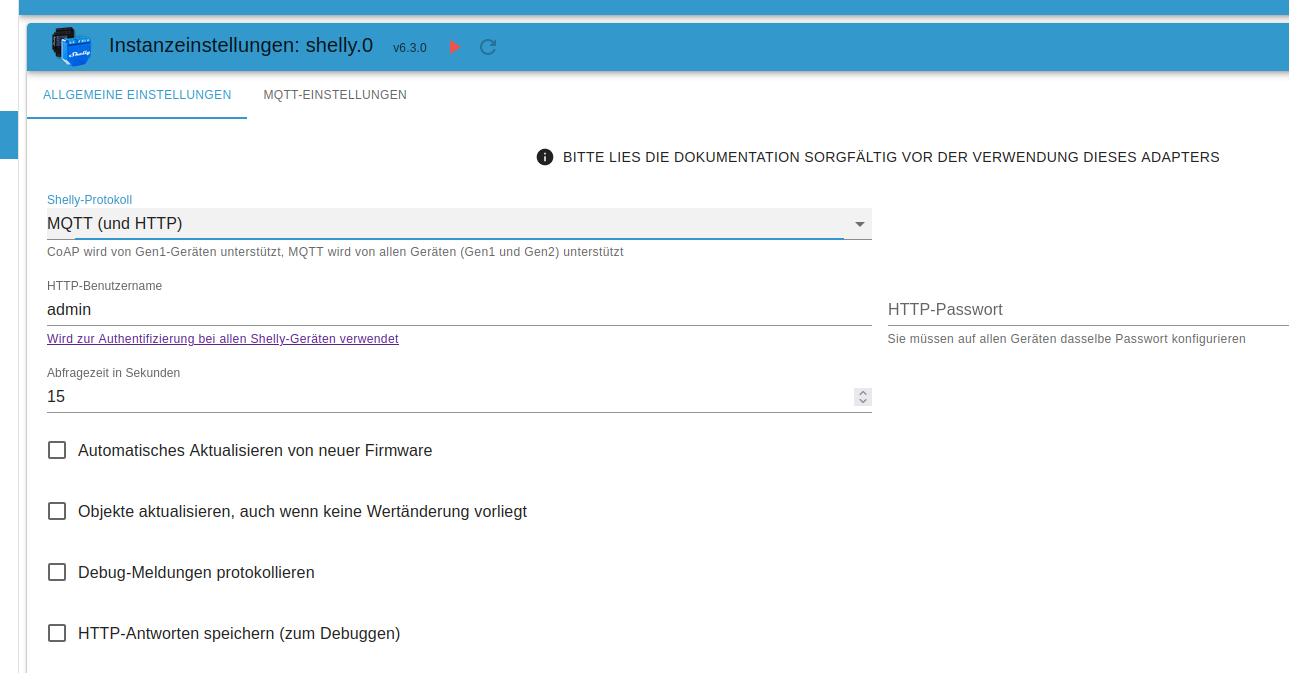
DAnke fuer die viele HIlfe, und schoene Tage noch! :)Shelly Adapter
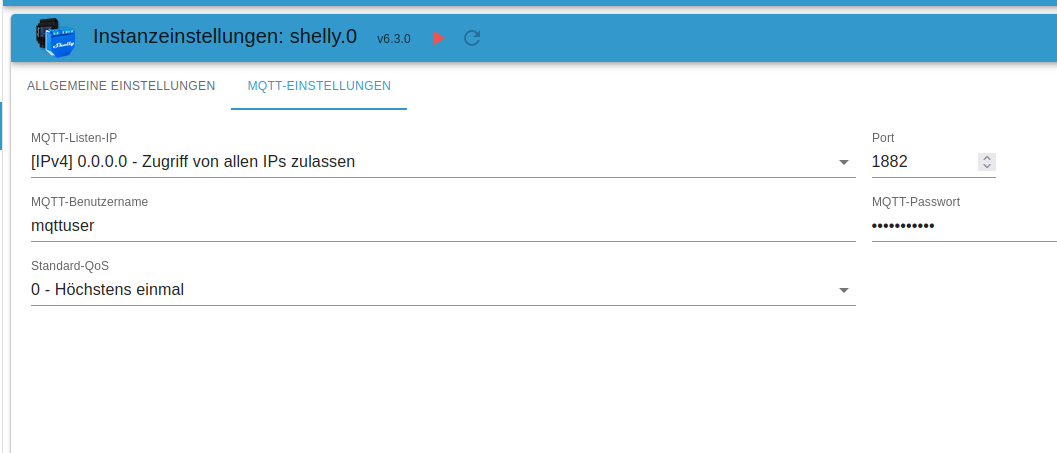
und das Untermenü zur
mqtteinstellung
Da kannst Du den Port einstellen, sollte natürlich ein freier nicht genutzter sein und auch keiner der Standardmäßig schon durch andere Applikationen/Systeme besetzt ist :)
Dann musst Du natürlich auch die Shellys umkonfigurieren, damit der Port auch greift.
Die Frage von @Thomas-Braun bleibt, sind heute noch zwei Instanzen nötig oder kann man heute alte u. neue Shellys in einer Instanz betreiben?VG
Bernd -
@zgadgeter sagte in Iobroker tot nach Admin update 6.3.3 zu 6.3.4:
@thomas-braun Ok, danke fuer den Hinweiss ueber die Ports die fuer die Shelly eingestellt sind, bzw. benutzt werden...da muss ich nach recherchieren.
DAnke fuer die viele HIlfe, und schoene Tage noch! :)Shelly Adapter
und das Untermenü zur
mqtteinstellung
Da kannst Du den Port einstellen, sollte natürlich ein freier nicht genutzter sein und auch keiner der Standardmäßig schon durch andere Applikationen/Systeme besetzt ist :)
Dann musst Du natürlich auch die Shellys umkonfigurieren, damit der Port auch greift.
Die Frage von @Thomas-Braun bleibt, sind heute noch zwei Instanzen nötig oder kann man heute alte u. neue Shellys in einer Instanz betreiben?VG
Bernd


387
Online32.7k
Users82.3k
Topics1.3m
Posts