Weiter zum Inhalt
  • Home
  • Aktuell
  • Tags
  • 0 Ungelesen 0
  • Kategorien
  • Unreplied
  • Beliebt
  • GitHub
  • Docu
  • Hilfe
Skins
  • Hell
  • Brite
  • Cerulean
  • Cosmo
  • Flatly
  • Journal
  • Litera
  • Lumen
  • Lux
  • Materia
  • Minty
  • Morph
  • Pulse
  • Sandstone
  • Simplex
  • Sketchy
  • Spacelab
  • United
  • Yeti
  • Zephyr
  • Dunkel
  • Cyborg
  • Darkly
  • Quartz
  • Slate
  • Solar
  • Superhero
  • Vapor

  • Standard: (Kein Skin)
  • Kein Skin
Einklappen
ioBroker Logo

Community Forum

donate donate
  1. ioBroker Community Home
  2. Deutsch
  3. Visualisierung
  4. Neuinstallation und VIS geht auf Fehler
NEWS

  • Neuer ioBroker-Blog online: Monatsrückblick März/April 2026
    BluefoxB
    Bluefox
    5
    1
    155

  • Verwendung von KI bitte immer deutlich kennzeichnen
    HomoranH
    Homoran
    8
    1
    180

  • Monatsrückblick Januar/Februar 2026 ist online!
    BluefoxB
    Bluefox
    18
    1
    877

Neuinstallation und VIS geht auf Fehler

Geplant Angeheftet Gesperrt Verschoben Visualisierung
173 Beiträge 5 Kommentatoren 10.2k Aufrufe 5 Beobachtet
  • Älteste zuerst
  • Neuste zuerst
  • Meiste Stimmen
Antworten
  • In einem neuen Thema antworten
Anmelden zum Antworten
Dieses Thema wurde gelöscht. Nur Nutzer mit entsprechenden Rechten können es sehen.
  • DJMarc75D DJMarc75

    @humidor sagte in Neuinstallation und VIS geht auf Fehler:

    das das Backup von einem Docker iobroker ist, ist irrelevant oder?

    Sollte kein Problem darstellen. Hast Du echt nur 1 Backup ???
    Und das war hoffentlich von einem funktionierenden System ?!

    HumidorH Offline
    HumidorH Offline
    Humidor
    schrieb am zuletzt editiert von Humidor
    #82

    @djmarc75 das ist von meinem laufenden System eine Kopie in einen eigenen Ordner am NAS ;)
    können wir den iobroker dort auf "Schäden" überprüfen?

    BG

    DJMarc75D 1 Antwort Letzte Antwort
    0
    • HumidorH Humidor

      @djmarc75 das ist von meinem laufenden System eine Kopie in einen eigenen Ordner am NAS ;)
      können wir den iobroker dort auf "Schäden" überprüfen?

      DJMarc75D Offline
      DJMarc75D Offline
      DJMarc75
      schrieb am zuletzt editiert von
      #83

      @humidor sagte in Neuinstallation und VIS geht auf Fehler:

      können wir den iobroker dort auf "Schäden" überprüfen?

      im Prinzip erstmal die beiden Befehle von oben auch mal in der Konsole vom iobroker auf dem Docker ausführen.

      Lehrling seit 1975 !!!
      Beitrag geholfen ? dann gerne ein upvote rechts unten im Beitrag klicken ;)
      https://forum.iobroker.net/topic/51555/hinweise-f%C3%BCr-gute-forenbeitr%C3%A4ge

      HumidorH 1 Antwort Letzte Antwort
      0
      • DJMarc75D DJMarc75

        @humidor sagte in Neuinstallation und VIS geht auf Fehler:

        können wir den iobroker dort auf "Schäden" überprüfen?

        im Prinzip erstmal die beiden Befehle von oben auch mal in der Konsole vom iobroker auf dem Docker ausführen.

        HumidorH Offline
        HumidorH Offline
        Humidor
        schrieb am zuletzt editiert von
        #84

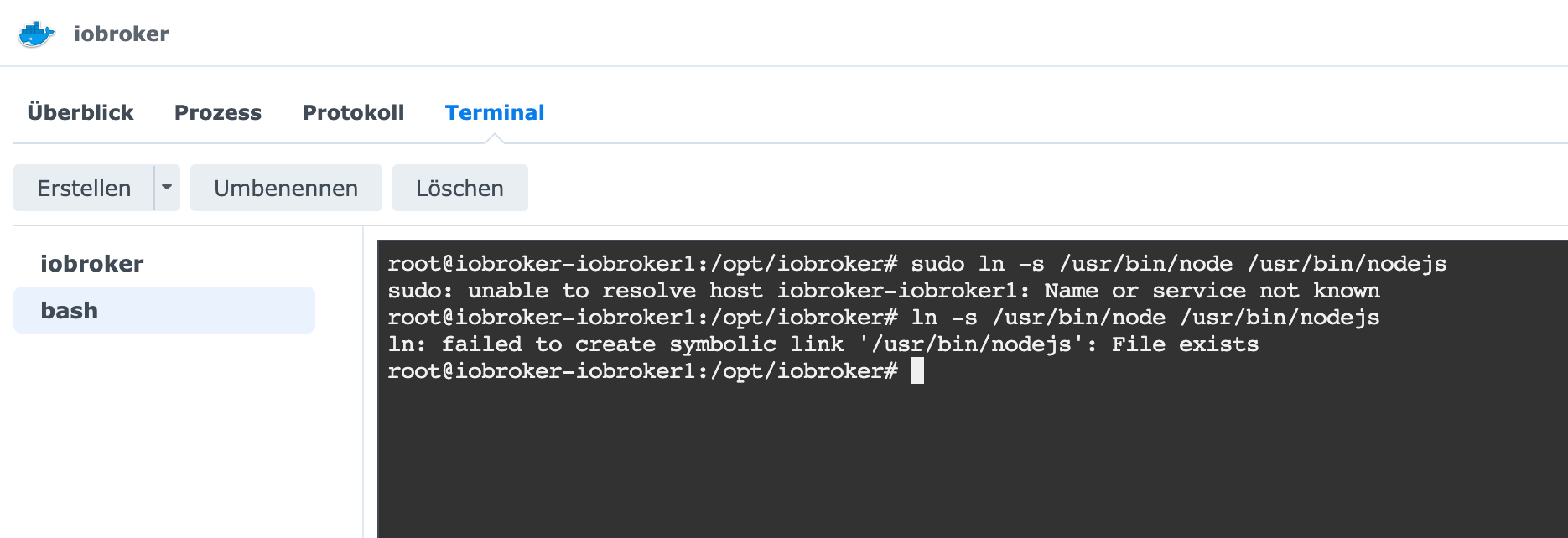
        @djmarc75 wie geht denn das?
        Bildschirmfoto 2022-10-12 um 14.08.30.png

        BG

        DJMarc75D 1 Antwort Letzte Antwort
        0
        • HumidorH Humidor

          @djmarc75 wie geht denn das?
          Bildschirmfoto 2022-10-12 um 14.08.30.png

          DJMarc75D Offline
          DJMarc75D Offline
          DJMarc75
          schrieb am zuletzt editiert von DJMarc75
          #85

          @humidor sagte in Neuinstallation und VIS geht auf Fehler:

          wie geht denn das?

          genau so. Die Rückmeldung dass das schon existiert ist quasi korrekt.
          Und jetzt noch den zweiten langen Befehl eingeben.

          uname -m && type -P nodejs node npm && nodejs -v && node -v && npm -v && iob -v && whoami && groups && pwd && sudo apt update &> /dev/null && sudo apt update && apt policy nodejs
          

          Lehrling seit 1975 !!!
          Beitrag geholfen ? dann gerne ein upvote rechts unten im Beitrag klicken ;)
          https://forum.iobroker.net/topic/51555/hinweise-f%C3%BCr-gute-forenbeitr%C3%A4ge

          HumidorH 1 Antwort Letzte Antwort
          0
          • DJMarc75D DJMarc75

            @humidor sagte in Neuinstallation und VIS geht auf Fehler:

            wie geht denn das?

            genau so. Die Rückmeldung dass das schon existiert ist quasi korrekt.
            Und jetzt noch den zweiten langen Befehl eingeben.

            uname -m && type -P nodejs node npm && nodejs -v && node -v && npm -v && iob -v && whoami && groups && pwd && sudo apt update &> /dev/null && sudo apt update && apt policy nodejs
            
            HumidorH Offline
            HumidorH Offline
            Humidor
            schrieb am zuletzt editiert von
            #86

            @djmarc75

            x86_64                                                                                                                         
            /usr/bin/nodejs                                                                                                                
            /usr/bin/node                                                                                                                  
            /usr/bin/npm                                                                                                                   
            v14.20.0                                                                                                                       
            v14.20.0                                                                                                                       
            sudo: unable to resolve host iobroker-iobroker1: Name or service not known                                                     
            6.14.17                                                                                                                        
            4.0.23                                                                                                                         
            root                                                                                                                           
            root                                                                                                                           
            /opt/iobroker    
            sudo: unable to resolve host iobroker-iobroker1: Name or service not known                                                     
            Hit:1 http://security.debian.org/debian-security bullseye-security InRelease                                                   
            Hit:2 http://deb.debian.org/debian bullseye InRelease                                                                          
            Hit:3 http://deb.debian.org/debian bullseye-updates InRelease                                                                  
            Hit:4 https://deb.nodesource.com/node_14.x bullseye InRelease                                                                  
            Reading package lists... Done                                                                                                  
            Building dependency tree... Done                                                                                               
            Reading state information... Done                                                                                              
            50 packages can be upgraded. Run 'apt list --upgradable' to see them.                                                          
            nodejs:                                                                                                                        
              Installed: 14.20.0-deb-1nodesource1                                                                                          
              Candidate: 14.20.1-deb-1nodesource1                                                                                          
              Version table:                                                                                                               
                 14.20.1-deb-1nodesource1 500                                                                                              
                    500 https://deb.nodesource.com/node_14.x bullseye/main amd64 Packages                                                  
             *** 14.20.0-deb-1nodesource1 100                                                                                              
                    100 /var/lib/dpkg/status                                                                                               
                 12.22.12~dfsg-1~deb11u1 500                                                                                               
                    500 http://security.debian.org/debian-security bullseye-security/main amd64 Packages                                   
                 12.22.5~dfsg-2~11u1 500                                                                                                   
                    500 http://deb.debian.org/debian bullseye/main amd64 Packages      
            

            BG

            DJMarc75D 1 Antwort Letzte Antwort
            0
            • HumidorH Humidor

              @djmarc75

              x86_64                                                                                                                         
              /usr/bin/nodejs                                                                                                                
              /usr/bin/node                                                                                                                  
              /usr/bin/npm                                                                                                                   
              v14.20.0                                                                                                                       
              v14.20.0                                                                                                                       
              sudo: unable to resolve host iobroker-iobroker1: Name or service not known                                                     
              6.14.17                                                                                                                        
              4.0.23                                                                                                                         
              root                                                                                                                           
              root                                                                                                                           
              /opt/iobroker    
              sudo: unable to resolve host iobroker-iobroker1: Name or service not known                                                     
              Hit:1 http://security.debian.org/debian-security bullseye-security InRelease                                                   
              Hit:2 http://deb.debian.org/debian bullseye InRelease                                                                          
              Hit:3 http://deb.debian.org/debian bullseye-updates InRelease                                                                  
              Hit:4 https://deb.nodesource.com/node_14.x bullseye InRelease                                                                  
              Reading package lists... Done                                                                                                  
              Building dependency tree... Done                                                                                               
              Reading state information... Done                                                                                              
              50 packages can be upgraded. Run 'apt list --upgradable' to see them.                                                          
              nodejs:                                                                                                                        
                Installed: 14.20.0-deb-1nodesource1                                                                                          
                Candidate: 14.20.1-deb-1nodesource1                                                                                          
                Version table:                                                                                                               
                   14.20.1-deb-1nodesource1 500                                                                                              
                      500 https://deb.nodesource.com/node_14.x bullseye/main amd64 Packages                                                  
               *** 14.20.0-deb-1nodesource1 100                                                                                              
                      100 /var/lib/dpkg/status                                                                                               
                   12.22.12~dfsg-1~deb11u1 500                                                                                               
                      500 http://security.debian.org/debian-security bullseye-security/main amd64 Packages                                   
                   12.22.5~dfsg-2~11u1 500                                                                                                   
                      500 http://deb.debian.org/debian bullseye/main amd64 Packages      
              
              DJMarc75D Offline
              DJMarc75D Offline
              DJMarc75
              schrieb am zuletzt editiert von
              #87

              @humidor ok, ich will jetzt nicht sagen dass das aktuell ist aber dem schenken wir jetzt erstmal keine Aufmerksamkeit.
              Kann man später korrigieren wenn das neue System läuft.
              Backup auf dem Raspberry starten und dann "Finger weg"

              Lehrling seit 1975 !!!
              Beitrag geholfen ? dann gerne ein upvote rechts unten im Beitrag klicken ;)
              https://forum.iobroker.net/topic/51555/hinweise-f%C3%BCr-gute-forenbeitr%C3%A4ge

              HumidorH 1 Antwort Letzte Antwort
              0
              • DJMarc75D DJMarc75

                @humidor ok, ich will jetzt nicht sagen dass das aktuell ist aber dem schenken wir jetzt erstmal keine Aufmerksamkeit.
                Kann man später korrigieren wenn das neue System läuft.
                Backup auf dem Raspberry starten und dann "Finger weg"

                HumidorH Offline
                HumidorH Offline
                Humidor
                schrieb am zuletzt editiert von
                #88

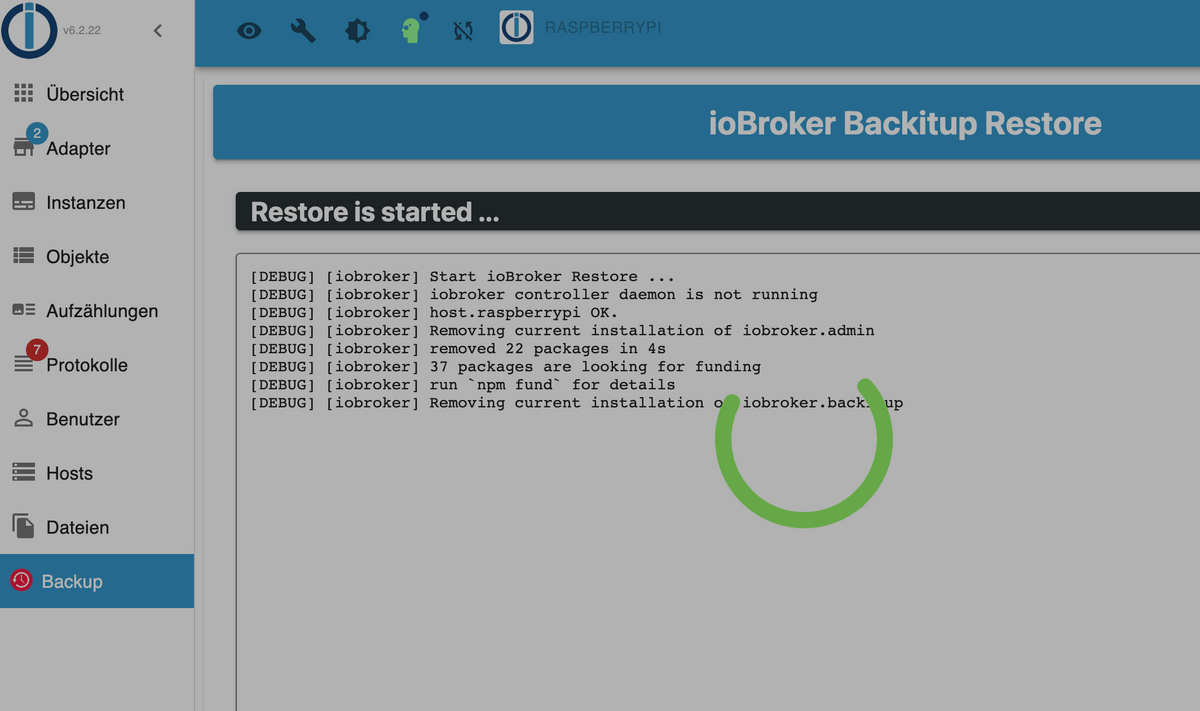
                @djmarc75 gestartet
                Bildschirmfoto 2022-10-12 um 14.16.53.png

                BG

                Thomas BraunT 1 Antwort Letzte Antwort
                0
                • HumidorH Humidor

                  @djmarc75 gestartet
                  Bildschirmfoto 2022-10-12 um 14.16.53.png

                  Thomas BraunT Online
                  Thomas BraunT Online
                  Thomas Braun
                  Most Active
                  schrieb am zuletzt editiert von
                  #89

                  @humidor

                  Mit

                  iobroker logs --watch | uniq
                  

                  kannst du jetzt den Fortgang in der Konsole beobachten.

                  Linux-Werkzeugkasten:
                  https://forum.iobroker.net/topic/42952/der-kleine-iobroker-linux-werkzeugkasten
                  NodeJS Fixer Skript:
                  https://forum.iobroker.net/topic/68035/iob-node-fix-skript
                  iob_diag: curl -sLf -o diag.sh https://iobroker.net/diag.sh && bash diag.sh

                  HumidorH 1 Antwort Letzte Antwort
                  1
                  • Thomas BraunT Thomas Braun

                    @humidor

                    Mit

                    iobroker logs --watch | uniq
                    

                    kannst du jetzt den Fortgang in der Konsole beobachten.

                    HumidorH Offline
                    HumidorH Offline
                    Humidor
                    schrieb am zuletzt editiert von
                    #90

                    @thomas-braun so, bin wieder da (nur kurz)
                    iobroker läuft noch, schaut aber noch nicht so gut aus
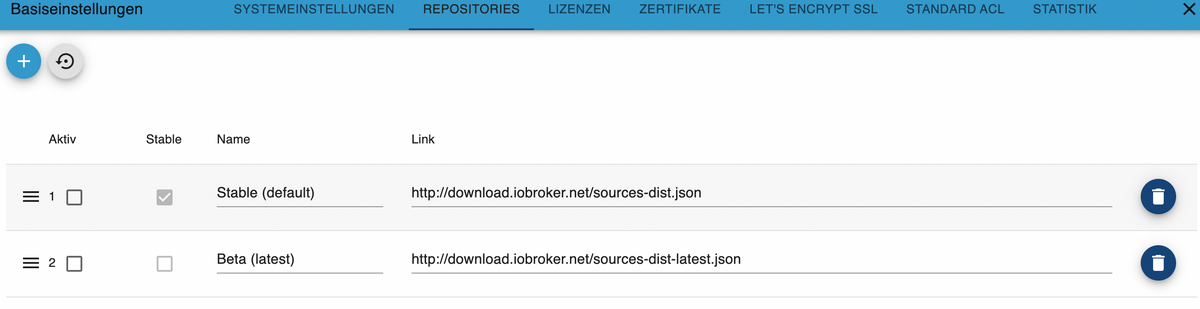
                    Bildschirmfoto 2022-10-12 um 16.19.14.png Bildschirmfoto 2022-10-12 um 16.18.48.png
                    er hat die aktive Stable Variante deaktiviert, diese werde ich dann mal wieder aktivieren.
                    das kann auch damit zusammen hängen, dass im Backup die Beta aktiv sind


                    2022-10-12 07:30:25.820 - info: host.raspberrypi iobroker.js-controller version 4.0.23 js-controller starting
                    2022-10-12 07:30:25.828 - info: host.raspberrypi Copyright (c) 2014-2022 bluefox, 2014 hobbyquaker
                    2022-10-12 07:30:25.829 - info: host.raspberrypi hostname: raspberrypi, node: v16.17.1
                    2022-10-12 07:30:25.831 - info: host.raspberrypi ip addresses: 192.168.0.92 fe80::e082:9e21:c57f:d9dc 192.168.0.93 fe80::347f:b2c:baa2:692e
                    2022-10-12 07:30:26.329 - info: host.raspberrypi connected to Objects and States
                    2022-10-12 07:30:26.360 - info: host.raspberrypi Node.js version has changed from unknown to 16.17.1
                    2022-10-12 07:30:26.412 - info: host.raspberrypi Successfully updated capabilities "cap_net_admin, cap_net_bind_service, cap_net_raw" for /usr/bin/node
                    2022-10-12 07:30:26.432 - info: host.raspberrypi added notifications configuration of host
                    2022-10-12 07:30:26.764 - info: host.raspberrypi 3 instances found
                    2022-10-12 07:30:26.774 - info: host.raspberrypi starting 3 instances
                    2022-10-12 07:30:26.846 - info: host.raspberrypi instance system.adapter.admin.0 started with pid 7036
                    2022-10-12 07:30:28.890 - info: admin.0 (7036) starting. Version 6.2.22 in /opt/iobroker/node_modules/iobroker.admin, node: v16.17.1, js-controller: 4.0.23
                    2022-10-12 07:30:28.945 - info: admin.0 (7036) requesting all states
                    2022-10-12 07:30:28.947 - info: admin.0 (7036) requesting all objects
                    2022-10-12 07:30:29.059 - info: admin.0 (7036) received all objects
                    2022-10-12 07:30:29.327 - info: admin.0 (7036) http server listening on port 8081
                    2022-10-12 07:30:29.328 - info: admin.0 (7036) Use link "http://localhost:8081" to configure.
                    2022-10-12 07:30:29.337 - info: admin.0 (7036) socket.io server listening on port 8081
                    2022-10-12 07:30:29.399 - warn: admin.0 (7036) Repository cannot be read: Active repo - stable
                    2022-10-12 07:30:29.400 - warn: admin.0 (7036) Active repository "stable" cannot be read
                    2022-10-12 07:30:30.802 - info: host.raspberrypi instance system.adapter.discovery.0 started with pid 7063
                    2022-10-12 07:30:32.462 - info: discovery.0 (7063) starting. Version 3.0.3 in /opt/iobroker/node_modules/iobroker.discovery, node: v16.17.1, js-controller: 4.0.23
                    2022-10-12 07:30:34.801 - info: host.raspberrypi instance system.adapter.backitup.0 started with pid 7078
                    2022-10-12 07:30:36.668 - info: backitup.0 (7078) starting. Version 2.4.12 in /opt/iobroker/node_modules/iobroker.backitup, node: v16.17.1, js-controller: 4.0.23
                    2022-10-12 07:30:36.750 - info: backitup.0 (7078) [iobroker] backup was activated at 02:40 every 1 day(s)
                    2022-10-12 07:34:35.154 - info: admin.0 (7036) ==> Connected system.user.admin from ::ffff:192.168.0.139
                    2022-10-12 07:34:35.527 - info: host.raspberrypi Updating repository "stable" under "http://download.iobroker.net/sources-dist.json"
                    2022-10-12 07:36:10.244 - info: vis.0 (7191) starting. Version 1.4.11 in /opt/iobroker/node_modules/iobroker.vis, node: v16.17.1, js-controller: 4.0.23
                    2022-10-12 07:36:10.314 - info: vis.0 (7191) Changes in index.html detected => update cache.manifest
                    2022-10-12 07:36:10.324 - error: vis.0 (7191) No license found for vis. Please get one on https://iobroker.net !
                    2022-10-12 07:36:10.340 - info: vis.0 (7191) config.js changed. Upload.
                    2022-10-12 07:36:10.384 - info: vis.0 (7191) Changes in index.html detected => update cache.manifest
                    2022-10-12 07:36:10.395 - info: vis.0 (7191) Upload vis anew, while changes detected...
                    2022-10-12 07:36:13.948 - info: vis.0 (7191) Uploaded. 0
                    2022-10-12 07:36:14.462 - info: vis.0 (7191) Terminated (NO_ERROR): Without reason
                    2022-10-12 07:36:30.614 - info: host.raspberrypi received SIGTERM
                    2022-10-12 07:36:30.629 - info: backitup.0 (7078) cleaned everything up...
                    2022-10-12 07:36:30.624 - info: host.raspberrypi stopInstance system.adapter.admin.0 (force=false, process=true)
                    2022-10-12 07:36:30.625 - info: host.raspberrypi stopInstance system.adapter.discovery.0 (force=false, process=true)
                    2022-10-12 07:36:30.626 - info: host.raspberrypi stopInstance system.adapter.backitup.0 (force=false, process=true)
                    2022-10-12 07:36:30.628 - info: admin.0 (7036) terminating http server on port 8081
                    2022-10-12 07:36:30.675 - info: admin.0 (7036) Got terminate signal TERMINATE_YOURSELF
                    2022-10-12 07:36:30.678 - info: discovery.0 (7063) Got terminate signal TERMINATE_YOURSELF
                    2022-10-12 07:36:30.679 - info: backitup.0 (7078) Got terminate signal TERMINATE_YOURSELF
                    2022-10-12 07:36:30.688 - info: admin.0 (7036) Terminated (START_IMMEDIATELY_AFTER_STOP): Without reason
                    2022-10-12 07:36:30.690 - info: host.raspberrypi stopInstance system.adapter.admin.0 send kill signal
                    2022-10-12 07:36:30.690 - info: discovery.0 (7063) Terminated (START_IMMEDIATELY_AFTER_STOP): Without reason
                    2022-10-12 07:36:30.696 - info: host.raspberrypi stopInstance system.adapter.discovery.0 send kill signal
                    2022-10-12 07:36:30.696 - info: backitup.0 (7078) Terminated (START_IMMEDIATELY_AFTER_STOP): Without reason
                    2022-10-12 07:36:30.697 - info: host.raspberrypi stopInstance system.adapter.backitup.0 send kill signal
                    2022-10-12 07:36:31.270 - info: host.raspberrypi instance system.adapter.discovery.0 terminated with code 156 (START_IMMEDIATELY_AFTER_STOP)
                    2022-10-12 07:36:31.318 - info: host.raspberrypi instance system.adapter.admin.0 terminated with code 156 (START_IMMEDIATELY_AFTER_STOP)
                    2022-10-12 07:36:31.356 - info: host.raspberrypi instance system.adapter.backitup.0 terminated with code 156 (START_IMMEDIATELY_AFTER_STOP)
                    2022-10-12 07:36:31.357 - info: host.raspberrypi All instances are stopped.
                    2022-10-12 07:36:31.462 - info: host.raspberrypi terminated
                    2022-10-12 07:36:39.163 - info: host.raspberrypi iobroker.js-controller version 4.0.23 js-controller starting
                    2022-10-12 07:36:39.170 - info: host.raspberrypi Copyright (c) 2014-2022 bluefox, 2014 hobbyquaker
                    2022-10-12 07:36:39.172 - info: host.raspberrypi hostname: raspberrypi, node: v16.17.1
                    2022-10-12 07:36:39.173 - info: host.raspberrypi ip addresses:
                    2022-10-12 07:36:39.888 - info: host.raspberrypi connected to Objects and States
                    2022-10-12 07:36:39.916 - info: host.raspberrypi added notifications configuration of host
                    2022-10-12 07:36:40.442 - info: host.raspberrypi Delete state "system.host.raspberrypi.versions.nodeCurrent"
                    2022-10-12 07:36:40.451 - info: host.raspberrypi 3 instances found
                    2022-10-12 07:36:40.461 - info: host.raspberrypi starting 3 instances
                    2022-10-12 07:36:40.527 - info: host.raspberrypi instance system.adapter.admin.0 started with pid 572
                    2022-10-12 07:36:40.547 - info: host.raspberrypi Delete state "system.host.raspberrypi.versions.nodeNewest"
                    2022-10-12 07:36:40.610 - info: host.raspberrypi Delete state "system.host.raspberrypi.versions.nodeNewestNext"
                    2022-10-12 07:36:40.625 - info: host.raspberrypi Delete state "system.host.raspberrypi.versions.npmCurrent"
                    2022-10-12 07:36:40.639 - info: host.raspberrypi Delete state "system.host.raspberrypi.versions.npmNewest"
                    2022-10-12 07:36:40.654 - info: host.raspberrypi Delete state "system.host.raspberrypi.versions.npmNewestNext"
                    2022-10-12 07:36:40.668 - info: host.raspberrypi Some obsolete host states deleted.
                    2022-10-12 07:36:43.077 - info: admin.0 (572) starting. Version 6.2.22 in /opt/iobroker/node_modules/iobroker.admin, node: v16.17.1, js-controller: 4.0.23
                    2022-10-12 07:36:43.132 - info: admin.0 (572) requesting all states
                    2022-10-12 07:36:43.133 - info: admin.0 (572) requesting all objects
                    2022-10-12 07:36:43.213 - warn: admin.0 (572) Cannot check node.js versions: Error: getaddrinfo EAI_AGAIN nodejs.org
                    2022-10-12 07:36:43.231 - warn: admin.0 (572) Cannot update news: getaddrinfo EAI_AGAIN iobroker.live
                    2022-10-12 07:36:43.590 - info: admin.0 (572) received all objects
                    2022-10-12 07:36:44.030 - info: admin.0 (572) http server listening on port 8081
                    2022-10-12 07:36:44.032 - info: admin.0 (572) Use link "http://localhost:8081" to configure.
                    2022-10-12 07:36:44.044 - info: admin.0 (572) socket.io server listening on port 8081
                    2022-10-12 07:36:44.110 - warn: admin.0 (572) Cannot update rating: getaddrinfo EAI_AGAIN rating.iobroker.net
                    2022-10-12 07:36:44.491 - info: host.raspberrypi instance system.adapter.discovery.0 started with pid 627
                    2022-10-12 07:36:59.365 - info: discovery.0 (627) starting. Version 3.0.3 in /opt/iobroker/node_modules/iobroker.discovery, node: v16.17.1, js-controller: 4.0.23
                    2022-10-12 07:37:01.549 - info: host.raspberrypi instance system.adapter.backitup.0 started with pid 702
                    2022-10-12 07:37:01.648 - info: admin.0 (572) ==> Connected system.user.admin from ::ffff:192.168.0.139
                    2022-10-12 07:37:03.417 - info: backitup.0 (702) starting. Version 2.4.12 in /opt/iobroker/node_modules/iobroker.backitup, node: v16.17.1, js-controller: 4.0.23
                    2022-10-12 07:37:03.494 - info: backitup.0 (702) [iobroker] backup was activated at 02:40 every 1 day(s)
                    2022-10-12 07:47:30.795 - info: admin.0 (572) ==> Connected system.user.admin from ::ffff:192.168.0.139
                    2022-10-12 07:47:58.110 - info: host.raspberrypi stopInstance system.adapter.backitup.0 (force=false, process=true)
                    2022-10-12 07:47:58.120 - info: backitup.0 (702) Got terminate signal TERMINATE_YOURSELF
                    2022-10-12 07:47:58.123 - info: backitup.0 (702) cleaned everything up...
                    2022-10-12 07:47:58.124 - info: backitup.0 (702) terminating
                    2022-10-12 07:47:58.126 - info: backitup.0 (702) Terminated (ADAPTER_REQUESTED_TERMINATION): Without reason
                    2022-10-12 07:47:58.163 - info: host.raspberrypi stopInstance system.adapter.backitup.0 send kill signal
                    2022-10-12 07:47:58.544 - info: admin.0 (572) <== Disconnect system.user.admin from ::ffff:192.168.0.139
                    2022-10-12 07:47:58.688 - info: host.raspberrypi instance system.adapter.backitup.0 terminated with code 11 (ADAPTER_REQUESTED_TERMINATION)
                    2022-10-12 07:48:01.190 - info: host.raspberrypi instance system.adapter.backitup.0 started with pid 798
                    2022-10-12 07:48:03.026 - info: backitup.0 (798) starting. Version 2.4.12 in /opt/iobroker/node_modules/iobroker.backitup, node: v16.17.1, js-controller: 4.0.23
                    2022-10-12 07:48:03.122 - info: backitup.0 (798) [iobroker] backup was activated at 02:40 every 1 day(s)
                    2022-10-12 07:49:52.026 - info: admin.0 (572) ==> Connected system.user.admin from ::ffff:192.168.0.139
                    2022-10-12 08:17:08.116 - info: host.raspberrypi iobroker.js-controller version 4.0.23 js-controller starting
                    2022-10-12 08:17:08.123 - info: host.raspberrypi Copyright (c) 2014-2022 bluefox, 2014 hobbyquaker
                    2022-10-12 08:17:08.124 - info: host.raspberrypi hostname: raspberrypi, node: v16.17.1
                    2022-10-12 08:17:08.126 - info: host.raspberrypi ip addresses:
                    2022-10-12 08:17:08.859 - info: host.raspberrypi connected to Objects and States
                    2022-10-12 08:17:08.888 - info: host.raspberrypi added notifications configuration of host
                    2022-10-12 08:17:09.402 - info: host.raspberrypi 3 instances found
                    2022-10-12 08:17:09.411 - info: host.raspberrypi starting 3 instances
                    2022-10-12 08:17:09.506 - info: host.raspberrypi instance system.adapter.admin.0 started with pid 576
                    2022-10-12 08:17:11.431 - error: admin.0 (576) admin.0 already running
                    2022-10-12 08:17:11.436 - warn: admin.0 (576) Terminated (ADAPTER_ALREADY_RUNNING): Without reason
                    2022-10-12 08:17:12.009 - error: host.raspberrypi instance system.adapter.admin.0 terminated with code 7 (ADAPTER_ALREADY_RUNNING)
                    2022-10-12 08:17:12.011 - info: host.raspberrypi Restart adapter system.adapter.admin.0 because enabled
                    2022-10-12 08:17:13.447 - info: host.raspberrypi instance system.adapter.discovery.0 started with pid 628
                    2022-10-12 08:17:14.754 - error: discovery.0 (628) discovery.0 already running
                    2022-10-12 08:17:14.759 - warn: discovery.0 (628) Terminated (ADAPTER_ALREADY_RUNNING): Without reason
                    2022-10-12 08:17:15.309 - error: host.raspberrypi instance system.adapter.discovery.0 terminated with code 7 (ADAPTER_ALREADY_RUNNING)
                    2022-10-12 08:17:15.310 - info: host.raspberrypi Restart adapter system.adapter.discovery.0 because enabled
                    2022-10-12 13:28:32.113 - info: host.raspberrypi instance system.adapter.backitup.0 started with pid 763
                    2022-10-12 13:28:33.501 - error: backitup.0 (763) backitup.0 already running
                    2022-10-12 13:28:33.506 - warn: backitup.0 (763) Terminated (ADAPTER_ALREADY_RUNNING): Without reason
                    2022-10-12 13:28:34.050 - error: host.raspberrypi instance system.adapter.backitup.0 terminated with code 7 (ADAPTER_ALREADY_RUNNING)
                    2022-10-12 13:28:34.051 - info: host.raspberrypi Restart adapter system.adapter.backitup.0 because enabled
                    2022-10-12 13:28:56.694 - info: host.raspberrypi instance system.adapter.admin.0 started with pid 776
                    2022-10-12 13:28:58.723 - info: admin.0 (776) starting. Version 6.2.22 in /opt/iobroker/node_modules/iobroker.admin, node: v16.17.1, js-controller: 4.0.23
                    2022-10-12 13:28:58.783 - info: admin.0 (776) requesting all states
                    2022-10-12 13:28:58.784 - info: admin.0 (776) requesting all objects
                    2022-10-12 13:28:59.270 - info: admin.0 (776) received all objects
                    2022-10-12 13:28:59.815 - info: admin.0 (776) http server listening on port 8081
                    2022-10-12 13:28:59.817 - info: admin.0 (776) Use link "http://localhost:8081" to configure.
                    2022-10-12 13:28:59.827 - info: admin.0 (776) socket.io server listening on port 8081
                    2022-10-12 13:28:59.993 - info: host.raspberrypi instance system.adapter.discovery.0 started with pid 801
                    2022-10-12 13:29:01.918 - info: discovery.0 (801) starting. Version 3.0.3 in /opt/iobroker/node_modules/iobroker.discovery, node: v16.17.1, js-controller: 4.0.23
                    2022-10-12 13:29:04.078 - info: host.raspberrypi instance system.adapter.backitup.0 started with pid 820
                    2022-10-12 13:29:05.897 - info: backitup.0 (820) starting. Version 2.4.12 in /opt/iobroker/node_modules/iobroker.backitup, node: v16.17.1, js-controller: 4.0.23
                    2022-10-12 13:29:05.970 - info: backitup.0 (820) [iobroker] backup was activated at 02:40 every 1 day(s)
                    2022-10-12 13:56:43.336 - info: admin.0 (776) ==> Connected system.user.admin from ::ffff:192.168.0.193
                    2022-10-12 13:57:01.801 - info: admin.0 (776) ==> Connected system.user.admin from ::ffff:192.168.0.193
                    2022-10-12 13:57:03.411 - info: admin.0 (776) <== Disconnect system.user.admin from ::ffff:192.168.0.193
                    2022-10-12 14:03:10.222 - info: admin.0 (776) ==> Connected system.user.admin from ::ffff:192.168.0.193
                    2022-10-12 14:16:27.204 - info: host.raspberrypi received SIGTERM
                    2022-10-12 14:16:27.209 - info: admin.0 (776) terminating http server on port 8081
                    2022-10-12 14:16:27.206 - info: backitup.0 (820) cleaned everything up...
                    2022-10-12 14:16:27.209 - info: host.raspberrypi stopInstance system.adapter.admin.0 (force=false, process=true)
                    2022-10-12 14:16:27.210 - info: host.raspberrypi stopInstance system.adapter.discovery.0 (force=false, process=true)
                    2022-10-12 14:16:27.210 - info: host.raspberrypi stopInstance system.adapter.backitup.0 (force=false, process=true)
                    2022-10-12 14:16:27.229 - info: backitup.0 (820) Got terminate signal TERMINATE_YOURSELF
                    2022-10-12 14:16:27.231 - info: admin.0 (776) Got terminate signal TERMINATE_YOURSELF
                    2022-10-12 14:16:27.234 - info: host.raspberrypi stopInstance system.adapter.admin.0 send kill signal
                    2022-10-12 14:16:27.236 - info: admin.0 (776) Terminated (START_IMMEDIATELY_AFTER_STOP): Without reason
                    2022-10-12 14:16:27.236 - info: host.raspberrypi stopInstance system.adapter.discovery.0 send kill signal
                    2022-10-12 14:16:27.229 - info: discovery.0 (801) Got terminate signal TERMINATE_YOURSELF
                    2022-10-12 14:16:27.237 - info: host.raspberrypi stopInstance system.adapter.backitup.0 send kill signal
                    2022-10-12 14:16:27.242 - info: discovery.0 (801) Terminated (START_IMMEDIATELY_AFTER_STOP): Without reason
                    2022-10-12 14:16:27.278 - info: backitup.0 (820) Terminated (START_IMMEDIATELY_AFTER_STOP): Without reason
                    2022-10-12 14:16:27.808 - info: host.raspberrypi instance system.adapter.admin.0 terminated with code 156 (START_IMMEDIATELY_AFTER_STOP)
                    2022-10-12 14:16:27.842 - info: host.raspberrypi instance system.adapter.discovery.0 terminated with code 156 (START_IMMEDIATELY_AFTER_STOP)
                    2022-10-12 14:16:27.850 - info: host.raspberrypi instance system.adapter.backitup.0 terminated with code 156 (START_IMMEDIATELY_AFTER_STOP)
                    2022-10-12 14:16:27.851 - info: host.raspberrypi All instances are stopped.
                    2022-10-12 14:16:28.050 - info: host.raspberrypi terminated
                    2022-10-12 14:18:27.924 - info: host.raspberrypi iobroker.js-controller version 4.0.23 js-controller starting
                    2022-10-12 14:18:27.931 - info: host.raspberrypi Copyright (c) 2014-2022 bluefox, 2014 hobbyquaker
                    2022-10-12 14:18:27.932 - info: host.raspberrypi hostname: raspberrypi, node: v16.17.1
                    2022-10-12 14:18:27.934 - info: host.raspberrypi ip addresses: 192.168.0.92 fe80::e082:9e21:c57f:d9dc 192.168.0.93 fe80::347f:b2c:baa2:692e
                    2022-10-12 14:18:29.882 - info: host.raspberrypi connected to Objects and States
                    2022-10-12 14:18:29.951 - info: host.raspberrypi Node.js version has changed from 14.20.0 to 16.17.1
                    2022-10-12 14:18:30.006 - info: host.raspberrypi Successfully updated capabilities "cap_net_admin, cap_net_bind_service, cap_net_raw" for /usr/bin/node
                    2022-10-12 14:18:30.032 - info: host.raspberrypi added notifications configuration of host
                    2022-10-12 14:18:30.822 - info: host.raspberrypi Delete host system.host.raspberrypi
                    2022-10-12 14:18:31.020 - info: host.raspberrypi 55 instances found
                    2022-10-12 14:18:31.087 - warn: host.raspberrypi startInstance cannot find adapter "alias-manager@1.2.6". Try to install it... 1 attempt
                    2022-10-12 14:18:31.088 - info: host.raspberrypi iobroker install alias-manager@1.2.6 using installedFrom
                    2022-10-12 14:18:31.207 - info: host.raspberrypi starting 2 instances
                    2022-10-12 14:18:31.489 - info: host.raspberrypi instance system.adapter.admin.0 started with pid 2029
                    2022-10-12 14:18:33.977 - error: host.raspberrypi iobroker npm-install: ERROR: No repositories defined. Please define one repository as active: "iob repo set <Stable (default) | Beta (latest)>
                    2022-10-12 14:18:35.050 - info: host.raspberrypi iobroker npm-install: exit 0
                    2022-10-12 14:18:36.327 - warn: host.raspberrypi startInstance cannot find adapter "icons-icons8@0.0.1". Try to install it... 1 attempt
                    2022-10-12 14:18:36.329 - info: host.raspberrypi iobroker install icons-icons8@0.0.1 using installedFrom
                    2022-10-12 14:18:36.674 - info: host.raspberrypi instance system.adapter.backitup.0 started with pid 2059
                    2022-10-12 14:18:37.703 - warn: admin.0 (2029) No repository source configured. Possible values: Stable (default), Beta (latest). Active repo(s): ""
                    2022-10-12 14:18:40.897 - error: host.raspberrypi iobroker npm-install: ERROR: No repositories defined. Please define one repository as active: "iob repo set <Stable (default) | Beta (latest)>
                    2022-10-12 14:18:41.947 - info: host.raspberrypi iobroker npm-install: exit 0
                    2022-10-12 14:18:42.948 - warn: host.raspberrypi startInstance cannot find adapter "icons-mfd-png@1.1.0". Try to install it... 1 attempt
                    2022-10-12 14:18:42.949 - info: host.raspberrypi iobroker install icons-mfd-png@1.1.0 using installedFrom
                    2022-10-12 14:18:45.342 - error: host.raspberrypi iobroker npm-install: ERROR: No repositories defined. Please define one repository as active: "iob repo set <Stable (default) | Beta (latest)>
                    2022-10-12 14:18:46.376 - info: host.raspberrypi iobroker npm-install: exit 0
                    2022-10-12 14:18:47.377 - warn: host.raspberrypi startInstance cannot find adapter "icons-open-icon-library-png@0.1.2". Try to install it... 1 attempt
                    2022-10-12 14:18:47.378 - info: host.raspberrypi iobroker install icons-open-icon-library-png@0.1.2 using installedFrom
                    2022-10-12 14:18:49.941 - error: host.raspberrypi iobroker npm-install: ERROR: No repositories defined. Please define one repository as active: "iob repo set <Stable (default) | Beta (latest)>
                    2022-10-12 14:18:50.973 - info: host.raspberrypi iobroker npm-install: exit 0
                    2022-10-12 14:18:51.974 - warn: host.raspberrypi startInstance cannot find adapter "icons-ultimate-png@1.0.1". Try to install it... 1 attempt
                    2022-10-12 14:18:51.974 - info: host.raspberrypi iobroker install icons-ultimate-png@1.0.1 using installedFrom
                    2022-10-12 14:18:54.461 - error: host.raspberrypi iobroker npm-install: ERROR: No repositories defined. Please define one repository as active: "iob repo set <Stable (default) | Beta (latest)>
                    2022-10-12 14:18:55.494 - info: host.raspberrypi iobroker npm-install: exit 0
                    2022-10-12 14:18:56.495 - warn: host.raspberrypi startInstance cannot find adapter "vis-icontwo@0.90.0". Try to install it... 1 attempt
                    2022-10-12 14:18:56.495 - info: host.raspberrypi iobroker install vis-icontwo@0.90.0 using installedFrom
                    2022-10-12 14:18:58.945 - error: host.raspberrypi iobroker npm-install: ERROR: No repositories defined. Please define one repository as active: "iob repo set <Stable (default) | Beta (latest)>
                    2022-10-12 14:18:59.995 - info: host.raspberrypi iobroker npm-install: exit 0
                    2022-10-12 14:19:00.996 - warn: host.raspberrypi startInstance cannot find adapter "history@2.2.4". Try to install it... 1 attempt
                    2022-10-12 14:19:00.998 - info: host.raspberrypi iobroker install history@2.2.4 using installedFrom
                    2022-10-12 14:19:03.546 - error: host.raspberrypi iobroker npm-install: ERROR: No repositories defined. Please define one repository as active: "iob repo set <Stable (default) | Beta (latest)>
                    2022-10-12 14:19:04.579 - info: host.raspberrypi iobroker npm-install: exit 0
                    2022-10-12 14:19:05.580 - warn: host.raspberrypi startInstance cannot find adapter "influxdb@3.2.0". Try to install it... 1 attempt
                    2022-10-12 14:19:05.581 - info: host.raspberrypi iobroker install influxdb@3.2.0 using installedFrom
                    2022-10-12 14:19:07.973 - error: host.raspberrypi iobroker npm-install: ERROR: No repositories defined. Please define one repository as active: "iob repo set <Stable (default) | Beta (latest)>
                    2022-10-12 14:19:09.011 - info: host.raspberrypi iobroker npm-install: exit 0
                    2022-10-12 14:19:10.012 - warn: host.raspberrypi startInstance cannot find adapter "javascript@6.0.3". Try to install it... 1 attempt
                    2022-10-12 14:19:10.013 - info: host.raspberrypi iobroker install javascript@6.0.3 using installedFrom
                    2022-10-12 14:19:12.434 - error: host.raspberrypi iobroker npm-install: ERROR: No repositories defined. Please define one repository as active: "iob repo set <Stable (default) | Beta (latest)>
                    2022-10-12 14:19:13.509 - info: host.raspberrypi iobroker npm-install: exit 0
                    2022-10-12 14:19:14.511 - warn: host.raspberrypi startInstance cannot find adapter "telegram@1.14.1". Try to install it... 1 attempt
                    2022-10-12 14:19:14.512 - info: host.raspberrypi iobroker install telegram@1.14.1 using installedFrom
                    2022-10-12 14:19:17.003 - error: host.raspberrypi iobroker npm-install: ERROR: No repositories defined. Please define one repository as active: "iob repo set <Stable (default) | Beta (latest)>
                    2022-10-12 14:19:18.035 - info: host.raspberrypi iobroker npm-install: exit 0
                    2022-10-12 14:19:19.036 - warn: host.raspberrypi startInstance cannot find adapter "hue@3.7.1". Try to install it... 1 attempt
                    2022-10-12 14:19:19.036 - info: host.raspberrypi iobroker install hue@3.7.1 using installedFrom
                    2022-10-12 14:19:21.553 - error: host.raspberrypi iobroker npm-install: ERROR: No repositories defined. Please define one repository as active: "iob repo set <Stable (default) | Beta (latest)>
                    2022-10-12 14:19:22.603 - info: host.raspberrypi iobroker npm-install: exit 0
                    2022-10-12 14:19:23.604 - warn: host.raspberrypi startInstance cannot find adapter "modbus@5.0.8". Try to install it... 1 attempt
                    2022-10-12 14:19:23.605 - info: host.raspberrypi iobroker install modbus@5.0.8 using installedFrom
                    2022-10-12 14:19:26.055 - error: host.raspberrypi iobroker npm-install: ERROR: No repositories defined. Please define one repository as active: "iob repo set <Stable (default) | Beta (latest)>
                    2022-10-12 14:19:27.087 - info: host.raspberrypi iobroker npm-install: exit 0
                    2022-10-12 14:19:28.088 - warn: host.raspberrypi startInstance cannot find adapter "modbus@5.0.8". Try to install it... 1 attempt
                    2022-10-12 14:19:28.089 - info: host.raspberrypi iobroker install modbus@5.0.8 using installedFrom
                    2022-10-12 14:19:30.615 - error: host.raspberrypi iobroker npm-install: ERROR: No repositories defined. Please define one repository as active: "iob repo set <Stable (default) | Beta (latest)>
                    2022-10-12 14:19:31.649 - info: host.raspberrypi iobroker npm-install: exit 0
                    2022-10-12 14:19:32.650 - warn: host.raspberrypi startInstance cannot find adapter "modbus@5.0.8". Try to install it... 1 attempt
                    2022-10-12 14:19:32.651 - info: host.raspberrypi iobroker install modbus@5.0.8 using installedFrom
                    2022-10-12 14:19:35.056 - error: host.raspberrypi iobroker npm-install: ERROR: No repositories defined. Please define one repository as active: "iob repo set <Stable (default) | Beta (latest)>
                    2022-10-12 14:19:36.110 - info: host.raspberrypi iobroker npm-install: exit 0
                    2022-10-12 14:19:37.110 - warn: host.raspberrypi startInstance cannot find adapter "mqtt@4.0.7". Try to install it... 1 attempt
                    2022-10-12 14:19:37.110 - info: host.raspberrypi iobroker install mqtt@4.0.7 using installedFrom
                    2022-10-12 14:19:39.544 - error: host.raspberrypi iobroker npm-install: ERROR: No repositories defined. Please define one repository as active: "iob repo set <Stable (default) | Beta (latest)>
                    2022-10-12 14:19:40.602 - info: host.raspberrypi iobroker npm-install: exit 0
                    2022-10-12 14:19:41.603 - warn: host.raspberrypi startInstance cannot find adapter "owntracks@1.0.4". Try to install it... 1 attempt
                    2022-10-12 14:19:41.605 - info: host.raspberrypi iobroker install owntracks@1.0.4 using installedFrom
                    2022-10-12 14:19:44.080 - error: host.raspberrypi iobroker npm-install: ERROR: No repositories defined. Please define one repository as active: "iob repo set <Stable (default) | Beta (latest)>
                    2022-10-12 14:19:45.130 - info: host.raspberrypi iobroker npm-install: exit 0
                    2022-10-12 14:19:46.131 - warn: host.raspberrypi startInstance cannot find adapter "places@1.1.2". Try to install it... 1 attempt
                    2022-10-12 14:19:46.132 - info: host.raspberrypi iobroker install places@1.1.2 using installedFrom
                    2022-10-12 14:19:48.567 - error: host.raspberrypi iobroker npm-install: ERROR: No repositories defined. Please define one repository as active: "iob repo set <Stable (default) | Beta (latest)>
                    2022-10-12 14:19:49.605 - info: host.raspberrypi iobroker npm-install: exit 0
                    2022-10-12 14:19:50.606 - warn: host.raspberrypi startInstance cannot find adapter "s7@1.3.14". Try to install it... 1 attempt
                    2022-10-12 14:19:50.607 - info: host.raspberrypi iobroker install s7@1.3.14 using installedFrom
                    2022-10-12 14:19:53.078 - error: host.raspberrypi iobroker npm-install: ERROR: No repositories defined. Please define one repository as active: "iob repo set <Stable (default) | Beta (latest)>
                    2022-10-12 14:19:54.127 - info: host.raspberrypi iobroker npm-install: exit 0
                    2022-10-12 14:19:55.128 - warn: host.raspberrypi startInstance cannot find adapter "shelly@6.2.0". Try to install it... 1 attempt
                    2022-10-12 14:19:55.128 - info: host.raspberrypi iobroker install shelly@6.2.0 using installedFrom
                    2022-10-12 14:19:57.557 - error: host.raspberrypi iobroker npm-install: ERROR: No repositories defined. Please define one repository as active: "iob repo set <Stable (default) | Beta (latest)>
                    2022-10-12 14:19:58.604 - info: host.raspberrypi iobroker npm-install: exit 0
                    2022-10-12 14:19:59.605 - warn: host.raspberrypi startInstance cannot find adapter "sonoff@2.5.1". Try to install it... 1 attempt
                    2022-10-12 14:19:59.606 - info: host.raspberrypi iobroker install sonoff@2.5.1 using installedFrom
                    2022-10-12 14:20:02.057 - error: host.raspberrypi iobroker npm-install: ERROR: No repositories defined. Please define one repository as active: "iob repo set <Stable (default) | Beta (latest)>
                    2022-10-12 14:20:03.106 - info: host.raspberrypi iobroker npm-install: exit 0
                    2022-10-12 14:20:04.107 - warn: host.raspberrypi startInstance cannot find adapter "synology@2.1.9". Try to install it... 1 attempt
                    2022-10-12 14:20:04.107 - info: host.raspberrypi iobroker install synology@2.1.9 using installedFrom
                    2022-10-12 14:20:06.582 - error: host.raspberrypi iobroker npm-install: ERROR: No repositories defined. Please define one repository as active: "iob repo set <Stable (default) | Beta (latest)>
                    2022-10-12 14:20:07.651 - info: host.raspberrypi iobroker npm-install: exit 0
                    2022-10-12 14:20:08.652 - warn: host.raspberrypi startInstance cannot find adapter "zigbee@1.7.6". Try to install it... 1 attempt
                    2022-10-12 14:20:08.653 - info: host.raspberrypi iobroker install zigbee@1.7.6 using installedFrom
                    2022-10-12 14:20:11.079 - error: host.raspberrypi iobroker npm-install: ERROR: No repositories defined. Please define one repository as active: "iob repo set <Stable (default) | Beta (latest)>
                    2022-10-12 14:20:12.126 - info: host.raspberrypi iobroker npm-install: exit 0
                    2022-10-12 14:20:13.127 - warn: host.raspberrypi startInstance cannot find adapter "discovery@3.0.5". Try to install it... 1 attempt
                    2022-10-12 14:20:13.128 - info: host.raspberrypi iobroker install discovery@3.0.5 using installedFrom
                    2022-10-12 14:20:15.579 - error: host.raspberrypi iobroker npm-install: ERROR: No repositories defined. Please define one repository as active: "iob repo set <Stable (default) | Beta (latest)>
                    2022-10-12 14:20:16.628 - info: host.raspberrypi iobroker npm-install: exit 0
                    2022-10-12 14:20:17.629 - warn: host.raspberrypi startInstance cannot find adapter "alias-manager". Try to install it... 2 attempt
                    2022-10-12 14:20:17.630 - info: host.raspberrypi iobroker install alias-manager using installedVersion
                    2022-10-12 14:20:20.113 - error: host.raspberrypi iobroker npm-install: ERROR: No repositories defined. Please define one repository as active: "iob repo set <Stable (default) | Beta (latest)>
                    2022-10-12 14:20:21.161 - info: host.raspberrypi iobroker npm-install: exit 0
                    2022-10-12 14:20:22.162 - warn: host.raspberrypi startInstance cannot find adapter "cloud@4.2.2". Try to install it... 1 attempt
                    2022-10-12 14:20:22.163 - info: host.raspberrypi iobroker install cloud@4.2.2 using installedFrom
                    2022-10-12 14:20:24.556 - error: host.raspberrypi iobroker npm-install: ERROR: No repositories defined. Please define one repository as active: "iob repo set <Stable (default) | Beta (latest)>
                    2022-10-12 14:20:25.608 - info: host.raspberrypi iobroker npm-install: exit 0
                    2022-10-12 14:20:26.609 - warn: host.raspberrypi startInstance cannot find adapter "daswetter@3.1.4". Try to install it... 1 attempt
                    2022-10-12 14:20:26.609 - info: host.raspberrypi iobroker install daswetter@3.1.4 using installedFrom
                    2022-10-12 14:20:29.016 - error: host.raspberrypi iobroker npm-install: ERROR: No repositories defined. Please define one repository as active: "iob repo set <Stable (default) | Beta (latest)>
                    2022-10-12 14:20:30.081 - info: host.raspberrypi iobroker npm-install: exit 0
                    2022-10-12 14:20:31.082 - warn: host.raspberrypi startInstance cannot find adapter "denon@1.13.4". Try to install it... 1 attempt
                    2022-10-12 14:20:31.083 - info: host.raspberrypi iobroker install denon@1.13.4 using installedFrom
                    2022-10-12 14:20:33.577 - error: host.raspberrypi iobroker npm-install: ERROR: No repositories defined. Please define one repository as active: "iob repo set <Stable (default) | Beta (latest)>
                    2022-10-12 14:20:34.626 - info: host.raspberrypi iobroker npm-install: exit 0
                    2022-10-12 14:20:35.627 - warn: host.raspberrypi startInstance cannot find adapter "echarts@1.0.12". Try to install it... 1 attempt
                    2022-10-12 14:20:35.628 - info: host.raspberrypi iobroker install echarts@1.0.12 using installedFrom
                    2022-10-12 14:20:38.105 - error: host.raspberrypi iobroker npm-install: ERROR: No repositories defined. Please define one repository as active: "iob repo set <Stable (default) | Beta (latest)>
                    2022-10-12 14:20:39.155 - info: host.raspberrypi iobroker npm-install: exit 0
                    2022-10-12 14:20:40.155 - warn: host.raspberrypi startInstance cannot find adapter "fritzdect@2.2.6". Try to install it... 1 attempt
                    2022-10-12 14:20:40.156 - info: host.raspberrypi iobroker install fritzdect@2.2.6 using installedFrom
                    2022-10-12 14:20:42.629 - error: host.raspberrypi iobroker npm-install: ERROR: No repositories defined. Please define one repository as active: "iob repo set <Stable (default) | Beta (latest)>
                    2022-10-12 14:20:43.675 - info: host.raspberrypi iobroker npm-install: exit 0
                    2022-10-12 14:20:44.676 - warn: host.raspberrypi startInstance cannot find adapter "fronius@1.1.3". Try to install it... 1 attempt
                    2022-10-12 14:20:44.676 - info: host.raspberrypi iobroker install fronius@1.1.3 using installedFrom
                    2022-10-12 14:20:47.103 - error: host.raspberrypi iobroker npm-install: ERROR: No repositories defined. Please define one repository as active: "iob repo set <Stable (default) | Beta (latest)>
                    2022-10-12 14:20:48.153 - info: host.raspberrypi iobroker npm-install: exit 0
                    2022-10-12 14:20:49.154 - warn: host.raspberrypi startInstance cannot find adapter "fuelpricemonitor@0.3.0". Try to install it... 1 attempt
                    2022-10-12 14:20:49.155 - info: host.raspberrypi iobroker install fuelpricemonitor@0.3.0 using installedFrom
                    2022-10-12 14:20:51.609 - error: host.raspberrypi iobroker npm-install: ERROR: No repositories defined. Please define one repository as active: "iob repo set <Stable (default) | Beta (latest)>
                    2022-10-12 14:20:52.656 - info: host.raspberrypi iobroker npm-install: exit 0
                    2022-10-12 14:20:53.657 - warn: host.raspberrypi startInstance cannot find adapter "go-e@1.0.25". Try to install it... 1 attempt
                    2022-10-12 14:20:53.657 - info: host.raspberrypi iobroker install go-e@1.0.25 using installedFrom
                    2022-10-12 14:20:56.113 - error: host.raspberrypi iobroker npm-install: ERROR: No repositories defined. Please define one repository as active: "iob repo set <Stable (default) | Beta (latest)>
                    2022-10-12 14:20:57.168 - info: host.raspberrypi iobroker npm-install: exit 0
                    2022-10-12 14:20:58.170 - warn: host.raspberrypi startInstance cannot find adapter "habpanel@0.5.0". Try to install it... 1 attempt
                    2022-10-12 14:20:58.171 - info: host.raspberrypi iobroker install habpanel@0.5.0 using installedFrom
                    2022-10-12 14:21:00.710 - error: host.raspberrypi iobroker npm-install: ERROR: No repositories defined. Please define one repository as active: "iob repo set <Stable (default) | Beta (latest)>
                    2022-10-12 14:21:01.743 - info: host.raspberrypi iobroker npm-install: exit 0
                    2022-10-12 14:21:02.744 - warn: host.raspberrypi startInstance cannot find adapter "harmony@1.2.2". Try to install it... 1 attempt
                    2022-10-12 14:21:02.744 - info: host.raspberrypi iobroker install harmony@1.2.2 using installedFrom
                    2022-10-12 14:21:05.197 - error: host.raspberrypi iobroker npm-install: ERROR: No repositories defined. Please define one repository as active: "iob repo set <Stable (default) | Beta (latest)>
                    2022-10-12 14:21:06.244 - info: host.raspberrypi iobroker npm-install: exit 0
                    2022-10-12 14:21:07.245 - warn: host.raspberrypi startInstance cannot find adapter "hs100@2.1.2". Try to install it... 1 attempt
                    2022-10-12 14:21:07.246 - info: host.raspberrypi iobroker install hs100@2.1.2 using installedFrom
                    2022-10-12 14:21:09.699 - error: host.raspberrypi iobroker npm-install: ERROR: No repositories defined. Please define one repository as active: "iob repo set <Stable (default) | Beta (latest)>
                    2022-10-12 14:21:10.754 - info: host.raspberrypi iobroker npm-install: exit 0
                    2022-10-12 14:21:11.755 - warn: host.raspberrypi startInstance cannot find adapter "hue-extended@2.0.0". Try to install it... 1 attempt
                    2022-10-12 14:21:11.755 - info: host.raspberrypi iobroker install hue-extended@2.0.0 using installedFrom
                    2022-10-12 14:21:14.152 - error: host.raspberrypi iobroker npm-install: ERROR: No repositories defined. Please define one repository as active: "iob repo set <Stable (default) | Beta (latest)>
                    2022-10-12 14:21:15.199 - info: host.raspberrypi iobroker npm-install: exit 0
                    2022-10-12 14:21:16.200 - warn: host.raspberrypi startInstance cannot find adapter "icons-icons8". Try to install it... 2 attempt
                    2022-10-12 14:21:16.201 - info: host.raspberrypi iobroker install icons-icons8 using installedVersion
                    2022-10-12 14:21:18.613 - error: host.raspberrypi iobroker npm-install: ERROR: No repositories defined. Please define one repository as active: "iob repo set <Stable (default) | Beta (latest)>
                    2022-10-12 14:21:19.668 - info: host.raspberrypi iobroker npm-install: exit 0
                    2022-10-12 14:21:20.668 - warn: host.raspberrypi startInstance cannot find adapter "icons-mfd-png". Try to install it... 2 attempt
                    2022-10-12 14:21:20.669 - info: host.raspberrypi iobroker install icons-mfd-png using installedVersion
                    2022-10-12 14:21:23.078 - error: host.raspberrypi iobroker npm-install: ERROR: No repositories defined. Please define one repository as active: "iob repo set <Stable (default) | Beta (latest)>
                    2022-10-12 14:21:24.145 - info: host.raspberrypi iobroker npm-install: exit 0
                    2022-10-12 14:21:25.147 - warn: host.raspberrypi startInstance cannot find adapter "icons-open-icon-library-png". Try to install it... 2 attempt
                    2022-10-12 14:21:25.148 - info: host.raspberrypi iobroker install icons-open-icon-library-png using installedVersion
                    2022-10-12 14:21:27.578 - error: host.raspberrypi iobroker npm-install: ERROR: No repositories defined. Please define one repository as active: "iob repo set <Stable (default) | Beta (latest)>
                    2022-10-12 14:21:28.614 - info: host.raspberrypi iobroker npm-install: exit 0
                    2022-10-12 14:21:29.615 - warn: host.raspberrypi startInstance cannot find adapter "icons-ultimate-png". Try to install it... 2 attempt
                    2022-10-12 14:21:29.616 - info: host.raspberrypi iobroker install icons-ultimate-png using installedVersion
                    2022-10-12 14:21:32.054 - error: host.raspberrypi iobroker npm-install: ERROR: No repositories defined. Please define one repository as active: "iob repo set <Stable (default) | Beta (latest)>
                    2022-10-12 14:21:33.103 - info: host.raspberrypi iobroker npm-install: exit 0
                    2022-10-12 14:21:34.104 - warn: host.raspberrypi startInstance cannot find adapter "info@1.9.21". Try to install it... 1 attempt
                    2022-10-12 14:21:34.105 - info: host.raspberrypi iobroker install info@1.9.21 using installedFrom
                    2022-10-12 14:21:36.590 - error: host.raspberrypi iobroker npm-install: ERROR: No repositories defined. Please define one repository as active: "iob repo set <Stable (default) | Beta (latest)>
                    2022-10-12 14:21:37.625 - info: host.raspberrypi iobroker npm-install: exit 0
                    2022-10-12 14:21:38.626 - warn: host.raspberrypi startInstance cannot find adapter "iot@1.12.2". Try to install it... 1 attempt
                    2022-10-12 14:21:38.627 - info: host.raspberrypi iobroker install iot@1.12.2 using installedFrom
                    2022-10-12 14:21:41.047 - error: host.raspberrypi iobroker npm-install: ERROR: No repositories defined. Please define one repository as active: "iob repo set <Stable (default) | Beta (latest)>
                    2022-10-12 14:21:42.080 - info: host.raspberrypi iobroker npm-install: exit 0
                    2022-10-12 14:21:43.080 - warn: host.raspberrypi startInstance cannot find adapter "kecontact@1.4.1". Try to install it... 1 attempt
                    2022-10-12 14:21:43.081 - info: host.raspberrypi iobroker install kecontact@1.4.1 using installedFrom
                    2022-10-12 14:21:45.465 - error: host.raspberrypi iobroker npm-install: ERROR: No repositories defined. Please define one repository as active: "iob repo set <Stable (default) | Beta (latest)>
                    2022-10-12 14:21:46.532 - info: host.raspberrypi iobroker npm-install: exit 0
                    2022-10-12 14:21:47.534 - warn: host.raspberrypi startInstance cannot find adapter "life360@0.2.18". Try to install it... 1 attempt
                    2022-10-12 14:21:47.535 - info: host.raspberrypi iobroker url MiGoller/ioBroker.life360#56ba15fa07202fdfa5c99420deaa03829e1a8178 life360 using installedFrom
                    2022-10-12 14:21:49.381 - info: host.raspberrypi iobroker npm-install: install MiGoller/ioBroker.life360#56ba15fa07202fdfa5c99420deaa03829e1a8178
                    2022-10-12 14:21:50.426 - info: host.raspberrypi iobroker npm-install: NPM version: 8.15.0
                    2022-10-12 14:21:50.428 - info: host.raspberrypi iobroker npm-install: Installing MiGoller/ioBroker.life360#56ba15fa07202fdfa5c99420deaa03829e1a8178... (System call)
                    2022-10-12 14:21:57.993 - info: host.raspberrypi iobroker npm-install:
                    2022-10-12 14:21:57.994 - info: host.raspberrypi iobroker npm-install: added 7 packages in 7s26 packages are looking for funding run npm fund for details
                    2022-10-12 14:21:58.062 - info: host.raspberrypi iobroker npm-install: upload [7] life360.admin /opt/iobroker/node_modules/iobroker.life360/admin/admin.d.ts admin.d.ts video/mp2t
                    2022-10-12 14:21:58.198 - info: host.raspberrypi iobroker npm-install: upload [6] life360.admin /opt/iobroker/node_modules/iobroker.life360/admin/index_m.html index_m.html text/html
                    2022-10-12 14:21:58.207 - info: host.raspberrypi iobroker npm-install: upload [5] life360.admin /opt/iobroker/node_modules/iobroker.life360/admin/ioBroker.life360.settings.integration.png image/png
                    2022-10-12 14:21:58.210 - info: host.raspberrypi iobroker npm-install: upload [4] life360.admin /opt/iobroker/node_modules/iobroker.life360/admin/ioBroker.life360.settings.life360.png image/png
                    2022-10-12 14:21:58.213 - info: host.raspberrypi iobroker npm-install: upload [3] life360.admin /opt/iobroker/node_modules/iobroker.life360/admin/ioBroker.life360.settings.myplaces.png image/png
                    2022-10-12 14:21:58.217 - info: host.raspberrypi iobroker npm-install: upload [2] life360.admin /opt/iobroker/node_modules/iobroker.life360/admin/life360.png life360.png image/png
                    2022-10-12 14:21:58.227 - info: host.raspberrypi iobroker npm-install: upload [1] life360.admin /opt/iobroker/node_modules/iobroker.life360/admin/style.css style.css text/css
                    2022-10-12 14:21:58.236 - info: host.raspberrypi iobroker npm-install: upload [0] life360.admin /opt/iobroker/node_modules/iobroker.life360/admin/words.js words.js application/javascript
                    2022-10-12 14:21:59.366 - info: host.raspberrypi iobroker npm-install: exit 0
                    2022-10-12 14:22:00.367 - warn: host.raspberrypi startInstance cannot find adapter "linktap@0.2.1". Try to install it... 1 attempt
                    2022-10-12 14:22:00.367 - info: host.raspberrypi iobroker install linktap@0.2.1 using installedFrom
                    2022-10-12 14:22:02.798 - error: host.raspberrypi iobroker npm-install: ERROR: No repositories defined. Please define one repository as active: "iob repo set <Stable (default) | Beta (latest)>
                    2022-10-12 14:22:03.263 - warn: admin.0 (2029) No repository source configured. Possible values: Stable (default), Beta (latest). Active repo(s): ""
                    2022-10-12 14:22:03.872 - info: host.raspberrypi iobroker npm-install: exit 0
                    2022-10-12 14:22:04.873 - warn: host.raspberrypi startInstance cannot find adapter "logparser@1.1.0". Try to install it... 1 attempt
                    2022-10-12 14:22:04.874 - info: host.raspberrypi iobroker install logparser@1.1.0 using installedFrom
                    2022-10-12 14:22:07.344 - error: host.raspberrypi iobroker npm-install: ERROR: No repositories defined. Please define one repository as active: "iob repo set <Stable (default) | Beta (latest)>
                    2022-10-12 14:22:08.390 - info: host.raspberrypi iobroker npm-install: exit 0
                    2022-10-12 14:22:09.391 - warn: host.raspberrypi startInstance cannot find adapter "psa@0.0.11". Try to install it... 1 attempt
                    2022-10-12 14:22:09.392 - info: host.raspberrypi iobroker install psa@0.0.11 using installedFrom
                    2022-10-12 14:22:11.816 - error: host.raspberrypi iobroker npm-install: ERROR: No repositories defined. Please define one repository as active: "iob repo set <Stable (default) | Beta (latest)>
                    2022-10-12 14:22:12.862 - info: host.raspberrypi iobroker npm-install: exit 0
                    2022-10-12 14:22:13.863 - warn: host.raspberrypi startInstance cannot find adapter "renault@0.0.14". Try to install it... 1 attempt
                    2022-10-12 14:22:13.864 - info: host.raspberrypi iobroker install renault@0.0.14 using installedFrom
                    2022-10-12 14:22:16.297 - error: host.raspberrypi iobroker npm-install: ERROR: No repositories defined. Please define one repository as active: "iob repo set <Stable (default) | Beta (latest)>
                    2022-10-12 14:22:17.344 - info: host.raspberrypi iobroker npm-install: exit 0
                    2022-10-12 14:22:18.345 - warn: host.raspberrypi startInstance cannot find adapter "time-switch@2.2.2". Try to install it... 1 attempt
                    2022-10-12 14:22:18.345 - info: host.raspberrypi iobroker install time-switch@2.2.2 using installedFrom
                    2022-10-12 14:22:20.780 - error: host.raspberrypi iobroker npm-install: ERROR: No repositories defined. Please define one repository as active: "iob repo set <Stable (default) | Beta (latest)>
                    2022-10-12 14:22:21.813 - info: host.raspberrypi iobroker npm-install: exit 0
                    2022-10-12 14:22:22.814 - warn: host.raspberrypi startInstance cannot find adapter "virtualpowermeter@1.4.6". Try to install it... 1 attempt
                    2022-10-12 14:22:22.815 - info: host.raspberrypi iobroker install virtualpowermeter@1.4.6 using installedFrom
                    2022-10-12 14:22:25.246 - error: host.raspberrypi iobroker npm-install: ERROR: No repositories defined. Please define one repository as active: "iob repo set <Stable (default) | Beta (latest)>
                    2022-10-12 14:22:26.305 - info: host.raspberrypi iobroker npm-install: exit 0
                    2022-10-12 14:22:27.306 - warn: host.raspberrypi startInstance cannot find adapter "vis-icontwo". Try to install it... 2 attempt
                    2022-10-12 14:22:27.308 - info: host.raspberrypi iobroker install vis-icontwo using installedVersion
                    2022-10-12 14:22:29.745 - error: host.raspberrypi iobroker npm-install: ERROR: No repositories defined. Please define one repository as active: "iob repo set <Stable (default) | Beta (latest)>
                    2022-10-12 14:22:30.792 - info: host.raspberrypi iobroker npm-install: exit 0
                    2022-10-12 14:22:31.793 - warn: host.raspberrypi startInstance cannot find adapter "vis-inventwo@3.3.3". Try to install it... 1 attempt
                    2022-10-12 14:22:31.794 - info: host.raspberrypi iobroker install vis-inventwo@3.3.3 using installedFrom
                    2022-10-12 14:22:34.244 - error: host.raspberrypi iobroker npm-install: ERROR: No repositories defined. Please define one repository as active: "iob repo set <Stable (default) | Beta (latest)>
                    2022-10-12 14:22:35.292 - info: host.raspberrypi iobroker npm-install: exit 0
                    2022-10-12 14:22:36.293 - warn: host.raspberrypi startInstance cannot find adapter "vis-jqui-mfd@1.0.12". Try to install it... 1 attempt
                    2022-10-12 14:22:36.294 - info: host.raspberrypi iobroker install vis-jqui-mfd@1.0.12 using installedFrom
                    2022-10-12 14:22:38.682 - error: host.raspberrypi iobroker npm-install: ERROR: No repositories defined. Please define one repository as active: "iob repo set <Stable (default) | Beta (latest)>
                    2022-10-12 14:22:39.730 - info: host.raspberrypi iobroker npm-install: exit 0
                    2022-10-12 14:22:40.731 - warn: host.raspberrypi startInstance cannot find adapter "vis-justgage@1.0.2". Try to install it... 1 attempt
                    2022-10-12 14:22:40.732 - info: host.raspberrypi iobroker install vis-justgage@1.0.2 using installedFrom
                    2022-10-12 14:22:43.212 - error: host.raspberrypi iobroker npm-install: ERROR: No repositories defined. Please define one repository as active: "iob repo set <Stable (default) | Beta (latest)>
                    2022-10-12 14:22:44.259 - info: host.raspberrypi iobroker npm-install: exit 0
                    2022-10-12 14:22:45.260 - warn: host.raspberrypi startInstance cannot find adapter "vis-map@1.0.4". Try to install it... 1 attempt
                    2022-10-12 14:22:45.260 - info: host.raspberrypi iobroker install vis-map@1.0.4 using installedFrom
                    2022-10-12 14:22:47.674 - error: host.raspberrypi iobroker npm-install: ERROR: No repositories defined. Please define one repository as active: "iob repo set <Stable (default) | Beta (latest)>
                    2022-10-12 14:22:48.729 - info: host.raspberrypi iobroker npm-install: exit 0
                    2022-10-12 14:22:49.730 - warn: host.raspberrypi startInstance cannot find adapter "vis-materialdesign@0.5.9". Try to install it... 1 attempt
                    2022-10-12 14:22:49.730 - info: host.raspberrypi iobroker install vis-materialdesign@0.5.9 using installedFrom
                    2022-10-12 14:22:52.208 - error: host.raspberrypi iobroker npm-install: ERROR: No repositories defined. Please define one repository as active: "iob repo set <Stable (default) | Beta (latest)>
                    2022-10-12 14:22:53.240 - info: host.raspberrypi iobroker npm-install: exit 0
                    2022-10-12 14:22:54.241 - warn: host.raspberrypi startInstance cannot find adapter "vis@1.4.15". Try to install it... 1 attempt
                    2022-10-12 14:22:54.241 - info: host.raspberrypi iobroker install vis@1.4.15 using installedFrom
                    2022-10-12 14:22:56.725 - error: host.raspberrypi iobroker npm-install: ERROR: No repositories defined. Please define one repository as active: "iob repo set <Stable (default) | Beta (latest)>
                    2022-10-12 14:22:57.759 - info: host.raspberrypi iobroker npm-install: exit 0
                    2022-10-12 14:22:58.760 - warn: host.raspberrypi startInstance cannot find adapter "web@5.2.5". Try to install it... 1 attempt
                    2022-10-12 14:22:58.760 - info: host.raspberrypi iobroker install web@5.2.5 using installedFrom
                    2022-10-12 14:23:01.230 - error: host.raspberrypi iobroker npm-install: ERROR: No repositories defined. Please define one repository as active: "iob repo set <Stable (default) | Beta (latest)>
                    2022-10-12 14:23:02.263 - info: host.raspberrypi iobroker npm-install: exit 0
                    2022-10-12 14:23:03.264 - warn: host.raspberrypi startInstance cannot find adapter "yahka@0.14.0". Try to install it... 1 attempt
                    2022-10-12 14:23:03.264 - info: host.raspberrypi iobroker url jensweigele/ioBroker.yahka#02a659e5d0dd2db1bd7e55dcef6b4bff142f1552 yahka using installedFrom
                    2022-10-12 14:23:05.049 - info: host.raspberrypi iobroker npm-install: install jensweigele/ioBroker.yahka#02a659e5d0dd2db1bd7e55dcef6b4bff142f1552
                    2022-10-12 14:23:06.124 - info: host.raspberrypi iobroker npm-install: NPM version: 8.15.0
                    2022-10-12 14:23:06.126 - info: host.raspberrypi iobroker npm-install: Installing jensweigele/ioBroker.yahka#02a659e5d0dd2db1bd7e55dcef6b4bff142f1552... (System call)
                    2022-10-12 14:23:31.051 - info: host.raspberrypi iobroker npm-install:
                    2022-10-12 14:23:31.053 - info: host.raspberrypi iobroker npm-install: added 71 packages in 24s
                    2022-10-12 14:23:31.054 - info: host.raspberrypi iobroker npm-install:
                    2022-10-12 14:23:31.054 - info: host.raspberrypi iobroker npm-install: 65 packages are looking for funding
                    2022-10-12 14:23:31.055 - info: host.raspberrypi iobroker npm-install: run npm fund for details
                    2022-10-12 14:23:31.131 - info: host.raspberrypi iobroker npm-install: upload [19] yahka.admin /opt/iobroker/node_modules/iobroker.yahka/admin/css/yahka.admin.css css/yahka.admin.css text/css
                    2022-10-12 14:23:31.264 - info: host.raspberrypi iobroker npm-install: upload [18] yahka.admin /opt/iobroker/node_modules/iobroker.yahka/admin/ext/metroui/css/metro-colors.min.css ext/metroui/css/metro-colors.min.css text/css
                    2022-10-12 14:23:31.274 - info: host.raspberrypi iobroker npm-install: upload [17] yahka.admin /opt/iobroker/node_modules/iobroker.yahka/admin/ext/metroui/css/metro-icons.min.css ext/metroui/css/metro-icons.min.css text/css
                    2022-10-12 14:23:31.283 - info: host.raspberrypi iobroker npm-install: upload [16] yahka.admin /opt/iobroker/node_modules/iobroker.yahka/admin/ext/metroui/css/metro-responsive.min.css ext/metroui/css/metro-responsive.min.css text/css
                    2022-10-12 14:23:31.292 - info: host.raspberrypi iobroker npm-install: upload [15] yahka.admin /opt/iobroker/node_modules/iobroker.yahka/admin/ext/metroui/css/metro-rtl.min.css ext/metroui/css/metro-rtl.min.css text/css
                    2022-10-12 14:23:31.301 - info: host.raspberrypi iobroker npm-install: upload [14] yahka.admin /opt/iobroker/node_modules/iobroker.yahka/admin/ext/metroui/css/metro-schemes.min.css ext/metroui/css/metro-schemes.min.css text/css
                    2022-10-12 14:23:31.310 - info: host.raspberrypi iobroker npm-install: upload [13] yahka.admin /opt/iobroker/node_modules/iobroker.yahka/admin/ext/metroui/css/metro.min.css ext/metroui/css/metro.min.css text/css
                    2022-10-12 14:23:31.326 - info: host.raspberrypi iobroker npm-install: upload [12] yahka.admin /opt/iobroker/node_modules/iobroker.yahka/admin/ext/metroui/fonts/metro.eot ext/metroui/fonts/metro.eot application/vnd.ms-fontobject
                    2022-10-12 14:23:31.338 - info: host.raspberrypi iobroker npm-install: upload [11] yahka.admin /opt/iobroker/node_modules/iobroker.yahka/admin/ext/metroui/fonts/metro.svg ext/metroui/fonts/metro.svg image/svg+xml
                    2022-10-12 14:23:31.361 - info: host.raspberrypi iobroker npm-install: upload [10] yahka.admin /opt/iobroker/node_modules/iobroker.yahka/admin/ext/metroui/fonts/metro.ttf ext/metroui/fonts/metro.ttf font/ttf
                    2022-10-12 14:23:31.373 - info: host.raspberrypi iobroker npm-install: upload [9] yahka.admin /opt/iobroker/node_modules/iobroker.yahka/admin/ext/metroui/fonts/metro.woff ext/metroui/fonts/metro.woff font/woff
                    2022-10-12 14:23:31.383 - info: host.raspberrypi iobroker npm-install: upload [8] yahka.admin /opt/iobroker/node_modules/iobroker.yahka/admin/ext/metroui/fonts/selection.json ext/metroui/fonts/selection.json application/json
                    2022-10-12 14:23:31.414 - info: host.raspberrypi iobroker npm-install: upload [7] yahka.admin /opt/iobroker/node_modules/iobroker.yahka/admin/ext/metroui/js/metro.min.js ext/metroui/js/metro.min.js application/javascript
                    2022-10-12 14:23:31.426 - info: host.raspberrypi iobroker npm-install: upload [6] yahka.admin /opt/iobroker/node_modules/iobroker.yahka/admin/home_icon_large.png home_icon_large.png image/png
                    2022-10-12 14:23:31.460 - info: host.raspberrypi iobroker npm-install: upload [5] yahka.admin /opt/iobroker/node_modules/iobroker.yahka/admin/index.html index.html text/html
                    2022-10-12 14:23:31.469 - info: host.raspberrypi iobroker npm-install: upload [4] yahka.admin /opt/iobroker/node_modules/iobroker.yahka/admin/index_m.html index_m.html text/html
                    2022-10-12 14:23:31.477 - info: host.raspberrypi iobroker npm-install: upload [3] yahka.admin /opt/iobroker/node_modules/iobroker.yahka/admin/words.js words.js application/javascript
                    2022-10-12 14:23:31.485 - info: host.raspberrypi iobroker npm-install: upload [2] yahka.admin /opt/iobroker/node_modules/iobroker.yahka/admin/yahka.admin.js yahka.admin.js application/javascript
                    2022-10-12 14:23:31.981 - info: host.raspberrypi iobroker npm-install: upload [1] yahka.admin /opt/iobroker/node_modules/iobroker.yahka/admin/yahka.admin.js.map yahka.admin.js.map application/json
                    2022-10-12 14:23:32.431 - info: host.raspberrypi iobroker npm-install: upload [0] yahka.admin /opt/iobroker/node_modules/iobroker.yahka/admin/yahka.png yahka.png image/png
                    2022-10-12 14:23:33.629 - info: host.raspberrypi iobroker npm-install: exit 0
                    2022-10-12 14:23:37.462 - warn: admin.0 (2029) No repository source configured. Possible values: Stable (default), Beta (latest). Active repo(s): ""

                    BG

                    DJMarc75D 1 Antwort Letzte Antwort
                    0
                    • HumidorH Humidor

                      @thomas-braun so, bin wieder da (nur kurz)
                      iobroker läuft noch, schaut aber noch nicht so gut aus

                      Bildschirmfoto 2022-10-12 um 16.19.14.png Bildschirmfoto 2022-10-12 um 16.18.48.png
                      er hat die aktive Stable Variante deaktiviert, diese werde ich dann mal wieder aktivieren.
                      das kann auch damit zusammen hängen, dass im Backup die Beta aktiv sind


                      2022-10-12 07:30:25.820 - info: host.raspberrypi iobroker.js-controller version 4.0.23 js-controller starting
                      2022-10-12 07:30:25.828 - info: host.raspberrypi Copyright (c) 2014-2022 bluefox, 2014 hobbyquaker
                      2022-10-12 07:30:25.829 - info: host.raspberrypi hostname: raspberrypi, node: v16.17.1
                      2022-10-12 07:30:25.831 - info: host.raspberrypi ip addresses: 192.168.0.92 fe80::e082:9e21:c57f:d9dc 192.168.0.93 fe80::347f:b2c:baa2:692e
                      2022-10-12 07:30:26.329 - info: host.raspberrypi connected to Objects and States
                      2022-10-12 07:30:26.360 - info: host.raspberrypi Node.js version has changed from unknown to 16.17.1
                      2022-10-12 07:30:26.412 - info: host.raspberrypi Successfully updated capabilities "cap_net_admin, cap_net_bind_service, cap_net_raw" for /usr/bin/node
                      2022-10-12 07:30:26.432 - info: host.raspberrypi added notifications configuration of host
                      2022-10-12 07:30:26.764 - info: host.raspberrypi 3 instances found
                      2022-10-12 07:30:26.774 - info: host.raspberrypi starting 3 instances
                      2022-10-12 07:30:26.846 - info: host.raspberrypi instance system.adapter.admin.0 started with pid 7036
                      2022-10-12 07:30:28.890 - info: admin.0 (7036) starting. Version 6.2.22 in /opt/iobroker/node_modules/iobroker.admin, node: v16.17.1, js-controller: 4.0.23
                      2022-10-12 07:30:28.945 - info: admin.0 (7036) requesting all states
                      2022-10-12 07:30:28.947 - info: admin.0 (7036) requesting all objects
                      2022-10-12 07:30:29.059 - info: admin.0 (7036) received all objects
                      2022-10-12 07:30:29.327 - info: admin.0 (7036) http server listening on port 8081
                      2022-10-12 07:30:29.328 - info: admin.0 (7036) Use link "http://localhost:8081" to configure.
                      2022-10-12 07:30:29.337 - info: admin.0 (7036) socket.io server listening on port 8081
                      2022-10-12 07:30:29.399 - warn: admin.0 (7036) Repository cannot be read: Active repo - stable
                      2022-10-12 07:30:29.400 - warn: admin.0 (7036) Active repository "stable" cannot be read
                      2022-10-12 07:30:30.802 - info: host.raspberrypi instance system.adapter.discovery.0 started with pid 7063
                      2022-10-12 07:30:32.462 - info: discovery.0 (7063) starting. Version 3.0.3 in /opt/iobroker/node_modules/iobroker.discovery, node: v16.17.1, js-controller: 4.0.23
                      2022-10-12 07:30:34.801 - info: host.raspberrypi instance system.adapter.backitup.0 started with pid 7078
                      2022-10-12 07:30:36.668 - info: backitup.0 (7078) starting. Version 2.4.12 in /opt/iobroker/node_modules/iobroker.backitup, node: v16.17.1, js-controller: 4.0.23
                      2022-10-12 07:30:36.750 - info: backitup.0 (7078) [iobroker] backup was activated at 02:40 every 1 day(s)
                      2022-10-12 07:34:35.154 - info: admin.0 (7036) ==> Connected system.user.admin from ::ffff:192.168.0.139
                      2022-10-12 07:34:35.527 - info: host.raspberrypi Updating repository "stable" under "http://download.iobroker.net/sources-dist.json"
                      2022-10-12 07:36:10.244 - info: vis.0 (7191) starting. Version 1.4.11 in /opt/iobroker/node_modules/iobroker.vis, node: v16.17.1, js-controller: 4.0.23
                      2022-10-12 07:36:10.314 - info: vis.0 (7191) Changes in index.html detected => update cache.manifest
                      2022-10-12 07:36:10.324 - error: vis.0 (7191) No license found for vis. Please get one on https://iobroker.net !
                      2022-10-12 07:36:10.340 - info: vis.0 (7191) config.js changed. Upload.
                      2022-10-12 07:36:10.384 - info: vis.0 (7191) Changes in index.html detected => update cache.manifest
                      2022-10-12 07:36:10.395 - info: vis.0 (7191) Upload vis anew, while changes detected...
                      2022-10-12 07:36:13.948 - info: vis.0 (7191) Uploaded. 0
                      2022-10-12 07:36:14.462 - info: vis.0 (7191) Terminated (NO_ERROR): Without reason
                      2022-10-12 07:36:30.614 - info: host.raspberrypi received SIGTERM
                      2022-10-12 07:36:30.629 - info: backitup.0 (7078) cleaned everything up...
                      2022-10-12 07:36:30.624 - info: host.raspberrypi stopInstance system.adapter.admin.0 (force=false, process=true)
                      2022-10-12 07:36:30.625 - info: host.raspberrypi stopInstance system.adapter.discovery.0 (force=false, process=true)
                      2022-10-12 07:36:30.626 - info: host.raspberrypi stopInstance system.adapter.backitup.0 (force=false, process=true)
                      2022-10-12 07:36:30.628 - info: admin.0 (7036) terminating http server on port 8081
                      2022-10-12 07:36:30.675 - info: admin.0 (7036) Got terminate signal TERMINATE_YOURSELF
                      2022-10-12 07:36:30.678 - info: discovery.0 (7063) Got terminate signal TERMINATE_YOURSELF
                      2022-10-12 07:36:30.679 - info: backitup.0 (7078) Got terminate signal TERMINATE_YOURSELF
                      2022-10-12 07:36:30.688 - info: admin.0 (7036) Terminated (START_IMMEDIATELY_AFTER_STOP): Without reason
                      2022-10-12 07:36:30.690 - info: host.raspberrypi stopInstance system.adapter.admin.0 send kill signal
                      2022-10-12 07:36:30.690 - info: discovery.0 (7063) Terminated (START_IMMEDIATELY_AFTER_STOP): Without reason
                      2022-10-12 07:36:30.696 - info: host.raspberrypi stopInstance system.adapter.discovery.0 send kill signal
                      2022-10-12 07:36:30.696 - info: backitup.0 (7078) Terminated (START_IMMEDIATELY_AFTER_STOP): Without reason
                      2022-10-12 07:36:30.697 - info: host.raspberrypi stopInstance system.adapter.backitup.0 send kill signal
                      2022-10-12 07:36:31.270 - info: host.raspberrypi instance system.adapter.discovery.0 terminated with code 156 (START_IMMEDIATELY_AFTER_STOP)
                      2022-10-12 07:36:31.318 - info: host.raspberrypi instance system.adapter.admin.0 terminated with code 156 (START_IMMEDIATELY_AFTER_STOP)
                      2022-10-12 07:36:31.356 - info: host.raspberrypi instance system.adapter.backitup.0 terminated with code 156 (START_IMMEDIATELY_AFTER_STOP)
                      2022-10-12 07:36:31.357 - info: host.raspberrypi All instances are stopped.
                      2022-10-12 07:36:31.462 - info: host.raspberrypi terminated
                      2022-10-12 07:36:39.163 - info: host.raspberrypi iobroker.js-controller version 4.0.23 js-controller starting
                      2022-10-12 07:36:39.170 - info: host.raspberrypi Copyright (c) 2014-2022 bluefox, 2014 hobbyquaker
                      2022-10-12 07:36:39.172 - info: host.raspberrypi hostname: raspberrypi, node: v16.17.1
                      2022-10-12 07:36:39.173 - info: host.raspberrypi ip addresses:
                      2022-10-12 07:36:39.888 - info: host.raspberrypi connected to Objects and States
                      2022-10-12 07:36:39.916 - info: host.raspberrypi added notifications configuration of host
                      2022-10-12 07:36:40.442 - info: host.raspberrypi Delete state "system.host.raspberrypi.versions.nodeCurrent"
                      2022-10-12 07:36:40.451 - info: host.raspberrypi 3 instances found
                      2022-10-12 07:36:40.461 - info: host.raspberrypi starting 3 instances
                      2022-10-12 07:36:40.527 - info: host.raspberrypi instance system.adapter.admin.0 started with pid 572
                      2022-10-12 07:36:40.547 - info: host.raspberrypi Delete state "system.host.raspberrypi.versions.nodeNewest"
                      2022-10-12 07:36:40.610 - info: host.raspberrypi Delete state "system.host.raspberrypi.versions.nodeNewestNext"
                      2022-10-12 07:36:40.625 - info: host.raspberrypi Delete state "system.host.raspberrypi.versions.npmCurrent"
                      2022-10-12 07:36:40.639 - info: host.raspberrypi Delete state "system.host.raspberrypi.versions.npmNewest"
                      2022-10-12 07:36:40.654 - info: host.raspberrypi Delete state "system.host.raspberrypi.versions.npmNewestNext"
                      2022-10-12 07:36:40.668 - info: host.raspberrypi Some obsolete host states deleted.
                      2022-10-12 07:36:43.077 - info: admin.0 (572) starting. Version 6.2.22 in /opt/iobroker/node_modules/iobroker.admin, node: v16.17.1, js-controller: 4.0.23
                      2022-10-12 07:36:43.132 - info: admin.0 (572) requesting all states
                      2022-10-12 07:36:43.133 - info: admin.0 (572) requesting all objects
                      2022-10-12 07:36:43.213 - warn: admin.0 (572) Cannot check node.js versions: Error: getaddrinfo EAI_AGAIN nodejs.org
                      2022-10-12 07:36:43.231 - warn: admin.0 (572) Cannot update news: getaddrinfo EAI_AGAIN iobroker.live
                      2022-10-12 07:36:43.590 - info: admin.0 (572) received all objects
                      2022-10-12 07:36:44.030 - info: admin.0 (572) http server listening on port 8081
                      2022-10-12 07:36:44.032 - info: admin.0 (572) Use link "http://localhost:8081" to configure.
                      2022-10-12 07:36:44.044 - info: admin.0 (572) socket.io server listening on port 8081
                      2022-10-12 07:36:44.110 - warn: admin.0 (572) Cannot update rating: getaddrinfo EAI_AGAIN rating.iobroker.net
                      2022-10-12 07:36:44.491 - info: host.raspberrypi instance system.adapter.discovery.0 started with pid 627
                      2022-10-12 07:36:59.365 - info: discovery.0 (627) starting. Version 3.0.3 in /opt/iobroker/node_modules/iobroker.discovery, node: v16.17.1, js-controller: 4.0.23
                      2022-10-12 07:37:01.549 - info: host.raspberrypi instance system.adapter.backitup.0 started with pid 702
                      2022-10-12 07:37:01.648 - info: admin.0 (572) ==> Connected system.user.admin from ::ffff:192.168.0.139
                      2022-10-12 07:37:03.417 - info: backitup.0 (702) starting. Version 2.4.12 in /opt/iobroker/node_modules/iobroker.backitup, node: v16.17.1, js-controller: 4.0.23
                      2022-10-12 07:37:03.494 - info: backitup.0 (702) [iobroker] backup was activated at 02:40 every 1 day(s)
                      2022-10-12 07:47:30.795 - info: admin.0 (572) ==> Connected system.user.admin from ::ffff:192.168.0.139
                      2022-10-12 07:47:58.110 - info: host.raspberrypi stopInstance system.adapter.backitup.0 (force=false, process=true)
                      2022-10-12 07:47:58.120 - info: backitup.0 (702) Got terminate signal TERMINATE_YOURSELF
                      2022-10-12 07:47:58.123 - info: backitup.0 (702) cleaned everything up...
                      2022-10-12 07:47:58.124 - info: backitup.0 (702) terminating
                      2022-10-12 07:47:58.126 - info: backitup.0 (702) Terminated (ADAPTER_REQUESTED_TERMINATION): Without reason
                      2022-10-12 07:47:58.163 - info: host.raspberrypi stopInstance system.adapter.backitup.0 send kill signal
                      2022-10-12 07:47:58.544 - info: admin.0 (572) <== Disconnect system.user.admin from ::ffff:192.168.0.139
                      2022-10-12 07:47:58.688 - info: host.raspberrypi instance system.adapter.backitup.0 terminated with code 11 (ADAPTER_REQUESTED_TERMINATION)
                      2022-10-12 07:48:01.190 - info: host.raspberrypi instance system.adapter.backitup.0 started with pid 798
                      2022-10-12 07:48:03.026 - info: backitup.0 (798) starting. Version 2.4.12 in /opt/iobroker/node_modules/iobroker.backitup, node: v16.17.1, js-controller: 4.0.23
                      2022-10-12 07:48:03.122 - info: backitup.0 (798) [iobroker] backup was activated at 02:40 every 1 day(s)
                      2022-10-12 07:49:52.026 - info: admin.0 (572) ==> Connected system.user.admin from ::ffff:192.168.0.139
                      2022-10-12 08:17:08.116 - info: host.raspberrypi iobroker.js-controller version 4.0.23 js-controller starting
                      2022-10-12 08:17:08.123 - info: host.raspberrypi Copyright (c) 2014-2022 bluefox, 2014 hobbyquaker
                      2022-10-12 08:17:08.124 - info: host.raspberrypi hostname: raspberrypi, node: v16.17.1
                      2022-10-12 08:17:08.126 - info: host.raspberrypi ip addresses:
                      2022-10-12 08:17:08.859 - info: host.raspberrypi connected to Objects and States
                      2022-10-12 08:17:08.888 - info: host.raspberrypi added notifications configuration of host
                      2022-10-12 08:17:09.402 - info: host.raspberrypi 3 instances found
                      2022-10-12 08:17:09.411 - info: host.raspberrypi starting 3 instances
                      2022-10-12 08:17:09.506 - info: host.raspberrypi instance system.adapter.admin.0 started with pid 576
                      2022-10-12 08:17:11.431 - error: admin.0 (576) admin.0 already running
                      2022-10-12 08:17:11.436 - warn: admin.0 (576) Terminated (ADAPTER_ALREADY_RUNNING): Without reason
                      2022-10-12 08:17:12.009 - error: host.raspberrypi instance system.adapter.admin.0 terminated with code 7 (ADAPTER_ALREADY_RUNNING)
                      2022-10-12 08:17:12.011 - info: host.raspberrypi Restart adapter system.adapter.admin.0 because enabled
                      2022-10-12 08:17:13.447 - info: host.raspberrypi instance system.adapter.discovery.0 started with pid 628
                      2022-10-12 08:17:14.754 - error: discovery.0 (628) discovery.0 already running
                      2022-10-12 08:17:14.759 - warn: discovery.0 (628) Terminated (ADAPTER_ALREADY_RUNNING): Without reason
                      2022-10-12 08:17:15.309 - error: host.raspberrypi instance system.adapter.discovery.0 terminated with code 7 (ADAPTER_ALREADY_RUNNING)
                      2022-10-12 08:17:15.310 - info: host.raspberrypi Restart adapter system.adapter.discovery.0 because enabled
                      2022-10-12 13:28:32.113 - info: host.raspberrypi instance system.adapter.backitup.0 started with pid 763
                      2022-10-12 13:28:33.501 - error: backitup.0 (763) backitup.0 already running
                      2022-10-12 13:28:33.506 - warn: backitup.0 (763) Terminated (ADAPTER_ALREADY_RUNNING): Without reason
                      2022-10-12 13:28:34.050 - error: host.raspberrypi instance system.adapter.backitup.0 terminated with code 7 (ADAPTER_ALREADY_RUNNING)
                      2022-10-12 13:28:34.051 - info: host.raspberrypi Restart adapter system.adapter.backitup.0 because enabled
                      2022-10-12 13:28:56.694 - info: host.raspberrypi instance system.adapter.admin.0 started with pid 776
                      2022-10-12 13:28:58.723 - info: admin.0 (776) starting. Version 6.2.22 in /opt/iobroker/node_modules/iobroker.admin, node: v16.17.1, js-controller: 4.0.23
                      2022-10-12 13:28:58.783 - info: admin.0 (776) requesting all states
                      2022-10-12 13:28:58.784 - info: admin.0 (776) requesting all objects
                      2022-10-12 13:28:59.270 - info: admin.0 (776) received all objects
                      2022-10-12 13:28:59.815 - info: admin.0 (776) http server listening on port 8081
                      2022-10-12 13:28:59.817 - info: admin.0 (776) Use link "http://localhost:8081" to configure.
                      2022-10-12 13:28:59.827 - info: admin.0 (776) socket.io server listening on port 8081
                      2022-10-12 13:28:59.993 - info: host.raspberrypi instance system.adapter.discovery.0 started with pid 801
                      2022-10-12 13:29:01.918 - info: discovery.0 (801) starting. Version 3.0.3 in /opt/iobroker/node_modules/iobroker.discovery, node: v16.17.1, js-controller: 4.0.23
                      2022-10-12 13:29:04.078 - info: host.raspberrypi instance system.adapter.backitup.0 started with pid 820
                      2022-10-12 13:29:05.897 - info: backitup.0 (820) starting. Version 2.4.12 in /opt/iobroker/node_modules/iobroker.backitup, node: v16.17.1, js-controller: 4.0.23
                      2022-10-12 13:29:05.970 - info: backitup.0 (820) [iobroker] backup was activated at 02:40 every 1 day(s)
                      2022-10-12 13:56:43.336 - info: admin.0 (776) ==> Connected system.user.admin from ::ffff:192.168.0.193
                      2022-10-12 13:57:01.801 - info: admin.0 (776) ==> Connected system.user.admin from ::ffff:192.168.0.193
                      2022-10-12 13:57:03.411 - info: admin.0 (776) <== Disconnect system.user.admin from ::ffff:192.168.0.193
                      2022-10-12 14:03:10.222 - info: admin.0 (776) ==> Connected system.user.admin from ::ffff:192.168.0.193
                      2022-10-12 14:16:27.204 - info: host.raspberrypi received SIGTERM
                      2022-10-12 14:16:27.209 - info: admin.0 (776) terminating http server on port 8081
                      2022-10-12 14:16:27.206 - info: backitup.0 (820) cleaned everything up...
                      2022-10-12 14:16:27.209 - info: host.raspberrypi stopInstance system.adapter.admin.0 (force=false, process=true)
                      2022-10-12 14:16:27.210 - info: host.raspberrypi stopInstance system.adapter.discovery.0 (force=false, process=true)
                      2022-10-12 14:16:27.210 - info: host.raspberrypi stopInstance system.adapter.backitup.0 (force=false, process=true)
                      2022-10-12 14:16:27.229 - info: backitup.0 (820) Got terminate signal TERMINATE_YOURSELF
                      2022-10-12 14:16:27.231 - info: admin.0 (776) Got terminate signal TERMINATE_YOURSELF
                      2022-10-12 14:16:27.234 - info: host.raspberrypi stopInstance system.adapter.admin.0 send kill signal
                      2022-10-12 14:16:27.236 - info: admin.0 (776) Terminated (START_IMMEDIATELY_AFTER_STOP): Without reason
                      2022-10-12 14:16:27.236 - info: host.raspberrypi stopInstance system.adapter.discovery.0 send kill signal
                      2022-10-12 14:16:27.229 - info: discovery.0 (801) Got terminate signal TERMINATE_YOURSELF
                      2022-10-12 14:16:27.237 - info: host.raspberrypi stopInstance system.adapter.backitup.0 send kill signal
                      2022-10-12 14:16:27.242 - info: discovery.0 (801) Terminated (START_IMMEDIATELY_AFTER_STOP): Without reason
                      2022-10-12 14:16:27.278 - info: backitup.0 (820) Terminated (START_IMMEDIATELY_AFTER_STOP): Without reason
                      2022-10-12 14:16:27.808 - info: host.raspberrypi instance system.adapter.admin.0 terminated with code 156 (START_IMMEDIATELY_AFTER_STOP)
                      2022-10-12 14:16:27.842 - info: host.raspberrypi instance system.adapter.discovery.0 terminated with code 156 (START_IMMEDIATELY_AFTER_STOP)
                      2022-10-12 14:16:27.850 - info: host.raspberrypi instance system.adapter.backitup.0 terminated with code 156 (START_IMMEDIATELY_AFTER_STOP)
                      2022-10-12 14:16:27.851 - info: host.raspberrypi All instances are stopped.
                      2022-10-12 14:16:28.050 - info: host.raspberrypi terminated
                      2022-10-12 14:18:27.924 - info: host.raspberrypi iobroker.js-controller version 4.0.23 js-controller starting
                      2022-10-12 14:18:27.931 - info: host.raspberrypi Copyright (c) 2014-2022 bluefox, 2014 hobbyquaker
                      2022-10-12 14:18:27.932 - info: host.raspberrypi hostname: raspberrypi, node: v16.17.1
                      2022-10-12 14:18:27.934 - info: host.raspberrypi ip addresses: 192.168.0.92 fe80::e082:9e21:c57f:d9dc 192.168.0.93 fe80::347f:b2c:baa2:692e
                      2022-10-12 14:18:29.882 - info: host.raspberrypi connected to Objects and States
                      2022-10-12 14:18:29.951 - info: host.raspberrypi Node.js version has changed from 14.20.0 to 16.17.1
                      2022-10-12 14:18:30.006 - info: host.raspberrypi Successfully updated capabilities "cap_net_admin, cap_net_bind_service, cap_net_raw" for /usr/bin/node
                      2022-10-12 14:18:30.032 - info: host.raspberrypi added notifications configuration of host
                      2022-10-12 14:18:30.822 - info: host.raspberrypi Delete host system.host.raspberrypi
                      2022-10-12 14:18:31.020 - info: host.raspberrypi 55 instances found
                      2022-10-12 14:18:31.087 - warn: host.raspberrypi startInstance cannot find adapter "alias-manager@1.2.6". Try to install it... 1 attempt
                      2022-10-12 14:18:31.088 - info: host.raspberrypi iobroker install alias-manager@1.2.6 using installedFrom
                      2022-10-12 14:18:31.207 - info: host.raspberrypi starting 2 instances
                      2022-10-12 14:18:31.489 - info: host.raspberrypi instance system.adapter.admin.0 started with pid 2029
                      2022-10-12 14:18:33.977 - error: host.raspberrypi iobroker npm-install: ERROR: No repositories defined. Please define one repository as active: "iob repo set <Stable (default) | Beta (latest)>
                      2022-10-12 14:18:35.050 - info: host.raspberrypi iobroker npm-install: exit 0
                      2022-10-12 14:18:36.327 - warn: host.raspberrypi startInstance cannot find adapter "icons-icons8@0.0.1". Try to install it... 1 attempt
                      2022-10-12 14:18:36.329 - info: host.raspberrypi iobroker install icons-icons8@0.0.1 using installedFrom
                      2022-10-12 14:18:36.674 - info: host.raspberrypi instance system.adapter.backitup.0 started with pid 2059
                      2022-10-12 14:18:37.703 - warn: admin.0 (2029) No repository source configured. Possible values: Stable (default), Beta (latest). Active repo(s): ""
                      2022-10-12 14:18:40.897 - error: host.raspberrypi iobroker npm-install: ERROR: No repositories defined. Please define one repository as active: "iob repo set <Stable (default) | Beta (latest)>
                      2022-10-12 14:18:41.947 - info: host.raspberrypi iobroker npm-install: exit 0
                      2022-10-12 14:18:42.948 - warn: host.raspberrypi startInstance cannot find adapter "icons-mfd-png@1.1.0". Try to install it... 1 attempt
                      2022-10-12 14:18:42.949 - info: host.raspberrypi iobroker install icons-mfd-png@1.1.0 using installedFrom
                      2022-10-12 14:18:45.342 - error: host.raspberrypi iobroker npm-install: ERROR: No repositories defined. Please define one repository as active: "iob repo set <Stable (default) | Beta (latest)>
                      2022-10-12 14:18:46.376 - info: host.raspberrypi iobroker npm-install: exit 0
                      2022-10-12 14:18:47.377 - warn: host.raspberrypi startInstance cannot find adapter "icons-open-icon-library-png@0.1.2". Try to install it... 1 attempt
                      2022-10-12 14:18:47.378 - info: host.raspberrypi iobroker install icons-open-icon-library-png@0.1.2 using installedFrom
                      2022-10-12 14:18:49.941 - error: host.raspberrypi iobroker npm-install: ERROR: No repositories defined. Please define one repository as active: "iob repo set <Stable (default) | Beta (latest)>
                      2022-10-12 14:18:50.973 - info: host.raspberrypi iobroker npm-install: exit 0
                      2022-10-12 14:18:51.974 - warn: host.raspberrypi startInstance cannot find adapter "icons-ultimate-png@1.0.1". Try to install it... 1 attempt
                      2022-10-12 14:18:51.974 - info: host.raspberrypi iobroker install icons-ultimate-png@1.0.1 using installedFrom
                      2022-10-12 14:18:54.461 - error: host.raspberrypi iobroker npm-install: ERROR: No repositories defined. Please define one repository as active: "iob repo set <Stable (default) | Beta (latest)>
                      2022-10-12 14:18:55.494 - info: host.raspberrypi iobroker npm-install: exit 0
                      2022-10-12 14:18:56.495 - warn: host.raspberrypi startInstance cannot find adapter "vis-icontwo@0.90.0". Try to install it... 1 attempt
                      2022-10-12 14:18:56.495 - info: host.raspberrypi iobroker install vis-icontwo@0.90.0 using installedFrom
                      2022-10-12 14:18:58.945 - error: host.raspberrypi iobroker npm-install: ERROR: No repositories defined. Please define one repository as active: "iob repo set <Stable (default) | Beta (latest)>
                      2022-10-12 14:18:59.995 - info: host.raspberrypi iobroker npm-install: exit 0
                      2022-10-12 14:19:00.996 - warn: host.raspberrypi startInstance cannot find adapter "history@2.2.4". Try to install it... 1 attempt
                      2022-10-12 14:19:00.998 - info: host.raspberrypi iobroker install history@2.2.4 using installedFrom
                      2022-10-12 14:19:03.546 - error: host.raspberrypi iobroker npm-install: ERROR: No repositories defined. Please define one repository as active: "iob repo set <Stable (default) | Beta (latest)>
                      2022-10-12 14:19:04.579 - info: host.raspberrypi iobroker npm-install: exit 0
                      2022-10-12 14:19:05.580 - warn: host.raspberrypi startInstance cannot find adapter "influxdb@3.2.0". Try to install it... 1 attempt
                      2022-10-12 14:19:05.581 - info: host.raspberrypi iobroker install influxdb@3.2.0 using installedFrom
                      2022-10-12 14:19:07.973 - error: host.raspberrypi iobroker npm-install: ERROR: No repositories defined. Please define one repository as active: "iob repo set <Stable (default) | Beta (latest)>
                      2022-10-12 14:19:09.011 - info: host.raspberrypi iobroker npm-install: exit 0
                      2022-10-12 14:19:10.012 - warn: host.raspberrypi startInstance cannot find adapter "javascript@6.0.3". Try to install it... 1 attempt
                      2022-10-12 14:19:10.013 - info: host.raspberrypi iobroker install javascript@6.0.3 using installedFrom
                      2022-10-12 14:19:12.434 - error: host.raspberrypi iobroker npm-install: ERROR: No repositories defined. Please define one repository as active: "iob repo set <Stable (default) | Beta (latest)>
                      2022-10-12 14:19:13.509 - info: host.raspberrypi iobroker npm-install: exit 0
                      2022-10-12 14:19:14.511 - warn: host.raspberrypi startInstance cannot find adapter "telegram@1.14.1". Try to install it... 1 attempt
                      2022-10-12 14:19:14.512 - info: host.raspberrypi iobroker install telegram@1.14.1 using installedFrom
                      2022-10-12 14:19:17.003 - error: host.raspberrypi iobroker npm-install: ERROR: No repositories defined. Please define one repository as active: "iob repo set <Stable (default) | Beta (latest)>
                      2022-10-12 14:19:18.035 - info: host.raspberrypi iobroker npm-install: exit 0
                      2022-10-12 14:19:19.036 - warn: host.raspberrypi startInstance cannot find adapter "hue@3.7.1". Try to install it... 1 attempt
                      2022-10-12 14:19:19.036 - info: host.raspberrypi iobroker install hue@3.7.1 using installedFrom
                      2022-10-12 14:19:21.553 - error: host.raspberrypi iobroker npm-install: ERROR: No repositories defined. Please define one repository as active: "iob repo set <Stable (default) | Beta (latest)>
                      2022-10-12 14:19:22.603 - info: host.raspberrypi iobroker npm-install: exit 0
                      2022-10-12 14:19:23.604 - warn: host.raspberrypi startInstance cannot find adapter "modbus@5.0.8". Try to install it... 1 attempt
                      2022-10-12 14:19:23.605 - info: host.raspberrypi iobroker install modbus@5.0.8 using installedFrom
                      2022-10-12 14:19:26.055 - error: host.raspberrypi iobroker npm-install: ERROR: No repositories defined. Please define one repository as active: "iob repo set <Stable (default) | Beta (latest)>
                      2022-10-12 14:19:27.087 - info: host.raspberrypi iobroker npm-install: exit 0
                      2022-10-12 14:19:28.088 - warn: host.raspberrypi startInstance cannot find adapter "modbus@5.0.8". Try to install it... 1 attempt
                      2022-10-12 14:19:28.089 - info: host.raspberrypi iobroker install modbus@5.0.8 using installedFrom
                      2022-10-12 14:19:30.615 - error: host.raspberrypi iobroker npm-install: ERROR: No repositories defined. Please define one repository as active: "iob repo set <Stable (default) | Beta (latest)>
                      2022-10-12 14:19:31.649 - info: host.raspberrypi iobroker npm-install: exit 0
                      2022-10-12 14:19:32.650 - warn: host.raspberrypi startInstance cannot find adapter "modbus@5.0.8". Try to install it... 1 attempt
                      2022-10-12 14:19:32.651 - info: host.raspberrypi iobroker install modbus@5.0.8 using installedFrom
                      2022-10-12 14:19:35.056 - error: host.raspberrypi iobroker npm-install: ERROR: No repositories defined. Please define one repository as active: "iob repo set <Stable (default) | Beta (latest)>
                      2022-10-12 14:19:36.110 - info: host.raspberrypi iobroker npm-install: exit 0
                      2022-10-12 14:19:37.110 - warn: host.raspberrypi startInstance cannot find adapter "mqtt@4.0.7". Try to install it... 1 attempt
                      2022-10-12 14:19:37.110 - info: host.raspberrypi iobroker install mqtt@4.0.7 using installedFrom
                      2022-10-12 14:19:39.544 - error: host.raspberrypi iobroker npm-install: ERROR: No repositories defined. Please define one repository as active: "iob repo set <Stable (default) | Beta (latest)>
                      2022-10-12 14:19:40.602 - info: host.raspberrypi iobroker npm-install: exit 0
                      2022-10-12 14:19:41.603 - warn: host.raspberrypi startInstance cannot find adapter "owntracks@1.0.4". Try to install it... 1 attempt
                      2022-10-12 14:19:41.605 - info: host.raspberrypi iobroker install owntracks@1.0.4 using installedFrom
                      2022-10-12 14:19:44.080 - error: host.raspberrypi iobroker npm-install: ERROR: No repositories defined. Please define one repository as active: "iob repo set <Stable (default) | Beta (latest)>
                      2022-10-12 14:19:45.130 - info: host.raspberrypi iobroker npm-install: exit 0
                      2022-10-12 14:19:46.131 - warn: host.raspberrypi startInstance cannot find adapter "places@1.1.2". Try to install it... 1 attempt
                      2022-10-12 14:19:46.132 - info: host.raspberrypi iobroker install places@1.1.2 using installedFrom
                      2022-10-12 14:19:48.567 - error: host.raspberrypi iobroker npm-install: ERROR: No repositories defined. Please define one repository as active: "iob repo set <Stable (default) | Beta (latest)>
                      2022-10-12 14:19:49.605 - info: host.raspberrypi iobroker npm-install: exit 0
                      2022-10-12 14:19:50.606 - warn: host.raspberrypi startInstance cannot find adapter "s7@1.3.14". Try to install it... 1 attempt
                      2022-10-12 14:19:50.607 - info: host.raspberrypi iobroker install s7@1.3.14 using installedFrom
                      2022-10-12 14:19:53.078 - error: host.raspberrypi iobroker npm-install: ERROR: No repositories defined. Please define one repository as active: "iob repo set <Stable (default) | Beta (latest)>
                      2022-10-12 14:19:54.127 - info: host.raspberrypi iobroker npm-install: exit 0
                      2022-10-12 14:19:55.128 - warn: host.raspberrypi startInstance cannot find adapter "shelly@6.2.0". Try to install it... 1 attempt
                      2022-10-12 14:19:55.128 - info: host.raspberrypi iobroker install shelly@6.2.0 using installedFrom
                      2022-10-12 14:19:57.557 - error: host.raspberrypi iobroker npm-install: ERROR: No repositories defined. Please define one repository as active: "iob repo set <Stable (default) | Beta (latest)>
                      2022-10-12 14:19:58.604 - info: host.raspberrypi iobroker npm-install: exit 0
                      2022-10-12 14:19:59.605 - warn: host.raspberrypi startInstance cannot find adapter "sonoff@2.5.1". Try to install it... 1 attempt
                      2022-10-12 14:19:59.606 - info: host.raspberrypi iobroker install sonoff@2.5.1 using installedFrom
                      2022-10-12 14:20:02.057 - error: host.raspberrypi iobroker npm-install: ERROR: No repositories defined. Please define one repository as active: "iob repo set <Stable (default) | Beta (latest)>
                      2022-10-12 14:20:03.106 - info: host.raspberrypi iobroker npm-install: exit 0
                      2022-10-12 14:20:04.107 - warn: host.raspberrypi startInstance cannot find adapter "synology@2.1.9". Try to install it... 1 attempt
                      2022-10-12 14:20:04.107 - info: host.raspberrypi iobroker install synology@2.1.9 using installedFrom
                      2022-10-12 14:20:06.582 - error: host.raspberrypi iobroker npm-install: ERROR: No repositories defined. Please define one repository as active: "iob repo set <Stable (default) | Beta (latest)>
                      2022-10-12 14:20:07.651 - info: host.raspberrypi iobroker npm-install: exit 0
                      2022-10-12 14:20:08.652 - warn: host.raspberrypi startInstance cannot find adapter "zigbee@1.7.6". Try to install it... 1 attempt
                      2022-10-12 14:20:08.653 - info: host.raspberrypi iobroker install zigbee@1.7.6 using installedFrom
                      2022-10-12 14:20:11.079 - error: host.raspberrypi iobroker npm-install: ERROR: No repositories defined. Please define one repository as active: "iob repo set <Stable (default) | Beta (latest)>
                      2022-10-12 14:20:12.126 - info: host.raspberrypi iobroker npm-install: exit 0
                      2022-10-12 14:20:13.127 - warn: host.raspberrypi startInstance cannot find adapter "discovery@3.0.5". Try to install it... 1 attempt
                      2022-10-12 14:20:13.128 - info: host.raspberrypi iobroker install discovery@3.0.5 using installedFrom
                      2022-10-12 14:20:15.579 - error: host.raspberrypi iobroker npm-install: ERROR: No repositories defined. Please define one repository as active: "iob repo set <Stable (default) | Beta (latest)>
                      2022-10-12 14:20:16.628 - info: host.raspberrypi iobroker npm-install: exit 0
                      2022-10-12 14:20:17.629 - warn: host.raspberrypi startInstance cannot find adapter "alias-manager". Try to install it... 2 attempt
                      2022-10-12 14:20:17.630 - info: host.raspberrypi iobroker install alias-manager using installedVersion
                      2022-10-12 14:20:20.113 - error: host.raspberrypi iobroker npm-install: ERROR: No repositories defined. Please define one repository as active: "iob repo set <Stable (default) | Beta (latest)>
                      2022-10-12 14:20:21.161 - info: host.raspberrypi iobroker npm-install: exit 0
                      2022-10-12 14:20:22.162 - warn: host.raspberrypi startInstance cannot find adapter "cloud@4.2.2". Try to install it... 1 attempt
                      2022-10-12 14:20:22.163 - info: host.raspberrypi iobroker install cloud@4.2.2 using installedFrom
                      2022-10-12 14:20:24.556 - error: host.raspberrypi iobroker npm-install: ERROR: No repositories defined. Please define one repository as active: "iob repo set <Stable (default) | Beta (latest)>
                      2022-10-12 14:20:25.608 - info: host.raspberrypi iobroker npm-install: exit 0
                      2022-10-12 14:20:26.609 - warn: host.raspberrypi startInstance cannot find adapter "daswetter@3.1.4". Try to install it... 1 attempt
                      2022-10-12 14:20:26.609 - info: host.raspberrypi iobroker install daswetter@3.1.4 using installedFrom
                      2022-10-12 14:20:29.016 - error: host.raspberrypi iobroker npm-install: ERROR: No repositories defined. Please define one repository as active: "iob repo set <Stable (default) | Beta (latest)>
                      2022-10-12 14:20:30.081 - info: host.raspberrypi iobroker npm-install: exit 0
                      2022-10-12 14:20:31.082 - warn: host.raspberrypi startInstance cannot find adapter "denon@1.13.4". Try to install it... 1 attempt
                      2022-10-12 14:20:31.083 - info: host.raspberrypi iobroker install denon@1.13.4 using installedFrom
                      2022-10-12 14:20:33.577 - error: host.raspberrypi iobroker npm-install: ERROR: No repositories defined. Please define one repository as active: "iob repo set <Stable (default) | Beta (latest)>
                      2022-10-12 14:20:34.626 - info: host.raspberrypi iobroker npm-install: exit 0
                      2022-10-12 14:20:35.627 - warn: host.raspberrypi startInstance cannot find adapter "echarts@1.0.12". Try to install it... 1 attempt
                      2022-10-12 14:20:35.628 - info: host.raspberrypi iobroker install echarts@1.0.12 using installedFrom
                      2022-10-12 14:20:38.105 - error: host.raspberrypi iobroker npm-install: ERROR: No repositories defined. Please define one repository as active: "iob repo set <Stable (default) | Beta (latest)>
                      2022-10-12 14:20:39.155 - info: host.raspberrypi iobroker npm-install: exit 0
                      2022-10-12 14:20:40.155 - warn: host.raspberrypi startInstance cannot find adapter "fritzdect@2.2.6". Try to install it... 1 attempt
                      2022-10-12 14:20:40.156 - info: host.raspberrypi iobroker install fritzdect@2.2.6 using installedFrom
                      2022-10-12 14:20:42.629 - error: host.raspberrypi iobroker npm-install: ERROR: No repositories defined. Please define one repository as active: "iob repo set <Stable (default) | Beta (latest)>
                      2022-10-12 14:20:43.675 - info: host.raspberrypi iobroker npm-install: exit 0
                      2022-10-12 14:20:44.676 - warn: host.raspberrypi startInstance cannot find adapter "fronius@1.1.3". Try to install it... 1 attempt
                      2022-10-12 14:20:44.676 - info: host.raspberrypi iobroker install fronius@1.1.3 using installedFrom
                      2022-10-12 14:20:47.103 - error: host.raspberrypi iobroker npm-install: ERROR: No repositories defined. Please define one repository as active: "iob repo set <Stable (default) | Beta (latest)>
                      2022-10-12 14:20:48.153 - info: host.raspberrypi iobroker npm-install: exit 0
                      2022-10-12 14:20:49.154 - warn: host.raspberrypi startInstance cannot find adapter "fuelpricemonitor@0.3.0". Try to install it... 1 attempt
                      2022-10-12 14:20:49.155 - info: host.raspberrypi iobroker install fuelpricemonitor@0.3.0 using installedFrom
                      2022-10-12 14:20:51.609 - error: host.raspberrypi iobroker npm-install: ERROR: No repositories defined. Please define one repository as active: "iob repo set <Stable (default) | Beta (latest)>
                      2022-10-12 14:20:52.656 - info: host.raspberrypi iobroker npm-install: exit 0
                      2022-10-12 14:20:53.657 - warn: host.raspberrypi startInstance cannot find adapter "go-e@1.0.25". Try to install it... 1 attempt
                      2022-10-12 14:20:53.657 - info: host.raspberrypi iobroker install go-e@1.0.25 using installedFrom
                      2022-10-12 14:20:56.113 - error: host.raspberrypi iobroker npm-install: ERROR: No repositories defined. Please define one repository as active: "iob repo set <Stable (default) | Beta (latest)>
                      2022-10-12 14:20:57.168 - info: host.raspberrypi iobroker npm-install: exit 0
                      2022-10-12 14:20:58.170 - warn: host.raspberrypi startInstance cannot find adapter "habpanel@0.5.0". Try to install it... 1 attempt
                      2022-10-12 14:20:58.171 - info: host.raspberrypi iobroker install habpanel@0.5.0 using installedFrom
                      2022-10-12 14:21:00.710 - error: host.raspberrypi iobroker npm-install: ERROR: No repositories defined. Please define one repository as active: "iob repo set <Stable (default) | Beta (latest)>
                      2022-10-12 14:21:01.743 - info: host.raspberrypi iobroker npm-install: exit 0
                      2022-10-12 14:21:02.744 - warn: host.raspberrypi startInstance cannot find adapter "harmony@1.2.2". Try to install it... 1 attempt
                      2022-10-12 14:21:02.744 - info: host.raspberrypi iobroker install harmony@1.2.2 using installedFrom
                      2022-10-12 14:21:05.197 - error: host.raspberrypi iobroker npm-install: ERROR: No repositories defined. Please define one repository as active: "iob repo set <Stable (default) | Beta (latest)>
                      2022-10-12 14:21:06.244 - info: host.raspberrypi iobroker npm-install: exit 0
                      2022-10-12 14:21:07.245 - warn: host.raspberrypi startInstance cannot find adapter "hs100@2.1.2". Try to install it... 1 attempt
                      2022-10-12 14:21:07.246 - info: host.raspberrypi iobroker install hs100@2.1.2 using installedFrom
                      2022-10-12 14:21:09.699 - error: host.raspberrypi iobroker npm-install: ERROR: No repositories defined. Please define one repository as active: "iob repo set <Stable (default) | Beta (latest)>
                      2022-10-12 14:21:10.754 - info: host.raspberrypi iobroker npm-install: exit 0
                      2022-10-12 14:21:11.755 - warn: host.raspberrypi startInstance cannot find adapter "hue-extended@2.0.0". Try to install it... 1 attempt
                      2022-10-12 14:21:11.755 - info: host.raspberrypi iobroker install hue-extended@2.0.0 using installedFrom
                      2022-10-12 14:21:14.152 - error: host.raspberrypi iobroker npm-install: ERROR: No repositories defined. Please define one repository as active: "iob repo set <Stable (default) | Beta (latest)>
                      2022-10-12 14:21:15.199 - info: host.raspberrypi iobroker npm-install: exit 0
                      2022-10-12 14:21:16.200 - warn: host.raspberrypi startInstance cannot find adapter "icons-icons8". Try to install it... 2 attempt
                      2022-10-12 14:21:16.201 - info: host.raspberrypi iobroker install icons-icons8 using installedVersion
                      2022-10-12 14:21:18.613 - error: host.raspberrypi iobroker npm-install: ERROR: No repositories defined. Please define one repository as active: "iob repo set <Stable (default) | Beta (latest)>
                      2022-10-12 14:21:19.668 - info: host.raspberrypi iobroker npm-install: exit 0
                      2022-10-12 14:21:20.668 - warn: host.raspberrypi startInstance cannot find adapter "icons-mfd-png". Try to install it... 2 attempt
                      2022-10-12 14:21:20.669 - info: host.raspberrypi iobroker install icons-mfd-png using installedVersion
                      2022-10-12 14:21:23.078 - error: host.raspberrypi iobroker npm-install: ERROR: No repositories defined. Please define one repository as active: "iob repo set <Stable (default) | Beta (latest)>
                      2022-10-12 14:21:24.145 - info: host.raspberrypi iobroker npm-install: exit 0
                      2022-10-12 14:21:25.147 - warn: host.raspberrypi startInstance cannot find adapter "icons-open-icon-library-png". Try to install it... 2 attempt
                      2022-10-12 14:21:25.148 - info: host.raspberrypi iobroker install icons-open-icon-library-png using installedVersion
                      2022-10-12 14:21:27.578 - error: host.raspberrypi iobroker npm-install: ERROR: No repositories defined. Please define one repository as active: "iob repo set <Stable (default) | Beta (latest)>
                      2022-10-12 14:21:28.614 - info: host.raspberrypi iobroker npm-install: exit 0
                      2022-10-12 14:21:29.615 - warn: host.raspberrypi startInstance cannot find adapter "icons-ultimate-png". Try to install it... 2 attempt
                      2022-10-12 14:21:29.616 - info: host.raspberrypi iobroker install icons-ultimate-png using installedVersion
                      2022-10-12 14:21:32.054 - error: host.raspberrypi iobroker npm-install: ERROR: No repositories defined. Please define one repository as active: "iob repo set <Stable (default) | Beta (latest)>
                      2022-10-12 14:21:33.103 - info: host.raspberrypi iobroker npm-install: exit 0
                      2022-10-12 14:21:34.104 - warn: host.raspberrypi startInstance cannot find adapter "info@1.9.21". Try to install it... 1 attempt
                      2022-10-12 14:21:34.105 - info: host.raspberrypi iobroker install info@1.9.21 using installedFrom
                      2022-10-12 14:21:36.590 - error: host.raspberrypi iobroker npm-install: ERROR: No repositories defined. Please define one repository as active: "iob repo set <Stable (default) | Beta (latest)>
                      2022-10-12 14:21:37.625 - info: host.raspberrypi iobroker npm-install: exit 0
                      2022-10-12 14:21:38.626 - warn: host.raspberrypi startInstance cannot find adapter "iot@1.12.2". Try to install it... 1 attempt
                      2022-10-12 14:21:38.627 - info: host.raspberrypi iobroker install iot@1.12.2 using installedFrom
                      2022-10-12 14:21:41.047 - error: host.raspberrypi iobroker npm-install: ERROR: No repositories defined. Please define one repository as active: "iob repo set <Stable (default) | Beta (latest)>
                      2022-10-12 14:21:42.080 - info: host.raspberrypi iobroker npm-install: exit 0
                      2022-10-12 14:21:43.080 - warn: host.raspberrypi startInstance cannot find adapter "kecontact@1.4.1". Try to install it... 1 attempt
                      2022-10-12 14:21:43.081 - info: host.raspberrypi iobroker install kecontact@1.4.1 using installedFrom
                      2022-10-12 14:21:45.465 - error: host.raspberrypi iobroker npm-install: ERROR: No repositories defined. Please define one repository as active: "iob repo set <Stable (default) | Beta (latest)>
                      2022-10-12 14:21:46.532 - info: host.raspberrypi iobroker npm-install: exit 0
                      2022-10-12 14:21:47.534 - warn: host.raspberrypi startInstance cannot find adapter "life360@0.2.18". Try to install it... 1 attempt
                      2022-10-12 14:21:47.535 - info: host.raspberrypi iobroker url MiGoller/ioBroker.life360#56ba15fa07202fdfa5c99420deaa03829e1a8178 life360 using installedFrom
                      2022-10-12 14:21:49.381 - info: host.raspberrypi iobroker npm-install: install MiGoller/ioBroker.life360#56ba15fa07202fdfa5c99420deaa03829e1a8178
                      2022-10-12 14:21:50.426 - info: host.raspberrypi iobroker npm-install: NPM version: 8.15.0
                      2022-10-12 14:21:50.428 - info: host.raspberrypi iobroker npm-install: Installing MiGoller/ioBroker.life360#56ba15fa07202fdfa5c99420deaa03829e1a8178... (System call)
                      2022-10-12 14:21:57.993 - info: host.raspberrypi iobroker npm-install:
                      2022-10-12 14:21:57.994 - info: host.raspberrypi iobroker npm-install: added 7 packages in 7s26 packages are looking for funding run npm fund for details
                      2022-10-12 14:21:58.062 - info: host.raspberrypi iobroker npm-install: upload [7] life360.admin /opt/iobroker/node_modules/iobroker.life360/admin/admin.d.ts admin.d.ts video/mp2t
                      2022-10-12 14:21:58.198 - info: host.raspberrypi iobroker npm-install: upload [6] life360.admin /opt/iobroker/node_modules/iobroker.life360/admin/index_m.html index_m.html text/html
                      2022-10-12 14:21:58.207 - info: host.raspberrypi iobroker npm-install: upload [5] life360.admin /opt/iobroker/node_modules/iobroker.life360/admin/ioBroker.life360.settings.integration.png image/png
                      2022-10-12 14:21:58.210 - info: host.raspberrypi iobroker npm-install: upload [4] life360.admin /opt/iobroker/node_modules/iobroker.life360/admin/ioBroker.life360.settings.life360.png image/png
                      2022-10-12 14:21:58.213 - info: host.raspberrypi iobroker npm-install: upload [3] life360.admin /opt/iobroker/node_modules/iobroker.life360/admin/ioBroker.life360.settings.myplaces.png image/png
                      2022-10-12 14:21:58.217 - info: host.raspberrypi iobroker npm-install: upload [2] life360.admin /opt/iobroker/node_modules/iobroker.life360/admin/life360.png life360.png image/png
                      2022-10-12 14:21:58.227 - info: host.raspberrypi iobroker npm-install: upload [1] life360.admin /opt/iobroker/node_modules/iobroker.life360/admin/style.css style.css text/css
                      2022-10-12 14:21:58.236 - info: host.raspberrypi iobroker npm-install: upload [0] life360.admin /opt/iobroker/node_modules/iobroker.life360/admin/words.js words.js application/javascript
                      2022-10-12 14:21:59.366 - info: host.raspberrypi iobroker npm-install: exit 0
                      2022-10-12 14:22:00.367 - warn: host.raspberrypi startInstance cannot find adapter "linktap@0.2.1". Try to install it... 1 attempt
                      2022-10-12 14:22:00.367 - info: host.raspberrypi iobroker install linktap@0.2.1 using installedFrom
                      2022-10-12 14:22:02.798 - error: host.raspberrypi iobroker npm-install: ERROR: No repositories defined. Please define one repository as active: "iob repo set <Stable (default) | Beta (latest)>
                      2022-10-12 14:22:03.263 - warn: admin.0 (2029) No repository source configured. Possible values: Stable (default), Beta (latest). Active repo(s): ""
                      2022-10-12 14:22:03.872 - info: host.raspberrypi iobroker npm-install: exit 0
                      2022-10-12 14:22:04.873 - warn: host.raspberrypi startInstance cannot find adapter "logparser@1.1.0". Try to install it... 1 attempt
                      2022-10-12 14:22:04.874 - info: host.raspberrypi iobroker install logparser@1.1.0 using installedFrom
                      2022-10-12 14:22:07.344 - error: host.raspberrypi iobroker npm-install: ERROR: No repositories defined. Please define one repository as active: "iob repo set <Stable (default) | Beta (latest)>
                      2022-10-12 14:22:08.390 - info: host.raspberrypi iobroker npm-install: exit 0
                      2022-10-12 14:22:09.391 - warn: host.raspberrypi startInstance cannot find adapter "psa@0.0.11". Try to install it... 1 attempt
                      2022-10-12 14:22:09.392 - info: host.raspberrypi iobroker install psa@0.0.11 using installedFrom
                      2022-10-12 14:22:11.816 - error: host.raspberrypi iobroker npm-install: ERROR: No repositories defined. Please define one repository as active: "iob repo set <Stable (default) | Beta (latest)>
                      2022-10-12 14:22:12.862 - info: host.raspberrypi iobroker npm-install: exit 0
                      2022-10-12 14:22:13.863 - warn: host.raspberrypi startInstance cannot find adapter "renault@0.0.14". Try to install it... 1 attempt
                      2022-10-12 14:22:13.864 - info: host.raspberrypi iobroker install renault@0.0.14 using installedFrom
                      2022-10-12 14:22:16.297 - error: host.raspberrypi iobroker npm-install: ERROR: No repositories defined. Please define one repository as active: "iob repo set <Stable (default) | Beta (latest)>
                      2022-10-12 14:22:17.344 - info: host.raspberrypi iobroker npm-install: exit 0
                      2022-10-12 14:22:18.345 - warn: host.raspberrypi startInstance cannot find adapter "time-switch@2.2.2". Try to install it... 1 attempt
                      2022-10-12 14:22:18.345 - info: host.raspberrypi iobroker install time-switch@2.2.2 using installedFrom
                      2022-10-12 14:22:20.780 - error: host.raspberrypi iobroker npm-install: ERROR: No repositories defined. Please define one repository as active: "iob repo set <Stable (default) | Beta (latest)>
                      2022-10-12 14:22:21.813 - info: host.raspberrypi iobroker npm-install: exit 0
                      2022-10-12 14:22:22.814 - warn: host.raspberrypi startInstance cannot find adapter "virtualpowermeter@1.4.6". Try to install it... 1 attempt
                      2022-10-12 14:22:22.815 - info: host.raspberrypi iobroker install virtualpowermeter@1.4.6 using installedFrom
                      2022-10-12 14:22:25.246 - error: host.raspberrypi iobroker npm-install: ERROR: No repositories defined. Please define one repository as active: "iob repo set <Stable (default) | Beta (latest)>
                      2022-10-12 14:22:26.305 - info: host.raspberrypi iobroker npm-install: exit 0
                      2022-10-12 14:22:27.306 - warn: host.raspberrypi startInstance cannot find adapter "vis-icontwo". Try to install it... 2 attempt
                      2022-10-12 14:22:27.308 - info: host.raspberrypi iobroker install vis-icontwo using installedVersion
                      2022-10-12 14:22:29.745 - error: host.raspberrypi iobroker npm-install: ERROR: No repositories defined. Please define one repository as active: "iob repo set <Stable (default) | Beta (latest)>
                      2022-10-12 14:22:30.792 - info: host.raspberrypi iobroker npm-install: exit 0
                      2022-10-12 14:22:31.793 - warn: host.raspberrypi startInstance cannot find adapter "vis-inventwo@3.3.3". Try to install it... 1 attempt
                      2022-10-12 14:22:31.794 - info: host.raspberrypi iobroker install vis-inventwo@3.3.3 using installedFrom
                      2022-10-12 14:22:34.244 - error: host.raspberrypi iobroker npm-install: ERROR: No repositories defined. Please define one repository as active: "iob repo set <Stable (default) | Beta (latest)>
                      2022-10-12 14:22:35.292 - info: host.raspberrypi iobroker npm-install: exit 0
                      2022-10-12 14:22:36.293 - warn: host.raspberrypi startInstance cannot find adapter "vis-jqui-mfd@1.0.12". Try to install it... 1 attempt
                      2022-10-12 14:22:36.294 - info: host.raspberrypi iobroker install vis-jqui-mfd@1.0.12 using installedFrom
                      2022-10-12 14:22:38.682 - error: host.raspberrypi iobroker npm-install: ERROR: No repositories defined. Please define one repository as active: "iob repo set <Stable (default) | Beta (latest)>
                      2022-10-12 14:22:39.730 - info: host.raspberrypi iobroker npm-install: exit 0
                      2022-10-12 14:22:40.731 - warn: host.raspberrypi startInstance cannot find adapter "vis-justgage@1.0.2". Try to install it... 1 attempt
                      2022-10-12 14:22:40.732 - info: host.raspberrypi iobroker install vis-justgage@1.0.2 using installedFrom
                      2022-10-12 14:22:43.212 - error: host.raspberrypi iobroker npm-install: ERROR: No repositories defined. Please define one repository as active: "iob repo set <Stable (default) | Beta (latest)>
                      2022-10-12 14:22:44.259 - info: host.raspberrypi iobroker npm-install: exit 0
                      2022-10-12 14:22:45.260 - warn: host.raspberrypi startInstance cannot find adapter "vis-map@1.0.4". Try to install it... 1 attempt
                      2022-10-12 14:22:45.260 - info: host.raspberrypi iobroker install vis-map@1.0.4 using installedFrom
                      2022-10-12 14:22:47.674 - error: host.raspberrypi iobroker npm-install: ERROR: No repositories defined. Please define one repository as active: "iob repo set <Stable (default) | Beta (latest)>
                      2022-10-12 14:22:48.729 - info: host.raspberrypi iobroker npm-install: exit 0
                      2022-10-12 14:22:49.730 - warn: host.raspberrypi startInstance cannot find adapter "vis-materialdesign@0.5.9". Try to install it... 1 attempt
                      2022-10-12 14:22:49.730 - info: host.raspberrypi iobroker install vis-materialdesign@0.5.9 using installedFrom
                      2022-10-12 14:22:52.208 - error: host.raspberrypi iobroker npm-install: ERROR: No repositories defined. Please define one repository as active: "iob repo set <Stable (default) | Beta (latest)>
                      2022-10-12 14:22:53.240 - info: host.raspberrypi iobroker npm-install: exit 0
                      2022-10-12 14:22:54.241 - warn: host.raspberrypi startInstance cannot find adapter "vis@1.4.15". Try to install it... 1 attempt
                      2022-10-12 14:22:54.241 - info: host.raspberrypi iobroker install vis@1.4.15 using installedFrom
                      2022-10-12 14:22:56.725 - error: host.raspberrypi iobroker npm-install: ERROR: No repositories defined. Please define one repository as active: "iob repo set <Stable (default) | Beta (latest)>
                      2022-10-12 14:22:57.759 - info: host.raspberrypi iobroker npm-install: exit 0
                      2022-10-12 14:22:58.760 - warn: host.raspberrypi startInstance cannot find adapter "web@5.2.5". Try to install it... 1 attempt
                      2022-10-12 14:22:58.760 - info: host.raspberrypi iobroker install web@5.2.5 using installedFrom
                      2022-10-12 14:23:01.230 - error: host.raspberrypi iobroker npm-install: ERROR: No repositories defined. Please define one repository as active: "iob repo set <Stable (default) | Beta (latest)>
                      2022-10-12 14:23:02.263 - info: host.raspberrypi iobroker npm-install: exit 0
                      2022-10-12 14:23:03.264 - warn: host.raspberrypi startInstance cannot find adapter "yahka@0.14.0". Try to install it... 1 attempt
                      2022-10-12 14:23:03.264 - info: host.raspberrypi iobroker url jensweigele/ioBroker.yahka#02a659e5d0dd2db1bd7e55dcef6b4bff142f1552 yahka using installedFrom
                      2022-10-12 14:23:05.049 - info: host.raspberrypi iobroker npm-install: install jensweigele/ioBroker.yahka#02a659e5d0dd2db1bd7e55dcef6b4bff142f1552
                      2022-10-12 14:23:06.124 - info: host.raspberrypi iobroker npm-install: NPM version: 8.15.0
                      2022-10-12 14:23:06.126 - info: host.raspberrypi iobroker npm-install: Installing jensweigele/ioBroker.yahka#02a659e5d0dd2db1bd7e55dcef6b4bff142f1552... (System call)
                      2022-10-12 14:23:31.051 - info: host.raspberrypi iobroker npm-install:
                      2022-10-12 14:23:31.053 - info: host.raspberrypi iobroker npm-install: added 71 packages in 24s
                      2022-10-12 14:23:31.054 - info: host.raspberrypi iobroker npm-install:
                      2022-10-12 14:23:31.054 - info: host.raspberrypi iobroker npm-install: 65 packages are looking for funding
                      2022-10-12 14:23:31.055 - info: host.raspberrypi iobroker npm-install: run npm fund for details
                      2022-10-12 14:23:31.131 - info: host.raspberrypi iobroker npm-install: upload [19] yahka.admin /opt/iobroker/node_modules/iobroker.yahka/admin/css/yahka.admin.css css/yahka.admin.css text/css
                      2022-10-12 14:23:31.264 - info: host.raspberrypi iobroker npm-install: upload [18] yahka.admin /opt/iobroker/node_modules/iobroker.yahka/admin/ext/metroui/css/metro-colors.min.css ext/metroui/css/metro-colors.min.css text/css
                      2022-10-12 14:23:31.274 - info: host.raspberrypi iobroker npm-install: upload [17] yahka.admin /opt/iobroker/node_modules/iobroker.yahka/admin/ext/metroui/css/metro-icons.min.css ext/metroui/css/metro-icons.min.css text/css
                      2022-10-12 14:23:31.283 - info: host.raspberrypi iobroker npm-install: upload [16] yahka.admin /opt/iobroker/node_modules/iobroker.yahka/admin/ext/metroui/css/metro-responsive.min.css ext/metroui/css/metro-responsive.min.css text/css
                      2022-10-12 14:23:31.292 - info: host.raspberrypi iobroker npm-install: upload [15] yahka.admin /opt/iobroker/node_modules/iobroker.yahka/admin/ext/metroui/css/metro-rtl.min.css ext/metroui/css/metro-rtl.min.css text/css
                      2022-10-12 14:23:31.301 - info: host.raspberrypi iobroker npm-install: upload [14] yahka.admin /opt/iobroker/node_modules/iobroker.yahka/admin/ext/metroui/css/metro-schemes.min.css ext/metroui/css/metro-schemes.min.css text/css
                      2022-10-12 14:23:31.310 - info: host.raspberrypi iobroker npm-install: upload [13] yahka.admin /opt/iobroker/node_modules/iobroker.yahka/admin/ext/metroui/css/metro.min.css ext/metroui/css/metro.min.css text/css
                      2022-10-12 14:23:31.326 - info: host.raspberrypi iobroker npm-install: upload [12] yahka.admin /opt/iobroker/node_modules/iobroker.yahka/admin/ext/metroui/fonts/metro.eot ext/metroui/fonts/metro.eot application/vnd.ms-fontobject
                      2022-10-12 14:23:31.338 - info: host.raspberrypi iobroker npm-install: upload [11] yahka.admin /opt/iobroker/node_modules/iobroker.yahka/admin/ext/metroui/fonts/metro.svg ext/metroui/fonts/metro.svg image/svg+xml
                      2022-10-12 14:23:31.361 - info: host.raspberrypi iobroker npm-install: upload [10] yahka.admin /opt/iobroker/node_modules/iobroker.yahka/admin/ext/metroui/fonts/metro.ttf ext/metroui/fonts/metro.ttf font/ttf
                      2022-10-12 14:23:31.373 - info: host.raspberrypi iobroker npm-install: upload [9] yahka.admin /opt/iobroker/node_modules/iobroker.yahka/admin/ext/metroui/fonts/metro.woff ext/metroui/fonts/metro.woff font/woff
                      2022-10-12 14:23:31.383 - info: host.raspberrypi iobroker npm-install: upload [8] yahka.admin /opt/iobroker/node_modules/iobroker.yahka/admin/ext/metroui/fonts/selection.json ext/metroui/fonts/selection.json application/json
                      2022-10-12 14:23:31.414 - info: host.raspberrypi iobroker npm-install: upload [7] yahka.admin /opt/iobroker/node_modules/iobroker.yahka/admin/ext/metroui/js/metro.min.js ext/metroui/js/metro.min.js application/javascript
                      2022-10-12 14:23:31.426 - info: host.raspberrypi iobroker npm-install: upload [6] yahka.admin /opt/iobroker/node_modules/iobroker.yahka/admin/home_icon_large.png home_icon_large.png image/png
                      2022-10-12 14:23:31.460 - info: host.raspberrypi iobroker npm-install: upload [5] yahka.admin /opt/iobroker/node_modules/iobroker.yahka/admin/index.html index.html text/html
                      2022-10-12 14:23:31.469 - info: host.raspberrypi iobroker npm-install: upload [4] yahka.admin /opt/iobroker/node_modules/iobroker.yahka/admin/index_m.html index_m.html text/html
                      2022-10-12 14:23:31.477 - info: host.raspberrypi iobroker npm-install: upload [3] yahka.admin /opt/iobroker/node_modules/iobroker.yahka/admin/words.js words.js application/javascript
                      2022-10-12 14:23:31.485 - info: host.raspberrypi iobroker npm-install: upload [2] yahka.admin /opt/iobroker/node_modules/iobroker.yahka/admin/yahka.admin.js yahka.admin.js application/javascript
                      2022-10-12 14:23:31.981 - info: host.raspberrypi iobroker npm-install: upload [1] yahka.admin /opt/iobroker/node_modules/iobroker.yahka/admin/yahka.admin.js.map yahka.admin.js.map application/json
                      2022-10-12 14:23:32.431 - info: host.raspberrypi iobroker npm-install: upload [0] yahka.admin /opt/iobroker/node_modules/iobroker.yahka/admin/yahka.png yahka.png image/png
                      2022-10-12 14:23:33.629 - info: host.raspberrypi iobroker npm-install: exit 0
                      2022-10-12 14:23:37.462 - warn: admin.0 (2029) No repository source configured. Possible values: Stable (default), Beta (latest). Active repo(s): ""

                      DJMarc75D Offline
                      DJMarc75D Offline
                      DJMarc75
                      schrieb am zuletzt editiert von
                      #91

                      @humidor sagte in Neuinstallation und VIS geht auf Fehler:

                      dass im Backup die Beta aktiv sind

                      BITTE NICHT BETA !!!!! Glaub dazu hast Du vorerst nicht das Know-How !

                      Lehrling seit 1975 !!!
                      Beitrag geholfen ? dann gerne ein upvote rechts unten im Beitrag klicken ;)
                      https://forum.iobroker.net/topic/51555/hinweise-f%C3%BCr-gute-forenbeitr%C3%A4ge

                      HumidorH 1 Antwort Letzte Antwort
                      0
                      • DJMarc75D DJMarc75

                        @humidor sagte in Neuinstallation und VIS geht auf Fehler:

                        dass im Backup die Beta aktiv sind

                        BITTE NICHT BETA !!!!! Glaub dazu hast Du vorerst nicht das Know-How !

                        HumidorH Offline
                        HumidorH Offline
                        Humidor
                        schrieb am zuletzt editiert von
                        #92

                        @djmarc75 hab Stable aktiviert, dann ist soweit nichts passiert
                        nach host restart, läufts nun, Adapter werden installiert

                        BG

                        DJMarc75D 1 Antwort Letzte Antwort
                        0
                        • HumidorH Humidor

                          @djmarc75 hab Stable aktiviert, dann ist soweit nichts passiert
                          nach host restart, läufts nun, Adapter werden installiert

                          DJMarc75D Offline
                          DJMarc75D Offline
                          DJMarc75
                          schrieb am zuletzt editiert von
                          #93

                          @humidor ok, das heisst ?

                          Läuft das System nun so wie es soll ?

                          Lehrling seit 1975 !!!
                          Beitrag geholfen ? dann gerne ein upvote rechts unten im Beitrag klicken ;)
                          https://forum.iobroker.net/topic/51555/hinweise-f%C3%BCr-gute-forenbeitr%C3%A4ge

                          HumidorH 1 Antwort Letzte Antwort
                          0
                          • DJMarc75D DJMarc75

                            @humidor ok, das heisst ?

                            Läuft das System nun so wie es soll ?

                            HumidorH Offline
                            HumidorH Offline
                            Humidor
                            schrieb am zuletzt editiert von Humidor
                            #94

                            @djmarc75 soweit ich sehe installiert er noch immer Adapter
                            interessant finde ich das:

                            Bildschirmfoto 2022-10-12 um 19.20.36.png
                            viele Adapter wurden mit einer höheren Version installiert als "verfügbar" sind

                            BG

                            Thomas BraunT DJMarc75D 2 Antworten Letzte Antwort
                            0
                            • HumidorH Humidor

                              @djmarc75 soweit ich sehe installiert er noch immer Adapter
                              interessant finde ich das:
                              Bildschirmfoto 2022-10-12 um 19.20.36.png
                              viele Adapter wurden mit einer höheren Version installiert als "verfügbar" sind

                              Thomas BraunT Online
                              Thomas BraunT Online
                              Thomas Braun
                              Most Active
                              schrieb am zuletzt editiert von
                              #95

                              @humidor sagte in Neuinstallation und VIS geht auf Fehler:

                              soweit ich sehe

                              Schau halt im Log nach. Siehe oben.

                              Linux-Werkzeugkasten:
                              https://forum.iobroker.net/topic/42952/der-kleine-iobroker-linux-werkzeugkasten
                              NodeJS Fixer Skript:
                              https://forum.iobroker.net/topic/68035/iob-node-fix-skript
                              iob_diag: curl -sLf -o diag.sh https://iobroker.net/diag.sh && bash diag.sh

                              1 Antwort Letzte Antwort
                              0
                              • HumidorH Humidor

                                @djmarc75 soweit ich sehe installiert er noch immer Adapter
                                interessant finde ich das:
                                Bildschirmfoto 2022-10-12 um 19.20.36.png
                                viele Adapter wurden mit einer höheren Version installiert als "verfügbar" sind

                                DJMarc75D Offline
                                DJMarc75D Offline
                                DJMarc75
                                schrieb am zuletzt editiert von
                                #96

                                @humidor sagte in Neuinstallation und VIS geht auf Fehler:

                                soweit ich sehe installiert er noch immer Adapter

                                keine Ahnung.

                                @humidor sagte in Neuinstallation und VIS geht auf Fehler:

                                interessant finde ich das:

                                was genau ? ich erkenne auf diesem Screenshot nichts was da "interessant" sein soll.

                                @humidor sagte in Neuinstallation und VIS geht auf Fehler:

                                viele Adapter wurden mit einer höheren Version installiert als "verfügbar" sind

                                das liegt an Deiner für Dich völlig uninteressanten BETA Einstellung im Repository...

                                Lehrling seit 1975 !!!
                                Beitrag geholfen ? dann gerne ein upvote rechts unten im Beitrag klicken ;)
                                https://forum.iobroker.net/topic/51555/hinweise-f%C3%BCr-gute-forenbeitr%C3%A4ge

                                HumidorH 1 Antwort Letzte Antwort
                                0
                                • DJMarc75D DJMarc75

                                  @humidor sagte in Neuinstallation und VIS geht auf Fehler:

                                  soweit ich sehe installiert er noch immer Adapter

                                  keine Ahnung.

                                  @humidor sagte in Neuinstallation und VIS geht auf Fehler:

                                  interessant finde ich das:

                                  was genau ? ich erkenne auf diesem Screenshot nichts was da "interessant" sein soll.

                                  @humidor sagte in Neuinstallation und VIS geht auf Fehler:

                                  viele Adapter wurden mit einer höheren Version installiert als "verfügbar" sind

                                  das liegt an Deiner für Dich völlig uninteressanten BETA Einstellung im Repository...

                                  HumidorH Offline
                                  HumidorH Offline
                                  Humidor
                                  schrieb am zuletzt editiert von
                                  #97

                                  @djmarc75 er ist jetzt fertig mit dem installieren der Adapter, 2 konnte er nicht (da muss mich manuell über Github repository)

                                  ich habe BETA nicht aktiviert ! ich sagte, im Backup (also auf der gesicherten iobroker installation) sind Betas installiert

                                  alle Adapter sind auf Stop, dh diese müssen 1x manuell gestartet werden

                                  BG

                                  DJMarc75D 1 Antwort Letzte Antwort
                                  0
                                  • HumidorH Humidor

                                    @djmarc75 er ist jetzt fertig mit dem installieren der Adapter, 2 konnte er nicht (da muss mich manuell über Github repository)

                                    ich habe BETA nicht aktiviert ! ich sagte, im Backup (also auf der gesicherten iobroker installation) sind Betas installiert

                                    alle Adapter sind auf Stop, dh diese müssen 1x manuell gestartet werden

                                    DJMarc75D Offline
                                    DJMarc75D Offline
                                    DJMarc75
                                    schrieb am zuletzt editiert von DJMarc75
                                    #98

                                    @humidor sagte in Neuinstallation und VIS geht auf Fehler:

                                    dh diese müssen 1x manuell gestartet werden

                                    ja, und diese BETA(GITHUB)-Adapter - welche sind das genau ?

                                    Lehrling seit 1975 !!!
                                    Beitrag geholfen ? dann gerne ein upvote rechts unten im Beitrag klicken ;)
                                    https://forum.iobroker.net/topic/51555/hinweise-f%C3%BCr-gute-forenbeitr%C3%A4ge

                                    HumidorH 1 Antwort Letzte Antwort
                                    0
                                    • DJMarc75D DJMarc75

                                      @humidor sagte in Neuinstallation und VIS geht auf Fehler:

                                      dh diese müssen 1x manuell gestartet werden

                                      ja, und diese BETA(GITHUB)-Adapter - welche sind das genau ?

                                      HumidorH Offline
                                      HumidorH Offline
                                      Humidor
                                      schrieb am zuletzt editiert von
                                      #99

                                      @djmarc75 entweder verstehe ich was nicht oder werde nicht verstanden

                                      unter Adapter gibt es Reiter "installiert" und "verfügbar"

                                      er installiert höhere Versionen - als verfügbar. hat das was mit Beta zu tun ?

                                      time-switch
                                      materialdesign
                                      konnte er nicht selbst installieren.

                                      BG

                                      Thomas BraunT DJMarc75D 2 Antworten Letzte Antwort
                                      0
                                      • HumidorH Humidor

                                        @djmarc75 entweder verstehe ich was nicht oder werde nicht verstanden

                                        unter Adapter gibt es Reiter "installiert" und "verfügbar"

                                        er installiert höhere Versionen - als verfügbar. hat das was mit Beta zu tun ?

                                        time-switch
                                        materialdesign
                                        konnte er nicht selbst installieren.

                                        Thomas BraunT Online
                                        Thomas BraunT Online
                                        Thomas Braun
                                        Most Active
                                        schrieb am zuletzt editiert von
                                        #100

                                        @humidor sagte in Neuinstallation und VIS geht auf Fehler:

                                        er installiert höhere Versionen - als verfügbar. hat das was mit Beta zu tun ?

                                        Klar.

                                        Linux-Werkzeugkasten:
                                        https://forum.iobroker.net/topic/42952/der-kleine-iobroker-linux-werkzeugkasten
                                        NodeJS Fixer Skript:
                                        https://forum.iobroker.net/topic/68035/iob-node-fix-skript
                                        iob_diag: curl -sLf -o diag.sh https://iobroker.net/diag.sh && bash diag.sh

                                        1 Antwort Letzte Antwort
                                        0
                                        • HumidorH Offline
                                          HumidorH Offline
                                          Humidor
                                          schrieb am zuletzt editiert von Humidor
                                          #101

                                          @thomas-braun OK, Beta ist aber nicht aktiviert, dh er nimmt die Versionen aus dem Backup.

                                          ich habe den Adapter VIS gestartet, benötigt dieser noch einen anderen laufenenden Adapter, es erscheint eine Fehlermeldung
                                          ![0_1665596989447_Bildschirmfoto 2022-10-12 um 19.48.51.png](Lade 100% hoch)
                                          Bildschirmfoto 2022-10-12 um 19.48.51.png

                                          URIError: Failed to decode param '%web_protocol%://192.168.0.92:%web_port%/vis/edit.html'
                                              at decodeURIComponent (<anonymous>)
                                              at decode_param (/opt/iobroker/node_modules/express/lib/router/layer.js:172:12)
                                              at Layer.match (/opt/iobroker/node_modules/express/lib/router/layer.js:148:15)
                                              at matchLayer (/opt/iobroker/node_modules/express/lib/router/index.js:585:18)
                                              at next (/opt/iobroker/node_modules/express/lib/router/index.js:226:15)
                                              at compression (/opt/iobroker/node_modules/compression/index.js:220:5)
                                              at Layer.handle [as handle_request] (/opt/iobroker/node_modules/express/lib/router/layer.js:95:5)
                                              at trim_prefix (/opt/iobroker/node_modules/express/lib/router/index.js:328:13)
                                              at /opt/iobroker/node_modules/express/lib/router/index.js:286:9
                                              at Function.process_params (/opt/iobroker/node_modules/express/lib/router/index.js:346:12)
                                          

                                          BG

                                          DJMarc75D 1 Antwort Letzte Antwort
                                          0

                                          Hey! Du scheinst an dieser Unterhaltung interessiert zu sein, hast aber noch kein Konto.

                                          Hast du es satt, bei jedem Besuch durch die gleichen Beiträge zu scrollen? Wenn du dich für ein Konto anmeldest, kommst du immer genau dorthin zurück, wo du zuvor warst, und kannst dich über neue Antworten benachrichtigen lassen (entweder per E-Mail oder Push-Benachrichtigung). Du kannst auch Lesezeichen speichern und Beiträge positiv bewerten, um anderen Community-Mitgliedern deine Wertschätzung zu zeigen.

                                          Mit deinem Input könnte dieser Beitrag noch besser werden 💗

                                          Registrieren Anmelden
                                          Antworten
                                          • In einem neuen Thema antworten
                                          Anmelden zum Antworten
                                          • Älteste zuerst
                                          • Neuste zuerst
                                          • Meiste Stimmen


                                          Support us

                                          ioBroker
                                          Community Adapters
                                          Donate

                                          533

                                          Online

                                          32.8k

                                          Benutzer

                                          82.7k

                                          Themen

                                          1.3m

                                          Beiträge
                                          Community
                                          Impressum | Datenschutz-Bestimmungen | Nutzungsbedingungen | Einwilligungseinstellungen
                                          ioBroker Community 2014-2025
                                          logo
                                          • Anmelden

                                          • Du hast noch kein Konto? Registrieren

                                          • Anmelden oder registrieren, um zu suchen
                                          • Erster Beitrag
                                            Letzter Beitrag
                                          0
                                          • Home
                                          • Aktuell
                                          • Tags
                                          • Ungelesen 0
                                          • Kategorien
                                          • Unreplied
                                          • Beliebt
                                          • GitHub
                                          • Docu
                                          • Hilfe