




iOBroker im LXC keine Verbindung mehr
-
@crunchip sagte in iOBroker im LXC keine Verbindung mehr:
vereinzelt kann es immer mal irgendwo Probleme geben, aber nein, Version 7.x läuft
…da Proxmox7 auf cgroups2 umgestellt hat, kann es durchaus Fälle geben, bei denen gar nix mehr läuft - z.B. falls man LXCs laufen hat mit für cgroups2 zu altem systemd…
-
@jleg sagte in iOBroker im LXC keine Verbindung mehr:
auf cgroups2 umgestellt hat
stimmt, aber das wäre eine Zeile anpassen, wenn man es nicht weiss, dann natürlich blöd
-
@jleg sagte in iOBroker im LXC keine Verbindung mehr:
auf cgroups2 umgestellt hat
stimmt, aber das wäre eine Zeile anpassen, wenn man es nicht weiss, dann natürlich blöd
-
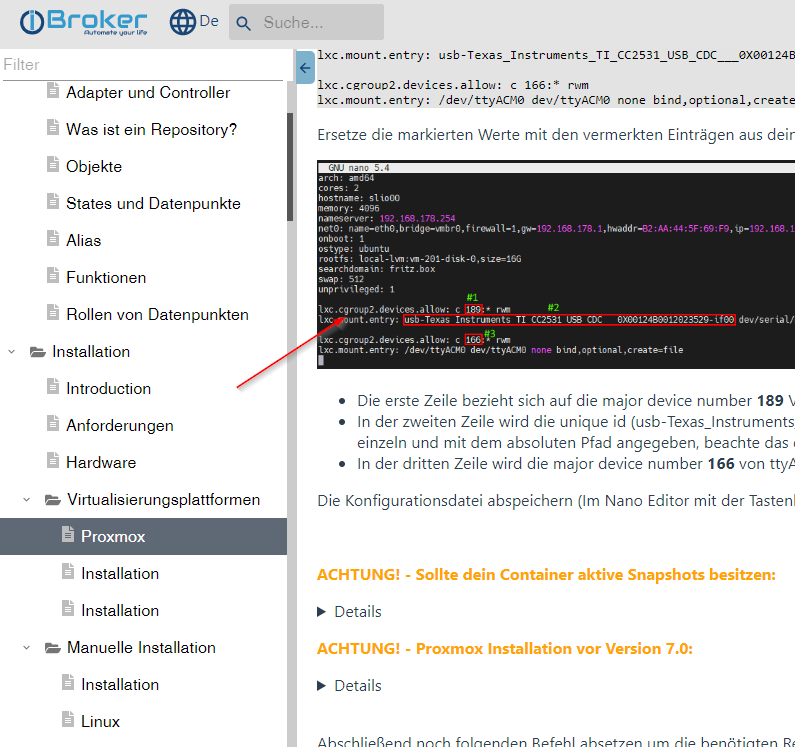
@nordischerjung kommt darauf an, was du alles in proxmox laufen hast, in deinem Fall, beim durchreichen eines Sticks in iobroker LXC, siehe https://www.iobroker.net/#de/documentation/install/proxmox.md
-
@nordischerjung kommt darauf an, was du alles in proxmox laufen hast, in deinem Fall, beim durchreichen eines Sticks in iobroker LXC, siehe https://www.iobroker.net/#de/documentation/install/proxmox.md
@crunchip das habe ich da alles nicht drin stehen. Ich habe auch kein USB den ich durchreiche
Gruß Nordischerjung
sonnige Grüße von der Ostsee
-
@nordischerjung
LogRotate ist Standard für die Log Files.
Nutz dir aber nix wenn da sturzbachartig Meldungen reinprasseln. Da muss man halt mal reinschauen warum das so ist.@thomas-braun Moin, ich habe die Syslog mal runtergeladen, die ist komplett vol mit dem hier (ist nur ein Ausschnitt, ist immer so ein ganzer Block mit influx)
Sep 28 08:30:23 iOBroker influxd-systemd-start.sh[182]: [httpd] 127.0.0.1 - admin [28/Sep/2022:08:30:23 +0200] "POST /write?database=iobroker&db=iobroker&p=%5BREDACTED%5D&precision=ms&u=admin HTTP/1.1 " 204 0 "-" "-" 07fc50fc-3ef7-11ed-b728-72560074c759 2358
Sep 28 08:30:23 iOBroker influxd-systemd-start.sh[182]: ts=2022-09-28T06:30:23.888800Z lvl=info msg="Executing query" log_id=0dBbw97l000 service=query query="SELECT value FROM iobroker.global.\"s7.0.Markers.22.Ist_Temp_Vor_Wint_li\" WHERE time <= '2022-09-25T07:00:00.000Z' ORDER BY time DESC LIMIT 1"
Sep 28 08:30:23 iOBroker influxd-systemd-start.sh[182]: ts=2022-09-28T06:30:23.894495Z lvl=info msg="Executing query" log_id=0dBbw97l000 service=query query="SELECT * FROM iobroker.global.\"s7.0.Markers.22.Ist_Temp_Vor_Wint_li\" WHERE time > '2022-09-25T07:00:00.000Z' AND time < '2022-09-28T07:00:00.000Z' ORDER BY time ASC"
Sep 28 08:30:24 iOBroker influxd-systemd-start.sh[182]: ts=2022-09-28T06:30:24.037551Z lvl=info msg="Executing query" log_id=0dBbw97l000 service=query query="SELECT value FROM iobroker.global.\"s7.0.Markers.22.Ist_Temp_Vor_Wint_li\" WHERE time >= '2022-09-28T07:00:00.000Z' LIMIT 1"
Sep 28 08:30:24 iOBroker influxd-systemd-start.sh[182]: [httpd] 127.0.0.1 - admin [28/Sep/2022:08:30:23 +0200] "GET /query?db=iobroker&p=%5BREDACTED%5D&precision=ms&q=SELECT+value+from+%22s7.0.Markers.22.Ist_Temp_Vor_Wint_li%22+WHERE+time+%3C%3D+%272022-09-25T07%3A00%3A00.000Z%27+ORDER+BY+time+DESC+LIMIT+1%3BSELECT+%2A+from+%22s7.0.Markers.22.Ist_Temp_Vor_Wint_li%22+WHERE++time+%3E+%272022-09-25T07%3A00%3A00.000Z%27+AND++time+%3C+%272022-09-28T07%3A00%3A00.000Z%27+ORDER+BY+time+ASC%3BSELECT+value+from+%22s7.0.Markers.22.Ist_Temp_Vor_Wint_li%22+WHERE+time+%3E%3D+%272022-09-28T07%3A00%3A00.000Z%27+LIMIT+1&u=admin HTTP/1.1" 200 2926267 "-" "-" 08812fae-3ef7-11ed-b729-72560074c759 535085
Sep 28 08:30:24 iOBroker influxd-systemd-start.sh[182]: ts=2022-09-28T06:30:24.830036Z lvl=info msg="Executing query" log_id=0dBbw97l000 service=query query="SELECT value FROM iobroker.global.\"s7.0.Markers.26.Ist_Temp_Rueck_Wint_li\" WHERE time <= '2022-09-25T07:00:00.000Z' ORDER BY time DESC LIMIT 1"
Sep 28 08:30:24 iOBroker influxd-systemd-start.sh[182]: ts=2022-09-28T06:30:24.836450Z lvl=info msg="Executing query" log_id=0dBbw97l000 service=query query="SELECT * FROM iobroker.global.\"s7.0.Markers.26.Ist_Temp_Rueck_Wint_li\" WHERE time > '2022-09-25T07:00:00.000Z' AND time < '2022-09-28T07:00:00.000Z' ORDER BY time ASC"
Sep 28 08:30:24 iOBroker influxd-systemd-start.sh[182]: ts=2022-09-28T06:30:24.990065Z lvl=info msg="Executing query" log_id=0dBbw97l000 service=query query="SELECT value FROM iobroker.global.\"s7.0.Markers.26.Ist_Temp_Rueck_Wint_li\" WHERE time >= '2022-09-28T07:00:00.000Z' LIMIT 1"
oder so etwas so immer ca. 800 Zeilen von 07:30:03 - 07:30:20 zB
Sep 28 07:30:18 iOBroker bash[18027]: Using TZID without Luxon available is unsupported. Returned times are in UTC, not the requested time zone
Sep 28 07:30:18 iOBroker bash[18027]: Using TZID without Luxon available is unsupported. Returned times are in UTC, not the requested time zone
Sep 28 07:30:18 iOBroker bash[18027]: Using TZID without Luxon available is unsupported. Returned times are in UTC, not the requested time zone
Sep 28 07:30:18 iOBroker bash[18027]: Using TZID without Luxon available is unsupported. Returned times are in UTC, not the requested time zone
Sep 28 07:30:18 iOBroker bash[18027]: Using TZID without Luxon available is unsupported. Returned times are in UTC, not the requested time zone
Sep 28 07:30:18 iOBroker bash[18027]: Using TZID without Luxon available is unsupported. Returned times are in UTC, not the requested time zone
Sep 28 07:30:18 iOBroker bash[18027]: Using TZID without Luxon available is unsupported. Returned times are in UTC, not the requested time zone
Sep 28 07:30:18 iOBroker bash[18027]: Using TZID without Luxon available is unsupported. Returned times are in UTC, not the requested time zone
Gruß Nordischerjung
sonnige Grüße von der Ostsee
-
@crunchip das habe ich da alles nicht drin stehen. Ich habe auch kein USB den ich durchreiche
@nordischerjung dann hast du diesbezüglich auch kein Problem beim umstellen auf v7, bleibt die Frage noch offen was sonst noch auf deinem proxmox läuft
-
@thomas-braun Moin, ich habe die Syslog mal runtergeladen, die ist komplett vol mit dem hier (ist nur ein Ausschnitt, ist immer so ein ganzer Block mit influx)
Sep 28 08:30:23 iOBroker influxd-systemd-start.sh[182]: [httpd] 127.0.0.1 - admin [28/Sep/2022:08:30:23 +0200] "POST /write?database=iobroker&db=iobroker&p=%5BREDACTED%5D&precision=ms&u=admin HTTP/1.1 " 204 0 "-" "-" 07fc50fc-3ef7-11ed-b728-72560074c759 2358
Sep 28 08:30:23 iOBroker influxd-systemd-start.sh[182]: ts=2022-09-28T06:30:23.888800Z lvl=info msg="Executing query" log_id=0dBbw97l000 service=query query="SELECT value FROM iobroker.global.\"s7.0.Markers.22.Ist_Temp_Vor_Wint_li\" WHERE time <= '2022-09-25T07:00:00.000Z' ORDER BY time DESC LIMIT 1"
Sep 28 08:30:23 iOBroker influxd-systemd-start.sh[182]: ts=2022-09-28T06:30:23.894495Z lvl=info msg="Executing query" log_id=0dBbw97l000 service=query query="SELECT * FROM iobroker.global.\"s7.0.Markers.22.Ist_Temp_Vor_Wint_li\" WHERE time > '2022-09-25T07:00:00.000Z' AND time < '2022-09-28T07:00:00.000Z' ORDER BY time ASC"
Sep 28 08:30:24 iOBroker influxd-systemd-start.sh[182]: ts=2022-09-28T06:30:24.037551Z lvl=info msg="Executing query" log_id=0dBbw97l000 service=query query="SELECT value FROM iobroker.global.\"s7.0.Markers.22.Ist_Temp_Vor_Wint_li\" WHERE time >= '2022-09-28T07:00:00.000Z' LIMIT 1"
Sep 28 08:30:24 iOBroker influxd-systemd-start.sh[182]: [httpd] 127.0.0.1 - admin [28/Sep/2022:08:30:23 +0200] "GET /query?db=iobroker&p=%5BREDACTED%5D&precision=ms&q=SELECT+value+from+%22s7.0.Markers.22.Ist_Temp_Vor_Wint_li%22+WHERE+time+%3C%3D+%272022-09-25T07%3A00%3A00.000Z%27+ORDER+BY+time+DESC+LIMIT+1%3BSELECT+%2A+from+%22s7.0.Markers.22.Ist_Temp_Vor_Wint_li%22+WHERE++time+%3E+%272022-09-25T07%3A00%3A00.000Z%27+AND++time+%3C+%272022-09-28T07%3A00%3A00.000Z%27+ORDER+BY+time+ASC%3BSELECT+value+from+%22s7.0.Markers.22.Ist_Temp_Vor_Wint_li%22+WHERE+time+%3E%3D+%272022-09-28T07%3A00%3A00.000Z%27+LIMIT+1&u=admin HTTP/1.1" 200 2926267 "-" "-" 08812fae-3ef7-11ed-b729-72560074c759 535085
Sep 28 08:30:24 iOBroker influxd-systemd-start.sh[182]: ts=2022-09-28T06:30:24.830036Z lvl=info msg="Executing query" log_id=0dBbw97l000 service=query query="SELECT value FROM iobroker.global.\"s7.0.Markers.26.Ist_Temp_Rueck_Wint_li\" WHERE time <= '2022-09-25T07:00:00.000Z' ORDER BY time DESC LIMIT 1"
Sep 28 08:30:24 iOBroker influxd-systemd-start.sh[182]: ts=2022-09-28T06:30:24.836450Z lvl=info msg="Executing query" log_id=0dBbw97l000 service=query query="SELECT * FROM iobroker.global.\"s7.0.Markers.26.Ist_Temp_Rueck_Wint_li\" WHERE time > '2022-09-25T07:00:00.000Z' AND time < '2022-09-28T07:00:00.000Z' ORDER BY time ASC"
Sep 28 08:30:24 iOBroker influxd-systemd-start.sh[182]: ts=2022-09-28T06:30:24.990065Z lvl=info msg="Executing query" log_id=0dBbw97l000 service=query query="SELECT value FROM iobroker.global.\"s7.0.Markers.26.Ist_Temp_Rueck_Wint_li\" WHERE time >= '2022-09-28T07:00:00.000Z' LIMIT 1"
oder so etwas so immer ca. 800 Zeilen von 07:30:03 - 07:30:20 zB
Sep 28 07:30:18 iOBroker bash[18027]: Using TZID without Luxon available is unsupported. Returned times are in UTC, not the requested time zone Sep 28 07:30:18 iOBroker bash[18027]: Using TZID without Luxon available is unsupported. Returned times are in UTC, not the requested time zone Sep 28 07:30:18 iOBroker bash[18027]: Using TZID without Luxon available is unsupported. Returned times are in UTC, not the requested time zone Sep 28 07:30:18 iOBroker bash[18027]: Using TZID without Luxon available is unsupported. Returned times are in UTC, not the requested time zone Sep 28 07:30:18 iOBroker bash[18027]: Using TZID without Luxon available is unsupported. Returned times are in UTC, not the requested time zone Sep 28 07:30:18 iOBroker bash[18027]: Using TZID without Luxon available is unsupported. Returned times are in UTC, not the requested time zone Sep 28 07:30:18 iOBroker bash[18027]: Using TZID without Luxon available is unsupported. Returned times are in UTC, not the requested time zone Sep 28 07:30:18 iOBroker bash[18027]: Using TZID without Luxon available is unsupported. Returned times are in UTC, not the requested time zone@nordischerjung hast du die Systemzeit im LXC angepasst?
dpkg-reconfigure tzdata -
@nordischerjung dann hast du diesbezüglich auch kein Problem beim umstellen auf v7, bleibt die Frage noch offen was sonst noch auf deinem proxmox läuft
@crunchip sagte in iOBroker im LXC keine Verbindung mehr:
@nordischerjung dann hast du diesbezüglich auch kein Problem beim umstellen auf v7, bleibt die Frage noch offen was sonst noch auf deinem proxmox läuft
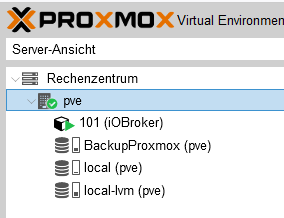
Nichts weiter, nur der eine LXC
Gruß Nordischerjung
sonnige Grüße von der Ostsee
-
@nordischerjung hast du die Systemzeit im LXC angepasst?
dpkg-reconfigure tzdata@crunchip sagte in iOBroker im LXC keine Verbindung mehr:
@nordischerjung hast du die Systemzeit im LXC angepasst?
dpkg-reconfigure tzdataJa die stand auf Europa / Berlin
-
@crunchip sagte in iOBroker im LXC keine Verbindung mehr:
@nordischerjung dann hast du diesbezüglich auch kein Problem beim umstellen auf v7, bleibt die Frage noch offen was sonst noch auf deinem proxmox läuft
Nichts weiter, nur der eine LXC
@nordischerjung dann mach das upgrade auf 7
-
@nordischerjung dann mach das upgrade auf 7
@crunchip ok, werde ich dann mal angehen. Aber wie bekomme ich denn jetzt diese syslog und daemon.log kleiner? syslog habe ich schon versucht am PC den Inhalt gelöscht und dann per Filezilla wieder zurück, geht nicht, zugriff verweigert, vermutlich da sie in Benutzung ist. die daemon.log kann ich nicht auf den PC übertragen, zugriff verweigert.
Gruß Nordischerjung
sonnige Grüße von der Ostsee
-
@crunchip ok, werde ich dann mal angehen. Aber wie bekomme ich denn jetzt diese syslog und daemon.log kleiner? syslog habe ich schon versucht am PC den Inhalt gelöscht und dann per Filezilla wieder zurück, geht nicht, zugriff verweigert, vermutlich da sie in Benutzung ist. die daemon.log kann ich nicht auf den PC übertragen, zugriff verweigert.
@nordischerjung sagte in iOBroker im LXC keine Verbindung mehr:
Aber wie bekomme ich denn jetzt diese syslog und daemon.log kleiner?
mit
sudo cat /dev/null > /var/log/syslogwär' das erstmal auf "Dateigrösse 0"; dann am besten mal schauen, ob es in ''/etc/logrotate.d/rsyslog'' einen Eintrag für ''/var/log/syslog'' gibt (sollte es immer). Normalerweise steht das auf "daily", d.h. das Log wird jeden Tag wegrotiert...
-
@nordischerjung sagte in iOBroker im LXC keine Verbindung mehr:
Aber wie bekomme ich denn jetzt diese syslog und daemon.log kleiner?
mit
sudo cat /dev/null > /var/log/syslogwär' das erstmal auf "Dateigrösse 0"; dann am besten mal schauen, ob es in ''/etc/logrotate.d/rsyslog'' einen Eintrag für ''/var/log/syslog'' gibt (sollte es immer). Normalerweise steht das auf "daily", d.h. das Log wird jeden Tag wegrotiert...
@jleg sagte in iOBroker im LXC keine Verbindung mehr:
sudo cat /dev/null > /var/log/syslog
/var/log/syslog
/var/log/mail.info
/var/log/mail.warn
/var/log/mail.err
/var/log/mail.log
/var/log/daemon.log
/var/log/kern.log
/var/log/auth.log
/var/log/user.log
/var/log/lpr.log
/var/log/cron.log
/var/log/debug
/var/log/messages
{
	rotate 4
	weekly
	missingok
	notifempty
	compress
	delaycompress
	sharedscripts
	postrotate
		/usr/lib/rsyslog/rsyslog-rotate
	endscript
}
da steht weekly, kann ich das ändern? Aber in meiner syslog sind ab 03.Januar drin
Gruß Nordischerjung
sonnige Grüße von der Ostsee
-
@nordischerjung sagte in iOBroker im LXC keine Verbindung mehr:
Aber wie bekomme ich denn jetzt diese syslog und daemon.log kleiner?
mit
sudo cat /dev/null > /var/log/syslogwär' das erstmal auf "Dateigrösse 0"; dann am besten mal schauen, ob es in ''/etc/logrotate.d/rsyslog'' einen Eintrag für ''/var/log/syslog'' gibt (sollte es immer). Normalerweise steht das auf "daily", d.h. das Log wird jeden Tag wegrotiert...
@jleg sagte in iOBroker im LXC keine Verbindung mehr:
sudo cat /dev/null > /var/log/syslog
sb@iOBroker:~$ sudo cat /dev/null > /var/log/syslog
-bash: /var/log/syslog: Permission denied
geht auch nicht
-
@jleg sagte in iOBroker im LXC keine Verbindung mehr:
sudo cat /dev/null > /var/log/syslog
/var/log/syslog
/var/log/mail.info
/var/log/mail.warn
/var/log/mail.err
/var/log/mail.log
/var/log/daemon.log
/var/log/kern.log
/var/log/auth.log
/var/log/user.log
/var/log/lpr.log
/var/log/cron.log
/var/log/debug
/var/log/messages
{
	rotate 4
	weekly
	missingok
	notifempty
	compress
	delaycompress
	sharedscripts
	postrotate
		/usr/lib/rsyslog/rsyslog-rotate
	endscript
}
da steht weekly, kann ich das ändern? Aber in meiner syslog sind ab 03.Januar drin
@nordischerjung normalerweise sollten 7 Tage genügen - ist glaube ich auch Debian-Default:
rotate 7
daily
damit werden die Logs jeden Tag rotiert - und komprimiert. Sollte das nicht der Fall sein, müsstest du mal schauen, ob Logrotate überhaupt funktioniert. Erstest: "sudo logrotate /etc/logrotate.conf" sollte ohne Fehler aufgerufen werden können...
-
@nordischerjung normalerweise sollten 7 Tage genügen - ist glaube ich auch Debian-Default:
rotate 7
daily
damit werden die Logs jeden Tag rotiert - und komprimiert. Sollte das nicht der Fall sein, müsstest du mal schauen, ob Logrotate überhaupt funktioniert. Erstest: "sudo logrotate /etc/logrotate.conf" sollte ohne Fehler aufgerufen werden können...
@jleg sagte in iOBroker im LXC keine Verbindung mehr:
sudo logrotate /etc/logrotate.conf
da kommt das
sb@iOBroker:~$ sudo logrotate /etc/logrotate.conf
sb@iOBroker:~$
bei sudo systemctl status rsyslog das
sb@iOBroker:~$ sudo systemctl status rsyslog
[sudo] password for sb:
* rsyslog.service - System Logging Service
     Loaded: loaded (/lib/systemd/system/rsyslog.service; enabled; vendor prese>
     Active: active (running) since Tue 2022-09-27 12:10:04 CEST; 22h ago
TriggeredBy: * syslog.socket
       Docs: man:rsyslogd(8)
             man:rsyslog.conf(5)
             https://www.rsyslog.com/doc/
   Main PID: 117 (rsyslogd)
      Tasks: 3 (limit: 4915)
     Memory: 26.4M
     CGroup: /system.slice/rsyslog.service
             `-117 /usr/sbin/rsyslogd -n -iNONE

Sep 27 12:10:04 iOBroker systemd[1]: Starting System Logging Service...
Sep 27 12:10:04 iOBroker rsyslogd[117]: imuxsock: Acquired UNIX socket '/run/sy>
Sep 27 12:10:04 iOBroker rsyslogd[117]: imklog: cannot open kernel log (/proc/k>
Sep 27 12:10:04 iOBroker systemd[1]: Started System Logging Service.
Sep 27 12:10:04 iOBroker rsyslogd[117]: activation of module imklog failed [v8.>
Sep 27 12:10:04 iOBroker rsyslogd[117]: [origin software="rsyslogd" swVersion=">
lines 1-19/19 (END)...skipping...
* rsyslog.service - System Logging Service
     Loaded: loaded (/lib/systemd/system/rsyslog.service; enabled; vendor preset: enabled)
     Active: active (running) since Tue 2022-09-27 12:10:04 CEST; 22h ago
TriggeredBy: * syslog.socket
       Docs: man:rsyslogd(8)
             man:rsyslog.conf(5)
             https://www.rsyslog.com/doc/
   Main PID: 117 (rsyslogd)
      Tasks: 3 (limit: 4915)
     Memory: 26.4M
     CGroup: /system.slice/rsyslog.service
             `-117 /usr/sbin/rsyslogd -n -iNONE

Sep 27 12:10:04 iOBroker systemd[1]: Starting System Logging Service...
Sep 27 12:10:04 iOBroker rsyslogd[117]: imuxsock: Acquired UNIX socket '/run/systemd/journal/syslog' (fd 3) from systemd.  [v8.2102.0]
Sep 27 12:10:04 iOBroker rsyslogd[117]: imklog: cannot open kernel log (/proc/kmsg): Permission denied.
Sep 27 12:10:04 iOBroker systemd[1]: Started System Logging Service.
Sep 27 12:10:04 iOBroker rsyslogd[117]: activation of module imklog failed [v8.2102.0 try https://www.rsyslog.com/e/2145 ]
Sep 27 12:10:04 iOBroker rsyslogd[117]: [origin software="rsyslogd" swVersion="8.2102.0" x-pid="117" x-info="https://www.rsyslog.com"] start
Gruß Nordischerjung
sonnige Grüße von der Ostsee
-
@nordischerjung normalerweise sollten 7 Tage genügen - ist glaube ich auch Debian-Default:
rotate 7
daily
damit werden die Logs jeden Tag rotiert - und komprimiert. Sollte das nicht der Fall sein, müsstest du mal schauen, ob Logrotate überhaupt funktioniert. Erstest: "sudo logrotate /etc/logrotate.conf" sollte ohne Fehler aufgerufen werden können...
@jleg sagte in iOBroker im LXC keine Verbindung mehr:
@nordischerjung normalerweise sollten 7 Tage genügen - ist glaube ich auch Debian-Default:
rotate 7
daily
damit werden die Logs jeden Tag rotiert - und komprimiert. Sollte das nicht der Fall sein, müsstest du mal schauen, ob Logrotate überhaupt funktioniert. Erstest: "sudo logrotate /etc/logrotate.conf" sollte ohne Fehler aufgerufen werden können...
geht nicht, keine Berechtigung. Habe es mit nano probiert und mit Filezilla. Die Rechte kann ich auch nicht ändern
Gruß Nordischerjung
sonnige Grüße von der Ostsee
-
@jleg sagte in iOBroker im LXC keine Verbindung mehr:
sudo logrotate /etc/logrotate.conf
da kommt das
sb@iOBroker:~$ sudo logrotate /etc/logrotate.conf
sb@iOBroker:~$
bei sudo systemctl status rsyslog das
sb@iOBroker:~$ sudo systemctl status rsyslog [sudo] password for sb: * rsyslog.service - System Logging Service Loaded: loaded (/lib/systemd/system/rsyslog.service; enabled; vendor prese> Active: active (running) since Tue 2022-09-27 12:10:04 CEST; 22h ago TriggeredBy: * syslog.socket Docs: man:rsyslogd(8) man:rsyslog.conf(5) https://www.rsyslog.com/doc/ Main PID: 117 (rsyslogd) Tasks: 3 (limit: 4915) Memory: 26.4M CGroup: /system.slice/rsyslog.service `-117 /usr/sbin/rsyslogd -n -iNONE Sep 27 12:10:04 iOBroker systemd[1]: Starting System Logging Service... Sep 27 12:10:04 iOBroker rsyslogd[117]: imuxsock: Acquired UNIX socket '/run/sy> Sep 27 12:10:04 iOBroker rsyslogd[117]: imklog: cannot open kernel log (/proc/k> Sep 27 12:10:04 iOBroker systemd[1]: Started System Logging Service. Sep 27 12:10:04 iOBroker rsyslogd[117]: activation of module imklog failed [v8.> Sep 27 12:10:04 iOBroker rsyslogd[117]: [origin software="rsyslogd" swVersion="> lines 1-19/19 (END)...skipping... * rsyslog.service - System Logging Service Loaded: loaded (/lib/systemd/system/rsyslog.service; enabled; vendor preset: enabled) Active: active (running) since Tue 2022-09-27 12:10:04 CEST; 22h ago TriggeredBy: * syslog.socket Docs: man:rsyslogd(8) man:rsyslog.conf(5) https://www.rsyslog.com/doc/ Main PID: 117 (rsyslogd) Tasks: 3 (limit: 4915) Memory: 26.4M CGroup: /system.slice/rsyslog.service `-117 /usr/sbin/rsyslogd -n -iNONE Sep 27 12:10:04 iOBroker systemd[1]: Starting System Logging Service... Sep 27 12:10:04 iOBroker rsyslogd[117]: imuxsock: Acquired UNIX socket '/run/systemd/journal/syslog' (fd 3) from systemd. [v8.2102.0] Sep 27 12:10:04 iOBroker rsyslogd[117]: imklog: cannot open kernel log (/proc/kmsg): Permission denied. Sep 27 12:10:04 iOBroker systemd[1]: Started System Logging Service. Sep 27 12:10:04 iOBroker rsyslogd[117]: activation of module imklog failed [v8.2102.0 try https://www.rsyslog.com/e/2145 ] Sep 27 12:10:04 iOBroker rsyslogd[117]: [origin software="rsyslogd" swVersion="8.2102.0" x-pid="117" x-info="https://www.rsyslog.com"] start@nordischerjung sagte in iOBroker im LXC keine Verbindung mehr:
@jleg sagte in iOBroker im LXC keine Verbindung mehr:
sudo logrotate /etc/logrotate.conf
da kommt das
sb@iOBroker:~$ sudo logrotate /etc/logrotate.conf
sb@iOBroker:~$
das heisst schonmal, dass logrotate kein grundsätzliches (syntax-) Problem hat...
bei sudo systemctl status rsyslog das
sieht imo erstmal normal aus - ich nehme an, hier geht es um einen unprivilegierten LXC - der darf nicht auf's Kernellog zugreifen. Um die Fehlermeldung zu vermeiden, könnte man das erwähnte Modul imklog aus der rsyslog-Config entfernen...
-
@jleg sagte in iOBroker im LXC keine Verbindung mehr:
@nordischerjung normalerweise sollten 7 Tage genügen - ist glaube ich auch Debian-Default:
rotate 7
daily
damit werden die Logs jeden Tag rotiert - und komprimiert. Sollte das nicht der Fall sein, müsstest du mal schauen, ob Logrotate überhaupt funktioniert. Erstest: "sudo logrotate /etc/logrotate.conf" sollte ohne Fehler aufgerufen werden können...
geht nicht, keine Berechtigung. Habe es mit nano probiert und mit Filezilla. Die Rechte kann ich auch nicht ändern
@nordischerjung sagte in iOBroker im LXC keine Verbindung mehr:
geht nicht, keine Berechtigung. Habe es mit nano probiert und mit Filezilla. Die Rechte kann ich auch nicht ändern
was geht nicht? /etc/logrotate.d/rsyslog ändern? das ist als root (bzw. sudo) änderbar...



Hey! Du scheinst an dieser Unterhaltung interessiert zu sein, hast aber noch kein Konto.
Hast du es satt, bei jedem Besuch durch die gleichen Beiträge zu scrollen? Wenn du dich für ein Konto anmeldest, kommst du immer genau dorthin zurück, wo du zuvor warst, und kannst dich über neue Antworten benachrichtigen lassen (entweder per E-Mail oder Push-Benachrichtigung). Du kannst auch Lesezeichen speichern und Beiträge positiv bewerten, um anderen Community-Mitgliedern deine Wertschätzung zu zeigen.
Mit deinem Input könnte dieser Beitrag noch besser werden 💗
Registrieren Anmelden451
Online33.0k
Benutzer83.5k
Themen1.3m
Beiträge