




SONOFF NSPanel mit Lovelace UI (TypeScript Version)
-
Hallo zusammen.
ich bin von der Version 4.0.4 gekommen.
Bei mir ging auch gar nix mehr, habe dann Tasmota/Dispaly/Script aktualisiert.
Das Display dreht und wartet auf Content.
Leider erhalte ich im Script noch folgenden Fehler. Keine Anhnung wo ich ansetzten soll.22.9.2023, 16:57:33.628 [info ]: javascript.0 (2218329) script.js.Skripte.Geräte.NSPanel1_-_4_2_1_-_neu1: compiling TypeScript source... 22.9.2023, 16:57:34.361 [error]: javascript.0 (2218329) script.js.Skripte.Geräte.NSPanel1_-_4_2_1_-_neu1: TypeScript compilation failed: export const config = <Config>{ ^ ERROR: Conversion of type '{ panelRecvTopic: string; panelSendTopic: string; leftScreensaverEntity: undefined[]; bottomScreensaverEntity: ({ ScreensaverEntity: string; ScreensaverEntityFactor: number; ScreensaverEntityDecimalPlaces: number; ... 5 more ...; ScreensaverEntityIconColor: RGB; } | { ...; } | { ...; })[]; ... 11 more ...; button2Pa...' to type 'Config' may be a mistake because neither type sufficiently overlaps with the other. If this was intentional, convert the expression to 'unknown' first. Type '{ panelRecvTopic: string; panelSendTopic: string; leftScreensaverEntity: undefined[]; bottomScreensaverEntity: ({ ScreensaverEntity: string; ScreensaverEntityFactor: number; ScreensaverEntityDecimalPlaces: number; ... 5 more ...; ScreensaverEntityIconColor: RGB; } | { ...; } | { ...; })[]; ... 11 more ...; button2Pa...' is missing the following properties from type 'Config': button1, button2Irgendwas scheint da auch mit CustomSend nicht zu passen. Der schreibt nichts darein in MQTT-Adapter Objekte. Habe den Datenpunkt auch mal gelöscht und neu Angelegt. Bei State und Tele wird aktualisiert! ???
Vielleicht kann mir jemand helfen. Gruß
sieht aus, als wäre da einiges im Variablenbereich durcheinander gekommen...
Am Besten nimmst du das Script ohne Beispiele:
https://github.com/joBr99/nspanel-lovelace-ui/blob/main/ioBroker/NsPanelTs_without_Examples.tsDann passt du die gleichen Parameter wie im Beitrag oben drüber an...
Das Script und das NSPanel sollte damit bereits laufen.
Danach eine Seiten-Variable nach der anderen in das neue Script ziehen...
-
sieht aus, als wäre da einiges im Variablenbereich durcheinander gekommen...
Am Besten nimmst du das Script ohne Beispiele:
https://github.com/joBr99/nspanel-lovelace-ui/blob/main/ioBroker/NsPanelTs_without_Examples.tsDann passt du die gleichen Parameter wie im Beitrag oben drüber an...
Das Script und das NSPanel sollte damit bereits laufen.
Danach eine Seiten-Variable nach der anderen in das neue Script ziehen...
Normalerweise ist das ohne Examples gewesen. Hatte halt nur meine Seiten eingefügt. Werde ich aber nochmals versuchen. Danke für deine schnelle Antwort
Update: Hat geklappt, Content kommt wieder. Nur der Update Prozess nach 5 Monaten, fängt man wieder von vorne an.
Danke für eure Hilfbereitschaft und das mega Projekt
-
Hallo zusammen,
ich habe mittlerweile eine Reihe von Seiten im NSPanel laufen und bin begeistert. Vielen Dank für die vielen Tipps und Unterstützungen hier im Forum.Aktuell würde ich gerne im ScreensaverAdvanced eine Anzeige einrichten, die mir den Ladestand meiner PV Batterie anzeigt. Ich habe da bereits ein wenig "gebastelt" allerdings nicht sehr erfolgreich. (ScreensaverEntity 4 klappt soweit, nur als Beispiel dabei)
Falls jemand etwas ähnliches gemacht haben sollte oder eine Idee hat, wie es besser gehen würde würde ich mich über eine Hilfe freuen.// indicatorScreensaverEntity 4 (only Advanced Screensaver) { ScreensaverEntity: 'worx.0.202230267109009939B8.mower.state', ScreensaverEntityFactor: 1, ScreensaverEntityDecimalPlaces: 0, ScreensaverEntityIconOn: 'robot-mower-outline', ScreensaverEntityIconOff: null, ScreensaverEntityText: 'Mäher', ScreensaverEntityUnitText: '%', ScreensaverEntityIconColor: { 'val_min': 0, 'val_max': 1 } }, // indicatorScreensaverEntity 5 (only Advanced Screensaver) { ScreensaverEntity: 'plenticore.0.devices.local.battery.SoC', ScreensaverEntityFactor: 1, ScreensaverEntityDecimalPlaces: 1, ScreensaverEntityIconOn: 'battery-arrow-up', ScreensaverEntityIconOff: null, ScreensaverEntityText: 'Leistung', ScreensaverEntityUnitText: '%', ScreensaverEntityIconColor: {'val_min': 0, 'val_max': 100, 'val_best': 100}Ich muss gestehen, dass ich bisher nicht wirklich verstanden habe, was die einzelnen Einträge in der Entity für Auswirkungen haben. In den meisten Fällen war aber das, was in den Beispielen steht gut nutzbar.
In den Objekten ist der Eintrag .local.battery.SoC als Prozentwert dargestellt. Ich hatte gedacht, dass je nach Batterie-Füllstand sich die Farbe des Icon ändert oder irgend eine proz. Veränderung auftreten würde. :confounded: Es tut sich aber nichts.
Vielen Dank für eventuelle Tipps und Hinweise, wie es besser zu machen wäre. -
Hallo zusammen,
ich habe mittlerweile eine Reihe von Seiten im NSPanel laufen und bin begeistert. Vielen Dank für die vielen Tipps und Unterstützungen hier im Forum.Aktuell würde ich gerne im ScreensaverAdvanced eine Anzeige einrichten, die mir den Ladestand meiner PV Batterie anzeigt. Ich habe da bereits ein wenig "gebastelt" allerdings nicht sehr erfolgreich. (ScreensaverEntity 4 klappt soweit, nur als Beispiel dabei)
Falls jemand etwas ähnliches gemacht haben sollte oder eine Idee hat, wie es besser gehen würde würde ich mich über eine Hilfe freuen.// indicatorScreensaverEntity 4 (only Advanced Screensaver) { ScreensaverEntity: 'worx.0.202230267109009939B8.mower.state', ScreensaverEntityFactor: 1, ScreensaverEntityDecimalPlaces: 0, ScreensaverEntityIconOn: 'robot-mower-outline', ScreensaverEntityIconOff: null, ScreensaverEntityText: 'Mäher', ScreensaverEntityUnitText: '%', ScreensaverEntityIconColor: { 'val_min': 0, 'val_max': 1 } }, // indicatorScreensaverEntity 5 (only Advanced Screensaver) { ScreensaverEntity: 'plenticore.0.devices.local.battery.SoC', ScreensaverEntityFactor: 1, ScreensaverEntityDecimalPlaces: 1, ScreensaverEntityIconOn: 'battery-arrow-up', ScreensaverEntityIconOff: null, ScreensaverEntityText: 'Leistung', ScreensaverEntityUnitText: '%', ScreensaverEntityIconColor: {'val_min': 0, 'val_max': 100, 'val_best': 100}Ich muss gestehen, dass ich bisher nicht wirklich verstanden habe, was die einzelnen Einträge in der Entity für Auswirkungen haben. In den meisten Fällen war aber das, was in den Beispielen steht gut nutzbar.
In den Objekten ist der Eintrag .local.battery.SoC als Prozentwert dargestellt. Ich hatte gedacht, dass je nach Batterie-Füllstand sich die Farbe des Icon ändert oder irgend eine proz. Veränderung auftreten würde. :confounded: Es tut sich aber nichts.
Vielen Dank für eventuelle Tipps und Hinweise, wie es besser zu machen wäre.@manylopmy sagte in SONOFF NSPanel mit Lovelace UI:
ScreensaverEntityIconColor: {'val_min': 0, 'val_max': 100, 'val_best': 100}
Was passiert wenn du val_best heraus nimmst?
ScreensaverEntityIconColor: {'val_min': 0, 'val_max': 100} -
Du benötigst keine 2. MQTT Instanz!
Es reicht, wenn du das Script kopierst, die MQTT Parameter anpasst und den Pfad für 0_userdata umbenennst, z.B. so:
...
const NSPanel_Path = '0_userdata.0.NSPanel.2.';       // Anpassen an das jeweilige NSPanel
...
export const config = <Config> {
    panelRecvTopic: 'mqtt.0.SmartHome.NSPanel_2.tele.RESULT',       // Bitte anpassen
    panelSendTopic: 'mqtt.0.SmartHome.NSPanel_2.cmnd.CustomSend',   // Bitte anpassen
...
Danach die beiden Button funktionen auf die neuen Devices ändern...
... und fertig
-
Installationsanleitung, Tipps, Alias-Definitionen, FAQ für das Sonoff NSPanel mit lovelace UI unter ioBroker
https://github.com/joBr99/nspanel-lovelace-ui/wikiBenutzt das Voting rechts unten im Beitrag wenn er euch geholfen hat.
-
-
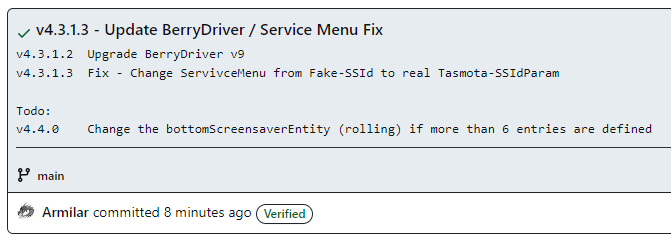
Für den Fall, dass es Probleme beim Upgrade des FlashNextion beim TFT-Upgrade ab Tasmota 13.1.0 gibt, bitte auf den BerryDriver 9 wechseln...
-
Im Service Menü hatte sich ein Fehler eingeschlichen. Dieser hat eine Fake-SSID angezeigt.
Ansonsten gerne trotzdem auf den BerryDriver 9 wechseln und wie immer den unteren Teil ersetzen.
https://github.com/joBr99/nspanel-lovelace-ui/blob/main/ioBroker/NsPanelTs_without_Examples.tsMöglichkeiten für das Berry Driver 9 Update:
Tasmota Konsole:
Backlog UpdateDriverVersion https://raw.githubusercontent.com/joBr99/nspanel-lovelace-ui/main/tasmota/autoexec.be; Restart 1oder per Tasmota Konsolen/Verwalte Dateisystem
autoexec.beundautoexec.beclöschen undautoexec.beneu mit aktueller Version anlegen:
https://github.com/joBr99/nspanel-lovelace-ui/blob/main/tasmota/autoexec.beoder einfach im Service Menü aktualisieren...
--
Für den Fall, dass ihr keine SSID im Service Menü habt, ersetzt ihr einfach die Service Menü Variablen... (Zeilen 781 - 1109 im nachfolgenden Link)
https://github.com/joBr99/nspanel-lovelace-ui/blob/main/ioBroker/NsPanelTs.ts -
-
Hi,
ich habe grade auf Berry 9 geupdatet dabei habe ich gesehen das meine TFT Firmware nicht aktuell ist wenn ich diese updaten möchte bekomme ich diese Fehlermeldung :
08:45:31.076 CMD: FlashNextion http://nspanel.pky.eu/lovelace-ui/github/nspanel-v4.3.1.tft
08:45:31.090 MQT: stat/tasmota_C82F70/RESULT = {"FlashNextion":"Done"}
08:45:31.203 FLH: host: nspanel.pky.eu, port: 80, get: /lovelace-ui/github/nspanel-v4.3.1.tft
08:45:33.384 FLH: Send (High Speed) flash start
08:45:33.736 BRY: Exception> 'type_error' - unsupported operand type(s) for <: 'nil' and 'int'
Installiert habe ich die 4.2.1
Hat da jemand ein Tipp ?
Grüße
-
Hi,
ich habe grade auf Berry 9 geupdatet dabei habe ich gesehen das meine TFT Firmware nicht aktuell ist wenn ich diese updaten möchte bekomme ich diese Fehlermeldung :
08:45:31.076 CMD: FlashNextion http://nspanel.pky.eu/lovelace-ui/github/nspanel-v4.3.1.tft
08:45:31.090 MQT: stat/tasmota_C82F70/RESULT = {"FlashNextion":"Done"}
08:45:31.203 FLH: host: nspanel.pky.eu, port: 80, get: /lovelace-ui/github/nspanel-v4.3.1.tft
08:45:33.384 FLH: Send (High Speed) flash start
08:45:33.736 BRY: Exception> 'type_error' - unsupported operand type(s) for <: 'nil' and 'int'
Installiert habe ich die 4.2.1
Hat da jemand ein Tipp ?
Grüße
@michaelf sagte in SONOFF NSPanel mit Lovelace UI:
Hi,
ich habe grade auf Berry 9 geupdatet dabei habe ich gesehen das meine TFT Firmware nicht aktuell ist wenn ich diese updaten möchte bekomme ich diese Fehlermeldung :08:45:31.076 CMD: FlashNextion http://nspanel.pky.eu/lovelace-ui/github/nspanel-v4.3.1.tft 08:45:31.090 MQT: stat/tasmota_C82F70/RESULT = {"FlashNextion":"Done"} 08:45:31.203 FLH: host: nspanel.pky.eu, port: 80, get: /lovelace-ui/github/nspanel-v4.3.1.tft 08:45:33.384 FLH: Send (High Speed) flash start 08:45:33.736 BRY: Exception> 'type_error' - unsupported operand type(s) for <: 'nil' and 'int'Installiert habe ich die 4.2.1
Hat da jemand ein Tipp ?
Grüße@joBr99 hast du eine Ahnung woran das liegen könnte? Bei mir läuft das super durch...
-
Vielleicht noch als Info was ich grade auf dem Panel gesehen habe was eigentlich normal funktioniert. Ich sehe in den settings keine Berry Version nur die verfügbare und genau das gleiche bei der TFT Version. Also es steht einfach nichts in der Zeile
-
Vielleicht noch als Info was ich grade auf dem Panel gesehen habe was eigentlich normal funktioniert. Ich sehe in den settings keine Berry Version nur die verfügbare und genau das gleiche bei der TFT Version. Also es steht einfach nichts in der Zeile
Installationsanleitung, Tipps, Alias-Definitionen, FAQ für das Sonoff NSPanel mit lovelace UI unter ioBroker
https://github.com/joBr99/nspanel-lovelace-ui/wikiBenutzt das Voting rechts unten im Beitrag wenn er euch geholfen hat.
-
@manylopmy sagte in SONOFF NSPanel mit Lovelace UI:
ScreensaverEntityIconColor: {'val_min': 0, 'val_max': 100, 'val_best': 100}
Was passiert wenn du val_best heraus nimmst?
ScreensaverEntityIconColor: {'val_min': 0, 'val_max': 100}@armilar
Danke für den Hinweis.
val_best habe ich entfernt. Allerdings kann ich (so schnell) keine Änderung feststellen. Das Icon ist weiß, war es vorher auch. Ich weiß allerdings ja nicht bei welchem Füllstand welche Farbe aktiviert wird. Ich warte einmal ab, bis die Batterie wieder langsam leer ist. -
@armilar
Danke für den Hinweis.
val_best habe ich entfernt. Allerdings kann ich (so schnell) keine Änderung feststellen. Das Icon ist weiß, war es vorher auch. Ich weiß allerdings ja nicht bei welchem Füllstand welche Farbe aktiviert wird. Ich warte einmal ab, bis die Batterie wieder langsam leer ist.zeige bitte mal die Objektdaten vom diesem Datenpunkt.
plenticore.0.devices.local.battery.SoCeigentlich sollte das Icon eine Farbe haben und nicht weiss sein.
bei welchem Füllstand welche Farbe aktiviert wird
es wird die Farbskala aus dem Script genutzt.
//Dynamische Indikatoren (Abstufung grün nach gelb nach rot) const colorScale0: RGB = { red: 99, green: 190, blue: 123 }; const colorScale1: RGB = { red: 129, green: 199, blue: 126 }; const colorScale2: RGB = { red: 161, green: 208, blue: 127 }; const colorScale3: RGB = { red: 129, green: 217, blue: 126 }; const colorScale4: RGB = { red: 222, green: 226, blue: 131 }; const colorScale5: RGB = { red: 254, green: 235, blue: 132 }; const colorScale6: RGB = { red: 255, green: 210, blue: 129 }; const colorScale7: RGB = { red: 251, green: 185, blue: 124 }; const colorScale8: RGB = { red: 251, green: 158, blue: 117 }; const colorScale9: RGB = { red: 248, green: 131, blue: 111 }; const colorScale10: RGB = { red: 248, green: 105, blue: 107 }; -
@armilar said in SONOFF NSPanel mit Lovelace UI:
was steht denn darin?

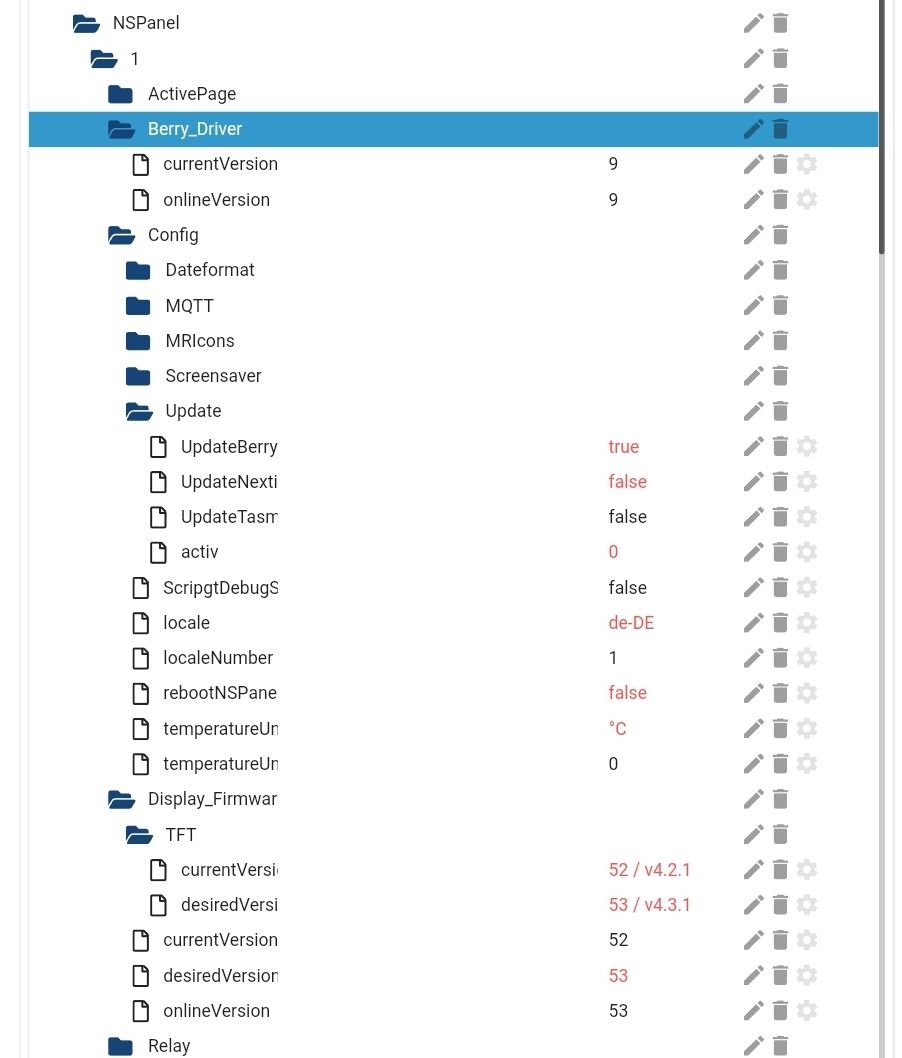
Reicht das Bild, ansonsten mach ich es von meinem Rechner
Grüsse
habe bei mir den Flash mal durchlaufen lassen, ohne Probleme. Hast du den Flash über das Panel gestartet oder auf der Tasmota Consoloe??
10:36:38.914 MQT: SmartHome/NSPanelBüro/stat/RESULT = {"CustomSend":"Done"}
10:36:40.088 CMD: FlashNextion http://nspanel.pky.eu/lovelace-ui/github/nspanel-v4.3.1.tft
10:36:40.103 MQT: SmartHome/NSPanelBüro/stat/RESULT = {"FlashNextion":"Done"}
10:36:40.157 FLH: host: nspanel.pky.eu, port: 80, get: /lovelace-ui/github/nspanel-v4.3.1.tft
10:36:40.710 FLH: Send (High Speed) flash start
10:36:41.103 MQT: SmartHome/NSPanelBüro/tele/RESULT = {"Flashing":{"complete": 0, "time_elapsed": 0}}
10:36:41.586 FLH: host: nspanel.pky.eu, port: 80, get: /lovelace-ui/github/nspanel-v4.3.1.tft
10:36:42.065 MQT: SmartHome/NSPanelBüro/tele/RESULT = {"Flashing":{"complete": 85, "time_elapsed": 1}}
10:36:43.480 MQT: SmartHome/NSPanelBüro/tele/RESULT = {"Flashing":{"complete": 86, "time_elapsed": 2}}
10:36:45.991 MQT: SmartHome/NSPanelBüro/tele/RESULT = {"Flashing":{"complete": 87, "time_elapsed": 5}}
10:36:48.207 MQT: SmartHome/NSPanelBüro/tele/RESULT = {"Flashing":{"complete": 88, "time_elapsed": 7}}
10:36:50.384 MQT: SmartHome/NSPanelBüro/tele/RESULT = {"Flashing":{"complete": 89, "time_elapsed": 9}}
10:36:52.695 MQT: SmartHome/NSPanelBüro/tele/RESULT = {"Flashing":{"complete": 90, "time_elapsed": 11}}
10:36:55.012 MQT: SmartHome/NSPanelBüro/tele/RESULT = {"Flashing":{"complete": 91, "time_elapsed": 14}}
10:36:57.305 MQT: SmartHome/NSPanelBüro/tele/RESULT = {"Flashing":{"complete": 92, "time_elapsed": 16}}
Gruß Tom
https://github.com/tt-tom17
Wenn meine Hilfe erfolgreich war, benutze bitte das Voting unten rechts im BeitragNSPanel Script Wiki
https://github.com/joBr99/nspanel-lovelace-ui/wikiNSPanel Adapter Wiki
https://github.com/ticaki/ioBroker.nspanel-lovelace-ui/wiki -
habe bei mir den Flash mal durchlaufen lassen, ohne Probleme. Hast du den Flash über das Panel gestartet oder auf der Tasmota Consoloe??
10:36:38.914 MQT: SmartHome/NSPanelBüro/stat/RESULT = {"CustomSend":"Done"} 10:36:40.088 CMD: FlashNextion http://nspanel.pky.eu/lovelace-ui/github/nspanel-v4.3.1.tft 10:36:40.103 MQT: SmartHome/NSPanelBüro/stat/RESULT = {"FlashNextion":"Done"} 10:36:40.157 FLH: host: nspanel.pky.eu, port: 80, get: /lovelace-ui/github/nspanel-v4.3.1.tft 10:36:40.710 FLH: Send (High Speed) flash start 10:36:41.103 MQT: SmartHome/NSPanelBüro/tele/RESULT = {"Flashing":{"complete": 0, "time_elapsed": 0}} 10:36:41.586 FLH: host: nspanel.pky.eu, port: 80, get: /lovelace-ui/github/nspanel-v4.3.1.tft 10:36:42.065 MQT: SmartHome/NSPanelBüro/tele/RESULT = {"Flashing":{"complete": 85, "time_elapsed": 1}} 10:36:43.480 MQT: SmartHome/NSPanelBüro/tele/RESULT = {"Flashing":{"complete": 86, "time_elapsed": 2}} 10:36:45.991 MQT: SmartHome/NSPanelBüro/tele/RESULT = {"Flashing":{"complete": 87, "time_elapsed": 5}} 10:36:48.207 MQT: SmartHome/NSPanelBüro/tele/RESULT = {"Flashing":{"complete": 88, "time_elapsed": 7}} 10:36:50.384 MQT: SmartHome/NSPanelBüro/tele/RESULT = {"Flashing":{"complete": 89, "time_elapsed": 9}} 10:36:52.695 MQT: SmartHome/NSPanelBüro/tele/RESULT = {"Flashing":{"complete": 90, "time_elapsed": 11}} 10:36:55.012 MQT: SmartHome/NSPanelBüro/tele/RESULT = {"Flashing":{"complete": 91, "time_elapsed": 14}} 10:36:57.305 MQT: SmartHome/NSPanelBüro/tele/RESULT = {"Flashing":{"complete": 92, "time_elapsed": 16}}@tt-tom said in SONOFF NSPanel mit Lovelace UI:
habe bei mir den Flash mal durchlaufen lassen, ohne Probleme. Hast du den Flash über das Panel gestartet oder auf der Tasmota Consoloe??
10:36:38.914 MQT: SmartHome/NSPanelBüro/stat/RESULT = {"CustomSend":"Done"}
10:36:40.088 CMD: FlashNextion http://nspanel.pky.eu/lovelace-ui/github/nspanel-v4.3.1.tft
10:36:40.103 MQT: SmartHome/NSPanelBüro/stat/RESULT = {"FlashNextion":"Done"}
10:36:40.157 FLH: host: nspanel.pky.eu, port: 80, get: /lovelace-ui/github/nspanel-v4.3.1.tft
10:36:40.710 FLH: Send (High Speed) flash start
10:36:41.103 MQT: SmartHome/NSPanelBüro/tele/RESULT = {"Flashing":{"complete": 0, "time_elapsed": 0}}
10:36:41.586 FLH: host: nspanel.pky.eu, port: 80, get: /lovelace-ui/github/nspanel-v4.3.1.tft
10:36:42.065 MQT: SmartHome/NSPanelBüro/tele/RESULT = {"Flashing":{"complete": 85, "time_elapsed": 1}}
10:36:43.480 MQT: SmartHome/NSPanelBüro/tele/RESULT = {"Flashing":{"complete": 86, "time_elapsed": 2}}
10:36:45.991 MQT: SmartHome/NSPanelBüro/tele/RESULT = {"Flashing":{"complete": 87, "time_elapsed": 5}}
10:36:48.207 MQT: SmartHome/NSPanelBüro/tele/RESULT = {"Flashing":{"complete": 88, "time_elapsed": 7}}
10:36:50.384 MQT: SmartHome/NSPanelBüro/tele/RESULT = {"Flashing":{"complete": 89, "time_elapsed": 9}}
10:36:52.695 MQT: SmartHome/NSPanelBüro/tele/RESULT = {"Flashing":{"complete": 90, "time_elapsed": 11}}
10:36:55.012 MQT: SmartHome/NSPanelBüro/tele/RESULT = {"Flashing":{"complete": 91, "time_elapsed": 14}}
10:36:57.305 MQT: SmartHome/NSPanelBüro/tele/RESULT = {"Flashing":{"complete": 92, "time_elapsed": 16}}
Beides, das erste mal über das panel, das zweite mal über die console. Beim ersten mal über das panel erschien der Balken auf dem Display aber dieser bewegte sich nicht nach ungefähr 30 Minuten dann neu gestartet und über die console versucht. Da dann diese Fehlermeldung
-
@tt-tom said in SONOFF NSPanel mit Lovelace UI:
habe bei mir den Flash mal durchlaufen lassen, ohne Probleme. Hast du den Flash über das Panel gestartet oder auf der Tasmota Consoloe??
10:36:38.914 MQT: SmartHome/NSPanelBüro/stat/RESULT = {"CustomSend":"Done"}
10:36:40.088 CMD: FlashNextion http://nspanel.pky.eu/lovelace-ui/github/nspanel-v4.3.1.tft
10:36:40.103 MQT: SmartHome/NSPanelBüro/stat/RESULT = {"FlashNextion":"Done"}
10:36:40.157 FLH: host: nspanel.pky.eu, port: 80, get: /lovelace-ui/github/nspanel-v4.3.1.tft
10:36:40.710 FLH: Send (High Speed) flash start
10:36:41.103 MQT: SmartHome/NSPanelBüro/tele/RESULT = {"Flashing":{"complete": 0, "time_elapsed": 0}}
10:36:41.586 FLH: host: nspanel.pky.eu, port: 80, get: /lovelace-ui/github/nspanel-v4.3.1.tft
10:36:42.065 MQT: SmartHome/NSPanelBüro/tele/RESULT = {"Flashing":{"complete": 85, "time_elapsed": 1}}
10:36:43.480 MQT: SmartHome/NSPanelBüro/tele/RESULT = {"Flashing":{"complete": 86, "time_elapsed": 2}}
10:36:45.991 MQT: SmartHome/NSPanelBüro/tele/RESULT = {"Flashing":{"complete": 87, "time_elapsed": 5}}
10:36:48.207 MQT: SmartHome/NSPanelBüro/tele/RESULT = {"Flashing":{"complete": 88, "time_elapsed": 7}}
10:36:50.384 MQT: SmartHome/NSPanelBüro/tele/RESULT = {"Flashing":{"complete": 89, "time_elapsed": 9}}
10:36:52.695 MQT: SmartHome/NSPanelBüro/tele/RESULT = {"Flashing":{"complete": 90, "time_elapsed": 11}}
10:36:55.012 MQT: SmartHome/NSPanelBüro/tele/RESULT = {"Flashing":{"complete": 91, "time_elapsed": 14}}
10:36:57.305 MQT: SmartHome/NSPanelBüro/tele/RESULT = {"Flashing":{"complete": 92, "time_elapsed": 16}}
Beides, das erste mal über das panel, das zweite mal über die console. Beim ersten mal über das panel erschien der Balken auf dem Display aber dieser bewegte sich nicht nach ungefähr 30 Minuten dann neu gestartet und über die console versucht. Da dann diese Fehlermeldung
08:45:33.736 BRY: Exception> 'type_error'ist das eine Meldung vom Berry driver. ich würde Vorschlagen den Berry nochmal neu aufsetzen und dann den Flash neu starten.
Gruß Tom
https://github.com/tt-tom17
Wenn meine Hilfe erfolgreich war, benutze bitte das Voting unten rechts im BeitragNSPanel Script Wiki
https://github.com/joBr99/nspanel-lovelace-ui/wikiNSPanel Adapter Wiki
https://github.com/ticaki/ioBroker.nspanel-lovelace-ui/wiki -
werfe mal alle Dateien weg:
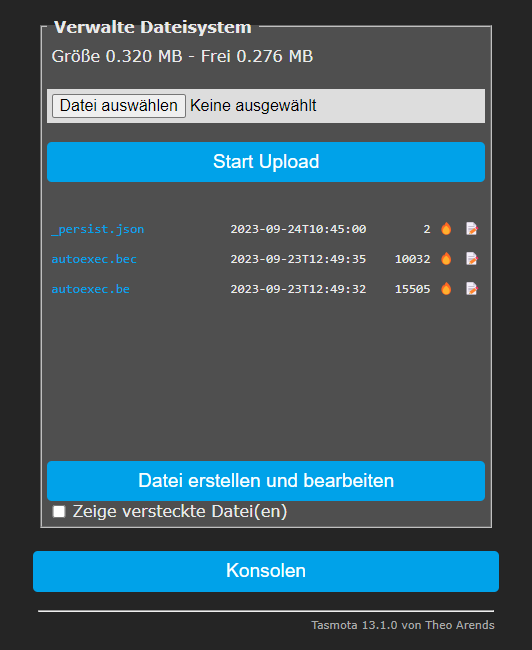
dann die autoexec.be neu anlegen mit diesem Inhalt:
https://raw.githubusercontent.com/joBr99/nspanel-lovelace-ui/main/tasmota/autoexec.bedann Tasmota neustarten
und erneut
FlashNextion http://nspanel.pky.eu/lovelace-ui/github/nspanel-v4.3.1.tftInstallationsanleitung, Tipps, Alias-Definitionen, FAQ für das Sonoff NSPanel mit lovelace UI unter ioBroker
https://github.com/joBr99/nspanel-lovelace-ui/wikiBenutzt das Voting rechts unten im Beitrag wenn er euch geholfen hat.
-
werfe mal alle Dateien weg:
dann die autoexec.be neu anlegen mit diesem Inhalt:
https://raw.githubusercontent.com/joBr99/nspanel-lovelace-ui/main/tasmota/autoexec.bedann Tasmota neustarten
und erneut
FlashNextion http://nspanel.pky.eu/lovelace-ui/github/nspanel-v4.3.1.tft@armilar said in SONOFF NSPanel mit Lovelace UI:
werfe mal alle Dateien weg:
dann die autoexec.be neu anlegen mit diesem Inhalt:
https://raw.githubusercontent.com/joBr99/nspanel-lovelace-ui/main/tasmota/autoexec.bedann Tasmota neustarten
und erneut
FlashNextion http://nspanel.pky.eu/lovelace-ui/github/nspanel-v4.3.1.tftGemacht :
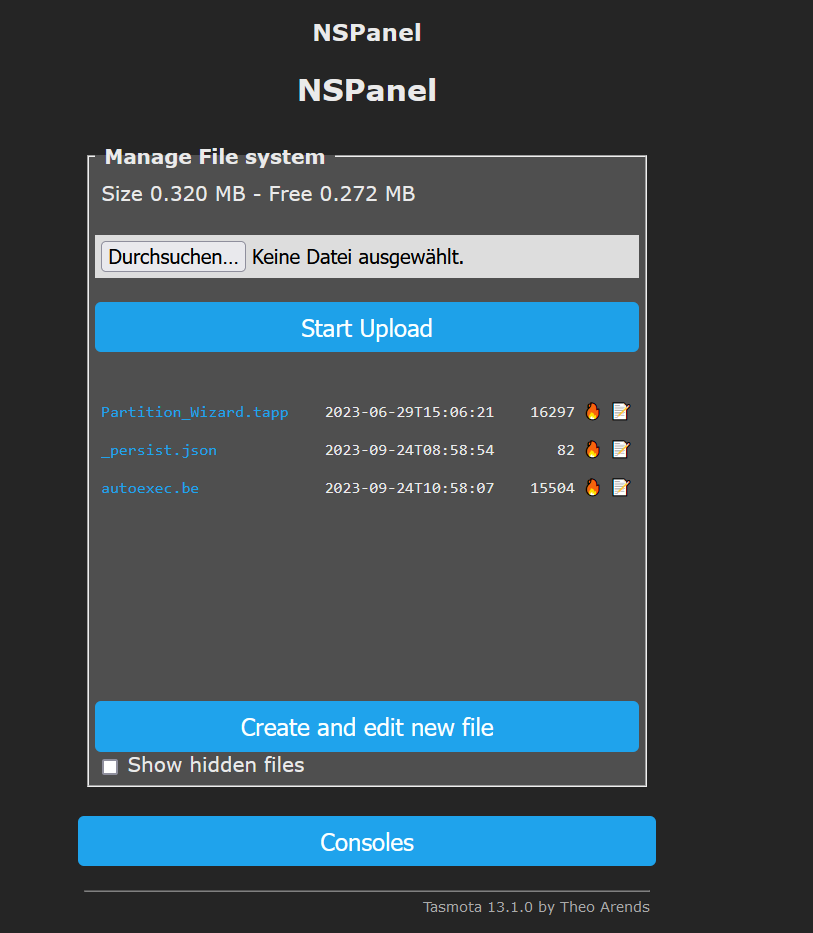
10:59:21.111 CMD: FlashNextion http://nspanel.pky.eu/lovelace-ui/github/nspanel-v4.3.1.tft
10:59:21.126 MQT: stat/tasmota_C82F70/RESULT = {"FlashNextion":"Done"}
10:59:21.167 FLH: host: nspanel.pky.eu, port: 80, get: /lovelace-ui/github/nspanel-v4.3.1.tft
10:59:23.198 FLH: Something has gone wrong flashing display firmware [bytes('55BB1F006576656E742C736C656570526561636865642C63617264456E746974...')]
10:59:23.244 MQT: stat/tasmota_C82F70/STATUS = {"Status":{"Module":0,"DeviceName":"NSPanel","FriendlyName":["Panel1",""],"Topic":"tasmota_C82F70","ButtonTopic":"0","Power":0,"PowerOnState":3,"LedState":1,"LedMask":"FFFF","SaveData":0,"SaveState":1,"SwitchTopic":"0","SwitchMode":[0,0,0,0,0,0,0,0,0,0,0,0,0,0,0,0,0,0,0,0,0,0,0,0,0,0,0,0],"ButtonRetain":0,"SwitchRetain":0,"SensorRetain":0,"PowerRetain":0,"InfoRetain":0,"StateRetain":0,"StatusRetain":0}}
10:59:23.284 MQT: stat/tasmota_C82F70/STATUS1 = {"StatusPRM":{"Baudrate":115200,"SerialConfig":"8N1","GroupTopic":"tasmotas","OtaUrl":"http://ota.tasmota.com/tasmota32/release/tasmota32-nspanel.bin","RestartReason":"Software reset CPU","Uptime":"0T00:00:28","StartupUTC":"2023-09-24T09:58:55","Sleep":0,"CfgHolder":4617,"BootCount":95,"BCResetTime":"2022-07-07T18:59:33","SaveCount":186}}
10:59:23.326 MQT: stat/tasmota_C82F70/STATUS2 = {"StatusFWR":{"Version":"13.1.0(nspanel)","BuildDateTime":"2023-08-15T08:01:15","Core":"2_0_11","SDK":"4.4.5.230722","CpuFrequency":160,"Hardware":"ESP32-D0WD-V3 rev.3","CR":"450/699"}}
10:59:23.345 MQT: stat/tasmota_C82F70/STATUS3 = {"StatusLOG":{"SerialLog":2,"WebLog":2,"MqttLog":0,"SysLog":0,"LogHost":"192.168.178.69","LogPort":514,"SSId":["WLAN 7270",""],"TelePeriod":300,"Resolution":"558180C0","SetOption":["00008009","0505C80001000600003C5A0A192800000000","00800080","00006000","00004001","00000001"]}}
10:59:23.385 MQT: stat/tasmota_C82F70/STATUS4 = {"StatusMEM":{"ProgramSize":1870,"Free":1009,"Heap":73,"StackLowMark":3,"PsrMax":0,"PsrFree":0,"ProgramFlashSize":4096,"FlashSize":4096,"FlashChipId":"16405E","FlashFrequency":40,"FlashMode":"DIO","Features":["00000809","9F9AD7DF","0015A001","B7F7BFCF","05DA9BC4","E0360DC7","480840D2","20200000","D4BC482D","010A80B1"],"Drivers":"1,2,3,4,5,7,8,9,10,11,12,14,16,17,20,21,24,26,27,29,34,35,38,50,52,59,60,62,63,66,67,68,82,86,87,88","Sensors":"1,2,3,5,6,7,8,9,10,11,12,13,14,15,17,18,19,20,21,22,26,31,34,37,39,40,42,43,45,51,52,55,56,58,59,64,66,67,74,85,92,95,98,103,105,109,127","I2CDriver":"7,8,9,10,11,12,13,14,15,17,18,20,24,29,31,36,41,42,44,46,48,58,62,65,69,76,77,82"}}
10:59:23.462 MQT: stat/tasmota_C82F70/STATUS5 = {"StatusNET":{"Hostname":"tasmota-C82F70-3952","IPAddress":"192.168.178.57","Gateway":"192.168.178.1","Subnetmask":"255.255.255.0","DNSServer1":"253.0.0.0","DNSServer2":"32.3.0.223","Mac":"7C:87:CE:C8:2F:70","IP6Global":"2003:df:373f:e00:7e87:ceff:fec8:2f70","IP6Local":"fe80::7e87:ceff:fec8:2f70","Ethernet":{"Hostname":"","IPAddress":"0.0.0.0","Gateway":"0.0.0.0","Subnetmask":"0.0.0.0","DNSServer1":"253.0.0.0","DNSServer2":"32.3.0.223","Mac":"00:00:00:00:00:00","IP6Global":"","IP6Local":""},"Webserver":2,"HTTP_API":1,"WifiConfig":4,"WifiPower":17.0}}
10:59:23.528 MQT: stat/tasmota_C82F70/STATUS6 = {"StatusMQT":{"MqttHost":"192.168.178.69","MqttPort":1886,"MqttClientMask":"NS_Panel1","MqttClient":"NS_Panel1","MqttUser":"Mikeldk","MqttCount":1,"MAX_PACKET_SIZE":1200,"KEEPALIVE":30,"SOCKET_TIMEOUT":4}}
10:59:23.557 MQT: stat/tasmota_C82F70/STATUS7 = {"StatusTIM":{"UTC":"2023-09-24T09:59:23","Local":"2023-09-24T10:59:23","StartDST":"2023-03-26T02:00:00","EndDST":"2023-10-29T03:00:00","Timezone":"+01:00","Sunrise":"06:39","Sunset":"18:44"}}
10:59:23.582 MQT: stat/tasmota_C82F70/STATUS10 = {"StatusSNS":{"Time":"2023-09-24T10:59:23","ANALOG":{"Temperature1":26.6},"ESP32":{"Temperature":56.1},"TempUnit":"C"}}
10:59:23.607 MQT: stat/tasmota_C82F70/STATUS11 = {"StatusSTS":{"Time":"2023-09-24T10:59:23","Uptime":"0T00:00:28","UptimeSec":28,"Heap":70,"SleepMode":"Dynamic","Sleep":0,"LoadAvg":910,"MqttCount":1,"Berry":{"HeapUsed":33,"Objects":452},"POWER1":"OFF","POWER2":"OFF","Wifi":{"AP":1,"SSId":"WLAN 7270","BSSId":"38:10:D5:13:AB:0E","Channel":1,"Mode":"11n","RSSI":58,"Signal":-71,"LinkCount":1,"Downtime":"0T00:00:02"}}}
10:59:23.796 MQT: stat/tasmota_C82F70/RESULT = {"CustomSend":"Done"}
10:59:23.862 FLH: Send (High Speed) flash start
10:59:24.214 BRY: Exception> 'type_error' - unsupported operand type(s) for <: 'nil' and 'int'
Kein erfolg, was ich grade in der Berry Console gesehen habe :
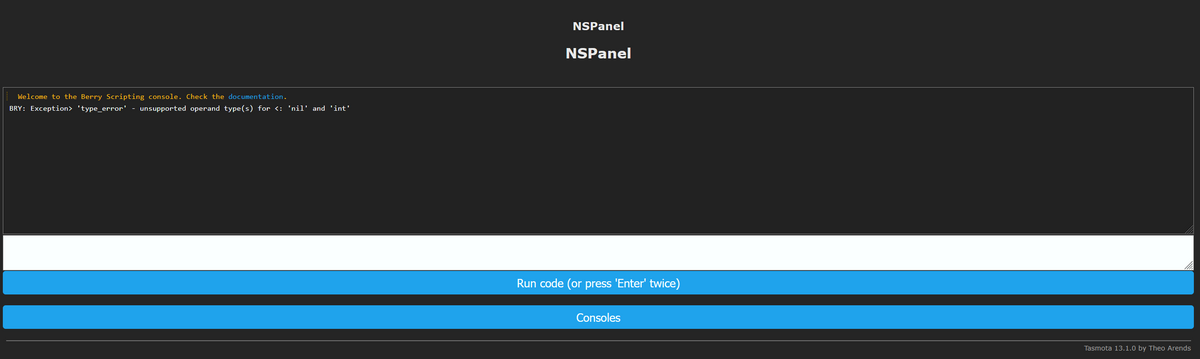
Der Log nach einem Neustart, fehlt da was ?
00:00:00.002 HDW: ESP32-D0WD-V3 00:00:00.074 UFS: FlashFS mounted with 272 kB free 00:00:00.106 CFG: Loaded from File, Count 191 00:00:00.116 QPC: Count 1 00:00:00.242 BRY: Berry initialized, RAM used=4470 bytes 00:00:00.264 TFS: File '.drvset003' not found 00:00:00.275 Project tasmota - NSPanel Version 13.1.0(nspanel)-2_0_11(2023-08-15T08:01:15) 00:00:00.328 TAP: Loaded Tasmota App 'Partition_Wizard.tapp' 00:00:01.654 NXP: Initializing Driver 00:00:01.661 BRY: Successfully loaded 'autoexec.be' -
@armilar said in SONOFF NSPanel mit Lovelace UI:
werfe mal alle Dateien weg:
dann die autoexec.be neu anlegen mit diesem Inhalt:
https://raw.githubusercontent.com/joBr99/nspanel-lovelace-ui/main/tasmota/autoexec.bedann Tasmota neustarten
und erneut
FlashNextion http://nspanel.pky.eu/lovelace-ui/github/nspanel-v4.3.1.tftGemacht :
10:59:21.111 CMD: FlashNextion http://nspanel.pky.eu/lovelace-ui/github/nspanel-v4.3.1.tft
10:59:21.126 MQT: stat/tasmota_C82F70/RESULT = {"FlashNextion":"Done"}
10:59:21.167 FLH: host: nspanel.pky.eu, port: 80, get: /lovelace-ui/github/nspanel-v4.3.1.tft
10:59:23.198 FLH: Something has gone wrong flashing display firmware [bytes('55BB1F006576656E742C736C656570526561636865642C63617264456E746974...')]
10:59:23.244 MQT: stat/tasmota_C82F70/STATUS = {"Status":{"Module":0,"DeviceName":"NSPanel","FriendlyName":["Panel1",""],"Topic":"tasmota_C82F70","ButtonTopic":"0","Power":0,"PowerOnState":3,"LedState":1,"LedMask":"FFFF","SaveData":0,"SaveState":1,"SwitchTopic":"0","SwitchMode":[0,0,0,0,0,0,0,0,0,0,0,0,0,0,0,0,0,0,0,0,0,0,0,0,0,0,0,0],"ButtonRetain":0,"SwitchRetain":0,"SensorRetain":0,"PowerRetain":0,"InfoRetain":0,"StateRetain":0,"StatusRetain":0}}
10:59:23.284 MQT: stat/tasmota_C82F70/STATUS1 = {"StatusPRM":{"Baudrate":115200,"SerialConfig":"8N1","GroupTopic":"tasmotas","OtaUrl":"http://ota.tasmota.com/tasmota32/release/tasmota32-nspanel.bin","RestartReason":"Software reset CPU","Uptime":"0T00:00:28","StartupUTC":"2023-09-24T09:58:55","Sleep":0,"CfgHolder":4617,"BootCount":95,"BCResetTime":"2022-07-07T18:59:33","SaveCount":186}}
10:59:23.326 MQT: stat/tasmota_C82F70/STATUS2 = {"StatusFWR":{"Version":"13.1.0(nspanel)","BuildDateTime":"2023-08-15T08:01:15","Core":"2_0_11","SDK":"4.4.5.230722","CpuFrequency":160,"Hardware":"ESP32-D0WD-V3 rev.3","CR":"450/699"}}
10:59:23.345 MQT: stat/tasmota_C82F70/STATUS3 = {"StatusLOG":{"SerialLog":2,"WebLog":2,"MqttLog":0,"SysLog":0,"LogHost":"192.168.178.69","LogPort":514,"SSId":["WLAN 7270",""],"TelePeriod":300,"Resolution":"558180C0","SetOption":["00008009","0505C80001000600003C5A0A192800000000","00800080","00006000","00004001","00000001"]}}
10:59:23.385 MQT: stat/tasmota_C82F70/STATUS4 = {"StatusMEM":{"ProgramSize":1870,"Free":1009,"Heap":73,"StackLowMark":3,"PsrMax":0,"PsrFree":0,"ProgramFlashSize":4096,"FlashSize":4096,"FlashChipId":"16405E","FlashFrequency":40,"FlashMode":"DIO","Features":["00000809","9F9AD7DF","0015A001","B7F7BFCF","05DA9BC4","E0360DC7","480840D2","20200000","D4BC482D","010A80B1"],"Drivers":"1,2,3,4,5,7,8,9,10,11,12,14,16,17,20,21,24,26,27,29,34,35,38,50,52,59,60,62,63,66,67,68,82,86,87,88","Sensors":"1,2,3,5,6,7,8,9,10,11,12,13,14,15,17,18,19,20,21,22,26,31,34,37,39,40,42,43,45,51,52,55,56,58,59,64,66,67,74,85,92,95,98,103,105,109,127","I2CDriver":"7,8,9,10,11,12,13,14,15,17,18,20,24,29,31,36,41,42,44,46,48,58,62,65,69,76,77,82"}}
10:59:23.462 MQT: stat/tasmota_C82F70/STATUS5 = {"StatusNET":{"Hostname":"tasmota-C82F70-3952","IPAddress":"192.168.178.57","Gateway":"192.168.178.1","Subnetmask":"255.255.255.0","DNSServer1":"253.0.0.0","DNSServer2":"32.3.0.223","Mac":"7C:87:CE:C8:2F:70","IP6Global":"2003:df:373f:e00:7e87:ceff:fec8:2f70","IP6Local":"fe80::7e87:ceff:fec8:2f70","Ethernet":{"Hostname":"","IPAddress":"0.0.0.0","Gateway":"0.0.0.0","Subnetmask":"0.0.0.0","DNSServer1":"253.0.0.0","DNSServer2":"32.3.0.223","Mac":"00:00:00:00:00:00","IP6Global":"","IP6Local":""},"Webserver":2,"HTTP_API":1,"WifiConfig":4,"WifiPower":17.0}}
10:59:23.528 MQT: stat/tasmota_C82F70/STATUS6 = {"StatusMQT":{"MqttHost":"192.168.178.69","MqttPort":1886,"MqttClientMask":"NS_Panel1","MqttClient":"NS_Panel1","MqttUser":"Mikeldk","MqttCount":1,"MAX_PACKET_SIZE":1200,"KEEPALIVE":30,"SOCKET_TIMEOUT":4}}
10:59:23.557 MQT: stat/tasmota_C82F70/STATUS7 = {"StatusTIM":{"UTC":"2023-09-24T09:59:23","Local":"2023-09-24T10:59:23","StartDST":"2023-03-26T02:00:00","EndDST":"2023-10-29T03:00:00","Timezone":"+01:00","Sunrise":"06:39","Sunset":"18:44"}}
10:59:23.582 MQT: stat/tasmota_C82F70/STATUS10 = {"StatusSNS":{"Time":"2023-09-24T10:59:23","ANALOG":{"Temperature1":26.6},"ESP32":{"Temperature":56.1},"TempUnit":"C"}}
10:59:23.607 MQT: stat/tasmota_C82F70/STATUS11 = {"StatusSTS":{"Time":"2023-09-24T10:59:23","Uptime":"0T00:00:28","UptimeSec":28,"Heap":70,"SleepMode":"Dynamic","Sleep":0,"LoadAvg":910,"MqttCount":1,"Berry":{"HeapUsed":33,"Objects":452},"POWER1":"OFF","POWER2":"OFF","Wifi":{"AP":1,"SSId":"WLAN 7270","BSSId":"38:10:D5:13:AB:0E","Channel":1,"Mode":"11n","RSSI":58,"Signal":-71,"LinkCount":1,"Downtime":"0T00:00:02"}}}
10:59:23.796 MQT: stat/tasmota_C82F70/RESULT = {"CustomSend":"Done"}
10:59:23.862 FLH: Send (High Speed) flash start
10:59:24.214 BRY: Exception> 'type_error' - unsupported operand type(s) for <: 'nil' and 'int'
Kein erfolg, was ich grade in der Berry Console gesehen habe :
Der Log nach einem Neustart, fehlt da was ?
00:00:00.002 HDW: ESP32-D0WD-V3 00:00:00.074 UFS: FlashFS mounted with 272 kB free 00:00:00.106 CFG: Loaded from File, Count 191 00:00:00.116 QPC: Count 1 00:00:00.242 BRY: Berry initialized, RAM used=4470 bytes 00:00:00.264 TFS: File '.drvset003' not found 00:00:00.275 Project tasmota - NSPanel Version 13.1.0(nspanel)-2_0_11(2023-08-15T08:01:15) 00:00:00.328 TAP: Loaded Tasmota App 'Partition_Wizard.tapp' 00:00:01.654 NXP: Initializing Driver 00:00:01.661 BRY: Successfully loaded 'autoexec.be'da ist anscheinend auch noch der Partition_Witzard auf dem Tasmota. Da die Partition bereits geändert ist, solltest du den wieder löschen und den Speicher freigeben.
Danach nochmals versuchen
Installationsanleitung, Tipps, Alias-Definitionen, FAQ für das Sonoff NSPanel mit lovelace UI unter ioBroker
https://github.com/joBr99/nspanel-lovelace-ui/wikiBenutzt das Voting rechts unten im Beitrag wenn er euch geholfen hat.


Support us
570
Online32.7k
Users82.4k
Topics1.3m
Posts