



Skip to content
  • Home
  • Recent
  • Tags
  • 0 Unread 0
  • Categories
  • Unreplied
  • Popular
  • GitHub
  • Docu
  • Hilfe
Skins
  • Light
  • Brite
  • Cerulean
  • Cosmo
  • Flatly
  • Journal
  • Litera
  • Lumen
  • Lux
  • Materia
  • Minty
  • Morph
  • Pulse
  • Sandstone
  • Simplex
  • Sketchy
  • Spacelab
  • United
  • Yeti
  • Zephyr
  • Dark
  • Cyborg
  • Darkly
  • Quartz
  • Slate
  • Solar
  • Superhero
  • Vapor

  • Default (No Skin)
  • No Skin
Collapse
ioBroker Logo

Community Forum

donate donate
  1. ioBroker Community Home
  2. Deutsch
  3. ioBroker Allgemein
  4. Reiter Objekte endet in Warteschleife

NEWS

  • UPDATE 31.10.: Amazon Alexa - ioBroker Skill läuft aus ?
    apollon77A
    apollon77
    48
    3
    8.9k

  • Monatsrückblick – September 2025
    BluefoxB
    Bluefox
    13
    1
    2.3k

  • Neues Video "KI im Smart Home" - ioBroker plus n8n
    BluefoxB
    Bluefox
    16
    1
    3.4k

Reiter Objekte endet in Warteschleife

Scheduled Pinned Locked Moved ioBroker Allgemein
35 Posts 6 Posters 2.2k Views 3 Watching
  • Oldest to Newest
  • Newest to Oldest
  • Most Votes
Reply
  • Reply as topic
Log in to reply
This topic has been deleted. Only users with topic management privileges can see it.
  • paul53P paul53

    @grisu1000 sagte: Ladeschleife

    Geduld! Der Browser hat seit einiger Zeit sehr viel zu tun bis die Objekte gezeigt werden. Das betrifft auch den Erstaufruf des ID-Selektors in Javascript / Blockly nach einem Browser-Refresh.

    G Offline
    G Offline
    grisu1000
    wrote on last edited by
    #6

    @paul53 said in Reiter Objekte endet in Warteschleife:

    r Browser hat seit einiger Zeit sehr viel zu tun bis die Objekte gezeigt werden. Das betrifft auch den Erstaufruf des ID-Selektor

    dann lass ich ihn mal laufen ;-)

    G 1 Reply Last reply
    0
    • G grisu1000

      @paul53 said in Reiter Objekte endet in Warteschleife:

      r Browser hat seit einiger Zeit sehr viel zu tun bis die Objekte gezeigt werden. Das betrifft auch den Erstaufruf des ID-Selektor

      dann lass ich ihn mal laufen ;-)

      G Offline
      G Offline
      grisu1000
      wrote on last edited by
      #7

      @grisu1000 also nach knapp 15 Minuten tut sich hier nix

      paul53P GlasfaserG 2 Replies Last reply
      0
      • G grisu1000

        @grisu1000 also nach knapp 15 Minuten tut sich hier nix

        paul53P Offline
        paul53P Offline
        paul53
        wrote on last edited by
        #8

        @grisu1000 sagte: nach knapp 15 Minuten tut sich hier nix

        Zu schwache Hardware, auf der der Browser läuft?

        Bitte verzichtet auf Chat-Nachrichten, denn die Handhabung ist grauenhaft !
        Produktiv: RPi 2 mit S.USV, HM-MOD-RPI und SLC-USB-Stick mit root fs

        1 Reply Last reply
        0
        • G grisu1000

          @grisu1000 also nach knapp 15 Minuten tut sich hier nix

          GlasfaserG Offline
          GlasfaserG Offline
          Glasfaser
          wrote on last edited by
          #9

          @grisu1000 sagte in Reiter Objekte endet in Warteschleife:

          @grisu1000 also nach knapp 15 Minuten tut sich hier nix

          Hast du dir den Thread auch durchgelesen und das alles auch mal versucht !?

          Anderen Broswser mal genutzt , den du noch nie für ioBroker genommen hast !?

          Starte dein ioBroker mal neu , was ist dann !?

          Synology 918+ 16GB - ioBroker in Docker v9 , VISO auf Trekstor Primebook C13 13,3" , Hikvision Domkameras mit Surveillance Station .. CCU RaspberryMatic in Synology VM .. Zigbee CC2538+CC2592 .. Sonoff .. KNX .. Modbus ..

          1 Reply Last reply
          0
          • G grisu1000

            Ohne bewusst etwas geändert zu haben habe ich heute versucht den Reiter Objekte zu öffnen um einen Wert zu kontrollieren.

            Leider endet der Versuch die Seite zu öffnen in einer Ladeschleife (drehender blauer Kreis links oben) .... hat jemand vielleicht einen Tipp wie ich da beheben kann... bzw. welche Infos werden benötigt von mir?

            Danke für die Mühe im Vorraus
            Gruss Grisu1000

            GlasfaserG Offline
            GlasfaserG Offline
            Glasfaser
            wrote on last edited by
            #10

            @grisu1000 sagte in Reiter Objekte endet in Warteschleife:

            ... bzw. welche Infos werden benötigt von mir?

            steht etwas im Log .

            Welche Hardware .

            und:
            Ein/ und Ausgabe davon in Code-Tags </> hier einstellen

            cd /opt/iobroker
            npm ls | grep -E 'github.com|ERR' 
            
            iobroker update -i
             
            sudo ln -s /usr/bin/node /usr/bin/nodejs
            
            uname -m && type -P nodejs node npm && nodejs -v && node -v && npm -v && whoami && pwd && sudo apt update &> /dev/null && sudo apt update && apt policy nodejs
            

            Synology 918+ 16GB - ioBroker in Docker v9 , VISO auf Trekstor Primebook C13 13,3" , Hikvision Domkameras mit Surveillance Station .. CCU RaspberryMatic in Synology VM .. Zigbee CC2538+CC2592 .. Sonoff .. KNX .. Modbus ..

            G 1 Reply Last reply
            0
            • GlasfaserG Glasfaser

              @grisu1000 sagte in Reiter Objekte endet in Warteschleife:

              ... bzw. welche Infos werden benötigt von mir?

              steht etwas im Log .

              Welche Hardware .

              und:
              Ein/ und Ausgabe davon in Code-Tags </> hier einstellen

              cd /opt/iobroker
              npm ls | grep -E 'github.com|ERR' 
              
              iobroker update -i
               
              sudo ln -s /usr/bin/node /usr/bin/nodejs
              
              uname -m && type -P nodejs node npm && nodejs -v && node -v && npm -v && whoami && pwd && sudo apt update &> /dev/null && sudo apt update && apt policy nodejs
              
              G Offline
              G Offline
              grisu1000
              wrote on last edited by
              #11

              @glasfaser erstmal danke für die Mühe vorweg.

              Ja ich hab den Thread durchgelesen und auch alles versucht nachzuvollziehen. Inkl. Adapter deaktivieren und Neustarten. Da es auf dem Android Handy funktioniert als erstes einmal den PC und den Browser im Verdacht gehabt. Auf Laptop und Desktop jeweils nen komplett neuen Browser (Brave oder so ähnlich) installiert und mit dem Probiert. Selber Effekt.

              Im Log fällt nur

              admin.0 	2022-09-14 12:33:32.764	info	<== Disconnect system.user.admin from ::ffff:192.168.0.181 admin
              

              auf beim Auruf des Reiters Objekte. 20 Sekunden später verbindet sich der Admin Adapter scheinbar wieder

              admin.0	2022-09-14 12:34:40.293	info	==> Connected system.user.admin from ::ffff:192.168.0.181
              

              Als Hardware kommt für den iobroker ein simpler Raspberry 4 zum Einsatz der bisher problemlos seinen Dienst tat.

              pi@raspberrypi:~ $ cd /opt/iobroker
              pi@raspberrypi:/opt/iobroker $ npm ls | grep -E 'github.com|ERR'
              pi@raspberrypi:/opt/iobroker $ iobroker update -i
              Used repository: stable
              Adapter    "admin"        : 6.2.20   , installed 6.2.20
              Adapter    "alexa2"       : 3.11.2   , installed 3.11.2
              Adapter    "backitup"     : 2.4.10   , installed 2.4.10
              Adapter    "ble"          : 0.13.0   , installed 0.13.0
              Adapter    "cloud"        : 4.2.2    , installed 4.2.2
              Adapter    "device-reminder": 1.2.9  , installed 1.2.9
              Adapter    "devices"      : 1.0.12   , installed 1.0.12
              Adapter    "discovery"    : 3.0.5    , installed 3.0.5
              Adapter    "divera247"    : 0.2.0    , installed 0.2.0
              Adapter    "email"        : 1.1.3    , installed 1.1.3
              Adapter    "fb-checkpresence": 1.1.19, installed 1.1.19
              Adapter    "fritzbox"     : 0.2.1    , installed 0.2.1
              Adapter    "fritzdect"    : 2.2.3    , installed 2.2.3
              Adapter    "history"      : 2.2.0    , installed 2.2.0
              Adapter    "ical"         : 1.13.1   , installed 1.13.1
              Adapter    "info"         : 1.9.19   , installed 1.9.19
              Adapter    "iot"          : 1.11.8   , installed 1.11.8
              Adapter    "javascript"   : 6.0.0    , installed 6.0.0
              Controller "js-controller": 4.0.23   , installed 4.0.23
              Adapter    "mihome"       : 1.4.0    , installed 1.4.0
              Adapter    "mihome-vacuum": 3.4.2    , installed 3.4.2
              Adapter    "mqtt"         : 4.0.7    , installed 4.0.7
              Adapter    "mqtt-client"  : 1.6.3    , installed 1.6.3
              Adapter    "parcel"       : 0.0.20   , installed 0.0.20
              Adapter    "ping"         : 1.5.3    , installed 1.5.3
              Adapter    "ring"         : 3.0.4    , installed 3.0.4
              Adapter    "simple-api"   : 2.7.0    , installed 2.7.0
              Adapter    "socketio"     : 4.2.0    , installed 4.2.0
              Adapter    "sonoff"       : 2.5.1    , installed 2.5.1
              Adapter    "telegram"     : 1.14.1   , installed 1.14.1
              Adapter    "terminal"     : 0.2.6    , installed 0.2.6
              Adapter    "trashschedule": 2.0.3    , installed 2.0.3
              Adapter    "velux"        : 0.0.7    , installed 0.0.7
              Adapter    "vis"          : 1.4.15   , installed 1.4.15
              Adapter    "web"          : 4.3.0    , installed 4.3.0
              Adapter    "whatsapp-cmb" : 0.2.2    , installed 0.2.2
              Adapter    "wifilight"    : 1.1.4    , installed 1.1.4
              Adapter    "ws"           : 1.3.0    , installed 1.3.0
              Adapter    "yahka"        : 0.13.1   , installed 0.13.1
              Adapter    "zigbee"       : 1.7.5    , installed 1.7.5
              
              
              sudo ln -s /usr/bin/node /usr/bin/nodejs
              ln: failed to create symbolic link '/usr/bin/nodejs': File exists
              
              
              pi@raspberrypi:/opt/iobroker $ uname -m && type -P nodejs node npm && nodejs -v                                                                                           && node -v && npm -v && whoami && pwd && sudo apt update &> /dev/null && sudo ap                                                                                          t update && apt policy nodejs
              armv7l
              /usr/bin/nodejs
              /usr/local/bin/node
              /usr/local/bin/npm
              v18.8.0
              v16.17.0
              8.15.0
              pi
              /opt/iobroker
              Hit:1 http://archive.raspberrypi.org/debian bullseye InRelease
              Hit:2 http://raspbian.raspberrypi.org/raspbian bullseye InRelease
              Hit:3 https://deb.nodesource.com/node_16.x bullseye InRelease
              Reading package lists... Done
              Building dependency tree... Done
              Reading state information... Done
              50 packages can be upgraded. Run 'apt list --upgradable' to see them.
              nodejs:
                Installed: 18.8.0-deb-1nodesource1
                Candidate: 18.8.0-deb-1nodesource1
                Version table:
               *** 18.8.0-deb-1nodesource1 100
                      100 /var/lib/dpkg/status
                   16.17.0-deb-1nodesource1 500
                      500 https://deb.nodesource.com/node_16.x bullseye/main armhf Packages
                   12.22.12~dfsg-1~deb11u1 500
                      500 http://raspbian.raspberrypi.org/raspbian bullseye/main armhf Packages
              
              
              GlasfaserG 1 Reply Last reply
              0
              • G grisu1000

                @glasfaser erstmal danke für die Mühe vorweg.

                Ja ich hab den Thread durchgelesen und auch alles versucht nachzuvollziehen. Inkl. Adapter deaktivieren und Neustarten. Da es auf dem Android Handy funktioniert als erstes einmal den PC und den Browser im Verdacht gehabt. Auf Laptop und Desktop jeweils nen komplett neuen Browser (Brave oder so ähnlich) installiert und mit dem Probiert. Selber Effekt.

                Im Log fällt nur

                admin.0 	2022-09-14 12:33:32.764	info	<== Disconnect system.user.admin from ::ffff:192.168.0.181 admin
                

                auf beim Auruf des Reiters Objekte. 20 Sekunden später verbindet sich der Admin Adapter scheinbar wieder

                admin.0	2022-09-14 12:34:40.293	info	==> Connected system.user.admin from ::ffff:192.168.0.181
                

                Als Hardware kommt für den iobroker ein simpler Raspberry 4 zum Einsatz der bisher problemlos seinen Dienst tat.

                pi@raspberrypi:~ $ cd /opt/iobroker
                pi@raspberrypi:/opt/iobroker $ npm ls | grep -E 'github.com|ERR'
                pi@raspberrypi:/opt/iobroker $ iobroker update -i
                Used repository: stable
                Adapter    "admin"        : 6.2.20   , installed 6.2.20
                Adapter    "alexa2"       : 3.11.2   , installed 3.11.2
                Adapter    "backitup"     : 2.4.10   , installed 2.4.10
                Adapter    "ble"          : 0.13.0   , installed 0.13.0
                Adapter    "cloud"        : 4.2.2    , installed 4.2.2
                Adapter    "device-reminder": 1.2.9  , installed 1.2.9
                Adapter    "devices"      : 1.0.12   , installed 1.0.12
                Adapter    "discovery"    : 3.0.5    , installed 3.0.5
                Adapter    "divera247"    : 0.2.0    , installed 0.2.0
                Adapter    "email"        : 1.1.3    , installed 1.1.3
                Adapter    "fb-checkpresence": 1.1.19, installed 1.1.19
                Adapter    "fritzbox"     : 0.2.1    , installed 0.2.1
                Adapter    "fritzdect"    : 2.2.3    , installed 2.2.3
                Adapter    "history"      : 2.2.0    , installed 2.2.0
                Adapter    "ical"         : 1.13.1   , installed 1.13.1
                Adapter    "info"         : 1.9.19   , installed 1.9.19
                Adapter    "iot"          : 1.11.8   , installed 1.11.8
                Adapter    "javascript"   : 6.0.0    , installed 6.0.0
                Controller "js-controller": 4.0.23   , installed 4.0.23
                Adapter    "mihome"       : 1.4.0    , installed 1.4.0
                Adapter    "mihome-vacuum": 3.4.2    , installed 3.4.2
                Adapter    "mqtt"         : 4.0.7    , installed 4.0.7
                Adapter    "mqtt-client"  : 1.6.3    , installed 1.6.3
                Adapter    "parcel"       : 0.0.20   , installed 0.0.20
                Adapter    "ping"         : 1.5.3    , installed 1.5.3
                Adapter    "ring"         : 3.0.4    , installed 3.0.4
                Adapter    "simple-api"   : 2.7.0    , installed 2.7.0
                Adapter    "socketio"     : 4.2.0    , installed 4.2.0
                Adapter    "sonoff"       : 2.5.1    , installed 2.5.1
                Adapter    "telegram"     : 1.14.1   , installed 1.14.1
                Adapter    "terminal"     : 0.2.6    , installed 0.2.6
                Adapter    "trashschedule": 2.0.3    , installed 2.0.3
                Adapter    "velux"        : 0.0.7    , installed 0.0.7
                Adapter    "vis"          : 1.4.15   , installed 1.4.15
                Adapter    "web"          : 4.3.0    , installed 4.3.0
                Adapter    "whatsapp-cmb" : 0.2.2    , installed 0.2.2
                Adapter    "wifilight"    : 1.1.4    , installed 1.1.4
                Adapter    "ws"           : 1.3.0    , installed 1.3.0
                Adapter    "yahka"        : 0.13.1   , installed 0.13.1
                Adapter    "zigbee"       : 1.7.5    , installed 1.7.5
                
                
                sudo ln -s /usr/bin/node /usr/bin/nodejs
                ln: failed to create symbolic link '/usr/bin/nodejs': File exists
                
                
                pi@raspberrypi:/opt/iobroker $ uname -m && type -P nodejs node npm && nodejs -v                                                                                           && node -v && npm -v && whoami && pwd && sudo apt update &> /dev/null && sudo ap                                                                                          t update && apt policy nodejs
                armv7l
                /usr/bin/nodejs
                /usr/local/bin/node
                /usr/local/bin/npm
                v18.8.0
                v16.17.0
                8.15.0
                pi
                /opt/iobroker
                Hit:1 http://archive.raspberrypi.org/debian bullseye InRelease
                Hit:2 http://raspbian.raspberrypi.org/raspbian bullseye InRelease
                Hit:3 https://deb.nodesource.com/node_16.x bullseye InRelease
                Reading package lists... Done
                Building dependency tree... Done
                Reading state information... Done
                50 packages can be upgraded. Run 'apt list --upgradable' to see them.
                nodejs:
                  Installed: 18.8.0-deb-1nodesource1
                  Candidate: 18.8.0-deb-1nodesource1
                  Version table:
                 *** 18.8.0-deb-1nodesource1 100
                        100 /var/lib/dpkg/status
                     16.17.0-deb-1nodesource1 500
                        500 https://deb.nodesource.com/node_16.x bullseye/main armhf Packages
                     12.22.12~dfsg-1~deb11u1 500
                        500 http://raspbian.raspberrypi.org/raspbian bullseye/main armhf Packages
                
                
                GlasfaserG Offline
                GlasfaserG Offline
                Glasfaser
                wrote on last edited by Glasfaser
                #12

                @grisu1000 sagte in Reiter Objekte endet in Warteschleife:

                /usr/bin/nodejs

                /usr/local/bin/node

                /usr/local/bin/npm

                v18.8.0

                v16.17.0

                8.15.0

                hier ist der Fehler ... alles schief und im falschen Verzeichniss!

                Nimm die empfohlene NodeJS 16 ... wie kommst du auf 18 !?

                50 packages can be upgraded.

                und halte dein System auf Stand .

                gehe hiernach :

                https://forum.iobroker.net/topic/35090/howto-nodejs-installation-und-upgrades-unter-debian

                Synology 918+ 16GB - ioBroker in Docker v9 , VISO auf Trekstor Primebook C13 13,3" , Hikvision Domkameras mit Surveillance Station .. CCU RaspberryMatic in Synology VM .. Zigbee CC2538+CC2592 .. Sonoff .. KNX .. Modbus ..

                G 1 Reply Last reply
                0
                • GlasfaserG Glasfaser

                  @grisu1000 sagte in Reiter Objekte endet in Warteschleife:

                  /usr/bin/nodejs

                  /usr/local/bin/node

                  /usr/local/bin/npm

                  v18.8.0

                  v16.17.0

                  8.15.0

                  hier ist der Fehler ... alles schief und im falschen Verzeichniss!

                  Nimm die empfohlene NodeJS 16 ... wie kommst du auf 18 !?

                  50 packages can be upgraded.

                  und halte dein System auf Stand .

                  gehe hiernach :

                  https://forum.iobroker.net/topic/35090/howto-nodejs-installation-und-upgrades-unter-debian

                  G Offline
                  G Offline
                  grisu1000
                  wrote on last edited by grisu1000
                  #13

                  @glasfaser ich weiss dass ich aus Unwissen heraus schon einmal auf die NodeJs 18 gewechselt habe ... hatte das aber nach einen Tipp wieder auf die 16 umgestellt

                  Der Infoscreen am Anfang zeigt mir die auch an.
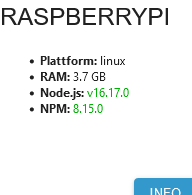
                  Screenshot 2022-09-14 at 13-00-26 intro - raspberrypi.png

                  GlasfaserG 1 Reply Last reply
                  0
                  • G grisu1000

                    @glasfaser ich weiss dass ich aus Unwissen heraus schon einmal auf die NodeJs 18 gewechselt habe ... hatte das aber nach einen Tipp wieder auf die 16 umgestellt

                    Der Infoscreen am Anfang zeigt mir die auch an.

                    Screenshot 2022-09-14 at 13-00-26 intro - raspberrypi.png

                    GlasfaserG Offline
                    GlasfaserG Offline
                    Glasfaser
                    wrote on last edited by
                    #14

                    @grisu1000 sagte in Reiter Objekte endet in Warteschleife:

                    @glasfaser ich weiss dass ich aus Unwissen heraus schon einmal auf die NodeJs 18 gewechselt habe ... hatte das aber nach einen Tipp wieder auf die 16 umgestellt

                    Dann war schon die Grundinstallation mit 18 auch schon im falschen Verzeichniss .

                    Synology 918+ 16GB - ioBroker in Docker v9 , VISO auf Trekstor Primebook C13 13,3" , Hikvision Domkameras mit Surveillance Station .. CCU RaspberryMatic in Synology VM .. Zigbee CC2538+CC2592 .. Sonoff .. KNX .. Modbus ..

                    G 1 Reply Last reply
                    0
                    • GlasfaserG Glasfaser

                      @grisu1000 sagte in Reiter Objekte endet in Warteschleife:

                      @glasfaser ich weiss dass ich aus Unwissen heraus schon einmal auf die NodeJs 18 gewechselt habe ... hatte das aber nach einen Tipp wieder auf die 16 umgestellt

                      Dann war schon die Grundinstallation mit 18 auch schon im falschen Verzeichniss .

                      G Offline
                      G Offline
                      grisu1000
                      wrote on last edited by
                      #15

                      @glasfaser okay .. ich habe schon vermutet das der Fehler hier vor dem Bildschirm sitzt :face_palm:

                      Lässt sich das gerade biegen oder System neu aufsetzen und Backup einspielen?

                      GlasfaserG 1 Reply Last reply
                      0
                      • G grisu1000

                        @glasfaser okay .. ich habe schon vermutet das der Fehler hier vor dem Bildschirm sitzt :face_palm:

                        Lässt sich das gerade biegen oder System neu aufsetzen und Backup einspielen?

                        GlasfaserG Offline
                        GlasfaserG Offline
                        Glasfaser
                        wrote on last edited by
                        #16

                        @grisu1000 sagte in Reiter Objekte endet in Warteschleife:

                        Lässt sich das gerade biegen

                        Ja,
                        steht alles erklärt im Link , den ich dir oben dazu gegeben habe

                        Synology 918+ 16GB - ioBroker in Docker v9 , VISO auf Trekstor Primebook C13 13,3" , Hikvision Domkameras mit Surveillance Station .. CCU RaspberryMatic in Synology VM .. Zigbee CC2538+CC2592 .. Sonoff .. KNX .. Modbus ..

                        G 2 Replies Last reply
                        0
                        • GlasfaserG Glasfaser

                          @grisu1000 sagte in Reiter Objekte endet in Warteschleife:

                          Lässt sich das gerade biegen

                          Ja,
                          steht alles erklärt im Link , den ich dir oben dazu gegeben habe

                          G Offline
                          G Offline
                          grisu1000
                          wrote on last edited by
                          #17

                          @glasfaser Danke ich setze mich heute Abend in aller Ruhe dran.

                          Danke erstmal

                          1 Reply Last reply
                          0
                          • paul53P Offline
                            paul53P Offline
                            paul53
                            wrote on last edited by paul53
                            #18

                            Zur Info: Ich habe mal verschiedene Versionen des Admin-Adapters getestet mit folgendem Ergebnis: Bis zur Version 5.1.9 erfolgte das Laden des Objekte-Tabs noch schnell. Seit Version 5.1.10 dauert es sehr lange. Also muss es zur Version 5.1.10 eine entsprechende Änderung gegeben haben, die sich bis heute durchzieht.

                            Bitte verzichtet auf Chat-Nachrichten, denn die Handhabung ist grauenhaft !
                            Produktiv: RPi 2 mit S.USV, HM-MOD-RPI und SLC-USB-Stick mit root fs

                            1 Reply Last reply
                            0
                            • GlasfaserG Glasfaser

                              @grisu1000 sagte in Reiter Objekte endet in Warteschleife:

                              Lässt sich das gerade biegen

                              Ja,
                              steht alles erklärt im Link , den ich dir oben dazu gegeben habe

                              G Offline
                              G Offline
                              grisu1000
                              wrote on last edited by
                              #19

                              @glasfaser
                              Dein Hinweis hat mir natürlich keine Ruhe gelassen also bin ich die Anleitung Schritt für Schritt durchgegangen.... Effekt bleibt leider aus...

                              pi@raspberrypi:~ $ cd /opt/iobroker
                              pi@raspberrypi:/opt/iobroker $ npm ls | grep -E 'github|ERR'
                              pi@raspberrypi:/opt/iobroker $ curl -sL https://deb.nodesource.com/setup_16.x |                                                                          sudo -E bash
                              
                              ## Installing the NodeSource Node.js 16.x repo...
                              
                              
                              ## Populating apt-get cache...
                              
                              + apt-get update
                              Hit:1 http://archive.raspberrypi.org/debian bullseye InRelease
                              Hit:2 http://raspbian.raspberrypi.org/raspbian bullseye InRelease
                              Hit:3 https://deb.nodesource.com/node_16.x bullseye InRelease
                              Reading package lists... Done
                              
                              ## Confirming "bullseye" is supported...
                              
                              + curl -sLf -o /dev/null 'https://deb.nodesource.com/node_16.x/dists/bullseye/Re                                                                         lease'
                              
                              ## Adding the NodeSource signing key to your keyring...
                              
                              + curl -s https://deb.nodesource.com/gpgkey/nodesource.gpg.key | gpg --dearmor |                                                                          tee /usr/share/keyrings/nodesource.gpg >/dev/null
                              
                              ## Creating apt sources list file for the NodeSource Node.js 16.x repo...
                              
                              + echo 'deb [signed-by=/usr/share/keyrings/nodesource.gpg] https://deb.nodesourc                                                                         e.com/node_16.x bullseye main' > /etc/apt/sources.list.d/nodesource.list
                              + echo 'deb-src [signed-by=/usr/share/keyrings/nodesource.gpg] https://deb.nodes                                                                         ource.com/node_16.x bullseye main' >> /etc/apt/sources.list.d/nodesource.list
                              
                              ## Running `apt-get update` for you...
                              
                              + apt-get update
                              Hit:1 http://archive.raspberrypi.org/debian bullseye InRelease
                              Hit:2 http://raspbian.raspberrypi.org/raspbian bullseye InRelease
                              Hit:3 https://deb.nodesource.com/node_16.x bullseye InRelease
                              Reading package lists... Done
                              
                              ## Run `sudo apt-get install -y nodejs` to install Node.js 16.x and npm
                              ## You may also need development tools to build native addons:
                                   sudo apt-get install gcc g++ make
                              ## To install the Yarn package manager, run:
                                   curl -sL https://dl.yarnpkg.com/debian/pubkey.gpg | gpg --dearmor | sudo te                                                                         e /usr/share/keyrings/yarnkey.gpg >/dev/null
                                   echo "deb [signed-by=/usr/share/keyrings/yarnkey.gpg] https://dl.yarnpkg.co                                                                         m/debian stable main" | sudo tee /etc/apt/sources.list.d/yarn.list
                                   sudo apt-get update && sudo apt-get install yarn
                              
                              
                              pi@raspberrypi:/opt/iobroker $ sudo apt install nodejs
                              Reading package lists... Done
                              Building dependency tree... Done
                              Reading state information... Done
                              nodejs is already the newest version (18.8.0-deb-1nodesource1).
                              0 upgraded, 0 newly installed, 0 to remove and 0 not upgraded.
                              pi@raspberrypi:/opt/iobroker $ sudo ln -s /usr/bin/node /usr/bin/nodejs
                              ln: failed to create symbolic link '/usr/bin/nodejs': File exists
                              pi@raspberrypi:/opt/iobroker $ setup_16.x
                              -bash: setup_16.x: command not found
                              pi@raspberrypi:/opt/iobroker $ sudo apt dist-upgrade
                              Reading package lists... Done
                              Building dependency tree... Done
                              Reading state information... Done
                              Calculating upgrade... Done
                              0 upgraded, 0 newly installed, 0 to remove and 0 not upgraded.
                              pi@raspberrypi:/opt/iobroker $ iobroker stop
                              pi@raspberrypi:/opt/iobroker $ sudo nano /etc/apt/sources.list.d/nodesource.list
                              pi@raspberrypi:/opt/iobroker $ sudo apt update
                              Hit:1 http://archive.raspberrypi.org/debian bullseye InRelease
                              Hit:2 http://raspbian.raspberrypi.org/raspbian bullseye InRelease
                              Hit:3 https://deb.nodesource.com/node_16.x bullseye InRelease
                              Reading package lists... Done
                              Building dependency tree... Done
                              Reading state information... Done
                              All packages are up to date.
                              pi@raspberrypi:/opt/iobroker $ sudo apt upgrade
                              Reading package lists... Done
                              Building dependency tree... Done
                              Reading state information... Done
                              Calculating upgrade... Done
                              0 upgraded, 0 newly installed, 0 to remove and 0 not upgraded.
                              pi@raspberrypi:/opt/iobroker $ apt policy nodejs
                              nodejs:
                                Installed: 18.8.0-deb-1nodesource1
                                Candidate: 18.8.0-deb-1nodesource1
                                Version table:
                               *** 18.8.0-deb-1nodesource1 100
                                      100 /var/lib/dpkg/status
                                   16.17.0-deb-1nodesource1 500
                                      500 https://deb.nodesource.com/node_16.x bullseye/main armhf Packages
                                   12.22.12~dfsg-1~deb11u1 500
                                      500 http://raspbian.raspberrypi.org/raspbian bullseye/main armhf Packages
                              pi@raspberrypi:/opt/iobroker $ sudo apt install nodejs=16.17.0-deb-1nodesource1
                              Reading package lists... Done
                              Building dependency tree... Done
                              Reading state information... Done
                              The following packages will be DOWNGRADED:
                                nodejs
                              0 upgraded, 0 newly installed, 1 downgraded, 0 to remove and 0 not upgraded.
                              Need to get 24.1 MB of archives.
                              After this operation, 50.9 MB disk space will be freed.
                              Do you want to continue? [Y/n] y
                              Get:1 https://deb.nodesource.com/node_16.x bullseye/main armhf nodejs armhf 16.17.0-deb-1nodesource1 [24.1 MB]
                              Fetched 24.1 MB in 2s (12.8 MB/s)
                              dpkg: warning: downgrading nodejs from 18.8.0-deb-1nodesource1 to 16.17.0-deb-1nodesource1
                              (Reading database ... 54260 files and directories currently installed.)
                              Preparing to unpack .../nodejs_16.17.0-deb-1nodesource1_armhf.deb ...
                              Unpacking nodejs (16.17.0-deb-1nodesource1) over (18.8.0-deb-1nodesource1) ...
                              Setting up nodejs (16.17.0-deb-1nodesource1) ...
                              Processing triggers for man-db (2.9.4-2) ...
                              pi@raspberrypi:/opt/iobroker $ sudo ln -s /usr/bin/node /usr/bin/nodejs
                              ln: failed to create symbolic link '/usr/bin/nodejs': File exists
                              pi@raspberrypi:/opt/iobroker $ uname -m && type -P nodejs node npm && nodejs -v && node -v && npm -v && iob -v && whoami && groups && pwd && sudo apt update &> /dev/null && sudo apt update && apt policy nodejs
                              armv7l
                              /usr/bin/nodejs
                              /usr/local/bin/node
                              /usr/local/bin/npm
                              v16.17.0
                              v16.17.0
                              8.15.0
                              4.0.23
                              pi
                              pi adm dialout cdrom sudo audio video plugdev games users input netdev gpio i2c spi iobroker
                              /opt/iobroker
                              Hit:1 http://archive.raspberrypi.org/debian bullseye InRelease
                              Hit:2 http://raspbian.raspberrypi.org/raspbian bullseye InRelease
                              Hit:3 https://deb.nodesource.com/node_16.x bullseye InRelease
                              Reading package lists... Done
                              Building dependency tree... Done
                              Reading state information... Done
                              All packages are up to date.
                              nodejs:
                                Installed: 16.17.0-deb-1nodesource1
                                Candidate: 16.17.0-deb-1nodesource1
                                Version table:
                               *** 16.17.0-deb-1nodesource1 500
                                      500 https://deb.nodesource.com/node_16.x bullseye/main armhf Packages
                                      100 /var/lib/dpkg/status
                                   12.22.12~dfsg-1~deb11u1 500
                                      500 http://raspbian.raspberrypi.org/raspbian bullseye/main armhf Packages
                              pi@raspberrypi:/opt/iobroker $ sudo ln -s /usr/bin/node /usr/bin/nodejs
                              ln: failed to create symbolic link '/usr/bin/nodejs': File exists
                              pi@raspberrypi:/opt/iobroker $ iobroker fix
                              library: loaded
                              Library version=2022-06-15
                              
                              ==========================================================================
                              
                                  Welcome to the ioBroker installation fixer!
                                  Script version: 2022-06-03
                              
                                  You might need to enter your password a couple of times.
                              
                              ==========================================================================
                              
                              
                              ==========================================================================
                                  Installing prerequisites (1/3)
                              ==========================================================================
                              
                              Hit:1 http://raspbian.raspberrypi.org/raspbian bullseye InRelease
                              Hit:2 http://archive.raspberrypi.org/debian bullseye InRelease
                              Hit:3 https://deb.nodesource.com/node_16.x bullseye InRelease
                              Reading package lists... Done
                              Installed gcc-c++
                              
                              ==========================================================================
                                  Checking ioBroker user and directory permissions (2/3)
                              ==========================================================================
                              
                              Created /etc/sudoers.d/iobroker
                              Fixing directory permissions...
                              
                              ==========================================================================
                                  Checking autostart (3/3)
                              ==========================================================================
                              
                              Enabling autostart...
                              Autostart enabled!
                              
                              ==========================================================================
                              
                                  Your installation was fixed successfully
                                  Run iobroker start to start ioBroker again!
                              
                              ==========================================================================
                              
                              pi@raspberrypi:/opt/iobroker $ iobroker start
                              pi@raspberrypi:/opt/iobroker $ iobroker start
                              pi@raspberrypi:/opt/iobroker $ sudo ln -s /usr/bin/node /usr/bin/nodejs
                              ln: failed to create symbolic link '/usr/bin/nodejs': File exists
                              pi@raspberrypi:/opt/iobroker $
                              
                              
                              Thomas BraunT 1 Reply Last reply
                              0
                              • G grisu1000

                                @glasfaser
                                Dein Hinweis hat mir natürlich keine Ruhe gelassen also bin ich die Anleitung Schritt für Schritt durchgegangen.... Effekt bleibt leider aus...

                                pi@raspberrypi:~ $ cd /opt/iobroker
                                pi@raspberrypi:/opt/iobroker $ npm ls | grep -E 'github|ERR'
                                pi@raspberrypi:/opt/iobroker $ curl -sL https://deb.nodesource.com/setup_16.x |                                                                          sudo -E bash
                                
                                ## Installing the NodeSource Node.js 16.x repo...
                                
                                
                                ## Populating apt-get cache...
                                
                                + apt-get update
                                Hit:1 http://archive.raspberrypi.org/debian bullseye InRelease
                                Hit:2 http://raspbian.raspberrypi.org/raspbian bullseye InRelease
                                Hit:3 https://deb.nodesource.com/node_16.x bullseye InRelease
                                Reading package lists... Done
                                
                                ## Confirming "bullseye" is supported...
                                
                                + curl -sLf -o /dev/null 'https://deb.nodesource.com/node_16.x/dists/bullseye/Re                                                                         lease'
                                
                                ## Adding the NodeSource signing key to your keyring...
                                
                                + curl -s https://deb.nodesource.com/gpgkey/nodesource.gpg.key | gpg --dearmor |                                                                          tee /usr/share/keyrings/nodesource.gpg >/dev/null
                                
                                ## Creating apt sources list file for the NodeSource Node.js 16.x repo...
                                
                                + echo 'deb [signed-by=/usr/share/keyrings/nodesource.gpg] https://deb.nodesourc                                                                         e.com/node_16.x bullseye main' > /etc/apt/sources.list.d/nodesource.list
                                + echo 'deb-src [signed-by=/usr/share/keyrings/nodesource.gpg] https://deb.nodes                                                                         ource.com/node_16.x bullseye main' >> /etc/apt/sources.list.d/nodesource.list
                                
                                ## Running `apt-get update` for you...
                                
                                + apt-get update
                                Hit:1 http://archive.raspberrypi.org/debian bullseye InRelease
                                Hit:2 http://raspbian.raspberrypi.org/raspbian bullseye InRelease
                                Hit:3 https://deb.nodesource.com/node_16.x bullseye InRelease
                                Reading package lists... Done
                                
                                ## Run `sudo apt-get install -y nodejs` to install Node.js 16.x and npm
                                ## You may also need development tools to build native addons:
                                     sudo apt-get install gcc g++ make
                                ## To install the Yarn package manager, run:
                                     curl -sL https://dl.yarnpkg.com/debian/pubkey.gpg | gpg --dearmor | sudo te                                                                         e /usr/share/keyrings/yarnkey.gpg >/dev/null
                                     echo "deb [signed-by=/usr/share/keyrings/yarnkey.gpg] https://dl.yarnpkg.co                                                                         m/debian stable main" | sudo tee /etc/apt/sources.list.d/yarn.list
                                     sudo apt-get update && sudo apt-get install yarn
                                
                                
                                pi@raspberrypi:/opt/iobroker $ sudo apt install nodejs
                                Reading package lists... Done
                                Building dependency tree... Done
                                Reading state information... Done
                                nodejs is already the newest version (18.8.0-deb-1nodesource1).
                                0 upgraded, 0 newly installed, 0 to remove and 0 not upgraded.
                                pi@raspberrypi:/opt/iobroker $ sudo ln -s /usr/bin/node /usr/bin/nodejs
                                ln: failed to create symbolic link '/usr/bin/nodejs': File exists
                                pi@raspberrypi:/opt/iobroker $ setup_16.x
                                -bash: setup_16.x: command not found
                                pi@raspberrypi:/opt/iobroker $ sudo apt dist-upgrade
                                Reading package lists... Done
                                Building dependency tree... Done
                                Reading state information... Done
                                Calculating upgrade... Done
                                0 upgraded, 0 newly installed, 0 to remove and 0 not upgraded.
                                pi@raspberrypi:/opt/iobroker $ iobroker stop
                                pi@raspberrypi:/opt/iobroker $ sudo nano /etc/apt/sources.list.d/nodesource.list
                                pi@raspberrypi:/opt/iobroker $ sudo apt update
                                Hit:1 http://archive.raspberrypi.org/debian bullseye InRelease
                                Hit:2 http://raspbian.raspberrypi.org/raspbian bullseye InRelease
                                Hit:3 https://deb.nodesource.com/node_16.x bullseye InRelease
                                Reading package lists... Done
                                Building dependency tree... Done
                                Reading state information... Done
                                All packages are up to date.
                                pi@raspberrypi:/opt/iobroker $ sudo apt upgrade
                                Reading package lists... Done
                                Building dependency tree... Done
                                Reading state information... Done
                                Calculating upgrade... Done
                                0 upgraded, 0 newly installed, 0 to remove and 0 not upgraded.
                                pi@raspberrypi:/opt/iobroker $ apt policy nodejs
                                nodejs:
                                  Installed: 18.8.0-deb-1nodesource1
                                  Candidate: 18.8.0-deb-1nodesource1
                                  Version table:
                                 *** 18.8.0-deb-1nodesource1 100
                                        100 /var/lib/dpkg/status
                                     16.17.0-deb-1nodesource1 500
                                        500 https://deb.nodesource.com/node_16.x bullseye/main armhf Packages
                                     12.22.12~dfsg-1~deb11u1 500
                                        500 http://raspbian.raspberrypi.org/raspbian bullseye/main armhf Packages
                                pi@raspberrypi:/opt/iobroker $ sudo apt install nodejs=16.17.0-deb-1nodesource1
                                Reading package lists... Done
                                Building dependency tree... Done
                                Reading state information... Done
                                The following packages will be DOWNGRADED:
                                  nodejs
                                0 upgraded, 0 newly installed, 1 downgraded, 0 to remove and 0 not upgraded.
                                Need to get 24.1 MB of archives.
                                After this operation, 50.9 MB disk space will be freed.
                                Do you want to continue? [Y/n] y
                                Get:1 https://deb.nodesource.com/node_16.x bullseye/main armhf nodejs armhf 16.17.0-deb-1nodesource1 [24.1 MB]
                                Fetched 24.1 MB in 2s (12.8 MB/s)
                                dpkg: warning: downgrading nodejs from 18.8.0-deb-1nodesource1 to 16.17.0-deb-1nodesource1
                                (Reading database ... 54260 files and directories currently installed.)
                                Preparing to unpack .../nodejs_16.17.0-deb-1nodesource1_armhf.deb ...
                                Unpacking nodejs (16.17.0-deb-1nodesource1) over (18.8.0-deb-1nodesource1) ...
                                Setting up nodejs (16.17.0-deb-1nodesource1) ...
                                Processing triggers for man-db (2.9.4-2) ...
                                pi@raspberrypi:/opt/iobroker $ sudo ln -s /usr/bin/node /usr/bin/nodejs
                                ln: failed to create symbolic link '/usr/bin/nodejs': File exists
                                pi@raspberrypi:/opt/iobroker $ uname -m && type -P nodejs node npm && nodejs -v && node -v && npm -v && iob -v && whoami && groups && pwd && sudo apt update &> /dev/null && sudo apt update && apt policy nodejs
                                armv7l
                                /usr/bin/nodejs
                                /usr/local/bin/node
                                /usr/local/bin/npm
                                v16.17.0
                                v16.17.0
                                8.15.0
                                4.0.23
                                pi
                                pi adm dialout cdrom sudo audio video plugdev games users input netdev gpio i2c spi iobroker
                                /opt/iobroker
                                Hit:1 http://archive.raspberrypi.org/debian bullseye InRelease
                                Hit:2 http://raspbian.raspberrypi.org/raspbian bullseye InRelease
                                Hit:3 https://deb.nodesource.com/node_16.x bullseye InRelease
                                Reading package lists... Done
                                Building dependency tree... Done
                                Reading state information... Done
                                All packages are up to date.
                                nodejs:
                                  Installed: 16.17.0-deb-1nodesource1
                                  Candidate: 16.17.0-deb-1nodesource1
                                  Version table:
                                 *** 16.17.0-deb-1nodesource1 500
                                        500 https://deb.nodesource.com/node_16.x bullseye/main armhf Packages
                                        100 /var/lib/dpkg/status
                                     12.22.12~dfsg-1~deb11u1 500
                                        500 http://raspbian.raspberrypi.org/raspbian bullseye/main armhf Packages
                                pi@raspberrypi:/opt/iobroker $ sudo ln -s /usr/bin/node /usr/bin/nodejs
                                ln: failed to create symbolic link '/usr/bin/nodejs': File exists
                                pi@raspberrypi:/opt/iobroker $ iobroker fix
                                library: loaded
                                Library version=2022-06-15
                                
                                ==========================================================================
                                
                                    Welcome to the ioBroker installation fixer!
                                    Script version: 2022-06-03
                                
                                    You might need to enter your password a couple of times.
                                
                                ==========================================================================
                                
                                
                                ==========================================================================
                                    Installing prerequisites (1/3)
                                ==========================================================================
                                
                                Hit:1 http://raspbian.raspberrypi.org/raspbian bullseye InRelease
                                Hit:2 http://archive.raspberrypi.org/debian bullseye InRelease
                                Hit:3 https://deb.nodesource.com/node_16.x bullseye InRelease
                                Reading package lists... Done
                                Installed gcc-c++
                                
                                ==========================================================================
                                    Checking ioBroker user and directory permissions (2/3)
                                ==========================================================================
                                
                                Created /etc/sudoers.d/iobroker
                                Fixing directory permissions...
                                
                                ==========================================================================
                                    Checking autostart (3/3)
                                ==========================================================================
                                
                                Enabling autostart...
                                Autostart enabled!
                                
                                ==========================================================================
                                
                                    Your installation was fixed successfully
                                    Run iobroker start to start ioBroker again!
                                
                                ==========================================================================
                                
                                pi@raspberrypi:/opt/iobroker $ iobroker start
                                pi@raspberrypi:/opt/iobroker $ iobroker start
                                pi@raspberrypi:/opt/iobroker $ sudo ln -s /usr/bin/node /usr/bin/nodejs
                                ln: failed to create symbolic link '/usr/bin/nodejs': File exists
                                pi@raspberrypi:/opt/iobroker $
                                
                                
                                Thomas BraunT Online
                                Thomas BraunT Online
                                Thomas Braun
                                Most Active
                                wrote on last edited by Thomas Braun
                                #20

                                @grisu1000 sagte in Reiter Objekte endet in Warteschleife:

                                die Anleitung Schritt für Schritt durchgegangen...

                                Dann hast du den Schritt 'flasche Pfade' übersprungen.

                                Die falsch installierten bins noch löschen.

                                sudo rm /usr/local/bin/node             
                                sudo rm /usr/local/bin/npm
                                

                                Dann nochmal den 'Test'

                                Linux-Werkzeugkasten:
                                https://forum.iobroker.net/topic/42952/der-kleine-iobroker-linux-werkzeugkasten
                                NodeJS Fixer Skript:
                                https://forum.iobroker.net/topic/68035/iob-node-fix-skript
                                iob_diag: curl -sLf -o diag.sh https://iobroker.net/diag.sh && bash diag.sh

                                GlasfaserG 1 Reply Last reply
                                0
                                • Thomas BraunT Thomas Braun

                                  @grisu1000 sagte in Reiter Objekte endet in Warteschleife:

                                  die Anleitung Schritt für Schritt durchgegangen...

                                  Dann hast du den Schritt 'flasche Pfade' übersprungen.

                                  Die falsch installierten bins noch löschen.

                                  sudo rm /usr/local/bin/node             
                                  sudo rm /usr/local/bin/npm
                                  

                                  Dann nochmal den 'Test'

                                  GlasfaserG Offline
                                  GlasfaserG Offline
                                  Glasfaser
                                  wrote on last edited by
                                  #21

                                  @thomas-braun sagte in Reiter Objekte endet in Warteschleife:

                                  Dann hast du den Schritt 'flasche Pfade' übersprungen.

                                  Den würde ich auch überspringen :blush: ....
                                  .. nah bist wohl mit dem Handy am tippen

                                  Synology 918+ 16GB - ioBroker in Docker v9 , VISO auf Trekstor Primebook C13 13,3" , Hikvision Domkameras mit Surveillance Station .. CCU RaspberryMatic in Synology VM .. Zigbee CC2538+CC2592 .. Sonoff .. KNX .. Modbus ..

                                  Thomas BraunT G 2 Replies Last reply
                                  0
                                  • GlasfaserG Glasfaser

                                    @thomas-braun sagte in Reiter Objekte endet in Warteschleife:

                                    Dann hast du den Schritt 'flasche Pfade' übersprungen.

                                    Den würde ich auch überspringen :blush: ....
                                    .. nah bist wohl mit dem Handy am tippen

                                    Thomas BraunT Online
                                    Thomas BraunT Online
                                    Thomas Braun
                                    Most Active
                                    wrote on last edited by
                                    #22

                                    @glasfaser

                                    Nee, das ist wie 'Flasche leer'

                                    Linux-Werkzeugkasten:
                                    https://forum.iobroker.net/topic/42952/der-kleine-iobroker-linux-werkzeugkasten
                                    NodeJS Fixer Skript:
                                    https://forum.iobroker.net/topic/68035/iob-node-fix-skript
                                    iob_diag: curl -sLf -o diag.sh https://iobroker.net/diag.sh && bash diag.sh

                                    1 Reply Last reply
                                    0
                                    • GlasfaserG Glasfaser

                                      @thomas-braun sagte in Reiter Objekte endet in Warteschleife:

                                      Dann hast du den Schritt 'flasche Pfade' übersprungen.

                                      Den würde ich auch überspringen :blush: ....
                                      .. nah bist wohl mit dem Handy am tippen

                                      G Offline
                                      G Offline
                                      grisu1000
                                      wrote on last edited by
                                      #23

                                      @glasfaser :fearful: ich bewundere deine Geduld ehrlich ;-)

                                      Ja tatsächlich überlesen... also beide wie beschrieben ausgeführt...

                                      /usr/bin/nodejs
                                      /usr/bin/node
                                      /usr/bin/npm
                                      v16.17.0
                                      v16.17.0
                                      8.15.0
                                      4.0.23


                                      vorher den iobroker angehalten... danach neu gestartet ... leider keine Besserung

                                      GlasfaserG 1 Reply Last reply
                                      0
                                      • G grisu1000

                                        @glasfaser :fearful: ich bewundere deine Geduld ehrlich ;-)

                                        Ja tatsächlich überlesen... also beide wie beschrieben ausgeführt...

                                        /usr/bin/nodejs
                                        /usr/bin/node
                                        /usr/bin/npm
                                        v16.17.0
                                        v16.17.0
                                        8.15.0
                                        4.0.23


                                        vorher den iobroker angehalten... danach neu gestartet ... leider keine Besserung

                                        GlasfaserG Offline
                                        GlasfaserG Offline
                                        Glasfaser
                                        wrote on last edited by Glasfaser
                                        #24

                                        @grisu1000 sagte in Reiter Objekte endet in Warteschleife:

                                        ... leider keine Besserung

                                        @glasfaser sagte in Reiter Objekte endet in Warteschleife:
                                        Anderen Browser mal genutzt , den du noch nie für ioBroker genommen hast !?

                                        Was war hiermit ?

                                        bzw. inkognito mal versucht

                                        Synology 918+ 16GB - ioBroker in Docker v9 , VISO auf Trekstor Primebook C13 13,3" , Hikvision Domkameras mit Surveillance Station .. CCU RaspberryMatic in Synology VM .. Zigbee CC2538+CC2592 .. Sonoff .. KNX .. Modbus ..

                                        G 1 Reply Last reply
                                        0
                                        • GlasfaserG Glasfaser

                                          @grisu1000 sagte in Reiter Objekte endet in Warteschleife:

                                          ... leider keine Besserung

                                          @glasfaser sagte in Reiter Objekte endet in Warteschleife:
                                          Anderen Browser mal genutzt , den du noch nie für ioBroker genommen hast !?

                                          Was war hiermit ?

                                          bzw. inkognito mal versucht

                                          G Offline
                                          G Offline
                                          grisu1000
                                          wrote on last edited by
                                          #25

                                          @glasfaser said in Reiter Objekte endet in Warteschleife:

                                          eren Browser mal gen

                                          Anderen Browser genutzt (Brave).. selber Effekt
                                          Firefox Inkognito ... selber Effekt
                                          Cache bei den Browsern gelöscht ... selber Effekt

                                          einzig mit dem android Telefon lassen sich die Objekte öffnen

                                          GlasfaserG 1 Reply Last reply
                                          0
                                          Reply
                                          • Reply as topic
                                          Log in to reply
                                          • Oldest to Newest
                                          • Newest to Oldest
                                          • Most Votes


                                          Support us

                                          ioBroker
                                          Community Adapters
                                          Donate
                                          FAQ Cloud / IOT
                                          HowTo: Node.js-Update
                                          HowTo: Backup/Restore
                                          Downloads
                                          BLOG

                                          585

                                          Online

                                          32.4k

                                          Users

                                          81.6k

                                          Topics

                                          1.3m

                                          Posts
                                          Community
                                          Impressum | Datenschutz-Bestimmungen | Nutzungsbedingungen | Einwilligungseinstellungen
                                          ioBroker Community 2014-2025
                                          logo
                                          • Login

                                          • Don't have an account? Register

                                          • Login or register to search.
                                          • First post
                                            Last post
                                          0
                                          • Home
                                          • Recent
                                          • Tags
                                          • Unread 0
                                          • Categories
                                          • Unreplied
                                          • Popular
                                          • GitHub
                                          • Docu
                                          • Hilfe
