Skip to content
  • Home
  • Recent
  • Tags
  • 0 Unread 0
  • Categories
  • Unreplied
  • Popular
  • GitHub
  • Docu
  • Hilfe
Skins
  • Light
  • Brite
  • Cerulean
  • Cosmo
  • Flatly
  • Journal
  • Litera
  • Lumen
  • Lux
  • Materia
  • Minty
  • Morph
  • Pulse
  • Sandstone
  • Simplex
  • Sketchy
  • Spacelab
  • United
  • Yeti
  • Zephyr
  • Dark
  • Cyborg
  • Darkly
  • Quartz
  • Slate
  • Solar
  • Superhero
  • Vapor

  • Default (No Skin)
  • No Skin
Collapse
ioBroker Logo

Community Forum

donate donate
  1. ioBroker Community Home
  2. Deutsch
  3. ioBroker Allgemein
  4. ioBroker + Homematic auf Promox VE

NEWS

  • Monatsrückblick Januar/Februar 2026 ist online!
    BluefoxB
    Bluefox
    18
    1
    783

  • Jahresrückblick 2025 – unser neuer Blogbeitrag ist online! ✨
    BluefoxB
    Bluefox
    18
    1
    6.2k

  • Neuer Blogbeitrag: Monatsrückblick - Dezember 2025 🎄
    BluefoxB
    Bluefox
    13
    1
    1.5k

ioBroker + Homematic auf Promox VE
Scheduled Pinned Locked Moved ioBroker Allgemein
promoxiobrokerraspberrymatichmip
25 Posts 6 Posters 1.6k Views 5 Watching
  • Oldest to Newest
  • Newest to Oldest
  • Most Votes
Reply
  • Reply as topic
Log in to reply
This topic has been deleted. Only users with topic management privileges can see it.
  • Dr. BakteriusD Dr. Bakterius

    @gregors sagte in ioBroker + Homematic auf Promox VE:

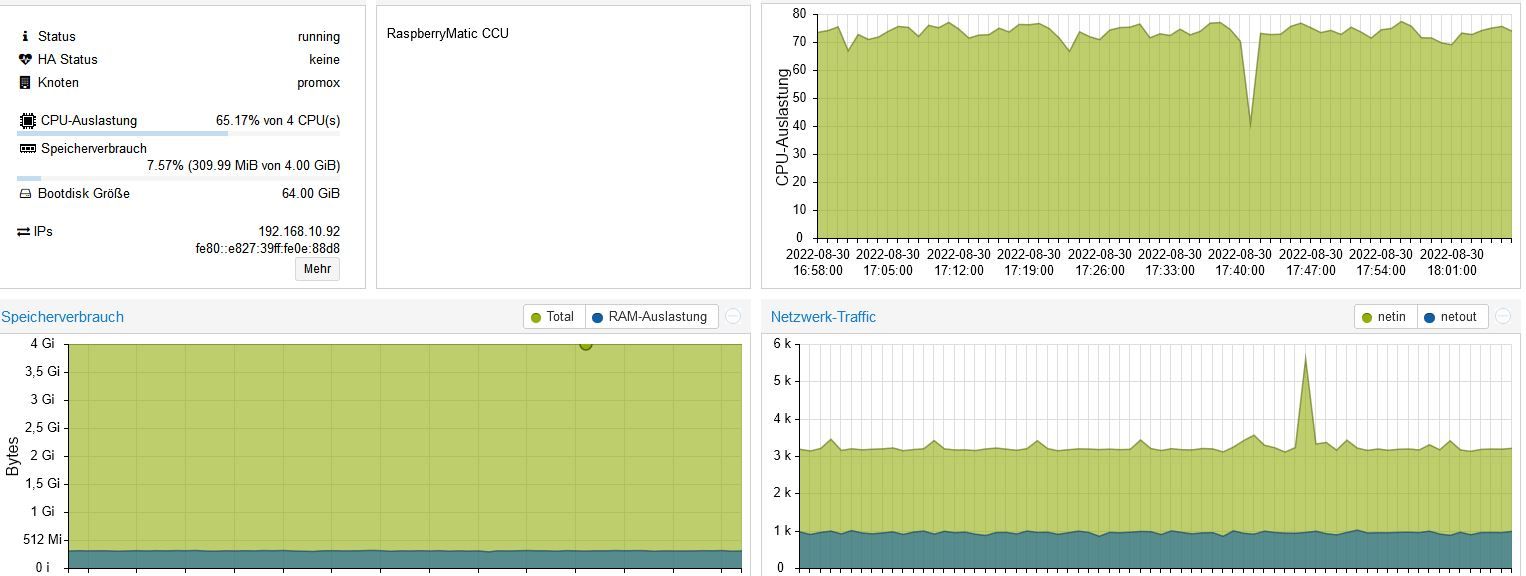
    Raspberrymatic braucht fast 20 Minuten, bis die Seite erreichbar ist, und dann nochmal ca. 6 Minuten bis die WebUI erscheint.

    Teilweise geht die CPU-Auslastung sogar bis zu 98% hoch.

    Du hast dir zwar schon einen NUC zugelegt, doch bei meinem NUC mit einem J3455 (der etwa die gleiche Leistung wie dein i3-4030U hat) habe ich nur etwa 3,5% CPU-Auslastung und die Weboberfläche reagiert normal. Da hat also wohl irgendetwas mit der Installation nicht gepasst.

    GregorSG Offline
    GregorSG Offline
    GregorS
    wrote on last edited by
    #11

    @dr-bakterius
    Ja, war die falsche Version.
    War eine Andoidemulation

    INTEL NUC i7, Sonoff, hmIP, AVM, Jeelink, T-Link, Alexa, Saia-Burgess, uvm.

    1 Reply Last reply
    0
    • GregorSG GregorS

      @jey-cee
      Nach Beendigung der Installation und Reboot hängt er jetzt.
      Es wird nur " Booting from Hard Disk" angezeigt.
      Den Container kann ich weder stoppen noch rebooten.
      Fehlermeldung aus dem Log von Promox

      ()
      trying to acquire lock...
      TASK ERROR: can't lock file '/var/lock/qemu-server/lock-100.conf' - got timeout
      

      z3.JPG

      Jey CeeJ Online
      Jey CeeJ Online
      Jey Cee
      Developer
      wrote on last edited by
      #12

      @gregors sagte in ioBroker + Homematic auf Promox VE:

      Fehlermeldung aus dem Log von Promox
      () trying to acquire lock... TASK ERROR: can't lock file '/var/lock/qemu-server/lock-100.conf' - got timeout

      Schau mal HIER da ist das Problem mit Lösung beschrieben.

      Persönlicher Support
      Spenden -> paypal.me/J3YC33

      GregorSG 1 Reply Last reply
      0
      • Jey CeeJ Jey Cee

        @gregors sagte in ioBroker + Homematic auf Promox VE:

        Fehlermeldung aus dem Log von Promox
        () trying to acquire lock... TASK ERROR: can't lock file '/var/lock/qemu-server/lock-100.conf' - got timeout

        Schau mal HIER da ist das Problem mit Lösung beschrieben.

        GregorSG Offline
        GregorSG Offline
        GregorS
        wrote on last edited by
        #13

        @jey-cee
        Ok. Weiss ich nun für´s nächste mal.
        Hab einfach neu installiert.
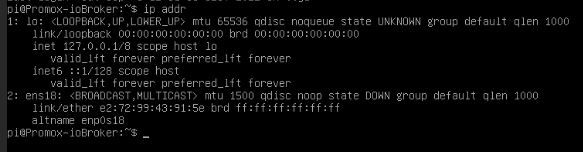
        Jetzt läuft er wieder, aber er gibt mir keine IP-Adrese raus.
        Hatte erst wie in der Anleitung beschrieben auf static umgestellt, dann wieder zurück auf dhcp.
        Keine IP
        z4.JPG

        INTEL NUC i7, Sonoff, hmIP, AVM, Jeelink, T-Link, Alexa, Saia-Burgess, uvm.

        E 1 Reply Last reply
        0
        • GregorSG GregorS

          @jey-cee
          Ok. Weiss ich nun für´s nächste mal.
          Hab einfach neu installiert.
          Jetzt läuft er wieder, aber er gibt mir keine IP-Adrese raus.
          Hatte erst wie in der Anleitung beschrieben auf static umgestellt, dann wieder zurück auf dhcp.
          Keine IP
          z4.JPG

          E Offline
          E Offline
          Einstein67
          wrote on last edited by Einstein67
          #14

          Gehts hier jetzt um einen Container (CT) oder eine Virtuelle-Maschine (VM)??

          Ich blicke nicht mehr durch ...

          Einen Fix&Fertig IOBroker-Container könntest du dir mit folgenden Einzeiler installieren lassen.

          bash -c "$(wget -qLO - https://github.com/tteck/Proxmox/raw/main/ct/iobroker-v4.sh)"
          
          P 1 Reply Last reply
          0
          • E Einstein67

            Gehts hier jetzt um einen Container (CT) oder eine Virtuelle-Maschine (VM)??

            Ich blicke nicht mehr durch ...

            Einen Fix&Fertig IOBroker-Container könntest du dir mit folgenden Einzeiler installieren lassen.

            bash -c "$(wget -qLO - https://github.com/tteck/Proxmox/raw/main/ct/iobroker-v4.sh)"
            
            P Offline
            P Offline
            peterfido
            wrote on last edited by
            #15

            Moin,

            für iobroker habe ich eine eigene VM und für Debmatic auch. Für Debmatic kann auf jeden Fall 2 Kerne empfehlen. Mit nur einem Kern braucht das ewig, bis das System bereit ist. Bei zwei Kernen geht das flott.

            Da es bei mir nach einem Proxmox Update Probleme mit den USB Treibern für das Funkmodul unter einem Container gab, bin ich auf VMs gewechselt. Seit dem keine Probleme mehr.

            Zur Info: iobroker hat 4 Kerne und 8GB RAM, Debmatic 2 Kerne und 1GB RAM. Als CPU im NUC arbeitet eine Core i5 mit 8 Threads.

            Gruß

            Peterfido


            Proxmox auf Intel NUC12WSHi5
            ioBroker: Debian (VM)
            CCU: Debmatic (VM)
            Influx: Debian (VM)
            Grafana: Debian (VM)
            eBus: Debian (VM)
            Zigbee: Debian (VM) mit zigbee2mqtt

            GregorSG 2 Replies Last reply
            0
            • P peterfido

              Moin,

              für iobroker habe ich eine eigene VM und für Debmatic auch. Für Debmatic kann auf jeden Fall 2 Kerne empfehlen. Mit nur einem Kern braucht das ewig, bis das System bereit ist. Bei zwei Kernen geht das flott.

              Da es bei mir nach einem Proxmox Update Probleme mit den USB Treibern für das Funkmodul unter einem Container gab, bin ich auf VMs gewechselt. Seit dem keine Probleme mehr.

              Zur Info: iobroker hat 4 Kerne und 8GB RAM, Debmatic 2 Kerne und 1GB RAM. Als CPU im NUC arbeitet eine Core i5 mit 8 Threads.

              GregorSG Offline
              GregorSG Offline
              GregorS
              wrote on last edited by
              #16

              @peterfido
              So wollte ich es auch aufbauen.
              Habe von jey-cee auch den Tipp mit der VM bekommen.
              Erster Versuch war ebenfalls eine direkte Installation in einem lxc.

              Hoffe, dass ich eine Lösung für die nicht vorhanden IP-Adresse finde. Dann kann ich ioBroker schonmal installieren.
              Danach kommt Debmatic

              INTEL NUC i7, Sonoff, hmIP, AVM, Jeelink, T-Link, Alexa, Saia-Burgess, uvm.

              E 1 Reply Last reply
              0
              • GregorSG GregorS

                @peterfido
                So wollte ich es auch aufbauen.
                Habe von jey-cee auch den Tipp mit der VM bekommen.
                Erster Versuch war ebenfalls eine direkte Installation in einem lxc.

                Hoffe, dass ich eine Lösung für die nicht vorhanden IP-Adresse finde. Dann kann ich ioBroker schonmal installieren.
                Danach kommt Debmatic

                E Offline
                E Offline
                Einstein67
                wrote on last edited by
                #17

                @gregors In einem LXC kannst du die gewünschte IP im Proxmox GUI einstellen.

                Bei einer VM musst du, falls DHCP nicht funktioniert in der Console eine Datei bearbeiten:

                nano /etc/network/interfaces 
                ---
                #The primary network interface
                iface enp6s18 inet static
                        address 192.168.0.231
                        netmask 255.255.255.0
                        gateway 192.168.0.2
                        dns-nameservers 192.168.0.2
                

                wäre so ein Beispiel für IP x.x.x.231 und DNS x.x.x.2

                1 Reply Last reply
                0
                • P peterfido

                  Moin,

                  für iobroker habe ich eine eigene VM und für Debmatic auch. Für Debmatic kann auf jeden Fall 2 Kerne empfehlen. Mit nur einem Kern braucht das ewig, bis das System bereit ist. Bei zwei Kernen geht das flott.

                  Da es bei mir nach einem Proxmox Update Probleme mit den USB Treibern für das Funkmodul unter einem Container gab, bin ich auf VMs gewechselt. Seit dem keine Probleme mehr.

                  Zur Info: iobroker hat 4 Kerne und 8GB RAM, Debmatic 2 Kerne und 1GB RAM. Als CPU im NUC arbeitet eine Core i5 mit 8 Threads.

                  GregorSG Offline
                  GregorSG Offline
                  GregorS
                  wrote on last edited by
                  #18

                  @peterfido

                  Bin gerade bei der Installation von Debmatic.
                  In der Anleitung von Alexreinert bin ich jetzt an Punkt 5 angelangt.
                  Habe ine VM erstellt und das Funkmodul (USB) durchgeleitet. Was ist ein previligierter Container?
                  Unter Pkt. 6

                  Anpassen der Konfiguration des Containers, es müssen in der Datei /etc/pve/lxc/<Container-ID>.conf folgende beiden Zeilen eingefügt werden:
                  
                  lxc.apparmor.profile: unconfined
                  lxc.hook.mount: /usr/share/debmatic/bin/lxc-start-hook.sh


                  Ich habe doch keinen lxc-Container. Will eine VM.

                  INTEL NUC i7, Sonoff, hmIP, AVM, Jeelink, T-Link, Alexa, Saia-Burgess, uvm.

                  P Jey CeeJ 2 Replies Last reply
                  0
                  • bahnuhrB Offline
                    bahnuhrB Offline
                    bahnuhr
                    Forum Testing Most Active
                    wrote on last edited by
                    #19

                    Hier die Anleitung von Jens Maus für Raspberrymatic.
                    Hat bei mir einwandfrei geklappt.

                    Installation Proxmox VE · jens-maus_RaspberryMatic Wiki.pdf


                    Wenn ich helfen konnte, dann Daumen hoch (Pfeil nach oben)!
                    Danke.
                    gute Forenbeiträge: https://forum.iobroker.net/topic/51555/hinweise-f%C3%BCr-gute-forenbeitr%C3%A4ge
                    ScreenToGif :https://www.screentogif.com/downloads.html

                    1 Reply Last reply
                    0
                    • bahnuhrB Offline
                      bahnuhrB Offline
                      bahnuhr
                      Forum Testing Most Active
                      wrote on last edited by
                      #20

                      ok, hab gerade gesehen, dass der TE diese ja schon verlinkt hatte.


                      Wenn ich helfen konnte, dann Daumen hoch (Pfeil nach oben)!
                      Danke.
                      gute Forenbeiträge: https://forum.iobroker.net/topic/51555/hinweise-f%C3%BCr-gute-forenbeitr%C3%A4ge
                      ScreenToGif :https://www.screentogif.com/downloads.html

                      1 Reply Last reply
                      0
                      • GregorSG GregorS

                        @peterfido

                        Bin gerade bei der Installation von Debmatic.
                        In der Anleitung von Alexreinert bin ich jetzt an Punkt 5 angelangt.
                        Habe ine VM erstellt und das Funkmodul (USB) durchgeleitet. Was ist ein previligierter Container?
                        Unter Pkt. 6

                        Anpassen der Konfiguration des Containers, es müssen in der Datei /etc/pve/lxc/<Container-ID>.conf folgende beiden Zeilen eingefügt werden:
                        
                        lxc.apparmor.profile: unconfined
                        lxc.hook.mount: /usr/share/debmatic/bin/lxc-start-hook.sh


                        Ich habe doch keinen lxc-Container. Will eine VM.

                        P Offline
                        P Offline
                        peterfido
                        wrote on last edited by
                        #21

                        @gregors
                        Ich nutze keine Container mehr. Bei VMs kann man die USB Geräte einfach unter Hardware durchreichen. Dazu immer die IDs der USB Geräte auswählen, dann ist es egal, wenn du diese Mal umsteckst.

                        Gruß

                        Peterfido


                        Proxmox auf Intel NUC12WSHi5
                        ioBroker: Debian (VM)
                        CCU: Debmatic (VM)
                        Influx: Debian (VM)
                        Grafana: Debian (VM)
                        eBus: Debian (VM)
                        Zigbee: Debian (VM) mit zigbee2mqtt

                        1 Reply Last reply
                        0
                        • GregorSG GregorS

                          @peterfido

                          Bin gerade bei der Installation von Debmatic.
                          In der Anleitung von Alexreinert bin ich jetzt an Punkt 5 angelangt.
                          Habe ine VM erstellt und das Funkmodul (USB) durchgeleitet. Was ist ein previligierter Container?
                          Unter Pkt. 6

                          Anpassen der Konfiguration des Containers, es müssen in der Datei /etc/pve/lxc/<Container-ID>.conf folgende beiden Zeilen eingefügt werden:
                          
                          lxc.apparmor.profile: unconfined
                          lxc.hook.mount: /usr/share/debmatic/bin/lxc-start-hook.sh


                          Ich habe doch keinen lxc-Container. Will eine VM.

                          Jey CeeJ Online
                          Jey CeeJ Online
                          Jey Cee
                          Developer
                          wrote on last edited by
                          #22

                          @gregors sagte in ioBroker + Homematic auf Promox VE:

                          Was ist ein previligierter Container?

                          Exklusiver zugriff auf Ressourcen, heist er läuft mit root rechten. Kenn ich nur bei Docker.
                          Bei einer VM hast du das nicht.

                          Persönlicher Support
                          Spenden -> paypal.me/J3YC33

                          GregorSG 1 Reply Last reply
                          0
                          • Jey CeeJ Jey Cee

                            @gregors sagte in ioBroker + Homematic auf Promox VE:

                            Was ist ein previligierter Container?

                            Exklusiver zugriff auf Ressourcen, heist er läuft mit root rechten. Kenn ich nur bei Docker.
                            Bei einer VM hast du das nicht.

                            GregorSG Offline
                            GregorSG Offline
                            GregorS
                            wrote on last edited by
                            #23

                            @jey-cee

                            Anpassen der Konfiguration des Containers, es müssen in der Datei /etc/pve/lxc/<Container-ID>.conf folgende beiden Zeilen eingefügt werden:
                            lxc.apparmor.profile: unconfined
                            lxc.hook.mount: /usr/share/debmatic/bin/lxc-start-hook.sh
                            

                            Muss ich die Befehle trotzdem ausführen, oder kann ich mit der Installation von Debmatic
                            in der VM weitermachen?

                            INTEL NUC i7, Sonoff, hmIP, AVM, Jeelink, T-Link, Alexa, Saia-Burgess, uvm.

                            Jey CeeJ 1 Reply Last reply
                            0
                            • GregorSG GregorS

                              @jey-cee

                              Anpassen der Konfiguration des Containers, es müssen in der Datei /etc/pve/lxc/<Container-ID>.conf folgende beiden Zeilen eingefügt werden:
                              lxc.apparmor.profile: unconfined
                              lxc.hook.mount: /usr/share/debmatic/bin/lxc-start-hook.sh
                              

                              Muss ich die Befehle trotzdem ausführen, oder kann ich mit der Installation von Debmatic
                              in der VM weitermachen?

                              Jey CeeJ Online
                              Jey CeeJ Online
                              Jey Cee
                              Developer
                              wrote on last edited by
                              #24

                              @gregors ne musst du nicht Ausführen.

                              Persönlicher Support
                              Spenden -> paypal.me/J3YC33

                              GregorSG 1 Reply Last reply
                              0
                              • Jey CeeJ Jey Cee

                                @gregors ne musst du nicht Ausführen.

                                GregorSG Offline
                                GregorSG Offline
                                GregorS
                                wrote on last edited by
                                #25

                                @jey-cee
                                Habe jetzt ioBroker und Debmatic jeweils in einer VM laufen.
                                Informationsänderungen werden in der Debmatic erkannt und angezeigt.
                                Bis auf die beiden nachfolgenden Probleme bin ich sehr zufrieden mit der Lösung.

                                Allerdings bleibt mein hm-rpc gelb.

                                Zeit
                                	
                                Nachricht
                                hm-rpc.1
                                	2022-09-08 07:53:13.122	info	Terminated (NO_ERROR): Without reason
                                hm-rpc.1
                                	2022-09-08 07:53:13.122	debug	Plugin sentry destroyed
                                hm-rpc.1
                                	2022-09-08 07:53:13.122	info	terminating
                                hm-rpc.1
                                	2022-09-08 07:53:13.120	error	Cannot call init: [http://192.168.10.101:2010, ""] Unknown XML-RPC tag 'TITLE'
                                hm-rpc.1
                                	2022-09-08 07:53:13.117	info	xmlrpc -> 192.168.10.102:2010/ init ["http://192.168.10.101:2010",""]
                                hm-rpc.1
                                	2022-09-08 07:53:13.111	error	Init not possible, going to stop: Unknown XML-RPC tag 'TITLE'
                                hm-rpc.1
                                	2022-09-08 07:53:13.107	debug	xmlrpc -> 192.168.10.102:2010/ init ["http://192.168.10.101:2010","Promox-ioBroker:hm-rpc.1:8d21cc2ee176ddadaacb02b91d94b8b4"]
                                hm-rpc.1
                                	2022-09-08 07:52:43.116	error	Init not possible, going to stop: Unknown XML-RPC tag 'TITLE'
                                hm-rpc.1
                                	2022-09-08 07:52:43.107	debug	start connecting interval
                                hm-rpc.1
                                	2022-09-08 07:52:43.104	debug	xmlrpc -> 192.168.10.102:2010/ init ["http://192.168.10.101:2010","Promox-ioBroker:hm-rpc.1:8d21cc2ee176ddadaacb02b91d94b8b4"]
                                hm-rpc.1
                                	2022-09-08 07:52:43.104	debug	Connect...
                                hm-rpc.1
                                	2022-09-08 07:52:43.103	info	xmlrpc client is trying to connect to 192.168.10.102:2010/ with ["http://192.168.10.101:2010","Promox-ioBroker:hm-rpc.1:8d21cc2ee176ddadaacb02b91d94b8b4"]
                                hm-rpc.1
                                	2022-09-08 07:52:43.103	info	xmlrpc server is trying to listen on 192.168.10.101:2010
                                hm-rpc.1
                                	2022-09-08 07:52:43.036	info	starting. Version 1.15.12 in /opt/iobroker/node_modules/iobroker.hm-rpc, node: v16.17.0, js-controller: 4.0.23
                                hm-rpc.1
                                	2022-09-08 07:52:42.925	debug	Plugin sentry Initialize Plugin (enabled=true)
                                hm-rpc.1
                                	2022-09-08 07:52:42.889	debug	States connected to redis: 127.0.0.1:6379
                                hm-rpc.1
                                	2022-09-08 07:52:42.886	debug	States create User PubSub Client
                                hm-rpc.1
                                	2022-09-08 07:52:42.885	debug	States create System PubSub Client
                                hm-rpc.1
                                	2022-09-08 07:52:42.883	debug	Redis States: Use Redis connection: 127.0.0.1:6379
                                hm-rpc.1
                                	2022-09-08 07:52:42.866	debug	Objects connected to redis: 127.0.0.1:9001
                                hm-rpc.1
                                	2022-09-08 07:52:42.863	debug	Objects client initialize lua scripts
                                hm-rpc.1
                                	2022-09-08 07:52:42.827	debug	Objects create User PubSub Client
                                hm-rpc.1
                                	2022-09-08 07:52:42.826	debug	Objects create System PubSub Client
                                hm-rpc.1
                                	2022-09-08 07:52:42.825	debug	Objects client ready ... initialize now
                                hm-rpc.1
                                	2022-09-08 07:52:42.791	debug	Redis Objects: Use Redis connection: 127.0.0.1:9001
                                

                                Die hm-rega-Instanz ist grün.
                                Authentisierung bei Debmatic ist aus.

                                Mein Sonoff-Adapter wird ebenfalls nicht mehr grün

                                sonoff.0
                                	2022-09-08 07:52:14.463	debug	stateChange sonoff.0.Steckdose-Ladegeräte-Keller.alive: {"val":false,"ack":true,"ts":1662616334459,"q":0,"from":"system.adapter.sonoff.0","user":"system.user.admin","lc":1662568119960}
                                sonoff.0
                                	2022-09-08 07:52:14.462	debug	stateChange sonoff.0.Steckdose-Arbeitszimmer-Fernsehen.alive: {"val":false,"ack":true,"ts":1662616334459,"q":0,"from":"system.adapter.sonoff.0","user":"system.user.admin","lc":1662568119918}
                                sonoff.0
                                	2022-09-08 07:52:14.462	debug	stateChange sonoff.0.Steckdose Tablet Flur.alive: {"val":false,"ack":true,"ts":1662616334459,"q":0,"from":"system.adapter.sonoff.0","user":"system.user.admin","lc":1662568119918}
                                sonoff.0
                                	2022-09-08 07:52:14.462	debug	stateChange sonoff.0.Schalter_Wandlampe_Flur.alive: {"val":false,"ack":true,"ts":1662616334459,"q":0,"from":"system.adapter.sonoff.0","user":"system.user.admin","lc":1662568119918}
                                sonoff.0
                                	2022-09-08 07:52:14.462	debug	stateChange sonoff.0.Schalter_WZ.alive: {"val":false,"ack":true,"ts":1662616334459,"q":0,"from":"system.adapter.sonoff.0","user":"system.user.admin","lc":1662568119918}
                                sonoff.0
                                	2022-09-08 07:52:14.462	debug	stateChange sonoff.0.Schalter_Kammer.alive: {"val":false,"ack":true,"ts":1662616334459,"q":0,"from":"system.adapter.sonoff.0","user":"system.user.admin","lc":1662568119918}
                                sonoff.0
                                	2022-09-08 07:52:14.461	debug	stateChange sonoff.0.Leistung_Gefrierschrank.alive: {"val":false,"ack":true,"ts":1662616334459,"q":0,"from":"system.adapter.sonoff.0","user":"system.user.admin","lc":1662568119918}
                                sonoff.0
                                	2022-09-08 07:52:14.461	debug	stateChange sonoff.0.Leckageüberwachung Küche.alive: {"val":false,"ack":true,"ts":1662616334459,"q":0,"from":"system.adapter.sonoff.0","user":"system.user.admin","lc":1662568119917}
                                sonoff.0
                                	2022-09-08 07:52:14.384	debug	stateChange sonoff.0.info.connection: {"val":"","ack":true,"ts":1662616334383,"q":0,"from":"system.adapter.sonoff.0","user":"system.user.admin","lc":1662568119841}
                                sonoff.0
                                	2022-09-08 07:52:14.379	info	Starting MQTT authenticated server on port 1883
                                sonoff.0
                                	2022-09-08 07:52:14.358	info	starting. Version 2.5.1 in /opt/iobroker/node_modules/iobroker.sonoff, node: v16.17.0, js-controller: 4.0.23
                                sonoff.0
                                	2022-09-08 07:52:14.232	debug	Plugin sentry Initialize Plugin (enabled=true)
                                sonoff.0
                                	2022-09-08 07:52:14.215	debug	States connected to redis: 127.0.0.1:6379
                                sonoff.0
                                	2022-09-08 07:52:14.212	debug	States create User PubSub Client
                                sonoff.0
                                	2022-09-08 07:52:14.212	debug	States create System PubSub Client
                                sonoff.0
                                	2022-09-08 07:52:14.207	debug	Redis States: Use Redis connection: 127.0.0.1:6379
                                sonoff.0
                                	2022-09-08 07:52:14.186	debug	Objects connected to redis: 127.0.0.1:9001
                                sonoff.0
                                	2022-09-08 07:52:14.183	debug	Objects client initialize lua scripts
                                sonoff.0
                                	2022-09-08 07:52:14.138	debug	Objects create User PubSub Client
                                sonoff.0
                                	2022-09-08 07:52:14.137	debug	Objects create System PubSub Client
                                sonoff.0
                                	2022-09-08 07:52:14.095	debug	Objects client ready ... initialize now
                                sonoff.0
                                	2022-09-08 07:52:14.063	debug	Redis Objects: Use Redis connection: 127.0.0.1:9001
                                

                                ioBroker hat keinen Zugriff auf den USB-Stick.
                                Habe ihn unter pi (Benutzer) angelegt.
                                Wie kann ich ioBroker auch den Zugriff erlauben?

                                Gibt es vieleicht ein Problem mit redis?
                                Komme nicht mehr weiter.

                                INTEL NUC i7, Sonoff, hmIP, AVM, Jeelink, T-Link, Alexa, Saia-Burgess, uvm.

                                1 Reply Last reply
                                0

                                Hello! It looks like you're interested in this conversation, but you don't have an account yet.

                                Getting fed up of having to scroll through the same posts each visit? When you register for an account, you'll always come back to exactly where you were before, and choose to be notified of new replies (either via email, or push notification). You'll also be able to save bookmarks and upvote posts to show your appreciation to other community members.

                                With your input, this post could be even better 💗

                                Register Login
                                Reply
                                • Reply as topic
                                Log in to reply
                                • Oldest to Newest
                                • Newest to Oldest
                                • Most Votes


                                Support us

                                ioBroker
                                Community Adapters
                                Donate
                                FAQ Cloud / IOT
                                HowTo: Node.js-Update
                                HowTo: Backup/Restore
                                Downloads
                                BLOG

                                269

                                Online

                                32.8k

                                Users

                                82.7k

                                Topics

                                1.3m

                                Posts
                                Community
                                Impressum | Datenschutz-Bestimmungen | Nutzungsbedingungen | Einwilligungseinstellungen
                                ioBroker Community 2014-2025
                                logo
                                • Login

                                • Don't have an account? Register

                                • Login or register to search.
                                • First post
                                  Last post
                                0
                                • Home
                                • Recent
                                • Tags
                                • Unread 0
                                • Categories
                                • Unreplied
                                • Popular
                                • GitHub
                                • Docu
                                • Hilfe