



Skip to content
  • Home
  • Aktuell
  • Tags
  • 0 Ungelesen 0
  • Kategorien
  • Unreplied
  • Beliebt
  • GitHub
  • Docu
  • Hilfe
Skins
  • Light
  • Brite
  • Cerulean
  • Cosmo
  • Flatly
  • Journal
  • Litera
  • Lumen
  • Lux
  • Materia
  • Minty
  • Morph
  • Pulse
  • Sandstone
  • Simplex
  • Sketchy
  • Spacelab
  • United
  • Yeti
  • Zephyr
  • Dark
  • Cyborg
  • Darkly
  • Quartz
  • Slate
  • Solar
  • Superhero
  • Vapor

  • Standard: (Kein Skin)
  • Kein Skin
Einklappen
ioBroker Logo

Community Forum

donate donate
  1. ioBroker Community Home
  2. Deutsch
  3. Off Topic
  4. InfluxDB
  5. influxdb.0 2022-08-15 ECONNREFUSED 127.0.0.1:8086 (gelöst)

NEWS

  • UPDATE 31.10.: Amazon Alexa - ioBroker Skill läuft aus ?
    apollon77A
    apollon77
    48
    3
    8.8k

  • Monatsrückblick – September 2025
    BluefoxB
    Bluefox
    13
    1
    2.2k

  • Neues Video "KI im Smart Home" - ioBroker plus n8n
    BluefoxB
    Bluefox
    16
    1
    3.4k

influxdb.0 2022-08-15 ECONNREFUSED 127.0.0.1:8086 (gelöst)

Geplant Angeheftet Gesperrt Verschoben InfluxDB
17 Beiträge 3 Kommentatoren 5.8k Aufrufe 1 Watching
  • Älteste zuerst
  • Neuste zuerst
  • Meiste Stimmen
Antworten
  • In einem neuen Thema antworten
Anmelden zum Antworten
Dieses Thema wurde gelöscht. Nur Nutzer mit entsprechenden Rechten können es sehen.
  • M Offline
    M Offline
    maximinus
    schrieb am zuletzt editiert von maximinus
    #1

    Die iobrokerinstallation läuft seit Monaten fehlerfrei. Es wurde nichts geändert.
    Heute morgen zeigte ein grafana dashboard keine Daten an (nur no data). Grafana läuft auf einem RasPi mit der Solaranzeige,
    die dazugehörige Datenbank aber auf dem RasPi mit dem ioBroker
    Es stellte sich heraus dass der RasPi mit dem iobroker und der betreffenden Influxdb nicht lief. Das blaue Licht auf der SSD flackerte nicht. Es bestand kein Zugriff über ssh somit hard reset durch Abstecken
    der Stromversorgung.
    Der RasPi bootet wieder aber influxdb und mqtt bleiben gelb. Mit Restart influxdb kurzzeitig grün dann wieder gelb.
    In der Logdatei:
    influxdb.0 2022-08-15 14:51:40.131 error Error: connect ECONNREFUSED 127.0.0.1:8086
    Mit iobroker fixer repariert keine Änderung. Danach alle Adapter aktualisiert.
    auch keine Änderung

    pi@raspberrypi:~ $ iobroker update -i
    Used repository: stable
    Adapter    "admin"        : 5.3.8    , installed 5.3.8
    Adapter    "alexa2"       : 3.11.2   , installed 3.11.2
    Adapter    "alias-manager": 1.2.4    , installed 1.2.4
    Adapter    "backitup"     : 2.4.10   , installed 2.4.10
    Adapter    "denon"        : 1.13.4   , installed 1.13.4
    Adapter    "devices"      : 1.0.12   , installed 1.0.12
    Adapter    "discovery"    : 3.0.5    , installed 3.0.5
    Adapter    "echarts"      : 1.0.12   , installed 1.0.12
    Adapter    "email"        : 1.1.3    , installed 1.1.3
    Adapter    "fhem"         : 1.6.3    , installed 1.6.3
    Adapter    "flot"         : 1.11.0   , installed 1.11.0
    Adapter    "habpanel"     : 0.5.0    , installed 0.5.0
    Adapter    "history"      : 2.2.0    , installed 2.2.0
    Adapter    "influxdb"     : 3.1.7    , installed 3.1.7
    Adapter    "info"         : 1.9.19   , installed 1.9.19
    Adapter    "iot"          : 1.11.8   , installed 1.11.8
    Adapter    "iqontrol"     : 2.0.0    , installed 2.0.0
    Adapter    "jarvis"       : 3.0.11   , installed 3.0.11
    Adapter    "javascript"   : 5.7.0    , installed 5.7.0
    Controller "js-controller": 4.0.23   , installed 4.0.23
    Adapter    "material"     : 1.1.2    , installed 1.1.2
    Adapter    "mqtt"         : 3.0.6    , installed 3.0.6
    Adapter    "net-tools"    : 0.2.0    , installed 0.2.0
    Adapter    "node-red"     : 3.3.1    , installed 3.3.1
    Adapter    "openhab"      : 1.1.0    , installed 1.1.0
    Adapter    "parser"       : 1.1.7    , installed 1.1.7
    Adapter    "ping"         : 1.5.3    , installed 1.5.3
    Adapter    "pushover"     : 3.0.2    , installed 3.0.2
    Adapter    "rpi2"         : 1.3.2    , installed 1.3.2
    Adapter    "simple-api"   : 2.7.0    , installed 2.7.0
    Adapter    "smart-eq"     : 0.0.2    , installed 0.0.2
    Adapter    "socketio"     : 4.2.0    , installed 4.2.0
    Adapter    "sonoff"       : 2.5.1    , installed 2.5.1
    Adapter    "sql"          : 2.1.7    , installed 2.1.7
    Adapter    "telegram"     : 1.13.0   , installed 1.13.0
    Adapter    "text2command" : 2.2.2    , installed 2.2.2
    Adapter    "tr-064"       : 4.2.16   , installed 4.2.16
    Adapter    "vis"          : 1.4.15   , installed 1.4.15
    Adapter    "vis-hqwidgets": 1.2.0    , installed 1.2.0
    Adapter    "web"          : 4.3.0    , installed 4.3.0
    Adapter    "ws"           : 1.3.0    , installed 1.3.0
    pi@raspberrypi:~ $
    

    iobroker status:

    pi@raspberrypi:~ $ iobroker status
    iobroker is running on this host.
    
    
    Objects type: jsonl
    States  type: redis
    pi@raspberrypi:~ $
    

    Das problem ist aber nicht gelöst. Wenn ich das Dashboard aufrufe zeigte es etwa 10 sec die Daten
    aber dann wieder no data und später wieder Daten und das bis alle Ewigkeit.
    In Grafana der Solaranzeige bekomme ich bei Einstellungen datasource abwechselnd InfluxDB Error: Bad Gateway und Data source is working.
    Sehe ich mir die gleiche Datenbank mit Grafana auf dem RasPi mit ioBroker an ist sie immer working.
    Die IP Adresse, Port, und credentials sind korrekt.
    Wie kann ich herausfinden wieso es zu diesen Verbindungsfehlern kommt?

    RasPi 4 4GB bookworm
    nodejs v20.19.4
    npm 10.8.2
    Objects type: jsonl
    States type: redis
    js-controller: 7.0.6
    admin: 7.6.17
    javascript: 8.9.2

    M 1 Antwort Letzte Antwort
    0
    • M maximinus

      Die iobrokerinstallation läuft seit Monaten fehlerfrei. Es wurde nichts geändert.
      Heute morgen zeigte ein grafana dashboard keine Daten an (nur no data). Grafana läuft auf einem RasPi mit der Solaranzeige,
      die dazugehörige Datenbank aber auf dem RasPi mit dem ioBroker
      Es stellte sich heraus dass der RasPi mit dem iobroker und der betreffenden Influxdb nicht lief. Das blaue Licht auf der SSD flackerte nicht. Es bestand kein Zugriff über ssh somit hard reset durch Abstecken
      der Stromversorgung.
      Der RasPi bootet wieder aber influxdb und mqtt bleiben gelb. Mit Restart influxdb kurzzeitig grün dann wieder gelb.
      In der Logdatei:
      influxdb.0 2022-08-15 14:51:40.131 error Error: connect ECONNREFUSED 127.0.0.1:8086
      Mit iobroker fixer repariert keine Änderung. Danach alle Adapter aktualisiert.
      auch keine Änderung

      pi@raspberrypi:~ $ iobroker update -i
      Used repository: stable
      Adapter    "admin"        : 5.3.8    , installed 5.3.8
      Adapter    "alexa2"       : 3.11.2   , installed 3.11.2
      Adapter    "alias-manager": 1.2.4    , installed 1.2.4
      Adapter    "backitup"     : 2.4.10   , installed 2.4.10
      Adapter    "denon"        : 1.13.4   , installed 1.13.4
      Adapter    "devices"      : 1.0.12   , installed 1.0.12
      Adapter    "discovery"    : 3.0.5    , installed 3.0.5
      Adapter    "echarts"      : 1.0.12   , installed 1.0.12
      Adapter    "email"        : 1.1.3    , installed 1.1.3
      Adapter    "fhem"         : 1.6.3    , installed 1.6.3
      Adapter    "flot"         : 1.11.0   , installed 1.11.0
      Adapter    "habpanel"     : 0.5.0    , installed 0.5.0
      Adapter    "history"      : 2.2.0    , installed 2.2.0
      Adapter    "influxdb"     : 3.1.7    , installed 3.1.7
      Adapter    "info"         : 1.9.19   , installed 1.9.19
      Adapter    "iot"          : 1.11.8   , installed 1.11.8
      Adapter    "iqontrol"     : 2.0.0    , installed 2.0.0
      Adapter    "jarvis"       : 3.0.11   , installed 3.0.11
      Adapter    "javascript"   : 5.7.0    , installed 5.7.0
      Controller "js-controller": 4.0.23   , installed 4.0.23
      Adapter    "material"     : 1.1.2    , installed 1.1.2
      Adapter    "mqtt"         : 3.0.6    , installed 3.0.6
      Adapter    "net-tools"    : 0.2.0    , installed 0.2.0
      Adapter    "node-red"     : 3.3.1    , installed 3.3.1
      Adapter    "openhab"      : 1.1.0    , installed 1.1.0
      Adapter    "parser"       : 1.1.7    , installed 1.1.7
      Adapter    "ping"         : 1.5.3    , installed 1.5.3
      Adapter    "pushover"     : 3.0.2    , installed 3.0.2
      Adapter    "rpi2"         : 1.3.2    , installed 1.3.2
      Adapter    "simple-api"   : 2.7.0    , installed 2.7.0
      Adapter    "smart-eq"     : 0.0.2    , installed 0.0.2
      Adapter    "socketio"     : 4.2.0    , installed 4.2.0
      Adapter    "sonoff"       : 2.5.1    , installed 2.5.1
      Adapter    "sql"          : 2.1.7    , installed 2.1.7
      Adapter    "telegram"     : 1.13.0   , installed 1.13.0
      Adapter    "text2command" : 2.2.2    , installed 2.2.2
      Adapter    "tr-064"       : 4.2.16   , installed 4.2.16
      Adapter    "vis"          : 1.4.15   , installed 1.4.15
      Adapter    "vis-hqwidgets": 1.2.0    , installed 1.2.0
      Adapter    "web"          : 4.3.0    , installed 4.3.0
      Adapter    "ws"           : 1.3.0    , installed 1.3.0
      pi@raspberrypi:~ $
      

      iobroker status:

      pi@raspberrypi:~ $ iobroker status
      iobroker is running on this host.
      
      
      Objects type: jsonl
      States  type: redis
      pi@raspberrypi:~ $
      

      Das problem ist aber nicht gelöst. Wenn ich das Dashboard aufrufe zeigte es etwa 10 sec die Daten
      aber dann wieder no data und später wieder Daten und das bis alle Ewigkeit.
      In Grafana der Solaranzeige bekomme ich bei Einstellungen datasource abwechselnd InfluxDB Error: Bad Gateway und Data source is working.
      Sehe ich mir die gleiche Datenbank mit Grafana auf dem RasPi mit ioBroker an ist sie immer working.
      Die IP Adresse, Port, und credentials sind korrekt.
      Wie kann ich herausfinden wieso es zu diesen Verbindungsfehlern kommt?

      M Offline
      M Offline
      maximinus
      schrieb am zuletzt editiert von
      #2

      @maximinus
      Ich suche immer noch nach möglichen Ursachen für das Problem. Mit Putty erhalte ich folgende Meldung:

      pi@raspberrypi:~ $ influx
      Failed to connect to http://localhost:8086: Get http://localhost:8086/ping: dial tcp [::1]:8086: connect: connection refused
      Please check your connection settings and ensure 'influxd' is running.
      pi@raspberrypi:~ $
      

      Mit Ping ist localhost erreichbar:

      pi@raspberrypi:~ $ ping -4 localhost
      PING localhost (127.0.0.1) 56(84) bytes of data.
      64 bytes from localhost (127.0.0.1): icmp_seq=1 ttl=64 time=0.094 ms
      64 bytes from localhost (127.0.0.1): icmp_seq=2 ttl=64 time=0.092 ms
      64 bytes from localhost (127.0.0.1): icmp_seq=3 ttl=64 time=0.076 ms
      64 bytes from localhost (127.0.0.1): icmp_seq=4 ttl=64 time=0.085 ms
      64 bytes from localhost (127.0.0.1): icmp_seq=5 ttl=64 time=0.049 ms
      64 bytes from localhost (127.0.0.1): icmp_seq=6 ttl=64 time=0.135 ms
      ^C
      --- localhost ping statistics ---
      6 packets transmitted, 6 received, 0% packet loss, time 202ms
      rtt min/avg/max/mdev = 0.049/0.088/0.135/0.027 ms
      pi@raspberrypi:~ $
      

      und auch hierschein alles OK:

      pi@raspberrypi:~ $ sudo netstat -tulpn | grep LISTEN |grep influx
      tcp        0      0 127.0.0.1:8088          0.0.0.0:*               LISTEN      16653/influxd
      pi@raspberrypi:~ $
      

      Was mir aber auffällt ist deer Eintrag hier:

      pi@raspberrypi:~ $ influxd config
      Merging with configuration at: /etc/influxdb/influxdb.conf
      reporting-disabled = false
      bind-address = "127.0.0.1:8088"
      
      [meta]
        dir = "/var/lib/influxdb/meta"
        retention-autocreate = true
        logging-enabled = true
      

      Da steht bind address 8088
      im adapter habe ich aber 8086 gewählt.

      Selbst wenn ich im Adapter 8088 eintrage bekomme ich identische Probleme.
      Ich habe alles diesbezügliche schon gelesen aber ich finde keine Lösung.
      knn mir bitte jemand einen Hinweis geben wo ich eventuell noch suchen könnte.
      MfG Gerhard

      RasPi 4 4GB bookworm
      nodejs v20.19.4
      npm 10.8.2
      Objects type: jsonl
      States type: redis
      js-controller: 7.0.6
      admin: 7.6.17
      javascript: 8.9.2

      HomoranH 1 Antwort Letzte Antwort
      0
      • M maximinus

        @maximinus
        Ich suche immer noch nach möglichen Ursachen für das Problem. Mit Putty erhalte ich folgende Meldung:

        pi@raspberrypi:~ $ influx
        Failed to connect to http://localhost:8086: Get http://localhost:8086/ping: dial tcp [::1]:8086: connect: connection refused
        Please check your connection settings and ensure 'influxd' is running.
        pi@raspberrypi:~ $
        

        Mit Ping ist localhost erreichbar:

        pi@raspberrypi:~ $ ping -4 localhost
        PING localhost (127.0.0.1) 56(84) bytes of data.
        64 bytes from localhost (127.0.0.1): icmp_seq=1 ttl=64 time=0.094 ms
        64 bytes from localhost (127.0.0.1): icmp_seq=2 ttl=64 time=0.092 ms
        64 bytes from localhost (127.0.0.1): icmp_seq=3 ttl=64 time=0.076 ms
        64 bytes from localhost (127.0.0.1): icmp_seq=4 ttl=64 time=0.085 ms
        64 bytes from localhost (127.0.0.1): icmp_seq=5 ttl=64 time=0.049 ms
        64 bytes from localhost (127.0.0.1): icmp_seq=6 ttl=64 time=0.135 ms
        ^C
        --- localhost ping statistics ---
        6 packets transmitted, 6 received, 0% packet loss, time 202ms
        rtt min/avg/max/mdev = 0.049/0.088/0.135/0.027 ms
        pi@raspberrypi:~ $
        

        und auch hierschein alles OK:

        pi@raspberrypi:~ $ sudo netstat -tulpn | grep LISTEN |grep influx
        tcp        0      0 127.0.0.1:8088          0.0.0.0:*               LISTEN      16653/influxd
        pi@raspberrypi:~ $
        

        Was mir aber auffällt ist deer Eintrag hier:

        pi@raspberrypi:~ $ influxd config
        Merging with configuration at: /etc/influxdb/influxdb.conf
        reporting-disabled = false
        bind-address = "127.0.0.1:8088"
        
        [meta]
          dir = "/var/lib/influxdb/meta"
          retention-autocreate = true
          logging-enabled = true
        

        Da steht bind address 8088
        im adapter habe ich aber 8086 gewählt.

        Selbst wenn ich im Adapter 8088 eintrage bekomme ich identische Probleme.
        Ich habe alles diesbezügliche schon gelesen aber ich finde keine Lösung.
        knn mir bitte jemand einen Hinweis geben wo ich eventuell noch suchen könnte.
        MfG Gerhard

        HomoranH Nicht stören
        HomoranH Nicht stören
        Homoran
        Global Moderator Administrators
        schrieb am zuletzt editiert von
        #3

        @maximinus ist das wirklich ein Problem mit dem Adapter?
        oder doch eher mit der Datenbank?

        kein Support per PN! - Fragen im Forum stellen - es gibt fast nichts, was nicht auch für andere interessant ist.

        Benutzt das Voting rechts unten im Beitrag wenn er euch geholfen hat.

        der Installationsfixer: curl -fsL https://iobroker.net/fix.sh | bash -

        M 1 Antwort Letzte Antwort
        0
        • HomoranH Homoran

          @maximinus ist das wirklich ein Problem mit dem Adapter?
          oder doch eher mit der Datenbank?

          M Offline
          M Offline
          maximinus
          schrieb am zuletzt editiert von
          #4

          @homoran
          Wie kann ich das herausfinden?mit putty und top erhalte ich so ein BildRasPi-top.png
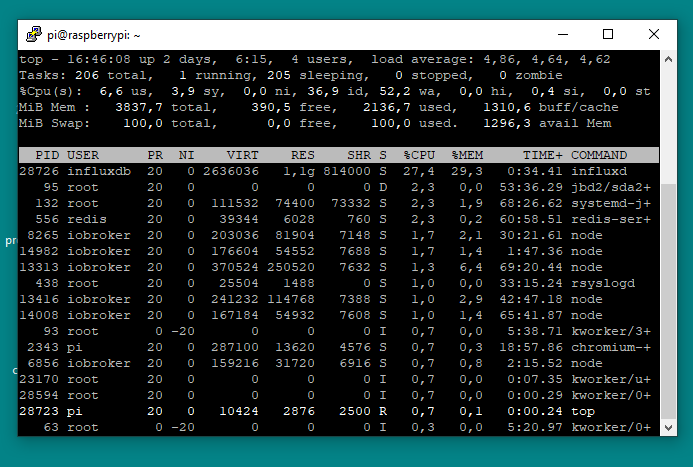
          MfG Gerhard

          RasPi 4 4GB bookworm
          nodejs v20.19.4
          npm 10.8.2
          Objects type: jsonl
          States type: redis
          js-controller: 7.0.6
          admin: 7.6.17
          javascript: 8.9.2

          M 1 Antwort Letzte Antwort
          0
          • M maximinus

            @homoran
            Wie kann ich das herausfinden?mit putty und top erhalte ich so ein BildRasPi-top.png
            MfG Gerhard

            M Offline
            M Offline
            maximinus
            schrieb am zuletzt editiert von
            #5

            @maximinus
            was mir noch auffällt: Die Datensicherung der influxdb vom Tag vor dem Absturz beträgt 390205KB
            die von gestern nur 263114KB

            RasPi 4 4GB bookworm
            nodejs v20.19.4
            npm 10.8.2
            Objects type: jsonl
            States type: redis
            js-controller: 7.0.6
            admin: 7.6.17
            javascript: 8.9.2

            M 1 Antwort Letzte Antwort
            0
            • M maximinus

              @maximinus
              was mir noch auffällt: Die Datensicherung der influxdb vom Tag vor dem Absturz beträgt 390205KB
              die von gestern nur 263114KB

              M Offline
              M Offline
              maximinus
              schrieb am zuletzt editiert von
              #6

              Das Problem konnte gelöst werden:
              influx entfernen mit:
              To uninstall the influxdb package and any other dependant package which are no longer needed on Ubuntu.

              sudo apt-get autoremove influxdb
              

              neu instllieren wie hier beschrieben:

              https://pimylifeup.com/raspberry-pi-influxdb/#:~:text=To%20install%20InfluxDB%20to%20our%20Raspberry%20Pi%2C%20all,service%20manager%20to%20enable%20our%20InfluxDB%20service%20file.
              

              Jetzt läuft es wieder

              RasPi 4 4GB bookworm
              nodejs v20.19.4
              npm 10.8.2
              Objects type: jsonl
              States type: redis
              js-controller: 7.0.6
              admin: 7.6.17
              javascript: 8.9.2

              Thomas BraunT 1 Antwort Letzte Antwort
              0
              • M maximinus

                Das Problem konnte gelöst werden:
                influx entfernen mit:
                To uninstall the influxdb package and any other dependant package which are no longer needed on Ubuntu.

                sudo apt-get autoremove influxdb
                

                neu instllieren wie hier beschrieben:

                https://pimylifeup.com/raspberry-pi-influxdb/#:~:text=To%20install%20InfluxDB%20to%20our%20Raspberry%20Pi%2C%20all,service%20manager%20to%20enable%20our%20InfluxDB%20service%20file.
                

                Jetzt läuft es wieder

                Thomas BraunT Online
                Thomas BraunT Online
                Thomas Braun
                Most Active
                schrieb am zuletzt editiert von
                #7

                @maximinus

                Du hast aber auch ein Problem mit zu wenig RAM.
                Laufender Desktop z. B.?

                Linux-Werkzeugkasten:
                https://forum.iobroker.net/topic/42952/der-kleine-iobroker-linux-werkzeugkasten
                NodeJS Fixer Skript:
                https://forum.iobroker.net/topic/68035/iob-node-fix-skript
                iob_diag: curl -sLf -o diag.sh https://iobroker.net/diag.sh && bash diag.sh

                M 1 Antwort Letzte Antwort
                0
                • Thomas BraunT Thomas Braun

                  @maximinus

                  Du hast aber auch ein Problem mit zu wenig RAM.
                  Laufender Desktop z. B.?

                  M Offline
                  M Offline
                  maximinus
                  schrieb am zuletzt editiert von
                  #8

                  @thomas-braun
                  Nachdem das "Problem" gelöst war habe ich hier nicht mehr hineingeschaut und den Hinweis nicht gesehen. Es läuft tatsächlich die Desktop version.
                  Leider ist es heute wieder aufgetreten ohne etwas zu ändern war der Zugriff auf die Datenbank weg.
                  Ich habe dann ein update upgrade gemacht und plötzlich war sie wieder da aber nur für kurze Zeit. Jetzt ist sie wieder weg. In der Instanzen Übersicht ist der Adapter gelb, wechselt aber sporadisch für kurze Zeit nach grün. Da sieht offenbar so aus:

                  pi@raspberrypi:~ $ influx
                  Connected to http://localhost:8086 version 1.8.10
                  InfluxDB shell version: 1.8.10
                  > show databases
                  ERR: Post http://localhost:8086/query?chunked=true&db=&epoch=ns&q=show+databases: dial tcp [::1]:8086: connect: connection refused
                  > use database iobroker1
                  ERR: Post http://localhost:8086/query?db=&epoch=ns&q=SHOW+DATABASES: dial tcp [::1]:8086: connect: connection refused
                  DB does not exist!
                  > show databases
                  ERR: Post http://localhost:8086/query?chunked=true&db=&epoch=ns&q=show+databases: dial tcp [::1]:8086: connect: connection refused
                  > exit
                  pi@raspberrypi:~ $ influx
                  Failed to connect to http://localhost:8086: Get http://localhost:8086/ping: dial tcp [::1]:8086: connect: connection refused
                  Please check your connection settings and ensure 'influxd' is running.
                  pi@raspberrypi:~ $
                  

                  Ich habe eine 2. Instanz installiert die ist und bleibt grün !?!
                  Ich wollte syslog ansehen das ist aber mit 2,7MB zu groß.
                  Was mach ich nur?

                  RasPi 4 4GB bookworm
                  nodejs v20.19.4
                  npm 10.8.2
                  Objects type: jsonl
                  States type: redis
                  js-controller: 7.0.6
                  admin: 7.6.17
                  javascript: 8.9.2

                  Thomas BraunT 2 Antworten Letzte Antwort
                  0
                  • M maximinus

                    @thomas-braun
                    Nachdem das "Problem" gelöst war habe ich hier nicht mehr hineingeschaut und den Hinweis nicht gesehen. Es läuft tatsächlich die Desktop version.
                    Leider ist es heute wieder aufgetreten ohne etwas zu ändern war der Zugriff auf die Datenbank weg.
                    Ich habe dann ein update upgrade gemacht und plötzlich war sie wieder da aber nur für kurze Zeit. Jetzt ist sie wieder weg. In der Instanzen Übersicht ist der Adapter gelb, wechselt aber sporadisch für kurze Zeit nach grün. Da sieht offenbar so aus:

                    pi@raspberrypi:~ $ influx
                    Connected to http://localhost:8086 version 1.8.10
                    InfluxDB shell version: 1.8.10
                    > show databases
                    ERR: Post http://localhost:8086/query?chunked=true&db=&epoch=ns&q=show+databases: dial tcp [::1]:8086: connect: connection refused
                    > use database iobroker1
                    ERR: Post http://localhost:8086/query?db=&epoch=ns&q=SHOW+DATABASES: dial tcp [::1]:8086: connect: connection refused
                    DB does not exist!
                    > show databases
                    ERR: Post http://localhost:8086/query?chunked=true&db=&epoch=ns&q=show+databases: dial tcp [::1]:8086: connect: connection refused
                    > exit
                    pi@raspberrypi:~ $ influx
                    Failed to connect to http://localhost:8086: Get http://localhost:8086/ping: dial tcp [::1]:8086: connect: connection refused
                    Please check your connection settings and ensure 'influxd' is running.
                    pi@raspberrypi:~ $
                    

                    Ich habe eine 2. Instanz installiert die ist und bleibt grün !?!
                    Ich wollte syslog ansehen das ist aber mit 2,7MB zu groß.
                    Was mach ich nur?

                    Thomas BraunT Online
                    Thomas BraunT Online
                    Thomas Braun
                    Most Active
                    schrieb am zuletzt editiert von Thomas Braun
                    #9

                    @maximinus sagte in influxdb.0 2022-08-15 ECONNREFUSED 127.0.0.1:8086 (gelöst):

                    Was mach ich nur?

                    Den Desktop natürlich aus?

                    Linux-Werkzeugkasten:
                    https://forum.iobroker.net/topic/42952/der-kleine-iobroker-linux-werkzeugkasten
                    NodeJS Fixer Skript:
                    https://forum.iobroker.net/topic/68035/iob-node-fix-skript
                    iob_diag: curl -sLf -o diag.sh https://iobroker.net/diag.sh && bash diag.sh

                    1 Antwort Letzte Antwort
                    0
                    • M maximinus

                      @thomas-braun
                      Nachdem das "Problem" gelöst war habe ich hier nicht mehr hineingeschaut und den Hinweis nicht gesehen. Es läuft tatsächlich die Desktop version.
                      Leider ist es heute wieder aufgetreten ohne etwas zu ändern war der Zugriff auf die Datenbank weg.
                      Ich habe dann ein update upgrade gemacht und plötzlich war sie wieder da aber nur für kurze Zeit. Jetzt ist sie wieder weg. In der Instanzen Übersicht ist der Adapter gelb, wechselt aber sporadisch für kurze Zeit nach grün. Da sieht offenbar so aus:

                      pi@raspberrypi:~ $ influx
                      Connected to http://localhost:8086 version 1.8.10
                      InfluxDB shell version: 1.8.10
                      > show databases
                      ERR: Post http://localhost:8086/query?chunked=true&db=&epoch=ns&q=show+databases: dial tcp [::1]:8086: connect: connection refused
                      > use database iobroker1
                      ERR: Post http://localhost:8086/query?db=&epoch=ns&q=SHOW+DATABASES: dial tcp [::1]:8086: connect: connection refused
                      DB does not exist!
                      > show databases
                      ERR: Post http://localhost:8086/query?chunked=true&db=&epoch=ns&q=show+databases: dial tcp [::1]:8086: connect: connection refused
                      > exit
                      pi@raspberrypi:~ $ influx
                      Failed to connect to http://localhost:8086: Get http://localhost:8086/ping: dial tcp [::1]:8086: connect: connection refused
                      Please check your connection settings and ensure 'influxd' is running.
                      pi@raspberrypi:~ $
                      

                      Ich habe eine 2. Instanz installiert die ist und bleibt grün !?!
                      Ich wollte syslog ansehen das ist aber mit 2,7MB zu groß.
                      Was mach ich nur?

                      Thomas BraunT Online
                      Thomas BraunT Online
                      Thomas Braun
                      Most Active
                      schrieb am zuletzt editiert von
                      #10

                      @maximinus

                      sudo apt update
                      apt policy influxdb*
                      

                      sagt?

                      Linux-Werkzeugkasten:
                      https://forum.iobroker.net/topic/42952/der-kleine-iobroker-linux-werkzeugkasten
                      NodeJS Fixer Skript:
                      https://forum.iobroker.net/topic/68035/iob-node-fix-skript
                      iob_diag: curl -sLf -o diag.sh https://iobroker.net/diag.sh && bash diag.sh

                      M 1 Antwort Letzte Antwort
                      0
                      • Thomas BraunT Thomas Braun

                        @maximinus

                        sudo apt update
                        apt policy influxdb*
                        

                        sagt?

                        M Offline
                        M Offline
                        maximinus
                        schrieb am zuletzt editiert von
                        #11

                        @thomas-braun

                        Danke dass Du dich meies Problems annimmst

                        Also Desktop ist jetzt aus und

                        das ist die Antwort:

                        login as: pi
                        pi@192.168.178.28's password:
                        Linux raspberrypi 5.15.56-v7l+ #1575 SMP Fri Jul 22 20:29:46 BST 2022 armv7l
                        
                        The programs included with the Debian GNU/Linux system are free software;
                        the exact distribution terms for each program are described in the
                        individual files in /usr/share/doc/*/copyright.
                        
                        Debian GNU/Linux comes with ABSOLUTELY NO WARRANTY, to the extent
                        permitted by applicable law.
                        Last login: Thu Sep  1 11:47:57 2022 from 192.168.178.74
                        pi@raspberrypi:~ $ sudo apt update
                        Get:1 http://archive.raspberrypi.org/debian bullseye InRelease [23.7 kB]
                        Get:2 http://raspbian.raspberrypi.org/raspbian bullseye InRelease [15.0 kB]
                        Hit:3 https://packages.grafana.com/oss/deb stable InRelease
                        Hit:4 https://repos.influxdata.com/debian bullseye InRelease
                        Hit:5 https://deb.nodesource.com/node_16.x bullseye InRelease
                        Get:6 http://raspbian.raspberrypi.org/raspbian bullseye/main armhf Packages [13.2 MB]
                        Get:7 http://archive.raspberrypi.org/debian bullseye/main armhf Packages [297 kB]
                        Fetched 13.6 MB in 9s (1,503 kB/s)
                        Reading package lists... Done
                        Building dependency tree... Done
                        Reading state information... Done
                        All packages are up to date.
                        pi@raspberrypi:~ $ apt policy influxdb*
                        influxdb-client:
                          Installed: (none)
                          Candidate: 1.6.7~rc0-1
                          Version table:
                             1.6.7~rc0-1 500
                                500 http://raspbian.raspberrypi.org/raspbian bullseye/main armhf Packages
                        influxdb-dev:
                          Installed: (none)
                          Candidate: (none)
                          Version table:
                        influxdb:
                          Installed: 1.8.10-1
                          Candidate: 1.8.10-1
                          Version table:
                         *** 1.8.10-1 500
                                500 https://repos.influxdata.com/debian bullseye/stable armhf Packages
                                100 /var/lib/dpkg/status
                             1.6.7~rc0-1 500
                                500 http://raspbian.raspberrypi.org/raspbian bullseye/main armhf Packages
                        pi@raspberrypi:~ $
                        

                        Installed:none
                        Das dürfte ein Fehler sein, oder? Was habe ich da falsch gemacht?
                        Was mich allerdings wundert , ist dass es einige Tage zu funktionieren schien.

                        Wie behebe ich das jetzt?

                        Herzlichen Dank
                        Gerhard

                        RasPi 4 4GB bookworm
                        nodejs v20.19.4
                        npm 10.8.2
                        Objects type: jsonl
                        States type: redis
                        js-controller: 7.0.6
                        admin: 7.6.17
                        javascript: 8.9.2

                        Thomas BraunT 1 Antwort Letzte Antwort
                        0
                        • M maximinus

                          @thomas-braun

                          Danke dass Du dich meies Problems annimmst

                          Also Desktop ist jetzt aus und

                          das ist die Antwort:

                          login as: pi
                          pi@192.168.178.28's password:
                          Linux raspberrypi 5.15.56-v7l+ #1575 SMP Fri Jul 22 20:29:46 BST 2022 armv7l
                          
                          The programs included with the Debian GNU/Linux system are free software;
                          the exact distribution terms for each program are described in the
                          individual files in /usr/share/doc/*/copyright.
                          
                          Debian GNU/Linux comes with ABSOLUTELY NO WARRANTY, to the extent
                          permitted by applicable law.
                          Last login: Thu Sep  1 11:47:57 2022 from 192.168.178.74
                          pi@raspberrypi:~ $ sudo apt update
                          Get:1 http://archive.raspberrypi.org/debian bullseye InRelease [23.7 kB]
                          Get:2 http://raspbian.raspberrypi.org/raspbian bullseye InRelease [15.0 kB]
                          Hit:3 https://packages.grafana.com/oss/deb stable InRelease
                          Hit:4 https://repos.influxdata.com/debian bullseye InRelease
                          Hit:5 https://deb.nodesource.com/node_16.x bullseye InRelease
                          Get:6 http://raspbian.raspberrypi.org/raspbian bullseye/main armhf Packages [13.2 MB]
                          Get:7 http://archive.raspberrypi.org/debian bullseye/main armhf Packages [297 kB]
                          Fetched 13.6 MB in 9s (1,503 kB/s)
                          Reading package lists... Done
                          Building dependency tree... Done
                          Reading state information... Done
                          All packages are up to date.
                          pi@raspberrypi:~ $ apt policy influxdb*
                          influxdb-client:
                            Installed: (none)
                            Candidate: 1.6.7~rc0-1
                            Version table:
                               1.6.7~rc0-1 500
                                  500 http://raspbian.raspberrypi.org/raspbian bullseye/main armhf Packages
                          influxdb-dev:
                            Installed: (none)
                            Candidate: (none)
                            Version table:
                          influxdb:
                            Installed: 1.8.10-1
                            Candidate: 1.8.10-1
                            Version table:
                           *** 1.8.10-1 500
                                  500 https://repos.influxdata.com/debian bullseye/stable armhf Packages
                                  100 /var/lib/dpkg/status
                               1.6.7~rc0-1 500
                                  500 http://raspbian.raspberrypi.org/raspbian bullseye/main armhf Packages
                          pi@raspberrypi:~ $
                          

                          Installed:none
                          Das dürfte ein Fehler sein, oder? Was habe ich da falsch gemacht?
                          Was mich allerdings wundert , ist dass es einige Tage zu funktionieren schien.

                          Wie behebe ich das jetzt?

                          Herzlichen Dank
                          Gerhard

                          Thomas BraunT Online
                          Thomas BraunT Online
                          Thomas Braun
                          Most Active
                          schrieb am zuletzt editiert von
                          #12

                          @maximinus sagte in influxdb.0 2022-08-15 ECONNREFUSED 127.0.0.1:8086 (gelöst):

                          Das dürfte ein Fehler sein, oder? Was habe ich da falsch gemacht?

                          Nein, kein Fehler, die Installation ist so wie sie sein soll.

                          Bei influx hab ich weiter keine Aktien drin. Muss sich wer anders anschauen.

                          Linux-Werkzeugkasten:
                          https://forum.iobroker.net/topic/42952/der-kleine-iobroker-linux-werkzeugkasten
                          NodeJS Fixer Skript:
                          https://forum.iobroker.net/topic/68035/iob-node-fix-skript
                          iob_diag: curl -sLf -o diag.sh https://iobroker.net/diag.sh && bash diag.sh

                          M 1 Antwort Letzte Antwort
                          0
                          • Thomas BraunT Thomas Braun

                            @maximinus sagte in influxdb.0 2022-08-15 ECONNREFUSED 127.0.0.1:8086 (gelöst):

                            Das dürfte ein Fehler sein, oder? Was habe ich da falsch gemacht?

                            Nein, kein Fehler, die Installation ist so wie sie sein soll.

                            Bei influx hab ich weiter keine Aktien drin. Muss sich wer anders anschauen.

                            M Offline
                            M Offline
                            maximinus
                            schrieb am zuletzt editiert von
                            #13

                            @thomas-braun

                            Danke,

                            das kann ich noch anbieten, mir sagt das leider nichts:

                            pi@raspberrypi:~ $ influx
                            Failed to connect to http://localhost:8086: Get http://localhost:8086/ping: dial tcp [::1]:8086: connect: connection refused
                            Please check your connection settings and ensure 'influxd' is running.
                            pi@raspberrypi:~ $ influxd
                            
                             8888888           .d888 888                   8888888b.  888888b.
                               888            d88P"  888                   888  "Y88b 888  "88b
                               888            888    888                   888    888 888  .88P
                               888   88888b.  888888 888 888  888 888  888 888    888 8888888K.
                               888   888 "88b 888    888 888  888  Y8bd8P' 888    888 888  "Y88b
                               888   888  888 888    888 888  888   X88K   888    888 888    888
                               888   888  888 888    888 Y88b 888 .d8""8b. 888  .d88P 888   d88P
                             8888888 888  888 888    888  "Y88888 888  888 8888888P"  8888888P"
                            
                            2022-09-02T17:25:23.217735Z     info    InfluxDB starting       {"log_id": "0cgoc4_G000", "version": "1.8.10", "branch": "1.8", "commit": "688e697c51fd"}
                            2022-09-02T17:25:23.217810Z     info    Go runtime      {"log_id": "0cgoc4_G000", "version": "go1.13.8", "maxprocs": 4}
                            run: open server: listen: listen tcp 127.0.0.1:8088: bind: address already in use
                            pi@raspberrypi:~ $
                            

                            Gerhard

                            RasPi 4 4GB bookworm
                            nodejs v20.19.4
                            npm 10.8.2
                            Objects type: jsonl
                            States type: redis
                            js-controller: 7.0.6
                            admin: 7.6.17
                            javascript: 8.9.2

                            HomoranH Thomas BraunT 2 Antworten Letzte Antwort
                            0
                            • M maximinus

                              @thomas-braun

                              Danke,

                              das kann ich noch anbieten, mir sagt das leider nichts:

                              pi@raspberrypi:~ $ influx
                              Failed to connect to http://localhost:8086: Get http://localhost:8086/ping: dial tcp [::1]:8086: connect: connection refused
                              Please check your connection settings and ensure 'influxd' is running.
                              pi@raspberrypi:~ $ influxd
                              
                               8888888           .d888 888                   8888888b.  888888b.
                                 888            d88P"  888                   888  "Y88b 888  "88b
                                 888            888    888                   888    888 888  .88P
                                 888   88888b.  888888 888 888  888 888  888 888    888 8888888K.
                                 888   888 "88b 888    888 888  888  Y8bd8P' 888    888 888  "Y88b
                                 888   888  888 888    888 888  888   X88K   888    888 888    888
                                 888   888  888 888    888 Y88b 888 .d8""8b. 888  .d88P 888   d88P
                               8888888 888  888 888    888  "Y88888 888  888 8888888P"  8888888P"
                              
                              2022-09-02T17:25:23.217735Z     info    InfluxDB starting       {"log_id": "0cgoc4_G000", "version": "1.8.10", "branch": "1.8", "commit": "688e697c51fd"}
                              2022-09-02T17:25:23.217810Z     info    Go runtime      {"log_id": "0cgoc4_G000", "version": "go1.13.8", "maxprocs": 4}
                              run: open server: listen: listen tcp 127.0.0.1:8088: bind: address already in use
                              pi@raspberrypi:~ $
                              

                              Gerhard

                              HomoranH Nicht stören
                              HomoranH Nicht stören
                              Homoran
                              Global Moderator Administrators
                              schrieb am zuletzt editiert von
                              #14

                              kenne ich damit auch nicht aus. Aber hast du das gemacht, was da steht?

                              @maximinus sagte in influxdb.0 2022-08-15 ECONNREFUSED 127.0.0.1:8086 (gelöst):

                              Please check your connection settings and ensure 'influxd' is running.

                              kein Support per PN! - Fragen im Forum stellen - es gibt fast nichts, was nicht auch für andere interessant ist.

                              Benutzt das Voting rechts unten im Beitrag wenn er euch geholfen hat.

                              der Installationsfixer: curl -fsL https://iobroker.net/fix.sh | bash -

                              1 Antwort Letzte Antwort
                              0
                              • M maximinus

                                @thomas-braun

                                Danke,

                                das kann ich noch anbieten, mir sagt das leider nichts:

                                pi@raspberrypi:~ $ influx
                                Failed to connect to http://localhost:8086: Get http://localhost:8086/ping: dial tcp [::1]:8086: connect: connection refused
                                Please check your connection settings and ensure 'influxd' is running.
                                pi@raspberrypi:~ $ influxd
                                
                                 8888888           .d888 888                   8888888b.  888888b.
                                   888            d88P"  888                   888  "Y88b 888  "88b
                                   888            888    888                   888    888 888  .88P
                                   888   88888b.  888888 888 888  888 888  888 888    888 8888888K.
                                   888   888 "88b 888    888 888  888  Y8bd8P' 888    888 888  "Y88b
                                   888   888  888 888    888 888  888   X88K   888    888 888    888
                                   888   888  888 888    888 Y88b 888 .d8""8b. 888  .d88P 888   d88P
                                 8888888 888  888 888    888  "Y88888 888  888 8888888P"  8888888P"
                                
                                2022-09-02T17:25:23.217735Z     info    InfluxDB starting       {"log_id": "0cgoc4_G000", "version": "1.8.10", "branch": "1.8", "commit": "688e697c51fd"}
                                2022-09-02T17:25:23.217810Z     info    Go runtime      {"log_id": "0cgoc4_G000", "version": "go1.13.8", "maxprocs": 4}
                                run: open server: listen: listen tcp 127.0.0.1:8088: bind: address already in use
                                pi@raspberrypi:~ $
                                

                                Gerhard

                                Thomas BraunT Online
                                Thomas BraunT Online
                                Thomas Braun
                                Most Active
                                schrieb am zuletzt editiert von
                                #15

                                @maximinus sagte in influxdb.0 2022-08-15 ECONNREFUSED 127.0.0.1:8086 (gelöst):

                                run: open server: listen: listen tcp 127.0.0.1:8088: bind: address already in use

                                Da lebt schon was auf dem Port.

                                Linux-Werkzeugkasten:
                                https://forum.iobroker.net/topic/42952/der-kleine-iobroker-linux-werkzeugkasten
                                NodeJS Fixer Skript:
                                https://forum.iobroker.net/topic/68035/iob-node-fix-skript
                                iob_diag: curl -sLf -o diag.sh https://iobroker.net/diag.sh && bash diag.sh

                                M 1 Antwort Letzte Antwort
                                0
                                • Thomas BraunT Thomas Braun

                                  @maximinus sagte in influxdb.0 2022-08-15 ECONNREFUSED 127.0.0.1:8086 (gelöst):

                                  run: open server: listen: listen tcp 127.0.0.1:8088: bind: address already in use

                                  Da lebt schon was auf dem Port.

                                  M Offline
                                  M Offline
                                  maximinus
                                  schrieb am zuletzt editiert von
                                  #16

                                  @thomas-braun

                                  Da lebt schon was auf dem Port

                                  Das hat jetzt etwas länger gedauert ich musste alles erst zusammensuchen

                                  Was da zu leben scheint ist dass influx auf 8088 lauscht, woher das kommt ist mir ein Rätsel

                                  pi@raspberrypi:~ $ influxd config
                                  Merging with configuration at: /etc/influxdb/influxdb.conf
                                  reporting-disabled = false
                                  bind-address = "127.0.0.1:8088"
                                  
                                  [meta]
                                    dir = "/var/lib/influxdb/meta"
                                    retention-autocreate = true
                                    logging-enabled = true
                                  
                                  [data]
                                    dir = "/var/lib/influxdb/data"
                                    index-version = "inmem"
                                    wal-dir = "/var/lib/influxdb/wal"
                                    wal-fsync-delay = "0s"
                                    validate-keys = false
                                    strict-error-handling = false
                                    query-log-enabled = true
                                    cache-max-memory-size = 1073741824
                                    cache-snapshot-memory-size = 26214400
                                    cache-snapshot-write-cold-duration = "10m0s"
                                    compact-full-write-cold-duration = "4h0m0s"
                                    compact-throughput = 50331648
                                    compact-throughput-burst = 50331648
                                    max-series-per-database = 1000000
                                    max-values-per-tag = 100000
                                    max-concurrent-compactions = 0
                                    max-index-log-file-size = 1048576
                                    series-id-set-cache-size = 100
                                    series-file-max-concurrent-snapshot-compactions = 0
                                    trace-logging-enabled = false
                                    tsm-use-madv-willneed = false
                                  
                                  [coordinator]
                                    write-timeout = "10s"
                                    max-concurrent-queries = 0
                                    query-timeout = "0s"
                                    log-queries-after = "0s"
                                    max-select-point = 0
                                    max-select-series = 0
                                    max-select-buckets = 0
                                  
                                  [retention]
                                    enabled = true
                                    check-interval = "30m0s"
                                  
                                  [shard-precreation]
                                    enabled = true
                                    check-interval = "10m0s"
                                    advance-period = "30m0s"
                                  
                                  [monitor]
                                    store-enabled = true
                                    store-database = "_internal"
                                    store-interval = "10s"
                                  
                                  [subscriber]
                                    enabled = true
                                    http-timeout = "30s"
                                    insecure-skip-verify = false
                                    ca-certs = ""
                                    write-concurrency = 40
                                    write-buffer-size = 1000
                                  
                                  [http]
                                    enabled = true
                                    bind-address = ":8086"
                                    auth-enabled = false
                                    log-enabled = true
                                    suppress-write-log = false
                                    write-tracing = false
                                    flux-enabled = false
                                    flux-log-enabled = false
                                    pprof-enabled = false
                                    pprof-auth-enabled = false
                                    debug-pprof-enabled = false
                                    ping-auth-enabled = false
                                    prom-read-auth-enabled = false
                                    https-enabled = false
                                    https-certificate = "/etc/ssl/influxdb.pem"
                                    https-private-key = ""
                                    max-row-limit = 0
                                    max-connection-limit = 0
                                    shared-secret = ""
                                    realm = "InfluxDB"
                                    unix-socket-enabled = false
                                    unix-socket-permissions = "0777"
                                    bind-socket = "/var/run/influxdb.sock"
                                    max-body-size = 25000000
                                    access-log-path = ""
                                    max-concurrent-write-limit = 0
                                    max-enqueued-write-limit = 0
                                    enqueued-write-timeout = 30000000000
                                  
                                  [logging]
                                    format = "auto"
                                    level = "info"
                                    suppress-logo = false
                                  
                                  [[graphite]]
                                    enabled = false
                                    bind-address = ":2003"
                                    database = "graphite"
                                    retention-policy = ""
                                    protocol = "tcp"
                                    batch-size = 5000
                                    batch-pending = 10
                                    batch-timeout = "1s"
                                    consistency-level = "one"
                                    separator = "."
                                    udp-read-buffer = 0
                                  
                                  [[collectd]]
                                    enabled = false
                                    bind-address = ":25826"
                                    database = "collectd"
                                    retention-policy = ""
                                    batch-size = 5000
                                    batch-pending = 10
                                    batch-timeout = "10s"
                                    read-buffer = 0
                                    typesdb = "/usr/share/collectd/types.db"
                                    security-level = "none"
                                    auth-file = "/etc/collectd/auth_file"
                                    parse-multivalue-plugin = "split"
                                  
                                  [[opentsdb]]
                                    enabled = false
                                    bind-address = ":4242"
                                    database = "opentsdb"
                                    retention-policy = ""
                                    consistency-level = "one"
                                    tls-enabled = false
                                    certificate = "/etc/ssl/influxdb.pem"
                                    batch-size = 1000
                                    batch-pending = 5
                                    batch-timeout = "1s"
                                    log-point-errors = true
                                  
                                  [[udp]]
                                    enabled = false
                                    bind-address = ":8089"
                                    database = "udp"
                                    retention-policy = ""
                                    batch-size = 5000
                                    batch-pending = 10
                                    read-buffer = 0
                                    batch-timeout = "1s"
                                    precision = ""
                                  
                                  [continuous_queries]
                                    log-enabled = true
                                    enabled = true
                                    query-stats-enabled = false
                                    run-interval = "1s"
                                  
                                  [tls]
                                    min-version = ""
                                    max-version = ""
                                  
                                  pi@raspberrypi:~ $
                                  

                                  Wenn ich in die /etc/influxd/influxd.conf schaue ist die 8088 mit einer Raute versehen:

                                  # The values in this file override the default values used by the system if
                                  # a config option is not specified. The commented out lines are the configurati>
                                  # field and the default value used. Uncommenting a line and changing the value
                                  # will change the value used at runtime when the process is restarted.
                                  
                                  # Once every 24 hours InfluxDB will report usage data to usage.influxdata.com
                                  # The data includes a random ID, os, arch, version, the number of series and ot>
                                  # usage data. No data from user databases is ever transmitted.
                                  # Change this option to true to disable reporting.
                                  # reporting-disabled = false
                                  
                                  # Bind address to use for the RPC service for backup and restore.
                                  # bind-address = "127.0.0.1:8088"
                                  

                                  und weiter unten im http-Teil korrekt mit 8086 definiert

                                  [http]
                                    # Determines whether HTTP endpoint is enabled.
                                  enabled = true
                                  
                                    # Determines whether the Flux query endpoint is enabled.
                                    # flux-enabled = false
                                  
                                    # Determines whether the Flux query logging is enabled.
                                    # flux-log-enabled = false
                                  
                                    # The bind address used by the HTTP service.
                                  bind-address = ":8086"
                                  
                                  pi@raspberrypi:~ $ sudo netstat -tulpn | grep LISTEN |grep influx
                                  tcp        0      0 127.0.0.1:8088          0.0.0.0:*               LISTEN      13217/influxd
                                  pi@raspberrypi:~ $
                                  

                                  @Homoran

                                  Ich denke Influxd läuft, es meldet bind address already in use und erreichbar sollte es auch sein:

                                  pi@raspberrypi:~ $ ping -4 localhost
                                  PING  (127.0.0.1) 56(84) bytes of data.
                                  64 bytes from localhost (127.0.0.1): icmp_seq=1 ttl=64 time=0.058 ms
                                  64 bytes from localhost (127.0.0.1): icmp_seq=2 ttl=64 time=0.078 ms
                                  64 bytes from localhost (127.0.0.1): icmp_seq=3 ttl=64 time=0.099 ms
                                  64 bytes from localhost (127.0.0.1): icmp_seq=4 ttl=64 time=0.054 ms
                                  64 bytes from localhost (127.0.0.1): icmp_seq=5 ttl=64 time=0.059 ms
                                  64 bytes from localhost (127.0.0.1): icmp_seq=6 ttl=64 time=0.054 ms
                                  ^C
                                  ---  ping statistics ---
                                  6 packets transmitted, 6 received, 0% packet loss, time 5229ms
                                  rtt min/avg/max/mdev = 0.054/0.067/0.099/0.016 ms
                                  

                                  Nirgendwo ist Port 8086 zu sehen

                                  pi@raspberrypi:/usr/lib/influxdb $ sudo netstat -tulpen
                                  Active Internet connections (only servers)
                                  Proto Recv-Q Send-Q Local Address           Foreign Address         State       User       Inode      PID/Program name
                                  tcp        0      0 127.0.0.1:9001          0.0.0.0:*               LISTEN      1001       17420      1069/iobroker.js-co
                                  tcp        0      0 0.0.0.0:1886            0.0.0.0:*               LISTEN      1001       16738      1263/io.mqtt.0
                                  tcp        0      0 0.0.0.0:1887            0.0.0.0:*               LISTEN      1001       16739      1263/io.mqtt.0
                                  tcp        0      0 0.0.0.0:1500            0.0.0.0:*               LISTEN      1001       16038      1341/io.sonoff.0
                                  tcp        0      0 127.0.0.1:8088          0.0.0.0:*               LISTEN      999        115698     17948/influxd
                                  tcp        0      0 127.0.0.1:631           0.0.0.0:*               LISTEN      0          14526      516/cupsd
                                  tcp        0      0 0.0.0.0:22              0.0.0.0:*               LISTEN      0          13713      558/sshd: /usr/sbin
                                  tcp        0      0 127.0.0.1:6379          0.0.0.0:*               LISTEN      115        11867      529/redis-server 12
                                  tcp6       0      0 ::1:6379                :::*                    LISTEN      115        11868      529/redis-server 12
                                  tcp6       0      0 :::3000                 :::*                    LISTEN      116        12175      522/grafana-server
                                  tcp6       0      0 ::1:631                 :::*                    LISTEN      0          14525      516/cupsd
                                  tcp6       0      0 :::8081                 :::*                    LISTEN      1001       15761      1135/io.admin.0
                                  tcp6       0      0 :::22                   :::*                    LISTEN      0          13723      558/sshd: /usr/sbin
                                  udp        0      0 0.0.0.0:68              0.0.0.0:*                           0          14569      492/dhcpcd
                                  udp        0      0 0.0.0.0:631             0.0.0.0:*                           0          13738      587/cups-browsed
                                  udp        0      0 0.0.0.0:47757           0.0.0.0:*                           108        14449      398/avahi-daemon: r
                                  udp        0      0 0.0.0.0:5353            0.0.0.0:*                           108        14447      398/avahi-daemon: r
                                  udp6       0      0 :::41076                :::*                                108        14450      398/avahi-daemon: r
                                  udp6       0      0 :::5353                 :::*                                108        14448      398/avahi-daemon: r
                                  pi@raspberrypi:/usr/lib/influxdb $
                                  
                                  LG Gerhard

                                  RasPi 4 4GB bookworm
                                  nodejs v20.19.4
                                  npm 10.8.2
                                  Objects type: jsonl
                                  States type: redis
                                  js-controller: 7.0.6
                                  admin: 7.6.17
                                  javascript: 8.9.2

                                  M 1 Antwort Letzte Antwort
                                  0
                                  • M maximinus

                                    @thomas-braun

                                    Da lebt schon was auf dem Port

                                    Das hat jetzt etwas länger gedauert ich musste alles erst zusammensuchen

                                    Was da zu leben scheint ist dass influx auf 8088 lauscht, woher das kommt ist mir ein Rätsel

                                    pi@raspberrypi:~ $ influxd config
                                    Merging with configuration at: /etc/influxdb/influxdb.conf
                                    reporting-disabled = false
                                    bind-address = "127.0.0.1:8088"
                                    
                                    [meta]
                                      dir = "/var/lib/influxdb/meta"
                                      retention-autocreate = true
                                      logging-enabled = true
                                    
                                    [data]
                                      dir = "/var/lib/influxdb/data"
                                      index-version = "inmem"
                                      wal-dir = "/var/lib/influxdb/wal"
                                      wal-fsync-delay = "0s"
                                      validate-keys = false
                                      strict-error-handling = false
                                      query-log-enabled = true
                                      cache-max-memory-size = 1073741824
                                      cache-snapshot-memory-size = 26214400
                                      cache-snapshot-write-cold-duration = "10m0s"
                                      compact-full-write-cold-duration = "4h0m0s"
                                      compact-throughput = 50331648
                                      compact-throughput-burst = 50331648
                                      max-series-per-database = 1000000
                                      max-values-per-tag = 100000
                                      max-concurrent-compactions = 0
                                      max-index-log-file-size = 1048576
                                      series-id-set-cache-size = 100
                                      series-file-max-concurrent-snapshot-compactions = 0
                                      trace-logging-enabled = false
                                      tsm-use-madv-willneed = false
                                    
                                    [coordinator]
                                      write-timeout = "10s"
                                      max-concurrent-queries = 0
                                      query-timeout = "0s"
                                      log-queries-after = "0s"
                                      max-select-point = 0
                                      max-select-series = 0
                                      max-select-buckets = 0
                                    
                                    [retention]
                                      enabled = true
                                      check-interval = "30m0s"
                                    
                                    [shard-precreation]
                                      enabled = true
                                      check-interval = "10m0s"
                                      advance-period = "30m0s"
                                    
                                    [monitor]
                                      store-enabled = true
                                      store-database = "_internal"
                                      store-interval = "10s"
                                    
                                    [subscriber]
                                      enabled = true
                                      http-timeout = "30s"
                                      insecure-skip-verify = false
                                      ca-certs = ""
                                      write-concurrency = 40
                                      write-buffer-size = 1000
                                    
                                    [http]
                                      enabled = true
                                      bind-address = ":8086"
                                      auth-enabled = false
                                      log-enabled = true
                                      suppress-write-log = false
                                      write-tracing = false
                                      flux-enabled = false
                                      flux-log-enabled = false
                                      pprof-enabled = false
                                      pprof-auth-enabled = false
                                      debug-pprof-enabled = false
                                      ping-auth-enabled = false
                                      prom-read-auth-enabled = false
                                      https-enabled = false
                                      https-certificate = "/etc/ssl/influxdb.pem"
                                      https-private-key = ""
                                      max-row-limit = 0
                                      max-connection-limit = 0
                                      shared-secret = ""
                                      realm = "InfluxDB"
                                      unix-socket-enabled = false
                                      unix-socket-permissions = "0777"
                                      bind-socket = "/var/run/influxdb.sock"
                                      max-body-size = 25000000
                                      access-log-path = ""
                                      max-concurrent-write-limit = 0
                                      max-enqueued-write-limit = 0
                                      enqueued-write-timeout = 30000000000
                                    
                                    [logging]
                                      format = "auto"
                                      level = "info"
                                      suppress-logo = false
                                    
                                    [[graphite]]
                                      enabled = false
                                      bind-address = ":2003"
                                      database = "graphite"
                                      retention-policy = ""
                                      protocol = "tcp"
                                      batch-size = 5000
                                      batch-pending = 10
                                      batch-timeout = "1s"
                                      consistency-level = "one"
                                      separator = "."
                                      udp-read-buffer = 0
                                    
                                    [[collectd]]
                                      enabled = false
                                      bind-address = ":25826"
                                      database = "collectd"
                                      retention-policy = ""
                                      batch-size = 5000
                                      batch-pending = 10
                                      batch-timeout = "10s"
                                      read-buffer = 0
                                      typesdb = "/usr/share/collectd/types.db"
                                      security-level = "none"
                                      auth-file = "/etc/collectd/auth_file"
                                      parse-multivalue-plugin = "split"
                                    
                                    [[opentsdb]]
                                      enabled = false
                                      bind-address = ":4242"
                                      database = "opentsdb"
                                      retention-policy = ""
                                      consistency-level = "one"
                                      tls-enabled = false
                                      certificate = "/etc/ssl/influxdb.pem"
                                      batch-size = 1000
                                      batch-pending = 5
                                      batch-timeout = "1s"
                                      log-point-errors = true
                                    
                                    [[udp]]
                                      enabled = false
                                      bind-address = ":8089"
                                      database = "udp"
                                      retention-policy = ""
                                      batch-size = 5000
                                      batch-pending = 10
                                      read-buffer = 0
                                      batch-timeout = "1s"
                                      precision = ""
                                    
                                    [continuous_queries]
                                      log-enabled = true
                                      enabled = true
                                      query-stats-enabled = false
                                      run-interval = "1s"
                                    
                                    [tls]
                                      min-version = ""
                                      max-version = ""
                                    
                                    pi@raspberrypi:~ $
                                    

                                    Wenn ich in die /etc/influxd/influxd.conf schaue ist die 8088 mit einer Raute versehen:

                                    # The values in this file override the default values used by the system if
                                    # a config option is not specified. The commented out lines are the configurati>
                                    # field and the default value used. Uncommenting a line and changing the value
                                    # will change the value used at runtime when the process is restarted.
                                    
                                    # Once every 24 hours InfluxDB will report usage data to usage.influxdata.com
                                    # The data includes a random ID, os, arch, version, the number of series and ot>
                                    # usage data. No data from user databases is ever transmitted.
                                    # Change this option to true to disable reporting.
                                    # reporting-disabled = false
                                    
                                    # Bind address to use for the RPC service for backup and restore.
                                    # bind-address = "127.0.0.1:8088"
                                    

                                    und weiter unten im http-Teil korrekt mit 8086 definiert

                                    [http]
                                      # Determines whether HTTP endpoint is enabled.
                                    enabled = true
                                    
                                      # Determines whether the Flux query endpoint is enabled.
                                      # flux-enabled = false
                                    
                                      # Determines whether the Flux query logging is enabled.
                                      # flux-log-enabled = false
                                    
                                      # The bind address used by the HTTP service.
                                    bind-address = ":8086"
                                    
                                    pi@raspberrypi:~ $ sudo netstat -tulpn | grep LISTEN |grep influx
                                    tcp        0      0 127.0.0.1:8088          0.0.0.0:*               LISTEN      13217/influxd
                                    pi@raspberrypi:~ $
                                    

                                    @Homoran

                                    Ich denke Influxd läuft, es meldet bind address already in use und erreichbar sollte es auch sein:

                                    pi@raspberrypi:~ $ ping -4 localhost
                                    PING  (127.0.0.1) 56(84) bytes of data.
                                    64 bytes from localhost (127.0.0.1): icmp_seq=1 ttl=64 time=0.058 ms
                                    64 bytes from localhost (127.0.0.1): icmp_seq=2 ttl=64 time=0.078 ms
                                    64 bytes from localhost (127.0.0.1): icmp_seq=3 ttl=64 time=0.099 ms
                                    64 bytes from localhost (127.0.0.1): icmp_seq=4 ttl=64 time=0.054 ms
                                    64 bytes from localhost (127.0.0.1): icmp_seq=5 ttl=64 time=0.059 ms
                                    64 bytes from localhost (127.0.0.1): icmp_seq=6 ttl=64 time=0.054 ms
                                    ^C
                                    ---  ping statistics ---
                                    6 packets transmitted, 6 received, 0% packet loss, time 5229ms
                                    rtt min/avg/max/mdev = 0.054/0.067/0.099/0.016 ms
                                    

                                    Nirgendwo ist Port 8086 zu sehen

                                    pi@raspberrypi:/usr/lib/influxdb $ sudo netstat -tulpen
                                    Active Internet connections (only servers)
                                    Proto Recv-Q Send-Q Local Address           Foreign Address         State       User       Inode      PID/Program name
                                    tcp        0      0 127.0.0.1:9001          0.0.0.0:*               LISTEN      1001       17420      1069/iobroker.js-co
                                    tcp        0      0 0.0.0.0:1886            0.0.0.0:*               LISTEN      1001       16738      1263/io.mqtt.0
                                    tcp        0      0 0.0.0.0:1887            0.0.0.0:*               LISTEN      1001       16739      1263/io.mqtt.0
                                    tcp        0      0 0.0.0.0:1500            0.0.0.0:*               LISTEN      1001       16038      1341/io.sonoff.0
                                    tcp        0      0 127.0.0.1:8088          0.0.0.0:*               LISTEN      999        115698     17948/influxd
                                    tcp        0      0 127.0.0.1:631           0.0.0.0:*               LISTEN      0          14526      516/cupsd
                                    tcp        0      0 0.0.0.0:22              0.0.0.0:*               LISTEN      0          13713      558/sshd: /usr/sbin
                                    tcp        0      0 127.0.0.1:6379          0.0.0.0:*               LISTEN      115        11867      529/redis-server 12
                                    tcp6       0      0 ::1:6379                :::*                    LISTEN      115        11868      529/redis-server 12
                                    tcp6       0      0 :::3000                 :::*                    LISTEN      116        12175      522/grafana-server
                                    tcp6       0      0 ::1:631                 :::*                    LISTEN      0          14525      516/cupsd
                                    tcp6       0      0 :::8081                 :::*                    LISTEN      1001       15761      1135/io.admin.0
                                    tcp6       0      0 :::22                   :::*                    LISTEN      0          13723      558/sshd: /usr/sbin
                                    udp        0      0 0.0.0.0:68              0.0.0.0:*                           0          14569      492/dhcpcd
                                    udp        0      0 0.0.0.0:631             0.0.0.0:*                           0          13738      587/cups-browsed
                                    udp        0      0 0.0.0.0:47757           0.0.0.0:*                           108        14449      398/avahi-daemon: r
                                    udp        0      0 0.0.0.0:5353            0.0.0.0:*                           108        14447      398/avahi-daemon: r
                                    udp6       0      0 :::41076                :::*                                108        14450      398/avahi-daemon: r
                                    udp6       0      0 :::5353                 :::*                                108        14448      398/avahi-daemon: r
                                    pi@raspberrypi:/usr/lib/influxdb $
                                    
                                    LG Gerhard
                                    M Offline
                                    M Offline
                                    maximinus
                                    schrieb am zuletzt editiert von
                                    #17

                                    @maximinus
                                    ich schon wieder.
                                    Ich habe jetzt aus Interesse nochmals influx aufgerufen, das meldet sich aber zeigt nichts an und scheint aber auf eine Eingabe zu warten

                                    pi@raspberrypi:/etc/influxdb $ influx
                                    Connected to http://localhost:8086 version 1.8.10
                                    InfluxDB shell version: 1.8.10
                                    > show databases
                                    ERR: Post http://localhost:8086/query?chunked=true&db=&epoch=ns&q=show+databases: dial tcp [::1]:8086: connect: connection refused
                                    >
                                    

                                    RasPi 4 4GB bookworm
                                    nodejs v20.19.4
                                    npm 10.8.2
                                    Objects type: jsonl
                                    States type: redis
                                    js-controller: 7.0.6
                                    admin: 7.6.17
                                    javascript: 8.9.2

                                    1 Antwort Letzte Antwort
                                    0
                                    Antworten
                                    • In einem neuen Thema antworten
                                    Anmelden zum Antworten
                                    • Älteste zuerst
                                    • Neuste zuerst
                                    • Meiste Stimmen


                                    Support us

                                    ioBroker
                                    Community Adapters
                                    Donate

                                    599

                                    Online

                                    32.4k

                                    Benutzer

                                    81.5k

                                    Themen

                                    1.3m

                                    Beiträge
                                    Community
                                    Impressum | Datenschutz-Bestimmungen | Nutzungsbedingungen | Einwilligungseinstellungen
                                    ioBroker Community 2014-2025
                                    logo
                                    • Anmelden

                                    • Du hast noch kein Konto? Registrieren

                                    • Anmelden oder registrieren, um zu suchen
                                    • Erster Beitrag
                                      Letzter Beitrag
                                    0
                                    • Home
                                    • Aktuell
                                    • Tags
                                    • Ungelesen 0
                                    • Kategorien
                                    • Unreplied
                                    • Beliebt
                                    • GitHub
                                    • Docu
                                    • Hilfe