Skip to content
  • Home
  • Recent
  • Tags
  • 0 Unread 0
  • Categories
  • Unreplied
  • Popular
  • GitHub
  • Docu
  • Hilfe
Skins
  • Light
  • Brite
  • Cerulean
  • Cosmo
  • Flatly
  • Journal
  • Litera
  • Lumen
  • Lux
  • Materia
  • Minty
  • Morph
  • Pulse
  • Sandstone
  • Simplex
  • Sketchy
  • Spacelab
  • United
  • Yeti
  • Zephyr
  • Dark
  • Cyborg
  • Darkly
  • Quartz
  • Slate
  • Solar
  • Superhero
  • Vapor

  • Default (No Skin)
  • No Skin
Collapse
ioBroker Logo

Community Forum

donate donate
  1. ioBroker Community Home
  2. Deutsch
  3. ioBroker Allgemein
  4. [Gelöst] Zwave Adapter startet nicht

NEWS

  • Monatsrückblick Januar/Februar 2026 ist online!
    BluefoxB
    Bluefox
    18
    1
    687

  • Jahresrückblick 2025 – unser neuer Blogbeitrag ist online! ✨
    BluefoxB
    Bluefox
    18
    1
    5.8k

  • Neuer Blogbeitrag: Monatsrückblick - Dezember 2025 🎄
    BluefoxB
    Bluefox
    13
    1
    1.5k

[Gelöst] Zwave Adapter startet nicht

Scheduled Pinned Locked Moved ioBroker Allgemein
42 Posts 10 Posters 9.2k Views
  • Oldest to Newest
  • Newest to Oldest
  • Most Votes
Reply
  • Reply as topic
Log in to reply
This topic has been deleted. Only users with topic management privileges can see it.
  • S Offline
    S Offline
    Stormbringer
    wrote on last edited by
    #11

    Danke, heute oder morgen kommt mein Nuc dann melde ich mich nochmal. Hab aber einen NUC7i3BNH günstiger bekommen und da zu geschlagen. Habe im Vorfeld schon etwas recherchiert. Linux wird wohl da nicht offiziell unterstützt aber habe eine Anleitung für Debian gefunden.

    http://forums.debian.net/viewtopic.php?f=5&t=131832

    Kann ich die dann einfach mit deiner Anleitung kombinieren? Das wird was werden. Notfalls muss ich halt dann mit Ubuntu probieren aber dann passen die ganzen schönen Anleitungen hier im Forum nicht mehr, wenn man nur stupide copy paste machen kann :lol: oder?

    Angaben zur Installation: JS Controller 5.0.12, npm 9.6.7, node 18.17.1, auf einem Intel NUC mit Ubuntu 22.04

    1 Reply Last reply
    0
    • S Offline
      S Offline
      Stormbringer
      wrote on last edited by
      #12

      yihaaaa /opt/iobroker/node_modules/iobroker.zwave gibt es aber schluckt er glaube ich nicht ganz, Adapter geht noch immer nicht:

      ! root@ioBroker-RasPi-1:~# cd /opt/iobroker/node_modules/iobroker.zwave
      ! root@ioBroker-RasPi-1:/opt/iobroker/node_modules/iobroker.zwave# npm i –force --production
      ! npm WARN using --force I sure hope you know what you are doing.
      ! npm WARN lifecycle iobroker.zwave@0.5.2~preinstall: cannot run in wd %s %s (wd=%s) iobroker.zwave@0.5.2 node lib/preinstall.js /opt/iobroker/node_modules/iobroker.zwave
      ! npm WARN iobroker.zwave@0.5.2 license should be a valid SPDX license expression

      Angaben zur Installation: JS Controller 5.0.12, npm 9.6.7, node 18.17.1, auf einem Intel NUC mit Ubuntu 22.04

      1 Reply Last reply
      0
      • S Offline
        S Offline
        Stormbringer
        wrote on last edited by
        #13

        Hilfe :o Der Nuc ist heute gekommen…. Debian 8 Stable habe ich leider nicht zum Laufen gebraucht wegen den bekannten Treiberproblemen.... Jetzt habe ich Debian testing 9 drauf..... Linux an und für sich würde jetzt laufen.

        Aber bei der von Rainer gepostetet Anleitung komme ich bei

        curl -sL https://deb.nodesource.com/setup_6.x | sudo -E bash -

        nicht weiter. Da meckert er immer

        curl -sL https://deb.nodesource.com/setup_6.x | sudo -E bash -

        -su: curl: Kommando nicht gefunden.

        Könntest du mir da bitte helfen? Oder habe ich es schon verbockt mit der Debian Testing Variante und hätte lieber Ubuntu nehmen sollen?

        Angaben zur Installation: JS Controller 5.0.12, npm 9.6.7, node 18.17.1, auf einem Intel NUC mit Ubuntu 22.04

        1 Reply Last reply
        0
        • eric2905E Offline
          eric2905E Offline
          eric2905
          wrote on last edited by
          #14

          Hi,

          bin zwar nicht Rainer, versuche es aber einfach mal :-)

          Versuche mal mit

          sudo apt-get install curl
          

          das fehlende curl Paket zu installieren - danach sollte es laufen.

          Gruß,

          Eric

          Von unterwegs getippert

          Roses are red, violets are blue,

          if I listen to metal, my neighbours do too

          1 Reply Last reply
          0
          • S Offline
            S Offline
            Stormbringer
            wrote on last edited by
            #15

            Grad geändert, hab gemerkt, dass er offline ist :lol: Danke Eric…

            Da schreibt er dann

            Media change: please insert the disc labeled

            'Debian GNU/Linux testing Stretch - Official Snapshot amd64 DVD Binary-1 20170417-20:47'

            in the drive '/media/cdrom/' and press [Enter]

            Will er jetzt wieder den Boot USB Stick :roll: > wollte er wohl nicht, jetzt ist er komplett eingefroren :lol:

            was sagst du allgemein? Passt überhaupt Debian Testing?

            Angaben zur Installation: JS Controller 5.0.12, npm 9.6.7, node 18.17.1, auf einem Intel NUC mit Ubuntu 22.04

            1 Reply Last reply
            0
            • eric2905E Offline
              eric2905E Offline
              eric2905
              wrote on last edited by
              #16

              Wenn er Zugriff aufs Internet hat, sollte er aber auch von dort installieren können.

              Prüf das mal.

              Gruß,

              Eric

              Von unterwegs getippert

              Roses are red, violets are blue,

              if I listen to metal, my neighbours do too

              1 Reply Last reply
              0
              • S Offline
                S Offline
                Stormbringer
                wrote on last edited by
                #17

                Hab mich voller Freude auf Firefox gestürzt, sonst wüsste ich ned wie ich das testen soll…. Firefox hat aber Verbindung zum Internet

                Angaben zur Installation: JS Controller 5.0.12, npm 9.6.7, node 18.17.1, auf einem Intel NUC mit Ubuntu 22.04

                1 Reply Last reply
                0
                • Lenny.CBL Online
                  Lenny.CBL Online
                  Lenny.CB
                  Most Active
                  wrote on last edited by
                  #18

                  @Stormbringer:

                  root@ioBroker-RasPi-1:~# cd /opt/iobroker/node_modules/iobroker.zwave

                  root@ioBroker-RasPi-1:/opt/iobroker/node_modules/iobroker.zwave# npm i –force --production

                  npm WARN using --force I sure hope you know what you are doing.

                  npm WARN lifecycle iobroker.zwave@0.5.2~preinstall: cannot run in wd %s %s (wd=%s) iobroker.zwave@0.5.2 node lib/preinstall.js /opt/iobroker/node_modules/iobroker.zwave

                  npm WARN iobroker.zwave@0.5.2 license should be a valid SPDX license expression `

                  hier hat bei mir Folgendes geholfen:

                  sudo ldconfig
                  
                  1 Reply Last reply
                  0
                  • S Offline
                    S Offline
                    Stormbringer
                    wrote on last edited by
                    #19

                    So….. ioBroker läuft jetzt endlich auf dem neuen Nuc aber mit Ubuntu.

                    Leider hab ich jetzt wieder das Problem von der Überschrift bzw. lässt sich der Z Wave Adapter nicht installieren

                    ! $ ./iobroker add zwave
                    ! npm install iobroker.zwave –production --prefix "/opt/iobroker" (System call)
                    ! npm WARN
                    ! lifecycle openzwave-shared@1.3.4~preinstall: cannot run in wd %s %s (wd=%s) openzwave-shared@1.3.4 node lib/install-ozw.js /opt/iobroker/node_modules/.staging/openzwave-shared-8e400646npm WARN lifecycle iobroker.zwave@0.5.2~preinstall: cannot run in wd %s %s (wd=%s) iobroker.zwave@0.5.2 node lib/preinstall.js /opt/iobroker/node_modules/.staging/iobroker.zwave-936e120a
                    ! In file included from ../src/callbacks.cc:18:0:../src/openzwave.hpp:29:21: fatal error: Manager.h: Datei oder Verzeichnis nicht gefunden
                    ! compilation terminated.
                    ! make: *** [Release/obj.target/openzwave_shared/src/callbacks.o] Fehler 1
                    ! gyp
                    ! ERR! build error
                    ! gyp ERR! stack Error: make failed with exit code: 2gyp ERR! stack at ChildProcess.onExit (/usr/lib/node_modules/npm/node_modules/node-gyp/lib/build.js:276:23)
                    ! gyp ERR! stack at emitTwo (events.js:106:13)
                    ! gyp ERR! stack at ChildProcess.emit (events.js:191:7)
                    ! gyp ERR! stack at Process.ChildProcess._handle.onexit (internal/child_process.js:215:12)
                    ! gyp ERR! System Linux 4.4.0-62-generic
                    ! gyp ERR! command "/usr/bin/nodejs" "/usr/lib/node_modules/npm/node_modules/node-gyp/bin/node-gyp.js" "rebuild"
                    ! gyp ERR! cwd /opt/iobroker/node_modules/openzwave-shared
                    ! gyp ERR! node -v v6.10.2
                    ! gyp ERR! node-gyp -v v3.4.0
                    ! gyp ERR! not ok
                    ! npm
                    ! ERR! Linux 4.4.0-62-genericnpm ERR! argv "/usr/bin/nodejs" "/usr/bin/npm" "install" "iobroker.zwave" "–production" "--prefix" "/opt/iobroker"
                    ! npm ERR! node v6.10.2
                    ! npm ERR! npm v3.10.10
                    ! npm ERR! code ELIFECYCLE
                    ! npm ERR! openzwave-shared@1.3.4 install: node-gyp rebuildnpm ERR! Exit status 1
                    ! npm ERR!
                    ! npm ERR! Failed at the openzwave-shared@1.3.4 install script 'node-gyp rebuild'.
                    ! npm ERR! Make sure you have the latest version of node.js and npm installed.
                    ! npm ERR! If you do, this is most likely a problem with the openzwave-shared package,
                    ! npm ERR! not with npm itself.
                    ! npm ERR! Tell the author that this fails on your system:
                    ! npm ERR! node-gyp rebuild
                    ! npm ERR! You can get information on how to open an issue for this project with:npm ERR! npm bugs openzwave-shared
                    ! npm ERR! Or if that isn't available, you can get their info via:
                    ! npm ERR! npm owner ls openzwave-shared
                    ! npm ERR! There is likely additional logging output above.
                    ! npm ERR! Please include the following file with any support request:npm ERR! /npm-debug.log
                    ! ERROR: host.ubuntu Cannot install iobroker.zwave: 1
                    ! ERROR: process exited with code 25

                    Wenn ich jetzt versuche die neue Version von Github zu installieren und es klappt, habe ich wieder mein Anfangsproblem mit den 2 verschiedenen Versionen oder?

                    Angaben zur Installation: JS Controller 5.0.12, npm 9.6.7, node 18.17.1, auf einem Intel NUC mit Ubuntu 22.04

                    1 Reply Last reply
                    0
                    • AlCalzoneA Offline
                      AlCalzoneA Offline
                      AlCalzone
                      Developer
                      wrote on last edited by
                      #20

                      Das "lifecycle"-Problem liegt daran, dass die install-Skripte mit erhöhten Rechten ausgeführt werden müssten, npm reduziert diese aber aus Sicherheitsgründen. Vielleicht kann man hier an der Install-Routine nachbessern? @Bluefox

                      Im Ordner /opt/iobroker:

                      sudo npm install https://github.com/iobroker/iobroker.zwave/tarball/master --production --unsafe-perm
                      

                      Dann (wenn noch keine Instanz existiert)

                      iobroker add zwave
                      

                      sonst

                      iobroker upload zwave
                      

                      Wenn es dabei Rechteprobleme gibt, ein sudo davor stellen.

                      Warum `sudo` böse ist: https://forum.iobroker.net/post/17109

                      1 Reply Last reply
                      0
                      • S Offline
                        S Offline
                        Stormbringer
                        wrote on last edited by
                        #21

                        Danke Al, bis zu deinem 2. Punkt hat alles super geklappt. Instanz erscheint jetzt auch aber jetzt hab ich den Fehler im Log

                        ! host.ubuntu 2017-04-21 12:56:29.292 info Restart adapter system.adapter.zwave.0 because enabled
                        ! host.ubuntu 2017-04-21 12:56:29.292 error instance system.adapter.zwave.0 terminated with code 0 (OK)
                        ! zwave.0 2017-04-21 12:56:29.286 error Error: libopenzwave.so.1.4: cannot open shared object file: No such file or directory at Error (native) at Object.Module._extensions..node (module.js:597:18) at Module.load (module.js:487:
                        ! zwave.0 2017-04-21 12:56:29.286 error uncaught exception: libopenzwave.so.1.4: cannot open shared object file: No such file or directory

                        bzw. mit Log Option im Adapter

                        ! host.ubuntu 2017-04-21 13:01:55.585 info instance system.adapter.zwave.0 started with pid 7277
                        ! host.ubuntu 2017-04-21 13:01:47.945 info Restart adapter system.adapter.zwave.0 because enabled
                        ! host.ubuntu 2017-04-21 13:01:47.945 error instance system.adapter.zwave.0 terminated with code 0 (OK)
                        ! zwave.0 2017-04-21 13:01:47.942 info terminating
                        ! zwave.0 2017-04-21 13:01:47.934 error at Object.Module._extensions..js (module.js:579:10)
                        ! zwave.0 2017-04-21 13:01:47.934 error at Module._compile (module.js:570:32)
                        ! zwave.0 2017-04-21 13:01:47.934 error at Object. (/opt/iobroker/node_modules/iobroker.zwave/node_modules/openzwave-shared/lib/openzwave-shared.js:26:19)
                        ! zwave.0 2017-04-21 13:01:47.934 error at require (internal/module.js:20:19)
                        ! zwave.0 2017-04-21 13:01:47.934 error at Module.require (module.js:497:17)
                        ! zwave.0 2017-04-21 13:01:47.934 error at Function.Module._load (module.js:438:3)
                        ! zwave.0 2017-04-21 13:01:47.934 error at tryModuleLoad (module.js:446:12)
                        ! zwave.0 2017-04-21 13:01:47.934 error at Module.load (module.js:487:32)
                        ! zwave.0 2017-04-21 13:01:47.934 error at Object.Module._extensions..node (module.js:597:18)
                        ! zwave.0 2017-04-21 13:01:47.934 error at Error (native)
                        ! zwave.0 2017-04-21 13:01:47.934 error Error: libopenzwave.so.1.4: cannot open shared object file: No such file or directory
                        ! zwave.0 2017-04-21 13:01:47.933 error uncaught exception: libopenzwave.so.1.4: cannot open shared object file: No such file or directory
                        ! zwave.0 2017-04-21 13:01:47.911 info starting. Version 0.5.2 in /opt/iobroker/node_modules/iobroker.zwave, node: v6.10.2

                        Angaben zur Installation: JS Controller 5.0.12, npm 9.6.7, node 18.17.1, auf einem Intel NUC mit Ubuntu 22.04

                        1 Reply Last reply
                        0
                        • S Offline
                          S Offline
                          Stormbringer
                          wrote on last edited by
                          #22

                          Wenn ich die nächst niedrigere Version versuche mit Experten Ansicht Admin, habe ich dann wieder das Lifecycle Problem? Langsam bekomm ich Paranoia davor :lol:

                          Vor allem ist es lieder bei mir der 2. wichtigste Hardware Adapter neben Hue

                          Angaben zur Installation: JS Controller 5.0.12, npm 9.6.7, node 18.17.1, auf einem Intel NUC mit Ubuntu 22.04

                          1 Reply Last reply
                          0
                          • S Offline
                            S Offline
                            Stormbringer
                            wrote on last edited by
                            #23

                            habs geschaft, der adapter ist grün. yihaaaaa!

                            sudo ldconfig allein hat nicht hingehauen.

                            sudo ldconfig /usr/local/lib64
                            

                            ging. Kam zwar Fehlermeldung "Das hat nicht funktioniert, bitte nochmal probieren" aber jetzt haut es hin! Danke allen die mitgeleidet haben.

                            Angaben zur Installation: JS Controller 5.0.12, npm 9.6.7, node 18.17.1, auf einem Intel NUC mit Ubuntu 22.04

                            1 Reply Last reply
                            0
                            • M Offline
                              M Offline
                              Mifo
                              wrote on last edited by
                              #24

                              Vielen Dank an alle für die Hilfe

                              Nach einem angleichen der Versionen klappt nun alles

                              1 Reply Last reply
                              0
                              • S Offline
                                S Offline
                                Stormbringer
                                wrote on last edited by
                                #25

                                Es gibt ja jetzt die neue Version mit Secure Funktion freu

                                Im Reiter Adapter zeigt er mir kein Update, über Konsole mit ./iobroker update, schlägt er mir als Updateversion 0.4.4 vor?! Installiert ist 0.5.2, hätte aber wegen der Secure Funktion gerne die aktuelle 0.6.0

                                Wie bekomme ich die ohne, dass ich wieder alles schrotte?

                                Auch wieder mit?

                                sudo npm install https://github.com/iobroker/iobroker.zw … all/master --production --unsafe-perm

                                Oder eher?

                                sudo npm upgrade https://github.com/iobroker/iobroker.zw ... all/master --production --unsafe-perm

                                Oder welche Version zieht er sich da?

                                Sorry, dass ich wieder so blöd Frage aber ich hab echt noch Paranoia vor dem Adapter und dem Lifecycle Zeugs....

                                Danach wird man alle Z Wave Devices löschen und neu anlernen müssen oder? Also zumindest die, die man im Secure Modus braucht...

                                Angaben zur Installation: JS Controller 5.0.12, npm 9.6.7, node 18.17.1, auf einem Intel NUC mit Ubuntu 22.04

                                1 Reply Last reply
                                0
                                • paul53P Offline
                                  paul53P Offline
                                  paul53
                                  wrote on last edited by
                                  #26

                                  @Stormbringer:

                                  Im Reiter Adapter zeigt er mir kein Update, über Konsole mit ./iobroker update, schlägt er mir als Updateversion 0.4.4 vor?! Installiert ist 0.5.2, hätte aber wegen der Secure Funktion gerne die aktuelle 0.6.0 `
                                  In der Hauptkonfiguration von ioBroker unter "Aktiver Verwahrungsort" latest auswählen. Dann sollte es auch im Reiter "Admin" funktionieren.

                                  Bitte verzichtet auf Chat-Nachrichten, denn die Handhabung ist grauenhaft !
                                  Produktiv: RPi 2 mit S.USV, HM-MOD-RPI und SLC-USB-Stick mit root fs

                                  1 Reply Last reply
                                  0
                                  • S Offline
                                    S Offline
                                    Stormbringer
                                    wrote on last edited by
                                    #27

                                    Top, danke. Und gleich meine nächste Frage mitbeantwortet :lol:

                                    Latest kann ich dann so lassen oder?

                                    Ähm sieht man irgendwo welche Objekte in welchem Skript verwendet werden? Wenn ich die jetzt löschen muss zum Secure einbinden, hauen ja auch die Skripte nicht mehr hin.

                                    Angaben zur Installation: JS Controller 5.0.12, npm 9.6.7, node 18.17.1, auf einem Intel NUC mit Ubuntu 22.04

                                    1 Reply Last reply
                                    0
                                    • P Offline
                                      P Offline
                                      Pman
                                      wrote on last edited by
                                      #28

                                      @Stormbringer:

                                      Top, danke. Und gleich meine nächste Frage mitbeantwortet :lol:

                                      Latest kann ich dann so lassen oder?

                                      Ähm sieht man irgendwo welche Objekte in welchem Skript verwendet werden? Wenn ich die jetzt löschen muss zum Secure einbinden, hauen ja auch die Skripte nicht mehr hin. `

                                      Deswegen in Skripten am besten immer alle verwendeten Objekte / States ganz oben in Variablen speichern, dann kann man diese nämlich später unkompliziert aktualisieren. ;)

                                      In VIS musst du wohl oder übel auch alles ersetzen. Vielleicht fängst du erstmal mit 1-2 Geräten an. Es wäre außerdem richtig toll, wenn du im zwave Adapter das logging aktivierst und dann nach dem Secure Pairing mal die OZW Log-Datei nach so etwas durchsuchst:

                                      2017-05-04 18:03:20.249 Info, Node014, Received SecurityCmd_SupportedReport from node 14
                                      2017-05-04 18:03:20.249 Info, Node014,   Secured command classes for node 14:
                                      ...
                                      

                                      Die Log-Datei liegt unter "iobroker/node-modules/iobroker.zwave/node-modules/openzwave-shared/OZW_Log.txt". Mit neuerem Node/NPM evtl auch in einem anderen Unterverzeichnis, aber defintiv in "openzwave-shared/OZW_Log.txt". Vorsicht, diese Datei wird bei jedem Neustart des Adapters überschrieben, also schnell sicher nach dem Pairing!

                                      Leider gibts es auch keine andere Möglichkeit überhaupt festzustellen, ob ein Gerät nun secure oder unsecure gepairt wurde.

                                      Ergebnis am besten hier posten, da gibt es auch schon ein Beispiel von mir:

                                      http://forum.iobroker.net/viewtopic.php?f=36&t=6297

                                      1 Reply Last reply
                                      0
                                      • S Offline
                                        S Offline
                                        Stormbringer
                                        wrote on last edited by
                                        #29

                                        @Stormbringer:

                                        Ergebnis am besten hier posten, da gibt es auch schon ein Beispiel von mir: `

                                        Merk schon in deinem Post, wird irgendwie nach mir geschrien :lol:

                                        Hab ein Danalock…. Das verlangt Scure, ja zwingend. Ich versuche deine Anleitung dann und poste es mal, wenn es euch weiter hilft. Auch wenn ichs nicht wirklich verstanden hab, für was man die Datei durchforsten muss....

                                        @Pman:

                                        Deswegen in Skripten am besten immer alle verwendeten Objekte / States ganz oben in Variablen speichern, dann kann man diese nämlich später unkompliziert aktualisieren. `

                                        Das habe ich dann wohl verbockt, habe fast nichts mit Variablen gemaneged. Glaub, dann lasse ich den rest lieber unsecure :lol:

                                        Angaben zur Installation: JS Controller 5.0.12, npm 9.6.7, node 18.17.1, auf einem Intel NUC mit Ubuntu 22.04

                                        1 Reply Last reply
                                        0
                                        • S Offline
                                          S Offline
                                          Stormbringer
                                          wrote on last edited by
                                          #30

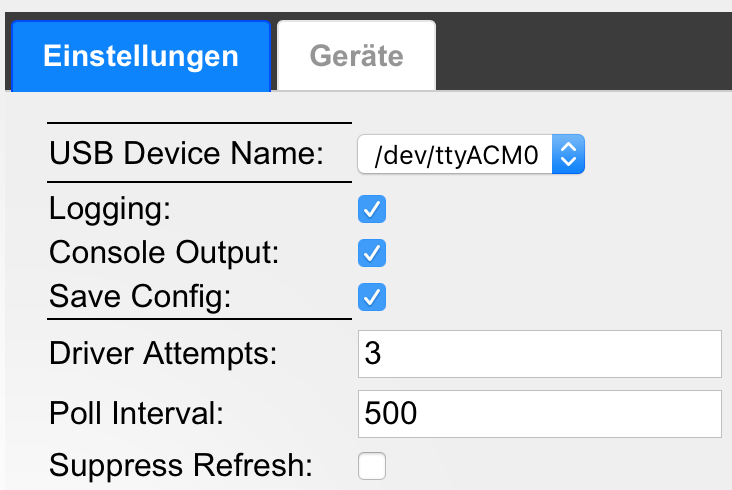
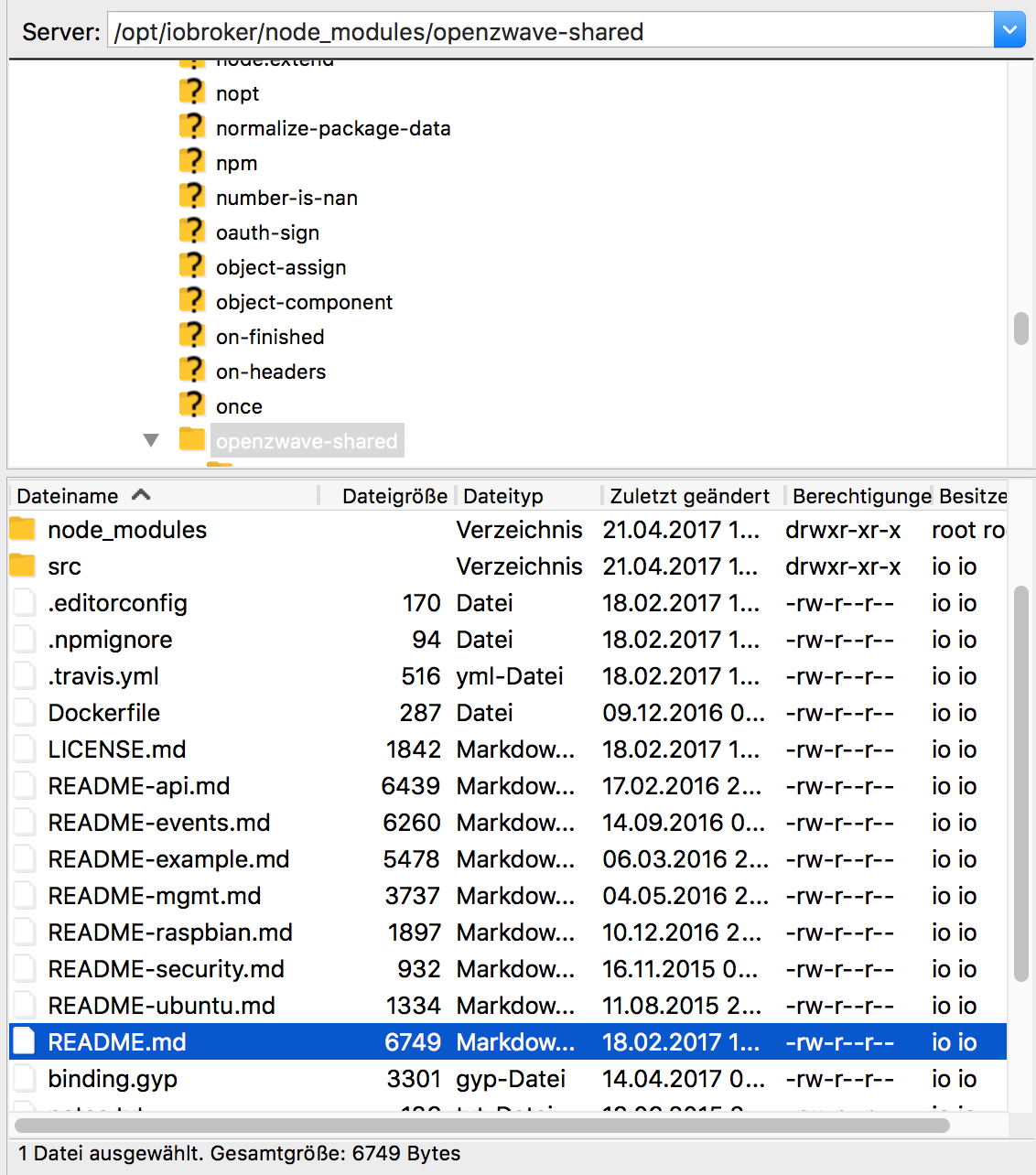
                                          Finde natürlich die Datei nicht :oops:

                                          Log habe ich damals schon eingeschaltet, in dem Ordner ist aber die Datei nicht
                                          2548_bildschirmfoto_2017-05-07_um_19.24.00.png
                                          2548_bildschirmfoto_2017-05-07_um_19.23.39.png

                                          Angaben zur Installation: JS Controller 5.0.12, npm 9.6.7, node 18.17.1, auf einem Intel NUC mit Ubuntu 22.04

                                          1 Reply Last reply
                                          0

                                          Hello! It looks like you're interested in this conversation, but you don't have an account yet.

                                          Getting fed up of having to scroll through the same posts each visit? When you register for an account, you'll always come back to exactly where you were before, and choose to be notified of new replies (either via email, or push notification). You'll also be able to save bookmarks and upvote posts to show your appreciation to other community members.

                                          With your input, this post could be even better 💗

                                          Register Login
                                          Reply
                                          • Reply as topic
                                          Log in to reply
                                          • Oldest to Newest
                                          • Newest to Oldest
                                          • Most Votes


                                          Support us

                                          ioBroker
                                          Community Adapters
                                          Donate
                                          FAQ Cloud / IOT
                                          HowTo: Node.js-Update
                                          HowTo: Backup/Restore
                                          Downloads
                                          BLOG

                                          587

                                          Online

                                          32.7k

                                          Users

                                          82.6k

                                          Topics

                                          1.3m

                                          Posts
                                          Community
                                          Impressum | Datenschutz-Bestimmungen | Nutzungsbedingungen | Einwilligungseinstellungen
                                          ioBroker Community 2014-2025
                                          logo
                                          • Login

                                          • Don't have an account? Register

                                          • Login or register to search.
                                          • First post
                                            Last post
                                          0
                                          • Home
                                          • Recent
                                          • Tags
                                          • Unread 0
                                          • Categories
                                          • Unreplied
                                          • Popular
                                          • GitHub
                                          • Docu
                                          • Hilfe