




Adapter Update Probleme mit dependencies
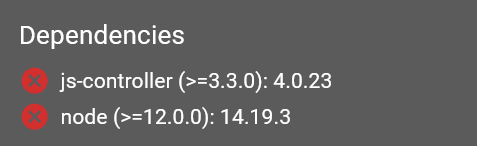
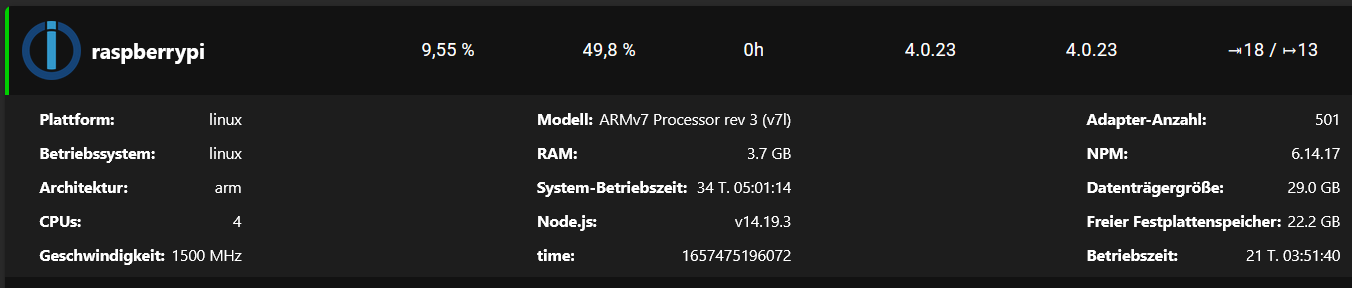
-
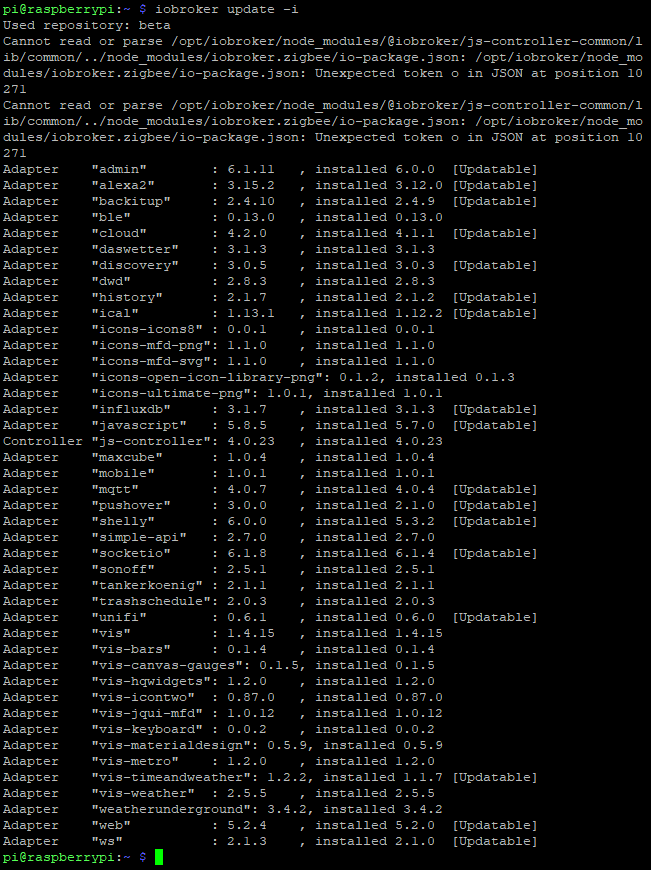
iobroker update -i
sudo ln -s /usr/bin/node /usr/bin/nodejs

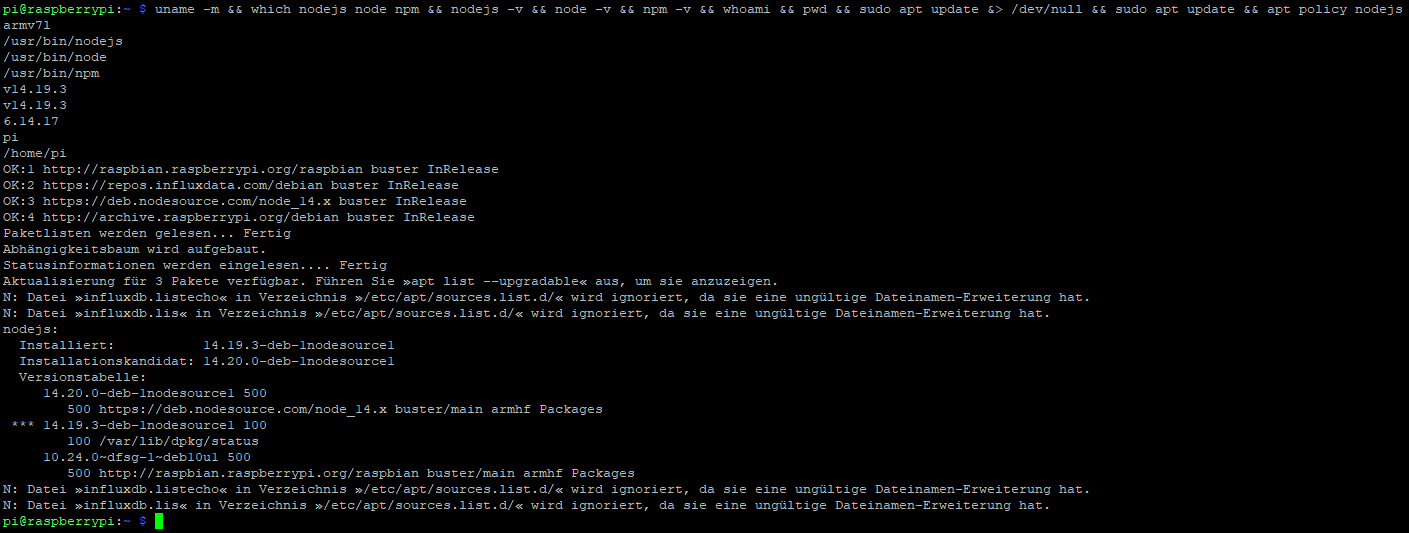
uname -m && which nodejs node npm && nodejs -v && node -v && npm -v && whoami && pwd && sudo apt update &> /dev/null && sudo apt update && apt policy nodejs
Ich hoffe das passt so...
Danke!
-
@crunchip sagte in Adapter Update Probleme mit dependencies:
@wr80 admin installed v 6.0.0
alles klar!
und das als Beta Tester noch mit der allerersten Beta Version unterwegs -
Hallo haselchen,
so?
Used repository: beta
Cannot read or parse /opt/iobroker/node_modules/@iobroker/js-controller-common/lib/common/../node_modules/iobroker.zigbee/io-package.json: /opt/iobroker/node_modules/iobroker.zigbee/io-package.json: Unexpected token o in JSON at position 10271
Cannot read or parse /opt/iobroker/node_modules/@iobroker/js-controller-common/lib/common/../node_modules/iobroker.zigbee/io-package.json: /opt/iobroker/node_modules/iobroker.zigbee/io-package.json: Unexpected token o in JSON at position 10271
Adapter    "admin"        : 6.1.11   , installed 6.0.0  [Updatable]
Adapter    "alexa2"       : 3.15.2   , installed 3.12.0 [Updatable]
Adapter    "backitup"     : 2.4.10   , installed 2.4.9  [Updatable]
Adapter    "ble"          : 0.13.0   , installed 0.13.0
Adapter    "cloud"        : 4.2.0    , installed 4.1.1  [Updatable]
Adapter    "daswetter"    : 3.1.3    , installed 3.1.3
Adapter    "discovery"    : 3.0.5    , installed 3.0.3  [Updatable]
Adapter    "dwd"          : 2.8.3    , installed 2.8.3
Adapter    "history"      : 2.1.7    , installed 2.1.2  [Updatable]
Adapter    "ical"         : 1.13.1   , installed 1.12.2 [Updatable]
Adapter    "icons-icons8" : 0.0.1    , installed 0.0.1
Adapter    "icons-mfd-png": 1.1.0    , installed 1.1.0
Adapter    "icons-mfd-svg": 1.1.0    , installed 1.1.0
Adapter    "icons-open-icon-library-png": 0.1.2, installed 0.1.3
Adapter    "icons-ultimate-png": 1.0.1, installed 1.0.1
Adapter    "influxdb"     : 3.1.7    , installed 3.1.3  [Updatable]
Adapter    "javascript"   : 5.8.5    , installed 5.7.0  [Updatable]
Controller "js-controller": 4.0.23   , installed 4.0.23
Adapter    "maxcube"      : 1.0.4    , installed 1.0.4
Adapter    "mobile"       : 1.0.1    , installed 1.0.1
Adapter    "mqtt"         : 4.0.7    , installed 4.0.4  [Updatable]
Adapter    "pushover"     : 3.0.0    , installed 2.1.0  [Updatable]
Adapter    "shelly"       : 6.0.0    , installed 5.3.2  [Updatable]
Adapter    "simple-api"   : 2.7.0    , installed 2.7.0
Adapter    "socketio"     : 6.1.8    , installed 6.1.4  [Updatable]
Adapter    "sonoff"       : 2.5.1    , installed 2.5.1
Adapter    "tankerkoenig" : 2.1.1    , installed 2.1.1
Adapter    "trashschedule": 2.0.3    , installed 2.0.3
Adapter    "unifi"        : 0.6.1    , installed 0.6.0  [Updatable]
Adapter    "vis"          : 1.4.15   , installed 1.4.15
Adapter    "vis-bars"     : 0.1.4    , installed 0.1.4
Adapter    "vis-canvas-gauges": 0.1.5, installed 0.1.5
Adapter    "vis-hqwidgets": 1.2.0    , installed 1.2.0
Adapter    "vis-icontwo"  : 0.87.0   , installed 0.87.0
Adapter    "vis-jqui-mfd" : 1.0.12   , installed 1.0.12
Adapter    "vis-keyboard" : 0.0.2    , installed 0.0.2
Adapter    "vis-materialdesign": 0.5.9, installed 0.5.9
Adapter    "vis-metro"    : 1.2.0    , installed 1.2.0
Adapter    "vis-timeandweather": 1.2.2, installed 1.1.7 [Updatable]
Adapter    "vis-weather"  : 2.5.5    , installed 2.5.5
Adapter    "weatherunderground": 3.4.2, installed 3.4.2
Adapter    "web"          : 5.2.4    , installed 5.2.0  [Updatable]
Adapter    "ws"           : 2.1.3    , installed 2.1.0  [Updatable]
ln: die symbolische Verknüpfung '/usr/bin/nodejs' konnte nicht angelegt werden: Die Datei existiert bereitsnpm -v && whoami && pwd && sudo apt update &> /dev/null && sudo apt update && ap t policy nodejs armv7l /usr/bin/nodejs /usr/bin/node /usr/bin/npm v14.19.3 v14.19.3 6.14.17 pi /home/pi OK:1 http://archive.raspberrypi.org/debian buster InRelease OK:2 http://raspbian.raspberrypi.org/raspbian buster InRelease OK:3 https://repos.influxdata.com/debian buster InRelease OK:4 https://deb.nodesource.com/node_14.x buster InRelease Paketlisten werden gelesen... Fertig Abhängigkeitsbaum wird aufgebaut. Statusinformationen werden eingelesen.... Fertig Aktualisierung für 3 Pakete verfügbar. Führen Sie »apt list --upgradable« aus, um sie anzuzeigen. N: Datei »influxdb.listecho« in Verzeichnis »/etc/apt/sources.list.d/« wird ignoriert, da sie eine ungültige Dateinamen-Erweiterung hat. N: Datei »influxdb.lis« in Verzeichnis »/etc/apt/sources.list.d/« wird ignoriert, da sie eine ungültige Dateinamen-Erweiterung hat. nodejs: Installiert: 14.19.3-deb-1nodesource1 Installationskandidat: 14.20.0-deb-1nodesource1 Versionstabelle: 14.20.0-deb-1nodesource1 500 500 https://deb.nodesource.com/node_14.x buster/main armhf Packages *** 14.19.3-deb-1nodesource1 100 100 /var/lib/dpkg/status 10.24.0~dfsg-1~deb10u1 500 500 http://raspbian.raspberrypi.org/raspbian buster/main armhf Packages N: Datei »influxdb.listecho« in Verzeichnis »/etc/apt/sources.list.d/« wird ignoriert, da sie eine ungültige Dateinamen-Erweiterung hat. N: Datei »influxdb.lis« in Verzeichnis »/etc/apt/sources.list.d/« wird ignoriert, da sie eine ungültige Dateinamen-Erweiterung hat. -
iobroker update -i
sudo ln -s /usr/bin/node /usr/bin/nodejs
uname -m && which nodejs node npm && nodejs -v && node -v && npm -v && whoami && pwd && sudo apt update &> /dev/null && sudo apt update && apt policy nodejs
Ich hoffe das passt so...
Danke!
-
Hallo haselchen,
so?
Used repository: beta
Cannot read or parse /opt/iobroker/node_modules/@iobroker/js-controller-common/lib/common/../node_modules/iobroker.zigbee/io-package.json: /opt/iobroker/node_modules/iobroker.zigbee/io-package.json: Unexpected token o in JSON at position 10271
Cannot read or parse /opt/iobroker/node_modules/@iobroker/js-controller-common/lib/common/../node_modules/iobroker.zigbee/io-package.json: /opt/iobroker/node_modules/iobroker.zigbee/io-package.json: Unexpected token o in JSON at position 10271
Adapter    "admin"        : 6.1.11   , installed 6.0.0  [Updatable]
Adapter    "alexa2"       : 3.15.2   , installed 3.12.0 [Updatable]
Adapter    "backitup"     : 2.4.10   , installed 2.4.9  [Updatable]
Adapter    "ble"          : 0.13.0   , installed 0.13.0
Adapter    "cloud"        : 4.2.0    , installed 4.1.1  [Updatable]
Adapter    "daswetter"    : 3.1.3    , installed 3.1.3
Adapter    "discovery"    : 3.0.5    , installed 3.0.3  [Updatable]
Adapter    "dwd"          : 2.8.3    , installed 2.8.3
Adapter    "history"      : 2.1.7    , installed 2.1.2  [Updatable]
Adapter    "ical"         : 1.13.1   , installed 1.12.2 [Updatable]
Adapter    "icons-icons8" : 0.0.1    , installed 0.0.1
Adapter    "icons-mfd-png": 1.1.0    , installed 1.1.0
Adapter    "icons-mfd-svg": 1.1.0    , installed 1.1.0
Adapter    "icons-open-icon-library-png": 0.1.2, installed 0.1.3
Adapter    "icons-ultimate-png": 1.0.1, installed 1.0.1
Adapter    "influxdb"     : 3.1.7    , installed 3.1.3  [Updatable]
Adapter    "javascript"   : 5.8.5    , installed 5.7.0  [Updatable]
Controller "js-controller": 4.0.23   , installed 4.0.23
Adapter    "maxcube"      : 1.0.4    , installed 1.0.4
Adapter    "mobile"       : 1.0.1    , installed 1.0.1
Adapter    "mqtt"         : 4.0.7    , installed 4.0.4  [Updatable]
Adapter    "pushover"     : 3.0.0    , installed 2.1.0  [Updatable]
Adapter    "shelly"       : 6.0.0    , installed 5.3.2  [Updatable]
Adapter    "simple-api"   : 2.7.0    , installed 2.7.0
Adapter    "socketio"     : 6.1.8    , installed 6.1.4  [Updatable]
Adapter    "sonoff"       : 2.5.1    , installed 2.5.1
Adapter    "tankerkoenig" : 2.1.1    , installed 2.1.1
Adapter    "trashschedule": 2.0.3    , installed 2.0.3
Adapter    "unifi"        : 0.6.1    , installed 0.6.0  [Updatable]
Adapter    "vis"          : 1.4.15   , installed 1.4.15
Adapter    "vis-bars"     : 0.1.4    , installed 0.1.4
Adapter    "vis-canvas-gauges": 0.1.5, installed 0.1.5
Adapter    "vis-hqwidgets": 1.2.0    , installed 1.2.0
Adapter    "vis-icontwo"  : 0.87.0   , installed 0.87.0
Adapter    "vis-jqui-mfd" : 1.0.12   , installed 1.0.12
Adapter    "vis-keyboard" : 0.0.2    , installed 0.0.2
Adapter    "vis-materialdesign": 0.5.9, installed 0.5.9
Adapter    "vis-metro"    : 1.2.0    , installed 1.2.0
Adapter    "vis-timeandweather": 1.2.2, installed 1.1.7 [Updatable]
Adapter    "vis-weather"  : 2.5.5    , installed 2.5.5
Adapter    "weatherunderground": 3.4.2, installed 3.4.2
Adapter    "web"          : 5.2.4    , installed 5.2.0  [Updatable]
Adapter    "ws"           : 2.1.3    , installed 2.1.0  [Updatable]
ln: die symbolische Verknüpfung '/usr/bin/nodejs' konnte nicht angelegt werden: Die Datei existiert bereitsnpm -v && whoami && pwd && sudo apt update &> /dev/null && sudo apt update && ap t policy nodejs armv7l /usr/bin/nodejs /usr/bin/node /usr/bin/npm v14.19.3 v14.19.3 6.14.17 pi /home/pi OK:1 http://archive.raspberrypi.org/debian buster InRelease OK:2 http://raspbian.raspberrypi.org/raspbian buster InRelease OK:3 https://repos.influxdata.com/debian buster InRelease OK:4 https://deb.nodesource.com/node_14.x buster InRelease Paketlisten werden gelesen... Fertig Abhängigkeitsbaum wird aufgebaut. Statusinformationen werden eingelesen.... Fertig Aktualisierung für 3 Pakete verfügbar. Führen Sie »apt list --upgradable« aus, um sie anzuzeigen. N: Datei »influxdb.listecho« in Verzeichnis »/etc/apt/sources.list.d/« wird ignoriert, da sie eine ungültige Dateinamen-Erweiterung hat. N: Datei »influxdb.lis« in Verzeichnis »/etc/apt/sources.list.d/« wird ignoriert, da sie eine ungültige Dateinamen-Erweiterung hat. nodejs: Installiert: 14.19.3-deb-1nodesource1 Installationskandidat: 14.20.0-deb-1nodesource1 Versionstabelle: 14.20.0-deb-1nodesource1 500 500 https://deb.nodesource.com/node_14.x buster/main armhf Packages *** 14.19.3-deb-1nodesource1 100 100 /var/lib/dpkg/status 10.24.0~dfsg-1~deb10u1 500 500 http://raspbian.raspberrypi.org/raspbian buster/main armhf Packages N: Datei »influxdb.listecho« in Verzeichnis »/etc/apt/sources.list.d/« wird ignoriert, da sie eine ungültige Dateinamen-Erweiterung hat. N: Datei »influxdb.lis« in Verzeichnis »/etc/apt/sources.list.d/« wird ignoriert, da sie eine ungültige Dateinamen-Erweiterung hat.@wr80 sagte in [gelöst]Adapter lassen sich nicht updaten nach Nodejs 16:
Zuerst misten wir mal die .list-Files aus:
iobroker stop sudo rm /etc/apt/sources.list.d/influxdb.listecho sudo rm /etc/apt/sources.list.d/influxdb.lis sudo apt update sudo apt full-install sudo reboot -
Hallo haselchen,
so?
Used repository: beta
Cannot read or parse /opt/iobroker/node_modules/@iobroker/js-controller-common/lib/common/../node_modules/iobroker.zigbee/io-package.json: /opt/iobroker/node_modules/iobroker.zigbee/io-package.json: Unexpected token o in JSON at position 10271
Cannot read or parse /opt/iobroker/node_modules/@iobroker/js-controller-common/lib/common/../node_modules/iobroker.zigbee/io-package.json: /opt/iobroker/node_modules/iobroker.zigbee/io-package.json: Unexpected token o in JSON at position 10271
Adapter    "admin"        : 6.1.11   , installed 6.0.0  [Updatable]
Adapter    "alexa2"       : 3.15.2   , installed 3.12.0 [Updatable]
Adapter    "backitup"     : 2.4.10   , installed 2.4.9  [Updatable]
Adapter    "ble"          : 0.13.0   , installed 0.13.0
Adapter    "cloud"        : 4.2.0    , installed 4.1.1  [Updatable]
Adapter    "daswetter"    : 3.1.3    , installed 3.1.3
Adapter    "discovery"    : 3.0.5    , installed 3.0.3  [Updatable]
Adapter    "dwd"          : 2.8.3    , installed 2.8.3
Adapter    "history"      : 2.1.7    , installed 2.1.2  [Updatable]
Adapter    "ical"         : 1.13.1   , installed 1.12.2 [Updatable]
Adapter    "icons-icons8" : 0.0.1    , installed 0.0.1
Adapter    "icons-mfd-png": 1.1.0    , installed 1.1.0
Adapter    "icons-mfd-svg": 1.1.0    , installed 1.1.0
Adapter    "icons-open-icon-library-png": 0.1.2, installed 0.1.3
Adapter    "icons-ultimate-png": 1.0.1, installed 1.0.1
Adapter    "influxdb"     : 3.1.7    , installed 3.1.3  [Updatable]
Adapter    "javascript"   : 5.8.5    , installed 5.7.0  [Updatable]
Controller "js-controller": 4.0.23   , installed 4.0.23
Adapter    "maxcube"      : 1.0.4    , installed 1.0.4
Adapter    "mobile"       : 1.0.1    , installed 1.0.1
Adapter    "mqtt"         : 4.0.7    , installed 4.0.4  [Updatable]
Adapter    "pushover"     : 3.0.0    , installed 2.1.0  [Updatable]
Adapter    "shelly"       : 6.0.0    , installed 5.3.2  [Updatable]
Adapter    "simple-api"   : 2.7.0    , installed 2.7.0
Adapter    "socketio"     : 6.1.8    , installed 6.1.4  [Updatable]
Adapter    "sonoff"       : 2.5.1    , installed 2.5.1
Adapter    "tankerkoenig" : 2.1.1    , installed 2.1.1
Adapter    "trashschedule": 2.0.3    , installed 2.0.3
Adapter    "unifi"        : 0.6.1    , installed 0.6.0  [Updatable]
Adapter    "vis"          : 1.4.15   , installed 1.4.15
Adapter    "vis-bars"     : 0.1.4    , installed 0.1.4
Adapter    "vis-canvas-gauges": 0.1.5, installed 0.1.5
Adapter    "vis-hqwidgets": 1.2.0    , installed 1.2.0
Adapter    "vis-icontwo"  : 0.87.0   , installed 0.87.0
Adapter    "vis-jqui-mfd" : 1.0.12   , installed 1.0.12
Adapter    "vis-keyboard" : 0.0.2    , installed 0.0.2
Adapter    "vis-materialdesign": 0.5.9, installed 0.5.9
Adapter    "vis-metro"    : 1.2.0    , installed 1.2.0
Adapter    "vis-timeandweather": 1.2.2, installed 1.1.7 [Updatable]
Adapter    "vis-weather"  : 2.5.5    , installed 2.5.5
Adapter    "weatherunderground": 3.4.2, installed 3.4.2
Adapter    "web"          : 5.2.4    , installed 5.2.0  [Updatable]
Adapter    "ws"           : 2.1.3    , installed 2.1.0  [Updatable]
ln: die symbolische Verknüpfung '/usr/bin/nodejs' konnte nicht angelegt werden: Die Datei existiert bereitsnpm -v && whoami && pwd && sudo apt update &> /dev/null && sudo apt update && ap t policy nodejs armv7l /usr/bin/nodejs /usr/bin/node /usr/bin/npm v14.19.3 v14.19.3 6.14.17 pi /home/pi OK:1 http://archive.raspberrypi.org/debian buster InRelease OK:2 http://raspbian.raspberrypi.org/raspbian buster InRelease OK:3 https://repos.influxdata.com/debian buster InRelease OK:4 https://deb.nodesource.com/node_14.x buster InRelease Paketlisten werden gelesen... Fertig Abhängigkeitsbaum wird aufgebaut. Statusinformationen werden eingelesen.... Fertig Aktualisierung für 3 Pakete verfügbar. Führen Sie »apt list --upgradable« aus, um sie anzuzeigen. N: Datei »influxdb.listecho« in Verzeichnis »/etc/apt/sources.list.d/« wird ignoriert, da sie eine ungültige Dateinamen-Erweiterung hat. N: Datei »influxdb.lis« in Verzeichnis »/etc/apt/sources.list.d/« wird ignoriert, da sie eine ungültige Dateinamen-Erweiterung hat. nodejs: Installiert: 14.19.3-deb-1nodesource1 Installationskandidat: 14.20.0-deb-1nodesource1 Versionstabelle: 14.20.0-deb-1nodesource1 500 500 https://deb.nodesource.com/node_14.x buster/main armhf Packages *** 14.19.3-deb-1nodesource1 100 100 /var/lib/dpkg/status 10.24.0~dfsg-1~deb10u1 500 500 http://raspbian.raspberrypi.org/raspbian buster/main armhf Packages N: Datei »influxdb.listecho« in Verzeichnis »/etc/apt/sources.list.d/« wird ignoriert, da sie eine ungültige Dateinamen-Erweiterung hat. N: Datei »influxdb.lis« in Verzeichnis »/etc/apt/sources.list.d/« wird ignoriert, da sie eine ungültige Dateinamen-Erweiterung hat.@wr80 hast du immer noch nicht mitbekommen dass du einen eigenen Thread hier hast?
Bitte nicht mehr im falschen Thread posten!
kein Support per PN! - Fragen im Forum stellen - Benutzt das Voting rechts unten im Beitrag wenn er euch geholfen hat.
Das Forum freut sich über eine Spende. Benutzt dazu den Spendenbutton oben rechts. Danke!
der Installationsfixer: curl -fsL https://iobroker.net/fix.sh | bash - -
@wr80 hast du immer noch nicht mitbekommen dass du einen eigenen Thread hier hast?
Bitte nicht mehr im falschen Thread posten!
@homoran deswegen war ich vorhin etwas verwirrt, hatte sich wohl überschnitten bei meinem Beitrag vorhin
-
@wr80 sagte in [gelöst]Adapter lassen sich nicht updaten nach Nodejs 16:
Zuerst misten wir mal die .list-Files aus:
iobroker stop sudo rm /etc/apt/sources.list.d/influxdb.listecho sudo rm /etc/apt/sources.list.d/influxdb.lis sudo apt update sudo apt full-install sudo reboot -
@wr80
In CodeTags... -
@wr80
In CodeTags...zu 2
rm: das Entfernen von '/etc/apt/sources.list.d/influxdb.listecho' ist nicht möglich: Datei oder Verzeichnis nicht gefundenzu 3
rm: das Entfernen von '/etc/apt/sources.list.d/influxdb.lis' ist nicht möglich: Datei oder Verzeichnis nicht gefundenzu 4
OK:1 http://archive.raspberrypi.org/debian buster InRelease
OK:2 http://raspbian.raspberrypi.org/raspbian buster InRelease
OK:3 https://repos.influxdata.com/debian buster InRelease
OK:4 https://deb.nodesource.com/node_14.x buster InRelease
Paketlisten werden gelesen... Fertig
Abhängigkeitsbaum wird aufgebaut.
Statusinformationen werden eingelesen.... Fertig
Alle Pakete sind aktuell.
zu 5
E: Ungültige Operation full-install -
zu 2
rm: das Entfernen von '/etc/apt/sources.list.d/influxdb.listecho' ist nicht möglich: Datei oder Verzeichnis nicht gefundenzu 3
rm: das Entfernen von '/etc/apt/sources.list.d/influxdb.lis' ist nicht möglich: Datei oder Verzeichnis nicht gefundenzu 4
OK:1 http://archive.raspberrypi.org/debian buster InRelease
OK:2 http://raspbian.raspberrypi.org/raspbian buster InRelease
OK:3 https://repos.influxdata.com/debian buster InRelease
OK:4 https://deb.nodesource.com/node_14.x buster InRelease
Paketlisten werden gelesen... Fertig
Abhängigkeitsbaum wird aufgebaut.
Statusinformationen werden eingelesen.... Fertig
Alle Pakete sind aktuell.
zu 5
E: Ungültige Operation full-install@wr80 sagte in Adapter Update Probleme mit dependencies:
Dann liegt
influxdb.listecho
influxdb.lis
wo anders im Pfad /etc/apt/
Musst du selber mal schauen.ls -la /etc/apt ls -ls /etc/apt/sources.list.dvielleicht mal anschauen.
Zu 5: Fehler von mir.
Musssudo apt full-upgradelauten. -
@wr80 sagte in Adapter Update Probleme mit dependencies:
Dann liegt
influxdb.listecho
influxdb.lis
wo anders im Pfad /etc/apt/
Musst du selber mal schauen.ls -la /etc/apt ls -ls /etc/apt/sources.list.dvielleicht mal anschauen.
Zu 5: Fehler von mir.
Musssudo apt full-upgradelauten...kein Thema!
Paketlisten werden gelesen... Fertig Abhängigkeitsbaum wird aufgebaut. Statusinformationen werden eingelesen.... Fertig Paketaktualisierung (Upgrade) wird berechnet... Fertig 0 aktualisiert, 0 neu installiert, 0 zu entfernen und 0 nicht aktualisiert. -
..kein Thema!
Paketlisten werden gelesen... Fertig Abhängigkeitsbaum wird aufgebaut. Statusinformationen werden eingelesen.... Fertig Paketaktualisierung (Upgrade) wird berechnet... Fertig 0 aktualisiert, 0 neu installiert, 0 zu entfernen und 0 nicht aktualisiert.@wr80 Bitte vollständig alle Ein- wie Ausgaben zeigen. Mit so Schnipseln ist das schwer zu sehen.
Nochmal:sudo apt update -
@wr80 Bitte vollständig alle Ein- wie Ausgaben zeigen. Mit so Schnipseln ist das schwer zu sehen.
Nochmal:sudo apt updateDen oben genanten Befehl hab ich durchgeführt und in CodeTag geantwortet.
Da ist doch nicht mehr. Ich kopiers nochmal, mit dem Befehl..
pi@raspberrypi:~ $ sudo apt full-upgrade
Paketlisten werden gelesen... Fertig
Abhängigkeitsbaum wird aufgebaut.
Statusinformationen werden eingelesen.... Fertig
Paketaktualisierung (Upgrade) wird berechnet... Fertig
0 aktualisiert, 0 neu installiert, 0 zu entfernen und 0 nicht aktualisiert.
Ändert sich aber nicht viel..
Nach "sudo apt update"
pi@raspberrypi:~ $ sudo apt update OK:1 http://archive.raspberrypi.org/debian buster InRelease OK:2 http://raspbian.raspberrypi.org/raspbian buster InRelease OK:3 https://repos.influxdata.com/debian buster InRelease OK:4 https://deb.nodesource.com/node_14.x buster InRelease Paketlisten werden gelesen... Fertig Abhängigkeitsbaum wird aufgebaut. Statusinformationen werden eingelesen.... Fertig Alle Pakete sind aktuell. -
Den oben genanten Befehl hab ich durchgeführt und in CodeTag geantwortet.
Da ist doch nicht mehr. Ich kopiers nochmal, mit dem Befehl..
pi@raspberrypi:~ $ sudo apt full-upgrade
Paketlisten werden gelesen... Fertig
Abhängigkeitsbaum wird aufgebaut.
Statusinformationen werden eingelesen.... Fertig
Paketaktualisierung (Upgrade) wird berechnet... Fertig
0 aktualisiert, 0 neu installiert, 0 zu entfernen und 0 nicht aktualisiert.
Ändert sich aber nicht viel..
Nach "sudo apt update"
pi@raspberrypi:~ $ sudo apt update OK:1 http://archive.raspberrypi.org/debian buster InRelease OK:2 http://raspbian.raspberrypi.org/raspbian buster InRelease OK:3 https://repos.influxdata.com/debian buster InRelease OK:4 https://deb.nodesource.com/node_14.x buster InRelease Paketlisten werden gelesen... Fertig Abhängigkeitsbaum wird aufgebaut. Statusinformationen werden eingelesen.... Fertig Alle Pakete sind aktuell.Dann ist das Kellergeschoss jetzt aufgeräumt. Eins höher:
iobroker update iobroker upgrade admin -
Dann ist das Kellergeschoss jetzt aufgeräumt. Eins höher:
iobroker update iobroker upgrade adminpi@raspberrypi:~ $ iobroker update Used repository: beta Cannot read or parse /opt/iobroker/node_modules/@iobroker/js-controller-common/lib/common/../node_modules/iobroker.zigbee/io-package.json: /opt/iobroker/node_modules/iobroker.zigbee/io-package.json: Unexpected token o in JSON at position 10271 Cannot read or parse /opt/iobroker/node_modules/@iobroker/js-controller-common/lib/common/../node_modules/iobroker.zigbee/io-package.json: /opt/iobroker/node_modules/iobroker.zigbee/io-package.json: Unexpected token o in JSON at position 10271 Adapter "admin" : 6.1.11 , installed 6.0.0 [Updatable] Adapter "alexa2" : 3.15.2 , installed 3.12.0 [Updatable] Adapter "backitup" : 2.4.10 , installed 2.4.9 [Updatable] Adapter "ble" : 0.13.0 , installed 0.13.0 Adapter "cloud" : 4.2.0 , installed 4.1.1 [Updatable] Adapter "daswetter" : 3.1.3 , installed 3.1.3 Adapter "discovery" : 3.0.5 , installed 3.0.3 [Updatable] Adapter "dwd" : 2.8.3 , installed 2.8.3 Adapter "history" : 2.1.7 , installed 2.1.2 [Updatable] Adapter "ical" : 1.13.1 , installed 1.12.2 [Updatable] Adapter "icons-icons8" : 0.0.1 , installed 0.0.1 Adapter "icons-mfd-png": 1.1.0 , installed 1.1.0 Adapter "icons-mfd-svg": 1.1.0 , installed 1.1.0 Adapter "icons-open-icon-library-png": 0.1.2, installed 0.1.3 Adapter "icons-ultimate-png": 1.0.1, installed 1.0.1 Adapter "influxdb" : 3.1.7 , installed 3.1.3 [Updatable] Adapter "javascript" : 5.8.5 , installed 5.7.0 [Updatable] Controller "js-controller": 4.0.23 , installed 4.0.23 Adapter "maxcube" : 1.0.4 , installed 1.0.4 Adapter "mobile" : 1.0.1 , installed 1.0.1 Adapter "mqtt" : 4.0.7 , installed 4.0.4 [Updatable] Adapter "pushover" : 3.0.0 , installed 2.1.0 [Updatable] Adapter "shelly" : 6.0.0 , installed 5.3.2 [Updatable] Adapter "simple-api" : 2.7.0 , installed 2.7.0 Adapter "socketio" : 6.1.8 , installed 6.1.4 [Updatable] Adapter "sonoff" : 2.5.1 , installed 2.5.1 Adapter "tankerkoenig" : 2.1.1 , installed 2.1.1 Adapter "trashschedule": 2.0.3 , installed 2.0.3 Adapter "unifi" : 0.6.1 , installed 0.6.0 [Updatable] Adapter "vis" : 1.4.15 , installed 1.4.15 Adapter "vis-bars" : 0.1.4 , installed 0.1.4 Adapter "vis-canvas-gauges": 0.1.5, installed 0.1.5 Adapter "vis-hqwidgets": 1.2.0 , installed 1.2.0 Adapter "vis-icontwo" : 0.87.0 , installed 0.87.0 Adapter "vis-jqui-mfd" : 1.0.12 , installed 1.0.12 Adapter "vis-keyboard" : 0.0.2 , installed 0.0.2 Adapter "vis-materialdesign": 0.5.9, installed 0.5.9 Adapter "vis-metro" : 1.2.0 , installed 1.2.0 Adapter "vis-timeandweather": 1.2.2, installed 1.1.7 [Updatable] Adapter "vis-weather" : 2.5.5 , installed 2.5.5 Adapter "weatherunderground": 3.4.2, installed 3.4.2 Adapter "web" : 5.2.4 , installed 5.2.0 [Updatable] Adapter "ws" : 2.1.3 , installed 2.1.0 [Updatable]pi@raspberrypi:~ $ iobroker upgrade admin This upgrade of "admin" will at least introduce the following changes: ========================================================================== -> 6.1.11: Fixed GUI issues Release candidate 1 -> 6.1.10: Fixed issue with map -> 6.1.9: Some GUI fixes done -> 6.1.8: Corrected the host update instructions -> 6.1.7: Some GUI fixes done -> 6.1.6: Some GUI fixes done -> 6.1.4: Added settings to define loading screen ========================================================================== Would you like to upgrade admin from @6.0.0 to @6.1.11 now? [(y)es, (n)o]: y Update admin from @6.0.0 to @6.1.11 host.raspberrypi Adapter "system.adapter.admin.0" is stopped. NPM version: 6.14.17 Installing iobroker.admin@6.1.11... (System call) + iobroker.admin@6.1.11 added 2 packages from 2 contributors and updated 1 package in 48.076s 115 packages are looking for funding run `npm fund` for details Update "system.adapter.admin.0" upload [51] admin.admin /opt/iobroker/node_modules/iobroker.admin/admin/admin.png admin.png image/png upload [50] admin.admin /opt/iobroker/node_modules/iobroker.admin/admin/custom/customComponents.js custom/customComponents.js app lication/javascript upload [40] admin.admin /opt/iobroker/node_modules/iobroker.admin/admin/custom/i18n/ru.json custom/i18n/ru.json application/json upload [30] admin.admin /opt/iobroker/node_modules/iobroker.admin/admin/custom/static/js/node_modules_prop-types_index_js.512eddf 9.chunk.js custom/static/js/node_modules_prop-types_index_js.512eddf9.chunk.js application/javascript upload [20] admin.admin /opt/iobroker/node_modules/iobroker.admin/admin/custom/static/js/vendors-node_modules_mui_material_Accordion_index_js-node_modules_mui_material_AccordionDetai-57e02d.0886b730.chunk.js custom/static/js/vendors-node_modules_mui_material_Accordion_index_js-node_modules_mui_material_AccordionDetai-57e02d.0886b730.chunk.js application/javascript upload [19] admin.admin /opt/iobroker/node_modules/iobroker.admin/admin/custom/static/js/vendors-node_modules_mui_material_Accordion_index_js-node_modules_mui_material_AccordionDetai-57e02d.0886b730.chunk.js.map custom/static/js/vendors-node_modules_mui_material_Accordion_index_js-node_modules_mui_material_AccordionDetai-57e02d.0886b730.chunk.js.map application/json upload [18] admin.admin /opt/iobroker/node_modules/iobroker.admin/admin/custom/static/js/vendors-node_modules_mui_material_index_js.40e01f69.chunk.js custom/static/js/vendors-node_modules_mui_material_index_js.40e01f69.chunk.js application/javascript upload [17] admin.admin /opt/iobroker/node_modules/iobroker.admin/admin/custom/static/js/vendors-node_modules_mui_material_index_js.40e01f69.chunk.js.map custom/static/js/vendors-node_modules_mui_material_index_js.40e01f69.chunk.js.map application/json upload [16] admin.admin /opt/iobroker/node_modules/iobroker.admin/admin/custom/static/js/vendors-node_modules_mui_styles_index_js-node_modules_mui_utils_esm_capitalize_js-node_module-19fe07.82575832.chunk.js custom/static/js/vendors-node_modules_mui_styles_index_js-node_modules_mui_utils_esm_capitalize_js-node_module-19fe07.82575832.chunk.js application/javascript upload [15] admin.admin /opt/iobroker/node_modules/iobroker.admin/admin/custom/static/js/vendors-node_modules_mui_styles_index_js-node_modules_mui_utils_esm_capitalize_js-node_module-19fe07.82575832.chunk.js.map custom/static/js/vendors-node_modules_mui_styles_index_js-node_modules_mui_utils_esm_capitalize_js-node_module-19fe07.82575832.chunk.js.map application/json upload [14] admin.admin /opt/iobroker/node_modules/iobroker.admin/admin/custom/static/js/vendors-node_modules_mui_styles_withStyles_withStyles_js.6d998ff2.chunk.js custom/static/js/vendors-node_modules_mui_styles_withStyles_withStyles_js.6d998ff2.chunk.js application/javascript upload [13] admin.admin /opt/iobroker/node_modules/iobroker.admin/admin/custom/static/js/vendors-node_modules_mui_styles_withStyles_withStyles_js.6d998ff2.chunk.js.map custom/static/js/vendors-node_modules_mui_styles_withStyles_withStyles_js.6d998ff2.chunk.js.map application/json upload [12] admin.admin /opt/iobroker/node_modules/iobroker.admin/admin/custom/static/js/vendors-node_modules_react-dom_index_js.51544235.chunk.js custom/static/js/vendors-node_modules_react-dom_index_js.51544235.chunk.js application/javascript upload [11] admin.admin /opt/iobroker/node_modules/iobroker.admin/admin/custom/static/js/vendors-node_modules_react-dom_index_js.51544235.chunk.js.map custom/static/js/vendors-node_modules_react-dom_index_js.51544235.chunk.js.map application/json upload [10] admin.admin /opt/iobroker/node_modules/iobroker.admin/admin/i18n/de/translations.json i18n/de/translations.json application/json upload [9] admin.admin /opt/iobroker/node_modules/iobroker.admin/admin/i18n/en/translations.json i18n/en/translations.json application/json upload [8] admin.admin /opt/iobroker/node_modules/iobroker.admin/admin/i18n/es/translations.json i18n/es/translations.json application/json upload [7] admin.admin /opt/iobroker/node_modules/iobroker.admin/admin/i18n/fr/translations.json i18n/fr/translations.json application/json upload [6] admin.admin /opt/iobroker/node_modules/iobroker.admin/admin/i18n/it/translations.json i18n/it/translations.json application/json upload [5] admin.admin /opt/iobroker/node_modules/iobroker.admin/admin/i18n/nl/translations.json i18n/nl/translations.json application/json upload [4] admin.admin /opt/iobroker/node_modules/iobroker.admin/admin/i18n/pl/translations.json i18n/pl/translations.json application/json upload [3] admin.admin /opt/iobroker/node_modules/iobroker.admin/admin/i18n/pt/translations.json i18n/pt/translations.json application/json upload [2] admin.admin /opt/iobroker/node_modules/iobroker.admin/admin/i18n/ru/translations.json i18n/ru/translations.json application/json upload [1] admin.admin /opt/iobroker/node_modules/iobroker.admin/admin/i18n/zh-cn/translations.json i18n/zh-cn/translations.json application/json upload [0] admin.admin /opt/iobroker/node_modules/iobroker.admin/admin/jsonConfig.json5 jsonConfig.json5 application/json5 host.raspberrypi Adapter "system.adapter.admin.0" is started -
Dann ist das Kellergeschoss jetzt aufgeräumt. Eins höher:
iobroker update iobroker upgrade adminDanke Thomas,
jetzt lassen sich die Adapter aktualisieren.
Lag es dann letztendlich "nur" an dem Admin 6.0.0 zu 6.1.xx? -
pi@raspberrypi:~ $ iobroker update
Used repository: beta
Cannot read or parse /opt/iobroker/node_modules/@iobroker/js-controller-common/lib/common/../node_modules/iobroker.zigbee/io-package.json: /opt/iobroker/node_modules/iobroker.zigbee/io-package.json: Unexpected token o in JSON at position 10271
Cannot read or parse /opt/iobroker/node_modules/@iobroker/js-controller-common/lib/common/../node_modules/iobroker.zigbee/io-package.json: /opt/iobroker/node_modules/iobroker.zigbee/io-package.json: Unexpected token o in JSON at position 10271
Adapter    "admin"        : 6.1.11   , installed 6.0.0  [Updatable]
Adapter    "alexa2"       : 3.15.2   , installed 3.12.0 [Updatable]
Adapter    "backitup"     : 2.4.10   , installed 2.4.9  [Updatable]
Adapter    "ble"          : 0.13.0   , installed 0.13.0
Adapter    "cloud"        : 4.2.0    , installed 4.1.1  [Updatable]
Adapter    "daswetter"    : 3.1.3    , installed 3.1.3
Adapter    "discovery"    : 3.0.5    , installed 3.0.3  [Updatable]
Adapter    "dwd"          : 2.8.3    , installed 2.8.3
Adapter    "history"      : 2.1.7    , installed 2.1.2  [Updatable]
Adapter    "ical"         : 1.13.1   , installed 1.12.2 [Updatable]
Adapter    "icons-icons8" : 0.0.1    , installed 0.0.1
Adapter    "icons-mfd-png": 1.1.0    , installed 1.1.0
Adapter    "icons-mfd-svg": 1.1.0    , installed 1.1.0
Adapter    "icons-open-icon-library-png": 0.1.2, installed 0.1.3
Adapter    "icons-ultimate-png": 1.0.1, installed 1.0.1
Adapter    "influxdb"     : 3.1.7    , installed 3.1.3  [Updatable]
Adapter    "javascript"   : 5.8.5    , installed 5.7.0  [Updatable]
Controller "js-controller": 4.0.23   , installed 4.0.23
Adapter    "maxcube"      : 1.0.4    , installed 1.0.4
Adapter    "mobile"       : 1.0.1    , installed 1.0.1
Adapter    "mqtt"         : 4.0.7    , installed 4.0.4  [Updatable]
Adapter    "pushover"     : 3.0.0    , installed 2.1.0  [Updatable]
Adapter    "shelly"       : 6.0.0    , installed 5.3.2  [Updatable]
Adapter    "simple-api"   : 2.7.0    , installed 2.7.0
Adapter    "socketio"     : 6.1.8    , installed 6.1.4  [Updatable]
Adapter    "sonoff"       : 2.5.1    , installed 2.5.1
Adapter    "tankerkoenig" : 2.1.1    , installed 2.1.1
Adapter    "trashschedule": 2.0.3    , installed 2.0.3
Adapter    "unifi"        : 0.6.1    , installed 0.6.0  [Updatable]
Adapter    "vis"          : 1.4.15   , installed 1.4.15
Adapter    "vis-bars"     : 0.1.4    , installed 0.1.4
Adapter    "vis-canvas-gauges": 0.1.5, installed 0.1.5
Adapter    "vis-hqwidgets": 1.2.0    , installed 1.2.0
Adapter    "vis-icontwo"  : 0.87.0   , installed 0.87.0
Adapter    "vis-jqui-mfd" : 1.0.12   , installed 1.0.12
Adapter    "vis-keyboard" : 0.0.2    , installed 0.0.2
Adapter    "vis-materialdesign": 0.5.9, installed 0.5.9
Adapter    "vis-metro"    : 1.2.0    , installed 1.2.0
Adapter    "vis-timeandweather": 1.2.2, installed 1.1.7 [Updatable]
Adapter    "vis-weather"  : 2.5.5    , installed 2.5.5
Adapter    "weatherunderground": 3.4.2, installed 3.4.2
Adapter    "web"          : 5.2.4    , installed 5.2.0  [Updatable]
Adapter    "ws"           : 2.1.3    , installed 2.1.0  [Updatable]
pi@raspberrypi:~ $ iobroker upgrade admin This upgrade of "admin" will at least introduce the following changes: ========================================================================== -> 6.1.11: Fixed GUI issues Release candidate 1 -> 6.1.10: Fixed issue with map -> 6.1.9: Some GUI fixes done -> 6.1.8: Corrected the host update instructions -> 6.1.7: Some GUI fixes done -> 6.1.6: Some GUI fixes done -> 6.1.4: Added settings to define loading screen ========================================================================== Would you like to upgrade admin from @6.0.0 to @6.1.11 now? [(y)es, (n)o]: y Update admin from @6.0.0 to @6.1.11 host.raspberrypi Adapter "system.adapter.admin.0" is stopped. NPM version: 6.14.17 Installing iobroker.admin@6.1.11... (System call) + iobroker.admin@6.1.11 added 2 packages from 2 contributors and updated 1 package in 48.076s 115 packages are looking for funding run `npm fund` for details Update "system.adapter.admin.0" upload [51] admin.admin /opt/iobroker/node_modules/iobroker.admin/admin/admin.png admin.png image/png upload [50] admin.admin /opt/iobroker/node_modules/iobroker.admin/admin/custom/customComponents.js custom/customComponents.js app lication/javascript upload [40] admin.admin /opt/iobroker/node_modules/iobroker.admin/admin/custom/i18n/ru.json custom/i18n/ru.json application/json upload [30] admin.admin /opt/iobroker/node_modules/iobroker.admin/admin/custom/static/js/node_modules_prop-types_index_js.512eddf 9.chunk.js custom/static/js/node_modules_prop-types_index_js.512eddf9.chunk.js application/javascript upload [20] admin.admin /opt/iobroker/node_modules/iobroker.admin/admin/custom/static/js/vendors-node_modules_mui_material_Accordion_index_js-node_modules_mui_material_AccordionDetai-57e02d.0886b730.chunk.js custom/static/js/vendors-node_modules_mui_material_Accordion_index_js-node_modules_mui_material_AccordionDetai-57e02d.0886b730.chunk.js application/javascript upload [19] admin.admin /opt/iobroker/node_modules/iobroker.admin/admin/custom/static/js/vendors-node_modules_mui_material_Accordion_index_js-node_modules_mui_material_AccordionDetai-57e02d.0886b730.chunk.js.map custom/static/js/vendors-node_modules_mui_material_Accordion_index_js-node_modules_mui_material_AccordionDetai-57e02d.0886b730.chunk.js.map application/json upload [18] admin.admin /opt/iobroker/node_modules/iobroker.admin/admin/custom/static/js/vendors-node_modules_mui_material_index_js.40e01f69.chunk.js custom/static/js/vendors-node_modules_mui_material_index_js.40e01f69.chunk.js application/javascript upload [17] admin.admin /opt/iobroker/node_modules/iobroker.admin/admin/custom/static/js/vendors-node_modules_mui_material_index_js.40e01f69.chunk.js.map custom/static/js/vendors-node_modules_mui_material_index_js.40e01f69.chunk.js.map application/json upload [16] admin.admin /opt/iobroker/node_modules/iobroker.admin/admin/custom/static/js/vendors-node_modules_mui_styles_index_js-node_modules_mui_utils_esm_capitalize_js-node_module-19fe07.82575832.chunk.js custom/static/js/vendors-node_modules_mui_styles_index_js-node_modules_mui_utils_esm_capitalize_js-node_module-19fe07.82575832.chunk.js application/javascript upload [15] admin.admin /opt/iobroker/node_modules/iobroker.admin/admin/custom/static/js/vendors-node_modules_mui_styles_index_js-node_modules_mui_utils_esm_capitalize_js-node_module-19fe07.82575832.chunk.js.map custom/static/js/vendors-node_modules_mui_styles_index_js-node_modules_mui_utils_esm_capitalize_js-node_module-19fe07.82575832.chunk.js.map application/json upload [14] admin.admin /opt/iobroker/node_modules/iobroker.admin/admin/custom/static/js/vendors-node_modules_mui_styles_withStyles_withStyles_js.6d998ff2.chunk.js custom/static/js/vendors-node_modules_mui_styles_withStyles_withStyles_js.6d998ff2.chunk.js application/javascript upload [13] admin.admin /opt/iobroker/node_modules/iobroker.admin/admin/custom/static/js/vendors-node_modules_mui_styles_withStyles_withStyles_js.6d998ff2.chunk.js.map custom/static/js/vendors-node_modules_mui_styles_withStyles_withStyles_js.6d998ff2.chunk.js.map application/json upload [12] admin.admin /opt/iobroker/node_modules/iobroker.admin/admin/custom/static/js/vendors-node_modules_react-dom_index_js.51544235.chunk.js custom/static/js/vendors-node_modules_react-dom_index_js.51544235.chunk.js application/javascript upload [11] admin.admin /opt/iobroker/node_modules/iobroker.admin/admin/custom/static/js/vendors-node_modules_react-dom_index_js.51544235.chunk.js.map custom/static/js/vendors-node_modules_react-dom_index_js.51544235.chunk.js.map application/json upload [10] admin.admin /opt/iobroker/node_modules/iobroker.admin/admin/i18n/de/translations.json i18n/de/translations.json application/json upload [9] admin.admin /opt/iobroker/node_modules/iobroker.admin/admin/i18n/en/translations.json i18n/en/translations.json application/json upload [8] admin.admin /opt/iobroker/node_modules/iobroker.admin/admin/i18n/es/translations.json i18n/es/translations.json application/json upload [7] admin.admin /opt/iobroker/node_modules/iobroker.admin/admin/i18n/fr/translations.json i18n/fr/translations.json application/json upload [6] admin.admin /opt/iobroker/node_modules/iobroker.admin/admin/i18n/it/translations.json i18n/it/translations.json application/json upload [5] admin.admin /opt/iobroker/node_modules/iobroker.admin/admin/i18n/nl/translations.json i18n/nl/translations.json application/json upload [4] admin.admin /opt/iobroker/node_modules/iobroker.admin/admin/i18n/pl/translations.json i18n/pl/translations.json application/json upload [3] admin.admin /opt/iobroker/node_modules/iobroker.admin/admin/i18n/pt/translations.json i18n/pt/translations.json application/json upload [2] admin.admin /opt/iobroker/node_modules/iobroker.admin/admin/i18n/ru/translations.json i18n/ru/translations.json application/json upload [1] admin.admin /opt/iobroker/node_modules/iobroker.admin/admin/i18n/zh-cn/translations.json i18n/zh-cn/translations.json application/json upload [0] admin.admin /opt/iobroker/node_modules/iobroker.admin/admin/jsonConfig.json5 jsonConfig.json5 application/json5 host.raspberrypi Adapter "system.adapter.admin.0" is started -
Danke Thomas,
jetzt lassen sich die Adapter aktualisieren.
Lag es dann letztendlich "nur" an dem Admin 6.0.0 zu 6.1.xx?@wr80 sagte in Adapter Update Probleme mit dependencies:
Lag es dann letztendlich "nur" an dem Admin 6.0.0 zu 6.1.xx?
Es liegt an dem eingestellten Beta-Repo. Stell das auf Stable/Default ein!
-
Nix? Der ist (war) schon lange rot...
Hab den nicht mehr zum laufen gebracht..Hab keine Verbindung mehr zu den Xiami Aquara Türsensoren und Feuchtesensoren bekommen.. :-(




Hey! Du scheinst an dieser Unterhaltung interessiert zu sein, hast aber noch kein Konto.
Hast du es satt, bei jedem Besuch durch die gleichen Beiträge zu scrollen? Wenn du dich für ein Konto anmeldest, kommst du immer genau dorthin zurück, wo du zuvor warst, und kannst dich über neue Antworten benachrichtigen lassen (entweder per E-Mail oder Push-Benachrichtigung). Du kannst auch Lesezeichen speichern und Beiträge positiv bewerten, um anderen Community-Mitgliedern deine Wertschätzung zu zeigen.
Mit deinem Input könnte dieser Beitrag noch besser werden 💗
Registrieren Anmelden406
Online33.0k
Benutzer83.5k
Themen1.3m
Beiträge