




Kann keine Adapter aktualisieren
-
@homoran
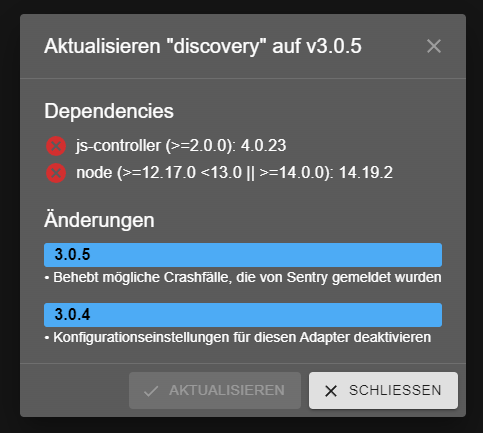
Gibt es für das Update der einzelnen Adapter per Admin-Oberfläche einen Workaround?
Das Problem besteht nach wie vor.Bsp. am Discovery-Adapter:
-
@homoran
Gibt es für das Update der einzelnen Adapter per Admin-Oberfläche einen Workaround?
Das Problem besteht nach wie vor.Bsp. am Discovery-Adapter:
@fatmax sagte in Kann keine Adapter aktualisieren:
Das Problem besteht nach wie vor.
da du die Outputs nicht gezeigt hast, kann ich nichts dazu sagen
-
@fatmax sagte in Kann keine Adapter aktualisieren:
Das Problem besteht nach wie vor.
da du die Outputs nicht gezeigt hast, kann ich nichts dazu sagen
@homoran
es gab in der Konsole keinen Output mit Fehler, da funktioniert es ja problemlos.@thomas-braun
brauchst du die ganze lange Liste, oder nur einen bestimmten Ausschnitt?
Ich bekomm die nicht komplett in die Zwischenablage.Liebe Grüße,
Fatmax -
@homoran
es gab in der Konsole keinen Output mit Fehler, da funktioniert es ja problemlos.@thomas-braun
brauchst du die ganze lange Liste, oder nur einen bestimmten Ausschnitt?
Ich bekomm die nicht komplett in die Zwischenablage.@fatmax sagte in Kann keine Adapter aktualisieren:
es gab in der Konsole keinen Output mit Fehler, da funktioniert es ja problemlos.
nein hier
@homoran sagte in Kann keine Adapter aktualisieren:
immer zeigen!
-
@homoran
es gab in der Konsole keinen Output mit Fehler, da funktioniert es ja problemlos.@thomas-braun
brauchst du die ganze lange Liste, oder nur einen bestimmten Ausschnitt?
Ich bekomm die nicht komplett in die Zwischenablage.@fatmax sagte in Kann keine Adapter aktualisieren:
brauchst du die ganze lange Liste, oder nur einen bestimmten Ausschnitt?
Alles. Pipe die durch less und dann zur Not seitenweise kopieren.
In meinem Terminal kann ich allerdings easy scrollen und alles markieren... -
@fatmax sagte in Kann keine Adapter aktualisieren:
brauchst du die ganze lange Liste, oder nur einen bestimmten Ausschnitt?
Alles. Pipe die durch less und dann zur Not seitenweise kopieren.
In meinem Terminal kann ich allerdings easy scrollen und alles markieren...Bei mir lassen sich auch keine Adapter mehr aktualisieren - weder über die Weboberfläche noch über die Kommandozeile:
rock64@rock64:/opt/iobroker$ iobroker update
Used repository: stable
Adapter    "admin"        : 5.3.8    , installed 5.3.8
Adapter    "alexa2"       : 3.11.2   , installed 3.11.2
Adapter    "backitup"     : 2.4.9    , installed 2.4.9
Adapter    "cloud"        : 4.1.1    , installed 4.1.1
Adapter    "daswetter"    : 3.1.2    , installed 3.1.2
Adapter    "denon"        : 1.13.4   , installed 1.13.4
Adapter    "devices"      : 1.0.12   , installed 1.0.12
Adapter    "discovery"    : 3.0.5    , installed 3.0.3  [Updatable]
Adapter    "fahrplan"     : 1.2.0    , installed 1.2.0
Adapter    "feiertage"    : 1.1.0    , installed 1.1.0
Adapter    "flot"         : 1.11.0   , installed 1.11.0
Adapter    "fullybrowser" : 2.1.2    , installed 2.1.2
Adapter    "harmony"      : 1.2.2    , installed 1.2.2
Adapter    "history"      : 2.1.7    , installed 1.11.1 [Updatable]
Adapter    "hm-rega"      : 3.0.40   , installed 3.0.40
Adapter    "hm-rpc"       : 1.15.12  , installed 1.15.12
Adapter    "ical"         : 1.13.1   , installed 1.12.1 [Updatable]
Adapter    "icons-mfd-svg": 1.1.0    , installed 1.1.0
Adapter    "info"         : 1.9.19   , installed 1.9.19
Adapter    "iot"          : 1.11.8   , installed 1.11.4 [Updatable]
Adapter    "javascript"   : 5.7.0    , installed 5.7.0
Controller "js-controller": 4.0.23   , installed 4.0.23
Adapter    "mobile"       : 1.0.1    , installed 1.0.1
Adapter    "nina"         : 0.0.25   , installed 0.0.25
Adapter    "node-red"     : 3.3.1    , installed 3.3.1
Adapter    "pi-hole"      : 1.3.4    , installed 1.3.4
Adapter    "ping"         : 1.5.3    , installed 1.5.3
Adapter    "radar2"       : 2.0.3    , installed 2.0.3
Adapter    "rest-api"     : 1.0.0    , installed 1.0.0
Adapter    "roomba"       : 1.1.4    , installed 1.1.4
Adapter    "rpi2"         : 1.3.2    , installed 1.3.2
Adapter    "samsung"      : 0.5.8    , installed 0.5.8
Adapter    "simple-api"   : 2.7.0    , installed 2.7.0
Adapter    "socketio"     : 4.2.0    , installed 4.2.0
Adapter    "synology"     : 2.1.9    , installed 2.1.7  [Updatable]
Adapter    "telegram"     : 1.13.0   , installed 1.13.0
Adapter    "unifi"        : 0.5.10   , installed 0.5.10
Adapter    "vis"          : 1.4.15   , installed 1.4.15
Adapter    "vis-jqui-mfd" : 1.0.12   , installed 1.0.12
Adapter    "vis-map"      : 1.0.4    , installed 1.0.4
Adapter    "vis-timeandweather": 1.1.7, installed 1.1.7
Adapter    "web"          : 4.3.0    , installed 4.3.0
Adapter    "ws"           : 1.3.0    , installed 1.3.0
rock64@rock64:/opt/iobroker$ iobroker upgrade

This upgrade of "synology" will introduce the following changes:
==========================================================================
-> 2.1.9:
Try to prevent account locks when using 2FA on restarts of the NAS

-> 2.1.8:
slow down reconnects to the DSM
==========================================================================

Would you like to upgrade synology from @2.1.7 to @2.1.9 now? [(y)es, (n)o]: y
Update synology from @2.1.7 to @2.1.9
NPM version: 8.11.0
Installing iobroker.synology@2.1.9... (System call)
host.rock64 Cannot install iobroker.synology@2.1.9: 128
Bisher hatte ich nie Probleme beim Aktualisieren. Ich habe schon den iobroker-Fixer laufen lassen. Was kann ich noch tun?
js-controller 4.0.23
nodejs v16.16.0
npm 8.11.0 -
Bei mir lassen sich auch keine Adapter mehr aktualisieren - weder über die Weboberfläche noch über die Kommandozeile:
rock64@rock64:/opt/iobroker$ iobroker update
Used repository: stable
Adapter    "admin"        : 5.3.8    , installed 5.3.8
Adapter    "alexa2"       : 3.11.2   , installed 3.11.2
Adapter    "backitup"     : 2.4.9    , installed 2.4.9
Adapter    "cloud"        : 4.1.1    , installed 4.1.1
Adapter    "daswetter"    : 3.1.2    , installed 3.1.2
Adapter    "denon"        : 1.13.4   , installed 1.13.4
Adapter    "devices"      : 1.0.12   , installed 1.0.12
Adapter    "discovery"    : 3.0.5    , installed 3.0.3  [Updatable]
Adapter    "fahrplan"     : 1.2.0    , installed 1.2.0
Adapter    "feiertage"    : 1.1.0    , installed 1.1.0
Adapter    "flot"         : 1.11.0   , installed 1.11.0
Adapter    "fullybrowser" : 2.1.2    , installed 2.1.2
Adapter    "harmony"      : 1.2.2    , installed 1.2.2
Adapter    "history"      : 2.1.7    , installed 1.11.1 [Updatable]
Adapter    "hm-rega"      : 3.0.40   , installed 3.0.40
Adapter    "hm-rpc"       : 1.15.12  , installed 1.15.12
Adapter    "ical"         : 1.13.1   , installed 1.12.1 [Updatable]
Adapter    "icons-mfd-svg": 1.1.0    , installed 1.1.0
Adapter    "info"         : 1.9.19   , installed 1.9.19
Adapter    "iot"          : 1.11.8   , installed 1.11.4 [Updatable]
Adapter    "javascript"   : 5.7.0    , installed 5.7.0
Controller "js-controller": 4.0.23   , installed 4.0.23
Adapter    "mobile"       : 1.0.1    , installed 1.0.1
Adapter    "nina"         : 0.0.25   , installed 0.0.25
Adapter    "node-red"     : 3.3.1    , installed 3.3.1
Adapter    "pi-hole"      : 1.3.4    , installed 1.3.4
Adapter    "ping"         : 1.5.3    , installed 1.5.3
Adapter    "radar2"       : 2.0.3    , installed 2.0.3
Adapter    "rest-api"     : 1.0.0    , installed 1.0.0
Adapter    "roomba"       : 1.1.4    , installed 1.1.4
Adapter    "rpi2"         : 1.3.2    , installed 1.3.2
Adapter    "samsung"      : 0.5.8    , installed 0.5.8
Adapter    "simple-api"   : 2.7.0    , installed 2.7.0
Adapter    "socketio"     : 4.2.0    , installed 4.2.0
Adapter    "synology"     : 2.1.9    , installed 2.1.7  [Updatable]
Adapter    "telegram"     : 1.13.0   , installed 1.13.0
Adapter    "unifi"        : 0.5.10   , installed 0.5.10
Adapter    "vis"          : 1.4.15   , installed 1.4.15
Adapter    "vis-jqui-mfd" : 1.0.12   , installed 1.0.12
Adapter    "vis-map"      : 1.0.4    , installed 1.0.4
Adapter    "vis-timeandweather": 1.1.7, installed 1.1.7
Adapter    "web"          : 4.3.0    , installed 4.3.0
Adapter    "ws"           : 1.3.0    , installed 1.3.0
rock64@rock64:/opt/iobroker$ iobroker upgrade

This upgrade of "synology" will introduce the following changes:
==========================================================================
-> 2.1.9:
Try to prevent account locks when using 2FA on restarts of the NAS

-> 2.1.8:
slow down reconnects to the DSM
==========================================================================

Would you like to upgrade synology from @2.1.7 to @2.1.9 now? [(y)es, (n)o]: y
Update synology from @2.1.7 to @2.1.9
NPM version: 8.11.0
Installing iobroker.synology@2.1.9... (System call)
host.rock64 Cannot install iobroker.synology@2.1.9: 128
Bisher hatte ich nie Probleme beim Aktualisieren. Ich habe schon den iobroker-Fixer laufen lassen. Was kann ich noch tun?
js-controller 4.0.23
nodejs v16.16.0
npm 8.11.0@grrfield sagte in Kann keine Adapter aktualisieren:
Bitte mit --debug Option upgraden.
Z. B. so:
iobroker upgrade synology --debug -
@grrfield sagte in Kann keine Adapter aktualisieren:
Bitte mit --debug Option upgraden.
Z. B. so:
iobroker upgrade synology --debug@thomas-braun sagte in Kann keine Adapter aktualisieren:
iobroker upgrade synology --debug
Hier der Output:
rock64@rock64:/opt/iobroker$ iobroker upgrade synology --debug This upgrade of "synology" will introduce the following changes: ========================================================================== -> 2.1.9: Try to prevent account locks when using 2FA on restarts of the NAS -> 2.1.8: slow down reconnects to the DSM ========================================================================== Would you like to upgrade synology from @2.1.7 to @2.1.9 now? [(y)es, (n)o]: y Update synology from @2.1.7 to @2.1.9 NPM version: 8.11.0 Installing iobroker.synology@2.1.9... (System call) npm ERR! code 128 npm ERR! An unknown git error occurred npm ERR! command git --no-replace-objects ls-remote ssh://git@github.com/Steiger04/ioBroker.radar-trap.git npm ERR! git@github.com: Permission denied (publickey). npm ERR! fatal: Could not read from remote repository. npm ERR! npm ERR! Please make sure you have the correct access rights npm ERR! and the repository exists. npm ERR! A complete log of this run can be found in: npm ERR! /home/iobroker/.npm/_logs/2022-07-22T08_44_58_233Z-debug-0.log host.rock64 Cannot install iobroker.synology@2.1.9: 128 -
@thomas-braun sagte in Kann keine Adapter aktualisieren:
iobroker upgrade synology --debug
Hier der Output:
rock64@rock64:/opt/iobroker$ iobroker upgrade synology --debug This upgrade of "synology" will introduce the following changes: ========================================================================== -> 2.1.9: Try to prevent account locks when using 2FA on restarts of the NAS -> 2.1.8: slow down reconnects to the DSM ========================================================================== Would you like to upgrade synology from @2.1.7 to @2.1.9 now? [(y)es, (n)o]: y Update synology from @2.1.7 to @2.1.9 NPM version: 8.11.0 Installing iobroker.synology@2.1.9... (System call) npm ERR! code 128 npm ERR! An unknown git error occurred npm ERR! command git --no-replace-objects ls-remote ssh://git@github.com/Steiger04/ioBroker.radar-trap.git npm ERR! git@github.com: Permission denied (publickey). npm ERR! fatal: Could not read from remote repository. npm ERR! npm ERR! Please make sure you have the correct access rights npm ERR! and the repository exists. npm ERR! A complete log of this run can be found in: npm ERR! /home/iobroker/.npm/_logs/2022-07-22T08_44_58_233Z-debug-0.log host.rock64 Cannot install iobroker.synology@2.1.9: 128@grrfield sagte in Kann keine Adapter aktualisieren:
ioBroker.radar-trap
Deinstallier den mal temporär für die Upgrades.
Hattest du die git-basierten Adapter vor dem nodejs16 Update nicht rausgeworfen? -
Bei mir lassen sich auch keine Adapter mehr aktualisieren - weder über die Weboberfläche noch über die Kommandozeile:
rock64@rock64:/opt/iobroker$ iobroker update
Used repository: stable
Adapter    "admin"        : 5.3.8    , installed 5.3.8
Adapter    "alexa2"       : 3.11.2   , installed 3.11.2
Adapter    "backitup"     : 2.4.9    , installed 2.4.9
Adapter    "cloud"        : 4.1.1    , installed 4.1.1
Adapter    "daswetter"    : 3.1.2    , installed 3.1.2
Adapter    "denon"        : 1.13.4   , installed 1.13.4
Adapter    "devices"      : 1.0.12   , installed 1.0.12
Adapter    "discovery"    : 3.0.5    , installed 3.0.3  [Updatable]
Adapter    "fahrplan"     : 1.2.0    , installed 1.2.0
Adapter    "feiertage"    : 1.1.0    , installed 1.1.0
Adapter    "flot"         : 1.11.0   , installed 1.11.0
Adapter    "fullybrowser" : 2.1.2    , installed 2.1.2
Adapter    "harmony"      : 1.2.2    , installed 1.2.2
Adapter    "history"      : 2.1.7    , installed 1.11.1 [Updatable]
Adapter    "hm-rega"      : 3.0.40   , installed 3.0.40
Adapter    "hm-rpc"       : 1.15.12  , installed 1.15.12
Adapter    "ical"         : 1.13.1   , installed 1.12.1 [Updatable]
Adapter    "icons-mfd-svg": 1.1.0    , installed 1.1.0
Adapter    "info"         : 1.9.19   , installed 1.9.19
Adapter    "iot"          : 1.11.8   , installed 1.11.4 [Updatable]
Adapter    "javascript"   : 5.7.0    , installed 5.7.0
Controller "js-controller": 4.0.23   , installed 4.0.23
Adapter    "mobile"       : 1.0.1    , installed 1.0.1
Adapter    "nina"         : 0.0.25   , installed 0.0.25
Adapter    "node-red"     : 3.3.1    , installed 3.3.1
Adapter    "pi-hole"      : 1.3.4    , installed 1.3.4
Adapter    "ping"         : 1.5.3    , installed 1.5.3
Adapter    "radar2"       : 2.0.3    , installed 2.0.3
Adapter    "rest-api"     : 1.0.0    , installed 1.0.0
Adapter    "roomba"       : 1.1.4    , installed 1.1.4
Adapter    "rpi2"         : 1.3.2    , installed 1.3.2
Adapter    "samsung"      : 0.5.8    , installed 0.5.8
Adapter    "simple-api"   : 2.7.0    , installed 2.7.0
Adapter    "socketio"     : 4.2.0    , installed 4.2.0
Adapter    "synology"     : 2.1.9    , installed 2.1.7  [Updatable]
Adapter    "telegram"     : 1.13.0   , installed 1.13.0
Adapter    "unifi"        : 0.5.10   , installed 0.5.10
Adapter    "vis"          : 1.4.15   , installed 1.4.15
Adapter    "vis-jqui-mfd" : 1.0.12   , installed 1.0.12
Adapter    "vis-map"      : 1.0.4    , installed 1.0.4
Adapter    "vis-timeandweather": 1.1.7, installed 1.1.7
Adapter    "web"          : 4.3.0    , installed 4.3.0
Adapter    "ws"           : 1.3.0    , installed 1.3.0
rock64@rock64:/opt/iobroker$ iobroker upgrade

This upgrade of "synology" will introduce the following changes:
==========================================================================
-> 2.1.9:
Try to prevent account locks when using 2FA on restarts of the NAS

-> 2.1.8:
slow down reconnects to the DSM
==========================================================================

Would you like to upgrade synology from @2.1.7 to @2.1.9 now? [(y)es, (n)o]: y
Update synology from @2.1.7 to @2.1.9
NPM version: 8.11.0
Installing iobroker.synology@2.1.9... (System call)
host.rock64 Cannot install iobroker.synology@2.1.9: 128
Bisher hatte ich nie Probleme beim Aktualisieren. Ich habe schon den iobroker-Fixer laufen lassen. Was kann ich noch tun?
js-controller 4.0.23
nodejs v16.16.0
npm 8.11.0@grrfield sagte in Kann keine Adapter aktualisieren:
Bei mir lassen sich auch keine Adapter mehr aktualisieren - weder über die Weboberfläche noch über die Kommandozeile:
rock64@rock64:/opt/iobroker$ iobroker update
Used repository: stable
Adapter    "admin"        : 5.3.8    , installed 5.3.8
Adapter    "alexa2"       : 3.11.2   , installed 3.11.2
Adapter    "backitup"     : 2.4.9    , installed 2.4.9
Adapter    "cloud"        : 4.1.1    , installed 4.1.1
Adapter    "daswetter"    : 3.1.2    , installed 3.1.2
Adapter    "denon"        : 1.13.4   , installed 1.13.4
Adapter    "devices"      : 1.0.12   , installed 1.0.12
Adapter    "discovery"    : 3.0.5    , installed 3.0.3  [Updatable]
Adapter    "fahrplan"     : 1.2.0    , installed 1.2.0
Adapter    "feiertage"    : 1.1.0    , installed 1.1.0
Adapter    "flot"         : 1.11.0   , installed 1.11.0
Adapter    "fullybrowser" : 2.1.2    , installed 2.1.2
Adapter    "harmony"      : 1.2.2    , installed 1.2.2
Adapter    "history"      : 2.1.7    , installed 1.11.1 [Updatable]
Adapter    "hm-rega"      : 3.0.40   , installed 3.0.40
Adapter    "hm-rpc"       : 1.15.12  , installed 1.15.12
Adapter    "ical"         : 1.13.1   , installed 1.12.1 [Updatable]
Adapter    "icons-mfd-svg": 1.1.0    , installed 1.1.0
Adapter    "info"         : 1.9.19   , installed 1.9.19
Adapter    "iot"          : 1.11.8   , installed 1.11.4 [Updatable]
Adapter    "javascript"   : 5.7.0    , installed 5.7.0
Controller "js-controller": 4.0.23   , installed 4.0.23
Adapter    "mobile"       : 1.0.1    , installed 1.0.1
Adapter    "nina"         : 0.0.25   , installed 0.0.25
Adapter    "node-red"     : 3.3.1    , installed 3.3.1
Adapter    "pi-hole"      : 1.3.4    , installed 1.3.4
Adapter    "ping"         : 1.5.3    , installed 1.5.3
Adapter    "radar2"       : 2.0.3    , installed 2.0.3
Adapter    "rest-api"     : 1.0.0    , installed 1.0.0
Adapter    "roomba"       : 1.1.4    , installed 1.1.4
Adapter    "rpi2"         : 1.3.2    , installed 1.3.2
Adapter    "samsung"      : 0.5.8    , installed 0.5.8
Adapter    "simple-api"   : 2.7.0    , installed 2.7.0
Adapter    "socketio"     : 4.2.0    , installed 4.2.0
Adapter    "synology"     : 2.1.9    , installed 2.1.7  [Updatable]
Adapter    "telegram"     : 1.13.0   , installed 1.13.0
Adapter    "unifi"        : 0.5.10   , installed 0.5.10
Adapter    "vis"          : 1.4.15   , installed 1.4.15
Adapter    "vis-jqui-mfd" : 1.0.12   , installed 1.0.12
Adapter    "vis-map"      : 1.0.4    , installed 1.0.4
Adapter    "vis-timeandweather": 1.1.7, installed 1.1.7
Adapter    "web"          : 4.3.0    , installed 4.3.0
Adapter    "ws"           : 1.3.0    , installed 1.3.0
rock64@rock64:/opt/iobroker$ iobroker upgrade

This upgrade of "synology" will introduce the following changes:
==========================================================================
-> 2.1.9:
Try to prevent account locks when using 2FA on restarts of the NAS

-> 2.1.8:
slow down reconnects to the DSM
==========================================================================

Would you like to upgrade synology from @2.1.7 to @2.1.9 now? [(y)es, (n)o]: y
Update synology from @2.1.7 to @2.1.9
NPM version: 8.11.0
Installing iobroker.synology@2.1.9... (System call)
host.rock64 Cannot install iobroker.synology@2.1.9: 128
Bisher hatte ich nie Probleme beim Aktualisieren. Ich habe schon den iobroker-Fixer laufen lassen. Was kann ich noch tun?
js-controller 4.0.23
nodejs v16.16.0
npm 8.11.0Bei mir das selbe Problem mit den stabel-Updates folgender Adapter:
-discovery devices 3.0.3 ->3.0.5
-History 1.11.1 ->2.1.7
-iCal 1.12.1 ->1.13.1
-influxDB 2.6.3 ->3.1.7
-IoT assistants 1.11.4 ->1.11.8Der Worx-Adapter 1.5.5 -> 1.6.6 ließ sich ohne Fehler updaten
nodejs sowohl bei v16.15.1 und v16.16.0
node v16.15.1 bzw. v16.16.0
npm 8.11.0habe auch iob fix noch einmal laufen lassen.
Beispielhaft hier für History-Update:
XXXXX@iobrokerVM:~$ iobroker upgrade history --debug This upgrade of "history" will at least introduce the following changes: ========================================================================== -> 2.1.7: Allow to remove a configuration value for "round" in config again -> 2.1.6: When not count is provided for aggregate "none" or "onchange" then the limit (de fault 2000) is used as count to define the number of data to return. -> 2.1.5: Ignore errors from forked process after response was sent for GetHistory -> 2.1.4: Make sure debug log is active according to the settings -> 2.1.3: Huge performance optimizations for GetHistory calls -> 2.1.2: Fix crash case reported by Sentry -> 2.1.1: Fix crash case reported by Sentry ========================================================================== BE CAREFUL: THIS IS A MAJOR UPGRADE, WHICH WILL MOST LIKELY INTRODUCE BREAKING C HANGES! Would you like to upgrade history from @1.11.1 to @2.1.7 now? [(y)es, (n)o]: y Update history from @1.11.1 to @2.1.7 NPM version: 8.11.0 Installing iobroker.history@2.1.7... (System call) npm ERR! code ENOTEMPTY npm ERR! syscall rename npm ERR! path /opt/iobroker/node_modules/abab npm ERR! dest /opt/iobroker/node_modules/.abab-bvmibCm3 npm ERR! errno -39 npm ERR! ENOTEMPTY: directory not empty, rename '/opt/iobroker/node_modules/abab' -> '/opt/iobroker/node_modules/.abab-bvmibCm3' npm ERR! A complete log of this run can be found in: npm ERR! /home/iobroker/.npm/_logs/2022-07-22T08_56_29_851Z-debug-0.log host.iobrokerVM Cannot install iobroker.history@2.1.7: 217 -
@grrfield sagte in Kann keine Adapter aktualisieren:
Bei mir lassen sich auch keine Adapter mehr aktualisieren - weder über die Weboberfläche noch über die Kommandozeile:
rock64@rock64:/opt/iobroker$ iobroker update
Used repository: stable
Adapter    "admin"        : 5.3.8    , installed 5.3.8
Adapter    "alexa2"       : 3.11.2   , installed 3.11.2
Adapter    "backitup"     : 2.4.9    , installed 2.4.9
Adapter    "cloud"        : 4.1.1    , installed 4.1.1
Adapter    "daswetter"    : 3.1.2    , installed 3.1.2
Adapter    "denon"        : 1.13.4   , installed 1.13.4
Adapter    "devices"      : 1.0.12   , installed 1.0.12
Adapter    "discovery"    : 3.0.5    , installed 3.0.3  [Updatable]
Adapter    "fahrplan"     : 1.2.0    , installed 1.2.0
Adapter    "feiertage"    : 1.1.0    , installed 1.1.0
Adapter    "flot"         : 1.11.0   , installed 1.11.0
Adapter    "fullybrowser" : 2.1.2    , installed 2.1.2
Adapter    "harmony"      : 1.2.2    , installed 1.2.2
Adapter    "history"      : 2.1.7    , installed 1.11.1 [Updatable]
Adapter    "hm-rega"      : 3.0.40   , installed 3.0.40
Adapter    "hm-rpc"       : 1.15.12  , installed 1.15.12
Adapter    "ical"         : 1.13.1   , installed 1.12.1 [Updatable]
Adapter    "icons-mfd-svg": 1.1.0    , installed 1.1.0
Adapter    "info"         : 1.9.19   , installed 1.9.19
Adapter    "iot"          : 1.11.8   , installed 1.11.4 [Updatable]
Adapter    "javascript"   : 5.7.0    , installed 5.7.0
Controller "js-controller": 4.0.23   , installed 4.0.23
Adapter    "mobile"       : 1.0.1    , installed 1.0.1
Adapter    "nina"         : 0.0.25   , installed 0.0.25
Adapter    "node-red"     : 3.3.1    , installed 3.3.1
Adapter    "pi-hole"      : 1.3.4    , installed 1.3.4
Adapter    "ping"         : 1.5.3    , installed 1.5.3
Adapter    "radar2"       : 2.0.3    , installed 2.0.3
Adapter    "rest-api"     : 1.0.0    , installed 1.0.0
Adapter    "roomba"       : 1.1.4    , installed 1.1.4
Adapter    "rpi2"         : 1.3.2    , installed 1.3.2
Adapter    "samsung"      : 0.5.8    , installed 0.5.8
Adapter    "simple-api"   : 2.7.0    , installed 2.7.0
Adapter    "socketio"     : 4.2.0    , installed 4.2.0
Adapter    "synology"     : 2.1.9    , installed 2.1.7  [Updatable]
Adapter    "telegram"     : 1.13.0   , installed 1.13.0
Adapter    "unifi"        : 0.5.10   , installed 0.5.10
Adapter    "vis"          : 1.4.15   , installed 1.4.15
Adapter    "vis-jqui-mfd" : 1.0.12   , installed 1.0.12
Adapter    "vis-map"      : 1.0.4    , installed 1.0.4
Adapter    "vis-timeandweather": 1.1.7, installed 1.1.7
Adapter    "web"          : 4.3.0    , installed 4.3.0
Adapter    "ws"           : 1.3.0    , installed 1.3.0
rock64@rock64:/opt/iobroker$ iobroker upgrade

This upgrade of "synology" will introduce the following changes:
==========================================================================
-> 2.1.9:
Try to prevent account locks when using 2FA on restarts of the NAS

-> 2.1.8:
slow down reconnects to the DSM
==========================================================================

Would you like to upgrade synology from @2.1.7 to @2.1.9 now? [(y)es, (n)o]: y
Update synology from @2.1.7 to @2.1.9
NPM version: 8.11.0
Installing iobroker.synology@2.1.9... (System call)
host.rock64 Cannot install iobroker.synology@2.1.9: 128
Bisher hatte ich nie Probleme beim Aktualisieren. Ich habe schon den iobroker-Fixer laufen lassen. Was kann ich noch tun?
js-controller 4.0.23
nodejs v16.16.0
npm 8.11.0Bei mir das selbe Problem mit den stabel-Updates folgender Adapter:
-discovery devices 3.0.3 ->3.0.5
-History 1.11.1 ->2.1.7
-iCal 1.12.1 ->1.13.1
-influxDB 2.6.3 ->3.1.7
-IoT assistants 1.11.4 ->1.11.8Der Worx-Adapter 1.5.5 -> 1.6.6 ließ sich ohne Fehler updaten
nodejs sowohl bei v16.15.1 und v16.16.0
node v16.15.1 bzw. v16.16.0
npm 8.11.0habe auch iob fix noch einmal laufen lassen.
Beispielhaft hier für History-Update:
XXXXX@iobrokerVM:~$ iobroker upgrade history --debug This upgrade of "history" will at least introduce the following changes: ========================================================================== -> 2.1.7: Allow to remove a configuration value for "round" in config again -> 2.1.6: When not count is provided for aggregate "none" or "onchange" then the limit (de fault 2000) is used as count to define the number of data to return. -> 2.1.5: Ignore errors from forked process after response was sent for GetHistory -> 2.1.4: Make sure debug log is active according to the settings -> 2.1.3: Huge performance optimizations for GetHistory calls -> 2.1.2: Fix crash case reported by Sentry -> 2.1.1: Fix crash case reported by Sentry ========================================================================== BE CAREFUL: THIS IS A MAJOR UPGRADE, WHICH WILL MOST LIKELY INTRODUCE BREAKING C HANGES! Would you like to upgrade history from @1.11.1 to @2.1.7 now? [(y)es, (n)o]: y Update history from @1.11.1 to @2.1.7 NPM version: 8.11.0 Installing iobroker.history@2.1.7... (System call) npm ERR! code ENOTEMPTY npm ERR! syscall rename npm ERR! path /opt/iobroker/node_modules/abab npm ERR! dest /opt/iobroker/node_modules/.abab-bvmibCm3 npm ERR! errno -39 npm ERR! ENOTEMPTY: directory not empty, rename '/opt/iobroker/node_modules/abab' -> '/opt/iobroker/node_modules/.abab-bvmibCm3' npm ERR! A complete log of this run can be found in: npm ERR! /home/iobroker/.npm/_logs/2022-07-22T08_56_29_851Z-debug-0.log host.iobrokerVM Cannot install iobroker.history@2.1.7: 217@frank_y sagte in Kann keine Adapter aktualisieren:
habe auch iob fix noch einmal laufen lassen.
Dann das gleiche auch für dich:
Upgrade mit --debug Option laufen lassen. -
@frank_y sagte in Kann keine Adapter aktualisieren:
habe auch iob fix noch einmal laufen lassen.
Dann das gleiche auch für dich:
Upgrade mit --debug Option laufen lassen.hier für iot-Update:
XXXXX@iobrokerVM:~$ iobroker upgrade iot --debug This upgrade of "iot" will introduce the following changes: ========================================================================== -> 1.11.8: Update dependencies to allow better automatic rebuild -> 1.11.7: Tried to correct URL key creation for Google home -> 1.11.5: Alisa: update for binary-sensor "motion" and "contact" ========================================================================== Would you like to upgrade iot from @1.11.4 to @1.11.8 now? [(y)es, (n)o]: y Update iot from @1.11.4 to @1.11.8 NPM version: 8.11.0 Installing iobroker.iot@1.11.8... (System call) npm ERR! code ENOTEMPTY npm ERR! syscall rename npm ERR! path /opt/iobroker/node_modules/abbrev npm ERR! dest /opt/iobroker/node_modules/.abbrev-5eNud0FY npm ERR! errno -39 npm ERR! ENOTEMPTY: directory not empty, rename '/opt/iobroker/node_modules/abbrev' -> '/opt/iobroker/node_modules/.abbrev-5eNud0FY' npm ERR! A complete log of this run can be found in: npm ERR! /home/iobroker/.npm/_logs/2022-07-22T09_00_22_561Z-debug-0.log host.iobrokerVM Cannot install iobroker.iot@1.11.8: 217 -
@grrfield sagte in Kann keine Adapter aktualisieren:
Bei mir lassen sich auch keine Adapter mehr aktualisieren - weder über die Weboberfläche noch über die Kommandozeile:
rock64@rock64:/opt/iobroker$ iobroker update
Used repository: stable
Adapter    "admin"        : 5.3.8    , installed 5.3.8
Adapter    "alexa2"       : 3.11.2   , installed 3.11.2
Adapter    "backitup"     : 2.4.9    , installed 2.4.9
Adapter    "cloud"        : 4.1.1    , installed 4.1.1
Adapter    "daswetter"    : 3.1.2    , installed 3.1.2
Adapter    "denon"        : 1.13.4   , installed 1.13.4
Adapter    "devices"      : 1.0.12   , installed 1.0.12
Adapter    "discovery"    : 3.0.5    , installed 3.0.3  [Updatable]
Adapter    "fahrplan"     : 1.2.0    , installed 1.2.0
Adapter    "feiertage"    : 1.1.0    , installed 1.1.0
Adapter    "flot"         : 1.11.0   , installed 1.11.0
Adapter    "fullybrowser" : 2.1.2    , installed 2.1.2
Adapter    "harmony"      : 1.2.2    , installed 1.2.2
Adapter    "history"      : 2.1.7    , installed 1.11.1 [Updatable]
Adapter    "hm-rega"      : 3.0.40   , installed 3.0.40
Adapter    "hm-rpc"       : 1.15.12  , installed 1.15.12
Adapter    "ical"         : 1.13.1   , installed 1.12.1 [Updatable]
Adapter    "icons-mfd-svg": 1.1.0    , installed 1.1.0
Adapter    "info"         : 1.9.19   , installed 1.9.19
Adapter    "iot"          : 1.11.8   , installed 1.11.4 [Updatable]
Adapter    "javascript"   : 5.7.0    , installed 5.7.0
Controller "js-controller": 4.0.23   , installed 4.0.23
Adapter    "mobile"       : 1.0.1    , installed 1.0.1
Adapter    "nina"         : 0.0.25   , installed 0.0.25
Adapter    "node-red"     : 3.3.1    , installed 3.3.1
Adapter    "pi-hole"      : 1.3.4    , installed 1.3.4
Adapter    "ping"         : 1.5.3    , installed 1.5.3
Adapter    "radar2"       : 2.0.3    , installed 2.0.3
Adapter    "rest-api"     : 1.0.0    , installed 1.0.0
Adapter    "roomba"       : 1.1.4    , installed 1.1.4
Adapter    "rpi2"         : 1.3.2    , installed 1.3.2
Adapter    "samsung"      : 0.5.8    , installed 0.5.8
Adapter    "simple-api"   : 2.7.0    , installed 2.7.0
Adapter    "socketio"     : 4.2.0    , installed 4.2.0
Adapter    "synology"     : 2.1.9    , installed 2.1.7  [Updatable]
Adapter    "telegram"     : 1.13.0   , installed 1.13.0
Adapter    "unifi"        : 0.5.10   , installed 0.5.10
Adapter    "vis"          : 1.4.15   , installed 1.4.15
Adapter    "vis-jqui-mfd" : 1.0.12   , installed 1.0.12
Adapter    "vis-map"      : 1.0.4    , installed 1.0.4
Adapter    "vis-timeandweather": 1.1.7, installed 1.1.7
Adapter    "web"          : 4.3.0    , installed 4.3.0
Adapter    "ws"           : 1.3.0    , installed 1.3.0
rock64@rock64:/opt/iobroker$ iobroker upgrade

This upgrade of "synology" will introduce the following changes:
==========================================================================
-> 2.1.9:
Try to prevent account locks when using 2FA on restarts of the NAS

-> 2.1.8:
slow down reconnects to the DSM
==========================================================================

Would you like to upgrade synology from @2.1.7 to @2.1.9 now? [(y)es, (n)o]: y
Update synology from @2.1.7 to @2.1.9
NPM version: 8.11.0
Installing iobroker.synology@2.1.9... (System call)
host.rock64 Cannot install iobroker.synology@2.1.9: 128
Bisher hatte ich nie Probleme beim Aktualisieren. Ich habe schon den iobroker-Fixer laufen lassen. Was kann ich noch tun?
js-controller 4.0.23
nodejs v16.16.0
npm 8.11.0Bei mir das selbe Problem mit den stabel-Updates folgender Adapter:
-discovery devices 3.0.3 ->3.0.5
-History 1.11.1 ->2.1.7
-iCal 1.12.1 ->1.13.1
-influxDB 2.6.3 ->3.1.7
-IoT assistants 1.11.4 ->1.11.8Der Worx-Adapter 1.5.5 -> 1.6.6 ließ sich ohne Fehler updaten
nodejs sowohl bei v16.15.1 und v16.16.0
node v16.15.1 bzw. v16.16.0
npm 8.11.0habe auch iob fix noch einmal laufen lassen.
Beispielhaft hier für History-Update:
XXXXX@iobrokerVM:~$ iobroker upgrade history --debug This upgrade of "history" will at least introduce the following changes: ========================================================================== -> 2.1.7: Allow to remove a configuration value for "round" in config again -> 2.1.6: When not count is provided for aggregate "none" or "onchange" then the limit (de fault 2000) is used as count to define the number of data to return. -> 2.1.5: Ignore errors from forked process after response was sent for GetHistory -> 2.1.4: Make sure debug log is active according to the settings -> 2.1.3: Huge performance optimizations for GetHistory calls -> 2.1.2: Fix crash case reported by Sentry -> 2.1.1: Fix crash case reported by Sentry ========================================================================== BE CAREFUL: THIS IS A MAJOR UPGRADE, WHICH WILL MOST LIKELY INTRODUCE BREAKING C HANGES! Would you like to upgrade history from @1.11.1 to @2.1.7 now? [(y)es, (n)o]: y Update history from @1.11.1 to @2.1.7 NPM version: 8.11.0 Installing iobroker.history@2.1.7... (System call) npm ERR! code ENOTEMPTY npm ERR! syscall rename npm ERR! path /opt/iobroker/node_modules/abab npm ERR! dest /opt/iobroker/node_modules/.abab-bvmibCm3 npm ERR! errno -39 npm ERR! ENOTEMPTY: directory not empty, rename '/opt/iobroker/node_modules/abab' -> '/opt/iobroker/node_modules/.abab-bvmibCm3' npm ERR! A complete log of this run can be found in: npm ERR! /home/iobroker/.npm/_logs/2022-07-22T08_56_29_851Z-debug-0.log host.iobrokerVM Cannot install iobroker.history@2.1.7: 217@frank_y sagte in Kann keine Adapter aktualisieren:
/opt/iobroker/node_modules/.abab-bvmibCm3
Alle Verzeichnisse die so ausgespuckt werden löschen.
Beispiel:rm -rf /opt/iobroker/node_modules/.abab-bvmibCm3Solange bis alle angemeckerten Verzeichnisse weg sind.
-
@grrfield sagte in Kann keine Adapter aktualisieren:
ioBroker.radar-trap
Deinstallier den mal temporär für die Upgrades.
Hattest du die git-basierten Adapter vor dem nodejs16 Update nicht rausgeworfen?@thomas-braun sagte in Kann keine Adapter aktualisieren:
@grrfield sagte in Kann keine Adapter aktualisieren:
ioBroker.radar-trap
Vielen Dank für die schnelle Antwort!
Deinstallier den mal temporär für die Upgrades.
Ich habe den Adapter über die Weboberfläche deinstalliert, er ist da auch nicht mehr zu sehen. Nach
iob update
iobroker upgrade synology --debug
bekomme ich wieder dieselbe Debug-Ausgabe wie vorher, d. h. es wird immer noch versucht, auf ssh://git@github.com/Steiger04/ioBroker.radar-trap.git zuzugreifen.Hattest du die git-basierten Adapter vor dem nodejs16 Update nicht rausgeworfen?
Nein, ich bin eigentlich genau nach der Anleitung [How-to] Node.js ioBroker richtig updaten-2021/22 Edition](https://forum.iobroker.net/topic/44566/how-to-node-js-iobroker-richtig-updaten-2021-22-edition?page=1) vorgegangen, und da habe ich nichts gelesen, daß die Git-Adapter vorher entfernt werden müssen. Hätte ich das tun müssen?
-
@thomas-braun sagte in Kann keine Adapter aktualisieren:
@grrfield sagte in Kann keine Adapter aktualisieren:
ioBroker.radar-trap
Vielen Dank für die schnelle Antwort!
Deinstallier den mal temporär für die Upgrades.
Ich habe den Adapter über die Weboberfläche deinstalliert, er ist da auch nicht mehr zu sehen. Nach
iob update
iobroker upgrade synology --debug
bekomme ich wieder dieselbe Debug-Ausgabe wie vorher, d. h. es wird immer noch versucht, auf ssh://git@github.com/Steiger04/ioBroker.radar-trap.git zuzugreifen.Hattest du die git-basierten Adapter vor dem nodejs16 Update nicht rausgeworfen?
Nein, ich bin eigentlich genau nach der Anleitung [How-to] Node.js ioBroker richtig updaten-2021/22 Edition](https://forum.iobroker.net/topic/44566/how-to-node-js-iobroker-richtig-updaten-2021-22-edition?page=1) vorgegangen, und da habe ich nichts gelesen, daß die Git-Adapter vorher entfernt werden müssen. Hätte ich das tun müssen?
Bei Updates wo es größere Versionssprünge bei npm gibt (zb Node.js 14->16 updated npm von 6.x auf 8.x) kann es sehr hilfreich sein wenn man schaut ob Adapter die von GitHub installiert wurden inzwischen in der gleichen version auf auf npm liegen und dann ggf von dort nochmals installieren oder updaten. Im Admin werden Adapter die per GitHub installiert wurden gesondert mit einem GitHub Symbol angezeigt. Das hilft auch im Vorfeld Probleme zu vermeiden.
Das ist die Passage, die für dich relevant gewesen wäre.
-
Bei Updates wo es größere Versionssprünge bei npm gibt (zb Node.js 14->16 updated npm von 6.x auf 8.x) kann es sehr hilfreich sein wenn man schaut ob Adapter die von GitHub installiert wurden inzwischen in der gleichen version auf auf npm liegen und dann ggf von dort nochmals installieren oder updaten. Im Admin werden Adapter die per GitHub installiert wurden gesondert mit einem GitHub Symbol angezeigt. Das hilft auch im Vorfeld Probleme zu vermeiden.
Das ist die Passage, die für dich relevant gewesen wäre.
@thomas-braun
Oh, das hatte ich nicht so aufgefaßt, da einige Adapter (radar-trap) noch nicht auf npm sind. Das nächste Mal bin ich dann klüger.
Wie kann ich denn den Fehler, daß immer bei der Installation neuer Adapter immer noch nach den git-Adaptern gesucht wird, loswerden? -
@thomas-braun
Oh, das hatte ich nicht so aufgefaßt, da einige Adapter (radar-trap) noch nicht auf npm sind. Das nächste Mal bin ich dann klüger.
Wie kann ich denn den Fehler, daß immer bei der Installation neuer Adapter immer noch nach den git-Adaptern gesucht wird, loswerden? -
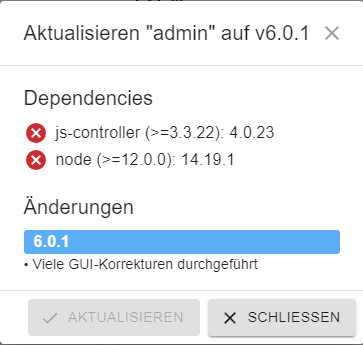
Hallo zusammen,
ich versuche gerade diverse Adapter zu aktualisieren, leider ohne Erfolg.
Kurzer Ausschnitt was bei der "Update-Kachel" erscheint :Dependencies:
js-controller (>=3.3.22): 4.0.23
node (>=12.0.0): 16.16.0Der Button "Aktualisieren" ist ausgeblendet.
Ich weiß nicht so richtig weiter, denn wenn ich das richtig lese, sind alle Voraussetzungen erfüllt aber ein Update ist nicht möglich.
Kann mir jemand helfen?
LG
-
Hallo zusammen,
ich versuche gerade diverse Adapter zu aktualisieren, leider ohne Erfolg.
Kurzer Ausschnitt was bei der "Update-Kachel" erscheint :Dependencies:
js-controller (>=3.3.22): 4.0.23
node (>=12.0.0): 16.16.0Der Button "Aktualisieren" ist ausgeblendet.
Ich weiß nicht so richtig weiter, denn wenn ich das richtig lese, sind alle Voraussetzungen erfüllt aber ein Update ist nicht möglich.
Kann mir jemand helfen?
LG
6 Zeilen unter Dir ist das gleiche Problem.
Warum nutzt du nicht den Thread?Bitte zusammenführen
https://forum.iobroker.net/topic/55518/kann-keine-adapter-aktualisieren
-
Hallo zusammen,
ich versuche gerade diverse Adapter zu aktualisieren, leider ohne Erfolg.
Kurzer Ausschnitt was bei der "Update-Kachel" erscheint :Dependencies:
js-controller (>=3.3.22): 4.0.23
node (>=12.0.0): 16.16.0Der Button "Aktualisieren" ist ausgeblendet.
Ich weiß nicht so richtig weiter, denn wenn ich das richtig lese, sind alle Voraussetzungen erfüllt aber ein Update ist nicht möglich.
Kann mir jemand helfen?
LG
@nbrgit
Was kommt vom System auf diese Befehle in der Kommandozeile zurück?iobroker update -i sudo ln -s /usr/bin/node /usr/bin/nodejs uname -m && type -P nodejs node npm && nodejs -v && node -v && npm -v && whoami && pwd && sudo apt update &> /dev/null && sudo apt update && apt policy nodejs cd /opt/iobroker npm ls | grep -E 'github|ERR'






Hello! It looks like you're interested in this conversation, but you don't have an account yet.
Getting fed up of having to scroll through the same posts each visit? When you register for an account, you'll always come back to exactly where you were before, and choose to be notified of new replies (either via email, or push notification). You'll also be able to save bookmarks and upvote posts to show your appreciation to other community members.
With your input, this post could be even better 💗
Register Login378
Online32.8k
Users82.7k
Topics1.3m
Posts