




Terminal Adapter
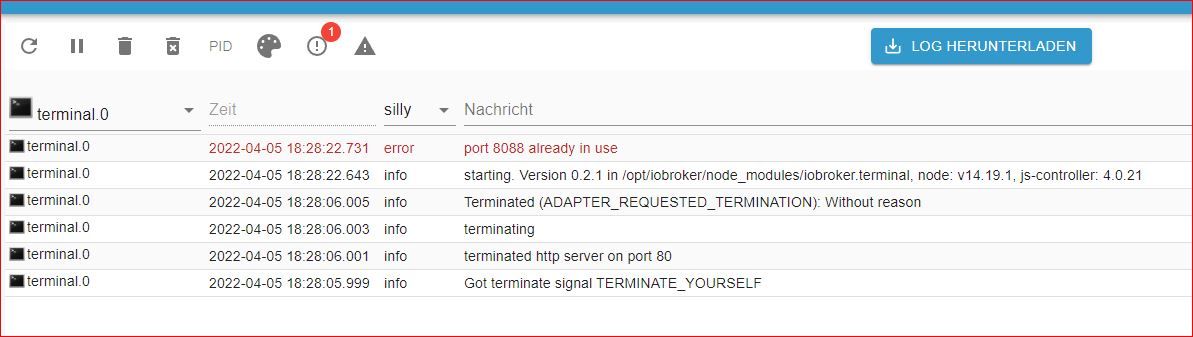
-
@atticus vnc braucht kein Mensch auf einem Server.
@thomas-braun ok, vnc kann runter, ändert aber nichts an der Sache
-
@thomas-braun ok, vnc kann runter, ändert aber nichts an der Sache
Hab den VNC deaktiviert
pi@ioBroker482:~ $ sudo netstat -tulpe Aktive Internetverbindungen (Nur Server) Proto Recv-Q Send-Q Local Address Foreign Address State Benutzer Inode PID/Program name tcp 0 0 ioBroker482.fritz.:2001 0.0.0.0:* LISTEN iobroker 22855 1313/io.hm-rpc.0 tcp 0 0 127.0.0.53:domain 0.0.0.0:* LISTEN systemd-resolve 17517 321/systemd-resolve tcp 0 0 0.0.0.0:ssh 0.0.0.0:* LISTEN root 16107 480/sshd tcp 0 0 localhost:ipp 0.0.0.0:* LISTEN root 15809 358/cupsd tcp 0 0 0.0.0.0:1880 0.0.0.0:* LISTEN iobroker 23722 1233/node-red tcp 0 0 ioBroker482:pipe-server 0.0.0.0:* LISTEN iobroker 23919 1321/io.hm-rpc.1 tcp 0 0 ioBroker482.fritz.:8701 0.0.0.0:* LISTEN iobroker 20419 1332/io.hm-rpc.2 tcp 0 0 ioBroker482.fritz.:8702 0.0.0.0:* LISTEN iobroker 20464 1365/io.hm-rpc.3 tcp 0 0 localhost:9000 0.0.0.0:* LISTEN iobroker 19947 456/iobroker.js-con tcp 0 0 localhost:9001 0.0.0.0:* LISTEN iobroker 21868 456/iobroker.js-con tcp 0 0 0.0.0.0:hostmon 0.0.0.0:* LISTEN systemd-resolve 17511 321/systemd-resolve tcp 0 0 ioBroker482.fritz:18701 0.0.0.0:* LISTEN iobroker 22973 1377/io.hm-rpc.4 tcp6 0 0 [::]:tproxy [::]:* LISTEN iobroker 22274 1034/io.admin.0 tcp6 0 0 [::]:8084 [::]:* LISTEN iobroker 27936 1816/io.socketio.0 tcp6 0 0 [::]:ssh [::]:* LISTEN root 16109 480/sshd tcp6 0 0 [::]:8087 [::]:* LISTEN iobroker 26886 1801/io.simple-api. tcp6 0 0 localhost:ipp [::]:* LISTEN root 15808 358/cupsd tcp6 0 0 [::]:hostmon [::]:* LISTEN systemd-resolve 17514 321/systemd-resolve udp 0 0 0.0.0.0:5683 0.0.0.0:* iobroker 23123 1510/io.shelly.0 udp 0 0 127.0.0.53:domain 0.0.0.0:* systemd-resolve 17516 321/systemd-resolve udp 0 0 0.0.0.0:44141 0.0.0.0:* avahi 15797 371/avahi-daemon: r udp 0 0 0.0.0.0:ipp 0.0.0.0:* root 16167 453/cups-browsed udp 0 0 0.0.0.0:53421 0.0.0.0:* iobroker 24719 1434/io.mihome-vacu udp 0 0 224.0.0.251:mdns 0.0.0.0:* pi 19431 669/index.html?l%5B udp 0 0 0.0.0.0:mdns 0.0.0.0:* avahi 15795 371/avahi-daemon: r udp 0 0 0.0.0.0:hostmon 0.0.0.0:* systemd-resolve 17510 321/systemd-resolve udp 0 0 ioBroker482.fritz:45815 0.0.0.0:* pi 27111 669/index.html?l%5B udp6 0 0 [::]:mdns [::]:* avahi 15796 371/avahi-daemon: r udp6 0 0 [::]:hostmon [::]:* systemd-resolve 17513 321/systemd-resolve udp6 0 0 [::]:44848 [::]:* avahi 15798 371/avahi-daemon: r pi@ioBroker482:~ $ -
Hab den VNC deaktiviert
pi@ioBroker482:~ $ sudo netstat -tulpe Aktive Internetverbindungen (Nur Server) Proto Recv-Q Send-Q Local Address Foreign Address State Benutzer Inode PID/Program name tcp 0 0 ioBroker482.fritz.:2001 0.0.0.0:* LISTEN iobroker 22855 1313/io.hm-rpc.0 tcp 0 0 127.0.0.53:domain 0.0.0.0:* LISTEN systemd-resolve 17517 321/systemd-resolve tcp 0 0 0.0.0.0:ssh 0.0.0.0:* LISTEN root 16107 480/sshd tcp 0 0 localhost:ipp 0.0.0.0:* LISTEN root 15809 358/cupsd tcp 0 0 0.0.0.0:1880 0.0.0.0:* LISTEN iobroker 23722 1233/node-red tcp 0 0 ioBroker482:pipe-server 0.0.0.0:* LISTEN iobroker 23919 1321/io.hm-rpc.1 tcp 0 0 ioBroker482.fritz.:8701 0.0.0.0:* LISTEN iobroker 20419 1332/io.hm-rpc.2 tcp 0 0 ioBroker482.fritz.:8702 0.0.0.0:* LISTEN iobroker 20464 1365/io.hm-rpc.3 tcp 0 0 localhost:9000 0.0.0.0:* LISTEN iobroker 19947 456/iobroker.js-con tcp 0 0 localhost:9001 0.0.0.0:* LISTEN iobroker 21868 456/iobroker.js-con tcp 0 0 0.0.0.0:hostmon 0.0.0.0:* LISTEN systemd-resolve 17511 321/systemd-resolve tcp 0 0 ioBroker482.fritz:18701 0.0.0.0:* LISTEN iobroker 22973 1377/io.hm-rpc.4 tcp6 0 0 [::]:tproxy [::]:* LISTEN iobroker 22274 1034/io.admin.0 tcp6 0 0 [::]:8084 [::]:* LISTEN iobroker 27936 1816/io.socketio.0 tcp6 0 0 [::]:ssh [::]:* LISTEN root 16109 480/sshd tcp6 0 0 [::]:8087 [::]:* LISTEN iobroker 26886 1801/io.simple-api. tcp6 0 0 localhost:ipp [::]:* LISTEN root 15808 358/cupsd tcp6 0 0 [::]:hostmon [::]:* LISTEN systemd-resolve 17514 321/systemd-resolve udp 0 0 0.0.0.0:5683 0.0.0.0:* iobroker 23123 1510/io.shelly.0 udp 0 0 127.0.0.53:domain 0.0.0.0:* systemd-resolve 17516 321/systemd-resolve udp 0 0 0.0.0.0:44141 0.0.0.0:* avahi 15797 371/avahi-daemon: r udp 0 0 0.0.0.0:ipp 0.0.0.0:* root 16167 453/cups-browsed udp 0 0 0.0.0.0:53421 0.0.0.0:* iobroker 24719 1434/io.mihome-vacu udp 0 0 224.0.0.251:mdns 0.0.0.0:* pi 19431 669/index.html?l%5B udp 0 0 0.0.0.0:mdns 0.0.0.0:* avahi 15795 371/avahi-daemon: r udp 0 0 0.0.0.0:hostmon 0.0.0.0:* systemd-resolve 17510 321/systemd-resolve udp 0 0 ioBroker482.fritz:45815 0.0.0.0:* pi 27111 669/index.html?l%5B udp6 0 0 [::]:mdns [::]:* avahi 15796 371/avahi-daemon: r udp6 0 0 [::]:hostmon [::]:* systemd-resolve 17513 321/systemd-resolve udp6 0 0 [::]:44848 [::]:* avahi 15798 371/avahi-daemon: r pi@ioBroker482:~ $@atticus
sudo netstat -tulpenDas n am Ende ist wichtig!
-
Hab den VNC deaktiviert
pi@ioBroker482:~ $ sudo netstat -tulpe Aktive Internetverbindungen (Nur Server) Proto Recv-Q Send-Q Local Address Foreign Address State Benutzer Inode PID/Program name tcp 0 0 ioBroker482.fritz.:2001 0.0.0.0:* LISTEN iobroker 22855 1313/io.hm-rpc.0 tcp 0 0 127.0.0.53:domain 0.0.0.0:* LISTEN systemd-resolve 17517 321/systemd-resolve tcp 0 0 0.0.0.0:ssh 0.0.0.0:* LISTEN root 16107 480/sshd tcp 0 0 localhost:ipp 0.0.0.0:* LISTEN root 15809 358/cupsd tcp 0 0 0.0.0.0:1880 0.0.0.0:* LISTEN iobroker 23722 1233/node-red tcp 0 0 ioBroker482:pipe-server 0.0.0.0:* LISTEN iobroker 23919 1321/io.hm-rpc.1 tcp 0 0 ioBroker482.fritz.:8701 0.0.0.0:* LISTEN iobroker 20419 1332/io.hm-rpc.2 tcp 0 0 ioBroker482.fritz.:8702 0.0.0.0:* LISTEN iobroker 20464 1365/io.hm-rpc.3 tcp 0 0 localhost:9000 0.0.0.0:* LISTEN iobroker 19947 456/iobroker.js-con tcp 0 0 localhost:9001 0.0.0.0:* LISTEN iobroker 21868 456/iobroker.js-con tcp 0 0 0.0.0.0:hostmon 0.0.0.0:* LISTEN systemd-resolve 17511 321/systemd-resolve tcp 0 0 ioBroker482.fritz:18701 0.0.0.0:* LISTEN iobroker 22973 1377/io.hm-rpc.4 tcp6 0 0 [::]:tproxy [::]:* LISTEN iobroker 22274 1034/io.admin.0 tcp6 0 0 [::]:8084 [::]:* LISTEN iobroker 27936 1816/io.socketio.0 tcp6 0 0 [::]:ssh [::]:* LISTEN root 16109 480/sshd tcp6 0 0 [::]:8087 [::]:* LISTEN iobroker 26886 1801/io.simple-api. tcp6 0 0 localhost:ipp [::]:* LISTEN root 15808 358/cupsd tcp6 0 0 [::]:hostmon [::]:* LISTEN systemd-resolve 17514 321/systemd-resolve udp 0 0 0.0.0.0:5683 0.0.0.0:* iobroker 23123 1510/io.shelly.0 udp 0 0 127.0.0.53:domain 0.0.0.0:* systemd-resolve 17516 321/systemd-resolve udp 0 0 0.0.0.0:44141 0.0.0.0:* avahi 15797 371/avahi-daemon: r udp 0 0 0.0.0.0:ipp 0.0.0.0:* root 16167 453/cups-browsed udp 0 0 0.0.0.0:53421 0.0.0.0:* iobroker 24719 1434/io.mihome-vacu udp 0 0 224.0.0.251:mdns 0.0.0.0:* pi 19431 669/index.html?l%5B udp 0 0 0.0.0.0:mdns 0.0.0.0:* avahi 15795 371/avahi-daemon: r udp 0 0 0.0.0.0:hostmon 0.0.0.0:* systemd-resolve 17510 321/systemd-resolve udp 0 0 ioBroker482.fritz:45815 0.0.0.0:* pi 27111 669/index.html?l%5B udp6 0 0 [::]:mdns [::]:* avahi 15796 371/avahi-daemon: r udp6 0 0 [::]:hostmon [::]:* systemd-resolve 17513 321/systemd-resolve udp6 0 0 [::]:44848 [::]:* avahi 15798 371/avahi-daemon: r pi@ioBroker482:~ $@atticus geb den Befehl nichmal richtig ein, ansonsten stell den Adapter auf 8089, dann sollte es funktionieren
-
@atticus geb den Befehl nichmal richtig ein, ansonsten stell den Adapter auf 8089, dann sollte es funktionieren
@crunchip ich hab den Port auf 8089 geändert, geht auch nicht.
pi@ioBroker482:~ $ sudo netstat -tulpen Aktive Internetverbindungen (Nur Server) Proto Recv-Q Send-Q Local Address Foreign Address State Benutzer Inode PID/Program name tcp 0 0 192.168.2.238:2001 0.0.0.0:* LISTEN 1001 22855 1313/io.hm-rpc.0 tcp 0 0 127.0.0.53:53 0.0.0.0:* LISTEN 102 17517 321/systemd-resolve tcp 0 0 0.0.0.0:22 0.0.0.0:* LISTEN 0 16107 480/sshd tcp 0 0 127.0.0.1:631 0.0.0.0:* LISTEN 0 15809 358/cupsd tcp 0 0 0.0.0.0:1880 0.0.0.0:* LISTEN 1001 23722 1233/node-red tcp 0 0 192.168.2.238:2010 0.0.0.0:* LISTEN 1001 23919 1321/io.hm-rpc.1 tcp 0 0 192.168.2.238:8701 0.0.0.0:* LISTEN 1001 20419 1332/io.hm-rpc.2 tcp 0 0 192.168.2.238:8702 0.0.0.0:* LISTEN 1001 20464 1365/io.hm-rpc.3 tcp 0 0 127.0.0.1:9000 0.0.0.0:* LISTEN 1001 19947 456/iobroker.js-con tcp 0 0 127.0.0.1:9001 0.0.0.0:* LISTEN 1001 21868 456/iobroker.js-con tcp 0 0 0.0.0.0:5355 0.0.0.0:* LISTEN 102 17511 321/systemd-resolve tcp 0 0 192.168.2.238:18701 0.0.0.0:* LISTEN 1001 22973 1377/io.hm-rpc.4 tcp6 0 0 :::8081 :::* LISTEN 1001 22274 1034/io.admin.0 tcp6 0 0 :::8082 :::* LISTEN 1001 34095 2294/io.web.0 tcp6 0 0 :::8084 :::* LISTEN 1001 27936 1816/io.socketio.0 tcp6 0 0 :::22 :::* LISTEN 0 16109 480/sshd tcp6 0 0 :::8087 :::* LISTEN 1001 26886 1801/io.simple-api. tcp6 0 0 ::1:631 :::* LISTEN 0 15808 358/cupsd tcp6 0 0 :::5355 :::* LISTEN 102 17514 321/systemd-resolve udp 0 0 0.0.0.0:5683 0.0.0.0:* 1001 23123 1510/io.shelly.0 udp 0 0 127.0.0.53:53 0.0.0.0:* 102 17516 321/systemd-resolve udp 0 0 0.0.0.0:44141 0.0.0.0:* 108 15797 371/avahi-daemon: r udp 0 0 0.0.0.0:631 0.0.0.0:* 0 16167 453/cups-browsed udp 0 0 0.0.0.0:53421 0.0.0.0:* 1001 24719 1434/io.mihome-vacu udp 0 0 224.0.0.251:5353 0.0.0.0:* 1000 19431 669/index.html?l%5B udp 0 0 0.0.0.0:5353 0.0.0.0:* 108 15795 371/avahi-daemon: r udp 0 0 0.0.0.0:5355 0.0.0.0:* 102 17510 321/systemd-resolve udp6 0 0 :::5353 :::* 108 15796 371/avahi-daemon: r udp6 0 0 :::5355 :::* 102 17513 321/systemd-resolve udp6 0 0 :::44848 :::* 108 15798 371/avahi-daemon: r pi@ioBroker482:~ $ -
@crunchip ich hab den Port auf 8089 geändert, geht auch nicht.
pi@ioBroker482:~ $ sudo netstat -tulpen Aktive Internetverbindungen (Nur Server) Proto Recv-Q Send-Q Local Address Foreign Address State Benutzer Inode PID/Program name tcp 0 0 192.168.2.238:2001 0.0.0.0:* LISTEN 1001 22855 1313/io.hm-rpc.0 tcp 0 0 127.0.0.53:53 0.0.0.0:* LISTEN 102 17517 321/systemd-resolve tcp 0 0 0.0.0.0:22 0.0.0.0:* LISTEN 0 16107 480/sshd tcp 0 0 127.0.0.1:631 0.0.0.0:* LISTEN 0 15809 358/cupsd tcp 0 0 0.0.0.0:1880 0.0.0.0:* LISTEN 1001 23722 1233/node-red tcp 0 0 192.168.2.238:2010 0.0.0.0:* LISTEN 1001 23919 1321/io.hm-rpc.1 tcp 0 0 192.168.2.238:8701 0.0.0.0:* LISTEN 1001 20419 1332/io.hm-rpc.2 tcp 0 0 192.168.2.238:8702 0.0.0.0:* LISTEN 1001 20464 1365/io.hm-rpc.3 tcp 0 0 127.0.0.1:9000 0.0.0.0:* LISTEN 1001 19947 456/iobroker.js-con tcp 0 0 127.0.0.1:9001 0.0.0.0:* LISTEN 1001 21868 456/iobroker.js-con tcp 0 0 0.0.0.0:5355 0.0.0.0:* LISTEN 102 17511 321/systemd-resolve tcp 0 0 192.168.2.238:18701 0.0.0.0:* LISTEN 1001 22973 1377/io.hm-rpc.4 tcp6 0 0 :::8081 :::* LISTEN 1001 22274 1034/io.admin.0 tcp6 0 0 :::8082 :::* LISTEN 1001 34095 2294/io.web.0 tcp6 0 0 :::8084 :::* LISTEN 1001 27936 1816/io.socketio.0 tcp6 0 0 :::22 :::* LISTEN 0 16109 480/sshd tcp6 0 0 :::8087 :::* LISTEN 1001 26886 1801/io.simple-api. tcp6 0 0 ::1:631 :::* LISTEN 0 15808 358/cupsd tcp6 0 0 :::5355 :::* LISTEN 102 17514 321/systemd-resolve udp 0 0 0.0.0.0:5683 0.0.0.0:* 1001 23123 1510/io.shelly.0 udp 0 0 127.0.0.53:53 0.0.0.0:* 102 17516 321/systemd-resolve udp 0 0 0.0.0.0:44141 0.0.0.0:* 108 15797 371/avahi-daemon: r udp 0 0 0.0.0.0:631 0.0.0.0:* 0 16167 453/cups-browsed udp 0 0 0.0.0.0:53421 0.0.0.0:* 1001 24719 1434/io.mihome-vacu udp 0 0 224.0.0.251:5353 0.0.0.0:* 1000 19431 669/index.html?l%5B udp 0 0 0.0.0.0:5353 0.0.0.0:* 108 15795 371/avahi-daemon: r udp 0 0 0.0.0.0:5355 0.0.0.0:* 102 17510 321/systemd-resolve udp6 0 0 :::5353 :::* 108 15796 371/avahi-daemon: r udp6 0 0 :::5355 :::* 102 17513 321/systemd-resolve udp6 0 0 :::44848 :::* 108 15798 371/avahi-daemon: r pi@ioBroker482:~ $@atticus
Neben der (sich eigentlich nicht stellenden) Sinnfrage des Desktops, wozu braucht es den Terminal-Adapter eigentlich? Der sorgt auch anderen Stellen gerne für Probleme. Würde ich (neben dem Desktop) eh rauswerfen.
-
@crunchip ich hab den Port auf 8089 geändert, geht auch nicht.
pi@ioBroker482:~ $ sudo netstat -tulpen Aktive Internetverbindungen (Nur Server) Proto Recv-Q Send-Q Local Address Foreign Address State Benutzer Inode PID/Program name tcp 0 0 192.168.2.238:2001 0.0.0.0:* LISTEN 1001 22855 1313/io.hm-rpc.0 tcp 0 0 127.0.0.53:53 0.0.0.0:* LISTEN 102 17517 321/systemd-resolve tcp 0 0 0.0.0.0:22 0.0.0.0:* LISTEN 0 16107 480/sshd tcp 0 0 127.0.0.1:631 0.0.0.0:* LISTEN 0 15809 358/cupsd tcp 0 0 0.0.0.0:1880 0.0.0.0:* LISTEN 1001 23722 1233/node-red tcp 0 0 192.168.2.238:2010 0.0.0.0:* LISTEN 1001 23919 1321/io.hm-rpc.1 tcp 0 0 192.168.2.238:8701 0.0.0.0:* LISTEN 1001 20419 1332/io.hm-rpc.2 tcp 0 0 192.168.2.238:8702 0.0.0.0:* LISTEN 1001 20464 1365/io.hm-rpc.3 tcp 0 0 127.0.0.1:9000 0.0.0.0:* LISTEN 1001 19947 456/iobroker.js-con tcp 0 0 127.0.0.1:9001 0.0.0.0:* LISTEN 1001 21868 456/iobroker.js-con tcp 0 0 0.0.0.0:5355 0.0.0.0:* LISTEN 102 17511 321/systemd-resolve tcp 0 0 192.168.2.238:18701 0.0.0.0:* LISTEN 1001 22973 1377/io.hm-rpc.4 tcp6 0 0 :::8081 :::* LISTEN 1001 22274 1034/io.admin.0 tcp6 0 0 :::8082 :::* LISTEN 1001 34095 2294/io.web.0 tcp6 0 0 :::8084 :::* LISTEN 1001 27936 1816/io.socketio.0 tcp6 0 0 :::22 :::* LISTEN 0 16109 480/sshd tcp6 0 0 :::8087 :::* LISTEN 1001 26886 1801/io.simple-api. tcp6 0 0 ::1:631 :::* LISTEN 0 15808 358/cupsd tcp6 0 0 :::5355 :::* LISTEN 102 17514 321/systemd-resolve udp 0 0 0.0.0.0:5683 0.0.0.0:* 1001 23123 1510/io.shelly.0 udp 0 0 127.0.0.53:53 0.0.0.0:* 102 17516 321/systemd-resolve udp 0 0 0.0.0.0:44141 0.0.0.0:* 108 15797 371/avahi-daemon: r udp 0 0 0.0.0.0:631 0.0.0.0:* 0 16167 453/cups-browsed udp 0 0 0.0.0.0:53421 0.0.0.0:* 1001 24719 1434/io.mihome-vacu udp 0 0 224.0.0.251:5353 0.0.0.0:* 1000 19431 669/index.html?l%5B udp 0 0 0.0.0.0:5353 0.0.0.0:* 108 15795 371/avahi-daemon: r udp 0 0 0.0.0.0:5355 0.0.0.0:* 102 17510 321/systemd-resolve udp6 0 0 :::5353 :::* 108 15796 371/avahi-daemon: r udp6 0 0 :::5355 :::* 102 17513 321/systemd-resolve udp6 0 0 :::44848 :::* 108 15798 371/avahi-daemon: r pi@ioBroker482:~ $@atticus sagte in Terminal Adapter:
geht auch nicht
Mit welcher Meldung?
Starte den Pi mal neu und probier nochmal.
Ich sehe da nichts was weder den default Port noch den anderen belegen sollte.
Oder mal so probierensudo netstat -lntup | grep ":8088" -
@atticus sagte in Terminal Adapter:
geht auch nicht
Mit welcher Meldung?
Starte den Pi mal neu und probier nochmal.
Ich sehe da nichts was weder den default Port noch den anderen belegen sollte.
Oder mal so probierensudo netstat -lntup | grep ":8088"@crunchip sagte in Terminal Adapter:
sudo netstat -lntup | grep ":8088"
pi@ioBroker482:~ $ sudo netstat -lntup | grep ":8088"
pi@ioBroker482:~ $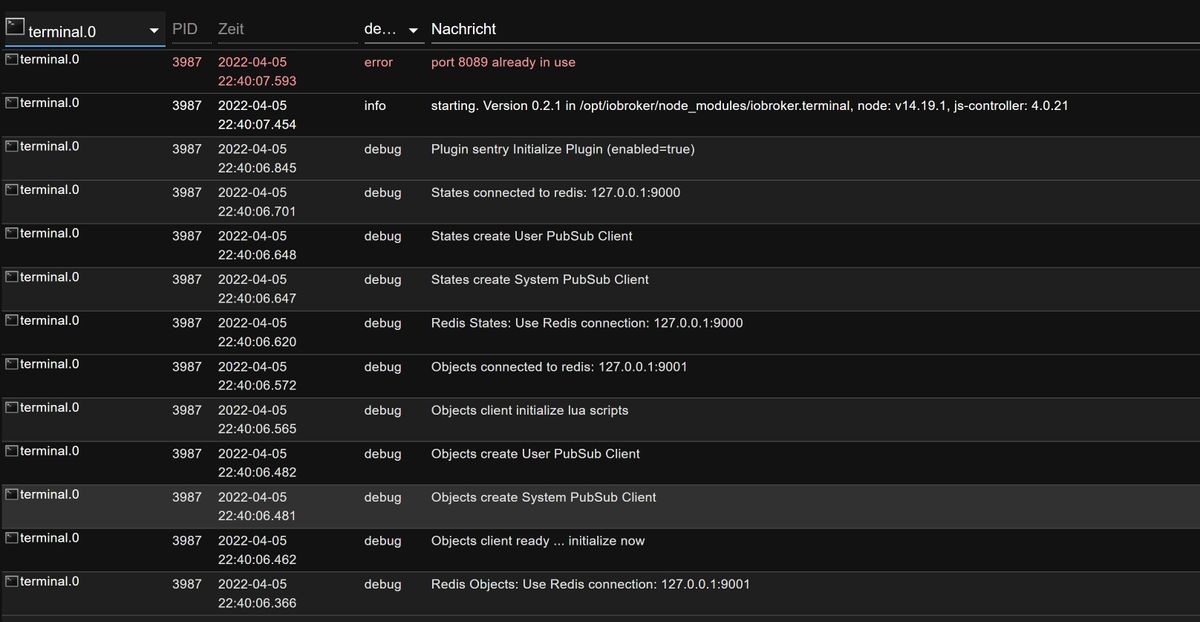
-
@atticus
Neben der (sich eigentlich nicht stellenden) Sinnfrage des Desktops, wozu braucht es den Terminal-Adapter eigentlich? Der sorgt auch anderen Stellen gerne für Probleme. Würde ich (neben dem Desktop) eh rauswerfen.
@thomas-braun ich hab an dem Raspberry ein Display angeschlossen, das die Weboberfläche des iobrokers anzeigt.
Zum zweiten hatte ich schon mal den Fall, da hast du auch geantwortet, das der Raspberry durch einen Stromausfall nicht mehr richtig funktioniert, ich konnte mich am Raspberry nicht mehr anmelden, der iobroker lief aber noch, da konnte ich durch das Terminal im iobroker versuchen, den Raspbery zu retten. -
@thomas-braun ich hab an dem Raspberry ein Display angeschlossen, das die Weboberfläche des iobrokers anzeigt.
Zum zweiten hatte ich schon mal den Fall, da hast du auch geantwortet, das der Raspberry durch einen Stromausfall nicht mehr richtig funktioniert, ich konnte mich am Raspberry nicht mehr anmelden, der iobroker lief aber noch, da konnte ich durch das Terminal im iobroker versuchen, den Raspbery zu retten.@atticus sagte in Terminal Adapter:
da konnte ich durch das Terminal im iobroker versuchen, den Raspbery zu retten.
das geht such über ein SSH Terminal am PC (puTTY oder Powershell)
-
@atticus sagte in Terminal Adapter:
da konnte ich durch das Terminal im iobroker versuchen, den Raspbery zu retten.
das geht such über ein SSH Terminal am PC (puTTY oder Powershell)
@homoran ja, im normalfall, schon. Glaub mir, es war so, ich konnte mich an dem Raspberry mit keiner Anmeldung verbinden, der iobroker lief jedoch beim Starten des Raspberrys an, und über das Terminal im iobroker konnte man versuchen, den Raspberry zu retten. Eine Anmeldung über putty etc. war nicht möglich.
-
@homoran ja, im normalfall, schon. Glaub mir, es war so, ich konnte mich an dem Raspberry mit keiner Anmeldung verbinden, der iobroker lief jedoch beim Starten des Raspberrys an, und über das Terminal im iobroker konnte man versuchen, den Raspberry zu retten. Eine Anmeldung über putty etc. war nicht möglich.
@atticus sagte in Terminal Adapter:
und über das Terminal im iobroker konnte man versuchen, den Raspberry zu retten.
Dann läuft da auch eine bash/Terminal
-
@atticus sagte in Terminal Adapter:
und über das Terminal im iobroker konnte man versuchen, den Raspberry zu retten.
Dann läuft da auch eine bash/Terminal
@thomas-braun Ich nutze den terminal Adapter auch nicht mehr
Leider - das er sehr brauchbar war beim testen der exec function, da man ja mit dem iobroker user arbeitet und Probleme mit rechten leicht sieht -
@crunchip sagte in Terminal Adapter:
sudo netstat -lntup | grep ":8088"
pi@ioBroker482:~ $ sudo netstat -lntup | grep ":8088" pi@ioBroker482:~ $@atticus sagte in Terminal Adapter:
netstat -lntup | grep ":8088"
war falsch, mach mal nur auf Port 80
netstat -lntup | grep ":80" -
@crunchip ja, ich hab schon einige Ports eingegeben, bei jedem kommt die o.g. Meldung. Es sieht also so aus, das der Fehler bei jedem Port auftritt. Ich habe natürlich nicht alle möglichen Ports getestet, aber wenn ich eine (mehrere) willkürliche Portadresse verwende, und immer kommt die gleiche Fehlermeldung, ist das schon seltsam, oder?




Hey! Du scheinst an dieser Unterhaltung interessiert zu sein, hast aber noch kein Konto.
Hast du es satt, bei jedem Besuch durch die gleichen Beiträge zu scrollen? Wenn du dich für ein Konto anmeldest, kommst du immer genau dorthin zurück, wo du zuvor warst, und kannst dich über neue Antworten benachrichtigen lassen (entweder per E-Mail oder Push-Benachrichtigung). Du kannst auch Lesezeichen speichern und Beiträge positiv bewerten, um anderen Community-Mitgliedern deine Wertschätzung zu zeigen.
Mit deinem Input könnte dieser Beitrag noch besser werden 💗
Registrieren Anmelden449
Online33.0k
Benutzer83.6k
Themen1.3m
Beiträge