Skip to content
  • Home
  • Recent
  • Tags
  • 0 Unread 0
  • Categories
  • Unreplied
  • Popular
  • GitHub
  • Docu
  • Hilfe
Skins
  • Light
  • Brite
  • Cerulean
  • Cosmo
  • Flatly
  • Journal
  • Litera
  • Lumen
  • Lux
  • Materia
  • Minty
  • Morph
  • Pulse
  • Sandstone
  • Simplex
  • Sketchy
  • Spacelab
  • United
  • Yeti
  • Zephyr
  • Dark
  • Cyborg
  • Darkly
  • Quartz
  • Slate
  • Solar
  • Superhero
  • Vapor

  • Default (No Skin)
  • No Skin
Collapse
ioBroker Logo

Community Forum

donate donate
  1. ioBroker Community Home
  2. Deutsch
  3. Visualisierung
  4. [Aufruf] vis-beta Releasen?

NEWS

  • Jahresrückblick 2025 – unser neuer Blogbeitrag ist online! ✨
    BluefoxB
    Bluefox
    17
    1
    3.2k

  • Neuer Blogbeitrag: Monatsrückblick - Dezember 2025 🎄
    BluefoxB
    Bluefox
    13
    1
    1.1k

  • Weihnachtsangebot 2025! 🎄
    BluefoxB
    Bluefox
    25
    1
    2.4k

[Aufruf] vis-beta Releasen?

Scheduled Pinned Locked Moved Visualisierung
97 Posts 13 Posters 9.3k Views
  • Oldest to Newest
  • Newest to Oldest
  • Most Votes
Reply
  • Reply as topic
Log in to reply
This topic has been deleted. Only users with topic management privileges can see it.
  • BluefoxB Offline
    BluefoxB Offline
    Bluefox
    wrote on last edited by
    #55

    @KNXbroker:

    Hi @ all

    kurze Bestätigung meinerseits, habe auch diese Probleme:

    • 12.17 lässt sich nicht installieren
    ````
    ERR! fetch failed https://github.com/iobroker/ioBroker.vis-beta/tarball/master
    npm WARN retry will retry, error on last attempt: Error: fetch failed with status code 404
    npm
     ERR! fetch failed https://github.com/iobroker/ioBroker.vis-beta/tarball/master
    npm WARN retry will retry, error on last attempt: Error: fetch failed with status code 404
    ````
    
    • Font-Size ändert die Buttongröße nicht

    • Rückgängigtaste geht nicht live (muss immer F5 drücken)

    • Das ändern eines Themas wird nicht Live übernommen (muss immer F5 drücken)

    • Font-Size ändert die Buttongröße nicht

    • Das Laden der Widget Sätze dauert lange im Viewer. Interessanterweise fehlt auch die Zeile Lade Daten… beim Viewer

    Danke für alles, KNX Broker `
    Man muss das Paket ganz normal über Adapter Reiter updaten.

    Und mich interessiert nicht was in anderen Versionen nicht geht. Mir ist nur 0.12.17 interessant.

    1 Reply Last reply
    0
    • BluefoxB Offline
      BluefoxB Offline
      Bluefox
      wrote on last edited by
      #56

      @pix:

      Hab es schon an anderer Stelle geschrieben:

      Unter VIS 0.12.16 bleiben Sayit-Ansagen stumm. Unter 0.10.X gibt es kein Problem.

      Übrigens: Danke für's Reparieren der Dropdown Auswahl:Bildschirmfoto 2017-03-21 um 11.24.32.jpgBisher konnte ich im Dropdown-Auswahlmenü nicht scrollen. Das geht jetzt wieder! :D

      Pix `
      Ok. Werde sayit checken. Wie wird gesteuert? Über Instanz Name, FFFFFFFF oder * ?

      1 Reply Last reply
      0
      • rantanplanR Online
        rantanplanR Online
        rantanplan
        wrote on last edited by
        #57

        @Bluefox:

        Man muss das Paket ganz normal über Adapter Reiter updaten. `

        Mache ich ja. Klappt trotzdem nicht.

        Grüße

        Rantanplan

        CCU3 / MS Server 2019(VM) / Scripten mit Blockly

        1 Reply Last reply
        0
        • K Offline
          K Offline
          KNXbroker
          wrote on last edited by
          #58

          Komme auch nicht auf die 12.17. Er bringt mir immer folgenden Fehler:

          ! ````
          $ ./iobroker url "https://github.com/iobroker/ioBroker.vis-beta/tarball/master" vis-beta
          install https://github.com/iobroker/ioBroker.vis-beta/tarball/master
          npm install https://github.com/iobroker/ioBroker.vis-beta/tarball/master --production --prefix "/opt/iobroker" (System call)
          npm
          ERR!
          fetch failed https://github.com/iobroker/ioBroker.vis-beta/tarball/master
          npm WARN retry will retry, error on last attempt: Error: fetch failed with status code 404
          npm
          ERR!
          fetch failed https://github.com/iobroker/ioBroker.vis-beta/tarball/master
          npm WARN retry will retry, error on last attempt: Error: fetch failed with status code 404
          npm
          ERR! fetch failed https://github.com/iobroker/ioBroker.vis-beta/tarball/master
          npm
          ERR! Linux 4.4.38-v7+
          npm ERR! argv "/usr/bin/nodejs" "/usr/bin/npm" "install" "https://github.com/iobroker/ioBroker.vis-beta/tarball/master" "--production" "--prefix" "/opt/iobroker"npm
          ERR! node v4.7.3npm ERR!
          npm v2.15.11
          npm ERR!
          fetch failed with status code 404npm ERR!
          npm ERR! If you need help, you may report this error at:
          npm ERR! <https: github.com/npm/issues="">
          ! npm ERR! Please include the following file with any support request:npm ERR! /npm-debug.log
          ! ERROR: host.raspberrypi Cannot install https://github.com/iobroker/ioBroker.vis-beta/tarball/master: 1
          ERROR: process exited with code 25</https:>

          
          Die Debug Log habe ich beigefügt
          [1711_npm-debug.log](/assets/uploads/files/1711_npm-debug.log)
          1 Reply Last reply
          0
          • rantanplanR Online
            rantanplanR Online
            rantanplan
            wrote on last edited by
            #59

            Hier noch mal meine Fehlermeldung.

            info   exit 25
            error   host.KDB-W10-Onl Cannot install iobroker.vis-beta: 1
            info   1
            info   code
            info   
            info   ERR!
            info   
            info   npm
            info   starting. Version 0.12.17 in C:/ioBroker/node_modules/iobroker.vis-beta, node: v6.10.0
            info   npm install iobroker.vis-beta --production --prefix "C:/ioBroker" (System call)
            info   add vis-beta 


            Liegt es eventuell an node v6.10.0?

            Grüße

            Rantanplan

            CCU3 / MS Server 2019(VM) / Scripten mit Blockly

            1 Reply Last reply
            0
            • P Offline
              P Offline
              pix
              wrote on last edited by
              #60

              @Bluefox:

              @pix:

              Hab es schon an anderer Stelle geschrieben:

              Unter VIS 0.12.16 bleiben Sayit-Ansagen stumm. Unter 0.10.X gibt es kein Problem.

              Übrigens: Danke für's Reparieren der Dropdown Auswahl:Bildschirmfoto 2017-03-21 um 11.24.32.jpgBisher konnte ich im Dropdown-Auswahlmenü nicht scrollen. Das geht jetzt wieder! :D

              Pix Ok. Werde sayit checken. Wie wird gesteuert? Über Instanz Name, FFFFFFFF oder * ?

              Über * 261_bildschirmfoto_2017-03-21_um_11.53.20.png
              (Access Key im Screenshot anonymisiert)

              Pix

              ioBroker auf Ubuntu in Proxmox (früher Mac mini (bis OS X 10.12.6 Sierra), VIS via iOS; angeschlossen: Homematic CCU2, Homepilot 1, ConBee II, einige Wemos, Sonos, Unifi CK+Protect, Homekit, Homebridge; KEIN blockly! Github-Profil

              1 Reply Last reply
              0
              • P Offline
                P Offline
                pix
                wrote on last edited by
                #61

                Update in Admin über Update-Knopf von 0.12.16 auf 0.12.17 ergibt diesen Fehler unter Safari/OS X

                $ ./iobroker upgrade vis-beta
                npm install iobroker.vis-beta --production --prefix "/Users/pix/Documents/iobroker" (System call)
                npm
                 WARN optional SKIPPING OPTIONAL DEPENDENCY: bluetooth-hci-socket@^0.5.1 (node_modules/iobroker.radar/node_modules/noble/node_modules/bluetooth-hci-socket):npm WARN notsup SKIPPING OPTIONAL DEPENDENCY: Unsupported platform for bluetooth-hci-socket@0.5.1: wanted {"os":"linux,android,win32","arch":"any"} (current: {"os":"darwin","arch":"x64"})
                
                ERROR: host.MacMini-Ethernet.fritz.box Cannot install iobroker.vis-beta: 1
                ERROR: process exited with code 25


                Pix

                Edit:

                wurde aber trotzdem installiert

                ! MacMini-Ethernet:iobroker pix$ ./iobroker update update done Adapter "zwave" : 0.5.1 Adapter "yr" : 1.0.5 , installed 1.0.5 Adapter "yahka" : 0.5.4 , installed 0.5.2 [Updateable] Adapter "yamaha" : 0.3.7 Adapter "xs1" : 0.5.2 Adapter "wolf" : 0.9.2 Adapter "wifilight" : 0.1.1 Adapter "wm-bus" : 0.1.12 Adapter "wetty" : 0.1.1 Adapter "web" : 2.0.2 , installed 2.0.2 Adapter "weatherunderground": 1.0.2 , installed 1.0.2 Adapter "vis-timeandweather": 1.1.7 , installed 1.1.7 Adapter "vis-rgraph" : 0.0.2 , installed 0.0.2 Adapter "vis-plumb" : 0.1.6 Adapter "vis-players" : 0.1.4 Adapter "vis-metro" : 1.0.4 , installed 1.0.4 Adapter "vis-map" : 0.1.3 , installed 0.1.3 Adapter "vis-lcars" : 1.0.1 Adapter "vis-keyboard" : 0.0.2 , installed 0.0.2 Adapter "vis-justgage" : 0.7.1 , installed 0.7.1 Adapter "vis-jqui-mfd" : 1.0.5 , installed 1.0.5 Adapter "vis-hqwidgets" : 1.0.6 , installed 1.0.6 Adapter "vis-history" : 0.2.4 , installed 0.2.4 Adapter "vis-google-fonts": 0.1.0 , installed 0.1.0 Adapter "vis-fancyswitch": 1.0.0 , installed 1.0.0 Adapter "vis-colorpicker": 1.1.1 , installed 1.1.1 Adapter "vis-canvas-gauges": 0.1.5 , installed 0.1.5 Adapter "vis-beta" : 0.12.17 , installed 0.12.17 ... !

                ioBroker auf Ubuntu in Proxmox (früher Mac mini (bis OS X 10.12.6 Sierra), VIS via iOS; angeschlossen: Homematic CCU2, Homepilot 1, ConBee II, einige Wemos, Sonos, Unifi CK+Protect, Homekit, Homebridge; KEIN blockly! Github-Profil

                1 Reply Last reply
                0
                • P Offline
                  P Offline
                  pix
                  wrote on last edited by
                  #62

                  @pix:

                  @Bluefox:

                  @pix:

                  Hab es schon an anderer Stelle geschrieben:

                  Unter VIS 0.12.16 bleiben Sayit-Ansagen stumm. Unter 0.10.X gibt es kein Problem.

                  Übrigens: Danke für's Reparieren der Dropdown Auswahl:Bildschirmfoto 2017-03-21 um 11.24.32.jpgBisher konnte ich im Dropdown-Auswahlmenü nicht scrollen. Das geht jetzt wieder! :D

                  Pix Ok. Werde sayit checken. Wie wird gesteuert? Über Instanz Name, FFFFFFFF oder * ?

                  Über *Bildschirmfoto 2017-03-21 um 11.53.20.png

                  (Access Key im Screenshot anonymisiert)

                  Pix `

                  Sayit Browserausgabe bleibt unter 0.12.17 auch stumm. Jeweils mit * und FFFFFFFF und direkter Texteingabe im Objekt-Reiter von Admin getestet.

                  ioBroker auf Ubuntu in Proxmox (früher Mac mini (bis OS X 10.12.6 Sierra), VIS via iOS; angeschlossen: Homematic CCU2, Homepilot 1, ConBee II, einige Wemos, Sonos, Unifi CK+Protect, Homekit, Homebridge; KEIN blockly! Github-Profil

                  1 Reply Last reply
                  0
                  • BluefoxB Offline
                    BluefoxB Offline
                    Bluefox
                    wrote on last edited by
                    #63

                    @KNXbroker:

                    Komme auch nicht auf die 12.17. Er bringt mir immer folgenden Fehler:

                    ! ````
                    $ ./iobroker url "https://github.com/iobroker/ioBroker.vis-beta/tarball/master" vis-beta
                    install https://github.com/iobroker/ioBroker.vis-beta/tarball/master
                    npm install https://github.com/iobroker/ioBroker.vis-beta/tarball/master --production --prefix "/opt/iobroker" (System call)
                    npm
                    ERR!
                    fetch failed https://github.com/iobroker/ioBroker.vis-beta/tarball/master
                    npm WARN retry will retry, error on last attempt: Error: fetch failed with status code 404
                    npm
                    ERR!
                    fetch failed https://github.com/iobroker/ioBroker.vis-beta/tarball/master
                    npm WARN retry will retry, error on last attempt: Error: fetch failed with status code 404
                    npm
                    ERR! fetch failed https://github.com/iobroker/ioBroker.vis-beta/tarball/master
                    npm
                    ERR! Linux 4.4.38-v7+
                    npm ERR! argv "/usr/bin/nodejs" "/usr/bin/npm" "install" "https://github.com/iobroker/ioBroker.vis-beta/tarball/master" "--production" "--prefix" "/opt/iobroker"npm
                    ERR! node v4.7.3npm ERR!
                    npm v2.15.11
                    npm ERR!
                    fetch failed with status code 404npm ERR!
                    npm ERR! If you need help, you may report this error at:
                    npm ERR! <https: github.com/npm/issues="">
                    ! npm ERR! Please include the following file with any support request:npm ERR! /npm-debug.log
                    ! ERROR: host.raspberrypi Cannot install https://github.com/iobroker/ioBroker.vis-beta/tarball/master: 1
                    ERROR: process exited with code 25</https:>

                    
                    Die Debug Log habe ich beigefügt `  
                    
                    cd /opt/iobroker
                    npm i iobroker.vis-beta --production
                    
                    1 Reply Last reply
                    0
                    • BluefoxB Offline
                      BluefoxB Offline
                      Bluefox
                      wrote on last edited by
                      #64

                      @pix:

                      ERROR: host.MacMini-Ethernet.fritz.box Cannot install iobroker.vis-beta: 1

                      ERROR: process exited with code 25 `
                      Dieser Fehler gehört zu anderem Paket. Npm 3 versucht alle Pakete irgendwie noch mal zu installieren. Es gibt noch keine Lösung.

                      1 Reply Last reply
                      0
                      • rantanplanR Online
                        rantanplanR Online
                        rantanplan
                        wrote on last edited by
                        #65

                        :cry: Keiner spricht mir mir :cry:

                        Rantanplan

                        CCU3 / MS Server 2019(VM) / Scripten mit Blockly

                        1 Reply Last reply
                        0
                        • K Offline
                          K Offline
                          KNXbroker
                          wrote on last edited by
                          #66

                          Hi BlueFox,

                          danke, mit der Terminal Eingabe hat es funktioniert! Damit ist auch das Font Problem behoben. Folgendes noch nicht

                          • Rückgängigtaste geht nicht live (muss immer F5 drücken)

                          • Das ändern eines Themas wird nicht Live übernommen (muss immer F5 drücken)

                          • Interessanterweise fehlt auch die Zeile Lade Daten… beim Startbildschirm des Viewer

                          • EDIT: Der dunkle Startbildschirm geht auch nicht

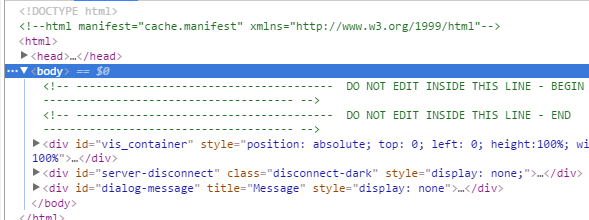
                          Bei mir steht auch …html manifest... im header (siehe Anhang)

                          Gruß KNX Broker
                          1711_unbenannt.png

                          1 Reply Last reply
                          0
                          • BluefoxB Offline
                            BluefoxB Offline
                            Bluefox
                            wrote on last edited by
                            #67

                            @pix:

                            @pix:

                            @Bluefox:

                            Ok. Werde sayit checken. Wie wird gesteuert? Über Instanz Name, FFFFFFFF oder * ? `

                            Über *Bildschirmfoto 2017-03-21 um 11.53.20.png

                            (Access Key im Screenshot anonymisiert)

                            Pix `

                            Sayit Browserausgabe bleibt unter 0.12.17 auch stumm. Jeweils mit * und FFFFFFFF und direkter Texteingabe im Objekt-Reiter von Admin getestet. `
                            Ich hoffe du hast mit vis-beta.0.control.command und nicht mit vis.0.control.command probiert?

                            Bei mir geht es.

                            1 Reply Last reply
                            0
                            • BluefoxB Offline
                              BluefoxB Offline
                              Bluefox
                              wrote on last edited by
                              #68

                              @rantanplan:

                              Hier noch mal meine Fehlermeldung.

                              info   exit 25
                              error   host.KDB-W10-Onl Cannot install iobroker.vis-beta: 1
                              info   1
                              info   code
                              info   
                              info   ERR!
                              info   
                              info   npm
                              info   starting. Version 0.12.17 in C:/ioBroker/node_modules/iobroker.vis-beta, node: v6.10.0
                              info   npm install iobroker.vis-beta --production --prefix "C:/ioBroker" (System call)
                              info   add vis-beta 


                              Liegt es eventuell an node v6.10.0?

                              Grüße `
                              Kann es sein, dass trotz Fehlermeldungen ist vis-beta installiert?

                              1 Reply Last reply
                              0
                              • BluefoxB Offline
                                BluefoxB Offline
                                Bluefox
                                wrote on last edited by
                                #69

                                @KNXbroker:

                                • Rückgängigtaste geht nicht live (muss immer F5 drücken)

                                • Das ändern eines Themas wird nicht Live übernommen (muss immer F5 drücken)

                                • Interessanterweise fehlt auch die Zeile Lade Daten… beim Startbildschirm des Viewer

                                • EDIT: Der dunkle Startbildschirm geht auch nicht `
                                  Danke. Es gibt wieder was zu tun. ;)

                                1 Reply Last reply
                                0
                                • arteckA Offline
                                  arteckA Offline
                                  arteck
                                  Developer Most Active
                                  wrote on last edited by
                                  #70

                                  @Bluefox:

                                  • Rückgängigtaste geht nicht live (muss immer F5 drücken)

                                  • Das ändern eines Themas wird nicht Live übernommen (muss immer F5 drücken)

                                  • Interessanterweise fehlt auch die Zeile Lade Daten… beim Startbildschirm des Viewer

                                  • EDIT: Der dunkle Startbildschirm geht auch nicht `

                                  und ne Entprellung in die VIS….für die Buttons

                                  zigbee hab ich, zwave auch, nuc's genauso und HA auch

                                  1 Reply Last reply
                                  0
                                  • HomoranH Do not disturb
                                    HomoranH Do not disturb
                                    Homoran
                                    Global Moderator Administrators
                                    wrote on last edited by
                                    #71

                                    @arteck:

                                    und ne Entprellung in die VIS….für die Buttons `
                                    funktioniert das nicht???

                                    Gruß

                                    Rainer

                                    kein Support per PN! - Fragen im Forum stellen - es gibt fast nichts, was nicht auch für andere interessant ist.

                                    Benutzt das Voting rechts unten im Beitrag wenn er euch geholfen hat.

                                    der Installationsfixer: curl -fsL https://iobroker.net/fix.sh | bash -

                                    1 Reply Last reply
                                    0
                                    • rantanplanR Online
                                      rantanplanR Online
                                      rantanplan
                                      wrote on last edited by
                                      #72

                                      @Bluefox:

                                      Kann es sein, dass trotz Fehlermeldungen ist vis-beta installiert? `

                                      So war es bei beta-Versionen vorher.

                                      Fehlermeldung bei Update.

                                      Admin zeigte die neue Version an.

                                      In Edit vis-beta wurde aber noch die Alte angezeigt.

                                      Ich habe nun alle vis deinstalliert und neu installiert.

                                      Zur Zeit ist alles ok.

                                      Mal sehen was beim nächsten Update passiert.

                                      Grüße

                                      Rantanplan

                                      CCU3 / MS Server 2019(VM) / Scripten mit Blockly

                                      1 Reply Last reply
                                      0
                                      • BluefoxB Offline
                                        BluefoxB Offline
                                        Bluefox
                                        wrote on last edited by
                                        #73

                                        @Bluefox:

                                        • Rückgängigtaste geht nicht live (muss immer F5 drücken)

                                          Fixed
                                          @Bluefox:

                                          • Das ändern eines Themas wird nicht Live übernommen (muss immer F5 drücken)

                                            Fixed
                                            @Bluefox:

                                            • Interessanterweise fehlt auch die Zeile Lade Daten… beim Startbildschirm des Viewer

                                              Die Daten im Runtime werden nicht mehr am Anfang geladen, sondern nur wenn ein View angezeigt werden sollte. Also muss so sein.
                                              @Bluefox:

                                              • EDIT: Der dunkle Startbildschirm geht auch nicht `
                                                Kann nicht reproduzieren.
                                                48_2017-03-22_20_09_26-vis_-d__pwork_iobroker-data_files_vis-_…js_vis.js-_webstorm_2017.1.png

                                              > und ne Entprellung in die VIS….für die Buttons
                                              Kann man mehr Info darüber haben? Ging in 0.10.15 und in 0.12.x nicht? `

                                        1 Reply Last reply
                                        0
                                        • A Offline
                                          A Offline
                                          akamia
                                          wrote on last edited by
                                          #74

                                          In der 0.12.8 funktionieren die Schriftfarben und -größen wieder, ebenso die Filter. Danke bluefox.

                                          NUC6i3 / ProxMox / HM/FHEM/WifiLight/HUE/Tradfri/KM200/InfluxDB/RFlink/Plex/Smartmeter
                                          piVCCU, Arduinos, X4000, Z2000, Solo4K, SAMSUNG C & H, NAS OMV4/Win10Pro (JRMC/JRemote), 4x4 HDMImatrix, ...

                                          1 Reply Last reply
                                          0
                                          Reply
                                          • Reply as topic
                                          Log in to reply
                                          • Oldest to Newest
                                          • Newest to Oldest
                                          • Most Votes


                                          Support us

                                          ioBroker
                                          Community Adapters
                                          Donate

                                          675

                                          Online

                                          32.7k

                                          Users

                                          82.3k

                                          Topics

                                          1.3m

                                          Posts
                                          Community
                                          Impressum | Datenschutz-Bestimmungen | Nutzungsbedingungen | Einwilligungseinstellungen
                                          ioBroker Community 2014-2025
                                          logo
                                          • Login

                                          • Don't have an account? Register

                                          • Login or register to search.
                                          • First post
                                            Last post
                                          0
                                          • Home
                                          • Recent
                                          • Tags
                                          • Unread 0
                                          • Categories
                                          • Unreplied
                                          • Popular
                                          • GitHub
                                          • Docu
                                          • Hilfe