




js-controller 4.0.x jetzt für alle User im STABLE!
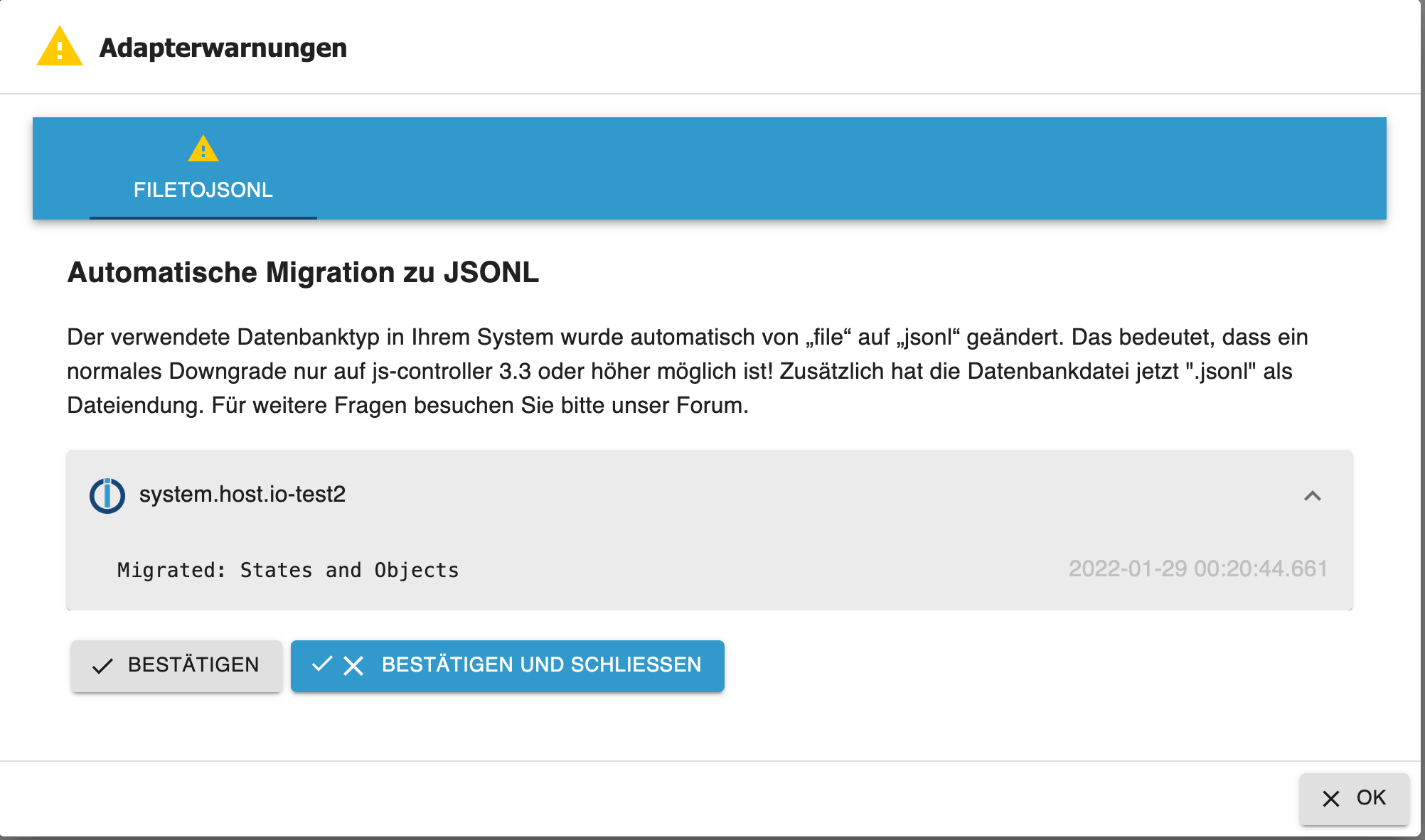
-
Bei mir hat sich beim Update irgendwas aufgehangen. Seit dem ist der broker nicht mehr erreichbar
pi@raspberrypi-iob:~ $ iobroker upgrade self
Update js-controller from @3.1.6 to @4.0.21
NPM version: 6.14.16
npm install iobroker.js-controller@4.0.21 --loglevel error --unsafe-perm --prefix "/opt/iobroker" (System call)
In file included from ../../nan/nan.h:56,
                 from ../src/unix_dgram.cc:5:
/home/iobroker/.cache/node-gyp/14.19.1/include/node/node.h:793:43: warning: cast between incompatible function types from ‘void (*)(v8::Local<v8::Object>)’ to ‘node::addon_register_func’ {aka ‘void (*)(v8::Local<v8::Object>, v8::Local<v8::Value>, void*)’} [-Wcast-function-type]
       (node::addon_register_func) (regfunc),                          \
                                           ^
/home/iobroker/.cache/node-gyp/14.19.1/include/node/node.h:827:3: note: in expansion of macro ‘NODE_MODULE_X’
   NODE_MODULE_X(modname, regfunc, NULL, 0)  // NOLINT (readability/null_usage)
   ^~~~~~~~~~~~~
../src/unix_dgram.cc:404:1: note: in expansion of macro ‘NODE_MODULE’
 NODE_MODULE(unix_dgram, Initialize)
 ^~~~~~~~~~~
 Objects 127.0.0.1:53902 Error from InMemDB: Error: GET-UNSUPPORTED for namespace cfg.: Data=["meta.objects.features.useSets"]
 States 127.0.0.1:38688 Error from InMemDB: Error: GET-UNSUPPORTED for namespace meta.: Data=["meta.states.protocolVersion"]
 Objects 127.0.0.1:53902 Error from InMemDB: Error: GET-UNSUPPORTED for namespace cfg.: Data=["meta.objects.protocolVersion"]
 Objects 127.0.0.1:53902 Error from InMemDB: Error: scan NOT SUPPORTED
/opt/iobroker/node_modules/standard-as-callback/built/index.js:6
        throw e;
        ^

ReplyError: Error scan NOT SUPPORTED
    at parseError (/opt/iobroker/node_modules/redis-parser/lib/parser.js:179:12)
    at parseType (/opt/iobroker/node_modules/redis-parser/lib/parser.js:302:14)
Emitted 'error' event on ScanStream instance at:
    at /opt/iobroker/node_modules/ioredis/built/ScanStream.js:38:22
    at tryCatcher (/opt/iobroker/node_modules/standard-as-callback/built/utils.js:12:23)
    at /opt/iobroker/node_modules/standard-as-callback/built/index.js:33:51
    at processTicksAndRejections (internal/process/task_queues.js:95:5) {
  command: {
    name: 'scan',
    args: [ '0', 'MATCH', 'cfg.o.system.host.*', 'COUNT', '250' ]
  }
}
npm ERR! code ELIFECYCLE
npm ERR! errno 1
npm ERR! iobroker.js-controller@4.0.21 install: `node iobroker.js setup first`
npm ERR! Exit status 1
npm ERR!
npm ERR! Failed at the iobroker.js-controller@4.0.21 install script.
npm ERR! This is probably not a problem with npm. There is likely additional logging output above.

npm ERR! A complete log of this run can be found in:
npm ERR!     /home/iobroker/.npm/_logs/2022-03-29T16_38_52_007Z-debug.log
host.raspberrypi-iob Cannot install iobroker.js-controller@4.0.21: 1
iobroker update bringt
pi@raspberrypi-iob:/opt/iobroker $ iobroker update
internal/modules/cjs/loader.js:905
  throw err;
  ^

Error: Cannot find module '/opt/iobroker/node_modules/iobroker.js-controller/iobroker.js'
    at Function.Module._resolveFilename (internal/modules/cjs/loader.js:902:15)
    at Function.Module._load (internal/modules/cjs/loader.js:746:27)
    at Function.executeUserEntryPoint [as runMain] (internal/modules/run_main.js:75:12)
    at internal/main/run_main_module.js:17:47 {
  code: 'MODULE_NOT_FOUND',
  requireStack: []
}
Jemand eine Idee wo ich ansetzen kann?
@hardy_01 said in js-controller 4.0.x jetzt für alle User im STABLE!:
Bei mir hat sich beim Update irgendwas aufgehangen. Seit dem ist der broker nicht mehr erreichbar
pi@raspberrypi-iob:~ $ iobroker upgrade self
Update js-controller from @3.1.6 to @4.0.21
NPM version: 6.14.16
npm install iobroker.js-controller@4.0.21 --loglevel error --unsafe-perm --prefix "/opt/iobroker" (System call)
In file included from ../../nan/nan.h:56,
                 from ../src/unix_dgram.cc:5:
/home/iobroker/.cache/node-gyp/14.19.1/include/node/node.h:793:43: warning: cast between incompatible function types from ‘void (*)(v8::Local<v8::Object>)’ to ‘node::addon_register_func’ {aka ‘void (*)(v8::Local<v8::Object>, v8::Local<v8::Value>, void*)’} [-Wcast-function-type]
       (node::addon_register_func) (regfunc),                          \
                                           ^
/home/iobroker/.cache/node-gyp/14.19.1/include/node/node.h:827:3: note: in expansion of macro ‘NODE_MODULE_X’
   NODE_MODULE_X(modname, regfunc, NULL, 0)  // NOLINT (readability/null_usage)
   ^~~~~~~~~~~~~
../src/unix_dgram.cc:404:1: note: in expansion of macro ‘NODE_MODULE’
 NODE_MODULE(unix_dgram, Initialize)
 ^~~~~~~~~~~
 Objects 127.0.0.1:53902 Error from InMemDB: Error: GET-UNSUPPORTED for namespace cfg.: Data=["meta.objects.features.useSets"]
 States 127.0.0.1:38688 Error from InMemDB: Error: GET-UNSUPPORTED for namespace meta.: Data=["meta.states.protocolVersion"]
 Objects 127.0.0.1:53902 Error from InMemDB: Error: GET-UNSUPPORTED for namespace cfg.: Data=["meta.objects.protocolVersion"]
 Objects 127.0.0.1:53902 Error from InMemDB: Error: scan NOT SUPPORTED
/opt/iobroker/node_modules/standard-as-callback/built/index.js:6
        throw e;
        ^

ReplyError: Error scan NOT SUPPORTED
    at parseError (/opt/iobroker/node_modules/redis-parser/lib/parser.js:179:12)
    at parseType (/opt/iobroker/node_modules/redis-parser/lib/parser.js:302:14)
Emitted 'error' event on ScanStream instance at:
    at /opt/iobroker/node_modules/ioredis/built/ScanStream.js:38:22
    at tryCatcher (/opt/iobroker/node_modules/standard-as-callback/built/utils.js:12:23)
    at /opt/iobroker/node_modules/standard-as-callback/built/index.js:33:51
    at processTicksAndRejections (internal/process/task_queues.js:95:5) {
  command: {
    name: 'scan',
    args: [ '0', 'MATCH', 'cfg.o.system.host.*', 'COUNT', '250' ]
  }
}
npm ERR! code ELIFECYCLE
npm ERR! errno 1
npm ERR! iobroker.js-controller@4.0.21 install: `node iobroker.js setup first`
npm ERR! Exit status 1
npm ERR!
npm ERR! Failed at the iobroker.js-controller@4.0.21 install script.
npm ERR! This is probably not a problem with npm. There is likely additional logging output above.

npm ERR! A complete log of this run can be found in:
npm ERR!     /home/iobroker/.npm/_logs/2022-03-29T16_38_52_007Z-debug.log
host.raspberrypi-iob Cannot install iobroker.js-controller@4.0.21: 1
iobroker update bringt
pi@raspberrypi-iob:/opt/iobroker $ iobroker update
internal/modules/cjs/loader.js:905
  throw err;
  ^

Error: Cannot find module '/opt/iobroker/node_modules/iobroker.js-controller/iobroker.js'
    at Function.Module._resolveFilename (internal/modules/cjs/loader.js:902:15)
    at Function.Module._load (internal/modules/cjs/loader.js:746:27)
    at Function.executeUserEntryPoint [as runMain] (internal/modules/run_main.js:75:12)
    at internal/main/run_main_module.js:17:47 {
  code: 'MODULE_NOT_FOUND',
  requireStack: []
}
pi@raspberrypi-iob:/opt/iobroker $ iobroker start pi@raspberrypi-iob:/opt/iobroker $ iobroker fix library: loaded Library version=2022-02-10 ioBroker is not installed in /opt/iobroker! Cannot fix anything...Jemand eine Idee wo ich ansetzen kann?
-
@hardy_01 said in js-controller 4.0.x jetzt für alle User im STABLE!:
Bei mir hat sich beim Update irgendwas aufgehangen. Seit dem ist der broker nicht mehr erreichbar
pi@raspberrypi-iob:~ $ iobroker upgrade self
Update js-controller from @3.1.6 to @4.0.21
NPM version: 6.14.16
npm install iobroker.js-controller@4.0.21 --loglevel error --unsafe-perm --prefix "/opt/iobroker" (System call)
In file included from ../../nan/nan.h:56,
                 from ../src/unix_dgram.cc:5:
/home/iobroker/.cache/node-gyp/14.19.1/include/node/node.h:793:43: warning: cast between incompatible function types from ‘void (*)(v8::Local<v8::Object>)’ to ‘node::addon_register_func’ {aka ‘void (*)(v8::Local<v8::Object>, v8::Local<v8::Value>, void*)’} [-Wcast-function-type]
       (node::addon_register_func) (regfunc),                          \
                                           ^
/home/iobroker/.cache/node-gyp/14.19.1/include/node/node.h:827:3: note: in expansion of macro ‘NODE_MODULE_X’
   NODE_MODULE_X(modname, regfunc, NULL, 0)  // NOLINT (readability/null_usage)
   ^~~~~~~~~~~~~
../src/unix_dgram.cc:404:1: note: in expansion of macro ‘NODE_MODULE’
 NODE_MODULE(unix_dgram, Initialize)
 ^~~~~~~~~~~
 Objects 127.0.0.1:53902 Error from InMemDB: Error: GET-UNSUPPORTED for namespace cfg.: Data=["meta.objects.features.useSets"]
 States 127.0.0.1:38688 Error from InMemDB: Error: GET-UNSUPPORTED for namespace meta.: Data=["meta.states.protocolVersion"]
 Objects 127.0.0.1:53902 Error from InMemDB: Error: GET-UNSUPPORTED for namespace cfg.: Data=["meta.objects.protocolVersion"]
 Objects 127.0.0.1:53902 Error from InMemDB: Error: scan NOT SUPPORTED
/opt/iobroker/node_modules/standard-as-callback/built/index.js:6
        throw e;
        ^

ReplyError: Error scan NOT SUPPORTED
    at parseError (/opt/iobroker/node_modules/redis-parser/lib/parser.js:179:12)
    at parseType (/opt/iobroker/node_modules/redis-parser/lib/parser.js:302:14)
Emitted 'error' event on ScanStream instance at:
    at /opt/iobroker/node_modules/ioredis/built/ScanStream.js:38:22
    at tryCatcher (/opt/iobroker/node_modules/standard-as-callback/built/utils.js:12:23)
    at /opt/iobroker/node_modules/standard-as-callback/built/index.js:33:51
    at processTicksAndRejections (internal/process/task_queues.js:95:5) {
  command: {
    name: 'scan',
    args: [ '0', 'MATCH', 'cfg.o.system.host.*', 'COUNT', '250' ]
  }
}
npm ERR! code ELIFECYCLE
npm ERR! errno 1
npm ERR! iobroker.js-controller@4.0.21 install: `node iobroker.js setup first`
npm ERR! Exit status 1
npm ERR!
npm ERR! Failed at the iobroker.js-controller@4.0.21 install script.
npm ERR! This is probably not a problem with npm. There is likely additional logging output above.

npm ERR! A complete log of this run can be found in:
npm ERR!     /home/iobroker/.npm/_logs/2022-03-29T16_38_52_007Z-debug.log
host.raspberrypi-iob Cannot install iobroker.js-controller@4.0.21: 1
iobroker update bringt
pi@raspberrypi-iob:/opt/iobroker $ iobroker update
internal/modules/cjs/loader.js:905
  throw err;
  ^

Error: Cannot find module '/opt/iobroker/node_modules/iobroker.js-controller/iobroker.js'
    at Function.Module._resolveFilename (internal/modules/cjs/loader.js:902:15)
    at Function.Module._load (internal/modules/cjs/loader.js:746:27)
    at Function.executeUserEntryPoint [as runMain] (internal/modules/run_main.js:75:12)
    at internal/main/run_main_module.js:17:47 {
  code: 'MODULE_NOT_FOUND',
  requireStack: []
}
pi@raspberrypi-iob:/opt/iobroker $ iobroker start pi@raspberrypi-iob:/opt/iobroker $ iobroker fix library: loaded Library version=2022-02-10 ioBroker is not installed in /opt/iobroker! Cannot fix anything...Jemand eine Idee wo ich ansetzen kann?
Falls es auch danach noch Fehler gibt, bitte die Installation erneut mittels sudo -H -u iobroker npm install iobroker.js-controller versuchen. -
Bei mir hat sich beim Update irgendwas aufgehangen. Seit dem ist der broker nicht mehr erreichbar
pi@raspberrypi-iob:~ $ iobroker upgrade self
Update js-controller from @3.1.6 to @4.0.21
NPM version: 6.14.16
npm install iobroker.js-controller@4.0.21 --loglevel error --unsafe-perm --prefix "/opt/iobroker" (System call)
In file included from ../../nan/nan.h:56,
                 from ../src/unix_dgram.cc:5:
/home/iobroker/.cache/node-gyp/14.19.1/include/node/node.h:793:43: warning: cast between incompatible function types from ‘void (*)(v8::Local<v8::Object>)’ to ‘node::addon_register_func’ {aka ‘void (*)(v8::Local<v8::Object>, v8::Local<v8::Value>, void*)’} [-Wcast-function-type]
       (node::addon_register_func) (regfunc),                          \
                                           ^
/home/iobroker/.cache/node-gyp/14.19.1/include/node/node.h:827:3: note: in expansion of macro ‘NODE_MODULE_X’
   NODE_MODULE_X(modname, regfunc, NULL, 0)  // NOLINT (readability/null_usage)
   ^~~~~~~~~~~~~
../src/unix_dgram.cc:404:1: note: in expansion of macro ‘NODE_MODULE’
 NODE_MODULE(unix_dgram, Initialize)
 ^~~~~~~~~~~
 Objects 127.0.0.1:53902 Error from InMemDB: Error: GET-UNSUPPORTED for namespace cfg.: Data=["meta.objects.features.useSets"]
 States 127.0.0.1:38688 Error from InMemDB: Error: GET-UNSUPPORTED for namespace meta.: Data=["meta.states.protocolVersion"]
 Objects 127.0.0.1:53902 Error from InMemDB: Error: GET-UNSUPPORTED for namespace cfg.: Data=["meta.objects.protocolVersion"]
 Objects 127.0.0.1:53902 Error from InMemDB: Error: scan NOT SUPPORTED
/opt/iobroker/node_modules/standard-as-callback/built/index.js:6
        throw e;
        ^

ReplyError: Error scan NOT SUPPORTED
    at parseError (/opt/iobroker/node_modules/redis-parser/lib/parser.js:179:12)
    at parseType (/opt/iobroker/node_modules/redis-parser/lib/parser.js:302:14)
Emitted 'error' event on ScanStream instance at:
    at /opt/iobroker/node_modules/ioredis/built/ScanStream.js:38:22
    at tryCatcher (/opt/iobroker/node_modules/standard-as-callback/built/utils.js:12:23)
    at /opt/iobroker/node_modules/standard-as-callback/built/index.js:33:51
    at processTicksAndRejections (internal/process/task_queues.js:95:5) {
  command: {
    name: 'scan',
    args: [ '0', 'MATCH', 'cfg.o.system.host.*', 'COUNT', '250' ]
  }
}
npm ERR! code ELIFECYCLE
npm ERR! errno 1
npm ERR! iobroker.js-controller@4.0.21 install: `node iobroker.js setup first`
npm ERR! Exit status 1
npm ERR!
npm ERR! Failed at the iobroker.js-controller@4.0.21 install script.
npm ERR! This is probably not a problem with npm. There is likely additional logging output above.

npm ERR! A complete log of this run can be found in:
npm ERR!     /home/iobroker/.npm/_logs/2022-03-29T16_38_52_007Z-debug.log
host.raspberrypi-iob Cannot install iobroker.js-controller@4.0.21: 1
iobroker update bringt
pi@raspberrypi-iob:/opt/iobroker $ iobroker update
internal/modules/cjs/loader.js:905
  throw err;
  ^

Error: Cannot find module '/opt/iobroker/node_modules/iobroker.js-controller/iobroker.js'
    at Function.Module._resolveFilename (internal/modules/cjs/loader.js:902:15)
    at Function.Module._load (internal/modules/cjs/loader.js:746:27)
    at Function.executeUserEntryPoint [as runMain] (internal/modules/run_main.js:75:12)
    at internal/main/run_main_module.js:17:47 {
  code: 'MODULE_NOT_FOUND',
  requireStack: []
}
Jemand eine Idee wo ich ansetzen kann?
-
@hardy_01 naja Du kommst von der 3.1 ... Da steht oben das Du idealerweise zuerst die 3.2 installieren solltest bzw ja bei DIr wäre der direkte weg via npm der sinnvolle. Siehe letzter Post
@apollon77
Habe ich probiert, bekomme leider immer noch einen Fehler (Berechtigung).pi@raspberrypi-iob:~ $ sudo -H -u iobroker npm install iobroker.js-controller npm WARN deprecated request@2.88.2: request has been deprecated, see https://github.com/request/request/issues/3142 npm WARN deprecated har-validator@5.1.5: this library is no longer supported npm WARN deprecated uuid@3.4.0: Please upgrade to version 7 or higher. Older versions may use Math.random() in certain circumstances, which is known to be problematic. See https://v8.dev/blog/math-random for details. npm WARN checkPermissions Missing write access to /home/pi npm WARN optional SKIPPING OPTIONAL DEPENDENCY: fsevents@~2.3.2 (node_modules/chokidar/node_modules/fsevents): npm WARN notsup SKIPPING OPTIONAL DEPENDENCY: Unsupported platform for fsevents@2.3.2: wanted {"os":"darwin","arch":"any"} (current: {"os":"linux","arch":"arm"}) npm WARN enoent ENOENT: no such file or directory, open '/home/pi/package.json' npm WARN pi No description npm WARN pi No repository field. npm WARN pi No README data npm WARN pi No license field. npm ERR! code EACCES npm ERR! syscall access npm ERR! path /home/pi npm ERR! errno -13 npm ERR! Error: EACCES: permission denied, access '/home/pi' npm ERR! [Error: EACCES: permission denied, access '/home/pi'] { npm ERR! errno: -13, npm ERR! code: 'EACCES', npm ERR! syscall: 'access', npm ERR! path: '/home/pi' npm ERR! } npm ERR! npm ERR! The operation was rejected by your operating system. npm ERR! It is likely you do not have the permissions to access this file as the current user npm ERR! npm ERR! If you believe this might be a permissions issue, please double-check the npm ERR! permissions of the file and its containing directories, or try running npm ERR! the command again as root/Administrator. npm ERR! A complete log of this run can be found in: npm ERR! /home/iobroker/.npm/_logs/2022-03-29T20_06_59_453Z-debug.log -
@apollon77
Habe ich probiert, bekomme leider immer noch einen Fehler (Berechtigung).pi@raspberrypi-iob:~ $ sudo -H -u iobroker npm install iobroker.js-controller npm WARN deprecated request@2.88.2: request has been deprecated, see https://github.com/request/request/issues/3142 npm WARN deprecated har-validator@5.1.5: this library is no longer supported npm WARN deprecated uuid@3.4.0: Please upgrade to version 7 or higher. Older versions may use Math.random() in certain circumstances, which is known to be problematic. See https://v8.dev/blog/math-random for details. npm WARN checkPermissions Missing write access to /home/pi npm WARN optional SKIPPING OPTIONAL DEPENDENCY: fsevents@~2.3.2 (node_modules/chokidar/node_modules/fsevents): npm WARN notsup SKIPPING OPTIONAL DEPENDENCY: Unsupported platform for fsevents@2.3.2: wanted {"os":"darwin","arch":"any"} (current: {"os":"linux","arch":"arm"}) npm WARN enoent ENOENT: no such file or directory, open '/home/pi/package.json' npm WARN pi No description npm WARN pi No repository field. npm WARN pi No README data npm WARN pi No license field. npm ERR! code EACCES npm ERR! syscall access npm ERR! path /home/pi npm ERR! errno -13 npm ERR! Error: EACCES: permission denied, access '/home/pi' npm ERR! [Error: EACCES: permission denied, access '/home/pi'] { npm ERR! errno: -13, npm ERR! code: 'EACCES', npm ERR! syscall: 'access', npm ERR! path: '/home/pi' npm ERR! } npm ERR! npm ERR! The operation was rejected by your operating system. npm ERR! It is likely you do not have the permissions to access this file as the current user npm ERR! npm ERR! If you believe this might be a permissions issue, please double-check the npm ERR! permissions of the file and its containing directories, or try running npm ERR! the command again as root/Administrator. npm ERR! A complete log of this run can be found in: npm ERR! /home/iobroker/.npm/_logs/2022-03-29T20_06_59_453Z-debug.log@hardy_01
Du stehst im falschen Verzeichnis...cd /opt/iobrokerUnd dann die direkte Installation wie schon versucht.
-
@hardy_01
Du stehst im falschen Verzeichnis...cd /opt/iobrokerUnd dann die direkte Installation wie schon versucht.
@thomas-braun
Herzlichen Dank an alle, hat funktioniert :blush: -
Moin,
heute habe ich mal allen Mut gefasst und auf die aktuelle Version upgedatet.
Es sieht so aus, als ob alles funktioniert hat.
Es allerdings ein paar Meldungen, die von dem Beispiel im ersten Thread abweichenpi@raspberrypi:/opt/iobroker $ iobroker upgrade self Update js-controller from @3.3.22 to @4.0.21 NPM version: 6.14.16 npm install iobroker.js-controller@4.0.21 --loglevel error --unsafe-perm --prefix "/opt/iobroker" (System call) In file included from ../src/unix_dgram.cc:5: ../../nan/nan.h: In function ‘void Nan::AsyncQueueWorker(Nan::AsyncWorker*)’: ../../nan/nan.h:2294:62: warning: cast between incompatible function types from ‘void (*)(uv_work_t*)’ {aka ‘void (*)(uv_work_s*)’} to ‘uv_after_work_cb’ {aka ‘void (*)(uv_work_s*, int)’} [-Wcast-function-type] , reinterpret_cast<uv_after_work_cb>(AsyncExecuteComplete) ^ In file included from ../../nan/nan.h:56, from ../src/unix_dgram.cc:5: ../src/unix_dgram.cc: At global scope: /home/iobroker/.cache/node-gyp/14.19.1/include/node/node.h:793:43: warning: cast between incompatible function types from ‘void (*)(v8::Local<v8::Object>)’ to ‘node::addon_register_func’ {aka ‘void (*)(v8::Local<v8::Object>, v8::Local<v8::Value>, void*)’} [-Wcast-function-type] (node::addon_register_func) (regfunc), \ ^ /home/iobroker/.cache/node-gyp/14.19.1/include/node/node.h:827:3: note: in expansion of macro ‘NODE_MODULE_X’ NODE_MODULE_X(modname, regfunc, NULL, 0) // NOLINT (readability/null_usage) ^~~~~~~~~~~~~ ../src/unix_dgram.cc:404:1: note: in expansion of macro ‘NODE_MODULE’ NODE_MODULE(unix_dgram, Initialize) ^~~~~~~~~~~ Server Objects 127.0.0.1:41112 Error from InMemDB: Error: GET-UNSUPPORTED for namespace cfg.: Data=["meta.objects.features.useSets"] Server Objects 127.0.0.1:41112 Error from InMemDB: Error: GET-UNSUPPORTED for namespace cfg.: Data=["meta.objects.protocolVersion"] Server Objects 127.0.0.1:41112 Error from InMemDB: Error: Unknown LUA script load Server Objects 127.0.0.1:41112 Error from InMemDB: Error: Unknown LUA script load Server Objects 127.0.0.1:41112 Error from InMemDB: Error: Unknown LUA script load Server Objects 127.0.0.1:41112 Error from InMemDB: Error: SET-UNSUPPORTED for namespace cfg.: Data=["meta.objects.features.useSets",{"type":"Buffer","data":[49]}] Could not migrate objects to corresponding sets: Error SET-UNSUPPORTED for namespace cfg.: Data=["meta.objects.features.useSets",{"type":"Buffer","data":[49]}] pi@raspberrypi:/opt/iobroker $Muss ich hier noch etwas unternehmen oder ist das so OK?
Gruß
Hans-Jürgen
Nachtrag:
meine Datenbanken sehen jetzt so aus:pi@raspberrypi:/opt/iobroker $ iob status iobroker is running on this host. Objects type: jsonl States type: redis pi@raspberrypi:/opt/iobroker $Proxmox LXC
Node.js: V22.22.0
NPM: 10.9.4
JS-controller: 7.0.7 -
Moin,
heute habe ich mal allen Mut gefasst und auf die aktuelle Version upgedatet.
Es sieht so aus, als ob alles funktioniert hat.
Es allerdings ein paar Meldungen, die von dem Beispiel im ersten Thread abweichenpi@raspberrypi:/opt/iobroker $ iobroker upgrade self Update js-controller from @3.3.22 to @4.0.21 NPM version: 6.14.16 npm install iobroker.js-controller@4.0.21 --loglevel error --unsafe-perm --prefix "/opt/iobroker" (System call) In file included from ../src/unix_dgram.cc:5: ../../nan/nan.h: In function ‘void Nan::AsyncQueueWorker(Nan::AsyncWorker*)’: ../../nan/nan.h:2294:62: warning: cast between incompatible function types from ‘void (*)(uv_work_t*)’ {aka ‘void (*)(uv_work_s*)’} to ‘uv_after_work_cb’ {aka ‘void (*)(uv_work_s*, int)’} [-Wcast-function-type] , reinterpret_cast<uv_after_work_cb>(AsyncExecuteComplete) ^ In file included from ../../nan/nan.h:56, from ../src/unix_dgram.cc:5: ../src/unix_dgram.cc: At global scope: /home/iobroker/.cache/node-gyp/14.19.1/include/node/node.h:793:43: warning: cast between incompatible function types from ‘void (*)(v8::Local<v8::Object>)’ to ‘node::addon_register_func’ {aka ‘void (*)(v8::Local<v8::Object>, v8::Local<v8::Value>, void*)’} [-Wcast-function-type] (node::addon_register_func) (regfunc), \ ^ /home/iobroker/.cache/node-gyp/14.19.1/include/node/node.h:827:3: note: in expansion of macro ‘NODE_MODULE_X’ NODE_MODULE_X(modname, regfunc, NULL, 0) // NOLINT (readability/null_usage) ^~~~~~~~~~~~~ ../src/unix_dgram.cc:404:1: note: in expansion of macro ‘NODE_MODULE’ NODE_MODULE(unix_dgram, Initialize) ^~~~~~~~~~~ Server Objects 127.0.0.1:41112 Error from InMemDB: Error: GET-UNSUPPORTED for namespace cfg.: Data=["meta.objects.features.useSets"] Server Objects 127.0.0.1:41112 Error from InMemDB: Error: GET-UNSUPPORTED for namespace cfg.: Data=["meta.objects.protocolVersion"] Server Objects 127.0.0.1:41112 Error from InMemDB: Error: Unknown LUA script load Server Objects 127.0.0.1:41112 Error from InMemDB: Error: Unknown LUA script load Server Objects 127.0.0.1:41112 Error from InMemDB: Error: Unknown LUA script load Server Objects 127.0.0.1:41112 Error from InMemDB: Error: SET-UNSUPPORTED for namespace cfg.: Data=["meta.objects.features.useSets",{"type":"Buffer","data":[49]}] Could not migrate objects to corresponding sets: Error SET-UNSUPPORTED for namespace cfg.: Data=["meta.objects.features.useSets",{"type":"Buffer","data":[49]}] pi@raspberrypi:/opt/iobroker $Muss ich hier noch etwas unternehmen oder ist das so OK?
Gruß
Hans-Jürgen
Nachtrag:
meine Datenbanken sehen jetzt so aus:pi@raspberrypi:/opt/iobroker $ iob status iobroker is running on this host. Objects type: jsonl States type: redis pi@raspberrypi:/opt/iobroker $Schaut okay aus.
-
Hallo!
Habe heute versucht auf den js-controller 4.0.x upzugraden - leider bin ich gescheitert ... Habe mich durch die infos im thread garbeitet und auch einiges ausprobiert, jedoch haben alle Lösungen nicht funktioniert bzw. immer wieder zu demselben Problem / Error geführt:
pi@PI4IOBroker:/opt/iobroker $ iobroker upgrade self
Update js-controller from @3.1.6 to @4.0.21
NPM version: 7.24.2
npm install iobroker.js-controller@4.0.21 --loglevel error --unsafe-perm --prefix "/opt/iobroker" (System call)
 Objects 127.0.0.1:56176 Error from InMemDB: Error: GET-UNSUPPORTED for namespace cfg.: Data=["meta.objects.features.useSets"]
 States 127.0.0.1:43884 Error from InMemDB: Error: GET-UNSUPPORTED for namespace meta.: Data=["meta.states.protocolVersion"]
 Objects 127.0.0.1:56176 Error from InMemDB: Error: GET-UNSUPPORTED for namespace cfg.: Data=["meta.objects.protocolVersion"]
 Objects 127.0.0.1:56176 Error from InMemDB: Error: scan NOT SUPPORTED
npm ERR! code 1
npm ERR! path /opt/iobroker/node_modules/iobroker.js-controller
npm ERR! command failed
npm ERR! command sh -c node iobroker.js setup first
npm ERR! /opt/iobroker/node_modules/standard-as-callback/built/index.js:6
npm ERR!         throw e;
npm ERR!         ^
npm ERR!
npm ERR! ReplyError: Error scan NOT SUPPORTED
npm ERR!     at parseError (/opt/iobroker/node_modules/redis-parser/lib/parser.js:179:12)
npm ERR!     at parseType (/opt/iobroker/node_modules/redis-parser/lib/parser.js:302:14)
npm ERR! Emitted 'error' event on ScanStream instance at:
npm ERR!     at /opt/iobroker/node_modules/ioredis/built/ScanStream.js:38:22
npm ERR!     at tryCatcher (/opt/iobroker/node_modules/standard-as-callback/built/utils.js:12:23)
npm ERR!     at /opt/iobroker/node_modules/standard-as-callback/built/index.js:33:51
npm ERR!     at processTicksAndRejections (internal/process/task_queues.js:95:5) {
npm ERR!   command: {
npm ERR!     name: 'scan',
npm ERR!     args: [ '0', 'MATCH', 'cfg.o.system.host.*', 'COUNT', '250' ]
npm ERR!   }
npm ERR! }

npm ERR! A complete log of this run can be found in:
npm ERR!     /home/iobroker/.npm/_logs/2022-04-01T21_26_30_838Z-debug.log
Starting node restart.js
Die zuletzt probierte Prozedur war folgende:
iobroker update
iobroker stop
iobroker upgrade
iobroker upgrade self
iobroker fix
iobroker start
Hat jemand eine idee woran es liegen könnte? Leider kann ich mit den Error Log auf keinen grünen Zweig kommen :-(
Der Log beinhaltet folgendes:
0 verbose cli [
0 verbose cli   '/usr/local/bin/node',
0 verbose cli   '/usr/local/bin/npm',
0 verbose cli   'install',
0 verbose cli   'iobroker.js-controller@4.0.21',
0 verbose cli   '--loglevel',
0 verbose cli   'error',
0 verbose cli   '--unsafe-perm',
0 verbose cli   '--prefix',
0 verbose cli   '/opt/iobroker'
0 verbose cli ]
1 info using npm@7.24.2
2 info using node@v14.19.1
3 timing npm:load:whichnode Completed in 1ms
4 timing config:load:defaults Completed in 5ms
5 timing config:load:file:/usr/local/lib/node_modules/npm/npmrc Completed in 4ms
6 timing config:load:builtin Completed in 4ms
7 timing config:load:cli Completed in 8ms
8 timing config:load:env Completed in 0ms
9 timing config:load:file:/opt/iobroker/.npmrc Completed in 2ms
10 timing config:load:project Completed in 2ms
11 timing config:load:file:/home/iobroker/.npmrc Completed in 1ms
12 timing config:load:user Completed in 1ms
13 timing config:load:file:/opt/iobroker/etc/npmrc Completed in 0ms
14 timing config:load:global Completed in 0ms
15 timing config:load:validate Completed in 1ms
16 timing config:load:credentials Completed in 3ms
17 timing config:load:setEnvs Completed in 3ms
18 timing config:load Completed in 28ms
19 timing npm:load:configload Completed in 28ms
20 timing npm:load:setTitle Completed in 0ms
21 timing npm:load:setupLog Completed in 2ms
22 timing config:load:flatten Completed in 9ms
23 timing npm:load:cleanupLog Completed in 6ms
24 timing npm:load:configScope Completed in 0ms
25 timing npm:load:projectScope Completed in 1ms
26 timing npm:load Completed in 47ms
27 timing arborist:ctor Completed in 2ms
28 verbose shrinkwrap failed to load node_modules/.package-lock.json out of date, updated: node_modules/iobroker.zwave2
29 timing idealTree:init Completed in 6038ms
30 timing idealTree:userRequests Completed in 24ms
31 silly idealTree buildDeps
32 silly fetch manifest iobroker.js-controller@4.0.21
33 http fetch GET 200 https://registry.npmjs.org/iobroker.js-controller 7421ms (cache revalidated)
34 silly placeDep ROOT iobroker.js-controller@4.0.21 REPLACE for: iobroker.inst@2.0.3 want: 4.0.21
35 silly fetch manifest @alcalzone/esbuild-register@^2.5.1-1
36 silly fetch manifest @iobroker/db-objects-file@4.0.21
37 silly fetch manifest @iobroker/db-objects-jsonl@4.0.21
38 silly fetch manifest @iobroker/db-objects-redis@4.0.21
39 silly fetch manifest @iobroker/db-states-file@4.0.21
40 silly fetch manifest @iobroker/db-states-jsonl@4.0.21
41 silly fetch manifest @iobroker/db-states-redis@4.0.21
42 silly fetch manifest @iobroker/js-controller-adapter@4.0.21
43 silly fetch manifest @iobroker/js-controller-cli@4.0.21
44 silly fetch manifest @iobroker/js-controller-common@4.0.21
45 silly fetch manifest @iobroker/js-controller-common-db@4.0.21
46 silly fetch manifest @iobroker/plugin-base@~1.2.1
47 silly fetch manifest @iobroker/plugin-sentry@~1.2.0
48 silly fetch manifest axios@^0.24.0
Vielen Dank für eure Hilfe.
LG Lukas
-
@lacknelu denke du müsstest erst mal dein node und npm richtig installieren
wenn das erledigt ist und dennoch kein upgrade funktioniert, dann im ersten Thread den Abschnitt "Bei Fehlern:" nochmal lesen -
Hallo!
Habe heute versucht auf den js-controller 4.0.x upzugraden - leider bin ich gescheitert ... Habe mich durch die infos im thread garbeitet und auch einiges ausprobiert, jedoch haben alle Lösungen nicht funktioniert bzw. immer wieder zu demselben Problem / Error geführt:
pi@PI4IOBroker:/opt/iobroker $ iobroker upgrade self
Update js-controller from @3.1.6 to @4.0.21
NPM version: 7.24.2
npm install iobroker.js-controller@4.0.21 --loglevel error --unsafe-perm --prefix "/opt/iobroker" (System call)
 Objects 127.0.0.1:56176 Error from InMemDB: Error: GET-UNSUPPORTED for namespace cfg.: Data=["meta.objects.features.useSets"]
 States 127.0.0.1:43884 Error from InMemDB: Error: GET-UNSUPPORTED for namespace meta.: Data=["meta.states.protocolVersion"]
 Objects 127.0.0.1:56176 Error from InMemDB: Error: GET-UNSUPPORTED for namespace cfg.: Data=["meta.objects.protocolVersion"]
 Objects 127.0.0.1:56176 Error from InMemDB: Error: scan NOT SUPPORTED
npm ERR! code 1
npm ERR! path /opt/iobroker/node_modules/iobroker.js-controller
npm ERR! command failed
npm ERR! command sh -c node iobroker.js setup first
npm ERR! /opt/iobroker/node_modules/standard-as-callback/built/index.js:6
npm ERR!         throw e;
npm ERR!         ^
npm ERR!
npm ERR! ReplyError: Error scan NOT SUPPORTED
npm ERR!     at parseError (/opt/iobroker/node_modules/redis-parser/lib/parser.js:179:12)
npm ERR!     at parseType (/opt/iobroker/node_modules/redis-parser/lib/parser.js:302:14)
npm ERR! Emitted 'error' event on ScanStream instance at:
npm ERR!     at /opt/iobroker/node_modules/ioredis/built/ScanStream.js:38:22
npm ERR!     at tryCatcher (/opt/iobroker/node_modules/standard-as-callback/built/utils.js:12:23)
npm ERR!     at /opt/iobroker/node_modules/standard-as-callback/built/index.js:33:51
npm ERR!     at processTicksAndRejections (internal/process/task_queues.js:95:5) {
npm ERR!   command: {
npm ERR!     name: 'scan',
npm ERR!     args: [ '0', 'MATCH', 'cfg.o.system.host.*', 'COUNT', '250' ]
npm ERR!   }
npm ERR! }

npm ERR! A complete log of this run can be found in:
npm ERR!     /home/iobroker/.npm/_logs/2022-04-01T21_26_30_838Z-debug.log
Starting node restart.js
Die zuletzt probierte Prozedur war folgende:
iobroker update
iobroker stop
iobroker upgrade
iobroker upgrade self
iobroker fix
iobroker start
Hat jemand eine idee woran es liegen könnte? Leider kann ich mit den Error Log auf keinen grünen Zweig kommen :-(
Der Log beinhaltet folgendes:
0 verbose cli [
0 verbose cli   '/usr/local/bin/node',
0 verbose cli   '/usr/local/bin/npm',
0 verbose cli   'install',
0 verbose cli   'iobroker.js-controller@4.0.21',
0 verbose cli   '--loglevel',
0 verbose cli   'error',
0 verbose cli   '--unsafe-perm',
0 verbose cli   '--prefix',
0 verbose cli   '/opt/iobroker'
0 verbose cli ]
1 info using npm@7.24.2
2 info using node@v14.19.1
3 timing npm:load:whichnode Completed in 1ms
4 timing config:load:defaults Completed in 5ms
5 timing config:load:file:/usr/local/lib/node_modules/npm/npmrc Completed in 4ms
6 timing config:load:builtin Completed in 4ms
7 timing config:load:cli Completed in 8ms
8 timing config:load:env Completed in 0ms
9 timing config:load:file:/opt/iobroker/.npmrc Completed in 2ms
10 timing config:load:project Completed in 2ms
11 timing config:load:file:/home/iobroker/.npmrc Completed in 1ms
12 timing config:load:user Completed in 1ms
13 timing config:load:file:/opt/iobroker/etc/npmrc Completed in 0ms
14 timing config:load:global Completed in 0ms
15 timing config:load:validate Completed in 1ms
16 timing config:load:credentials Completed in 3ms
17 timing config:load:setEnvs Completed in 3ms
18 timing config:load Completed in 28ms
19 timing npm:load:configload Completed in 28ms
20 timing npm:load:setTitle Completed in 0ms
21 timing npm:load:setupLog Completed in 2ms
22 timing config:load:flatten Completed in 9ms
23 timing npm:load:cleanupLog Completed in 6ms
24 timing npm:load:configScope Completed in 0ms
25 timing npm:load:projectScope Completed in 1ms
26 timing npm:load Completed in 47ms
27 timing arborist:ctor Completed in 2ms
28 verbose shrinkwrap failed to load node_modules/.package-lock.json out of date, updated: node_modules/iobroker.zwave2
29 timing idealTree:init Completed in 6038ms
30 timing idealTree:userRequests Completed in 24ms
31 silly idealTree buildDeps
32 silly fetch manifest iobroker.js-controller@4.0.21
33 http fetch GET 200 https://registry.npmjs.org/iobroker.js-controller 7421ms (cache revalidated)
34 silly placeDep ROOT iobroker.js-controller@4.0.21 REPLACE for: iobroker.inst@2.0.3 want: 4.0.21
35 silly fetch manifest @alcalzone/esbuild-register@^2.5.1-1
36 silly fetch manifest @iobroker/db-objects-file@4.0.21
37 silly fetch manifest @iobroker/db-objects-jsonl@4.0.21
38 silly fetch manifest @iobroker/db-objects-redis@4.0.21
39 silly fetch manifest @iobroker/db-states-file@4.0.21
40 silly fetch manifest @iobroker/db-states-jsonl@4.0.21
41 silly fetch manifest @iobroker/db-states-redis@4.0.21
42 silly fetch manifest @iobroker/js-controller-adapter@4.0.21
43 silly fetch manifest @iobroker/js-controller-cli@4.0.21
44 silly fetch manifest @iobroker/js-controller-common@4.0.21
45 silly fetch manifest @iobroker/js-controller-common-db@4.0.21
46 silly fetch manifest @iobroker/plugin-base@~1.2.1
47 silly fetch manifest @iobroker/plugin-sentry@~1.2.0
48 silly fetch manifest axios@^0.24.0
Vielen Dank für eure Hilfe.
LG Lukas
@lacknelu
Ja, nodeJS und das Drumherum ist komplett schief.
Das zuerst in Ordnung bringen. Siehe in meiner Signatur. -
Hallo!
Habe heute versucht auf den js-controller 4.0.x upzugraden - leider bin ich gescheitert ... Habe mich durch die infos im thread garbeitet und auch einiges ausprobiert, jedoch haben alle Lösungen nicht funktioniert bzw. immer wieder zu demselben Problem / Error geführt:
pi@PI4IOBroker:/opt/iobroker $ iobroker upgrade self
Update js-controller from @3.1.6 to @4.0.21
NPM version: 7.24.2
npm install iobroker.js-controller@4.0.21 --loglevel error --unsafe-perm --prefix "/opt/iobroker" (System call)
 Objects 127.0.0.1:56176 Error from InMemDB: Error: GET-UNSUPPORTED for namespace cfg.: Data=["meta.objects.features.useSets"]
 States 127.0.0.1:43884 Error from InMemDB: Error: GET-UNSUPPORTED for namespace meta.: Data=["meta.states.protocolVersion"]
 Objects 127.0.0.1:56176 Error from InMemDB: Error: GET-UNSUPPORTED for namespace cfg.: Data=["meta.objects.protocolVersion"]
 Objects 127.0.0.1:56176 Error from InMemDB: Error: scan NOT SUPPORTED
npm ERR! code 1
npm ERR! path /opt/iobroker/node_modules/iobroker.js-controller
npm ERR! command failed
npm ERR! command sh -c node iobroker.js setup first
npm ERR! /opt/iobroker/node_modules/standard-as-callback/built/index.js:6
npm ERR!         throw e;
npm ERR!         ^
npm ERR!
npm ERR! ReplyError: Error scan NOT SUPPORTED
npm ERR!     at parseError (/opt/iobroker/node_modules/redis-parser/lib/parser.js:179:12)
npm ERR!     at parseType (/opt/iobroker/node_modules/redis-parser/lib/parser.js:302:14)
npm ERR! Emitted 'error' event on ScanStream instance at:
npm ERR!     at /opt/iobroker/node_modules/ioredis/built/ScanStream.js:38:22
npm ERR!     at tryCatcher (/opt/iobroker/node_modules/standard-as-callback/built/utils.js:12:23)
npm ERR!     at /opt/iobroker/node_modules/standard-as-callback/built/index.js:33:51
npm ERR!     at processTicksAndRejections (internal/process/task_queues.js:95:5) {
npm ERR!   command: {
npm ERR!     name: 'scan',
npm ERR!     args: [ '0', 'MATCH', 'cfg.o.system.host.*', 'COUNT', '250' ]
npm ERR!   }
npm ERR! }

npm ERR! A complete log of this run can be found in:
npm ERR!     /home/iobroker/.npm/_logs/2022-04-01T21_26_30_838Z-debug.log
Starting node restart.js
Die zuletzt probierte Prozedur war folgende:
iobroker update
iobroker stop
iobroker upgrade
iobroker upgrade self
iobroker fix
iobroker start
Hat jemand eine idee woran es liegen könnte? Leider kann ich mit den Error Log auf keinen grünen Zweig kommen :-(
Der Log beinhaltet folgendes:
0 verbose cli [
0 verbose cli   '/usr/local/bin/node',
0 verbose cli   '/usr/local/bin/npm',
0 verbose cli   'install',
0 verbose cli   'iobroker.js-controller@4.0.21',
0 verbose cli   '--loglevel',
0 verbose cli   'error',
0 verbose cli   '--unsafe-perm',
0 verbose cli   '--prefix',
0 verbose cli   '/opt/iobroker'
0 verbose cli ]
1 info using npm@7.24.2
2 info using node@v14.19.1
3 timing npm:load:whichnode Completed in 1ms
4 timing config:load:defaults Completed in 5ms
5 timing config:load:file:/usr/local/lib/node_modules/npm/npmrc Completed in 4ms
6 timing config:load:builtin Completed in 4ms
7 timing config:load:cli Completed in 8ms
8 timing config:load:env Completed in 0ms
9 timing config:load:file:/opt/iobroker/.npmrc Completed in 2ms
10 timing config:load:project Completed in 2ms
11 timing config:load:file:/home/iobroker/.npmrc Completed in 1ms
12 timing config:load:user Completed in 1ms
13 timing config:load:file:/opt/iobroker/etc/npmrc Completed in 0ms
14 timing config:load:global Completed in 0ms
15 timing config:load:validate Completed in 1ms
16 timing config:load:credentials Completed in 3ms
17 timing config:load:setEnvs Completed in 3ms
18 timing config:load Completed in 28ms
19 timing npm:load:configload Completed in 28ms
20 timing npm:load:setTitle Completed in 0ms
21 timing npm:load:setupLog Completed in 2ms
22 timing config:load:flatten Completed in 9ms
23 timing npm:load:cleanupLog Completed in 6ms
24 timing npm:load:configScope Completed in 0ms
25 timing npm:load:projectScope Completed in 1ms
26 timing npm:load Completed in 47ms
27 timing arborist:ctor Completed in 2ms
28 verbose shrinkwrap failed to load node_modules/.package-lock.json out of date, updated: node_modules/iobroker.zwave2
29 timing idealTree:init Completed in 6038ms
30 timing idealTree:userRequests Completed in 24ms
31 silly idealTree buildDeps
32 silly fetch manifest iobroker.js-controller@4.0.21
33 http fetch GET 200 https://registry.npmjs.org/iobroker.js-controller 7421ms (cache revalidated)
34 silly placeDep ROOT iobroker.js-controller@4.0.21 REPLACE for: iobroker.inst@2.0.3 want: 4.0.21
35 silly fetch manifest @alcalzone/esbuild-register@^2.5.1-1
36 silly fetch manifest @iobroker/db-objects-file@4.0.21
37 silly fetch manifest @iobroker/db-objects-jsonl@4.0.21
38 silly fetch manifest @iobroker/db-objects-redis@4.0.21
39 silly fetch manifest @iobroker/db-states-file@4.0.21
40 silly fetch manifest @iobroker/db-states-jsonl@4.0.21
41 silly fetch manifest @iobroker/db-states-redis@4.0.21
42 silly fetch manifest @iobroker/js-controller-adapter@4.0.21
43 silly fetch manifest @iobroker/js-controller-cli@4.0.21
44 silly fetch manifest @iobroker/js-controller-common@4.0.21
45 silly fetch manifest @iobroker/js-controller-common-db@4.0.21
46 silly fetch manifest @iobroker/plugin-base@~1.2.1
47 silly fetch manifest @iobroker/plugin-sentry@~1.2.0
48 silly fetch manifest axios@^0.24.0
Vielen Dank für eure Hilfe.
LG Lukas
@lacknelu naja, du springst von der 3.1 über 3.2 und 3.3 zur 4.0 ... das ist ein "weiterer Weg" ... lies mal oben im ersten Post ... Mach einen "npm" install des 4er controller wie oben angegeben dann geht es auch
PS: Hättest auch einfach mal ein paar Posts nach oben scrollen können, da gabs schon einen zweiten User mit genau dem gleichen problem :-(
-
Mein Update ist absolut problemlos gelaufen, wieder einmal prima Arbeit von den Verantwortlichen. DANKE dafür.
Eine Frage habe ich aber noch - Ich bekomme seit dem Update die Meldunginfluxdb.0 2022-04-02 17:38:44.229 warn No connection to DBDas ist erst einmal nicht tragisch, da ich eigentlich nur noch die influxdb.1 benutze. Die influxdb.0 zeigt auf eine externe db die es seit kurzem nicht mehr gibt und nicht mehr genutzt wird. Bisher hatte ich dazu keine Fehlermeldungen bekommen, erst nach dem Update.
Meine Frage ist nun wie ich herausbekommen kann ob ich doch noch Objekte mit der alten influxdb.0 verknüpft habe.
Würde ich Fehlermeldungen bekommen wenn dem so wäre? Dann lege ich mich dazu gleich wieder ganz beruhigt hin. -
Mein Update ist absolut problemlos gelaufen, wieder einmal prima Arbeit von den Verantwortlichen. DANKE dafür.
Eine Frage habe ich aber noch - Ich bekomme seit dem Update die Meldunginfluxdb.0 2022-04-02 17:38:44.229 warn No connection to DBDas ist erst einmal nicht tragisch, da ich eigentlich nur noch die influxdb.1 benutze. Die influxdb.0 zeigt auf eine externe db die es seit kurzem nicht mehr gibt und nicht mehr genutzt wird. Bisher hatte ich dazu keine Fehlermeldungen bekommen, erst nach dem Update.
Meine Frage ist nun wie ich herausbekommen kann ob ich doch noch Objekte mit der alten influxdb.0 verknüpft habe.
Würde ich Fehlermeldungen bekommen wenn dem so wäre? Dann lege ich mich dazu gleich wieder ganz beruhigt hin. -
Mein Update ist absolut problemlos gelaufen, wieder einmal prima Arbeit von den Verantwortlichen. DANKE dafür.
Eine Frage habe ich aber noch - Ich bekomme seit dem Update die Meldunginfluxdb.0 2022-04-02 17:38:44.229 warn No connection to DBDas ist erst einmal nicht tragisch, da ich eigentlich nur noch die influxdb.1 benutze. Die influxdb.0 zeigt auf eine externe db die es seit kurzem nicht mehr gibt und nicht mehr genutzt wird. Bisher hatte ich dazu keine Fehlermeldungen bekommen, erst nach dem Update.
Meine Frage ist nun wie ich herausbekommen kann ob ich doch noch Objekte mit der alten influxdb.0 verknüpft habe.
Würde ich Fehlermeldungen bekommen wenn dem so wäre? Dann lege ich mich dazu gleich wieder ganz beruhigt hin.@aiouh said in js-controller 4.0.x jetzt für alle User im STABLE!:
Meine Frage ist nun wie ich herausbekommen kann ob ich doch noch Objekte mit der alten influxdb.0 verknüpft habe.
Einfach die Objekte öffnen und dann rechts oben bei Einstellungen "influxdb.0" auswählen.
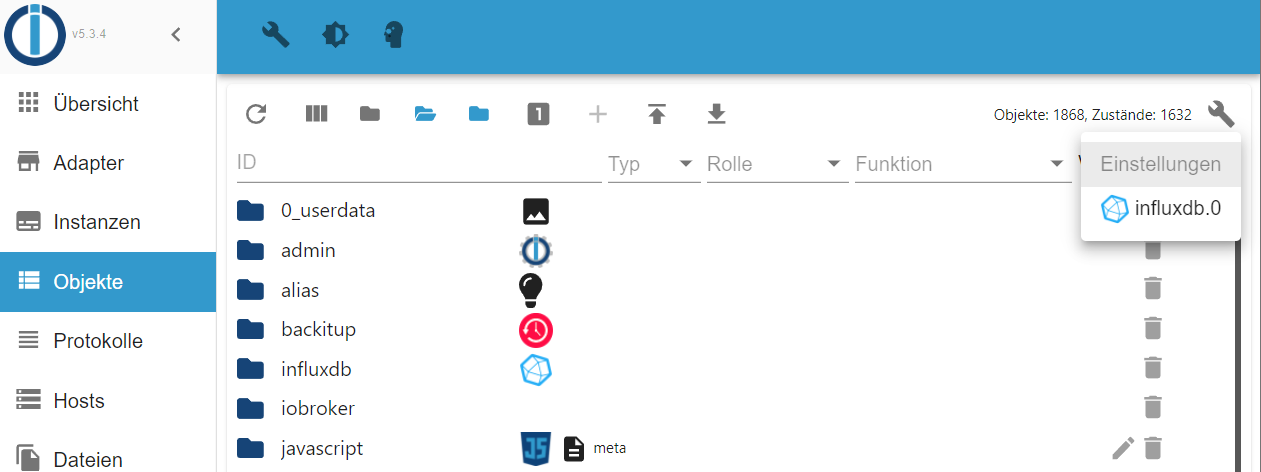
Dann werden nur mehr Objekte angezeigt, die nach influxdb.0 speichern.
-
@apollon77, @Thomas Braun, @crunchip
Danke für eure Unterstützung. Bin noch einmal alles durchgegangen und habe Node richtig gestellt. Zwischenzeitlich ist dann nichts mehr gegangen weil ich einfach leider viel zu wenig über die Thematik verstehe :disappointed:
IOBroker läuft mittlerweile wieder und ich upgrade mich sukzessive in Richtung 4.X
Danke & LG
Lukas -
@aiouh sagte in js-controller 4.0.x jetzt für alle User im STABLE!:
Meine Frage ist nun wie ich herausbekommen kann ob ich doch noch Objekte mit der alten influxdb.0 verknüpft habe.
Wie meinst Du das?
@apollon77
Wie meine ich das: Ich habe in den Anfängen meines ioBroker bei einigen Objekten die influxdb.0 als history DB verwendet.
Ich habe dann auf die lokale influxdb.1 umgestellt und "glaube" auch, dass ich alle Objekte umgestellt habe, ich bin mir aber eben leider nicht sicher.
Bevor ich nun irgendwann eine Überraschung erlebe dass die history Daten eines Objekts fehlen dachte ich mir es wäre gut wenn ich, ohne jedes Objekt einzeln zu öffnen, irgendwie eine Übersicht ziehen könnte welches Objekt welcher influxdb zugeordnet ist.
Ich hoffe das war klarer ausgedrückt. -
@apollon77
Wie meine ich das: Ich habe in den Anfängen meines ioBroker bei einigen Objekten die influxdb.0 als history DB verwendet.
Ich habe dann auf die lokale influxdb.1 umgestellt und "glaube" auch, dass ich alle Objekte umgestellt habe, ich bin mir aber eben leider nicht sicher.
Bevor ich nun irgendwann eine Überraschung erlebe dass die history Daten eines Objekts fehlen dachte ich mir es wäre gut wenn ich, ohne jedes Objekt einzeln zu öffnen, irgendwie eine Übersicht ziehen könnte welches Objekt welcher influxdb zugeordnet ist.
Ich hoffe das war klarer ausgedrückt. -
Hallo zusammen,
habe noch eine etwas ältere Installation am laufen (js-controller 2.x) und würde diese gern updaten. Wie empfohlen würde ich das gerne über einen Zwischenstopp bei der 3.3 machen und dann erstmal Node.js updaten.Leider scheitere ich jedoch bei der Installation vom js-controller 3.3:
pi@raspberrypi:/opt/iobroker $ npm install iobroker.js-controller@3.3
npm WARN deprecated request@2.88.2: request has been deprecated, see https://github.com/request/request/issues/3142
npm ERR! code ENOTSUP
npm ERR! notsup Unsupported engine for winston@3.7.2: wanted: {"node":">= 12.0.0"} (current: {"node":"10.18.1","npm":"6.13.4"})
npm ERR! notsup Not compatible with your version of node/npm: winston@3.7.2
npm ERR! notsup Not compatible with your version of node/npm: winston@3.7.2
npm ERR! notsup Required: {"node":">= 12.0.0"}
npm ERR! notsup Actual:   {"npm":"6.13.4","node":"10.18.1"}

npm ERR! A complete log of this run can be found in:
npm ERR!     /home/pi/.npm/_logs/2022-04-07T18_31_35_248Z-debug.log
Dachte der js-controller 3.3 ist noch mit Node.js 10 kompatibel? Der Versuch auf den js.controller 3.2 upzudaten führt zum gleichen Problem. Hat jmd. einen Tipp für mich?
Danke -
Hallo zusammen,
habe noch eine etwas ältere Installation am laufen (js-controller 2.x) und würde diese gern updaten. Wie empfohlen würde ich das gerne über einen Zwischenstopp bei der 3.3 machen und dann erstmal Node.js updaten.Leider scheitere ich jedoch bei der Installation vom js-controller 3.3:
pi@raspberrypi:/opt/iobroker $ npm install iobroker.js-controller@3.3
npm WARN deprecated request@2.88.2: request has been deprecated, see https://github.com/request/request/issues/3142
npm ERR! code ENOTSUP
npm ERR! notsup Unsupported engine for winston@3.7.2: wanted: {"node":">= 12.0.0"} (current: {"node":"10.18.1","npm":"6.13.4"})
npm ERR! notsup Not compatible with your version of node/npm: winston@3.7.2
npm ERR! notsup Not compatible with your version of node/npm: winston@3.7.2
npm ERR! notsup Required: {"node":">= 12.0.0"}
npm ERR! notsup Actual:   {"npm":"6.13.4","node":"10.18.1"}

npm ERR! A complete log of this run can be found in:
npm ERR!     /home/pi/.npm/_logs/2022-04-07T18_31_35_248Z-debug.log
Dachte der js-controller 3.3 ist noch mit Node.js 10 kompatibel? Der Versuch auf den js.controller 3.2 upzudaten führt zum gleichen Problem. Hat jmd. einen Tipp für mich?
Danke@flubb
Installier doch zunächst eine aktuelle nodeJS-Version?
Ich würde gleich auf node14 gehen.



475
Online32.7k
Users82.5k
Topics1.3m
Posts