




Magic Mirror zusammen mit IOBroker
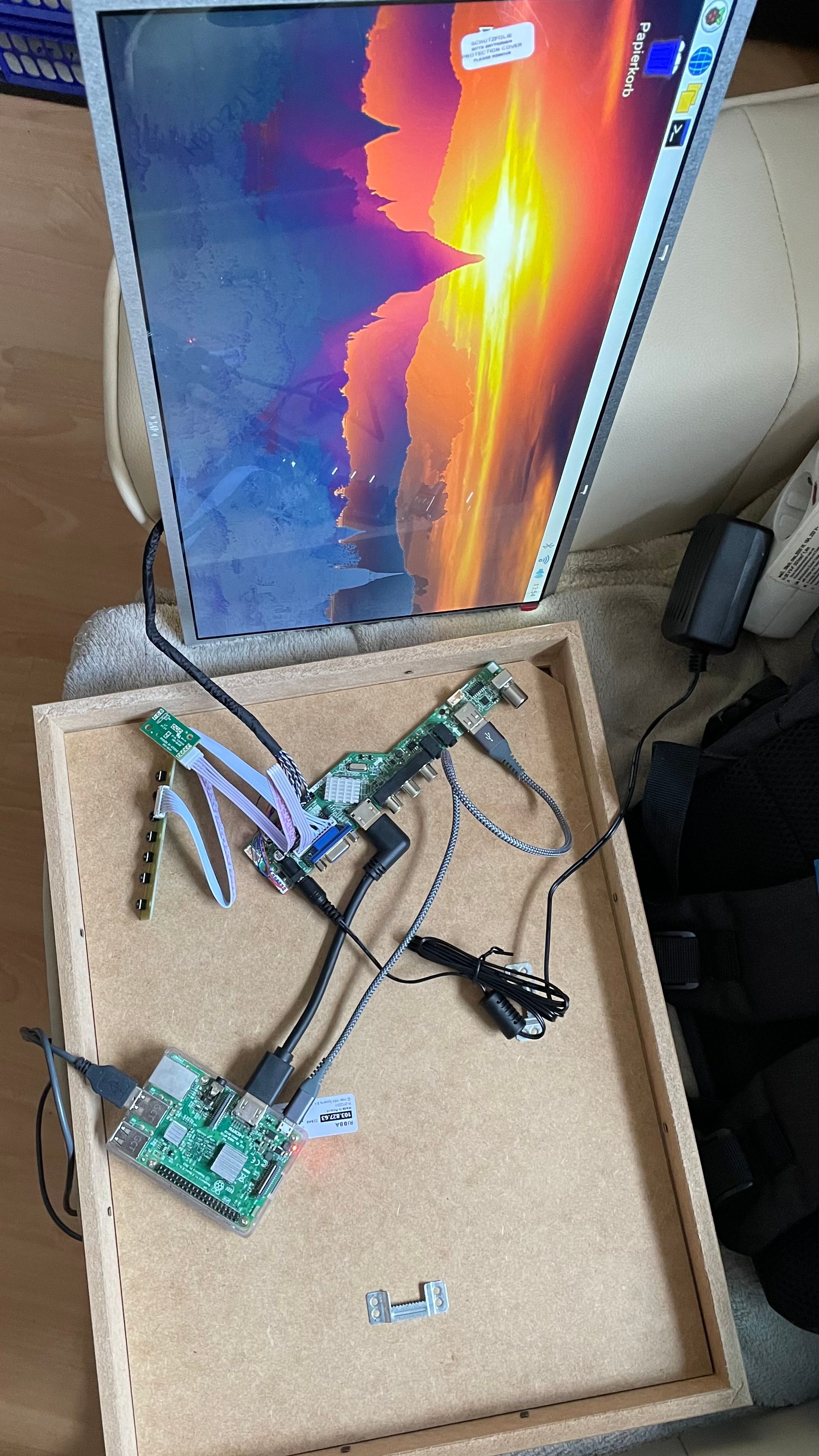
-
@kusselin
Das +r bedeutet das man die Datei ausführen darf, also das es ein Programm ist das man starten darf. Wie eine exe unter WIndows (ok nur in etwa)
Für crontab kannst du mal eingebenrm ~/.selected_editorDann sollte beim nächten mal die Abfrage wieder kommen.
Edit: Ja richtig, bei jedem booten wird jetzt der MM gestartet.@mrjeschke perfekt.. danke 🙏 Dir
-
@kusselin
Auf keinen Fall Windows Notepad. Da kommt nur Unfug raus.
Die Befehle sind im Terminal / ssh einzugeben.
Mit cd ~
geht es ins home-Verzeichnis
Dann startest du dort mit
nano mm.sh
den Editor und gibst die beiden Zeilen
cd ~/MagicMirror
npm run server
ein. Mit Steuerung s speichern, Mit Steuerung x beenden.
Dann gibst du ein
crontab -e
Es öffnet sich so etwas wie ein Editor, dort kommt nur eine Zeile rein (am Ende)
@reboot /home/pi/mm.sh
Wieder mit Steueruns s speichern, mit Steuerung x beenden.
sudo reboot
Fertig@mrjeschke sagte in Magic Mirror zusammen mit IOBroker:
@kusselin
Auf keinen Fall Windows Notepad. Da kommt nur Unfug raus.
Die Befehle sind im Terminal / ssh einzugeben.
Mit cd ~
geht es ins home-Verzeichnis
Dann startest du dort mit
nano mm.sh
den Editor und gibst die beiden Zeilen
cd ~/MagicMirror
npm run server
ein. Mit Steuerung s speichern, Mit Steuerung x beenden.
Dann gibst du ein
crontab -e
Es öffnet sich so etwas wie ein Editor, dort kommt nur eine Zeile rein (am Ende)
@reboot /home/pi/mm.sh
Wieder mit Steueruns s speichern, mit Steuerung x beenden.
sudo reboot
FertigHi, ich musste ein Update/Upgrade meines LXC Containers machen udn habe jetzt das Problem das ich keine Verbindung mehr aufbauen kann zu meinem MM wenn ich IP:8080 in den Browser eingebe.
ich hatte durch deine Hilfe damals mit Cron den MM so ausführbar machen können damit dieser auch bei einem Neustart wieder startet. -> Nun startet er nicht mehr...die cron ist noch vorhanden udn auch die mm.sh unter /home..Weisst du eventuell was ich mir zerschossen habe beim Update/upgrade?
Über ne Info herzlichen Dank
-
@mrjeschke sagte in Magic Mirror zusammen mit IOBroker:
@kusselin
Auf keinen Fall Windows Notepad. Da kommt nur Unfug raus.
Die Befehle sind im Terminal / ssh einzugeben.
Mit cd ~
geht es ins home-Verzeichnis
Dann startest du dort mit
nano mm.sh
den Editor und gibst die beiden Zeilen
cd ~/MagicMirror
npm run server
ein. Mit Steuerung s speichern, Mit Steuerung x beenden.
Dann gibst du ein
crontab -e
Es öffnet sich so etwas wie ein Editor, dort kommt nur eine Zeile rein (am Ende)
@reboot /home/pi/mm.sh
Wieder mit Steueruns s speichern, mit Steuerung x beenden.
sudo reboot
FertigHi, ich musste ein Update/Upgrade meines LXC Containers machen udn habe jetzt das Problem das ich keine Verbindung mehr aufbauen kann zu meinem MM wenn ich IP:8080 in den Browser eingebe.
ich hatte durch deine Hilfe damals mit Cron den MM so ausführbar machen können damit dieser auch bei einem Neustart wieder startet. -> Nun startet er nicht mehr...die cron ist noch vorhanden udn auch die mm.sh unter /home..Weisst du eventuell was ich mir zerschossen habe beim Update/upgrade?
Über ne Info herzlichen Dank
-
Ich hab es jetzt nur überflogen, aber genau sowas steuert man über systemd und entsprechende units.
-
@mrjeschke hi, ich habe zumindest gestern unter benutzer "pi" in der Console den Befehl "chmod +x ~/mm.sh" abgesetzt...dann den LXC Container neu gestartet udn die IP:8080 im Browser eingegeben... Seite ging aber nicht auf :-(
Frage: Was kann man sich bei einem Update zerschiessen bzw. was kann da überschrieben werden? Der cron und die mm.sh ist ja noch vorhanden udn der Inhalt auch (geprüft mit nano)
-
@mrjeschke hi, ich habe zumindest gestern unter benutzer "pi" in der Console den Befehl "chmod +x ~/mm.sh" abgesetzt...dann den LXC Container neu gestartet udn die IP:8080 im Browser eingegeben... Seite ging aber nicht auf :-(
Frage: Was kann man sich bei einem Update zerschiessen bzw. was kann da überschrieben werden? Der cron und die mm.sh ist ja noch vorhanden udn der Inhalt auch (geprüft mit nano)
-
@mrjeschke Hi schau...ich bin ins Verzeichnis MagicMirror dann das hier:
pi@MagicMirror-live:~/MagicMirror$ npm run server

> magicmirror@2.27.0 server
> node ./serveronly

node:internal/modules/cjs/loader:1031
  throw err;
  ^

Error: Cannot find module 'envsub'
Require stack:
- /home/pi/MagicMirror/js/app.js
- /home/pi/MagicMirror/serveronly/index.js
    at Function.Module._resolveFilename (node:internal/modules/cjs/loader:1028:15)
    at Function.Module._resolveFilename (/home/pi/MagicMirror/node_modules/module-alias/index.js:49:29)
    at Function.Module._load (node:internal/modules/cjs/loader:873:27)
    at Module.require (node:internal/modules/cjs/loader:1100:19)
    at require (node:internal/modules/cjs/helpers:119:18)
    at Object.<anonymous> (/home/pi/MagicMirror/js/app.js:6:16)
    at Module._compile (node:internal/modules/cjs/loader:1198:14)
    at Object.Module._extensions..js (node:internal/modules/cjs/loader:1252:10)
    at Module.load (node:internal/modules/cjs/loader:1076:32)
    at Function.Module._load (node:internal/modules/cjs/loader:911:12) {
  code: 'MODULE_NOT_FOUND',
  requireStack: [
    '/home/pi/MagicMirror/js/app.js',
    '/home/pi/MagicMirror/serveronly/index.js'
  ]
}
Kannst du da sagen was da net geht?
DankeEDIT: Keiner ne Idee was die Meldungen bedeuten? Ich kann nur lesen was mit "Cannot find modul"
Was ist hier zu machen?
Danke -
@mrjeschke Hi schau...ich bin ins Verzeichnis MagicMirror dann das hier:
pi@MagicMirror-live:~/MagicMirror$ npm run server

> magicmirror@2.27.0 server
> node ./serveronly

node:internal/modules/cjs/loader:1031
  throw err;
  ^

Error: Cannot find module 'envsub'
Require stack:
- /home/pi/MagicMirror/js/app.js
- /home/pi/MagicMirror/serveronly/index.js
    at Function.Module._resolveFilename (node:internal/modules/cjs/loader:1028:15)
    at Function.Module._resolveFilename (/home/pi/MagicMirror/node_modules/module-alias/index.js:49:29)
    at Function.Module._load (node:internal/modules/cjs/loader:873:27)
    at Module.require (node:internal/modules/cjs/loader:1100:19)
    at require (node:internal/modules/cjs/helpers:119:18)
    at Object.<anonymous> (/home/pi/MagicMirror/js/app.js:6:16)
    at Module._compile (node:internal/modules/cjs/loader:1198:14)
    at Object.Module._extensions..js (node:internal/modules/cjs/loader:1252:10)
    at Module.load (node:internal/modules/cjs/loader:1076:32)
    at Function.Module._load (node:internal/modules/cjs/loader:911:12) {
  code: 'MODULE_NOT_FOUND',
  requireStack: [
    '/home/pi/MagicMirror/js/app.js',
    '/home/pi/MagicMirror/serveronly/index.js'
  ]
}
Kannst du da sagen was da net geht?
DankeEDIT: Keiner ne Idee was die Meldungen bedeuten? Ich kann nur lesen was mit "Cannot find modul"
Was ist hier zu machen?
Danke -
Ich hatte den Thread damals schon etwas verfolgt. Soweit ich beim Überfliegen gesehen habe, gibt kein relativ wenig Bilder zu den Spiegeln. Habt ihr ggf. noch einige für mich? Ich wollte sowas auf Dauer auch umsetzen.
Vielen Dank schon mal. -
@kusselin
Du könntest den Installer noch mal starten.cd ~/MagicMirror npm run install-mm@mrjeschke sagte in Magic Mirror zusammen mit IOBroker:
@kusselin
Du könntest den Installer noch mal starten.cd ~/MagicMirror npm run install-mmHi, danke, aber wenn ich den installer starte ist alles weg..config vorher sichern gell
Edit
Denke da stimmt was nicht mit npm?
Könnt ihr euch das nochmal anschauen bitte...pi@MagicMirror-live:~/MagicMirror$ npm run install-mm > magicmirror@2.27.0 install-mm > npm install --no-audit --no-fund --no-update-notifier --only=prod --omit=dev npm ERR! code EBADENGINE npm ERR! engine Unsupported engine npm ERR! engine Not compatible with your version of node/npm: magicmirror@2.27.0 npm ERR! notsup Not compatible with your version of node/npm: magicmirror@2.27.0 npm ERR! notsup Required: {"node":">=18"} npm ERR! notsup Actual: {"npm":"8.19.4","node":"v16.20.2"} npm ERR! A complete log of this run can be found in: npm ERR! /home/pi/.npm/_logs/2024-08-09T09_41_27_957Z-debug-0.log npm notice npm notice New major version of npm available! 8.19.4 -> 10.8.2 npm notice Changelog: https://github.com/npm/cli/releases/tag/v10.8.2 npm notice Run npm install -g npm@10.8.2 to update! npm notice -
@mrjeschke sagte in Magic Mirror zusammen mit IOBroker:
@kusselin
Du könntest den Installer noch mal starten.cd ~/MagicMirror npm run install-mmHi, danke, aber wenn ich den installer starte ist alles weg..config vorher sichern gell
Edit
Denke da stimmt was nicht mit npm?
Könnt ihr euch das nochmal anschauen bitte...pi@MagicMirror-live:~/MagicMirror$ npm run install-mm > magicmirror@2.27.0 install-mm > npm install --no-audit --no-fund --no-update-notifier --only=prod --omit=dev npm ERR! code EBADENGINE npm ERR! engine Unsupported engine npm ERR! engine Not compatible with your version of node/npm: magicmirror@2.27.0 npm ERR! notsup Not compatible with your version of node/npm: magicmirror@2.27.0 npm ERR! notsup Required: {"node":">=18"} npm ERR! notsup Actual: {"npm":"8.19.4","node":"v16.20.2"} npm ERR! A complete log of this run can be found in: npm ERR! /home/pi/.npm/_logs/2024-08-09T09_41_27_957Z-debug-0.log npm notice npm notice New major version of npm available! 8.19.4 -> 10.8.2 npm notice Changelog: https://github.com/npm/cli/releases/tag/v10.8.2 npm notice Run npm install -g npm@10.8.2 to update! npm noticeDann ist dein nodejs/npm-Setup zu alt. Oder falsch.
node -v
npm -v
sudo apt update
apt policy nodejs
sagt?
-
Dann ist dein nodejs/npm-Setup zu alt. Oder falsch.
node -v
npm -v
sudo apt update
apt policy nodejs
sagt?
@thomas-braun schau thomas
pi@MagicMirror-live:~/MagicMirror$ node -v v16.20.2 pi@MagicMirror-live:~/MagicMirror$ npm -v 8.19.4 pi@MagicMirror-live:~/MagicMirror$ sudo apt update [sudo] password for pi: Sorry, try again. [sudo] password for pi: OK:1 https://deb.nodesource.com/node_16.x jammy InRelease OK:2 http://archive.ubuntu.com/ubuntu jammy InRelease Holen:3 http://archive.ubuntu.com/ubuntu jammy-updates InRelease [128 kB] Holen:4 http://archive.ubuntu.com/ubuntu jammy-security InRelease [129 kB] Holen:5 http://archive.ubuntu.com/ubuntu jammy-updates/main amd64 Packages [1.941 kB] Holen:6 http://archive.ubuntu.com/ubuntu jammy-updates/main Translation-en [343 kB] Holen:7 http://archive.ubuntu.com/ubuntu jammy-updates/main amd64 c-n-f Metadata [17,7 kB] Holen:8 http://archive.ubuntu.com/ubuntu jammy-updates/restricted amd64 Packages [2.314 kB] Holen:9 http://archive.ubuntu.com/ubuntu jammy-updates/restricted Translation-en [397 kB] Holen:10 http://archive.ubuntu.com/ubuntu jammy-updates/universe amd64 Packages [1.110 kB] Holen:11 http://archive.ubuntu.com/ubuntu jammy-updates/universe amd64 c-n-f Metadata [25,9 kB] Holen:12 http://archive.ubuntu.com/ubuntu jammy-updates/multiverse amd64 Packages [43,3 kB] Holen:13 http://archive.ubuntu.com/ubuntu jammy-updates/multiverse amd64 c-n-f Metadata [444 B] Holen:14 http://archive.ubuntu.com/ubuntu jammy-security/main amd64 Packages [1.712 kB] Holen:15 http://archive.ubuntu.com/ubuntu jammy-security/main Translation-en [283 kB] Holen:16 http://archive.ubuntu.com/ubuntu jammy-security/main amd64 c-n-f Metadata [13,1 kB] Holen:17 http://archive.ubuntu.com/ubuntu jammy-security/restricted amd64 Packages [2.226 kB] Holen:18 http://archive.ubuntu.com/ubuntu jammy-security/restricted Translation-en [383 kB] Holen:19 http://archive.ubuntu.com/ubuntu jammy-security/universe amd64 Packages [888 kB] Holen:20 http://archive.ubuntu.com/ubuntu jammy-security/universe amd64 c-n-f Metadata [19,0 kB] Es wurden 12,0 MB in 4 s geholt (3.270 kB/s). Paketlisten werden gelesen… Fertig Abhängigkeitsbaum wird aufgebaut… Fertig Statusinformationen werden eingelesen… Fertig Aktualisierung für 7 Pakete verfügbar. Führen Sie »apt list --upgradable« aus, um sie anzuzeigen. pi@MagicMirror-live:~/MagicMirror$ apt policy nodejs nodejs: Installiert: 16.20.2-deb-1nodesource1 Installationskandidat: 16.20.2-deb-1nodesource1 Versionstabelle: *** 16.20.2-deb-1nodesource1 500 500 https://deb.nodesource.com/node_16.x jammy/main amd64 Packages 100 /var/lib/dpkg/status 12.22.9~dfsg-1ubuntu3.6 500 500 http://archive.ubuntu.com/ubuntu jammy-updates/universe amd64 Packages 500 http://archive.ubuntu.com/ubuntu jammy-security/universe amd64 Packages 12.22.9~dfsg-1ubuntu3 500 500 http://archive.ubuntu.com/ubuntu jammy/universe amd64 Packages -
@thomas-braun schau thomas
pi@MagicMirror-live:~/MagicMirror$ node -v v16.20.2 pi@MagicMirror-live:~/MagicMirror$ npm -v 8.19.4 pi@MagicMirror-live:~/MagicMirror$ sudo apt update [sudo] password for pi: Sorry, try again. [sudo] password for pi: OK:1 https://deb.nodesource.com/node_16.x jammy InRelease OK:2 http://archive.ubuntu.com/ubuntu jammy InRelease Holen:3 http://archive.ubuntu.com/ubuntu jammy-updates InRelease [128 kB] Holen:4 http://archive.ubuntu.com/ubuntu jammy-security InRelease [129 kB] Holen:5 http://archive.ubuntu.com/ubuntu jammy-updates/main amd64 Packages [1.941 kB] Holen:6 http://archive.ubuntu.com/ubuntu jammy-updates/main Translation-en [343 kB] Holen:7 http://archive.ubuntu.com/ubuntu jammy-updates/main amd64 c-n-f Metadata [17,7 kB] Holen:8 http://archive.ubuntu.com/ubuntu jammy-updates/restricted amd64 Packages [2.314 kB] Holen:9 http://archive.ubuntu.com/ubuntu jammy-updates/restricted Translation-en [397 kB] Holen:10 http://archive.ubuntu.com/ubuntu jammy-updates/universe amd64 Packages [1.110 kB] Holen:11 http://archive.ubuntu.com/ubuntu jammy-updates/universe amd64 c-n-f Metadata [25,9 kB] Holen:12 http://archive.ubuntu.com/ubuntu jammy-updates/multiverse amd64 Packages [43,3 kB] Holen:13 http://archive.ubuntu.com/ubuntu jammy-updates/multiverse amd64 c-n-f Metadata [444 B] Holen:14 http://archive.ubuntu.com/ubuntu jammy-security/main amd64 Packages [1.712 kB] Holen:15 http://archive.ubuntu.com/ubuntu jammy-security/main Translation-en [283 kB] Holen:16 http://archive.ubuntu.com/ubuntu jammy-security/main amd64 c-n-f Metadata [13,1 kB] Holen:17 http://archive.ubuntu.com/ubuntu jammy-security/restricted amd64 Packages [2.226 kB] Holen:18 http://archive.ubuntu.com/ubuntu jammy-security/restricted Translation-en [383 kB] Holen:19 http://archive.ubuntu.com/ubuntu jammy-security/universe amd64 Packages [888 kB] Holen:20 http://archive.ubuntu.com/ubuntu jammy-security/universe amd64 c-n-f Metadata [19,0 kB] Es wurden 12,0 MB in 4 s geholt (3.270 kB/s). Paketlisten werden gelesen… Fertig Abhängigkeitsbaum wird aufgebaut… Fertig Statusinformationen werden eingelesen… Fertig Aktualisierung für 7 Pakete verfügbar. Führen Sie »apt list --upgradable« aus, um sie anzuzeigen. pi@MagicMirror-live:~/MagicMirror$ apt policy nodejs nodejs: Installiert: 16.20.2-deb-1nodesource1 Installationskandidat: 16.20.2-deb-1nodesource1 Versionstabelle: *** 16.20.2-deb-1nodesource1 500 500 https://deb.nodesource.com/node_16.x jammy/main amd64 Packages 100 /var/lib/dpkg/status 12.22.9~dfsg-1ubuntu3.6 500 500 http://archive.ubuntu.com/ubuntu jammy-updates/universe amd64 Packages 500 http://archive.ubuntu.com/ubuntu jammy-security/universe amd64 Packages 12.22.9~dfsg-1ubuntu3 500 500 http://archive.ubuntu.com/ubuntu jammy/universe amd64 Packages@kusselin
Ich vermute, da läuft kein ioBroker auf der Kiste, oder?
Dann musst du das nodesource-Repo 'von Hand' auf den aktuellen Stand bringen.sudo rm /etc/apt/sources.list.d/node* curl -fsSL https://deb.nodesource.com/setup_20.x -o nodesource_setup.sh bash nodesource_setup.sh sudo apt update sudo apt install nodejs -
@kusselin
Ich vermute, da läuft kein ioBroker auf der Kiste, oder?
Dann musst du das nodesource-Repo 'von Hand' auf den aktuellen Stand bringen.sudo rm /etc/apt/sources.list.d/node* curl -fsSL https://deb.nodesource.com/setup_20.x -o nodesource_setup.sh bash nodesource_setup.sh sudo apt update sudo apt install nodejs@thomas-braun nee da läuft kein iobroker..ist reiner lxc für magicmirror..dann so wie du vorgegeben hast updaten ok?
-
@kusselin
Ich vermute, da läuft kein ioBroker auf der Kiste, oder?
Dann musst du das nodesource-Repo 'von Hand' auf den aktuellen Stand bringen.sudo rm /etc/apt/sources.list.d/node* curl -fsSL https://deb.nodesource.com/setup_20.x -o nodesource_setup.sh bash nodesource_setup.sh sudo apt update sudo apt install nodejs@thomas-braun ergebnis deiner codes jetzt
pi@MagicMirror-live:~/MagicMirror$ npm run server > magicmirror@2.27.0 server > node ./serveronly [2024-08-09 11:18:05.959] [LOG] Starting MagicMirror: v2.27.0 [2024-08-09 11:18:05.970] [LOG] Loading config ... [2024-08-09 11:18:05.972] [LOG] config template file not exists, no envsubst [2024-08-09 11:18:06.407] [LOG] Loading module helpers ... [2024-08-09 11:18:06.408] [LOG] No helper found for module: alert. [2024-08-09 11:18:06.568] [LOG] Initializing new module helper ... [2024-08-09 11:18:06.569] [LOG] Module helper loaded: updatenotification [2024-08-09 11:18:06.569] [LOG] No helper found for module: clock. [2024-08-09 11:18:06.643] [LOG] Initializing new module helper ... [2024-08-09 11:18:06.644] [LOG] Module helper loaded: calendar [2024-08-09 11:18:06.644] [LOG] No helper found for module: weather. [2024-08-09 11:18:06.706] [LOG] Initializing new module helper ... [2024-08-09 11:18:06.706] [LOG] Module helper loaded: MMM-Remote-Control [2024-08-09 11:18:06.707] [LOG] No helper found for module: compliments. [2024-08-09 11:18:06.765] [LOG] Initializing new module helper ... [2024-08-09 11:18:06.765] [LOG] Module helper loaded: newsfeed [2024-08-09 11:18:06.775] [LOG] Initializing new module helper ... [2024-08-09 11:18:06.775] [LOG] Check MagicMirror² version for node helper 'MMM-Fuel' - Minimum version: 2.15.0 - Current version: 2.27.0 [2024-08-09 11:18:06.776] [LOG] Version is ok! [2024-08-09 11:18:06.776] [LOG] Module helper loaded: MMM-Fuel [2024-08-09 11:18:06.786] [LOG] Initializing new module helper ... [2024-08-09 11:18:06.787] [LOG] Module helper loaded: MMM-PublicTransportHafas [2024-08-09 11:18:07.089] [LOG] Initializing new module helper ... [2024-08-09 11:18:07.089] [LOG] Module helper loaded: MMM-RNV [2024-08-09 11:18:07.090] [LOG] Initializing new module helper ... [2024-08-09 11:18:07.090] [LOG] Module helper loaded: MMM-ioBroker [2024-08-09 11:18:07.123] [LOG] Initializing new module helper ... [2024-08-09 11:18:07.123] [LOG] Module helper loaded: MMM-COVID19-AMPEL [2024-08-09 11:18:07.125] [LOG] Initializing new module helper ... [2024-08-09 11:18:07.126] [LOG] Module helper loaded: MMM-SoccerLiveScore [2024-08-09 11:18:07.129] [ERROR] Whoops! There was an uncaught exception... [2024-08-09 11:18:07.133] [ERROR] Error: Cannot find module 'node-fetch' Require stack: - /home/pi/MagicMirror/modules/MMM-Tankerkoenig/node_helper.js - /home/pi/MagicMirror/js/app.js - /home/pi/MagicMirror/serveronly/index.js at Module._resolveFilename (node:internal/modules/cjs/loader:1145:15) at Module._resolveFilename (/home/pi/MagicMirror/node_modules/module-alias/index.js:49:29) at Module._load (node:internal/modules/cjs/loader:986:27) at Module.require (node:internal/modules/cjs/loader:1233:19) at require (node:internal/modules/helpers:179:18) at Object.<anonymous> (/home/pi/MagicMirror/modules/MMM-Tankerkoenig/node_helper.js:8:15) at Module._compile (node:internal/modules/cjs/loader:1358:14) at Module._extensions..js (node:internal/modules/cjs/loader:1416:10) at Module.load (node:internal/modules/cjs/loader:1208:32) at Module._load (node:internal/modules/cjs/loader:1024:12) at Module.require (node:internal/modules/cjs/loader:1233:19) at require (node:internal/modules/helpers:179:18) at loadModule (/home/pi/MagicMirror/js/app.js:183:19) at loadModules (/home/pi/MagicMirror/js/app.js:213:10) at process.processTicksAndRejections (node:internal/process/task_queues:95:5) at async App.start (/home/pi/MagicMirror/js/app.js:261:3) { code: 'MODULE_NOT_FOUND', requireStack: [ '/home/pi/MagicMirror/modules/MMM-Tankerkoenig/node_helper.js', '/home/pi/MagicMirror/js/app.js', '/home/pi/MagicMirror/serveronly/index.js' ] } [2024-08-09 11:18:07.133] [ERROR] MagicMirror² will not quit, but it might be a good idea to check why this happened. Maybe no internet connection? [2024-08-09 11:18:07.133] [ERROR] If you think this really is an issue, please open an issue on GitHub: https://github.com/MagicMirrorOrg/MagicMirror/issues [2024-08-09 11:18:07.219] [INFO] System information: ### SYSTEM: manufacturer: ; model: ; raspberry: undefined; virtual: false ### OS: platform: linux; distro: Ubuntu; release: 22.04.4 LTS; arch: x64; kernel: 6.5.13-3-pve ### VERSIONS: electron: undefined; used node: 20.16.0; installed node: 20.16.0; npm: 10.8.1; pm2: ### OTHER: timeZone: UTC; ELECTRON_ENABLE_GPU: undefined -
@thomas-braun ergebnis deiner codes jetzt
pi@MagicMirror-live:~/MagicMirror$ npm run server > magicmirror@2.27.0 server > node ./serveronly [2024-08-09 11:18:05.959] [LOG] Starting MagicMirror: v2.27.0 [2024-08-09 11:18:05.970] [LOG] Loading config ... [2024-08-09 11:18:05.972] [LOG] config template file not exists, no envsubst [2024-08-09 11:18:06.407] [LOG] Loading module helpers ... [2024-08-09 11:18:06.408] [LOG] No helper found for module: alert. [2024-08-09 11:18:06.568] [LOG] Initializing new module helper ... [2024-08-09 11:18:06.569] [LOG] Module helper loaded: updatenotification [2024-08-09 11:18:06.569] [LOG] No helper found for module: clock. [2024-08-09 11:18:06.643] [LOG] Initializing new module helper ... [2024-08-09 11:18:06.644] [LOG] Module helper loaded: calendar [2024-08-09 11:18:06.644] [LOG] No helper found for module: weather. [2024-08-09 11:18:06.706] [LOG] Initializing new module helper ... [2024-08-09 11:18:06.706] [LOG] Module helper loaded: MMM-Remote-Control [2024-08-09 11:18:06.707] [LOG] No helper found for module: compliments. [2024-08-09 11:18:06.765] [LOG] Initializing new module helper ... [2024-08-09 11:18:06.765] [LOG] Module helper loaded: newsfeed [2024-08-09 11:18:06.775] [LOG] Initializing new module helper ... [2024-08-09 11:18:06.775] [LOG] Check MagicMirror² version for node helper 'MMM-Fuel' - Minimum version: 2.15.0 - Current version: 2.27.0 [2024-08-09 11:18:06.776] [LOG] Version is ok! [2024-08-09 11:18:06.776] [LOG] Module helper loaded: MMM-Fuel [2024-08-09 11:18:06.786] [LOG] Initializing new module helper ... [2024-08-09 11:18:06.787] [LOG] Module helper loaded: MMM-PublicTransportHafas [2024-08-09 11:18:07.089] [LOG] Initializing new module helper ... [2024-08-09 11:18:07.089] [LOG] Module helper loaded: MMM-RNV [2024-08-09 11:18:07.090] [LOG] Initializing new module helper ... [2024-08-09 11:18:07.090] [LOG] Module helper loaded: MMM-ioBroker [2024-08-09 11:18:07.123] [LOG] Initializing new module helper ... [2024-08-09 11:18:07.123] [LOG] Module helper loaded: MMM-COVID19-AMPEL [2024-08-09 11:18:07.125] [LOG] Initializing new module helper ... [2024-08-09 11:18:07.126] [LOG] Module helper loaded: MMM-SoccerLiveScore [2024-08-09 11:18:07.129] [ERROR] Whoops! There was an uncaught exception... [2024-08-09 11:18:07.133] [ERROR] Error: Cannot find module 'node-fetch' Require stack: - /home/pi/MagicMirror/modules/MMM-Tankerkoenig/node_helper.js - /home/pi/MagicMirror/js/app.js - /home/pi/MagicMirror/serveronly/index.js at Module._resolveFilename (node:internal/modules/cjs/loader:1145:15) at Module._resolveFilename (/home/pi/MagicMirror/node_modules/module-alias/index.js:49:29) at Module._load (node:internal/modules/cjs/loader:986:27) at Module.require (node:internal/modules/cjs/loader:1233:19) at require (node:internal/modules/helpers:179:18) at Object.<anonymous> (/home/pi/MagicMirror/modules/MMM-Tankerkoenig/node_helper.js:8:15) at Module._compile (node:internal/modules/cjs/loader:1358:14) at Module._extensions..js (node:internal/modules/cjs/loader:1416:10) at Module.load (node:internal/modules/cjs/loader:1208:32) at Module._load (node:internal/modules/cjs/loader:1024:12) at Module.require (node:internal/modules/cjs/loader:1233:19) at require (node:internal/modules/helpers:179:18) at loadModule (/home/pi/MagicMirror/js/app.js:183:19) at loadModules (/home/pi/MagicMirror/js/app.js:213:10) at process.processTicksAndRejections (node:internal/process/task_queues:95:5) at async App.start (/home/pi/MagicMirror/js/app.js:261:3) { code: 'MODULE_NOT_FOUND', requireStack: [ '/home/pi/MagicMirror/modules/MMM-Tankerkoenig/node_helper.js', '/home/pi/MagicMirror/js/app.js', '/home/pi/MagicMirror/serveronly/index.js' ] } [2024-08-09 11:18:07.133] [ERROR] MagicMirror² will not quit, but it might be a good idea to check why this happened. Maybe no internet connection? [2024-08-09 11:18:07.133] [ERROR] If you think this really is an issue, please open an issue on GitHub: https://github.com/MagicMirrorOrg/MagicMirror/issues [2024-08-09 11:18:07.219] [INFO] System information: ### SYSTEM: manufacturer: ; model: ; raspberry: undefined; virtual: false ### OS: platform: linux; distro: Ubuntu; release: 22.04.4 LTS; arch: x64; kernel: 6.5.13-3-pve ### VERSIONS: electron: undefined; used node: 20.16.0; installed node: 20.16.0; npm: 10.8.1; pm2: ### OTHER: timeZone: UTC; ELECTRON_ENABLE_GPU: undefinedAlso läuft das nun in der aktuellen nodejs-Umgebung.
Fein.
Zur Konfiguration des ganzen kann ich dir nix raten, da musst du mal auf der Seite von magicmirror schauen. -
Also läuft das nun in der aktuellen nodejs-Umgebung.
Fein.
Zur Konfiguration des ganzen kann ich dir nix raten, da musst du mal auf der Seite von magicmirror schauen. -
@thomas-braun o.k. laufen tut er in der aktuellen umgebung aber ich kann ihn nicht aufrufen...
am besten wirds sein das ich die config sichere udn den container neu aufsetze mit aktuellem Ubuntu system...
ist das O.K.?Und was soll das bringen?
Den MagicMirror musst du auch in einem anderen System richtig konfigurieren. -
Und was soll das bringen?
Den MagicMirror musst du auch in einem anderen System richtig konfigurieren.@thomas-braun war jetzt nur ne Frage.....
lt. der consolenausgabe läuft der MM aber die Module laufen nicht...kannst du das auch herauslesen? -
@kusselin
Du könntest den Installer noch mal starten.cd ~/MagicMirror npm run install-mm@mrjeschke Hi, ich habe jetzt mal ein bisschen probiert und neu installiert.. ich habe ja den MM in einem Container udn auch gesichert...wenn ich diesen wieder aufspiele dann geht er ist aber nicht aktuell...aber man kann ja auch probieren....also was habe ich gemacht..
- Neuen ConLXC Container angelegt
- Ubuntu 24 LTS installiert
- apt-get update && apt-get upgrade -y ausgeführt
- neuen User "MM" angelegt mit useradd -s /bin/bash -m MM
- passwort für MM vergeben
- den Neuen User der Gruppe "sudo" zugeführt mit sudo usermod -a -G sudo MM
- reboot
- angemeldet mit MM uns pass
- dann folegenden Befehl ausgeführt:
bash -c "$(curl -sL https://raw.githubusercontent.com/sdetweil/MagicMirror_scripts/master/raspberry.sh)"- nach Installation folegenden weiteren Befehl ausgeführt:
bash -c "$(curl -sL https://raw.githubusercontent.com/sdetweil/MagicMirror_scripts/master/upgrade-script.sh)"- dann cd eingegeben und ich stehe auf
mm@MagicMirror-live:~$- dann nano mm.sh eingegeben und fiolgendes dort eingefügt:
cd ~/MagicMirror npm run server- Dann die Datei ausfürbargemacht mit
chmod +r ~/mm.sh- dann crontab -e eingebgeben und 1 gewählt dann dort das ganz unten als letztes eingegeben:
@reboot /home/pi/mm.sh- dann raus und reboot gemacht....
15.sicherheitshalber ins verzeichnis /MagicMirror gegangen udn npm run server ausgeführt.. - dann kommt das raus:
mm@MagicMirror-live:~/MagicMirror$ npm run server

> magicmirror@2.28.0 server
> node ./serveronly

[2024-08-10 16:51:17.974] [LOG]   Starting MagicMirror: v2.28.0
[2024-08-10 16:51:17.986] [LOG]   Loading config ...
[2024-08-10 16:51:17.989] [LOG]   config template file not exists, no envsubst
[2024-08-10 16:51:18.334] [LOG]   Loading module helpers ...
[2024-08-10 16:51:18.335] [LOG]   No helper found for module: alert.
[2024-08-10 16:51:18.343] [LOG]   Initializing new module helper ...
[2024-08-10 16:51:18.344] [LOG]   Module helper loaded: updatenotification
[2024-08-10 16:51:18.344] [LOG]   No helper found for module: clock.
[2024-08-10 16:51:18.561] [LOG]   Initializing new module helper ...
[2024-08-10 16:51:18.563] [LOG]   Module helper loaded: calendar
[2024-08-10 16:51:18.565] [LOG]   No helper found for module: compliments.
[2024-08-10 16:51:18.567] [LOG]   No helper found for module: weather.
[2024-08-10 16:51:18.568] [LOG]   No helper found for module: weather.
[2024-08-10 16:51:18.717] [LOG]   Initializing new module helper ...
[2024-08-10 16:51:18.717] [LOG]   Module helper loaded: newsfeed
[2024-08-10 16:51:18.718] [LOG]   All module helpers loaded.
[2024-08-10 16:51:18.724] [LOG]   Starting server on port 8080 ...
[2024-08-10 16:51:18.746] [LOG]   Server started ...
[2024-08-10 16:51:18.747] [LOG]   Connecting socket for: updatenotification
[2024-08-10 16:51:18.747] [LOG]   Starting module helper: updatenotification
[2024-08-10 16:51:18.748] [LOG]   Connecting socket for: calendar
[2024-08-10 16:51:18.748] [LOG]   Starting node helper for: calendar
[2024-08-10 16:51:18.748] [LOG]   Connecting socket for: newsfeed
[2024-08-10 16:51:18.748] [LOG]   Starting node helper for: newsfeed
[2024-08-10 16:51:18.749] [LOG]   Sockets connected & modules started ...
[2024-08-10 16:51:18.749] [INFO]
>>>   Ready to go! Please point your browser to: http://localhost:8080   <<<
[2024-08-10 16:51:18.871] [INFO]  System information:
### SYSTEM:   manufacturer: ; model: ; raspberry: undefined; virtual: false
### OS:       platform: linux; distro: Ubuntu; release: 24.04 LTS; arch: x64; kernel: 6.5.13-3-pve
### VERSIONS: electron: undefined; used node: 20.9.0; installed node: 20.9.0; npm: 10.1.0; pm2: 5.4.2
### OTHER:    timeZone: UTC; ELECTRON_ENABLE_GPU: undefined
^C[2024-08-10 16:51:29.977] [LOG]   [SIGINT] Received. Shutting down server...
[2024-08-10 16:51:29.977] [LOG]   Stopping module helper: updatenotification
[2024-08-10 16:51:29.977] [LOG]   Stopping module helper: calendar
[2024-08-10 16:51:29.977] [LOG]   Stopping module helper: newsfeed
[2024-08-10 16:51:29.978] [LOG]   Node_helpers stopped ...
whats that :-(
Er fährt den Server wieder runter.. :-( wieso ?Bin ich wieder falsch vorgegangen?????
Danke und Gruss


Hello! It looks like you're interested in this conversation, but you don't have an account yet.
Getting fed up of having to scroll through the same posts each visit? When you register for an account, you'll always come back to exactly where you were before, and choose to be notified of new replies (either via email, or push notification). You'll also be able to save bookmarks and upvote posts to show your appreciation to other community members.
With your input, this post could be even better 💗
Register LoginSupport us
255
Online32.7k
Users82.6k
Topics1.3m
Posts