Skip to content
  • Home
  • Recent
  • Tags
  • 0 Unread 0
  • Categories
  • Unreplied
  • Popular
  • GitHub
  • Docu
  • Hilfe
Skins
  • Light
  • Brite
  • Cerulean
  • Cosmo
  • Flatly
  • Journal
  • Litera
  • Lumen
  • Lux
  • Materia
  • Minty
  • Morph
  • Pulse
  • Sandstone
  • Simplex
  • Sketchy
  • Spacelab
  • United
  • Yeti
  • Zephyr
  • Dark
  • Cyborg
  • Darkly
  • Quartz
  • Slate
  • Solar
  • Superhero
  • Vapor

  • Default (No Skin)
  • No Skin
Collapse
ioBroker Logo

Community Forum

donate donate
  1. ioBroker Community Home
  2. Deutsch
  3. Einsteigerfragen
  4. KNX Adapter läuft nicht

NEWS

  • Jahresrückblick 2025 – unser neuer Blogbeitrag ist online! ✨
    BluefoxB
    Bluefox
    17
    1
    3.0k

  • Neuer Blogbeitrag: Monatsrückblick - Dezember 2025 🎄
    BluefoxB
    Bluefox
    13
    1
    1.1k

  • Weihnachtsangebot 2025! 🎄
    BluefoxB
    Bluefox
    25
    1
    2.4k

KNX Adapter läuft nicht

Scheduled Pinned Locked Moved Einsteigerfragen
21 Posts 4 Posters 1.6k Views 4 Watching
  • Oldest to Newest
  • Newest to Oldest
  • Most Votes
Reply
  • Reply as topic
Log in to reply
This topic has been deleted. Only users with topic management privileges can see it.
  • R Rookie 0
    pi@raspberrypi:~ $ pi@raspberrypi:~ $ iobroker logs --watch
    2022-01-31 17:36:42.377  - info: host.raspberrypi stopInstance system.adapter.knx.1 (force=false, process=true)
    2022-01-31 17:36:42.386  - info: host.raspberrypi stopInstance system.adapter.knx.1 send kill signal
    2022-01-31 17:36:42.389  - info: knx.1 (4737) Got terminate signal TERMINATE_YOURSELF
    2022-01-31 17:36:42.401  - info: knx.1 (4737) terminating
    2022-01-31 17:36:42.404  - info: knx.1 (4737) Terminated (ADAPTER_REQUESTED_TERMINATION): Without reason
    2022-01-31 17:36:42.958  - info: host.raspberrypi instance system.adapter.knx.1 terminated with code 11 (ADAPTER_REQUESTED_TERMINATION)
    2022-01-31 17:36:45.458  - info: host.raspberrypi instance system.adapter.knx.1 started with pid 4752
    2022-01-31 17:36:48.672  - info: knx.1 (4752) starting. Version 2.0.5 in /opt/iobroker/node_modules/iobroker.knx, node: v14.18.3, js-controller: 3.3.22
    2022-01-31 17:36:48.765  - warn: knx.1 (4752) No license found for knx. You can use 500DP for free or you can get a license on https://iobroker.net/accountLicenses !
    2022-01-31 17:36:48.770  - info: knx.1 (4752) Connecting to knx GW: 127.0.0.1:3674 with phy. Adr: 1.1.0
    2022-01-31 17:36:48.938  - info: host.raspberrypi stopInstance system.adapter.knx.1 (force=false, process=true)
    2022-01-31 17:36:48.949  - info: knx.1 (4752) Got terminate signal TERMINATE_YOURSELF
    2022-01-31 17:36:48.961  - info: knx.1 (4752) terminating
    2022-01-31 17:36:48.964  - info: knx.1 (4752) Terminated (ADAPTER_REQUESTED_TERMINATION): Without reason
    2022-01-31 17:36:48.994  - info: host.raspberrypi stopInstance system.adapter.knx.1 send kill signal
    2022-01-31 17:36:49.532  - info: host.raspberrypi instance system.adapter.knx.1 terminated with code 11 (ADAPTER_REQUESTED_TERMINATION)
    2022-01-31 17:36:52.056  - info: host.raspberrypi instance system.adapter.knx.1 started with pid 4767
    2022-01-31 17:36:55.253  - info: knx.1 (4767) starting. Version 2.0.5 in /opt/iobroker/node_modules/iobroker.knx, node: v14.18.3, js-controller: 3.3.22
    2022-01-31 17:36:55.368  - warn: knx.1 (4767) No license found for knx. You can use 500DP for free or you can get a license on https://iobroker.net/accountLicenses !
    2022-01-31 17:36:55.373  - info: knx.1 (4767) Connecting to knx GW: 127.0.0.1:3674 with phy. Adr: 1.1.0
    2022-01-31 17:36:55.473  - info: host.raspberrypi stopInstance system.adapter.knx.1 (force=false, process=true)
    2022-01-31 17:36:55.484  - info: host.raspberrypi stopInstance system.adapter.knx.1 send kill signal
    2022-01-31 17:36:55.512  - info: knx.1 (4767) Got terminate signal TERMINATE_YOURSELF
    2022-01-31 17:36:55.522  - info: knx.1 (4767) terminating
    2022-01-31 17:36:55.525  - info: knx.1 (4767) Terminated (ADAPTER_REQUESTED_TERMINATION): Without reason
    2022-01-31 17:36:56.085  - info: host.raspberrypi instance system.adapter.knx.1 terminated with code 11 (ADAPTER_REQUESTED_TERMINATION)
    2022-01-31 17:36:58.556  - info: host.raspberrypi instance system.adapter.knx.1 started with pid 4782
    2022-01-31 17:37:01.748  - info: knx.1 (4782) starting. Version 2.0.5 in /opt/iobroker/node_modules/iobroker.knx, node: v14.18.3, js-controller: 3.3.22
    2022-01-31 17:37:01.870  - warn: knx.1 (4782) No license found for knx. You can use 500DP for free or you can get a license on https://iobroker.net/accountLicenses !
    2022-01-31 17:37:01.874  - info: knx.1 (4782) Connecting to knx GW: 127.0.0.1:3674 with phy. Adr: 1.1.0
    2022-01-31 17:37:01.968  - info: host.raspberrypi stopInstance system.adapter.knx.1 (force=false, process=true)
    2022-01-31 17:37:01.995  - info: host.raspberrypi stopInstance system.adapter.knx.1 send kill signal
    2022-01-31 17:37:02.026  - info: knx.1 (4782) Got terminate signal TERMINATE_YOURSELF
    2022-01-31 17:37:02.036  - info: knx.1 (4782) terminating
    2022-01-31 17:37:02.039  - info: knx.1 (4782) Terminated (ADAPTER_REQUESTED_TERMINATION): Without reason
    2022-01-31 17:37:02.598  - info: host.raspberrypi instance system.adapter.knx.1 terminated with code 11 (ADAPTER_REQUESTED_TERMINATION)
    2022-01-31 17:37:05.054  - info: host.raspberrypi instance system.adapter.knx.1 started with pid 4797
    2022-01-31 17:37:08.236  - info: knx.1 (4797) starting. Version 2.0.5 in /opt/iobroker/node_modules/iobroker.knx, node: v14.18.3, js-controller: 3.3.22
    2022-01-31 17:37:08.328  - warn: knx.1 (4797) No license found for knx. You can use 500DP for free or you can get a license on https://iobroker.net/accountLicenses !
    2022-01-31 17:37:08.333  - info: knx.1 (4797) Connecting to knx GW: 127.0.0.1:3674 with phy. Adr: 1.1.0
    2022-01-31 17:37:08.806  - info: host.raspberrypi stopInstance system.adapter.knx.1 (force=false, process=true)
    2022-01-31 17:37:08.818  - info: host.raspberrypi stopInstance system.adapter.knx.1 send kill signal
    2022-01-31 17:37:08.818  - info: knx.1 (4797) Got terminate signal TERMINATE_YOURSELF
    2022-01-31 17:37:08.833  - info: knx.1 (4797) terminating
    2022-01-31 17:37:08.837  - info: knx.1 (4797) Terminated (ADAPTER_REQUESTED_TERMINATION): Without reason
    2022-01-31 17:37:09.436  - info: host.raspberrypi instance system.adapter.knx.1 terminated with code 11 (ADAPTER_REQUESTED_TERMINATION)
    2022-01-31 17:37:11.880  - info: host.raspberrypi instance system.adapter.knx.1 started with pid 4812
    2022-01-31 17:37:15.049  - info: knx.1 (4812) starting. Version 2.0.5 in /opt/iobroker/node_modules/iobroker.knx, node: v14.18.3, js-controller: 3.3.22
    2022-01-31 17:37:15.179  - warn: knx.1 (4812) No license found for knx. You can use 500DP for free or you can get a license on https://iobroker.net/accountLicenses !
    2022-01-31 17:37:15.184  - info: knx.1 (4812) Connecting to knx GW: 127.0.0.1:3674 with phy. Adr: 1.1.0
    2022-01-31 17:37:15.623  - info: host.raspberrypi stopInstance system.adapter.knx.1 (force=false, process=true)
    2022-01-31 17:37:15.631  - info: host.raspberrypi stopInstance system.adapter.knx.1 send kill signal
    2022-01-31 17:37:15.631  - info: knx.1 (4812) Got terminate signal TERMINATE_YOURSELF
    2022-01-31 17:37:15.642  - info: knx.1 (4812) terminating
    2022-01-31 17:37:15.645  - info: knx.1 (4812) Terminated (ADAPTER_REQUESTED_TERMINATION): Without reason
    2022-01-31 17:37:16.277  - info: host.raspberrypi instance system.adapter.knx.1 terminated with code 11 (ADAPTER_REQUESTED_TERMINATION)
    2022-01-31 17:37:18.698  - info: host.raspberrypi instance system.adapter.knx.1 started with pid 4827
    2022-01-31 17:37:21.936  - info: knx.1 (4827) starting. Version 2.0.5 in /opt/iobroker/node_modules/iobroker.knx, node: v14.18.3, js-controller: 3.3.22
    2022-01-31 17:37:22.034  - warn: knx.1 (4827) No license found for knx. You can use 500DP for free or you can get a license on https://iobroker.net/accountLicenses !
    2022-01-31 17:37:22.040  - info: knx.1 (4827) Connecting to knx GW: 127.0.0.1:3674 with phy. Adr: 1.1.0
    2022-01-31 17:37:22.453  - info: host.raspberrypi stopInstance system.adapter.knx.1 (force=false, process=true)
    2022-01-31 17:37:22.462  - info: host.raspberrypi stopInstance system.adapter.knx.1 send kill signal
    2022-01-31 17:51:23.128  - info: host.raspberrypi stopInstance system.adapter.knx.2 send kill signalocess=true)x, node: v14.18.3, js-controller: 3.3.225) not possible because of cancelled connection.D : 0 SeqCntIN : 0 SeqCntOUT : 0  msgC
    
    R Offline
    R Offline
    Rookie 0
    wrote on last edited by
    #4

    ist das so ok?

    Danke schonmal!

    Thomas BraunT GlasfaserG 2 Replies Last reply
    0
    • R Rookie 0

      ist das so ok?

      Danke schonmal!

      Thomas BraunT Online
      Thomas BraunT Online
      Thomas Braun
      Most Active
      wrote on last edited by
      #5

      @rookie-0
      Deine Systemzeit steht offenbar auf London-Zeit. Stell das auf Berlin/MEZ um

      Linux-Werkzeugkasten:
      https://forum.iobroker.net/topic/42952/der-kleine-iobroker-linux-werkzeugkasten
      NodeJS Fixer Skript:
      https://forum.iobroker.net/topic/68035/iob-node-fix-skript
      iob_diag: curl -sLf -o diag.sh https://iobroker.net/diag.sh && bash diag.sh

      1 Reply Last reply
      0
      • R Rookie 0

        ist das so ok?

        Danke schonmal!

        GlasfaserG Offline
        GlasfaserG Offline
        Glasfaser
        wrote on last edited by
        #6

        @rookie-0

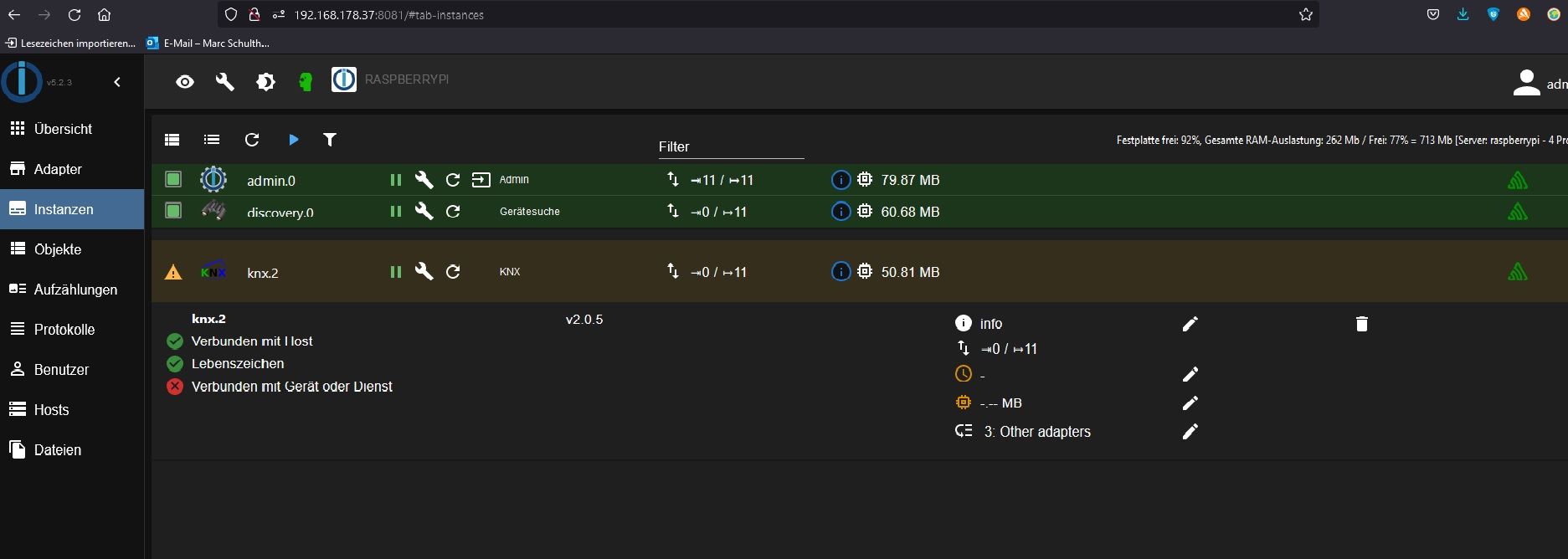
        Oben im Screenshot ist die Instanz knx.2
        und im Log knx.1 !?

        Wieviel instanzen hast du !?

        Synology 918+ 16GB - ioBroker in Docker v9 , VISO auf Trekstor Primebook C13 13,3" , Hikvision Domkameras mit Surveillance Station .. CCU RaspberryMatic in Synology VM .. Zigbee CC2538+CC2592 .. Sonoff .. KNX .. Modbus ..

        R 1 Reply Last reply
        0
        • GlasfaserG Glasfaser

          @rookie-0

          Oben im Screenshot ist die Instanz knx.2
          und im Log knx.1 !?

          Wieviel instanzen hast du !?

          R Offline
          R Offline
          Rookie 0
          wrote on last edited by
          #7

          Eine Instanz. Der Rest ist eigentlich raus gelöscht...

          R 1 Reply Last reply
          0
          • R Rookie 0

            Eine Instanz. Der Rest ist eigentlich raus gelöscht...

            R Offline
            R Offline
            Rookie 0
            wrote on last edited by
            #8

            System Zeit hatte ich eigentlich schon auf berlin gesetzt.
            Geht doch über rasperry-config oder?

            Thomas BraunT 2 Replies Last reply
            0
            • R Rookie 0

              System Zeit hatte ich eigentlich schon auf berlin gesetzt.
              Geht doch über rasperry-config oder?

              Thomas BraunT Online
              Thomas BraunT Online
              Thomas Braun
              Most Active
              wrote on last edited by Thomas Braun
              #9

              @rookie-0 Ja. Die geloggten Zeitstempel deuten aber auf eine Stunde Differenz hin.

              date && date -u
              

              liefert?

              Linux-Werkzeugkasten:
              https://forum.iobroker.net/topic/42952/der-kleine-iobroker-linux-werkzeugkasten
              NodeJS Fixer Skript:
              https://forum.iobroker.net/topic/68035/iob-node-fix-skript
              iob_diag: curl -sLf -o diag.sh https://iobroker.net/diag.sh && bash diag.sh

              R 1 Reply Last reply
              0
              • R Rookie 0

                System Zeit hatte ich eigentlich schon auf berlin gesetzt.
                Geht doch über rasperry-config oder?

                Thomas BraunT Online
                Thomas BraunT Online
                Thomas Braun
                Most Active
                wrote on last edited by
                #10

                @rookie-0

                iobroker list instances
                iobroker update -i
                

                Linux-Werkzeugkasten:
                https://forum.iobroker.net/topic/42952/der-kleine-iobroker-linux-werkzeugkasten
                NodeJS Fixer Skript:
                https://forum.iobroker.net/topic/68035/iob-node-fix-skript
                iob_diag: curl -sLf -o diag.sh https://iobroker.net/diag.sh && bash diag.sh

                R 1 Reply Last reply
                0
                • Thomas BraunT Thomas Braun

                  @rookie-0 Ja. Die geloggten Zeitstempel deuten aber auf eine Stunde Differenz hin.

                  date && date -u
                  

                  liefert?

                  R Offline
                  R Offline
                  Rookie 0
                  wrote on last edited by
                  #11

                  @thomas-braun

                  Mon 31 Jan 20:08:12 CET 2022
                  Mon 31 Jan 19:08:12 UTC 2022

                  1 Reply Last reply
                  0
                  • Thomas BraunT Thomas Braun

                    @rookie-0

                    iobroker list instances
                    iobroker update -i
                    
                    R Offline
                    R Offline
                    Rookie 0
                    wrote on last edited by
                    #12

                    @thomas-braun
                    iobroker list instances

                    • system.adapter.admin.0 : admin : raspberrypi - enabled, port: 8081, bind: 0.0.0.0, run as: admin

                    • system.adapter.discovery.0 : discovery : raspberrypi - enabled
                      system.adapter.knx.1 : knx : raspberrypi - disabled, bind: 127.0.0.1

                    • system.adapter.knx.2 : knx : raspberrypi - enabled, bind: 192.168.178.37

                    • instance is alive

                    R 1 Reply Last reply
                    0
                    • R Rookie 0

                      @thomas-braun
                      iobroker list instances

                      • system.adapter.admin.0 : admin : raspberrypi - enabled, port: 8081, bind: 0.0.0.0, run as: admin

                      • system.adapter.discovery.0 : discovery : raspberrypi - enabled
                        system.adapter.knx.1 : knx : raspberrypi - disabled, bind: 127.0.0.1

                      • system.adapter.knx.2 : knx : raspberrypi - enabled, bind: 192.168.178.37

                      • instance is alive

                      R Offline
                      R Offline
                      Rookie 0
                      wrote on last edited by Rookie 0
                      #13
                      
                      R
                      Rookie 0
                      32 minutes ago
                      
                      pi@raspberrypi:~ $ iobroker update -i
                      Used repository: default
                      hash changed or no sources cached => force download of new sources
                      update done
                      Adapter "admin" : 5.2.3 , installed 5.2.3
                      Adapter "backitup" : 2.2.3 , installed 2.2.3
                      Adapter "discovery" : 2.7.3 , installed 2.7.3
                      Controller "js-controller" : 3.3.22 , installed 3.3.22
                      Adapter "knx" : 2.0.5 , installed 2.0.5
                      
                      
                      R Thomas BraunT 2 Replies Last reply
                      0
                      • R Rookie 0
                        
                        R
                        Rookie 0
                        32 minutes ago
                        
                        pi@raspberrypi:~ $ iobroker update -i
                        Used repository: default
                        hash changed or no sources cached => force download of new sources
                        update done
                        Adapter "admin" : 5.2.3 , installed 5.2.3
                        Adapter "backitup" : 2.2.3 , installed 2.2.3
                        Adapter "discovery" : 2.7.3 , installed 2.7.3
                        Controller "js-controller" : 3.3.22 , installed 3.3.22
                        Adapter "knx" : 2.0.5 , installed 2.0.5
                        
                        
                        R Offline
                        R Offline
                        Rookie 0
                        wrote on last edited by
                        #14

                        kann es an einer verkehrten physikalischen adresse liegen?

                        1 Reply Last reply
                        0
                        • R Rookie 0
                          
                          R
                          Rookie 0
                          32 minutes ago
                          
                          pi@raspberrypi:~ $ iobroker update -i
                          Used repository: default
                          hash changed or no sources cached => force download of new sources
                          update done
                          Adapter "admin" : 5.2.3 , installed 5.2.3
                          Adapter "backitup" : 2.2.3 , installed 2.2.3
                          Adapter "discovery" : 2.7.3 , installed 2.7.3
                          Controller "js-controller" : 3.3.22 , installed 3.3.22
                          Adapter "knx" : 2.0.5 , installed 2.0.5
                          
                          
                          Thomas BraunT Online
                          Thomas BraunT Online
                          Thomas Braun
                          Most Active
                          wrote on last edited by
                          #15

                          @rookie-0

                          Bitte in CodeTags setzen. Danke.

                          Linux-Werkzeugkasten:
                          https://forum.iobroker.net/topic/42952/der-kleine-iobroker-linux-werkzeugkasten
                          NodeJS Fixer Skript:
                          https://forum.iobroker.net/topic/68035/iob-node-fix-skript
                          iob_diag: curl -sLf -o diag.sh https://iobroker.net/diag.sh && bash diag.sh

                          R 1 Reply Last reply
                          0
                          • Thomas BraunT Thomas Braun

                            @rookie-0

                            Bitte in CodeTags setzen. Danke.

                            R Offline
                            R Offline
                            Rookie 0
                            wrote on last edited by
                            #16

                            hiermit geschehen...

                            Thomas BraunT T 2 Replies Last reply
                            0
                            • R Rookie 0

                              hiermit geschehen...

                              Thomas BraunT Online
                              Thomas BraunT Online
                              Thomas Braun
                              Most Active
                              wrote on last edited by Thomas Braun
                              #17

                              @rookie-0
                              Nö, noch nicht geschehen.

                              bind: 192.168.178.37
                              

                              Ist meist falsch. Lös das Binding auf.

                              Linux-Werkzeugkasten:
                              https://forum.iobroker.net/topic/42952/der-kleine-iobroker-linux-werkzeugkasten
                              NodeJS Fixer Skript:
                              https://forum.iobroker.net/topic/68035/iob-node-fix-skript
                              iob_diag: curl -sLf -o diag.sh https://iobroker.net/diag.sh && bash diag.sh

                              1 Reply Last reply
                              0
                              • R Rookie 0

                                hiermit geschehen...

                                T Offline
                                T Offline
                                tombox
                                wrote on last edited by
                                #18

                                @rookie-0
                                Also sicherstellen das nur eine instance läuft.
                                Dann die IP und Physikalische adresse des gateways doppelt checken
                                OpenKnx Adapter ausprobieren.

                                R 1 Reply Last reply
                                0
                                • T tombox

                                  @rookie-0
                                  Also sicherstellen das nur eine instance läuft.
                                  Dann die IP und Physikalische adresse des gateways doppelt checken
                                  OpenKnx Adapter ausprobieren.

                                  R Offline
                                  R Offline
                                  Rookie 0
                                  wrote on last edited by
                                  #19

                                  Ich habe es endlich hinbekommen.
                                  Die IP des Gateway war falsch...

                                  Danke an Alle!

                                  R 1 Reply Last reply
                                  0
                                  • R Rookie 0

                                    Ich habe es endlich hinbekommen.
                                    Die IP des Gateway war falsch...

                                    Danke an Alle!

                                    R Offline
                                    R Offline
                                    Rookie 0
                                    wrote on last edited by
                                    #20

                                    Jetzt würde ich gerne eine Visu installieren.
                                    Ich bekomme jedoch eine rote Meldung, wenn ich den Adapter hinzufügen möchte.

                                    Keine Versionsinfo für web

                                    Steht dann da und Hinzufügen ist ausgegraut.
                                    Was mache ich jetzt schon wieder verkehrt?

                                    1 Reply Last reply
                                    0
                                    • R Offline
                                      R Offline
                                      Rookie 0
                                      wrote on last edited by
                                      #21

                                      Ok, der Webadapter fehlt wohl.
                                      Den bekomme ich aber nicht installiert. Woran liegt es?

                                      $ iobroker add web auto --host raspberrypi
                                      
                                      NPM version: 6.14.15
                                      
                                      npm install iobroker.web@3.4.16 --loglevel error --prefix "/opt/iobroker" (System call)
                                      
                                      npm ERR! Cannot read property 'match' of undefined
                                      
                                      npm ERR! A complete log of this run can be found in:
                                      
                                      npm ERR! /home/iobroker/.npm/_logs/2022-02-01T08_53_20_360Z-debug.log
                                      
                                      host.raspberrypi Cannot install iobroker.web@3.4.16: 1
                                      
                                      ERROR: Process exited with code 25
                                      

                                      ???

                                      1 Reply Last reply
                                      0
                                      Reply
                                      • Reply as topic
                                      Log in to reply
                                      • Oldest to Newest
                                      • Newest to Oldest
                                      • Most Votes


                                      Support us

                                      ioBroker
                                      Community Adapters
                                      Donate

                                      303

                                      Online

                                      32.6k

                                      Users

                                      82.3k

                                      Topics

                                      1.3m

                                      Posts
                                      Community
                                      Impressum | Datenschutz-Bestimmungen | Nutzungsbedingungen | Einwilligungseinstellungen
                                      ioBroker Community 2014-2025
                                      logo
                                      • Login

                                      • Don't have an account? Register

                                      • Login or register to search.
                                      • First post
                                        Last post
                                      0
                                      • Home
                                      • Recent
                                      • Tags
                                      • Unread 0
                                      • Categories
                                      • Unreplied
                                      • Popular
                                      • GitHub
                                      • Docu
                                      • Hilfe