




KNX Adapter läuft nicht
-
Hallo Zusammen,
ich habe iobroker installiert und den knx adapter installiert. Dieser möchte jedoch nicht seinen Dienst aufnehmen. Siehe screenshot.
Was kann ich tun?
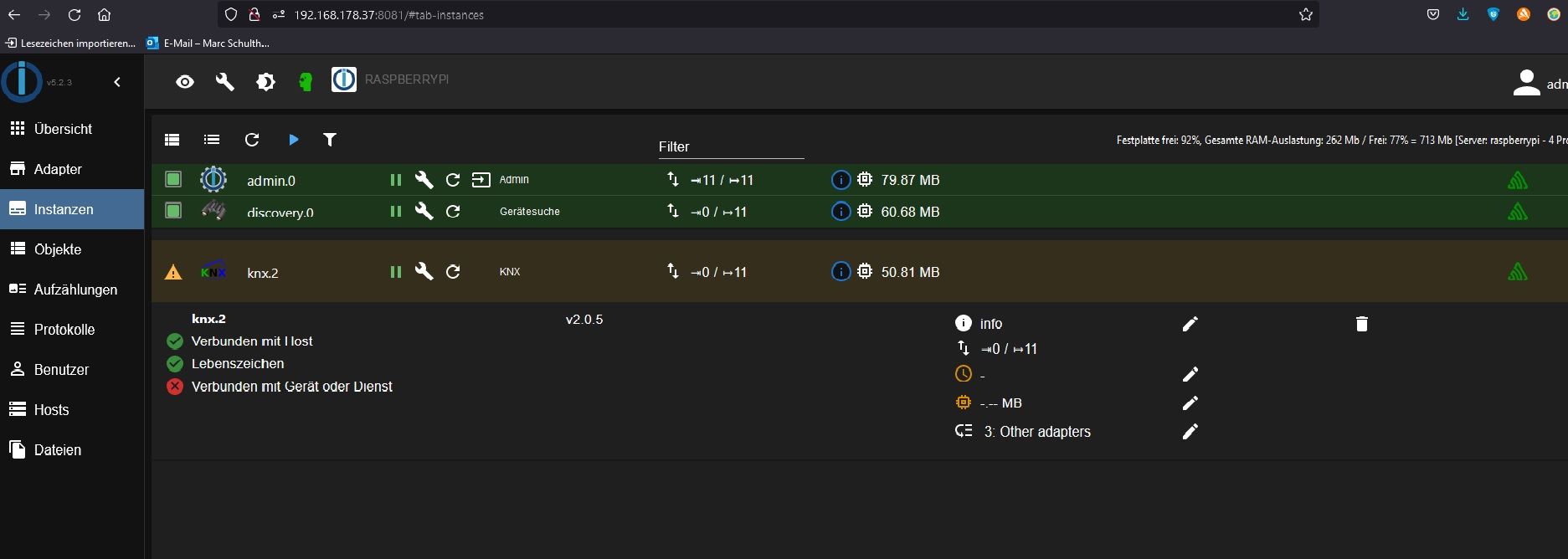
@rookie-0 sagte in KNX Adapter läuft nicht:
Was kann ich tun?
Den Start des Adapters nicht per nichtssagendem Screenshot sondern aus dem LogFile heraus dokumentieren.
iobroker logs --watchDann den Adapter (neu)starten, Ausgaben in CodeTags (KEIN Screenshot!) als Text hier rein.
-
pi@raspberrypi:~ $ pi@raspberrypi:~ $ iobroker logs --watch 2022-01-31 17:36:42.377 - info: host.raspberrypi stopInstance system.adapter.knx.1 (force=false, process=true) 2022-01-31 17:36:42.386 - info: host.raspberrypi stopInstance system.adapter.knx.1 send kill signal 2022-01-31 17:36:42.389 - info: knx.1 (4737) Got terminate signal TERMINATE_YOURSELF 2022-01-31 17:36:42.401 - info: knx.1 (4737) terminating 2022-01-31 17:36:42.404 - info: knx.1 (4737) Terminated (ADAPTER_REQUESTED_TERMINATION): Without reason 2022-01-31 17:36:42.958 - info: host.raspberrypi instance system.adapter.knx.1 terminated with code 11 (ADAPTER_REQUESTED_TERMINATION) 2022-01-31 17:36:45.458 - info: host.raspberrypi instance system.adapter.knx.1 started with pid 4752 2022-01-31 17:36:48.672 - info: knx.1 (4752) starting. Version 2.0.5 in /opt/iobroker/node_modules/iobroker.knx, node: v14.18.3, js-controller: 3.3.22 2022-01-31 17:36:48.765 - warn: knx.1 (4752) No license found for knx. You can use 500DP for free or you can get a license on https://iobroker.net/accountLicenses ! 2022-01-31 17:36:48.770 - info: knx.1 (4752) Connecting to knx GW: 127.0.0.1:3674 with phy. Adr: 1.1.0 2022-01-31 17:36:48.938 - info: host.raspberrypi stopInstance system.adapter.knx.1 (force=false, process=true) 2022-01-31 17:36:48.949 - info: knx.1 (4752) Got terminate signal TERMINATE_YOURSELF 2022-01-31 17:36:48.961 - info: knx.1 (4752) terminating 2022-01-31 17:36:48.964 - info: knx.1 (4752) Terminated (ADAPTER_REQUESTED_TERMINATION): Without reason 2022-01-31 17:36:48.994 - info: host.raspberrypi stopInstance system.adapter.knx.1 send kill signal 2022-01-31 17:36:49.532 - info: host.raspberrypi instance system.adapter.knx.1 terminated with code 11 (ADAPTER_REQUESTED_TERMINATION) 2022-01-31 17:36:52.056 - info: host.raspberrypi instance system.adapter.knx.1 started with pid 4767 2022-01-31 17:36:55.253 - info: knx.1 (4767) starting. Version 2.0.5 in /opt/iobroker/node_modules/iobroker.knx, node: v14.18.3, js-controller: 3.3.22 2022-01-31 17:36:55.368 - warn: knx.1 (4767) No license found for knx. You can use 500DP for free or you can get a license on https://iobroker.net/accountLicenses ! 2022-01-31 17:36:55.373 - info: knx.1 (4767) Connecting to knx GW: 127.0.0.1:3674 with phy. Adr: 1.1.0 2022-01-31 17:36:55.473 - info: host.raspberrypi stopInstance system.adapter.knx.1 (force=false, process=true) 2022-01-31 17:36:55.484 - info: host.raspberrypi stopInstance system.adapter.knx.1 send kill signal 2022-01-31 17:36:55.512 - info: knx.1 (4767) Got terminate signal TERMINATE_YOURSELF 2022-01-31 17:36:55.522 - info: knx.1 (4767) terminating 2022-01-31 17:36:55.525 - info: knx.1 (4767) Terminated (ADAPTER_REQUESTED_TERMINATION): Without reason 2022-01-31 17:36:56.085 - info: host.raspberrypi instance system.adapter.knx.1 terminated with code 11 (ADAPTER_REQUESTED_TERMINATION) 2022-01-31 17:36:58.556 - info: host.raspberrypi instance system.adapter.knx.1 started with pid 4782 2022-01-31 17:37:01.748 - info: knx.1 (4782) starting. Version 2.0.5 in /opt/iobroker/node_modules/iobroker.knx, node: v14.18.3, js-controller: 3.3.22 2022-01-31 17:37:01.870 - warn: knx.1 (4782) No license found for knx. You can use 500DP for free or you can get a license on https://iobroker.net/accountLicenses ! 2022-01-31 17:37:01.874 - info: knx.1 (4782) Connecting to knx GW: 127.0.0.1:3674 with phy. Adr: 1.1.0 2022-01-31 17:37:01.968 - info: host.raspberrypi stopInstance system.adapter.knx.1 (force=false, process=true) 2022-01-31 17:37:01.995 - info: host.raspberrypi stopInstance system.adapter.knx.1 send kill signal 2022-01-31 17:37:02.026 - info: knx.1 (4782) Got terminate signal TERMINATE_YOURSELF 2022-01-31 17:37:02.036 - info: knx.1 (4782) terminating 2022-01-31 17:37:02.039 - info: knx.1 (4782) Terminated (ADAPTER_REQUESTED_TERMINATION): Without reason 2022-01-31 17:37:02.598 - info: host.raspberrypi instance system.adapter.knx.1 terminated with code 11 (ADAPTER_REQUESTED_TERMINATION) 2022-01-31 17:37:05.054 - info: host.raspberrypi instance system.adapter.knx.1 started with pid 4797 2022-01-31 17:37:08.236 - info: knx.1 (4797) starting. Version 2.0.5 in /opt/iobroker/node_modules/iobroker.knx, node: v14.18.3, js-controller: 3.3.22 2022-01-31 17:37:08.328 - warn: knx.1 (4797) No license found for knx. You can use 500DP for free or you can get a license on https://iobroker.net/accountLicenses ! 2022-01-31 17:37:08.333 - info: knx.1 (4797) Connecting to knx GW: 127.0.0.1:3674 with phy. Adr: 1.1.0 2022-01-31 17:37:08.806 - info: host.raspberrypi stopInstance system.adapter.knx.1 (force=false, process=true) 2022-01-31 17:37:08.818 - info: host.raspberrypi stopInstance system.adapter.knx.1 send kill signal 2022-01-31 17:37:08.818 - info: knx.1 (4797) Got terminate signal TERMINATE_YOURSELF 2022-01-31 17:37:08.833 - info: knx.1 (4797) terminating 2022-01-31 17:37:08.837 - info: knx.1 (4797) Terminated (ADAPTER_REQUESTED_TERMINATION): Without reason 2022-01-31 17:37:09.436 - info: host.raspberrypi instance system.adapter.knx.1 terminated with code 11 (ADAPTER_REQUESTED_TERMINATION) 2022-01-31 17:37:11.880 - info: host.raspberrypi instance system.adapter.knx.1 started with pid 4812 2022-01-31 17:37:15.049 - info: knx.1 (4812) starting. Version 2.0.5 in /opt/iobroker/node_modules/iobroker.knx, node: v14.18.3, js-controller: 3.3.22 2022-01-31 17:37:15.179 - warn: knx.1 (4812) No license found for knx. You can use 500DP for free or you can get a license on https://iobroker.net/accountLicenses ! 2022-01-31 17:37:15.184 - info: knx.1 (4812) Connecting to knx GW: 127.0.0.1:3674 with phy. Adr: 1.1.0 2022-01-31 17:37:15.623 - info: host.raspberrypi stopInstance system.adapter.knx.1 (force=false, process=true) 2022-01-31 17:37:15.631 - info: host.raspberrypi stopInstance system.adapter.knx.1 send kill signal 2022-01-31 17:37:15.631 - info: knx.1 (4812) Got terminate signal TERMINATE_YOURSELF 2022-01-31 17:37:15.642 - info: knx.1 (4812) terminating 2022-01-31 17:37:15.645 - info: knx.1 (4812) Terminated (ADAPTER_REQUESTED_TERMINATION): Without reason 2022-01-31 17:37:16.277 - info: host.raspberrypi instance system.adapter.knx.1 terminated with code 11 (ADAPTER_REQUESTED_TERMINATION) 2022-01-31 17:37:18.698 - info: host.raspberrypi instance system.adapter.knx.1 started with pid 4827 2022-01-31 17:37:21.936 - info: knx.1 (4827) starting. Version 2.0.5 in /opt/iobroker/node_modules/iobroker.knx, node: v14.18.3, js-controller: 3.3.22 2022-01-31 17:37:22.034 - warn: knx.1 (4827) No license found for knx. You can use 500DP for free or you can get a license on https://iobroker.net/accountLicenses ! 2022-01-31 17:37:22.040 - info: knx.1 (4827) Connecting to knx GW: 127.0.0.1:3674 with phy. Adr: 1.1.0 2022-01-31 17:37:22.453 - info: host.raspberrypi stopInstance system.adapter.knx.1 (force=false, process=true) 2022-01-31 17:37:22.462 - info: host.raspberrypi stopInstance system.adapter.knx.1 send kill signal 2022-01-31 17:51:23.128 - info: host.raspberrypi stopInstance system.adapter.knx.2 send kill signalocess=true)x, node: v14.18.3, js-controller: 3.3.225) not possible because of cancelled connection.D : 0 SeqCntIN : 0 SeqCntOUT : 0 msgC -
pi@raspberrypi:~ $ pi@raspberrypi:~ $ iobroker logs --watch 2022-01-31 17:36:42.377 - info: host.raspberrypi stopInstance system.adapter.knx.1 (force=false, process=true) 2022-01-31 17:36:42.386 - info: host.raspberrypi stopInstance system.adapter.knx.1 send kill signal 2022-01-31 17:36:42.389 - info: knx.1 (4737) Got terminate signal TERMINATE_YOURSELF 2022-01-31 17:36:42.401 - info: knx.1 (4737) terminating 2022-01-31 17:36:42.404 - info: knx.1 (4737) Terminated (ADAPTER_REQUESTED_TERMINATION): Without reason 2022-01-31 17:36:42.958 - info: host.raspberrypi instance system.adapter.knx.1 terminated with code 11 (ADAPTER_REQUESTED_TERMINATION) 2022-01-31 17:36:45.458 - info: host.raspberrypi instance system.adapter.knx.1 started with pid 4752 2022-01-31 17:36:48.672 - info: knx.1 (4752) starting. Version 2.0.5 in /opt/iobroker/node_modules/iobroker.knx, node: v14.18.3, js-controller: 3.3.22 2022-01-31 17:36:48.765 - warn: knx.1 (4752) No license found for knx. You can use 500DP for free or you can get a license on https://iobroker.net/accountLicenses ! 2022-01-31 17:36:48.770 - info: knx.1 (4752) Connecting to knx GW: 127.0.0.1:3674 with phy. Adr: 1.1.0 2022-01-31 17:36:48.938 - info: host.raspberrypi stopInstance system.adapter.knx.1 (force=false, process=true) 2022-01-31 17:36:48.949 - info: knx.1 (4752) Got terminate signal TERMINATE_YOURSELF 2022-01-31 17:36:48.961 - info: knx.1 (4752) terminating 2022-01-31 17:36:48.964 - info: knx.1 (4752) Terminated (ADAPTER_REQUESTED_TERMINATION): Without reason 2022-01-31 17:36:48.994 - info: host.raspberrypi stopInstance system.adapter.knx.1 send kill signal 2022-01-31 17:36:49.532 - info: host.raspberrypi instance system.adapter.knx.1 terminated with code 11 (ADAPTER_REQUESTED_TERMINATION) 2022-01-31 17:36:52.056 - info: host.raspberrypi instance system.adapter.knx.1 started with pid 4767 2022-01-31 17:36:55.253 - info: knx.1 (4767) starting. Version 2.0.5 in /opt/iobroker/node_modules/iobroker.knx, node: v14.18.3, js-controller: 3.3.22 2022-01-31 17:36:55.368 - warn: knx.1 (4767) No license found for knx. You can use 500DP for free or you can get a license on https://iobroker.net/accountLicenses ! 2022-01-31 17:36:55.373 - info: knx.1 (4767) Connecting to knx GW: 127.0.0.1:3674 with phy. Adr: 1.1.0 2022-01-31 17:36:55.473 - info: host.raspberrypi stopInstance system.adapter.knx.1 (force=false, process=true) 2022-01-31 17:36:55.484 - info: host.raspberrypi stopInstance system.adapter.knx.1 send kill signal 2022-01-31 17:36:55.512 - info: knx.1 (4767) Got terminate signal TERMINATE_YOURSELF 2022-01-31 17:36:55.522 - info: knx.1 (4767) terminating 2022-01-31 17:36:55.525 - info: knx.1 (4767) Terminated (ADAPTER_REQUESTED_TERMINATION): Without reason 2022-01-31 17:36:56.085 - info: host.raspberrypi instance system.adapter.knx.1 terminated with code 11 (ADAPTER_REQUESTED_TERMINATION) 2022-01-31 17:36:58.556 - info: host.raspberrypi instance system.adapter.knx.1 started with pid 4782 2022-01-31 17:37:01.748 - info: knx.1 (4782) starting. Version 2.0.5 in /opt/iobroker/node_modules/iobroker.knx, node: v14.18.3, js-controller: 3.3.22 2022-01-31 17:37:01.870 - warn: knx.1 (4782) No license found for knx. You can use 500DP for free or you can get a license on https://iobroker.net/accountLicenses ! 2022-01-31 17:37:01.874 - info: knx.1 (4782) Connecting to knx GW: 127.0.0.1:3674 with phy. Adr: 1.1.0 2022-01-31 17:37:01.968 - info: host.raspberrypi stopInstance system.adapter.knx.1 (force=false, process=true) 2022-01-31 17:37:01.995 - info: host.raspberrypi stopInstance system.adapter.knx.1 send kill signal 2022-01-31 17:37:02.026 - info: knx.1 (4782) Got terminate signal TERMINATE_YOURSELF 2022-01-31 17:37:02.036 - info: knx.1 (4782) terminating 2022-01-31 17:37:02.039 - info: knx.1 (4782) Terminated (ADAPTER_REQUESTED_TERMINATION): Without reason 2022-01-31 17:37:02.598 - info: host.raspberrypi instance system.adapter.knx.1 terminated with code 11 (ADAPTER_REQUESTED_TERMINATION) 2022-01-31 17:37:05.054 - info: host.raspberrypi instance system.adapter.knx.1 started with pid 4797 2022-01-31 17:37:08.236 - info: knx.1 (4797) starting. Version 2.0.5 in /opt/iobroker/node_modules/iobroker.knx, node: v14.18.3, js-controller: 3.3.22 2022-01-31 17:37:08.328 - warn: knx.1 (4797) No license found for knx. You can use 500DP for free or you can get a license on https://iobroker.net/accountLicenses ! 2022-01-31 17:37:08.333 - info: knx.1 (4797) Connecting to knx GW: 127.0.0.1:3674 with phy. Adr: 1.1.0 2022-01-31 17:37:08.806 - info: host.raspberrypi stopInstance system.adapter.knx.1 (force=false, process=true) 2022-01-31 17:37:08.818 - info: host.raspberrypi stopInstance system.adapter.knx.1 send kill signal 2022-01-31 17:37:08.818 - info: knx.1 (4797) Got terminate signal TERMINATE_YOURSELF 2022-01-31 17:37:08.833 - info: knx.1 (4797) terminating 2022-01-31 17:37:08.837 - info: knx.1 (4797) Terminated (ADAPTER_REQUESTED_TERMINATION): Without reason 2022-01-31 17:37:09.436 - info: host.raspberrypi instance system.adapter.knx.1 terminated with code 11 (ADAPTER_REQUESTED_TERMINATION) 2022-01-31 17:37:11.880 - info: host.raspberrypi instance system.adapter.knx.1 started with pid 4812 2022-01-31 17:37:15.049 - info: knx.1 (4812) starting. Version 2.0.5 in /opt/iobroker/node_modules/iobroker.knx, node: v14.18.3, js-controller: 3.3.22 2022-01-31 17:37:15.179 - warn: knx.1 (4812) No license found for knx. You can use 500DP for free or you can get a license on https://iobroker.net/accountLicenses ! 2022-01-31 17:37:15.184 - info: knx.1 (4812) Connecting to knx GW: 127.0.0.1:3674 with phy. Adr: 1.1.0 2022-01-31 17:37:15.623 - info: host.raspberrypi stopInstance system.adapter.knx.1 (force=false, process=true) 2022-01-31 17:37:15.631 - info: host.raspberrypi stopInstance system.adapter.knx.1 send kill signal 2022-01-31 17:37:15.631 - info: knx.1 (4812) Got terminate signal TERMINATE_YOURSELF 2022-01-31 17:37:15.642 - info: knx.1 (4812) terminating 2022-01-31 17:37:15.645 - info: knx.1 (4812) Terminated (ADAPTER_REQUESTED_TERMINATION): Without reason 2022-01-31 17:37:16.277 - info: host.raspberrypi instance system.adapter.knx.1 terminated with code 11 (ADAPTER_REQUESTED_TERMINATION) 2022-01-31 17:37:18.698 - info: host.raspberrypi instance system.adapter.knx.1 started with pid 4827 2022-01-31 17:37:21.936 - info: knx.1 (4827) starting. Version 2.0.5 in /opt/iobroker/node_modules/iobroker.knx, node: v14.18.3, js-controller: 3.3.22 2022-01-31 17:37:22.034 - warn: knx.1 (4827) No license found for knx. You can use 500DP for free or you can get a license on https://iobroker.net/accountLicenses ! 2022-01-31 17:37:22.040 - info: knx.1 (4827) Connecting to knx GW: 127.0.0.1:3674 with phy. Adr: 1.1.0 2022-01-31 17:37:22.453 - info: host.raspberrypi stopInstance system.adapter.knx.1 (force=false, process=true) 2022-01-31 17:37:22.462 - info: host.raspberrypi stopInstance system.adapter.knx.1 send kill signal 2022-01-31 17:51:23.128 - info: host.raspberrypi stopInstance system.adapter.knx.2 send kill signalocess=true)x, node: v14.18.3, js-controller: 3.3.225) not possible because of cancelled connection.D : 0 SeqCntIN : 0 SeqCntOUT : 0 msgC -
@rookie-0
Deine Systemzeit steht offenbar auf London-Zeit. Stell das auf Berlin/MEZ um -
-
System Zeit hatte ich eigentlich schon auf berlin gesetzt.
Geht doch über rasperry-config oder?@rookie-0 Ja. Die geloggten Zeitstempel deuten aber auf eine Stunde Differenz hin.
date && date -uliefert?
-
System Zeit hatte ich eigentlich schon auf berlin gesetzt.
Geht doch über rasperry-config oder?iobroker list instances iobroker update -i -
@rookie-0 Ja. Die geloggten Zeitstempel deuten aber auf eine Stunde Differenz hin.
date && date -uliefert?
Mon 31 Jan 20:08:12 CET 2022
Mon 31 Jan 19:08:12 UTC 2022 -
iobroker list instances iobroker update -i@thomas-braun
iobroker list instances-
system.adapter.admin.0 : admin : raspberrypi - enabled, port: 8081, bind: 0.0.0.0, run as: admin
-
system.adapter.discovery.0 : discovery : raspberrypi - enabled
system.adapter.knx.1 : knx : raspberrypi - disabled, bind: 127.0.0.1 -
system.adapter.knx.2 : knx : raspberrypi - enabled, bind: 192.168.178.37
-
instance is alive
-
-
@thomas-braun
iobroker list instances-
system.adapter.admin.0 : admin : raspberrypi - enabled, port: 8081, bind: 0.0.0.0, run as: admin
-
system.adapter.discovery.0 : discovery : raspberrypi - enabled
system.adapter.knx.1 : knx : raspberrypi - disabled, bind: 127.0.0.1 -
system.adapter.knx.2 : knx : raspberrypi - enabled, bind: 192.168.178.37
-
instance is alive
R Rookie 0 32 minutes ago pi@raspberrypi:~ $ iobroker update -i Used repository: default hash changed or no sources cached => force download of new sources update done Adapter "admin" : 5.2.3 , installed 5.2.3 Adapter "backitup" : 2.2.3 , installed 2.2.3 Adapter "discovery" : 2.7.3 , installed 2.7.3 Controller "js-controller" : 3.3.22 , installed 3.3.22 Adapter "knx" : 2.0.5 , installed 2.0.5 -
-
R Rookie 0 32 minutes ago pi@raspberrypi:~ $ iobroker update -i Used repository: default hash changed or no sources cached => force download of new sources update done Adapter "admin" : 5.2.3 , installed 5.2.3 Adapter "backitup" : 2.2.3 , installed 2.2.3 Adapter "discovery" : 2.7.3 , installed 2.7.3 Controller "js-controller" : 3.3.22 , installed 3.3.22 Adapter "knx" : 2.0.5 , installed 2.0.5 -
R Rookie 0 32 minutes ago pi@raspberrypi:~ $ iobroker update -i Used repository: default hash changed or no sources cached => force download of new sources update done Adapter "admin" : 5.2.3 , installed 5.2.3 Adapter "backitup" : 2.2.3 , installed 2.2.3 Adapter "discovery" : 2.7.3 , installed 2.7.3 Controller "js-controller" : 3.3.22 , installed 3.3.22 Adapter "knx" : 2.0.5 , installed 2.0.5Bitte in CodeTags setzen. Danke.
-
Bitte in CodeTags setzen. Danke.
-
-
@rookie-0
Also sicherstellen das nur eine instance läuft.
Dann die IP und Physikalische adresse des gateways doppelt checken
OpenKnx Adapter ausprobieren. -
-
Ok, der Webadapter fehlt wohl.
Den bekomme ich aber nicht installiert. Woran liegt es?$ iobroker add web auto --host raspberrypi NPM version: 6.14.15 npm install iobroker.web@3.4.16 --loglevel error --prefix "/opt/iobroker" (System call) npm ERR! Cannot read property 'match' of undefined npm ERR! A complete log of this run can be found in: npm ERR! /home/iobroker/.npm/_logs/2022-02-01T08_53_20_360Z-debug.log host.raspberrypi Cannot install iobroker.web@3.4.16: 1 ERROR: Process exited with code 25???


Hey! Du scheinst an dieser Unterhaltung interessiert zu sein, hast aber noch kein Konto.
Hast du es satt, bei jedem Besuch durch die gleichen Beiträge zu scrollen? Wenn du dich für ein Konto anmeldest, kommst du immer genau dorthin zurück, wo du zuvor warst, und kannst dich über neue Antworten benachrichtigen lassen (entweder per E-Mail oder Push-Benachrichtigung). Du kannst auch Lesezeichen speichern und Beiträge positiv bewerten, um anderen Community-Mitgliedern deine Wertschätzung zu zeigen.
Mit deinem Input könnte dieser Beitrag noch besser werden 💗
Registrieren AnmeldenSupport us
315
Online33.0k
Benutzer83.5k
Themen1.3m
Beiträge