




Skip to content
  • Home
  • Recent
  • Tags
  • 0 Unread 0
  • Categories
  • Unreplied
  • Popular
  • GitHub
  • Docu
  • Hilfe
Skins
  • Light
  • Brite
  • Cerulean
  • Cosmo
  • Flatly
  • Journal
  • Litera
  • Lumen
  • Lux
  • Materia
  • Minty
  • Morph
  • Pulse
  • Sandstone
  • Simplex
  • Sketchy
  • Spacelab
  • United
  • Yeti
  • Zephyr
  • Dark
  • Cyborg
  • Darkly
  • Quartz
  • Slate
  • Solar
  • Superhero
  • Vapor

  • Default (No Skin)
  • No Skin
Collapse
ioBroker Logo

Community Forum

donate donate
  1. ioBroker Community Home
  2. Deutsch
  3. Off Topic
  4. Proxmox
  5. Proxmox LXC Bootdisk vergrößern

NEWS

  • Monatsrückblick Januar/Februar 2026 ist online!
    BluefoxB
    Bluefox
    16
    1
    277

  • Jahresrückblick 2025 – unser neuer Blogbeitrag ist online! ✨
    BluefoxB
    Bluefox
    17
    1
    4.6k

  • Neuer Blogbeitrag: Monatsrückblick - Dezember 2025 🎄
    BluefoxB
    Bluefox
    13
    1
    1.3k

Proxmox LXC Bootdisk vergrößern

Scheduled Pinned Locked Moved Proxmox
39 Posts 3 Posters 3.5k Views 4 Watching
  • Oldest to Newest
  • Newest to Oldest
  • Most Votes
Reply
  • Reply as topic
Log in to reply
This topic has been deleted. Only users with topic management privileges can see it.
  • Thomas BraunT Thomas Braun

    @negalein Das sind 'Überreste' eines unsauberen umounts einer NFS-Freigabe.

    NegaleinN Offline
    NegaleinN Offline
    Negalein
    Global Moderator
    wrote on last edited by
    #24

    @thomas-braun sagte in Proxmox LXC Bootdisk vergrößern:

    Das sind 'Überreste' eines unsauberen umounts einer NFS-Freigabe.

    kann ich die bedenkenlos löschen?

    ° Node.js & System Update ---> sudo apt update, iob stop, sudo apt full-upgrade
    ° Node.js Fixer ---> iob nodejs-update
    ° Fixer ---> iob fix

    Thomas BraunT 1 Reply Last reply
    0
    • NegaleinN Negalein

      @thomas-braun sagte in Proxmox LXC Bootdisk vergrößern:

      Das sind 'Überreste' eines unsauberen umounts einer NFS-Freigabe.

      kann ich die bedenkenlos löschen?

      Thomas BraunT Online
      Thomas BraunT Online
      Thomas Braun
      Most Active
      wrote on last edited by
      #25

      @negalein
      Kannst du ja mal probieren. Wenn da aber noch ein Prozess drauf zugreift wird direkt das nächste File angelegt.
      Da scheint mir also das Backup nicht richtig eingestellt zu sein. Oder was läuft da um 23:06 los?

      Linux-Werkzeugkasten:
      https://forum.iobroker.net/topic/42952/der-kleine-iobroker-linux-werkzeugkasten
      NodeJS Fixer Skript:
      https://forum.iobroker.net/topic/68035/iob-node-fix-skript
      iob_diag: curl -sLf -o diag.sh https://iobroker.net/diag.sh && bash diag.sh

      crunchipC NegaleinN 2 Replies Last reply
      0
      • Thomas BraunT Thomas Braun

        @negalein
        Kannst du ja mal probieren. Wenn da aber noch ein Prozess drauf zugreift wird direkt das nächste File angelegt.
        Da scheint mir also das Backup nicht richtig eingestellt zu sein. Oder was läuft da um 23:06 los?

        crunchipC Away
        crunchipC Away
        crunchip
        Forum Testing Most Active
        wrote on last edited by
        #26

        @thomas-braun sagte in Proxmox LXC Bootdisk vergrößern:

        Da scheint mir also das Backup nicht richtig eingestellt zu sein

        dann müsste es doch auch die anderen betreffen, wie history, javascript...und nicht nur das iobroker backup

        umgestiegen von Proxmox auf Unraid

        Thomas BraunT 1 Reply Last reply
        0
        • crunchipC crunchip

          @thomas-braun sagte in Proxmox LXC Bootdisk vergrößern:

          Da scheint mir also das Backup nicht richtig eingestellt zu sein

          dann müsste es doch auch die anderen betreffen, wie history, javascript...und nicht nur das iobroker backup

          Thomas BraunT Online
          Thomas BraunT Online
          Thomas Braun
          Most Active
          wrote on last edited by Thomas Braun
          #27

          @crunchip Vielleicht wird auch nur das iobroker Backup auf einem NFS vorgehalten?

          Zu den NFS Files:

          The way NFS does this is with the .nfsNNNN files. If you try to remove one of these file, and the file is still open, it will just reappear with a different number. So, in order to remove the file completely you must kill the process that has it open. Once you have located and killed the process that has the file open, the .nfs file will go away automatically.
          Put another way, the .nfsxxxx files are used by NFS clients to manage the deletion of open files. If an open file is deleted, then the client renames it to .nfsxxxx. If the last open to this file is closed then the client should send a request to remove it. However, if the client crashes before it can clean up then you'll be left with these files.

          Da bleiben also die Backupfiles offen. Warum auch immer.

          Linux-Werkzeugkasten:
          https://forum.iobroker.net/topic/42952/der-kleine-iobroker-linux-werkzeugkasten
          NodeJS Fixer Skript:
          https://forum.iobroker.net/topic/68035/iob-node-fix-skript
          iob_diag: curl -sLf -o diag.sh https://iobroker.net/diag.sh && bash diag.sh

          crunchipC 1 Reply Last reply
          0
          • Thomas BraunT Thomas Braun

            @negalein
            Kannst du ja mal probieren. Wenn da aber noch ein Prozess drauf zugreift wird direkt das nächste File angelegt.
            Da scheint mir also das Backup nicht richtig eingestellt zu sein. Oder was läuft da um 23:06 los?

            NegaleinN Offline
            NegaleinN Offline
            Negalein
            Global Moderator
            wrote on last edited by
            #28

            @thomas-braun sagte in Proxmox LXC Bootdisk vergrößern:

            Oder was läuft da um 23:06 los?

            Standard Backup von Backitup.
            Hab nur Lokal, FTP und Dropbox.

            NFS könnte von Proxmox kommen.
            Da hat mir @Dutchman eingestellt, dass die Backups aufs NAS geschoben werden.
            Das funktioniert. Sogar die komischen .nfsxxxxxxxxx sind am NAS.

            ° Node.js & System Update ---> sudo apt update, iob stop, sudo apt full-upgrade
            ° Node.js Fixer ---> iob nodejs-update
            ° Fixer ---> iob fix

            Thomas BraunT crunchipC 2 Replies Last reply
            0
            • Thomas BraunT Thomas Braun

              @crunchip Vielleicht wird auch nur das iobroker Backup auf einem NFS vorgehalten?

              Zu den NFS Files:

              The way NFS does this is with the .nfsNNNN files. If you try to remove one of these file, and the file is still open, it will just reappear with a different number. So, in order to remove the file completely you must kill the process that has it open. Once you have located and killed the process that has the file open, the .nfs file will go away automatically.
              Put another way, the .nfsxxxx files are used by NFS clients to manage the deletion of open files. If an open file is deleted, then the client renames it to .nfsxxxx. If the last open to this file is closed then the client should send a request to remove it. However, if the client crashes before it can clean up then you'll be left with these files.

              Da bleiben also die Backupfiles offen. Warum auch immer.

              crunchipC Away
              crunchipC Away
              crunchip
              Forum Testing Most Active
              wrote on last edited by
              #29

              @thomas-braun ja, aber guck doch nochmal oben https://forum.iobroker.net/post/693893, die waren ja doppelt, die backup's tar.gz hat er ja manuell gelöscht.

              unabhängig davon, 406Mib?? mein Iobroker backup hat rund 90,000kb

              umgestiegen von Proxmox auf Unraid

              Thomas BraunT 1 Reply Last reply
              0
              • NegaleinN Negalein

                @thomas-braun sagte in Proxmox LXC Bootdisk vergrößern:

                Oder was läuft da um 23:06 los?

                Standard Backup von Backitup.
                Hab nur Lokal, FTP und Dropbox.

                NFS könnte von Proxmox kommen.
                Da hat mir @Dutchman eingestellt, dass die Backups aufs NAS geschoben werden.
                Das funktioniert. Sogar die komischen .nfsxxxxxxxxx sind am NAS.

                Thomas BraunT Online
                Thomas BraunT Online
                Thomas Braun
                Most Active
                wrote on last edited by
                #30

                @negalein
                Dann hast du es doch. Wenn der Prozess nicht sauber läuft bleiben die nfsXXX-Dinger offen.

                Linux-Werkzeugkasten:
                https://forum.iobroker.net/topic/42952/der-kleine-iobroker-linux-werkzeugkasten
                NodeJS Fixer Skript:
                https://forum.iobroker.net/topic/68035/iob-node-fix-skript
                iob_diag: curl -sLf -o diag.sh https://iobroker.net/diag.sh && bash diag.sh

                NegaleinN 1 Reply Last reply
                0
                • NegaleinN Negalein

                  @thomas-braun sagte in Proxmox LXC Bootdisk vergrößern:

                  Oder was läuft da um 23:06 los?

                  Standard Backup von Backitup.
                  Hab nur Lokal, FTP und Dropbox.

                  NFS könnte von Proxmox kommen.
                  Da hat mir @Dutchman eingestellt, dass die Backups aufs NAS geschoben werden.
                  Das funktioniert. Sogar die komischen .nfsxxxxxxxxx sind am NAS.

                  crunchipC Away
                  crunchipC Away
                  crunchip
                  Forum Testing Most Active
                  wrote on last edited by
                  #31

                  @negalein aaaah, da kommen wir der Sache näher, das erklärt auch die Größe

                  umgestiegen von Proxmox auf Unraid

                  1 Reply Last reply
                  0
                  • Thomas BraunT Thomas Braun

                    @negalein
                    Dann hast du es doch. Wenn der Prozess nicht sauber läuft bleiben die nfsXXX-Dinger offen.

                    NegaleinN Offline
                    NegaleinN Offline
                    Negalein
                    Global Moderator
                    wrote on last edited by
                    #32

                    @thomas-braun sagte in Proxmox LXC Bootdisk vergrößern:

                    Wenn der Prozess nicht sauber läuft bleiben die nfsXXX-Dinger offen.

                    hab sie jetzt mal gelöscht und werde weiter beobachten.

                    ° Node.js & System Update ---> sudo apt update, iob stop, sudo apt full-upgrade
                    ° Node.js Fixer ---> iob nodejs-update
                    ° Fixer ---> iob fix

                    1 Reply Last reply
                    0
                    • crunchipC crunchip

                      @thomas-braun ja, aber guck doch nochmal oben https://forum.iobroker.net/post/693893, die waren ja doppelt, die backup's tar.gz hat er ja manuell gelöscht.

                      unabhängig davon, 406Mib?? mein Iobroker backup hat rund 90,000kb

                      Thomas BraunT Online
                      Thomas BraunT Online
                      Thomas Braun
                      Most Active
                      wrote on last edited by
                      #33

                      @crunchip sagte in Proxmox LXC Bootdisk vergrößern:

                      die backup's tar.gz hat er ja manuell gelöscht.

                      Das ist ja genau der Punkt. Wenn auf das zu löschende File noch ein anderer Prozess zugreift wird das File eben nicht gelöscht sondern zu einem nfs-file. So lange, bis der Prozess geschlossen wird. Wenn der aber stirbt bleibt das File liegen.

                      Linux-Werkzeugkasten:
                      https://forum.iobroker.net/topic/42952/der-kleine-iobroker-linux-werkzeugkasten
                      NodeJS Fixer Skript:
                      https://forum.iobroker.net/topic/68035/iob-node-fix-skript
                      iob_diag: curl -sLf -o diag.sh https://iobroker.net/diag.sh && bash diag.sh

                      crunchipC 1 Reply Last reply
                      0
                      • Thomas BraunT Thomas Braun

                        @crunchip sagte in Proxmox LXC Bootdisk vergrößern:

                        die backup's tar.gz hat er ja manuell gelöscht.

                        Das ist ja genau der Punkt. Wenn auf das zu löschende File noch ein anderer Prozess zugreift wird das File eben nicht gelöscht sondern zu einem nfs-file. So lange, bis der Prozess geschlossen wird. Wenn der aber stirbt bleibt das File liegen.

                        crunchipC Away
                        crunchipC Away
                        crunchip
                        Forum Testing Most Active
                        wrote on last edited by
                        #34

                        @thomas-braun aber verstehe trotzdem nicht was das im Ordner opt/iobroker/backups verloren hat
                        Das ist doch ein Proxmox Backup der kompletten VM, die aufs NAS gespielt werden.
                        Also besteht ein NFS Mount im NAS, das hat doch nichts im Backup Ordner vom iobroker zu suchen.

                        umgestiegen von Proxmox auf Unraid

                        NegaleinN 1 Reply Last reply
                        0
                        • crunchipC crunchip

                          @thomas-braun aber verstehe trotzdem nicht was das im Ordner opt/iobroker/backups verloren hat
                          Das ist doch ein Proxmox Backup der kompletten VM, die aufs NAS gespielt werden.
                          Also besteht ein NFS Mount im NAS, das hat doch nichts im Backup Ordner vom iobroker zu suchen.

                          NegaleinN Offline
                          NegaleinN Offline
                          Negalein
                          Global Moderator
                          wrote on last edited by
                          #35

                          @crunchip sagte in Proxmox LXC Bootdisk vergrößern:

                          Das ist doch ein Proxmox Backup der kompletten VM, die aufs NAS gespielt werden.

                          Nein, da wird nur der Backupordner (von Backitup) auf die NAS gespielt (gespiegelt).

                          ° Node.js & System Update ---> sudo apt update, iob stop, sudo apt full-upgrade
                          ° Node.js Fixer ---> iob nodejs-update
                          ° Fixer ---> iob fix

                          crunchipC 1 Reply Last reply
                          0
                          • NegaleinN Negalein

                            @crunchip sagte in Proxmox LXC Bootdisk vergrößern:

                            Das ist doch ein Proxmox Backup der kompletten VM, die aufs NAS gespielt werden.

                            Nein, da wird nur der Backupordner (von Backitup) auf die NAS gespielt (gespiegelt).

                            crunchipC Away
                            crunchipC Away
                            crunchip
                            Forum Testing Most Active
                            wrote on last edited by
                            #36

                            @negalein ich blick da bei dir nicht durch, warum heisst dein iobroker backup Standard....das ist doch das backup vom iobroker und das hat über 400MB?? und das selbige hast du da nochmal als nfs....

                              406.3 MiB [##########]  .nfs00000000001a056f00000028
                            
                              406.3 MiB [######### ]  iobroker_2021_10_15-23_00_10_Standard_backupiobroker.tar.gz
                            

                            bei mir siehts das so aus
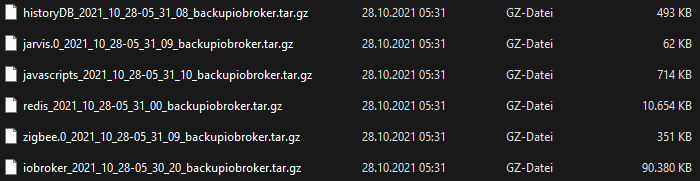
                            f2a89d7e-cb80-4f52-ba21-12d1b5bf8c4f-grafik.png

                            umgestiegen von Proxmox auf Unraid

                            NegaleinN 1 Reply Last reply
                            0
                            • crunchipC crunchip

                              @negalein ich blick da bei dir nicht durch, warum heisst dein iobroker backup Standard....das ist doch das backup vom iobroker und das hat über 400MB?? und das selbige hast du da nochmal als nfs....

                                406.3 MiB [##########]  .nfs00000000001a056f00000028
                              
                                406.3 MiB [######### ]  iobroker_2021_10_15-23_00_10_Standard_backupiobroker.tar.gz
                              

                              bei mir siehts das so aus
                              f2a89d7e-cb80-4f52-ba21-12d1b5bf8c4f-grafik.png

                              NegaleinN Offline
                              NegaleinN Offline
                              Negalein
                              Global Moderator
                              wrote on last edited by
                              #37

                              @crunchip sagte in Proxmox LXC Bootdisk vergrößern:

                              warum heisst dein iobroker backup Standard

                              weil ich es so genannt habe

                              instances - ioBroker.png

                              das ist doch das backup vom iobroker und das hat über 400MB??

                              vermutlich ist meine Installation um einiges größer als bei dir ;)

                              und das selbige hast du da nochmal als nfs....

                              Ja, die sind jetzt weg. Wie @Thomas-Braun sagte, sind/waren das Mountfehler.
                              Ich habe den Backupordner ins NAS gemountet.

                              ° Node.js & System Update ---> sudo apt update, iob stop, sudo apt full-upgrade
                              ° Node.js Fixer ---> iob nodejs-update
                              ° Fixer ---> iob fix

                              crunchipC 1 Reply Last reply
                              0
                              • NegaleinN Negalein

                                @crunchip sagte in Proxmox LXC Bootdisk vergrößern:

                                warum heisst dein iobroker backup Standard

                                weil ich es so genannt habe
                                instances - ioBroker.png

                                das ist doch das backup vom iobroker und das hat über 400MB??

                                vermutlich ist meine Installation um einiges größer als bei dir ;)

                                und das selbige hast du da nochmal als nfs....

                                Ja, die sind jetzt weg. Wie @Thomas-Braun sagte, sind/waren das Mountfehler.
                                Ich habe den Backupordner ins NAS gemountet.

                                crunchipC Away
                                crunchipC Away
                                crunchip
                                Forum Testing Most Active
                                wrote on last edited by
                                #38

                                @negalein sagte in Proxmox LXC Bootdisk vergrößern:

                                vermutlich ist meine Installation um einiges größer als bei dir

                                das bezweifel ich

                                umgestiegen von Proxmox auf Unraid

                                NegaleinN 1 Reply Last reply
                                0
                                • crunchipC crunchip

                                  @negalein sagte in Proxmox LXC Bootdisk vergrößern:

                                  vermutlich ist meine Installation um einiges größer als bei dir

                                  das bezweifel ich

                                  NegaleinN Offline
                                  NegaleinN Offline
                                  Negalein
                                  Global Moderator
                                  wrote on last edited by
                                  #39

                                  @crunchip sagte in Proxmox LXC Bootdisk vergrößern:

                                  das bezweifel ich

                                  dann bin ich überfragt.
                                  Es ist nur das normale Backup von Backitup.

                                  ° Node.js & System Update ---> sudo apt update, iob stop, sudo apt full-upgrade
                                  ° Node.js Fixer ---> iob nodejs-update
                                  ° Fixer ---> iob fix

                                  1 Reply Last reply
                                  0
                                  Reply
                                  • Reply as topic
                                  Log in to reply
                                  • Oldest to Newest
                                  • Newest to Oldest
                                  • Most Votes


                                  Support us

                                  ioBroker
                                  Community Adapters
                                  Donate

                                  262

                                  Online

                                  32.7k

                                  Users

                                  82.5k

                                  Topics

                                  1.3m

                                  Posts
                                  Community
                                  Impressum | Datenschutz-Bestimmungen | Nutzungsbedingungen | Einwilligungseinstellungen
                                  ioBroker Community 2014-2025
                                  logo
                                  • Login

                                  • Don't have an account? Register

                                  • Login or register to search.
                                  • First post
                                    Last post
                                  0
                                  • Home
                                  • Recent
                                  • Tags
                                  • Unread 0
                                  • Categories
                                  • Unreplied
                                  • Popular
                                  • GitHub
                                  • Docu
                                  • Hilfe

