



Skip to content
  • Home
  • Recent
  • Tags
  • 0 Unread 0
  • Categories
  • Unreplied
  • Popular
  • GitHub
  • Docu
  • Hilfe
Skins
  • Light
  • Brite
  • Cerulean
  • Cosmo
  • Flatly
  • Journal
  • Litera
  • Lumen
  • Lux
  • Materia
  • Minty
  • Morph
  • Pulse
  • Sandstone
  • Simplex
  • Sketchy
  • Spacelab
  • United
  • Yeti
  • Zephyr
  • Dark
  • Cyborg
  • Darkly
  • Quartz
  • Slate
  • Solar
  • Superhero
  • Vapor

  • Default (No Skin)
  • No Skin
Collapse
ioBroker Logo

Community Forum

donate donate
  1. ioBroker Community Home
  2. Deutsch
  3. ioBroker Allgemein
  4. BackItUp funktioniert weder mit NFS noch mit CIFS
NEWS

  • Monatsrückblick Januar/Februar 2026 ist online!
    BluefoxB
    Bluefox
    17
    1
    571

  • Jahresrückblick 2025 – unser neuer Blogbeitrag ist online! ✨
    BluefoxB
    Bluefox
    17
    1
    5.5k

  • Neuer Blogbeitrag: Monatsrückblick - Dezember 2025 🎄
    BluefoxB
    Bluefox
    13
    1
    1.4k

BackItUp funktioniert weder mit NFS noch mit CIFS

Scheduled Pinned Locked Moved ioBroker Allgemein
48 Posts 10 Posters 4.5k Views 11 Watching
  • Oldest to Newest
  • Newest to Oldest
  • Most Votes
Reply
  • Reply as topic
Log in to reply
This topic has been deleted. Only users with topic management privileges can see it.
  • M mooly

    @da_woody

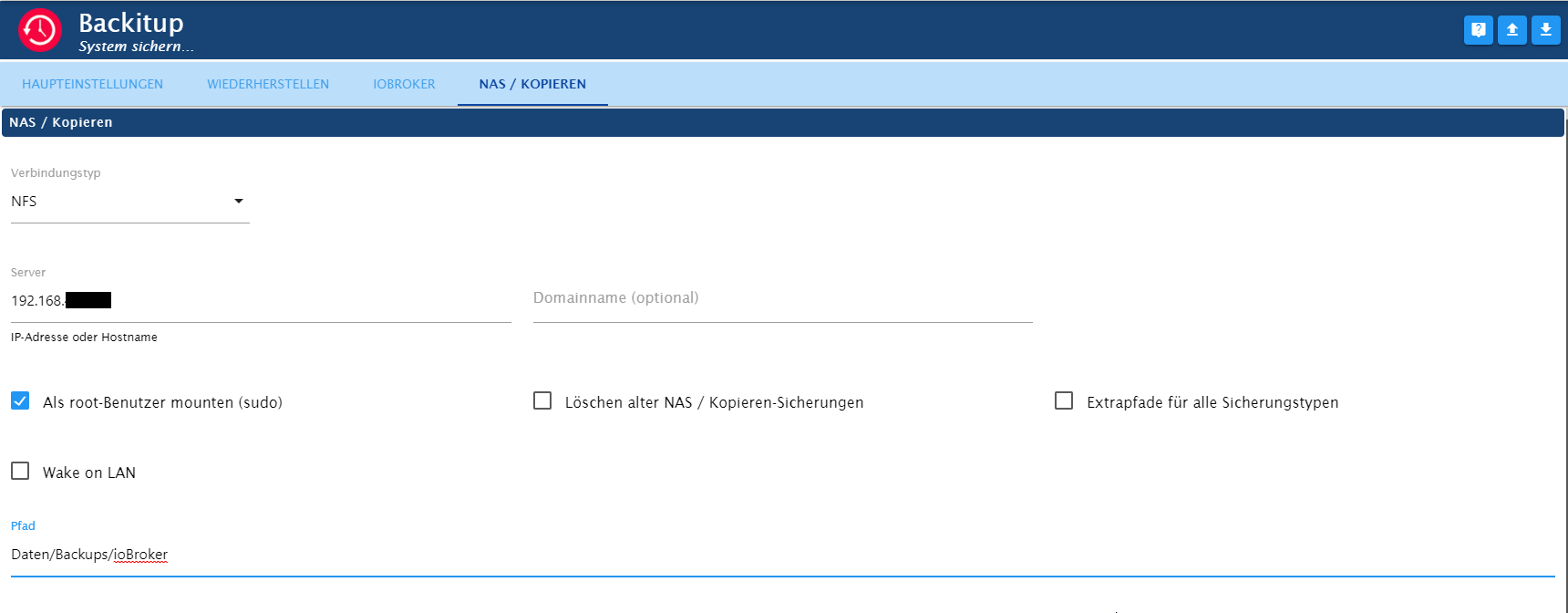
    Bei NFS bekomme ich ein "access Denied" obwohl die IP eingetragen ist.

    Keine Ahnung.

    HomoranH Do not disturb
    HomoranH Do not disturb
    Homoran
    Global Moderator Administrators
    wrote on last edited by
    #38

    @mooly sagte in BackItUp funktioniert weder mit NFS noch mit CIFS:

    @da_woody

    Bei NFS bekomme ich ein "access Denied" obwohl die IP eingetragen ist.

    Keine Ahnung.

    dann hat dein user auf der Syno nicht die richtigen Rechte.
    nicht dass ich wüsste wie man das richtig macht!

    Ich habe dann auf CIFS gewechsrlt und es hat auf Anhieb geschnurrt

    kein Support per PN! - Fragen im Forum stellen -
    Benutzt das Voting rechts unten im Beitrag wenn er euch geholfen hat.
    Das Forum freut sich über eine Spende. Benutzt dazu den Spendenbutton im Header. Danke!
    der Installationsfixer: curl -fsL https://iobroker.net/fix.sh | bash -

    M 1 Reply Last reply
    0
    • HomoranH Homoran

      @mooly sagte in BackItUp funktioniert weder mit NFS noch mit CIFS:

      @da_woody

      Bei NFS bekomme ich ein "access Denied" obwohl die IP eingetragen ist.

      Keine Ahnung.

      dann hat dein user auf der Syno nicht die richtigen Rechte.
      nicht dass ich wüsste wie man das richtig macht!

      Ich habe dann auf CIFS gewechsrlt und es hat auf Anhieb geschnurrt

      M Offline
      M Offline
      mooly
      wrote on last edited by
      #39

      @homoran

      Okay... CIFS ist dann quasi Samba? Oder muss ich CIFS noch in der syno aktivieren?

      LG

      HomoranH 1 Reply Last reply
      0
      • M mooly

        @da_woody

        Bei NFS bekomme ich ein "access Denied" obwohl die IP eingetragen ist.

        Keine Ahnung.

        Thomas BraunT Online
        Thomas BraunT Online
        Thomas Braun
        Most Active
        wrote on last edited by
        #40

        @mooly

        Bei NFS wird nicht mit Passworten gearbeitet sondern über die uid des Users. Die müssen als übereinstimmen. Sonst muss da ein squash eingerichtet werden. Sollte aber in der Anleitung zum NAS stehen.

        Linux-Werkzeugkasten:
        https://forum.iobroker.net/topic/42952/der-kleine-iobroker-linux-werkzeugkasten
        NodeJS Fixer Skript:
        https://forum.iobroker.net/topic/68035/iob-node-fix-skript
        iob_diag: curl -sLf -o diag.sh https://iobroker.net/diag.sh && bash diag.sh

        1 Reply Last reply
        0
        • M mooly

          @homoran

          Okay... CIFS ist dann quasi Samba? Oder muss ich CIFS noch in der syno aktivieren?

          LG

          HomoranH Do not disturb
          HomoranH Do not disturb
          Homoran
          Global Moderator Administrators
          wrote on last edited by
          #41

          @mooly sagte in BackItUp funktioniert weder mit NFS noch mit CIFS:

          CIFS ist dann quasi Samba?

          quasi!

          @mooly sagte in BackItUp funktioniert weder mit NFS noch mit CIFS:

          muss ich CIFS noch in der syno aktivieren?

          möglich (unter Dateidienste), kann mich nicht mehr erinnern

          kein Support per PN! - Fragen im Forum stellen -
          Benutzt das Voting rechts unten im Beitrag wenn er euch geholfen hat.
          Das Forum freut sich über eine Spende. Benutzt dazu den Spendenbutton im Header. Danke!
          der Installationsfixer: curl -fsL https://iobroker.net/fix.sh | bash -

          M 1 Reply Last reply
          0
          • HomoranH Homoran

            @mooly sagte in BackItUp funktioniert weder mit NFS noch mit CIFS:

            CIFS ist dann quasi Samba?

            quasi!

            @mooly sagte in BackItUp funktioniert weder mit NFS noch mit CIFS:

            muss ich CIFS noch in der syno aktivieren?

            möglich (unter Dateidienste), kann mich nicht mehr erinnern

            M Offline
            M Offline
            mooly
            wrote on last edited by mooly
            #42

            @homoran

            Habe es versucht...

            Started iobroker ...
            [DEBUG] [mount] - noserverino option: false
            [DEBUG] [mount] - cifs-mount command: "sudo mount -t cifs -o username=Backup,password=****,rw,file_mode=0777,dir_mode=0777,vers=3.1.1 //192.168.1.222/privat/backups/iobroker /opt/iobroker/backups"
            [DEBUG] [mount] - first mount attempt with smb option failed. try next mount attempt without smb option ...
            [DEBUG] [mount] - cifs-mount command: "sudo mount -t cifs -o username=Backup,password=****,rw,file_mode=0777,dir_mode=0777 //192.168.1.222/privat/backups/iobroker /opt/iobroker/backups"
            [ERROR] [mount] - [undefined Error: Command failed: sudo mount -t cifs -o username=Backup,password=****,rw,file_mode=0777,dir_mode=0777 //192.168.1.222/privat/backups/iobroker /opt/iobroker/backups
            mount: bad usage
            Try 'mount --help' for more information.
            
            [ERROR] [mount] - Error: Command failed: sudo mount -t cifs -o username=Backup ,password=****,rw,file_mode=0777,dir_mode=0777 //192.168.1.222/privat/backups/iobroker /opt/iobroker/backups
            mount: bad usage
            Try 'mount --help' for more information.
            

            MOD-EDIT: Code in code-tags gesetzt!

            HomoranH Thomas BraunT 2 Replies Last reply
            0
            • M mooly

              @homoran

              Habe es versucht...

              Started iobroker ...
              [DEBUG] [mount] - noserverino option: false
              [DEBUG] [mount] - cifs-mount command: "sudo mount -t cifs -o username=Backup,password=****,rw,file_mode=0777,dir_mode=0777,vers=3.1.1 //192.168.1.222/privat/backups/iobroker /opt/iobroker/backups"
              [DEBUG] [mount] - first mount attempt with smb option failed. try next mount attempt without smb option ...
              [DEBUG] [mount] - cifs-mount command: "sudo mount -t cifs -o username=Backup,password=****,rw,file_mode=0777,dir_mode=0777 //192.168.1.222/privat/backups/iobroker /opt/iobroker/backups"
              [ERROR] [mount] - [undefined Error: Command failed: sudo mount -t cifs -o username=Backup,password=****,rw,file_mode=0777,dir_mode=0777 //192.168.1.222/privat/backups/iobroker /opt/iobroker/backups
              mount: bad usage
              Try 'mount --help' for more information.
              
              [ERROR] [mount] - Error: Command failed: sudo mount -t cifs -o username=Backup ,password=****,rw,file_mode=0777,dir_mode=0777 //192.168.1.222/privat/backups/iobroker /opt/iobroker/backups
              mount: bad usage
              Try 'mount --help' for more information.
              

              MOD-EDIT: Code in code-tags gesetzt!

              HomoranH Do not disturb
              HomoranH Do not disturb
              Homoran
              Global Moderator Administrators
              wrote on last edited by Homoran
              #43

              @mooly sagte in BackItUp funktioniert weder mit NFS noch mit CIFS:

              Habe es versucht...

              versuch es beim nächsten mal mit code-tags

              persönliche Daten unkenntlich machen und Konfigs zeigen
              (von backitup und vom share auf der Syno)

              kein Support per PN! - Fragen im Forum stellen -
              Benutzt das Voting rechts unten im Beitrag wenn er euch geholfen hat.
              Das Forum freut sich über eine Spende. Benutzt dazu den Spendenbutton im Header. Danke!
              der Installationsfixer: curl -fsL https://iobroker.net/fix.sh | bash -

              1 Reply Last reply
              0
              • M mooly

                @homoran

                Habe es versucht...

                Started iobroker ...
                [DEBUG] [mount] - noserverino option: false
                [DEBUG] [mount] - cifs-mount command: "sudo mount -t cifs -o username=Backup,password=****,rw,file_mode=0777,dir_mode=0777,vers=3.1.1 //192.168.1.222/privat/backups/iobroker /opt/iobroker/backups"
                [DEBUG] [mount] - first mount attempt with smb option failed. try next mount attempt without smb option ...
                [DEBUG] [mount] - cifs-mount command: "sudo mount -t cifs -o username=Backup,password=****,rw,file_mode=0777,dir_mode=0777 //192.168.1.222/privat/backups/iobroker /opt/iobroker/backups"
                [ERROR] [mount] - [undefined Error: Command failed: sudo mount -t cifs -o username=Backup,password=****,rw,file_mode=0777,dir_mode=0777 //192.168.1.222/privat/backups/iobroker /opt/iobroker/backups
                mount: bad usage
                Try 'mount --help' for more information.
                
                [ERROR] [mount] - Error: Command failed: sudo mount -t cifs -o username=Backup ,password=****,rw,file_mode=0777,dir_mode=0777 //192.168.1.222/privat/backups/iobroker /opt/iobroker/backups
                mount: bad usage
                Try 'mount --help' for more information.
                

                MOD-EDIT: Code in code-tags gesetzt!

                Thomas BraunT Online
                Thomas BraunT Online
                Thomas Braun
                Most Active
                wrote on last edited by Thomas Braun
                #44

                @mooly sagte in BackItUp funktioniert weder mit NFS noch mit CIFS:

                username=Name1 Name2

                Der username darf keine Leerzeichen enthalten.

                Linux-Werkzeugkasten:
                https://forum.iobroker.net/topic/42952/der-kleine-iobroker-linux-werkzeugkasten
                NodeJS Fixer Skript:
                https://forum.iobroker.net/topic/68035/iob-node-fix-skript
                iob_diag: curl -sLf -o diag.sh https://iobroker.net/diag.sh && bash diag.sh

                M 1 Reply Last reply
                0
                • Thomas BraunT Thomas Braun

                  @mooly sagte in BackItUp funktioniert weder mit NFS noch mit CIFS:

                  username=Name1 Name2

                  Der username darf keine Leerzeichen enthalten.

                  M Offline
                  M Offline
                  mooly
                  wrote on last edited by mooly
                  #45

                  @thomas-braun

                  Danke ;-)

                  Habe es geändert, geht aber nicht.

                  Thomas BraunT 1 Reply Last reply
                  0
                  • M mooly

                    @thomas-braun

                    Danke ;-)

                    Habe es geändert, geht aber nicht.

                    Thomas BraunT Online
                    Thomas BraunT Online
                    Thomas Braun
                    Most Active
                    wrote on last edited by
                    #46

                    @mooly sagte in BackItUp funktioniert weder mit NFS noch mit CIFS:

                    geht aber nicht.

                    Das ist keine verwertbare Fehlermeldung.

                    Linux-Werkzeugkasten:
                    https://forum.iobroker.net/topic/42952/der-kleine-iobroker-linux-werkzeugkasten
                    NodeJS Fixer Skript:
                    https://forum.iobroker.net/topic/68035/iob-node-fix-skript
                    iob_diag: curl -sLf -o diag.sh https://iobroker.net/diag.sh && bash diag.sh

                    M 1 Reply Last reply
                    0
                    • Thomas BraunT Thomas Braun

                      @mooly sagte in BackItUp funktioniert weder mit NFS noch mit CIFS:

                      geht aber nicht.

                      Das ist keine verwertbare Fehlermeldung.

                      M Offline
                      M Offline
                      mooly
                      wrote on last edited by
                      #47

                      @thomas-braun

                      Es kommen die gleichen Fehler... die von mir eingefügten Fehlerzeilen sind schon mit anderem Login gemacht... ohne Leerzeichen.

                      HomoranH 1 Reply Last reply
                      0
                      • M mooly

                        @thomas-braun

                        Es kommen die gleichen Fehler... die von mir eingefügten Fehlerzeilen sind schon mit anderem Login gemacht... ohne Leerzeichen.

                        HomoranH Do not disturb
                        HomoranH Do not disturb
                        Homoran
                        Global Moderator Administrators
                        wrote on last edited by
                        #48

                        @mooly sagte in BackItUp funktioniert weder mit NFS noch mit CIFS:

                        Es kommen die gleichen Fehler

                        absolut identisch?

                        und was ist mit

                        @homoran sagte in BackItUp funktioniert weder mit NFS noch mit CIFS:

                        und Konfigs zeigen
                        (von backitup und vom share auf der Syno)

                        ??

                        kein Support per PN! - Fragen im Forum stellen -
                        Benutzt das Voting rechts unten im Beitrag wenn er euch geholfen hat.
                        Das Forum freut sich über eine Spende. Benutzt dazu den Spendenbutton im Header. Danke!
                        der Installationsfixer: curl -fsL https://iobroker.net/fix.sh | bash -

                        1 Reply Last reply
                        0
                        Reply
                        • Reply as topic
                        Log in to reply
                        • Oldest to Newest
                        • Newest to Oldest
                        • Most Votes


                        Support us

                        ioBroker
                        Community Adapters
                        Donate
                        FAQ Cloud / IOT
                        HowTo: Node.js-Update
                        HowTo: Backup/Restore
                        Downloads
                        BLOG

                        672

                        Online

                        32.7k

                        Users

                        82.6k

                        Topics

                        1.3m

                        Posts
                        Community
                        Impressum | Datenschutz-Bestimmungen | Nutzungsbedingungen | Einwilligungseinstellungen
                        ioBroker Community 2014-2025
                        logo
                        • Login

                        • Don't have an account? Register

                        • Login or register to search.
                        • First post
                          Last post
                        0
                        • Home
                        • Recent
                        • Tags
                        • Unread 0
                        • Categories
                        • Unreplied
                        • Popular
                        • GitHub
                        • Docu
                        • Hilfe
