
NEWS




[HowTo] ioBroker unter Docker auf Synology DiskStation
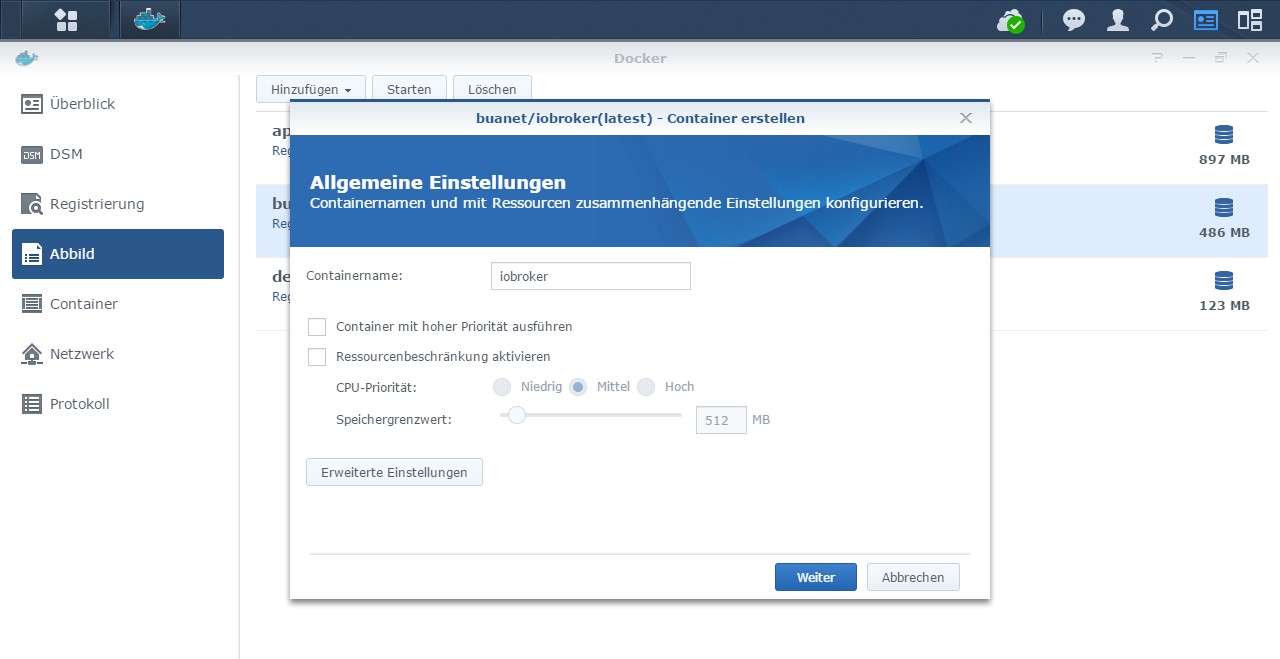
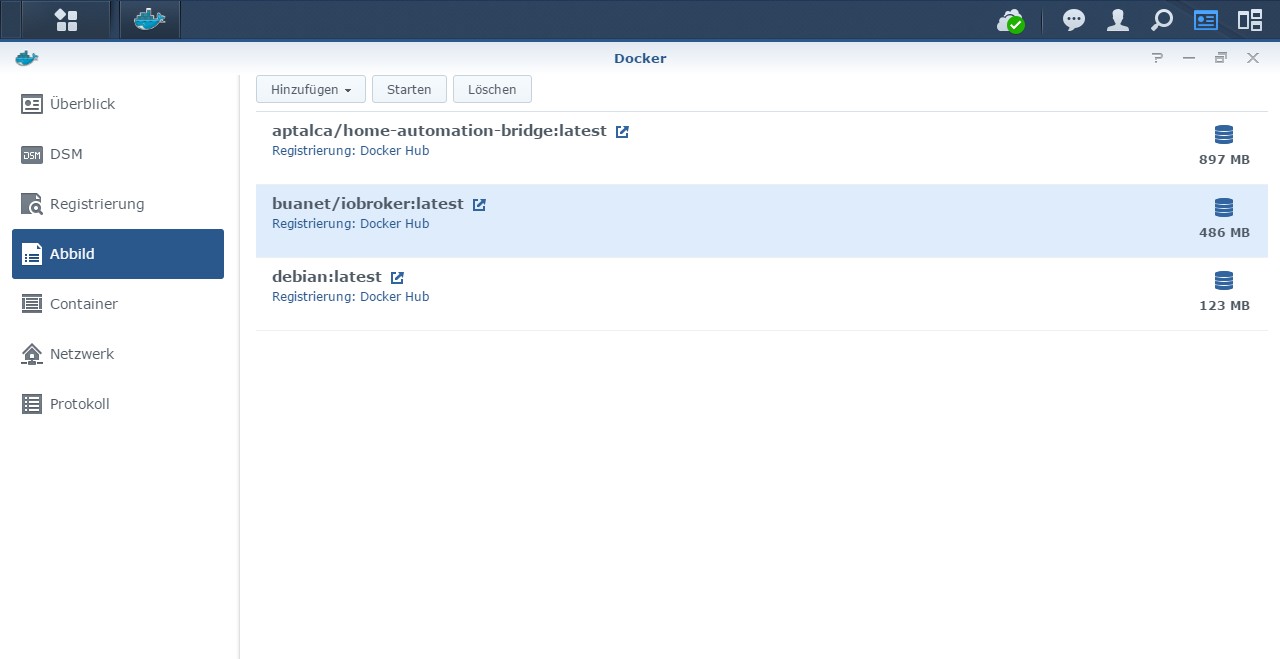
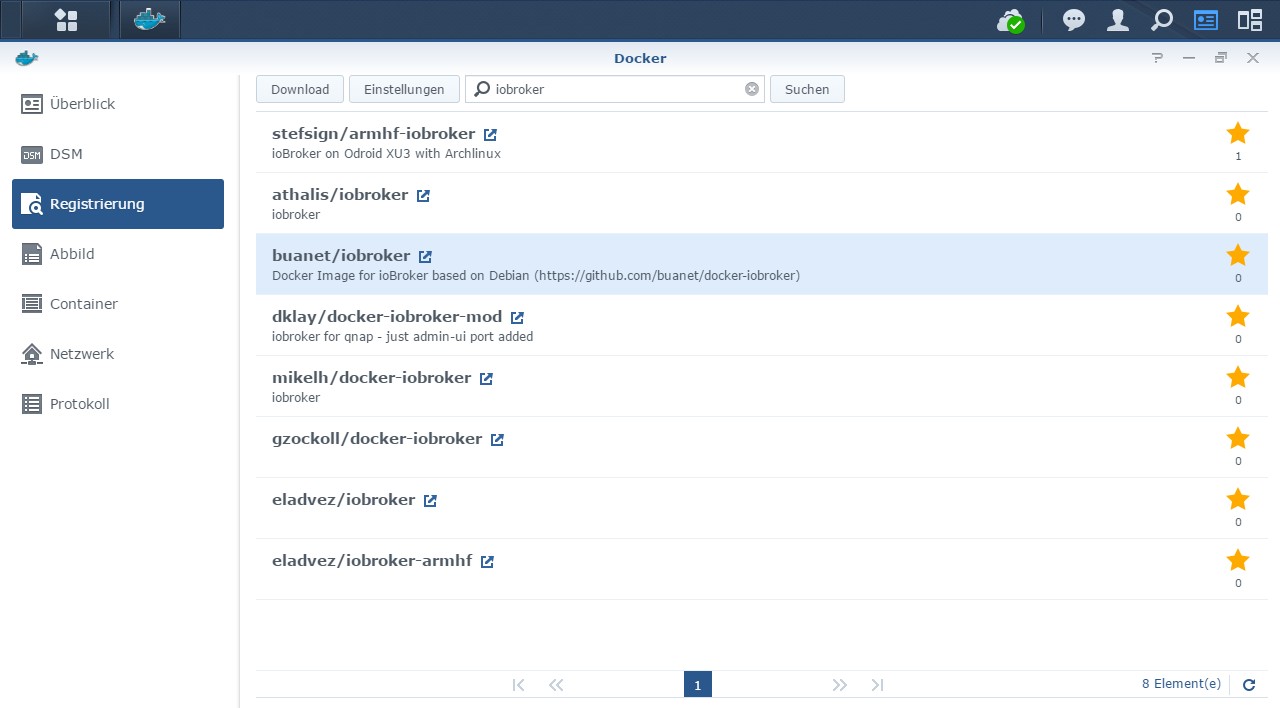

-
@typ1er und @Glasfaser ich danke euch! Also werde ich für den Upgrade ein bissel mehr Zeit einplanen.
-
@andre Hab gesehen du bist and der Version 5.2 dran - hab aber zum Stand nichts gefunden, sollen wir mittesten? Ich bin noch auf JS 3.1.6 und hoffte dass ich mir die Upgrades innerhalb des Containers sparen kann... gib mal bitte kurzen Hinweis wie es weitergeht und wass bezüglich Updaten dann sinnvoll ist... ich würde lieber ein neues Image von dir aufsetzen als mich an die manuellen Updates zu wagen...
-
@andre Hab gesehen du bist and der Version 5.2 dran - hab aber zum Stand nichts gefunden, sollen wir mittesten? Ich bin noch auf JS 3.1.6 und hoffte dass ich mir die Upgrades innerhalb des Containers sparen kann... gib mal bitte kurzen Hinweis wie es weitergeht und wass bezüglich Updaten dann sinnvoll ist... ich würde lieber ein neues Image von dir aufsetzen als mich an die manuellen Updates zu wagen...
@boardy Ja, bin ich dran. Ich hab da so ein paar Sachen die da unbedingt noch mit rein sollen, z.B.:
- Autobuild über Github Actions (dazu habe ich noch einen offenen PR bezüglich iobroker Setup Script)
- Neue Version des Maintenance Scripts aus V5.1.0
- diverses Renaming und Aufräumen
Sobald ich das alles zusammen habe gibts nochmal ne neue beta zum Testen und wenn alles ok ist daraus direkt das Release. Ich gebe dann Bescheid.
PS: Das Upgrade des JS-Controllers wirst du dir aber nicht sparen können, es sei denn du machst das Container Update über Backup und Restore. Wenn du nur den Container updatest und den selben ioBroker Ordner mountest wirst du das js-controller Update trotzdem per Kommandozeile machen müssen.... Müsste hier alles auch drin stehen...
MfG,
André -
@boardy Ja, bin ich dran. Ich hab da so ein paar Sachen die da unbedingt noch mit rein sollen, z.B.:
- Autobuild über Github Actions (dazu habe ich noch einen offenen PR bezüglich iobroker Setup Script)
- Neue Version des Maintenance Scripts aus V5.1.0
- diverses Renaming und Aufräumen
Sobald ich das alles zusammen habe gibts nochmal ne neue beta zum Testen und wenn alles ok ist daraus direkt das Release. Ich gebe dann Bescheid.
PS: Das Upgrade des JS-Controllers wirst du dir aber nicht sparen können, es sei denn du machst das Container Update über Backup und Restore. Wenn du nur den Container updatest und den selben ioBroker Ordner mountest wirst du das js-controller Update trotzdem per Kommandozeile machen müssen.... Müsste hier alles auch drin stehen...
MfG,
André@andre Dann mache ich lieber das Update mit Backup und Restore, aktuell hat mein Admin user keine Rechte auf die Verzeichnisse, alles schon wieder zu lange her und vergessen... SSH Zugang ist idr Auch inaktiv...
Frage: ging das JS Controler Upgrade auch mittels Cron Job aus der Synology heraus? das wäre dann echt ne option - z.B. so mache ich das Portainer Update - dann braucht es keinen SSH Zugang...
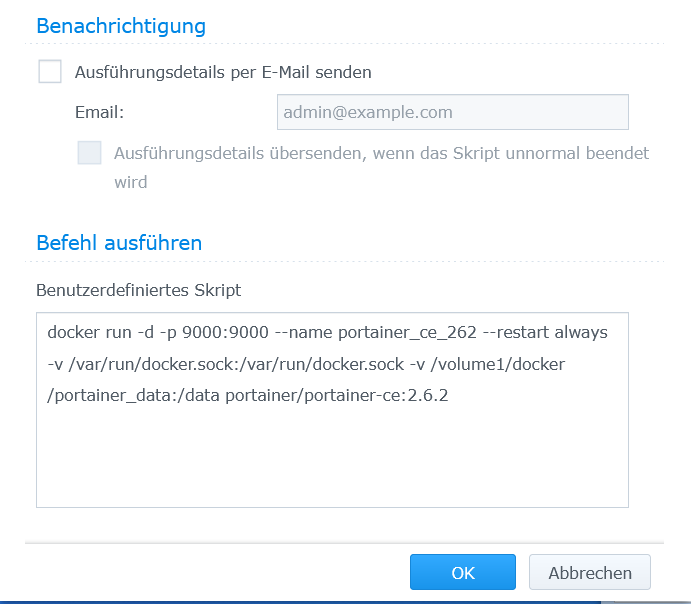
Würde dann das Script mit root gestartet passen?:
pkill -u iobroker
iobroker update
iobroker upgrade selfvorher noch ein cd /opt/iobroker ???
Oder zerschieße ich mir dann alles?Wenn das ginge wäre es sicher auch für andere eine Erleichterung...
LG
Uwe -
@andre Dann mache ich lieber das Update mit Backup und Restore, aktuell hat mein Admin user keine Rechte auf die Verzeichnisse, alles schon wieder zu lange her und vergessen... SSH Zugang ist idr Auch inaktiv...
Frage: ging das JS Controler Upgrade auch mittels Cron Job aus der Synology heraus? das wäre dann echt ne option - z.B. so mache ich das Portainer Update - dann braucht es keinen SSH Zugang...
Würde dann das Script mit root gestartet passen?:
pkill -u iobroker
iobroker update
iobroker upgrade selfvorher noch ein cd /opt/iobroker ???
Oder zerschieße ich mir dann alles?Wenn das ginge wäre es sicher auch für andere eine Erleichterung...
LG
Uwe@boardy sagte in [HowTo] ioBroker unter Docker auf Synology DiskStation:
dann braucht es keinen SSH Zugang...
pkill -u iobroker
iobroker update
iobroker upgrade selfWarum SSH und per Skript , die drei Befehle kannst du doch einfach in der Syn Docker Terminalkonsole eingeben und dann den Container neu starten !
vorher noch ein cd /opt/iobroker ???
siehe hier :
https://forum.iobroker.net/topic/32656/iobroker-admin-über-8081-nicht-mehr-erreichbar-gelöst/11 -
@boardy sagte in [HowTo] ioBroker unter Docker auf Synology DiskStation:
dann braucht es keinen SSH Zugang...
pkill -u iobroker
iobroker update
iobroker upgrade selfWarum SSH und per Skript , die drei Befehle kannst du doch einfach in der Syn Docker Terminalkonsole eingeben und dann den Container neu starten !
vorher noch ein cd /opt/iobroker ???
siehe hier :
https://forum.iobroker.net/topic/32656/iobroker-admin-über-8081-nicht-mehr-erreichbar-gelöst/11@glasfaser Danke teste ich morgen - manchmal denkt man einfach zu kompliziert ;)
Update: Mensch war das easy, das kann Andre bestimmt noch in seiner Anleitung erwähnen - hab seit langem mal alles auf aktuellem Stand (-:
-
Hallo,
ich habe eine Problem mit "Exec" Befehlen welche ich senden möchte in mein Netzwerk, damit Daten von meiner Heizung aktualisiert werden.Exec Befehl sieht so aus Benutzer/Passwort und xxx.xxx.xxx.xxx natürlich mit richtigen Daten befüllt:
curl --digest --user BENUTZER:PASSWORT http://xxx.xxx.xxx.xxx/api/1.0/lookup/1/60/0/2/80/0
curl --digest --user Service:123xyz http://192.168.1.70/api/1.0/lookup/1/60/0/2/80/0Wenn ich den http Aufruf über meinen Laptop mache funktioniert es sofort und die Seite wird aufgeruen/aktualisiert.
Über Blockly und JavaScript funktionisrt das aus dem ioBroker raus leider nicht ("Kommando "exec" erlauben" ist angehackt), im debug und in der Info wird angezeigt das er den Befehl auch ausführt wird.

Kann es sein das es an meiner Konfiguration vom Docker unter Synology liegt in bezug auf den Netzwerk Einstellungen?
Das der Befehl gar nicht in mein Netzwerk kommt?Homematic Verbindung etc. funktioniert alles.
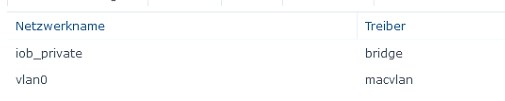

ioBroker 3.3.15
Node.js V12.17.0
JavaScript Adapter 5.2.8 -
Hi,
ich habe ein kleines Problem: ich möchte einen "alten" Multihost Eintrag aus der Konfiguration entfernen. Leider gelingt es mir nicht. Ich bekomme immer wieder die Meldung:
root@iobroker:/opt/iobroker# pkill -u iobroker
root@iobroker:/opt/iobroker# iobroker host remove ioBroker-slave
Cannot execute changes on running system. Stop iobroker first.
root@iobroker:/opt/iobroker#
Ich habe es auch schon mit
pkill ioprobiert. Das macht keinen Unterschied.Hat wer eine Idee, wie ich den alten Host entferne?
Gruß
Rookie
-
Hi,
ich habe ein kleines Problem: ich möchte einen "alten" Multihost Eintrag aus der Konfiguration entfernen. Leider gelingt es mir nicht. Ich bekomme immer wieder die Meldung:
root@iobroker:/opt/iobroker# pkill -u iobroker
root@iobroker:/opt/iobroker# iobroker host remove ioBroker-slave
Cannot execute changes on running system. Stop iobroker first.
root@iobroker:/opt/iobroker#
Ich habe es auch schon mit
pkill ioprobiert. Das macht keinen Unterschied.Hat wer eine Idee, wie ich den alten Host entferne?
Gruß
Rookie
-
root@iobroker:/opt/iobroker# pkill -u iobroker
root@iobroker:/opt/iobroker# iobroker host remove ioBroker-slave
Cannot execute changes on running system. Stop iobroker first.
root@iobroker:/opt/iobroker# iobroker stop
iobroker controller daemon is not running
root@iobroker:/opt/iobroker# iobroker host remove ioBroker-slave
Cannot execute changes on running system. Stop iobroker first.
root@iobroker:/opt/iobroker# pkill io
root@iobroker:/opt/iobroker# iobroker host remove ioBroker-slave
Cannot execute changes on running system. Stop iobroker first.
root@iobroker:/opt/iobroker#
Welche Möglichkeiten gibt es sonst noch?
-
root@iobroker:/opt/iobroker# pkill -u iobroker
root@iobroker:/opt/iobroker# iobroker host remove ioBroker-slave
Cannot execute changes on running system. Stop iobroker first.
root@iobroker:/opt/iobroker# iobroker stop
iobroker controller daemon is not running
root@iobroker:/opt/iobroker# iobroker host remove ioBroker-slave
Cannot execute changes on running system. Stop iobroker first.
root@iobroker:/opt/iobroker# pkill io
root@iobroker:/opt/iobroker# iobroker host remove ioBroker-slave
Cannot execute changes on running system. Stop iobroker first.
root@iobroker:/opt/iobroker#
Welche Möglichkeiten gibt es sonst noch?
@rookie50 sagte in [HowTo] ioBroker unter Docker auf Synology DiskStation:
Welche Möglichkeiten gibt es sonst noch?
evtl muss auch der Slave gestoppt sein. Ansonsten mit
ps auxprüfen ob noch iobroker Prozesse laufen und diese händisch 'killen'.kill -9 PID -
Hi,
ich habe ein kleines Problem: ich möchte einen "alten" Multihost Eintrag aus der Konfiguration entfernen. Leider gelingt es mir nicht. Ich bekomme immer wieder die Meldung:
root@iobroker:/opt/iobroker# pkill -u iobroker
root@iobroker:/opt/iobroker# iobroker host remove ioBroker-slave
Cannot execute changes on running system. Stop iobroker first.
root@iobroker:/opt/iobroker#
Ich habe es auch schon mit
pkill ioprobiert. Das macht keinen Unterschied.Hat wer eine Idee, wie ich den alten Host entferne?
Gruß
Rookie
-
@rookie50 sagte in [HowTo] ioBroker unter Docker auf Synology DiskStation:
Hat wer eine Idee, wie ich den alten Host entferne?
Den Ordner vom alten Host (in der Expertenansicht) löschen ,
dann ioBroker neu starten@glasfaser DANKE!! Das war's. Jetzt ist der Eintrag weg und ich bekomme keine unnötigen logg Meldungen mehr.
Gruß Rookie
-
@rookie50 sagte in [HowTo] ioBroker unter Docker auf Synology DiskStation:
Hat wer eine Idee, wie ich den alten Host entferne?
Den Ordner vom alten Host (in der Expertenansicht) löschen ,
dann ioBroker neu starten@glasfaser DANKE!! Das war's. Jetzt ist der Eintrag weg und ich bekomme keine unnötigen logg Meldungen mehr.
Gruß Rookie
-
Ich hab n Problem..
Hab vor 6 Wochen ein Update auf DSM 7 durchgeführt, lief bis gestern super
Seit heute lässt sich der Container nicht mehr starten. hab nichts verändert.. Zumindest nicht bewusst, folgende Fehlermeldung erhalte ich:Failure failed to create endpoint iobroker on network iob_public: network id "d3a15b5bcdacdd57542ef9c0ff5de34150a682b95f69f87fb0efe58de5eda8ce" not foundKann damit jemand was anfangen?
-
Ich habe Probleme, wenn ich meinen bestehenden Docker Container (aktuell Tag
v5.1.0) auf Taglatest-v5updaten will. Der Container scheint in einer Endlosschleife zu hängen und nach ca. 1 Minute immer wieder neu zu starten.Hier sind die Logs, die meiner Meinung nach nicht richtig gesund aussehen.
what():  basic_string::_M_replace_aux,
/opt/scripts/iobroker_startup.sh: line 505:    96 Aborted                 gosu iobroker node node_modules/iobroker.js-controller/controller.js,
tail: cannot read realtime clock: Operation not permitted,
,
--------------------------------------------------------------------------------,
-------------------------     1970-01-01 01:00:00      -------------------------,
--------------------------------------------------------------------------------,
,
--------------------------------------------------------------------------------,
-----                 Welcome to your ioBroker-container!                  -----,
-----                    Startupscript is now running.                     -----,
-----                          Please be patient!                          -----,
--------------------------------------------------------------------------------,
,
--------------------------------------------------------------------------------,
-----                        Debugging information                         -----,
-----                                                                      -----,
-----                                System                                -----,
-----                    arch:                armv7l                       -----,
-----                                                                      -----,
-----                             Docker-Image                             -----,
-----                    image:               v5.2.0                       -----,
-----                    build:               2021-10-01T03:48:11+00:00    -----,
-----                                                                      -----,
-----                               Versions                               -----,
terminate called after throwing an instance of 'std::length_error',
what():  basic_string::_M_replace_aux,
-----                    node:                                             -----,
terminate called after throwing an instance of 'std::length_error',
what():  basic_string::_M_replace_aux,
-----                    npm:                                              -----,
-----                                                                      -----,
-----                                 ENV                                  -----,
-----                    IOB_MULTIHOST:       slave                        -----,
-----                    IOB_OBJECTSDB_HOST:  192.168.13.10                -----,
-----                    IOB_OBJECTSDB_PORT:  9001                         -----,
-----                    IOB_OBJECTSDB_TYPE:  file                         -----,
-----                    SETGID:              1000                         -----,
-----                    SETUID:              1000                         -----,
-----                    IOB_STATESDB_HOST:   192.168.13.10                -----,
-----                    IOB_STATESDB_PORT:   9000                         -----,
-----                    IOB_STATESDB_TYPE:   file                         -----,
--------------------------------------------------------------------------------,
,
--------------------------------------------------------------------------------,
-----                  Step 1 of 5: Preparing container                   -----,
--------------------------------------------------------------------------------,
,
Nothing to do here.,
,
--------------------------------------------------------------------------------,
-----             Step 2 of 5: Detecting ioBroker installation             -----,
--------------------------------------------------------------------------------,
,
Existing installation of ioBroker detected in /opt/iobroker.,
,
--------------------------------------------------------------------------------,
-----             Step 3 of 5: Checking ioBroker installation              -----,
--------------------------------------------------------------------------------,
,
(Re)Setting folder permissions (This might take a while! Please be patient!)...,
Done.,
,
Fixing "sudo-bug" by replacing sudo in iobroker with gosu...,
cp: preserving times for '/opt/iobroker/iobroker.bak': Operation not permitted,
Done.,
,
terminate called after throwing an instance of 'std::length_error',
what():  basic_string::_M_replace_aux,
iobroker: line 6:    64 Aborted                 gosu iobroker node /opt/iobroker/node_modules/iobroker.js-controller/iobroker.js "$@",
/opt/scripts/iobroker_startup.sh: line 199: [: !=: unary operator expected,
--------------------------------------------------------------------------------,
-----                Step 4 of 5: Applying special settings                -----,
--------------------------------------------------------------------------------,
,
Some adapters have special requirements/ settings which can be activated by the use of environment variables.,
For more information take a look at readme.md on Github!,
,
Multihost is set as "slave" by ENV and external objects db is set.,
Skipping this step...,
Done.,
,
Multihost is set as "slave" by ENV and external states db is set.,
Skipping this step...,
Done.,
,
ENV IOB_OBJECTSDB_TYPE is set and value meets detected ioBroker installation. Nothing to do here.,
ENV IOB_OBJECTSDB_HOST is set and value meets detected ioBroker installation. Nothing to do here.,
ENV IOB_OBJECTSDB_PORT is set and value meets detected ioBroker installation. Nothing to do here.,
,
ENV IOB_STATESDB_TYPE is set and value meets detected ioBroker installation. Nothing to do here.,
ENV IOB_STATESDB_HOST is set and value meets detected ioBroker installation. Nothing to do here.,
ENV IOB_STATESDB_PORT is set and value meets detected ioBroker installation. Nothing to do here.,
,
--------------------------------------------------------------------------------,
-----                    Step 5 of 5: ioBroker startup                     -----,
--------------------------------------------------------------------------------,
,
Starting ioBroker...,
,
Hat da jemand eine Idee zu?
-
Ich habe Probleme, wenn ich meinen bestehenden Docker Container (aktuell Tag
v5.1.0) auf Taglatest-v5updaten will. Der Container scheint in einer Endlosschleife zu hängen und nach ca. 1 Minute immer wieder neu zu starten.Hier sind die Logs, die meiner Meinung nach nicht richtig gesund aussehen.
what():  basic_string::_M_replace_aux,
/opt/scripts/iobroker_startup.sh: line 505:    96 Aborted                 gosu iobroker node node_modules/iobroker.js-controller/controller.js,
tail: cannot read realtime clock: Operation not permitted,
,
--------------------------------------------------------------------------------,
-------------------------     1970-01-01 01:00:00      -------------------------,
--------------------------------------------------------------------------------,
,
--------------------------------------------------------------------------------,
-----                 Welcome to your ioBroker-container!                  -----,
-----                    Startupscript is now running.                     -----,
-----                          Please be patient!                          -----,
--------------------------------------------------------------------------------,
,
--------------------------------------------------------------------------------,
-----                        Debugging information                         -----,
-----                                                                      -----,
-----                                System                                -----,
-----                    arch:                armv7l                       -----,
-----                                                                      -----,
-----                             Docker-Image                             -----,
-----                    image:               v5.2.0                       -----,
-----                    build:               2021-10-01T03:48:11+00:00    -----,
-----                                                                      -----,
-----                               Versions                               -----,
terminate called after throwing an instance of 'std::length_error',
what():  basic_string::_M_replace_aux,
-----                    node:                                             -----,
terminate called after throwing an instance of 'std::length_error',
what():  basic_string::_M_replace_aux,
-----                    npm:                                              -----,
-----                                                                      -----,
-----                                 ENV                                  -----,
-----                    IOB_MULTIHOST:       slave                        -----,
-----                    IOB_OBJECTSDB_HOST:  192.168.13.10                -----,
-----                    IOB_OBJECTSDB_PORT:  9001                         -----,
-----                    IOB_OBJECTSDB_TYPE:  file                         -----,
-----                    SETGID:              1000                         -----,
-----                    SETUID:              1000                         -----,
-----                    IOB_STATESDB_HOST:   192.168.13.10                -----,
-----                    IOB_STATESDB_PORT:   9000                         -----,
-----                    IOB_STATESDB_TYPE:   file                         -----,
--------------------------------------------------------------------------------,
,
--------------------------------------------------------------------------------,
-----                  Step 1 of 5: Preparing container                   -----,
--------------------------------------------------------------------------------,
,
Nothing to do here.,
,
--------------------------------------------------------------------------------,
-----             Step 2 of 5: Detecting ioBroker installation             -----,
--------------------------------------------------------------------------------,
,
Existing installation of ioBroker detected in /opt/iobroker.,
,
--------------------------------------------------------------------------------,
-----             Step 3 of 5: Checking ioBroker installation              -----,
--------------------------------------------------------------------------------,
,
(Re)Setting folder permissions (This might take a while! Please be patient!)...,
Done.,
,
Fixing "sudo-bug" by replacing sudo in iobroker with gosu...,
cp: preserving times for '/opt/iobroker/iobroker.bak': Operation not permitted,
Done.,
,
terminate called after throwing an instance of 'std::length_error',
what():  basic_string::_M_replace_aux,
iobroker: line 6:    64 Aborted                 gosu iobroker node /opt/iobroker/node_modules/iobroker.js-controller/iobroker.js "$@",
/opt/scripts/iobroker_startup.sh: line 199: [: !=: unary operator expected,
--------------------------------------------------------------------------------,
-----                Step 4 of 5: Applying special settings                -----,
--------------------------------------------------------------------------------,
,
Some adapters have special requirements/ settings which can be activated by the use of environment variables.,
For more information take a look at readme.md on Github!,
,
Multihost is set as "slave" by ENV and external objects db is set.,
Skipping this step...,
Done.,
,
Multihost is set as "slave" by ENV and external states db is set.,
Skipping this step...,
Done.,
,
ENV IOB_OBJECTSDB_TYPE is set and value meets detected ioBroker installation. Nothing to do here.,
ENV IOB_OBJECTSDB_HOST is set and value meets detected ioBroker installation. Nothing to do here.,
ENV IOB_OBJECTSDB_PORT is set and value meets detected ioBroker installation. Nothing to do here.,
,
ENV IOB_STATESDB_TYPE is set and value meets detected ioBroker installation. Nothing to do here.,
ENV IOB_STATESDB_HOST is set and value meets detected ioBroker installation. Nothing to do here.,
ENV IOB_STATESDB_PORT is set and value meets detected ioBroker installation. Nothing to do here.,
,
--------------------------------------------------------------------------------,
-----                    Step 5 of 5: ioBroker startup                     -----,
--------------------------------------------------------------------------------,
,
Starting ioBroker...,
,
Hat da jemand eine Idee zu?
@kraxelhuber Ja, habe ich gerade ein Issue zu. Lass mich raten: Docker auf Raspberry (oder zumindest ARM Architektur)???
Ganz unten steht die Lösung: https://github.com/buanet/ioBroker.docker/issues/199
MfG,
André -
@kraxelhuber Ja, habe ich gerade ein Issue zu. Lass mich raten: Docker auf Raspberry (oder zumindest ARM Architektur)???
Ganz unten steht die Lösung: https://github.com/buanet/ioBroker.docker/issues/199
MfG,
André@andre said in [HowTo] ioBroker unter Docker auf Synology DiskStation:
@kraxelhuber Ja, habe ich gerade ein Issue zu. Lass mich raten: Docker auf Raspberry (oder zumindest ARM Architektur)???
Ganz unten steht die Lösung: https://github.com/buanet/ioBroker.docker/issues/199
MfG,
AndréJa, richtig, ich nutze einen Raspberry Pi. Deine Lösung hat aber leider nicht funktioniert. Habe den entsprechenden Terminal Output bei GitHub gepostet.
-
@andre said in [HowTo] ioBroker unter Docker auf Synology DiskStation:
@kraxelhuber Ja, habe ich gerade ein Issue zu. Lass mich raten: Docker auf Raspberry (oder zumindest ARM Architektur)???
Ganz unten steht die Lösung: https://github.com/buanet/ioBroker.docker/issues/199
MfG,
AndréJa, richtig, ich nutze einen Raspberry Pi. Deine Lösung hat aber leider nicht funktioniert. Habe den entsprechenden Terminal Output bei GitHub gepostet.
@andre said in [HowTo] ioBroker unter Docker auf Synology DiskStation:
@kraxelhuber Ja, habe ich gerade ein Issue zu. Lass mich raten: Docker auf Raspberry (oder zumindest ARM Architektur)???
Was habe ich denn zu erwarten, wenn ich den Container auf meiner Synology DS716II+ auf
latest-v5update? Sind hier irgendwelche Schwierigkeiten bekannt? -
@andre said in [HowTo] ioBroker unter Docker auf Synology DiskStation:
@kraxelhuber Ja, habe ich gerade ein Issue zu. Lass mich raten: Docker auf Raspberry (oder zumindest ARM Architektur)???
Was habe ich denn zu erwarten, wenn ich den Container auf meiner Synology DS716II+ auf
latest-v5update? Sind hier irgendwelche Schwierigkeiten bekannt?Ich habˋ gestern versuchsweise einen neuen Container auf meiner QNAP erstellt.
- Backup gem. Anweisung erstellt/hinzugefügt.
- Der Hostname habe ich geändert, Erststart funktktioniert wie erwartet nicht, Workaround
Container startete anschliessend, Backup wurde auch wiederhergestellt. Die Instanzen waren alle da, die installierten Adapter jedoch nicht (ausser den drei Standartadapter). Gibt‘s dazu evtl. eine Idee?
Versionen:
- Container Station QNAP
- Image: v5.2.0-amd64




734
Online32.6k
Users82.2k
Topics1.3m
Posts