




[HowTo] ioBroker unter Docker auf Synology DiskStation

-
@duffbeer2000
ich würde mich ja für eine Teamviewer Session bereit erklären ;-)
gerne per pm...alleine traue ich es mich nicht...
@dos1973 Können wir später gerne machen. Ich bin allerdings noch bei der Arbeit. Sobald ich zuhause bin und die Regierung mir Freizeit gewährt melde ich mich ;)
-
Ich benötige schon wieder euere Hilfe.
Ich bekomme meinen Conbee Stick nicht installiert.
Ich kann keien API Key generieren.Habe bereits in einem anderen Thread nachgefragt, haben aber noch keine Lösung gefunden.
Meine Vermutung ist, dass es ein Netzwerkproblem ist.
Ich habe mit viel Hilfe aus diesem Thread hier, meine ioBroker Installation mit Portainer und MACVLAN ans laufen gebracht.
ioBroker Installation hat die IP Adresse 192.168.178.100 und die Adapter hören auf die IP Adresse 192.168.178.50.
Auch die besagte Phoscon App läuft mit der IP 192.168.178.50:8077
Kann hier jemand helfen?
ioBroker im Docker auf Synology DiskStation DS 716+II mit DSM 6.2.1
- Lightmanager Air / Lupusec XT2 Plus mit div. Fenster- u. Türkontakten, Rauch- u. Bewegungsmelder / Harmony Hub / Fritzbox 7590 OS7
- schaltbare Steckdosen / Alexa Echo Dot 3 / Zigbee USB Stick / diverse Xiaomi Produkte / Xiaomi Yeelight Birnen
-
Ich benötige schon wieder euere Hilfe.
Ich bekomme meinen Conbee Stick nicht installiert.
Ich kann keien API Key generieren.Habe bereits in einem anderen Thread nachgefragt, haben aber noch keine Lösung gefunden.
Meine Vermutung ist, dass es ein Netzwerkproblem ist.
Ich habe mit viel Hilfe aus diesem Thread hier, meine ioBroker Installation mit Portainer und MACVLAN ans laufen gebracht.
ioBroker Installation hat die IP Adresse 192.168.178.100 und die Adapter hören auf die IP Adresse 192.168.178.50.
Auch die besagte Phoscon App läuft mit der IP 192.168.178.50:8077
Kann hier jemand helfen?
-
Ich benötige schon wieder euere Hilfe.
Ich bekomme meinen Conbee Stick nicht installiert.
Ich kann keien API Key generieren.Habe bereits in einem anderen Thread nachgefragt, haben aber noch keine Lösung gefunden.
Meine Vermutung ist, dass es ein Netzwerkproblem ist.
Ich habe mit viel Hilfe aus diesem Thread hier, meine ioBroker Installation mit Portainer und MACVLAN ans laufen gebracht.
ioBroker Installation hat die IP Adresse 192.168.178.100 und die Adapter hören auf die IP Adresse 192.168.178.50.
Auch die besagte Phoscon App läuft mit der IP 192.168.178.50:8077
Kann hier jemand helfen?
Hier der Link wo @StM47 die Probleme hat , sonnst wird dieser Thread zu gespammt
Conbee USB Stick auf Synology Diskstation im Docker Container
Synology 918+ 16GB - ioBroker in Docker v9 , VISO auf Trekstor Primebook C13 13,3" , Hikvision Domkameras mit Surveillance Station .. CCU RaspberryMatic in Synology VM .. Zigbee CC2538+CC2592 .. Sonoff .. KNX .. Modbus ..
-
Hier der Link wo @StM47 die Probleme hat , sonnst wird dieser Thread zu gespammt
Conbee USB Stick auf Synology Diskstation im Docker Container
Danke
-
@StM47 Versuch mal
iobroker stop admin.0
iobroker set admin.0 --bind 192.168.178.100
iobroker start admin.0
Die Adapter werden nach den restore installiert, das kann auch gerne mal 1-2 Stunden dauern - je nach Menge und Leistung des Hosts.
@darkiop sagte in [HowTo][Anleitung] Installation ioBroker in Docker auf Synology DiskStation:
Versuch mal
iobroker stop admin.0 iobroker set admin.0 --bind 192.168.178.100 iobroker start admin.0
Die Adapter werden nach den restore installiert, das kann auch gerne mal 1-2 Stunden dauern - je nach Menge und Leistung des Hosts.Ich habe iobroker erneut wiederherstellen müssen, weil ich das Ganze jetzt doch im Bridge Modus laufen lassen möchte. Die IP Adresse soll jetzt die Gleiche sein, wie die von der Syno Diskstation.
Ich habe die oben stehenden Befehle mit der neuen IP 192.168.178.50 ausgeführt. Ich dachte, es funktioniert auch anders herum.
Leider bekomme ich jetzt Fehlermeldungen.
Kannst du dir das mal anschauen?
<
,
,------------------------------------------------------------
,-----   Step 2 of 5: Detecting ioBroker installation   -----
,------------------------------------------------------------
,
,Installation of ioBroker detected in /opt/iobroker.
,
,------------------------------------------------------------
,-----   Step 3 of 5: Checking ioBroker installation    -----
,------------------------------------------------------------
,
,This is NOT the first run of the container. Some Steps will be skipped.
,
,(Re)Setting folder permissions (This might take a while! Please be patient!)...
,Done.
,
,Fixing "sudo-bug" by replacing sudo with gosu...
,Done.
,
,------------------------------------------------------------
,-----      Step 4 of 5: Applying special settings      -----
,------------------------------------------------------------
,
,Some adapters have special requirements which can be activated by the use of environment variables.
,For more information take a look at readme.md
,
,------------------------------------------------------------
,-----          Step 5 of 5: ioBroker startup           -----
,------------------------------------------------------------
,
,Starting ioBroker...
,
,host.iobroker check instance "system.adapter.admin.0" for host "iobroker"
,host.iobroker check instance "system.adapter.alexa2.0" for host "iobroker"
,host.iobroker check instance "system.adapter.backitup.0" for host "iobroker"
,host.iobroker check instance "system.adapter.broadlink2.0" for host "iobroker"
,host.iobroker check instance "system.adapter.daswetter.0" for host "iobroker"
,host.iobroker check instance "system.adapter.discovery.0" for host "iobroker"
,host.iobroker check instance "system.adapter.dwd.0" for host "iobroker"
,host.iobroker check instance "system.adapter.fritzbox.0" for host "iobroker"
,host.iobroker check instance "system.adapter.fritzdect.0" for host "iobroker"
,host.iobroker check instance "system.adapter.habpanel.0" for host "iobroker"
,host.iobroker check instance "system.adapter.harmony.0" for host "iobroker"
,host.iobroker check instance "system.adapter.history.0" for host "iobroker"
,host.iobroker check instance "system.adapter.husq-automower.0" for host "iobroker"
,host.iobroker check instance "system.adapter.ical.1" for host "iobroker"
,host.iobroker check instance "system.adapter.ical.2" for host "iobroker"
,host.iobroker check instance "system.adapter.info.0" for host "iobroker"
,host.iobroker check instance "system.adapter.iot.0" for host "iobroker"
,host.iobroker check instance "system.adapter.iqontrol.0" for host "iobroker"
,host.iobroker check instance "system.adapter.javascript.0" for host "iobroker"
,host.iobroker check instance "system.adapter.lupusec.0" for host "iobroker"
,host.iobroker check instance "system.adapter.mobile.0" for host "iobroker"
,host.iobroker check instance "system.adapter.node-red.0" for host "iobroker"
,host.iobroker check instance "system.adapter.openweathermap.0" for host "iobroker"
,host.iobroker check instance "system.adapter.places.0" for host "iobroker"
,host.iobroker check instance "system.adapter.pushover.0" for host "iobroker"
,host.iobroker check instance "system.adapter.radar2.0" for host "iobroker"
,host.iobroker check instance "system.adapter.sayit.0" for host "iobroker"
,host.iobroker check instance "system.adapter.scenes.0" for host "iobroker"
,host.iobroker check instance "system.adapter.snmp.0" for host "iobroker"
,host.iobroker check instance "system.adapter.synology.0" for host "iobroker"
,host.iobroker check instance "system.adapter.systeminfo.0" for host "iobroker"
,host.iobroker check instance "system.adapter.tankerkoenig.0" for host "iobroker"
,host.iobroker check instance "system.adapter.telegram.0" for host "iobroker"
,host.iobroker check instance "system.adapter.terminal.0" for host "iobroker"
,host.iobroker check instance "system.adapter.text2command.0" for host "iobroker"
,host.iobroker check instance "system.adapter.tileboard.0" for host "iobroker"
,host.iobroker check instance "system.adapter.tr-064-community.0" for host "iobroker"
,host.iobroker check instance "system.adapter.tuya.0" for host "iobroker"
,host.iobroker check instance "system.adapter.upnp.0" for host "iobroker"
,host.iobroker check instance "system.adapter.viessmannapi.0" for host "iobroker"
,host.iobroker check instance "system.adapter.virtualpowermeter.0" for host "iobroker"
,host.iobroker check instance "system.adapter.vis-fancyswitch.0" for host "iobroker"
,host.iobroker check instance "system.adapter.vis-google-fonts.0" for host "iobroker"
,host.iobroker check instance "system.adapter.vis-history.0" for host "iobroker"
,host.iobroker check instance "system.adapter.vis-hqwidgets.0" for host "iobroker"
,host.iobroker check instance "system.adapter.vis-jqui-mfd.0" for host "iobroker"
,host.iobroker check instance "system.adapter.vis-map.0" for host "iobroker"
,host.iobroker check instance "system.adapter.vis-metro.0" for host "iobroker"
,host.iobroker check instance "system.adapter.vis-timeandweather.0" for host "iobroker"
,host.iobroker check instance "system.adapter.vis.0" for host "iobroker"
,host.iobroker check instance "system.adapter.web.0" for host "iobroker"
,host.iobroker check instance "system.adapter.yahka.0" for host "iobroker"
,host.iobroker check instance "system.adapter.yeelight-2.0" for host "iobroker"
,host.iobroker check instance "system.adapter.zigbee.0" for host "iobroker"
,{ Error: listen EADDRNOTAVAIL: address not available 192.168.178.50:8081
,    at Server.setupListenHandle [as _listen2] (net.js:1263:19)
,    at listenInCluster (net.js:1328:12)
,    at doListen (net.js:1461:7)
,    at process._tickCallback (internal/process/next_tick.js:63:19)
,  code: 'EADDRNOTAVAIL',
,  errno: 'EADDRNOTAVAIL',
,  syscall: 'listen',
,  address: '192.168.178.50',
,  port: 8081 }
,
,================================== > LOG REDIRECT system.adapter.admin.0 => false [Process stopped]
,================================== > LOG REDIRECT system.adapter.admin.0 => false [system.adapter.admin.0.logging]
,/>
Mod-Edit: Code/Log in Code Tags gepackt. Bitte benutzt die Code Tags Funktion -> </>
Hier gehts zur Hilfe.ioBroker im Docker auf Synology DiskStation DS 716+II mit DSM 6.2.1
- Lightmanager Air / Lupusec XT2 Plus mit div. Fenster- u. Türkontakten, Rauch- u. Bewegungsmelder / Harmony Hub / Fritzbox 7590 OS7
- schaltbare Steckdosen / Alexa Echo Dot 3 / Zigbee USB Stick / diverse Xiaomi Produkte / Xiaomi Yeelight Birnen
-
@darkiop sagte in [HowTo][Anleitung] Installation ioBroker in Docker auf Synology DiskStation:
Versuch mal
iobroker stop admin.0 iobroker set admin.0 --bind 192.168.178.100 iobroker start admin.0
Die Adapter werden nach den restore installiert, das kann auch gerne mal 1-2 Stunden dauern - je nach Menge und Leistung des Hosts.Ich habe iobroker erneut wiederherstellen müssen, weil ich das Ganze jetzt doch im Bridge Modus laufen lassen möchte. Die IP Adresse soll jetzt die Gleiche sein, wie die von der Syno Diskstation.
Ich habe die oben stehenden Befehle mit der neuen IP 192.168.178.50 ausgeführt. Ich dachte, es funktioniert auch anders herum.
Leider bekomme ich jetzt Fehlermeldungen.
Kannst du dir das mal anschauen?
<
,
,------------------------------------------------------------
,-----   Step 2 of 5: Detecting ioBroker installation   -----
,------------------------------------------------------------
,
,Installation of ioBroker detected in /opt/iobroker.
,
,------------------------------------------------------------
,-----   Step 3 of 5: Checking ioBroker installation    -----
,------------------------------------------------------------
,
,This is NOT the first run of the container. Some Steps will be skipped.
,
,(Re)Setting folder permissions (This might take a while! Please be patient!)...
,Done.
,
,Fixing "sudo-bug" by replacing sudo with gosu...
,Done.
,
,------------------------------------------------------------
,-----      Step 4 of 5: Applying special settings      -----
,------------------------------------------------------------
,
,Some adapters have special requirements which can be activated by the use of environment variables.
,For more information take a look at readme.md
,
,------------------------------------------------------------
,-----          Step 5 of 5: ioBroker startup           -----
,------------------------------------------------------------
,
,Starting ioBroker...
,
,host.iobroker check instance "system.adapter.admin.0" for host "iobroker"
,host.iobroker check instance "system.adapter.alexa2.0" for host "iobroker"
,host.iobroker check instance "system.adapter.backitup.0" for host "iobroker"
,host.iobroker check instance "system.adapter.broadlink2.0" for host "iobroker"
,host.iobroker check instance "system.adapter.daswetter.0" for host "iobroker"
,host.iobroker check instance "system.adapter.discovery.0" for host "iobroker"
,host.iobroker check instance "system.adapter.dwd.0" for host "iobroker"
,host.iobroker check instance "system.adapter.fritzbox.0" for host "iobroker"
,host.iobroker check instance "system.adapter.fritzdect.0" for host "iobroker"
,host.iobroker check instance "system.adapter.habpanel.0" for host "iobroker"
,host.iobroker check instance "system.adapter.harmony.0" for host "iobroker"
,host.iobroker check instance "system.adapter.history.0" for host "iobroker"
,host.iobroker check instance "system.adapter.husq-automower.0" for host "iobroker"
,host.iobroker check instance "system.adapter.ical.1" for host "iobroker"
,host.iobroker check instance "system.adapter.ical.2" for host "iobroker"
,host.iobroker check instance "system.adapter.info.0" for host "iobroker"
,host.iobroker check instance "system.adapter.iot.0" for host "iobroker"
,host.iobroker check instance "system.adapter.iqontrol.0" for host "iobroker"
,host.iobroker check instance "system.adapter.javascript.0" for host "iobroker"
,host.iobroker check instance "system.adapter.lupusec.0" for host "iobroker"
,host.iobroker check instance "system.adapter.mobile.0" for host "iobroker"
,host.iobroker check instance "system.adapter.node-red.0" for host "iobroker"
,host.iobroker check instance "system.adapter.openweathermap.0" for host "iobroker"
,host.iobroker check instance "system.adapter.places.0" for host "iobroker"
,host.iobroker check instance "system.adapter.pushover.0" for host "iobroker"
,host.iobroker check instance "system.adapter.radar2.0" for host "iobroker"
,host.iobroker check instance "system.adapter.sayit.0" for host "iobroker"
,host.iobroker check instance "system.adapter.scenes.0" for host "iobroker"
,host.iobroker check instance "system.adapter.snmp.0" for host "iobroker"
,host.iobroker check instance "system.adapter.synology.0" for host "iobroker"
,host.iobroker check instance "system.adapter.systeminfo.0" for host "iobroker"
,host.iobroker check instance "system.adapter.tankerkoenig.0" for host "iobroker"
,host.iobroker check instance "system.adapter.telegram.0" for host "iobroker"
,host.iobroker check instance "system.adapter.terminal.0" for host "iobroker"
,host.iobroker check instance "system.adapter.text2command.0" for host "iobroker"
,host.iobroker check instance "system.adapter.tileboard.0" for host "iobroker"
,host.iobroker check instance "system.adapter.tr-064-community.0" for host "iobroker"
,host.iobroker check instance "system.adapter.tuya.0" for host "iobroker"
,host.iobroker check instance "system.adapter.upnp.0" for host "iobroker"
,host.iobroker check instance "system.adapter.viessmannapi.0" for host "iobroker"
,host.iobroker check instance "system.adapter.virtualpowermeter.0" for host "iobroker"
,host.iobroker check instance "system.adapter.vis-fancyswitch.0" for host "iobroker"
,host.iobroker check instance "system.adapter.vis-google-fonts.0" for host "iobroker"
,host.iobroker check instance "system.adapter.vis-history.0" for host "iobroker"
,host.iobroker check instance "system.adapter.vis-hqwidgets.0" for host "iobroker"
,host.iobroker check instance "system.adapter.vis-jqui-mfd.0" for host "iobroker"
,host.iobroker check instance "system.adapter.vis-map.0" for host "iobroker"
,host.iobroker check instance "system.adapter.vis-metro.0" for host "iobroker"
,host.iobroker check instance "system.adapter.vis-timeandweather.0" for host "iobroker"
,host.iobroker check instance "system.adapter.vis.0" for host "iobroker"
,host.iobroker check instance "system.adapter.web.0" for host "iobroker"
,host.iobroker check instance "system.adapter.yahka.0" for host "iobroker"
,host.iobroker check instance "system.adapter.yeelight-2.0" for host "iobroker"
,host.iobroker check instance "system.adapter.zigbee.0" for host "iobroker"
,{ Error: listen EADDRNOTAVAIL: address not available 192.168.178.50:8081
,    at Server.setupListenHandle [as _listen2] (net.js:1263:19)
,    at listenInCluster (net.js:1328:12)
,    at doListen (net.js:1461:7)
,    at process._tickCallback (internal/process/next_tick.js:63:19)
,  code: 'EADDRNOTAVAIL',
,  errno: 'EADDRNOTAVAIL',
,  syscall: 'listen',
,  address: '192.168.178.50',
,  port: 8081 }
,
,================================== > LOG REDIRECT system.adapter.admin.0 => false [Process stopped]
,================================== > LOG REDIRECT system.adapter.admin.0 => false [system.adapter.admin.0.logging]
,/>
Mod-Edit: Code/Log in Code Tags gepackt. Bitte benutzt die Code Tags Funktion -> </>
Hier gehts zur Hilfe.@StM47 sagte in [HowTo][Anleitung] Installation ioBroker in Docker auf Synology DiskStation:
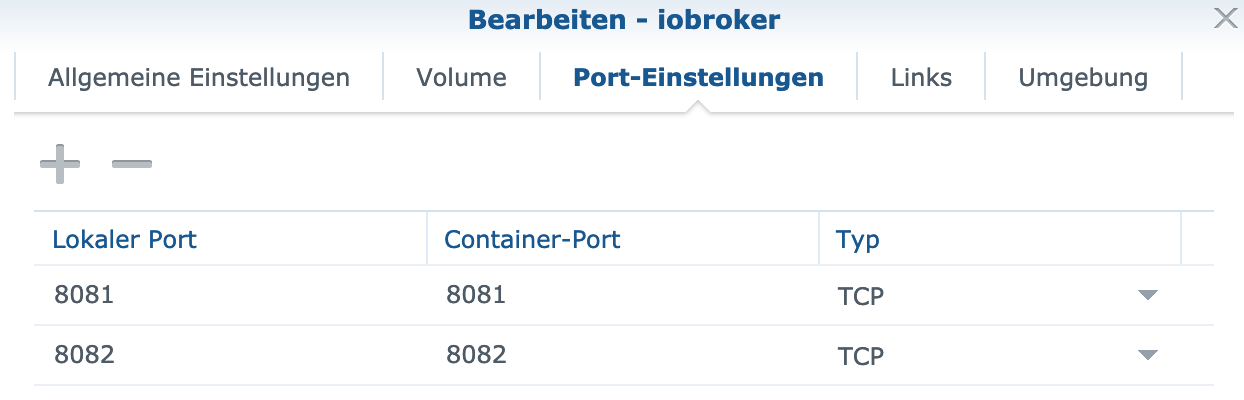
Error: listen EADDRNOTAVAIL: address not available 192.168.178.50:8081
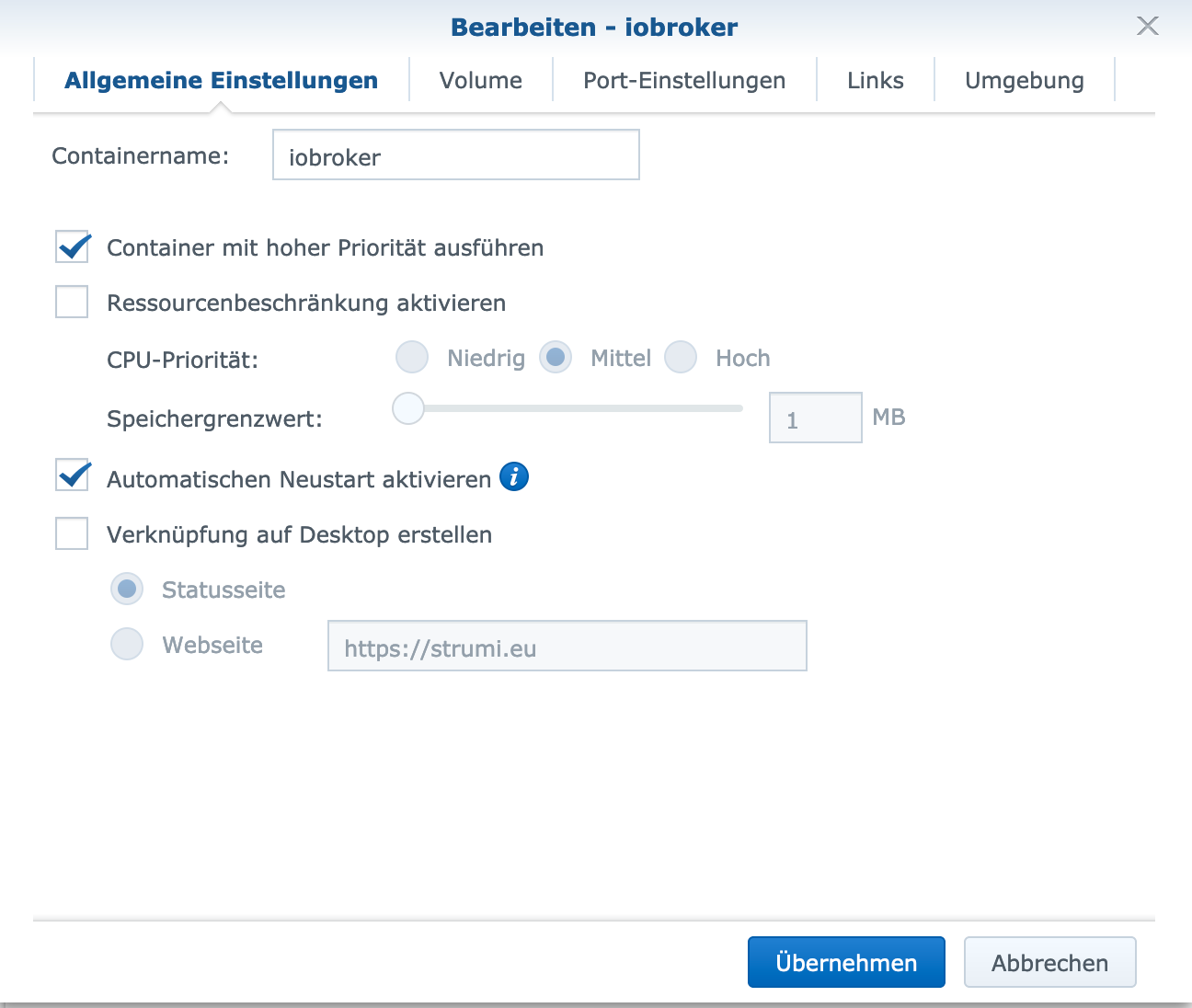
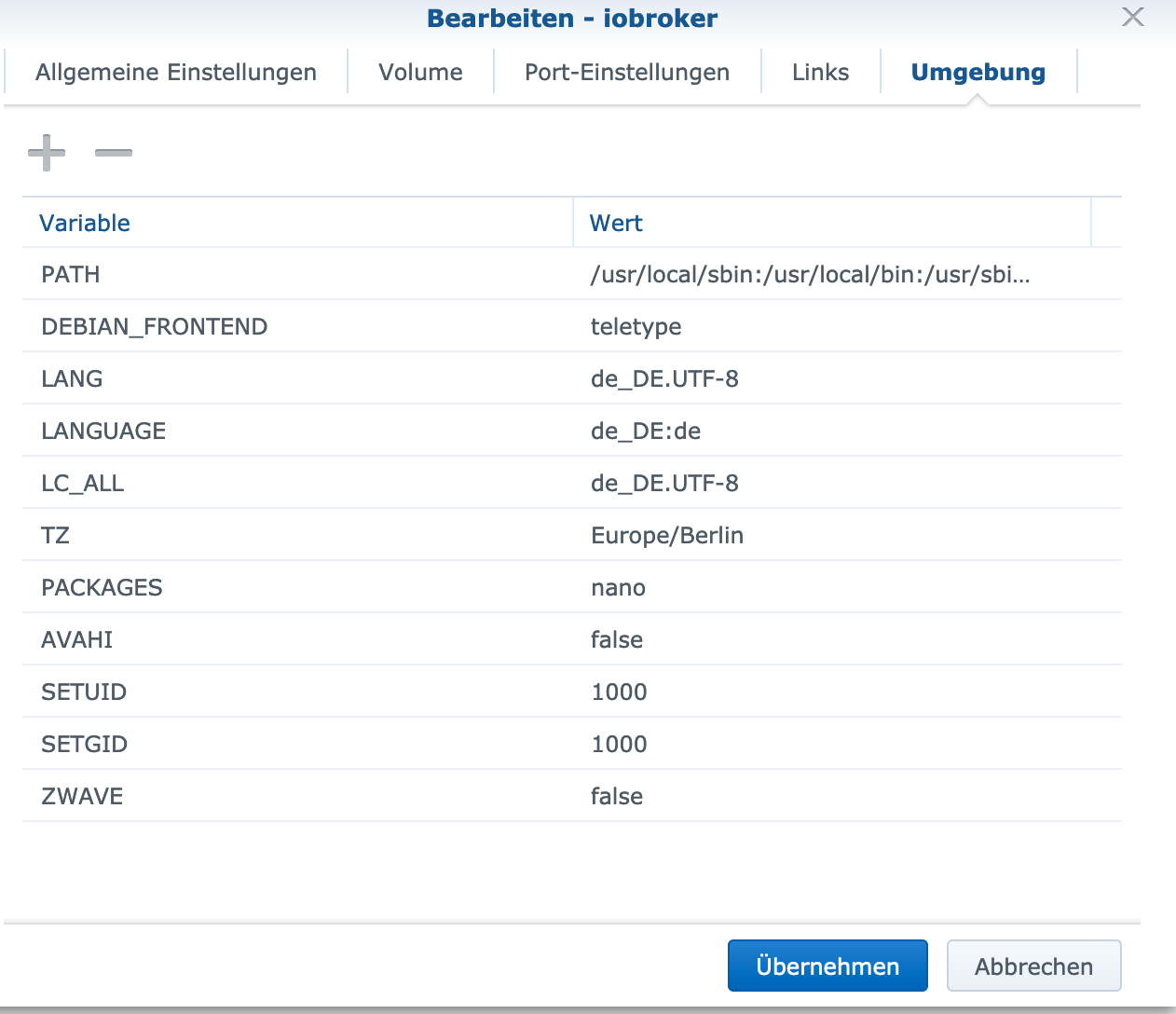
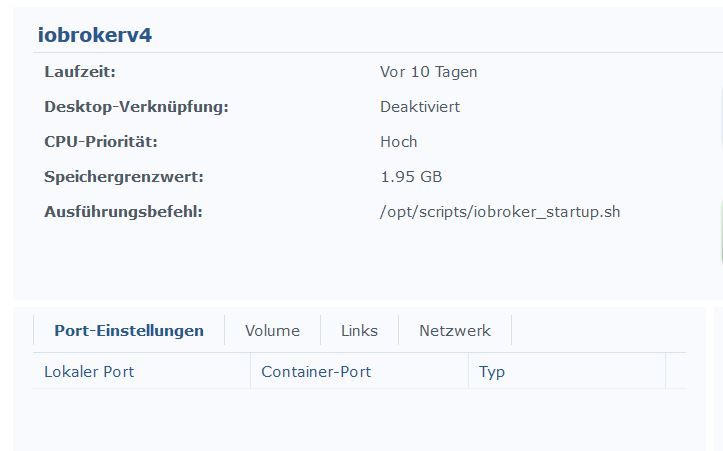
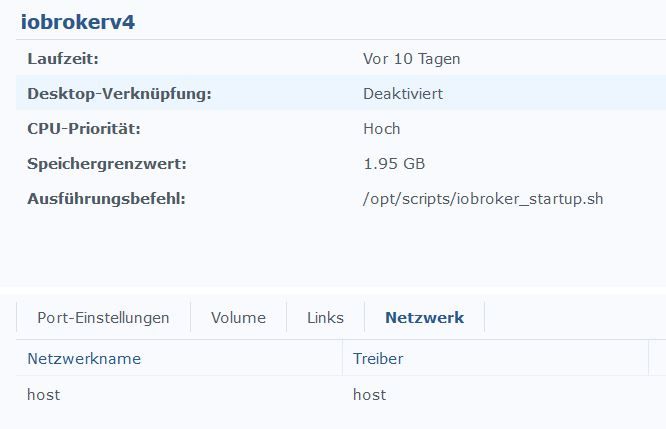
zeig bitte mal Screenshots deiner Dockereinstellungen?
Vor-allem die der Port-Einstellungen.° Node.js & System Update ---> sudo apt update, iob stop, sudo apt full-upgrade
° Node.js Fixer ---> iob nodejs-update
° Fixer ---> iob fix -
@StM47 sagte in [HowTo][Anleitung] Installation ioBroker in Docker auf Synology DiskStation:
Error: listen EADDRNOTAVAIL: address not available 192.168.178.50:8081
zeig bitte mal Screenshots deiner Dockereinstellungen?
Vor-allem die der Port-Einstellungen.ioBroker im Docker auf Synology DiskStation DS 716+II mit DSM 6.2.1
- Lightmanager Air / Lupusec XT2 Plus mit div. Fenster- u. Türkontakten, Rauch- u. Bewegungsmelder / Harmony Hub / Fritzbox 7590 OS7
- schaltbare Steckdosen / Alexa Echo Dot 3 / Zigbee USB Stick / diverse Xiaomi Produkte / Xiaomi Yeelight Birnen
-
@darkiop sagte in [HowTo][Anleitung] Installation ioBroker in Docker auf Synology DiskStation:
Versuch mal
iobroker stop admin.0 iobroker set admin.0 --bind 192.168.178.100 iobroker start admin.0
Die Adapter werden nach den restore installiert, das kann auch gerne mal 1-2 Stunden dauern - je nach Menge und Leistung des Hosts.Ich habe iobroker erneut wiederherstellen müssen, weil ich das Ganze jetzt doch im Bridge Modus laufen lassen möchte. Die IP Adresse soll jetzt die Gleiche sein, wie die von der Syno Diskstation.
Ich habe die oben stehenden Befehle mit der neuen IP 192.168.178.50 ausgeführt. Ich dachte, es funktioniert auch anders herum.
Leider bekomme ich jetzt Fehlermeldungen.
Kannst du dir das mal anschauen?
<
,
,------------------------------------------------------------
,-----   Step 2 of 5: Detecting ioBroker installation   -----
,------------------------------------------------------------
,
,Installation of ioBroker detected in /opt/iobroker.
,
,------------------------------------------------------------
,-----   Step 3 of 5: Checking ioBroker installation    -----
,------------------------------------------------------------
,
,This is NOT the first run of the container. Some Steps will be skipped.
,
,(Re)Setting folder permissions (This might take a while! Please be patient!)...
,Done.
,
,Fixing "sudo-bug" by replacing sudo with gosu...
,Done.
,
,------------------------------------------------------------
,-----      Step 4 of 5: Applying special settings      -----
,------------------------------------------------------------
,
,Some adapters have special requirements which can be activated by the use of environment variables.
,For more information take a look at readme.md
,
,------------------------------------------------------------
,-----          Step 5 of 5: ioBroker startup           -----
,------------------------------------------------------------
,
,Starting ioBroker...
,
,host.iobroker check instance "system.adapter.admin.0" for host "iobroker"
,host.iobroker check instance "system.adapter.alexa2.0" for host "iobroker"
,host.iobroker check instance "system.adapter.backitup.0" for host "iobroker"
,host.iobroker check instance "system.adapter.broadlink2.0" for host "iobroker"
,host.iobroker check instance "system.adapter.daswetter.0" for host "iobroker"
,host.iobroker check instance "system.adapter.discovery.0" for host "iobroker"
,host.iobroker check instance "system.adapter.dwd.0" for host "iobroker"
,host.iobroker check instance "system.adapter.fritzbox.0" for host "iobroker"
,host.iobroker check instance "system.adapter.fritzdect.0" for host "iobroker"
,host.iobroker check instance "system.adapter.habpanel.0" for host "iobroker"
,host.iobroker check instance "system.adapter.harmony.0" for host "iobroker"
,host.iobroker check instance "system.adapter.history.0" for host "iobroker"
,host.iobroker check instance "system.adapter.husq-automower.0" for host "iobroker"
,host.iobroker check instance "system.adapter.ical.1" for host "iobroker"
,host.iobroker check instance "system.adapter.ical.2" for host "iobroker"
,host.iobroker check instance "system.adapter.info.0" for host "iobroker"
,host.iobroker check instance "system.adapter.iot.0" for host "iobroker"
,host.iobroker check instance "system.adapter.iqontrol.0" for host "iobroker"
,host.iobroker check instance "system.adapter.javascript.0" for host "iobroker"
,host.iobroker check instance "system.adapter.lupusec.0" for host "iobroker"
,host.iobroker check instance "system.adapter.mobile.0" for host "iobroker"
,host.iobroker check instance "system.adapter.node-red.0" for host "iobroker"
,host.iobroker check instance "system.adapter.openweathermap.0" for host "iobroker"
,host.iobroker check instance "system.adapter.places.0" for host "iobroker"
,host.iobroker check instance "system.adapter.pushover.0" for host "iobroker"
,host.iobroker check instance "system.adapter.radar2.0" for host "iobroker"
,host.iobroker check instance "system.adapter.sayit.0" for host "iobroker"
,host.iobroker check instance "system.adapter.scenes.0" for host "iobroker"
,host.iobroker check instance "system.adapter.snmp.0" for host "iobroker"
,host.iobroker check instance "system.adapter.synology.0" for host "iobroker"
,host.iobroker check instance "system.adapter.systeminfo.0" for host "iobroker"
,host.iobroker check instance "system.adapter.tankerkoenig.0" for host "iobroker"
,host.iobroker check instance "system.adapter.telegram.0" for host "iobroker"
,host.iobroker check instance "system.adapter.terminal.0" for host "iobroker"
,host.iobroker check instance "system.adapter.text2command.0" for host "iobroker"
,host.iobroker check instance "system.adapter.tileboard.0" for host "iobroker"
,host.iobroker check instance "system.adapter.tr-064-community.0" for host "iobroker"
,host.iobroker check instance "system.adapter.tuya.0" for host "iobroker"
,host.iobroker check instance "system.adapter.upnp.0" for host "iobroker"
,host.iobroker check instance "system.adapter.viessmannapi.0" for host "iobroker"
,host.iobroker check instance "system.adapter.virtualpowermeter.0" for host "iobroker"
,host.iobroker check instance "system.adapter.vis-fancyswitch.0" for host "iobroker"
,host.iobroker check instance "system.adapter.vis-google-fonts.0" for host "iobroker"
,host.iobroker check instance "system.adapter.vis-history.0" for host "iobroker"
,host.iobroker check instance "system.adapter.vis-hqwidgets.0" for host "iobroker"
,host.iobroker check instance "system.adapter.vis-jqui-mfd.0" for host "iobroker"
,host.iobroker check instance "system.adapter.vis-map.0" for host "iobroker"
,host.iobroker check instance "system.adapter.vis-metro.0" for host "iobroker"
,host.iobroker check instance "system.adapter.vis-timeandweather.0" for host "iobroker"
,host.iobroker check instance "system.adapter.vis.0" for host "iobroker"
,host.iobroker check instance "system.adapter.web.0" for host "iobroker"
,host.iobroker check instance "system.adapter.yahka.0" for host "iobroker"
,host.iobroker check instance "system.adapter.yeelight-2.0" for host "iobroker"
,host.iobroker check instance "system.adapter.zigbee.0" for host "iobroker"
,{ Error: listen EADDRNOTAVAIL: address not available 192.168.178.50:8081
,    at Server.setupListenHandle [as _listen2] (net.js:1263:19)
,    at listenInCluster (net.js:1328:12)
,    at doListen (net.js:1461:7)
,    at process._tickCallback (internal/process/next_tick.js:63:19)
,  code: 'EADDRNOTAVAIL',
,  errno: 'EADDRNOTAVAIL',
,  syscall: 'listen',
,  address: '192.168.178.50',
,  port: 8081 }
,
,================================== > LOG REDIRECT system.adapter.admin.0 => false [Process stopped]
,================================== > LOG REDIRECT system.adapter.admin.0 => false [system.adapter.admin.0.logging]
,/>
Mod-Edit: Code/Log in Code Tags gepackt. Bitte benutzt die Code Tags Funktion -> </>
Hier gehts zur Hilfe.@StM47 Kann es sein das auf deiner Disksation auf Port 8081 noch was anderes läuft? Wenn der ioBroker-Conainer im Bridge Mode läuft dann Trage die Ports wieder ein.
Versuch 1:
iobroker stop admin.0
iobroker set admin.0 --bind 0.0.0.0
iobroker start admin.0Versuch 2 (Port 8089 wenn der nicht belegt ist sonst ein anderer und den bei den Ports dann auch eintragen):
iobroker stop admin.0
iobroker set admin.0 --bind 0.0.0.0
iobroker set admin.0 --port 8089
iobroker start admin.0 -
Hat sich erledigt.
Ich habe iobroker über Hyper Backup wiederhergestellt.
Danke!
ioBroker im Docker auf Synology DiskStation DS 716+II mit DSM 6.2.1
- Lightmanager Air / Lupusec XT2 Plus mit div. Fenster- u. Türkontakten, Rauch- u. Bewegungsmelder / Harmony Hub / Fritzbox 7590 OS7
- schaltbare Steckdosen / Alexa Echo Dot 3 / Zigbee USB Stick / diverse Xiaomi Produkte / Xiaomi Yeelight Birnen
-
Hi,
ich habe eine Frage.
ich hatte bisher im Docker 2 container1x iobroker
1x unifi (mein wlan controller)
die beide im Bridge Modus gearbeitet und sich sehen konnten.Nachdenm ich iobroker auf portainer und macvlan umgestellt habe,
- 192.168.10.20
stelle ich fest, dass ich aus iobroker nicht mehr den unifi host erreichen kann, der weiterhin im Bridge Mode auf des Synology läuft
- 192.168.10.10
unifi.0	2019-11-27 17:01:23.425	info	(6718) ERROR: Error: connect EHOSTUNREACH 192.168.10.10:8443
unifi.0	2019-11-27 17:01:19.673	info	(6718) controller = 192.168.10.10:8443
der Host ist definitiv online.
gibt es da noch ein Setting?!
Danke.
-
Sobald ein Container im Modus MACVLAN läuft kann er den Host nicht mehr erreichen, das bedeutet weder die Synology noch ein Container der die IP der Synology mitbenutzt. Das ist eine Sicherheitsfunktion von Docker.
Folgende Möglichkeiten hast du:
- Unifi Controller auch mit MACVLAN betreiben
- ioBroker und Unifi Controller beide im Bridge oder Host Modus laufen lassen.
-
Hi,
ich habe jetzt den ganzen Abend rumprobiert... bekomme es aber nicht hin 2 Container mit Macvlan zum laufen zu bekommen.
1 container kriege ich hin, bei dem 2 bekomme ich immer die Meldung die Netze überlappen sich.
ich hatte Netz config (/29) angelegt, das erlaubt mir 6 Hosts - geht aber nicht?!?
2 separate config (32) und nur jeweils einer ip klappt auch nicht.:-(
Portainer habe ich inzwischen durch die ganzen Versuche mit Netzen und configs total "versaut"
Blicke selbst nicht mehr durch, weil ich mich an keine "namenskonvention gehalten habe - war eben try & error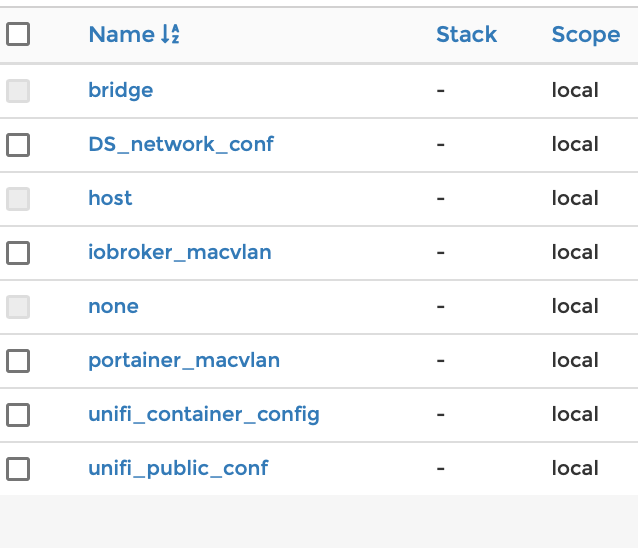
Frage wie kann ich denn die "config" Netze löschen... Portainer sagt mir immer, die wäre noch in "use" aber ich habe alle container ausgeschaltet.
würde gerne etwas aufräumen... und nochmals sauber starten.am liebsten die ganze Netzkonfiguration auf Anfang zurücksetzen...
-
Ich nutze die V3 im Bridge-Mode.
Gestern habe ich Node.js von 8 auf 10 upgedated. Mit diesen Befehlen:kill io curl -sL https://deb.nodesource.com/setup_10.x | sudo -E bash - sudo apt-get install -y nodejs node -v curl -sL https://iobroker.net/fix.sh | bash - npm rebuildBeim starten des Containers steht im Log:
----------------------------------------
-----     Image-Version: 3.0.0     -----
-----      2019-11-28 09:56:35     -----
----------------------------------------
Startupscript running...
Installing additional packages...
The following packages will be installed: nano
Installing additional packages done...
Starting ioBroker...
Starting ioBroker done...
Es tut so als ob iobroker läuft aber kein io-Prozess läuft.
Erst wenn ich mit dem Kommando starte läuft iobroker.node node_modules/iobroker.js-controller/controller.js >/opt/scripts/docker_iobroker_log.txt 2>&1 &Ich habe wohl die Autostartinformation irgendwie zerschossen. Wie kann ich das wieder herstellen?
-
Ich nutze die V3 im Bridge-Mode.
Gestern habe ich Node.js von 8 auf 10 upgedated. Mit diesen Befehlen:kill io curl -sL https://deb.nodesource.com/setup_10.x | sudo -E bash - sudo apt-get install -y nodejs node -v curl -sL https://iobroker.net/fix.sh | bash - npm rebuildBeim starten des Containers steht im Log:
----------------------------------------
-----     Image-Version: 3.0.0     -----
-----      2019-11-28 09:56:35     -----
----------------------------------------
Startupscript running...
Installing additional packages...
The following packages will be installed: nano
Installing additional packages done...
Starting ioBroker...
Starting ioBroker done...
Es tut so als ob iobroker läuft aber kein io-Prozess läuft.
Erst wenn ich mit dem Kommando starte läuft iobroker.node node_modules/iobroker.js-controller/controller.js >/opt/scripts/docker_iobroker_log.txt 2>&1 &Ich habe wohl die Autostartinformation irgendwie zerschossen. Wie kann ich das wieder herstellen?
-
Wow, das ging ja einfach. Das war mein erstes Recreate.
Auf einem Spielcontainer habe ich es zuerst getestet. iobroker kam zwar hoch aber mit fehler im Log. Aber das schiebe ich auf die noch veralteten Adapter.
Dann habe ich es doch auf dem produktiven Container gewagt. Ohne Fehler. Soweit ist alles ok.
Aber was habe ich bei meinem Ursprünglichen Problem falsch gemacht? Hätte ich node.js nicht updaten dürfen?
-
ich starte die iobroker Docker-Instanz schon mit hohen Rechten (Admin), dennoch kann ich erst auf den CC2531 Stick zugreifen, wenn ich chmod 777 /dev/ttyACM0 durchführe.
Das müsste ich dann ja nach jedem Synology-Reboot durchführen. Gibt es hier schon eine Lösung?







693
Online32.7k
Users82.5k
Topics1.3m
Posts