Skip to content
  • Home
  • Recent
  • Tags
  • 0 Unread 0
  • Categories
  • Unreplied
  • Popular
  • GitHub
  • Docu
  • Hilfe
Skins
  • Light
  • Brite
  • Cerulean
  • Cosmo
  • Flatly
  • Journal
  • Litera
  • Lumen
  • Lux
  • Materia
  • Minty
  • Morph
  • Pulse
  • Sandstone
  • Simplex
  • Sketchy
  • Spacelab
  • United
  • Yeti
  • Zephyr
  • Dark
  • Cyborg
  • Darkly
  • Quartz
  • Slate
  • Solar
  • Superhero
  • Vapor

  • Default (No Skin)
  • No Skin
Collapse
ioBroker Logo

Community Forum

donate donate
  1. ioBroker Community Home
  2. Deutsch
  3. Off Topic
  4. Upgrade von Debian 10 'Buster' auf 11 'Bullseye'

NEWS

  • Monatsrückblick Januar/Februar 2026 ist online!
    BluefoxB
    Bluefox
    17
    1
    401

  • Jahresrückblick 2025 – unser neuer Blogbeitrag ist online! ✨
    BluefoxB
    Bluefox
    17
    1
    4.9k

  • Neuer Blogbeitrag: Monatsrückblick - Dezember 2025 🎄
    BluefoxB
    Bluefox
    13
    1
    1.4k

Upgrade von Debian 10 'Buster' auf 11 'Bullseye'

Scheduled Pinned Locked Moved Off Topic
309 Posts 43 Posters 90.9k Views 42 Watching
  • Oldest to Newest
  • Newest to Oldest
  • Most Votes
Reply
  • Reply as topic
Log in to reply
This topic has been deleted. Only users with topic management privileges can see it.
  • Marc_el_KM Marc_el_K

    @thomas-braun sagte in Upgrade von Debian 10 'Buster' auf 11 'Bullseye':

    @marc_el_k sagte in Upgrade von Debian 10 'Buster' auf 11 'Bullseye':

    habe ich mich dafür entschieden, die "momentan installierten Versionen beizubehalten".

    Schlechte Entscheidung.
    Wie man das richtet weiß ich allerdings auch nicht

    Aber was ist jetzt dein Problem? Du bist doch offenbar angemeldet.

    Danke für die schnelle Antwort. Mein Problem ist, dass iobroker nicht mehr startet

    Thomas BraunT Online
    Thomas BraunT Online
    Thomas Braun
    Most Active
    wrote on last edited by
    #30

    @marc_el_k

    iobroker status
    

    Linux-Werkzeugkasten:
    https://forum.iobroker.net/topic/42952/der-kleine-iobroker-linux-werkzeugkasten
    NodeJS Fixer Skript:
    https://forum.iobroker.net/topic/68035/iob-node-fix-skript
    iob_diag: curl -sLf -o diag.sh https://iobroker.net/diag.sh && bash diag.sh

    Marc_el_KM 1 Reply Last reply
    0
    • Thomas BraunT Thomas Braun

      @marc_el_k

      iobroker status
      
      Marc_el_KM Offline
      Marc_el_KM Offline
      Marc_el_K
      wrote on last edited by
      #31

      @thomas-braun Da kommt "Cannot read system.config:null (OK when migrating or restoring)
      iobroker not running on this host

      Thomas BraunT 1 Reply Last reply
      0
      • Marc_el_KM Marc_el_K

        @thomas-braun Da kommt "Cannot read system.config:null (OK when migrating or restoring)
        iobroker not running on this host

        Thomas BraunT Online
        Thomas BraunT Online
        Thomas Braun
        Most Active
        wrote on last edited by
        #32

        @marc_el_k
        Such das Mini-HowTo.

        Linux-Werkzeugkasten:
        https://forum.iobroker.net/topic/42952/der-kleine-iobroker-linux-werkzeugkasten
        NodeJS Fixer Skript:
        https://forum.iobroker.net/topic/68035/iob-node-fix-skript
        iob_diag: curl -sLf -o diag.sh https://iobroker.net/diag.sh && bash diag.sh

        M Marc_el_KM 2 Replies Last reply
        0
        • Thomas BraunT Thomas Braun

          @marc_el_k
          Such das Mini-HowTo.

          M Offline
          M Offline
          Michi_Pi
          wrote on last edited by
          #33

          @thomas-braun bin gerade deine Anleitung durchgegangen. lief alles ohne Probleme, bis auf den Neustart natürlich...
          Es kommt die Fehlermeldung Failed to start DHCP Client Daemon
          Mit der Ausgabe systemctl status dhcp.service sagt er Unit dhcp.service could not be found

          wie kann ich das nachinstallieren oder aktivieren?

          Thomas BraunT 1 Reply Last reply
          0
          • M Michi_Pi

            @thomas-braun bin gerade deine Anleitung durchgegangen. lief alles ohne Probleme, bis auf den Neustart natürlich...
            Es kommt die Fehlermeldung Failed to start DHCP Client Daemon
            Mit der Ausgabe systemctl status dhcp.service sagt er Unit dhcp.service could not be found

            wie kann ich das nachinstallieren oder aktivieren?

            Thomas BraunT Online
            Thomas BraunT Online
            Thomas Braun
            Most Active
            wrote on last edited by Thomas Braun
            #34

            @michi_pi

            Das muss ja auch

            systemctl status dhcpd.service
            

            heißen.
            Ist das Paket dhcpcd5 installiert?

            apt policy dhcpcd5
            

            Linux-Werkzeugkasten:
            https://forum.iobroker.net/topic/42952/der-kleine-iobroker-linux-werkzeugkasten
            NodeJS Fixer Skript:
            https://forum.iobroker.net/topic/68035/iob-node-fix-skript
            iob_diag: curl -sLf -o diag.sh https://iobroker.net/diag.sh && bash diag.sh

            M 1 Reply Last reply
            0
            • Thomas BraunT Thomas Braun

              @michi_pi

              Das muss ja auch

              systemctl status dhcpd.service
              

              heißen.
              Ist das Paket dhcpcd5 installiert?

              apt policy dhcpcd5
              
              M Offline
              M Offline
              Michi_Pi
              wrote on last edited by
              #35

              @thomas-braun stimmt Tippfehler heißt

              systemctl status dhcpcd.service
              

              sagt bei

              Active: failed (Result: exit-code) 
              Process: (code=exited, status=203/EXEC)
              
              dhcpcd.service: Scheduled restart job, restart counter is at 5.
              Stopped DHCP Client Daemon
              dhcpcd.service: Start request repeated to quickly.
              dhcpcd.service: Failed with result 'exit-code'
              Failed to start DHCP Client Daemon
              

              Installiert ist die Version 1:8.1.2-1+rpt3

              Thomas BraunT 1 Reply Last reply
              0
              • M Michi_Pi

                @thomas-braun stimmt Tippfehler heißt

                systemctl status dhcpcd.service
                

                sagt bei

                Active: failed (Result: exit-code) 
                Process: (code=exited, status=203/EXEC)
                
                dhcpcd.service: Scheduled restart job, restart counter is at 5.
                Stopped DHCP Client Daemon
                dhcpcd.service: Start request repeated to quickly.
                dhcpcd.service: Failed with result 'exit-code'
                Failed to start DHCP Client Daemon
                

                Installiert ist die Version 1:8.1.2-1+rpt3

                Thomas BraunT Online
                Thomas BraunT Online
                Thomas Braun
                Most Active
                wrote on last edited by Thomas Braun
                #36

                @michi_pi

                Bitte Ausgaben komplett zeigen.
                Beide.

                Linux-Werkzeugkasten:
                https://forum.iobroker.net/topic/42952/der-kleine-iobroker-linux-werkzeugkasten
                NodeJS Fixer Skript:
                https://forum.iobroker.net/topic/68035/iob-node-fix-skript
                iob_diag: curl -sLf -o diag.sh https://iobroker.net/diag.sh && bash diag.sh

                M 1 Reply Last reply
                0
                • Thomas BraunT Thomas Braun

                  @michi_pi

                  Bitte Ausgaben komplett zeigen.
                  Beide.

                  M Offline
                  M Offline
                  Michi_Pi
                  wrote on last edited by
                  #37

                  @thomas-braun sorry muss das abtippen, hab ja gerade keinen Zugriff über ssh

                  M 1 Reply Last reply
                  0
                  • M Michi_Pi

                    @thomas-braun sorry muss das abtippen, hab ja gerade keinen Zugriff über ssh

                    M Offline
                    M Offline
                    Michi_Pi
                    wrote on last edited by
                    #38

                    @Thomas-Braun ich bin jetzt so frei und stell ein bild hier ein, auch wenn es nicht erwünscht ist.
                    Kann aber das nicht alles abtippen.
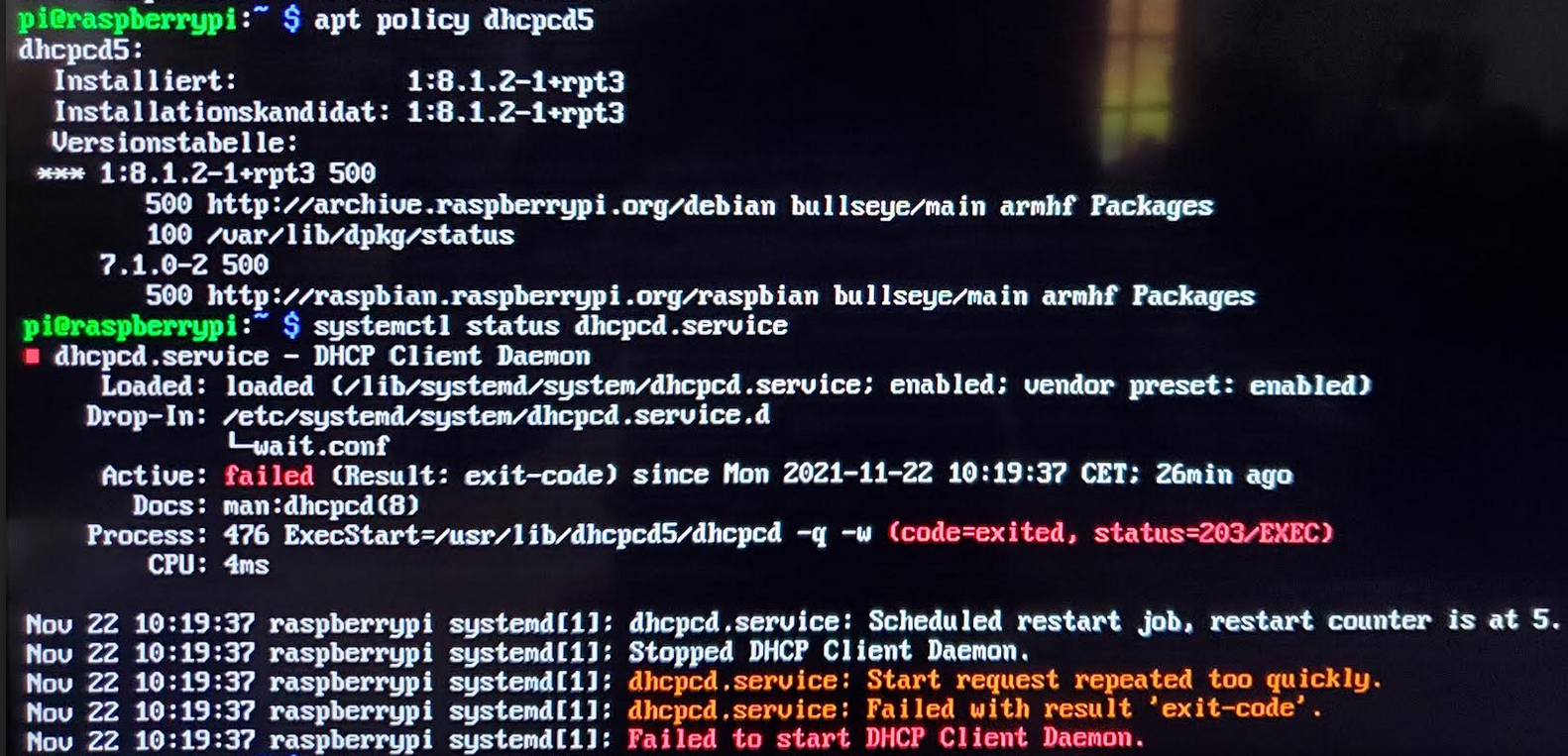
                    bf4b72a5-676b-4a29-849f-8846b4a5743c-grafik.png

                    Thomas BraunT 1 Reply Last reply
                    0
                    • M Michi_Pi

                      @Thomas-Braun ich bin jetzt so frei und stell ein bild hier ein, auch wenn es nicht erwünscht ist.
                      Kann aber das nicht alles abtippen.
                      bf4b72a5-676b-4a29-849f-8846b4a5743c-grafik.png

                      Thomas BraunT Online
                      Thomas BraunT Online
                      Thomas Braun
                      Most Active
                      wrote on last edited by
                      #39

                      @michi_pi

                      Keine Ahnung warum das failed.

                      sudo systemctl restart dhcpcd.service
                      

                      Ansonsten einfach mal

                      sudo reboot
                      

                      Linux-Werkzeugkasten:
                      https://forum.iobroker.net/topic/42952/der-kleine-iobroker-linux-werkzeugkasten
                      NodeJS Fixer Skript:
                      https://forum.iobroker.net/topic/68035/iob-node-fix-skript
                      iob_diag: curl -sLf -o diag.sh https://iobroker.net/diag.sh && bash diag.sh

                      M 1 Reply Last reply
                      0
                      • Thomas BraunT Thomas Braun

                        @michi_pi

                        Keine Ahnung warum das failed.

                        sudo systemctl restart dhcpcd.service
                        

                        Ansonsten einfach mal

                        sudo reboot
                        
                        M Offline
                        M Offline
                        Michi_Pi
                        wrote on last edited by
                        #40

                        @thomas-braun kann den nicht neustarten, dabei kommt eine Fehlermeldung.

                        Im Journal steht was von
                        dhcp6_writelease: no such file or directory
                        bevor der DHCP Client gestoppt wird.

                        Thomas BraunT 1 Reply Last reply
                        0
                        • M Michi_Pi

                          @thomas-braun kann den nicht neustarten, dabei kommt eine Fehlermeldung.

                          Im Journal steht was von
                          dhcp6_writelease: no such file or directory
                          bevor der DHCP Client gestoppt wird.

                          Thomas BraunT Online
                          Thomas BraunT Online
                          Thomas Braun
                          Most Active
                          wrote on last edited by
                          #41

                          @michi_pi sagte in Upgrade von Debian 10 'Buster' auf 11 'Bullseye':

                          kann den nicht neustarten, dabei kommt eine Fehlermeldung.

                          Und welche?
                          Ansonsten gilt die Empfehlung von Raspberry OS:
                          Installier es neu, ein Upgrade via apt ist nicht empfohlen.

                          Linux-Werkzeugkasten:
                          https://forum.iobroker.net/topic/42952/der-kleine-iobroker-linux-werkzeugkasten
                          NodeJS Fixer Skript:
                          https://forum.iobroker.net/topic/68035/iob-node-fix-skript
                          iob_diag: curl -sLf -o diag.sh https://iobroker.net/diag.sh && bash diag.sh

                          M J 2 Replies Last reply
                          0
                          • Thomas BraunT Thomas Braun

                            @michi_pi sagte in Upgrade von Debian 10 'Buster' auf 11 'Bullseye':

                            kann den nicht neustarten, dabei kommt eine Fehlermeldung.

                            Und welche?
                            Ansonsten gilt die Empfehlung von Raspberry OS:
                            Installier es neu, ein Upgrade via apt ist nicht empfohlen.

                            M Offline
                            M Offline
                            Michi_Pi
                            wrote on last edited by
                            #42

                            @thomas-braun

                            Job for dhcpcd.service failed because the control process exited with error code.
                            See "systemctl status dhcpcd.service" and "journalctl -xe" for details.
                            

                            status ist ja das was ich schon gezeigt hab und unter journalhab ich ja dann folgendes rausgelesen

                            dhcp6_writelease: no such file or directory
                            

                            Ja wenn es keine Lösung gibt, werd ich es neu aufsetzen.

                            Marc_el_KM J 2 Replies Last reply
                            0
                            • Thomas BraunT Thomas Braun

                              @michi_pi sagte in Upgrade von Debian 10 'Buster' auf 11 'Bullseye':

                              kann den nicht neustarten, dabei kommt eine Fehlermeldung.

                              Und welche?
                              Ansonsten gilt die Empfehlung von Raspberry OS:
                              Installier es neu, ein Upgrade via apt ist nicht empfohlen.

                              J Offline
                              J Offline
                              JoergH
                              wrote on last edited by
                              #43

                              @thomas-braun sagte in Upgrade von Debian 10 'Buster' auf 11 'Bullseye':

                              Installier es neu, ein Upgrade via apt ist nicht empfohlen.

                              Wie meinst Du das? Ich habe bisher immer mein System mit apt-get update | apt-get upgrade auf den neusten Stand gebracht. Sollte man das nicht machen?

                              Thomas BraunT 1 Reply Last reply
                              0
                              • J JoergH

                                @thomas-braun sagte in Upgrade von Debian 10 'Buster' auf 11 'Bullseye':

                                Installier es neu, ein Upgrade via apt ist nicht empfohlen.

                                Wie meinst Du das? Ich habe bisher immer mein System mit apt-get update | apt-get upgrade auf den neusten Stand gebracht. Sollte man das nicht machen?

                                Thomas BraunT Online
                                Thomas BraunT Online
                                Thomas Braun
                                Most Active
                                wrote on last edited by
                                #44

                                @joergh

                                Nein, das sollst du schon machen. Aber der hier vorgenommene Wechsel des Releases ist nicht der empfohlene Weg. Hier wird eigentlich eine Neuinstallation vorgesehen.

                                Linux-Werkzeugkasten:
                                https://forum.iobroker.net/topic/42952/der-kleine-iobroker-linux-werkzeugkasten
                                NodeJS Fixer Skript:
                                https://forum.iobroker.net/topic/68035/iob-node-fix-skript
                                iob_diag: curl -sLf -o diag.sh https://iobroker.net/diag.sh && bash diag.sh

                                1 Reply Last reply
                                0
                                • M Michi_Pi

                                  @thomas-braun

                                  Job for dhcpcd.service failed because the control process exited with error code.
                                  See "systemctl status dhcpcd.service" and "journalctl -xe" for details.
                                  

                                  status ist ja das was ich schon gezeigt hab und unter journalhab ich ja dann folgendes rausgelesen

                                  dhcp6_writelease: no such file or directory
                                  

                                  Ja wenn es keine Lösung gibt, werd ich es neu aufsetzen.

                                  Marc_el_KM Offline
                                  Marc_el_KM Offline
                                  Marc_el_K
                                  wrote on last edited by
                                  #45

                                  @michi_pi sagte in Upgrade von Debian 10 'Buster' auf 11 'Bullseye':

                                  @thomas-braun

                                  Job for dhcpcd.service failed because the control process exited with error code.
                                  See "systemctl status dhcpcd.service" and "journalctl -xe" for details.
                                  

                                  status ist ja das was ich schon gezeigt hab und unter journalhab ich ja dann folgendes rausgelesen

                                  dhcp6_writelease: no such file or directory
                                  

                                  Ja wenn es keine Lösung gibt, werd ich es neu aufsetzen.

                                  Exakt gleiche Fehlermeldung auch bei mir!

                                  Thomas BraunT 1 Reply Last reply
                                  0
                                  • Thomas BraunT Thomas Braun

                                    @marc_el_k
                                    Such das Mini-HowTo.

                                    Marc_el_KM Offline
                                    Marc_el_KM Offline
                                    Marc_el_K
                                    wrote on last edited by
                                    #46

                                    @thomas-braun sagte in Upgrade von Debian 10 'Buster' auf 11 'Bullseye':

                                    @marc_el_k
                                    Such das Mini-HowTo.

                                    Habe ich gefunden, hänge noch am Versuch die letztmöglichen Backups wieder einzuspielen.

                                    DAs der Weg hier nicht für einen Wechsel sondern für eine Neuinstallation gedacht ist, ist mega schade. MAl schauen, wie weit ich noch komme oder ob ich auch komplett neu installieren muss.

                                    1 Reply Last reply
                                    0
                                    • Marc_el_KM Marc_el_K

                                      @michi_pi sagte in Upgrade von Debian 10 'Buster' auf 11 'Bullseye':

                                      @thomas-braun

                                      Job for dhcpcd.service failed because the control process exited with error code.
                                      See "systemctl status dhcpcd.service" and "journalctl -xe" for details.
                                      

                                      status ist ja das was ich schon gezeigt hab und unter journalhab ich ja dann folgendes rausgelesen

                                      dhcp6_writelease: no such file or directory
                                      

                                      Ja wenn es keine Lösung gibt, werd ich es neu aufsetzen.

                                      Exakt gleiche Fehlermeldung auch bei mir!

                                      Thomas BraunT Online
                                      Thomas BraunT Online
                                      Thomas Braun
                                      Most Active
                                      wrote on last edited by
                                      #47

                                      @marc_el_k

                                      Auf meinem System gibt es die auch nicht:

                                      pi@chet:~ $ locate dhcp6_writelease
                                      pi@chet:~ $
                                      

                                      Ich hab aber auch keine Meldung in Logs. Netzwerk funktioniert natürlich auch.

                                      Linux-Werkzeugkasten:
                                      https://forum.iobroker.net/topic/42952/der-kleine-iobroker-linux-werkzeugkasten
                                      NodeJS Fixer Skript:
                                      https://forum.iobroker.net/topic/68035/iob-node-fix-skript
                                      iob_diag: curl -sLf -o diag.sh https://iobroker.net/diag.sh && bash diag.sh

                                      Marc_el_KM 1 Reply Last reply
                                      0
                                      • Thomas BraunT Thomas Braun

                                        @marc_el_k

                                        Auf meinem System gibt es die auch nicht:

                                        pi@chet:~ $ locate dhcp6_writelease
                                        pi@chet:~ $
                                        

                                        Ich hab aber auch keine Meldung in Logs. Netzwerk funktioniert natürlich auch.

                                        Marc_el_KM Offline
                                        Marc_el_KM Offline
                                        Marc_el_K
                                        wrote on last edited by
                                        #48

                                        @thomas-braun sagte in Upgrade von Debian 10 'Buster' auf 11 'Bullseye':

                                        @marc_el_k

                                        Auf meinem System gibt es die auch nicht:

                                        pi@chet:~ $ locate dhcp6_writelease
                                        pi@chet:~ $
                                        

                                        Ich hab aber auch keine Meldung in Logs. Netzwerk funktioniert natürlich auch.

                                        Ich meinte diese Fehlermeldung

                                        Job for dhcpcd.service failed because the control process exited with error code.
                                        See "systemctl status dhcpcd.service" and "journalctl -xe" for details.
                                        

                                        nach Eingabe von journalctl -xe

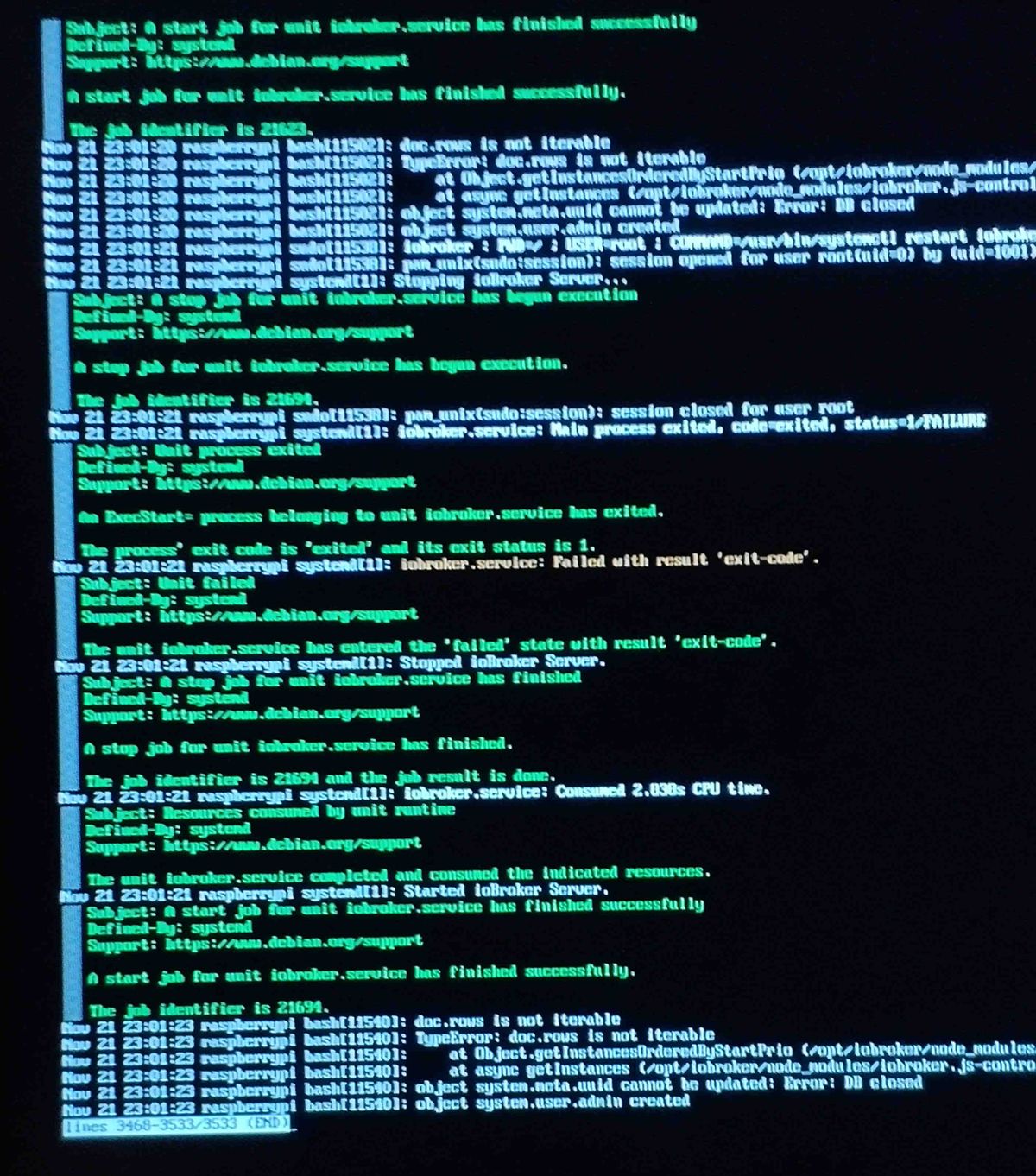
                                        taucht wiederholend der Fehler aufscreen.jpg

                                        Thomas BraunT 1 Reply Last reply
                                        0
                                        • Marc_el_KM Marc_el_K

                                          @thomas-braun sagte in Upgrade von Debian 10 'Buster' auf 11 'Bullseye':

                                          @marc_el_k

                                          Auf meinem System gibt es die auch nicht:

                                          pi@chet:~ $ locate dhcp6_writelease
                                          pi@chet:~ $
                                          

                                          Ich hab aber auch keine Meldung in Logs. Netzwerk funktioniert natürlich auch.

                                          Ich meinte diese Fehlermeldung

                                          Job for dhcpcd.service failed because the control process exited with error code.
                                          See "systemctl status dhcpcd.service" and "journalctl -xe" for details.
                                          

                                          nach Eingabe von journalctl -xe

                                          taucht wiederholend der Fehler aufscreen.jpg

                                          Thomas BraunT Online
                                          Thomas BraunT Online
                                          Thomas Braun
                                          Most Active
                                          wrote on last edited by
                                          #49

                                          @marc_el_k
                                          Ich sehe da nur was zu iobroker.service

                                          Linux-Werkzeugkasten:
                                          https://forum.iobroker.net/topic/42952/der-kleine-iobroker-linux-werkzeugkasten
                                          NodeJS Fixer Skript:
                                          https://forum.iobroker.net/topic/68035/iob-node-fix-skript
                                          iob_diag: curl -sLf -o diag.sh https://iobroker.net/diag.sh && bash diag.sh

                                          1 Reply Last reply
                                          0
                                          Reply
                                          • Reply as topic
                                          Log in to reply
                                          • Oldest to Newest
                                          • Newest to Oldest
                                          • Most Votes


                                          Support us

                                          ioBroker
                                          Community Adapters
                                          Donate

                                          352

                                          Online

                                          32.7k

                                          Users

                                          82.5k

                                          Topics

                                          1.3m

                                          Posts
                                          Community
                                          Impressum | Datenschutz-Bestimmungen | Nutzungsbedingungen | Einwilligungseinstellungen
                                          ioBroker Community 2014-2025
                                          logo
                                          • Login

                                          • Don't have an account? Register

                                          • Login or register to search.
                                          • First post
                                            Last post
                                          0
                                          • Home
                                          • Recent
                                          • Tags
                                          • Unread 0
                                          • Categories
                                          • Unreplied
                                          • Popular
                                          • GitHub
                                          • Docu
                                          • Hilfe