Skip to content
  • Home
  • Recent
  • Tags
  • 0 Unread 0
  • Categories
  • Unreplied
  • Popular
  • GitHub
  • Docu
  • Hilfe
Skins
  • Light
  • Brite
  • Cerulean
  • Cosmo
  • Flatly
  • Journal
  • Litera
  • Lumen
  • Lux
  • Materia
  • Minty
  • Morph
  • Pulse
  • Sandstone
  • Simplex
  • Sketchy
  • Spacelab
  • United
  • Yeti
  • Zephyr
  • Dark
  • Cyborg
  • Darkly
  • Quartz
  • Slate
  • Solar
  • Superhero
  • Vapor

  • Default (No Skin)
  • No Skin
Collapse
ioBroker Logo

Community Forum

donate donate
  1. ioBroker Community Home
  2. Deutsch
  3. ioBroker Allgemein
  4. Adapter "smartmeter"

NEWS

  • Jahresrückblick 2025 – unser neuer Blogbeitrag ist online! ✨
    BluefoxB
    Bluefox
    17
    1
    3.5k

  • Neuer Blogbeitrag: Monatsrückblick - Dezember 2025 🎄
    BluefoxB
    Bluefox
    13
    1
    1.1k

  • Weihnachtsangebot 2025! 🎄
    BluefoxB
    Bluefox
    25
    1
    2.5k

Adapter "smartmeter"

Scheduled Pinned Locked Moved ioBroker Allgemein
3.6k Posts 281 Posters 2.5m Views 161 Watching
  • Oldest to Newest
  • Newest to Oldest
  • Most Votes
Reply
  • Reply as topic
Log in to reply
This topic has been deleted. Only users with topic management privileges can see it.
  • StabilostickS Offline
    StabilostickS Offline
    Stabilostick
    wrote on last edited by
    #954

    @momobatico

    Sieht doch schon mal super aus. Die 1b usw. zeigen den Beginn eines Datentelegramms an. Welche Einstellungen hast Du im Adapter gemacht?

    1 Reply Last reply
    0
    • M Offline
      M Offline
      momobatiko
      wrote on last edited by
      #955

      @Stabilostick

      Der erste Code war nicht meiner den hab ich nur als Beispiel Kopiert.

      Aber hier hab ich jetzt ein aktuellen aus meiner Anlage…

      ~ $ cat /dev/ttyUSB0 | od -tx1

      0000000 00 00 00 00 00 00 00 00 00 00 00 00 00 00 00 00

      0000400 00 af c5 53 59 35 d1 33 44 51 fe 76 7d 7d eb f7

      0000420 72 82 a2 6b 53 d4 a6 28 6b 82 d2 a2 f9 51 bd c3

      0000440 53 56 b9 df db 92 b3 82 a2 b7 fb e7 ff eb 99 fe

      0000460 f7 e1 2e 30 aa b2 77 37 7a 3a fe bf ff df 9e 32

      0000500 7b 6e 6c 4d 4d 5b 8a b3 52 5b d7 e8 b9 77 a9 b7

      0000520 d3 ff df ab ff bb fb ab 5a 93 ab aa 42 82 82 82

      0000540 82 ba 8b 73 d9 eb ea 9f de dd 5f bf bf bf bf bf

      0000560 3f 30 aa b2 35 35 96 9c 34 35 ed b7 a7 29 da fb

      0000600 df a9 8d 0a b1 6d 9e bf 77 8b ed 7b ed ab ba 5f

      0000620 cf ca ef 66 cb dd 6e 94 b5 ab f7 a9 8f 4b f1 6f

      0000640 30 3a b1 97 fb 5b 5b 9b eb ab 69 3d 31 bf bb 33

      0000660 39 6e 5f 5b fb a9 9d 8f b5 eb ec b7 27 db af 73

      0000700 eb 5b 9b fb aa c2 ea d3 4a 7b 2a 72 93 e9 f5 d9

      0000720 bd d3 73 f7 bd 75 aa b2 ed fd eb ff fd 55 cf f9

      0000740 3f 31 b5 37 bb b8 b4 b1 a9 8d 0a 21 8d d5 af c5

      0000760 53 59 35 d1 33 44 41 b1 b1 72 fe b2 ef 67 93 f6

      0001000 85 63 a1 b6 4b 4c 9d 98 2e 30 2e 30 aa b2 35 35

      Einstellungen in Smartmeter hab ich schon einige durch, aber krieg immer den einen Fehler.Deswegen vll hat jemand den Zähler am laufen ...würde mich freuen wenn mir jemand da weiter helfen könnte...

      1 Reply Last reply
      0
      • wendy2702W Online
        wendy2702W Online
        wendy2702
        wrote on last edited by
        #956

        Mal hier geschaut:

        https://wiki.volkszaehler.org/hardware/ … ymeter_q3d

        Die Augabe mit „cat...“ musst du beenden wenn du den Smartmeter Adapter startest. Beides zeitgleich geht nicht.

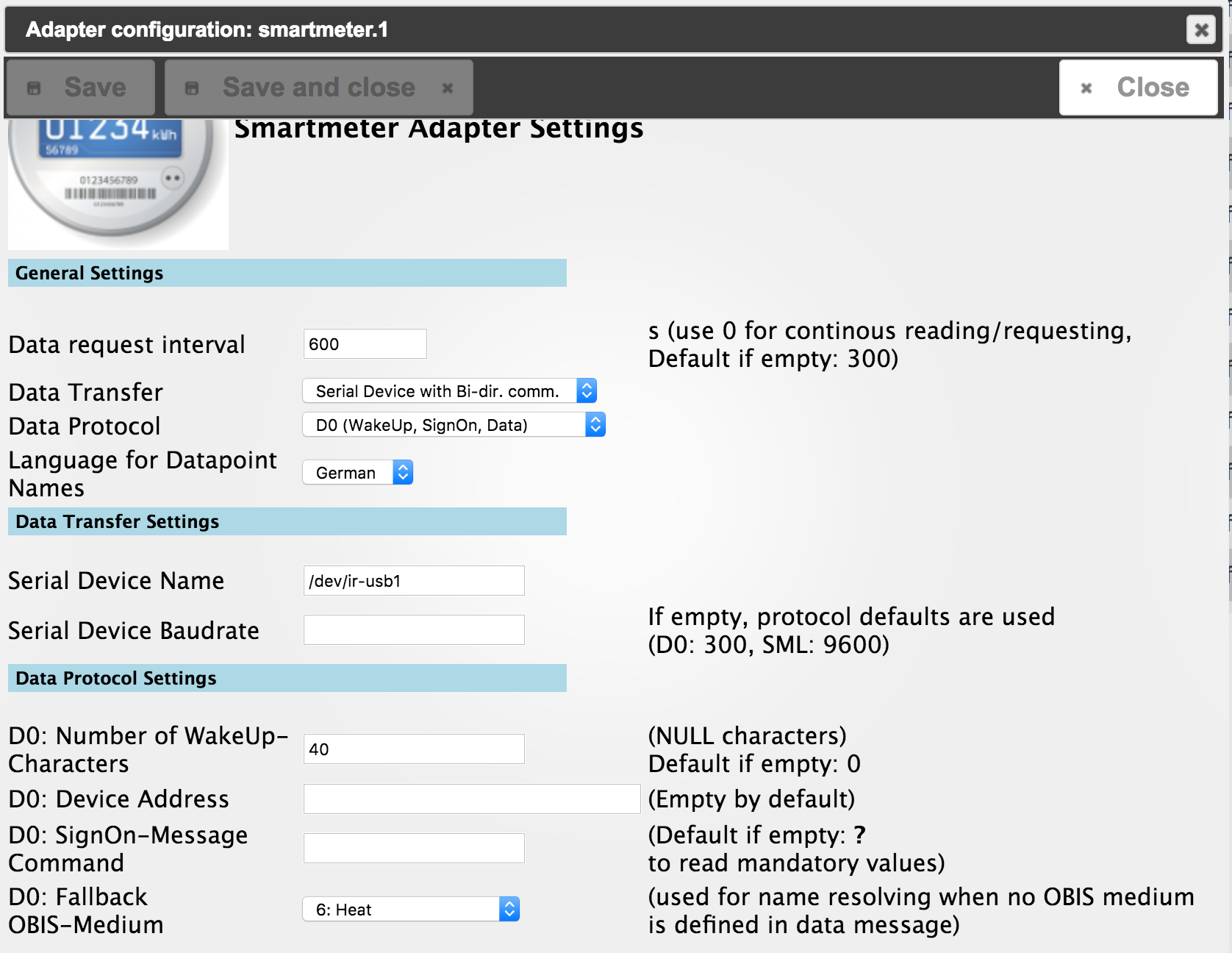
        Poste doch mal deine Einstellungen?

        Sicher das du das richtige USB Device gewählt hast?

        Gesendet von iPad mit Tapatalk Pro

        Bitte keine Fragen per PN, die gehören ins Forum!

        Benutzt das Voting rechts unten im Beitrag wenn er euch geholfen hat.

        1 Reply Last reply
        0
        • RöstkartoffelR Offline
          RöstkartoffelR Offline
          Röstkartoffel
          wrote on last edited by
          #957

          @momobatiko:

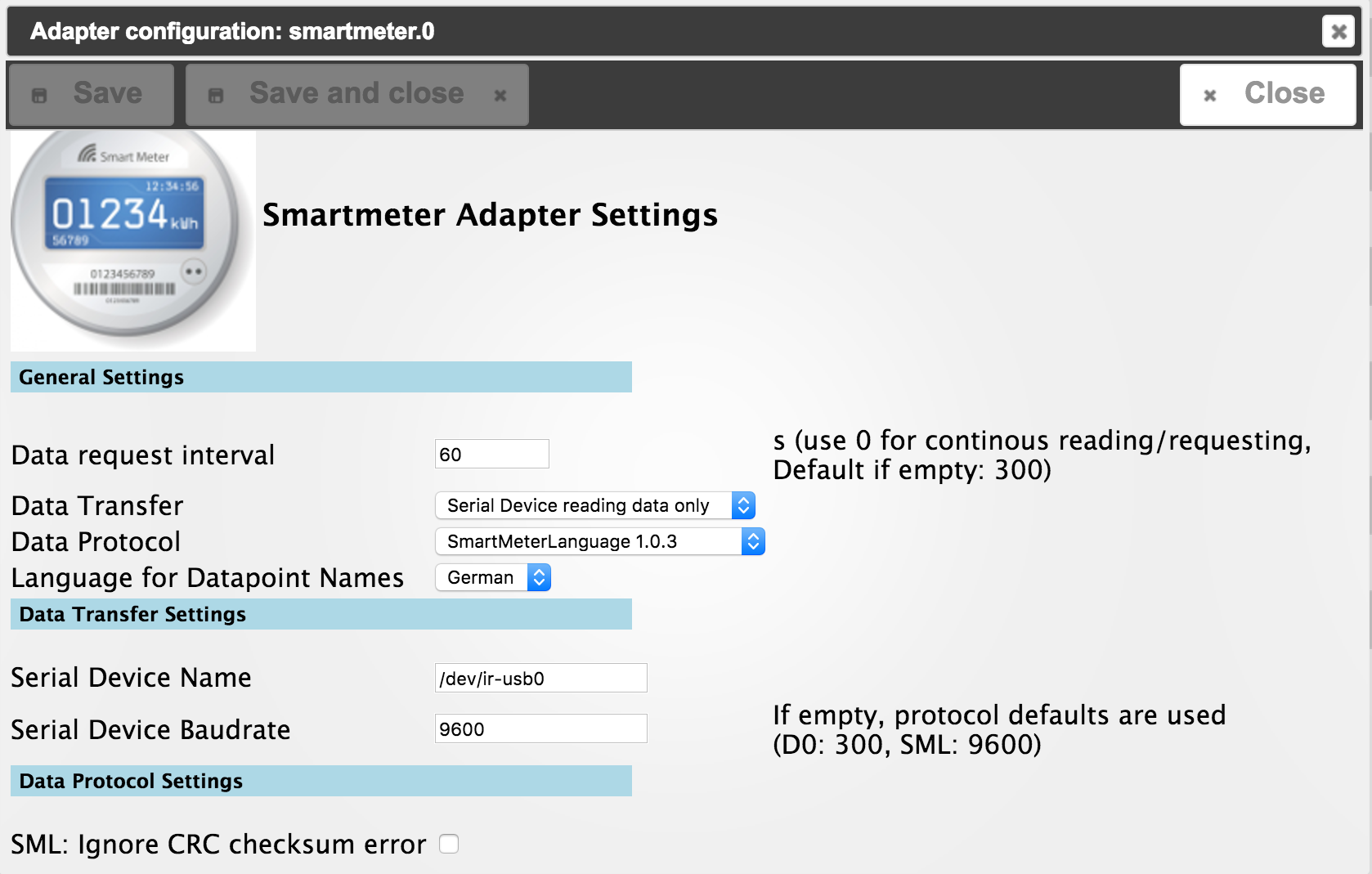
          Ich verwende den VZ-Lesekopf an einem Easymeter Q3DB1024 mit unidirektionaler Kommunikation mit diesen Einstellungen: 1826_easymeter.png
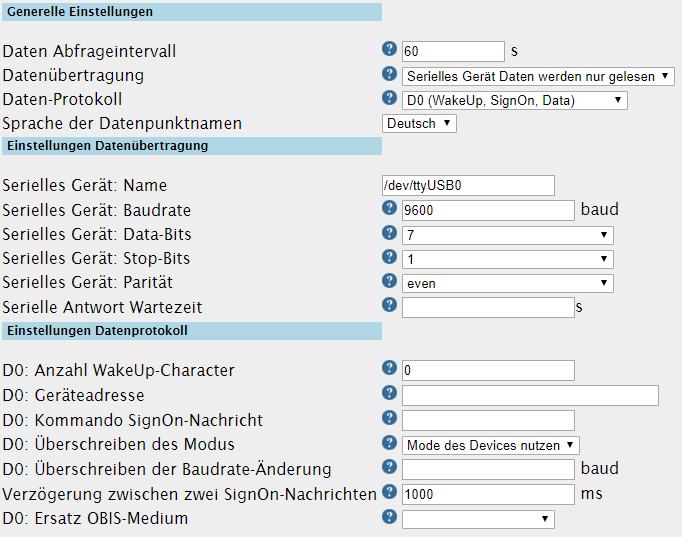
          Der Unterschied zwieschen deinem und meinem ist die Genauigkeit und ich habe einen Zweirichtungszähler und du den Bezugszähler mit Rücklaufsperre.

          NUC7i3BNH mit Proxmox und ioBroker (VM Debian Buster), Raspi3 (Slave Smartmeter für eHZ easymeter), Hardware CCU2, SMA SB5000TL-21

          1 Reply Last reply
          0
          • M Offline
            M Offline
            mig81
            wrote on last edited by
            #958

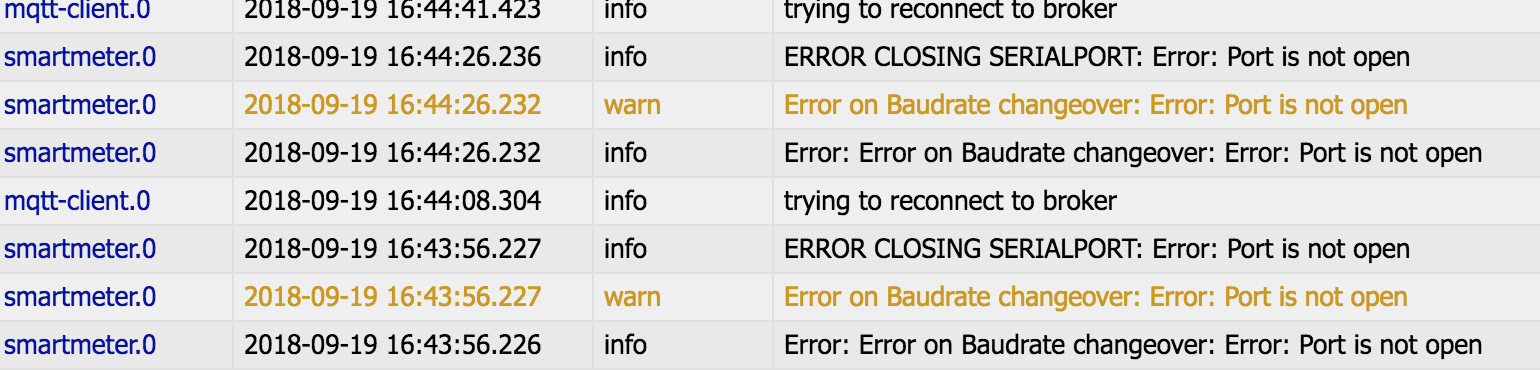
            5108_bildschirmfoto_2018-09-19_um_16.44.33.png

            funktioniert leider immer noch nicht….

            Was ist mit Error Port gemeint? Muss ich noch ein Port einstellen?

            Danke :D

            1 Reply Last reply
            0
            • apollon77A Offline
              apollon77A Offline
              apollon77
              wrote on last edited by
              #959

              @Röstkartoffel:

              @momobatiko:

              Ich verwende den VZ-Lesekopf an einem Easymeter Q3DB1024 mit unidirektionaler Kommunikation mit diesen Einstellungen:EasyMeter.PNG

              Der Unterschied zwieschen deinem und meinem ist die Genauigkeit und ich habe einen Zweirichtungszähler und du den Bezugszähler mit Rücklaufsperre. `

              Wenn es wie oben SML (1b1b1b1b…) sein sollte dann bitte auch SML als Protokoll auswählen.

              Beitrag hat geholfen? Votet rechts unten im Beitrag :-) https://paypal.me/Apollon77 / https://github.com/sponsors/Apollon77

              • Debug-Log für Instanz einschalten? Admin -> Instanzen -> Expertenmodus -> Instanz aufklappen - Loglevel ändern
              • Logfiles auf Platte /opt/iobroker/log/… nutzen, Admin schneidet Zeilen ab
              1 Reply Last reply
              0
              • apollon77A Offline
                apollon77A Offline
                apollon77
                wrote on last edited by
                #960

                @mig81:

                Bildschirmfoto 2018-09-19 um 16.44.33.png

                funktioniert leider immer noch nicht….

                Was ist mit Error Port gemeint? Muss ich noch ein Port einstellen?

                Danke :D `

                Bitte komplettes log ab Adapterstart zeigen und bitte als Text und nicht als Bild

                Beitrag hat geholfen? Votet rechts unten im Beitrag :-) https://paypal.me/Apollon77 / https://github.com/sponsors/Apollon77

                • Debug-Log für Instanz einschalten? Admin -> Instanzen -> Expertenmodus -> Instanz aufklappen - Loglevel ändern
                • Logfiles auf Platte /opt/iobroker/log/… nutzen, Admin schneidet Zeilen ab
                1 Reply Last reply
                0
                • M Offline
                  M Offline
                  mig81
                  wrote on last edited by
                  #961

                  smartmeter.0 2018-09-19 17:03:20.871 info ERROR CLOSING SERIALPORT: Error: Port is not open

                  smartmeter.0 2018-09-19 17:03:20.870 warn Error on Baudrate changeover: Error: Port is not open

                  smartmeter.0 2018-09-19 17:03:20.869 info Error: Error on Baudrate changeover: Error: Port is not open

                  smartmeter.0 2018-09-19 17:03:20.816 info starting. Version 1.2.1 in /opt/iobroker/node_modules/iobroker.smartmeter, node: v6.11.4

                  smartmeter.0 2018-09-19 17:03:17.473 info terminating

                  1 Reply Last reply
                  0
                  • RöstkartoffelR Offline
                    RöstkartoffelR Offline
                    Röstkartoffel
                    wrote on last edited by
                    #962

                    @momobatiko:

                    Ich habe mal eben deinen aktuellen Code durch einen AsciitoHex Converter geschickt und da kam nichts bei raus.

                    Suche mal die Zeichenfolge "0a 21 0d 0a 2f 45 53 59 35 51 33", das ist der Anfang des Datenstrings:

                    !

                    /ESY5Q3

                    Wenn die Parameter richtig im Adapter eingetragen sind, muss das oben genannte im Code vorkommen.

                    NUC7i3BNH mit Proxmox und ioBroker (VM Debian Buster), Raspi3 (Slave Smartmeter für eHZ easymeter), Hardware CCU2, SMA SB5000TL-21

                    1 Reply Last reply
                    0
                    • apollon77A Offline
                      apollon77A Offline
                      apollon77
                      wrote on last edited by
                      #963

                      @mig81:

                      smartmeter.0 2018-09-19 17:03:20.871 info ERROR CLOSING SERIALPORT: Error: Port is not open

                      smartmeter.0 2018-09-19 17:03:20.870 warn Error on Baudrate changeover: Error: Port is not open

                      smartmeter.0 2018-09-19 17:03:20.869 info Error: Error on Baudrate changeover: Error: Port is not open

                      smartmeter.0 2018-09-19 17:03:20.816 info starting. Version 1.2.1 in /opt/iobroker/node_modules/iobroker.smartmeter, node: v6.11.4

                      smartmeter.0 2018-09-19 17:03:17.473 info terminating `

                      Dann würde ich sagen der USB port ist belegt oder falsch angegeben

                      Beitrag hat geholfen? Votet rechts unten im Beitrag :-) https://paypal.me/Apollon77 / https://github.com/sponsors/Apollon77

                      • Debug-Log für Instanz einschalten? Admin -> Instanzen -> Expertenmodus -> Instanz aufklappen - Loglevel ändern
                      • Logfiles auf Platte /opt/iobroker/log/… nutzen, Admin schneidet Zeilen ab
                      1 Reply Last reply
                      0
                      • apollon77A Offline
                        apollon77A Offline
                        apollon77
                        wrote on last edited by
                        #964

                        @Röstkartoffel:

                        @momobatiko:

                        Ich habe mal eben deinen aktuellen Code durch einen AsciitoHex Converter geschickt und da kam nichts bei raus.

                        Suche mal die Zeichenfolge "0a 21 0d 0a 2f 45 53 59 35 51 33", das ist der Anfang des Datenstrings:

                        !

                        /ESY5Q3

                        Wenn die Parameter richtig im Adapter eingetragen sind, muss das oben genannte im Code vorkommen. `

                        Dann wäre es D0 und kein SML … :-)

                        Beitrag hat geholfen? Votet rechts unten im Beitrag :-) https://paypal.me/Apollon77 / https://github.com/sponsors/Apollon77

                        • Debug-Log für Instanz einschalten? Admin -> Instanzen -> Expertenmodus -> Instanz aufklappen - Loglevel ändern
                        • Logfiles auf Platte /opt/iobroker/log/… nutzen, Admin schneidet Zeilen ab
                        1 Reply Last reply
                        0
                        • StabilostickS Offline
                          StabilostickS Offline
                          Stabilostick
                          wrote on last edited by
                          #965

                          Konfiguration siehe Screenshot von Röstkartoffel.

                          1 Reply Last reply
                          0
                          • RöstkartoffelR Offline
                            RöstkartoffelR Offline
                            Röstkartoffel
                            wrote on last edited by
                            #966

                            @Stabilostick:

                            Konfiguration siehe Screenshot von Röstkartoffel. `

                            Richtig. Ist ja auch für den Easymeter von Momobatiko.

                            NUC7i3BNH mit Proxmox und ioBroker (VM Debian Buster), Raspi3 (Slave Smartmeter für eHZ easymeter), Hardware CCU2, SMA SB5000TL-21

                            1 Reply Last reply
                            0
                            • StabilostickS Offline
                              StabilostickS Offline
                              Stabilostick
                              wrote on last edited by
                              #967

                              Und mit nix anderem auf die serielle Schnittstelle /dev/ttyUSB0 zugreifen, wenn der Adapter gestartet ist!

                              Wenn es nicht geht, nochmal Log.

                              Und das Log kann man ausführlicher machen, indem Du bei der Instanzansicht auf „Experte“ schaltest und dann beim smartmeter-Adapter den Loglevel auf „debug“ umschaltest.

                              1 Reply Last reply
                              0
                              • M Offline
                                M Offline
                                mig81
                                wrote on last edited by
                                #968

                                Komme irgendwie nicht weiter

                                Ich habe nichts an den USB-Ports angeschlossen außer den Lesekopf.

                                Das Log ist schon auf Experte/debug

                                Muss ich was beim Raspberry einstellen das er den Lesekopf erkennt oder ist der evtl. defekt?

                                1 Reply Last reply
                                0
                                • M Offline
                                  M Offline
                                  mig81
                                  wrote on last edited by
                                  #969

                                  Gibt es eventuell eine Möglichkeit zu erkennen ob der Raspberry den Lesekopf erkannt hat?

                                  1 Reply Last reply
                                  0
                                  • wendy2702W Online
                                    wendy2702W Online
                                    wendy2702
                                    wrote on last edited by
                                    #970

                                    Z.B.:````
                                    dmesg

                                    
                                    Auf der Konsole.
                                    
                                    Serialport installiert?

                                    Bitte keine Fragen per PN, die gehören ins Forum!

                                    Benutzt das Voting rechts unten im Beitrag wenn er euch geholfen hat.

                                    1 Reply Last reply
                                    0
                                    • M Offline
                                      M Offline
                                      momobatiko
                                      wrote on last edited by
                                      #971

                                      Danke für die ganzen Tipps werde die auf jeden fall ausprobieren…

                                      Komischerweise hab ich jetzt diesen Fehler im Log. :?:

                                      host.logocontrol2018-09-19 20:10:28.168infoRestart adapter system.adapter.smartmeter.0 because enabled

                                      host.logocontrol2018-09-19 20:10:28.168errorinstance system.adapter.smartmeter.0 terminated with code 1 ()

                                      host.logocontrol2018-09-19 20:10:28.167error Caught by controller[0]: at Module._compile (module.js:577:32)

                                      host.logocontrol2018-09-19 20:10:28.167error Caught by controller[0]: at Object. <anonymous>(/opt/iobroker/node_modules/smartmeterobis/node_modules/serialport/lib/bindings/linux.js:2:36)

                                      host.logocontrol2018-09-19 20:10:28.167error

                                      Caught by controller[0]: at bindings (/opt/iobroker/node_modules/smartmeter-obis/node_modules/bindings/bindings.js:81:44)

                                      host.logocontrol2018-09-19 20:10:28.166error Caught by controller[0]: at require (internal/module.js:20:19)

                                      host.logocontrol2018-09-19 20:10:28.166error Caught by controller[0]: at Module.require (module.js:504:17)

                                      host.logocontrol2018-09-19 20:10:28.166error Caught by controller[0]: at Function.Module._load (module.js:445:3)

                                      host.logocontrol2018-09-19 20:10:28.166error Caught by controller[0]: at tryModuleLoad (module.js:453:12)

                                      host.logocontrol2018-09-19 20:10:28.165error Caught by controller[0]: at Module.load (module.js:494:32)

                                      host.logocontrol2018-09-19 20:10:28.165error Caught by controller[0]: at Object.Module._extensions..node (module.js:604:18)

                                      host.logocontrol2018-09-19 20:10:28.165error Caught by controller[0]: at Error (native)

                                      host.logocontrol2018-09-19 20:10:28.164error Caught by controller[0]: Error: Module version mismatch. Expected 48, got 64.

                                      host.logocontrol2018-09-19 20:10:28.164error Caught by controller[0]: ^

                                      host.logocontrol2018-09-19 20:10:28.163error Caught by controller[0]: throw e

                                      host.logocontrol2018-09-19 20:10:28.158error Caught by controller[0]: /opt/iobroker/node_modules/smartmeter-obis/node_modules/bindings/bindings.js:88

                                      host.logocontrol2018-09-19 20:10:25.123infoinstance system.adapter.smartmeter.0 started with pid 4540

                                      hat jemand eine Idee was da jetzt nicht ganz io ist…</anonymous>

                                      1 Reply Last reply
                                      0
                                      • apollon77A Offline
                                        apollon77A Offline
                                        apollon77
                                        wrote on last edited by
                                        #972

                                        Das bedeutet das Du ein Serialport (nativer Part der Serialport Library) die für eine falsche nodejs Version gebaut wurde. So kanns nicht tun :-)

                                        installiere smartmeter nochmal neu und checke das install log

                                        Beitrag hat geholfen? Votet rechts unten im Beitrag :-) https://paypal.me/Apollon77 / https://github.com/sponsors/Apollon77

                                        • Debug-Log für Instanz einschalten? Admin -> Instanzen -> Expertenmodus -> Instanz aufklappen - Loglevel ändern
                                        • Logfiles auf Platte /opt/iobroker/log/… nutzen, Admin schneidet Zeilen ab
                                        1 Reply Last reply
                                        0
                                        • M Offline
                                          M Offline
                                          momobatiko
                                          wrote on last edited by
                                          #973

                                          Hab den Smartmeter Adapter gelöscht und neu installiert , hat leider nichts gebracht . Log sieht immer noch so aus. :(


                                          1 Reply Last reply
                                          0
                                          Reply
                                          • Reply as topic
                                          Log in to reply
                                          • Oldest to Newest
                                          • Newest to Oldest
                                          • Most Votes


                                          Support us

                                          ioBroker
                                          Community Adapters
                                          Donate
                                          FAQ Cloud / IOT
                                          HowTo: Node.js-Update
                                          HowTo: Backup/Restore
                                          Downloads
                                          BLOG

                                          598

                                          Online

                                          32.7k

                                          Users

                                          82.4k

                                          Topics

                                          1.3m

                                          Posts
                                          Community
                                          Impressum | Datenschutz-Bestimmungen | Nutzungsbedingungen | Einwilligungseinstellungen
                                          ioBroker Community 2014-2025
                                          logo
                                          • Login

                                          • Don't have an account? Register

                                          • Login or register to search.
                                          • First post
                                            Last post
                                          0
                                          • Home
                                          • Recent
                                          • Tags
                                          • Unread 0
                                          • Categories
                                          • Unreplied
                                          • Popular
                                          • GitHub
                                          • Docu
                                          • Hilfe