Skip to content
  • Home
  • Recent
  • Tags
  • 0 Unread 0
  • Categories
  • Unreplied
  • Popular
  • GitHub
  • Docu
  • Hilfe
Skins
  • Light
  • Brite
  • Cerulean
  • Cosmo
  • Flatly
  • Journal
  • Litera
  • Lumen
  • Lux
  • Materia
  • Minty
  • Morph
  • Pulse
  • Sandstone
  • Simplex
  • Sketchy
  • Spacelab
  • United
  • Yeti
  • Zephyr
  • Dark
  • Cyborg
  • Darkly
  • Quartz
  • Slate
  • Solar
  • Superhero
  • Vapor

  • Default (No Skin)
  • No Skin
Collapse
ioBroker Logo

Community Forum

donate donate
  1. ioBroker Community Home
  2. Deutsch
  3. Visualisierung
  4. [HowTo] rtsp mit ffmpeg für vis konvertieren

NEWS

  • Jahresrückblick 2025 – unser neuer Blogbeitrag ist online! ✨
    BluefoxB
    Bluefox
    17
    1
    2.5k

  • Neuer Blogbeitrag: Monatsrückblick - Dezember 2025 🎄
    BluefoxB
    Bluefox
    13
    1
    990

  • Weihnachtsangebot 2025! 🎄
    BluefoxB
    Bluefox
    25
    1
    2.3k

[HowTo] rtsp mit ffmpeg für vis konvertieren

Scheduled Pinned Locked Moved Visualisierung
vistemplate
59 Posts 24 Posters 28.7k Views 14 Watching
  • Oldest to Newest
  • Newest to Oldest
  • Most Votes
Reply
  • Reply as topic
Log in to reply
This topic has been deleted. Only users with topic management privileges can see it.
  • _ Offline
    _ Offline
    _techniker_
    wrote on last edited by
    #26

    So sieht das bei mir auch aus.

    Gibt es dafür eine Lösung?

    1 Reply Last reply
    0
    • C Offline
      C Offline
      crossx
      wrote on last edited by
      #27

      @_techniker_:

      So sieht das bei mir auch aus.

      Gibt es dafür eine Lösung? `

      Im ursprünglichen Skript fehlt am Ende in der start-Funktion der Befehl ffmpegStart() um den Stream zu starten. Allerdings auf meinem RPi2 kaum umsetzbar, da zuviel Leistung benötigt wird.

      function start() {
          ffserverStart();
          ffmpegStart();
      }
      
      1 Reply Last reply
      0
      • ChaotC Offline
        ChaotC Offline
        Chaot
        wrote on last edited by
        #28

        Bei mir startet das Script nicht.

        Ich habe bei der Adresse der Kamera einen Fehler.

        Komme aber nicht drauf was:

        javascript.0	2018-12-26 23:08:40.399	error	at TCP.onread (net.js:601:20)
        javascript.0	2018-12-26 23:08:40.399	error	at Socket.Readable.push (_stream_readable.js:208:10)
        javascript.0	2018-12-26 23:08:40.399	error	at readableAddChunk (_stream_readable.js:250:11)
        javascript.0	2018-12-26 23:08:40.399	error	at addChunk (_stream_readable.js:263:12)
        javascript.0	2018-12-26 23:08:40.399	error	at Socket.emit (events.js:211:7)
        javascript.0	2018-12-26 23:08:40.399	error	at emitOne (events.js:116:13)
        javascript.0	2018-12-26 23:08:40.399	error	at Socket. <anonymous>(/opt/iobroker/node_modules/redis/index.js:274:27)
        javascript.0	2018-12-26 23:08:40.399	error	at JavascriptRedisParser.execute (/opt/iobroker/node_modules/redis-parser/lib/parser.js:574:12)
        javascript.0	2018-12-26 23:08:40.398	error	at JavascriptRedisParser.returnReply (/opt/iobroker/node_modules/redis/index.js:192:18)
        javascript.0	2018-12-26 23:08:40.398	error	at RedisClient.return_reply (/opt/iobroker/node_modules/redis/index.js:824:9)
        javascript.0	2018-12-26 23:08:40.398	error	at normal_reply (/opt/iobroker/node_modules/redis/index.js:726:21)
        javascript.0	2018-12-26 23:08:40.398	error	at Command.callback (/opt/iobroker/node_modules/iobroker.js-controller/lib/states/statesInRedis.js:236:17)
        javascript.0	2018-12-26 23:08:40.398	error	at adapter.getForeignState (/opt/iobroker/node_modules/iobroker.javascript/main.js:823:17)
        javascript.0	2018-12-26 23:08:40.398	error	at createActiveObject (/opt/iobroker/node_modules/iobroker.javascript/main.js:1200:20)
        javascript.0	2018-12-26 23:08:40.398	error	at prepareScript (/opt/iobroker/node_modules/iobroker.javascript/main.js:1146:37)
        javascript.0	2018-12-26 23:08:40.398	error	at compile (/opt/iobroker/node_modules/iobroker.javascript/main.js:957:28)
        javascript.0	2018-12-26 23:08:40.398	error	at Object.createScript (vm.js:80:10)
        javascript.0	2018-12-26 23:08:40.397	error	SyntaxError: Unexpected identifier
        javascript.0	2018-12-26 23:08:40.397	error	^^^^
        javascript.0	2018-12-26 23:08:40.397	error	var ffmpegStartCmd = "ffmpeg -i \"rtsp://192.168.8.90:554/user=XXXXXX_password=XXXXXXXX_channel=1_stream=0.sdp?real_stream" http://localhost:8090/ipcam1.ffm";
        javascript.0	2018-12-26 23:08:40.397	error	at script.js.Klingel.Kamera:6
        javascript.0	2018-12-26 23:08:40.397	error	script.js.Klingel.Kamera compile failed:</anonymous> 
        

        Scriptkopf:

        // **********************************************************************
        // Settings
        
        var ffserverStartCmd = "/usr/bin/ffserver &";
        var ffserverStopCmd  = "killall ffserver";
        var ffmpegStartCmd   = "ffmpeg -i \"rtsp://192.168.8.90:554/user=XXXX_password=XXXXXX_channel=1_stream=0.sdp?real_stream" http://localhost:8090/ipcam1.ffm";
        var ffmpegStopCmd    = "killall ffmpeg";


        ioBroker auf NUC unter Proxmox; VIS: 12" Touchscreen und 17" Touch; Lichtsteuerung, Thermometer und Sensoren: Tasmota (39); Ambiente Beleuchtung: WLED (9); Heizung: DECT Thermostate (9) an Fritz 6690; EMS-ESP; 1 Echo V2; 3 Echo DOT; 1 Echo Connect; 2 Echo Show 5; Unifi Ap-Ac Lite.

        1 Reply Last reply
        0
        • J Offline
          J Offline
          johann.greindl
          wrote on last edited by
          #29

          Da fehlt ein Backslash \ nach real_stream

          Gesendet von iPad mit Tapatalk

          1 Reply Last reply
          0
          • ChaotC Offline
            ChaotC Offline
            Chaot
            wrote on last edited by
            #30

            :D :D :D … und läuft!

            Ganz herzlichen Dank :!:

            ioBroker auf NUC unter Proxmox; VIS: 12" Touchscreen und 17" Touch; Lichtsteuerung, Thermometer und Sensoren: Tasmota (39); Ambiente Beleuchtung: WLED (9); Heizung: DECT Thermostate (9) an Fritz 6690; EMS-ESP; 1 Echo V2; 3 Echo DOT; 1 Echo Connect; 2 Echo Show 5; Unifi Ap-Ac Lite.

            1 Reply Last reply
            0
            • H Offline
              H Offline
              HoffmannOs
              wrote on last edited by
              #31

              ` > * javascript.0 2018-12-28 01:22:59.897 info script.js.Alarmanlage.ffmpeg: ffmpeg has exited unexpected! Restart in 30s!

              javascript.0 2018-12-28 01:22:59.897 info script.js.Alarmanlage.ffmpeg: getState(id=ffmpegCam.run, timerId=0) => [object Object]
              
              javascript.0 2018-12-28 01:22:59.897 info script.js.Alarmanlage.ffmpeg: ffmpeg error: ffmpeg version 3.2.12-1~deb9u1 Copyright © 2000-2018 the FFmpeg developers built with gcc 6.3.0 (Debian 6.3.0-18+deb9u1) 20170516 configuration: --pre
              
              javascript.0 2018-12-28 01:22:54.447 info script.js.Alarmanlage.ffmpeg: ffmpeg stop failed: ffmpeg: Kein Prozess gefunden
              
              javascript.0 2018-12-28 01:22:54.447 info script.js.Alarmanlage.ffmpeg: exec: ffmpeg -i "rtsp://xxx:xxxx12@192.168.181.53:554/onvif/profile1/media.smp" [http://localhost:8090/ipcam1.ffm](http://localhost:8090/ipcam1.ffm)
              
              javascript.0 2018-12-28 01:22:54.447 info script.js.Alarmanlage.ffmpeg: ffmpeg start...
              
              javascript.0 2018-12-28 01:22:54.447 info script.js.Alarmanlage.ffmpeg: exec: killall ffmpeg
              
              javascript.0 2018-12-28 01:22:54.447 info script.js.Alarmanlage.ffmpeg: ffmpeg stop...
              
              javascript.0 2018-12-28 01:22:54.447 warn script.js.Alarmanlage.ffmpeg: clearTimeout() => not found
              
              javascript.0 2018-12-28 01:22:54.447 info script.js.Alarmanlage.ffmpeg: setForeignState(id=javascript.0.ffmpegCam.statistics.cntRestart, state=45)
              
              javascript.0 2018-12-28 01:22:54.447 info script.js.Alarmanlage.ffmpeg: getState(id=ffmpegCam.statistics.cntRestart, timerId=0) => [object Object]
              
              javascript.0 2018-12-28 01:22:54.447 info script.js.Alarmanlage.ffmpeg: setForeignState(id=javascript.0.ffmpegCam.statistics.lastRestart, state="2018-12-28 01:22:54")
              
              javascript.0 2018-12-28 01:22:24.421 info script.js.Alarmanlage.ffmpeg: setTimeout(ms=30000)
              
              javascript.0 2018-12-28 01:22:24.421 info script.js.Alarmanlage.ffmpeg: ffmpeg has exited unexpected! Restart in 30s!
              
              javascript.0 2018-12-28 01:22:24.421 info script.js.Alarmanlage.ffmpeg: getState(id=ffmpegCam.run, timerId=0) => [object Object]
              
              javascript.0 2018-12-28 01:22:24.418 info script.js.Alarmanlage.ffmpeg: ffmpeg error: ffmpeg version 3.2.12-1~deb9u1 Copyright © 2000-2018 the FFmpeg developers built with gcc 6.3.0 (Debian 6.3.0-18+deb9u1) 20170516 configuration: --pre
              
              javascript.0 2018-12-28 01:22:18.922 info script.js.Alarmanlage.ffmpeg: exec: ffmpeg -i "rtsp://xxx:xx@192.168.181.53:554/onvif/profile1/media.smp" [http://localhost:8090/ipcam1.ffm](http://localhost:8090/ipcam1.ffm)
              
              javascript.0 2018-12-28 01:22:18.922 info script.js.Alarmanlage.ffmpeg: ffmpeg start...
              
              javascript.0 2018-12-28 01:22:18.921 info script.js.Alarmanlage.ffmpeg: Start ffmpeg...
              
              javascript.0 2018-12-28 01:22:18.921 info script.js.Alarmanlage.ffmpeg: Run state changed from false to true
              
              javascript.0 2018-12-28 01:22:05.055 info script.js.Alarmanlage.ffmpeg: exec: /usr/bin/ffserver &
              
              javascript.0 2018-12-28 01:22:05.055 info script.js.Alarmanlage.ffmpeg: ffserver start... `  
              

              ich bekomme immer diesen fehler. kann mir jemand helfen?

              1 Reply Last reply
              0
              • ChaotC Offline
                ChaotC Offline
                Chaot
                wrote on last edited by
                #32

                Das ist eventuell der gleiche Fehler wie bei mir.

                aus

                rtsp://xxx:xx@192.168.181.53:554/onvif/profile1/media.smp
                

                muss

                rtsp://xxx:xx@192.168.181.53:554/onvif/profile1/media.smp\
                

                werden. dann sollte es funktionieren.

                Allerdings wundert mich die Adresse. Bist du sicher das da drüber der Stream kommt?

                Allerdings funktioniert bei mir jetzt zwar das Script, aber der Stream leider nicht. :cry:

                ioBroker auf NUC unter Proxmox; VIS: 12" Touchscreen und 17" Touch; Lichtsteuerung, Thermometer und Sensoren: Tasmota (39); Ambiente Beleuchtung: WLED (9); Heizung: DECT Thermostate (9) an Fritz 6690; EMS-ESP; 1 Echo V2; 3 Echo DOT; 1 Echo Connect; 2 Echo Show 5; Unifi Ap-Ac Lite.

                1 Reply Last reply
                0
                • JohGreJ Offline
                  JohGreJ Offline
                  JohGre
                  wrote on last edited by
                  #33

                  Ob der Stream funktioniert kannst du schnell mit VLC unter "Medien –> Netzwerkstream öffnen" testen.

                  nuc i5: RaspberryMatic, ioBroker, pi-hole, SQL-Server, OMV-NAS, Influx-DB & Grafana, OpenHab, tasmoadmin

                  1 Reply Last reply
                  0
                  • A Offline
                    A Offline
                    aleks-83
                    wrote on last edited by
                    #34

                    Ich versuche auch gerade einen restream per ffmpeg aufzubauen.
                    Habe aber ein Problem.

                    Irgendwie scheitert die Verbindung zum localhost.
                    Ich habe auch versucht localhost durch 127.0.0.1 oder die IP des servers zu ersetzen.
                    Keine Änderung...

                    ffmpeg version 3.2.12-1~deb9u1 Copyright (c) 2000-2018 the FFmpeg developers
                      built with gcc 6.3.0 (Debian 6.3.0-18+deb9u1) 20170516
                      configuration: --prefix=/usr --extra-version='1~deb9u1' 
                    --toolchain=hardened --libdir=/usr/lib/x86_64-linux-gnu --incdir=/usr/include/x86_64-linux-gnu 
                    --enable-gpl --disable-stripping --enable-avresample --enable-avisynth 
                    --enable-gnutls --enable-ladspa --enable-libass --enable-libbluray 
                    --enable-libbs2b --enable-libcaca --enable-libcdio --enable-libebur128 
                    --enable-libflite --enable-libfontconfig --enable-libfreetype --enable-libfribidi
                     --enable-libgme --enable-libgsm --enable-libmp3lame --enable-libopenjpeg
                     --enable-libopenmpt --enable-libopus --enable-libpulse --enable-librubberband 
                    --enable-libshine --enable-libsnappy --enable-libsoxr --enable-libspeex 
                    --enable-libssh --enable-libtheora --enable-libtwolame --enable-libvorbis 
                    --enable-libvpx --enable-libwavpack --enable-libwebp --enable-libx265 
                    --enable-libxvid --enable-libzmq --enable-libzvbi --enable-omx 
                    --enable-openal --enable-opengl --enable-sdl2 --enable-libdc1394 
                    --enable-libiec61883 --enable-chromaprint --enable-frei0r --enable-libopencv 
                    --enable-libx264 --enable-shared
                      libavutil      55. 34.101 / 55. 34.101
                      libavcodec     57. 64.101 / 57. 64.101
                      libavformat    57. 56.101 / 57. 56.101
                      libavdevice    57.  1.100 / 57.  1.100
                      libavfilter     6. 65.100 /  6. 65.100
                      libavresample   3.  1.  0 /  3.  1.  0
                      libswscale      4.  2.100 /  4.  2.100
                      libswresample   2.  3.100 /  2.  3.100
                      libpostproc    54.  1.100 / 54.  1.100
                    Input #0, rtsp, from 'rtsp://USER:PASS@10.0.0.21:554/Streaming/Channels/102':
                      Metadata:
                        title           : Media Presentation
                      Duration: N/A, start: 0.310000, bitrate: N/A
                        Stream #0:0: Video: h264 (Main), yuvj420p(pc, bt709, progressive), 640x360 [SAR 1:1 DAR 16:9], 20 fps, 25 tbr, 90k tbn, 40 tbc
                    [tcp @ 0x55fc826e03a0] Connection to tcp://localhost:8090 failed (Connection refused), trying next address
                    [tcp @ 0x55fc826e03a0] Connection to tcp://localhost:8090 failed: Connection refused
                    http://localhost:8090/Eingang.ffm: Connection refused


                    Der FFserver bzw. das WebIF ist aber auch nicht über die IP.des.Servers:8090 zu erreichen...
                    Das scheint wohl das Problem zu sein.

                    = Dell Optiplex Micro - 10GB RAM - 200GB SSD - Debian VM =
                    = Node.js v20.19.6 = NPM 10.8.2 = JS Controller 7.0.7 =

                    Ubiquiti UAP-AC-LR - UAP-AC-Lite - Synology DS716+II - Fritz!Box 7490
                    Glasfaser 400

                    1 Reply Last reply
                    0
                    • A Offline
                      A Offline
                      aleks-83
                      wrote on last edited by aleks-83
                      #35

                      Weiß niemand warum der ffserver nicht unter 8090 zu erreichen ist?

                      Welche Befehle oder stati kann ich checken um ihn zum Laufen zu bekommen?

                      = Dell Optiplex Micro - 10GB RAM - 200GB SSD - Debian VM =
                      = Node.js v20.19.6 = NPM 10.8.2 = JS Controller 7.0.7 =

                      Ubiquiti UAP-AC-LR - UAP-AC-Lite - Synology DS716+II - Fritz!Box 7490
                      Glasfaser 400

                      1 Reply Last reply
                      0
                      • wendy2702W Offline
                        wendy2702W Offline
                        wendy2702
                        wrote on last edited by
                        #36

                        Gibt wenn ich mich nicht täusche für ffmpeg Optionen zum erweiterten Loggen. Mal googeln und schauen ob es mehr infos gibt.

                        Bitte keine Fragen per PN, die gehören ins Forum!

                        Benutzt das Voting rechts unten im Beitrag wenn er euch geholfen hat.

                        1 Reply Last reply
                        0
                        • A Offline
                          A Offline
                          aleks-83
                          wrote on last edited by aleks-83
                          #37

                          @wendy2702 @eastcoast
                          Ich habe den ffmpeg Server nochmal mit einem Ubuntu 18.04 aufgesetzt.
                          Das läuft jetzt soweit besser durch.
                          Den Loglevel habe ich aber auch mal auf debug gesetzt.

                          Jetzt bekomme ich eine 404 Meldung:

                          root@ffmpeg:~# ffmpeg -loglevel debug -i "rtsp://ffmpeg:stream123@10.0.0.21:554/Streaming/Channels/102/" http://10.0.0.17:8090/eingang.ffm
                          ffmpeg version 3.4.4-0ubuntu0.18.04.1 Copyright (c) 2000-2018 the FFmpeg developers
                            built with gcc 7 (Ubuntu 7.3.0-16ubuntu3)
                            configuration: --prefix=/usr --extra-version=0ubuntu0.18.04.1 --toolchain=hardened --libdir=/usr/lib/x86_64-linux-gnu --incdir=/usr/include/x86_64-linux-gnu --enable-gpl --disable-stripping --enable-avresample --enable-avisynth --enable-gnutls --enable-ladspa --enable-libass --enable-libbluray --enable-libbs2b --enable-libcaca --enable-libcdio --enable-libflite --enable-libfontconfig --enable-libfreetype --enable-libfribidi --enable-libgme --enable-libgsm --enable-libmp3lame --enable-libmysofa --enable-libopenjpeg --enable-libopenmpt --enable-libopus --enable-libpulse --enable-librubberband --enable-librsvg --enable-libshine --enable-libsnappy --enable-libsoxr --enable-libspeex --enable-libssh --enable-libtheora --enable-libtwolame --enable-libvorbis --enable-libvpx --enable-libwavpack --enable-libwebp --enable-libx265 --enable-libxml2 --enable-libxvid --enable-libzmq --enable-libzvbi --enable-omx --enable-openal --enable-opengl --enable-sdl2 --enable-libdc1394 --enable-libdrm --enable-libiec61883 --enable-chromaprint --enable-frei0r --enable-libopencv --enable-libx264 --enable-shared
                            libavutil      55. 78.100 / 55. 78.100
                            libavcodec     57.107.100 / 57.107.100
                            libavformat    57. 83.100 / 57. 83.100
                            libavdevice    57. 10.100 / 57. 10.100
                            libavfilter     6.107.100 /  6.107.100
                            libavresample   3.  7.  0 /  3.  7.  0
                            libswscale      4.  8.100 /  4.  8.100
                            libswresample   2.  9.100 /  2.  9.100
                            libpostproc    54.  7.100 / 54.  7.100
                          Splitting the commandline.
                          Reading option '-loglevel' ... matched as option 'loglevel' (set logging level) with argument 'debug'.
                          Reading option '-i' ... matched as input url with argument 'rtsp://ffmpeg:stream123@10.0.0.21:554/Streaming/Channels/102/'.
                          Reading option 'http://10.0.0.17:8090/eingang.ffm' ... matched as output url.
                          Finished splitting the commandline.
                          Parsing a group of options: global .
                          Applying option loglevel (set logging level) with argument debug.
                          Successfully parsed a group of options.
                          Parsing a group of options: input url rtsp://ffmpeg:stream123@10.0.0.21:554/Streaming/Channels/102/.
                          Successfully parsed a group of options.
                          Opening an input file: rtsp://ffmpeg:stream123@10.0.0.21:554/Streaming/Channels/102/.
                          [tcp @ 0x55d237b01aa0] No default whitelist set
                          [rtsp @ 0x55d237aff8c0] SDP:
                          v=0
                          o=- 1553524705086562 1553524705086562 IN IP6 ::
                          s=Media Presentation
                          e=NONE
                          b=AS:5050
                          t=0 0
                          a=control:rtsp://10.0.0.21:554/Streaming/Channels/102/
                          m=video 0 RTP/AVP 96
                          c=IN IP6 ::
                          b=AS:5000
                          a=recvonly
                          a=x-dimensions:640,360
                          a=control:rtsp://10.0.0.21:554/Streaming/Channels/102/trackID=1
                          a=rtpmap:96 H264/90000
                          a=fmtp:96 profile-level-id=420029; packetization-mode=1; sprop-parameter-sets=Z01AHppkBQF/y4C3AQEBQAAA+gAAJxA6GAEVwAEVsu8uNDACK4ACK2XeXCg=,aO48gA==
                          a=Media_header:MEDIAINFO=494D4B48010200000400000100000000000000000000000000000000000000000000000000000000;
                          a=appversion:1.0
                          
                          [rtsp @ 0x55d237aff8c0] video codec set to: h264
                          [rtsp @ 0x55d237aff8c0] RTP Profile IDC: 42 Profile IOP: 0 Level: 29
                          [rtsp @ 0x55d237aff8c0] RTP Packetization Mode: 1
                          [rtsp @ 0x55d237aff8c0] Extradata set to 0x55d237b029a0 (size: 56)
                          [rtp @ 0x55d237b03b40] No default whitelist set
                          [udp @ 0x55d237b04360] No default whitelist set
                          [udp @ 0x55d237b04360] end receive buffer size reported is 131072
                          [udp @ 0x55d237b14800] No default whitelist set
                          [udp @ 0x55d237b14800] end receive buffer size reported is 131072
                          [rtsp @ 0x55d237aff8c0] setting jitter buffer size to 500
                          [rtsp @ 0x55d237aff8c0] hello state=0
                          [h264 @ 0x55d237b03380] nal_unit_type: 7, nal_ref_idc: 3
                          [h264 @ 0x55d237b03380] nal_unit_type: 8, nal_ref_idc: 3
                          [h264 @ 0x55d237b03380] nal_unit_type: 7, nal_ref_idc: 3
                          [h264 @ 0x55d237b03380] nal_unit_type: 8, nal_ref_idc: 3
                          [h264 @ 0x55d237b03380] nal_unit_type: 7, nal_ref_idc: 3
                          [h264 @ 0x55d237b03380] nal_unit_type: 8, nal_ref_idc: 3
                          [h264 @ 0x55d237b03380] nal_unit_type: 5, nal_ref_idc: 3
                          [h264 @ 0x55d237b03380] Reinit context to 640x368, pix_fmt: yuvj420p
                          [h264 @ 0x55d237b03380] nal_unit_type: 1, nal_ref_idc: 3
                          [h264 @ 0x55d237b03380] nal_unit_type: 7, nal_ref_idc: 3
                          [h264 @ 0x55d237b03380] nal_unit_type: 8, nal_ref_idc: 3
                          [h264 @ 0x55d237b03380] nal_unit_type: 5, nal_ref_idc: 3
                          [h264 @ 0x55d237b03380] nal_unit_type: 1, nal_ref_idc: 3
                              Last message repeated 3 times
                          [rtsp @ 0x55d237aff8c0] All info found
                          Input #0, rtsp, from 'rtsp://ffmpeg:stream123@10.0.0.21:554/Streaming/Channels/102/':
                            Metadata:
                              title           : Media Presentation
                            Duration: N/A, start: 0.310000, bitrate: N/A
                              Stream #0:0, 28, 1/90000: Video: h264 (Main), 1 reference frame, yuvj420p(pc, bt709, progressive, left), 640x360 (640x368) [SAR 1:1 DAR 16:9], 0/1, 20 fps, 25 tbr, 90k tbn, 40 tbc
                          Successfully opened the file.
                          Parsing a group of options: output url http://10.0.0.17:8090/eingang.ffm.
                          Successfully parsed a group of options.
                          Opening an output file: http://10.0.0.17:8090/eingang.ffm.
                          [NULL @ 0x55d237b3ce00] Opening 'http://10.0.0.17:8090/eingang.ffm' for reading
                          [http @ 0x55d237bf21a0] Setting default whitelist 'http,https,tls,rtp,tcp,udp,crypto,httpproxy'
                          [http @ 0x55d237bf21a0] request: GET /eingang.ffm HTTP/1.1
                          User-Agent: Lavf/57.83.100
                          Accept: */*
                          Range: bytes=0-
                          Connection: close
                          Host: 10.0.0.17:8090
                          Icy-MetaData: 1
                          
                          
                          [http @ 0x55d237bf21a0] HTTP error 404 Not Found
                          http://10.0.0.17:8090/eingang.ffm: Server returned 404 Not Found


                          Bei dieser Konfig:

                          
                          HTTPPort 8090
                          HTTPBindAddress 0.0.0.0
                          MaxHTTPConnections 200
                          MaxClients 100
                          MaxBandwidth 4096
                          
                          # CustomLog -
                          ########################################
                          
                          # IP camera feed...
                          
                          <feed eingang.ffm>
                          File /tmp/eingang.ffm
                          FileMaxSize 1M
                          ACL allow 127.0.0.1
                          </feed>
                          
                          #########################################
                          
                          # Streams...
                          
                          <stream eingang.rtsp>
                          Feed eingang.ffm
                          Format rtsp
                          #VideoCodec libx264 (auch getestet)
                          VideoQMin 1
                          VideoQMax 4
                          VideoFrameRate 20
                          VideoSize 640x360
                          VideoBufferSize 1024
                          VideoBitRate 1024
                          NoAudio
                          Strict -1
                          </stream>
                          
                          
                          <stream status.html="">
                          # Server status URL Format status
                          # Only allow local people to get the status
                          ACL allow 0.0.0.0 255.255.255.255
                          </stream>
                          
                          <redirect index.html>
                          # Just an URL redirect for index
                          # Redirect index.html to the appropriate site
                          URL http://www.ffmpeg.org/
                          </redirect>


                          Die Status-Seite gibt folgendes aus:
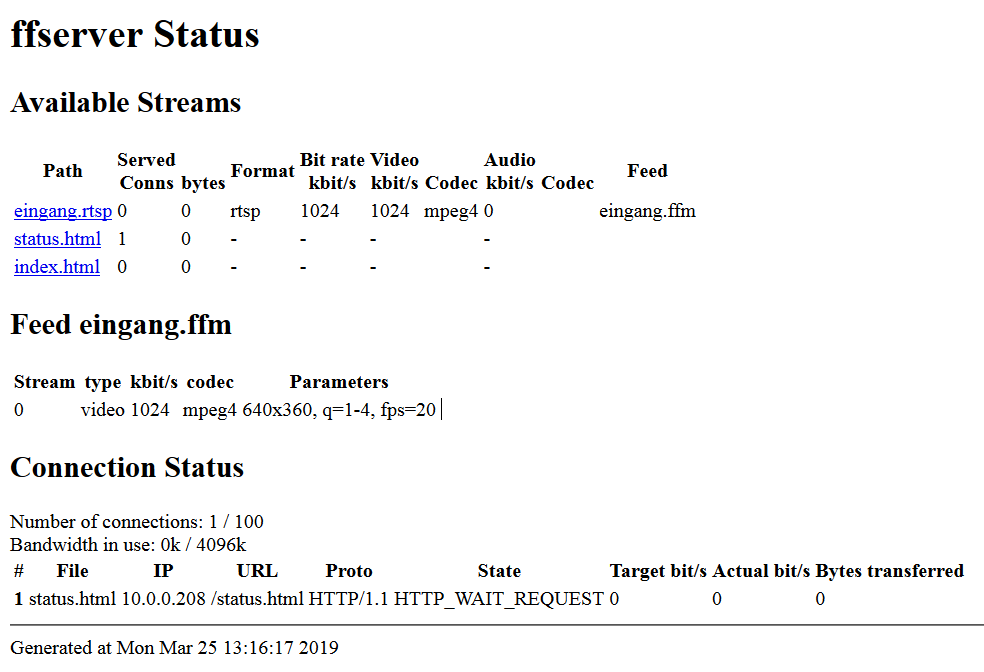
                          ffmpeg.png

                          Klicke ich auf "eingang.rtsp" wird diese nicht gefunden...
                          File '/eingang.rtsp' not found

                          = Dell Optiplex Micro - 10GB RAM - 200GB SSD - Debian VM =
                          = Node.js v20.19.6 = NPM 10.8.2 = JS Controller 7.0.7 =

                          Ubiquiti UAP-AC-LR - UAP-AC-Lite - Synology DS716+II - Fritz!Box 7490
                          Glasfaser 400

                          wendy2702W 1 Reply Last reply
                          0
                          • wendy2702W Offline
                            wendy2702W Offline
                            wendy2702
                            wrote on last edited by
                            #38

                            @aleks-83 sagte in [Tipp] IP-Kamera Stream mit ffmpeg für vis konvertieren:

                            http://10.0.0.17:8090/eingang.ffm

                            Was soll das denn sein?

                            Bitte keine Fragen per PN, die gehören ins Forum!

                            Benutzt das Voting rechts unten im Beitrag wenn er euch geholfen hat.

                            1 Reply Last reply
                            0
                            • A Offline
                              A Offline
                              aleks-83
                              wrote on last edited by aleks-83
                              #39

                              Der Feed der auf der Stream zeigt!?

                              = Dell Optiplex Micro - 10GB RAM - 200GB SSD - Debian VM =
                              = Node.js v20.19.6 = NPM 10.8.2 = JS Controller 7.0.7 =

                              Ubiquiti UAP-AC-LR - UAP-AC-Lite - Synology DS716+II - Fritz!Box 7490
                              Glasfaser 400

                              1 Reply Last reply
                              0
                              • A aleks-83

                                @wendy2702 @eastcoast
                                Ich habe den ffmpeg Server nochmal mit einem Ubuntu 18.04 aufgesetzt.
                                Das läuft jetzt soweit besser durch.
                                Den Loglevel habe ich aber auch mal auf debug gesetzt.

                                Jetzt bekomme ich eine 404 Meldung:

                                root@ffmpeg:~# ffmpeg -loglevel debug -i "rtsp://ffmpeg:stream123@10.0.0.21:554/Streaming/Channels/102/" http://10.0.0.17:8090/eingang.ffm
                                ffmpeg version 3.4.4-0ubuntu0.18.04.1 Copyright (c) 2000-2018 the FFmpeg developers
                                  built with gcc 7 (Ubuntu 7.3.0-16ubuntu3)
                                  configuration: --prefix=/usr --extra-version=0ubuntu0.18.04.1 --toolchain=hardened --libdir=/usr/lib/x86_64-linux-gnu --incdir=/usr/include/x86_64-linux-gnu --enable-gpl --disable-stripping --enable-avresample --enable-avisynth --enable-gnutls --enable-ladspa --enable-libass --enable-libbluray --enable-libbs2b --enable-libcaca --enable-libcdio --enable-libflite --enable-libfontconfig --enable-libfreetype --enable-libfribidi --enable-libgme --enable-libgsm --enable-libmp3lame --enable-libmysofa --enable-libopenjpeg --enable-libopenmpt --enable-libopus --enable-libpulse --enable-librubberband --enable-librsvg --enable-libshine --enable-libsnappy --enable-libsoxr --enable-libspeex --enable-libssh --enable-libtheora --enable-libtwolame --enable-libvorbis --enable-libvpx --enable-libwavpack --enable-libwebp --enable-libx265 --enable-libxml2 --enable-libxvid --enable-libzmq --enable-libzvbi --enable-omx --enable-openal --enable-opengl --enable-sdl2 --enable-libdc1394 --enable-libdrm --enable-libiec61883 --enable-chromaprint --enable-frei0r --enable-libopencv --enable-libx264 --enable-shared
                                  libavutil      55. 78.100 / 55. 78.100
                                  libavcodec     57.107.100 / 57.107.100
                                  libavformat    57. 83.100 / 57. 83.100
                                  libavdevice    57. 10.100 / 57. 10.100
                                  libavfilter     6.107.100 /  6.107.100
                                  libavresample   3.  7.  0 /  3.  7.  0
                                  libswscale      4.  8.100 /  4.  8.100
                                  libswresample   2.  9.100 /  2.  9.100
                                  libpostproc    54.  7.100 / 54.  7.100
                                Splitting the commandline.
                                Reading option '-loglevel' ... matched as option 'loglevel' (set logging level) with argument 'debug'.
                                Reading option '-i' ... matched as input url with argument 'rtsp://ffmpeg:stream123@10.0.0.21:554/Streaming/Channels/102/'.
                                Reading option 'http://10.0.0.17:8090/eingang.ffm' ... matched as output url.
                                Finished splitting the commandline.
                                Parsing a group of options: global .
                                Applying option loglevel (set logging level) with argument debug.
                                Successfully parsed a group of options.
                                Parsing a group of options: input url rtsp://ffmpeg:stream123@10.0.0.21:554/Streaming/Channels/102/.
                                Successfully parsed a group of options.
                                Opening an input file: rtsp://ffmpeg:stream123@10.0.0.21:554/Streaming/Channels/102/.
                                [tcp @ 0x55d237b01aa0] No default whitelist set
                                [rtsp @ 0x55d237aff8c0] SDP:
                                v=0
                                o=- 1553524705086562 1553524705086562 IN IP6 ::
                                s=Media Presentation
                                e=NONE
                                b=AS:5050
                                t=0 0
                                a=control:rtsp://10.0.0.21:554/Streaming/Channels/102/
                                m=video 0 RTP/AVP 96
                                c=IN IP6 ::
                                b=AS:5000
                                a=recvonly
                                a=x-dimensions:640,360
                                a=control:rtsp://10.0.0.21:554/Streaming/Channels/102/trackID=1
                                a=rtpmap:96 H264/90000
                                a=fmtp:96 profile-level-id=420029; packetization-mode=1; sprop-parameter-sets=Z01AHppkBQF/y4C3AQEBQAAA+gAAJxA6GAEVwAEVsu8uNDACK4ACK2XeXCg=,aO48gA==
                                a=Media_header:MEDIAINFO=494D4B48010200000400000100000000000000000000000000000000000000000000000000000000;
                                a=appversion:1.0
                                
                                [rtsp @ 0x55d237aff8c0] video codec set to: h264
                                [rtsp @ 0x55d237aff8c0] RTP Profile IDC: 42 Profile IOP: 0 Level: 29
                                [rtsp @ 0x55d237aff8c0] RTP Packetization Mode: 1
                                [rtsp @ 0x55d237aff8c0] Extradata set to 0x55d237b029a0 (size: 56)
                                [rtp @ 0x55d237b03b40] No default whitelist set
                                [udp @ 0x55d237b04360] No default whitelist set
                                [udp @ 0x55d237b04360] end receive buffer size reported is 131072
                                [udp @ 0x55d237b14800] No default whitelist set
                                [udp @ 0x55d237b14800] end receive buffer size reported is 131072
                                [rtsp @ 0x55d237aff8c0] setting jitter buffer size to 500
                                [rtsp @ 0x55d237aff8c0] hello state=0
                                [h264 @ 0x55d237b03380] nal_unit_type: 7, nal_ref_idc: 3
                                [h264 @ 0x55d237b03380] nal_unit_type: 8, nal_ref_idc: 3
                                [h264 @ 0x55d237b03380] nal_unit_type: 7, nal_ref_idc: 3
                                [h264 @ 0x55d237b03380] nal_unit_type: 8, nal_ref_idc: 3
                                [h264 @ 0x55d237b03380] nal_unit_type: 7, nal_ref_idc: 3
                                [h264 @ 0x55d237b03380] nal_unit_type: 8, nal_ref_idc: 3
                                [h264 @ 0x55d237b03380] nal_unit_type: 5, nal_ref_idc: 3
                                [h264 @ 0x55d237b03380] Reinit context to 640x368, pix_fmt: yuvj420p
                                [h264 @ 0x55d237b03380] nal_unit_type: 1, nal_ref_idc: 3
                                [h264 @ 0x55d237b03380] nal_unit_type: 7, nal_ref_idc: 3
                                [h264 @ 0x55d237b03380] nal_unit_type: 8, nal_ref_idc: 3
                                [h264 @ 0x55d237b03380] nal_unit_type: 5, nal_ref_idc: 3
                                [h264 @ 0x55d237b03380] nal_unit_type: 1, nal_ref_idc: 3
                                    Last message repeated 3 times
                                [rtsp @ 0x55d237aff8c0] All info found
                                Input #0, rtsp, from 'rtsp://ffmpeg:stream123@10.0.0.21:554/Streaming/Channels/102/':
                                  Metadata:
                                    title           : Media Presentation
                                  Duration: N/A, start: 0.310000, bitrate: N/A
                                    Stream #0:0, 28, 1/90000: Video: h264 (Main), 1 reference frame, yuvj420p(pc, bt709, progressive, left), 640x360 (640x368) [SAR 1:1 DAR 16:9], 0/1, 20 fps, 25 tbr, 90k tbn, 40 tbc
                                Successfully opened the file.
                                Parsing a group of options: output url http://10.0.0.17:8090/eingang.ffm.
                                Successfully parsed a group of options.
                                Opening an output file: http://10.0.0.17:8090/eingang.ffm.
                                [NULL @ 0x55d237b3ce00] Opening 'http://10.0.0.17:8090/eingang.ffm' for reading
                                [http @ 0x55d237bf21a0] Setting default whitelist 'http,https,tls,rtp,tcp,udp,crypto,httpproxy'
                                [http @ 0x55d237bf21a0] request: GET /eingang.ffm HTTP/1.1
                                User-Agent: Lavf/57.83.100
                                Accept: */*
                                Range: bytes=0-
                                Connection: close
                                Host: 10.0.0.17:8090
                                Icy-MetaData: 1
                                
                                
                                [http @ 0x55d237bf21a0] HTTP error 404 Not Found
                                http://10.0.0.17:8090/eingang.ffm: Server returned 404 Not Found


                                Bei dieser Konfig:

                                
                                HTTPPort 8090
                                HTTPBindAddress 0.0.0.0
                                MaxHTTPConnections 200
                                MaxClients 100
                                MaxBandwidth 4096
                                
                                # CustomLog -
                                ########################################
                                
                                # IP camera feed...
                                
                                <feed eingang.ffm>
                                File /tmp/eingang.ffm
                                FileMaxSize 1M
                                ACL allow 127.0.0.1
                                </feed>
                                
                                #########################################
                                
                                # Streams...
                                
                                <stream eingang.rtsp>
                                Feed eingang.ffm
                                Format rtsp
                                #VideoCodec libx264 (auch getestet)
                                VideoQMin 1
                                VideoQMax 4
                                VideoFrameRate 20
                                VideoSize 640x360
                                VideoBufferSize 1024
                                VideoBitRate 1024
                                NoAudio
                                Strict -1
                                </stream>
                                
                                
                                <stream status.html="">
                                # Server status URL Format status
                                # Only allow local people to get the status
                                ACL allow 0.0.0.0 255.255.255.255
                                </stream>
                                
                                <redirect index.html>
                                # Just an URL redirect for index
                                # Redirect index.html to the appropriate site
                                URL http://www.ffmpeg.org/
                                </redirect>


                                Die Status-Seite gibt folgendes aus:
                                ffmpeg.png

                                Klicke ich auf "eingang.rtsp" wird diese nicht gefunden...
                                File '/eingang.rtsp' not found

                                wendy2702W Offline
                                wendy2702W Offline
                                wendy2702
                                wrote on last edited by
                                #40

                                @aleks-83 sagte in [Tipp] IP-Kamera Stream mit ffmpeg für vis konvertieren:

                                Opening an output file: http://10.0.0.17:8090/eingang.ffm.
                                [NULL @ 0x55d237b3ce00] Opening 'http://10.0.0.17:8090/eingang.ffm' for reading

                                Denke da stimmt etwas mit den Optionen nicht. Es wird ja scheinbar von FFMPEG versucht das File zu öffnen.

                                Bitte keine Fragen per PN, die gehören ins Forum!

                                Benutzt das Voting rechts unten im Beitrag wenn er euch geholfen hat.

                                1 Reply Last reply
                                0
                                • A Offline
                                  A Offline
                                  aleks-83
                                  wrote on last edited by aleks-83
                                  #41

                                  Ja,
                                  mit dem Befehl:

                                  ffmpeg -loglevel debug -i "rtsp://ffmpeg:stream123@10.0.0.21:554/Streaming/Channels/102/" http://10.0.0.17:8090/eingang.ffm
                                  

                                  versucht er doch den rtsp Stream aus der 10.0.0.21 mit der http://10.0.0.17:8090/eingang.ffm zu verbinden, oder nicht?
                                  Diese legt er dann in /tmp/ ab, und versucht sie als stream zu öffnen.
                                  So verstehe ich das Ganze...

                                  = Dell Optiplex Micro - 10GB RAM - 200GB SSD - Debian VM =
                                  = Node.js v20.19.6 = NPM 10.8.2 = JS Controller 7.0.7 =

                                  Ubiquiti UAP-AC-LR - UAP-AC-Lite - Synology DS716+II - Fritz!Box 7490
                                  Glasfaser 400

                                  1 Reply Last reply
                                  0
                                  • wendy2702W Offline
                                    wendy2702W Offline
                                    wendy2702
                                    wrote on last edited by
                                    #42

                                    Da müsste ich mich wieder rein lesen wenn ich ehrlich bin.

                                    Bitte keine Fragen per PN, die gehören ins Forum!

                                    Benutzt das Voting rechts unten im Beitrag wenn er euch geholfen hat.

                                    1 Reply Last reply
                                    0
                                    • A Offline
                                      A Offline
                                      aleks-83
                                      wrote on last edited by
                                      #43

                                      Hmmm.
                                      Ich scheine ja kurz vorm Ziel zu sein.

                                      OffTopic:
                                      MotionEye würde ja gehen, aber das will ich meinem NUC nicht antun.
                                      Der läuft dann auf 75% CPU Last bei 4 Kameras.

                                      = Dell Optiplex Micro - 10GB RAM - 200GB SSD - Debian VM =
                                      = Node.js v20.19.6 = NPM 10.8.2 = JS Controller 7.0.7 =

                                      Ubiquiti UAP-AC-LR - UAP-AC-Lite - Synology DS716+II - Fritz!Box 7490
                                      Glasfaser 400

                                      1 Reply Last reply
                                      0
                                      • wendy2702W Offline
                                        wendy2702W Offline
                                        wendy2702
                                        wrote on last edited by
                                        #44

                                        Ob ffmpeg bei 4 Kameras nachher weniger benötigt?

                                        Ich wollte/habe Motioneye ja auch gewählt da ich aufzeichnen möchte und das relativ einfach verwalten will.

                                        Kameras ohne Aufzeichung im Aussenbereich macht für mich keinen bis wenig sinn.

                                        Bitte keine Fragen per PN, die gehören ins Forum!

                                        Benutzt das Voting rechts unten im Beitrag wenn er euch geholfen hat.

                                        1 Reply Last reply
                                        0
                                        • A Offline
                                          A Offline
                                          aleks-83
                                          wrote on last edited by
                                          #45

                                          Aufzeichnung macht meine Synology.
                                          Da sie aber zu schwach ist um auch noch MotionEye (für das restreaming) zu machen, wollte ich meinen NUC dafür nutzen.

                                          = Dell Optiplex Micro - 10GB RAM - 200GB SSD - Debian VM =
                                          = Node.js v20.19.6 = NPM 10.8.2 = JS Controller 7.0.7 =

                                          Ubiquiti UAP-AC-LR - UAP-AC-Lite - Synology DS716+II - Fritz!Box 7490
                                          Glasfaser 400

                                          1 Reply Last reply
                                          0
                                          Reply
                                          • Reply as topic
                                          Log in to reply
                                          • Oldest to Newest
                                          • Newest to Oldest
                                          • Most Votes


                                          Support us

                                          ioBroker
                                          Community Adapters
                                          Donate

                                          309

                                          Online

                                          32.6k

                                          Users

                                          82.3k

                                          Topics

                                          1.3m

                                          Posts
                                          Community
                                          Impressum | Datenschutz-Bestimmungen | Nutzungsbedingungen | Einwilligungseinstellungen
                                          ioBroker Community 2014-2025
                                          logo
                                          • Login

                                          • Don't have an account? Register

                                          • Login or register to search.
                                          • First post
                                            Last post
                                          0
                                          • Home
                                          • Recent
                                          • Tags
                                          • Unread 0
                                          • Categories
                                          • Unreplied
                                          • Popular
                                          • GitHub
                                          • Docu
                                          • Hilfe