Skip to content
  • Home
  • Recent
  • Tags
  • 0 Unread 0
  • Categories
  • Unreplied
  • Popular
  • GitHub
  • Docu
  • Hilfe
Skins
  • Light
  • Brite
  • Cerulean
  • Cosmo
  • Flatly
  • Journal
  • Litera
  • Lumen
  • Lux
  • Materia
  • Minty
  • Morph
  • Pulse
  • Sandstone
  • Simplex
  • Sketchy
  • Spacelab
  • United
  • Yeti
  • Zephyr
  • Dark
  • Cyborg
  • Darkly
  • Quartz
  • Slate
  • Solar
  • Superhero
  • Vapor

  • Default (No Skin)
  • No Skin
Collapse
ioBroker Logo

Community Forum

donate donate
  1. ioBroker Community Home
  2. Deutsch
  3. Tester
  4. [ESPHome] Beta release

NEWS

  • Jahresrückblick 2025 – unser neuer Blogbeitrag ist online! ✨
    BluefoxB
    Bluefox
    17
    1
    3.5k

  • Neuer Blogbeitrag: Monatsrückblick - Dezember 2025 🎄
    BluefoxB
    Bluefox
    13
    1
    1.1k

  • Weihnachtsangebot 2025! 🎄
    BluefoxB
    Bluefox
    25
    1
    2.5k

[ESPHome] Beta release

Scheduled Pinned Locked Moved Tester
591 Posts 48 Posters 168.8k Views 39 Watching
  • Oldest to Newest
  • Newest to Oldest
  • Most Votes
Reply
  • Reply as topic
Log in to reply
This topic has been deleted. Only users with topic management privileges can see it.
  • Thomas BraunT Thomas Braun

    @klassisch
    Dann schau dir die Verteilung allein mal für den ioBroker an. Auch da ist die überwiegende Zahl der Installationen auf Linux-Kisten zu finden.

    mac89mucM Offline
    mac89mucM Offline
    mac89muc
    wrote on last edited by
    #438

    @thomas-braun

    Danke für eure Rückinfos - welche Möglichkeiten habe ich denn überhaupt noch für mein Setup?

    Wenn ich euch richtig verstanden habe ist das Dashboard mit meiner Konfiguration nicht nutzbar.

    Gibt es ggf. noch Alternativen für mich unter osx, mit denen ich unkompliziert mein yaml-Template auf einen D1 Mini bekomme, um den dann in ioBroker einzubinden?

    Wenn ich Dich - @klassisch - richtig verstanden habe, klappt die Einbindung trotz fehlendem Dashboard bei Dir mit dem Adapter, du erledigst den Rest (Compilieren etc) nur separat - also losgelöst vom Adapter, allerdings unter Windows.

    Gibt es die Möglichkeit für osx auch?
    Möchte mir ungern jetzt noch eine VM aufsetzen um dann dort iobroker oder home-assistant zu installieren.

    Viele Grüße

    K 1 Reply Last reply
    0
    • mac89mucM mac89muc

      @thomas-braun

      Danke für eure Rückinfos - welche Möglichkeiten habe ich denn überhaupt noch für mein Setup?

      Wenn ich euch richtig verstanden habe ist das Dashboard mit meiner Konfiguration nicht nutzbar.

      Gibt es ggf. noch Alternativen für mich unter osx, mit denen ich unkompliziert mein yaml-Template auf einen D1 Mini bekomme, um den dann in ioBroker einzubinden?

      Wenn ich Dich - @klassisch - richtig verstanden habe, klappt die Einbindung trotz fehlendem Dashboard bei Dir mit dem Adapter, du erledigst den Rest (Compilieren etc) nur separat - also losgelöst vom Adapter, allerdings unter Windows.

      Gibt es die Möglichkeit für osx auch?
      Möchte mir ungern jetzt noch eine VM aufsetzen um dann dort iobroker oder home-assistant zu installieren.

      Viele Grüße

      K Offline
      K Offline
      klassisch
      Most Active
      wrote on last edited by
      #439

      @mac89muc Bei mir lief das so:

      • Python 3.8+ muß installiert, funktionierend und verpfadet sein. Mit
      python -V
      

      testen

      • Dann ein Verzeichnis für die ESPHome Projekte erstellen und dorthin navigieren
      • In Kommandozeilenmodus (DOS-Box) wechseln, bei Win mit CMD
      • Dort in dieses Verzeichnis navigieren
        Über pip-Kommando ESPHome installieren, wie bei ESPHome-getting started beschrieben
      pip3 install esphome
      

      oder auch mal bei Update

      pip install -U esphome
      
      • Dann wurde bei mir das Framework installiert
      • Mit einem Editor ein YAML schreiben.
      • YAML speichern, z.B. esphometest01.yaml, Dabie die eigenartigen naming restrictions beachten
      • den compile run starten
      esphome run esphometest01.yaml
      
      1 Reply Last reply
      0
      • K Offline
        K Offline
        klassisch
        Most Active
        wrote on last edited by
        #440

        Hat schon mal jemand den DAC des ESP32 verwendet? Wie kommen die Daten vom ioBroker in den ESP?

        draexlerD 1 Reply Last reply
        0
        • K klassisch

          Hat schon mal jemand den DAC des ESP32 verwendet? Wie kommen die Daten vom ioBroker in den ESP?

          draexlerD Offline
          draexlerD Offline
          draexler
          wrote on last edited by draexler
          #441

          Hi,
          wie kann ich diese Fehlermeldung im Log eliminieren?
          Anscheinend ist das Passwort falsch? Aber es läuft eigentlich alles...

          Bildschirmfoto 2021-12-24 um 14.50.13.png

          Auf welches Passwort bezieht sich diese Meldung?

          esphome:
            name: wohnzimmer-wetterdisplay
            platform: ESP32
            board: esp32dev
            
            on_boot:
              priority: -10
              then:
                - delay: 7s
                - component.update: epaper
            
          <<: !include secrets.yaml
          
          mqtt:
            broker: 192.168.1.??
            username: GeheimGeheimGeheim
            password: GeheimGeheimGeheim
            
            # OTA MODUS
            on_message:
              - topic: ADMINESP/OTA/Wetterdisplay_Wohnzimmer
                payload: 'ON'
                then:
                  - deep_sleep.prevent: deep_sleep_1
              - topic: ADMINESP/DEEPSLEEP/Wetterdisplay_Wohnzimmer
                payload: 'ON'
                then:
                  - deep_sleep.enter: deep_sleep_1
            
          api:
              password: 'MyPassword'
            
          ota:
            password: "GeheimGeheimGeheim"
            
          logger:
          
          ##############
          
          captive_portal:
          
          E 1 Reply Last reply
          0
          • draexlerD draexler

            Hi,
            wie kann ich diese Fehlermeldung im Log eliminieren?
            Anscheinend ist das Passwort falsch? Aber es läuft eigentlich alles...

            Bildschirmfoto 2021-12-24 um 14.50.13.png

            Auf welches Passwort bezieht sich diese Meldung?

            esphome:
              name: wohnzimmer-wetterdisplay
              platform: ESP32
              board: esp32dev
              
              on_boot:
                priority: -10
                then:
                  - delay: 7s
                  - component.update: epaper
              
            <<: !include secrets.yaml
            
            mqtt:
              broker: 192.168.1.??
              username: GeheimGeheimGeheim
              password: GeheimGeheimGeheim
              
              # OTA MODUS
              on_message:
                - topic: ADMINESP/OTA/Wetterdisplay_Wohnzimmer
                  payload: 'ON'
                  then:
                    - deep_sleep.prevent: deep_sleep_1
                - topic: ADMINESP/DEEPSLEEP/Wetterdisplay_Wohnzimmer
                  payload: 'ON'
                  then:
                    - deep_sleep.enter: deep_sleep_1
              
            api:
                password: 'MyPassword'
              
            ota:
              password: "GeheimGeheimGeheim"
              
            logger:
            
            ##############
            
            captive_portal:
            
            E Offline
            E Offline
            e-s
            wrote on last edited by
            #442

            @draexler
            warum hast du mqtt und api aktiv?
            Schmeiß mal mqtt raus?
            Was steht noch in deiner secret.yaml?

            draexlerD 1 Reply Last reply
            0
            • E e-s

              @draexler
              warum hast du mqtt und api aktiv?
              Schmeiß mal mqtt raus?
              Was steht noch in deiner secret.yaml?

              draexlerD Offline
              draexlerD Offline
              draexler
              wrote on last edited by
              #443

              @e-s Hi,
              MQTT ist aktiv weil ich darüber iobroker Werte/Daten auf ein ePaper zur Anzeige bringe (Geht ja aktuell nur über MQTT)

              API aus dem Grund damit der ESP Connected Status in der ESP Home Instance angezeigt werden kann. Habe ich das weggelassen war der immer "Offline".

              In der Secret YAML steht nur das WIFI Passwort und das FastConnect "true" ist.

              E 1 Reply Last reply
              0
              • draexlerD draexler

                @e-s Hi,
                MQTT ist aktiv weil ich darüber iobroker Werte/Daten auf ein ePaper zur Anzeige bringe (Geht ja aktuell nur über MQTT)

                API aus dem Grund damit der ESP Connected Status in der ESP Home Instance angezeigt werden kann. Habe ich das weggelassen war der immer "Offline".

                In der Secret YAML steht nur das WIFI Passwort und das FastConnect "true" ist.

                E Offline
                E Offline
                e-s
                wrote on last edited by
                #444

                @draexler
                Werden denn im esphome Adapter Daten vom esp über api angezeigt, ich würde tippen das das passwort im esphome Adapter nicht drin steht.

                draexlerD 1 Reply Last reply
                0
                • M Offline
                  M Offline
                  marsmännchen
                  wrote on last edited by
                  #445

                  kann mir jemand sagen weshalb ich immer noch folgende Fehlermeldung bekomme wenn ich versuche Text auf einem Display darzustellen:

                  Failed config
                  
                  font: [source /opt/iobroker/iobroker-data/esphome.0/testdisplay.yaml:32]
                    
                    Please install the pillow python package to use this feature. (pip install pillow).
                    - [source /opt/iobroker/iobroker-data/esphome.0/testdisplay.yaml:32]
                      file: /opt/iobroker/iobroker-data/esphome.0/Sandyshand.ttf
                      id: sandy
                      size: 6
                  

                  Ich habe pillow installiert:

                  pi@achbotslave:~ $ pip install pillow
                  Looking in indexes: https://pypi.org/simple, https://www.piwheels.org/simple
                  Requirement already satisfied: pillow in ./.local/lib/python3.9/site-packages (8.4.0)
                  

                  Und eine *.ttf im Verzeichnis:

                  pi@achbotslave:/opt/iobroker/iobroker-data/esphome.0 $ ls
                  esp32presence.yaml  Fonts  Sandyshand.ttf  testdisplay.yaml
                  pi@achbotslave:/opt/iobroker/iobroker-data/esphome.0 $


                  Ich habe schon hinbekommen einen simplen Strich am Display, aber die Fonts stören ihn irgendwie:

                  esphome:
                    name: testdisplay
                    platform: ESP32
                    board: ttgo-lora32-v1
                  
                  # Enable logging
                  logger:
                  
                  # Enable Home Assistant API
                  api:
                  
                  ota:
                    
                  wifi:
                    ssid: "Wlannetz"
                    password: "1234"
                    power_save_mode: LIGHT
                  
                    manual_ip:
                      static_ip: 192.168.99.99
                      gateway: 192.168.99.99
                      subnet: 255.255.255.0
                  
                    # Enable fallback hotspot (captive portal) in case wifi connection fails
                    ap:
                      ssid: "Testdisplay Fallback Hotspot"
                      password: "1234"
                  
                  captive_portal:
                  
                  font:
                    - file: "/opt/iobroker/iobroker-data/esphome.0/Sandyshand.ttf"
                      id: sandy
                      size: 6


                  i2c:
                    sda: 4
                    scl: 15


                  display:
                    - platform: ssd1306_i2c
                      model: "SSD1306 128x64"
                      reset_pin: 16
                      address: 0x3C
                      lambda: |-
                        it.print(0, 0, id(sandy), "Hello World!");
                  

                  Ich habe leider nur den Hinweis im Forum gefunden : https://forum.iobroker.net/topic/47289/gleichung-in-blockly/22?_=1640546464509
                  Das habe ich aber soweit schon durch.
                  Vielleicht hat noch jemand einen Tipp?
                  MfG
                  Patrick

                  Raspberry Pi 4 8GB, Debian 11, js-controller: 5.0.12, Nodejs: v18.18.2, NPM: 9.8.1 (Multihost),
                  Wago PFC200 mit Dali Lichtsteuerung.

                  P 1 Reply Last reply
                  0
                  • M marsmännchen

                    kann mir jemand sagen weshalb ich immer noch folgende Fehlermeldung bekomme wenn ich versuche Text auf einem Display darzustellen:

                    Failed config
                    
                    font: [source /opt/iobroker/iobroker-data/esphome.0/testdisplay.yaml:32]
                      
                      Please install the pillow python package to use this feature. (pip install pillow).
                      - [source /opt/iobroker/iobroker-data/esphome.0/testdisplay.yaml:32]
                        file: /opt/iobroker/iobroker-data/esphome.0/Sandyshand.ttf
                        id: sandy
                        size: 6
                    

                    Ich habe pillow installiert:

                    pi@achbotslave:~ $ pip install pillow
                    Looking in indexes: https://pypi.org/simple, https://www.piwheels.org/simple
                    Requirement already satisfied: pillow in ./.local/lib/python3.9/site-packages (8.4.0)
                    

                    Und eine *.ttf im Verzeichnis:

                    pi@achbotslave:/opt/iobroker/iobroker-data/esphome.0 $ ls
                    esp32presence.yaml  Fonts  Sandyshand.ttf  testdisplay.yaml
                    pi@achbotslave:/opt/iobroker/iobroker-data/esphome.0 $


                    Ich habe schon hinbekommen einen simplen Strich am Display, aber die Fonts stören ihn irgendwie:

                    esphome:
                      name: testdisplay
                      platform: ESP32
                      board: ttgo-lora32-v1
                    
                    # Enable logging
                    logger:
                    
                    # Enable Home Assistant API
                    api:
                    
                    ota:
                      
                    wifi:
                      ssid: "Wlannetz"
                      password: "1234"
                      power_save_mode: LIGHT
                    
                      manual_ip:
                        static_ip: 192.168.99.99
                        gateway: 192.168.99.99
                        subnet: 255.255.255.0
                    
                      # Enable fallback hotspot (captive portal) in case wifi connection fails
                      ap:
                        ssid: "Testdisplay Fallback Hotspot"
                        password: "1234"
                    
                    captive_portal:
                    
                    font:
                      - file: "/opt/iobroker/iobroker-data/esphome.0/Sandyshand.ttf"
                        id: sandy
                        size: 6


                    i2c:
                      sda: 4
                      scl: 15


                    display:
                      - platform: ssd1306_i2c
                        model: "SSD1306 128x64"
                        reset_pin: 16
                        address: 0x3C
                        lambda: |-
                          it.print(0, 0, id(sandy), "Hello World!");
                    

                    Ich habe leider nur den Hinweis im Forum gefunden : https://forum.iobroker.net/topic/47289/gleichung-in-blockly/22?_=1640546464509
                    Das habe ich aber soweit schon durch.
                    Vielleicht hat noch jemand einen Tipp?
                    MfG
                    Patrick

                    P Offline
                    P Offline
                    pboeck
                    wrote on last edited by
                    #446

                    @marsmännchen
                    Ich habe folgenden Eintrag in der .yaml:

                    
                    font:
                      - file: "Roboto-Regular.ttf"
                        id: RB3
                        size: 24
                      - file: "Roboto-Regular.ttf"
                        id: RB2
                        size: 20
                      - file: "Roboto-Regular.ttf"
                        id: RB1
                        size: 16  


                    Oder ist die Font größe zu klein?

                    M 1 Reply Last reply
                    0
                    • P pboeck

                      @marsmännchen
                      Ich habe folgenden Eintrag in der .yaml:

                      
                      font:
                        - file: "Roboto-Regular.ttf"
                          id: RB3
                          size: 24
                        - file: "Roboto-Regular.ttf"
                          id: RB2
                          size: 20
                        - file: "Roboto-Regular.ttf"
                          id: RB1
                          size: 16  


                      Oder ist die Font größe zu klein?

                      M Offline
                      M Offline
                      marsmännchen
                      wrote on last edited by
                      #447

                      @pboeck
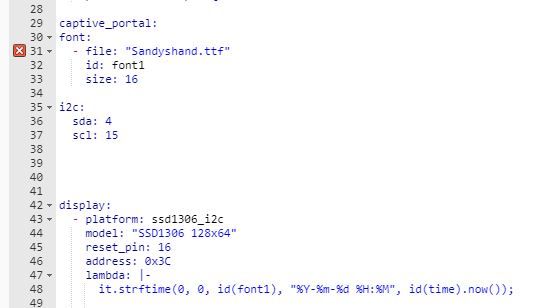
                      nein leider. Das rote X, ich soll pillow installieren bleibt.schrift.JPG
                      Raspberry Pi 4 8GB, Debian 11, js-controller: 5.0.12, Nodejs: v18.18.2, NPM: 9.8.1 (Multihost),
                      Wago PFC200 mit Dali Lichtsteuerung.

                      Thomas BraunT 1 Reply Last reply
                      0
                      • M marsmännchen

                        @pboeck
                        nein leider. Das rote X, ich soll pillow installieren bleibt.schrift.JPG

                        Thomas BraunT Online
                        Thomas BraunT Online
                        Thomas Braun
                        Most Active
                        wrote on last edited by Thomas Braun
                        #448

                        @marsmännchen

                        sudo apt update
                        apt policy python3-pil python3-pil.imagetk
                        

                        Linux-Werkzeugkasten:
                        https://forum.iobroker.net/topic/42952/der-kleine-iobroker-linux-werkzeugkasten
                        NodeJS Fixer Skript:
                        https://forum.iobroker.net/topic/68035/iob-node-fix-skript
                        iob_diag: curl -sLf -o diag.sh https://iobroker.net/diag.sh && bash diag.sh

                        M 1 Reply Last reply
                        1
                        • Thomas BraunT Thomas Braun

                          @marsmännchen

                          sudo apt update
                          apt policy python3-pil python3-pil.imagetk
                          
                          M Offline
                          M Offline
                          marsmännchen
                          wrote on last edited by
                          #449

                          @thomas-braun sagte in [ESPHome] Beta release:

                          apt policy python3-pil python3-pil.imagetk

                          Ergibt:

                          pi@achbotslave:~ $ sudo apt update
                          OK:1 http://archive.raspberrypi.org/debian bullseye InRelease
                          Holen:2 http://raspbian.raspberrypi.org/raspbian bullseye InRelease [15,0 kB]
                          OK:3 https://packages.grafana.com/enterprise/deb stable InRelease
                          OK:4 https://repos.influxdata.com/debian bullseye InRelease
                          OK:5 https://deb.nodesource.com/node_14.x bullseye InRelease
                          Holen:6 http://raspbian.raspberrypi.org/raspbian bullseye/main armhf Packages [13,2 MB]
                          Es wurden 13,2 MB in 5 s geholt (2.552 kB/s).
                          Paketlisten werden gelesen… Fertig
                          Abhängigkeitsbaum wird aufgebaut… Fertig
                          Statusinformationen werden eingelesen… Fertig
                          Aktualisierung für 34 Pakete verfügbar. Führen Sie »apt list --upgradable« aus, um sie anzuzeigen.


                          und:

                          pi@achbotslave:~ $ apt policy python3-pil python3-pil.imagetk
                          python3-pil:
                            Installiert:           (keine)
                            Installationskandidat: 8.1.2+dfsg-0.3
                            Versionstabelle:
                               8.1.2+dfsg-0.3 500
                                  500 http://raspbian.raspberrypi.org/raspbian bullseye/main armhf Packages
                          python3-pil.imagetk:
                            Installiert:           (keine)
                            Installationskandidat: 8.1.2+dfsg-0.3
                            Versionstabelle:
                               8.1.2+dfsg-0.3 500
                                  500 http://raspbian.raspberrypi.org/raspbian bullseye/main armhf Packages


                          Als laie würd ich sagen da fehlt was?

                          Raspberry Pi 4 8GB, Debian 11, js-controller: 5.0.12, Nodejs: v18.18.2, NPM: 9.8.1 (Multihost),
                          Wago PFC200 mit Dali Lichtsteuerung.

                          Thomas BraunT 1 Reply Last reply
                          0
                          • M marsmännchen

                            @thomas-braun sagte in [ESPHome] Beta release:

                            apt policy python3-pil python3-pil.imagetk

                            Ergibt:

                            pi@achbotslave:~ $ sudo apt update
                            OK:1 http://archive.raspberrypi.org/debian bullseye InRelease
                            Holen:2 http://raspbian.raspberrypi.org/raspbian bullseye InRelease [15,0 kB]
                            OK:3 https://packages.grafana.com/enterprise/deb stable InRelease
                            OK:4 https://repos.influxdata.com/debian bullseye InRelease
                            OK:5 https://deb.nodesource.com/node_14.x bullseye InRelease
                            Holen:6 http://raspbian.raspberrypi.org/raspbian bullseye/main armhf Packages [13,2 MB]
                            Es wurden 13,2 MB in 5 s geholt (2.552 kB/s).
                            Paketlisten werden gelesen… Fertig
                            Abhängigkeitsbaum wird aufgebaut… Fertig
                            Statusinformationen werden eingelesen… Fertig
                            Aktualisierung für 34 Pakete verfügbar. Führen Sie »apt list --upgradable« aus, um sie anzuzeigen.


                            und:

                            pi@achbotslave:~ $ apt policy python3-pil python3-pil.imagetk
                            python3-pil:
                              Installiert:           (keine)
                              Installationskandidat: 8.1.2+dfsg-0.3
                              Versionstabelle:
                                 8.1.2+dfsg-0.3 500
                                    500 http://raspbian.raspberrypi.org/raspbian bullseye/main armhf Packages
                            python3-pil.imagetk:
                              Installiert:           (keine)
                              Installationskandidat: 8.1.2+dfsg-0.3
                              Versionstabelle:
                                 8.1.2+dfsg-0.3 500
                                    500 http://raspbian.raspberrypi.org/raspbian bullseye/main armhf Packages


                            Als laie würd ich sagen da fehlt was?

                            Thomas BraunT Online
                            Thomas BraunT Online
                            Thomas Braun
                            Most Active
                            wrote on last edited by
                            #450

                            @marsmännchen

                            Dann installier die beiden Pakete nach und auch die ausstehenden 34 Paketupdates.

                            Linux-Werkzeugkasten:
                            https://forum.iobroker.net/topic/42952/der-kleine-iobroker-linux-werkzeugkasten
                            NodeJS Fixer Skript:
                            https://forum.iobroker.net/topic/68035/iob-node-fix-skript
                            iob_diag: curl -sLf -o diag.sh https://iobroker.net/diag.sh && bash diag.sh

                            M 1 Reply Last reply
                            1
                            • Thomas BraunT Thomas Braun

                              @marsmännchen

                              Dann installier die beiden Pakete nach und auch die ausstehenden 34 Paketupdates.

                              M Offline
                              M Offline
                              marsmännchen
                              wrote on last edited by
                              #451

                              @thomas-braun
                              Fürchterlich der ewige Anfänger zu sein. Vielen Dank, das wars.
                              Ich habe :

                              sudo apt-get python3-pil
                               sudo pip3 install pillow
                              sudo apt-get install python3-pil.imagetk
                              

                              und danach:

                              sudo apt-get install libopenjp2-7-dev


                              Jetzt funktioniert es.

                              Raspberry Pi 4 8GB, Debian 11, js-controller: 5.0.12, Nodejs: v18.18.2, NPM: 9.8.1 (Multihost),
                              Wago PFC200 mit Dali Lichtsteuerung.

                              Thomas BraunT 1 Reply Last reply
                              0
                              • M marsmännchen

                                @thomas-braun
                                Fürchterlich der ewige Anfänger zu sein. Vielen Dank, das wars.
                                Ich habe :

                                sudo apt-get python3-pil
                                 sudo pip3 install pillow
                                sudo apt-get install python3-pil.imagetk
                                

                                und danach:

                                sudo apt-get install libopenjp2-7-dev


                                Jetzt funktioniert es.

                                Thomas BraunT Online
                                Thomas BraunT Online
                                Thomas Braun
                                Most Active
                                wrote on last edited by
                                #452

                                @marsmännchen sagte in [ESPHome] Beta release:

                                sudo pip3 install pillow

                                Sollte nicht erforderlich sein, bzw. ist es jetzt in zwei Pfaden installiert.
                                Debian hat die Eigenart, alle möglichen phython-Pakete selber zu packen und nicht pip3 zu verwenden. Im Fall von pillow halt in die beiden Pakete, die du jetzt nachinstalliert hast.

                                Linux-Werkzeugkasten:
                                https://forum.iobroker.net/topic/42952/der-kleine-iobroker-linux-werkzeugkasten
                                NodeJS Fixer Skript:
                                https://forum.iobroker.net/topic/68035/iob-node-fix-skript
                                iob_diag: curl -sLf -o diag.sh https://iobroker.net/diag.sh && bash diag.sh

                                O 1 Reply Last reply
                                0
                                • Thomas BraunT Thomas Braun

                                  @marsmännchen sagte in [ESPHome] Beta release:

                                  sudo pip3 install pillow

                                  Sollte nicht erforderlich sein, bzw. ist es jetzt in zwei Pfaden installiert.
                                  Debian hat die Eigenart, alle möglichen phython-Pakete selber zu packen und nicht pip3 zu verwenden. Im Fall von pillow halt in die beiden Pakete, die du jetzt nachinstalliert hast.

                                  O Offline
                                  O Offline
                                  OPatrick
                                  wrote on last edited by
                                  #453

                                  Hello I have also problems installing the esp Adapter.
                                  Attached my log file. I don't know what to do..
                                  It a new installation of rasbian. With new iobroker.
                                  2022-01-02T18_40_22_424Z-debug.log

                                  1 Reply Last reply
                                  0
                                  • Thomas BraunT Thomas Braun

                                    @johannes-bauerstatter sagte in [ESPHome] Beta release:

                                    ModuleNotFoundError: No module named 'apt_pkg'                                                                                                                                                                            (Reading database ... 50809 files and directories currently installed.)
                                    

                                    Gaaaaaaanz merkwürdige Meldungen. Was zur Hölle hast du da wie installiert?
                                    Ich würd's nochmal ganz frisch installieren.

                                    O Offline
                                    O Offline
                                    OPatrick
                                    wrote on last edited by
                                    #454

                                    @thomas-braun bekomme eine ähnliche Meldung. Allerdings ist es eine neue Installation.
                                    2022-01-02T18_40_22_424Z-debug.log

                                    Thomas BraunT 1 Reply Last reply
                                    0
                                    • O OPatrick

                                      @thomas-braun bekomme eine ähnliche Meldung. Allerdings ist es eine neue Installation.
                                      2022-01-02T18_40_22_424Z-debug.log

                                      Thomas BraunT Online
                                      Thomas BraunT Online
                                      Thomas Braun
                                      Most Active
                                      wrote on last edited by Thomas Braun
                                      #455

                                      @opatrick

                                      Installier die vorgesehene node-Version 14, nicht node@v12.22.8

                                      Und wie genau versuchst du das zu installieren? KOMPLETTE Eingabezeile ist gefragt.

                                      Keine Ahnung was ihr da immer treibt:

                                      echad@chet:~ $ iobroker add esphome
                                      NPM version: x.y.z
                                      npm install iobroker.esphome@0.2.4 --loglevel error --prefix "/opt/iobroker" (System call)
                                      host.chet install adapter esphome
                                      upload [5] esphome.admin /opt/iobroker/node_modules/iobroker.esphome/admin/words.js words.js application/javascript
                                      upload [4] esphome.admin /opt/iobroker/node_modules/iobroker.esphome/admin/style.css style.css text/css
                                      upload [3] esphome.admin /opt/iobroker/node_modules/iobroker.esphome/admin/index_m.html index_m.html text/html
                                      upload [2] esphome.admin /opt/iobroker/node_modules/iobroker.esphome/admin/img/dashboard.png img/dashboard.png image/png
                                      upload [1] esphome.admin /opt/iobroker/node_modules/iobroker.esphome/admin/esphome.png esphome.png image/png
                                      upload [0] esphome.admin /opt/iobroker/node_modules/iobroker.esphome/admin/admin.d.ts admin.d.ts video/mp2t
                                      host.chet object system.adapter.esphome created/updated
                                      host.chet create instance esphome
                                      host.chet object esphome.0.info.connection created
                                      host.chet object esphome.0.info created
                                      host.chet object system.adapter.esphome.0.logLevel created
                                      host.chet object system.adapter.esphome.0.sigKill created
                                      host.chet object system.adapter.esphome.0.eventLoopLag created
                                      host.chet object system.adapter.esphome.0.outputCount created
                                      host.chet object system.adapter.esphome.0.inputCount created
                                      host.chet object system.adapter.esphome.0.uptime created
                                      host.chet object system.adapter.esphome.0.memRss created
                                      host.chet object system.adapter.esphome.0.memHeapTotal created
                                      host.chet object system.adapter.esphome.0.memHeapUsed created
                                      host.chet object system.adapter.esphome.0.cputime created
                                      host.chet object system.adapter.esphome.0.cpu created
                                      host.chet object system.adapter.esphome.0.compactMode created
                                      host.chet object system.adapter.esphome.0.connected created
                                      host.chet object system.adapter.esphome.0.alive created
                                      host.chet Set default value of esphome.0.info.connection: false
                                      host.chet object system.adapter.esphome.0 created
                                      

                                      Linux-Werkzeugkasten:
                                      https://forum.iobroker.net/topic/42952/der-kleine-iobroker-linux-werkzeugkasten
                                      NodeJS Fixer Skript:
                                      https://forum.iobroker.net/topic/68035/iob-node-fix-skript
                                      iob_diag: curl -sLf -o diag.sh https://iobroker.net/diag.sh && bash diag.sh

                                      O 1 Reply Last reply
                                      0
                                      • Thomas BraunT Thomas Braun

                                        @opatrick

                                        Installier die vorgesehene node-Version 14, nicht node@v12.22.8

                                        Und wie genau versuchst du das zu installieren? KOMPLETTE Eingabezeile ist gefragt.

                                        Keine Ahnung was ihr da immer treibt:

                                        echad@chet:~ $ iobroker add esphome
                                        NPM version: x.y.z
                                        npm install iobroker.esphome@0.2.4 --loglevel error --prefix "/opt/iobroker" (System call)
                                        host.chet install adapter esphome
                                        upload [5] esphome.admin /opt/iobroker/node_modules/iobroker.esphome/admin/words.js words.js application/javascript
                                        upload [4] esphome.admin /opt/iobroker/node_modules/iobroker.esphome/admin/style.css style.css text/css
                                        upload [3] esphome.admin /opt/iobroker/node_modules/iobroker.esphome/admin/index_m.html index_m.html text/html
                                        upload [2] esphome.admin /opt/iobroker/node_modules/iobroker.esphome/admin/img/dashboard.png img/dashboard.png image/png
                                        upload [1] esphome.admin /opt/iobroker/node_modules/iobroker.esphome/admin/esphome.png esphome.png image/png
                                        upload [0] esphome.admin /opt/iobroker/node_modules/iobroker.esphome/admin/admin.d.ts admin.d.ts video/mp2t
                                        host.chet object system.adapter.esphome created/updated
                                        host.chet create instance esphome
                                        host.chet object esphome.0.info.connection created
                                        host.chet object esphome.0.info created
                                        host.chet object system.adapter.esphome.0.logLevel created
                                        host.chet object system.adapter.esphome.0.sigKill created
                                        host.chet object system.adapter.esphome.0.eventLoopLag created
                                        host.chet object system.adapter.esphome.0.outputCount created
                                        host.chet object system.adapter.esphome.0.inputCount created
                                        host.chet object system.adapter.esphome.0.uptime created
                                        host.chet object system.adapter.esphome.0.memRss created
                                        host.chet object system.adapter.esphome.0.memHeapTotal created
                                        host.chet object system.adapter.esphome.0.memHeapUsed created
                                        host.chet object system.adapter.esphome.0.cputime created
                                        host.chet object system.adapter.esphome.0.cpu created
                                        host.chet object system.adapter.esphome.0.compactMode created
                                        host.chet object system.adapter.esphome.0.connected created
                                        host.chet object system.adapter.esphome.0.alive created
                                        host.chet Set default value of esphome.0.info.connection: false
                                        host.chet object system.adapter.esphome.0 created
                                        
                                        O Offline
                                        O Offline
                                        OPatrick
                                        wrote on last edited by OPatrick
                                        #456

                                        @thomas-braun ich habe gerade auch das update auf node 14 gemacht:
                                        Leider klappt das nicht..

                                        pi@mospi:~ $  iobroker add esphome
                                        NPM version: 6.14.15
                                        npm install iobroker.esphome@0.2.4 --loglevel error --prefix "/opt/iobroker" (System call)
                                        /usr/local/lib/python3.8/site-packages/_distutils_hack/__init__.py:24: UserWarning: Distutils was imported before Setuptools, but importing Setuptools also replaces the `distutils` module in `sys.modules`. This may lead to undesirable behaviors or errors. To avoid these issues, avoid using distutils directly, ensure that setuptools is installed in the traditional way (e.g. not an editable install), and/or make sure that setuptools is always imported before distutils.
                                          warnings.warn(
                                        /usr/local/lib/python3.8/site-packages/_distutils_hack/__init__.py:36: UserWarning: Setuptools is replacing distutils.
                                          warnings.warn("Setuptools is replacing distutils.")
                                        Traceback (most recent call last):
                                          File "/opt/iobroker/node_modules/nopy/src/get-pip.py", line 20061, in <module>
                                            main()
                                          File "/opt/iobroker/node_modules/nopy/src/get-pip.py", line 194, in main
                                            bootstrap(tmpdir=tmpdir)
                                          File "/opt/iobroker/node_modules/nopy/src/get-pip.py", line 119, in bootstrap
                                            import setuptools  # noqa
                                          File "/usr/local/lib/python3.8/site-packages/setuptools/__init__.py", line 8, in <module>
                                            import _distutils_hack.override  # noqa: F401
                                          File "/usr/local/lib/python3.8/site-packages/_distutils_hack/override.py", line 1, in <module>
                                            __import__('_distutils_hack').do_override()
                                          File "/usr/local/lib/python3.8/site-packages/_distutils_hack/__init__.py", line 73, in do_override
                                            ensure_local_distutils()
                                          File "/usr/local/lib/python3.8/site-packages/_distutils_hack/__init__.py", line 61, in ensure_local_distutils
                                            assert '_distutils' in core.__file__, core.__file__
                                        AssertionError: /usr/local/lib/python3.8/distutils/core.py
                                        Error: Exited with code 1.
                                            at ChildProcess.<anonymous> (/opt/iobroker/node_modules/nopy/src/api.js:277:20)
                                            at ChildProcess.emit (events.js:400:28)
                                            at maybeClose (internal/child_process.js:1058:16)
                                            at Process.ChildProcess._handle.onexit (internal/child_process.js:293:5)
                                        npm ERR! code ELIFECYCLE
                                        npm ERR! errno 1
                                        npm ERR! iobroker.esphome@0.2.4 install: `npip install`
                                        npm ERR! Exit status 1
                                        npm ERR!
                                        npm ERR! Failed at the iobroker.esphome@0.2.4 install script.
                                        npm ERR! This is probably not a problem with npm. There is likely additional logging output above.
                                        
                                        npm ERR! A complete log of this run can be found in:
                                        npm ERR!     /home/iobroker/.npm/_logs/2022-01-02T20_29_14_127Z-debug.log
                                        host.mospi Cannot install iobroker.esphome@0.2.4: 1
                                        pi@mospi:~ $ node -v
                                        v14.18.2
                                        pi@mospi:~ $ npm -v
                                        6.14.15
                                        pi@mospi:~ $
                                        

                                        was mich stuzig mach ist folgendes:

                                        /usr/local/lib/python3.8/site-packages/_distutils_hack/__init__.py:24: UserWarning: Distutils was imported before Setuptools, but importing Setuptools also replaces the `distutils` module in `sys.modules`. This may lead to undesirable behaviors or errors. To avoid these issues, avoid using distutils directly, ensure that setuptools is installed in the traditional way (e.g. not an editable install), and/or make sure that setuptools is always imported before distutils.
                                        
                                          warnings.warn(
                                        
                                        /usr/local/lib/python3.8/site-packages/_distutils_hack/__init__.py:36: UserWarning: Setuptools is replacing distutils.
                                        
                                          warnings.warn("Setuptools is replacing distutils.")
                                        

                                        das taucht bei dir nicht auf...

                                        Thomas BraunT 1 Reply Last reply
                                        0
                                        • O OPatrick

                                          @thomas-braun ich habe gerade auch das update auf node 14 gemacht:
                                          Leider klappt das nicht..

                                          pi@mospi:~ $  iobroker add esphome
                                          NPM version: 6.14.15
                                          npm install iobroker.esphome@0.2.4 --loglevel error --prefix "/opt/iobroker" (System call)
                                          /usr/local/lib/python3.8/site-packages/_distutils_hack/__init__.py:24: UserWarning: Distutils was imported before Setuptools, but importing Setuptools also replaces the `distutils` module in `sys.modules`. This may lead to undesirable behaviors or errors. To avoid these issues, avoid using distutils directly, ensure that setuptools is installed in the traditional way (e.g. not an editable install), and/or make sure that setuptools is always imported before distutils.
                                            warnings.warn(
                                          /usr/local/lib/python3.8/site-packages/_distutils_hack/__init__.py:36: UserWarning: Setuptools is replacing distutils.
                                            warnings.warn("Setuptools is replacing distutils.")
                                          Traceback (most recent call last):
                                            File "/opt/iobroker/node_modules/nopy/src/get-pip.py", line 20061, in <module>
                                              main()
                                            File "/opt/iobroker/node_modules/nopy/src/get-pip.py", line 194, in main
                                              bootstrap(tmpdir=tmpdir)
                                            File "/opt/iobroker/node_modules/nopy/src/get-pip.py", line 119, in bootstrap
                                              import setuptools  # noqa
                                            File "/usr/local/lib/python3.8/site-packages/setuptools/__init__.py", line 8, in <module>
                                              import _distutils_hack.override  # noqa: F401
                                            File "/usr/local/lib/python3.8/site-packages/_distutils_hack/override.py", line 1, in <module>
                                              __import__('_distutils_hack').do_override()
                                            File "/usr/local/lib/python3.8/site-packages/_distutils_hack/__init__.py", line 73, in do_override
                                              ensure_local_distutils()
                                            File "/usr/local/lib/python3.8/site-packages/_distutils_hack/__init__.py", line 61, in ensure_local_distutils
                                              assert '_distutils' in core.__file__, core.__file__
                                          AssertionError: /usr/local/lib/python3.8/distutils/core.py
                                          Error: Exited with code 1.
                                              at ChildProcess.<anonymous> (/opt/iobroker/node_modules/nopy/src/api.js:277:20)
                                              at ChildProcess.emit (events.js:400:28)
                                              at maybeClose (internal/child_process.js:1058:16)
                                              at Process.ChildProcess._handle.onexit (internal/child_process.js:293:5)
                                          npm ERR! code ELIFECYCLE
                                          npm ERR! errno 1
                                          npm ERR! iobroker.esphome@0.2.4 install: `npip install`
                                          npm ERR! Exit status 1
                                          npm ERR!
                                          npm ERR! Failed at the iobroker.esphome@0.2.4 install script.
                                          npm ERR! This is probably not a problem with npm. There is likely additional logging output above.
                                          
                                          npm ERR! A complete log of this run can be found in:
                                          npm ERR!     /home/iobroker/.npm/_logs/2022-01-02T20_29_14_127Z-debug.log
                                          host.mospi Cannot install iobroker.esphome@0.2.4: 1
                                          pi@mospi:~ $ node -v
                                          v14.18.2
                                          pi@mospi:~ $ npm -v
                                          6.14.15
                                          pi@mospi:~ $
                                          

                                          was mich stuzig mach ist folgendes:

                                          /usr/local/lib/python3.8/site-packages/_distutils_hack/__init__.py:24: UserWarning: Distutils was imported before Setuptools, but importing Setuptools also replaces the `distutils` module in `sys.modules`. This may lead to undesirable behaviors or errors. To avoid these issues, avoid using distutils directly, ensure that setuptools is installed in the traditional way (e.g. not an editable install), and/or make sure that setuptools is always imported before distutils.
                                          
                                            warnings.warn(
                                          
                                          /usr/local/lib/python3.8/site-packages/_distutils_hack/__init__.py:36: UserWarning: Setuptools is replacing distutils.
                                          
                                            warnings.warn("Setuptools is replacing distutils.")
                                          

                                          das taucht bei dir nicht auf...

                                          Thomas BraunT Online
                                          Thomas BraunT Online
                                          Thomas Braun
                                          Most Active
                                          wrote on last edited by Thomas Braun
                                          #457

                                          @opatrick

                                          apt policy python3
                                          

                                          und

                                          sudo ln -s /usr/bin/node /usr/bin/nodejs
                                          which nodejs node npm && nodejs -v && node -v && npm -v && sudo apt update && sudo apt update && apt policy nodejs
                                          

                                          liefern jeweils?

                                          Linux-Werkzeugkasten:
                                          https://forum.iobroker.net/topic/42952/der-kleine-iobroker-linux-werkzeugkasten
                                          NodeJS Fixer Skript:
                                          https://forum.iobroker.net/topic/68035/iob-node-fix-skript
                                          iob_diag: curl -sLf -o diag.sh https://iobroker.net/diag.sh && bash diag.sh

                                          1 Reply Last reply
                                          0
                                          Reply
                                          • Reply as topic
                                          Log in to reply
                                          • Oldest to Newest
                                          • Newest to Oldest
                                          • Most Votes


                                          Support us

                                          ioBroker
                                          Community Adapters
                                          Donate

                                          684

                                          Online

                                          32.7k

                                          Users

                                          82.4k

                                          Topics

                                          1.3m

                                          Posts
                                          Community
                                          Impressum | Datenschutz-Bestimmungen | Nutzungsbedingungen | Einwilligungseinstellungen
                                          ioBroker Community 2014-2025
                                          logo
                                          • Login

                                          • Don't have an account? Register

                                          • Login or register to search.
                                          • First post
                                            Last post
                                          0
                                          • Home
                                          • Recent
                                          • Tags
                                          • Unread 0
                                          • Categories
                                          • Unreplied
                                          • Popular
                                          • GitHub
                                          • Docu
                                          • Hilfe