Skip to content
  • Home
  • Recent
  • Tags
  • 0 Unread 0
  • Categories
  • Unreplied
  • Popular
  • GitHub
  • Docu
  • Hilfe
Skins
  • Light
  • Brite
  • Cerulean
  • Cosmo
  • Flatly
  • Journal
  • Litera
  • Lumen
  • Lux
  • Materia
  • Minty
  • Morph
  • Pulse
  • Sandstone
  • Simplex
  • Sketchy
  • Spacelab
  • United
  • Yeti
  • Zephyr
  • Dark
  • Cyborg
  • Darkly
  • Quartz
  • Slate
  • Solar
  • Superhero
  • Vapor

  • Default (No Skin)
  • No Skin
Collapse
ioBroker Logo

Community Forum

donate donate
  1. ioBroker Community Home
  2. Deutsch
  3. ioBroker Allgemein
  4. [ Geklärt ] Problem bei Influx Installation

NEWS

  • Monatsrückblick Januar/Februar 2026 ist online!
    BluefoxB
    Bluefox
    13
    1
    147

  • Jahresrückblick 2025 – unser neuer Blogbeitrag ist online! ✨
    BluefoxB
    Bluefox
    17
    1
    4.3k

  • Neuer Blogbeitrag: Monatsrückblick - Dezember 2025 🎄
    BluefoxB
    Bluefox
    13
    1
    1.3k

[ Geklärt ] Problem bei Influx Installation

Scheduled Pinned Locked Moved ioBroker Allgemein
influxdb
178 Posts 12 Posters 36.8k Views 11 Watching
  • Oldest to Newest
  • Newest to Oldest
  • Most Votes
Reply
  • Reply as topic
Log in to reply
This topic has been deleted. Only users with topic management privileges can see it.
  • crunchipC crunchip

    @Altersrentner dann jetzt nochmal von vorne

    • hast du irgend etwas anderes noch gemacht?
    • was zeigt der status an, läuft influx?
    A Offline
    A Offline
    Altersrentner
    wrote on last edited by
    #32

    @crunchip
    Nein, ich habe nichts weiter gemacht,
    Ampel ist jetzt wieder grün.

    pi@raspberrypi:~ $ sudo influx
    Failed to connect to http://localhost:8086: Get http://localhost:8086/ping: dial tcp [::1]:8086: connect: connection refused
    Please check your connection settings and ensure 'influxd' is running.
    pi@raspberrypi:~ $
    
    
    HALH crunchipC 2 Replies Last reply
    0
    • A Altersrentner

      @crunchip
      Nein, ich habe nichts weiter gemacht,
      Ampel ist jetzt wieder grün.

      pi@raspberrypi:~ $ sudo influx
      Failed to connect to http://localhost:8086: Get http://localhost:8086/ping: dial tcp [::1]:8086: connect: connection refused
      Please check your connection settings and ensure 'influxd' is running.
      pi@raspberrypi:~ $
      
      
      HALH Offline
      HALH Offline
      HAL
      wrote on last edited by
      #33

      @Altersrentner hiernach hat bei mir die Installation von influxb problemlos geklappt

      lnfluxdb Raspberry

      Alle Raspberry ( 5 ) gegen NUC (N100, 16GB Ram und 500GB M2 SSD, extern 2TB SSD ) mit Proxmox 8.3.3 gewechselt. Läuft absolut super !
      (Iobroker, Grafana, Teslalogger, Nextcloud, go2rtc, PiHole, IOB-VIS2, Teslamate, homeassistant nur als test)

      SegwayS A 2 Replies Last reply
      0
      • HALH HAL

        @Altersrentner hiernach hat bei mir die Installation von influxb problemlos geklappt

        lnfluxdb Raspberry

        SegwayS Offline
        SegwayS Offline
        Segway
        wrote on last edited by
        #34

        Ich nehme immer die offizielle Herstellerseite --> H I E R

        Da bin ich sicher immer alles aktuell zu haben und das das Setup auch klappt. Alles andere kann und meistens ist es auch so dann veraltet sein ! Das gibt nur Probleme

        Gruß Dirk
        Intel Proxmox Cluster (3x NUC) mit Debian & Proxmox / IoB als VM unter Debian / 60+ Adapter installiert

        1 Reply Last reply
        0
        • A Altersrentner

          @crunchip
          Nein, ich habe nichts weiter gemacht,
          Ampel ist jetzt wieder grün.

          pi@raspberrypi:~ $ sudo influx
          Failed to connect to http://localhost:8086: Get http://localhost:8086/ping: dial tcp [::1]:8086: connect: connection refused
          Please check your connection settings and ensure 'influxd' is running.
          pi@raspberrypi:~ $
          
          
          crunchipC Away
          crunchipC Away
          crunchip
          Forum Testing Most Active
          wrote on last edited by
          #35

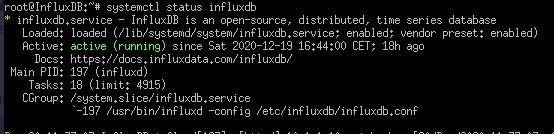
          @Altersrentner ich wollte wissen, ob der status grün ist/bzw aktiv
          7c3d7963-3738-451e-bdb3-56d0a6b9f19e-image.png

          umgestiegen von Proxmox auf Unraid

          A 1 Reply Last reply
          0
          • HALH HAL

            @Altersrentner hiernach hat bei mir die Installation von influxb problemlos geklappt

            lnfluxdb Raspberry

            A Offline
            A Offline
            Altersrentner
            wrote on last edited by
            #36

            @HAL
            Hallo,
            kann ich das so drüber installieren oder meine Installation löschen?
            Aber wie!!
            Danke

            1 Reply Last reply
            0
            • crunchipC crunchip

              @Altersrentner ich wollte wissen, ob der status grün ist/bzw aktiv
              7c3d7963-3738-451e-bdb3-56d0a6b9f19e-image.png

              A Offline
              A Offline
              Altersrentner
              wrote on last edited by
              #37

              @crunchip

              Hatte ich leider übersehen, Entschuldigung
              Nein

              pi@raspberrypi:~ $ sudo systemctl status influxdb
              ● influxdb.service - InfluxDB is an open-source, distributed, time series database
                 Loaded: loaded (/lib/systemd/system/influxdb.service; enabled; vendor preset: enabled)
                 Active: failed (Result: exit-code) since Sun 2020-12-20 18:04:01 CET; 13min ago
                   Docs: https://docs.influxdata.com/influxdb/
               Main PID: 30313 (code=exited, status=1/FAILURE)
              
              Dec 20 18:04:01 raspberrypi systemd[1]: influxdb.service: Service RestartSec=100ms expired, scheduling r
              Dec 20 18:04:01 raspberrypi systemd[1]: influxdb.service: Scheduled restart job, restart counter is at 5
              Dec 20 18:04:01 raspberrypi systemd[1]: Stopped InfluxDB is an open-source, distributed, time series dat
              Dec 20 18:04:01 raspberrypi systemd[1]: influxdb.service: Start request repeated too quickly.
              Dec 20 18:04:01 raspberrypi systemd[1]: influxdb.service: Failed with result 'exit-code'.
              Dec 20 18:04:01 raspberrypi systemd[1]: Failed to start InfluxDB is an open-source, distributed, time se
              lines 1-12/12 (END)
              ● influxdb.service - InfluxDB is an open-source, distributed, time series database
                 Loaded: loaded (/lib/systemd/system/influxdb.service; enabled; vendor preset: enabled)
                 Active: failed (Result: exit-code) since Sun 2020-12-20 18:04:01 CET; 13min ago
                   Docs: https://docs.influxdata.com/influxdb/
               Main PID: 30313 (code=exited, status=1/FAILURE)
              
              Dec 20 18:04:01 raspberrypi systemd[1]: influxdb.service: Service RestartSec=100ms expired, scheduling restart.
              Dec 20 18:04:01 raspberrypi systemd[1]: influxdb.service: Scheduled restart job, restart counter is at 5.
              Dec 20 18:04:01 raspberrypi systemd[1]: Stopped InfluxDB is an open-source, distributed, time series database.
              Dec 20 18:04:01 raspberrypi systemd[1]: influxdb.service: Start request repeated too quickly.
              Dec 20 18:04:01 raspberrypi systemd[1]: influxdb.service: Failed with result 'exit-code'.
              Dec 20 18:04:01 raspberrypi systemd[1]: Failed to start InfluxDB is an open-source, distributed, time series database.
              ~
              ~
              ~
              ~
              ~
              ~
              ~
              ~
              ~
              ~
              ~
              ~
              ~
              ~
              ~
              ~
              ~
              ~
              ~
              ~
              ~
              ~
              lines 1-12/12 (END)
              ● influxdb.service - InfluxDB is an open-source, distributed, time series database
                 Loaded: loaded (/lib/systemd/system/influxdb.service; enabled; vendor preset: enabled)
                 Active: failed (Result: exit-code) since Sun 2020-12-20 18:04:01 CET; 13min ago
                   Docs: https://docs.influxdata.com/influxdb/
               Main PID: 30313 (code=exited, status=1/FAILURE)
              
              Dec 20 18:04:01 raspberrypi systemd[1]: influxdb.service: Service RestartSec=100ms expired, scheduling restart.
              Dec 20 18:04:01 raspberrypi systemd[1]: influxdb.service: Scheduled restart job, restart counter is at 5.
              Dec 20 18:04:01 raspberrypi systemd[1]: Stopped InfluxDB is an open-source, distributed, time series database.
              Dec 20 18:04:01 raspberrypi systemd[1]: influxdb.service: Start request repeated too quickly.
              Dec 20 18:04:01 raspberrypi systemd[1]: influxdb.service: Failed with result 'exit-code'.
              Dec 20 18:04:01 raspberrypi systemd[1]: Failed to start InfluxDB is an open-source, distributed, time series database.
              ~
              ~
              ~
              ~
              ~
              ~
              ~
              ~
              ~
              ~
              ~
              ~
              ~
              ~
              ~
              ~
              ~
              ~
              ~
              ~
              ~
              ~
              lines 1-12/12 (END)
              
              
              crunchipC 1 Reply Last reply
              0
              • A Altersrentner

                @crunchip

                Hatte ich leider übersehen, Entschuldigung
                Nein

                pi@raspberrypi:~ $ sudo systemctl status influxdb
                ● influxdb.service - InfluxDB is an open-source, distributed, time series database
                   Loaded: loaded (/lib/systemd/system/influxdb.service; enabled; vendor preset: enabled)
                   Active: failed (Result: exit-code) since Sun 2020-12-20 18:04:01 CET; 13min ago
                     Docs: https://docs.influxdata.com/influxdb/
                 Main PID: 30313 (code=exited, status=1/FAILURE)
                
                Dec 20 18:04:01 raspberrypi systemd[1]: influxdb.service: Service RestartSec=100ms expired, scheduling r
                Dec 20 18:04:01 raspberrypi systemd[1]: influxdb.service: Scheduled restart job, restart counter is at 5
                Dec 20 18:04:01 raspberrypi systemd[1]: Stopped InfluxDB is an open-source, distributed, time series dat
                Dec 20 18:04:01 raspberrypi systemd[1]: influxdb.service: Start request repeated too quickly.
                Dec 20 18:04:01 raspberrypi systemd[1]: influxdb.service: Failed with result 'exit-code'.
                Dec 20 18:04:01 raspberrypi systemd[1]: Failed to start InfluxDB is an open-source, distributed, time se
                lines 1-12/12 (END)
                ● influxdb.service - InfluxDB is an open-source, distributed, time series database
                   Loaded: loaded (/lib/systemd/system/influxdb.service; enabled; vendor preset: enabled)
                   Active: failed (Result: exit-code) since Sun 2020-12-20 18:04:01 CET; 13min ago
                     Docs: https://docs.influxdata.com/influxdb/
                 Main PID: 30313 (code=exited, status=1/FAILURE)
                
                Dec 20 18:04:01 raspberrypi systemd[1]: influxdb.service: Service RestartSec=100ms expired, scheduling restart.
                Dec 20 18:04:01 raspberrypi systemd[1]: influxdb.service: Scheduled restart job, restart counter is at 5.
                Dec 20 18:04:01 raspberrypi systemd[1]: Stopped InfluxDB is an open-source, distributed, time series database.
                Dec 20 18:04:01 raspberrypi systemd[1]: influxdb.service: Start request repeated too quickly.
                Dec 20 18:04:01 raspberrypi systemd[1]: influxdb.service: Failed with result 'exit-code'.
                Dec 20 18:04:01 raspberrypi systemd[1]: Failed to start InfluxDB is an open-source, distributed, time series database.
                ~
                ~
                ~
                ~
                ~
                ~
                ~
                ~
                ~
                ~
                ~
                ~
                ~
                ~
                ~
                ~
                ~
                ~
                ~
                ~
                ~
                ~
                lines 1-12/12 (END)
                ● influxdb.service - InfluxDB is an open-source, distributed, time series database
                   Loaded: loaded (/lib/systemd/system/influxdb.service; enabled; vendor preset: enabled)
                   Active: failed (Result: exit-code) since Sun 2020-12-20 18:04:01 CET; 13min ago
                     Docs: https://docs.influxdata.com/influxdb/
                 Main PID: 30313 (code=exited, status=1/FAILURE)
                
                Dec 20 18:04:01 raspberrypi systemd[1]: influxdb.service: Service RestartSec=100ms expired, scheduling restart.
                Dec 20 18:04:01 raspberrypi systemd[1]: influxdb.service: Scheduled restart job, restart counter is at 5.
                Dec 20 18:04:01 raspberrypi systemd[1]: Stopped InfluxDB is an open-source, distributed, time series database.
                Dec 20 18:04:01 raspberrypi systemd[1]: influxdb.service: Start request repeated too quickly.
                Dec 20 18:04:01 raspberrypi systemd[1]: influxdb.service: Failed with result 'exit-code'.
                Dec 20 18:04:01 raspberrypi systemd[1]: Failed to start InfluxDB is an open-source, distributed, time series database.
                ~
                ~
                ~
                ~
                ~
                ~
                ~
                ~
                ~
                ~
                ~
                ~
                ~
                ~
                ~
                ~
                ~
                ~
                ~
                ~
                ~
                ~
                lines 1-12/12 (END)
                
                
                crunchipC Away
                crunchipC Away
                crunchip
                Forum Testing Most Active
                wrote on last edited by
                #38

                @Altersrentner na irgend etwas ist da bei dir faul
                probier bitte nochmal in der Reihenfolge

                sudo systemctl stop influxdb
                sudo systemctl unmask influxdb.service
                sudo systemctl start influxdb
                sudo systemctl status influxdb
                

                umgestiegen von Proxmox auf Unraid

                A 1 Reply Last reply
                0
                • crunchipC crunchip

                  @Altersrentner na irgend etwas ist da bei dir faul
                  probier bitte nochmal in der Reihenfolge

                  sudo systemctl stop influxdb
                  sudo systemctl unmask influxdb.service
                  sudo systemctl start influxdb
                  sudo systemctl status influxdb
                  
                  A Offline
                  A Offline
                  Altersrentner
                  wrote on last edited by
                  #39

                  @crunchip

                  pi@raspberrypi:~ $ sudo systemctl stop influxdb
                  pi@raspberrypi:~ $ sudo systemctl unmask influxdb.service
                  pi@raspberrypi:~ $ sudo systemctl start influxdb
                  pi@raspberrypi:~ $ sudo systemctl status influxdb
                  ● influxdb.service - InfluxDB is an open-source, distributed, time series database
                     Loaded: loaded (/lib/systemd/system/influxdb.service; enabled; vendor preset: enabled)
                     Active: failed (Result: exit-code) since Sun 2020-12-20 18:39:16 CET; 17s ago
                       Docs: https://docs.influxdata.com/influxdb/
                    Process: 3797 ExecStart=/usr/bin/influxd -config /etc/influxdb/influxdb.conf $INFLUXD_OPTS (code=exited, status=1/FAILURE)
                   Main PID: 3797 (code=exited, status=1/FAILURE)
                  
                  Dec 20 18:39:16 raspberrypi systemd[1]: influxdb.service: Service RestartSec=100ms expired, scheduling restart.
                  Dec 20 18:39:16 raspberrypi systemd[1]: influxdb.service: Scheduled restart job, restart counter is at 5.
                  Dec 20 18:39:16 raspberrypi systemd[1]: Stopped InfluxDB is an open-source, distributed, time series database.
                  Dec 20 18:39:16 raspberrypi systemd[1]: influxdb.service: Start request repeated too quickly.
                  Dec 20 18:39:16 raspberrypi systemd[1]: influxdb.service: Failed with result 'exit-code'.
                  Dec 20 18:39:16 raspberrypi systemd[1]: Failed to start InfluxDB is an open-source, distributed, time series database.
                  pi@raspberrypi:~ $


                  Ampel ist grün

                  crunchipC 1 Reply Last reply
                  0
                  • A Altersrentner

                    @crunchip

                    pi@raspberrypi:~ $ sudo systemctl stop influxdb
                    pi@raspberrypi:~ $ sudo systemctl unmask influxdb.service
                    pi@raspberrypi:~ $ sudo systemctl start influxdb
                    pi@raspberrypi:~ $ sudo systemctl status influxdb
                    ● influxdb.service - InfluxDB is an open-source, distributed, time series database
                       Loaded: loaded (/lib/systemd/system/influxdb.service; enabled; vendor preset: enabled)
                       Active: failed (Result: exit-code) since Sun 2020-12-20 18:39:16 CET; 17s ago
                         Docs: https://docs.influxdata.com/influxdb/
                      Process: 3797 ExecStart=/usr/bin/influxd -config /etc/influxdb/influxdb.conf $INFLUXD_OPTS (code=exited, status=1/FAILURE)
                     Main PID: 3797 (code=exited, status=1/FAILURE)
                    
                    Dec 20 18:39:16 raspberrypi systemd[1]: influxdb.service: Service RestartSec=100ms expired, scheduling restart.
                    Dec 20 18:39:16 raspberrypi systemd[1]: influxdb.service: Scheduled restart job, restart counter is at 5.
                    Dec 20 18:39:16 raspberrypi systemd[1]: Stopped InfluxDB is an open-source, distributed, time series database.
                    Dec 20 18:39:16 raspberrypi systemd[1]: influxdb.service: Start request repeated too quickly.
                    Dec 20 18:39:16 raspberrypi systemd[1]: influxdb.service: Failed with result 'exit-code'.
                    Dec 20 18:39:16 raspberrypi systemd[1]: Failed to start InfluxDB is an open-source, distributed, time series database.
                    pi@raspberrypi:~ $


                    Ampel ist grün

                    crunchipC Away
                    crunchipC Away
                    crunchip
                    Forum Testing Most Active
                    wrote on last edited by
                    #40

                    @Altersrentner die Ampel interessiert momentan nicht, da dein influx-service nicht läuft, Zeile 7
                    hast du in der

                    /etc/influxdb/influxdb.conf
                    

                    irgendwas geändert/angepasst?

                    umgestiegen von Proxmox auf Unraid

                    A 1 Reply Last reply
                    0
                    • crunchipC crunchip

                      @Altersrentner die Ampel interessiert momentan nicht, da dein influx-service nicht läuft, Zeile 7
                      hast du in der

                      /etc/influxdb/influxdb.conf
                      

                      irgendwas geändert/angepasst?

                      A Offline
                      A Offline
                      Altersrentner
                      wrote on last edited by
                      #41

                      @crunchip NEIN!!

                      crunchipC 1 Reply Last reply
                      0
                      • A Altersrentner

                        @crunchip NEIN!!

                        crunchipC Away
                        crunchipC Away
                        crunchip
                        Forum Testing Most Active
                        wrote on last edited by
                        #42

                        @Altersrentner dann nochmal, mit enable...

                        sudo systemctl stop influxdb
                        sudo systemctl unmask influxdb.service
                        sudo systemctl enable influxdb
                        sudo systemctl start influxdb
                        sudo systemctl status influxdb
                        netstat -tulpen
                        

                        umgestiegen von Proxmox auf Unraid

                        A 1 Reply Last reply
                        0
                        • crunchipC crunchip

                          @Altersrentner dann nochmal, mit enable...

                          sudo systemctl stop influxdb
                          sudo systemctl unmask influxdb.service
                          sudo systemctl enable influxdb
                          sudo systemctl start influxdb
                          sudo systemctl status influxdb
                          netstat -tulpen
                          
                          A Offline
                          A Offline
                          Altersrentner
                          wrote on last edited by
                          #43

                          @crunchip

                          pi@raspberrypi:~ $ sudo systemctl stop influxdb
                          pi@raspberrypi:~ $ sudo systemctl unmask influxdb.service
                          pi@raspberrypi:~ $ sudo systemctl enable influxdb
                          pi@raspberrypi:~ $ sudo systemctl start influxdb
                          pi@raspberrypi:~ $ sudo systemctl status influxdb
                          ● influxdb.service - InfluxDB is an open-source, distributed, time series database
                             Loaded: loaded (/lib/systemd/system/influxdb.service; enabled; vendor preset: enabled)
                             Active: failed (Result: exit-code) since Sun 2020-12-20 19:07:54 CET; 26s ago
                               Docs: https://docs.influxdata.com/influxdb/
                            Process: 7963 ExecStart=/usr/bin/influxd -config /etc/influxdb/influxdb.conf $INFLUXD_OPTS (code=exited, status=1/FAILURE)
                           Main PID: 7963 (code=exited, status=1/FAILURE)
                          
                          Dec 20 19:07:54 raspberrypi systemd[1]: influxdb.service: Service RestartSec=100ms expired, scheduling restart.
                          Dec 20 19:07:54 raspberrypi systemd[1]: influxdb.service: Scheduled restart job, restart counter is at 5.
                          Dec 20 19:07:54 raspberrypi systemd[1]: Stopped InfluxDB is an open-source, distributed, time series database.
                          Dec 20 19:07:54 raspberrypi systemd[1]: influxdb.service: Start request repeated too quickly.
                          Dec 20 19:07:54 raspberrypi systemd[1]: influxdb.service: Failed with result 'exit-code'.
                          Dec 20 19:07:54 raspberrypi systemd[1]: Failed to start InfluxDB is an open-source, distributed, time series database.
                          pi@raspberrypi:~ $ netstat -tulpen
                          (Not all processes could be identified, non-owned process info
                           will not be shown, you would have to be root to see it all.)
                          Active Internet connections (only servers)
                          Proto Recv-Q Send-Q Local Address           Foreign Address         State       User       Inode      PID/Program name
                          tcp        0      0 127.0.0.1:9000          0.0.0.0:*               LISTEN      1001       882108     -
                          tcp        0      0 127.0.0.1:9001          0.0.0.0:*               LISTEN      1001       881190     -
                          tcp        0      0 192.168.178.41:2000     0.0.0.0:*               LISTEN      1001       887022     -
                          tcp        0      0 192.168.178.41:2001     0.0.0.0:*               LISTEN      1001       884408     -
                          tcp        0      0 0.0.0.0:22              0.0.0.0:*               LISTEN      0          15904      -
                          tcp        0      0 127.0.0.1:6010          0.0.0.0:*               LISTEN      1000       1015445    -
                          tcp        0      0 192.168.178.41:8701     0.0.0.0:*               LISTEN      1001       886967     -
                          tcp6       0      0 :::61991                :::*                    LISTEN      1001       883885     -
                          tcp6       0      0 :::8081                 :::*                    LISTEN      1001       883049     -
                          tcp6       0      0 :::8083                 :::*                    LISTEN      1001       885009     -
                          tcp6       0      0 :::8084                 :::*                    LISTEN      1001       882261     -
                          tcp6       0      0 :::22                   :::*                    LISTEN      0          15906      -
                          tcp6       0      0 ::1:6010                :::*                    LISTEN      1000       1015444    -
                          tcp6       0      0 :::8090                 :::*                    LISTEN      1001       884598     -
                          udp        0      0 0.0.0.0:5353            0.0.0.0:*                           108        14271      -
                          udp        0      0 0.0.0.0:61991           0.0.0.0:*                           1001       883886     -
                          udp        0      0 0.0.0.0:5683            0.0.0.0:*                           1001       884062     -
                          udp        0      0 0.0.0.0:68              0.0.0.0:*                           0          15151      -
                          udp        0      0 0.0.0.0:43619           0.0.0.0:*                           108        14273      -
                          udp        0      0 0.0.0.0:9898            0.0.0.0:*                           1001       881469     -
                          udp        0      0 0.0.0.0:53421           0.0.0.0:*                           1001       882347     -
                          udp6       0      0 :::5353                 :::*                                108        14272      -
                          udp6       0      0 :::546                  :::*                                0          18566      -
                          udp6       0      0 :::51291                :::*                                108        14274      -
                          pi@raspberrypi:~ $
                          
                          
                          crunchipC 1 Reply Last reply
                          0
                          • A Altersrentner

                            @crunchip

                            pi@raspberrypi:~ $ sudo systemctl stop influxdb
                            pi@raspberrypi:~ $ sudo systemctl unmask influxdb.service
                            pi@raspberrypi:~ $ sudo systemctl enable influxdb
                            pi@raspberrypi:~ $ sudo systemctl start influxdb
                            pi@raspberrypi:~ $ sudo systemctl status influxdb
                            ● influxdb.service - InfluxDB is an open-source, distributed, time series database
                               Loaded: loaded (/lib/systemd/system/influxdb.service; enabled; vendor preset: enabled)
                               Active: failed (Result: exit-code) since Sun 2020-12-20 19:07:54 CET; 26s ago
                                 Docs: https://docs.influxdata.com/influxdb/
                              Process: 7963 ExecStart=/usr/bin/influxd -config /etc/influxdb/influxdb.conf $INFLUXD_OPTS (code=exited, status=1/FAILURE)
                             Main PID: 7963 (code=exited, status=1/FAILURE)
                            
                            Dec 20 19:07:54 raspberrypi systemd[1]: influxdb.service: Service RestartSec=100ms expired, scheduling restart.
                            Dec 20 19:07:54 raspberrypi systemd[1]: influxdb.service: Scheduled restart job, restart counter is at 5.
                            Dec 20 19:07:54 raspberrypi systemd[1]: Stopped InfluxDB is an open-source, distributed, time series database.
                            Dec 20 19:07:54 raspberrypi systemd[1]: influxdb.service: Start request repeated too quickly.
                            Dec 20 19:07:54 raspberrypi systemd[1]: influxdb.service: Failed with result 'exit-code'.
                            Dec 20 19:07:54 raspberrypi systemd[1]: Failed to start InfluxDB is an open-source, distributed, time series database.
                            pi@raspberrypi:~ $ netstat -tulpen
                            (Not all processes could be identified, non-owned process info
                             will not be shown, you would have to be root to see it all.)
                            Active Internet connections (only servers)
                            Proto Recv-Q Send-Q Local Address           Foreign Address         State       User       Inode      PID/Program name
                            tcp        0      0 127.0.0.1:9000          0.0.0.0:*               LISTEN      1001       882108     -
                            tcp        0      0 127.0.0.1:9001          0.0.0.0:*               LISTEN      1001       881190     -
                            tcp        0      0 192.168.178.41:2000     0.0.0.0:*               LISTEN      1001       887022     -
                            tcp        0      0 192.168.178.41:2001     0.0.0.0:*               LISTEN      1001       884408     -
                            tcp        0      0 0.0.0.0:22              0.0.0.0:*               LISTEN      0          15904      -
                            tcp        0      0 127.0.0.1:6010          0.0.0.0:*               LISTEN      1000       1015445    -
                            tcp        0      0 192.168.178.41:8701     0.0.0.0:*               LISTEN      1001       886967     -
                            tcp6       0      0 :::61991                :::*                    LISTEN      1001       883885     -
                            tcp6       0      0 :::8081                 :::*                    LISTEN      1001       883049     -
                            tcp6       0      0 :::8083                 :::*                    LISTEN      1001       885009     -
                            tcp6       0      0 :::8084                 :::*                    LISTEN      1001       882261     -
                            tcp6       0      0 :::22                   :::*                    LISTEN      0          15906      -
                            tcp6       0      0 ::1:6010                :::*                    LISTEN      1000       1015444    -
                            tcp6       0      0 :::8090                 :::*                    LISTEN      1001       884598     -
                            udp        0      0 0.0.0.0:5353            0.0.0.0:*                           108        14271      -
                            udp        0      0 0.0.0.0:61991           0.0.0.0:*                           1001       883886     -
                            udp        0      0 0.0.0.0:5683            0.0.0.0:*                           1001       884062     -
                            udp        0      0 0.0.0.0:68              0.0.0.0:*                           0          15151      -
                            udp        0      0 0.0.0.0:43619           0.0.0.0:*                           108        14273      -
                            udp        0      0 0.0.0.0:9898            0.0.0.0:*                           1001       881469     -
                            udp        0      0 0.0.0.0:53421           0.0.0.0:*                           1001       882347     -
                            udp6       0      0 :::5353                 :::*                                108        14272      -
                            udp6       0      0 :::546                  :::*                                0          18566      -
                            udp6       0      0 :::51291                :::*                                108        14274      -
                            pi@raspberrypi:~ $
                            
                            
                            crunchipC Away
                            crunchipC Away
                            crunchip
                            Forum Testing Most Active
                            wrote on last edited by crunchip
                            #44

                            @Altersrentner so kommen wir nicht weiter, da is der Wurm drin und kann dir ehrlich gesagt, nicht sagen, wo der Fehler liegt.
                            Ne Möglichkeit dann doch nochmal influx zu entfernen und frisch installieren.

                            sudo apt-get autoremove influxdb
                            

                            danach nochmal eine installation anstoßen, bezieht sich auf ubuntu

                            wget -qO- https://repos.influxdata.com/influxdb.key | sudo apt-key add -
                            source /etc/lsb-release
                            echo "deb https://repos.influxdata.com/${DISTRIB_ID,,} ${DISTRIB_CODENAME} stable" | sudo tee /etc/apt/sources.list.d/influxdb.list
                            
                            sudo apt-get update && sudo apt-get install influxdb
                            sudo systemctl unmask influxdb.service
                            sudo systemctl start influxdb
                            

                            für debian

                            wget -qO- https://repos.influxdata.com/influxdb.key | sudo apt-key add -
                            source /etc/os-release
                            echo "deb https://repos.influxdata.com/debian $(lsb_release -cs) stable" | sudo tee /etc/apt/sources.list.d/influxdb.list
                            sudo apt-get update && sudo apt-get install influxdb
                            sudo systemctl enable influxdb
                            sudo systemctl start influxdb
                            

                            wenn fertig, prüfen ob der Dienst läuft

                            sudo systemctl status influxdb
                            

                            umgestiegen von Proxmox auf Unraid

                            A DuffyD 4 Replies Last reply
                            0
                            • crunchipC crunchip

                              @Altersrentner so kommen wir nicht weiter, da is der Wurm drin und kann dir ehrlich gesagt, nicht sagen, wo der Fehler liegt.
                              Ne Möglichkeit dann doch nochmal influx zu entfernen und frisch installieren.

                              sudo apt-get autoremove influxdb
                              

                              danach nochmal eine installation anstoßen, bezieht sich auf ubuntu

                              wget -qO- https://repos.influxdata.com/influxdb.key | sudo apt-key add -
                              source /etc/lsb-release
                              echo "deb https://repos.influxdata.com/${DISTRIB_ID,,} ${DISTRIB_CODENAME} stable" | sudo tee /etc/apt/sources.list.d/influxdb.list
                              
                              sudo apt-get update && sudo apt-get install influxdb
                              sudo systemctl unmask influxdb.service
                              sudo systemctl start influxdb
                              

                              für debian

                              wget -qO- https://repos.influxdata.com/influxdb.key | sudo apt-key add -
                              source /etc/os-release
                              echo "deb https://repos.influxdata.com/debian $(lsb_release -cs) stable" | sudo tee /etc/apt/sources.list.d/influxdb.list
                              sudo apt-get update && sudo apt-get install influxdb
                              sudo systemctl enable influxdb
                              sudo systemctl start influxdb
                              

                              wenn fertig, prüfen ob der Dienst läuft

                              sudo systemctl status influxdb
                              
                              A Offline
                              A Offline
                              Altersrentner
                              wrote on last edited by Altersrentner
                              #45

                              @crunchip
                              OK,
                              Nach welcher Vorlage?

                              pi@raspberrypi:~ $ sudo apt-get autoremove influxdb
                              Reading package lists... Done
                              Building dependency tree
                              Reading state information... Done
                              The following packages will be REMOVED:
                                influxdb rpi-eeprom-images
                              0 upgraded, 0 newly installed, 2 to remove and 0 not upgraded.
                              After this operation, 153 MB disk space will be freed.
                              Do you want to continue? [Y/n] y
                              y
                              (Reading database ... 61344 files and directories currently installed.)
                              Removing influxdb (1.8.3-1) ...
                              Removing rpi-eeprom-images (11.0-1) ...
                              Processing triggers for man-db (2.8.5-2) ...
                              pi@raspberrypi:~ $


                              War es das schon?

                              crunchipC 1 Reply Last reply
                              0
                              • A Altersrentner

                                @crunchip
                                OK,
                                Nach welcher Vorlage?

                                pi@raspberrypi:~ $ sudo apt-get autoremove influxdb
                                Reading package lists... Done
                                Building dependency tree
                                Reading state information... Done
                                The following packages will be REMOVED:
                                  influxdb rpi-eeprom-images
                                0 upgraded, 0 newly installed, 2 to remove and 0 not upgraded.
                                After this operation, 153 MB disk space will be freed.
                                Do you want to continue? [Y/n] y
                                y
                                (Reading database ... 61344 files and directories currently installed.)
                                Removing influxdb (1.8.3-1) ...
                                Removing rpi-eeprom-images (11.0-1) ...
                                Processing triggers for man-db (2.8.5-2) ...
                                pi@raspberrypi:~ $


                                War es das schon?

                                crunchipC Away
                                crunchipC Away
                                crunchip
                                Forum Testing Most Active
                                wrote on last edited by
                                #46

                                @Altersrentner scheint so,
                                hab oben weiter ergänzt, zwecks Installation

                                umgestiegen von Proxmox auf Unraid

                                A 1 Reply Last reply
                                0
                                • crunchipC crunchip

                                  @Altersrentner scheint so,
                                  hab oben weiter ergänzt, zwecks Installation

                                  A Offline
                                  A Offline
                                  Altersrentner
                                  wrote on last edited by
                                  #47

                                  @crunchip
                                  Wo ist oben?
                                  Das sind die Angaben zu meinem System

                                  pi@raspberrypi:~ $ cat /proc/version
                                  Linux version 5.4.79-v7l+ (dom@buildbot) (gcc version 8.4.0 (Ubuntu/Linaro 8.4.0-3ubuntu1)) #1373 SMP Mon Nov 23 13:27:40                  GMT 2020
                                  pi@raspberrypi:~ $ uname -a
                                  Linux raspberrypi 5.4.79-v7l+ #1373 SMP Mon Nov 23 13:27:40 GMT 2020 armv7l GNU/Linux
                                  pi@raspberrypi:~ $ cat /etc/debian_version
                                  10.7
                                  pi@raspberrypi:~ $
                                  
                                  
                                  crunchipC 1 Reply Last reply
                                  0
                                  • A Altersrentner

                                    @crunchip
                                    Wo ist oben?
                                    Das sind die Angaben zu meinem System

                                    pi@raspberrypi:~ $ cat /proc/version
                                    Linux version 5.4.79-v7l+ (dom@buildbot) (gcc version 8.4.0 (Ubuntu/Linaro 8.4.0-3ubuntu1)) #1373 SMP Mon Nov 23 13:27:40                  GMT 2020
                                    pi@raspberrypi:~ $ uname -a
                                    Linux raspberrypi 5.4.79-v7l+ #1373 SMP Mon Nov 23 13:27:40 GMT 2020 armv7l GNU/Linux
                                    pi@raspberrypi:~ $ cat /etc/debian_version
                                    10.7
                                    pi@raspberrypi:~ $
                                    
                                    
                                    crunchipC Away
                                    crunchipC Away
                                    crunchip
                                    Forum Testing Most Active
                                    wrote on last edited by crunchip
                                    #48

                                    @Altersrentner sagte in Problem bei Influx Installation:

                                    Wo ist oben?

                                    https://forum.iobroker.net/post/541116
                                    ah moment stop, Ubuntu
                                    @Altersrentner sorry, war grad abgelenkt, hatte kleinen zwischenfall,
                                    also debian läuft?, dann war ich doch richtig, mit der Anleitung

                                    umgestiegen von Proxmox auf Unraid

                                    1 Reply Last reply
                                    0
                                    • crunchipC crunchip

                                      @Altersrentner so kommen wir nicht weiter, da is der Wurm drin und kann dir ehrlich gesagt, nicht sagen, wo der Fehler liegt.
                                      Ne Möglichkeit dann doch nochmal influx zu entfernen und frisch installieren.

                                      sudo apt-get autoremove influxdb
                                      

                                      danach nochmal eine installation anstoßen, bezieht sich auf ubuntu

                                      wget -qO- https://repos.influxdata.com/influxdb.key | sudo apt-key add -
                                      source /etc/lsb-release
                                      echo "deb https://repos.influxdata.com/${DISTRIB_ID,,} ${DISTRIB_CODENAME} stable" | sudo tee /etc/apt/sources.list.d/influxdb.list
                                      
                                      sudo apt-get update && sudo apt-get install influxdb
                                      sudo systemctl unmask influxdb.service
                                      sudo systemctl start influxdb
                                      

                                      für debian

                                      wget -qO- https://repos.influxdata.com/influxdb.key | sudo apt-key add -
                                      source /etc/os-release
                                      echo "deb https://repos.influxdata.com/debian $(lsb_release -cs) stable" | sudo tee /etc/apt/sources.list.d/influxdb.list
                                      sudo apt-get update && sudo apt-get install influxdb
                                      sudo systemctl enable influxdb
                                      sudo systemctl start influxdb
                                      

                                      wenn fertig, prüfen ob der Dienst läuft

                                      sudo systemctl status influxdb
                                      
                                      A Offline
                                      A Offline
                                      Altersrentner
                                      wrote on last edited by
                                      #49

                                      @crunchip
                                      Zeile 2 ?

                                      pi@raspberrypi:~ $ wget -qO- https://repos.influxdata.com/influxdb.key | sudo apt-key add -
                                      OK
                                      pi@raspberrypi:~ $ source /etc/lsb-release
                                      -bash: /etc/lsb-release: No such file or directory
                                      pi@raspberrypi:~ $ sudo source /etc/lsb-release
                                      sudo: source: command not found
                                      pi@raspberrypi:~ $ source /etc/lsb-release
                                      -bash: /etc/lsb-release: No such file or directory
                                      pi@raspberrypi:~ $
                                      
                                      
                                      crunchipC 1 Reply Last reply
                                      0
                                      • A Altersrentner

                                        @crunchip
                                        Zeile 2 ?

                                        pi@raspberrypi:~ $ wget -qO- https://repos.influxdata.com/influxdb.key | sudo apt-key add -
                                        OK
                                        pi@raspberrypi:~ $ source /etc/lsb-release
                                        -bash: /etc/lsb-release: No such file or directory
                                        pi@raspberrypi:~ $ sudo source /etc/lsb-release
                                        sudo: source: command not found
                                        pi@raspberrypi:~ $ source /etc/lsb-release
                                        -bash: /etc/lsb-release: No such file or directory
                                        pi@raspberrypi:~ $
                                        
                                        
                                        crunchipC Away
                                        crunchipC Away
                                        crunchip
                                        Forum Testing Most Active
                                        wrote on last edited by
                                        #50

                                        @Altersrentner das sind doch ganze Befehle, guck mal selbst, auf der ganz normalen offiziellen Seite

                                        umgestiegen von Proxmox auf Unraid

                                        1 Reply Last reply
                                        0
                                        • crunchipC crunchip

                                          @Altersrentner so kommen wir nicht weiter, da is der Wurm drin und kann dir ehrlich gesagt, nicht sagen, wo der Fehler liegt.
                                          Ne Möglichkeit dann doch nochmal influx zu entfernen und frisch installieren.

                                          sudo apt-get autoremove influxdb
                                          

                                          danach nochmal eine installation anstoßen, bezieht sich auf ubuntu

                                          wget -qO- https://repos.influxdata.com/influxdb.key | sudo apt-key add -
                                          source /etc/lsb-release
                                          echo "deb https://repos.influxdata.com/${DISTRIB_ID,,} ${DISTRIB_CODENAME} stable" | sudo tee /etc/apt/sources.list.d/influxdb.list
                                          
                                          sudo apt-get update && sudo apt-get install influxdb
                                          sudo systemctl unmask influxdb.service
                                          sudo systemctl start influxdb
                                          

                                          für debian

                                          wget -qO- https://repos.influxdata.com/influxdb.key | sudo apt-key add -
                                          source /etc/os-release
                                          echo "deb https://repos.influxdata.com/debian $(lsb_release -cs) stable" | sudo tee /etc/apt/sources.list.d/influxdb.list
                                          sudo apt-get update && sudo apt-get install influxdb
                                          sudo systemctl enable influxdb
                                          sudo systemctl start influxdb
                                          

                                          wenn fertig, prüfen ob der Dienst läuft

                                          sudo systemctl status influxdb
                                          
                                          A Offline
                                          A Offline
                                          Altersrentner
                                          wrote on last edited by
                                          #51

                                          @crunchip

                                          ● influxdb.service - InfluxDB is an open-source, distributed, time series database
                                             Loaded: loaded (/lib/systemd/system/influxdb.service; enabled; vendor preset: enabled)
                                             Active: active (running) since Sun 2020-12-20 20:05:48 CET; 20s ago
                                               Docs: https://docs.influxdata.com/influxdb/
                                           Main PID: 4285 (influxd)
                                              Tasks: 14 (limit: 4915)
                                             CGroup: /system.slice/influxdb.service
                                                     └─4285 /usr/bin/influxd -config /etc/influxdb/influxdb.conf
                                          
                                          Dec 20 20:05:49 raspberrypi influxd[4285]: ts=2020-12-20T19:05:49.999473Z lvl=info msg="Starting continuous query service" log_id=0RCOY820000 service
                                          Dec 20 20:05:49 raspberrypi influxd[4285]: ts=2020-12-20T19:05:49.999496Z lvl=info msg="Starting HTTP service" log_id=0RCOY820000 service=httpd authe
                                          Dec 20 20:05:49 raspberrypi influxd[4285]: ts=2020-12-20T19:05:49.999517Z lvl=info msg="opened HTTP access log" log_id=0RCOY820000 service=httpd path
                                          Dec 20 20:05:49 raspberrypi influxd[4285]: ts=2020-12-20T19:05:49.999520Z lvl=info msg="Storing statistics" log_id=0RCOY820000 service=monitor db_ins
                                          Dec 20 20:05:50 raspberrypi influxd[4285]: ts=2020-12-20T19:05:49.999745Z lvl=info msg="Listening on HTTP" log_id=0RCOY820000 service=httpd addr=[::]
                                          Dec 20 20:05:50 raspberrypi influxd[4285]: ts=2020-12-20T19:05:49.999809Z lvl=info msg="Starting retention policy enforcement service" log_id=0RCOY82
                                          Dec 20 20:05:50 raspberrypi influxd[4285]: ts=2020-12-20T19:05:50.000038Z lvl=info msg="Listening for signals" log_id=0RCOY820000
                                          Dec 20 20:05:50 raspberrypi influxd[4285]: ts=2020-12-20T19:05:50.004535Z lvl=info msg="Sending usage statistics to usage.influxdata.com" log_id=0RCO
                                          Dec 20 20:05:59 raspberrypi influxd[4285]: ts=2020-12-20T19:05:59.234954Z lvl=info msg="Executing query" log_id=0RCOY820000 service=query query="SHOW
                                          Dec 20 20:05:59 raspberrypi influxd[4285]: [httpd] 192.168.178.41 - MEB [20/Dec/2020:20:05:59 +0100] "GET /query?db=iobroker&p=%5BREDACTED%5D&precisi
                                          ~
                                          ~
                                          ~
                                          ~
                                          ~
                                          ~
                                          ~
                                          ~
                                          ~
                                          ~
                                          lines 1-19/19 (END)
                                          
                                          ``
                                          Sieht das gut aus?

                                          crunchipC 1 Reply Last reply
                                          0
                                          Reply
                                          • Reply as topic
                                          Log in to reply
                                          • Oldest to Newest
                                          • Newest to Oldest
                                          • Most Votes


                                          Support us

                                          ioBroker
                                          Community Adapters
                                          Donate
                                          FAQ Cloud / IOT
                                          HowTo: Node.js-Update
                                          HowTo: Backup/Restore
                                          Downloads
                                          BLOG

                                          512

                                          Online

                                          32.7k

                                          Users

                                          82.4k

                                          Topics

                                          1.3m

                                          Posts
                                          Community
                                          Impressum | Datenschutz-Bestimmungen | Nutzungsbedingungen | Einwilligungseinstellungen
                                          ioBroker Community 2014-2025
                                          logo
                                          • Login

                                          • Don't have an account? Register

                                          • Login or register to search.
                                          • First post
                                            Last post
                                          0
                                          • Home
                                          • Recent
                                          • Tags
                                          • Unread 0
                                          • Categories
                                          • Unreplied
                                          • Popular
                                          • GitHub
                                          • Docu
                                          • Hilfe