Skip to content
  • Home
  • Recent
  • Tags
  • 0 Unread 0
  • Categories
  • Unreplied
  • Popular
  • GitHub
  • Docu
  • Hilfe
Skins
  • Light
  • Brite
  • Cerulean
  • Cosmo
  • Flatly
  • Journal
  • Litera
  • Lumen
  • Lux
  • Materia
  • Minty
  • Morph
  • Pulse
  • Sandstone
  • Simplex
  • Sketchy
  • Spacelab
  • United
  • Yeti
  • Zephyr
  • Dark
  • Cyborg
  • Darkly
  • Quartz
  • Slate
  • Solar
  • Superhero
  • Vapor

  • Default (No Skin)
  • No Skin
Collapse
ioBroker Logo

Community Forum

donate donate
  1. ioBroker Community Home
  2. Deutsch
  3. Skripten / Logik
  4. Blockly
  5. Screenshot per Telegram oder Pushover versenden

NEWS

  • Jahresrückblick 2025 – unser neuer Blogbeitrag ist online! ✨
    BluefoxB
    Bluefox
    17
    1
    3.5k

  • Neuer Blogbeitrag: Monatsrückblick - Dezember 2025 🎄
    BluefoxB
    Bluefox
    13
    1
    1.1k

  • Weihnachtsangebot 2025! 🎄
    BluefoxB
    Bluefox
    25
    1
    2.5k

Screenshot per Telegram oder Pushover versenden

Scheduled Pinned Locked Moved Blockly
blockly
15 Posts 4 Posters 1.4k Views 4 Watching
  • Oldest to Newest
  • Newest to Oldest
  • Most Votes
Reply
  • Reply as topic
Log in to reply
This topic has been deleted. Only users with topic management privileges can see it.
  • D Offline
    D Offline
    Darkmann2000
    wrote on last edited by Darkmann2000
    #1

    Hallo liebe Forengemeinde,

    ich würde gerne soabld es klingelt das ein Screenshot versendet wird. Habe es mit Telegramm und Pushover versucht. Pushmitteilungen werden versendet doch leider kein Bild.

    Betriebssystem ist Windows 10

    Kamera Snapshot http://192.168.178.40/cgi-bin/snapshot.cgi?stream=0

    Vielen Dank im Voraus.

    Blockly Code

    
    <xml xmlns="https://developers.google.com/blockly/xml">
      <variables>
        <variable type="timeout" id="timeout">timeout</variable>
        <variable type="timeout" id="timeout1">timeout1</variable>
      </variables>
      <block type="on_ext" id="/%6jfUR|]NpMM$}m=4oj" x="87" y="-713">
        <mutation xmlns="http://www.w3.org/1999/xhtml" items="1"></mutation>
        <field name="CONDITION">true</field>
        <field name="ACK_CONDITION"></field>
        <value name="OID0">
          <shadow type="field_oid" id="2~SzzXiLW$2dWh0Rd=m5">
            <field name="oid">hm-rpc.0.QEQ0889232.1.PRESS_SHORT</field>
          </shadow>
        </value>
        <statement name="STATEMENT">
          <block type="telegram" id="O)W4(_qg*KS)KD+[i[hf">
            <field name="INSTANCE">.0</field>
            <field name="LOG"></field>
            <field name="SILENT">FALSE</field>
            <field name="PARSEMODE">default</field>
            <value name="MESSAGE">
              <shadow type="text" id="Y9*@/}DK}qH@qB$xpS8/">
                <field name="TEXT">hallo</field>
              </shadow>
            </value>
            <next>
              <block type="procedures_callnoreturn" id="DnF9TAl0.q.3ygACGS~C">
                <mutation name="foto senden"></mutation>
              </block>
            </next>
          </block>
        </statement>
      </block>
      <block type="procedures_defnoreturn" id="~pPk?PHjzu0{iCY*^,Mh" x="563" y="-612">
        <field name="NAME">foto senden</field>
        <comment pinned="false" h="80" w="160">Beschreibe diese Funktion …</comment>
        <statement name="STACK">
          <block type="timeouts_settimeout" id="%parHE%U;Jg[8keop7B#">
            <field name="NAME">timeout</field>
            <field name="DELAY">1000</field>
            <field name="UNIT">ms</field>
            <statement name="STATEMENT">
              <block type="exec" id=")s4eqoL)+rnTyhSAl1/f">
                <mutation xmlns="http://www.w3.org/1999/xhtml" with_statement="false"></mutation>
                <field name="WITH_STATEMENT">FALSE</field>
                <field name="LOG"></field>
                <value name="COMMAND">
                  <shadow type="text" id="x`Y6eq`nky[SMncjoLv.">
                    <field name="TEXT">wget --output-document /C:\iobroker/ipcam/alarm.jpg 'http://192.168.178.40/cgi-bin/snapshot.cgi'</field>
                  </shadow>
                </value>
                <next>
                  <block type="timeouts_settimeout" id="%@nkC[RH(?Ec:@AGgZ:,">
                    <field name="NAME">timeout1</field>
                    <field name="DELAY">1000</field>
                    <field name="UNIT">ms</field>
                    <statement name="STATEMENT">
                      <block type="telegram" id="d38k#q#az~Oi^iSLuj9.">
                        <field name="INSTANCE">.0</field>
                        <field name="LOG"></field>
                        <field name="SILENT">FALSE</field>
                        <field name="PARSEMODE">default</field>
                        <value name="MESSAGE">
                          <shadow type="text" id="at(q2i6A623??3sky7BI">
                            <field name="TEXT">c:\iobroker/ipcam/alarm.jpg</field>
                          </shadow>
                        </value>
                      </block>
                    </statement>
                  </block>
                </next>
              </block>
            </statement>
          </block>
        </statement>
      </block>
    </xml>
    
    
    M 1 Reply Last reply
    0
    • D Darkmann2000

      Hallo liebe Forengemeinde,

      ich würde gerne soabld es klingelt das ein Screenshot versendet wird. Habe es mit Telegramm und Pushover versucht. Pushmitteilungen werden versendet doch leider kein Bild.

      Betriebssystem ist Windows 10

      Kamera Snapshot http://192.168.178.40/cgi-bin/snapshot.cgi?stream=0

      Vielen Dank im Voraus.

      Blockly Code

      
      <xml xmlns="https://developers.google.com/blockly/xml">
        <variables>
          <variable type="timeout" id="timeout">timeout</variable>
          <variable type="timeout" id="timeout1">timeout1</variable>
        </variables>
        <block type="on_ext" id="/%6jfUR|]NpMM$}m=4oj" x="87" y="-713">
          <mutation xmlns="http://www.w3.org/1999/xhtml" items="1"></mutation>
          <field name="CONDITION">true</field>
          <field name="ACK_CONDITION"></field>
          <value name="OID0">
            <shadow type="field_oid" id="2~SzzXiLW$2dWh0Rd=m5">
              <field name="oid">hm-rpc.0.QEQ0889232.1.PRESS_SHORT</field>
            </shadow>
          </value>
          <statement name="STATEMENT">
            <block type="telegram" id="O)W4(_qg*KS)KD+[i[hf">
              <field name="INSTANCE">.0</field>
              <field name="LOG"></field>
              <field name="SILENT">FALSE</field>
              <field name="PARSEMODE">default</field>
              <value name="MESSAGE">
                <shadow type="text" id="Y9*@/}DK}qH@qB$xpS8/">
                  <field name="TEXT">hallo</field>
                </shadow>
              </value>
              <next>
                <block type="procedures_callnoreturn" id="DnF9TAl0.q.3ygACGS~C">
                  <mutation name="foto senden"></mutation>
                </block>
              </next>
            </block>
          </statement>
        </block>
        <block type="procedures_defnoreturn" id="~pPk?PHjzu0{iCY*^,Mh" x="563" y="-612">
          <field name="NAME">foto senden</field>
          <comment pinned="false" h="80" w="160">Beschreibe diese Funktion …</comment>
          <statement name="STACK">
            <block type="timeouts_settimeout" id="%parHE%U;Jg[8keop7B#">
              <field name="NAME">timeout</field>
              <field name="DELAY">1000</field>
              <field name="UNIT">ms</field>
              <statement name="STATEMENT">
                <block type="exec" id=")s4eqoL)+rnTyhSAl1/f">
                  <mutation xmlns="http://www.w3.org/1999/xhtml" with_statement="false"></mutation>
                  <field name="WITH_STATEMENT">FALSE</field>
                  <field name="LOG"></field>
                  <value name="COMMAND">
                    <shadow type="text" id="x`Y6eq`nky[SMncjoLv.">
                      <field name="TEXT">wget --output-document /C:\iobroker/ipcam/alarm.jpg 'http://192.168.178.40/cgi-bin/snapshot.cgi'</field>
                    </shadow>
                  </value>
                  <next>
                    <block type="timeouts_settimeout" id="%@nkC[RH(?Ec:@AGgZ:,">
                      <field name="NAME">timeout1</field>
                      <field name="DELAY">1000</field>
                      <field name="UNIT">ms</field>
                      <statement name="STATEMENT">
                        <block type="telegram" id="d38k#q#az~Oi^iSLuj9.">
                          <field name="INSTANCE">.0</field>
                          <field name="LOG"></field>
                          <field name="SILENT">FALSE</field>
                          <field name="PARSEMODE">default</field>
                          <value name="MESSAGE">
                            <shadow type="text" id="at(q2i6A623??3sky7BI">
                              <field name="TEXT">c:\iobroker/ipcam/alarm.jpg</field>
                            </shadow>
                          </value>
                        </block>
                      </statement>
                    </block>
                  </next>
                </block>
              </statement>
            </block>
          </statement>
        </block>
      </xml>
      
      
      M Online
      M Online
      MCU
      wrote on last edited by MCU
      #2

      @Darkmann2000 sagte in Screenshot per Telegram oder Pushover versenden:

      wget --output-document /C:\iobroker/ipcam/alarm.jpg 'http://192.168.178.40/cgi-bin/snapshot.cgi'

      Beispiele:
      wget --output-document /media/fritzbox/snapshot.png 'http://192.168.XXX.XXX/capture'

      Für Deinen Fall:

      wget --output-document c:/iobroker/ipcam/alarm.jpg 'http://192.168.178.40/cgi-bin/snapshot.cgi?stream=0'

      NUC i7 64GB mit Proxmox ---- Jarvis Infos Aktualisierungen der Doku auf Instagram verfolgen -> mcuiobroker Instagram
      Wenn Euch mein Vorschlag geholfen hat, bitte rechts "^" klicken.

      bahnuhrB 1 Reply Last reply
      0
      • M MCU

        @Darkmann2000 sagte in Screenshot per Telegram oder Pushover versenden:

        wget --output-document /C:\iobroker/ipcam/alarm.jpg 'http://192.168.178.40/cgi-bin/snapshot.cgi'

        Beispiele:
        wget --output-document /media/fritzbox/snapshot.png 'http://192.168.XXX.XXX/capture'

        Für Deinen Fall:

        wget --output-document c:/iobroker/ipcam/alarm.jpg 'http://192.168.178.40/cgi-bin/snapshot.cgi?stream=0'

        bahnuhrB Online
        bahnuhrB Online
        bahnuhr
        Forum Testing Most Active
        wrote on last edited by
        #3

        @MCU
        Wget funktioniert auf win10 nicht.

        Ich sende euch nachher ein Script.


        Wenn ich helfen konnte, dann Daumen hoch (Pfeil nach oben)!
        Danke.
        gute Forenbeiträge: https://forum.iobroker.net/topic/51555/hinweise-f%C3%BCr-gute-forenbeitr%C3%A4ge
        ScreenToGif :https://www.screentogif.com/downloads.html

        1 Reply Last reply
        0
        • bahnuhrB Online
          bahnuhrB Online
          bahnuhr
          Forum Testing Most Active
          wrote on last edited by
          #4

          So, nun das Script:

          var request = require('request');
          var fs      = require('fs');
              request.get({url: 'http://192.168.243.' + ip + ':88//cgi-bin/CGIProxy.fcgi?cmd=snapPicture2&usr=xxx&pwd=xxx', encoding: 'binary'}, function (err, response, body) {
                  fs.writeFile('opt/iobroker/iobroker-data/tmp/snap' + ip + '.jpg', body, 'binary', function(err) {
                  if (err) {
                      console.error(err);
                  } else {
                      log('Snapshot sent '+ ip);
                      sendTo('telegram.0', {user: vUser, text: 'opt/iobroker/iobroker-data/tmp/snap' + ip + '.jpg', caption: cam});
                  }
                }); 
              });
          

          Http, Pfad musst du natürlich anpassen.

          mfg
          Dieter


          Wenn ich helfen konnte, dann Daumen hoch (Pfeil nach oben)!
          Danke.
          gute Forenbeiträge: https://forum.iobroker.net/topic/51555/hinweise-f%C3%BCr-gute-forenbeitr%C3%A4ge
          ScreenToGif :https://www.screentogif.com/downloads.html

          D 1 Reply Last reply
          0
          • arteckA Offline
            arteckA Offline
            arteck
            Developer Most Active
            wrote on last edited by
            #5

            einmal hätte auch gereicht

            https://forum.iobroker.net/topic/38676/screenshot-per-telegram-oder-pushover-verschicken

            zigbee hab ich, zwave auch, nuc's genauso und HA auch

            bahnuhrB 1 Reply Last reply
            0
            • arteckA arteck

              einmal hätte auch gereicht

              https://forum.iobroker.net/topic/38676/screenshot-per-telegram-oder-pushover-verschicken

              bahnuhrB Online
              bahnuhrB Online
              bahnuhr
              Forum Testing Most Active
              wrote on last edited by
              #6

              @arteck sagte in Screenshot per Telegram oder Pushover versenden:

              einmal hätte auch gereicht

              die sind halt immer so ungeduldig; die Leute von heute.

              -kann ich aber auch ;-)


              Wenn ich helfen konnte, dann Daumen hoch (Pfeil nach oben)!
              Danke.
              gute Forenbeiträge: https://forum.iobroker.net/topic/51555/hinweise-f%C3%BCr-gute-forenbeitr%C3%A4ge
              ScreenToGif :https://www.screentogif.com/downloads.html

              D 1 Reply Last reply
              0
              • bahnuhrB bahnuhr

                @arteck sagte in Screenshot per Telegram oder Pushover versenden:

                einmal hätte auch gereicht

                die sind halt immer so ungeduldig; die Leute von heute.

                -kann ich aber auch ;-)

                D Offline
                D Offline
                Darkmann2000
                wrote on last edited by Darkmann2000
                #7

                Hallo zusammen,

                ich danke euch vielmals für die Hilfe.

                Eigentlich wollte ich das nur einmal posten, habe aber geshen das ich zu erst unter Skripten/Logik erstellt habe. Danach habe ich es noch einmal unter Skripten/Logik/Blockly erstellt, wo es meiner Meinung auch hin gehört.

                Sorry das war nicht extra!

                Eine kleine bitte an den Admin, den doppelten Thread zu löschen.

                Vielen Dank im Voraus.

                1 Reply Last reply
                0
                • bahnuhrB bahnuhr

                  So, nun das Script:

                  var request = require('request');
                  var fs      = require('fs');
                      request.get({url: 'http://192.168.243.' + ip + ':88//cgi-bin/CGIProxy.fcgi?cmd=snapPicture2&usr=xxx&pwd=xxx', encoding: 'binary'}, function (err, response, body) {
                          fs.writeFile('opt/iobroker/iobroker-data/tmp/snap' + ip + '.jpg', body, 'binary', function(err) {
                          if (err) {
                              console.error(err);
                          } else {
                              log('Snapshot sent '+ ip);
                              sendTo('telegram.0', {user: vUser, text: 'opt/iobroker/iobroker-data/tmp/snap' + ip + '.jpg', caption: cam});
                          }
                        }); 
                      });
                  

                  Http, Pfad musst du natürlich anpassen.

                  mfg
                  Dieter

                  D Offline
                  D Offline
                  Darkmann2000
                  wrote on last edited by
                  #8

                  @bahnuhr

                  Hallo Dieter,
                  vielen Dank für das Skript.

                  Kamera Link http://192.168.178.40/cgi-bin/snapshot.cgi?stream=0

                  Dein Skript habe ich wie folgt geändert:

                  var request = require('request');
                  
                  var fs      = require('fs');
                  
                      request.get({url: 'http://192.168.178.40/cgi-bin/snapshot.cgi?stream=0', encoding: 'binary'}, function (err, response, body) {
                  
                          fs.writeFile('opt/iobroker/iobroker-data/tmp/snap' + ip + '.jpg', body, 'binary', function(err) {
                  
                          if (err) {
                  
                              console.error(err);
                  
                          } else {
                  
                              log('Snapshot sent '+ ip);
                  
                              sendTo('telegram.0', {user: vUser, text: 'opt/iobroker/iobroker-data/tmp/snap' + ip + '.jpg', caption: cam});
                  
                          }
                  
                        }); 
                  
                      });


                  Bekomme folgene Fehlermeldung im Log:

                  6c4309aa-bad4-4b16-ba78-0cca74fe6a83-grafik.png

                  M 1 Reply Last reply
                  0
                  • D Darkmann2000

                    @bahnuhr

                    Hallo Dieter,
                    vielen Dank für das Skript.

                    Kamera Link http://192.168.178.40/cgi-bin/snapshot.cgi?stream=0

                    Dein Skript habe ich wie folgt geändert:

                    var request = require('request');
                    
                    var fs      = require('fs');
                    
                        request.get({url: 'http://192.168.178.40/cgi-bin/snapshot.cgi?stream=0', encoding: 'binary'}, function (err, response, body) {
                    
                            fs.writeFile('opt/iobroker/iobroker-data/tmp/snap' + ip + '.jpg', body, 'binary', function(err) {
                    
                            if (err) {
                    
                                console.error(err);
                    
                            } else {
                    
                                log('Snapshot sent '+ ip);
                    
                                sendTo('telegram.0', {user: vUser, text: 'opt/iobroker/iobroker-data/tmp/snap' + ip + '.jpg', caption: cam});
                    
                            }
                    
                          }); 
                    
                        });


                    Bekomme folgene Fehlermeldung im Log:
                    6c4309aa-bad4-4b16-ba78-0cca74fe6a83-grafik.png

                    M Online
                    M Online
                    MCU
                    wrote on last edited by MCU
                    #9

                    @Darkmann2000 sagte in Screenshot per Telegram oder Pushover versenden:

                    snap' + ip + '.jpg'

                    ip ist hier ein Variable. Einfach löschen: .../snap.jpg

                    -> 'opt/iobroker/iobroker-data/tmp/snap.jpg' (Im Writefile und sendTo) und log('Snapshot sent ');
                    oder
                    var ip = '192_168_178_40'; setzen

                    NUC i7 64GB mit Proxmox ---- Jarvis Infos Aktualisierungen der Doku auf Instagram verfolgen -> mcuiobroker Instagram
                    Wenn Euch mein Vorschlag geholfen hat, bitte rechts "^" klicken.

                    D 1 Reply Last reply
                    0
                    • M MCU

                      @Darkmann2000 sagte in Screenshot per Telegram oder Pushover versenden:

                      snap' + ip + '.jpg'

                      ip ist hier ein Variable. Einfach löschen: .../snap.jpg

                      -> 'opt/iobroker/iobroker-data/tmp/snap.jpg' (Im Writefile und sendTo) und log('Snapshot sent ');
                      oder
                      var ip = '192_168_178_40'; setzen

                      D Offline
                      D Offline
                      Darkmann2000
                      wrote on last edited by
                      #10

                      @MCU

                      Danke für die schnelle Rückmeldung.

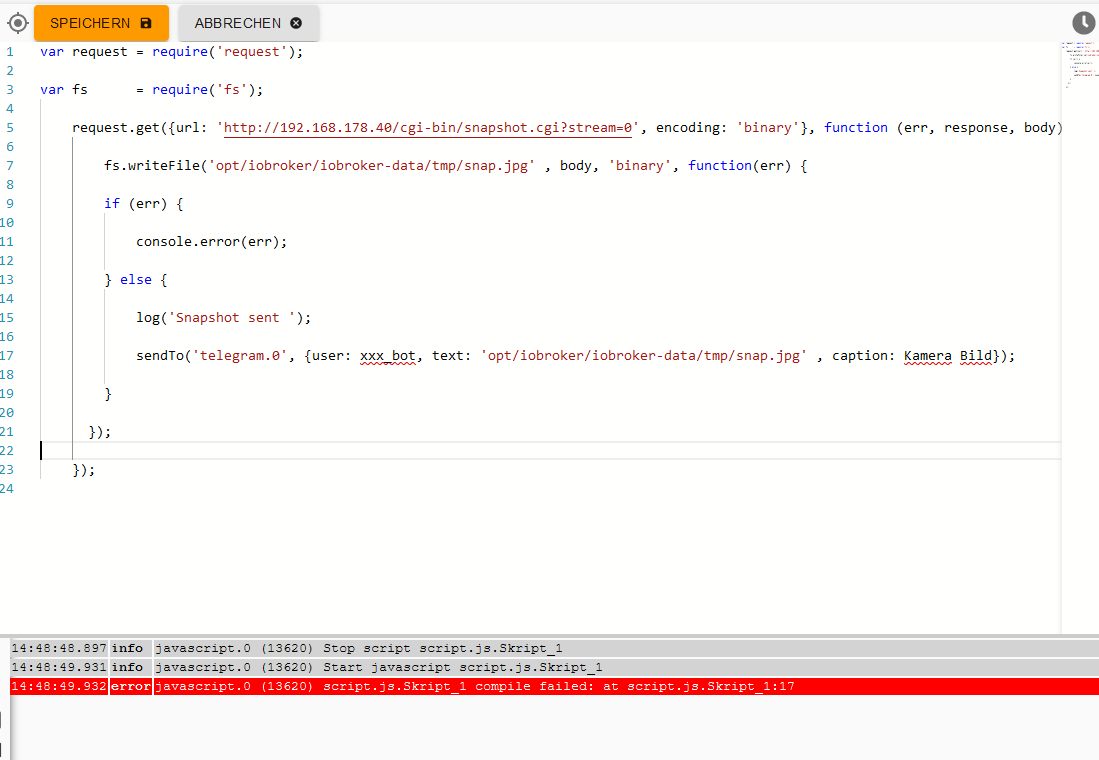
                      Stimmt das Skript jetzt so? Oder habe ich zuviel geändert. Bekomme jetzt folgenede Fehlermeldung.

                      95e0c792-fcca-4a5c-b06b-980e0cf4814b-grafik.png

                      var request = require('request');
                      
                      var fs      = require('fs');
                      
                          request.get({url: 'http://192.168.178.40/cgi-bin/snapshot.cgi?stream=0', encoding: 'binary'}, function (err, response, body) {
                      
                              fs.writeFile('opt/iobroker/iobroker-data/tmp/snap.jpg' , body, 'binary', function(err) {
                      
                              if (err) {
                      
                                  console.error(err);
                      
                              } else {
                      
                                  log('Snapshot sent ');
                      
                                  sendTo('telegram.0', {user: vUser, text: 'opt/iobroker/iobroker-data/tmp/snap.jpg' , caption: cam});
                      
                              }
                      
                            }); 
                      
                          });


                      M 1 Reply Last reply
                      0
                      • bahnuhrB Online
                        bahnuhrB Online
                        bahnuhr
                        Forum Testing Most Active
                        wrote on last edited by bahnuhr
                        #11

                        vUser ist auch eine Variable.

                        Diese musst du setzen oder deinen Namen mit "..." hin schreiben.

                        z.B.
                        user: "Dieter"

                        Natürlich deinen Namen der im telegram Adapter gelistet ist.


                        Wenn ich helfen konnte, dann Daumen hoch (Pfeil nach oben)!
                        Danke.
                        gute Forenbeiträge: https://forum.iobroker.net/topic/51555/hinweise-f%C3%BCr-gute-forenbeitr%C3%A4ge
                        ScreenToGif :https://www.screentogif.com/downloads.html

                        1 Reply Last reply
                        0
                        • D Darkmann2000

                          @MCU

                          Danke für die schnelle Rückmeldung.

                          Stimmt das Skript jetzt so? Oder habe ich zuviel geändert. Bekomme jetzt folgenede Fehlermeldung.

                          95e0c792-fcca-4a5c-b06b-980e0cf4814b-grafik.png

                          var request = require('request');
                          
                          var fs      = require('fs');
                          
                              request.get({url: 'http://192.168.178.40/cgi-bin/snapshot.cgi?stream=0', encoding: 'binary'}, function (err, response, body) {
                          
                                  fs.writeFile('opt/iobroker/iobroker-data/tmp/snap.jpg' , body, 'binary', function(err) {
                          
                                  if (err) {
                          
                                      console.error(err);
                          
                                  } else {
                          
                                      log('Snapshot sent ');
                          
                                      sendTo('telegram.0', {user: vUser, text: 'opt/iobroker/iobroker-data/tmp/snap.jpg' , caption: cam});
                          
                                  }
                          
                                }); 
                          
                              });


                          M Online
                          M Online
                          MCU
                          wrote on last edited by
                          #12

                          @Darkmann2000 sagte in Screenshot per Telegram oder Pushover versenden:

                          user: vUser, text: 'opt/iobroker/iobroker-data/tmp/snap.jpg' , caption: cam}

                          vUser und cam sind auch variablen

                          vUser ersetzen mit "DeinTelegram Name"
                          cam ersetzen mit "Kamera-Bild"

                          NUC i7 64GB mit Proxmox ---- Jarvis Infos Aktualisierungen der Doku auf Instagram verfolgen -> mcuiobroker Instagram
                          Wenn Euch mein Vorschlag geholfen hat, bitte rechts "^" klicken.

                          D 1 Reply Last reply
                          0
                          • M MCU

                            @Darkmann2000 sagte in Screenshot per Telegram oder Pushover versenden:

                            user: vUser, text: 'opt/iobroker/iobroker-data/tmp/snap.jpg' , caption: cam}

                            vUser und cam sind auch variablen

                            vUser ersetzen mit "DeinTelegram Name"
                            cam ersetzen mit "Kamera-Bild"

                            D Offline
                            D Offline
                            Darkmann2000
                            wrote on last edited by Darkmann2000
                            #13

                            @MCU @bahnuhr
                            43a9c59b-cd6e-4a91-8a0c-a99e34a7fff0-grafik.png

                            Ich habe vom Skript schreiben keine Ahnung, das ist mein Problem. :-)

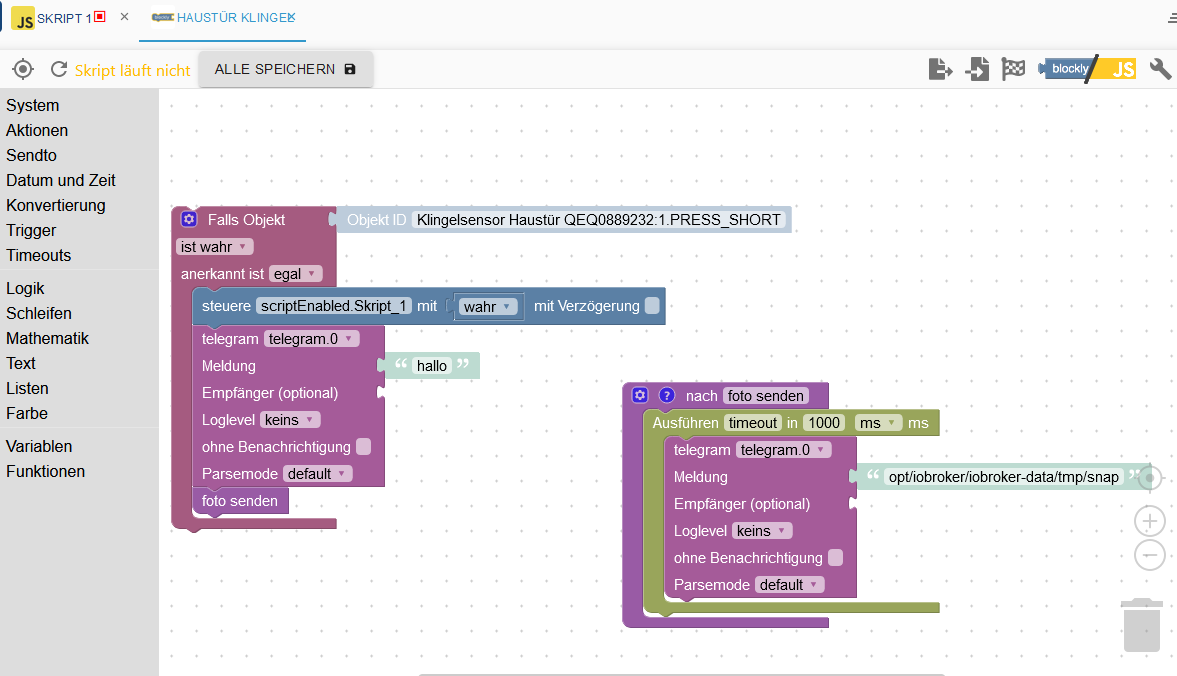
                            Mir würde auch ein Script reichen wo nur das Bild auf der Festplatte Lokal gespeichert wird.

                            Über Blockly habe ich das Skript am laufen. Habe zum testen ein Bild in dem Ordner hinterlegt. Das wird auch per Telegramm versendet. Nur ich bekomme kein Aktuelles Bild von der Kamera Lokal gespeichert.
                            2f2b9c2e-a0e5-4ac9-951a-3b2e468db44b-grafik.png

                            M 1 Reply Last reply
                            0
                            • D Darkmann2000

                              @MCU @bahnuhr
                              43a9c59b-cd6e-4a91-8a0c-a99e34a7fff0-grafik.png

                              Ich habe vom Skript schreiben keine Ahnung, das ist mein Problem. :-)

                              Mir würde auch ein Script reichen wo nur das Bild auf der Festplatte Lokal gespeichert wird.

                              Über Blockly habe ich das Skript am laufen. Habe zum testen ein Bild in dem Ordner hinterlegt. Das wird auch per Telegramm versendet. Nur ich bekomme kein Aktuelles Bild von der Kamera Lokal gespeichert.

                              2f2b9c2e-a0e5-4ac9-951a-3b2e468db44b-grafik.png

                              M Online
                              M Online
                              MCU
                              wrote on last edited by
                              #14

                              @Darkmann2000
                              eabd9d18-4bc4-4f89-b25e-38c572893ee7-image.png
                              {user: '', text: 'opt...........', caption: 'Kamera Bild'});

                              NUC i7 64GB mit Proxmox ---- Jarvis Infos Aktualisierungen der Doku auf Instagram verfolgen -> mcuiobroker Instagram
                              Wenn Euch mein Vorschlag geholfen hat, bitte rechts "^" klicken.

                              D 1 Reply Last reply
                              0
                              • M MCU

                                @Darkmann2000
                                eabd9d18-4bc4-4f89-b25e-38c572893ee7-image.png
                                {user: '', text: 'opt...........', caption: 'Kamera Bild'});

                                D Offline
                                D Offline
                                Darkmann2000
                                wrote on last edited by
                                #15

                                Es funktioniert.

                                Vielen lieben dank an euch.

                                Lieben Gruß

                                1 Reply Last reply
                                0
                                Reply
                                • Reply as topic
                                Log in to reply
                                • Oldest to Newest
                                • Newest to Oldest
                                • Most Votes


                                Support us

                                ioBroker
                                Community Adapters
                                Donate

                                702

                                Online

                                32.7k

                                Users

                                82.4k

                                Topics

                                1.3m

                                Posts
                                Community
                                Impressum | Datenschutz-Bestimmungen | Nutzungsbedingungen | Einwilligungseinstellungen
                                ioBroker Community 2014-2025
                                logo
                                • Login

                                • Don't have an account? Register

                                • Login or register to search.
                                • First post
                                  Last post
                                0
                                • Home
                                • Recent
                                • Tags
                                • Unread 0
                                • Categories
                                • Unreplied
                                • Popular
                                • GitHub
                                • Docu
                                • Hilfe