Skip to content
  • Home
  • Recent
  • Tags
  • 0 Unread 0
  • Categories
  • Unreplied
  • Popular
  • GitHub
  • Docu
  • Hilfe
Skins
  • Light
  • Brite
  • Cerulean
  • Cosmo
  • Flatly
  • Journal
  • Litera
  • Lumen
  • Lux
  • Materia
  • Minty
  • Morph
  • Pulse
  • Sandstone
  • Simplex
  • Sketchy
  • Spacelab
  • United
  • Yeti
  • Zephyr
  • Dark
  • Cyborg
  • Darkly
  • Quartz
  • Slate
  • Solar
  • Superhero
  • Vapor

  • Default (No Skin)
  • No Skin
Collapse
ioBroker Logo

Community Forum

donate donate
  1. ioBroker Community Home
  2. Deutsch
  3. ioBroker Allgemein
  4. Synology Surveillance Station API

NEWS

  • Jahresrückblick 2025 – unser neuer Blogbeitrag ist online! ✨
    BluefoxB
    Bluefox
    17
    1
    3.1k

  • Neuer Blogbeitrag: Monatsrückblick - Dezember 2025 🎄
    BluefoxB
    Bluefox
    13
    1
    1.1k

  • Weihnachtsangebot 2025! 🎄
    BluefoxB
    Bluefox
    25
    1
    2.4k

Synology Surveillance Station API

Scheduled Pinned Locked Moved ioBroker Allgemein
181 Posts 51 Posters 65.2k Views 35 Watching
  • Oldest to Newest
  • Newest to Oldest
  • Most Votes
Reply
  • Reply as topic
Log in to reply
This topic has been deleted. Only users with topic management privileges can see it.
  • C Offline
    C Offline
    chrischi99
    wrote on last edited by
    #132

    @Samson71
    Tipp top, hat wunderbar geklappt! Ich danke dir!!!

    1 Reply Last reply
    0
    • A Offline
      A Offline
      aleks-83
      wrote on last edited by
      #133

      Funktioniert bei mir auch!
      Super. Danke!

      Ich musste nur erst meine Kamera ID herausfinden :grimacing:

      Dazu einfach in der SSS einen Rechtsklick auf die Kamera unter "IP-Kameras",
      Dann "Stream Pfad freigeben",
      Dort steht dann am Ende der URL "...Sms=4.unicast", was bedeutet dass diese Kamera jetzt ID 4 hat.

      = Dell Optiplex Micro - 10GB RAM - 200GB SSD - Debian VM =
      = Node.js v20.19.6 = NPM 10.8.2 = JS Controller 7.0.7 =

      Ubiquiti UAP-AC-LR - UAP-AC-Lite - Synology DS716+II - Fritz!Box 7490
      Glasfaser 400

      1 Reply Last reply
      1
      • S Offline
        S Offline
        scoobydoo
        wrote on last edited by
        #134

        Hab gerade Anfrage zwecks Zugang gestellt, mal sehen ob es dann auch wieder bei mir läuft,
        wär ja echt Klasse.

        1 Reply Last reply
        0
        • S Offline
          S Offline
          scoobydoo
          wrote on last edited by
          #135

          Sehr geilLeute , es funzt wieder , vielen Dank an Samson71 für Unterstützung !!!!

          1 Reply Last reply
          0
          • Samson71S Samson71

            @hobbycamper sagte in Synology Surveillance Station API:

            Hi zusammen,

            hat noch jemand @apollon77 Skript am laufen?

            var request = require('request');
            
            // Konfiguration
            var user = "XXXXXX";  // Synology Benutzer mit Berechtigung die Kamera anzuzeigen
            var pass = "XXXXXXX";  // Passwort zu eben eingegebenem Benutzer
            var ip = "192.168.178.XXX";  // IP-Adresse eures Synology-NAS
            var port = XXX;  // default Port der Surveillance Station
            var cameraID = 1;  // ID der Kamera, welche angezeigt werden soll
            
            createState('javascript.' + instance + '.Anzeigen.Kamera.Eingangstuer-Stream', {'type': 'string', 'read': true, 'write': true, 'role': 'value', 'def': ""});
            
            // Authentifizierung an Synology Surveillance Station WebAPI und auslesen der SID
            
            function updateStreamUrl() {
                request('http://' + ip + ':' + port + '/webapi/auth.cgi?api=SYNO.API.Auth&method=Login&version=3&account=' + user + '&passwd=' + pass + '&session=SurveillanceStation&format=sid', function (error, response, body) {
                    //console.log('error:', error); // Print the error if one occurred
                    //console.log('statusCode:', response && response.statusCode); // Print the response status code if a response was received
                    //console.log('body:', body); // Print the HTML for the Google homepage.
                    try {
                        var bodyObj = JSON.parse(body);
                    }
                    catch (e) {
                        console.log("Error update SurveillanceStation Stream URL: " + e);
                        return;
                    }
                    if (bodyObj && bodyObj.data && bodyObj.data.sid) {
                        var sid = bodyObj.data.sid;
                        setState('javascript.' + instance + '.Anzeigen.Kamera.Eingangstuer-Stream', 'http://' + ip + ':' + port + '/webapi/SurveillanceStation/videoStreaming.cgi?api=SYNO.SurveillanceStation.VideoStream&version=1&method=Stream&cameraId=' + cameraID + '&format=mjpeg&_sid=' + sid, true);
                    }
                    else {
                        console.log("Invalid return on SurveillanceStation Stream URL: " + JSON.stringify(bodyObj));
                        return;
                    }
                });
            }
            
            schedule("0 * * * *", function() {
                updateStreamUrl();
            });
            
            updateStreamUrl();
            

            Lief monatelang ohne Probleme. Scheinbar nach irgend einem Update, entweder iobroker oder SurveillanceStation (aktuell 8.2.3-5828), kommt kein Bild mehr. Wenn ich die angelegte URL aus dem Datenpunkt in den Browser kopiere, kommt auch kein Bild.
            Das wäre z.B. das Format des aktuellen Datenpunkt:

            http://192.168.178.XXX:XXX/webapi/SurveillanceStation/videoStreaming.cgi?api=SYNO.SurveillanceStation.VideoStream&version=1&method=Stream&cameraId=1&format=mjpeg&_sid=ibdh4MDGQhITs1790QDN403203
            

            Es kommt auch nicht "Seite nicht erreichbar", sondern der Browser sucht und sucht...

            Es hilft auch kein Neustart des iobroker oder der synology.

            Im Log kommt auch nichts ungewöhnliches:

            javascript.0	2019-03-02 08:29:30.867	info	script.js.common.Kamera: registered 0 subscriptions and 1 schedule
            javascript.0	2019-03-02 08:29:30.842	info	Start javascript script.js.common.Kamera
            javascript.0	2019-03-02 08:29:30.828	info	Stop script script.js.common.Kamera
            

            Ist da jemand schon was bekannt?

            LG
            Thomas

            Die Problem habe (hatte) ich auch.
            Snology hat mit dem Update auf die Surveillance Station 8.2.3-5828 die API verändert. Das Problem wird in den einschlägigen Foren auch diskutiert. Mittlerweile gibt es einen Fix in Form eines inoffiziellen Updates auf die 8.2.3-5829.

            Kann von hier runtergeladen werden:
            https://supfiles.synology.com/sharing/oXkk1MptJ

            Der Zugang ist passwortgeschützt. Gebe ich gern auf Chatanfrage weiter, da ich nicht weis ob ich das hier frei posten kann/darf.

            totocotonioT Offline
            totocotonioT Offline
            totocotonio
            wrote on last edited by
            #136

            @Samson71 sagte in Synology Surveillance Station API:

            @hobbycamper sagte in Synology Surveillance Station API:

            Hi zusammen,

            hat noch jemand @apollon77 Skript am laufen?

            var request = require('request');
            
            // Konfiguration
            var user = "XXXXXX";  // Synology Benutzer mit Berechtigung die Kamera anzuzeigen
            var pass = "XXXXXXX";  // Passwort zu eben eingegebenem Benutzer
            var ip = "192.168.178.XXX";  // IP-Adresse eures Synology-NAS
            var port = XXX;  // default Port der Surveillance Station
            var cameraID = 1;  // ID der Kamera, welche angezeigt werden soll
            
            createState('javascript.' + instance + '.Anzeigen.Kamera.Eingangstuer-Stream', {'type': 'string', 'read': true, 'write': true, 'role': 'value', 'def': ""});
            
            // Authentifizierung an Synology Surveillance Station WebAPI und auslesen der SID
            
            function updateStreamUrl() {
                request('http://' + ip + ':' + port + '/webapi/auth.cgi?api=SYNO.API.Auth&method=Login&version=3&account=' + user + '&passwd=' + pass + '&session=SurveillanceStation&format=sid', function (error, response, body) {
                    //console.log('error:', error); // Print the error if one occurred
                    //console.log('statusCode:', response && response.statusCode); // Print the response status code if a response was received
                    //console.log('body:', body); // Print the HTML for the Google homepage.
                    try {
                        var bodyObj = JSON.parse(body);
                    }
                    catch (e) {
                        console.log("Error update SurveillanceStation Stream URL: " + e);
                        return;
                    }
                    if (bodyObj && bodyObj.data && bodyObj.data.sid) {
                        var sid = bodyObj.data.sid;
                        setState('javascript.' + instance + '.Anzeigen.Kamera.Eingangstuer-Stream', 'http://' + ip + ':' + port + '/webapi/SurveillanceStation/videoStreaming.cgi?api=SYNO.SurveillanceStation.VideoStream&version=1&method=Stream&cameraId=' + cameraID + '&format=mjpeg&_sid=' + sid, true);
                    }
                    else {
                        console.log("Invalid return on SurveillanceStation Stream URL: " + JSON.stringify(bodyObj));
                        return;
                    }
                });
            }
            
            schedule("0 * * * *", function() {
                updateStreamUrl();
            });
            
            updateStreamUrl();
            

            Lief monatelang ohne Probleme. Scheinbar nach irgend einem Update, entweder iobroker oder SurveillanceStation (aktuell 8.2.3-5828), kommt kein Bild mehr. Wenn ich die angelegte URL aus dem Datenpunkt in den Browser kopiere, kommt auch kein Bild.
            Das wäre z.B. das Format des aktuellen Datenpunkt:

            http://192.168.178.XXX:XXX/webapi/SurveillanceStation/videoStreaming.cgi?api=SYNO.SurveillanceStation.VideoStream&version=1&method=Stream&cameraId=1&format=mjpeg&_sid=ibdh4MDGQhITs1790QDN403203
            

            Es kommt auch nicht "Seite nicht erreichbar", sondern der Browser sucht und sucht...

            Es hilft auch kein Neustart des iobroker oder der synology.

            Im Log kommt auch nichts ungewöhnliches:

            javascript.0	2019-03-02 08:29:30.867	info	script.js.common.Kamera: registered 0 subscriptions and 1 schedule
            javascript.0	2019-03-02 08:29:30.842	info	Start javascript script.js.common.Kamera
            javascript.0	2019-03-02 08:29:30.828	info	Stop script script.js.common.Kamera
            

            Ist da jemand schon was bekannt?

            LG
            Thomas

            Die Problem habe (hatte) ich auch.
            Snology hat mit dem Update auf die Surveillance Station 8.2.3-5828 die API verändert. Das Problem wird in den einschlägigen Foren auch diskutiert. Mittlerweile gibt es einen Fix in Form eines inoffiziellen Updates auf die 8.2.3-5829.

            Kann von hier runtergeladen werden:
            https://supfiles.synology.com/sharing/oXkk1MptJ

            Der Zugang ist passwortgeschützt. Gebe ich gern auf Chatanfrage weiter, da ich nicht weis ob ich das hier frei posten kann/darf.

            Hi,
            könntest du mir den Zugang bitte zukommen lassen.
            Ich habe das gleiche Problem.

            Gruß Totocotonio

            Bin noch Anfänger in Sachen IO-Broker und lerne gerne dazu. :P

            1 Reply Last reply
            0
            • Samson71S Offline
              Samson71S Offline
              Samson71
              Global Moderator
              wrote on last edited by
              #137

              @totocotonio sagte in Synology Surveillance Station API:

              könntest du mir den Zugang bitte zukommen lassen.

              Hast PN.

              Was ist eigentlich an dem Satz

              @Samson71 sagte in Synology Surveillance Station API:
              Gebe ich gern auf Chatanfrage weiter, da ich nicht weis ob ich das hier frei posten kann/darf.

              nicht zu verstehen? ;)

              Markus

              Bitte beachten:
              Hinweise für gute Forenbeiträge
              Maßnahmen zum Schutz des Forums

              totocotonioT 1 Reply Last reply
              0
              • Samson71S Samson71

                @totocotonio sagte in Synology Surveillance Station API:

                könntest du mir den Zugang bitte zukommen lassen.

                Hast PN.

                Was ist eigentlich an dem Satz

                @Samson71 sagte in Synology Surveillance Station API:
                Gebe ich gern auf Chatanfrage weiter, da ich nicht weis ob ich das hier frei posten kann/darf.

                nicht zu verstehen? ;)

                totocotonioT Offline
                totocotonioT Offline
                totocotonio
                wrote on last edited by
                #138

                @Samson71 Vielen Dank für deine Hilfe es funktioniert.

                Gruß Totocotonio

                Bin noch Anfänger in Sachen IO-Broker und lerne gerne dazu. :P

                1 Reply Last reply
                0
                • K Offline
                  K Offline
                  Kueppert
                  wrote on last edited by
                  #139

                  Hm,
                  bei mir läuft es leider immer noch nicht :(

                  javascript.0 script.js.common.SurveillanceStation.CameraEsszimmer: Error update SurveillanceStation Stream URL: SyntaxError: Unexpected token u in JSON at position 0
                  

                  Jemand eine Idee, was das bedeutet?

                  UDM Pro, Intel NUC - ioBroker in Proxmox-VM, PiHole+Grafana&Influx+TasmoAdmin in LXCs, Raspberry Pi3 (als CCU), Zigbee-Stick Sonoff, Synology DS918+

                  K 1 Reply Last reply
                  0
                  • Z Offline
                    Z Offline
                    zahnheinrich
                    wrote on last edited by
                    #140

                    @Samson71
                    Würdest du mir den Zugangscode auch bitte zusenden?
                    Vielen Dank im Voraus!

                    MfG Ulrich

                    Samson71S 1 Reply Last reply
                    0
                    • Z zahnheinrich

                      @Samson71
                      Würdest du mir den Zugangscode auch bitte zusenden?
                      Vielen Dank im Voraus!

                      Samson71S Offline
                      Samson71S Offline
                      Samson71
                      Global Moderator
                      wrote on last edited by
                      #141

                      @zahnheinrich sagte in Synology Surveillance Station API:

                      @Samson71
                      Würdest du mir den Zugangscode auch bitte zusenden?

                      Hast ne Chatnachricht.

                      Markus

                      Bitte beachten:
                      Hinweise für gute Forenbeiträge
                      Maßnahmen zum Schutz des Forums

                      1 Reply Last reply
                      0
                      • K Kueppert

                        Hm,
                        bei mir läuft es leider immer noch nicht :(

                        javascript.0 script.js.common.SurveillanceStation.CameraEsszimmer: Error update SurveillanceStation Stream URL: SyntaxError: Unexpected token u in JSON at position 0
                        

                        Jemand eine Idee, was das bedeutet?

                        K Offline
                        K Offline
                        Kueppert
                        wrote on last edited by
                        #142

                        @Kueppert hab das Problem gefunden. Hatte https und port 5001. Wieder auf http und Port 5000 geändert - läuft wieder

                        UDM Pro, Intel NUC - ioBroker in Proxmox-VM, PiHole+Grafana&Influx+TasmoAdmin in LXCs, Raspberry Pi3 (als CCU), Zigbee-Stick Sonoff, Synology DS918+

                        1 Reply Last reply
                        0
                        • M Offline
                          M Offline
                          MarcoM
                          wrote on last edited by
                          #143

                          Mit dem Update auf die Version 8.2.3-5829 funktioniert es bei mir auch wieder.
                          Danke @Samson71

                          1 Reply Last reply
                          0
                          • W Offline
                            W Offline
                            web4wasch
                            wrote on last edited by
                            #144

                            Hallo zusammen,

                            ist das mit dem api-Code und dem Skript noch aktuell?
                            Ich bekomme leider über die URL vom Skript kein Bild angezeigt - nur über den RTSP-Stream über Freigabe und VLC funktioniert es bei mir.

                            Der Snapshot haut hin...

                            Danke für die Rückinfo.

                            GlasfaserG 1 Reply Last reply
                            0
                            • W web4wasch

                              Hallo zusammen,

                              ist das mit dem api-Code und dem Skript noch aktuell?
                              Ich bekomme leider über die URL vom Skript kein Bild angezeigt - nur über den RTSP-Stream über Freigabe und VLC funktioniert es bei mir.

                              Der Snapshot haut hin...

                              Danke für die Rückinfo.

                              GlasfaserG Offline
                              GlasfaserG Offline
                              Glasfaser
                              wrote on last edited by Glasfaser
                              #145

                              @web4wasch

                              Das Script funktioniert und erstellt auch dann im Datenpunkt eine erzeugte URL.
                              Nur diese erstellte URL wird im VIS nicht angezeigt ,im Browser lädt sie endlos .......
                              nur im VLC wird einmalig mit der erstellten URL ein Standbild angezeigt .

                              Daher nutze ich da Script nicht .
                              Bin auch nicht weiterkommen , aber mir reicht das Snapshot mit Intervall.

                              Synology 918+ 16GB - ioBroker in Docker v9 , VISO auf Trekstor Primebook C13 13,3" , Hikvision Domkameras mit Surveillance Station .. CCU RaspberryMatic in Synology VM .. Zigbee CC2538+CC2592 .. Sonoff .. KNX .. Modbus ..

                              W 1 Reply Last reply
                              0
                              • GlasfaserG Glasfaser

                                @web4wasch

                                Das Script funktioniert und erstellt auch dann im Datenpunkt eine erzeugte URL.
                                Nur diese erstellte URL wird im VIS nicht angezeigt ,im Browser lädt sie endlos .......
                                nur im VLC wird einmalig mit der erstellten URL ein Standbild angezeigt .

                                Daher nutze ich da Script nicht .
                                Bin auch nicht weiterkommen , aber mir reicht das Snapshot mit Intervall.

                                W Offline
                                W Offline
                                web4wasch
                                wrote on last edited by
                                #146

                                @Glasfaser

                                danke dir für die schnelle Antwort.
                                Denke ich werde auch beim Intervall bleiben.

                                eigentlich voll schade :v:

                                GlasfaserG 1 Reply Last reply
                                0
                                • W web4wasch

                                  @Glasfaser

                                  danke dir für die schnelle Antwort.
                                  Denke ich werde auch beim Intervall bleiben.

                                  eigentlich voll schade :v:

                                  GlasfaserG Offline
                                  GlasfaserG Offline
                                  Glasfaser
                                  wrote on last edited by
                                  #147

                                  @web4wasch

                                  Ja leider ....

                                  Kennst du das , auch sehr interessant für die Synology
                                  Link Text

                                  Synology 918+ 16GB - ioBroker in Docker v9 , VISO auf Trekstor Primebook C13 13,3" , Hikvision Domkameras mit Surveillance Station .. CCU RaspberryMatic in Synology VM .. Zigbee CC2538+CC2592 .. Sonoff .. KNX .. Modbus ..

                                  W 1 Reply Last reply
                                  0
                                  • GlasfaserG Glasfaser

                                    @web4wasch

                                    Ja leider ....

                                    Kennst du das , auch sehr interessant für die Synology
                                    Link Text

                                    W Offline
                                    W Offline
                                    web4wasch
                                    wrote on last edited by
                                    #148

                                    @Glasfaser

                                    habe mal kurz überflogen, liest sich interessant!!!!

                                    Hast du das schon mit einem Skript (Variable Anwesenheit) irgendwie umgesetzt?

                                    Die Aktionsregeln habe ich just eingearbeitet, jetzt fehlt nur noch ein JS-Script oder Blocky.

                                    Dank dir.

                                    GlasfaserG 1 Reply Last reply
                                    0
                                    • W web4wasch

                                      @Glasfaser

                                      habe mal kurz überflogen, liest sich interessant!!!!

                                      Hast du das schon mit einem Skript (Variable Anwesenheit) irgendwie umgesetzt?

                                      Die Aktionsregeln habe ich just eingearbeitet, jetzt fehlt nur noch ein JS-Script oder Blocky.

                                      Dank dir.

                                      GlasfaserG Offline
                                      GlasfaserG Offline
                                      Glasfaser
                                      wrote on last edited by
                                      #149

                                      @web4wasch

                                      Habe auch Aktionregel diese werden aber noch über die CCU ( Rasperrymatic ) angesteuert.,
                                      deshalb wollte ich Sie auf IObrocker umziehen !
                                      Aber leider weiß ich nicht wie man dort im Script Triggert
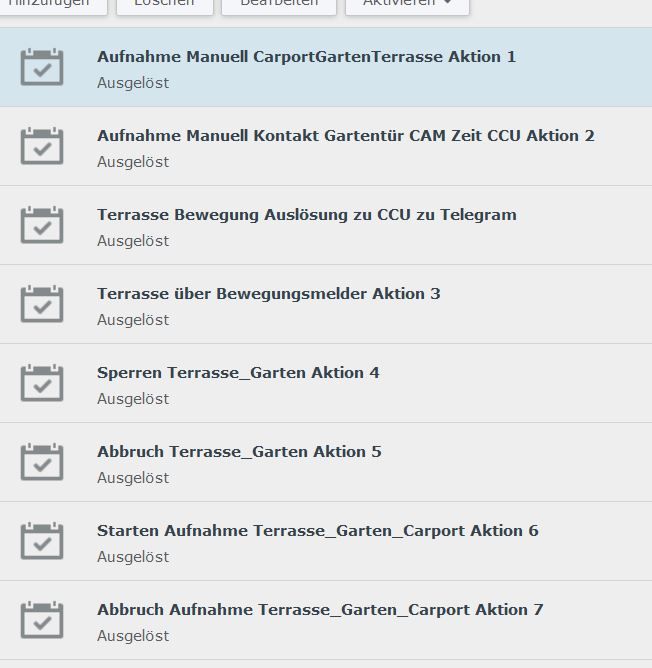
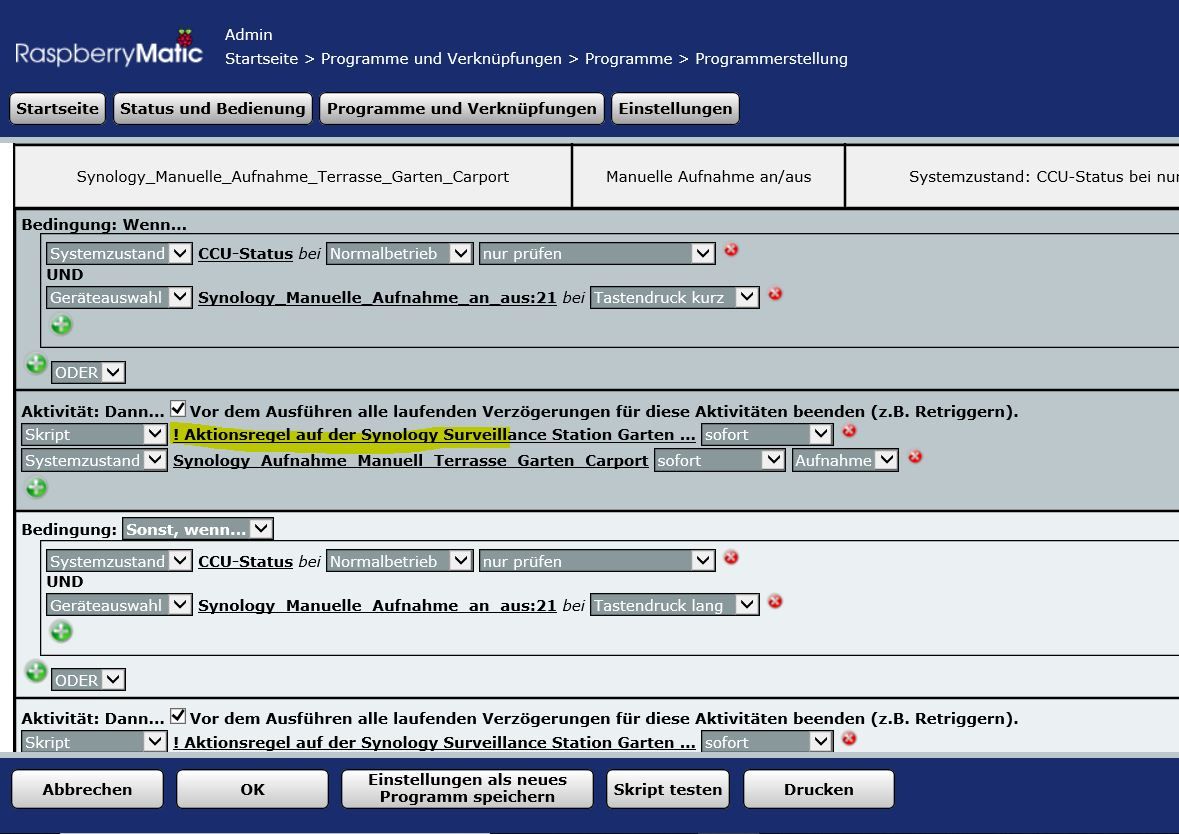
                                      1111.JPG

                                      2222.JPG
                                      4444.JPG

                                      Synology 918+ 16GB - ioBroker in Docker v9 , VISO auf Trekstor Primebook C13 13,3" , Hikvision Domkameras mit Surveillance Station .. CCU RaspberryMatic in Synology VM .. Zigbee CC2538+CC2592 .. Sonoff .. KNX .. Modbus ..

                                      KnallochseK W 2 Replies Last reply
                                      0
                                      • GlasfaserG Glasfaser

                                        @web4wasch

                                        Habe auch Aktionregel diese werden aber noch über die CCU ( Rasperrymatic ) angesteuert.,
                                        deshalb wollte ich Sie auf IObrocker umziehen !
                                        Aber leider weiß ich nicht wie man dort im Script Triggert
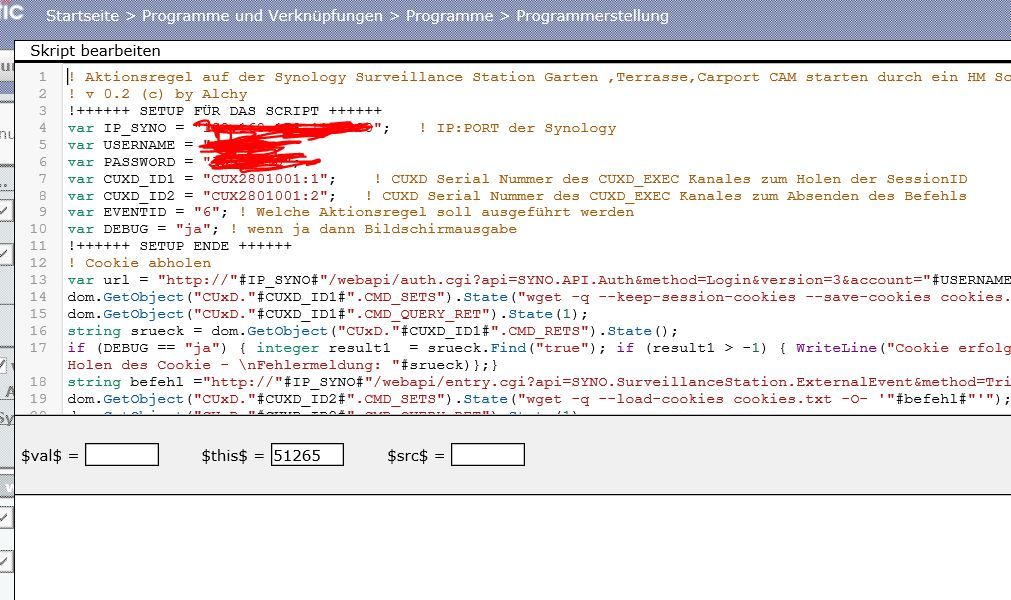
                                        1111.JPG

                                        2222.JPG
                                        4444.JPG

                                        KnallochseK Do not disturb
                                        KnallochseK Do not disturb
                                        Knallochse
                                        wrote on last edited by
                                        #150

                                        @Glasfaser eigentlich simpel
                                        In der Synology SurveillanceStation den API Befehl holen (Benutzername & Passwort ergänzen)
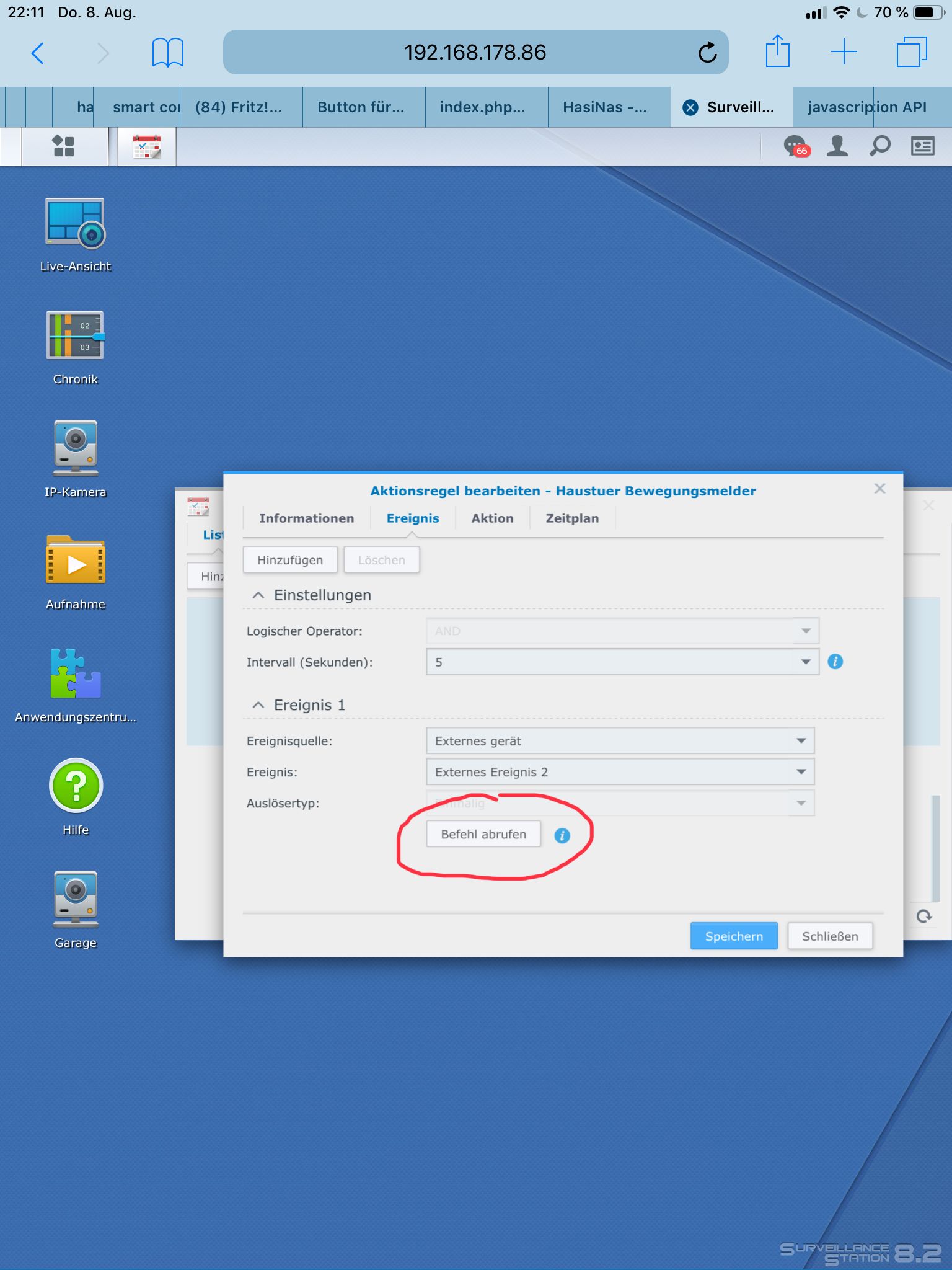
                                        118138FA-557D-4431-811E-1B7EAAB751F9.jpeg
                                        Und per Blockly einen Request zusammen klicken
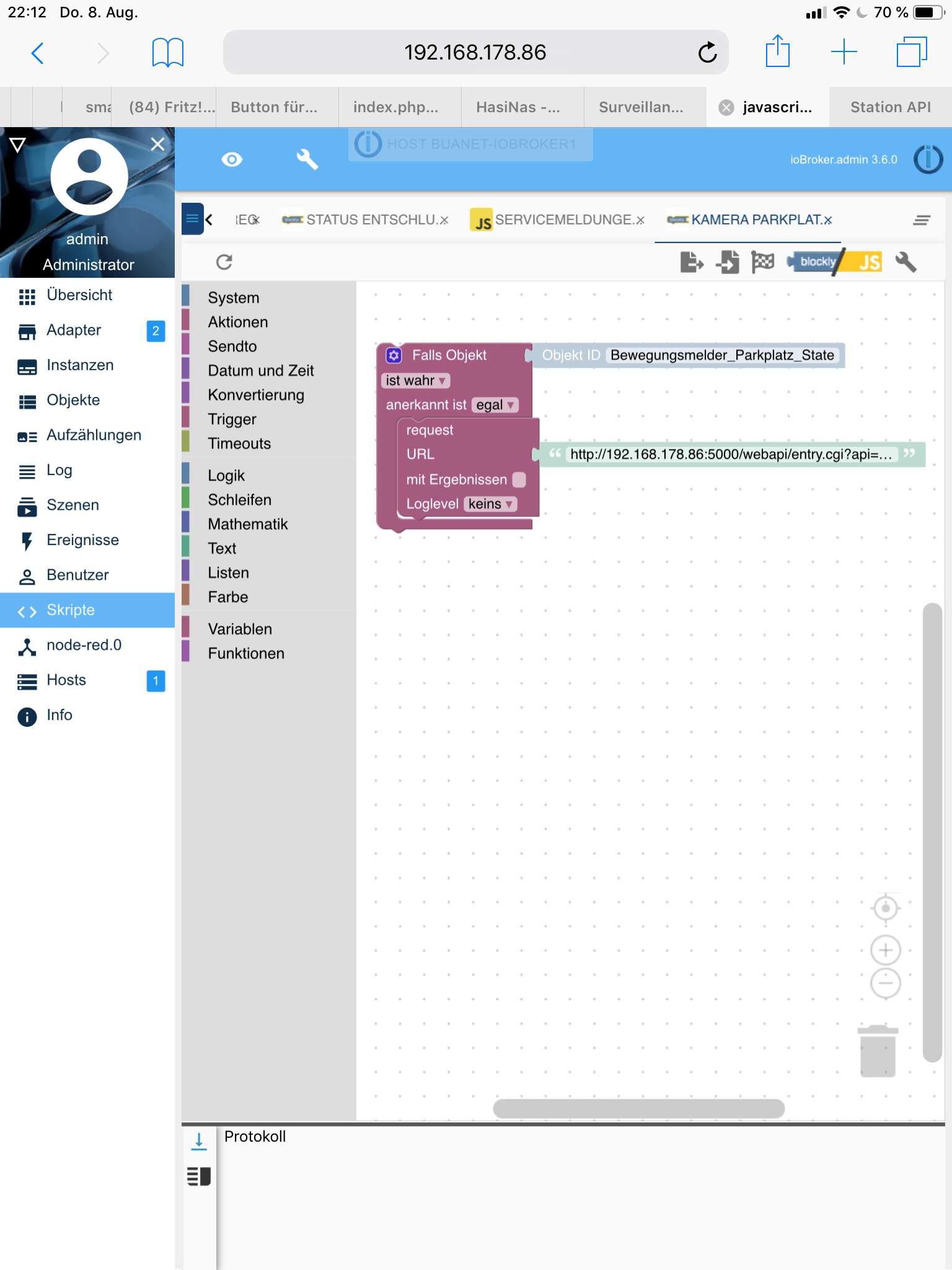
                                        7FCB7F61-9EB9-4D96-8D77-3CF8337482B1.png

                                        HM&HMIP über 100 Geräte + IoBroker auf DS918+ uvm.

                                        GlasfaserG 1 Reply Last reply
                                        1
                                        • KnallochseK Knallochse

                                          @Glasfaser eigentlich simpel
                                          In der Synology SurveillanceStation den API Befehl holen (Benutzername & Passwort ergänzen)
                                          118138FA-557D-4431-811E-1B7EAAB751F9.jpeg
                                          Und per Blockly einen Request zusammen klicken
                                          7FCB7F61-9EB9-4D96-8D77-3CF8337482B1.png

                                          GlasfaserG Offline
                                          GlasfaserG Offline
                                          Glasfaser
                                          wrote on last edited by
                                          #151

                                          @Knallochse

                                          Genau nach deine Anleitung binn in vorgegangen ,Benutzername & Passwort auch ergänzt , aber keine Funktion damit !

                                          Synology 918+ 16GB - ioBroker in Docker v9 , VISO auf Trekstor Primebook C13 13,3" , Hikvision Domkameras mit Surveillance Station .. CCU RaspberryMatic in Synology VM .. Zigbee CC2538+CC2592 .. Sonoff .. KNX .. Modbus ..


                                          KnallochseK 1 Reply Last reply
                                          0
                                          Reply
                                          • Reply as topic
                                          Log in to reply
                                          • Oldest to Newest
                                          • Newest to Oldest
                                          • Most Votes


                                          Support us

                                          ioBroker
                                          Community Adapters
                                          Donate
                                          FAQ Cloud / IOT
                                          HowTo: Node.js-Update
                                          HowTo: Backup/Restore
                                          Downloads
                                          BLOG

                                          519

                                          Online

                                          32.7k

                                          Users

                                          82.3k

                                          Topics

                                          1.3m

                                          Posts
                                          Community
                                          Impressum | Datenschutz-Bestimmungen | Nutzungsbedingungen | Einwilligungseinstellungen
                                          ioBroker Community 2014-2025
                                          logo
                                          • Login

                                          • Don't have an account? Register

                                          • Login or register to search.
                                          • First post
                                            Last post
                                          0
                                          • Home
                                          • Recent
                                          • Tags
                                          • Unread 0
                                          • Categories
                                          • Unreplied
                                          • Popular
                                          • GitHub
                                          • Docu
                                          • Hilfe