Skip to content
  • Home
  • Recent
  • Tags
  • 0 Unread 0
  • Categories
  • Unreplied
  • Popular
  • GitHub
  • Docu
  • Hilfe
Skins
  • Light
  • Brite
  • Cerulean
  • Cosmo
  • Flatly
  • Journal
  • Litera
  • Lumen
  • Lux
  • Materia
  • Minty
  • Morph
  • Pulse
  • Sandstone
  • Simplex
  • Sketchy
  • Spacelab
  • United
  • Yeti
  • Zephyr
  • Dark
  • Cyborg
  • Darkly
  • Quartz
  • Slate
  • Solar
  • Superhero
  • Vapor

  • Default (No Skin)
  • No Skin
Collapse
ioBroker Logo

Community Forum

donate donate
  1. ioBroker Community Home
  2. Deutsch
  3. Error/Bug
  4. Time Out Instancen Installation

NEWS

  • Weihnachtsangebot 2025! 🎄
    BluefoxB
    Bluefox
    18
    1
    672

  • UPDATE 31.10.: Amazon Alexa - ioBroker Skill läuft aus ?
    apollon77A
    apollon77
    48
    3
    9.0k

  • Monatsrückblick – September 2025
    BluefoxB
    Bluefox
    13
    1
    2.3k

Time Out Instancen Installation

Scheduled Pinned Locked Moved Unsolved Error/Bug
raspberry
60 Posts 5 Posters 4.3k Views 4 Watching
  • Oldest to Newest
  • Newest to Oldest
  • Most Votes
Reply
  • Reply as topic
Log in to reply
This topic has been deleted. Only users with topic management privileges can see it.
  • HomoranH Homoran

    @Cedrik1 sagte in Time Out Instancen Installation:

    ein Ort wo ich den Befehl im iobroker eingeben kann.

    in der Fernkonsole, z.B. putty

    C Offline
    C Offline
    Cedrik1
    wrote on last edited by
    #11
    /usr/bin/nodejs
    v10.16.0
    /usr/bin/node
    v10.16.0
    /usr/bin/npm
    6.9.0
    nodejs:
     Installed: 10.16.0-1nodesource1
     Candidate: 10.16.0-1nodesource1
     Version table:
    *** 10.16.0-1nodesource1 500
           500 https://deb.nodesource.com/node_10.x buster/main armhf Packages
           100 /var/lib/dpkg/status
        10.15.2~dfsg-2+rpi1 500
           500 http://raspbian.raspberrypi.org/raspbian buster/main armhf Packages
    
    Thomas BraunT 1 Reply Last reply
    0
    • C Cedrik1
      Systemdata Bitte Ausfüllen
      Hardwaresystem: Pi2.
      Arbeitsspeicher: 1GB
      Festplattenart: SD-Karte
      Betriebssystem: IO Broker mit Homemativ als ein Image
      Node-Version: 10.16.0
      Nodejs-Version: 10.16.0
      NPM-Version: 6.9.0
      Installationsart: Image
      Image genutzt: Ja
      Ort/Name der Imagedatei: ioBroker Image für Raspberry Pi2/3/4 Buster mit piVCCU 20190723 direkt von der ioBroker Page```

      Beim ersten Start vom Io Broker mussten die Instancen ping.0 und web.0 installiert werden. Diese wurde nicht erfolgreich durchgeführt bzw. gingen beide mit Time out zu ende. Darunter in der Box mit folgender Meldung:
      adapter "web" yet installed. Use "upgrade" to install newer version.
      ERROR: process exited with code 51

      Hier ein Auszug aus der LOG

      host.raspberrypi	2020-10-06 11:28:59.397	info	Restart adapter system.adapter.ping.0 because enabled
      host.raspberrypi	2020-10-06 11:28:59.396	error	instance system.adapter.ping.0 terminated with code 1 ()
      host.raspberrypi	2020-10-06 11:28:59.396	error	Caught by controller[0]: at Function.Module._load (internal/modules/cjs/loader.js:585:3)
      host.raspberrypi	2020-10-06 11:28:59.396	error	Caught by controller[0]: at tryModuleLoad (internal/modules/cjs/loader.js:593:12)
      host.raspberrypi	2020-10-06 11:28:59.396	error	Caught by controller[0]: at Module.load (internal/modules/cjs/loader.js:653:32)
      host.raspberrypi	2020-10-06 11:28:59.396	error	Caught by controller[0]: at Object.Module._extensions..js (internal/modules/cjs/loader.js:787:10)
      host.raspberrypi	2020-10-06 11:28:59.396	error	Caught by controller[0]: at Module._compile (internal/modules/cjs/loader.js:776:30)
      host.raspberrypi	2020-10-06 11:28:59.396	error	Caught by controller[0]: at Object.<anonymous> (/opt/iobroker/node_modules/iobroker.ping/node_modules/@iobroker/adapter-core/build/index.js:29:54)
      host.raspberrypi	2020-10-06 11:28:59.395	error	Caught by controller[0]: at require (internal/modules/cjs/helpers.js:25:18)
      host.raspberrypi	2020-10-06 11:28:59.390	error	Caught by controller[0]: at Module.require (internal/modules/cjs/loader.js:690:17)
      host.raspberrypi	2020-10-06 11:28:59.389	error	Caught by controller[0]: at Function.Module._load (internal/modules/cjs/loader.js:562:25)
      host.raspberrypi	2020-10-06 11:28:59.389	error	Caught by controller[0]: at Function.Module._resolveFilename (internal/modules/cjs/loader.js:636:15)
      host.raspberrypi	2020-10-06 11:28:59.389	error	Caught by controller[0]: Error: Cannot find module '/opt/iobroker/node_modules/iobroker.js-controller/lib/exitCodes'
      host.raspberrypi	2020-10-06 11:28:59.389	error	Caught by controller[0]: ^
      host.raspberrypi	2020-10-06 11:28:59.389	error	Caught by controller[0]: throw err;
      host.raspberrypi	2020-10-06 11:28:59.384	error	Caught by controller[0]: internal/modules/cjs/loader.js:638
      host.raspberrypi	2020-10-06 11:28:58.420	info	instance system.adapter.ping.0 started with pid 18106
      

      MOD-Edit: Code in code-tags gesetzt!

      GlasfaserG Offline
      GlasfaserG Offline
      Glasfaser
      wrote on last edited by
      #12

      @Cedrik1 sagte in Time Out Instancen Installation:

      Beim ersten Start vom Io Broker mussten die Instancen ping.0 und web.0 installiert werden. Diese wurde nicht erfolgreich durchgeführt

      Zeige mal deine JS-Controller Version

      iobroker version
      

      Synology 918+ 16GB - ioBroker in Docker v9 , VISO auf Trekstor Primebook C13 13,3" , Hikvision Domkameras mit Surveillance Station .. CCU RaspberryMatic in Synology VM .. Zigbee CC2538+CC2592 .. Sonoff .. KNX .. Modbus ..

      GlasfaserG 1 Reply Last reply
      0
      • C Cedrik1
        /usr/bin/nodejs
        v10.16.0
        /usr/bin/node
        v10.16.0
        /usr/bin/npm
        6.9.0
        nodejs:
         Installed: 10.16.0-1nodesource1
         Candidate: 10.16.0-1nodesource1
         Version table:
        *** 10.16.0-1nodesource1 500
               500 https://deb.nodesource.com/node_10.x buster/main armhf Packages
               100 /var/lib/dpkg/status
            10.15.2~dfsg-2+rpi1 500
               500 http://raspbian.raspberrypi.org/raspbian buster/main armhf Packages
        
        Thomas BraunT Online
        Thomas BraunT Online
        Thomas Braun
        Most Active
        wrote on last edited by
        #13

        @Cedrik1
        Das ist auch für node10 nicht der letzte Stand.

        sudo apt update
        sudo apt dist-upgrade
        

        Ich würde allerdings gleich auf node12 gehen. Update wie hier:
        https://forum.iobroker.net/topic/35090/howto-nodejs-installation-und-upgrades-unter-debian

        Linux-Werkzeugkasten:
        https://forum.iobroker.net/topic/42952/der-kleine-iobroker-linux-werkzeugkasten
        NodeJS Fixer Skript:
        https://forum.iobroker.net/topic/68035/iob-node-fix-skript
        iob_diag: curl -sLf -o diag.sh https://iobroker.net/diag.sh && bash diag.sh

        C Meister MopperM 2 Replies Last reply
        0
        • Thomas BraunT Thomas Braun

          @Cedrik1
          Das ist auch für node10 nicht der letzte Stand.

          sudo apt update
          sudo apt dist-upgrade
          

          Ich würde allerdings gleich auf node12 gehen. Update wie hier:
          https://forum.iobroker.net/topic/35090/howto-nodejs-installation-und-upgrades-unter-debian

          C Offline
          C Offline
          Cedrik1
          wrote on last edited by
          #14

          @Thomas-Braun Hallo Node 12 update klappt nicht, bzw. scheint es nicht mehr zu geben

          curl -sL https://deb.nodesource.com/setup_12.x | sudo -E bash –
          bash: –: No such file or directory
          
          Thomas BraunT 1 Reply Last reply
          0
          • C Cedrik1

            @Thomas-Braun Hallo Node 12 update klappt nicht, bzw. scheint es nicht mehr zu geben

            curl -sL https://deb.nodesource.com/setup_12.x | sudo -E bash –
            bash: –: No such file or directory
            
            Thomas BraunT Online
            Thomas BraunT Online
            Thomas Braun
            Most Active
            wrote on last edited by
            #15

            @Cedrik1
            Das ist ja auch nicht so wie in der Anleitung beschrieben.
            Da ändert man lediglich in der nodesource.list die Version und dann funktioniert das auch.

            Linux-Werkzeugkasten:
            https://forum.iobroker.net/topic/42952/der-kleine-iobroker-linux-werkzeugkasten
            NodeJS Fixer Skript:
            https://forum.iobroker.net/topic/68035/iob-node-fix-skript
            iob_diag: curl -sLf -o diag.sh https://iobroker.net/diag.sh && bash diag.sh

            C 1 Reply Last reply
            0
            • Thomas BraunT Thomas Braun

              @Cedrik1
              Das ist ja auch nicht so wie in der Anleitung beschrieben.
              Da ändert man lediglich in der nodesource.list die Version und dann funktioniert das auch.

              C Offline
              C Offline
              Cedrik1
              wrote on last edited by
              #16

              @Thomas-Braun Da komme ich gerade nicht hinterher. Vor einen Jahr lief diese Version perfekt, bis ich beim renovieren meine SD Karte zerstört hatte.
              Gibt es kein fertiges Image mit Node12 und der Homematic CCU?

              Thomas BraunT 1 Reply Last reply
              0
              • C Cedrik1

                @Thomas-Braun Da komme ich gerade nicht hinterher. Vor einen Jahr lief diese Version perfekt, bis ich beim renovieren meine SD Karte zerstört hatte.
                Gibt es kein fertiges Image mit Node12 und der Homematic CCU?

                Thomas BraunT Online
                Thomas BraunT Online
                Thomas Braun
                Most Active
                wrote on last edited by Thomas Braun
                #17

                @Cedrik1
                Wozu?
                Einfach in der Datei /etc/apt/sources.list.d/nodesource.list die 10 gegen 12 tauschen,

                sudo apt udate
                sudo apt upgrade
                

                und dann läuft da node12.

                Linux-Werkzeugkasten:
                https://forum.iobroker.net/topic/42952/der-kleine-iobroker-linux-werkzeugkasten
                NodeJS Fixer Skript:
                https://forum.iobroker.net/topic/68035/iob-node-fix-skript
                iob_diag: curl -sLf -o diag.sh https://iobroker.net/diag.sh && bash diag.sh

                C 1 Reply Last reply
                0
                • Thomas BraunT Thomas Braun

                  @Cedrik1
                  Wozu?
                  Einfach in der Datei /etc/apt/sources.list.d/nodesource.list die 10 gegen 12 tauschen,

                  sudo apt udate
                  sudo apt upgrade
                  

                  und dann läuft da node12.

                  C Offline
                  C Offline
                  Cedrik1
                  wrote on last edited by
                  #18

                  Update scheint geklappt zu haben, habe mich von der verlinkten Anleitung verwirren lassen

                  /usr/bin/nodejs
                  v12.18.4
                  /usr/bin/node
                  v12.18.4
                  /usr/bin/npm
                  6.14.6
                  nodejs:
                    Installed: 12.18.4-1nodesource1
                    Candidate: 12.18.4-1nodesource1
                    Version table:
                   *** 12.18.4-1nodesource1 500
                          500 https://deb.nodesource.com/node_12.x buster/main armhf Packages
                          100 /var/lib/dpkg/status
                       10.21.0~dfsg-1~deb10u1+rpi1 500
                          500 http://raspbian.raspberrypi.org/raspbian buster/main armhf Packages


                  Aber der ioBroker an sich hatte immer noch das selbe fehlerverhalten wie vorher. Eine Neuinstallation der Instancen lief nicht fehlerfrei

                  C 1 Reply Last reply
                  0
                  • C Cedrik1

                    Update scheint geklappt zu haben, habe mich von der verlinkten Anleitung verwirren lassen

                    /usr/bin/nodejs
                    v12.18.4
                    /usr/bin/node
                    v12.18.4
                    /usr/bin/npm
                    6.14.6
                    nodejs:
                      Installed: 12.18.4-1nodesource1
                      Candidate: 12.18.4-1nodesource1
                      Version table:
                     *** 12.18.4-1nodesource1 500
                            500 https://deb.nodesource.com/node_12.x buster/main armhf Packages
                            100 /var/lib/dpkg/status
                         10.21.0~dfsg-1~deb10u1+rpi1 500
                            500 http://raspbian.raspberrypi.org/raspbian buster/main armhf Packages


                    Aber der ioBroker an sich hatte immer noch das selbe fehlerverhalten wie vorher. Eine Neuinstallation der Instancen lief nicht fehlerfrei

                    C Offline
                    C Offline
                    Cedrik1
                    wrote on last edited by
                    #19

                    Die Log spuckt momentan diese Meldungen aus

                    host.raspberrypi	2020-10-06 18:01:54.980	info	instance system.adapter.ping.0 started with pid 4703
                    host.raspberrypi	2020-10-06 18:01:38.725	info	Restart adapter system.adapter.info.0 because enabled
                    host.raspberrypi	2020-10-06 18:01:38.724	error	instance system.adapter.info.0 terminated with code 0 (OK)
                    host.raspberrypi	2020-10-06 18:01:38.724	error	Caught by controller[0]: at Manager.<anonymous> (/opt/iobroker/node_modules/component-bind/index.js:21:15)
                    host.raspberrypi	2020-10-06 18:01:38.724	error	Caught by controller[0]: at Socket.onpacket (/opt/iobroker/node_modules/socket.io-client/lib/socket.js:236:12)
                    host.raspberrypi	2020-10-06 18:01:38.724	error	Caught by controller[0]: at Socket.onack (/opt/iobroker/node_modules/socket.io-client/lib/socket.js:312:9)
                    host.raspberrypi	2020-10-06 18:01:38.724	error	Caught by controller[0]: at Socket.<anonymous> (/opt/iobroker/node_modules/iobroker.info/main.js:191:21)
                    host.raspberrypi	2020-10-06 18:01:38.723	error	Caught by controller[0]: at /opt/iobroker/node_modules/iobroker.info/main.js:92:26
                    host.raspberrypi	2020-10-06 18:01:38.723	error	Caught by controller[0]: at Array.forEach (<anonymous>)
                    host.raspberrypi	2020-10-06 18:01:38.723	error	Caught by controller[0]: at /opt/iobroker/node_modules/iobroker.info/main.js:103:57
                    host.raspberrypi	2020-10-06 18:01:38.723	error	Caught by controller[0]: at Array.forEach (<anonymous>)
                    host.raspberrypi	2020-10-06 18:01:38.723	error	Caught by controller[0]: at /opt/iobroker/node_modules/iobroker.info/main.js:124:49
                    host.raspberrypi	2020-10-06 18:01:38.722	error	Caught by controller[0]: at checkVersion (/opt/iobroker/node_modules/iobroker.info/main.js:150:23)
                    host.raspberrypi	2020-10-06 18:01:38.721	error	Caught by controller[0]: TypeError: Cannot read property 'split' of undefined
                    info.0	2020-10-06 18:01:38.674	info	cleaned everything up...
                    info.0	2020-10-06 18:01:38.674	error	TypeError: Cannot read property 'split' of undefined at checkVersion (/opt/iobroker/node_modules/iobroker.info/main.js:150:23) at /opt/iobroker/node_modules/iobroker.info/main.js:124:49 at
                    info.0	2020-10-06 18:01:38.671	error	uncaught exception: Cannot read property 'split' of undefined
                    info.0	2020-10-06 18:01:38.535	info	Popup-News readed...
                    info.0	2020-10-06 18:01:38.183	info	Reading process data every 8 seconds.
                    info.0	2020-10-06 18:01:38.183	info	Reading CPU temp data every 3 seconds.
                    info.0	2020-10-06 18:01:38.182	info	Reading battery data every 8 seconds.
                    info.0	2020-10-06 18:01:38.182	info	Reading user data every 8 seconds.
                    info.0	2020-10-06 18:01:38.182	info	Reading memory data every 3 seconds.
                    info.0	2020-10-06 18:01:38.181	info	Reading disk data every 8 seconds.
                    info.0	2020-10-06 18:01:38.025	info	Reading CPU data every 3 seconds.
                    info.0	2020-10-06 18:01:38.024	info	Reading CPU current speed every 3 seconds.
                    info.0	2020-10-06 18:01:38.022	info	starting. Version 1.3.7 in /opt/iobroker/node_modules/iobroker.info, node: v12.18.4
                    
                    C 1 Reply Last reply
                    0
                    • C Cedrik1

                      Die Log spuckt momentan diese Meldungen aus

                      host.raspberrypi	2020-10-06 18:01:54.980	info	instance system.adapter.ping.0 started with pid 4703
                      host.raspberrypi	2020-10-06 18:01:38.725	info	Restart adapter system.adapter.info.0 because enabled
                      host.raspberrypi	2020-10-06 18:01:38.724	error	instance system.adapter.info.0 terminated with code 0 (OK)
                      host.raspberrypi	2020-10-06 18:01:38.724	error	Caught by controller[0]: at Manager.<anonymous> (/opt/iobroker/node_modules/component-bind/index.js:21:15)
                      host.raspberrypi	2020-10-06 18:01:38.724	error	Caught by controller[0]: at Socket.onpacket (/opt/iobroker/node_modules/socket.io-client/lib/socket.js:236:12)
                      host.raspberrypi	2020-10-06 18:01:38.724	error	Caught by controller[0]: at Socket.onack (/opt/iobroker/node_modules/socket.io-client/lib/socket.js:312:9)
                      host.raspberrypi	2020-10-06 18:01:38.724	error	Caught by controller[0]: at Socket.<anonymous> (/opt/iobroker/node_modules/iobroker.info/main.js:191:21)
                      host.raspberrypi	2020-10-06 18:01:38.723	error	Caught by controller[0]: at /opt/iobroker/node_modules/iobroker.info/main.js:92:26
                      host.raspberrypi	2020-10-06 18:01:38.723	error	Caught by controller[0]: at Array.forEach (<anonymous>)
                      host.raspberrypi	2020-10-06 18:01:38.723	error	Caught by controller[0]: at /opt/iobroker/node_modules/iobroker.info/main.js:103:57
                      host.raspberrypi	2020-10-06 18:01:38.723	error	Caught by controller[0]: at Array.forEach (<anonymous>)
                      host.raspberrypi	2020-10-06 18:01:38.723	error	Caught by controller[0]: at /opt/iobroker/node_modules/iobroker.info/main.js:124:49
                      host.raspberrypi	2020-10-06 18:01:38.722	error	Caught by controller[0]: at checkVersion (/opt/iobroker/node_modules/iobroker.info/main.js:150:23)
                      host.raspberrypi	2020-10-06 18:01:38.721	error	Caught by controller[0]: TypeError: Cannot read property 'split' of undefined
                      info.0	2020-10-06 18:01:38.674	info	cleaned everything up...
                      info.0	2020-10-06 18:01:38.674	error	TypeError: Cannot read property 'split' of undefined at checkVersion (/opt/iobroker/node_modules/iobroker.info/main.js:150:23) at /opt/iobroker/node_modules/iobroker.info/main.js:124:49 at
                      info.0	2020-10-06 18:01:38.671	error	uncaught exception: Cannot read property 'split' of undefined
                      info.0	2020-10-06 18:01:38.535	info	Popup-News readed...
                      info.0	2020-10-06 18:01:38.183	info	Reading process data every 8 seconds.
                      info.0	2020-10-06 18:01:38.183	info	Reading CPU temp data every 3 seconds.
                      info.0	2020-10-06 18:01:38.182	info	Reading battery data every 8 seconds.
                      info.0	2020-10-06 18:01:38.182	info	Reading user data every 8 seconds.
                      info.0	2020-10-06 18:01:38.182	info	Reading memory data every 3 seconds.
                      info.0	2020-10-06 18:01:38.181	info	Reading disk data every 8 seconds.
                      info.0	2020-10-06 18:01:38.025	info	Reading CPU data every 3 seconds.
                      info.0	2020-10-06 18:01:38.024	info	Reading CPU current speed every 3 seconds.
                      info.0	2020-10-06 18:01:38.022	info	starting. Version 1.3.7 in /opt/iobroker/node_modules/iobroker.info, node: v12.18.4
                      
                      C Offline
                      C Offline
                      Cedrik1
                      wrote on last edited by
                      #20

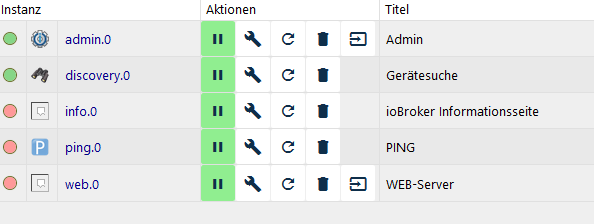
                      04b7c0d5-3dfd-496a-9437-7f1dab81c549-grafik.png

                      Ein Screenshot von meinen Instanzen

                      Thomas BraunT 1 Reply Last reply
                      0
                      • GlasfaserG Glasfaser

                        @Cedrik1 sagte in Time Out Instancen Installation:

                        Beim ersten Start vom Io Broker mussten die Instancen ping.0 und web.0 installiert werden. Diese wurde nicht erfolgreich durchgeführt

                        Zeige mal deine JS-Controller Version

                        iobroker version
                        
                        GlasfaserG Offline
                        GlasfaserG Offline
                        Glasfaser
                        wrote on last edited by
                        #21

                        @Glasfaser sagte in Time Out Instancen Installation:

                        @Cedrik1 sagte in Time Out Instancen Installation:

                        Beim ersten Start vom Io Broker mussten die Instancen ping.0 und web.0 installiert werden. Diese wurde nicht erfolgreich durchgeführt

                        Zeige mal deine JS-Controller Version

                        iobroker version
                        

                        ?????

                        Synology 918+ 16GB - ioBroker in Docker v9 , VISO auf Trekstor Primebook C13 13,3" , Hikvision Domkameras mit Surveillance Station .. CCU RaspberryMatic in Synology VM .. Zigbee CC2538+CC2592 .. Sonoff .. KNX .. Modbus ..

                        C 1 Reply Last reply
                        0
                        • C Cedrik1

                          04b7c0d5-3dfd-496a-9437-7f1dab81c549-grafik.png

                          Ein Screenshot von meinen Instanzen

                          Thomas BraunT Online
                          Thomas BraunT Online
                          Thomas Braun
                          Most Active
                          wrote on last edited by
                          #22

                          @Cedrik1
                          Versuch mal den info-Adapter nochmal in das System zu bügeln.

                          Linux-Werkzeugkasten:
                          https://forum.iobroker.net/topic/42952/der-kleine-iobroker-linux-werkzeugkasten
                          NodeJS Fixer Skript:
                          https://forum.iobroker.net/topic/68035/iob-node-fix-skript
                          iob_diag: curl -sLf -o diag.sh https://iobroker.net/diag.sh && bash diag.sh

                          C 1 Reply Last reply
                          0
                          • GlasfaserG Glasfaser

                            @Glasfaser sagte in Time Out Instancen Installation:

                            @Cedrik1 sagte in Time Out Instancen Installation:

                            Beim ersten Start vom Io Broker mussten die Instancen ping.0 und web.0 installiert werden. Diese wurde nicht erfolgreich durchgeführt

                            Zeige mal deine JS-Controller Version

                            iobroker version
                            

                            ?????

                            C Offline
                            C Offline
                            Cedrik1
                            wrote on last edited by
                            #23

                            @Glasfaser said in Time Out Instancen Installation:

                            iobroker version

                            1.5.11
                            
                            
                            GlasfaserG 1 Reply Last reply
                            0
                            • C Cedrik1

                              @Glasfaser said in Time Out Instancen Installation:

                              iobroker version

                              1.5.11
                              
                              
                              GlasfaserG Offline
                              GlasfaserG Offline
                              Glasfaser
                              wrote on last edited by Glasfaser
                              #24

                              @Cedrik1 sagte in Time Out Instancen Installation:

                              1.5.11

                              ist die wirklich 1.xx.xx ???
                              Dann hast du aber ein sehr altes System , damit läuft auch nicht der aktuelle Ping Adapter

                              Synology 918+ 16GB - ioBroker in Docker v9 , VISO auf Trekstor Primebook C13 13,3" , Hikvision Domkameras mit Surveillance Station .. CCU RaspberryMatic in Synology VM .. Zigbee CC2538+CC2592 .. Sonoff .. KNX .. Modbus ..

                              C 2 Replies Last reply
                              0
                              • GlasfaserG Glasfaser

                                @Cedrik1 sagte in Time Out Instancen Installation:

                                1.5.11

                                ist die wirklich 1.xx.xx ???
                                Dann hast du aber ein sehr altes System , damit läuft auch nicht der aktuelle Ping Adapter

                                C Offline
                                C Offline
                                Cedrik1
                                wrote on last edited by
                                #25

                                @Glasfaser Ja wie gesagt, ich habe mir ein aktuelles Image von der ioBroker Seite heruntergeladen

                                GlasfaserG 1 Reply Last reply
                                0
                                • Thomas BraunT Thomas Braun

                                  @Cedrik1
                                  Versuch mal den info-Adapter nochmal in das System zu bügeln.

                                  C Offline
                                  C Offline
                                  Cedrik1
                                  wrote on last edited by
                                  #26

                                  @Thomas-Braun Ich habe jetzt den Info Adapter und vorsichtshalber den discovery adapter gelöscht. Wie installiere ich die neu ins System?

                                  1 Reply Last reply
                                  0
                                  • GlasfaserG Glasfaser

                                    @Cedrik1 sagte in Time Out Instancen Installation:

                                    1.5.11

                                    ist die wirklich 1.xx.xx ???
                                    Dann hast du aber ein sehr altes System , damit läuft auch nicht der aktuelle Ping Adapter

                                    C Offline
                                    C Offline
                                    Cedrik1
                                    wrote on last edited by
                                    #27

                                    @Glasfaser Im ioBroker steht aber oben rechts was anderes
                                    ioBroker.admin 3.6.2

                                    1 Reply Last reply
                                    0
                                    • C Cedrik1

                                      @Glasfaser Ja wie gesagt, ich habe mir ein aktuelles Image von der ioBroker Seite heruntergeladen

                                      GlasfaserG Offline
                                      GlasfaserG Offline
                                      Glasfaser
                                      wrote on last edited by
                                      #28

                                      @Cedrik1 sagte in Time Out Instancen Installation:

                                      von der ioBroker Seite heruntergeladen

                                      .... kann ich mir nicht vorstellen , das du bei der Ausgabe von

                                      iobroker version
                                      

                                      1.x.x. als JS-Version hast

                                      wo hast du das Image her .

                                      Synology 918+ 16GB - ioBroker in Docker v9 , VISO auf Trekstor Primebook C13 13,3" , Hikvision Domkameras mit Surveillance Station .. CCU RaspberryMatic in Synology VM .. Zigbee CC2538+CC2592 .. Sonoff .. KNX .. Modbus ..

                                      C 1 Reply Last reply
                                      0
                                      • GlasfaserG Glasfaser

                                        @Cedrik1 sagte in Time Out Instancen Installation:

                                        von der ioBroker Seite heruntergeladen

                                        .... kann ich mir nicht vorstellen , das du bei der Ausgabe von

                                        iobroker version
                                        

                                        1.x.x. als JS-Version hast

                                        wo hast du das Image her .

                                        C Offline
                                        C Offline
                                        Cedrik1
                                        wrote on last edited by
                                        #29

                                        @Glasfaser Von der ioBroker Seite https://www.iobroker.net/#de/download
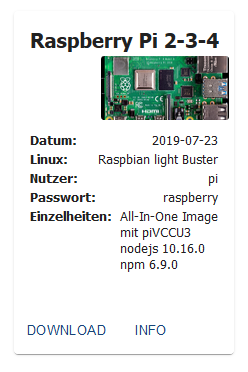
                                        49ee9129-0d56-4234-9b84-361810329538-grafik.png

                                        GlasfaserG 1 Reply Last reply
                                        0
                                        • C Cedrik1

                                          @Glasfaser Von der ioBroker Seite https://www.iobroker.net/#de/download

                                          49ee9129-0d56-4234-9b84-361810329538-grafik.png

                                          GlasfaserG Offline
                                          GlasfaserG Offline
                                          Glasfaser
                                          wrote on last edited by Glasfaser
                                          #30

                                          @Cedrik1

                                          Zeige mal als Ausgabe . in CodeTags </> .. nicht als Text von dir als Aussage

                                          iobroker version
                                          

                                          nach deimem Link ist die Version "mit dem js-controller v2.1.1 nach Stand vom 27.11.2019."

                                          Synology 918+ 16GB - ioBroker in Docker v9 , VISO auf Trekstor Primebook C13 13,3" , Hikvision Domkameras mit Surveillance Station .. CCU RaspberryMatic in Synology VM .. Zigbee CC2538+CC2592 .. Sonoff .. KNX .. Modbus ..

                                          C 1 Reply Last reply
                                          0
                                          Reply
                                          • Reply as topic
                                          Log in to reply
                                          • Oldest to Newest
                                          • Newest to Oldest
                                          • Most Votes


                                          Support us

                                          ioBroker
                                          Community Adapters
                                          Donate

                                          607

                                          Online

                                          32.5k

                                          Users

                                          81.6k

                                          Topics

                                          1.3m

                                          Posts
                                          Community
                                          Impressum | Datenschutz-Bestimmungen | Nutzungsbedingungen | Einwilligungseinstellungen
                                          ioBroker Community 2014-2025
                                          logo
                                          • Login

                                          • Don't have an account? Register

                                          • Login or register to search.
                                          • First post
                                            Last post
                                          0
                                          • Home
                                          • Recent
                                          • Tags
                                          • Unread 0
                                          • Categories
                                          • Unreplied
                                          • Popular
                                          • GitHub
                                          • Docu
                                          • Hilfe