Skip to content
  • Home
  • Recent
  • Tags
  • 0 Unread 0
  • Categories
  • Unreplied
  • Popular
  • GitHub
  • Docu
  • Hilfe
Skins
  • Light
  • Brite
  • Cerulean
  • Cosmo
  • Flatly
  • Journal
  • Litera
  • Lumen
  • Lux
  • Materia
  • Minty
  • Morph
  • Pulse
  • Sandstone
  • Simplex
  • Sketchy
  • Spacelab
  • United
  • Yeti
  • Zephyr
  • Dark
  • Cyborg
  • Darkly
  • Quartz
  • Slate
  • Solar
  • Superhero
  • Vapor

  • Default (No Skin)
  • No Skin
Collapse
ioBroker Logo

Community Forum

donate donate
  1. ioBroker Community Home
  2. Deutsch
  3. Hardware
  4. Ferraris Zähler mit TCRT5000 und esp8266

NEWS

  • Jahresrückblick 2025 – unser neuer Blogbeitrag ist online! ✨
    BluefoxB
    Bluefox
    17
    1
    3.0k

  • Neuer Blogbeitrag: Monatsrückblick - Dezember 2025 🎄
    BluefoxB
    Bluefox
    13
    1
    1.1k

  • Weihnachtsangebot 2025! 🎄
    BluefoxB
    Bluefox
    25
    1
    2.4k

Ferraris Zähler mit TCRT5000 und esp8266

Scheduled Pinned Locked Moved Hardware
esp8266ferrarismqtttcrt5000smlsmartmeter
485 Posts 49 Posters 138.9k Views 46 Watching
  • Oldest to Newest
  • Newest to Oldest
  • Most Votes
Reply
  • Reply as topic
Log in to reply
This topic has been deleted. Only users with topic management privileges can see it.
  • w00dst0ckW Offline
    w00dst0ckW Offline
    w00dst0ck
    wrote on last edited by
    #338

    Ich hatte immer wieder Abweichungen vom Zählerstand und fand eine simple Ursache.

    Der Sensor war nicht 100%ig positioniert und scheint nicht jeden Impuls mitbekommen zu haben.

    Nachdem ich ihn noch mal entfernt und mit Wasserwaage neu positioniert hatte, sind keine weiteren Messfehler aufgetreten.

    Vielleicht hilft die Erkenntnis ja weiter, wenn die bisherige Versuche nicht geholfen haben.

    1 Reply Last reply
    0
    • EisbaeeerE Eisbaeeer

      @so das framework installiert sich ja von alleine nach, da es in der platform.io referenziert ist. So wie du sagst als library. Lediglich der Webserver zum compilieren der react Webseiten muss im Verzeichnis des framework mit "npm ci" nachinstalliert werden. Ich vermute die fehlen noch ein paar libs.

      S Offline
      S Offline
      so
      wrote on last edited by
      #339

      @eisbaeeer Muss hier irgendwas bestimmtes gemacht werden?

      Entering npm script environment at location:
      /home/so/workspace/Ferraris_MQTT_Energy_Counter_Meter_TCRT5000/source/Ferraris_MQTT_Energy_Counter_Meter_TCRT5000/.pio/libdeps/nodemcuv2/ESP8266 IoT Framework/scripts
      Type 'exit' or ^D when finished


      Bekomme es nicht ans laufen. Wäre über hilfe dankbar.

      EisbaeeerE 1 Reply Last reply
      0
      • S so

        @eisbaeeer Muss hier irgendwas bestimmtes gemacht werden?

        Entering npm script environment at location:
        /home/so/workspace/Ferraris_MQTT_Energy_Counter_Meter_TCRT5000/source/Ferraris_MQTT_Energy_Counter_Meter_TCRT5000/.pio/libdeps/nodemcuv2/ESP8266 IoT Framework/scripts
        Type 'exit' or ^D when finished


        Bekomme es nicht ans laufen. Wäre über hilfe dankbar.

        EisbaeeerE Offline
        EisbaeeerE Offline
        Eisbaeeer
        Developer
        wrote on last edited by
        #340

        @so geh mal ein Verzeichnis zurück und führe dort das"npm ci" aus. Also hier: home/so/workspace/Ferraris_MQTT_Energy_Counter_Meter_TCRT5000/source/Ferraris_MQTT_Energy_Counter_Meter_TCRT5000/.pio/libdeps/nodemcuv2/

        Kein support per PM. Bitte im Forum Fragen stellen!

        S 1 Reply Last reply
        0
        • EisbaeeerE Eisbaeeer

          @so geh mal ein Verzeichnis zurück und führe dort das"npm ci" aus. Also hier: home/so/workspace/Ferraris_MQTT_Energy_Counter_Meter_TCRT5000/source/Ferraris_MQTT_Energy_Counter_Meter_TCRT5000/.pio/libdeps/nodemcuv2/

          S Offline
          S Offline
          so
          wrote on last edited by
          #341

          @eisbaeeer Hat leider nicht zu einem besseren Verhalten geführt.

          EisbaeeerE 1 Reply Last reply
          0
          • S so

            @eisbaeeer Hat leider nicht zu einem besseren Verhalten geführt.

            EisbaeeerE Offline
            EisbaeeerE Offline
            Eisbaeeer
            Developer
            wrote on last edited by
            #342

            @so ich installier morgen mal vscode auf meiner Ubuntu VM und teste das mal.

            Kein support per PM. Bitte im Forum Fragen stellen!

            S 2 Replies Last reply
            0
            • EisbaeeerE Eisbaeeer

              @so ich installier morgen mal vscode auf meiner Ubuntu VM und teste das mal.

              S Offline
              S Offline
              so
              wrote on last edited by
              #343

              @eisbaeeer Ich nutze vscodium, falls du es genau nachvollziehen willst.

              1 Reply Last reply
              0
              • EisbaeeerE Eisbaeeer

                @so ich installier morgen mal vscode auf meiner Ubuntu VM und teste das mal.

                S Offline
                S Offline
                so
                wrote on last edited by
                #344

                @eisbaeeer Hier noch mein log vom buid, vielleicht siehst du nochwas. Ich bin mir unsicher, ob da alles okay verlaufen ist. Ist allerdings ohne vorheriges 'clean'.

                so@soso  ~/workspace/Ferraris_MQTT_Energy_Counter_Meter_TCRT5000/source/Ferraris_MQTT_Energy_Counter_Meter_TCRT5000   master ● ? ⍟1  pio run
                Processing nodemcuv2 (platform: espressif8266@3.0.0; board: nodemcuv2; framework: arduino)
                --------------------------------------------------------------------------------------------------------------------------------------------------------------------
                Verbose mode can be enabled via `-v, --verbose` option
                CONFIGURATION: https://docs.platformio.org/page/boards/espressif8266/nodemcuv2.html
                PLATFORM: Espressif 8266 (3.0.0) > NodeMCU 1.0 (ESP-12E Module)
                HARDWARE: ESP8266 160MHz, 80KB RAM, 4MB Flash
                PACKAGES: 
                 - framework-arduinoespressif8266 3.30000.210519 (3.0.0) 
                 - tool-esptool 1.413.0 (4.13) 
                 - tool-esptoolpy 1.30000.201119 (3.0.0) 
                 - toolchain-xtensa 2.100200.0 (10.2.0)
                LDF: Library Dependency Finder -> https://bit.ly/configure-pio-ldf
                LDF Modes: Finder ~ chain, Compatibility ~ soft
                Running npm ci...
                npm <command>
                
                Usage:
                
                npm install        install all the dependencies in your project
                npm install <foo>  add the <foo> dependency to your project
                npm test           run this project's tests
                npm run <foo>      run the script named <foo>
                npm <command> -h   quick help on <command>
                npm -l             display usage info for all commands
                npm help <term>    search for help on <term>
                npm help npm       more involved overview
                
                All commands:
                
                    access, adduser, audit, bin, bugs, cache, ci, completion,
                    config, dedupe, deprecate, diff, dist-tag, docs, doctor,
                    edit, exec, explain, explore, find-dupes, fund, get, help,
                    hook, init, install, install-ci-test, install-test, link,
                    ll, login, logout, ls, org, outdated, owner, pack, ping,
                    pkg, prefix, profile, prune, publish, rebuild, repo,
                    restart, root, run-script, search, set, set-script,
                    shrinkwrap, star, stars, start, stop, team, test, token,
                    uninstall, unpublish, unstar, update, version, view, whoami
                
                Specify configs in the ini-formatted file:
                    /home/so/.npmrc
                or on the command line via: npm <command> --key=value
                
                More configuration info: npm help config
                Configuration fields: npm help 7 config
                
                npm@8.1.4 /usr/local/lib/node_modules/npm
                Running npx browserslist@latest --update-db...
                
                Entering npm script environment at location:
                /home/so/workspace/Ferraris_MQTT_Energy_Counter_Meter_TCRT5000/source/Ferraris_MQTT_Energy_Counter_Meter_TCRT5000/.pio/libdeps/nodemcuv2/ESP8266 IoT Framework/scripts
                Type 'exit' or ^D when finished
                
                 Running npm run build...
                npm <command>
                
                Usage:
                
                npm install        install all the dependencies in your project
                npm install <foo>  add the <foo> dependency to your project
                npm test           run this project's tests
                npm run <foo>      run the script named <foo>
                npm <command> -h   quick help on <command>
                npm -l             display usage info for all commands
                npm help <term>    search for help on <term>
                npm help npm       more involved overview
                
                All commands:
                
                    access, adduser, audit, bin, bugs, cache, ci, completion,
                    config, dedupe, deprecate, diff, dist-tag, docs, doctor,
                    edit, exec, explain, explore, find-dupes, fund, get, help,
                    hook, init, install, install-ci-test, install-test, link,
                    ll, login, logout, ls, org, outdated, owner, pack, ping,
                    pkg, prefix, profile, prune, publish, rebuild, repo,
                    restart, root, run-script, search, set, set-script,
                    shrinkwrap, star, stars, start, stop, team, test, token,
                    uninstall, unpublish, unstar, update, version, view, whoami
                
                Specify configs in the ini-formatted file:
                    /home/so/.npmrc
                or on the command line via: npm <command> --key=value
                
                More configuration info: npm help config
                Configuration fields: npm help 7 config
                
                npm@8.1.4 /usr/local/lib/node_modules/npm
                Found 41 compatible libraries
                Scanning dependencies...
                Dependency Graph
                |-- <ArduinoJson> 6.18.5
                |-- <ESP8266 IoT Framework> 1.9.0
                |   |-- <ArduinoJson> 6.18.5
                |   |-- <ESP8266WiFi> 1.0
                |   |-- <ESP8266HTTPClient> 1.2
                |   |   |-- <ESP8266WiFi> 1.0
                |   |-- <DNSServer> 1.1.0
                |   |   |-- <ESP8266WiFi> 1.0
                |   |-- <EEPROM> 1.0
                |   |-- <LittleFS(esp8266)> 0.1.0
                |   |-- <ESP Async WebServer> 1.2.3
                |   |   |-- <ESPAsyncTCP> 1.2.2
                |   |   |-- <Hash> 1.0
                |   |   |-- <ESP8266WiFi> 1.0
                |   |   |-- <ArduinoJson> 6.18.5
                |-- <ESP Async WebServer> 1.2.3
                |   |-- <ESPAsyncTCP> 1.2.2
                |   |-- <Hash> 1.0
                |   |-- <ESP8266WiFi> 1.0
                |   |-- <ArduinoJson> 6.18.5
                |-- <PubSubClient> 2.8.0
                |-- <LittleFS(esp8266)> 0.1.0
                Building in debug mode
                
                warning: Calling missing SConscript without error is deprecated.
                Transition by adding must_exist=False to SConscript calls.
                Missing SConscript 'scripts/preBuild.py'
                File "/home/so/.platformio/penv/lib/python3.8/site-packages/platformio/builder/main.py", line 188, in <module>
                Retrieving maximum program size .pio/build/nodemcuv2/firmware.elf
                Checking size .pio/build/nodemcuv2/firmware.elf
                Advanced Memory Usage is available via "PlatformIO Home > Project Inspect"
                RAM:   [======    ]  55.3% (used 45320 bytes from 81920 bytes)
                Flash: [========= ]  89.3% (used 932264 bytes from 1044464 bytes)
                =================================================================== [SUCCESS] Took 6.66 seconds ===================================================================
                
                EisbaeeerE 1 Reply Last reply
                0
                • S so

                  @eisbaeeer Hier noch mein log vom buid, vielleicht siehst du nochwas. Ich bin mir unsicher, ob da alles okay verlaufen ist. Ist allerdings ohne vorheriges 'clean'.

                  so@soso  ~/workspace/Ferraris_MQTT_Energy_Counter_Meter_TCRT5000/source/Ferraris_MQTT_Energy_Counter_Meter_TCRT5000   master ● ? ⍟1  pio run
                  Processing nodemcuv2 (platform: espressif8266@3.0.0; board: nodemcuv2; framework: arduino)
                  --------------------------------------------------------------------------------------------------------------------------------------------------------------------
                  Verbose mode can be enabled via `-v, --verbose` option
                  CONFIGURATION: https://docs.platformio.org/page/boards/espressif8266/nodemcuv2.html
                  PLATFORM: Espressif 8266 (3.0.0) > NodeMCU 1.0 (ESP-12E Module)
                  HARDWARE: ESP8266 160MHz, 80KB RAM, 4MB Flash
                  PACKAGES: 
                   - framework-arduinoespressif8266 3.30000.210519 (3.0.0) 
                   - tool-esptool 1.413.0 (4.13) 
                   - tool-esptoolpy 1.30000.201119 (3.0.0) 
                   - toolchain-xtensa 2.100200.0 (10.2.0)
                  LDF: Library Dependency Finder -> https://bit.ly/configure-pio-ldf
                  LDF Modes: Finder ~ chain, Compatibility ~ soft
                  Running npm ci...
                  npm <command>
                  
                  Usage:
                  
                  npm install        install all the dependencies in your project
                  npm install <foo>  add the <foo> dependency to your project
                  npm test           run this project's tests
                  npm run <foo>      run the script named <foo>
                  npm <command> -h   quick help on <command>
                  npm -l             display usage info for all commands
                  npm help <term>    search for help on <term>
                  npm help npm       more involved overview
                  
                  All commands:
                  
                      access, adduser, audit, bin, bugs, cache, ci, completion,
                      config, dedupe, deprecate, diff, dist-tag, docs, doctor,
                      edit, exec, explain, explore, find-dupes, fund, get, help,
                      hook, init, install, install-ci-test, install-test, link,
                      ll, login, logout, ls, org, outdated, owner, pack, ping,
                      pkg, prefix, profile, prune, publish, rebuild, repo,
                      restart, root, run-script, search, set, set-script,
                      shrinkwrap, star, stars, start, stop, team, test, token,
                      uninstall, unpublish, unstar, update, version, view, whoami
                  
                  Specify configs in the ini-formatted file:
                      /home/so/.npmrc
                  or on the command line via: npm <command> --key=value
                  
                  More configuration info: npm help config
                  Configuration fields: npm help 7 config
                  
                  npm@8.1.4 /usr/local/lib/node_modules/npm
                  Running npx browserslist@latest --update-db...
                  
                  Entering npm script environment at location:
                  /home/so/workspace/Ferraris_MQTT_Energy_Counter_Meter_TCRT5000/source/Ferraris_MQTT_Energy_Counter_Meter_TCRT5000/.pio/libdeps/nodemcuv2/ESP8266 IoT Framework/scripts
                  Type 'exit' or ^D when finished
                  
                   Running npm run build...
                  npm <command>
                  
                  Usage:
                  
                  npm install        install all the dependencies in your project
                  npm install <foo>  add the <foo> dependency to your project
                  npm test           run this project's tests
                  npm run <foo>      run the script named <foo>
                  npm <command> -h   quick help on <command>
                  npm -l             display usage info for all commands
                  npm help <term>    search for help on <term>
                  npm help npm       more involved overview
                  
                  All commands:
                  
                      access, adduser, audit, bin, bugs, cache, ci, completion,
                      config, dedupe, deprecate, diff, dist-tag, docs, doctor,
                      edit, exec, explain, explore, find-dupes, fund, get, help,
                      hook, init, install, install-ci-test, install-test, link,
                      ll, login, logout, ls, org, outdated, owner, pack, ping,
                      pkg, prefix, profile, prune, publish, rebuild, repo,
                      restart, root, run-script, search, set, set-script,
                      shrinkwrap, star, stars, start, stop, team, test, token,
                      uninstall, unpublish, unstar, update, version, view, whoami
                  
                  Specify configs in the ini-formatted file:
                      /home/so/.npmrc
                  or on the command line via: npm <command> --key=value
                  
                  More configuration info: npm help config
                  Configuration fields: npm help 7 config
                  
                  npm@8.1.4 /usr/local/lib/node_modules/npm
                  Found 41 compatible libraries
                  Scanning dependencies...
                  Dependency Graph
                  |-- <ArduinoJson> 6.18.5
                  |-- <ESP8266 IoT Framework> 1.9.0
                  |   |-- <ArduinoJson> 6.18.5
                  |   |-- <ESP8266WiFi> 1.0
                  |   |-- <ESP8266HTTPClient> 1.2
                  |   |   |-- <ESP8266WiFi> 1.0
                  |   |-- <DNSServer> 1.1.0
                  |   |   |-- <ESP8266WiFi> 1.0
                  |   |-- <EEPROM> 1.0
                  |   |-- <LittleFS(esp8266)> 0.1.0
                  |   |-- <ESP Async WebServer> 1.2.3
                  |   |   |-- <ESPAsyncTCP> 1.2.2
                  |   |   |-- <Hash> 1.0
                  |   |   |-- <ESP8266WiFi> 1.0
                  |   |   |-- <ArduinoJson> 6.18.5
                  |-- <ESP Async WebServer> 1.2.3
                  |   |-- <ESPAsyncTCP> 1.2.2
                  |   |-- <Hash> 1.0
                  |   |-- <ESP8266WiFi> 1.0
                  |   |-- <ArduinoJson> 6.18.5
                  |-- <PubSubClient> 2.8.0
                  |-- <LittleFS(esp8266)> 0.1.0
                  Building in debug mode
                  
                  warning: Calling missing SConscript without error is deprecated.
                  Transition by adding must_exist=False to SConscript calls.
                  Missing SConscript 'scripts/preBuild.py'
                  File "/home/so/.platformio/penv/lib/python3.8/site-packages/platformio/builder/main.py", line 188, in <module>
                  Retrieving maximum program size .pio/build/nodemcuv2/firmware.elf
                  Checking size .pio/build/nodemcuv2/firmware.elf
                  Advanced Memory Usage is available via "PlatformIO Home > Project Inspect"
                  RAM:   [======    ]  55.3% (used 45320 bytes from 81920 bytes)
                  Flash: [========= ]  89.3% (used 932264 bytes from 1044464 bytes)
                  =================================================================== [SUCCESS] Took 6.66 seconds ===================================================================
                  
                  EisbaeeerE Offline
                  EisbaeeerE Offline
                  Eisbaeeer
                  Developer
                  wrote on last edited by Eisbaeeer
                  #345

                  @so Dein Log sieht doch erstmal gut aus. Ich sehe keinen Fehler. Was funktioniert nicht?

                  Kein support per PM. Bitte im Forum Fragen stellen!

                  S 1 Reply Last reply
                  0
                  • EisbaeeerE Eisbaeeer

                    @so Dein Log sieht doch erstmal gut aus. Ich sehe keinen Fehler. Was funktioniert nicht?

                    S Offline
                    S Offline
                    so
                    wrote on last edited by
                    #346

                    @eisbaeeer
                    34bd1a15-3fc9-4daf-a2de-1ae59de6ca1b-image.png

                    EisbaeeerE 2 Replies Last reply
                    0
                    • S so

                      @eisbaeeer
                      34bd1a15-3fc9-4daf-a2de-1ae59de6ca1b-image.png

                      EisbaeeerE Offline
                      EisbaeeerE Offline
                      Eisbaeeer
                      Developer
                      wrote on last edited by
                      #347

                      @so ok, da fehlt tatsächlich der Webserver. Da hat das npm ci nicht funktioniert. Ich teste das morgen mal bei mir. Hab bisher nur auf Windows compiliert.

                      Kein support per PM. Bitte im Forum Fragen stellen!

                      1 Reply Last reply
                      0
                      • S so

                        @eisbaeeer
                        34bd1a15-3fc9-4daf-a2de-1ae59de6ca1b-image.png

                        EisbaeeerE Offline
                        EisbaeeerE Offline
                        Eisbaeeer
                        Developer
                        wrote on last edited by
                        #348

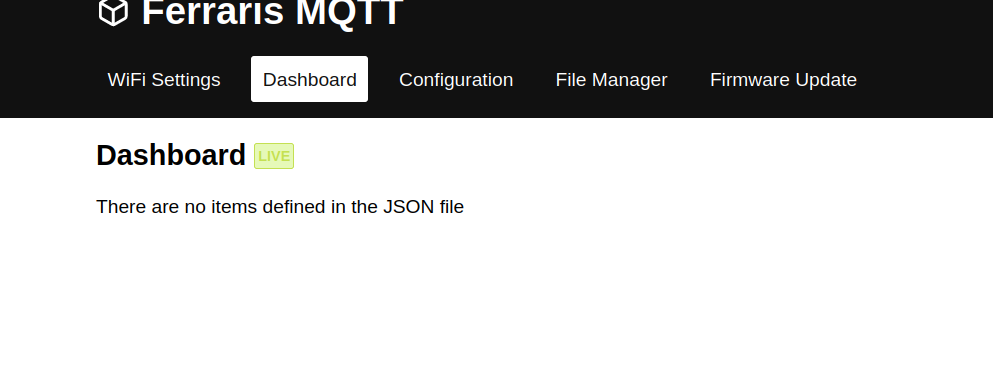
                        @so Also ich habe das gleiche Phänomen. Scheinbar compiliert er die Webseite mit den Configuration und dashboard items nicht. Das "sudo npm ci" läuft bei mir durch. Kannst du diesbezüglich ein issue aufmachen? https://github.com/maakbaas/esp8266-iot-framework/issues
                        Gruß Lars

                        Kein support per PM. Bitte im Forum Fragen stellen!

                        S 1 Reply Last reply
                        0
                        • EisbaeeerE Eisbaeeer

                          @so Also ich habe das gleiche Phänomen. Scheinbar compiliert er die Webseite mit den Configuration und dashboard items nicht. Das "sudo npm ci" läuft bei mir durch. Kannst du diesbezüglich ein issue aufmachen? https://github.com/maakbaas/esp8266-iot-framework/issues
                          Gruß Lars

                          S Offline
                          S Offline
                          so
                          wrote on last edited by
                          #349

                          @eisbaeeer
                          Okay, hab ein Issue aufgesetzt.

                          1 Reply Last reply
                          0
                          • C Offline
                            C Offline
                            chr2002
                            wrote on last edited by
                            #350

                            Hallo zusammen,

                            ich habe jetzt echt mal eine Frage : Wie zum Geier funktioniert dieses Ding ? :-)
                            Ich habe zuerst versucht, das ganze mit der Lichtschranke in Gang zu bekommen. Leider funktioniert das bei meinem Zähler überhaupt nicht und ich werde wohl ohnehin einen Digitalen bekommen.

                            Jetzt habe ich noch einen weiteren Zähler, der hat einen Potenzialfreien S0 Kontakt per Optokoppler. Nun hätte ich versucht, statt des Digital Pins der Lichtschranke das Signal des S0 Kontaktes zu verwenden. Ich Schickte 3,3V zum S0 Eingang vom ESP und gehe vom S0 Ausgang auf den D1 Pin. Aber die Impulse werden nicht erkannt. Auch bringt ein Pulldown nix. Der Pulse Graph macht was er will.
                            Von der Lichtschranke kommt doch auch nur ein 3,3V Signal oder ein 0V per Pulldown (auf der Lichtschranke)

                            Oder liege ich da falsch.

                            Lg Chris

                            EisbaeeerE 1 Reply Last reply
                            0
                            • C chr2002

                              Hallo zusammen,

                              ich habe jetzt echt mal eine Frage : Wie zum Geier funktioniert dieses Ding ? :-)
                              Ich habe zuerst versucht, das ganze mit der Lichtschranke in Gang zu bekommen. Leider funktioniert das bei meinem Zähler überhaupt nicht und ich werde wohl ohnehin einen Digitalen bekommen.

                              Jetzt habe ich noch einen weiteren Zähler, der hat einen Potenzialfreien S0 Kontakt per Optokoppler. Nun hätte ich versucht, statt des Digital Pins der Lichtschranke das Signal des S0 Kontaktes zu verwenden. Ich Schickte 3,3V zum S0 Eingang vom ESP und gehe vom S0 Ausgang auf den D1 Pin. Aber die Impulse werden nicht erkannt. Auch bringt ein Pulldown nix. Der Pulse Graph macht was er will.
                              Von der Lichtschranke kommt doch auch nur ein 3,3V Signal oder ein 0V per Pulldown (auf der Lichtschranke)

                              Oder liege ich da falsch.

                              Lg Chris

                              EisbaeeerE Offline
                              EisbaeeerE Offline
                              Eisbaeeer
                              Developer
                              wrote on last edited by
                              #351

                              @chr2002 Hallo Chris. Die Eingänge werden auf Ground gezogen. Versuche mal die Eingänge auf GND zu Brücken, dann solltest du einen Impuls bekommen. Den S0 kannst du mit der Schaltung auch verwenden.
                              Gruß Lars

                              Kein support per PM. Bitte im Forum Fragen stellen!

                              C 1 Reply Last reply
                              0
                              • EisbaeeerE Eisbaeeer

                                @chr2002 Hallo Chris. Die Eingänge werden auf Ground gezogen. Versuche mal die Eingänge auf GND zu Brücken, dann solltest du einen Impuls bekommen. Den S0 kannst du mit der Schaltung auch verwenden.
                                Gruß Lars

                                C Offline
                                C Offline
                                chr2002
                                wrote on last edited by
                                #352

                                @eisbaeeer Das habe ich auch probiert. Also erst per Pullup gegen 3,3V und GND auf D1.
                                Dann auch mal ohne PullUP. Der Impuls geht mal auf Low, mal nicht. Und manchmal bleibt er auch auf Low, obwohl die Brücke zu gnd raus ist und der 10k Ohm Pullup gegen 3,3V drin ist.

                                1 Reply Last reply
                                0
                                • C Offline
                                  C Offline
                                  chr2002
                                  wrote on last edited by
                                  #353

                                  Oder ist da irgendein check drin, der eine Wartezeit zwischen den Impulsen vorraussetzt. Ich wenn ich eine ganze weile Warte, gibts einen Flankenwechsel. Wenn ich zu kurz hintereinander die Brücke gegen GND mache, passiert nichts. Danach geht aber iwie erstmal gar nichts mehr, auch wenn ich viel später wieder die Brücke setze.

                                  1 Reply Last reply
                                  0
                                  • C Offline
                                    C Offline
                                    chr2002
                                    wrote on last edited by
                                    #354

                                    Ich bekomme den Graphen nichtmal zuverlässig auf LOW oder High, wenn ich eine Brücke setze. Da wird irgendwas wohl noch mit einbezogen. Hiermit geht also kein S0.

                                    EisbaeeerE 1 Reply Last reply
                                    0
                                    • C chr2002

                                      Ich bekomme den Graphen nichtmal zuverlässig auf LOW oder High, wenn ich eine Brücke setze. Da wird irgendwas wohl noch mit einbezogen. Hiermit geht also kein S0.

                                      EisbaeeerE Offline
                                      EisbaeeerE Offline
                                      Eisbaeeer
                                      Developer
                                      wrote on last edited by Eisbaeeer
                                      #355

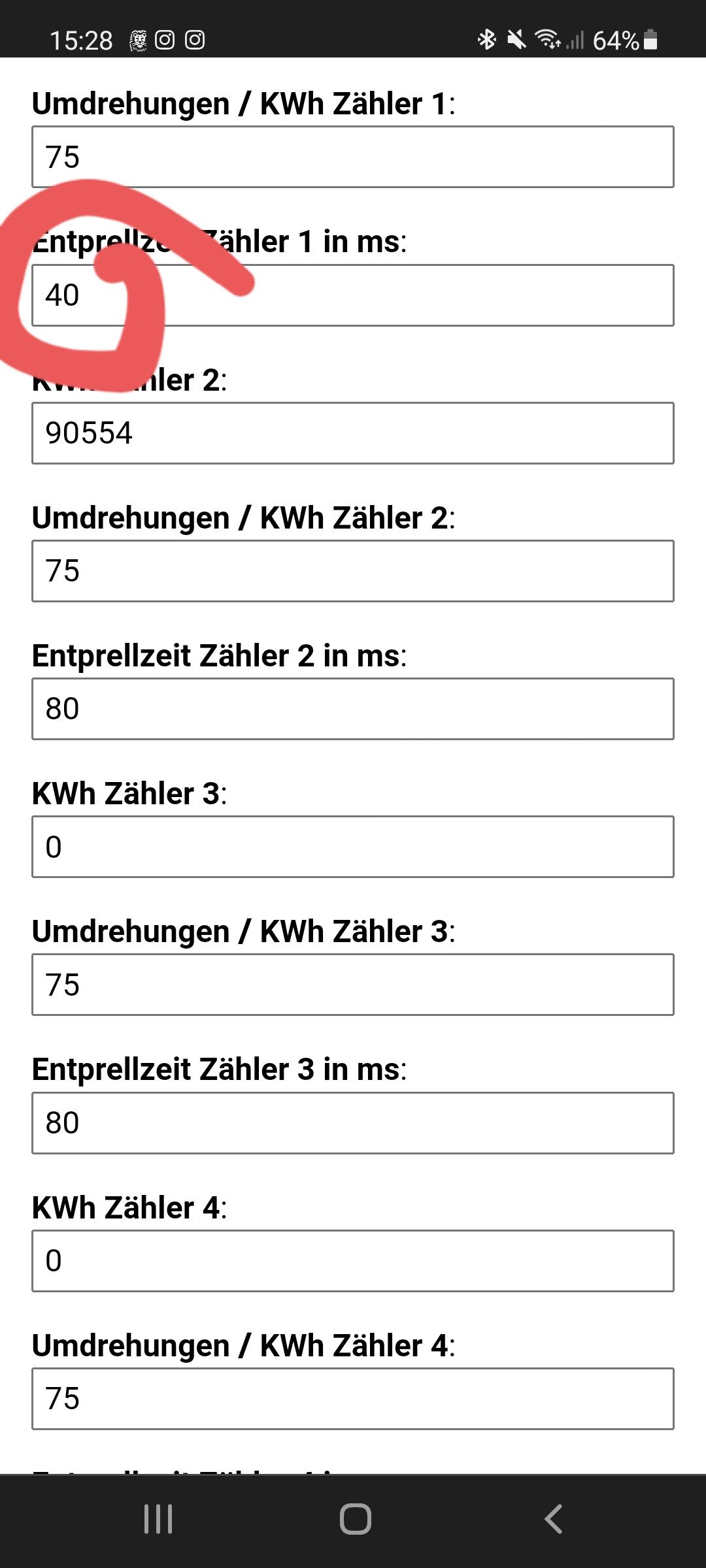
                                      @chr2002 Ähm ja, die Entprellzeit. Stell die mal niedriger, dann sollte das klappen.
                                      Screenshot_20211204-152845_Chrome.jpg

                                      Kein support per PM. Bitte im Forum Fragen stellen!

                                      C 1 Reply Last reply
                                      0
                                      • EisbaeeerE Eisbaeeer

                                        @chr2002 Ähm ja, die Entprellzeit. Stell die mal niedriger, dann sollte das klappen.
                                        Screenshot_20211204-152845_Chrome.jpg

                                        C Offline
                                        C Offline
                                        chr2002
                                        wrote on last edited by
                                        #356

                                        @eisbaeeer Auch schon probiert :-D Leider ohne Erfolg. Der Graph macht immernoch was er will.

                                        1 Reply Last reply
                                        0
                                        • C Offline
                                          C Offline
                                          chr2002
                                          wrote on last edited by chr2002
                                          #357

                                          Ich gebs auf. Hier ist was faul. ESPeasy zählt aber vernünftig. Keine Ahnung, am ESP liegt es nicht. Mit der Lichtschranke kommen auch keine anständigen Impulse zustande. Sehr seltsam. Vllt ist die 0.92 verbuggt ? Kann das sein ?

                                          Ich lasse das sein. Und werde eine anständige Wandlermessung hinter den Zähler packen :-D Von dort per Modbus weiter.


                                          D 1 Reply Last reply
                                          0
                                          Reply
                                          • Reply as topic
                                          Log in to reply
                                          • Oldest to Newest
                                          • Newest to Oldest
                                          • Most Votes


                                          Support us

                                          ioBroker
                                          Community Adapters
                                          Donate

                                          753

                                          Online

                                          32.6k

                                          Users

                                          82.3k

                                          Topics

                                          1.3m

                                          Posts
                                          Community
                                          Impressum | Datenschutz-Bestimmungen | Nutzungsbedingungen | Einwilligungseinstellungen
                                          ioBroker Community 2014-2025
                                          logo
                                          • Login

                                          • Don't have an account? Register

                                          • Login or register to search.
                                          • First post
                                            Last post
                                          0
                                          • Home
                                          • Recent
                                          • Tags
                                          • Unread 0
                                          • Categories
                                          • Unreplied
                                          • Popular
                                          • GitHub
                                          • Docu
                                          • Hilfe