Skip to content
  • Home
  • Recent
  • Tags
  • 0 Unread 0
  • Categories
  • Unreplied
  • Popular
  • GitHub
  • Docu
  • Hilfe
Skins
  • Light
  • Brite
  • Cerulean
  • Cosmo
  • Flatly
  • Journal
  • Litera
  • Lumen
  • Lux
  • Materia
  • Minty
  • Morph
  • Pulse
  • Sandstone
  • Simplex
  • Sketchy
  • Spacelab
  • United
  • Yeti
  • Zephyr
  • Dark
  • Cyborg
  • Darkly
  • Quartz
  • Slate
  • Solar
  • Superhero
  • Vapor

  • Default (No Skin)
  • No Skin
Collapse
ioBroker Logo

Community Forum

donate donate
  1. ioBroker Community Home
  2. Deutsch
  3. Tester
  4. Test Adapter lovelace v1.2.x
NEWS

  • Monatsrückblick Januar/Februar 2026 ist online!
    BluefoxB
    Bluefox
    16
    1
    258

  • Jahresrückblick 2025 – unser neuer Blogbeitrag ist online! ✨
    BluefoxB
    Bluefox
    17
    1
    4.6k

  • Neuer Blogbeitrag: Monatsrückblick - Dezember 2025 🎄
    BluefoxB
    Bluefox
    13
    1
    1.3k

Test Adapter lovelace v1.2.x
Scheduled Pinned Locked Moved Tester
lovelacevisualization
1.5k Posts 78 Posters 656.9k Views 72 Watching
  • Oldest to Newest
  • Newest to Oldest
  • Most Votes
Reply
  • Reply as topic
Log in to reply
This topic has been deleted. Only users with topic management privileges can see it.
  • nukleuzN nukleuz

    @m1r0o

    Hast du den Adapter neu gestartet?
    Oder ggf. gibt es dort die .js Datei direkt zum Download - nicht im .zip !?

    M Offline
    M Offline
    M1R0O
    wrote on last edited by
    #1062

    @nukleuz
    Neu gestartet habe ich. Die notwendige Datei ist nicht ohne download des zip.Containers möglich.
    Danke

    David G.D 1 Reply Last reply
    0
    • M M1R0O

      @nukleuz
      Neu gestartet habe ich. Die notwendige Datei ist nicht ohne download des zip.Containers möglich.
      Danke

      David G.D Online
      David G.D Online
      David G.
      wrote on last edited by David G.
      #1063

      @m1r0o

      Hast die js aber aus dem zip rauskommen und hochgeladen?

      Braucht die Karte mehrere Dateien?

      Copy the contents of custom_components/browser_mod/ to <your config dir>/custom_components/browser_mod/.

      Zeigt eure Lovelace-Visualisierung klick
      (Auch ideal um sich Anregungen zu holen)

      Meine Tabellen für eure Visualisierung klick

      M 1 Reply Last reply
      0
      • David G.D David G.

        @m1r0o

        Hast die js aber aus dem zip rauskommen und hochgeladen?

        Braucht die Karte mehrere Dateien?

        Copy the contents of custom_components/browser_mod/ to <your config dir>/custom_components/browser_mod/.

        M Offline
        M Offline
        M1R0O
        wrote on last edited by
        #1064

        @david-g sagte in Test Adapter lovelace v1.2.x:

        @m1r0o

        Hast die js aber aus dem zip rauskommen und hochgeladen?

        Braucht die Karte mehrere Dateien?

        Copy the contents of custom_components/browser_mod/ to <your config dir>/custom_components/browser_mod/.

        ZIP entpackt und browser_mod eingefügt.
        Ob weitere Datien benötigt werden: Kann sein. Aber welche und vor allem wohin?

        nukleuzN 1 Reply Last reply
        0
        • S Offline
          S Offline
          schienw
          wrote on last edited by
          #1065

          Hallo,
          nutz jemand die Home_mod Funktion mit Device?

          Ich versuche schon lange per script auf einem Anzeigegerät die Views zu wechseln.
          Bis jetzt kann ich nur die lovelace.0.control.instance pro Gerät feststellen, leider reagiert die Anzeige auf keine lovelace.0.control.command wie changeView.

          Leider wird mir bei den Objecten auch keine aktuell Ausgewählten views oder Instancen angezeigt.

          Danke
          VG

          1 Reply Last reply
          0
          • M M1R0O

            @david-g sagte in Test Adapter lovelace v1.2.x:

            @m1r0o

            Hast die js aber aus dem zip rauskommen und hochgeladen?

            Braucht die Karte mehrere Dateien?

            Copy the contents of custom_components/browser_mod/ to <your config dir>/custom_components/browser_mod/.

            ZIP entpackt und browser_mod eingefügt.
            Ob weitere Datien benötigt werden: Kann sein. Aber welche und vor allem wohin?

            nukleuzN Offline
            nukleuzN Offline
            nukleuz
            wrote on last edited by
            #1066

            @m1r0o

            Ich glaube …tools oder ähnlich sind da noch drin

            Intel NUC -> ProxMox -> Debian -> ioBroker (Master)| RPI3B+ -> rtl_433 (Slave) | CCU2

            M 1 Reply Last reply
            0
            • nukleuzN nukleuz

              @m1r0o

              Ich glaube …tools oder ähnlich sind da noch drin

              M Offline
              M Offline
              M1R0O
              wrote on last edited by
              #1067

              @nukleuz
              Das ist so, aber ich habe keine Ahnung, wo die hin müssen🤷‍♂️

              nukleuzN 1 Reply Last reply
              0
              • M M1R0O

                @nukleuz
                Das ist so, aber ich habe keine Ahnung, wo die hin müssen🤷‍♂️

                nukleuzN Offline
                nukleuzN Offline
                nukleuz
                wrote on last edited by
                #1068

                @m1r0o

                Auch zu den Cards hochladen 😎

                Intel NUC -> ProxMox -> Debian -> ioBroker (Master)| RPI3B+ -> rtl_433 (Slave) | CCU2

                M 1 Reply Last reply
                1
                • nukleuzN nukleuz

                  @m1r0o

                  Auch zu den Cards hochladen 😎

                  M Offline
                  M Offline
                  M1R0O
                  wrote on last edited by
                  #1069

                  @nukleuz sagte in Test Adapter lovelace v1.2.x:

                  @m1r0o

                  Auch zu den Cards hochladen 😎

                  Hat geklappt - danke

                  1 Reply Last reply
                  0
                  • M M1R0O

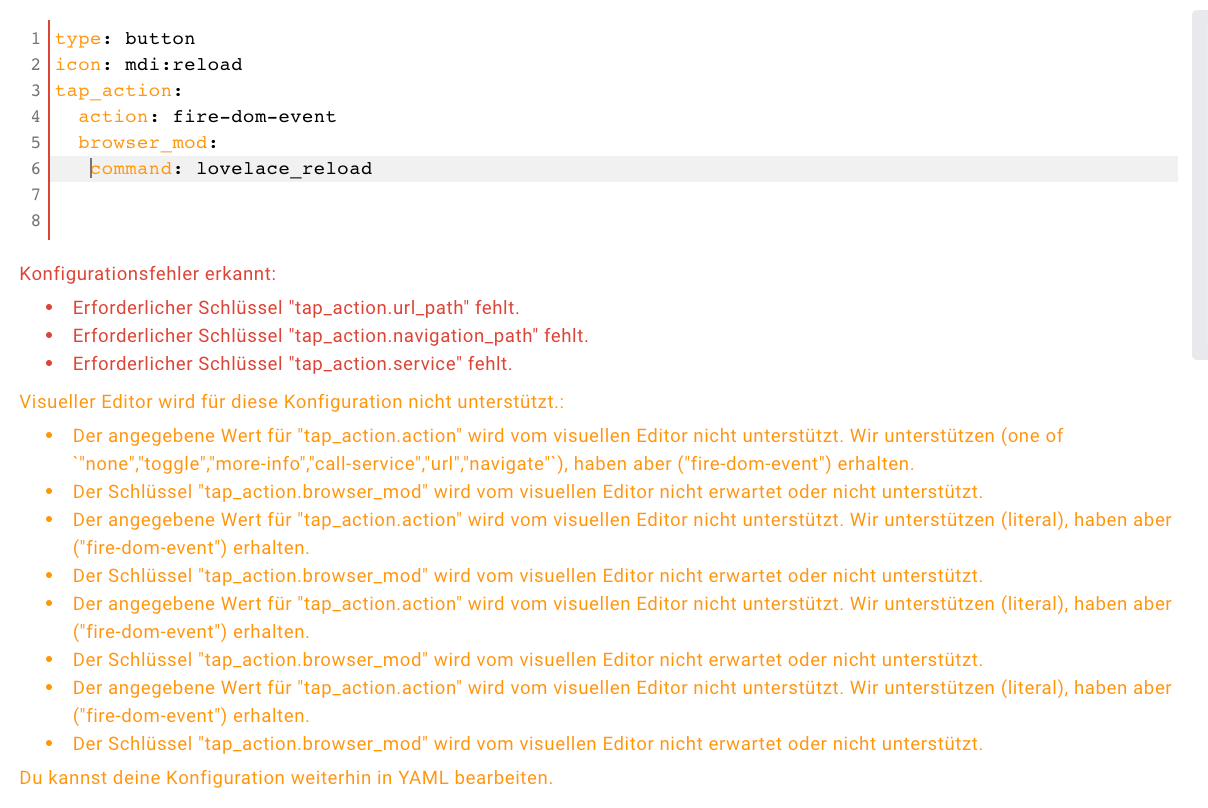
                    @garfonso ![Bildschirmfoto 2022-01-29 um 18.55.32.png]
                    Irgendwas mache ich falsch.
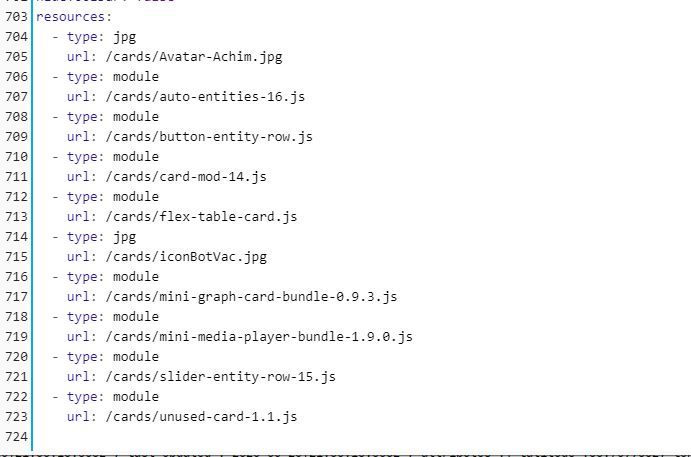
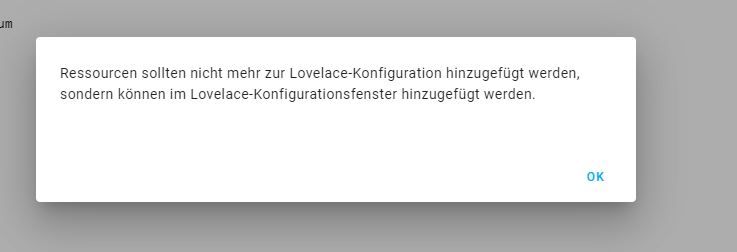
                    Karte heruntergeladen, browser_mod.js aus der ZIP in eigene Entitäten, wie folgt eingetragen:
                    Bildschirmfoto 2022-01-29 um 18.55.32.png

                    Wo ist der Fehler?
                    In Git steht etwas von:
                    service: browser_mod.lovelace_reload

                    Danke vorab.

                    GarfonsoG Offline
                    GarfonsoG Offline
                    Garfonso
                    Developer
                    wrote on last edited by
                    #1070

                    @schienw said in Test Adapter lovelace v1.2.x:

                    nutz jemand die Home_mod Funktion mit Device?

                    Was ist das? Hast du einen Link?

                    Ansonsten gibt es aktuell keinen Weg den View vom ioBroker aus zu ändern.

                    Meine Versuche das mit browser_mod hinzubekommen sind bisher nicht erfolgreich... da fehlt noch irgendwas im Adapter, aber ich habe noch nicht verstanden was. :-/

                    Ultimativer Lovelace Leitfaden: https://forum.iobroker.net/topic/35937/der-ultimative-iobroker-lovelace-leitfaden-dokumentation

                    Lovelace UI Beispiele: https://forum.iobroker.net/topic/35950/zeigt-her-eure-lovelace-visualisierung

                    1 Reply Last reply
                    0
                    • S Offline
                      S Offline
                      schienw
                      wrote on last edited by
                      #1071

                      @garfonso said in Test Adapter lovelace v1.2.x:

                      Home_mod Funktion mit Device

                      https://github.com/thomasloven/hass-browser_mod

                      hier steht:
                      Example uses
                      Make the camera feed from your front door pop up on the tablet in your kitchen when someone rings the doorbell.
                      Have a message pop up on every screen in the house when it's bedtime.
                      Make the browser on your workstation switch to a specific tab when the kitchen light is on after midnight
                      Play a TTS message on your work computer when the traffic sensor tells you it's time to go home.
                      Display a full screen clock on your screen if no one's touched it for five minutes
                      For more usage examples, see the cookbook.

                      nukleuzN GarfonsoG 2 Replies Last reply
                      0
                      • S Offline
                        S Offline
                        schienw
                        wrote on last edited by
                        #1072

                        und noch dies:
                        Devices
                        The most important concept of browser_mod is the device.

                        A device is a machine-browser combination identified by a unique deviceID. The deviceID is randomly generated and may look like ded3b4dc-abedd098.

                        Chrome on your desktop and Chrome on your laptop are two different devices.
                        Chrome on your laptop and Safari on your laptop are two different devices.
                        Two tabs in Firefox on the same computer is one device.
                        Two windows in Edge on the same computer is one device.
                        In the two latter cases, the last loaded tab/window will be the active one.

                        Note: Incognito mode will generate a new deviceID and thus a new device every time it's started.

                        1 Reply Last reply
                        0
                        • S schienw

                          @garfonso said in Test Adapter lovelace v1.2.x:

                          Home_mod Funktion mit Device

                          https://github.com/thomasloven/hass-browser_mod

                          hier steht:
                          Example uses
                          Make the camera feed from your front door pop up on the tablet in your kitchen when someone rings the doorbell.
                          Have a message pop up on every screen in the house when it's bedtime.
                          Make the browser on your workstation switch to a specific tab when the kitchen light is on after midnight
                          Play a TTS message on your work computer when the traffic sensor tells you it's time to go home.
                          Display a full screen clock on your screen if no one's touched it for five minutes
                          For more usage examples, see the cookbook.

                          nukleuzN Offline
                          nukleuzN Offline
                          nukleuz
                          wrote on last edited by
                          #1073

                          @schienw

                          Schau mal ins Kochbuch - da ist ein Beispiel:

                          https://github.com/thomasloven/hass-browser_mod/wiki/Cookbook

                          Würde mich auch interessieren 😎

                          Intel NUC -> ProxMox -> Debian -> ioBroker (Master)| RPI3B+ -> rtl_433 (Slave) | CCU2

                          S 1 Reply Last reply
                          0
                          • nukleuzN nukleuz

                            @schienw

                            Schau mal ins Kochbuch - da ist ein Beispiel:

                            https://github.com/thomasloven/hass-browser_mod/wiki/Cookbook

                            Würde mich auch interessieren 😎

                            S Offline
                            S Offline
                            schienw
                            wrote on last edited by schienw
                            #1074

                            @nukleuz
                            wüsste nicht, wo ich das eintragen sollte.

                            Unter VIS mache ich es so:
                            setState("vis.0.control.data","Wetter");

                            wie und wo kann ich solch ein Scipt im ioBroker eingeben?
                            test_popup:
                            sequence:
                            - service: browser_mod.popup
                            data_template:
                            deviceID: "{{ deviceID }}"
                            title: Testing script
                            card:
                            type: entities
                            entities:
                            - light.bed_light

                            nukleuzN 1 Reply Last reply
                            0
                            • S schienw

                              @nukleuz
                              wüsste nicht, wo ich das eintragen sollte.

                              Unter VIS mache ich es so:
                              setState("vis.0.control.data","Wetter");

                              wie und wo kann ich solch ein Scipt im ioBroker eingeben?
                              test_popup:
                              sequence:
                              - service: browser_mod.popup
                              data_template:
                              deviceID: "{{ deviceID }}"
                              title: Testing script
                              card:
                              type: entities
                              entities:
                              - light.bed_light

                              nukleuzN Offline
                              nukleuzN Offline
                              nukleuz
                              wrote on last edited by
                              #1075

                              @schienw

                              Versuch es mal im Konfigurationseditor zu finden oben rechts im Bearbeitungsmodus - die drei Punkte.

                              Beachte, dass du auf jeden Fall die richtigen Entitäten hast und auch die ID vom Device.

                              Kann gerade nicht genauer drauf eingehen - steht aber alles auf der BrowserMod GitHub Seite der Card…

                              Intel NUC -> ProxMox -> Debian -> ioBroker (Master)| RPI3B+ -> rtl_433 (Slave) | CCU2

                              S 1 Reply Last reply
                              0
                              • S Offline
                                S Offline
                                Supernils
                                wrote on last edited by Supernils
                                #1076

                                Hallo,
                                ich habe zwei Fragen:

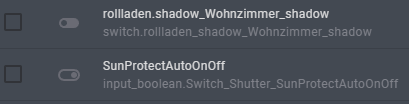
                                1. Wie kann man einen Taster in Lovelace realisieren? D.h. nach dem Drücken des Button wechselt der Wert automatisch wieder zu "false".
                                2. Was ist der Unterschied, ob man eine Entität vom Typ "input_Boolean" oder "switch" für eine boolean Variable erstellt? Gibt es bei einem Typen Vorteile?
                                  6163821e-1e7b-43c0-bbb1-5aedf523e145-grafik.png

                                Danke & Gruß

                                nukleuzN GarfonsoG 2 Replies Last reply
                                0
                                • S Supernils

                                  Hallo,
                                  ich habe zwei Fragen:

                                  1. Wie kann man einen Taster in Lovelace realisieren? D.h. nach dem Drücken des Button wechselt der Wert automatisch wieder zu "false".
                                  2. Was ist der Unterschied, ob man eine Entität vom Typ "input_Boolean" oder "switch" für eine boolean Variable erstellt? Gibt es bei einem Typen Vorteile?
                                    6163821e-1e7b-43c0-bbb1-5aedf523e145-grafik.png

                                  Danke & Gruß

                                  nukleuzN Offline
                                  nukleuzN Offline
                                  nukleuz
                                  wrote on last edited by
                                  #1077

                                  @supernils

                                  Zu 1. -> Ich nutze dafür Blockly (Trigger auf den zu schaltenden Datenpunkt, wenn true und dann steuere nach x Sekunden wieder auf false zurück)

                                  Zu 2. Bin ich mir gerade nicht mehr sicher - ggf. nur eine Darstellungssache... Mhhh - ähhhh - vielleicht wer anders :)

                                  Intel NUC -> ProxMox -> Debian -> ioBroker (Master)| RPI3B+ -> rtl_433 (Slave) | CCU2

                                  Archimedeus AA 1 Reply Last reply
                                  0
                                  • nukleuzN nukleuz

                                    @supernils

                                    Zu 1. -> Ich nutze dafür Blockly (Trigger auf den zu schaltenden Datenpunkt, wenn true und dann steuere nach x Sekunden wieder auf false zurück)

                                    Zu 2. Bin ich mir gerade nicht mehr sicher - ggf. nur eine Darstellungssache... Mhhh - ähhhh - vielleicht wer anders :)

                                    Archimedeus AA Offline
                                    Archimedeus AA Offline
                                    Archimedeus A
                                    wrote on last edited by
                                    #1078

                                    Hallo,

                                    kann man in einer entity filter noch irgendwie eine Navigation unterbringen?
                                    Das hier zeigt eingeschaltete Lichter an. Wäre doch schön, wenn man zu dem entsprechenden Raum navigieren könnte, per extra-icon daneben oder Doppelklick oder so.

                                    type: entity-filter
                                    entities:
                                      - entity: switch.esph8_switch
                                        name: Light Living Room
                                      - entity: switch.esph9_switch
                                        name: Light Bedroom
                                    state_filter:
                                      - 'on'
                                    card:
                                      type: entities
                                      title: lights on
                                      show_header_toggle: false
                                    

                                    Hab schon diverses versucht mit tap_action und so, aber kriegs nicht hin.
                                    Danke schon mal!

                                    XBiTX 1 Reply Last reply
                                    0
                                    • nukleuzN nukleuz

                                      @schienw

                                      Versuch es mal im Konfigurationseditor zu finden oben rechts im Bearbeitungsmodus - die drei Punkte.

                                      Beachte, dass du auf jeden Fall die richtigen Entitäten hast und auch die ID vom Device.

                                      Kann gerade nicht genauer drauf eingehen - steht aber alles auf der BrowserMod GitHub Seite der Card…

                                      S Offline
                                      S Offline
                                      schienw
                                      wrote on last edited by
                                      #1079

                                      @nukleuz
                                      Danke für den Hinweis, hab ich gefunden.
                                      Das Beispiel mit den Popup funktioniert schon mal.
                                      Leider komme ich mit m einem Problem nicht weiter.
                                      Eigentlich sollte ja laut Anleitung hier was installiert werden:

                                      Entities
                                      Once browser_mod is installed, loading up your Home Assistant frontend on a new device will create three to five new devices.

                                      sensor.<device>
                                      media_player.<device>
                                      light.<device>
                                      If you've enabled it: camera.<device>
                                      If you're using Fully Kiosk Browser: binary_sensor.<device>
                                      <device> here will be the deviceID of the device but with the dash (-) replaced by an underscore (_). If you've defined an alias, it will be that instead.

                                      E.g: Connecting your phone with deviceID: ded3b4dc-abedd098 will create the entities sensor.ded3b4dc_abedd098, media_player.ded3b4dc_abedd098 and light.ded3b4dc_abedd098. Connecting with the computer named Arrakis above with deviceID: 99980b13-dabc9563 will create the entities sensor.arrakis, media_player.arrakis and light.arrakis.

                                      Ich finde diese Einträge nicht.

                                      nukleuzN 1 Reply Last reply
                                      0
                                      • S schienw

                                        @nukleuz
                                        Danke für den Hinweis, hab ich gefunden.
                                        Das Beispiel mit den Popup funktioniert schon mal.
                                        Leider komme ich mit m einem Problem nicht weiter.
                                        Eigentlich sollte ja laut Anleitung hier was installiert werden:

                                        Entities
                                        Once browser_mod is installed, loading up your Home Assistant frontend on a new device will create three to five new devices.

                                        sensor.<device>
                                        media_player.<device>
                                        light.<device>
                                        If you've enabled it: camera.<device>
                                        If you're using Fully Kiosk Browser: binary_sensor.<device>
                                        <device> here will be the deviceID of the device but with the dash (-) replaced by an underscore (_). If you've defined an alias, it will be that instead.

                                        E.g: Connecting your phone with deviceID: ded3b4dc-abedd098 will create the entities sensor.ded3b4dc_abedd098, media_player.ded3b4dc_abedd098 and light.ded3b4dc_abedd098. Connecting with the computer named Arrakis above with deviceID: 99980b13-dabc9563 will create the entities sensor.arrakis, media_player.arrakis and light.arrakis.

                                        Ich finde diese Einträge nicht.

                                        nukleuzN Offline
                                        nukleuzN Offline
                                        nukleuz
                                        wrote on last edited by
                                        #1080

                                        @schienw

                                        Relativ einfach erklärt: Diese Entitäten werden nicht erzeugt. Das funktioniert nur in HomeAssistant. Es wird nur die GUI von HA mit den Entitäten emuliert im ioBroker. Das ganze Backend natürlich nicht.

                                        So wird man immer wieder auf Dinge stoßen, die nicht funktionieren werden.

                                        @garfonso macht schon viel möglich - alles wird technisch nicht funktionieren. 😎

                                        Intel NUC -> ProxMox -> Debian -> ioBroker (Master)| RPI3B+ -> rtl_433 (Slave) | CCU2

                                        1 Reply Last reply
                                        0
                                        • Archimedeus AA Archimedeus A

                                          Hallo,

                                          kann man in einer entity filter noch irgendwie eine Navigation unterbringen?
                                          Das hier zeigt eingeschaltete Lichter an. Wäre doch schön, wenn man zu dem entsprechenden Raum navigieren könnte, per extra-icon daneben oder Doppelklick oder so.

                                          type: entity-filter
                                          entities:
                                            - entity: switch.esph8_switch
                                              name: Light Living Room
                                            - entity: switch.esph9_switch
                                              name: Light Bedroom
                                          state_filter:
                                            - 'on'
                                          card:
                                            type: entities
                                            title: lights on
                                            show_header_toggle: false
                                          

                                          Hab schon diverses versucht mit tap_action und so, aber kriegs nicht hin.
                                          Danke schon mal!

                                          XBiTX Offline
                                          XBiTX Offline
                                          XBiT
                                          wrote on last edited by
                                          #1081

                                          @archimedeus-a

                                          schau dir mal die Banner Card an

                                          geht dann in etwa so.

                                          type: custom:banner-card
                                          heading: Vorgarten
                                          link: /lovelace/vorgarten
                                          entities:
                                            - entity: light.Licht_Haustuer
                                              name: Hautür
                                            - entity: light.Steckdosen_Schaltaktor_1
                                              name: Vorgarten
                                            - entity: light.Licht_Mauer
                                              name: Mauer

                                          
                                          
                                          Archimedeus AA 2 Replies Last reply
                                          0
                                          Reply
                                          • Reply as topic
                                          Log in to reply
                                          • Oldest to Newest
                                          • Newest to Oldest
                                          • Most Votes


                                          Support us

                                          ioBroker
                                          Community Adapters
                                          Donate

                                          594

                                          Online

                                          32.7k

                                          Users

                                          82.5k

                                          Topics

                                          1.3m

                                          Posts
                                          Community
                                          Impressum | Datenschutz-Bestimmungen | Nutzungsbedingungen | Einwilligungseinstellungen
                                          ioBroker Community 2014-2025
                                          logo
                                          • Login

                                          • Don't have an account? Register

                                          • Login or register to search.
                                          • First post
                                            Last post
                                          0
                                          • Home
                                          • Recent
                                          • Tags
                                          • Unread 0
                                          • Categories
                                          • Unreplied
                                          • Popular
                                          • GitHub
                                          • Docu
                                          • Hilfe