
NEWS




js-controller 3.1 jetzt im STABLE!
-
@Thomas-Braun Ja, ich habe es doch immer gepostet, was ich versucht habe.
D.h. vor 2 Std auf deinen Hinweis hin habe ich sudo chown -R 1001:1001 /home/iobroker/.npm und npm cache clean --force gemacht.
Zuletzt habe ich auf @apollon77 Hinweis hin sudo rm -R /home/iobroker/.npm , dann npm cache clean --force , dann aus /opt/iobroker heraus iobroker fix und sudo -H -u iobroker npm install iobroker.js-controller gemacht.Die npm Berechtigungsfehler (Error: EACCES: permission denied, scandir '/home/iobroker/.npm/_logs') bleiben.
@Thomas-Braun
@Nies sagte in js-controller 3.1 jetzt im STABLE!:npm cache clean --force
löscht den Cache des Users
pi. Probier malsudo -H -u iobroker npm cache clean --forceWarum `sudo` böse ist: https://forum.iobroker.net/post/17109
-
@Thomas-Braun
@Nies sagte in js-controller 3.1 jetzt im STABLE!:npm cache clean --force
löscht den Cache des Users
pi. Probier malsudo -H -u iobroker npm cache clean --force@AlCalzone Arrrgh, natürlich... Da hab ich aber megagepennt.
-
@AlCalzone @Thomas-Braun Nein, /home/iobroker gehört nicht root.
pi@rpi4:~ $ ls -la /home/iobroker
insgesamt 40
drwx------ 5 pi       pi       4096 Aug 23 22:57 .
drwxr-xr-x 4 root     root     4096 Jan 20  2020 ..
-rw-r--r-- 1 iobroker iobroker  220 Apr 18  2019 .bash_logout
-rw-r--r-- 1 iobroker iobroker 3523 Sep 26  2019 .bashrc
drwxr-xr-x 3 iobroker iobroker 4096 Jan 20  2020 .cache
drwx------ 3 iobroker iobroker 4096 Jan 20  2020 .config
-rwx------ 1 iobroker iobroker 5462 Apr  5 14:06 getParrot9333.pl
-rw-r--r-- 1 iobroker iobroker  807 Apr 18  2019 .profile
drwx------ 2 iobroker iobroker 4096 Feb  3  2020 .ssh
Entschuldigung für doofe Fragen. Ist es relevant, aus welchem Ordner ich npm cache clean ausführe? /home/iobroker oder /opt/iobroker oder root?
aus /home/iobroker:
pi@rpi4:/home/iobroker $ sudo -H -u iobroker npm cache clean --force
Error: EACCES: permission denied, scandir '/home/iobroker'
aus /opt/iobroker:
pi@rpi4:/opt/iobroker $ sudo -H -u iobroker npm cache clean --force
npm WARN using --force I sure hope you know what you are doing.
npm ERR! code EACCES
npm ERR! syscall scandir
npm ERR! path /home/iobroker/.npm/_logs
npm ERR! errno -13
npm ERR!
npm ERR! Your cache folder contains root-owned files, due to a bug in
npm ERR! previous versions of npm which has since been addressed.
npm ERR!
npm ERR! To permanently fix this problem, please run:
npm ERR!   sudo chown -R 1001:1001 "/home/iobroker/.npm"
glob error [Error: EACCES: permission denied, scandir '/home/iobroker/.npm/_logs'] {
  errno: -13,
  code: 'EACCES',
  syscall: 'scandir',
  path: '/home/iobroker/.npm/_logs'
}
npm ERR! code EACCES
npm ERR! syscall lstat
npm ERR! path /home/iobroker/.npm/_cacache
npm ERR! errno -13
npm ERR!
npm ERR! Your cache folder contains root-owned files, due to a bug in
npm ERR! previous versions of npm which has since been addressed.
npm ERR!
npm ERR! To permanently fix this problem, please run:
npm ERR!   sudo chown -R 1001:1001 "/home/iobroker/.npm"
aus root:
pi@rpi4:/ $ sudo -H -u iobroker npm cache clean --force npm WARN using --force I sure hope you know what you are doing. npm ERR! code EACCES npm ERR! syscall scandir npm ERR! path /home/iobroker/.npm/_logs npm ERR! errno -13 npm ERR! npm ERR! Your cache folder contains root-owned files, due to a bug in npm ERR! previous versions of npm which has since been addressed. npm ERR! npm ERR! To permanently fix this problem, please run: npm ERR! sudo chown -R 1001:1001 "/home/iobroker/.npm" glob error [Error: EACCES: permission denied, scandir '/home/iobroker/.npm/_logs'] { errno: -13, code: 'EACCES', syscall: 'scandir', path: '/home/iobroker/.npm/_logs' } npm ERR! code EACCES npm ERR! syscall lstat npm ERR! path /home/iobroker/.npm/_cacache npm ERR! errno -13 npm ERR! npm ERR! Your cache folder contains root-owned files, due to a bug in npm ERR! previous versions of npm which has since been addressed. npm ERR! npm ERR! To permanently fix this problem, please run: npm ERR! sudo chown -R 1001:1001 "/home/iobroker/.npm" -
@Nies sagte in js-controller 3.1 jetzt im STABLE!:
sudo chown -R 1001:1001 "/home/iobroker/.npm"
kurze Frage/Hinweis: im Fehlertext steht das Verzeichnis in " ":
sudo chown -R 1001:1001 "/home/iobroker/.npm"Wenn ich das richtig gelesen habe, wurde der Befehl aber ohne " " abgesetzt (bin auch kein Linux-Profi, ist mir nur beim Lesen ins Auge gesprungen?!)
VG Thorsten -
@AlCalzone @Thomas-Braun Nein, /home/iobroker gehört nicht root.
pi@rpi4:~ $ ls -la /home/iobroker
insgesamt 40
drwx------ 5 pi       pi       4096 Aug 23 22:57 .
drwxr-xr-x 4 root     root     4096 Jan 20  2020 ..
-rw-r--r-- 1 iobroker iobroker  220 Apr 18  2019 .bash_logout
-rw-r--r-- 1 iobroker iobroker 3523 Sep 26  2019 .bashrc
drwxr-xr-x 3 iobroker iobroker 4096 Jan 20  2020 .cache
drwx------ 3 iobroker iobroker 4096 Jan 20  2020 .config
-rwx------ 1 iobroker iobroker 5462 Apr  5 14:06 getParrot9333.pl
-rw-r--r-- 1 iobroker iobroker  807 Apr 18  2019 .profile
drwx------ 2 iobroker iobroker 4096 Feb  3  2020 .ssh
Entschuldigung für doofe Fragen. Ist es relevant, aus welchem Ordner ich npm cache clean ausführe? /home/iobroker oder /opt/iobroker oder root?
aus /home/iobroker:
pi@rpi4:/home/iobroker $ sudo -H -u iobroker npm cache clean --force
Error: EACCES: permission denied, scandir '/home/iobroker'
aus /opt/iobroker:
pi@rpi4:/opt/iobroker $ sudo -H -u iobroker npm cache clean --force
npm WARN using --force I sure hope you know what you are doing.
npm ERR! code EACCES
npm ERR! syscall scandir
npm ERR! path /home/iobroker/.npm/_logs
npm ERR! errno -13
npm ERR!
npm ERR! Your cache folder contains root-owned files, due to a bug in
npm ERR! previous versions of npm which has since been addressed.
npm ERR!
npm ERR! To permanently fix this problem, please run:
npm ERR!   sudo chown -R 1001:1001 "/home/iobroker/.npm"
glob error [Error: EACCES: permission denied, scandir '/home/iobroker/.npm/_logs'] {
  errno: -13,
  code: 'EACCES',
  syscall: 'scandir',
  path: '/home/iobroker/.npm/_logs'
}
npm ERR! code EACCES
npm ERR! syscall lstat
npm ERR! path /home/iobroker/.npm/_cacache
npm ERR! errno -13
npm ERR!
npm ERR! Your cache folder contains root-owned files, due to a bug in
npm ERR! previous versions of npm which has since been addressed.
npm ERR!
npm ERR! To permanently fix this problem, please run:
npm ERR!   sudo chown -R 1001:1001 "/home/iobroker/.npm"
aus root:
pi@rpi4:/ $ sudo -H -u iobroker npm cache clean --force npm WARN using --force I sure hope you know what you are doing. npm ERR! code EACCES npm ERR! syscall scandir npm ERR! path /home/iobroker/.npm/_logs npm ERR! errno -13 npm ERR! npm ERR! Your cache folder contains root-owned files, due to a bug in npm ERR! previous versions of npm which has since been addressed. npm ERR! npm ERR! To permanently fix this problem, please run: npm ERR! sudo chown -R 1001:1001 "/home/iobroker/.npm" glob error [Error: EACCES: permission denied, scandir '/home/iobroker/.npm/_logs'] { errno: -13, code: 'EACCES', syscall: 'scandir', path: '/home/iobroker/.npm/_logs' } npm ERR! code EACCES npm ERR! syscall lstat npm ERR! path /home/iobroker/.npm/_cacache npm ERR! errno -13 npm ERR! npm ERR! Your cache folder contains root-owned files, due to a bug in npm ERR! previous versions of npm which has since been addressed. npm ERR! npm ERR! To permanently fix this problem, please run: npm ERR! sudo chown -R 1001:1001 "/home/iobroker/.npm"An sich ist es egal, von wo du cache clean ausführst, es muss nur der richtige User sein.
/home/iobroker/.npm existiert auch nicht mehr, d.h. löschen kannst du dir sparen.@Nies sagte in js-controller 3.1 jetzt im STABLE!:
Nein, /home/iobroker gehört nicht root.
pi@rpi4:~ $ ls -la /home/iobroker
drwx------ 5 pi pi 4096 Aug 23 22:57 .Aber auch nicht iobroker. Bei mir funktioniert es mit Owner iobroker und 755 (hoffe @Thomas-Braun bringt mich für diesen Vorschlag nicht um) - probiers mal so:
sudo chown iobroker:iobroker /home/iobroker
sudo chmod 755 /home/iobroker
Danach sollte npm seine Verzeichnisse wieder selbst herstellen.
-
@Nies sagte in js-controller 3.1 jetzt im STABLE!:
sudo chown -R 1001:1001 "/home/iobroker/.npm"
kurze Frage/Hinweis: im Fehlertext steht das Verzeichnis in " ":
sudo chown -R 1001:1001 "/home/iobroker/.npm"Wenn ich das richtig gelesen habe, wurde der Befehl aber ohne " " abgesetzt (bin auch kein Linux-Profi, ist mir nur beim Lesen ins Auge gesprungen?!)
VG ThorstenES KLAPPT!
@Kueppert Mit "" hatte ich auch probiert. Daran lag es nicht. Ich danke dir trotzdem für deinen Versuch.
@AlCalzone Du hattest Recht. Mein home Verzeichnis war wohl doch im Besitz von root.Abhilfe brachte
sudo chown -R -c iobroker:iobroker /home/iobrokerAuf diesen Befehl hin kamen folgende 3 Zeilen: (nur noch sinngemäß, da ich zum testen das Update des js-controllers angestoßen habe und die 3 Zeilen oben aus dem Terminal rausgerutscht sind...)
Der Benutzer von /home/iobroker/.ssh...blabla wurde von root:root zu iobroker:iobroker geändert.
Der Benutzer von /home/iobroker/.ssh...blabla wurde von root:root zu iobroker:iobroker geändert.
Der Benutzer von /home/iobroker wurde von pi:pi zu iobroker:iobroker geändert.js-controller konnte nun erfolgreich aktualisiert werden. Danke für euren super Support.
-
An sich ist es egal, von wo du cache clean ausführst, es muss nur der richtige User sein.
/home/iobroker/.npm existiert auch nicht mehr, d.h. löschen kannst du dir sparen.@Nies sagte in js-controller 3.1 jetzt im STABLE!:
Nein, /home/iobroker gehört nicht root.
pi@rpi4:~ $ ls -la /home/iobroker
drwx------ 5 pi pi 4096 Aug 23 22:57 .Aber auch nicht iobroker. Bei mir funktioniert es mit Owner iobroker und 755 (hoffe @Thomas-Braun bringt mich für diesen Vorschlag nicht um) - probiers mal so:
sudo chown iobroker:iobroker /home/iobroker
sudo chmod 755 /home/iobroker
Danach sollte npm seine Verzeichnisse wieder selbst herstellen.
@AlCalzone Jepp, so hats geklappt. Danke dir!
-
Hallo in die Runde,
mal was neues. Hab gerade das Update vom Controller auf v4.6.23 gemacht und folgenden Hinweis erhalten:javascript.0 2020-08-24 17:47:41.484 error (16299) deprecated request-promise-native@1.0.9: request-promise-native has been deprecated because it extends the now deprecated request package, see https://github.com/request/request/issues/3142 javascript.0 2020-08-24 17:47:41.480 error (16299) WARN javascript.0 2020-08-24 17:47:41.477 error (16299) javascript.0 2020-08-24 17:47:41.474 error (16299) npmIst das ne Info, die ich einfach ignorieren kann? Hab nur ich das beim Update?? Hab in der Suche nach diesem Hinweis/Fehler nicht hier im Forum gefunden bisher. Normalerweise werden Fehler dieser Art ja immer fix gemeldet...
Danke und vG, ThorstenUDM Pro, Intel NUC - ioBroker in Proxmox-VM, PiHole+Grafana&Influx+TasmoAdmin in LXCs, Raspberry Pi3 (als CCU), Zigbee-Stick Sonoff, Synology DS918+
-
Hallo in die Runde,
mal was neues. Hab gerade das Update vom Controller auf v4.6.23 gemacht und folgenden Hinweis erhalten:javascript.0 2020-08-24 17:47:41.484 error (16299) deprecated request-promise-native@1.0.9: request-promise-native has been deprecated because it extends the now deprecated request package, see https://github.com/request/request/issues/3142 javascript.0 2020-08-24 17:47:41.480 error (16299) WARN javascript.0 2020-08-24 17:47:41.477 error (16299) javascript.0 2020-08-24 17:47:41.474 error (16299) npmIst das ne Info, die ich einfach ignorieren kann? Hab nur ich das beim Update?? Hab in der Suche nach diesem Hinweis/Fehler nicht hier im Forum gefunden bisher. Normalerweise werden Fehler dieser Art ja immer fix gemeldet...
Danke und vG, Thorsten@Kueppert sagte in js-controller 3.1 jetzt im STABLE!:
Update vom Controller auf v4.6.23
nicht gaaaaaaanz richtig,
hättest du ein controller update gemacht, wärst du zwar im richtigen Thread:blush:
du hast aber Adapter Javascript ein Update verpasst, klitzekleiner Unterschied:stuck_out_tongue_winking_eye:
aber Spass beiseite, hatte heut auch endlich mal das Update angestoßen und kam auch die Meldung.umgestiegen von Proxmox auf Unraid
-
@Kueppert sagte in js-controller 3.1 jetzt im STABLE!:
Update vom Controller auf v4.6.23
nicht gaaaaaaanz richtig,
hättest du ein controller update gemacht, wärst du zwar im richtigen Thread:blush:
du hast aber Adapter Javascript ein Update verpasst, klitzekleiner Unterschied:stuck_out_tongue_winking_eye:
aber Spass beiseite, hatte heut auch endlich mal das Update angestoßen und kam auch die Meldung. -
@Kueppert sagte in js-controller 3.1 jetzt im STABLE!:
Update vom Controller auf v4.6.23
nicht gaaaaaaanz richtig,
hättest du ein controller update gemacht, wärst du zwar im richtigen Thread:blush:
du hast aber Adapter Javascript ein Update verpasst, klitzekleiner Unterschied:stuck_out_tongue_winking_eye:
aber Spass beiseite, hatte heut auch endlich mal das Update angestoßen und kam auch die Meldung. -
Hallo,
wenn ich unter Windows als Admin in der Konsole
iobroker upgrade selfeingebe
bekomme ich immer folgenden Fehler:D:\iobroker\SmartHome6>iobroker upgrade self *** Error. Please start the ioBroker commandline with the correct Windows startmenu shortcut. Aborting...Was mache ich falsch?
Oder gibt es noch eine andere Möglichkeit den Adapter unter Windows upzudaten?
Gruß
Dennis -
Hallo,
wenn ich unter Windows als Admin in der Konsole
iobroker upgrade selfeingebe
bekomme ich immer folgenden Fehler:D:\iobroker\SmartHome6>iobroker upgrade self *** Error. Please start the ioBroker commandline with the correct Windows startmenu shortcut. Aborting...Was mache ich falsch?
Oder gibt es noch eine andere Möglichkeit den Adapter unter Windows upzudaten?
Gruß
Dennis -
@Storm86 Steht doch in der Fehlermeldung.
Du sollst die CMD der entsprechenden Installation benutzen, die wurde vom Installer angelegt, nicht irgendeine CMD.
Schau ins Startmenü unter ioBroker. -
Ich möchte anmerken, dass der WLAN-Betrieb wieder tadellos funktioniert.
Ich habe es erst beim JS-Controller 2.x versucht. Da kamen immer Aussetzer.
Leider habe ich das aus den Augen verloren und habe WLAN gestern wieder auf dem Slave aktiviert.
Bisher keine Probleme.
Gruß,
Mathias -
@J-A-R-V-I-S
Danke. Wegen dem unifi skript muss ich mal @liv-in-sky fragen weil das ist von ihm und nicht von mir von javascript direkt habe ich leider nicht wirklich Ahnung :-(
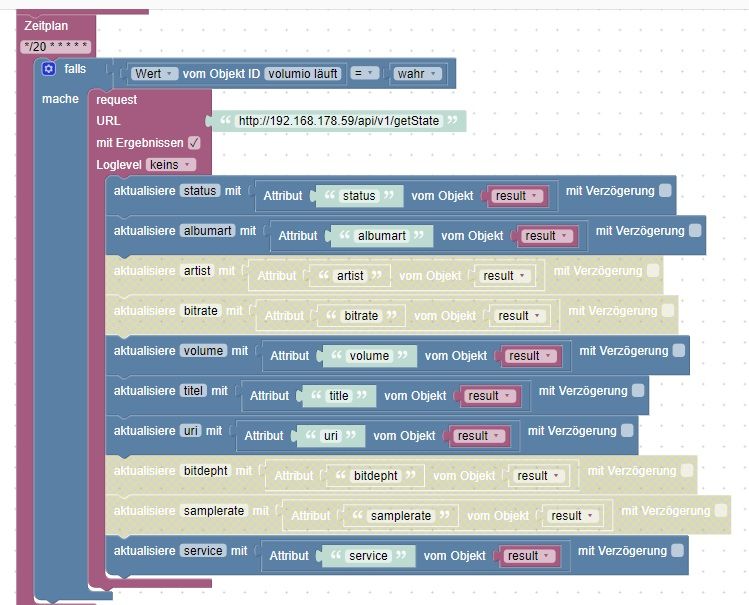
beim volumio skript musste ich folgendes deaktivieren, jetzt läuft es ohne Error. Das Problem ist wahrscheinlich das in der json die mit request geholt wird der wert leer ist. Wie könnte ich hier abfragen ob der Wert leer ist oder nicht bevor ich diesen schreiben will?
@saeft_2003 Ich habe am Anfang auch nur das Blockly Script gehabt und habe auch diese Fehler bekommen. Nun habe ich den Volumio Adapter installiert. Der noch besser als das Script läuft. Aber der Adapter bringt mir noch zu viele Infos weißt du vielleicht was sie bedeuten?
volumio.0
	2022-01-03 20:23:43.687	info	State value to set for "volumio.0.player.volume" has to be type "number" but received type "string"
volumio.0
	2022-01-03 20:23:43.687	info	State value to set for "volumio.0.playbackInfo.volume" has to be type "number" but received type "string"
volumio.0
	2022-01-03 20:23:43.686	info	State value to set for "volumio.0.playbackInfo.stream" has to be type "string" but received type "boolean"
volumio.0
	2022-01-03 20:23:43.683	info	State value to set for "volumio.0.playbackInfo.position" has to be type "string" but received type "number"
volumio.0
	2022-01-03 20:23:43.671	info	State value to set for "volumio.0.player.volume" has to be type "number" but received type "string"
volumio.0
	2022-01-03 20:23:43.671	info	State value to set for "volumio.0.playbackInfo.volume" has to be type "number" but received type "string"
volumio.0
	2022-01-03 20:23:43.670	info	State value to set for "volumio.0.playbackInfo.stream" has to be type "string" but received type "boolean"
volumio.0
	2022-01-03 20:23:43.668	info	State value to set for "volumio.0.playbackInfo.position" has to be type "string" but received type "number"
volumio.0
	2022-01-03 20:23:33.338	info	State value to set for "volumio.0.player.volume" has to be type "number" but received type "string"
volumio.0
	2022-01-03 20:23:33.302	info	State value to set for "volumio.0.playbackInfo.volume" has to be type "number" but received type "string"
volumio.0
	2022-01-03 20:23:33.302	info	State value to set for "volumio.0.playbackInfo.stream" has to be type "string" but received type "boolean"
volumio.0
	2022-01-03 20:23:33.300	info	State value to set for "volumio.0.playbackInfo.position" has to be type "string" but received type "number"
volumio.0
	2022-01-03 20:23:33.299	info	State value to set for "volumio.0.player.volume" has to be type "number" but received type "string"
volumio.0
	2022-01-03 20:23:33.299	info	State value to set for "volumio.0.playbackInfo.volume" has to be type "number" but received type "string"
volumio.0
	2022-01-03 20:23:33.298	info	State value to set for "volumio.0.playbackInfo.stream" has to be type "string" but received type "boolean"
volumio.0
	2022-01-03 20:23:33.296	info	State value to set for "volumio.0.playbackInfo.position" has to be type "string" but received type "number"
Iobroker läuft als VM auf Proxmoxserver x folgende Hersteller im Einsatz Sonoff, Gosund, Siemens x Aofo über Tasmota x Zigbee x das Smarthome wächst und wächst
-
@saeft_2003 Ich habe am Anfang auch nur das Blockly Script gehabt und habe auch diese Fehler bekommen. Nun habe ich den Volumio Adapter installiert. Der noch besser als das Script läuft. Aber der Adapter bringt mir noch zu viele Infos weißt du vielleicht was sie bedeuten?
volumio.0 2022-01-03 20:23:43.687 info State value to set for "volumio.0.player.volume" has to be type "number" but received type "string" volumio.0 2022-01-03 20:23:43.687 info State value to set for "volumio.0.playbackInfo.volume" has to be type "number" but received type "string" volumio.0 2022-01-03 20:23:43.686 info State value to set for "volumio.0.playbackInfo.stream" has to be type "string" but received type "boolean" volumio.0 2022-01-03 20:23:43.683 info State value to set for "volumio.0.playbackInfo.position" has to be type "string" but received type "number" volumio.0 2022-01-03 20:23:43.671 info State value to set for "volumio.0.player.volume" has to be type "number" but received type "string" volumio.0 2022-01-03 20:23:43.671 info State value to set for "volumio.0.playbackInfo.volume" has to be type "number" but received type "string" volumio.0 2022-01-03 20:23:43.670 info State value to set for "volumio.0.playbackInfo.stream" has to be type "string" but received type "boolean" volumio.0 2022-01-03 20:23:43.668 info State value to set for "volumio.0.playbackInfo.position" has to be type "string" but received type "number" volumio.0 2022-01-03 20:23:33.338 info State value to set for "volumio.0.player.volume" has to be type "number" but received type "string" volumio.0 2022-01-03 20:23:33.302 info State value to set for "volumio.0.playbackInfo.volume" has to be type "number" but received type "string" volumio.0 2022-01-03 20:23:33.302 info State value to set for "volumio.0.playbackInfo.stream" has to be type "string" but received type "boolean" volumio.0 2022-01-03 20:23:33.300 info State value to set for "volumio.0.playbackInfo.position" has to be type "string" but received type "number" volumio.0 2022-01-03 20:23:33.299 info State value to set for "volumio.0.player.volume" has to be type "number" but received type "string" volumio.0 2022-01-03 20:23:33.299 info State value to set for "volumio.0.playbackInfo.volume" has to be type "number" but received type "string" volumio.0 2022-01-03 20:23:33.298 info State value to set for "volumio.0.playbackInfo.stream" has to be type "string" but received type "boolean" volumio.0 2022-01-03 20:23:33.296 info State value to set for "volumio.0.playbackInfo.position" has to be type "string" but received type "number"@basti97 Es sind Warnungen, dass der Adapter z.B. einen String in einen Datenpunkt schreibt, welcher "number" sein soll. Wenn es dieser Adapter ist, dann bitte hier https://github.com/a-i-ks/ioBroker.volumio ein entsprechendes issue aufmache, damit es der Entwickler fixen kann. Funktional hat dies keine Auswirkung, muss aber im Adapter gelöst werden.
Nachdem das issue erstellt ist kannst du für den Adapter die Warnstufe auf "error" hochstellen, dann siehst du diese Warnunge nicht mehr.
-
@basti97 Es sind Warnungen, dass der Adapter z.B. einen String in einen Datenpunkt schreibt, welcher "number" sein soll. Wenn es dieser Adapter ist, dann bitte hier https://github.com/a-i-ks/ioBroker.volumio ein entsprechendes issue aufmache, damit es der Entwickler fixen kann. Funktional hat dies keine Auswirkung, muss aber im Adapter gelöst werden.
Nachdem das issue erstellt ist kannst du für den Adapter die Warnstufe auf "error" hochstellen, dann siehst du diese Warnunge nicht mehr.
@feuersturm Ok ich werde später ein issues bei github machen. Wenn ich die Warnstufe ändere steht info, error ist das richtig.?
Iobroker läuft als VM auf Proxmoxserver x folgende Hersteller im Einsatz Sonoff, Gosund, Siemens x Aofo über Tasmota x Zigbee x das Smarthome wächst und wächst
-
@feuersturm Ok ich werde später ein issues bei github machen. Wenn ich die Warnstufe ändere steht info, error ist das richtig.?
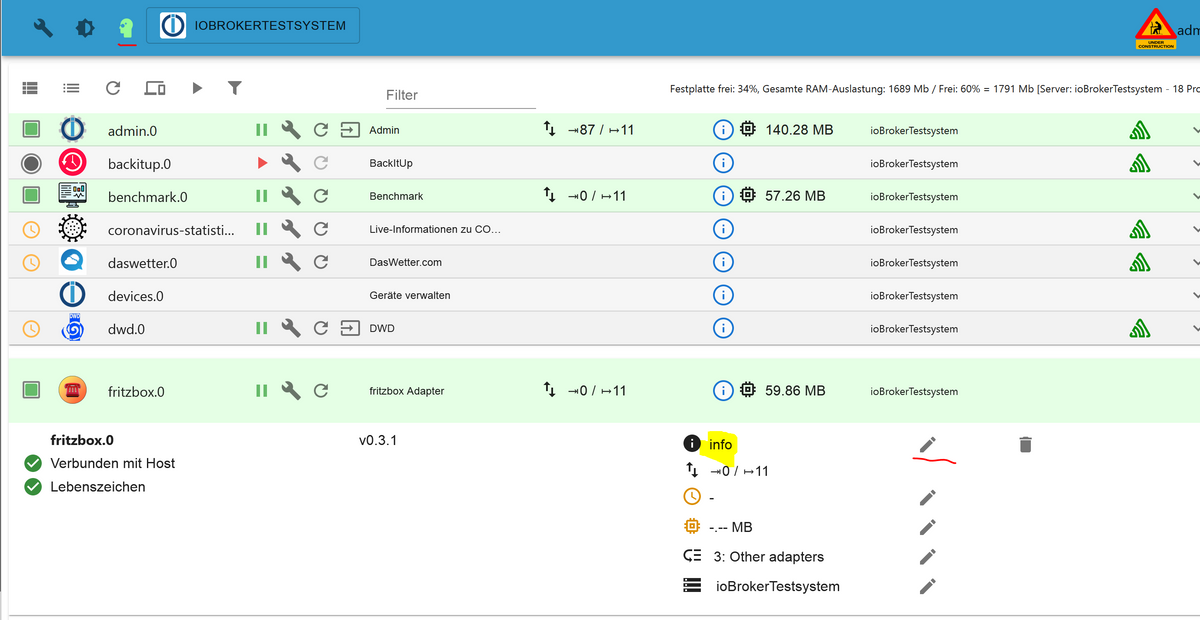
@basti97 Deine obige Meldung ist eine info, es reicht daher schon aus die Warnstufe auf "Warnung" zu stellen, dann siehst du nur noch Warnungen und Fehler. Stellst du es auf Fehler / Error, werden dir im Log nur noch Fehler von diesem Adapter angezeigt
Hier als Beispiel wo du es umstellst:









642
Online32.6k
Users82.2k
Topics1.3m
Posts