




Gelöst: Adapter Updates können nicht installiert werden
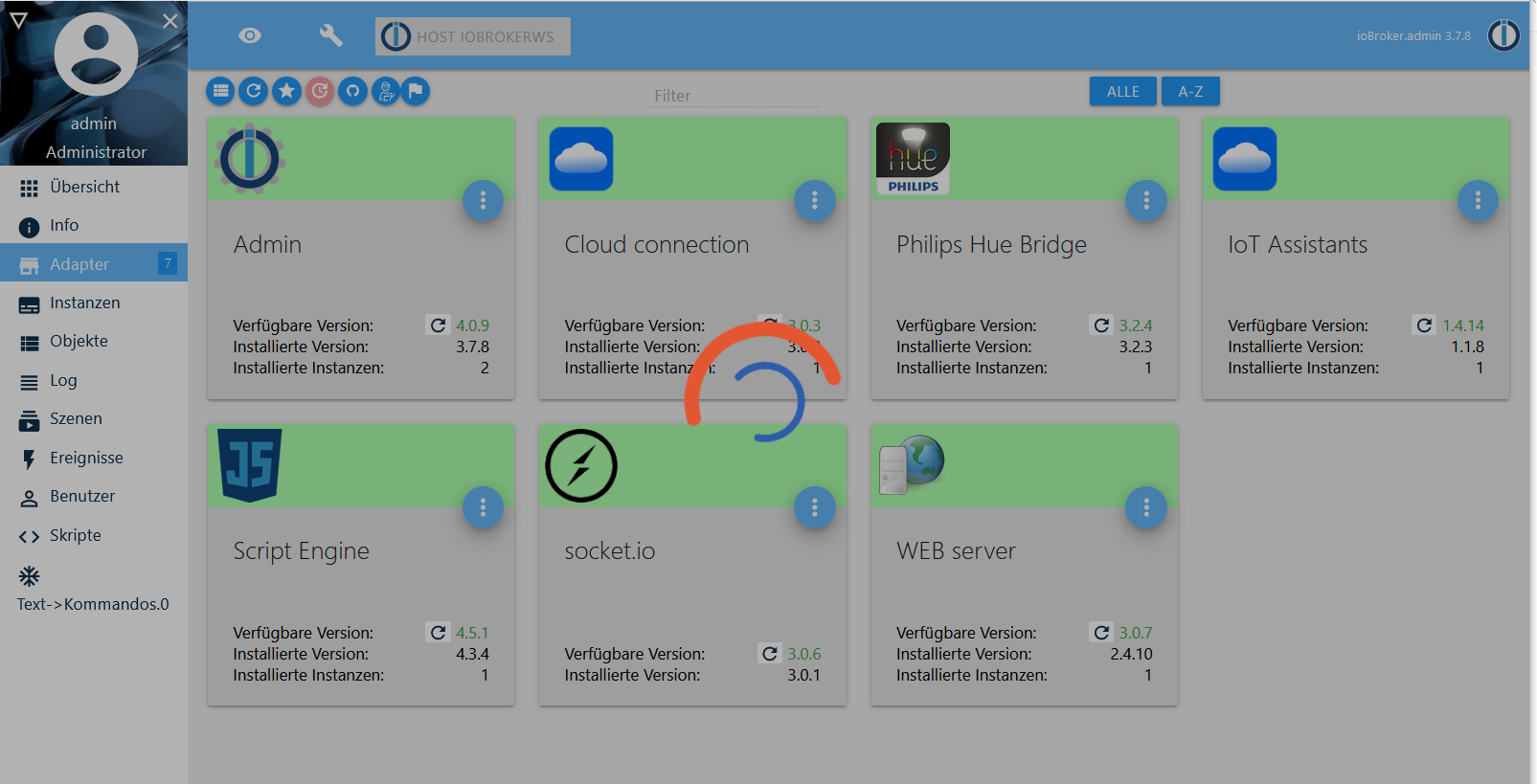
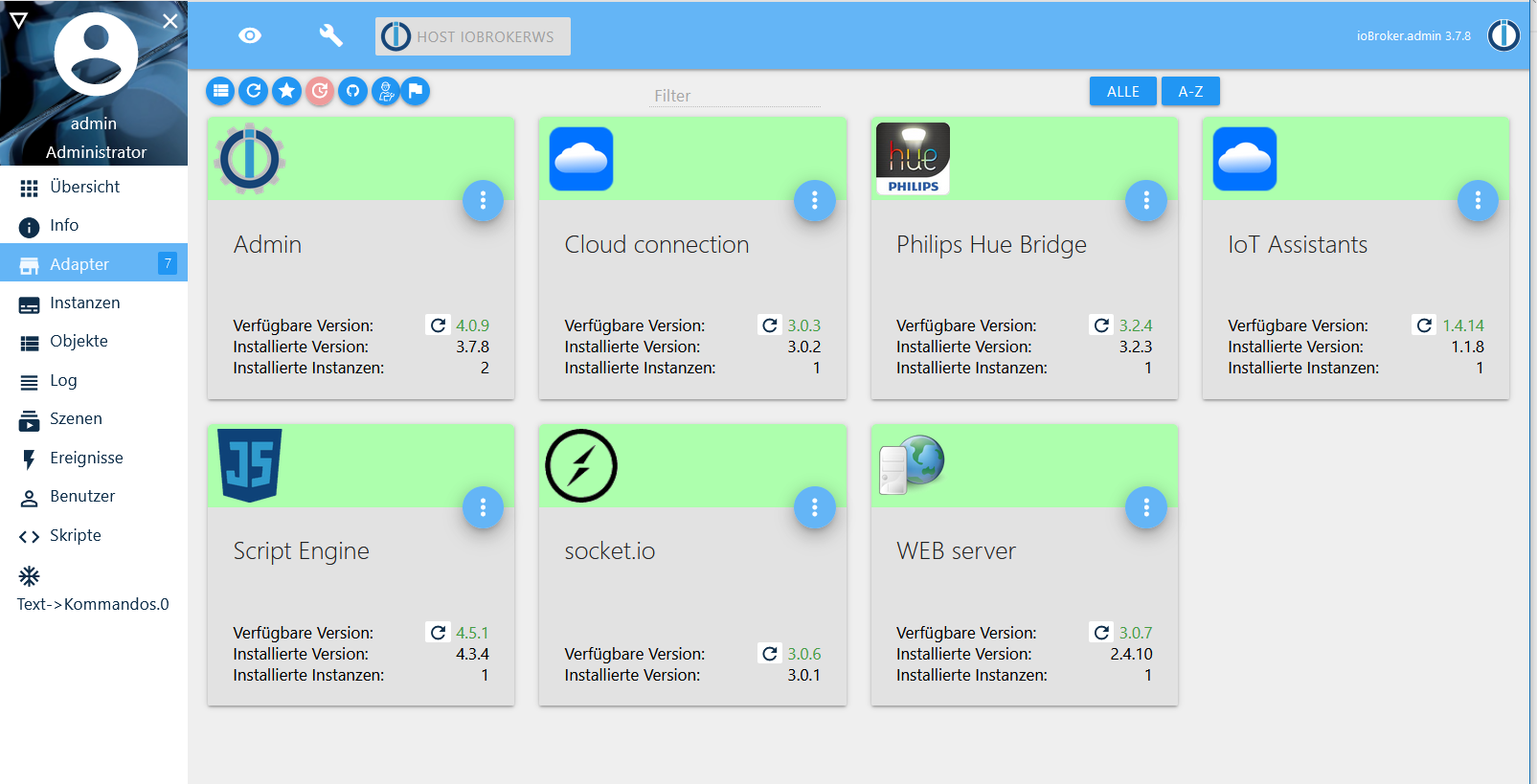
-
Heute Nacht gegen 1:30 Uhr wachte ich auf, schaute aufs Handy und siehe da, mein Installation funktionierte wieder.
Ich versuchte dann einen Adapter zu aktualisieren. Das dauerte ewig, war aber heute früh erfolgreich erledigt.
Jetzt installiere ich nacheinander die restlichen Updates und werde dann hier bereichten wie es ausging.@WalterKA Ich würde Mal die nicht benötigte graphische Oberfläche auf dem Pi ausschalten. Die frisst unnötig viel Ressourcen. Du gehst doch ohnehin per PuTTY / SSH auf die Kiste, oder nicht?
Du fährst ja auch nicht ganzjährig mit einem Wohnwagen am Auto durch die Gegend, nur weil der für den Sommerurlaub vorhanden ist.
-
@WalterKA Ich würde Mal die nicht benötigte graphische Oberfläche auf dem Pi ausschalten. Die frisst unnötig viel Ressourcen. Du gehst doch ohnehin per PuTTY / SSH auf die Kiste, oder nicht?
Du fährst ja auch nicht ganzjährig mit einem Wohnwagen am Auto durch die Gegend, nur weil der für den Sommerurlaub vorhanden ist.
Thomas, das kann ich inzwischen machen wenn ich wüsste wie es geht. Hatte das am Anfang auf jeden Fall gebraucht, alleine schon um Dekonz zu installieren und einzurichten.
Ich hätte die GUI auch schon deinstalliert wenn ich gewusst hätte wie und wenn ich Zeit dazu gehabt hätte danach zu googeln.
Ubuntu auf Intel NUC PC
Node.js v14.18.1
NPM 6.14.15 -
Ganz herzlichen Dank an alle die mich so tatkräftig unterstützt haben!
Meine ioBroker Installation funktioniert wieder tadellos.Ich habe auch wieder dazu gelernt bei dem ganzen Problemlösen. Wichtigste Erkenntnis: Auch wenn die Weboberfläche des ioBroker nicht erreichbar ist gibt es sehr gute Möglichkeiten mit Hilfe aus dem Forum die Installation wieder flott zu bekommen.
Hier das LOG:
info.0 2020-05-05 08:24:48.809 debug (9447) Adapter shoud be installed info.0 2020-05-05 08:24:48.809 debug (9447) Conditions for mydlink adapter info.0 2020-05-05 08:24:48.808 debug (9447) Checking conditions... info.0 2020-05-05 08:24:48.808 debug (9447) Checking: Mydlink: Objekt-IDs ändern sich info.0 2020-05-05 08:24:48.808 debug (9447) admin smaller version: 4.0.9 smaller 4.0.0 -> false info.0 2020-05-05 08:24:48.807 debug (9447) Conditions for admin adapter info.0 2020-05-05 08:24:48.807 debug (9447) Checking conditions... info.0 2020-05-05 08:24:48.807 debug (9447) Checking: BREAKING CHANGE: Keine Unterstützung für iPad 1+2/Android<4.4 mit Updates für Web, Socketio und Admin! info.0 2020-05-05 08:24:48.807 debug (9447) Adapter shoud be installed info.0 2020-05-05 08:24:48.806 debug (9447) Conditions for js-controller adapter info.0 2020-05-05 08:24:48.806 debug (9447) Checking conditions... info.0 2020-05-05 08:24:48.805 debug (9447) Checking: JS-Controller 2.x ist nicht kompatibel mit dem systeminfo-Adapter, der kleiner als 0.3.1 ist info.0 2020-05-05 08:24:48.805 debug (9447) Adapter shoud be installed info.0 2020-05-05 08:24:48.805 debug (9447) Conditions for js-controller adapter info.0 2020-05-05 08:24:48.804 debug (9447) Checking conditions... info.0 2020-05-05 08:24:48.804 debug (9447) Checking: JS-Controller 2.x ist nicht kompatibel mit dem broadlink2-Adapter, der kleiner als 2.0.2 ist info.0 2020-05-05 08:24:48.804 debug (9447) Adapter shoud be installed info.0 2020-05-05 08:24:48.804 debug (9447) Conditions for js-controller adapter info.0 2020-05-05 08:24:48.803 debug (9447) Checking conditions... info.0 2020-05-05 08:24:48.803 debug (9447) Checking: JS-Controller 2.x ist nicht kompatibel mit dem ble-Adapter, der kleiner als 0.10.1 ist info.0 2020-05-05 08:24:48.802 debug (9447) Adapter shoud be installed info.0 2020-05-05 08:24:48.802 debug (9447) Conditions for js-controller adapter info.0 2020-05-05 08:24:48.802 debug (9447) Checking conditions... info.0 2020-05-05 08:24:48.802 debug (9447) Checking: JS-Controller 2.x ist nicht kompatibel mit dem vis-hqwidgets-Adapter, der kleiner als 1.1.3 ist info.0 2020-05-05 08:24:48.801 debug (9447) Adapter shoud be installed info.0 2020-05-05 08:24:48.801 debug (9447) Conditions for js-controller adapter info.0 2020-05-05 08:24:48.801 debug (9447) Checking conditions... info.0 2020-05-05 08:24:48.800 debug (9447) Checking: JS-Controller 2.x ist nicht kompatibel mit dem web-Adapter, der kleiner als 2.4.9 ist info.0 2020-05-05 08:24:48.800 debug (9447) Adapter shoud be installed info.0 2020-05-05 08:24:48.800 debug (9447) Conditions for js-controller adapter info.0 2020-05-05 08:24:48.799 debug (9447) Checking conditions... info.0 2020-05-05 08:24:48.799 debug (9447) Checking: JS-Controller 2.x ist nicht kompatibel mit dem socketio-Adapter, der kleiner als 2.1.2 ist info.0 2020-05-05 08:24:48.799 debug (9447) Adapter shoud be installed info.0 2020-05-05 08:24:48.798 debug (9447) Conditions for js-controller adapter info.0 2020-05-05 08:24:48.798 debug (9447) Checking conditions... info.0 2020-05-05 08:24:48.798 debug (9447) Checking: JS-Controller 2.x ist nicht kompatibel mit dem iqontrol-Adapter, der kleiner als 0.2.12 ist info.0 2020-05-05 08:24:48.798 debug (9447) Adapter shoud be installed info.0 2020-05-05 08:24:48.797 debug (9447) Conditions for js-controller adapter info.0 2020-05-05 08:24:48.797 debug (9447) Checking conditions... info.0 2020-05-05 08:24:48.797 debug (9447) Checking: JS-Controller 2.x ist nicht kompatibel mit dem vis-Adapter, der kleiner als 1.2.2 ist info.0 2020-05-05 08:24:48.796 debug (9447) Adapter shoud be installed info.0 2020-05-05 08:24:48.796 debug (9447) Conditions for js-controller adapter info.0 2020-05-05 08:24:48.795 debug (9447) Checking conditions... info.0 2020-05-05 08:24:48.795 debug (9447) Checking: JS-Controller 2.x ist nicht kompatibel mit dem node-red-Adapter, der kleiner als 1.10.1 ist info.0 2020-05-05 08:24:48.795 debug (9447) Adapter shoud be installed info.0 2020-05-05 08:24:48.795 debug (9447) Conditions for js-controller adapter info.0 2020-05-05 08:24:48.794 debug (9447) Checking conditions... info.0 2020-05-05 08:24:48.794 debug (9447) Checking: JS-Controller 2.x ist nicht kompatibel mit dem hue-Adapter, der kleiner als 1.2.4 ist info.0 2020-05-05 08:24:48.794 debug (9447) Adapter shoud be installed info.0 2020-05-05 08:24:48.793 debug (9447) Conditions for js-controller adapter info.0 2020-05-05 08:24:48.793 debug (9447) Checking conditions... info.0 2020-05-05 08:24:48.792 debug (9447) Checking: JS-Controller 2.x ist nicht kompatibel mit dem pushover-Adapter, der kleiner als 1.1.1 ist info.0 2020-05-05 08:24:48.792 debug (9447) Adapter shoud be installed info.0 2020-05-05 08:24:48.792 debug (9447) Conditions for js-controller adapter info.0 2020-05-05 08:24:48.792 debug (9447) Checking conditions... info.0 2020-05-05 08:24:48.791 debug (9447) Checking: JS-Controller 2.x ist nicht kompatibel mit dem email-Adapter, der kleiner als 1.0.5 ist info.0 2020-05-05 08:24:48.791 debug (9447) Adapter shoud be installed info.0 2020-05-05 08:24:48.791 debug (9447) Conditions for js-controller adapter info.0 2020-05-05 08:24:48.790 debug (9447) Checking conditions... info.0 2020-05-05 08:24:48.790 debug (9447) Checking: JS-Controller 2.x ist nicht kompatibel mit dem simple-api-Adapter, der kleiner als 2.1.2 ist info.0 2020-05-05 08:24:48.789 debug (9447) NodeJS smaller version: 12.16.3 smaller 8.0.0 -> false info.0 2020-05-05 08:24:48.788 debug (9447) admin bigger version: 4.0.9 bigger 3.6.10 -> true info.0 2020-05-05 08:24:48.784 debug (9447) Conditions for admin adapter info.0 2020-05-05 08:24:48.784 debug (9447) Checking conditions... info.0 2020-05-05 08:24:48.783 debug (9447) Checking: Node.JS-Versionen, die kleiner als 8 sind, werden bald nicht mehr unterstützt info.0 2020-05-05 08:24:48.783 debug (9447) Adapter shoud be installed info.0 2020-05-05 08:24:48.783 debug (9447) Conditions for weatherunderground adapter info.0 2020-05-05 08:24:48.782 debug (9447) Checking conditions... info.0 2020-05-05 08:24:48.782 debug (9447) Checking: Bitte updaten Sie ioBroker.weatherunderground info.0 2020-05-05 08:24:48.782 debug (9447) Adapter shoud be installed info.0 2020-05-05 08:24:48.781 debug (9447) Conditions for radar adapter info.0 2020-05-05 08:24:48.781 debug (9447) Checking conditions... info.0 2020-05-05 08:24:48.781 debug (9447) Checking: Radar wird nicht weiterentwickelt! info.0 2020-05-05 08:24:48.780 debug (9447) Adapter shoud be installed info.0 2020-05-05 08:24:48.780 debug (9447) Conditions for broadlink adapter info.0 2020-05-05 08:24:48.780 debug (9447) Checking conditions... info.0 2020-05-05 08:24:48.780 debug (9447) Checking: Broadlink wird nicht mehr gepflegt info.0 2020-05-05 08:24:48.779 debug (9447) Adapter shoud be installed info.0 2020-05-05 08:24:48.779 debug (9447) Conditions for tankerkoenig adapter info.0 2020-05-05 08:24:48.779 debug (9447) Checking conditions... info.0 2020-05-05 08:24:48.778 debug (9447) Checking: ** ACHTUNG ** Defekte Versionen des Tankerkönig-Adapters verursachen massive Probleme auf dem Server! info.0 2020-05-05 08:24:48.774 debug (9447) Found 26 instances info.0 2020-05-05 08:24:48.657 debug (9447) Getting instances... info.0 2020-05-05 08:24:48.656 debug (9447) Messages: 20 info.0 2020-05-05 08:24:48.654 debug (9447) Language: de info.0 2020-05-05 08:24:48.652 debug (9447) Repo: default info.0 2020-05-05 08:24:48.598 info (9447) Popup news was read... sonoff.0 2020-05-05 08:21:57.359 warn (20721) Client "Luminea" not connected sonoff.0 2020-05-05 08:21:21.030 warn (20721) Client "Luminea" not connected sonoff.0 2020-05-05 08:21:12.368 warn (20721) Client "Luminea" not connected sonoff.0 2020-05-05 08:20:36.029 warn (20721) Client "Luminea" not connected sonoff.0 2020-05-05 08:19:51.059 warn (20721) Client "Luminea" not connected sonoff.0 2020-05-05 08:19:39.199 warn (20721) Client "Luminea" not connected sonoff.0 2020-05-05 08:19:06.066 warn (20721) Client "Luminea" not connected sonoff.0 2020-05-05 08:18:54.199 warn (20721) Client "Luminea" not connected sonoff.0 2020-05-05 08:18:09.197 warn (20721) Client "Luminea" not connected sonoff.0 2020-05-05 08:17:24.197 warn (20721) Client "Luminea" not connected host.ioBrokerWS 2020-05-05 08:10:27.798 info Update repository "default" under "http://download.iobroker.net/sources-dist.json" info.0 2020-05-05 08:10:15.192 debug (9447) system.adapter.admin.0: logging true info.0 2020-05-05 08:09:33.096 debug (9447) system.adapter.admin.0: logging false host.ioBrokerWS 2020-05-05 08:09:27.256 info Update repository "default" under "http://download.iobroker.net/sources-dist.json" info.0 2020-05-05 08:08:53.084 debug (9447) system.adapter.admin.0: logging true host.ioBrokerWS 2020-05-05 08:05:55.214 info iobroker exit 0 host.ioBrokerWS 2020-05-05 08:05:54.181 info iobroker Adapter "cloud" updated host.ioBrokerWS 2020-05-05 08:05:54.108 info iobroker upload [0] cloud.admin /opt/iobroker/node_modules/iobroker.cloud/admin/actions.js actions.js application/javascript host.ioBrokerWS 2020-05-05 08:05:54.018 info iobroker upload [1] cloud.admin /opt/iobroker/node_modules/iobroker.cloud/admin/alexalogo.png alexalogo.png image/png host.ioBrokerWS 2020-05-05 08:05:53.947 info iobroker upload [2] cloud.admin /opt/iobroker/node_modules/iobroker.cloud/admin/blockly.js blockly.js application/javascript host.ioBrokerWS 2020-05-05 08:05:53.874 info iobroker upload [3] cloud.admin /opt/iobroker/node_modules/iobroker.cloud/admin/cloud.png cloud.png image/png host.ioBrokerWS 2020-05-05 08:05:53.788 info iobroker upload [4] cloud.admin /opt/iobroker/node_modules/iobroker.cloud/admin/index.html index.html text/html host.ioBrokerWS 2020-05-05 08:05:53.709 info iobroker upload [5] cloud.admin /opt/iobroker/node_modules/iobroker.cloud/admin/index_m.html index_m.html text/html host.ioBrokerWS 2020-05-05 08:05:53.527 info iobroker Update "system.adapter.cloud.0" host.ioBrokerWS 2020-05-05 08:05:53.424 info iobroker upload [6] cloud.admin /opt/iobroker/node_modules/iobroker.cloud/admin/words.js words.js application/javascript host.ioBrokerWS 2020-05-05 08:05:45.690 info iobroker command "/usr/bin/node" "/usr/lib/node_modules/npm/node_modules/node-gyp/bin/node-gyp.js" "configure" "build"gyp ERR! cwd /opt/iobroker/node_modules/node-bluetoothgyp ERR! node -v v12.16.3g host.ioBrokerWS 2020-05-05 08:05:45.687 info iobroker ERR! host.ioBrokerWS 2020-05-05 08:05:45.684 info iobroker System Linux 4.19.97-v7+gyp host.ioBrokerWS 2020-05-05 08:05:45.682 info iobroker ERR! host.ioBrokerWS 2020-05-05 08:05:45.679 info iobroker gyp host.ioBrokerWS 2020-05-05 08:05:45.670 info iobroker stack at Process.ChildProcess._handle.onexit (internal/child_process.js:275:12) host.ioBrokerWS 2020-05-05 08:05:45.668 info iobroker ERR! host.ioBrokerWS 2020-05-05 08:05:45.665 info iobroker stack at ChildProcess.emit (events.js:310:20)gyp host.ioBrokerWS 2020-05-05 08:05:45.662 info iobroker host.ioBrokerWS 2020-05-05 08:05:45.659 info iobroker ERR! host.ioBrokerWS 2020-05-05 08:05:45.655 info iobroker stack at ChildProcess.onExit (/usr/lib/node_modules/npm/node_modules/node-gyp/lib/build.js:194:23)gyp host.ioBrokerWS 2020-05-05 08:05:45.653 info iobroker gyp ERR! stack Error: `make` failed with exit code: 2gyp ERR! host.ioBrokerWS 2020-05-05 08:05:45.637 info iobroker ERR! build error host.ioBrokerWS 2020-05-05 08:05:45.630 info iobroker gyp host.ioBrokerWS 2020-05-05 08:05:45.385 info iobroker make: *** [BluetoothSerialPort.target.mk:115: Release/obj.target/BluetoothSerialPort/src/linux/BluetoothSerialPort.o] Fehler 1 host.ioBrokerWS 2020-05-05 08:05:44.718 info iobroker In file included from ../src/linux/BluetoothSerialPort.cc:12:../src/linux/BluetoothSerialPort.cc:23:34: error: ‘InitAll’ was not declared in this scope NODE_MODULE(BluetoothSerialPort, InitA host.ioBrokerWS 2020-05-05 08:05:44.690 info iobroker ../src/linux/BluetoothSerialPort.cc:18:27: error: expected primary-expression before ‘>’ token void InitAll(Handle<Object> exports) { ^../src/linux/BluetoothSerialP host.ioBrokerWS 2020-05-05 08:05:44.688 info iobroker ../src/linux/BluetoothSerialPort.cc:18:14: note: suggested alternative: ‘rand_r’ void InitAll(Handle<Object> exports) { ^~~~~~ rand_r host.ioBrokerWS 2020-05-05 08:05:44.678 info iobroker ../src/linux/BluetoothSerialPort.cc:18:14: error: ‘Handle’ was not declared in this scope host.ioBrokerWS 2020-05-05 08:05:44.676 info iobroker ../src/linux/BluetoothSerialPort.cc: At global scope:../src/linux/BluetoothSerialPort.cc:18:14: error: variable or field ‘InitAll’ declared void void InitAll(Handle<Object> exports) { host.ioBrokerWS 2020-05-05 08:05:44.578 info iobroker In file included from ../src/DeviceINQ.h:17, from ../src/linux/BluetoothSerialPort.cc:13:../node_modules/nan/nan.h: In function ‘void Nan::AsyncQueueWorker(Nan::AsyncWorker*) host.ioBrokerWS 2020-05-05 08:05:37.439 info iobroker not ok host.ioBrokerWS 2020-05-05 08:05:37.435 info iobroker node-pre-gyp ERR! System Linux 4.19.97-v7+node-pre-gyp ERR! command "/usr/bin/node" "/opt/iobroker/node_modules/canvas/node_modules/.bin/node-pre-gyp" "install" "--fallback-to-build"node-pre host.ioBrokerWS 2020-05-05 08:05:37.432 info iobroker node-pre-gyp ERR! stack Error: Failed to execute '/usr/bin/node /usr/lib/node_modules/npm/node_modules/node-gyp/bin/node-gyp.js configure --fallback-to-build --module=/opt/iobroker/node_modu host.ioBrokerWS 2020-05-05 08:05:37.428 info iobroker node-pre-gyp ERR! build error host.ioBrokerWS 2020-05-05 08:05:37.409 info iobroker gyp ERR! System Linux 4.19.97-v7+gyp ERR! command "/usr/bin/node" "/usr/lib/node_modules/npm/node_modules/node-gyp/bin/node-gyp.js" "configure" "--fallback-to-build" "--module=/opt/iobroker/ host.ioBrokerWS 2020-05-05 08:05:37.404 info iobroker ERR! configure error gyp ERR! stack Error: `gyp` failed with exit code: 1gyp ERR! stack at ChildProcess.onCpExit (/usr/lib/node_modules/npm/node_modules/node-gyp/lib/configure.js:351:16 host.ioBrokerWS 2020-05-05 08:05:37.398 info iobroker gyp host.ioBrokerWS 2020-05-05 08:05:37.362 info iobroker Package pixman-1 was not found in the pkg-config search path.Perhaps you should add the directory containing `pixman-1.pc'to the PKG_CONFIG_PATH environment variableNo package 'pixman-1' fou host.ioBrokerWS 2020-05-05 08:04:44.147 info iobroker npm install iobroker.cloud@3.0.3 --loglevel error --prefix "/opt/iobroker" (System call) host.ioBrokerWS 2020-05-05 08:04:44.143 info iobroker NPM version: 6.14.4 host.ioBrokerWS 2020-05-05 08:04:42.498 info iobroker Update cloud from @3.0.2 to @3.0.3 host.ioBrokerWS 2020-05-05 08:04:38.866 info iobroker upgrade cloud host.ioBrokerWS 2020-05-05 08:04:32.930 info iobroker exit 0 host.ioBrokerWS 2020-05-05 08:04:31.907 info iobroker Adapter "javascript" updated host.ioBrokerWS 2020-05-05 08:04:31.836 info iobroker upload [0] javascript.admin /opt/iobroker/node_modules/iobroker.javascript/admin/adminWords.js adminWords.js application/javascript host.ioBrokerWS 2020-05-05 08:04:31.772 info iobroker upload [1] javascript.admin /opt/iobroker/node_modules/iobroker.javascript/admin/asset-manifest.json asset-manifest.json application/json host.ioBrokerWS 2020-05-05 08:04:31.700 info iobroker upload [2] javascript.admin /opt/iobroker/node_modules/iobroker.javascript/admin/favicon.ico favicon.ico image/vnd.microsoft.icon host.ioBrokerWS 2020-05-05 08:04:31.629 info iobroker upload [3] javascript.admin /opt/iobroker/node_modules/iobroker.javascript/admin/google-blockly/LICENSE google-blockly/LICENSE null host.ioBrokerWS 2020-05-05 08:04:30.779 info iobroker upload [4] javascript.admin /opt/iobroker/node_modules/iobroker.javascript/admin/google-blockly/blockly_compressed.js google-blockly/blockly_compressed.js application/javascript host.ioBrokerWS 2020-05-05 08:04:30.709 info iobroker upload [5] javascript.admin /opt/iobroker/node_modules/iobroker.javascript/admin/google-blockly/blocks_compressed.js google-blockly/blocks_compressed.js application/javascript host.ioBrokerWS 2020-05-05 08:04:30.640 info iobroker upload [6] javascript.admin /opt/iobroker/node_modules/iobroker.javascript/admin/google-blockly/javascript_compressed.js google-blockly/javascript_compressed.js application/javascript host.ioBrokerWS 2020-05-05 08:04:30.575 info iobroker upload [7] javascript.admin /opt/iobroker/node_modules/iobroker.javascript/admin/google-blockly/media/1x1.gif google-blockly/media/1x1.gif image/gif host.ioBrokerWS 2020-05-05 08:04:30.506 info iobroker upload [8] javascript.admin /opt/iobroker/node_modules/iobroker.javascript/admin/google-blockly/media/click.mp3 google-blockly/media/click.mp3 audio/mpeg host.ioBrokerWS 2020-05-05 08:04:30.424 info iobroker upload [9] javascript.admin /opt/iobroker/node_modules/iobroker.javascript/admin/google-blockly/media/click.ogg google-blockly/media/click.ogg audio/ogg host.ioBrokerWS 2020-05-05 08:04:30.346 info iobroker upload [10] javascript.admin /opt/iobroker/node_modules/iobroker.javascript/admin/google-blockly/media/click.wav google-blockly/media/click.wav audio/wav host.ioBrokerWS 2020-05-05 08:04:30.277 info iobroker upload [11] javascript.admin /opt/iobroker/node_modules/iobroker.javascript/admin/google-blockly/media/delete.mp3 google-blockly/media/delete.mp3 audio/mpeg host.ioBrokerWS 2020-05-05 08:04:30.198 info iobroker upload [12] javascript.admin /opt/iobroker/node_modules/iobroker.javascript/admin/google-blockly/media/delete.ogg google-blockly/media/delete.ogg audio/ogg host.ioBrokerWS 2020-05-05 08:04:30.131 info iobroker upload [13] javascript.admin /opt/iobroker/node_modules/iobroker.javascript/admin/google-blockly/media/delete.wav google-blockly/media/delete.wav audio/wav host.ioBrokerWS 2020-05-05 08:04:30.065 info iobroker upload [14] javascript.admin /opt/iobroker/node_modules/iobroker.javascript/admin/google-blockly/media/disconnect.mp3 google-blockly/media/disconnect.mp3 audio/mpeg host.ioBrokerWS 2020-05-05 08:04:29.994 info iobroker upload [15] javascript.admin /opt/iobroker/node_modules/iobroker.javascript/admin/google-blockly/media/disconnect.ogg google-blockly/media/disconnect.ogg audio/ogg host.ioBrokerWS 2020-05-05 08:04:29.930 info iobroker upload [16] javascript.admin /opt/iobroker/node_modules/iobroker.javascript/admin/google-blockly/media/disconnect.wav google-blockly/media/disconnect.wav audio/wav javascript.0 2020-05-05 08:04:29.832 info (22060) script.js.Walter.BWM_Flur_Test_2020-04-04: registered 1 subscription and 0 schedules javascript.0 2020-05-05 08:04:29.808 info (22060) Start javascript script.js.Walter.BWM_Flur_Test_2020-04-04 javascript.0 2020-05-05 08:04:29.806 info (22060) script.js.Walter.Wohnungstür_geschlossen_WS_zuhause_kein_Telegram: registered 1 subscription and 0 schedules javascript.0 2020-05-05 08:04:29.776 info (22060) Start javascript script.js.Walter.Wohnungstür_geschlossen_WS_zuhause_kein_Telegram javascript.0 2020-05-05 08:04:29.774 info (22060) script.js.Walter.Wohnungstür_geöffnet_WS_zuhause_kein_Telegram: registered 1 subscription and 0 schedules javascript.0 2020-05-05 08:04:29.730 info (22060) Start javascript script.js.Walter.Wohnungstür_geöffnet_WS_zuhause_kein_Telegram javascript.0 2020-05-05 08:04:29.726 info (22060) script.js.Walter.Telegram_Buttons: registered 0 subscriptions and 0 schedules host.ioBrokerWS 2020-05-05 08:04:29.839 info iobroker upload [17] javascript.admin /opt/iobroker/node_modules/iobroker.javascript/admin/google-blockly/media/handclosed.cur google-blockly/media/handclosed.cur null host.ioBrokerWS 2020-05-05 08:04:29.770 info iobroker upload [18] javascript.admin /opt/iobroker/node_modules/iobroker.javascript/admin/google-blockly/media/handdelete.cur google-blockly/media/handdelete.cur null telegram.0 2020-05-05 08:04:29.735 warn (7253) adapter.getMessage is deprecated and will be removed in js-controller 3.0. Please report this warning to the developer of this adapter! host.ioBrokerWS 2020-05-05 08:04:29.703 info iobroker upload [19] javascript.admin /opt/iobroker/node_modules/iobroker.javascript/admin/google-blockly/media/handopen.cur google-blockly/media/handopen.cur null host.ioBrokerWS 2020-05-05 08:04:29.636 info iobroker upload [20] javascript.admin /opt/iobroker/node_modules/iobroker.javascript/admin/google-blockly/media/quote0.png google-blockly/media/quote0.png image/png javascript.0 2020-05-05 08:04:29.581 info (22060) Start javascript script.js.Walter.Telegram_Buttons javascript.0 2020-05-05 08:04:28.763 info (22060) received all states javascript.0 2020-05-05 08:04:28.605 info (22060) received all objects host.ioBrokerWS 2020-05-05 08:04:28.559 info iobroker upload [30] javascript.admin /opt/iobroker/node_modules/iobroker.javascript/admin/google-blockly/msg/js/pl.js google-blockly/msg/js/pl.js application/javascript javascript.0 2020-05-05 08:04:26.632 info (22060) requesting all objects javascript.0 2020-05-05 08:04:26.627 info (22060) requesting all states host.ioBrokerWS 2020-05-05 08:04:26.418 info iobroker upload [40] javascript.admin /opt/iobroker/node_modules/iobroker.javascript/admin/google-blockly/own/blocks_time.js google-blockly/own/blocks_time.js application/javascript javascript.0 2020-05-05 08:04:26.365 info (22060) starting. Version 4.5.1 in /opt/iobroker/node_modules/iobroker.javascript, node: v12.16.3 host.ioBrokerWS 2020-05-05 08:04:25.556 info iobroker upload [50] javascript.admin /opt/iobroker/node_modules/iobroker.javascript/admin/google-blockly/own/msg/fr.js google-blockly/own/msg/fr.js application/javascript host.ioBrokerWS 2020-05-05 08:04:24.842 info iobroker upload [60] javascript.admin /opt/iobroker/node_modules/iobroker.javascript/admin/precache-manifest.53aabff70ba6fd6a56045658a4c06c3b.js precache-manifest.53aabff70ba6fd6a56045658a4c06c3b.js host.ioBrokerWS 2020-05-05 08:04:19.253 info iobroker upload [70] javascript.admin /opt/iobroker/node_modules/iobroker.javascript/admin/static/js/main.320f2344.chunk.js.LICENSE.txt static/js/main.320f2344.chunk.js.LICENSE.txt text/plain host.ioBrokerWS 2020-05-05 08:04:18.390 info iobroker upload [80] javascript.admin /opt/iobroker/node_modules/iobroker.javascript/admin/vs/basic-languages/cpp/cpp.js vs/basic-languages/cpp/cpp.js application/javascript host.ioBrokerWS 2020-05-05 08:04:17.223 info iobroker upload [90] javascript.admin /opt/iobroker/node_modules/iobroker.javascript/admin/vs/basic-languages/java/java.js vs/basic-languages/java/java.js application/javascript host.ioBrokerWS 2020-05-05 08:04:14.425 info iobroker upload [100] javascript.admin /opt/iobroker/node_modules/iobroker.javascript/admin/vs/basic-languages/powershell/powershell.js vs/basic-languages/powershell/powershell.js application/javascr host.ioBrokerWS 2020-05-05 08:04:12.277 info instance system.adapter.javascript.0 started with pid 22060 info.0 2020-05-05 08:04:10.469 debug (9447) system.adapter.javascript.0: logging false host.ioBrokerWS 2020-05-05 08:04:10.452 info instance system.adapter.javascript.0 terminated with code 156 (156) javascript.0 2020-05-05 08:04:09.762 info (20558) Terminated (START_IMMEDIATELY_AFTER_STOP): Without reason javascript.0 2020-05-05 08:04:09.759 info (20558) terminating javascript.0 2020-05-05 08:04:09.756 info (20558) Stop script script.js.Walter.BWM_Flur_Test_2020-04-04 javascript.0 2020-05-05 08:04:09.755 info (20558) Stop script script.js.Walter.Wohnungstür_geschlossen_WS_zuhause_kein_Telegram javascript.0 2020-05-05 08:04:09.752 info (20558) Stop script script.js.Walter.Wohnungstür_geöffnet_WS_zuhause_kein_Telegram javascript.0 2020-05-05 08:04:09.749 info (20558) Stop script script.js.Walter.Telegram_Buttons javascript.0 2020-05-05 08:04:09.730 info (20558) Got terminate signal TERMINATE_YOURSELF host.ioBrokerWS 2020-05-05 08:04:09.699 info stopInstance system.adapter.javascript.0 send kill signal host.ioBrokerWS 2020-05-05 08:04:09.686 info stopInstance system.adapter.javascript.0 (force=false, process=true) host.ioBrokerWS 2020-05-05 08:04:09.617 info iobroker Update "system.adapter.javascript.0" host.ioBrokerWS 2020-05-05 08:03:45.611 info iobroker gyp ERR! System Linux 4.19.97-v7+gyp ERR! command "/usr/bin/node" "/usr/lib/node_modules/npm/node_modules/node-gyp/bin/node-gyp.js" "configure" "build"gyp ERR! cwd /opt/iobroker/node_modules host.ioBrokerWS 2020-05-05 08:03:45.597 info iobroker gyp ERR! stack Error: `make` failed with exit code: 2gyp ERR! stack at ChildProcess.onExit (/usr/lib/node_modules/npm/node_modules/node-gyp/lib/build.js:194:23)gyp ERR! stack at Chil host.ioBrokerWS 2020-05-05 08:03:45.589 info iobroker gyp ERR! build error host.ioBrokerWS 2020-05-05 08:03:45.113 info iobroker make: *** [BluetoothSerialPort.target.mk:115: Release/obj.target/BluetoothSerialPort/src/linux/BluetoothSerialPort.o] Fehler 1 host.ioBrokerWS 2020-05-05 08:03:44.105 info iobroker In file included from ../src/linux/BluetoothSerialPort.cc:12:../src/linux/BluetoothSerialPort.cc:23:34: error: ‘InitAll’ was not declared in this scope NODE_MODULE(BluetoothSerialPort, InitA host.ioBrokerWS 2020-05-05 08:03:44.072 info iobroker ../src/linux/BluetoothSerialPort.cc:18:14: note: suggested alternative: ‘rand_r’ void InitAll(Handle<Object> exports) { ^~~~~~ rand_r../src/linux/BluetoothSerialPor host.ioBrokerWS 2020-05-05 08:03:44.059 info iobroker ../src/linux/BluetoothSerialPort.cc:18:14: error: ‘Handle’ was not declared in this scope host.ioBrokerWS 2020-05-05 08:03:44.053 info iobroker ../src/linux/BluetoothSerialPort.cc: At global scope:../src/linux/BluetoothSerialPort.cc:18:14: error: variable or field ‘InitAll’ declared void void InitAll(Handle<Object> exports) { host.ioBrokerWS 2020-05-05 08:03:43.924 info iobroker In file included from ../src/DeviceINQ.h:17, from ../src/linux/BluetoothSerialPort.cc:13:../node_modules/nan/nan.h: In function ‘void Nan::AsyncQueueWorker(Nan::AsyncWorker*) host.ioBrokerWS 2020-05-05 08:03:36.962 info iobroker node-pre-gyp ERR! System Linux 4.19.97-v7+node-pre-gyp ERR! command "/usr/bin/node" "/opt/iobroker/node_modules/canvas/node_modules/.bin/node-pre-gyp" "install" "--fallback-to-build"node-pre host.ioBrokerWS 2020-05-05 08:03:36.959 info iobroker node-pre-gyp ERR! stack Error: Failed to execute '/usr/bin/node /usr/lib/node_modules/npm/node_modules/node-gyp/bin/node-gyp.js configure --fallback-to-build --module=/opt/iobroker/node_modu host.ioBrokerWS 2020-05-05 08:03:36.955 info iobroker ERR! build error host.ioBrokerWS 2020-05-05 08:03:36.952 info iobroker node-pre-gyp host.ioBrokerWS 2020-05-05 08:03:36.936 info iobroker ERR! configure error gyp ERR! stack Error: `gyp` failed with exit code: 1gyp ERR! stack at ChildProcess.onCpExit (/usr/lib/node_modules/npm/node_modules/node-gyp/lib/configure.js:351:16 host.ioBrokerWS 2020-05-05 08:03:36.919 info iobroker gyp host.ioBrokerWS 2020-05-05 08:03:36.881 info iobroker Package pixman-1 was not found in the pkg-config search path.Perhaps you should add the directory containing `pixman-1.pc'to the PKG_CONFIG_PATH environment variableNo package 'pixman-1' fou host.ioBrokerWS 2020-05-05 08:02:41.531 info iobroker npm install iobroker.javascript@4.5.1 --loglevel error --prefix "/opt/iobroker" (System call) host.ioBrokerWS 2020-05-05 08:02:41.528 info iobroker NPM version: 6.14.4 host.ioBrokerWS 2020-05-05 08:02:39.840 info iobroker Update javascript from @4.3.4 to @4.5.1 host.ioBrokerWS 2020-05-05 08:02:35.125 info iobroker upgrade javascript info.0 2020-05-05 07:54:48.771 debug (9447) Adapter shoud be installed info.0 2020-05-05 07:54:48.770 debug (9447) Conditions for mydlink adapter info.0 2020-05-05 07:54:48.769 debug (9447) Checking conditions... info.0 2020-05-05 07:54:48.768 debug (9447) Checking: Mydlink: Objekt-IDs ändern sich info.0 2020-05-05 07:54:48.767 debug (9447) admin smaller version: 4.0.9 smaller 4.0.0 -> false info.0 2020-05-05 07:54:48.766 debug (9447) Conditions for admin adapter info.0 2020-05-05 07:54:48.765 debug (9447) Checking conditions... info.0 2020-05-05 07:54:48.764 debug (9447) Checking: BREAKING CHANGE: Keine Unterstützung für iPad 1+2/Android<4.4 mit Updates für Web, Socketio und Admin! info.0 2020-05-05 07:54:48.763 debug (9447) Adapter shoud be installed info.0 2020-05-05 07:54:48.762 debug (9447) Conditions for js-controller adapter info.0 2020-05-05 07:54:48.761 debug (9447) Checking conditions... info.0 2020-05-05 07:54:48.760 debug (9447) Checking: JS-Controller 2.x ist nicht kompatibel mit dem systeminfo-Adapter, der kleiner als 0.3.1 ist info.0 2020-05-05 07:54:48.759 debug (9447) Adapter shoud be installed info.0 2020-05-05 07:54:48.758 debug (9447) Conditions for js-controller adapter info.0 2020-05-05 07:54:48.756 debug (9447) Checking conditions... info.0 2020-05-05 07:54:48.755 debug (9447) Checking: JS-Controller 2.x ist nicht kompatibel mit dem broadlink2-Adapter, der kleiner als 2.0.2 ist info.0 2020-05-05 07:54:48.748 debug (9447) Adapter shoud be installed info.0 2020-05-05 07:54:48.748 debug (9447) Conditions for js-controller adapter info.0 2020-05-05 07:54:48.747 debug (9447) Checking conditions... info.0 2020-05-05 07:54:48.746 debug (9447) Checking: JS-Controller 2.x ist nicht kompatibel mit dem ble-Adapter, der kleiner als 0.10.1 ist info.0 2020-05-05 07:54:48.746 debug (9447) Adapter shoud be installed info.0 2020-05-05 07:54:48.745 debug (9447) Conditions for js-controller adapter info.0 2020-05-05 07:54:48.745 debug (9447) Checking conditions... info.0 2020-05-05 07:54:48.744 debug (9447) Checking: JS-Controller 2.x ist nicht kompatibel mit dem vis-hqwidgets-Adapter, der kleiner als 1.1.3 ist info.0 2020-05-05 07:54:48.743 debug (9447) Adapter shoud be installed info.0 2020-05-05 07:54:48.743 debug (9447) Conditions for js-controller adapter -
Ganz herzlichen Dank an alle die mich so tatkräftig unterstützt haben!
Meine ioBroker Installation funktioniert wieder tadellos.Ich habe auch wieder dazu gelernt bei dem ganzen Problemlösen. Wichtigste Erkenntnis: Auch wenn die Weboberfläche des ioBroker nicht erreichbar ist gibt es sehr gute Möglichkeiten mit Hilfe aus dem Forum die Installation wieder flott zu bekommen.
Hier das LOG:
info.0 2020-05-05 08:24:48.809 debug (9447) Adapter shoud be installed info.0 2020-05-05 08:24:48.809 debug (9447) Conditions for mydlink adapter info.0 2020-05-05 08:24:48.808 debug (9447) Checking conditions... info.0 2020-05-05 08:24:48.808 debug (9447) Checking: Mydlink: Objekt-IDs ändern sich info.0 2020-05-05 08:24:48.808 debug (9447) admin smaller version: 4.0.9 smaller 4.0.0 -> false info.0 2020-05-05 08:24:48.807 debug (9447) Conditions for admin adapter info.0 2020-05-05 08:24:48.807 debug (9447) Checking conditions... info.0 2020-05-05 08:24:48.807 debug (9447) Checking: BREAKING CHANGE: Keine Unterstützung für iPad 1+2/Android<4.4 mit Updates für Web, Socketio und Admin! info.0 2020-05-05 08:24:48.807 debug (9447) Adapter shoud be installed info.0 2020-05-05 08:24:48.806 debug (9447) Conditions for js-controller adapter info.0 2020-05-05 08:24:48.806 debug (9447) Checking conditions... info.0 2020-05-05 08:24:48.805 debug (9447) Checking: JS-Controller 2.x ist nicht kompatibel mit dem systeminfo-Adapter, der kleiner als 0.3.1 ist info.0 2020-05-05 08:24:48.805 debug (9447) Adapter shoud be installed info.0 2020-05-05 08:24:48.805 debug (9447) Conditions for js-controller adapter info.0 2020-05-05 08:24:48.804 debug (9447) Checking conditions... info.0 2020-05-05 08:24:48.804 debug (9447) Checking: JS-Controller 2.x ist nicht kompatibel mit dem broadlink2-Adapter, der kleiner als 2.0.2 ist info.0 2020-05-05 08:24:48.804 debug (9447) Adapter shoud be installed info.0 2020-05-05 08:24:48.804 debug (9447) Conditions for js-controller adapter info.0 2020-05-05 08:24:48.803 debug (9447) Checking conditions... info.0 2020-05-05 08:24:48.803 debug (9447) Checking: JS-Controller 2.x ist nicht kompatibel mit dem ble-Adapter, der kleiner als 0.10.1 ist info.0 2020-05-05 08:24:48.802 debug (9447) Adapter shoud be installed info.0 2020-05-05 08:24:48.802 debug (9447) Conditions for js-controller adapter info.0 2020-05-05 08:24:48.802 debug (9447) Checking conditions... info.0 2020-05-05 08:24:48.802 debug (9447) Checking: JS-Controller 2.x ist nicht kompatibel mit dem vis-hqwidgets-Adapter, der kleiner als 1.1.3 ist info.0 2020-05-05 08:24:48.801 debug (9447) Adapter shoud be installed info.0 2020-05-05 08:24:48.801 debug (9447) Conditions for js-controller adapter info.0 2020-05-05 08:24:48.801 debug (9447) Checking conditions... info.0 2020-05-05 08:24:48.800 debug (9447) Checking: JS-Controller 2.x ist nicht kompatibel mit dem web-Adapter, der kleiner als 2.4.9 ist info.0 2020-05-05 08:24:48.800 debug (9447) Adapter shoud be installed info.0 2020-05-05 08:24:48.800 debug (9447) Conditions for js-controller adapter info.0 2020-05-05 08:24:48.799 debug (9447) Checking conditions... info.0 2020-05-05 08:24:48.799 debug (9447) Checking: JS-Controller 2.x ist nicht kompatibel mit dem socketio-Adapter, der kleiner als 2.1.2 ist info.0 2020-05-05 08:24:48.799 debug (9447) Adapter shoud be installed info.0 2020-05-05 08:24:48.798 debug (9447) Conditions for js-controller adapter info.0 2020-05-05 08:24:48.798 debug (9447) Checking conditions... info.0 2020-05-05 08:24:48.798 debug (9447) Checking: JS-Controller 2.x ist nicht kompatibel mit dem iqontrol-Adapter, der kleiner als 0.2.12 ist info.0 2020-05-05 08:24:48.798 debug (9447) Adapter shoud be installed info.0 2020-05-05 08:24:48.797 debug (9447) Conditions for js-controller adapter info.0 2020-05-05 08:24:48.797 debug (9447) Checking conditions... info.0 2020-05-05 08:24:48.797 debug (9447) Checking: JS-Controller 2.x ist nicht kompatibel mit dem vis-Adapter, der kleiner als 1.2.2 ist info.0 2020-05-05 08:24:48.796 debug (9447) Adapter shoud be installed info.0 2020-05-05 08:24:48.796 debug (9447) Conditions for js-controller adapter info.0 2020-05-05 08:24:48.795 debug (9447) Checking conditions... info.0 2020-05-05 08:24:48.795 debug (9447) Checking: JS-Controller 2.x ist nicht kompatibel mit dem node-red-Adapter, der kleiner als 1.10.1 ist info.0 2020-05-05 08:24:48.795 debug (9447) Adapter shoud be installed info.0 2020-05-05 08:24:48.795 debug (9447) Conditions for js-controller adapter info.0 2020-05-05 08:24:48.794 debug (9447) Checking conditions... info.0 2020-05-05 08:24:48.794 debug (9447) Checking: JS-Controller 2.x ist nicht kompatibel mit dem hue-Adapter, der kleiner als 1.2.4 ist info.0 2020-05-05 08:24:48.794 debug (9447) Adapter shoud be installed info.0 2020-05-05 08:24:48.793 debug (9447) Conditions for js-controller adapter info.0 2020-05-05 08:24:48.793 debug (9447) Checking conditions... info.0 2020-05-05 08:24:48.792 debug (9447) Checking: JS-Controller 2.x ist nicht kompatibel mit dem pushover-Adapter, der kleiner als 1.1.1 ist info.0 2020-05-05 08:24:48.792 debug (9447) Adapter shoud be installed info.0 2020-05-05 08:24:48.792 debug (9447) Conditions for js-controller adapter info.0 2020-05-05 08:24:48.792 debug (9447) Checking conditions... info.0 2020-05-05 08:24:48.791 debug (9447) Checking: JS-Controller 2.x ist nicht kompatibel mit dem email-Adapter, der kleiner als 1.0.5 ist info.0 2020-05-05 08:24:48.791 debug (9447) Adapter shoud be installed info.0 2020-05-05 08:24:48.791 debug (9447) Conditions for js-controller adapter info.0 2020-05-05 08:24:48.790 debug (9447) Checking conditions... info.0 2020-05-05 08:24:48.790 debug (9447) Checking: JS-Controller 2.x ist nicht kompatibel mit dem simple-api-Adapter, der kleiner als 2.1.2 ist info.0 2020-05-05 08:24:48.789 debug (9447) NodeJS smaller version: 12.16.3 smaller 8.0.0 -> false info.0 2020-05-05 08:24:48.788 debug (9447) admin bigger version: 4.0.9 bigger 3.6.10 -> true info.0 2020-05-05 08:24:48.784 debug (9447) Conditions for admin adapter info.0 2020-05-05 08:24:48.784 debug (9447) Checking conditions... info.0 2020-05-05 08:24:48.783 debug (9447) Checking: Node.JS-Versionen, die kleiner als 8 sind, werden bald nicht mehr unterstützt info.0 2020-05-05 08:24:48.783 debug (9447) Adapter shoud be installed info.0 2020-05-05 08:24:48.783 debug (9447) Conditions for weatherunderground adapter info.0 2020-05-05 08:24:48.782 debug (9447) Checking conditions... info.0 2020-05-05 08:24:48.782 debug (9447) Checking: Bitte updaten Sie ioBroker.weatherunderground info.0 2020-05-05 08:24:48.782 debug (9447) Adapter shoud be installed info.0 2020-05-05 08:24:48.781 debug (9447) Conditions for radar adapter info.0 2020-05-05 08:24:48.781 debug (9447) Checking conditions... info.0 2020-05-05 08:24:48.781 debug (9447) Checking: Radar wird nicht weiterentwickelt! info.0 2020-05-05 08:24:48.780 debug (9447) Adapter shoud be installed info.0 2020-05-05 08:24:48.780 debug (9447) Conditions for broadlink adapter info.0 2020-05-05 08:24:48.780 debug (9447) Checking conditions... info.0 2020-05-05 08:24:48.780 debug (9447) Checking: Broadlink wird nicht mehr gepflegt info.0 2020-05-05 08:24:48.779 debug (9447) Adapter shoud be installed info.0 2020-05-05 08:24:48.779 debug (9447) Conditions for tankerkoenig adapter info.0 2020-05-05 08:24:48.779 debug (9447) Checking conditions... info.0 2020-05-05 08:24:48.778 debug (9447) Checking: ** ACHTUNG ** Defekte Versionen des Tankerkönig-Adapters verursachen massive Probleme auf dem Server! info.0 2020-05-05 08:24:48.774 debug (9447) Found 26 instances info.0 2020-05-05 08:24:48.657 debug (9447) Getting instances... info.0 2020-05-05 08:24:48.656 debug (9447) Messages: 20 info.0 2020-05-05 08:24:48.654 debug (9447) Language: de info.0 2020-05-05 08:24:48.652 debug (9447) Repo: default info.0 2020-05-05 08:24:48.598 info (9447) Popup news was read... sonoff.0 2020-05-05 08:21:57.359 warn (20721) Client "Luminea" not connected sonoff.0 2020-05-05 08:21:21.030 warn (20721) Client "Luminea" not connected sonoff.0 2020-05-05 08:21:12.368 warn (20721) Client "Luminea" not connected sonoff.0 2020-05-05 08:20:36.029 warn (20721) Client "Luminea" not connected sonoff.0 2020-05-05 08:19:51.059 warn (20721) Client "Luminea" not connected sonoff.0 2020-05-05 08:19:39.199 warn (20721) Client "Luminea" not connected sonoff.0 2020-05-05 08:19:06.066 warn (20721) Client "Luminea" not connected sonoff.0 2020-05-05 08:18:54.199 warn (20721) Client "Luminea" not connected sonoff.0 2020-05-05 08:18:09.197 warn (20721) Client "Luminea" not connected sonoff.0 2020-05-05 08:17:24.197 warn (20721) Client "Luminea" not connected host.ioBrokerWS 2020-05-05 08:10:27.798 info Update repository "default" under "http://download.iobroker.net/sources-dist.json" info.0 2020-05-05 08:10:15.192 debug (9447) system.adapter.admin.0: logging true info.0 2020-05-05 08:09:33.096 debug (9447) system.adapter.admin.0: logging false host.ioBrokerWS 2020-05-05 08:09:27.256 info Update repository "default" under "http://download.iobroker.net/sources-dist.json" info.0 2020-05-05 08:08:53.084 debug (9447) system.adapter.admin.0: logging true host.ioBrokerWS 2020-05-05 08:05:55.214 info iobroker exit 0 host.ioBrokerWS 2020-05-05 08:05:54.181 info iobroker Adapter "cloud" updated host.ioBrokerWS 2020-05-05 08:05:54.108 info iobroker upload [0] cloud.admin /opt/iobroker/node_modules/iobroker.cloud/admin/actions.js actions.js application/javascript host.ioBrokerWS 2020-05-05 08:05:54.018 info iobroker upload [1] cloud.admin /opt/iobroker/node_modules/iobroker.cloud/admin/alexalogo.png alexalogo.png image/png host.ioBrokerWS 2020-05-05 08:05:53.947 info iobroker upload [2] cloud.admin /opt/iobroker/node_modules/iobroker.cloud/admin/blockly.js blockly.js application/javascript host.ioBrokerWS 2020-05-05 08:05:53.874 info iobroker upload [3] cloud.admin /opt/iobroker/node_modules/iobroker.cloud/admin/cloud.png cloud.png image/png host.ioBrokerWS 2020-05-05 08:05:53.788 info iobroker upload [4] cloud.admin /opt/iobroker/node_modules/iobroker.cloud/admin/index.html index.html text/html host.ioBrokerWS 2020-05-05 08:05:53.709 info iobroker upload [5] cloud.admin /opt/iobroker/node_modules/iobroker.cloud/admin/index_m.html index_m.html text/html host.ioBrokerWS 2020-05-05 08:05:53.527 info iobroker Update "system.adapter.cloud.0" host.ioBrokerWS 2020-05-05 08:05:53.424 info iobroker upload [6] cloud.admin /opt/iobroker/node_modules/iobroker.cloud/admin/words.js words.js application/javascript host.ioBrokerWS 2020-05-05 08:05:45.690 info iobroker command "/usr/bin/node" "/usr/lib/node_modules/npm/node_modules/node-gyp/bin/node-gyp.js" "configure" "build"gyp ERR! cwd /opt/iobroker/node_modules/node-bluetoothgyp ERR! node -v v12.16.3g host.ioBrokerWS 2020-05-05 08:05:45.687 info iobroker ERR! host.ioBrokerWS 2020-05-05 08:05:45.684 info iobroker System Linux 4.19.97-v7+gyp host.ioBrokerWS 2020-05-05 08:05:45.682 info iobroker ERR! host.ioBrokerWS 2020-05-05 08:05:45.679 info iobroker gyp host.ioBrokerWS 2020-05-05 08:05:45.670 info iobroker stack at Process.ChildProcess._handle.onexit (internal/child_process.js:275:12) host.ioBrokerWS 2020-05-05 08:05:45.668 info iobroker ERR! host.ioBrokerWS 2020-05-05 08:05:45.665 info iobroker stack at ChildProcess.emit (events.js:310:20)gyp host.ioBrokerWS 2020-05-05 08:05:45.662 info iobroker host.ioBrokerWS 2020-05-05 08:05:45.659 info iobroker ERR! host.ioBrokerWS 2020-05-05 08:05:45.655 info iobroker stack at ChildProcess.onExit (/usr/lib/node_modules/npm/node_modules/node-gyp/lib/build.js:194:23)gyp host.ioBrokerWS 2020-05-05 08:05:45.653 info iobroker gyp ERR! stack Error: `make` failed with exit code: 2gyp ERR! host.ioBrokerWS 2020-05-05 08:05:45.637 info iobroker ERR! build error host.ioBrokerWS 2020-05-05 08:05:45.630 info iobroker gyp host.ioBrokerWS 2020-05-05 08:05:45.385 info iobroker make: *** [BluetoothSerialPort.target.mk:115: Release/obj.target/BluetoothSerialPort/src/linux/BluetoothSerialPort.o] Fehler 1 host.ioBrokerWS 2020-05-05 08:05:44.718 info iobroker In file included from ../src/linux/BluetoothSerialPort.cc:12:../src/linux/BluetoothSerialPort.cc:23:34: error: ‘InitAll’ was not declared in this scope NODE_MODULE(BluetoothSerialPort, InitA host.ioBrokerWS 2020-05-05 08:05:44.690 info iobroker ../src/linux/BluetoothSerialPort.cc:18:27: error: expected primary-expression before ‘>’ token void InitAll(Handle<Object> exports) { ^../src/linux/BluetoothSerialP host.ioBrokerWS 2020-05-05 08:05:44.688 info iobroker ../src/linux/BluetoothSerialPort.cc:18:14: note: suggested alternative: ‘rand_r’ void InitAll(Handle<Object> exports) { ^~~~~~ rand_r host.ioBrokerWS 2020-05-05 08:05:44.678 info iobroker ../src/linux/BluetoothSerialPort.cc:18:14: error: ‘Handle’ was not declared in this scope host.ioBrokerWS 2020-05-05 08:05:44.676 info iobroker ../src/linux/BluetoothSerialPort.cc: At global scope:../src/linux/BluetoothSerialPort.cc:18:14: error: variable or field ‘InitAll’ declared void void InitAll(Handle<Object> exports) { host.ioBrokerWS 2020-05-05 08:05:44.578 info iobroker In file included from ../src/DeviceINQ.h:17, from ../src/linux/BluetoothSerialPort.cc:13:../node_modules/nan/nan.h: In function ‘void Nan::AsyncQueueWorker(Nan::AsyncWorker*) host.ioBrokerWS 2020-05-05 08:05:37.439 info iobroker not ok host.ioBrokerWS 2020-05-05 08:05:37.435 info iobroker node-pre-gyp ERR! System Linux 4.19.97-v7+node-pre-gyp ERR! command "/usr/bin/node" "/opt/iobroker/node_modules/canvas/node_modules/.bin/node-pre-gyp" "install" "--fallback-to-build"node-pre host.ioBrokerWS 2020-05-05 08:05:37.432 info iobroker node-pre-gyp ERR! stack Error: Failed to execute '/usr/bin/node /usr/lib/node_modules/npm/node_modules/node-gyp/bin/node-gyp.js configure --fallback-to-build --module=/opt/iobroker/node_modu host.ioBrokerWS 2020-05-05 08:05:37.428 info iobroker node-pre-gyp ERR! build error host.ioBrokerWS 2020-05-05 08:05:37.409 info iobroker gyp ERR! System Linux 4.19.97-v7+gyp ERR! command "/usr/bin/node" "/usr/lib/node_modules/npm/node_modules/node-gyp/bin/node-gyp.js" "configure" "--fallback-to-build" "--module=/opt/iobroker/ host.ioBrokerWS 2020-05-05 08:05:37.404 info iobroker ERR! configure error gyp ERR! stack Error: `gyp` failed with exit code: 1gyp ERR! stack at ChildProcess.onCpExit (/usr/lib/node_modules/npm/node_modules/node-gyp/lib/configure.js:351:16 host.ioBrokerWS 2020-05-05 08:05:37.398 info iobroker gyp host.ioBrokerWS 2020-05-05 08:05:37.362 info iobroker Package pixman-1 was not found in the pkg-config search path.Perhaps you should add the directory containing `pixman-1.pc'to the PKG_CONFIG_PATH environment variableNo package 'pixman-1' fou host.ioBrokerWS 2020-05-05 08:04:44.147 info iobroker npm install iobroker.cloud@3.0.3 --loglevel error --prefix "/opt/iobroker" (System call) host.ioBrokerWS 2020-05-05 08:04:44.143 info iobroker NPM version: 6.14.4 host.ioBrokerWS 2020-05-05 08:04:42.498 info iobroker Update cloud from @3.0.2 to @3.0.3 host.ioBrokerWS 2020-05-05 08:04:38.866 info iobroker upgrade cloud host.ioBrokerWS 2020-05-05 08:04:32.930 info iobroker exit 0 host.ioBrokerWS 2020-05-05 08:04:31.907 info iobroker Adapter "javascript" updated host.ioBrokerWS 2020-05-05 08:04:31.836 info iobroker upload [0] javascript.admin /opt/iobroker/node_modules/iobroker.javascript/admin/adminWords.js adminWords.js application/javascript host.ioBrokerWS 2020-05-05 08:04:31.772 info iobroker upload [1] javascript.admin /opt/iobroker/node_modules/iobroker.javascript/admin/asset-manifest.json asset-manifest.json application/json host.ioBrokerWS 2020-05-05 08:04:31.700 info iobroker upload [2] javascript.admin /opt/iobroker/node_modules/iobroker.javascript/admin/favicon.ico favicon.ico image/vnd.microsoft.icon host.ioBrokerWS 2020-05-05 08:04:31.629 info iobroker upload [3] javascript.admin /opt/iobroker/node_modules/iobroker.javascript/admin/google-blockly/LICENSE google-blockly/LICENSE null host.ioBrokerWS 2020-05-05 08:04:30.779 info iobroker upload [4] javascript.admin /opt/iobroker/node_modules/iobroker.javascript/admin/google-blockly/blockly_compressed.js google-blockly/blockly_compressed.js application/javascript host.ioBrokerWS 2020-05-05 08:04:30.709 info iobroker upload [5] javascript.admin /opt/iobroker/node_modules/iobroker.javascript/admin/google-blockly/blocks_compressed.js google-blockly/blocks_compressed.js application/javascript host.ioBrokerWS 2020-05-05 08:04:30.640 info iobroker upload [6] javascript.admin /opt/iobroker/node_modules/iobroker.javascript/admin/google-blockly/javascript_compressed.js google-blockly/javascript_compressed.js application/javascript host.ioBrokerWS 2020-05-05 08:04:30.575 info iobroker upload [7] javascript.admin /opt/iobroker/node_modules/iobroker.javascript/admin/google-blockly/media/1x1.gif google-blockly/media/1x1.gif image/gif host.ioBrokerWS 2020-05-05 08:04:30.506 info iobroker upload [8] javascript.admin /opt/iobroker/node_modules/iobroker.javascript/admin/google-blockly/media/click.mp3 google-blockly/media/click.mp3 audio/mpeg host.ioBrokerWS 2020-05-05 08:04:30.424 info iobroker upload [9] javascript.admin /opt/iobroker/node_modules/iobroker.javascript/admin/google-blockly/media/click.ogg google-blockly/media/click.ogg audio/ogg host.ioBrokerWS 2020-05-05 08:04:30.346 info iobroker upload [10] javascript.admin /opt/iobroker/node_modules/iobroker.javascript/admin/google-blockly/media/click.wav google-blockly/media/click.wav audio/wav host.ioBrokerWS 2020-05-05 08:04:30.277 info iobroker upload [11] javascript.admin /opt/iobroker/node_modules/iobroker.javascript/admin/google-blockly/media/delete.mp3 google-blockly/media/delete.mp3 audio/mpeg host.ioBrokerWS 2020-05-05 08:04:30.198 info iobroker upload [12] javascript.admin /opt/iobroker/node_modules/iobroker.javascript/admin/google-blockly/media/delete.ogg google-blockly/media/delete.ogg audio/ogg host.ioBrokerWS 2020-05-05 08:04:30.131 info iobroker upload [13] javascript.admin /opt/iobroker/node_modules/iobroker.javascript/admin/google-blockly/media/delete.wav google-blockly/media/delete.wav audio/wav host.ioBrokerWS 2020-05-05 08:04:30.065 info iobroker upload [14] javascript.admin /opt/iobroker/node_modules/iobroker.javascript/admin/google-blockly/media/disconnect.mp3 google-blockly/media/disconnect.mp3 audio/mpeg host.ioBrokerWS 2020-05-05 08:04:29.994 info iobroker upload [15] javascript.admin /opt/iobroker/node_modules/iobroker.javascript/admin/google-blockly/media/disconnect.ogg google-blockly/media/disconnect.ogg audio/ogg host.ioBrokerWS 2020-05-05 08:04:29.930 info iobroker upload [16] javascript.admin /opt/iobroker/node_modules/iobroker.javascript/admin/google-blockly/media/disconnect.wav google-blockly/media/disconnect.wav audio/wav javascript.0 2020-05-05 08:04:29.832 info (22060) script.js.Walter.BWM_Flur_Test_2020-04-04: registered 1 subscription and 0 schedules javascript.0 2020-05-05 08:04:29.808 info (22060) Start javascript script.js.Walter.BWM_Flur_Test_2020-04-04 javascript.0 2020-05-05 08:04:29.806 info (22060) script.js.Walter.Wohnungstür_geschlossen_WS_zuhause_kein_Telegram: registered 1 subscription and 0 schedules javascript.0 2020-05-05 08:04:29.776 info (22060) Start javascript script.js.Walter.Wohnungstür_geschlossen_WS_zuhause_kein_Telegram javascript.0 2020-05-05 08:04:29.774 info (22060) script.js.Walter.Wohnungstür_geöffnet_WS_zuhause_kein_Telegram: registered 1 subscription and 0 schedules javascript.0 2020-05-05 08:04:29.730 info (22060) Start javascript script.js.Walter.Wohnungstür_geöffnet_WS_zuhause_kein_Telegram javascript.0 2020-05-05 08:04:29.726 info (22060) script.js.Walter.Telegram_Buttons: registered 0 subscriptions and 0 schedules host.ioBrokerWS 2020-05-05 08:04:29.839 info iobroker upload [17] javascript.admin /opt/iobroker/node_modules/iobroker.javascript/admin/google-blockly/media/handclosed.cur google-blockly/media/handclosed.cur null host.ioBrokerWS 2020-05-05 08:04:29.770 info iobroker upload [18] javascript.admin /opt/iobroker/node_modules/iobroker.javascript/admin/google-blockly/media/handdelete.cur google-blockly/media/handdelete.cur null telegram.0 2020-05-05 08:04:29.735 warn (7253) adapter.getMessage is deprecated and will be removed in js-controller 3.0. Please report this warning to the developer of this adapter! host.ioBrokerWS 2020-05-05 08:04:29.703 info iobroker upload [19] javascript.admin /opt/iobroker/node_modules/iobroker.javascript/admin/google-blockly/media/handopen.cur google-blockly/media/handopen.cur null host.ioBrokerWS 2020-05-05 08:04:29.636 info iobroker upload [20] javascript.admin /opt/iobroker/node_modules/iobroker.javascript/admin/google-blockly/media/quote0.png google-blockly/media/quote0.png image/png javascript.0 2020-05-05 08:04:29.581 info (22060) Start javascript script.js.Walter.Telegram_Buttons javascript.0 2020-05-05 08:04:28.763 info (22060) received all states javascript.0 2020-05-05 08:04:28.605 info (22060) received all objects host.ioBrokerWS 2020-05-05 08:04:28.559 info iobroker upload [30] javascript.admin /opt/iobroker/node_modules/iobroker.javascript/admin/google-blockly/msg/js/pl.js google-blockly/msg/js/pl.js application/javascript javascript.0 2020-05-05 08:04:26.632 info (22060) requesting all objects javascript.0 2020-05-05 08:04:26.627 info (22060) requesting all states host.ioBrokerWS 2020-05-05 08:04:26.418 info iobroker upload [40] javascript.admin /opt/iobroker/node_modules/iobroker.javascript/admin/google-blockly/own/blocks_time.js google-blockly/own/blocks_time.js application/javascript javascript.0 2020-05-05 08:04:26.365 info (22060) starting. Version 4.5.1 in /opt/iobroker/node_modules/iobroker.javascript, node: v12.16.3 host.ioBrokerWS 2020-05-05 08:04:25.556 info iobroker upload [50] javascript.admin /opt/iobroker/node_modules/iobroker.javascript/admin/google-blockly/own/msg/fr.js google-blockly/own/msg/fr.js application/javascript host.ioBrokerWS 2020-05-05 08:04:24.842 info iobroker upload [60] javascript.admin /opt/iobroker/node_modules/iobroker.javascript/admin/precache-manifest.53aabff70ba6fd6a56045658a4c06c3b.js precache-manifest.53aabff70ba6fd6a56045658a4c06c3b.js host.ioBrokerWS 2020-05-05 08:04:19.253 info iobroker upload [70] javascript.admin /opt/iobroker/node_modules/iobroker.javascript/admin/static/js/main.320f2344.chunk.js.LICENSE.txt static/js/main.320f2344.chunk.js.LICENSE.txt text/plain host.ioBrokerWS 2020-05-05 08:04:18.390 info iobroker upload [80] javascript.admin /opt/iobroker/node_modules/iobroker.javascript/admin/vs/basic-languages/cpp/cpp.js vs/basic-languages/cpp/cpp.js application/javascript host.ioBrokerWS 2020-05-05 08:04:17.223 info iobroker upload [90] javascript.admin /opt/iobroker/node_modules/iobroker.javascript/admin/vs/basic-languages/java/java.js vs/basic-languages/java/java.js application/javascript host.ioBrokerWS 2020-05-05 08:04:14.425 info iobroker upload [100] javascript.admin /opt/iobroker/node_modules/iobroker.javascript/admin/vs/basic-languages/powershell/powershell.js vs/basic-languages/powershell/powershell.js application/javascr host.ioBrokerWS 2020-05-05 08:04:12.277 info instance system.adapter.javascript.0 started with pid 22060 info.0 2020-05-05 08:04:10.469 debug (9447) system.adapter.javascript.0: logging false host.ioBrokerWS 2020-05-05 08:04:10.452 info instance system.adapter.javascript.0 terminated with code 156 (156) javascript.0 2020-05-05 08:04:09.762 info (20558) Terminated (START_IMMEDIATELY_AFTER_STOP): Without reason javascript.0 2020-05-05 08:04:09.759 info (20558) terminating javascript.0 2020-05-05 08:04:09.756 info (20558) Stop script script.js.Walter.BWM_Flur_Test_2020-04-04 javascript.0 2020-05-05 08:04:09.755 info (20558) Stop script script.js.Walter.Wohnungstür_geschlossen_WS_zuhause_kein_Telegram javascript.0 2020-05-05 08:04:09.752 info (20558) Stop script script.js.Walter.Wohnungstür_geöffnet_WS_zuhause_kein_Telegram javascript.0 2020-05-05 08:04:09.749 info (20558) Stop script script.js.Walter.Telegram_Buttons javascript.0 2020-05-05 08:04:09.730 info (20558) Got terminate signal TERMINATE_YOURSELF host.ioBrokerWS 2020-05-05 08:04:09.699 info stopInstance system.adapter.javascript.0 send kill signal host.ioBrokerWS 2020-05-05 08:04:09.686 info stopInstance system.adapter.javascript.0 (force=false, process=true) host.ioBrokerWS 2020-05-05 08:04:09.617 info iobroker Update "system.adapter.javascript.0" host.ioBrokerWS 2020-05-05 08:03:45.611 info iobroker gyp ERR! System Linux 4.19.97-v7+gyp ERR! command "/usr/bin/node" "/usr/lib/node_modules/npm/node_modules/node-gyp/bin/node-gyp.js" "configure" "build"gyp ERR! cwd /opt/iobroker/node_modules host.ioBrokerWS 2020-05-05 08:03:45.597 info iobroker gyp ERR! stack Error: `make` failed with exit code: 2gyp ERR! stack at ChildProcess.onExit (/usr/lib/node_modules/npm/node_modules/node-gyp/lib/build.js:194:23)gyp ERR! stack at Chil host.ioBrokerWS 2020-05-05 08:03:45.589 info iobroker gyp ERR! build error host.ioBrokerWS 2020-05-05 08:03:45.113 info iobroker make: *** [BluetoothSerialPort.target.mk:115: Release/obj.target/BluetoothSerialPort/src/linux/BluetoothSerialPort.o] Fehler 1 host.ioBrokerWS 2020-05-05 08:03:44.105 info iobroker In file included from ../src/linux/BluetoothSerialPort.cc:12:../src/linux/BluetoothSerialPort.cc:23:34: error: ‘InitAll’ was not declared in this scope NODE_MODULE(BluetoothSerialPort, InitA host.ioBrokerWS 2020-05-05 08:03:44.072 info iobroker ../src/linux/BluetoothSerialPort.cc:18:14: note: suggested alternative: ‘rand_r’ void InitAll(Handle<Object> exports) { ^~~~~~ rand_r../src/linux/BluetoothSerialPor host.ioBrokerWS 2020-05-05 08:03:44.059 info iobroker ../src/linux/BluetoothSerialPort.cc:18:14: error: ‘Handle’ was not declared in this scope host.ioBrokerWS 2020-05-05 08:03:44.053 info iobroker ../src/linux/BluetoothSerialPort.cc: At global scope:../src/linux/BluetoothSerialPort.cc:18:14: error: variable or field ‘InitAll’ declared void void InitAll(Handle<Object> exports) { host.ioBrokerWS 2020-05-05 08:03:43.924 info iobroker In file included from ../src/DeviceINQ.h:17, from ../src/linux/BluetoothSerialPort.cc:13:../node_modules/nan/nan.h: In function ‘void Nan::AsyncQueueWorker(Nan::AsyncWorker*) host.ioBrokerWS 2020-05-05 08:03:36.962 info iobroker node-pre-gyp ERR! System Linux 4.19.97-v7+node-pre-gyp ERR! command "/usr/bin/node" "/opt/iobroker/node_modules/canvas/node_modules/.bin/node-pre-gyp" "install" "--fallback-to-build"node-pre host.ioBrokerWS 2020-05-05 08:03:36.959 info iobroker node-pre-gyp ERR! stack Error: Failed to execute '/usr/bin/node /usr/lib/node_modules/npm/node_modules/node-gyp/bin/node-gyp.js configure --fallback-to-build --module=/opt/iobroker/node_modu host.ioBrokerWS 2020-05-05 08:03:36.955 info iobroker ERR! build error host.ioBrokerWS 2020-05-05 08:03:36.952 info iobroker node-pre-gyp host.ioBrokerWS 2020-05-05 08:03:36.936 info iobroker ERR! configure error gyp ERR! stack Error: `gyp` failed with exit code: 1gyp ERR! stack at ChildProcess.onCpExit (/usr/lib/node_modules/npm/node_modules/node-gyp/lib/configure.js:351:16 host.ioBrokerWS 2020-05-05 08:03:36.919 info iobroker gyp host.ioBrokerWS 2020-05-05 08:03:36.881 info iobroker Package pixman-1 was not found in the pkg-config search path.Perhaps you should add the directory containing `pixman-1.pc'to the PKG_CONFIG_PATH environment variableNo package 'pixman-1' fou host.ioBrokerWS 2020-05-05 08:02:41.531 info iobroker npm install iobroker.javascript@4.5.1 --loglevel error --prefix "/opt/iobroker" (System call) host.ioBrokerWS 2020-05-05 08:02:41.528 info iobroker NPM version: 6.14.4 host.ioBrokerWS 2020-05-05 08:02:39.840 info iobroker Update javascript from @4.3.4 to @4.5.1 host.ioBrokerWS 2020-05-05 08:02:35.125 info iobroker upgrade javascript info.0 2020-05-05 07:54:48.771 debug (9447) Adapter shoud be installed info.0 2020-05-05 07:54:48.770 debug (9447) Conditions for mydlink adapter info.0 2020-05-05 07:54:48.769 debug (9447) Checking conditions... info.0 2020-05-05 07:54:48.768 debug (9447) Checking: Mydlink: Objekt-IDs ändern sich info.0 2020-05-05 07:54:48.767 debug (9447) admin smaller version: 4.0.9 smaller 4.0.0 -> false info.0 2020-05-05 07:54:48.766 debug (9447) Conditions for admin adapter info.0 2020-05-05 07:54:48.765 debug (9447) Checking conditions... info.0 2020-05-05 07:54:48.764 debug (9447) Checking: BREAKING CHANGE: Keine Unterstützung für iPad 1+2/Android<4.4 mit Updates für Web, Socketio und Admin! info.0 2020-05-05 07:54:48.763 debug (9447) Adapter shoud be installed info.0 2020-05-05 07:54:48.762 debug (9447) Conditions for js-controller adapter info.0 2020-05-05 07:54:48.761 debug (9447) Checking conditions... info.0 2020-05-05 07:54:48.760 debug (9447) Checking: JS-Controller 2.x ist nicht kompatibel mit dem systeminfo-Adapter, der kleiner als 0.3.1 ist info.0 2020-05-05 07:54:48.759 debug (9447) Adapter shoud be installed info.0 2020-05-05 07:54:48.758 debug (9447) Conditions for js-controller adapter info.0 2020-05-05 07:54:48.756 debug (9447) Checking conditions... info.0 2020-05-05 07:54:48.755 debug (9447) Checking: JS-Controller 2.x ist nicht kompatibel mit dem broadlink2-Adapter, der kleiner als 2.0.2 ist info.0 2020-05-05 07:54:48.748 debug (9447) Adapter shoud be installed info.0 2020-05-05 07:54:48.748 debug (9447) Conditions for js-controller adapter info.0 2020-05-05 07:54:48.747 debug (9447) Checking conditions... info.0 2020-05-05 07:54:48.746 debug (9447) Checking: JS-Controller 2.x ist nicht kompatibel mit dem ble-Adapter, der kleiner als 0.10.1 ist info.0 2020-05-05 07:54:48.746 debug (9447) Adapter shoud be installed info.0 2020-05-05 07:54:48.745 debug (9447) Conditions for js-controller adapter info.0 2020-05-05 07:54:48.745 debug (9447) Checking conditions... info.0 2020-05-05 07:54:48.744 debug (9447) Checking: JS-Controller 2.x ist nicht kompatibel mit dem vis-hqwidgets-Adapter, der kleiner als 1.1.3 ist info.0 2020-05-05 07:54:48.743 debug (9447) Adapter shoud be installed info.0 2020-05-05 07:54:48.743 debug (9447) Conditions for js-controller adapter -
@Thomas-Braun
Ich bin eben in Zeiten groß geworden, da waren Disketten so groß wie Teller und 1MB viel Platz. Da habe ich mir einfach angewöhnt alles was unnötig und nicht gebraucht wird zu entfernen und wenn es das System schon vorschlägt, dann macht man das eben auch, schadet ja nicht :-)@Jan1 sagte in Adapter Updates können nicht installiert werden:
Ich bin eben in Zeiten groß geworden, da waren Disketten so groß wie Teller und 1MB viel Platz.
8" Disketten. Kenne ich auch noch!
 Später 5,25" und dann das moderne Zeugs mit 3,5" - Das waren Zeiten!
 -
Danke Jan, den Link habe ich mir gleich abgespeichert. Ich muss zukünftig doch mehr in der Doku nach Lösungen suchen und nicht nur hier im Forum.
Ich muss ehrlich zugeben, in die Doku schaute ich schon lange nicht mehr rein, denn immer wenn ich nach etwas bestimmten suchte kam ich als Resultat auf eine Seite auf der stand:
Dies ist ein Platzhalter.
Hilf mit bei ioBroker und erweitere diesen Artikel.
Bitte beachte den ioBroker Style Guide, damit die Änderungen einfacher übernommen werden können.Ich würde wirklich sehr gerne mithelfen bei der Doku, doch wie soll ich das können wenn ich keine Ahnung von ioBroker habe und die Doku nutzen will um Hilfe zu bekommen.
-
Danke Jan, den Link habe ich mir gleich abgespeichert. Ich muss zukünftig doch mehr in der Doku nach Lösungen suchen und nicht nur hier im Forum.
Ich muss ehrlich zugeben, in die Doku schaute ich schon lange nicht mehr rein, denn immer wenn ich nach etwas bestimmten suchte kam ich als Resultat auf eine Seite auf der stand:
Dies ist ein Platzhalter.
Hilf mit bei ioBroker und erweitere diesen Artikel.
Bitte beachte den ioBroker Style Guide, damit die Änderungen einfacher übernommen werden können.Ich würde wirklich sehr gerne mithelfen bei der Doku, doch wie soll ich das können wenn ich keine Ahnung von ioBroker habe und die Doku nutzen will um Hilfe zu bekommen.
@WalterKA
Ja die Doku ist noch bisschen löchrig, wobei der Teil aus dem Link dorthin, wohl einer der wichtigsten ist und der schon lange drin steht. Der wird auch immer mit Google gefunden, wenn man ganz simpel fragt, "IOBroker läuft nicht mehr" :-)Wenn sonst was unklar ist, wird hier natürlich auch geholfen, dafür ist das Forum ja da.
-
@WalterKA
Ja die Doku ist noch bisschen löchrig, wobei der Teil aus dem Link dorthin, wohl einer der wichtigsten ist und der schon lange drin steht. Der wird auch immer mit Google gefunden, wenn man ganz simpel fragt, "IOBroker läuft nicht mehr" :-)Wenn sonst was unklar ist, wird hier natürlich auch geholfen, dafür ist das Forum ja da.
-
@Jan1 sagte in Adapter Updates können nicht installiert werden:
Ich bin eben in Zeiten groß geworden, da waren Disketten so groß wie Teller und 1MB viel Platz.
8" Disketten. Kenne ich auch noch!
Später 5,25" und dann das moderne Zeugs mit 3,5" - Das waren Zeiten!@a200 sagte in Gelöst: Adapter Updates können nicht installiert werden:
@Jan1 sagte in Adapter Updates können nicht installiert werden:
Ich bin eben in Zeiten groß geworden, da waren Disketten so groß wie Teller und 1MB viel Platz.
8" Disketten. Kenne ich auch noch!
Später 5,25" und dann das moderne Zeugs mit 3,5" - Das waren Zeiten!Ja und Internet mit Akustikkoppler, was war da ein 64k Modem ne geile Erfindung und so schnell

-
Ich hatte im Fourm gesucht nach:
"iobroker bleibt bei Installation von Adapter hängen" und ähnliche Formulierungen. -
Ich habe gefunden wo ich die Desktopumgebung abschalten kann.
Ich frage mich jetzt was sinnvoll ist. Console Autologin, oder Console.
Ich finde nicht heraus ob der pi weiter bootet wenn nur Console ausgewählt ist und ich weiß auch nicht ob ich mich dann mit Putty einloggen kann wenn ich nur Console als Bootoption ohne Autologin einstelle.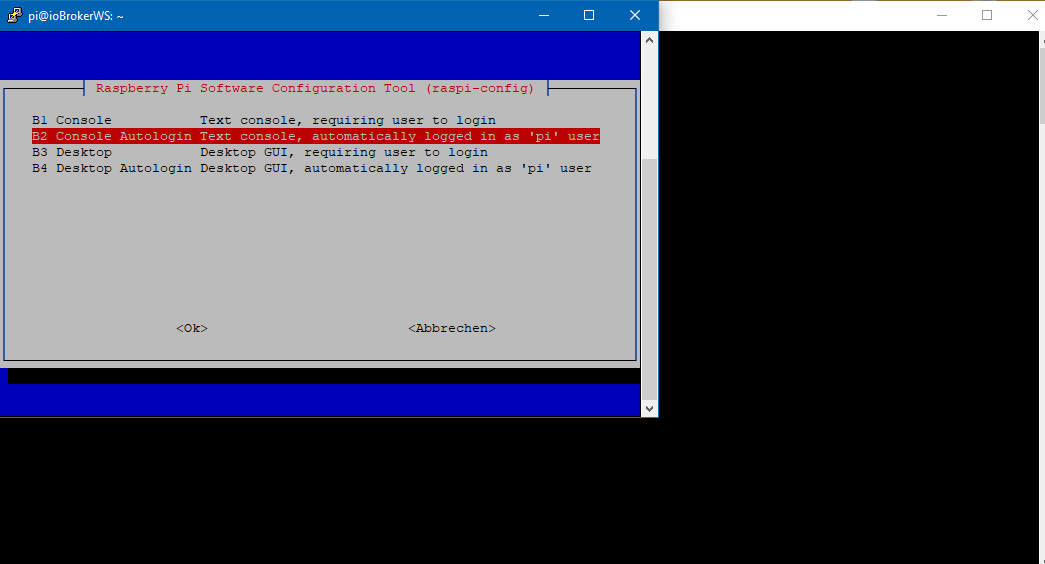
Ubuntu auf Intel NUC PC
Node.js v14.18.1
NPM 6.14.15 -
@WalterKA
Die Forum-suche ist wie bei fast jedem Forum eher suboptimal, obwohl ständig drauf hingewiesen wird, damit finde ich auch sehr selten was. Da ist Google besser, wenn man ein fach den Zusatz "IOBroker Forum" mit rein packt. -
Thomas, das kann ich inzwischen machen wenn ich wüsste wie es geht. Hatte das am Anfang auf jeden Fall gebraucht, alleine schon um Dekonz zu installieren und einzurichten.
Ich hätte die GUI auch schon deinstalliert wenn ich gewusst hätte wie und wenn ich Zeit dazu gehabt hätte danach zu googeln.
@WalterKA
Dann knips den Desktop aus. Insbesondere bei dem kleinen RAM auf deinem Pi:sudo raspi-configDa gibt es (unter Booting oder so ähnlich) eine Einstellung dafür. Bin gerade unterwegs, kann später Mal genauer schauen.
-
Ich habe gefunden wo ich die Desktopumgebung abschalten kann.
Ich frage mich jetzt was sinnvoll ist. Console Autologin, oder Console.
Ich finde nicht heraus ob der pi weiter bootet wenn nur Console ausgewählt ist und ich weiß auch nicht ob ich mich dann mit Putty einloggen kann wenn ich nur Console als Bootoption ohne Autologin einstelle.@WalterKA
Da Du auf Deinem Pi wahrscheinlich eh kein root User oder zweiten User angelegt hast, wird die Option "autologin als user PI" wohl passen, wobei ich eher gerne selbst entscheiden möchte wie ich rein gehe.
Dazu wird Thomas aber bestimmt die bessere Antwort liefern können, wobei ich glaube er wird auch den PI User setzten ;-)@Thomas-Braun
Er hat die Einstellung schon gefunden, möchte nur wissen welche der zwei Optionen wohl besser wäre. -
Ich habe gefunden wo ich die Desktopumgebung abschalten kann.
Ich frage mich jetzt was sinnvoll ist. Console Autologin, oder Console.
Ich finde nicht heraus ob der pi weiter bootet wenn nur Console ausgewählt ist und ich weiß auch nicht ob ich mich dann mit Putty einloggen kann wenn ich nur Console als Bootoption ohne Autologin einstelle.@WalterKA Der einziger Unterschied ist dass am ende der X-Server (also die GUI) nicht gestartet wird. Die Services wie sshd laufen weiter. Für iobroker nehme ich immer die Raspbian Buster Lite vVersion (Minimal image based on Debian Buster), dann bleiben mehr Ressourcen für iobroker, anstatt sie für Gui, die man nicht braucht zu verschwenden.
Nach der Erstellung der SD-Karte erstelle, noch bevor ich die Karte raus nehme, erstelle ich eine leere Textdatei mit dem Namen ssh. Dann wird beim booten der sshd gestartet. -
Danke, das wusste ich so noch nich, wohl auch weil recht viele AntwortPost so oder so ähnlich beginnen:
"Schon mal im Forum gesucht..." -
@WalterKA
Da Du auf Deinem Pi wahrscheinlich eh kein root User oder zweiten User angelegt hast, wird die Option "autologin als user PI" wohl passen, wobei ich eher gerne selbst entscheiden möchte wie ich rein gehe.
Dazu wird Thomas aber bestimmt die bessere Antwort liefern können, wobei ich glaube er wird auch den PI User setzten ;-)@Thomas-Braun
Er hat die Einstellung schon gefunden, möchte nur wissen welche der zwei Optionen wohl besser wäre.@Jan1 sagte in Adapter Updates können nicht installiert werden:
@WalterKA
Da Du auf Deinem Pi wahrscheinlich eh kein root User oder zweiten User angelegt hast, wird die Option "autologin als user PI" wohl passen, wobei ich eher gerne selbst entscheiden möchte wie ich rein gehe.Sehe ich auch so. Allerdings sind passwörter da um sie zu benutzen. Ganz normal Login Vorgang sollte IMHO gewählt werden. Will ich automatisches Einloggen mit putty oder Mobaxterm, dann nutze ich eine ssh-key.
-
Ich habe gefunden wo ich die Desktopumgebung abschalten kann.
Ich frage mich jetzt was sinnvoll ist. Console Autologin, oder Console.
Ich finde nicht heraus ob der pi weiter bootet wenn nur Console ausgewählt ist und ich weiß auch nicht ob ich mich dann mit Putty einloggen kann wenn ich nur Console als Bootoption ohne Autologin einstelle.@WalterKA Ich habe in meinem kleinen Netz ohne andere User die Option 'Autologin' als User Pi gesetzt
-
@Jan1 sagte in Adapter Updates können nicht installiert werden:
@WalterKA
Da Du auf Deinem Pi wahrscheinlich eh kein root User oder zweiten User angelegt hast, wird die Option "autologin als user PI" wohl passen, wobei ich eher gerne selbst entscheiden möchte wie ich rein gehe.Sehe ich auch so. Allerdings sind passwörter da um sie zu benutzen. Ganz normal Login Vorgang sollte IMHO gewählt werden. Will ich automatisches Einloggen mit putty oder Mobaxterm, dann nutze ich eine ssh-key.
-
@a200
Da wird wenn ich mich recht erinnere das Passwort schon noch abgefragt, nur der User "Pi" vorgegeben.@Jan1 sagte in Adapter Updates können nicht installiert werden:
@a200
Da wird wenn ich mich recht erinnere das Passwort schon noch abgefragt, nur der User "Pi" vorgegeben.Standardmässig hast du nur den User "pi" mit dem Passwort "raspberry". Als root kannst du dich erstmal ohne Weiteres nicht einloggen. Du musst entweder mit
sudo su -zum root switchen um als root eingeloggt zu sein, oder du erlaubst in /etc/sshd dass root sich einloggen darf. Das ist meine Lieblingslösung. Dann erstelle ich einen ssh-key und lege den in /root/.ssh Verzeichnis ab. Bei putty oder mobyxterm kannst du den key angeben. und ab dann loggst du dich jedes Mal sicher und schnell als root auf deinem Raspi.
Falls einer Hilfestellung braucht, kann ich gerne helfen.
IoBroker auf QNAP TS-451, Raspi und NUC


Hey! Du scheinst an dieser Unterhaltung interessiert zu sein, hast aber noch kein Konto.
Hast du es satt, bei jedem Besuch durch die gleichen Beiträge zu scrollen? Wenn du dich für ein Konto anmeldest, kommst du immer genau dorthin zurück, wo du zuvor warst, und kannst dich über neue Antworten benachrichtigen lassen (entweder per E-Mail oder Push-Benachrichtigung). Du kannst auch Lesezeichen speichern und Beiträge positiv bewerten, um anderen Community-Mitgliedern deine Wertschätzung zu zeigen.
Mit deinem Input könnte dieser Beitrag noch besser werden 💗
Registrieren Anmelden306
Online33.1k
Benutzende83.7k
Themen1.3m
Beiträge