
NEWS




HS100 Adapter Fehlermeldungen
-
Bei mir klappt die Version von GitHub leider nicht. Der Adapter startet nicht mehr...
2020-06-07 12:10:08.895 - error: hs100.0 (4288) [create_state] : TCP Timeout, stack: Error: TCP Timeout
at Timeout._onTimeout (I:\iobroker\node_modules\tplink-smarthome-api\lib\network\tcp-socket.js:62:22)
at listOnTimeout (internal/timers.js:549:17)
at processTimers (internal/timers.js:492:7)
2020-06-07 12:10:12.645 - info: host.IO-Broker-Server stopInstance system.adapter.hs100.0 (force=false, process=true)
2020-06-07 12:10:12.645 - info: host.IO-Broker-Server stopInstance system.adapter.hs100.0 send kill signal
2020-06-07 12:10:12.641 - info: hs100.0 (4288) Got terminate signal TERMINATE_YOURSELF
2020-06-07 12:10:12.642 - info: hs100.0 (4288) cleaned everything up...
2020-06-07 12:10:12.643 - info: hs100.0 (4288) terminating
2020-06-07 12:10:12.643 - info: hs100.0 (4288) Terminated (ADAPTER_REQUESTED_TERMINATION): Without reason
2020-06-07 12:10:13.184 - info: host.IO-Broker-Server instance system.adapter.hs100.0 terminated with code 11 (ADAPTER_REQUESTED_TERMINATION)
2020-06-07 12:10:15.665 - info: host.IO-Broker-Server instance system.adapter.hs100.0 started with pid 8208
2020-06-07 12:10:16.236 - info: hs100.0 (8208) starting. Version 2.0.0 in I:/iobroker/node_modules/iobroker.hs100, node: v12.16.1, js-controller: 3.1.5
2020-06-07 12:10:26.254 - error: hs100.0 (8208) [create_state] : TCP Timeout, stack: Error: TCP Timeout
at Timeout._onTimeout (I:\iobroker\node_modules\tplink-smarthome-api\lib\network\tcp-socket.js:62:22)
at listOnTimeout (internal/timers.js:549:17)
at processTimers (internal/timers.js:492:7)
2020-06-07 12:10:36.265 - warn: hs100.0 (8208) getDevice Socket connection Timeout : 192.168.1.240
IO-Broker Master/Slave auf Windows 11 64bit, NPM 10.9.4, Node 22.21.1 js-controller 7.0.7
-
Bei mir klappt die Version von GitHub leider nicht. Der Adapter startet nicht mehr...
2020-06-07 12:10:08.895 - error: hs100.0 (4288) [create_state] : TCP Timeout, stack: Error: TCP Timeout at Timeout._onTimeout (I:\iobroker\node_modules\tplink-smarthome-api\lib\network\tcp-socket.js:62:22) at listOnTimeout (internal/timers.js:549:17) at processTimers (internal/timers.js:492:7) 2020-06-07 12:10:12.645 - info: host.IO-Broker-Server stopInstance system.adapter.hs100.0 (force=false, process=true) 2020-06-07 12:10:12.645 - info: host.IO-Broker-Server stopInstance system.adapter.hs100.0 send kill signal 2020-06-07 12:10:12.641 - info: hs100.0 (4288) Got terminate signal TERMINATE_YOURSELF 2020-06-07 12:10:12.642 - info: hs100.0 (4288) cleaned everything up... 2020-06-07 12:10:12.643 - info: hs100.0 (4288) terminating 2020-06-07 12:10:12.643 - info: hs100.0 (4288) Terminated (ADAPTER_REQUESTED_TERMINATION): Without reason 2020-06-07 12:10:13.184 - info: host.IO-Broker-Server instance system.adapter.hs100.0 terminated with code 11 (ADAPTER_REQUESTED_TERMINATION) 2020-06-07 12:10:15.665 - info: host.IO-Broker-Server instance system.adapter.hs100.0 started with pid 8208 2020-06-07 12:10:16.236 - info: hs100.0 (8208) starting. Version 2.0.0 in I:/iobroker/node_modules/iobroker.hs100, node: v12.16.1, js-controller: 3.1.5 2020-06-07 12:10:26.254 - error: hs100.0 (8208) [create_state] : TCP Timeout, stack: Error: TCP Timeout at Timeout._onTimeout (I:\iobroker\node_modules\tplink-smarthome-api\lib\network\tcp-socket.js:62:22) at listOnTimeout (internal/timers.js:549:17) at processTimers (internal/timers.js:492:7) 2020-06-07 12:10:36.265 - warn: hs100.0 (8208) getDevice Socket connection Timeout : 192.168.1.240 -
@surfer09 sind alle Dosen erreichbar und am Strom ???
wenn nicht soltest du diese auf disable setzten ..zeigmal deine konfuguration Seite

@arteck: Ja, sind definitiv alle erreichbar. Bei mir tauchen auch immer wieder in unregelmäßigen Abständen diese Meldungen im LOG auf:
2020-06-07 21:26:29.030 - info: hs100.0 (3664) terminating
2020-06-07 21:26:29.031 - info: hs100.0 (3664) Terminated (NO_ERROR): Without reason
2020-06-07 21:26:29.562 - error: host.IO-Broker-Server Caught by controller[1]: TCP 192.168.1.240:9999 Error: TCP Timeout
2020-06-07 21:26:29.564 - error: host.IO-Broker-Server Caught by controller[1]: at Timeout._onTimeout (I:\iobroker\node_modules\tplink-smarthome-api\lib\network\tcp-socket.js:62:22)
2020-06-07 21:26:29.565 - error: host.IO-Broker-Server Caught by controller[1]: at listOnTimeout (internal/timers.js:549:17)
2020-06-07 21:26:29.565 - error: host.IO-Broker-Server Caught by controller[1]: at processTimers (internal/timers.js:492:7)
2020-06-07 21:26:29.565 - error: host.IO-Broker-Server Caught by controller[2]: TCP 192.168.1.240:9999 Error: TCP Timeout
2020-06-07 21:26:29.565 - error: host.IO-Broker-Server Caught by controller[2]: at Timeout._onTimeout (I:\iobroker\node_modules\tplink-smarthome-api\lib\network\tcp-socket.js:62:22)
2020-06-07 21:26:29.565 - error: host.IO-Broker-Server Caught by controller[2]: at listOnTimeout (internal/timers.js:549:17)
2020-06-07 21:26:29.565 - error: host.IO-Broker-Server Caught by controller[2]: at processTimers (internal/timers.js:492:7)
2020-06-07 21:26:29.565 - error: host.IO-Broker-Server Caught by controller[3]: TCP 192.168.1.240:9999 Error: TCP Timeout
2020-06-07 21:26:29.565 - error: host.IO-Broker-Server Caught by controller[3]: at Timeout._onTimeout (I:\iobroker\node_modules\tplink-smarthome-api\lib\network\tcp-socket.js:62:22)
2020-06-07 21:26:29.565 - error: host.IO-Broker-Server Caught by controller[3]: at listOnTimeout (internal/timers.js:549:17)
2020-06-07 21:26:29.565 - error: host.IO-Broker-Server Caught by controller[3]: at processTimers (internal/timers.js:492:7)
2020-06-07 21:26:29.565 - error: host.IO-Broker-Server Caught by controller[4]: TCP 192.168.1.240:9999 Error: TCP Timeout
2020-06-07 21:26:29.565 - error: host.IO-Broker-Server Caught by controller[4]: at Timeout._onTimeout (I:\iobroker\node_modules\tplink-smarthome-api\lib\network\tcp-socket.js:62:22)
2020-06-07 21:26:29.566 - error: host.IO-Broker-Server Caught by controller[4]: at listOnTimeout (internal/timers.js:549:17)
2020-06-07 21:26:29.566 - error: host.IO-Broker-Server Caught by controller[4]: at processTimers (internal/timers.js:492:7)
2020-06-07 21:26:29.566 - error: host.IO-Broker-Server Caught by controller[5]: TCP 192.168.1.182:9999 Error: TCP Timeout
2020-06-07 21:26:29.566 - error: host.IO-Broker-Server Caught by controller[5]: at Timeout._onTimeout (I:\iobroker\node_modules\tplink-smarthome-api\lib\network\tcp-socket.js:62:22)
2020-06-07 21:26:29.566 - error: host.IO-Broker-Server Caught by controller[5]: at listOnTimeout (internal/timers.js:549:17)
2020-06-07 21:26:29.566 - error: host.IO-Broker-Server Caught by controller[5]: at processTimers (internal/timers.js:492:7)
2020-06-07 21:26:29.566 - error: host.IO-Broker-Server Caught by controller[6]: TCP 192.168.1.240:9999 Error: TCP Timeout
2020-06-07 21:26:29.566 - error: host.IO-Broker-Server Caught by controller[6]: at Timeout._onTimeout (I:\iobroker\node_modules\tplink-smarthome-api\lib\network\tcp-socket.js:62:22)
2020-06-07 21:26:29.566 - error: host.IO-Broker-Server Caught by controller[6]: at listOnTimeout (internal/timers.js:549:17)
2020-06-07 21:26:29.566 - error: host.IO-Broker-Server Caught by controller[6]: at processTimers (internal/timers.js:492:7)
2020-06-07 21:26:29.566 - error: host.IO-Broker-Server Caught by controller[7]: TCP 192.168.1.182:9999 Error: TCP Timeout
2020-06-07 21:26:29.566 - error: host.IO-Broker-Server Caught by controller[7]: at Timeout._onTimeout (I:\iobroker\node_modules\tplink-smarthome-api\lib\network\tcp-socket.js:62:22)
2020-06-07 21:26:29.566 - error: host.IO-Broker-Server Caught by controller[7]: at listOnTimeout (internal/timers.js:549:17)
2020-06-07 21:26:29.566 - error: host.IO-Broker-Server Caught by controller[7]: at processTimers (internal/timers.js:492:7)
2020-06-07 21:26:29.566 - error: host.IO-Broker-Server Caught by controller[8]: TCP 192.168.1.240:9999 Error: TCP Timeout
2020-06-07 21:26:29.566 - error: host.IO-Broker-Server Caught by controller[8]: at Timeout._onTimeout (I:\iobroker\node_modules\tplink-smarthome-api\lib\network\tcp-socket.js:62:22)
2020-06-07 21:26:29.567 - error: host.IO-Broker-Server Caught by controller[8]: at listOnTimeout (internal/timers.js:549:17)
2020-06-07 21:26:29.567 - error: host.IO-Broker-Server Caught by controller[8]: at processTimers (internal/timers.js:492:7)
2020-06-07 21:26:29.567 - error: host.IO-Broker-Server Caught by controller[9]: TCP 192.168.1.182:9999 Error: read ECONNRESET
2020-06-07 21:26:29.567 - error: host.IO-Broker-Server Caught by controller[9]: at TCP.onStreamRead (internal/stream_base_commons.js:205:27) {
2020-06-07 21:26:29.567 - error: host.IO-Broker-Server Caught by controller[9]: errno: 'ECONNRESET',
2020-06-07 21:26:29.567 - error: host.IO-Broker-Server Caught by controller[9]: code: 'ECONNRESET',
2020-06-07 21:26:29.567 - error: host.IO-Broker-Server Caught by controller[9]: syscall: 'read'
2020-06-07 21:26:29.567 - error: host.IO-Broker-Server Caught by controller[9]: }
2020-06-07 21:26:29.567 - error: host.IO-Broker-Server Caught by controller[10]: TCP 192.168.1.182:9999 Error: read ECONNRESET
2020-06-07 21:26:29.567 - error: host.IO-Broker-Server Caught by controller[10]: at TCP.onStreamRead (internal/stream_base_commons.js:205:27) {
2020-06-07 21:26:29.567 - error: host.IO-Broker-Server Caught by controller[10]: errno: 'ECONNRESET',
2020-06-07 21:26:29.567 - error: host.IO-Broker-Server Caught by controller[10]: code: 'ECONNRESET',
2020-06-07 21:26:29.567 - error: host.IO-Broker-Server Caught by controller[10]: syscall: 'read'
2020-06-07 21:26:29.567 - error: host.IO-Broker-Server Caught by controller[10]: }
2020-06-07 21:26:29.567 - error: host.IO-Broker-Server Caught by controller[11]: TCP 192.168.1.182:9999 Error: read ECONNRESET
2020-06-07 21:26:29.567 - error: host.IO-Broker-Server Caught by controller[11]: at TCP.onStreamRead (internal/stream_base_commons.js:205:27) {
2020-06-07 21:26:29.567 - error: host.IO-Broker-Server Caught by controller[11]: errno: 'ECONNRESET',
2020-06-07 21:26:29.568 - error: host.IO-Broker-Server Caught by controller[11]: code: 'ECONNRESET',
2020-06-07 21:26:29.568 - error: host.IO-Broker-Server Caught by controller[11]: syscall: 'read'
2020-06-07 21:26:29.568 - error: host.IO-Broker-Server Caught by controller[11]: }
2020-06-07 21:26:29.568 - error: host.IO-Broker-Server Caught by controller[12]: TCP 192.168.1.182:9999 Error: read ECONNRESET
2020-06-07 21:26:29.568 - error: host.IO-Broker-Server Caught by controller[12]: at TCP.onStreamRead (internal/stream_base_commons.js:205:27) {
2020-06-07 21:26:29.568 - error: host.IO-Broker-Server Caught by controller[12]: errno: 'ECONNRESET',
2020-06-07 21:26:29.568 - error: host.IO-Broker-Server Caught by controller[12]: code: 'ECONNRESET',
2020-06-07 21:26:29.568 - error: host.IO-Broker-Server Caught by controller[12]: syscall: 'read'
2020-06-07 21:26:29.568 - error: host.IO-Broker-Server Caught by controller[12]: }
2020-06-07 21:26:29.568 - info: host.IO-Broker-Server instance system.adapter.hs100.0 terminated with code 0 (NO_ERROR
Den Screenshot habe ich mit angehangen.
Und wie schon beschrieben, deinen Adapter von GitHub bekomme ich bei mir nicht auf „grün“. Ich bin aktuell auf Version 1.1.5 zurück gegangen.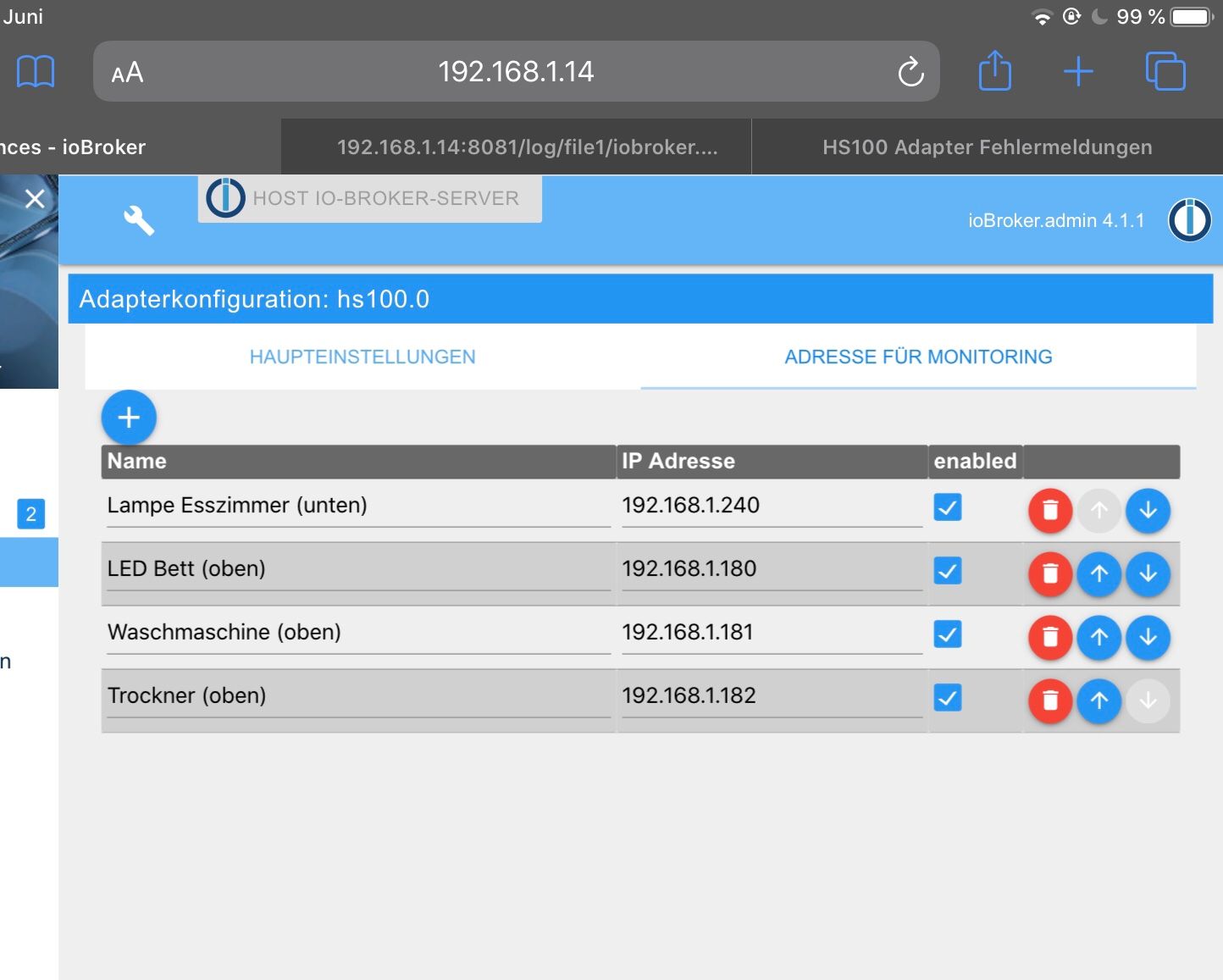
IO-Broker Master/Slave auf Windows 11 64bit, NPM 10.9.4, Node 22.21.1 js-controller 7.0.7
-
@arteck: Ja, sind definitiv alle erreichbar. Bei mir tauchen auch immer wieder in unregelmäßigen Abständen diese Meldungen im LOG auf:
2020-06-07 21:26:29.030 - info: hs100.0 (3664) terminating
2020-06-07 21:26:29.031 - info: hs100.0 (3664) Terminated (NO_ERROR): Without reason
2020-06-07 21:26:29.562 - error: host.IO-Broker-Server Caught by controller[1]: TCP 192.168.1.240:9999 Error: TCP Timeout
2020-06-07 21:26:29.564 - error: host.IO-Broker-Server Caught by controller[1]: at Timeout._onTimeout (I:\iobroker\node_modules\tplink-smarthome-api\lib\network\tcp-socket.js:62:22)
2020-06-07 21:26:29.565 - error: host.IO-Broker-Server Caught by controller[1]: at listOnTimeout (internal/timers.js:549:17)
2020-06-07 21:26:29.565 - error: host.IO-Broker-Server Caught by controller[1]: at processTimers (internal/timers.js:492:7)
2020-06-07 21:26:29.565 - error: host.IO-Broker-Server Caught by controller[2]: TCP 192.168.1.240:9999 Error: TCP Timeout
2020-06-07 21:26:29.565 - error: host.IO-Broker-Server Caught by controller[2]: at Timeout._onTimeout (I:\iobroker\node_modules\tplink-smarthome-api\lib\network\tcp-socket.js:62:22)
2020-06-07 21:26:29.565 - error: host.IO-Broker-Server Caught by controller[2]: at listOnTimeout (internal/timers.js:549:17)
2020-06-07 21:26:29.565 - error: host.IO-Broker-Server Caught by controller[2]: at processTimers (internal/timers.js:492:7)
2020-06-07 21:26:29.565 - error: host.IO-Broker-Server Caught by controller[3]: TCP 192.168.1.240:9999 Error: TCP Timeout
2020-06-07 21:26:29.565 - error: host.IO-Broker-Server Caught by controller[3]: at Timeout._onTimeout (I:\iobroker\node_modules\tplink-smarthome-api\lib\network\tcp-socket.js:62:22)
2020-06-07 21:26:29.565 - error: host.IO-Broker-Server Caught by controller[3]: at listOnTimeout (internal/timers.js:549:17)
2020-06-07 21:26:29.565 - error: host.IO-Broker-Server Caught by controller[3]: at processTimers (internal/timers.js:492:7)
2020-06-07 21:26:29.565 - error: host.IO-Broker-Server Caught by controller[4]: TCP 192.168.1.240:9999 Error: TCP Timeout
2020-06-07 21:26:29.565 - error: host.IO-Broker-Server Caught by controller[4]: at Timeout._onTimeout (I:\iobroker\node_modules\tplink-smarthome-api\lib\network\tcp-socket.js:62:22)
2020-06-07 21:26:29.566 - error: host.IO-Broker-Server Caught by controller[4]: at listOnTimeout (internal/timers.js:549:17)
2020-06-07 21:26:29.566 - error: host.IO-Broker-Server Caught by controller[4]: at processTimers (internal/timers.js:492:7)
2020-06-07 21:26:29.566 - error: host.IO-Broker-Server Caught by controller[5]: TCP 192.168.1.182:9999 Error: TCP Timeout
2020-06-07 21:26:29.566 - error: host.IO-Broker-Server Caught by controller[5]: at Timeout._onTimeout (I:\iobroker\node_modules\tplink-smarthome-api\lib\network\tcp-socket.js:62:22)
2020-06-07 21:26:29.566 - error: host.IO-Broker-Server Caught by controller[5]: at listOnTimeout (internal/timers.js:549:17)
2020-06-07 21:26:29.566 - error: host.IO-Broker-Server Caught by controller[5]: at processTimers (internal/timers.js:492:7)
2020-06-07 21:26:29.566 - error: host.IO-Broker-Server Caught by controller[6]: TCP 192.168.1.240:9999 Error: TCP Timeout
2020-06-07 21:26:29.566 - error: host.IO-Broker-Server Caught by controller[6]: at Timeout._onTimeout (I:\iobroker\node_modules\tplink-smarthome-api\lib\network\tcp-socket.js:62:22)
2020-06-07 21:26:29.566 - error: host.IO-Broker-Server Caught by controller[6]: at listOnTimeout (internal/timers.js:549:17)
2020-06-07 21:26:29.566 - error: host.IO-Broker-Server Caught by controller[6]: at processTimers (internal/timers.js:492:7)
2020-06-07 21:26:29.566 - error: host.IO-Broker-Server Caught by controller[7]: TCP 192.168.1.182:9999 Error: TCP Timeout
2020-06-07 21:26:29.566 - error: host.IO-Broker-Server Caught by controller[7]: at Timeout._onTimeout (I:\iobroker\node_modules\tplink-smarthome-api\lib\network\tcp-socket.js:62:22)
2020-06-07 21:26:29.566 - error: host.IO-Broker-Server Caught by controller[7]: at listOnTimeout (internal/timers.js:549:17)
2020-06-07 21:26:29.566 - error: host.IO-Broker-Server Caught by controller[7]: at processTimers (internal/timers.js:492:7)
2020-06-07 21:26:29.566 - error: host.IO-Broker-Server Caught by controller[8]: TCP 192.168.1.240:9999 Error: TCP Timeout
2020-06-07 21:26:29.566 - error: host.IO-Broker-Server Caught by controller[8]: at Timeout._onTimeout (I:\iobroker\node_modules\tplink-smarthome-api\lib\network\tcp-socket.js:62:22)
2020-06-07 21:26:29.567 - error: host.IO-Broker-Server Caught by controller[8]: at listOnTimeout (internal/timers.js:549:17)
2020-06-07 21:26:29.567 - error: host.IO-Broker-Server Caught by controller[8]: at processTimers (internal/timers.js:492:7)
2020-06-07 21:26:29.567 - error: host.IO-Broker-Server Caught by controller[9]: TCP 192.168.1.182:9999 Error: read ECONNRESET
2020-06-07 21:26:29.567 - error: host.IO-Broker-Server Caught by controller[9]: at TCP.onStreamRead (internal/stream_base_commons.js:205:27) {
2020-06-07 21:26:29.567 - error: host.IO-Broker-Server Caught by controller[9]: errno: 'ECONNRESET',
2020-06-07 21:26:29.567 - error: host.IO-Broker-Server Caught by controller[9]: code: 'ECONNRESET',
2020-06-07 21:26:29.567 - error: host.IO-Broker-Server Caught by controller[9]: syscall: 'read'
2020-06-07 21:26:29.567 - error: host.IO-Broker-Server Caught by controller[9]: }
2020-06-07 21:26:29.567 - error: host.IO-Broker-Server Caught by controller[10]: TCP 192.168.1.182:9999 Error: read ECONNRESET
2020-06-07 21:26:29.567 - error: host.IO-Broker-Server Caught by controller[10]: at TCP.onStreamRead (internal/stream_base_commons.js:205:27) {
2020-06-07 21:26:29.567 - error: host.IO-Broker-Server Caught by controller[10]: errno: 'ECONNRESET',
2020-06-07 21:26:29.567 - error: host.IO-Broker-Server Caught by controller[10]: code: 'ECONNRESET',
2020-06-07 21:26:29.567 - error: host.IO-Broker-Server Caught by controller[10]: syscall: 'read'
2020-06-07 21:26:29.567 - error: host.IO-Broker-Server Caught by controller[10]: }
2020-06-07 21:26:29.567 - error: host.IO-Broker-Server Caught by controller[11]: TCP 192.168.1.182:9999 Error: read ECONNRESET
2020-06-07 21:26:29.567 - error: host.IO-Broker-Server Caught by controller[11]: at TCP.onStreamRead (internal/stream_base_commons.js:205:27) {
2020-06-07 21:26:29.567 - error: host.IO-Broker-Server Caught by controller[11]: errno: 'ECONNRESET',
2020-06-07 21:26:29.568 - error: host.IO-Broker-Server Caught by controller[11]: code: 'ECONNRESET',
2020-06-07 21:26:29.568 - error: host.IO-Broker-Server Caught by controller[11]: syscall: 'read'
2020-06-07 21:26:29.568 - error: host.IO-Broker-Server Caught by controller[11]: }
2020-06-07 21:26:29.568 - error: host.IO-Broker-Server Caught by controller[12]: TCP 192.168.1.182:9999 Error: read ECONNRESET
2020-06-07 21:26:29.568 - error: host.IO-Broker-Server Caught by controller[12]: at TCP.onStreamRead (internal/stream_base_commons.js:205:27) {
2020-06-07 21:26:29.568 - error: host.IO-Broker-Server Caught by controller[12]: errno: 'ECONNRESET',
2020-06-07 21:26:29.568 - error: host.IO-Broker-Server Caught by controller[12]: code: 'ECONNRESET',
2020-06-07 21:26:29.568 - error: host.IO-Broker-Server Caught by controller[12]: syscall: 'read'
2020-06-07 21:26:29.568 - error: host.IO-Broker-Server Caught by controller[12]: }
2020-06-07 21:26:29.568 - info: host.IO-Broker-Server instance system.adapter.hs100.0 terminated with code 0 (NO_ERROR
Den Screenshot habe ich mit angehangen.
Und wie schon beschrieben, deinen Adapter von GitHub bekomme ich bei mir nicht auf „grün“. Ich bin aktuell auf Version 1.1.5 zurück gegangen.@surfer09 ok puss uff
installiere nochmal die 2.0.. mach bitte die .240 und die .182 im Adapter aus..
läuft der dann ?wenn nicht mach den bitte mal auf Debug und poste das LOG
zigbee hab ich, zwave auch, nuc's genauso und HA auch
-
@surfer09 ok puss uff
installiere nochmal die 2.0.. mach bitte die .240 und die .182 im Adapter aus..
läuft der dann ?wenn nicht mach den bitte mal auf Debug und poste das LOG
@arteck Gerade den Adapter in Version 2.0 installiert und die beiden Geräte deaktiviert - siehe da - der Status wird grün. Was ist denn mit den beiden Steckdosen?
IO-Broker Master/Slave auf Windows 11 64bit, NPM 10.9.4, Node 22.21.1 js-controller 7.0.7
-
@arteck Gerade den Adapter in Version 2.0 installiert und die beiden Geräte deaktiviert - siehe da - der Status wird grün. Was ist denn mit den beiden Steckdosen?
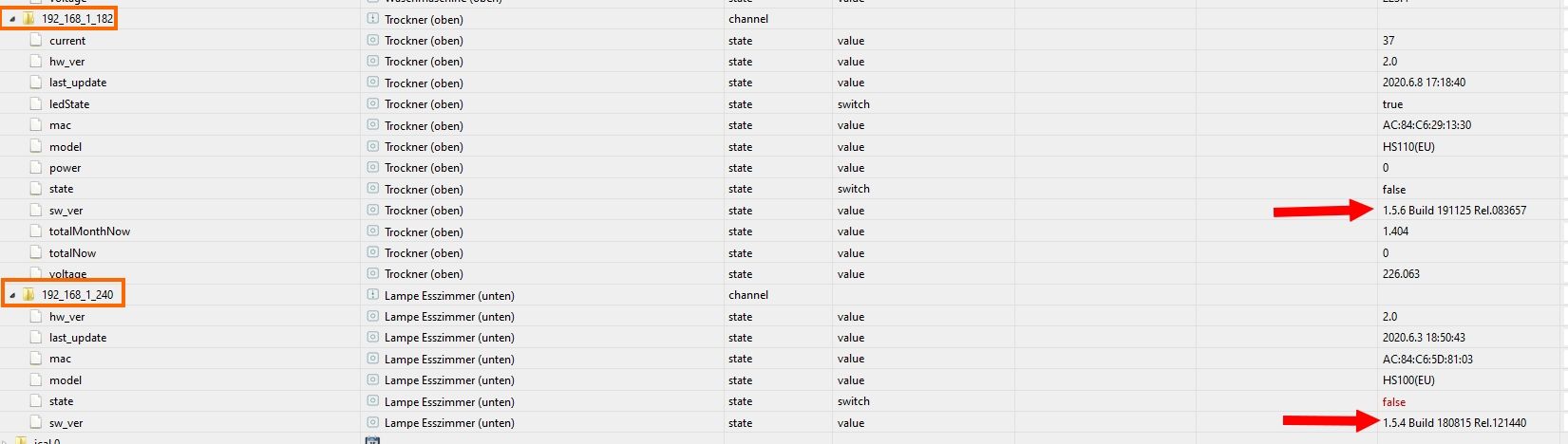
@arteck : Ich glaub' ich weiß, woran es liegen könnte! Er hat mit der einen Steckdose ein Problem, wo die Firmware noch nicht auf Version 1.5.6 ist. Diese Steckdose ist noch auf der 1.5.4. Sobald ich diese im Adapter aktiviere, bleibt der Status auf gelb und der Adapter startet nicht.
IO-Broker Master/Slave auf Windows 11 64bit, NPM 10.9.4, Node 22.21.1 js-controller 7.0.7
-
@arteck : Ich glaub' ich weiß, woran es liegen könnte! Er hat mit der einen Steckdose ein Problem, wo die Firmware noch nicht auf Version 1.5.6 ist. Diese Steckdose ist noch auf der 1.5.4. Sobald ich diese im Adapter aktiviere, bleibt der Status auf gelb und der Adapter startet nicht.
versuchmal folgendes
adapter stoppen
lösche nur den einen Datenpunkt (zb _240)
der wird dann neu erstellt bei adapter start
aktiviere die _240 dose und starte den adapterzigbee hab ich, zwave auch, nuc's genauso und HA auch
-
versuchmal folgendes
adapter stoppen
lösche nur den einen Datenpunkt (zb _240)
der wird dann neu erstellt bei adapter start
aktiviere die _240 dose und starte den adapter@arteck Geht nicht. Ich habe den kompletten Datenpunkt gelöscht, sobald ich das Gerät wieder aktiviere, startet der Adapter nicht mehr.
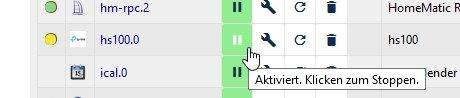
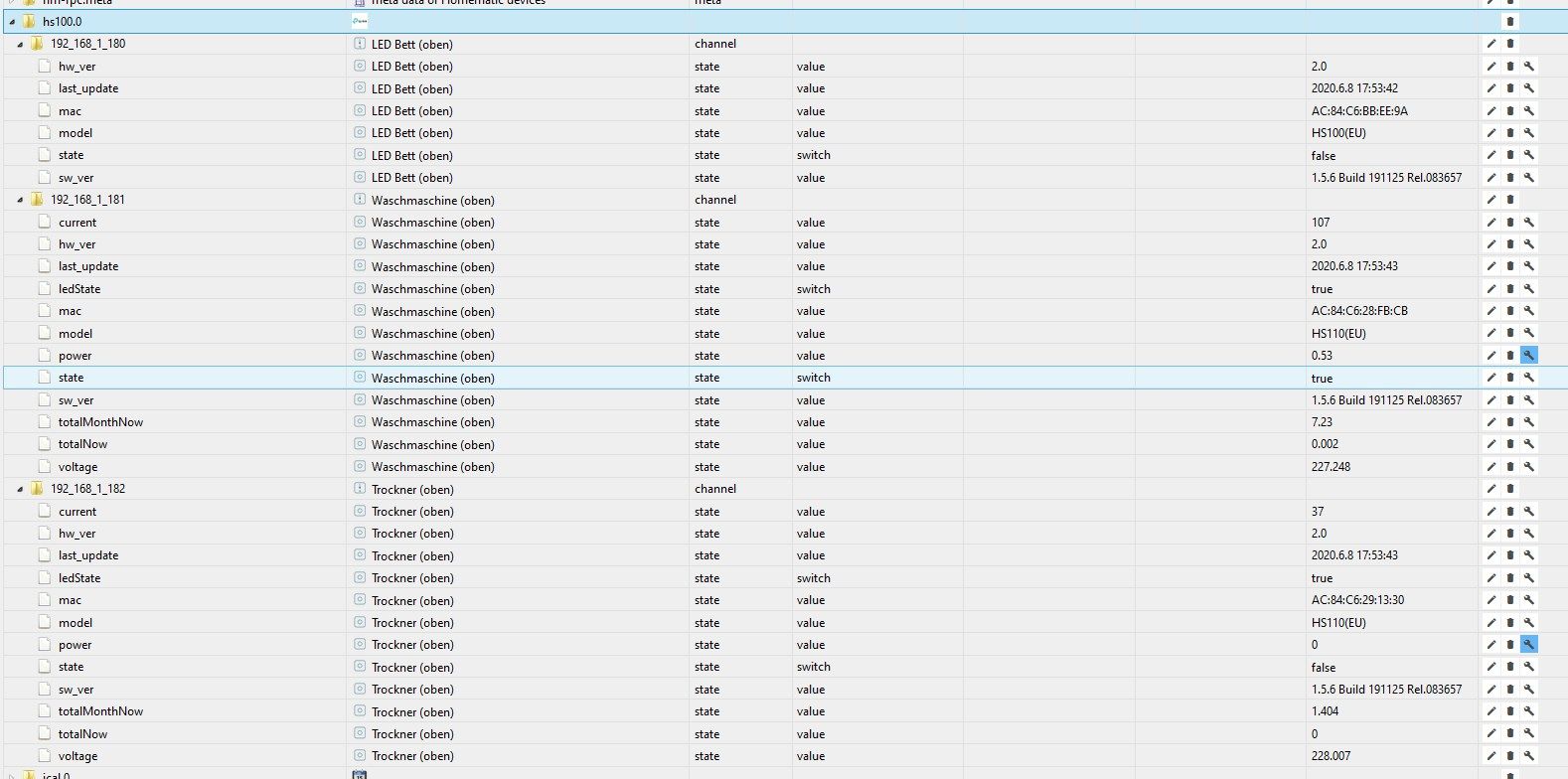
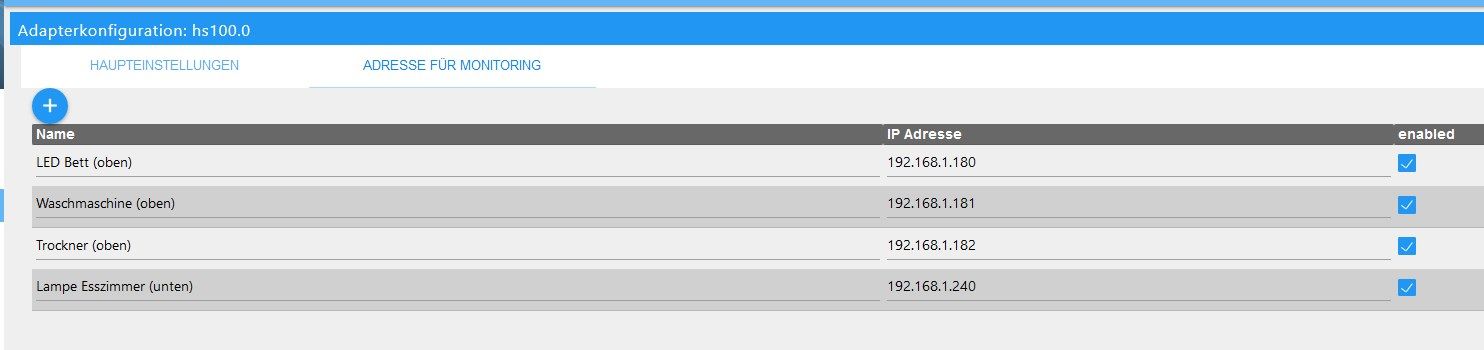
Er erzeugt aber auch den Datenpunkt nicht mehr.
-
ich konnte heute problemlos auf 2.0 aktualisieren. Melde mich wieder wenn ich Ergebnisse habe.
-
bisher sieht alles gut aus, kein einziger Fehler im LOG.
-
@arteck Geht nicht. Ich habe den kompletten Datenpunkt gelöscht, sobald ich das Gerät wieder aktiviere, startet der Adapter nicht mehr.
Er erzeugt aber auch den Datenpunkt nicht mehr.
-
da ich bisher nur stiller Mitleser war, das Thema für mich aber durchaus interessant und wichtig ist, wollte ich auch meinen Senf dazugeben:
Habe drei HS110-Steckdosen im Einsatz um Waschmaschinen und Trockner zu monitoren und hatte ebenfalls die hier schon genannten Timeoutprobleme! Nachdem ich nun bei allen drei auf Firmware 1.5.6. bin und die 2.0 des Adapters installiert habe, sind alle Fehler im Log weg!
@arteck, danke für deinen unermüdlichen Einsatz! -
@surfer09 dann mach alles aus nur den einen _240 an.. und debug infos an.. vielleicht bekommen wir das so raus
sonst update der Dose auf neue Firmware
@arteck sagte in HS100 Adapter Fehlermeldungen:
@surfer09 dann mach alles aus nur den einen _240 an.. und debug infos an.. vielleicht bekommen wir das so raus
sonst update der Dose auf neue Firmware
Ich werde die Steckdose updaten. Ich glaube der Aufwand für dich das erstmal zu analysieren lohnt nicht. Außerdem muss die Dose sowieso geupdatet werden.
Danke dir trotzdem! :-) -
Ich habe auch das Problem, dass der Adapter nicht grün wird. Meine Steckdosen sind auch noch Version 1.5.4. wie kann man die Steckdosen update
EDIT: hab’s gefunden. Nicht unter den Steckdosen, sondern in den Einstellungen in der App. Falls Noch jemand sucht 👍
-
Habe mal die 2.0er installiert und beide Steckdosen wieder in Betrieb genommen. Mal schauen, was das System so sagt. Zumindest lief der Adapter direkt auf Grün und hatte keine Fehlermeldungen :-)
@Berchemer sagte in HS100 Adapter Fehlermeldungen:
Habe mal die 2.0er installiert und beide Steckdosen wieder in Betrieb genommen. Mal schauen, was das System so sagt. Zumindest lief der Adapter direkt auf Grün und hatte keine Fehlermeldungen :-)
Hatte die zwei Steckdosen seit der Installation von 2.0 (seit 09.06) im Mittelgeschoss nebeneinander laufen.
Keine Skripte greifen darauf zu und es wird auch nichts mehr geschaltet, weil ich die Steckdosen wegen der Fehlermeldungen durch Zigbees ersetzt hatte.
Keine Fehlermeldungen soweit.
Gestern Vormittag habe ich eine der Steckdosen ins Erdgeschoss verbracht. Dort lief sie auch ohne Störungen bis heute morgen.Hier die kurze Fehlermeldung, da ich derzeit kein Debug eingeschaltet hatte. Also weiß ich auch nicht welche der Steckdosen den Fehler erzeugte. Schalte jetzt mal wieder auf Debug ;-)
Beide Dosen haben übrigens die v1.5.6 Build 191125 Rel 083657.hs100.0 2020-06-13 08:58:31.757 error at processTimers (internal/timers.js:492:7) hs100.0 2020-06-13 08:58:31.757 error at listOnTimeout (internal/timers.js:549:17) hs100.0 2020-06-13 08:58:31.757 error at Timeout._onTimeout (/opt/iobroker/node_modules/tplink-smarthome-api/lib/network/tcp-socket.js:62:22) hs100.0 2020-06-13 08:58:31.757 error (5097) [create_state] : TCP Timeout, stack: Error: TCP Timeout -
@Berchemer sagte in HS100 Adapter Fehlermeldungen:
Habe mal die 2.0er installiert und beide Steckdosen wieder in Betrieb genommen. Mal schauen, was das System so sagt. Zumindest lief der Adapter direkt auf Grün und hatte keine Fehlermeldungen :-)
Hatte die zwei Steckdosen seit der Installation von 2.0 (seit 09.06) im Mittelgeschoss nebeneinander laufen.
Keine Skripte greifen darauf zu und es wird auch nichts mehr geschaltet, weil ich die Steckdosen wegen der Fehlermeldungen durch Zigbees ersetzt hatte.
Keine Fehlermeldungen soweit.
Gestern Vormittag habe ich eine der Steckdosen ins Erdgeschoss verbracht. Dort lief sie auch ohne Störungen bis heute morgen.Hier die kurze Fehlermeldung, da ich derzeit kein Debug eingeschaltet hatte. Also weiß ich auch nicht welche der Steckdosen den Fehler erzeugte. Schalte jetzt mal wieder auf Debug ;-)
Beide Dosen haben übrigens die v1.5.6 Build 191125 Rel 083657.hs100.0 2020-06-13 08:58:31.757 error at processTimers (internal/timers.js:492:7) hs100.0 2020-06-13 08:58:31.757 error at listOnTimeout (internal/timers.js:549:17) hs100.0 2020-06-13 08:58:31.757 error at Timeout._onTimeout (/opt/iobroker/node_modules/tplink-smarthome-api/lib/network/tcp-socket.js:62:22) hs100.0 2020-06-13 08:58:31.757 error (5097) [create_state] : TCP Timeout, stack: Error: TCP Timeout@Berchemer sagte in HS100 Adapter Fehlermeldungen:
(5097) [create_state] : TCP Timeout, stack: Error: TCP Timeout
das ist aber bei adapter start.. der konnte die Dose nicht finden .. ergo konnte auch keine Object für anlegen
-
@Berchemer sagte in HS100 Adapter Fehlermeldungen:
(5097) [create_state] : TCP Timeout, stack: Error: TCP Timeout
das ist aber bei adapter start.. der konnte die Dose nicht finden .. ergo konnte auch keine Object für anlegen
@arteck sagte in HS100 Adapter Fehlermeldungen:
@Berchemer sagte in HS100 Adapter Fehlermeldungen:
(5097) [create_state] : TCP Timeout, stack: Error: TCP Timeout
das ist aber bei adapter start.. der konnte die Dose nicht finden .. ergo konnte auch keine Object für anlegen
Ok... Scheint tatsächlich nach einem Neustart gewesen zu sein.
Fehler ist auch seither nicht mehr aufgetreten.
Habe daher erstmal wieder Debug weggenommen.Wundert mich trotzdem, da die Datenpunkte ja existierten und nicht erst neu angelegt werden mussten :confused:
Fehlermeldungen scheinen jetzt - aus meiner Sicht und Konfiguration - abgefangen zu werden und Fehler treten somit bei mir scheinbar nicht mehr auf :-)
Danke!
-
Hallo zusammen,
ich bekomme im Minutentakt folgende Meldungen:host.raspberrypi 2020-06-16 09:06:37.526 info Restart adapter system.adapter.hs100.0 because enabled host.raspberrypi 2020-06-16 09:06:37.526 info instance system.adapter.hs100.0 terminated with code 0 (NO_ERROR) host.raspberrypi 2020-06-16 09:06:37.525 error Caught by controller[0]: TCP 192.168.123.111:9999 Error: TCP Timeout hs100.0 2020-06-16 09:06:37.002 info (2630) Terminated (NO_ERROR): Without reason hs100.0 2020-06-16 09:06:37.000 info (2630) terminating hs100.0 2020-06-16 09:06:36.988 info (2630) cleaned everything up... hs100.0 2020-06-16 09:06:36.986 error at Timer.processTimers (timers.js:223:10) hs100.0 2020-06-16 09:06:36.986 error at listOnTimeout (timers.js:263:5) hs100.0 2020-06-16 09:06:36.986 error at tryOnTimeout (timers.js:300:5) hs100.0 2020-06-16 09:06:36.986 error at ontimeout (timers.js:436:11) hs100.0 2020-06-16 09:06:36.986 error at Timeout.setTimeout [as _onTimeout] (/opt/iobroker/node_modules/tplink-smarthome-api/lib/network/tcp-socket.js:62:22) hs100.0 2020-06-16 09:06:36.986 error (2630) Error: TCP Timeout hs100.0 2020-06-16 09:06:36.986 error (2630) unhandled promise rejection: TCP Timeout Unhandled 2020-06-16 09:06:36.984 error promise rejection. This error originated either by throwing inside of an async function without a catch block, or by rejecting a promise which was not handled with .catch().Hat jemand eine Idee? Der HS Adapter läuft auf Version 2.0 und die Steckdosen haben die aktuellste Firmware (ich meine 1.5.6)


Support us
389
Online32.6k
Users82.3k
Topics1.3m
Posts