Skip to content
  • Home
  • Recent
  • Tags
  • 0 Unread 0
  • Categories
  • Unreplied
  • Popular
  • GitHub
  • Docu
  • Hilfe
Skins
  • Light
  • Brite
  • Cerulean
  • Cosmo
  • Flatly
  • Journal
  • Litera
  • Lumen
  • Lux
  • Materia
  • Minty
  • Morph
  • Pulse
  • Sandstone
  • Simplex
  • Sketchy
  • Spacelab
  • United
  • Yeti
  • Zephyr
  • Dark
  • Cyborg
  • Darkly
  • Quartz
  • Slate
  • Solar
  • Superhero
  • Vapor

  • Default (No Skin)
  • No Skin
Collapse
ioBroker Logo

Community Forum

donate donate
  1. ioBroker Community Home
  2. Deutsch
  3. ioBroker Allgemein
  4. Motioneye Telegram

NEWS

  • Jahresrückblick 2025 – unser neuer Blogbeitrag ist online! ✨
    BluefoxB
    Bluefox
    17
    1
    2.5k

  • Neuer Blogbeitrag: Monatsrückblick - Dezember 2025 🎄
    BluefoxB
    Bluefox
    13
    1
    993

  • Weihnachtsangebot 2025! 🎄
    BluefoxB
    Bluefox
    25
    1
    2.3k

Motioneye Telegram

Scheduled Pinned Locked Moved ioBroker Allgemein
motioneye telegram
73 Posts 5 Posters 7.9k Views 8 Watching
  • Oldest to Newest
  • Newest to Oldest
  • Most Votes
Reply
  • Reply as topic
Log in to reply
This topic has been deleted. Only users with topic management privileges can see it.
  • T Offline
    T Offline
    thecastle
    wrote on last edited by
    #12

    Unbenannt.png

    ? 1 Reply Last reply
    0
    • T Offline
      T Offline
      thecastle
      wrote on last edited by
      #13

      Ich bekomme immer nur das selbe Bild per Telegram und zwar das alarm.jpg, dass ist mir auch klar soweit. Aber es muss doch eine Möglichkeit geben das immer zu überschreiben ? Oder eine andere Möglichkeit das ich ein aktuelles Bild auf mein Smartphone per Telegram bekomme

      crunchipC 1 Reply Last reply
      0
      • T thecastle

        Ich bekomme immer nur das selbe Bild per Telegram und zwar das alarm.jpg, dass ist mir auch klar soweit. Aber es muss doch eine Möglichkeit geben das immer zu überschreiben ? Oder eine andere Möglichkeit das ich ein aktuelles Bild auf mein Smartphone per Telegram bekomme

        crunchipC Away
        crunchipC Away
        crunchip
        Forum Testing Most Active
        wrote on last edited by
        #14

        @thecastle zeig mal dein ganzes script...eventuell ein timeout Problem

        umgestiegen von Proxmox auf Unraid

        1 Reply Last reply
        0
        • T Offline
          T Offline
          thecastle
          wrote on last edited by
          #15

          Er schickt ja immer die selbe Datei weil ich im das so sage,

          <xml xmlns="http://www.w3.org/1999/xhtml">
          <variables>
          <variable type="undefined" id="timeout">timeout</variable>
          <variable type="undefined" id="timeout2">timeout2</variable>
          </variables>
          <block type="procedures_defnoreturn" id="t_)mre%3].H@^udza,~" x="838" y="-362"> <field name="NAME">Foto senden</field> <comment pinned="false" h="80" w="160">Beschreibe diese Funktion …</comment> <statement name="STACK"> <block type="timeouts_settimeout" id="*%r=Y5~XNnVxrh5XHlk">
          <field name="NAME">timeout</field>
          <field name="DELAY">1000</field>
          <field name="UNIT">ms</field>
          <statement name="STATEMENT">
          <block type="exec" id="275h7oKZ+y395LT+iu#-">
          <mutation with_statement="false"></mutation>
          <field name="WITH_STATEMENT">FALSE</field>
          <field name="LOG"></field>
          <value name="COMMAND">
          <shadow type="text" id="ltM-0,OSxYcM(e^Y{`Sd">
          <field name="TEXT">wget --output-document /var/lib/motioneye/Camera1 'http://192.168.178.34:8765/picture/1/current/?'</field>
          </shadow>
          </value>
          <next>
          <block type="timeouts_settimeout" id=";^]@[~xh;=yM/dG~iQ%">
          <field name="NAME">timeout2</field>
          <field name="DELAY">1000</field>
          <field name="UNIT">ms</field>
          <statement name="STATEMENT">
          <block type="telegram" id="#7%V,l]!]C@U3;RF%x{P">
          <field name="INSTANCE"></field>
          <field name="LOG"></field>
          <field name="SILENT">FALSE</field>
          <field name="PARSEMODE">default</field>
          <value name="MESSAGE">
          <shadow type="text" id=",tsALc;|bOL4A$#yWM]{">
          <field name="TEXT">/var/lib/motioneye/Camera1/alarm.jpg</field>
          </shadow>
          </value>
          </block>
          </statement>
          </block>
          </next>
          </block>
          </statement>
          </block>
          </statement>
          </block>
          <block type="on" id="hV,U:1/V6qpawuVB.m8q" x="163" y="-312">
          <field name="OID">cloud.0.services.ifttt</field>
          <field name="CONDITION">any</field>
          <field name="ACK_CONDITION"></field>
          <statement name="STATEMENT">
          <block type="controls_if" id="It:BOaOu][{+og:8@v!w">
          <value name="IF0">
          <block type="logic_compare" id="%8rAH
          ~R8IQ2{]_V~AoD">
          <field name="OP">EQ</field>
          <value name="A">
          <block type="get_value" id="EGzIO?FI{$Q|7rcDec$">
          <field name="ATTR">val</field>
          <field name="OID">cloud.0.services.ifttt</field>
          </block>
          </value>
          <value name="B">
          <block type="text" id="zL73Xsp,2Y3xah6462]-">
          <field name="TEXT">Bewegung_erkannt</field>
          </block>
          </value>
          </block>
          </value>
          <statement name="DO0">
          <block type="telegram" id="ERxs|dSCxN8I0:o7Dx?S">
          <field name="INSTANCE"></field>
          <field name="LOG"></field>
          <field name="SILENT">FALSE</field>
          <field name="PARSEMODE">default</field>
          <value name="MESSAGE">
          <shadow type="text" id="Z7Fqumr:htFev+?tMeKR">
          <field name="TEXT">Bewegung erkannt</field>
          </shadow>
          </value>
          <next>
          <block type="procedures_callnoreturn" id="ut|%,2}Ih[
          ?OAk4gM[E">
          <mutation name="Foto senden"></mutation>
          </block>
          </next>
          </block>
          </statement>
          </block>
          </statement>
          </block>
          </xml>

          crunchipC 1 Reply Last reply
          0
          • T thecastle

            Er schickt ja immer die selbe Datei weil ich im das so sage,

            <xml xmlns="http://www.w3.org/1999/xhtml">
            <variables>
            <variable type="undefined" id="timeout">timeout</variable>
            <variable type="undefined" id="timeout2">timeout2</variable>
            </variables>
            <block type="procedures_defnoreturn" id="t_)mre%3].H@^udza,~" x="838" y="-362"> <field name="NAME">Foto senden</field> <comment pinned="false" h="80" w="160">Beschreibe diese Funktion …</comment> <statement name="STACK"> <block type="timeouts_settimeout" id="*%r=Y5~XNnVxrh5XHlk">
            <field name="NAME">timeout</field>
            <field name="DELAY">1000</field>
            <field name="UNIT">ms</field>
            <statement name="STATEMENT">
            <block type="exec" id="275h7oKZ+y395LT+iu#-">
            <mutation with_statement="false"></mutation>
            <field name="WITH_STATEMENT">FALSE</field>
            <field name="LOG"></field>
            <value name="COMMAND">
            <shadow type="text" id="ltM-0,OSxYcM(e^Y{`Sd">
            <field name="TEXT">wget --output-document /var/lib/motioneye/Camera1 'http://192.168.178.34:8765/picture/1/current/?'</field>
            </shadow>
            </value>
            <next>
            <block type="timeouts_settimeout" id=";^]@[~xh;=yM/dG~iQ%">
            <field name="NAME">timeout2</field>
            <field name="DELAY">1000</field>
            <field name="UNIT">ms</field>
            <statement name="STATEMENT">
            <block type="telegram" id="#7%V,l]!]C@U3;RF%x{P">
            <field name="INSTANCE"></field>
            <field name="LOG"></field>
            <field name="SILENT">FALSE</field>
            <field name="PARSEMODE">default</field>
            <value name="MESSAGE">
            <shadow type="text" id=",tsALc;|bOL4A$#yWM]{">
            <field name="TEXT">/var/lib/motioneye/Camera1/alarm.jpg</field>
            </shadow>
            </value>
            </block>
            </statement>
            </block>
            </next>
            </block>
            </statement>
            </block>
            </statement>
            </block>
            <block type="on" id="hV,U:1/V6qpawuVB.m8q" x="163" y="-312">
            <field name="OID">cloud.0.services.ifttt</field>
            <field name="CONDITION">any</field>
            <field name="ACK_CONDITION"></field>
            <statement name="STATEMENT">
            <block type="controls_if" id="It:BOaOu][{+og:8@v!w">
            <value name="IF0">
            <block type="logic_compare" id="%8rAH
            ~R8IQ2{]_V~AoD">
            <field name="OP">EQ</field>
            <value name="A">
            <block type="get_value" id="EGzIO?FI{$Q|7rcDec$">
            <field name="ATTR">val</field>
            <field name="OID">cloud.0.services.ifttt</field>
            </block>
            </value>
            <value name="B">
            <block type="text" id="zL73Xsp,2Y3xah6462]-">
            <field name="TEXT">Bewegung_erkannt</field>
            </block>
            </value>
            </block>
            </value>
            <statement name="DO0">
            <block type="telegram" id="ERxs|dSCxN8I0:o7Dx?S">
            <field name="INSTANCE"></field>
            <field name="LOG"></field>
            <field name="SILENT">FALSE</field>
            <field name="PARSEMODE">default</field>
            <value name="MESSAGE">
            <shadow type="text" id="Z7Fqumr:htFev+?tMeKR">
            <field name="TEXT">Bewegung erkannt</field>
            </shadow>
            </value>
            <next>
            <block type="procedures_callnoreturn" id="ut|%,2}Ih[
            ?OAk4gM[E">
            <mutation name="Foto senden"></mutation>
            </block>
            </next>
            </block>
            </statement>
            </block>
            </statement>
            </block>
            </xml>

            crunchipC Away
            crunchipC Away
            crunchip
            Forum Testing Most Active
            wrote on last edited by crunchip
            #16

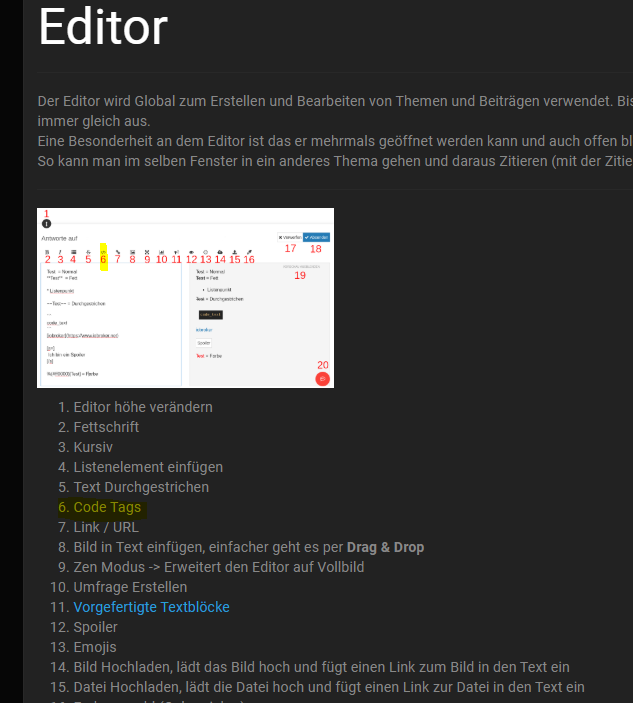
            @thecastle packs in code
            32431895-5dc2-4b2f-b64f-950b2a58f808-image.png

            umgestiegen von Proxmox auf Unraid

            1 Reply Last reply
            0
            • T thecastle

              Unbenannt.png

              ? Offline
              ? Offline
              A Former User
              wrote on last edited by
              #17

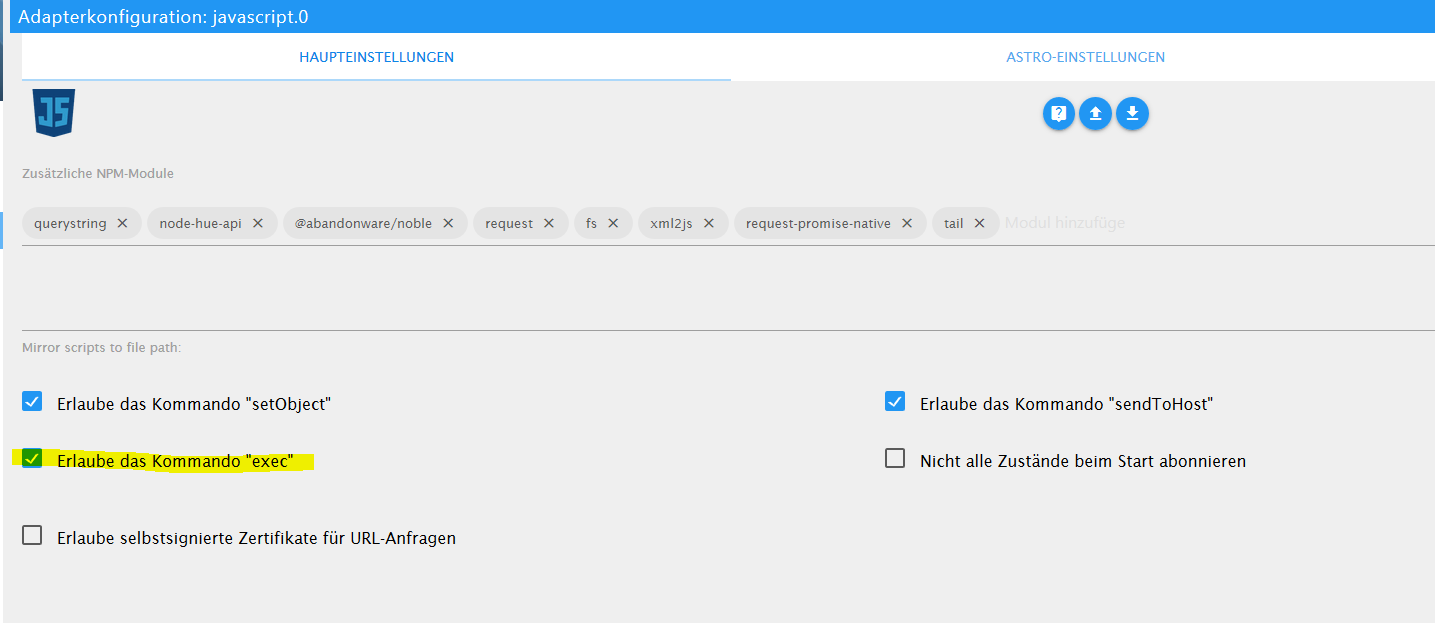
              @thecastle du hast im Editor als Warnung stehen, dass du in den settings "exec" einschalten sollst.. 🙂
              1 Reply Last reply
              0
              • T Offline
                T Offline
                thecastle
                wrote on last edited by
                #18
                <xml xmlns="http://www.w3.org/1999/xhtml">
                  <variables>
                    <variable type="undefined" id="timeout">timeout</variable>
                    <variable type="undefined" id="timeout2">timeout2</variable>
                  </variables>
                  <block type="procedures_defnoreturn" id="t_)mr`e%3].H@^udza,~" x="838" y="-362">
                    <field name="NAME">Foto senden</field>
                    <comment pinned="false" h="80" w="160">Beschreibe diese Funktion …</comment>
                    <statement name="STACK">
                      <block type="timeouts_settimeout" id="*%r=Y5~X`NnVxrh5XHlk">
                        <field name="NAME">timeout</field>
                        <field name="DELAY">1000</field>
                        <field name="UNIT">ms</field>
                        <statement name="STATEMENT">
                          <block type="exec" id="275h7oKZ+y395LT+iu#-">
                            <mutation with_statement="false"></mutation>
                            <field name="WITH_STATEMENT">FALSE</field>
                            <field name="LOG"></field>
                            <value name="COMMAND">
                              <shadow type="text" id="ltM-0,OSxYcM(e^Y{`Sd">
                                <field name="TEXT">wget --output-document /var/lib/motioneye/Camera1 'http://192.168.178.34:8765/picture/1/current/?'</field>
                              </shadow>
                            </value>
                            <next>
                              <block type="timeouts_settimeout" id=";^]@[*~xh;=yM/dG~iQ%">
                                <field name="NAME">timeout2</field>
                                <field name="DELAY">1000</field>
                                <field name="UNIT">ms</field>
                                <statement name="STATEMENT">
                                  <block type="telegram" id="#7%V,l]!]C@U3;RF%x{P">
                                    <field name="INSTANCE"></field>
                                    <field name="LOG"></field>
                                    <field name="SILENT">FALSE</field>
                                    <field name="PARSEMODE">default</field>
                                    <value name="MESSAGE">
                                      <shadow type="text" id=",tsALc;|bOL4A$#yWM]{">
                                        <field name="TEXT">/var/lib/motioneye/Camera1/alarm.jpg</field>
                                      </shadow>
                                    </value>
                                  </block>
                                </statement>
                              </block>
                            </next>
                          </block>
                        </statement>
                      </block>
                    </statement>
                  </block>
                  <block type="on" id="hV,U:1/V6qpawuVB.m8q" x="163" y="-312">
                    <field name="OID">cloud.0.services.ifttt</field>
                    <field name="CONDITION">any</field>
                    <field name="ACK_CONDITION"></field>
                    <statement name="STATEMENT">
                      <block type="controls_if" id="It:BOaOu][{+og:8@v!w">
                        <value name="IF0">
                          <block type="logic_compare" id="%8rAH*~R8IQ2{]_V~AoD">
                            <field name="OP">EQ</field>
                            <value name="A">
                              <block type="get_value" id="E*GzIO?FI{$Q|7rcDec$">
                                <field name="ATTR">val</field>
                                <field name="OID">cloud.0.services.ifttt</field>
                              </block>
                            </value>
                            <value name="B">
                              <block type="text" id="zL73Xsp,2Y3xah6462]-">
                                <field name="TEXT">Bewegung_erkannt</field>
                              </block>
                            </value>
                          </block>
                        </value>
                        <statement name="DO0">
                          <block type="telegram" id="ERxs|dSCxN8I0:o7Dx?S">
                            <field name="INSTANCE"></field>
                            <field name="LOG"></field>
                            <field name="SILENT">FALSE</field>
                            <field name="PARSEMODE">default</field>
                            <value name="MESSAGE">
                              <shadow type="text" id="Z7Fqumr:htFev+?tMeKR">
                                <field name="TEXT">Bewegung erkannt</field>
                              </shadow>
                            </value>
                            <next>
                              <block type="procedures_callnoreturn" id="ut|%,2}Ih[*?OAk4gM[E">
                                <mutation name="Foto senden"></mutation>
                              </block>
                            </next>
                          </block>
                        </statement>
                      </block>
                    </statement>
                  </block>
                </xml>
                
                crunchipC 1 Reply Last reply
                0
                • T thecastle
                  <xml xmlns="http://www.w3.org/1999/xhtml">
                    <variables>
                      <variable type="undefined" id="timeout">timeout</variable>
                      <variable type="undefined" id="timeout2">timeout2</variable>
                    </variables>
                    <block type="procedures_defnoreturn" id="t_)mr`e%3].H@^udza,~" x="838" y="-362">
                      <field name="NAME">Foto senden</field>
                      <comment pinned="false" h="80" w="160">Beschreibe diese Funktion …</comment>
                      <statement name="STACK">
                        <block type="timeouts_settimeout" id="*%r=Y5~X`NnVxrh5XHlk">
                          <field name="NAME">timeout</field>
                          <field name="DELAY">1000</field>
                          <field name="UNIT">ms</field>
                          <statement name="STATEMENT">
                            <block type="exec" id="275h7oKZ+y395LT+iu#-">
                              <mutation with_statement="false"></mutation>
                              <field name="WITH_STATEMENT">FALSE</field>
                              <field name="LOG"></field>
                              <value name="COMMAND">
                                <shadow type="text" id="ltM-0,OSxYcM(e^Y{`Sd">
                                  <field name="TEXT">wget --output-document /var/lib/motioneye/Camera1 'http://192.168.178.34:8765/picture/1/current/?'</field>
                                </shadow>
                              </value>
                              <next>
                                <block type="timeouts_settimeout" id=";^]@[*~xh;=yM/dG~iQ%">
                                  <field name="NAME">timeout2</field>
                                  <field name="DELAY">1000</field>
                                  <field name="UNIT">ms</field>
                                  <statement name="STATEMENT">
                                    <block type="telegram" id="#7%V,l]!]C@U3;RF%x{P">
                                      <field name="INSTANCE"></field>
                                      <field name="LOG"></field>
                                      <field name="SILENT">FALSE</field>
                                      <field name="PARSEMODE">default</field>
                                      <value name="MESSAGE">
                                        <shadow type="text" id=",tsALc;|bOL4A$#yWM]{">
                                          <field name="TEXT">/var/lib/motioneye/Camera1/alarm.jpg</field>
                                        </shadow>
                                      </value>
                                    </block>
                                  </statement>
                                </block>
                              </next>
                            </block>
                          </statement>
                        </block>
                      </statement>
                    </block>
                    <block type="on" id="hV,U:1/V6qpawuVB.m8q" x="163" y="-312">
                      <field name="OID">cloud.0.services.ifttt</field>
                      <field name="CONDITION">any</field>
                      <field name="ACK_CONDITION"></field>
                      <statement name="STATEMENT">
                        <block type="controls_if" id="It:BOaOu][{+og:8@v!w">
                          <value name="IF0">
                            <block type="logic_compare" id="%8rAH*~R8IQ2{]_V~AoD">
                              <field name="OP">EQ</field>
                              <value name="A">
                                <block type="get_value" id="E*GzIO?FI{$Q|7rcDec$">
                                  <field name="ATTR">val</field>
                                  <field name="OID">cloud.0.services.ifttt</field>
                                </block>
                              </value>
                              <value name="B">
                                <block type="text" id="zL73Xsp,2Y3xah6462]-">
                                  <field name="TEXT">Bewegung_erkannt</field>
                                </block>
                              </value>
                            </block>
                          </value>
                          <statement name="DO0">
                            <block type="telegram" id="ERxs|dSCxN8I0:o7Dx?S">
                              <field name="INSTANCE"></field>
                              <field name="LOG"></field>
                              <field name="SILENT">FALSE</field>
                              <field name="PARSEMODE">default</field>
                              <value name="MESSAGE">
                                <shadow type="text" id="Z7Fqumr:htFev+?tMeKR">
                                  <field name="TEXT">Bewegung erkannt</field>
                                </shadow>
                              </value>
                              <next>
                                <block type="procedures_callnoreturn" id="ut|%,2}Ih[*?OAk4gM[E">
                                  <mutation name="Foto senden"></mutation>
                                </block>
                              </next>
                            </block>
                          </statement>
                        </block>
                      </statement>
                    </block>
                  </xml>
                  
                  crunchipC Away
                  crunchipC Away
                  crunchip
                  Forum Testing Most Active
                  wrote on last edited by
                  #19

                  @thecastle

                  @ilovegym sagte in Motioneye Telegram:

                  @thecastle du hast im Editor als Warnung stehen, dass du in den settings "exec" einschalten sollst.. 🙂

                  d4a42bdc-c8e5-4f5e-a138-bb448c6f247c-image.png

                  umgestiegen von Proxmox auf Unraid

                  1 Reply Last reply
                  0
                  • T Offline
                    T Offline
                    thecastle
                    wrote on last edited by
                    #20

                    Okay das habe ich gemacht. Hat noch jemad eine Idee

                    crunchipC 1 Reply Last reply
                    0
                    • T thecastle

                      Okay das habe ich gemacht. Hat noch jemad eine Idee

                      crunchipC Away
                      crunchipC Away
                      crunchip
                      Forum Testing Most Active
                      wrote on last edited by
                      #21

                      @thecastle hast du den timeout mal erhöht, z.b.2000ms

                      umgestiegen von Proxmox auf Unraid

                      1 Reply Last reply
                      0
                      • T Offline
                        T Offline
                        thecastle
                        wrote on last edited by
                        #22

                        ja, aber das muss an mir liegen weil ich das Bild doch immer unter alarm speichere und das alle bzw... das erste immer wieder verende

                        1 Reply Last reply
                        0
                        • T Offline
                          T Offline
                          thecastle
                          wrote on last edited by
                          #23

                          Habe mal die Anleitung oben versucht, da habe ich soweit alles bis auf... ich verstehe nich ganz was ich da alles eintragen soll?

                          // Variablen
                          var cam_img = 'http://192.168.178.34:8765/picture/1/current/';   // Pfad zum Kamerabild (Im Beispiel eine Foscam)
                          var trigger_auto = 'hm-rpc.0.JEQXXXXXXX.1.MOTION';  // Datenpunkt zur autmatischen Auslösung (Status des Bewegungsmelders, Fenster-/ Türkontakt oder der Türklingel)
                          var trigger_manu = 'javascript.0.notify.telegram.cam.trigger_manu'; // Datenpunkt zur manuellen Auslösung (wird bei Bedarf automatisch angelegt)
                          var trigger_more_img = 'javascript.0.notify.telegram.cam.trigger_more_img'; // Datenpunkt zur Abfrage weiterer Bilder (wird bei Bedarf automatisch angelegt)
                          var disable = 'javascript.0.notify.telegram.cam.disable';   // Aktivierung/Deaktivierung des Versands per telegram (wird bei Bedarf automatisch angelegt)
                          var interval = '3000';  // Verzögerung der weiteren Aufnahmen in Millisekunden
                          var img_path = '/opt/iobroker/temp/cam/';   // Pfad zum lokalen Speicherort der aufgenommenen Bilder. Bilder werden bei jeder Auslösung überschrieben. Pfad muss schon vorhanden sein!
                           
                           
                          // -------------------------------------------
                          // Ab hier braucht in der Regel nichts mehr geändert zu werden. Also Finger weg wenn du nicht weißt was du tust. :) 
                          // -------------------------------------------
                           
                          // Datenpunkte anlegen (Kann unter Umständen auskommentiert werden, wenn die Datenpunkte manuell angelegt wurden.)
                          createState( trigger_auto, false, {name: 'http://192.168.178.34:8765/picture/1/current/'});
                          createState( trigger_manu, false, {name: 'http://192.168.178.34:8765/picture/1/current/'});
                          createState( trigger_more_img, false, {name: 'http://192.168.178.34:8765/picture/1/current/'});
                          createState( disable, false, {name: 'Aktivierung/Deaktivierung des Versands per telegram'});
                           
                          ``` I
                          crunchipC 1 Reply Last reply
                          0
                          • T thecastle

                            Habe mal die Anleitung oben versucht, da habe ich soweit alles bis auf... ich verstehe nich ganz was ich da alles eintragen soll?

                            // Variablen
                            var cam_img = 'http://192.168.178.34:8765/picture/1/current/';   // Pfad zum Kamerabild (Im Beispiel eine Foscam)
                            var trigger_auto = 'hm-rpc.0.JEQXXXXXXX.1.MOTION';  // Datenpunkt zur autmatischen Auslösung (Status des Bewegungsmelders, Fenster-/ Türkontakt oder der Türklingel)
                            var trigger_manu = 'javascript.0.notify.telegram.cam.trigger_manu'; // Datenpunkt zur manuellen Auslösung (wird bei Bedarf automatisch angelegt)
                            var trigger_more_img = 'javascript.0.notify.telegram.cam.trigger_more_img'; // Datenpunkt zur Abfrage weiterer Bilder (wird bei Bedarf automatisch angelegt)
                            var disable = 'javascript.0.notify.telegram.cam.disable';   // Aktivierung/Deaktivierung des Versands per telegram (wird bei Bedarf automatisch angelegt)
                            var interval = '3000';  // Verzögerung der weiteren Aufnahmen in Millisekunden
                            var img_path = '/opt/iobroker/temp/cam/';   // Pfad zum lokalen Speicherort der aufgenommenen Bilder. Bilder werden bei jeder Auslösung überschrieben. Pfad muss schon vorhanden sein!
                             
                             
                            // -------------------------------------------
                            // Ab hier braucht in der Regel nichts mehr geändert zu werden. Also Finger weg wenn du nicht weißt was du tust. :) 
                            // -------------------------------------------
                             
                            // Datenpunkte anlegen (Kann unter Umständen auskommentiert werden, wenn die Datenpunkte manuell angelegt wurden.)
                            createState( trigger_auto, false, {name: 'http://192.168.178.34:8765/picture/1/current/'});
                            createState( trigger_manu, false, {name: 'http://192.168.178.34:8765/picture/1/current/'});
                            createState( trigger_more_img, false, {name: 'http://192.168.178.34:8765/picture/1/current/'});
                            createState( disable, false, {name: 'Aktivierung/Deaktivierung des Versands per telegram'});
                             
                            ``` I
                            crunchipC Away
                            crunchipC Away
                            crunchip
                            Forum Testing Most Active
                            wrote on last edited by
                            #24

                            @thecastle was ist unklar?

                            umgestiegen von Proxmox auf Unraid

                            1 Reply Last reply
                            0
                            • T Offline
                              T Offline
                              thecastle
                              wrote on last edited by
                              #25

                              Im prenzieb alles was ich da selber eintragen muss (ich weiß es steht auskommentiert dahinter ) aber weiß nicht was verlangt wird

                              crunchipC 1 Reply Last reply
                              0
                              • T thecastle

                                Im prenzieb alles was ich da selber eintragen muss (ich weiß es steht auskommentiert dahinter ) aber weiß nicht was verlangt wird

                                crunchipC Away
                                crunchipC Away
                                crunchip
                                Forum Testing Most Active
                                wrote on last edited by crunchip
                                #26

                                @thecastle

                                • var cam_img = deinen Pfad der cam
                                • var trigger_auto = ist der Datenpunkt, den du angelegt hast und per webhook in Motioneye triggerst
                                • var img_path = dein pfad den du dir angelegt hast, wo das Bild gespeichert wird
                                  den rest kannst du so lassen

                                danach musst du noch deine Text2Command Befehle eintragen, ist ja auf der Seite gut beschrieben

                                umgestiegen von Proxmox auf Unraid

                                1 Reply Last reply
                                0
                                • T Offline
                                  T Offline
                                  thecastle
                                  wrote on last edited by
                                  #27

                                  Lönnte das so aussehen?

                                  // Variablen
                                  var cam_img = 'http://192.168.178.34:8765/';   // Pfad zum Kamerabild (Im Beispiel eine Foscam)
                                  var trigger_auto = 'https://maker.ifttt.com/Trigger/KameraBewegung/with/key/nquVxRxR5JetQdqt3tGhagx3ZwyV407mxDRQhJDx3Hq';  // Datenpunkt zur autmatischen Auslösung (Status des Bewegungsmelders, Fenster-/ Türkontakt oder der Türklingel)
                                  var trigger_manu = 'javascript.0.notify.telegram.cam.trigger_manu'; // Datenpunkt zur manuellen Auslösung (wird bei Bedarf automatisch angelegt)
                                  var trigger_more_img = 'javascript.0.notify.telegram.cam.trigger_more_img'; // Datenpunkt zur Abfrage weiterer Bilder (wird bei Bedarf automatisch angelegt)
                                  var disable = 'javascript.0.notify.telegram.cam.disable';   // Aktivierung/Deaktivierung des Versands per telegram (wird bei Bedarf automatisch angelegt)
                                  var interval = '3000';  // Verzögerung der weiteren Aufnahmen in Millisekunden
                                  var img_path = '/var/lib/motioneye/Camera1/';   // Pfad zum lokalen Speicherort der aufgenommenen Bilder. Bilder werden bei jeder Auslösung überschrieben. Pfad muss schon vorhanden sein!
                                  
                                  crunchipC 1 Reply Last reply
                                  0
                                  • T thecastle

                                    Lönnte das so aussehen?

                                    // Variablen
                                    var cam_img = 'http://192.168.178.34:8765/';   // Pfad zum Kamerabild (Im Beispiel eine Foscam)
                                    var trigger_auto = 'https://maker.ifttt.com/Trigger/KameraBewegung/with/key/nquVxRxR5JetQdqt3tGhagx3ZwyV407mxDRQhJDx3Hq';  // Datenpunkt zur autmatischen Auslösung (Status des Bewegungsmelders, Fenster-/ Türkontakt oder der Türklingel)
                                    var trigger_manu = 'javascript.0.notify.telegram.cam.trigger_manu'; // Datenpunkt zur manuellen Auslösung (wird bei Bedarf automatisch angelegt)
                                    var trigger_more_img = 'javascript.0.notify.telegram.cam.trigger_more_img'; // Datenpunkt zur Abfrage weiterer Bilder (wird bei Bedarf automatisch angelegt)
                                    var disable = 'javascript.0.notify.telegram.cam.disable';   // Aktivierung/Deaktivierung des Versands per telegram (wird bei Bedarf automatisch angelegt)
                                    var interval = '3000';  // Verzögerung der weiteren Aufnahmen in Millisekunden
                                    var img_path = '/var/lib/motioneye/Camera1/';   // Pfad zum lokalen Speicherort der aufgenommenen Bilder. Bilder werden bei jeder Auslösung überschrieben. Pfad muss schon vorhanden sein!
                                    
                                    crunchipC Away
                                    crunchipC Away
                                    crunchip
                                    Forum Testing Most Active
                                    wrote on last edited by
                                    #28

                                    @thecastle nicht ganz

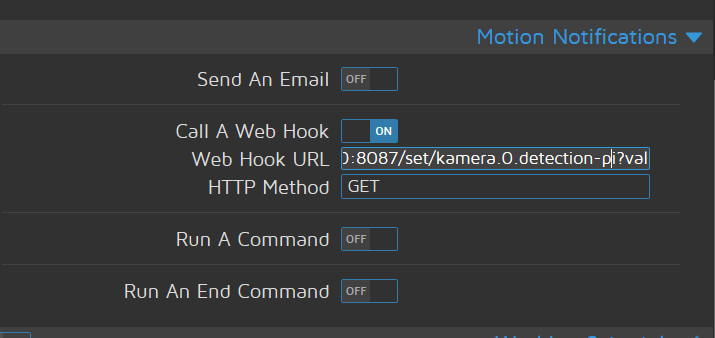
                                    var trigger_auto = 'https://maker.ifttt.com/Trigger/KameraBewegung/with/key/nquVxRxR5JetQdqt3tGhagx3ZwyV407mxDRQhJDx3Hq';  // Datenpunkt zur autmatischen Auslösung
                                    

                                    das stimmt nicht, da sollte dein erstellter Datenpunkt rein und dieser wird von motioneye getriggert

                                    hier als Beispiel in meinem Fall

                                    var trigger_auto = 'kamera.0.detection-pi';  // Datenpunkt zur autmatischen Auslösung
                                    

                                    4c7c96f9-bdd7-4a80-bb67-0ef69c76d429-image.png

                                    umgestiegen von Proxmox auf Unraid

                                    1 Reply Last reply
                                    0
                                    • T Offline
                                      T Offline
                                      thecastle
                                      wrote on last edited by
                                      #29

                                      Achsoo das ist bei mir in Motioneye so wie ich es trinne habe ;( ich schau mal ob ich das nur so ender kann

                                      1 Reply Last reply
                                      0
                                      • T Offline
                                        T Offline
                                        thecastle
                                        wrote on last edited by
                                        #30

                                        Gieb es ein fertiges bsp.?

                                        crunchipC 1 Reply Last reply
                                        0
                                        • T thecastle

                                          Gieb es ein fertiges bsp.?

                                          crunchipC Away
                                          crunchipC Away
                                          crunchip
                                          Forum Testing Most Active
                                          wrote on last edited by
                                          #31

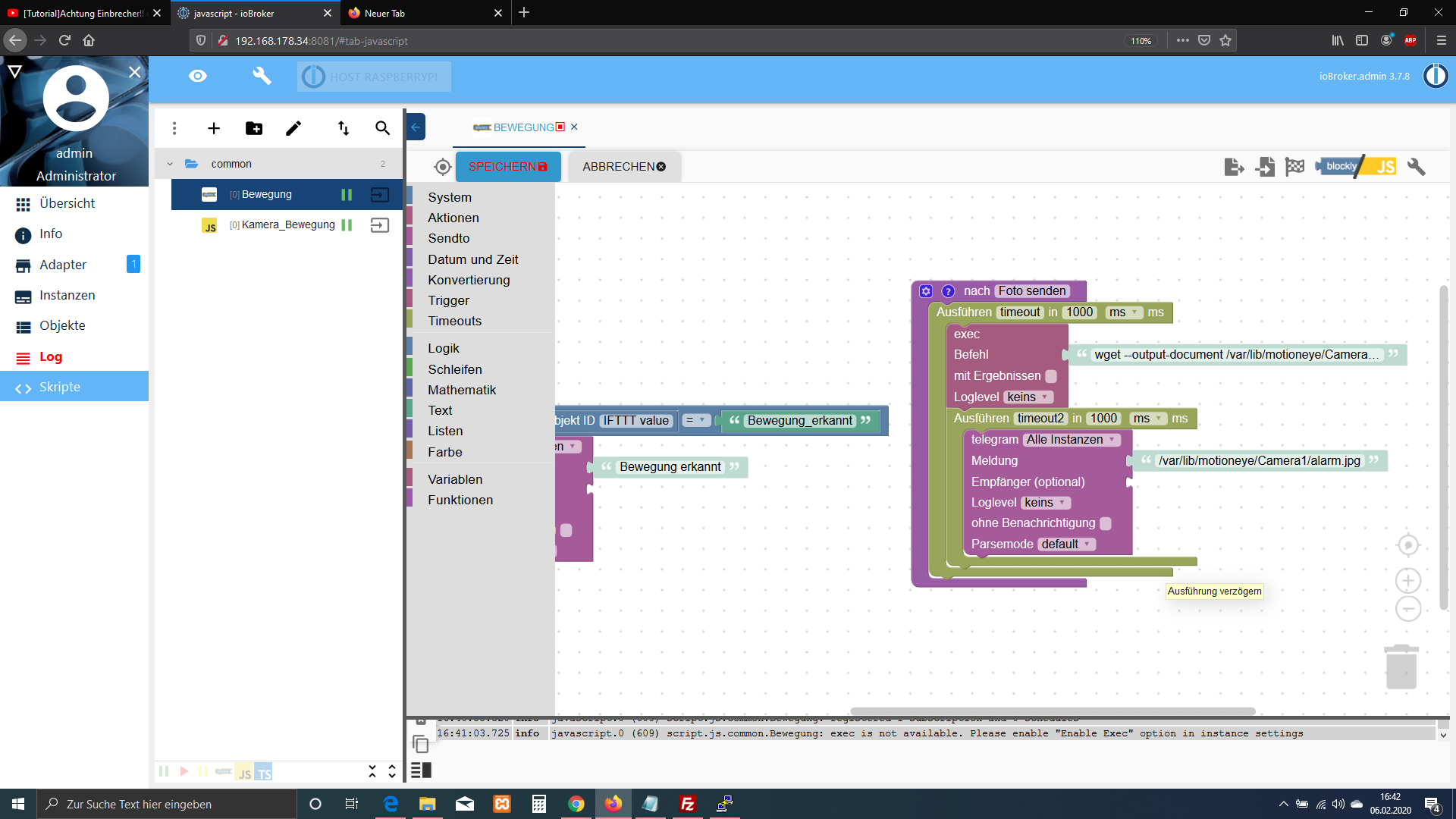
                                          @thecastle in wie fern, das Beispiel siehst du doch auf der Seite und ist alles erklärt.
                                          das was du machen musst,

                                          • ein Datenpunkt anlegen,
                                          • web Hook Url in Motioneye hinterlegen( dieser schaltet dann deinen Datenpunkt true/false) ist sozusagen dein Auslöser( vergleichbar mit Schalter/Bewegungsmelder)
                                            alles andere, hab ich oben schon geschrieben
                                          umgestiegen von Proxmox auf Unraid

                                          1 Reply Last reply
                                          0
                                          Reply
                                          • Reply as topic
                                          Log in to reply
                                          • Oldest to Newest
                                          • Newest to Oldest
                                          • Most Votes


                                          Support us

                                          ioBroker
                                          Community Adapters
                                          Donate
                                          FAQ Cloud / IOT
                                          HowTo: Node.js-Update
                                          HowTo: Backup/Restore
                                          Downloads
                                          BLOG

                                          720

                                          Online

                                          32.6k

                                          Users

                                          82.3k

                                          Topics

                                          1.3m

                                          Posts
                                          Community
                                          Impressum | Datenschutz-Bestimmungen | Nutzungsbedingungen | Einwilligungseinstellungen
                                          ioBroker Community 2014-2025
                                          logo
                                          • Login

                                          • Don't have an account? Register

                                          • Login or register to search.
                                          • First post
                                            Last post
                                          0
                                          • Home
                                          • Recent
                                          • Tags
                                          • Unread 0
                                          • Categories
                                          • Unreplied
                                          • Popular
                                          • GitHub
                                          • Docu
                                          • Hilfe