Skip to content
  • Home
  • Recent
  • Tags
  • 0 Unread 0
  • Categories
  • Unreplied
  • Popular
  • GitHub
  • Docu
  • Hilfe
Skins
  • Light
  • Brite
  • Cerulean
  • Cosmo
  • Flatly
  • Journal
  • Litera
  • Lumen
  • Lux
  • Materia
  • Minty
  • Morph
  • Pulse
  • Sandstone
  • Simplex
  • Sketchy
  • Spacelab
  • United
  • Yeti
  • Zephyr
  • Dark
  • Cyborg
  • Darkly
  • Quartz
  • Slate
  • Solar
  • Superhero
  • Vapor

  • Default (No Skin)
  • No Skin
Collapse
ioBroker Logo

Community Forum

donate donate
  1. ioBroker Community Home
  2. Deutsch
  3. Visualisierung
  4. [perfekt gelöst]Reload VIS

NEWS

  • UPDATE 31.10.: Amazon Alexa - ioBroker Skill läuft aus ?
    apollon77A
    apollon77
    48
    3
    8.8k

  • Monatsrückblick – September 2025
    BluefoxB
    Bluefox
    13
    1
    2.2k

  • Neues Video "KI im Smart Home" - ioBroker plus n8n
    BluefoxB
    Bluefox
    16
    1
    3.3k

[perfekt gelöst]Reload VIS

Scheduled Pinned Locked Moved Visualisierung
57 Posts 19 Posters 12.2k Views 10 Watching
  • Oldest to Newest
  • Newest to Oldest
  • Most Votes
Reply
  • Reply as topic
Log in to reply
This topic has been deleted. Only users with topic management privileges can see it.
  • htreckslerH Offline
    htreckslerH Offline
    htrecksler
    Forum Testing
    wrote on last edited by
    #6

    Danke dir, ich werde testen und berichten.

    was versteckt sich hinter "reconnect interval"?

    Gruss Hermann

    ioBroker auf Proxmox (Debian) auf IntelNuc als Produktivsystem

    1 Reply Last reply
    0
    • htreckslerH Offline
      htreckslerH Offline
      htrecksler
      Forum Testing
      wrote on last edited by
      #7

      Erste Test sehen super aus. Genauso wie es sein soll.

      Auch das dunkle Design sieht toll aus.

      Ich beobachte noch 1-2 Tage im Livebetrieb und berichte weiter.

      Gruss Hermann

      ioBroker auf Proxmox (Debian) auf IntelNuc als Produktivsystem

      1 Reply Last reply
      0
      • BluefoxB Offline
        BluefoxB Offline
        Bluefox
        wrote on last edited by
        #8

        @htrecksler:

        Danke dir, ich werde testen und berichten.

        was versteckt sich hinter "reconnect interval"? [https://github.com/ioBroker/ioBroker.vi … t-interval](https://github.com/ioBroker/ioBroker.vis#reconnect-interval) > Reconnect interval

        Set the interval between the connection attempts if disconnected. If you will set 2 seconds, it will try to establish the connection every 2 seconds. `

        1 Reply Last reply
        0
        • htreckslerH Offline
          htreckslerH Offline
          htrecksler
          Forum Testing
          wrote on last edited by
          #9

          Danke Bluefox, perfekt gelöst.

          Gruss Hermann

          ioBroker auf Proxmox (Debian) auf IntelNuc als Produktivsystem

          1 Reply Last reply
          0
          • T Offline
            T Offline
            tesso
            wrote on last edited by
            #10

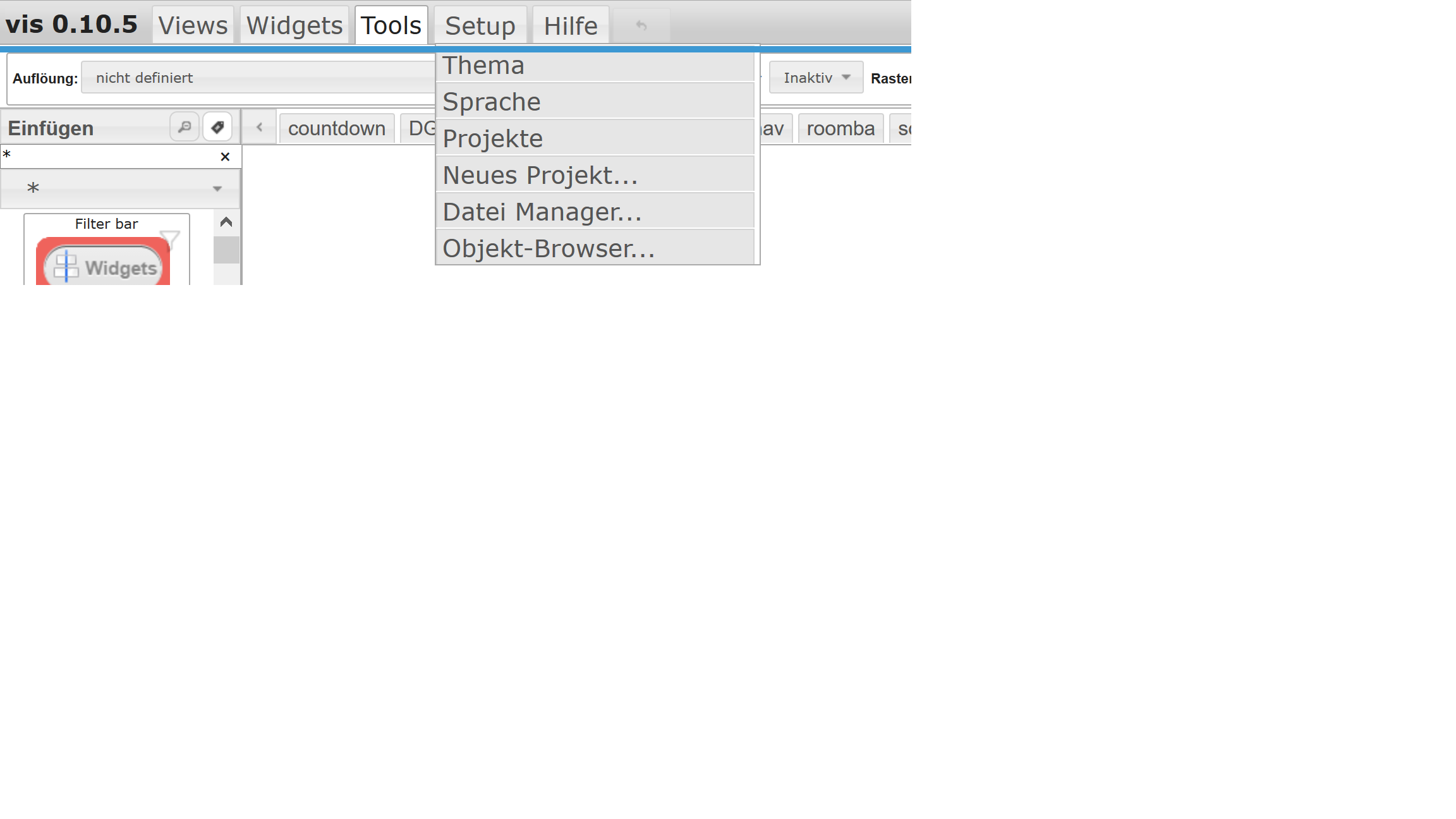
            451_vis.png Woher kommt im Screen oben der Punkt Einstellungen?

            Ich habe auch vis 0.10.5 installiert, aber dieser Punkt fehlt mir.

            Oder kommt das erst in der nächsten Version?

            1 Reply Last reply
            0
            • coyoteC Offline
              coyoteC Offline
              coyote
              Most Active
              wrote on last edited by
              #11

              Dazu musst du momentan noch die Version von Github nehmen

              1 Reply Last reply
              0
              • Jeeper.atJ Offline
                Jeeper.atJ Offline
                Jeeper.at
                wrote on last edited by
                #12

                Ich habe nun auch die neue Version im Einsatz. Gefällt mir sehr gut. Danke für die Lösung.

                1 Reply Last reply
                0
                • L Offline
                  L Offline
                  little_tiger
                  wrote on last edited by
                  #13

                  Hallo,

                  ich würde auch gerne die neue Version testen, da ich auch Probleme mit dem reload habe. Wie installiert man denn korrekt von github?

                  Ich bin auf die github-Seite gegangen habe dann über den "grünen Knopf" die https-Adresse kopiert und diese dann versucht in io.broker unter "Installieren aus eigener URL" eingesetzt.

                  Danach geht das Terminalfenster zwar auf, die Installation bricht aber u. a. mit der Fehlermeldung "Fletch failed with status Code 404" ab.

                  Was mache ich falsch?

                  Gruß

                  Little_tiger

                  Gesendet von iPad mit Tapatalk

                  1 Reply Last reply
                  0
                  • htreckslerH Offline
                    htreckslerH Offline
                    htrecksler
                    Forum Testing
                    wrote on last edited by
                    #14

                    warst du auf github auf der Seite von ioBroker.vis?

                    Das sollte die URL sein wenn ich mich nicht irre…

                    https://github.com/ioBroker/ioBroker.vis

                    Gruss Hermann

                    ioBroker auf Proxmox (Debian) auf IntelNuc als Produktivsystem

                    1 Reply Last reply
                    0
                    • L Offline
                      L Offline
                      little_tiger
                      wrote on last edited by
                      #15

                      Hallo Htrecksler,

                      ja, von dort habe ich die URL "https://github.com/ioBroker/ioBroker.vis.git" kopiert.

                      Folgende Meldung bekomme ich bei der Installation:

                      $ ./iobroker url "https://github.com/ioBroker/ioBroker.vis.git" --debug
                      install https://github.com/ioBroker/ioBroker.vis.git/tarball/master
                      npm install https://github.com/ioBroker/ioBroker.vis.git/tarball/master --production --prefix "/opt/iobroker" (System call)
                      npm ERR! fetch failed https://github.com/ioBroker/ioBroker.vis.git/tarball/masternpm WARN retry will retry, error on last attempt: Error: fetch failed with status code 404
                      
                      npm ERR! fetch failed https://github.com/ioBroker/ioBroker.vis.git/tarball/master
                      npm
                       WARN retry will retry, error on last attempt: Error: fetch failed with status code 404
                      npm ERR! fetch failed https://github.com/ioBroker/ioBroker.vis.git/tarball/master
                      npm ERR! Linux 4.4.3-sunxi
                      npm ERR! argv "/usr/bin/nodejs" "/usr/bin/npm" "install" "https://github.com/ioBroker/ioBroker.vis.git/tarball/master" "--production" "--prefix" "/opt/iobroker"npm ERR! node v4.4.2
                      npm ERR! npm  v2.15.0
                      
                      npm ERR! fetch failed with status code 404
                      npm ERR! 
                      npm ERR! If you need help, you may report this error at:
                      
                      npm ERR!     <https: github.com/npm/issues="">
                      npm ERR! Please include the following file with any support request:
                      npm ERR!     /npm-debug.log
                      
                      ERROR: host.cubietruck Cannot install https://github.com/ioBroker/ioBroker.vis.git/tarball/master: 1
                      ERROR: process exited with code 25</https:>
                      

                      Wo muss ich ansetzen?

                      Gruß

                      Little_tiger

                      1 Reply Last reply
                      0
                      • htreckslerH Offline
                        htreckslerH Offline
                        htrecksler
                        Forum Testing
                        wrote on last edited by
                        #16

                        in deinem link steht am Ende ein .git???

                        Ich vermute der gehört da nicht hin.

                        Gruss Hermann

                        ioBroker auf Proxmox (Debian) auf IntelNuc als Produktivsystem

                        1 Reply Last reply
                        0
                        • etvE Offline
                          etvE Offline
                          etv
                          wrote on last edited by
                          #17

                          Liebe Leute,

                          hab auch gerade die Version von github installiert und hab auch den Punkt Settings unter Setup….

                          ...aber wenn ich auf Settings klick tut sich nix?? :(

                          wie komm' ich an dieses Settingsfenster?

                          Grüße

                          etv

                          …ist schon sehr lange begeisterter ioBroker Nutzer! 1x zu Hause und 1x auf der Alm. ioBroker ist das 'Hirn' des Smarthome und steuert HomeMatic und Shellys, loggt was so passiert, zeigt es auf Tabletts schön an und ermöglicht mir via Cloud Adapter den Fernzugriff...

                          1 Reply Last reply
                          0
                          • BluefoxB Offline
                            BluefoxB Offline
                            Bluefox
                            wrote on last edited by
                            #18

                            @little_tiger:

                            Hallo Htrecksler,

                            ja, von dort habe ich die URL "https://github.com/ioBroker/ioBroker.vis.git" kopiert.

                            Folgende Meldung bekomme ich bei der Installation:

                            $ ./iobroker url "https://github.com/ioBroker/ioBroker.vis.git" --debug
                            install https://github.com/ioBroker/ioBroker.vis.git/tarball/master
                            npm install https://github.com/ioBroker/ioBroker.vis.git/tarball/master --production --prefix "/opt/iobroker" (System call)
                            npm ERR! fetch failed https://github.com/ioBroker/ioBroker.vis.git/tarball/masternpm WARN retry will retry, error on last attempt: Error: fetch failed with status code 404
                            
                            npm ERR! fetch failed https://github.com/ioBroker/ioBroker.vis.git/tarball/master
                            npm
                             WARN retry will retry, error on last attempt: Error: fetch failed with status code 404
                            npm ERR! fetch failed https://github.com/ioBroker/ioBroker.vis.git/tarball/master
                            npm ERR! Linux 4.4.3-sunxi
                            npm ERR! argv "/usr/bin/nodejs" "/usr/bin/npm" "install" "https://github.com/ioBroker/ioBroker.vis.git/tarball/master" "--production" "--prefix" "/opt/iobroker"npm ERR! node v4.4.2
                            npm ERR! npm  v2.15.0
                            
                            npm ERR! fetch failed with status code 404
                            npm ERR! 
                            npm ERR! If you need help, you may report this error at:
                            
                            npm ERR!     <https: github.com/npm/issues="">
                            npm ERR! Please include the following file with any support request:
                            npm ERR!     /npm-debug.log
                            
                            ERROR: host.cubietruck Cannot install https://github.com/ioBroker/ioBroker.vis.git/tarball/master: 1
                            ERROR: process exited with code 25</https:>
                            

                            Wo muss ich ansetzen?

                            Gruß

                            Little_tiger `
                            https://github.com/ioBroker/ioBroker.vis/tarball/master

                            oder einfach

                            https://github.com/ioBroker/ioBroker.vis

                            1 Reply Last reply
                            0
                            • etvE Offline
                              etvE Offline
                              etv
                              wrote on last edited by
                              #19

                              @Bluefox:

                              https://github.com/ioBroker/ioBroker.vis/tarball/master

                              oder einfach

                              https://github.com/ioBroker/ioBroker.vis `

                              …hab das nun nochmal gemacht und vis dann restarted aber ich bekomm beim Klick auf Settings nix - keine Reaktion....

                              Grüße

                              etv

                              …ist schon sehr lange begeisterter ioBroker Nutzer! 1x zu Hause und 1x auf der Alm. ioBroker ist das 'Hirn' des Smarthome und steuert HomeMatic und Shellys, loggt was so passiert, zeigt es auf Tabletts schön an und ermöglicht mir via Cloud Adapter den Fernzugriff...

                              1 Reply Last reply
                              0
                              • L Offline
                                L Offline
                                little_tiger
                                wrote on last edited by
                                #20

                                Hallo nochmal,

                                ja, das "git" war zu viel in der URL. Habe ich aber genau so von der github Seite in den Zwischenspeicher gepackt.

                                Jetzt geht es mir allerdings wie etv. In ioBroker.admin wird die Version 0.10.6 angezeigt,

                                In vis aber immer noch die Version 0.10.5 und über Setup lässt sich nichts auswählen.

                                Browsercache habe ich gelöscht.

                                Was mache ich denn nun schon wieder falsch :roll: :roll:

                                Gruß

                                Little_tiger

                                1 Reply Last reply
                                0
                                • htreckslerH Offline
                                  htreckslerH Offline
                                  htrecksler
                                  Forum Testing
                                  wrote on last edited by
                                  #21

                                  ich kann auch nur raten…

                                  eventuell hilft ja ein kompletter reboot?

                                  Ich habe mir in der Vergangenheit angewöhnt nach jedem Update eines Adapters immer anschließend einen reboot zu machen.

                                  Keine Ahnung ob es erforderlich ist...

                                  Gruss

                                  Hermann

                                  Gruss Hermann

                                  ioBroker auf Proxmox (Debian) auf IntelNuc als Produktivsystem

                                  1 Reply Last reply
                                  0
                                  • L Offline
                                    L Offline
                                    little_tiger
                                    wrote on last edited by
                                    #22

                                    hmmm…. kompletten reboot habe ich auch schon versucht.

                                    Im Reiter Adapter wird die korrekte Version angezeigt:

                                    377_adapter.jpg

                                    Im Vis-Editor immer noch die falsche Version.

                                    377_vis.jpg

                                    In dem Zusammenhang eine weitere Frage:

                                    Ich konnte bisher leider über den Button "view exportieren" auch keinen Export meines views (in ein neues Projekt) vornehmen, sonst würde ich mal die Android-app zur Visualisierung nutzen.

                                    Gruß

                                    Little_tiger

                                    1 Reply Last reply
                                    0
                                    • jens.mausJ Offline
                                      jens.mausJ Offline
                                      jens.maus
                                      wrote on last edited by
                                      #23

                                      @little_tiger:

                                      Jetzt geht es mir allerdings wie etv. In ioBroker.admin wird die Version 0.10.6 angezeigt,

                                      In vis aber immer noch die Version 0.10.5 und über Setup lässt sich nichts auswählen.

                                      Browsercache habe ich gelöscht. `

                                      Also ich habe hier den gleichen Effekt. Habe die 0.10.6 direkt über die URL von github installiert und iobroker.admin zeigt mir auch als installierte Version die 0.10.6 an. Nach einem neustart von VIS zeigt er mir auch "Settings…" nun an, es passiert aber nix wenn ich den Menüpunkt auswähle?!? Auch ein kompletter Neustart des Systems auf dem ioBroker läuft hat leider nicht zum Erfolg geführt!?!? Bin auch ratlos momentan.

                                      RaspberryMatic @ PromoxVE mit ~190 HomeMatic Geräten + ioBroker – GitHub – GitHub Sponsors / PayPal

                                      1 Reply Last reply
                                      0
                                      • htreckslerH Offline
                                        htreckslerH Offline
                                        htrecksler
                                        Forum Testing
                                        wrote on last edited by
                                        #24

                                        Ich lese hier immer "Settings"…

                                        Ihr seid aber schon hier...
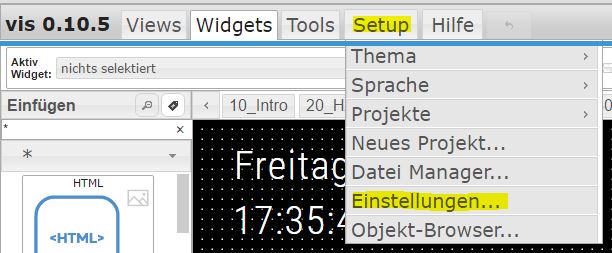
                                        115_vis_einstellungen.jpg
                                        und dann kommt (zumindest bei mir) dieses Fenster…
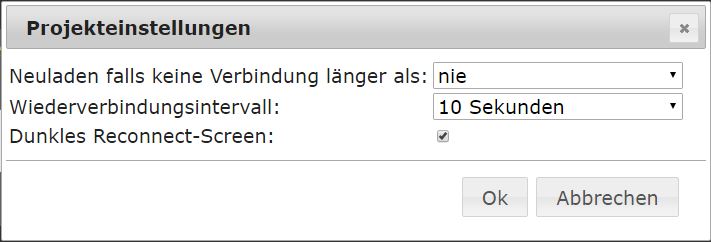
                                        115_einstellung2.jpg

                                        Gruss Hermann

                                        ioBroker auf Proxmox (Debian) auf IntelNuc als Produktivsystem

                                        1 Reply Last reply
                                        0
                                        • etvE Offline
                                          etvE Offline
                                          etv
                                          wrote on last edited by
                                          #25

                                          …und genau dieses Fenster kommt eben nicht ;-)

                                          …ist schon sehr lange begeisterter ioBroker Nutzer! 1x zu Hause und 1x auf der Alm. ioBroker ist das 'Hirn' des Smarthome und steuert HomeMatic und Shellys, loggt was so passiert, zeigt es auf Tabletts schön an und ermöglicht mir via Cloud Adapter den Fernzugriff...

                                          1 Reply Last reply
                                          0
                                          Reply
                                          • Reply as topic
                                          Log in to reply
                                          • Oldest to Newest
                                          • Newest to Oldest
                                          • Most Votes


                                          Support us

                                          ioBroker
                                          Community Adapters
                                          Donate

                                          859

                                          Online

                                          32.4k

                                          Users

                                          81.5k

                                          Topics

                                          1.3m

                                          Posts
                                          Community
                                          Impressum | Datenschutz-Bestimmungen | Nutzungsbedingungen | Einwilligungseinstellungen
                                          ioBroker Community 2014-2025
                                          logo
                                          • Login

                                          • Don't have an account? Register

                                          • Login or register to search.
                                          • First post
                                            Last post
                                          0
                                          • Home
                                          • Recent
                                          • Tags
                                          • Unread 0
                                          • Categories
                                          • Unreplied
                                          • Popular
                                          • GitHub
                                          • Docu
                                          • Hilfe