




js-controller 2.0 ab sofort im Latest Repo

-
@apollon77 sagte in js-controller 2.0 ab sofort im Latest Repo: compact mode deaktivieren.
Wie aktiviere ich den eigentlich?
@sigi234
iobroker compact enableDetails hatte @apollon77 hier im 3. Beitrag geschrieben
-
@Andreas-Hochstöger Also in der Benahmung sind zwei Fehler drin: Einmal der "." Am Anfang und semantisch muss danach ein ".0" kommen, also Meine_Objekte.0.xxx wäre ok.
Theoretisch könntest Du auf controller 1.5 zurück, deine Objekte exportieren, umbenennen, wieder importieren und dann neu updaten. Alternativ:
ioBroker stoppen, dann in iobroker-data/objects.json und states.json überall ".MeineDaten." durch "Meine_Objekte.0." erstzen und neu starten. Dann Deine Skripte und Visu anpassen
@apollon77
Ich habe alles super hinbekommen war ziemlich viel Arbeit.
Dann habe ich die Update gemacht, funktioniert alles außer der Node-Red adapter geht jetzt nicht mehr, ist das normal?
Oder hab ich da noch einen Fehler gemacht. -
@apollon77
Ich habe alles super hinbekommen war ziemlich viel Arbeit.
Dann habe ich die Update gemacht, funktioniert alles außer der Node-Red adapter geht jetzt nicht mehr, ist das normal?
Oder hab ich da noch einen Fehler gemacht.@Andreas-Hochstöger node-red sollte v1.10.1 oder höher sein
passt das bei dir?ioBroker auf NUC (VM debian v13 (Trixie ), node v22.21.0 npm v10.9.4, js-controller v7.1.0 jsonl/jsonl / HomeMatic CCU-2 (Wired und Funk) / Philips HUE / echo.DOT / Broadlink RM pro / SONOS
-
@Andreas-Hochstöger node-red sollte v1.10.1 oder höher sein
passt das bei dir?@BBTown
Ja ich habe 1.13.0 -
@Andreas-Hochstöger node-red sollte v1.10.1 oder höher sein
passt das bei dir? -
@Andreas-Hochstöger node-red sollte v1.10.1 oder höher sein
passt das bei dir?@BBTown Logs?
Beitrag hat geholfen? Votet rechts unten im Beitrag :-) https://paypal.me/Apollon77 / https://github.com/sponsors/Apollon77
- Debug-Log für Instanz einschalten? Admin -> Instanzen -> Expertenmodus -> Instanz aufklappen - Loglevel ändern
- Logfiles auf Platte /opt/iobroker/log/… nutzen, Admin schneidet Zeilen ab
-
-
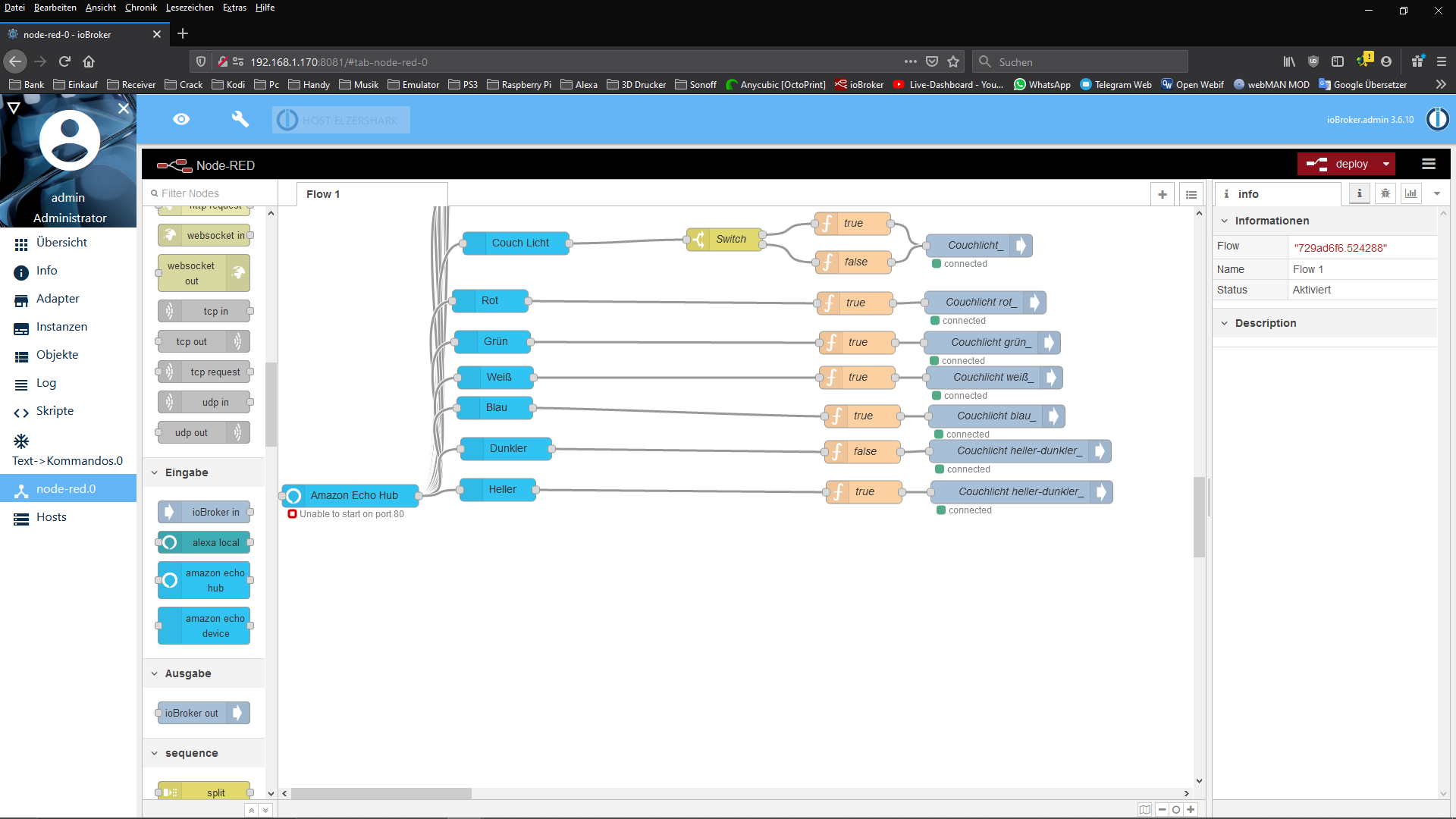
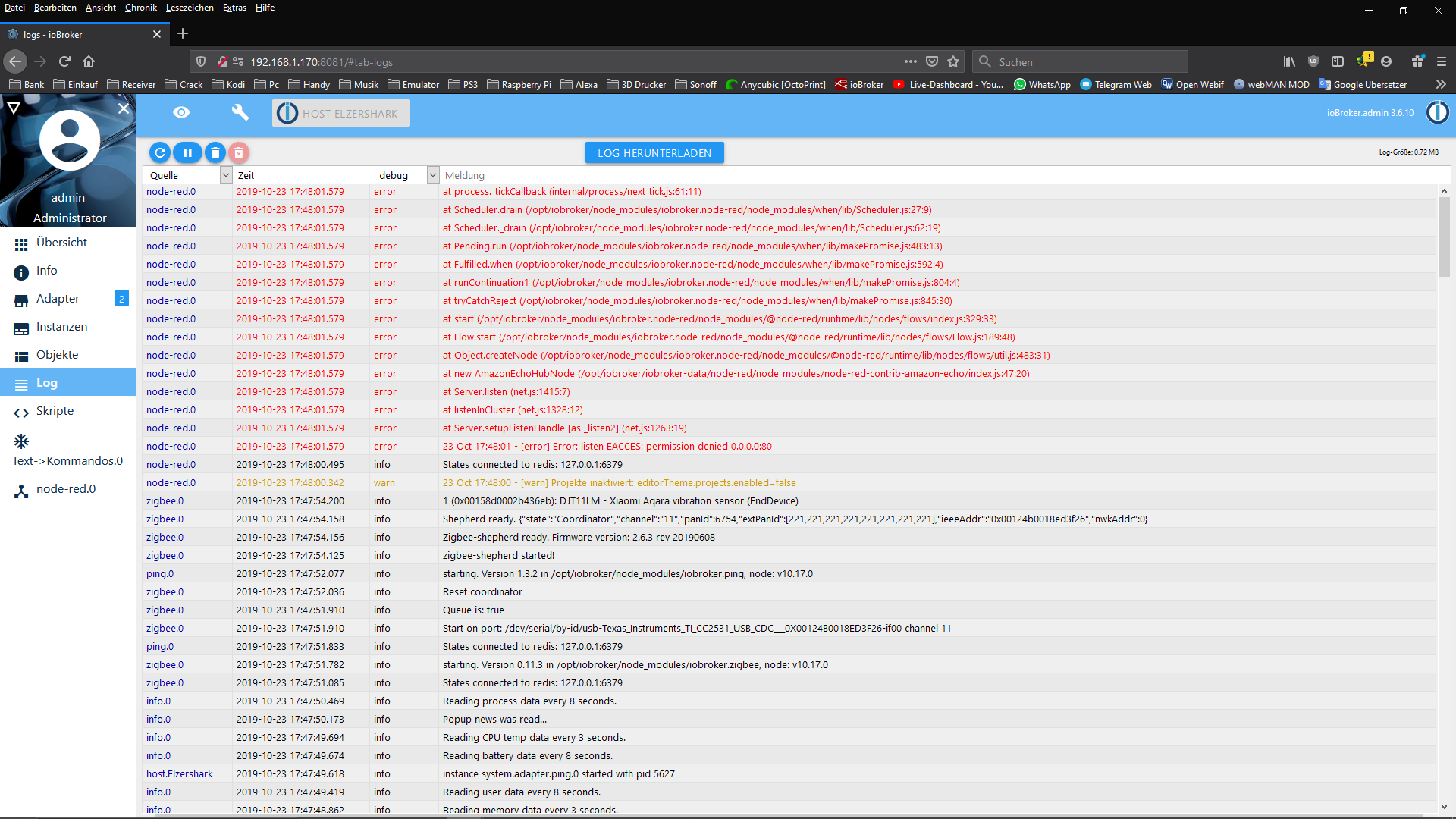
@Andreas-Hochstöger Da ist Port 80 eingestellt und per efault geht das nicht. vllt beim letzten nodejs update oderso rausgenommen worden. Der Installation fixer fixt die rechte wieder das ioBroker Port 80 Server öffnen darf
Beitrag hat geholfen? Votet rechts unten im Beitrag :-) https://paypal.me/Apollon77 / https://github.com/sponsors/Apollon77
- Debug-Log für Instanz einschalten? Admin -> Instanzen -> Expertenmodus -> Instanz aufklappen - Loglevel ändern
- Logfiles auf Platte /opt/iobroker/log/… nutzen, Admin schneidet Zeilen ab
-
@Andreas-Hochstöger Da ist Port 80 eingestellt und per efault geht das nicht. vllt beim letzten nodejs update oderso rausgenommen worden. Der Installation fixer fixt die rechte wieder das ioBroker Port 80 Server öffnen darf
@apollon77
Es ist schön mit Profis zu arbeiten, alles funktioniert.
Danke!!!!:+1: -
@Andreas-Hochstöger Da ist Port 80 eingestellt und per efault geht das nicht. vllt beim letzten nodejs update oderso rausgenommen worden. Der Installation fixer fixt die rechte wieder das ioBroker Port 80 Server öffnen darf
@apollon77 sagte in js-controller 2.0 ab sofort im Latest Repo:
@Andreas-Hochstöger Da ist Port 80 eingestellt und per efault geht das nicht. vllt beim letzten nodejs update oderso rausgenommen worden. Der Installation fixer fixt die rechte wieder das ioBroker Port 80 Server öffnen darf
Die Berechtigungen, die hierfür auf der Node.js executable gesetzt werden, gehen bei jedem Node.js-Update verloren und müssen wieder hergestellt werden.
-
Jetzt bin ich mal gespannt.
Ich habe den PC und den Slave an einen gemeinsamen Switch angeschlossen.
Der Slave ist jetzt 10 Grad wärmer und bis jetzt keine Ausfälle.Hallo, jemand von Euch schwierigkeiten mit dem OPI-Adapter ?
opi.0	2019-10-24 20:21:11.177	error	(8174) No Value found for soc_temp
opi.0	2019-10-24 20:21:11.152	error	(8174) No Value found for memory_available
opi.0	2019-10-24 20:21:11.143	error	(8174) No Value found for scaling_governor
opi.0	2019-10-24 20:21:11.133	error	(8174) No Value found for cpu_frequency
Den RFlink-Adapter bekomme ich auch nicht installiert.
$ ./iobroker add rflink  --host orangepiplus2e
NPM version: 6.11.3
npm install iobroker.rflink@2.0.0 --loglevel error --production --save --prefix "/opt/iobroker" (System call)
Traceback (most recent call last):  File "/usr/lib/node_modules/npm/node_modules/node-gyp/gyp/gyp_main.py", line 13, in <module>    import gyp  File "/usr/lib/node_modules/npm/node_modules/node-gyp/gyp/pylib/gyp/__init__.py", line 10, in <module>    import gyp.input  File "/usr/lib/node_modules/npm/node_modules/node-gyp/gyp/pylib/gyp/input.py", line 7, in <module>    from compiler.ast import ConstImportError: No module named compiler.ast
gyp ERR! configure error gyp ERR! stack Error: `gyp` failed with exit code: 1gyp ERR! stack     at ChildProcess.onCpExit (/usr/lib/node_modules/npm/node_modules/node-gyp/lib/configure.js:344:16)gyp ERR! stack     at ChildProcess.emit (events.js:198:13)gyp ERR! stack     at Process.ChildProcess._handle.onexit (internal/child_process.js:248:12)gyp ERR! System Linux 4.19.59-sunxigyp ERR! command "/usr/bin/node" "/usr/lib/node_modules/npm/node_modules/node-gyp/bin/node-gyp.js" "rebuild"gyp ERR! cwd /opt/iobroker/node_modules/authenticate-pamgyp ERR!

node -v v10.17.0gyp ERR! node-gyp -v v5.0.3gyp ERR! not ok
Traceback (most recent call last):  File "/usr/lib/node_modules/npm/node_modules/node-gyp/gyp/gyp_main.py", line 13, in <module>
    import gyp  File "/usr/lib/node_modules/npm/node_modules/node-gyp/gyp/pylib/gyp/__init__.py", line 10, in <module>    import gyp.input  File "/usr/lib/node_modules/npm/node_modules/node-gyp/gyp/pylib/gyp/input.py", line 7, in <module>    from compiler.ast import ConstImportError: No module named compiler.ast
gyp
 ERR! configure error
gyp ERR! stack Error: `gyp` failed with exit code: 1gyp ERR! stack     at ChildProcess.onCpExit (/usr/lib/node_modules/npm/node_modules/node-gyp/lib/configure.js:344:16)gyp ERR! stack     at ChildProcess.emit (events.js:198:13)gyp ERR! stack     at Process.ChildProcess._handle.onexit (internal/child_process.js:248:12)gyp ERR! System Linux 4.19.59-sunxigyp ERR! command "/usr/bin/node" "/usr/lib/node_modules/npm/node_modules/node-gyp/bin/node-gyp.js" "rebuild"gyp ERR! cwd /opt/iobroker/node_modules/diskusagegyp ERR! node -v v10.17.0gyp
ERR! node-gyp -v v5.0.3gyp ERR! not ok
Traceback (most recent call last):  File "/usr/lib/node_modules/npm/node_modules/node-gyp/gyp/gyp_main.py", line 13, in <module>    import gyp  File "/usr/lib/node_modules/npm/node_modules/node-gyp/gyp/pylib/gyp/__init__.py", line 10, in <module>    import gyp.input  File "/usr/lib/node_modules/npm/node_modules/node-gyp/gyp/pylib/gyp/input.py", line 7, in <module>    from compiler.ast import ConstImportError: No module named compiler.astgyp ERR! configure error gyp ERR! stack Error: `gyp` failed with exit code: 1gyp ERR! stack     at ChildProcess.onCpExit (/usr/lib/node_modules/npm/node_modules/node-gyp/lib/configure.js:344:16)gyp ERR! stack     at ChildProcess.emit (events.js:198:13)gyp ERR! stack     at Process.ChildProcess._handle.onexit (internal/child_process.js:248:12)gyp ERR! System Linux 4.19.59-sunxigyp ERR! command "/usr/bin/node" "/usr/lib/node_modules/npm/node_modules/node-gyp/bin/node-gyp.js" "configure" "--fallback-to-build" "--module=/opt/iobroker/node_modules/bcrypt/lib/binding/bcrypt_lib.node" "--module_name=bcrypt_lib" "--module_path=/opt/iobroker/node_modules/bcrypt/lib/binding" "--napi_version=5" "--node_abi_napi=napi" "--napi_build_version=0" "--node_napi_label=node-v64"gyp ERR! cwd /opt/iobroker/node_modules/bcryptgyp ERR! node -v v10.17.0gyp ERR! node-gyp -v v5.0.3gyp ERR! not ok node-pre-gyp ERR! build error node-pre-gyp ERR! stack Error: Failed to execute '/usr/bin/node /usr/lib/node_modules/npm/node_modules/node-gyp/bin/node-gyp.js configure --fallback-to-build --module=/opt/iobroker/node_modules/bcrypt/lib/binding/bcrypt_lib.node --module_name=bcrypt_lib --module_path=/opt/iobroker/node_modules/bcrypt/lib/binding --napi_version=5 --node_abi_napi=napi --napi_build_version=0 --node_napi_label=node-v64' (1)node-pre-gyp ERR! stack     at ChildProcess.<anonymous> (/opt/iobroker/node_modules/node-pre-gyp/lib/util/compile.js:83:29)node-pre-gyp ERR! stack     at ChildProcess.emit (events.js:198:13)node-pre-gyp ERR! stack     at maybeClose (internal/child_process.js:982:16)node-pre-gyp ERR! stack     at Process.ChildProcess._handle.onexit (internal/child_process.js:259:5)node-pre-gyp ERR! System Linux 4.19.59-sunxinode-pre-gyp ERR! command "/usr/bin/node" "/opt/iobroker/node_modules/.bin/node-pre-gyp" "install" "--fallback-to-build"node-pre-gyp ERR! cwd /opt/iobroker/node_modules/bcryptnode-pre-gyp ERR! node -v v10.17.0node-pre-gyp ERR! node-pre-gyp -v v0.12.0node-pre-gyp ERR! not ok
node-pre-gyp ERR! Tried to download(404): https://github.com/EmergingTechnologyAdvisors/node-serialport/releases/download/4.0.7/serialport-v4.0.7-node-v64-linux-arm.tar.gz
node-pre-gyp ERR! Pre-built binaries not found for serialport@4.0.7 and node@10.17.0 (node-v64 ABI) (falling back to source compile with node-gyp)
node-pre-gyp
 ERR!
 Tried to download(undefined): https://github.com/EmergingTechnologyAdvisors/node-serialport/releases/download/4.0.7/serialport-v4.0.7-node-v64-linux-arm.tar.gz
node-pre-gyp ERR! Pre-built binaries not found for serialport@4.0.7 and node@10.17.0 (node-v64 ABI) (falling back to source compile with node-gyp)
Traceback (most recent call last):  File "/usr/lib/node_modules/npm/node_modules/node-gyp/gyp/gyp_main.py", line 13, in <module>
    import gyp  File "/usr/lib/node_modules/npm/node_modules/node-gyp/gyp/pylib/gyp/__init__.py", line 10, in <module>    import gyp.input  File "/usr/lib/node_modules/npm/node_modules/node-gyp/gyp/pylib/gyp/input.py", line 7, in <module>    from compiler.ast import ConstImportError: No module named compiler.ast
gyp

ERR!
configure error
gyp ERR! stack Error: `gyp` failed with exit code: 1gyp ERR! stack     at ChildProcess.onCpExit (/usr/lib/node_modules/npm/node_modules/node-gyp/lib/configure.js:344:16)gyp ERR! stack
     at ChildProcess.emit (events.js:198:13)gyp ERR! stack     at Process.ChildProcess._handle.onexit (internal/child_process.js:248:12)gyp
 ERR! System Linux 4.19.59-sunxigyp ERR! command "/usr/bin/node" "/usr/lib/node_modules/npm/node_modules/node-gyp/bin/node-gyp.js" "configure" "--fallback-to-build" "--module=/opt/iobroker/node_modules/avrgirl-arduino/node_modules/serialport/build/Release/serialport.node" "--module_name=serialport" "--module_path=/opt/iobroker/node_modules/avrgirl-arduino/node_modules/serialport/build/Release"gyp ERR! cwd /opt/iobroker/node_modules/avrgirl-arduino/node_modules/serialportgyp ERR! node -v v10.17.0gyp ERR! node-gyp -v v5.0.3gyp ERR! not ok
node-pre-gyp ERR! build error
node-pre-gyp ERR! stack Error: Failed to execute '/usr/bin/node /usr/lib/node_modules/npm/node_modules/node-gyp/bin/node-gyp.js configure --fallback-to-build --module=/opt/iobroker/node_modules/avrgirl-arduino/node_modules/serialport/build/Release/serialport.node --module_name=serialport --module_path=/opt/iobroker/node_modules/avrgirl-arduino/node_modules/serialport/build/Release' (1)node-pre-gyp ERR! stack     at ChildProcess.<anonymous> (/opt/iobroker/node_modules/avrgirl-arduino/node_modules/serialport/node_modules/node-pre-gyp/lib/util/compile.js:83:29)node-pre-gyp ERR! stack     at ChildProcess.emit (events.js:198:13)node-pre-gyp ERR! stack     at maybeClose (internal/child_process.js:982:16)node-pre-gyp ERR! stack     at Process.ChildProcess._handle.onexit (internal/child_process.js:259:5)
node-pre-gyp ERR! System Linux 4.19.59-sunxinode-pre-gyp ERR! command "/usr/bin/node" "/opt/iobroker/node_modules/avrgirl-arduino/node_modules/serialport/node_modules/.bin/node-pre-gyp" "install" "--fallback-to-build"node-pre-gyp ERR! cwd /opt/iobroker/node_modules/avrgirl-arduino/node_modules/serialportnode-pre-gyp ERR! node -v v10.17.0node-pre-gyp ERR! node-pre-gyp -v v0.6.32node-pre-gyp ERR! not ok
Traceback (most recent call last):  File "/usr/lib/node_modules/npm/node_modules/node-gyp/gyp/gyp_main.py", line 13, in <module>    import gyp  File "/usr/lib/node_modules/npm/node_modules/node-gyp/gyp/pylib/gyp/__init__.py", line 10, in <module>    import gyp.input  File "/usr/lib/node_modules/npm/node_modules/node-gyp/gyp/pylib/gyp/input.py", line 7, in <module>    from compiler.ast import ConstImportError: No module named compiler.ast
gyp

ERR!
configure error
gyp ERR!
stack Error: `gyp` failed with exit code: 1gyp ERR! stack
     at ChildProcess.onCpExit (/usr/lib/node_modules/npm/node_modules/node-gyp/lib/configure.js:344:16)gyp ERR! stack     at ChildProcess.emit (events.js:198:13)gyp ERR! stack     at Process.ChildProcess._handle.onexit (internal/child_process.js:248:12)gyp ERR!
System Linux 4.19.59-sunxigyp ERR! command "/usr/bin/node" "/usr/lib/node_modules/npm/node_modules/node-gyp/bin/node-gyp.js" "configure" "--fallback-to-build" "--module=/opt/iobroker/node_modules/avrgirl-arduino/node_modules/serialport/build/Release/serialport.node" "--module_name=serialport" "--module_path=/opt/iobroker/node_modules/avrgirl-arduino/node_modules/serialport/build/Release"gyp ERR! cwd /opt/iobroker/node_modules/avrgirl-arduino/node_modules/serialportgyp ERR! node -v v10.17.0gyp ERR! node-gyp -v v5.0.3gyp ERR! not ok
Traceback (most recent call last):  File "/usr/lib/node_modules/npm/node_modules/node-gyp/gyp/gyp_main.py", line 13, in <module>
    import gyp  File "/usr/lib/node_modules/npm/node_modules/node-gyp/gyp/pylib/gyp/__init__.py", line 10, in <module>    import gyp.input  File "/usr/lib/node_modules/npm/node_modules/node-gyp/gyp/pylib/gyp/input.py", line 7, in <module>    from compiler.ast import ConstImportError: No module named compiler.ast
gyp

ERR! configure error
gyp ERR! stack Error: `gyp` failed with exit code: 1gyp ERR!
 stack     at ChildProcess.onCpExit (/usr/lib/node_modules/npm/node_modules/node-gyp/lib/configure.js:344:16)gyp ERR! stack     at ChildProcess.emit (events.js:198:13)gyp ERR! stack     at Process.ChildProcess._handle.onexit (internal/child_process.js:248:12)gyp ERR! System
 Linux 4.19.59-sunxigyp ERR! command "/usr/bin/node" "/usr/lib/node_modules/npm/node_modules/node-gyp/bin/node-gyp.js" "rebuild"gyp ERR! cwd /opt/iobroker/node_modules/unix-dgramgyp ERR! node -v v10.17.0gyp ERR! node-gyp -v v5.0.3gyp ERR! not ok
Traceback (most recent call last):  File "/usr/lib/node_modules/npm/node_modules/node-gyp/gyp/gyp_main.py", line 13, in <module>
    import gyp  File "/usr/lib/node_modules/npm/node_modules/node-gyp/gyp/pylib/gyp/__init__.py", line 10, in <module>    import gyp.input  File "/usr/lib/node_modules/npm/node_modules/node-gyp/gyp/pylib/gyp/input.py", line 7, in <module>    from compiler.ast import ConstImportError: No module named compiler.ast
gyp
 ERR! configure error
 gyp ERR! stack
 Error: `gyp` failed with exit code: 1gyp ERR! stack     at ChildProcess.onCpExit (/usr/lib/node_modules/npm/node_modules/node-gyp/lib/configure.js:344:16)gyp ERR! stack     at ChildProcess.emit (events.js:198:13)gyp ERR! stack     at Process.ChildProcess._handle.onexit (internal/child_process.js:248:12)gyp ERR! System Linux 4.19.59-sunxigyp ERR! command "/usr/bin/node" "/usr/lib/node_modules/npm/node_modules/node-gyp/bin/node-gyp.js" "rebuild"gyp ERR! cwd /opt/iobroker/node_modules/iobroker.rflink/node_modules/@serialport/bindingsgyp ERR! node -v v10.17.0gyp ERR! node-gyp -v v5.0.3gyp ERR! not ok
npm ERR!
 code ELIFECYCLEnpm
ERR! errno
 1npm
 ERR! @serialport/bindings@2.0.8 install: `prebuild-install --tag-prefix @serialport/bindings@ || node-gyp rebuild`
npm ERR!
 Exit status 1npm ERR! npm ERR! Failed at the @serialport/bindings@2.0.8 install script.npm ERR! This is probably not a problem with npm. There is likely additional logging output above.

npm ERR! A complete log of this run can be found in:npm ERR!     /home/iobroker/.npm/_logs/2019-10-24T18_41_49_379Z-debug.log
ERROR: host.orangepiplus2e Cannot install iobroker.rflink@2.0.0: 1
ERROR: process exited with code 25
Es ist ein Armbian Buster
root@orangepiplus2e:/opt/iobroker# node -v
v10.17.0
root@orangepiplus2e:/opt/iobroker# nodejs -v
v10.17.0
root@orangepiplus2e:/opt/iobroker# npm -v
6.11.3
Welcome to Debian Buster with Armbian Linux 4.19.59-sunxi
System load: 1.59 2.70 2.49 Up time: 1:01 hour
Memory usage: 38 % of 2013MB IP: 192.168.1.100
Usage of /: 13% of 15G[ General system configuration (beta): armbian-config ]
root@orangepiplus2e:~#
HP Microserver Gen8, RPI-4, IoBroker,
-
Hallo, jemand von Euch schwierigkeiten mit dem OPI-Adapter ?
opi.0	2019-10-24 20:21:11.177	error	(8174) No Value found for soc_temp
opi.0	2019-10-24 20:21:11.152	error	(8174) No Value found for memory_available
opi.0	2019-10-24 20:21:11.143	error	(8174) No Value found for scaling_governor
opi.0	2019-10-24 20:21:11.133	error	(8174) No Value found for cpu_frequency
Den RFlink-Adapter bekomme ich auch nicht installiert.
$ ./iobroker add rflink  --host orangepiplus2e
NPM version: 6.11.3
npm install iobroker.rflink@2.0.0 --loglevel error --production --save --prefix "/opt/iobroker" (System call)
Traceback (most recent call last):  File "/usr/lib/node_modules/npm/node_modules/node-gyp/gyp/gyp_main.py", line 13, in <module>    import gyp  File "/usr/lib/node_modules/npm/node_modules/node-gyp/gyp/pylib/gyp/__init__.py", line 10, in <module>    import gyp.input  File "/usr/lib/node_modules/npm/node_modules/node-gyp/gyp/pylib/gyp/input.py", line 7, in <module>    from compiler.ast import ConstImportError: No module named compiler.ast
gyp ERR! configure error gyp ERR! stack Error: `gyp` failed with exit code: 1gyp ERR! stack     at ChildProcess.onCpExit (/usr/lib/node_modules/npm/node_modules/node-gyp/lib/configure.js:344:16)gyp ERR! stack     at ChildProcess.emit (events.js:198:13)gyp ERR! stack     at Process.ChildProcess._handle.onexit (internal/child_process.js:248:12)gyp ERR! System Linux 4.19.59-sunxigyp ERR! command "/usr/bin/node" "/usr/lib/node_modules/npm/node_modules/node-gyp/bin/node-gyp.js" "rebuild"gyp ERR! cwd /opt/iobroker/node_modules/authenticate-pamgyp ERR!

node -v v10.17.0gyp ERR! node-gyp -v v5.0.3gyp ERR! not ok
Traceback (most recent call last):  File "/usr/lib/node_modules/npm/node_modules/node-gyp/gyp/gyp_main.py", line 13, in <module>
    import gyp  File "/usr/lib/node_modules/npm/node_modules/node-gyp/gyp/pylib/gyp/__init__.py", line 10, in <module>    import gyp.input  File "/usr/lib/node_modules/npm/node_modules/node-gyp/gyp/pylib/gyp/input.py", line 7, in <module>    from compiler.ast import ConstImportError: No module named compiler.ast
gyp
 ERR! configure error
gyp ERR! stack Error: `gyp` failed with exit code: 1gyp ERR! stack     at ChildProcess.onCpExit (/usr/lib/node_modules/npm/node_modules/node-gyp/lib/configure.js:344:16)gyp ERR! stack     at ChildProcess.emit (events.js:198:13)gyp ERR! stack     at Process.ChildProcess._handle.onexit (internal/child_process.js:248:12)gyp ERR! System Linux 4.19.59-sunxigyp ERR! command "/usr/bin/node" "/usr/lib/node_modules/npm/node_modules/node-gyp/bin/node-gyp.js" "rebuild"gyp ERR! cwd /opt/iobroker/node_modules/diskusagegyp ERR! node -v v10.17.0gyp
ERR! node-gyp -v v5.0.3gyp ERR! not ok
Traceback (most recent call last):  File "/usr/lib/node_modules/npm/node_modules/node-gyp/gyp/gyp_main.py", line 13, in <module>    import gyp  File "/usr/lib/node_modules/npm/node_modules/node-gyp/gyp/pylib/gyp/__init__.py", line 10, in <module>    import gyp.input  File "/usr/lib/node_modules/npm/node_modules/node-gyp/gyp/pylib/gyp/input.py", line 7, in <module>    from compiler.ast import ConstImportError: No module named compiler.astgyp ERR! configure error gyp ERR! stack Error: `gyp` failed with exit code: 1gyp ERR! stack     at ChildProcess.onCpExit (/usr/lib/node_modules/npm/node_modules/node-gyp/lib/configure.js:344:16)gyp ERR! stack     at ChildProcess.emit (events.js:198:13)gyp ERR! stack     at Process.ChildProcess._handle.onexit (internal/child_process.js:248:12)gyp ERR! System Linux 4.19.59-sunxigyp ERR! command "/usr/bin/node" "/usr/lib/node_modules/npm/node_modules/node-gyp/bin/node-gyp.js" "configure" "--fallback-to-build" "--module=/opt/iobroker/node_modules/bcrypt/lib/binding/bcrypt_lib.node" "--module_name=bcrypt_lib" "--module_path=/opt/iobroker/node_modules/bcrypt/lib/binding" "--napi_version=5" "--node_abi_napi=napi" "--napi_build_version=0" "--node_napi_label=node-v64"gyp ERR! cwd /opt/iobroker/node_modules/bcryptgyp ERR! node -v v10.17.0gyp ERR! node-gyp -v v5.0.3gyp ERR! not ok node-pre-gyp ERR! build error node-pre-gyp ERR! stack Error: Failed to execute '/usr/bin/node /usr/lib/node_modules/npm/node_modules/node-gyp/bin/node-gyp.js configure --fallback-to-build --module=/opt/iobroker/node_modules/bcrypt/lib/binding/bcrypt_lib.node --module_name=bcrypt_lib --module_path=/opt/iobroker/node_modules/bcrypt/lib/binding --napi_version=5 --node_abi_napi=napi --napi_build_version=0 --node_napi_label=node-v64' (1)node-pre-gyp ERR! stack     at ChildProcess.<anonymous> (/opt/iobroker/node_modules/node-pre-gyp/lib/util/compile.js:83:29)node-pre-gyp ERR! stack     at ChildProcess.emit (events.js:198:13)node-pre-gyp ERR! stack     at maybeClose (internal/child_process.js:982:16)node-pre-gyp ERR! stack     at Process.ChildProcess._handle.onexit (internal/child_process.js:259:5)node-pre-gyp ERR! System Linux 4.19.59-sunxinode-pre-gyp ERR! command "/usr/bin/node" "/opt/iobroker/node_modules/.bin/node-pre-gyp" "install" "--fallback-to-build"node-pre-gyp ERR! cwd /opt/iobroker/node_modules/bcryptnode-pre-gyp ERR! node -v v10.17.0node-pre-gyp ERR! node-pre-gyp -v v0.12.0node-pre-gyp ERR! not ok
node-pre-gyp ERR! Tried to download(404): https://github.com/EmergingTechnologyAdvisors/node-serialport/releases/download/4.0.7/serialport-v4.0.7-node-v64-linux-arm.tar.gz
node-pre-gyp ERR! Pre-built binaries not found for serialport@4.0.7 and node@10.17.0 (node-v64 ABI) (falling back to source compile with node-gyp)
node-pre-gyp
 ERR!
 Tried to download(undefined): https://github.com/EmergingTechnologyAdvisors/node-serialport/releases/download/4.0.7/serialport-v4.0.7-node-v64-linux-arm.tar.gz
node-pre-gyp ERR! Pre-built binaries not found for serialport@4.0.7 and node@10.17.0 (node-v64 ABI) (falling back to source compile with node-gyp)
Traceback (most recent call last):  File "/usr/lib/node_modules/npm/node_modules/node-gyp/gyp/gyp_main.py", line 13, in <module>
    import gyp  File "/usr/lib/node_modules/npm/node_modules/node-gyp/gyp/pylib/gyp/__init__.py", line 10, in <module>    import gyp.input  File "/usr/lib/node_modules/npm/node_modules/node-gyp/gyp/pylib/gyp/input.py", line 7, in <module>    from compiler.ast import ConstImportError: No module named compiler.ast
gyp

ERR!
configure error
gyp ERR! stack Error: `gyp` failed with exit code: 1gyp ERR! stack     at ChildProcess.onCpExit (/usr/lib/node_modules/npm/node_modules/node-gyp/lib/configure.js:344:16)gyp ERR! stack
     at ChildProcess.emit (events.js:198:13)gyp ERR! stack     at Process.ChildProcess._handle.onexit (internal/child_process.js:248:12)gyp
 ERR! System Linux 4.19.59-sunxigyp ERR! command "/usr/bin/node" "/usr/lib/node_modules/npm/node_modules/node-gyp/bin/node-gyp.js" "configure" "--fallback-to-build" "--module=/opt/iobroker/node_modules/avrgirl-arduino/node_modules/serialport/build/Release/serialport.node" "--module_name=serialport" "--module_path=/opt/iobroker/node_modules/avrgirl-arduino/node_modules/serialport/build/Release"gyp ERR! cwd /opt/iobroker/node_modules/avrgirl-arduino/node_modules/serialportgyp ERR! node -v v10.17.0gyp ERR! node-gyp -v v5.0.3gyp ERR! not ok
node-pre-gyp ERR! build error
node-pre-gyp ERR! stack Error: Failed to execute '/usr/bin/node /usr/lib/node_modules/npm/node_modules/node-gyp/bin/node-gyp.js configure --fallback-to-build --module=/opt/iobroker/node_modules/avrgirl-arduino/node_modules/serialport/build/Release/serialport.node --module_name=serialport --module_path=/opt/iobroker/node_modules/avrgirl-arduino/node_modules/serialport/build/Release' (1)node-pre-gyp ERR! stack     at ChildProcess.<anonymous> (/opt/iobroker/node_modules/avrgirl-arduino/node_modules/serialport/node_modules/node-pre-gyp/lib/util/compile.js:83:29)node-pre-gyp ERR! stack     at ChildProcess.emit (events.js:198:13)node-pre-gyp ERR! stack     at maybeClose (internal/child_process.js:982:16)node-pre-gyp ERR! stack     at Process.ChildProcess._handle.onexit (internal/child_process.js:259:5)
node-pre-gyp ERR! System Linux 4.19.59-sunxinode-pre-gyp ERR! command "/usr/bin/node" "/opt/iobroker/node_modules/avrgirl-arduino/node_modules/serialport/node_modules/.bin/node-pre-gyp" "install" "--fallback-to-build"node-pre-gyp ERR! cwd /opt/iobroker/node_modules/avrgirl-arduino/node_modules/serialportnode-pre-gyp ERR! node -v v10.17.0node-pre-gyp ERR! node-pre-gyp -v v0.6.32node-pre-gyp ERR! not ok
Traceback (most recent call last):  File "/usr/lib/node_modules/npm/node_modules/node-gyp/gyp/gyp_main.py", line 13, in <module>    import gyp  File "/usr/lib/node_modules/npm/node_modules/node-gyp/gyp/pylib/gyp/__init__.py", line 10, in <module>    import gyp.input  File "/usr/lib/node_modules/npm/node_modules/node-gyp/gyp/pylib/gyp/input.py", line 7, in <module>    from compiler.ast import ConstImportError: No module named compiler.ast
gyp

ERR!
configure error
gyp ERR!
stack Error: `gyp` failed with exit code: 1gyp ERR! stack
     at ChildProcess.onCpExit (/usr/lib/node_modules/npm/node_modules/node-gyp/lib/configure.js:344:16)gyp ERR! stack     at ChildProcess.emit (events.js:198:13)gyp ERR! stack     at Process.ChildProcess._handle.onexit (internal/child_process.js:248:12)gyp ERR!
System Linux 4.19.59-sunxigyp ERR! command "/usr/bin/node" "/usr/lib/node_modules/npm/node_modules/node-gyp/bin/node-gyp.js" "configure" "--fallback-to-build" "--module=/opt/iobroker/node_modules/avrgirl-arduino/node_modules/serialport/build/Release/serialport.node" "--module_name=serialport" "--module_path=/opt/iobroker/node_modules/avrgirl-arduino/node_modules/serialport/build/Release"gyp ERR! cwd /opt/iobroker/node_modules/avrgirl-arduino/node_modules/serialportgyp ERR! node -v v10.17.0gyp ERR! node-gyp -v v5.0.3gyp ERR! not ok
Traceback (most recent call last):  File "/usr/lib/node_modules/npm/node_modules/node-gyp/gyp/gyp_main.py", line 13, in <module>
    import gyp  File "/usr/lib/node_modules/npm/node_modules/node-gyp/gyp/pylib/gyp/__init__.py", line 10, in <module>    import gyp.input  File "/usr/lib/node_modules/npm/node_modules/node-gyp/gyp/pylib/gyp/input.py", line 7, in <module>    from compiler.ast import ConstImportError: No module named compiler.ast
gyp

ERR! configure error
gyp ERR! stack Error: `gyp` failed with exit code: 1gyp ERR!
 stack     at ChildProcess.onCpExit (/usr/lib/node_modules/npm/node_modules/node-gyp/lib/configure.js:344:16)gyp ERR! stack     at ChildProcess.emit (events.js:198:13)gyp ERR! stack     at Process.ChildProcess._handle.onexit (internal/child_process.js:248:12)gyp ERR! System
 Linux 4.19.59-sunxigyp ERR! command "/usr/bin/node" "/usr/lib/node_modules/npm/node_modules/node-gyp/bin/node-gyp.js" "rebuild"gyp ERR! cwd /opt/iobroker/node_modules/unix-dgramgyp ERR! node -v v10.17.0gyp ERR! node-gyp -v v5.0.3gyp ERR! not ok
Traceback (most recent call last):  File "/usr/lib/node_modules/npm/node_modules/node-gyp/gyp/gyp_main.py", line 13, in <module>
    import gyp  File "/usr/lib/node_modules/npm/node_modules/node-gyp/gyp/pylib/gyp/__init__.py", line 10, in <module>    import gyp.input  File "/usr/lib/node_modules/npm/node_modules/node-gyp/gyp/pylib/gyp/input.py", line 7, in <module>    from compiler.ast import ConstImportError: No module named compiler.ast
gyp
 ERR! configure error
 gyp ERR! stack
 Error: `gyp` failed with exit code: 1gyp ERR! stack     at ChildProcess.onCpExit (/usr/lib/node_modules/npm/node_modules/node-gyp/lib/configure.js:344:16)gyp ERR! stack     at ChildProcess.emit (events.js:198:13)gyp ERR! stack     at Process.ChildProcess._handle.onexit (internal/child_process.js:248:12)gyp ERR! System Linux 4.19.59-sunxigyp ERR! command "/usr/bin/node" "/usr/lib/node_modules/npm/node_modules/node-gyp/bin/node-gyp.js" "rebuild"gyp ERR! cwd /opt/iobroker/node_modules/iobroker.rflink/node_modules/@serialport/bindingsgyp ERR! node -v v10.17.0gyp ERR! node-gyp -v v5.0.3gyp ERR! not ok
npm ERR!
 code ELIFECYCLEnpm
ERR! errno
 1npm
 ERR! @serialport/bindings@2.0.8 install: `prebuild-install --tag-prefix @serialport/bindings@ || node-gyp rebuild`
npm ERR!
 Exit status 1npm ERR! npm ERR! Failed at the @serialport/bindings@2.0.8 install script.npm ERR! This is probably not a problem with npm. There is likely additional logging output above.

npm ERR! A complete log of this run can be found in:npm ERR!     /home/iobroker/.npm/_logs/2019-10-24T18_41_49_379Z-debug.log
ERROR: host.orangepiplus2e Cannot install iobroker.rflink@2.0.0: 1
ERROR: process exited with code 25
Es ist ein Armbian Buster
root@orangepiplus2e:/opt/iobroker# node -v
v10.17.0
root@orangepiplus2e:/opt/iobroker# nodejs -v
v10.17.0
root@orangepiplus2e:/opt/iobroker# npm -v
6.11.3
Welcome to Debian Buster with Armbian Linux 4.19.59-sunxi
System load: 1.59 2.70 2.49 Up time: 1:01 hour
Memory usage: 38 % of 2013MB IP: 192.168.1.100
Usage of /: 13% of 15G[ General system configuration (beta): armbian-config ]
root@orangepiplus2e:~#
@knopers1 opi kann ggf. daran liegen das als User iobroker bestimmte Werte nicht mehr lesbar sind? Da gabs auch was bei rpi.
Rflink: irgendwas scheint mit deiner node-Gyp installation zu sein oder mit Python. Google mal nach der Meldung am Anfang.
Beides nicht Controller related
-
@knopers1 opi kann ggf. daran liegen das als User iobroker bestimmte Werte nicht mehr lesbar sind? Da gabs auch was bei rpi.
Rflink: irgendwas scheint mit deiner node-Gyp installation zu sein oder mit Python. Google mal nach der Meldung am Anfang.
Beides nicht Controller related
Hallo,
ich habe jetzt auch erfolgreich auf iobroker 2.0.35 umgestellt. Die oben beschriebenen Befehle haben allerdings so nicht funktioniert. Ich habe dann "sudo -H -u iobroker npm install iobroker.js-controller@2.0" angegeben und dann ging es. bei mir laufen scheinbar alle Adapter einwandfrei, auch der TR-064 Adapter.
Gestern habe ich dann noch auf Redis umgestellt.
Ein paar Tage zuvor bin ich von einem Raspberry Pi 3 auf ein Intel NUC i3 umgestiegen. Hier läuft Proxmox und den ioBroker und Redis habe ich unter Debian 10 installiert. In einer zweiten VM habe ich MariaDB installiert in der ich die History Werte ablege. -
Hallo,
ich habe jetzt auch erfolgreich auf iobroker 2.0.35 umgestellt. Die oben beschriebenen Befehle haben allerdings so nicht funktioniert. Ich habe dann "sudo -H -u iobroker npm install iobroker.js-controller@2.0" angegeben und dann ging es. bei mir laufen scheinbar alle Adapter einwandfrei, auch der TR-064 Adapter.
Gestern habe ich dann noch auf Redis umgestellt.
Ein paar Tage zuvor bin ich von einem Raspberry Pi 3 auf ein Intel NUC i3 umgestiegen. Hier läuft Proxmox und den ioBroker und Redis habe ich unter Debian 10 installiert. In einer zweiten VM habe ich MariaDB installiert in der ich die History Werte ablege. -
Hallo,
ich habe jetzt auch erfolgreich auf iobroker 2.0.35 umgestellt. Die oben beschriebenen Befehle haben allerdings so nicht funktioniert. Ich habe dann "sudo -H -u iobroker npm install iobroker.js-controller@2.0" angegeben und dann ging es. bei mir laufen scheinbar alle Adapter einwandfrei, auch der TR-064 Adapter.
Gestern habe ich dann noch auf Redis umgestellt.
Ein paar Tage zuvor bin ich von einem Raspberry Pi 3 auf ein Intel NUC i3 umgestiegen. Hier läuft Proxmox und den ioBroker und Redis habe ich unter Debian 10 installiert. In einer zweiten VM habe ich MariaDB installiert in der ich die History Werte ablege.@Jogi19 sagte in js-controller 2.0 ab sofort im Latest Repo:
Ich habe dann "sudo -H -u iobroker npm install iobroker.js-controller@2.0" angegeben und dann ging es.
Hast du in letzter Zeit mal den Fixer ausgefürht? Mit der neuesten Version sollte das nicht mehr nötig sein.
-
host.zotac	2019-10-25 19:41:27.571	error	Objects 127.0.0.1:53536 (Init=false) Redis error:Error: Invalid Chunk: parse failed
host.zotac	2019-10-25 19:41:24.516	error	States 127.0.0.1:51570 (Init=false) Redis error:Error: Invalid Chunk: parse failed
host.zotac	2019-10-25 19:41:24.515	error	States 127.0.0.1:51568 (Init=false) Redis error:Error: Invalid Chunk: parse failed
host.zotac	2019-10-25 19:41:24.010	error	States 127.0.0.1:51556 (Init=false) Redis error:Error: Invalid Chunk: parse failed
host.zotac	2019-10-25 19:41:24.009	error	Objects 127.0.0.1:53510 (Init=false) Redis error:Error: Invalid Chunk: parse failed
host.zotac	2019-10-25 19:41:22.567	error	Objects 127.0.0.1:53482 (Init=false) Redis error:Error: Invalid Chunk: parse failed
host.zotac	2019-10-25 19:41:22.565	error	Objects 127.0.0.1:53480 (Init=false) Redis error:Error: Invalid Chunk: parse failed
host.zotac	2019-10-25 19:41:19.510	error	States 127.0.0.1:51510 (Init=false) Redis error:Error: Invalid Chunk: parse failed
host.zotac	2019-10-25 19:41:19.508	error	States 127.0.0.1:51508 (Init=false) Redis error:Error: Invalid Chunk: parse failed
host.zotac	2019-10-25 19:41:19.001	error	States 127.0.0.1:51506 (Init=false) Redis error:Error: Invalid Chunk: parse failed
host.zotac	2019-10-25 19:41:19.000	error	Objects 127.0.0.1:53460 (Init=false) Redis error:Error: Invalid Chunk: parse failed
host.zotac	2019-10-25 19:41:17.562	error	Objects 127.0.0.1:53438 (Init=false) Redis error:Error: Invalid Chunk: parse failed
host.zotac	2019-10-25 19:41:17.560	error	Objects 127.0.0.1:53436 (Init=false) Redis error:Error: Invalid Chunk: parse failed
Hallo,
nach Update. Ich nutze kein Redis (so viel ich weiss, möchte ich auch nicht)
VIS geht.
Simple-API: auf "alle" umgestellt
Admin und WEB: Alle IPs
WEB:
Puffer ja, Socket io:integriert, Laufen unter "simple API"MfG
Sissi
–-----------------------------------------
1 CCU3 1 CCU2-Gateway 1 LanGateway 1 Pi-Gateway 1 I7 für ioBroker/MySQL
-
Hi,
jetzt habe ich zum js-controller aucch mal eine Frage.
Wenn ich über das Terminal versuche den iobroker anzuhalten über sudo iobroker stop dann bekomme ich die Meldung das der daemeon gar nicht läuft. er läuft aber denn der iobroker ist über admin usw. erreichbar.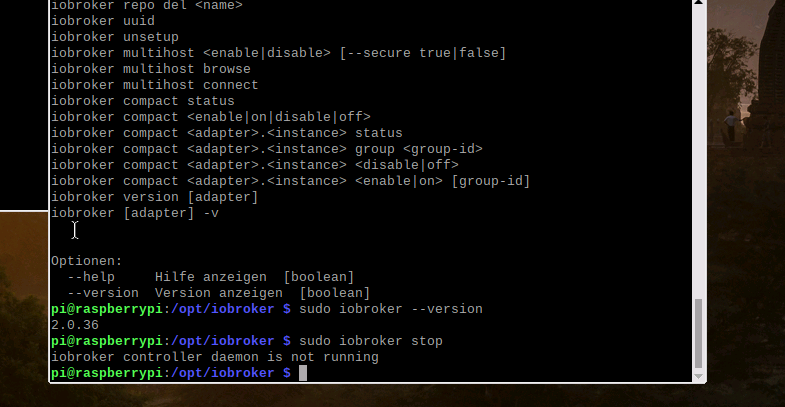
Interessant ist auch dass er offensichtlich den js-controller unter dem pfad: home/pi sucht.
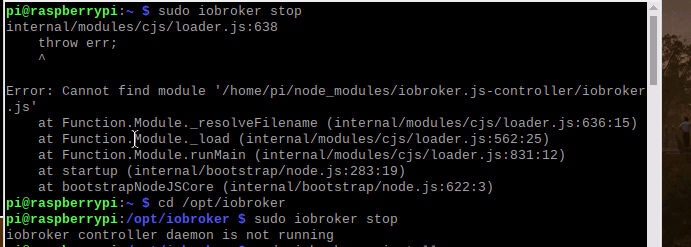
Da komme ich nun nicht mehr alleine durch
Andreas
-
Hi,
jetzt habe ich zum js-controller aucch mal eine Frage.
Wenn ich über das Terminal versuche den iobroker anzuhalten über sudo iobroker stop dann bekomme ich die Meldung das der daemeon gar nicht läuft. er läuft aber denn der iobroker ist über admin usw. erreichbar.Interessant ist auch dass er offensichtlich den js-controller unter dem pfad: home/pi sucht.
Da komme ich nun nicht mehr alleine durch
Andreas
-
@AlCalzone sagte in js-controller 2.0 ab sofort im Latest Repo:
cat /opt/iobroker/INSTALLER_INFO.txt
zu 1)
Installer version: 2019-07-21
Installation date 2019-09-25
Platform: linux
Installed as non-root user pi
init system: systemd
Autostart: systemd
ACL enabled: true/usr/bin/iobroker









548
Online32.7k
Users82.4k
Topics1.3m
Posts