Skip to content
  • Home
  • Recent
  • Tags
  • 0 Unread 0
  • Categories
  • Unreplied
  • Popular
  • GitHub
  • Docu
  • Hilfe
Skins
  • Light
  • Brite
  • Cerulean
  • Cosmo
  • Flatly
  • Journal
  • Litera
  • Lumen
  • Lux
  • Materia
  • Minty
  • Morph
  • Pulse
  • Sandstone
  • Simplex
  • Sketchy
  • Spacelab
  • United
  • Yeti
  • Zephyr
  • Dark
  • Cyborg
  • Darkly
  • Quartz
  • Slate
  • Solar
  • Superhero
  • Vapor

  • Default (No Skin)
  • No Skin
Collapse
ioBroker Logo

Community Forum

donate donate
  1. ioBroker Community Home
  2. Deutsch
  3. ioBroker Allgemein
  4. ioBroker Raspberry Pi 4 und SSD

NEWS

  • Jahresrückblick 2025 – unser neuer Blogbeitrag ist online! ✨
    BluefoxB
    Bluefox
    16
    1
    1.9k

  • Neuer Blogbeitrag: Monatsrückblick - Dezember 2025 🎄
    BluefoxB
    Bluefox
    13
    1
    917

  • Weihnachtsangebot 2025! 🎄
    BluefoxB
    Bluefox
    25
    1
    2.2k

ioBroker Raspberry Pi 4 und SSD

Scheduled Pinned Locked Moved ioBroker Allgemein
raspberry pi 4ssdusb
41 Posts 6 Posters 6.3k Views 5 Watching
  • Oldest to Newest
  • Newest to Oldest
  • Most Votes
Reply
  • Reply as topic
Log in to reply
This topic has been deleted. Only users with topic management privileges can see it.
  • AxelF1977A Offline
    AxelF1977A Offline
    AxelF1977
    wrote on last edited by
    #21

    Ich habe es jetzt mit dieser Videoanleitung gemacht, ES GEHT.

    https://www.youtube.com/watch?v=FM9wuFLufyA

    Vielen Vielen Dank an @paul53 für die Ausdauer und Hilfe.

    ASROCK Deskmini Intel I3 8100 16GB mit Proxmox VM ioBroker VM DIYHue| CCU piVCCU + FHEM auf Raspberry | Maria DB mit Grafana und Prometheus auf Tinker Board

    1 Reply Last reply
    0
    • R Offline
      R Offline
      RalfEngelberth
      wrote on last edited by RalfEngelberth
      #22

      Hallo,
      ich benötige mal eure Hilfe.

      Ich habe ein bestehendes IoBroker mit einem auf einen Raspberry Pi 4
      Mit diesem wollte ich auf eine neue SSD mit 400GB umziehen.

      Als Vorlage zum Umziehen habe ich dieses Anleitung durchgeführt.

      https://www.tomshardware.com/news/boot-raspberry-pi-from-usb,39782.html

      1. Ich habe mir meine Device anzeigen lassen sudo fdisk -l

      2. Dann habe ich mit sudo fdisk /dev/sda meine neue SSD (Disk /dev/sda: 440 GiB) formatiert.
        Mit P ,d,n,p,1 und 2X Enter anschl. w

      3. Mit sudo mkfs.ext4 /dev/sda1 habe ich meine SSD partitioniert

      4. Mit sudo mkdir /media/newdrive habe ich das Verzeichnis newdrive unter media angelget

      5. Anschl. habe ich mit sudo rsync -avx / /media/newdrive die Daten aus dem Root in das newdrive Verzeichnis kopiert.

      6. Dann habe ich die cmdline.txt erweitert mit root=/dev/sda1 rootfstype=ext4 rootwait
        Gesamt steht da jetzt console=serial0,115200 console=tty1 root=PARTUUID=5e3da3da-02 rootfstype=ext4 elevator=deadline fsck.repair=yes rootwait quiet splash plymouth.ignore-serial-consoles root=/dev/sda1 rootfstype=ext4 rootwait

      7. Als letztes dann noch ein reboot

      Das Raspberry bootet aber jetzt nicht durch.
      Ein Kontakt über SSH ist nicht möglich

      HomoranH paul53P 2 Replies Last reply
      0
      • R RalfEngelberth

        Hallo,
        ich benötige mal eure Hilfe.

        Ich habe ein bestehendes IoBroker mit einem auf einen Raspberry Pi 4
        Mit diesem wollte ich auf eine neue SSD mit 400GB umziehen.

        Als Vorlage zum Umziehen habe ich dieses Anleitung durchgeführt.

        https://www.tomshardware.com/news/boot-raspberry-pi-from-usb,39782.html

        1. Ich habe mir meine Device anzeigen lassen sudo fdisk -l

        2. Dann habe ich mit sudo fdisk /dev/sda meine neue SSD (Disk /dev/sda: 440 GiB) formatiert.
          Mit P ,d,n,p,1 und 2X Enter anschl. w

        3. Mit sudo mkfs.ext4 /dev/sda1 habe ich meine SSD partitioniert

        4. Mit sudo mkdir /media/newdrive habe ich das Verzeichnis newdrive unter media angelget

        5. Anschl. habe ich mit sudo rsync -avx / /media/newdrive die Daten aus dem Root in das newdrive Verzeichnis kopiert.

        6. Dann habe ich die cmdline.txt erweitert mit root=/dev/sda1 rootfstype=ext4 rootwait
          Gesamt steht da jetzt console=serial0,115200 console=tty1 root=PARTUUID=5e3da3da-02 rootfstype=ext4 elevator=deadline fsck.repair=yes rootwait quiet splash plymouth.ignore-serial-consoles root=/dev/sda1 rootfstype=ext4 rootwait

        7. Als letztes dann noch ein reboot

        Das Raspberry bootet aber jetzt nicht durch.
        Ein Kontakt über SSH ist nicht möglich

        HomoranH Do not disturb
        HomoranH Do not disturb
        Homoran
        Global Moderator Administrators
        wrote on last edited by
        #23

        @RalfEngelberth sagte in ioBroker Raspberry Pi 4 und SSD:

        Das Raspberry bootet aber jetzt nicht durch.

        Beim Pi4 muss man noch von SD booten.
        Die Funktion direkt von SSD zu booten ist noch nicht implementiert

        kein Support per PN! - Fragen im Forum stellen - es gibt fast nichts, was nicht auch für andere interessant ist.

        Benutzt das Voting rechts unten im Beitrag wenn er euch geholfen hat.

        der Installationsfixer: curl -fsL https://iobroker.net/fix.sh | bash -

        R 1 Reply Last reply
        0
        • HomoranH Homoran

          @RalfEngelberth sagte in ioBroker Raspberry Pi 4 und SSD:

          Das Raspberry bootet aber jetzt nicht durch.

          Beim Pi4 muss man noch von SD booten.
          Die Funktion direkt von SSD zu booten ist noch nicht implementiert

          R Offline
          R Offline
          RalfEngelberth
          wrote on last edited by
          #24

          @Homoran sagte in ioBroker Raspberry Pi 4 und SSD:

          @RalfEngelberth sagte in ioBroker Raspberry Pi 4 und SSD:

          Das Raspberry bootet aber jetzt nicht durch.

          Beim Pi4 muss man noch von SD booten.
          Die Funktion direkt von SSD zu booten ist noch nicht implementiert

          Die Anleitung ist doch für Boot über SD
          Oder ist das nicht die richtige.

          HomoranH 1 Reply Last reply
          0
          • R RalfEngelberth

            @Homoran sagte in ioBroker Raspberry Pi 4 und SSD:

            @RalfEngelberth sagte in ioBroker Raspberry Pi 4 und SSD:

            Das Raspberry bootet aber jetzt nicht durch.

            Beim Pi4 muss man noch von SD booten.
            Die Funktion direkt von SSD zu booten ist noch nicht implementiert

            Die Anleitung ist doch für Boot über SD
            Oder ist das nicht die richtige.

            HomoranH Do not disturb
            HomoranH Do not disturb
            Homoran
            Global Moderator Administrators
            wrote on last edited by Homoran
            #25

            @RalfEngelberth sagte in ioBroker Raspberry Pi 4 und SSD:

            Die Anleitung ist doch für Boot über SD

            Aber nicht für Pi4. oder?

            bei Pi2 und 3 klappt das

            kein Support per PN! - Fragen im Forum stellen - es gibt fast nichts, was nicht auch für andere interessant ist.

            Benutzt das Voting rechts unten im Beitrag wenn er euch geholfen hat.

            der Installationsfixer: curl -fsL https://iobroker.net/fix.sh | bash -

            R HomoranH 2 Replies Last reply
            0
            • HomoranH Homoran

              @RalfEngelberth sagte in ioBroker Raspberry Pi 4 und SSD:

              Die Anleitung ist doch für Boot über SD

              Aber nicht für Pi4. oder?

              bei Pi2 und 3 klappt das

              R Offline
              R Offline
              RalfEngelberth
              wrote on last edited by
              #26

              @Homoran sagte in ioBroker Raspberry Pi 4 und SSD:

              @RalfEngelberth sagte in ioBroker Raspberry Pi 4 und SSD:

              Die Anleitung ist doch für Boot über SD

              Aber nicht für Pi4. oder?

              bei Pi2 und 3 klappt das

              Was wäre denn der richtige Weg?

              1 Reply Last reply
              0
              • HomoranH Homoran

                @RalfEngelberth sagte in ioBroker Raspberry Pi 4 und SSD:

                Die Anleitung ist doch für Boot über SD

                Aber nicht für Pi4. oder?

                bei Pi2 und 3 klappt das

                HomoranH Do not disturb
                HomoranH Do not disturb
                Homoran
                Global Moderator Administrators
                wrote on last edited by
                #27

                @Homoran sagte in ioBroker Raspberry Pi 4 und SSD:

                Aber nicht für Pi4. oder?

                Habe mir jetzt doch die Anleitung selber angesehen.

                How to Run a Raspberry Pi 4 Off an SSD
                The first thing you need to do is prepare your external drive so that all of the appropriate data is on it. To get started:

                1. Connect your external drive to the Pi. Make sure to attach your drive to one of the blue-colored USB 3.0 ports.

                Also doch für den Pi4.

                Wenn du genau nach deren Anleitung vorgegangen bist kann ich dir auch nicht helfen

                kein Support per PN! - Fragen im Forum stellen - es gibt fast nichts, was nicht auch für andere interessant ist.

                Benutzt das Voting rechts unten im Beitrag wenn er euch geholfen hat.

                der Installationsfixer: curl -fsL https://iobroker.net/fix.sh | bash -

                HomoranH 1 Reply Last reply
                0
                • R RalfEngelberth

                  Hallo,
                  ich benötige mal eure Hilfe.

                  Ich habe ein bestehendes IoBroker mit einem auf einen Raspberry Pi 4
                  Mit diesem wollte ich auf eine neue SSD mit 400GB umziehen.

                  Als Vorlage zum Umziehen habe ich dieses Anleitung durchgeführt.

                  https://www.tomshardware.com/news/boot-raspberry-pi-from-usb,39782.html

                  1. Ich habe mir meine Device anzeigen lassen sudo fdisk -l

                  2. Dann habe ich mit sudo fdisk /dev/sda meine neue SSD (Disk /dev/sda: 440 GiB) formatiert.
                    Mit P ,d,n,p,1 und 2X Enter anschl. w

                  3. Mit sudo mkfs.ext4 /dev/sda1 habe ich meine SSD partitioniert

                  4. Mit sudo mkdir /media/newdrive habe ich das Verzeichnis newdrive unter media angelget

                  5. Anschl. habe ich mit sudo rsync -avx / /media/newdrive die Daten aus dem Root in das newdrive Verzeichnis kopiert.

                  6. Dann habe ich die cmdline.txt erweitert mit root=/dev/sda1 rootfstype=ext4 rootwait
                    Gesamt steht da jetzt console=serial0,115200 console=tty1 root=PARTUUID=5e3da3da-02 rootfstype=ext4 elevator=deadline fsck.repair=yes rootwait quiet splash plymouth.ignore-serial-consoles root=/dev/sda1 rootfstype=ext4 rootwait

                  7. Als letztes dann noch ein reboot

                  Das Raspberry bootet aber jetzt nicht durch.
                  Ein Kontakt über SSH ist nicht möglich

                  paul53P Offline
                  paul53P Offline
                  paul53
                  wrote on last edited by paul53
                  #28

                  @RalfEngelberth sagte:

                  Dann habe ich die cmdline.txt erweitert

                  Das ist falsch. Der Eintrag

                  root=PARTUUID=5e3da3da-02
                  

                  hätte ersetzt werden müssen durch

                  root=/dev/sda1
                  

                  oder durch die PARTUUID der SSD, was sicherer funktioniert als /dev/sda1.

                  Bitte verzichtet auf Chat-Nachrichten, denn die Handhabung ist grauenhaft !
                  Produktiv: RPi 2 mit S.USV, HM-MOD-RPI und SLC-USB-Stick mit root fs

                  R 1 Reply Last reply
                  0
                  • paul53P paul53

                    @RalfEngelberth sagte:

                    Dann habe ich die cmdline.txt erweitert

                    Das ist falsch. Der Eintrag

                    root=PARTUUID=5e3da3da-02
                    

                    hätte ersetzt werden müssen durch

                    root=/dev/sda1
                    

                    oder durch die PARTUUID der SSD, was sicherer funktioniert als /dev/sda1.

                    R Offline
                    R Offline
                    RalfEngelberth
                    wrote on last edited by RalfEngelberth
                    #29

                    @paul53 sagte in ioBroker Raspberry Pi 4 und SSD:

                    @RalfEngelberth sagte:

                    Dann habe ich die cmdline.txt erweitert

                    Das ist falsch. Der Eintrag

                    root=PARTUUID=5e3da3da-02
                    

                    hätte ersetzt werden müssen durch

                    root=/dev/sda1
                    

                    oder durch die PARTUUID der SSD, was sicherer funktioniert als /dev/sda1.

                    Dann steht als jetzt in der cmdline.txt
                    console=serial0,115200 console=tty1 root=/dev/sda1 rootfstype=ext4 elevator=deadline fsck.repair=yes rootwait quiet splash plymouth.ignore-serial-consoles rootwait

                    Was ist mit rootwait beibt das auch drin?

                    paul53P 1 Reply Last reply
                    0
                    • R RalfEngelberth

                      @paul53 sagte in ioBroker Raspberry Pi 4 und SSD:

                      @RalfEngelberth sagte:

                      Dann habe ich die cmdline.txt erweitert

                      Das ist falsch. Der Eintrag

                      root=PARTUUID=5e3da3da-02
                      

                      hätte ersetzt werden müssen durch

                      root=/dev/sda1
                      

                      oder durch die PARTUUID der SSD, was sicherer funktioniert als /dev/sda1.

                      Dann steht als jetzt in der cmdline.txt
                      console=serial0,115200 console=tty1 root=/dev/sda1 rootfstype=ext4 elevator=deadline fsck.repair=yes rootwait quiet splash plymouth.ignore-serial-consoles rootwait

                      Was ist mit rootwait beibt das auch drin?

                      paul53P Offline
                      paul53P Offline
                      paul53
                      wrote on last edited by
                      #30

                      @RalfEngelberth sagte in ioBroker Raspberry Pi 4 und SSD:

                      rootwait beibt das auch drin?

                      Nur einmal rootwait, also am Ende löschen.

                      Bitte verzichtet auf Chat-Nachrichten, denn die Handhabung ist grauenhaft !
                      Produktiv: RPi 2 mit S.USV, HM-MOD-RPI und SLC-USB-Stick mit root fs

                      R 2 Replies Last reply
                      0
                      • paul53P paul53

                        @RalfEngelberth sagte in ioBroker Raspberry Pi 4 und SSD:

                        rootwait beibt das auch drin?

                        Nur einmal rootwait, also am Ende löschen.

                        R Offline
                        R Offline
                        RalfEngelberth
                        wrote on last edited by
                        #31

                        @paul53 sagte in ioBroker Raspberry Pi 4 und SSD:

                        @RalfEngelberth sagte in ioBroker Raspberry Pi 4 und SSD:

                        rootwait beibt das auch drin?

                        Nur einmal rootwait, also am Ende löschen.

                        Ok.
                        Danke.
                        Werde es heut Abend ausprobieren.
                        Melde mich wieder

                        1 Reply Last reply
                        0
                        • paul53P paul53

                          @RalfEngelberth sagte in ioBroker Raspberry Pi 4 und SSD:

                          rootwait beibt das auch drin?

                          Nur einmal rootwait, also am Ende löschen.

                          R Offline
                          R Offline
                          RalfEngelberth
                          wrote on last edited by
                          #32

                          @paul53 sagte in ioBroker Raspberry Pi 4 und SSD:

                          @RalfEngelberth sagte in ioBroker Raspberry Pi 4 und SSD:

                          rootwait beibt das auch drin?

                          Nur einmal rootwait, also am Ende löschen.

                          Hallo,
                          hab das alles jetzt so gemacht.
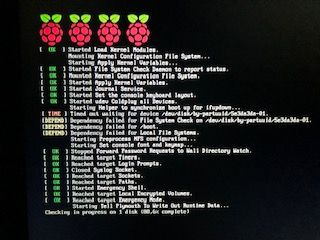
                          Er bootet nur bis zu den 3 PI

                          Kann es sein, dass das mit dem Kopieren nicht richtig funktioniert hat?

                          ![Bild Text](a12bad54-0275-4178-964b-53d8929ef6c8-image.png Bild Link)
                          Hier nochmal meine Vorgehensweise

                          1. Ich habe mir meine Device anzeigen lassen sudo fdisk -l
                          2. Dann habe ich mit sudo fdisk /dev/sda meine neue SSD (Disk /dev/sda: 440 GiB) formatiert.
                            Mit P ,d,n,p,1 und 2X Enter, Yes yanschl. w
                          3. Mit sudo mkfs.ext4 /dev/sda1 habe ich meine SSD partitioniert
                          4. Mit sudo mkdir /media/newdrive habe ich das Verzeichnis newdrive unter media angelget
                          5. Anschl. habe ich mit sudo rsync -avx / /media/newdrive die Daten aus dem Root in das newdrive Verzeichnis kopiert.
                          6. Dann habe ich die cmdline.txt geändert root=PARTUUID=5e3da3da-02 (PARTUUID der SD) geändert auf root=PARTUUID= f4a03c58-01 (PARTUUID der SSD)
                            Oder auf root=/dev/sda1
                            Die PARTUUID der SSD habe ich mir mit sudo blkid anzeigen lassen
                            Cmdline.txt ändern mit sudo nano /boot/cmdlinetxt
                            Gesamt steht jetzt
                            console=serial0,115200 console=tty1 root=PARTUUID= f4a03c58-01 rootfstype=ext4 elevator=deadline fsck.repair=yes rootwait quiet splash plymouth.ignore-serial-consoles

                          Als letztes dann noch ein reboot

                          Hier noch meine Abfrage mit blkid

                          pi@raspberrypi4IoBroker:~ $ sudo blkid
                          /dev/mmcblk0p1: LABEL_FATBOOT="boot" LABEL="boot" UUID="9F2D-0578" TYPE="vfat" PARTUUID="5e3da3da-01"
                          /dev/mmcblk0p2: LABEL="rootfs" UUID="efc2ea8b-042f-47f5-953e-577d8860de55" TYPE="ext4" PARTUUID="5e3da3da-02"
                          /dev/sda1: UUID="ab6cec76-cff2-4002-962d-a29258e48652" TYPE="ext4" PARTUUID="f4a03c58-01"
                          /dev/mmcblk0: PTUUID="5e3da3da" PTTYPE="dos"
                          ```pi@raspberrypi4IoBroker:~ $ sudo blkid
                          /dev/mmcblk0p1: LABEL_FATBOOT="boot" LABEL="boot" UUID="9F2D-0578" TYPE="vfat" PARTUUID="5e3da3da-01"
                          /dev/mmcblk0p2: LABEL="rootfs" UUID="efc2ea8b-042f-47f5-953e-577d8860de55" TYPE="ext4" PARTUUID="5e3da3da-02"
                          /dev/sda1: UUID="ab6cec76-cff2-4002-962d-a29258e48652" TYPE="ext4" PARTUUID="f4a03c58-01"
                          /dev/mmcblk0: PTUUID="5e3da3da" PTTYPE="dos"
                          paul53P 1 Reply Last reply
                          0
                          • R RalfEngelberth

                            @paul53 sagte in ioBroker Raspberry Pi 4 und SSD:

                            @RalfEngelberth sagte in ioBroker Raspberry Pi 4 und SSD:

                            rootwait beibt das auch drin?

                            Nur einmal rootwait, also am Ende löschen.

                            Hallo,
                            hab das alles jetzt so gemacht.
                            Er bootet nur bis zu den 3 PI

                            Kann es sein, dass das mit dem Kopieren nicht richtig funktioniert hat?

                            ![Bild Text](a12bad54-0275-4178-964b-53d8929ef6c8-image.png Bild Link)
                            Hier nochmal meine Vorgehensweise

                            1. Ich habe mir meine Device anzeigen lassen sudo fdisk -l
                            2. Dann habe ich mit sudo fdisk /dev/sda meine neue SSD (Disk /dev/sda: 440 GiB) formatiert.
                              Mit P ,d,n,p,1 und 2X Enter, Yes yanschl. w
                            3. Mit sudo mkfs.ext4 /dev/sda1 habe ich meine SSD partitioniert
                            4. Mit sudo mkdir /media/newdrive habe ich das Verzeichnis newdrive unter media angelget
                            5. Anschl. habe ich mit sudo rsync -avx / /media/newdrive die Daten aus dem Root in das newdrive Verzeichnis kopiert.
                            6. Dann habe ich die cmdline.txt geändert root=PARTUUID=5e3da3da-02 (PARTUUID der SD) geändert auf root=PARTUUID= f4a03c58-01 (PARTUUID der SSD)
                              Oder auf root=/dev/sda1
                              Die PARTUUID der SSD habe ich mir mit sudo blkid anzeigen lassen
                              Cmdline.txt ändern mit sudo nano /boot/cmdlinetxt
                              Gesamt steht jetzt
                              console=serial0,115200 console=tty1 root=PARTUUID= f4a03c58-01 rootfstype=ext4 elevator=deadline fsck.repair=yes rootwait quiet splash plymouth.ignore-serial-consoles

                            Als letztes dann noch ein reboot

                            Hier noch meine Abfrage mit blkid

                            pi@raspberrypi4IoBroker:~ $ sudo blkid
                            /dev/mmcblk0p1: LABEL_FATBOOT="boot" LABEL="boot" UUID="9F2D-0578" TYPE="vfat" PARTUUID="5e3da3da-01"
                            /dev/mmcblk0p2: LABEL="rootfs" UUID="efc2ea8b-042f-47f5-953e-577d8860de55" TYPE="ext4" PARTUUID="5e3da3da-02"
                            /dev/sda1: UUID="ab6cec76-cff2-4002-962d-a29258e48652" TYPE="ext4" PARTUUID="f4a03c58-01"
                            /dev/mmcblk0: PTUUID="5e3da3da" PTTYPE="dos"
                            ```pi@raspberrypi4IoBroker:~ $ sudo blkid
                            /dev/mmcblk0p1: LABEL_FATBOOT="boot" LABEL="boot" UUID="9F2D-0578" TYPE="vfat" PARTUUID="5e3da3da-01"
                            /dev/mmcblk0p2: LABEL="rootfs" UUID="efc2ea8b-042f-47f5-953e-577d8860de55" TYPE="ext4" PARTUUID="5e3da3da-02"
                            /dev/sda1: UUID="ab6cec76-cff2-4002-962d-a29258e48652" TYPE="ext4" PARTUUID="f4a03c58-01"
                            /dev/mmcblk0: PTUUID="5e3da3da" PTTYPE="dos"
                            paul53P Offline
                            paul53P Offline
                            paul53
                            wrote on last edited by
                            #33

                            @RalfEngelberth sagte in ioBroker Raspberry Pi 4 und SSD:

                            root=PARTUUID= f4a03c58-01

                            Da ist ein Leerzeichen zuviel.

                            Bitte verzichtet auf Chat-Nachrichten, denn die Handhabung ist grauenhaft !
                            Produktiv: RPi 2 mit S.USV, HM-MOD-RPI und SLC-USB-Stick mit root fs

                            R 1 Reply Last reply
                            0
                            • paul53P paul53

                              @RalfEngelberth sagte in ioBroker Raspberry Pi 4 und SSD:

                              root=PARTUUID= f4a03c58-01

                              Da ist ein Leerzeichen zuviel.

                              R Offline
                              R Offline
                              RalfEngelberth
                              wrote on last edited by
                              #34

                              @paul53 sagte in ioBroker Raspberry Pi 4 und SSD:

                              @RalfEngelberth sagte in ioBroker Raspberry Pi 4 und SSD:

                              root=PARTUUID= f4a03c58-01

                              Da ist ein Leerzeichen zuviel.

                              Habe ich geändert.
                              Jetzt bootet er
                              Der Boot dauert ab ca. 20min
                              Er macht erst eine Diskcheck

                              .IMG_0033.jpg

                              Wenn ich in der grafischen Oberfläche bin, den Dateimanager aufrufe und z.B. in das Verzeichnis von IoBroker gehe, sehe ich die LED an der SSD blinken.
                              Aber es dauert alles sehr lange.

                              Über SSH bekomme ich noch keine Verbindung und IoBroker startet auch noch nicht

                              1 Reply Last reply
                              0
                              • opossumO Offline
                                opossumO Offline
                                opossum
                                wrote on last edited by
                                #35

                                Hallo,
                                wenn das alles sehr lange dauert, kann es sein, dass der USB-Adapter nicht korrekt arbeitet. Wenn Du ihn in den USB 3.0 connected hast, fahre mal runter und stöpsel um auf USB 2.0. Vielleicht ist er dann schneller.

                                Wenn Du den PI sauber einrichten möchtest, kann ich Dir nur folgenden Link empfehlen: https://www.raspifun.de/viewtopic.php?t=4
                                Ist etwas länger, aber der Autor erklärt von Anfang bis Ende, wie man Raspian installiert.

                                https://schlepper-petersdorf.jimdofree.com/

                                R 1 Reply Last reply
                                0
                                • opossumO opossum

                                  Hallo,
                                  wenn das alles sehr lange dauert, kann es sein, dass der USB-Adapter nicht korrekt arbeitet. Wenn Du ihn in den USB 3.0 connected hast, fahre mal runter und stöpsel um auf USB 2.0. Vielleicht ist er dann schneller.

                                  Wenn Du den PI sauber einrichten möchtest, kann ich Dir nur folgenden Link empfehlen: https://www.raspifun.de/viewtopic.php?t=4
                                  Ist etwas länger, aber der Autor erklärt von Anfang bis Ende, wie man Raspian installiert.

                                  R Offline
                                  R Offline
                                  RalfEngelberth
                                  wrote on last edited by RalfEngelberth
                                  #36

                                  @opossum sagte in ioBroker Raspberry Pi 4 und SSD:

                                  Hallo,
                                  wenn das alles sehr lange dauert, kann es sein, dass der USB-Adapter nicht korrekt arbeitet. Wenn Du ihn in den USB 3.0 connected hast, fahre mal runter und stöpsel um auf USB 2.0. Vielleicht ist er dann schneller.

                                  Wenn Du den PI sauber einrichten möchtest, kann ich Dir nur folgenden Link empfehlen: https://www.raspifun.de/viewtopic.php?t=4
                                  Ist etwas länger, aber der Autor erklärt von Anfang bis Ende, wie man Raspian installiert.

                                  Der Tipp mit dem USB Port war gut.
                                  Er bootet jetzt und ist auch sehr schnell.

                                  Was könnte ich denn jetzt noch machen, damit der USB 3.0 (Blau) auch funktioniert?
                                  Die SSD kann ja USB 3.1

                                  1 Reply Last reply
                                  0
                                  • opossumO Offline
                                    opossumO Offline
                                    opossum
                                    wrote on last edited by
                                    #37

                                    Hallo,

                                    es funktionieren anscheinend nicht alle Adapter mit USB 3.0. Schau mal hier rein, da findest Du Informationen zu Adaptern.

                                    https://jamesachambers.com/raspberry-pi-4-usb-boot-config-guide-for-ssd-flash-drives/

                                    https://schlepper-petersdorf.jimdofree.com/

                                    R 1 Reply Last reply
                                    0
                                    • opossumO opossum

                                      Hallo,

                                      es funktionieren anscheinend nicht alle Adapter mit USB 3.0. Schau mal hier rein, da findest Du Informationen zu Adaptern.

                                      https://jamesachambers.com/raspberry-pi-4-usb-boot-config-guide-for-ssd-flash-drives/

                                      R Offline
                                      R Offline
                                      RalfEngelberth
                                      wrote on last edited by
                                      #38

                                      @opossum sagte in ioBroker Raspberry Pi 4 und SSD:

                                      Hallo,

                                      es funktionieren anscheinend nicht alle Adapter mit USB 3.0. Schau mal hier rein, da findest Du Informationen zu Adaptern.

                                      https://jamesachambers.com/raspberry-pi-4-usb-boot-config-guide-for-ssd-flash-drives/

                                      Hallo,
                                      das muss ich mir aber erst mal in Ruhe ansehen.
                                      Denke, dass ich heute Abend dazu kommen.
                                      Melde mich dann wieder.
                                      Aber nochmal Danke für den Tipp mit dem USB.

                                      1 Reply Last reply
                                      0
                                      • HomoranH Homoran

                                        @Homoran sagte in ioBroker Raspberry Pi 4 und SSD:

                                        Aber nicht für Pi4. oder?

                                        Habe mir jetzt doch die Anleitung selber angesehen.

                                        How to Run a Raspberry Pi 4 Off an SSD
                                        The first thing you need to do is prepare your external drive so that all of the appropriate data is on it. To get started:

                                        1. Connect your external drive to the Pi. Make sure to attach your drive to one of the blue-colored USB 3.0 ports.

                                        Also doch für den Pi4.

                                        Wenn du genau nach deren Anleitung vorgegangen bist kann ich dir auch nicht helfen

                                        HomoranH Do not disturb
                                        HomoranH Do not disturb
                                        Homoran
                                        Global Moderator Administrators
                                        wrote on last edited by
                                        #39

                                        @opossum

                                        Die Anleitung war aber IMHO für den 3.0 port

                                        @Homoran sagte in ioBroker Raspberry Pi 4 und SSD:

                                        How to Run a Raspberry Pi 4 Off an SSD
                                        The first thing you need to do is prepare your external drive so that all of the appropriate data is on it. To get started:

                                        1. Connect your external drive to the Pi. Make sure to attach your drive to one of the blue-colored USB 3.0 ports.

                                        kein Support per PN! - Fragen im Forum stellen - es gibt fast nichts, was nicht auch für andere interessant ist.

                                        Benutzt das Voting rechts unten im Beitrag wenn er euch geholfen hat.

                                        der Installationsfixer: curl -fsL https://iobroker.net/fix.sh | bash -

                                        R 1 Reply Last reply
                                        0
                                        • HomoranH Homoran

                                          @opossum

                                          Die Anleitung war aber IMHO für den 3.0 port

                                          @Homoran sagte in ioBroker Raspberry Pi 4 und SSD:

                                          How to Run a Raspberry Pi 4 Off an SSD
                                          The first thing you need to do is prepare your external drive so that all of the appropriate data is on it. To get started:

                                          1. Connect your external drive to the Pi. Make sure to attach your drive to one of the blue-colored USB 3.0 ports.
                                          R Offline
                                          R Offline
                                          RalfEngelberth
                                          wrote on last edited by
                                          #40

                                          @Homoran sagte in ioBroker Raspberry Pi 4 und SSD:

                                          @opossum

                                          Die Anleitung war aber IMHO für den 3.0 port

                                          @Homoran sagte in ioBroker Raspberry Pi 4 und SSD:

                                          How to Run a Raspberry Pi 4 Off an SSD
                                          The first thing you need to do is prepare your external drive so that all of the appropriate data is on it. To get started:

                                          1. Connect your external drive to the Pi. Make sure to attach your drive to one of the blue-colored USB 3.0 ports.

                                          Das habe ich doch gehabt
                                          Über die blaue Buchse habe ich die Änderungen vorgenommen.
                                          Die graue Buchs habe ich verwendet, nachdem alles drauf war.

                                          1 Reply Last reply
                                          0
                                          Reply
                                          • Reply as topic
                                          Log in to reply
                                          • Oldest to Newest
                                          • Newest to Oldest
                                          • Most Votes


                                          Support us

                                          ioBroker
                                          Community Adapters
                                          Donate
                                          FAQ Cloud / IOT
                                          HowTo: Node.js-Update
                                          HowTo: Backup/Restore
                                          Downloads
                                          BLOG

                                          461

                                          Online

                                          32.6k

                                          Users

                                          82.2k

                                          Topics

                                          1.3m

                                          Posts
                                          Community
                                          Impressum | Datenschutz-Bestimmungen | Nutzungsbedingungen | Einwilligungseinstellungen
                                          ioBroker Community 2014-2025
                                          logo
                                          • Login

                                          • Don't have an account? Register

                                          • Login or register to search.
                                          • First post
                                            Last post
                                          0
                                          • Home
                                          • Recent
                                          • Tags
                                          • Unread 0
                                          • Categories
                                          • Unreplied
                                          • Popular
                                          • GitHub
                                          • Docu
                                          • Hilfe