Skip to content
  • Home
  • Recent
  • Tags
  • 0 Unread 0
  • Categories
  • Unreplied
  • Popular
  • GitHub
  • Docu
  • Hilfe
Skins
  • Light
  • Brite
  • Cerulean
  • Cosmo
  • Flatly
  • Journal
  • Litera
  • Lumen
  • Lux
  • Materia
  • Minty
  • Morph
  • Pulse
  • Sandstone
  • Simplex
  • Sketchy
  • Spacelab
  • United
  • Yeti
  • Zephyr
  • Dark
  • Cyborg
  • Darkly
  • Quartz
  • Slate
  • Solar
  • Superhero
  • Vapor

  • Default (No Skin)
  • No Skin
Collapse
ioBroker Logo

Community Forum

donate donate
  1. ioBroker Community Home
  2. Deutsch
  3. ioBroker Allgemein
  4. IoBroker.phantomjs

NEWS

  • UPDATE 31.10.: Amazon Alexa - ioBroker Skill läuft aus ?
    apollon77A
    apollon77
    48
    3
    8.8k

  • Monatsrückblick – September 2025
    BluefoxB
    Bluefox
    13
    1
    2.2k

  • Neues Video "KI im Smart Home" - ioBroker plus n8n
    BluefoxB
    Bluefox
    16
    1
    3.2k

IoBroker.phantomjs

Scheduled Pinned Locked Moved ioBroker Allgemein
148 Posts 32 Posters 24.4k Views 19 Watching
  • Oldest to Newest
  • Newest to Oldest
  • Most Votes
Reply
  • Reply as topic
Log in to reply
This topic has been deleted. Only users with topic management privileges can see it.
  • NegaleinN Offline
    NegaleinN Offline
    Negalein
    Global Moderator
    wrote on last edited by
    #62

    bin etwas weiter :)

    Das "undefinied" ist weg. Aber der Error 127 bleibt

    
    phantomjs.0	2020-07-16 02:54:00.075	error	(3450) {"killed":false,"code":127,"signal":null,"cmd":"/opt/iobroker/node_modules/phantomjs-prebuilt/lib/phantom/bin/phantomjs /opt/iobroker/node_modules/iobroker.phantomjs/lib/rasterize.js --url http
    phantomjs.0	2020-07-16 02:54:00.061	info	(3450) Create 1200px*800px in 10000ms - "https://www.luftbilder-innviertel.at" => "/opt/iobroker/node_modules/iobroker.phantomjs/wetter.png"
    

    ° Node.js: 20.17.0 NPM: 10.8.2
    ° Proxmox, Ubuntu 22.04.3 LTS
    ° Fixer ---> iob fix

    1 Reply Last reply
    0
    • apollon77A Offline
      apollon77A Offline
      apollon77
      wrote on last edited by
      #63

      Errro 127 heisst das der prozess irgendwie stirbt und nicht sauber läuft. Starte doch mal das kommando manuell selbst an der shell und schau was passiert

      Beitrag hat geholfen? Votet rechts unten im Beitrag :-) https://paypal.me/Apollon77 / https://github.com/sponsors/Apollon77

      • Debug-Log für Instanz einschalten? Admin -> Instanzen -> Expertenmodus -> Instanz aufklappen - Loglevel ändern
      • Logfiles auf Platte /opt/iobroker/log/… nutzen, Admin schneidet Zeilen ab
      NegaleinN 1 Reply Last reply
      0
      • H Offline
        H Offline
        holgerwolf
        wrote on last edited by
        #64

        Vielleicht dauert das Rendern auch mehr als 10 Sekunden? Je nach Plattform wo der iobroker läuft.
        Spiel mal mit den 10000 ms...

        1 Reply Last reply
        0
        • NegaleinN Negalein

          @holgerwolf sagte in IoBroker.phantomjs:

          sorry

          Kein Problem.

          Kannst du dir denken, was der Fehler ist?

          ? Offline
          ? Offline
          A Former User
          wrote on last edited by A Former User
          #65

          @Negalein Hi, hab grad n Fehler im phantomjs-adapter gefunden, dort ist der Port des Webservers auf 8082 fest eingestellt, liegt deiner auch dort?

          Issue: Webserver Port

          NegaleinN 1 Reply Last reply
          0
          • ? A Former User

            @Negalein Hi, hab grad n Fehler im phantomjs-adapter gefunden, dort ist der Port des Webservers auf 8082 fest eingestellt, liegt deiner auch dort?

            Issue: Webserver Port

            NegaleinN Offline
            NegaleinN Offline
            Negalein
            Global Moderator
            wrote on last edited by
            #66

            @ilovegym sagte in IoBroker.phantomjs:

            Hi, hab grad n Fehler im phantomjs-adapter gefunden, dort ist der Port des Webservers auf 8082 fest eingestellt, liegt deiner auch dort?

            Wo weh ich das? Im Adapter gibt es keine Einstellungsmöglichkeit.

            ° Node.js: 20.17.0 NPM: 10.8.2
            ° Proxmox, Ubuntu 22.04.3 LTS
            ° Fixer ---> iob fix

            ? 1 Reply Last reply
            0
            • NegaleinN Negalein

              @ilovegym sagte in IoBroker.phantomjs:

              Hi, hab grad n Fehler im phantomjs-adapter gefunden, dort ist der Port des Webservers auf 8082 fest eingestellt, liegt deiner auch dort?

              Wo weh ich das? Im Adapter gibt es keine Einstellungsmöglichkeit.

              ? Offline
              ? Offline
              A Former User
              wrote on last edited by
              #67

              @Negalein richtig, es gibt keine Einstellungsmöglichkeit und im Link zum Bild unter phantomsjs.0.pictures.picture.png siehst du ja den Link, wenn du den einfach anklickst und dann ein Bild kommt, ist es ok, läuft der Browser hier ins leere, ist wahrscheinlich der Port falsch..

              Kannst ja zum Testen mal n zweiten Webserver-Instanz installieren und auf Port 8082 einstellen.. wenn der noch frei ist...

              NegaleinN 1 Reply Last reply
              0
              • apollon77A apollon77

                Errro 127 heisst das der prozess irgendwie stirbt und nicht sauber läuft. Starte doch mal das kommando manuell selbst an der shell und schau was passiert

                NegaleinN Offline
                NegaleinN Offline
                Negalein
                Global Moderator
                wrote on last edited by
                #68

                @apollon77 sagte in IoBroker.phantomjs:

                Starte doch mal das kommando manuell selbst an der shell und schau was passiert

                Du meinst das?
                exec('wput -nc /opt/iobroker/node_modules/iobroker.phantomjs/wetter.png ftp://xxxxxxxxx:xxxxxxxx@www37.world4you.com')

                Wie geb ich das in der Konsole ein?

                root@iobroker:/opt/iobroker# wput -nc /opt/iobroker/node_modules/iobroker.phantomjs/wetter.png ftp://xxxxxxxxx:xxxxxxxx@www37.world4you.com
                bash: wput: Kommando nicht gefunden.
                root@iobroker:/opt/iobroker# exec('wput -nc /opt/iobroker/node_modules/iobroker.phantomjs/wetter.png ftp://xxxxxxxxx:xxxxxxxx@www37.world4you.com')
                bash: Syntaxfehler beim unerwarteten Wort `'wput -nc /opt/iobroker/node_modules/iobroker.phantomjs/wetter.png ftp://xxxxxxxxx:xxxxxxxx@www37.world4you.com''
                root@iobroker:/opt/iobroker#
                

                ° Node.js: 20.17.0 NPM: 10.8.2
                ° Proxmox, Ubuntu 22.04.3 LTS
                ° Fixer ---> iob fix

                1 Reply Last reply
                0
                • ? A Former User

                  @Negalein richtig, es gibt keine Einstellungsmöglichkeit und im Link zum Bild unter phantomsjs.0.pictures.picture.png siehst du ja den Link, wenn du den einfach anklickst und dann ein Bild kommt, ist es ok, läuft der Browser hier ins leere, ist wahrscheinlich der Port falsch..

                  Kannst ja zum Testen mal n zweiten Webserver-Instanz installieren und auf Port 8082 einstellen.. wenn der noch frei ist...

                  NegaleinN Offline
                  NegaleinN Offline
                  Negalein
                  Global Moderator
                  wrote on last edited by
                  #69

                  @ilovegym sagte in IoBroker.phantomjs:

                  phantomsjs.0.pictures.picture.png

                  Gibt es bei mir in den Objekten nicht.

                  Es gibt phantomjs.0.filename
                  Dort steht /opt/iobroker/node_modules/iobroker.phantomjs/picture.png
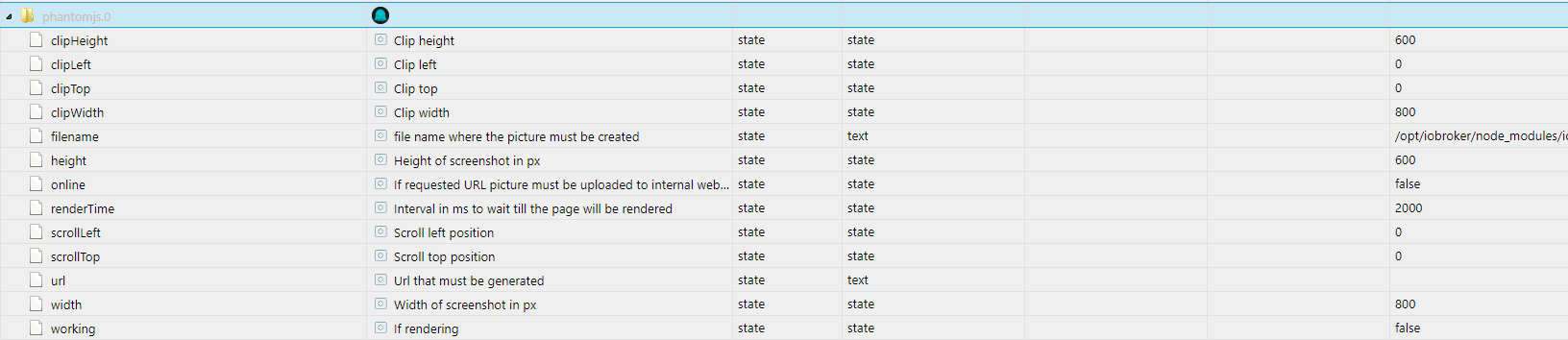
                  objects - ioBroker (3).png

                  ° Node.js: 20.17.0 NPM: 10.8.2
                  ° Proxmox, Ubuntu 22.04.3 LTS
                  ° Fixer ---> iob fix

                  ? crunchipC 2 Replies Last reply
                  0
                  • NegaleinN Negalein

                    @ilovegym sagte in IoBroker.phantomjs:

                    phantomsjs.0.pictures.picture.png

                    Gibt es bei mir in den Objekten nicht.

                    Es gibt phantomjs.0.filename
                    Dort steht /opt/iobroker/node_modules/iobroker.phantomjs/picture.png
                    objects - ioBroker (3).png

                    ? Offline
                    ? Offline
                    A Former User
                    wrote on last edited by
                    #70

                    @Negalein so sieht das bei mir aus, ich teste da immer erstmal mit ner lokalen IP, um zu sehen, was der Adapter überhaupt macht:
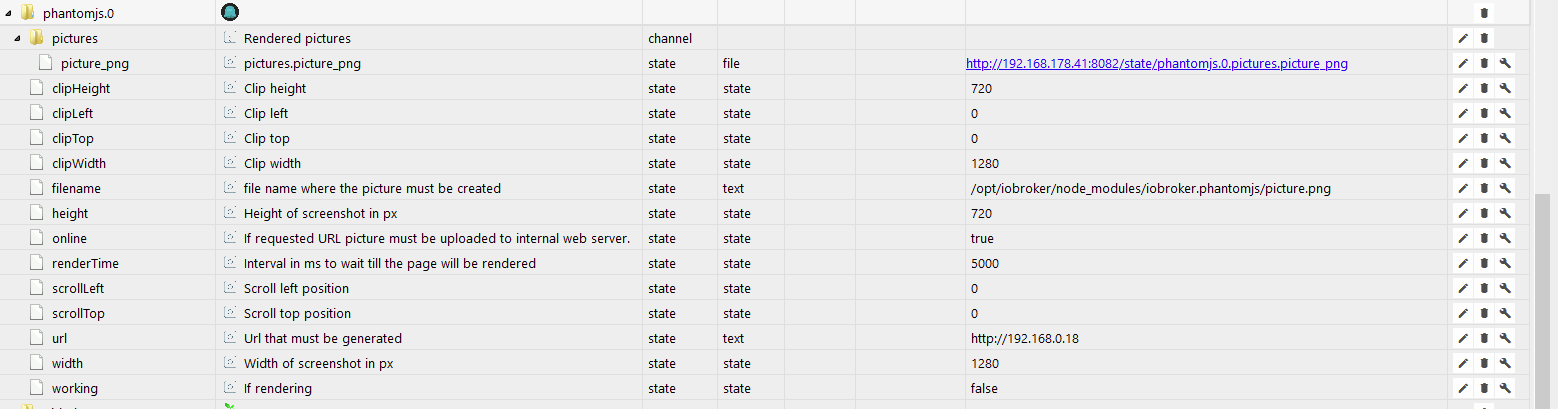
                    5643c5b8-1bb2-459b-8245-2e57a7324082-grafik.png

                    1 Reply Last reply
                    0
                    • NegaleinN Offline
                      NegaleinN Offline
                      Negalein
                      Global Moderator
                      wrote on last edited by
                      #71

                      @apollon77 @ilovegym

                      Beim Befehl in der Konsole kommt

                      /opt/iobroker/node_modules/phantomjs-prebuilt/lib/phantom/bin/phantomjs /opt/iobroker/node_modules/iobroker.phantomjs/lib/rasterize.js --url https://www.luftbilder-innviertel.a\"/opt/iobroker/node_modules/iobroker.phantomjs/wetter.png\" --width 1200 --height 800 --timeout 10000"}
                      /opt/iobroker/node_modules/phantomjs-prebuilt/lib/phantom/bin/phantomjs: error while loading shared libraries: libfontconfig.so.1: cannot open shared object file: No such file or directory
                      

                      ° Node.js: 20.17.0 NPM: 10.8.2
                      ° Proxmox, Ubuntu 22.04.3 LTS
                      ° Fixer ---> iob fix

                      1 Reply Last reply
                      0
                      • NegaleinN Negalein

                        @ilovegym sagte in IoBroker.phantomjs:

                        phantomsjs.0.pictures.picture.png

                        Gibt es bei mir in den Objekten nicht.

                        Es gibt phantomjs.0.filename
                        Dort steht /opt/iobroker/node_modules/iobroker.phantomjs/picture.png
                        objects - ioBroker (3).png

                        crunchipC Away
                        crunchipC Away
                        crunchip
                        Forum Testing Most Active
                        wrote on last edited by
                        #72

                        @Negalein so sieht das bei mir auch aus, habe den mal installiert, aber noch nie verwendet

                        umgestiegen von Proxmox auf Unraid

                        1 Reply Last reply
                        0
                        • NegaleinN Offline
                          NegaleinN Offline
                          Negalein
                          Global Moderator
                          wrote on last edited by
                          #73

                          @apollon77 @holgerwolf @ilovegym @crunchip

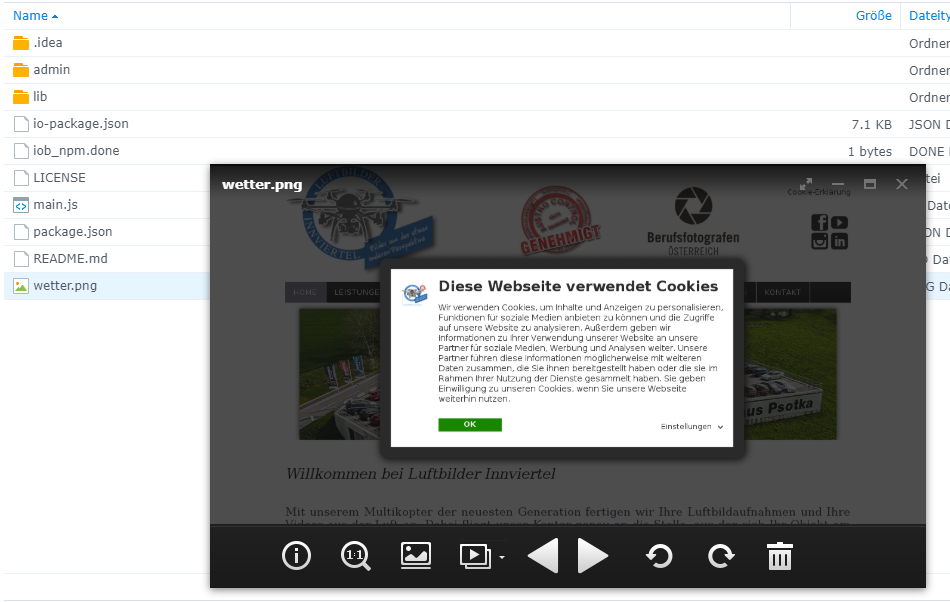
                          Es läuft jetzt soweit, dass das .png erstellt wird.
                          Hab libfontconfig nachinstalliert.

                          phantomjs.0	2020-07-16 12:58:00.486	info	(3450) Create 1200px*800px in 30000ms - "https://www.luftbilder-innviertel.at" => "/opt/iobroker/node_modules/iobroker.phantomjs/wetter.png"
                          phantomjs.0	2020-07-16 12:56:00.451	info	(3450) Create 1200px*800px in 30000ms - "https://www.luftbilder-innviertel.at" => "/opt/iobroker/node_modules/iobroker.phantomjs/wetter.png"
                          

                          Wird auch sauber abgespeichert.
                          Synology_Nega_3 - Synology DiskStation (4).png

                          Aber das mit dem FTP funktioniert nicht.

                          ° Node.js: 20.17.0 NPM: 10.8.2
                          ° Proxmox, Ubuntu 22.04.3 LTS
                          ° Fixer ---> iob fix

                          ? apollon77A 2 Replies Last reply
                          0
                          • NegaleinN Negalein

                            @apollon77 @holgerwolf @ilovegym @crunchip

                            Es läuft jetzt soweit, dass das .png erstellt wird.
                            Hab libfontconfig nachinstalliert.

                            phantomjs.0	2020-07-16 12:58:00.486	info	(3450) Create 1200px*800px in 30000ms - "https://www.luftbilder-innviertel.at" => "/opt/iobroker/node_modules/iobroker.phantomjs/wetter.png"
                            phantomjs.0	2020-07-16 12:56:00.451	info	(3450) Create 1200px*800px in 30000ms - "https://www.luftbilder-innviertel.at" => "/opt/iobroker/node_modules/iobroker.phantomjs/wetter.png"
                            

                            Wird auch sauber abgespeichert.
                            Synology_Nega_3 - Synology DiskStation (4).png

                            Aber das mit dem FTP funktioniert nicht.

                            ? Offline
                            ? Offline
                            A Former User
                            wrote on last edited by
                            #74

                            @Negalein wput ist installiert?
                            wput --version

                            ftp server erreichbar?

                            NegaleinN 1 Reply Last reply
                            0
                            • ? A Former User

                              @Negalein wput ist installiert?
                              wput --version

                              ftp server erreichbar?

                              NegaleinN Offline
                              NegaleinN Offline
                              Negalein
                              Global Moderator
                              wrote on last edited by Negalein
                              #75

                              @ilovegym sagte in IoBroker.phantomjs:

                              wput ist installiert?
                              wput --version

                              schätze nicht

                              root@iobroker:/opt/iobroker# wput --version
                              bash: wput: Kommando nicht gefunden.
                              

                              Mit welchem Befehl installier ich es?

                              Mit apt-get install wput?

                              ° Node.js: 20.17.0 NPM: 10.8.2
                              ° Proxmox, Ubuntu 22.04.3 LTS
                              ° Fixer ---> iob fix

                              ? 2 Replies Last reply
                              0
                              • NegaleinN Negalein

                                @ilovegym sagte in IoBroker.phantomjs:

                                wput ist installiert?
                                wput --version

                                schätze nicht

                                root@iobroker:/opt/iobroker# wput --version
                                bash: wput: Kommando nicht gefunden.
                                

                                Mit welchem Befehl installier ich es?

                                Mit apt-get install wput?

                                ? Offline
                                ? Offline
                                A Former User
                                wrote on last edited by
                                #76

                                @Negalein

                                sudo apt install wput

                                NegaleinN 1 Reply Last reply
                                0
                                • NegaleinN Negalein

                                  @ilovegym sagte in IoBroker.phantomjs:

                                  wput ist installiert?
                                  wput --version

                                  schätze nicht

                                  root@iobroker:/opt/iobroker# wput --version
                                  bash: wput: Kommando nicht gefunden.
                                  

                                  Mit welchem Befehl installier ich es?

                                  Mit apt-get install wput?

                                  ? Offline
                                  ? Offline
                                  A Former User
                                  wrote on last edited by
                                  #77

                                  @Negalein ... und pfui, nix root... immer schön n useraccount nutzen und sudo davor.. :-)

                                  GlasfaserG 1 Reply Last reply
                                  0
                                  • ? A Former User

                                    @Negalein

                                    sudo apt install wput

                                    NegaleinN Offline
                                    NegaleinN Offline
                                    Negalein
                                    Global Moderator
                                    wrote on last edited by
                                    #78

                                    @ilovegym sagte in IoBroker.phantomjs:

                                    sudo apt install wput

                                    Danke, war eine schwere Geburt.
                                    Läuft jetzt wunderbar.

                                    ° Node.js: 20.17.0 NPM: 10.8.2
                                    ° Proxmox, Ubuntu 22.04.3 LTS
                                    ° Fixer ---> iob fix

                                    ? 1 Reply Last reply
                                    0
                                    • NegaleinN Negalein

                                      @ilovegym sagte in IoBroker.phantomjs:

                                      sudo apt install wput

                                      Danke, war eine schwere Geburt.
                                      Läuft jetzt wunderbar.

                                      ? Offline
                                      ? Offline
                                      A Former User
                                      wrote on last edited by
                                      #79

                                      @Negalein super, freut mich! :+1: :+1:

                                      1 Reply Last reply
                                      0
                                      • ? A Former User

                                        @Negalein ... und pfui, nix root... immer schön n useraccount nutzen und sudo davor.. :-)

                                        GlasfaserG Offline
                                        GlasfaserG Offline
                                        Glasfaser
                                        wrote on last edited by
                                        #80

                                        @ilovegym sagte in IoBroker.phantomjs:

                                        @Negalein ... und pfui,

                                        Der ist gut ... :grin:

                                        Er hat eine Synology ;)

                                        Synology 918+ 16GB - ioBroker in Docker v9 , VISO auf Trekstor Primebook C13 13,3" , Hikvision Domkameras mit Surveillance Station .. CCU RaspberryMatic in Synology VM .. Zigbee CC2538+CC2592 .. Sonoff .. KNX .. Modbus ..

                                        1 Reply Last reply
                                        0
                                        • NegaleinN Negalein

                                          @apollon77 @holgerwolf @ilovegym @crunchip

                                          Es läuft jetzt soweit, dass das .png erstellt wird.
                                          Hab libfontconfig nachinstalliert.

                                          phantomjs.0	2020-07-16 12:58:00.486	info	(3450) Create 1200px*800px in 30000ms - "https://www.luftbilder-innviertel.at" => "/opt/iobroker/node_modules/iobroker.phantomjs/wetter.png"
                                          phantomjs.0	2020-07-16 12:56:00.451	info	(3450) Create 1200px*800px in 30000ms - "https://www.luftbilder-innviertel.at" => "/opt/iobroker/node_modules/iobroker.phantomjs/wetter.png"
                                          

                                          Wird auch sauber abgespeichert.
                                          Synology_Nega_3 - Synology DiskStation (4).png

                                          Aber das mit dem FTP funktioniert nicht.

                                          apollon77A Offline
                                          apollon77A Offline
                                          apollon77
                                          wrote on last edited by
                                          #81

                                          @Negalein leg mal bitte issue im github an das wir das mit installieren lassen

                                          Beitrag hat geholfen? Votet rechts unten im Beitrag :-) https://paypal.me/Apollon77 / https://github.com/sponsors/Apollon77

                                          • Debug-Log für Instanz einschalten? Admin -> Instanzen -> Expertenmodus -> Instanz aufklappen - Loglevel ändern
                                          • Logfiles auf Platte /opt/iobroker/log/… nutzen, Admin schneidet Zeilen ab

                                          NegaleinN 1 Reply Last reply
                                          0
                                          Reply
                                          • Reply as topic
                                          Log in to reply
                                          • Oldest to Newest
                                          • Newest to Oldest
                                          • Most Votes


                                          Support us

                                          ioBroker
                                          Community Adapters
                                          Donate
                                          FAQ Cloud / IOT
                                          HowTo: Node.js-Update
                                          HowTo: Backup/Restore
                                          Downloads
                                          BLOG

                                          387

                                          Online

                                          32.4k

                                          Users

                                          81.5k

                                          Topics

                                          1.3m

                                          Posts
                                          Community
                                          Impressum | Datenschutz-Bestimmungen | Nutzungsbedingungen | Einwilligungseinstellungen
                                          ioBroker Community 2014-2025
                                          logo
                                          • Login

                                          • Don't have an account? Register

                                          • Login or register to search.
                                          • First post
                                            Last post
                                          0
                                          • Home
                                          • Recent
                                          • Tags
                                          • Unread 0
                                          • Categories
                                          • Unreplied
                                          • Popular
                                          • GitHub
                                          • Docu
                                          • Hilfe