Skip to content
  • Home
  • Recent
  • Tags
  • 0 Unread 0
  • Categories
  • Unreplied
  • Popular
  • GitHub
  • Docu
  • Hilfe
Skins
  • Light
  • Brite
  • Cerulean
  • Cosmo
  • Flatly
  • Journal
  • Litera
  • Lumen
  • Lux
  • Materia
  • Minty
  • Morph
  • Pulse
  • Sandstone
  • Simplex
  • Sketchy
  • Spacelab
  • United
  • Yeti
  • Zephyr
  • Dark
  • Cyborg
  • Darkly
  • Quartz
  • Slate
  • Solar
  • Superhero
  • Vapor

  • Default (No Skin)
  • No Skin
Collapse
ioBroker Logo

Community Forum

donate donate
  1. ioBroker Community Home
  2. Deutsch
  3. ioBroker Allgemein
  4. Google Home/Assistant ioBroker einrichten/nutzen

NEWS

  • Monatsrückblick Januar/Februar 2026 ist online!
    BluefoxB
    Bluefox
    17
    1
    376

  • Jahresrückblick 2025 – unser neuer Blogbeitrag ist online! ✨
    BluefoxB
    Bluefox
    17
    1
    4.9k

  • Neuer Blogbeitrag: Monatsrückblick - Dezember 2025 🎄
    BluefoxB
    Bluefox
    13
    1
    1.3k

Google Home/Assistant ioBroker einrichten/nutzen
Scheduled Pinned Locked Moved ioBroker Allgemein
googlegoogle asisstantgoogle homegoogle home minihow-toanleitung
1.2k Posts 127 Posters 431.0k Views 140 Watching
  • Oldest to Newest
  • Newest to Oldest
  • Most Votes
Reply
  • Reply as topic
Log in to reply
This topic has been deleted. Only users with topic management privileges can see it.
  • E Offline
    E Offline
    eric1905
    wrote on last edited by
    #508

    @tombox said in Google Home/Assistant ioBroker einrichten/nutzen:

    @eric1905 Bei mir gehen die sonoff rgbs
    Entferne alle sonoff bei den google devices was nicht automatisch erstellt ist und wenn ich dann in der google home app eine farbe auswählen ändern sich die jeweiligen objekte sonoff.0.SchlafzimmerLEDBand.Blue Red und Green. Reicht das nicht?

    Hab das Gerät nochmal gelöscht und neu suchen lassen. Jetzt scheint es zu funktionieren. Auch wenn das Gelb eher wie grün aussieht, aber da muss ich mal in tasmota schauen was ich da noch einstellen muss. Danke!

    @eric1905 said in Google Home/Assistant ioBroker einrichten/nutzen:

    Ist es möglich von einem MagicHome LED Band, das ich mit Tasmota geflasht habe das scheme zu ändern?

    sonoff.0.SchlafzimmerLEDBand.json

    Ist das irgendwie möglich verschiedene Schemes zu setzen? Also irgendwie per sprache anzutriggern dass ein schema gesetzt wird? Zur not auch mit einem Blockly Script in Hintergrund, aber dazu müsste Google ja erst mal mit dem Befehl umgehen können.

    @tombox said in Google Home/Assistant ioBroker einrichten/nutzen:

    Ich habe eine neu Version erstellt. Neuinstalliern und diesmal auch den adapter uploaden.
    Sensoren funktionieren jetzt.

    Welche Sensoren genau? Humidity mittlerweile auch?

    B 1 Reply Last reply
    0
    • T tombox

      Ich habe eine neu Version erstellt. Neuinstalliern und diesmal auch den adapter uploaden.
      Sensoren funktionieren jetzt.
      Falls ein Button als Sensor erkannt wird sicherstellen, dass er commons write auf true hat.

      zigbee rgb geht auch vorher alle manuellen sachen löschen damit er automatisch erkannt wird. Wenn man die temp min max ändert ist es leider so das er nicht umrechnet sonderen den max value dann immer auf 555 abschneidet. Mal sehn wie man das noch lösen kann.

      Thermostate verhalten sich immernoch komisch

      E Offline
      E Offline
      eMd
      wrote on last edited by
      #509

      @tombox

      Also entweder kann man bei Google anstatt Kelvin die Mired Skala einstellen, oder der adapter muss das umrechnen.

      MIRED = 1.000.000/Kelvin

      das wäre super klasse...weiß nicht ob das so an sich möglich ist.

      Aber mit anderen adaptern kann ich auch die Farbtemperatur nutzen und er stellt die zwischen den eingestellen min/max werten ein. nur google schreibt dann da eine 2000 rein oder so :D

      Master: Intel NUC 16GB/500GB
      Slave: Raspberry Pi 3 + Homematicmodul
      Shelly, Google Home, Zigbee Aqara, Sonoff

      Meine VIS: https://youtu.be/JMYr2KYlpME

      T 1 Reply Last reply
      0
      • E eMd

        @tombox

        Also entweder kann man bei Google anstatt Kelvin die Mired Skala einstellen, oder der adapter muss das umrechnen.

        MIRED = 1.000.000/Kelvin

        das wäre super klasse...weiß nicht ob das so an sich möglich ist.

        Aber mit anderen adaptern kann ich auch die Farbtemperatur nutzen und er stellt die zwischen den eingestellen min/max werten ein. nur google schreibt dann da eine 2000 rein oder so :D

        T Offline
        T Offline
        tombox
        wrote on last edited by
        #510

        @eMd Im moment ist der Aufwand für die Umrechnung zu hoch. Ich habe den Featurewunsch an Google weitergeleitet. Es wird ein Konvertierungsfunktion geben wenn das neu Gerätemanagment fertig ist.

        1 Reply Last reply
        0
        • E eric1905

          @tombox said in Google Home/Assistant ioBroker einrichten/nutzen:

          @eric1905 Bei mir gehen die sonoff rgbs
          Entferne alle sonoff bei den google devices was nicht automatisch erstellt ist und wenn ich dann in der google home app eine farbe auswählen ändern sich die jeweiligen objekte sonoff.0.SchlafzimmerLEDBand.Blue Red und Green. Reicht das nicht?

          Hab das Gerät nochmal gelöscht und neu suchen lassen. Jetzt scheint es zu funktionieren. Auch wenn das Gelb eher wie grün aussieht, aber da muss ich mal in tasmota schauen was ich da noch einstellen muss. Danke!

          @eric1905 said in Google Home/Assistant ioBroker einrichten/nutzen:

          Ist es möglich von einem MagicHome LED Band, das ich mit Tasmota geflasht habe das scheme zu ändern?

          sonoff.0.SchlafzimmerLEDBand.json

          Ist das irgendwie möglich verschiedene Schemes zu setzen? Also irgendwie per sprache anzutriggern dass ein schema gesetzt wird? Zur not auch mit einem Blockly Script in Hintergrund, aber dazu müsste Google ja erst mal mit dem Befehl umgehen können.

          @tombox said in Google Home/Assistant ioBroker einrichten/nutzen:

          Ich habe eine neu Version erstellt. Neuinstalliern und diesmal auch den adapter uploaden.
          Sensoren funktionieren jetzt.

          Welche Sensoren genau? Humidity mittlerweile auch?

          B Offline
          B Offline
          Brati
          wrote on last edited by
          #511

          @eric1905 Wie triggerst du denn jetzt deine Schemen? Ich habe virtuelle Tasten der CCU verwendet, die lassen sich einfach auf true schalten und es wird reagiert, eine Variable mit Script dahinter klappt auch. Es muss nur Raum und Funktion vergeben sein, dazu habe ich den Raum Status und die Funktion Status angelegt.

          Dann kannst du z. B. sagen "Schalte den Status Fernsehlicht ein."

          Es gibt ja noch den Szenen Adapter, den habe ich aber nicht installiert.

          Grüße Brati

          CCU2 - 46 Geräte, ioBroker auf Intel NUC (DN2820FYKH) mit Tab als Frontend, Projekt Gartenhaus mit HM

          E 1 Reply Last reply
          0
          • B Brati

            @eric1905 Wie triggerst du denn jetzt deine Schemen? Ich habe virtuelle Tasten der CCU verwendet, die lassen sich einfach auf true schalten und es wird reagiert, eine Variable mit Script dahinter klappt auch. Es muss nur Raum und Funktion vergeben sein, dazu habe ich den Raum Status und die Funktion Status angelegt.

            Dann kannst du z. B. sagen "Schalte den Status Fernsehlicht ein."

            Es gibt ja noch den Szenen Adapter, den habe ich aber nicht installiert.

            Grüße Brati

            E Offline
            E Offline
            eric1905
            wrote on last edited by
            #512

            @Brati said in Google Home/Assistant ioBroker einrichten/nutzen:

            @eric1905 Wie triggerst du denn jetzt deine Schemen? Ich habe virtuelle Tasten der CCU verwendet, die lassen sich einfach auf true schalten und es wird reagiert, eine Variable mit Script dahinter klappt auch. Es muss nur Raum und Funktion vergeben sein, dazu habe ich den Raum Status und die Funktion Status angelegt.

            Dann kannst du z. B. sagen "Schalte den Status Fernsehlicht ein."

            Es gibt ja noch den Szenen Adapter, den habe ich aber nicht installiert.

            Grüße Brati

            Aktuell noch gar nicht. Als ich nur Google Assistent hatte konnte ich das in der App über einen Button steuern.
            Jetzt bin ich auf Tasmota und den IOT Adapter und möchte einfach mal schauen was so geht.
            In der Vis geht es ja indem ich mehrere Buttons anlege und jeweils das Schema setze. Wollte nur wissen ob es irgendwie möglich ist das per Sprache zu steuern.
            Wie sieht dann dein Google device aus? Heißt das dann Status? Und welcher Typ ist es?

            B 1 Reply Last reply
            0
            • SirDirkS Offline
              SirDirkS Offline
              SirDirk
              wrote on last edited by
              #513

              @tombox :: Ist es irgendwie möglich, einen manuell erzeugten Datenpunkt mit einem Text zu füllen?

              Beispiel:

              c0f801d1-0c01-490a-8a0c-daea667efae8-grafik.png

              Ich sage: Setze Status Kommando auf "Vitrine Regenbogen"
              ioBroker setzt den manuell erzeugten Datenpunkt "Kommando" auf "Vitrine Regenbogen".

              Damit hätte man eine universelle Schnittstelle zur Reaktion auf individuelle Sprachbefehle. Man könnte dann auch Abläufe in der Google-Home-App erzeugen, um den komplizierten Befehl einfacher an ioBroker zu übergeben:

              Google-Home-App - Abläufe - neu - Wenn ich sage "Vitrine Regenbogen" - führe aus: setze Status Kommando auf "Vitrine Regenbogen"

              Darauf könnte man dann mit einem ioBroker-Script reagieren ...

              SirDirkS 1 Reply Last reply
              0
              • E eric1905

                @Brati said in Google Home/Assistant ioBroker einrichten/nutzen:

                @eric1905 Wie triggerst du denn jetzt deine Schemen? Ich habe virtuelle Tasten der CCU verwendet, die lassen sich einfach auf true schalten und es wird reagiert, eine Variable mit Script dahinter klappt auch. Es muss nur Raum und Funktion vergeben sein, dazu habe ich den Raum Status und die Funktion Status angelegt.

                Dann kannst du z. B. sagen "Schalte den Status Fernsehlicht ein."

                Es gibt ja noch den Szenen Adapter, den habe ich aber nicht installiert.

                Grüße Brati

                Aktuell noch gar nicht. Als ich nur Google Assistent hatte konnte ich das in der App über einen Button steuern.
                Jetzt bin ich auf Tasmota und den IOT Adapter und möchte einfach mal schauen was so geht.
                In der Vis geht es ja indem ich mehrere Buttons anlege und jeweils das Schema setze. Wollte nur wissen ob es irgendwie möglich ist das per Sprache zu steuern.
                Wie sieht dann dein Google device aus? Heißt das dann Status? Und welcher Typ ist es?

                B Offline
                B Offline
                Brati
                wrote on last edited by Brati
                #514

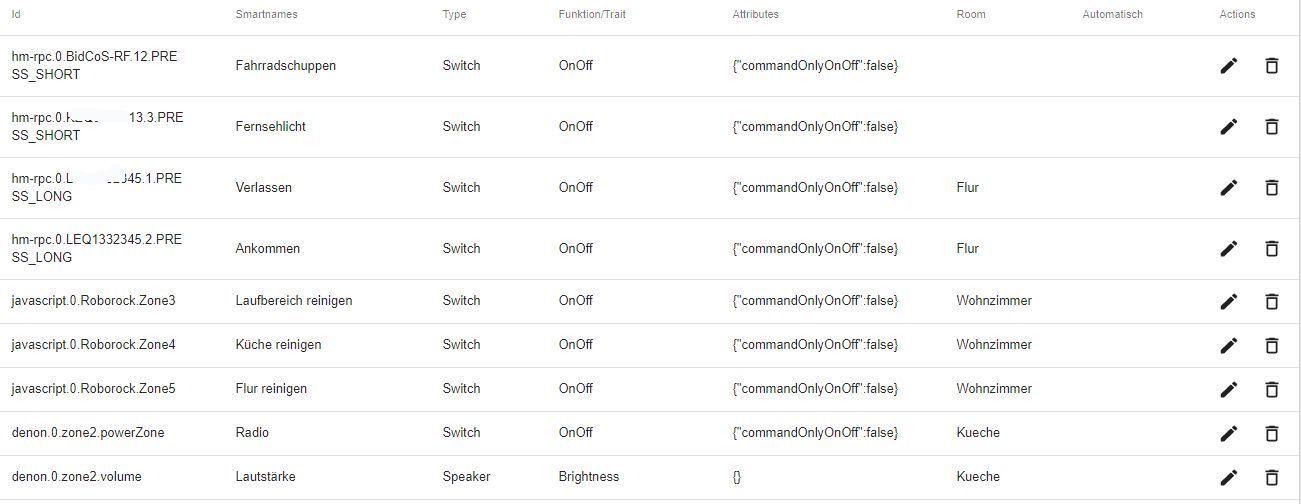
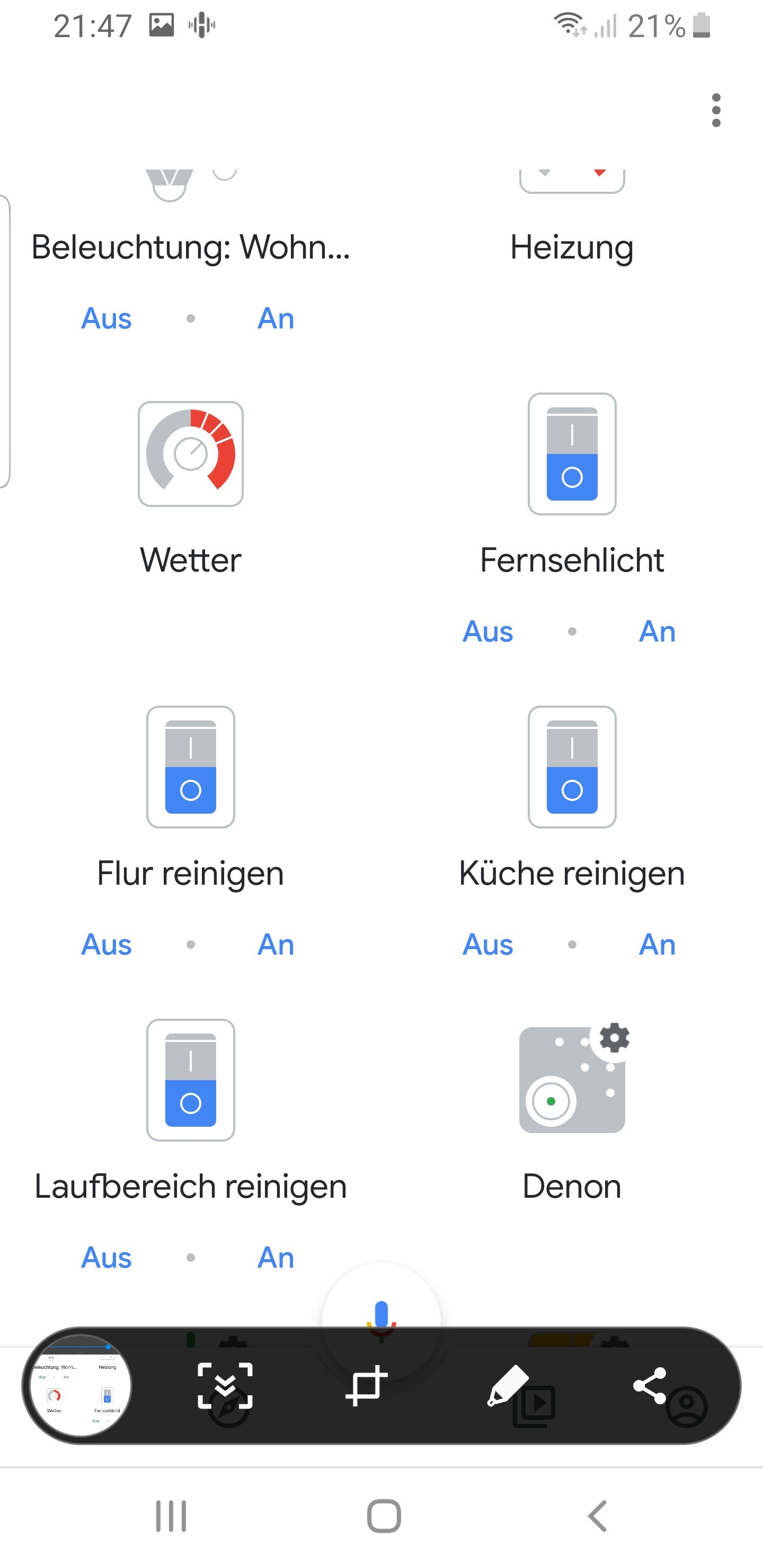
                @eric1905 Screenshot_20190813-214759_Home.jpg

                So sieht es in der App aus. Fernsehlicht ist dabei eine virtuelle CCU Taste und "Flur reinigen" ist z.B. eine State aus JavaScript.

                Ich setze jeden per Sprache auf "true" also: "Schalte das Fernsehlicht ein". Dann laufen die direkten Verknüpfungen der CCU und auf das Reinigen reagiert ein JavaScript und schickt den Staubsauger los.

                Andere Variablen habe ich zu Status verbannt.

                CCU2 - 46 Geräte, ioBroker auf Intel NUC (DN2820FYKH) mit Tab als Frontend, Projekt Gartenhaus mit HM

                E 1 Reply Last reply
                0
                • B Brati

                  @eric1905 Screenshot_20190813-214759_Home.jpg

                  So sieht es in der App aus. Fernsehlicht ist dabei eine virtuelle CCU Taste und "Flur reinigen" ist z.B. eine State aus JavaScript.

                  Ich setze jeden per Sprache auf "true" also: "Schalte das Fernsehlicht ein". Dann laufen die direkten Verknüpfungen der CCU und auf das Reinigen reagiert ein JavaScript und schickt den Staubsauger los.

                  Andere Variablen habe ich zu Status verbannt.

                  E Offline
                  E Offline
                  eric1905
                  wrote on last edited by
                  #515

                  @Brati und die google devices im iot adapter?

                  B 1 Reply Last reply
                  0
                  • E eric1905

                    @Brati und die google devices im iot adapter?

                    B Offline
                    B Offline
                    Brati
                    wrote on last edited by Brati
                    #516

                    @eric1905 Zwischenablage01.jpg

                    Die sind alle nachträglich hinzugefügt. Der Lautstärke musste ich Brightness zuordnen, weil er bei Volume nur das Handy lauter macht...

                    CCU2 - 46 Geräte, ioBroker auf Intel NUC (DN2820FYKH) mit Tab als Frontend, Projekt Gartenhaus mit HM

                    1 Reply Last reply
                    1
                    • T Offline
                      T Offline
                      tombox
                      wrote on last edited by
                      #517

                      Ich habe nochmal ein paar Fehler behoben.
                      Szene als Trait und eine deutsche Übersetzung hinzugefügt.
                      Ich habe bei den Speaker Volumen Trait auch durch Brightness ersetzt.

                      E 1 Reply Last reply
                      0
                      • T tombox

                        Ich habe nochmal ein paar Fehler behoben.
                        Szene als Trait und eine deutsche Übersetzung hinzugefügt.
                        Ich habe bei den Speaker Volumen Trait auch durch Brightness ersetzt.

                        E Offline
                        E Offline
                        eric1905
                        wrote on last edited by
                        #518

                        @tombox said in Google Home/Assistant ioBroker einrichten/nutzen:

                        Ich habe nochmal ein paar Fehler behoben.
                        Szene als Trait und eine deutsche Übersetzung hinzugefügt.
                        Ich habe bei den Speaker Volumen Trait auch durch Brightness ersetzt.

                        Stark. Wie kann ich dann Meiner Glühbirne, die auch schon Trait ColorSettingRGB hat sagen, dass sie auch szenen kann und wie die angesprochen werden?

                        T 1 Reply Last reply
                        0
                        • E eric1905

                          @tombox said in Google Home/Assistant ioBroker einrichten/nutzen:

                          Ich habe nochmal ein paar Fehler behoben.
                          Szene als Trait und eine deutsche Übersetzung hinzugefügt.
                          Ich habe bei den Speaker Volumen Trait auch durch Brightness ersetzt.

                          Stark. Wie kann ich dann Meiner Glühbirne, die auch schon Trait ColorSettingRGB hat sagen, dass sie auch szenen kann und wie die angesprochen werden?

                          T Offline
                          T Offline
                          tombox
                          wrote on last edited by
                          #519

                          @eric1905 ich würde ein extra Szenen Objekt hinzuzufügen und dann die Szene mit ioBroker abhandeln. Aktiviere habe ich bisher nur „aktiviere xxx Modus“

                          1 Reply Last reply
                          0
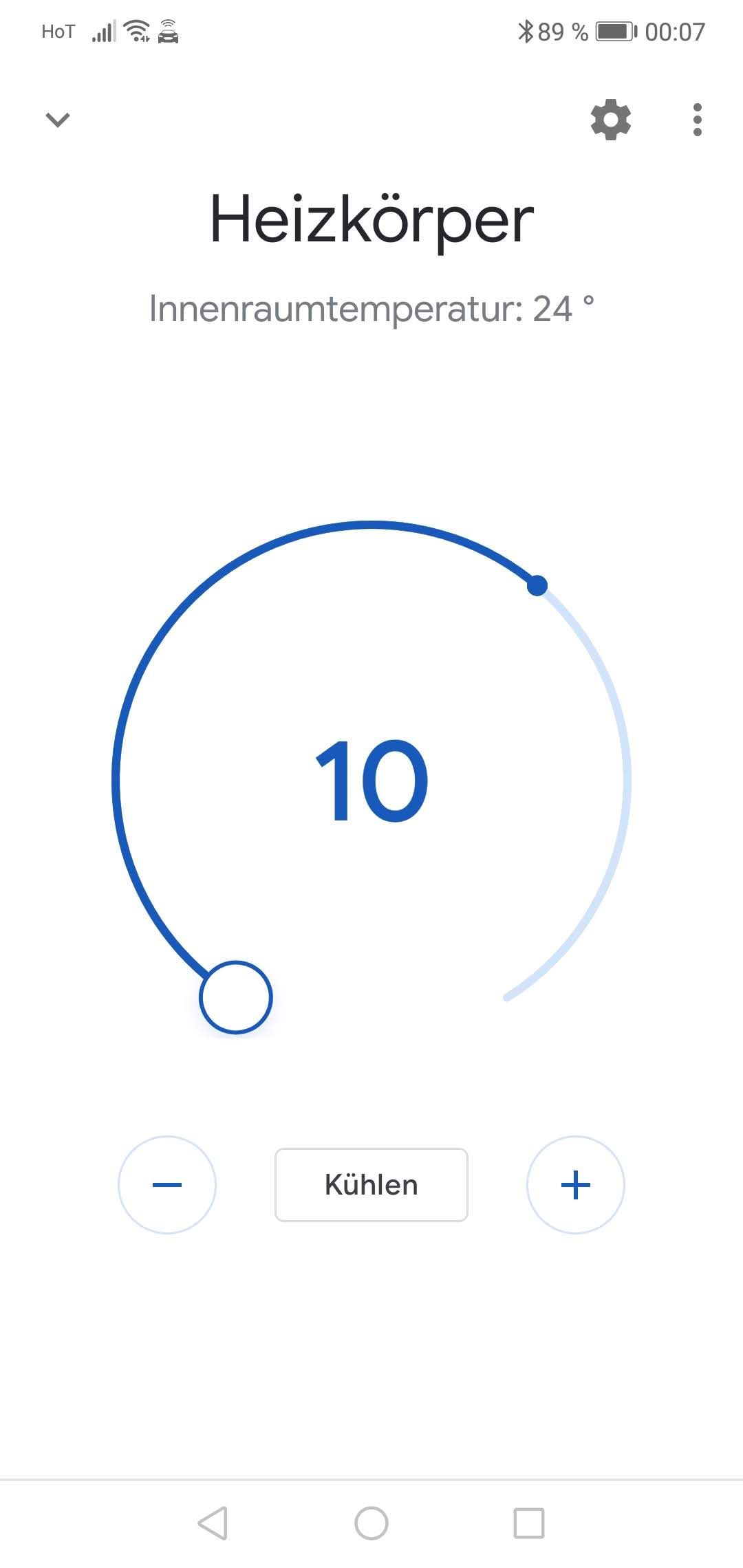
                          • sigi234S sigi234

                            @tombox sagte in Google Home/Assistant ioBroker einrichten/nutzen:

                            Bezüglich der Thermostate, funktioniert bei jemand das setzen der Thermostate?

                            Nein,
                            Antwort:
                            Das Thermostat Heizkörper unterstütz diese Funktion leider noch nicht........


                            Bekomme auch keine Anzeige , aber die Temperatur wird angesagt.
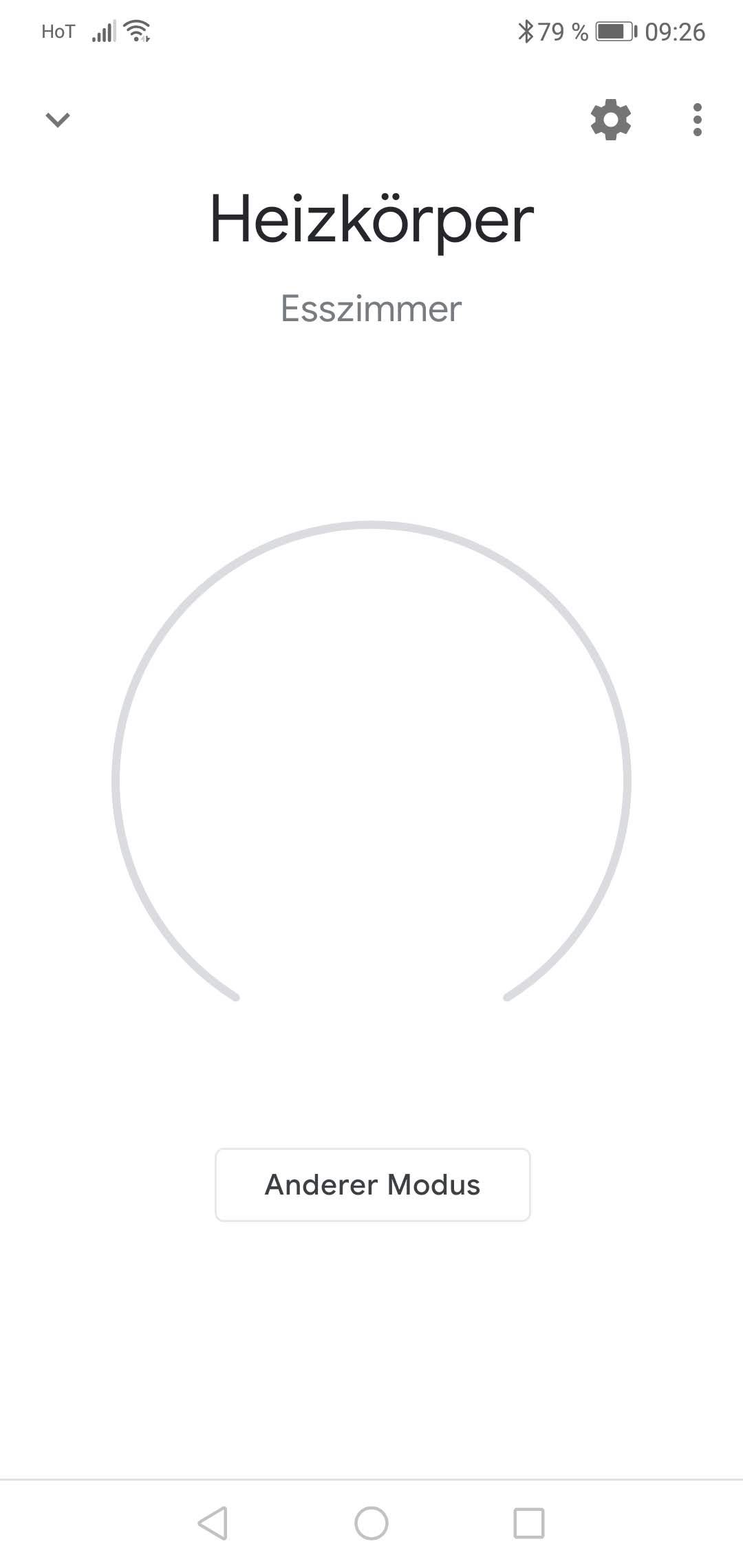
                            Screenshot_20190809_092628.jpg

                            sigi234S Online
                            sigi234S Online
                            sigi234
                            Forum Testing Most Active
                            wrote on last edited by
                            #520

                            @sigi234 sagte in Google Home/Assistant ioBroker einrichten/nutzen:

                            @tombox sagte in Google Home/Assistant ioBroker einrichten/nutzen:

                            Bezüglich der Thermostate, funktioniert bei jemand das setzen der Thermostate?


                            Bekomme auch keine Anzeige , aber die Temperatur wird angesagt.

                            Screenshot_20190809_092628.jpg

                            Edit:

                            Sieht jetzt Besser aus........

                            Screenshot_20190814_000749.jpg

                            Bitte benutzt das Voting rechts unten im Beitrag wenn er euch geholfen hat.
                            Immer Daten sichern!

                            1 Reply Last reply
                            0
                            • I Offline
                              I Offline
                              IoBreaker
                              wrote on last edited by IoBreaker
                              #521

                              Bei mir verhält es sich ganz komisch. (nutze seit heute die ioBroker Pro Lizenz um keine Fehler durch die 10-Befehls-Beschränkung zu bekommen und ordentlich testen zu können).
                              Die Verbindung hat soweit zwischen iobroker und Google Home geklappt. Ich bekomme die Geräte jedoch nicht mit richtigem Namen angezeigt. Außerdem kann ich die Geräte, die ich nicht sprachsteuern möchte nicht aus meinem Google Account raus. Er findet immer 19 Geräte, die hauptsächlich aus Steckdosen, Heizungsaktoren und Wandthermostaten besteht. Steckdosen konnte ich schon ein und ausschalten. Komisch ist, dass ich Alexa im IoT-Adapter nicht abwählen kann. Wenn ich nur Google nutzen möchte muss ich zwangsläufig auch Alexa anhaken. Wie bekomme ich nur die Geräte in mein Google Home, die ich tatsächlich benötige? (Bei Alexa klappt es übrigens). Danke vorab für alle Hinweise.

                              T 1 Reply Last reply
                              0
                              • I IoBreaker

                                Bei mir verhält es sich ganz komisch. (nutze seit heute die ioBroker Pro Lizenz um keine Fehler durch die 10-Befehls-Beschränkung zu bekommen und ordentlich testen zu können).
                                Die Verbindung hat soweit zwischen iobroker und Google Home geklappt. Ich bekomme die Geräte jedoch nicht mit richtigem Namen angezeigt. Außerdem kann ich die Geräte, die ich nicht sprachsteuern möchte nicht aus meinem Google Account raus. Er findet immer 19 Geräte, die hauptsächlich aus Steckdosen, Heizungsaktoren und Wandthermostaten besteht. Steckdosen konnte ich schon ein und ausschalten. Komisch ist, dass ich Alexa im IoT-Adapter nicht abwählen kann. Wenn ich nur Google nutzen möchte muss ich zwangsläufig auch Alexa anhaken. Wie bekomme ich nur die Geräte in mein Google Home, die ich tatsächlich benötige? (Bei Alexa klappt es übrigens). Danke vorab für alle Hinweise.

                                T Offline
                                T Offline
                                tombox
                                wrote on last edited by
                                #522

                                @IoBreaker funktioniert das löschen via Mülleimer ?

                                I 1 Reply Last reply
                                0
                                • sigi234S Online
                                  sigi234S Online
                                  sigi234
                                  Forum Testing Most Active
                                  wrote on last edited by
                                  #523

                                  Kommt jetzt immer:

                                  iot.0	2019-08-14 11:24:20.346	error	[GHOME] Cannot updateState: Request contains an invalid argument.
                                  

                                  Bitte benutzt das Voting rechts unten im Beitrag wenn er euch geholfen hat.
                                  Immer Daten sichern!

                                  T 1 Reply Last reply
                                  0
                                  • sigi234S sigi234

                                    Kommt jetzt immer:

                                    iot.0	2019-08-14 11:24:20.346	error	[GHOME] Cannot updateState: Request contains an invalid argument.
                                    
                                    T Offline
                                    T Offline
                                    tombox
                                    wrote on last edited by
                                    #524

                                    @sigi234 Passiert nach einem sync? Kannst du mir das schicken was nach dem Fehler kommt

                                    sigi234S 1 Reply Last reply
                                    0
                                    • T tombox

                                      @sigi234 Passiert nach einem sync? Kannst du mir das schicken was nach dem Fehler kommt

                                      sigi234S Online
                                      sigi234S Online
                                      sigi234
                                      Forum Testing Most Active
                                      wrote on last edited by sigi234
                                      #525

                                      @tombox sagte in Google Home/Assistant ioBroker einrichten/nutzen:

                                      @sigi234 Passiert nach einem sync? Kannst du mir das schicken was nach dem Fehler kommt


                                      iot.0 2019-08-14 11:50:36.760 error [GHOME] Cannot updateState: Request contains an invalid argument.
                                      iot.0 2019-08-14 11:50:33.151 warn Missing name, type or treat for: hm-rpc.0.CUX2801006.9. Not added to GoogleHome
                                      iot.0 2019-08-14 11:50:33.151 warn Missing name, type or treat for: hm-rpc.0.CUX2801006.8. Not added to GoogleHome
                                      iot.0 2019-08-14 11:50:33.151 warn Missing name, type or treat for: hm-rpc.0.CUX2801006.7. Not added to GoogleHome
                                      iot.0 2019-08-14 11:50:33.151 warn Missing name, type or treat for: hm-rpc.0.CUX2801006.6. Not added to GoogleHome
                                      iot.0 2019-08-14 11:50:33.151 warn Missing name, type or treat for: hm-rpc.0.CUX2801006.5. Not added to GoogleHome
                                      iot.0 2019-08-14 11:50:33.150 warn Missing name, type or treat for: hm-rpc.0.CUX2801006.4. Not added to GoogleHome
                                      iot.0 2019-08-14 11:50:33.150 warn Missing name, type or treat for: hm-rpc.0.CUX2801006.3. Not added to GoogleHome
                                      iot.0 2019-08-14 11:50:33.150 warn Missing name, type or treat for: hm-rpc.0.CUX2801006.2. Not added to GoogleHome
                                      iot.0 2019-08-14 11:50:33.150 warn Missing name, type or treat for: hm-rpc.0.CUX2801006.16. Not added to GoogleHome
                                      iot.0 2019-08-14 11:50:33.150 warn Missing name, type or treat for: hm-rpc.0.CUX2801006.15. Not added to GoogleHome
                                      iot.0 2019-08-14 11:50:33.150 warn Missing name, type or treat for: hm-rpc.0.CUX2801006.14. Not added to GoogleHome
                                      iot.0 2019-08-14 11:50:33.150 warn Missing name, type or treat for: hm-rpc.0.CUX2801006.13. Not added to GoogleHome
                                      iot.0 2019-08-14 11:50:33.150 warn Missing name, type or treat for: hm-rpc.0.CUX2801006.12. Not added to GoogleHome
                                      iot.0 2019-08-14 11:50:33.150 warn Missing name, type or treat for: hm-rpc.0.CUX2801006.11. Not added to GoogleHome
                                      iot.0 2019-08-14 11:50:33.150 warn Missing name, type or treat for: hm-rpc.0.CUX2801006.10. Not added to GoogleHome
                                      iot.0 2019-08-14 11:50:33.150 warn Missing name, type or treat for: hm-rpc.0.CUX2801006.1. Not added to GoogleHome
                                      iot.0 2019-08-14 11:50:33.150 warn Missing name, type or treat for: hm-rpc.0.CUX2801002.6. Not added to GoogleHome
                                      iot.0 2019-08-14 11:50:33.150 warn Missing name, type or treat for: hm-rpc.0.CUX2801002.1. Not added to GoogleHome
                                      iot.0 2019-08-14 11:50:33.150 warn Missing name, type or treat for: hm-rpc.0.CUX2801002.7. Not added to GoogleHome
                                      iot.0 2019-08-14 11:50:33.150 warn Missing name, type or treat for: hm-rpc.0.CUX2801001.8. Not added to GoogleHome
                                      iot.0 2019-08-14 11:50:33.150 warn Missing name, type or treat for: hm-rpc.0.CUX2801001.6. Not added to GoogleHome
                                      iot.0 2019-08-14 11:50:33.150 warn Missing name, type or treat for: hm-rpc.0.CUX2801002.8. Not added to GoogleHome
                                      iot.0 2019-08-14 11:50:33.150 warn Missing name, type or treat for: hm-rpc.0.CUX2801002.2. Not added to GoogleHome
                                      iot.0 2019-08-14 11:50:33.150 warn Missing name, type or treat for: hm-rpc.0.CUX2801003.10. Not added to GoogleHome
                                      iot.0 2019-08-14 11:50:33.150 warn Missing name, type or treat for: hm-rpc.0.CUX2801001.5. Not added to GoogleHome
                                      iot.0 2019-08-14 11:50:33.150 warn Missing name, type or treat for: hm-rpc.0.CUX2801001.9. Not added to GoogleHome
                                      iot.0 2019-08-14 11:50:33.150 warn Missing name, type or treat for: hm-rpc.0.CUX2801001.7. Not added to GoogleHome
                                      iot.0 2019-08-14 11:50:33.150 warn Missing name, type or treat for: hm-rpc.0.CUX2801001.16. Not added to GoogleHome
                                      iot.0 2019-08-14 11:50:33.150 warn Missing name, type or treat for: hm-rpc.0.CUX2801001.15. Not added to GoogleHome
                                      iot.0 2019-08-14 11:50:33.150 warn Missing name, type or treat for: hm-rpc.0.CUX2801001.14. Not added to GoogleHome
                                      iot.0 2019-08-14 11:50:33.150 warn Missing name, type or treat for: hm-rpc.0.CUX2801001.13. Not added to GoogleHome
                                      iot.0 2019-08-14 11:50:33.150 warn Missing name, type or treat for: hm-rpc.0.CUX2801001.12. Not added to GoogleHome
                                      iot.0 2019-08-14 11:50:33.150 warn Missing name, type or treat for: hm-rpc.0.CUX2801001.11. Not added to GoogleHome
                                      iot.0 2019-08-14 11:50:33.150 warn Missing name, type or treat for: hm-rpc.0.CUX2801001.10. Not added to GoogleHome
                                      iot.0 2019-08-14 11:50:33.150 warn Missing name, type or treat for: hm-rpc.0.CUX2801001.3. Not added to GoogleHome
                                      iot.0 2019-08-14 11:50:33.150 warn Missing name, type or treat for: hm-rpc.0.CUX2801003.3. Not added to GoogleHome
                                      iot.0 2019-08-14 11:50:33.150 warn Missing name, type or treat for: hm-rpc.0.CUX2801005.1. Not added to GoogleHome
                                      iot.0 2019-08-14 11:50:33.150 warn Missing name, type or treat for: hm-rpc.0.CUX2801004.1. Not added to GoogleHome
                                      iot.0 2019-08-14 11:50:33.150 warn Missing name, type or treat for: hm-rpc.0.CUX2801003.9. Not added to GoogleHome
                                      iot.0 2019-08-14 11:50:33.150 warn Missing name, type or treat for: hm-rpc.0.CUX2801003.8. Not added to GoogleHome
                                      iot.0 2019-08-14 11:50:33.150 warn Missing name, type or treat for: hm-rpc.0.CUX2801003.7. Not added to GoogleHome
                                      iot.0 2019-08-14 11:50:33.150 warn Missing name, type or treat for: hm-rpc.0.CUX2801003.6. Not added to GoogleHome
                                      iot.0 2019-08-14 11:50:33.150 warn Missing name, type or treat for: hm-rpc.0.CUX2801003.5. Not added to GoogleHome
                                      iot.0 2019-08-14 11:50:33.150 warn Missing name, type or treat for: hm-rpc.0.CUX2801003.4. Not added to GoogleHome
                                      iot.0 2019-08-14 11:50:33.150 warn Missing name, type or treat for: hm-rpc.0.CUX2801003.16. Not added to GoogleHome
                                      iot.0 2019-08-14 11:50:33.150 warn Missing name, type or treat for: hm-rpc.0.CUX2801003.15. Not added to GoogleHome
                                      iot.0 2019-08-14 11:50:33.150 warn Missing name, type or treat for: hm-rpc.0.CUX2801003.14. Not added to GoogleHome
                                      iot.0 2019-08-14 11:50:33.150 warn Missing name, type or treat for: hm-rpc.0.CUX2801003.13. Not added to GoogleHome
                                      iot.0 2019-08-14 11:50:33.150 warn Missing name, type or treat for: hm-rpc.0.CUX2801003.12. Not added to GoogleHome
                                      iot.0 2019-08-14 11:50:33.150 warn Missing name, type or treat for: hm-rpc.0.CUX2801003.11. Not added to GoogleHome
                                      iot.0 2019-08-14 11:50:33.150 warn Missing name, type or treat for: hm-rpc.0.CUX2801002.4. Not added to GoogleHome
                                      iot.0 2019-08-14 11:50:33.150 warn Missing name, type or treat for: hm-rpc.0.CUX2801002.3. Not added to GoogleHome
                                      iot.0 2019-08-14 11:50:33.150 warn Missing name, type or treat for: hm-rpc.0.CUX2801001.4. Not added to GoogleHome
                                      iot.0 2019-08-14 11:50:33.150 warn Missing name, type or treat for: hm-rpc.0.CUX2801002.9. Not added to GoogleHome
                                      iot.0 2019-08-14 11:50:33.150 warn Missing name, type or treat for: hm-rpc.0.CUX2801002.5. Not added to GoogleHome
                                      iot.0 2019-08-14 11:50:33.150 warn Missing name, type or treat for: hm-rpc.0.CUX2801002.16. Not added to GoogleHome
                                      iot.0 2019-08-14 11:50:33.150 warn Missing name, type or treat for: hm-rpc.0.CUX2801002.15. Not added to GoogleHome
                                      iot.0 2019-08-14 11:50:33.150 warn Missing name, type or treat for: hm-rpc.0.CUX2801002.14. Not added to GoogleHome
                                      iot.0 2019-08-14 11:50:33.150 warn Missing name, type or treat for: hm-rpc.0.CUX2801002.13. Not added to GoogleHome
                                      iot.0 2019-08-14 11:50:33.150 warn Missing name, type or treat for: hm-rpc.0.CUX2801002.12. Not added to GoogleHome
                                      iot.0 2019-08-14 11:50:33.150 warn Missing name, type or treat for: hm-rpc.0.CUX2801002.11. Not added to GoogleHome
                                      iot.0 2019-08-14 11:50:33.150 warn Missing name, type or treat for: hm-rpc.0.CUX2801002.10. Not added to GoogleHome
                                      iot.0 2019-08-14 11:50:33.150 warn Missing name, type or treat for: hm-rpc.0.CUX2801001.1. Not added to GoogleHome
                                      iot.0 2019-08-14 11:50:33.150 warn Missing name, type or treat for: hm-rpc.0.CUX2801003.1. Not added to GoogleHome
                                      iot.0 2019-08-14 11:50:33.150 warn Missing name, type or treat for: hm-rpc.0.CUX2801003.2. Not added to GoogleHome
                                      iot.0 2019-08-14 11:50:33.149 warn Missing name, type or treat for: hm-rpc.1.OEQ0655913.6. Not added to GoogleHome
                                      iot.0 2019-08-14 11:50:33.149 warn Missing name, type or treat for: hm-rpc.1.OEQ0655913.5. Not added to GoogleHome
                                      iot.0 2019-08-14 11:50:33.149 warn Missing name, type or treat for: hm-rpc.1.OEQ0655913.3. Not added to GoogleHome
                                      iot.0 2019-08-14 11:50:33.149 warn Missing name, type or treat for: hm-rpc.1.OEQ0655913.2. Not added to GoogleHome
                                      iot.0 2019-08-14 11:50:33.149 warn Missing name, type or treat for: hm-rpc.1.OEQ0655913.1. Not added to GoogleHome
                                      iot.0 2019-08-14 11:50:33.149 warn Missing name, type or treat for: hm-rpc.0.CUX2801001.2. Not added to GoogleHome
                                      info.0 2019-08-14 11:50:03.858 info Popup-News read...
                                      iot.0 2019-08-14 11:49:52.935 error [GHOME] device hm-rpc.1.OEQ0655913.4.SET_TEMPERATURE is unknown to google home
                                      iot.0 2019-08-14 11:49:50.419 info Cannot auto convert hm-rpc.0.CUX2801006.9. Type slider is not available, yet. If you need the state please add him manually
                                      iot.0 2019-08-14 11:49:50.419 info Cannot auto convert hm-rpc.0.CUX2801006.8. Type slider is not available, yet. If you need the state please add him manually
                                      iot.0 2019-08-14 11:49:50.419 info Cannot auto convert hm-rpc.0.CUX2801006.7. Type slider is not available, yet. If you need the state please add him manually
                                      iot.0 2019-08-14 11:49:50.419 info Cannot auto convert hm-rpc.0.CUX2801006.6. Type slider is not available, yet. If you need the state please add him manually
                                      iot.0 2019-08-14 11:49:50.419 info Cannot auto convert hm-rpc.0.CUX2801006.5. Type slider is not available, yet. If you need the state please add him manually
                                      iot.0 2019-08-14 11:49:50.419 info Cannot auto convert hm-rpc.0.CUX2801006.4. Type slider is not available, yet. If you need the state please add him manually
                                      iot.0 2019-08-14 11:49:50.419 info Cannot auto convert hm-rpc.0.CUX2801006.3. Type slider is not available, yet. If you need the state please add him manually
                                      iot.0 2019-08-14 11:49:50.419 info Cannot auto convert hm-rpc.0.CUX2801006.2. Type slider is not available, yet. If you need the state please add him manually
                                      iot.0 2019-08-14 11:49:50.419 info Cannot auto convert hm-rpc.0.CUX2801006.16. Type slider is not available, yet. If you need the state please add him manually
                                      iot.0 2019-08-14 11:49:50.419 info Cannot auto convert hm-rpc.0.CUX2801006.15. Type slider is not available, yet. If you need the state please add him manually
                                      iot.0 2019-08-14 11:49:50.419 info Cannot auto convert hm-rpc.0.CUX2801006.14. Type slider is not available, yet. If you need the state please add him manually
                                      iot.0 2019-08-14 11:49:50.419 info Cannot auto convert hm-rpc.0.CUX2801006.13. Type slider is not available, yet. If you need the state please add him manually
                                      iot.0 2019-08-14 11:49:50.419 info Cannot auto convert hm-rpc.0.CUX2801006.12. Type slider is not available, yet. If you need the state please add him manually
                                      iot.0 2019-08-14 11:49:50.419 info Cannot auto convert hm-rpc.0.CUX2801006.11. Type slider is not available, yet. If you need the state please add him manually
                                      iot.0 2019-08-14 11:49:50.419 info Cannot auto convert hm-rpc.0.CUX2801006.10. Type slider is not available, yet. If you need the state please add him manually
                                      iot.0 2019-08-14 11:49:50.419 info Cannot auto convert hm-rpc.0.CUX2801006.1. Type slider is not available, yet. If you need the state please add him manually
                                      iot.0 2019-08-14 11:49:50.419 info hm-rpc.1.OEQ0670648.1 is auto added with type temperature.
                                      iot.0 2019-08-14 11:49:50.419 info Cannot auto convert hm-rpc.0.CUX2801002.6. Type slider is not available, yet. If you need the state please add him manually
                                      iot.0 2019-08-14 11:49:50.419 info Cannot auto convert hm-rpc.0.CUX2801002.1. Type slider is not available, yet. If you need the state please add him manually
                                      iot.0 2019-08-14 11:49:50.419 info Cannot auto convert hm-rpc.0.CUX2801002.7. Type slider is not available, yet. If you need the state please add him manually
                                      iot.0 2019-08-14 11:49:50.418 info Cannot auto convert hm-rpc.0.CUX2801001.8. Type slider is not available, yet. If you need the state please add him manually
                                      iot.0 2019-08-14 11:49:50.418 info Cannot auto convert hm-rpc.0.CUX2801001.6. Type slider is not available, yet. If you need the state please add him manually
                                      iot.0 2019-08-14 11:49:50.418 info Cannot auto convert hm-rpc.0.CUX2801002.8. Type slider is not available, yet. If you need the state please add him manually
                                      iot.0 2019-08-14 11:49:50.418 info Cannot auto convert hm-rpc.0.CUX2801002.2. Type slider is not available, yet. If you need the state please add him manually
                                      iot.0 2019-08-14 11:49:50.418 info Cannot auto convert hm-rpc.0.CUX2801003.10. Type slider is not available, yet. If you need the state please add him manually
                                      iot.0 2019-08-14 11:49:50.418 info Cannot auto convert hm-rpc.0.CUX2801001.5. Type slider is not available, yet. If you need the state please add him manually
                                      iot.0 2019-08-14 11:49:50.418 info Cannot auto convert hm-rpc.0.CUX2801001.9. Type slider is not available, yet. If you need the state please add him manually
                                      iot.0 2019-08-14 11:49:50.418 info Cannot auto convert hm-rpc.0.CUX2801001.7. Type slider is not available, yet. If you need the state please add him manually
                                      iot.0 2019-08-14 11:49:50.418 info Cannot auto convert hm-rpc.0.CUX2801001.16. Type slider is not available, yet. If you need the state please add him manually
                                      iot.0 2019-08-14 11:49:50.418 info Cannot auto convert hm-rpc.0.CUX2801001.15. Type slider is not available, yet. If you need the state please add him manually
                                      iot.0 2019-08-14 11:49:50.418 info Cannot auto convert hm-rpc.0.CUX2801001.14. Type slider is not available, yet. If you need the state please add him manually
                                      iot.0 2019-08-14 11:49:50.418 info Cannot auto convert hm-rpc.0.CUX2801001.13. Type slider is not available, yet. If you need the state please add him manually
                                      iot.0 2019-08-14 11:49:50.418 info Cannot auto convert hm-rpc.0.CUX2801001.12. Type slider is not available, yet. If you need the state please add him manually
                                      iot.0 2019-08-14 11:49:50.418 info Cannot auto convert hm-rpc.0.CUX2801001.11. Type slider is not available, yet. If you need the state please add him manually
                                      iot.0 2019-08-14 11:49:50.418 info Cannot auto convert hm-rpc.0.CUX2801001.10. Type slider is not available, yet. If you need the state please add him manually
                                      iot.0 2019-08-14 11:49:50.418 info Cannot auto convert hm-rpc.0.CUX2801001.3. Type slider is not available, yet. If you need the state please add him manually
                                      iot.0 2019-08-14 11:49:50.418 info Cannot auto convert hm-rpc.0.CUX2801003.3. Type slider is not available, yet. If you need the state please add him manually
                                      iot.0 2019-08-14 11:49:50.418 info Cannot auto convert hm-rpc.0.CUX2801005.1. Type slider is not available, yet. If you need the state please add him manually
                                      iot.0 2019-08-14 11:49:50.418 info Cannot auto convert hm-rpc.0.CUX2801004.1. Type slider is not available, yet. If you need the state please add him manually
                                      iot.0 2019-08-14 11:49:50.418 info Cannot auto convert hm-rpc.0.CUX2801003.9. Type slider is not available, yet. If you need the state please add him manually
                                      iot.0 2019-08-14 11:49:50.418 info Cannot auto convert hm-rpc.0.CUX2801003.8. Type slider is not available, yet. If you need the state please add him manually
                                      iot.0 2019-08-14 11:49:50.418 info Cannot auto convert hm-rpc.0.CUX2801003.7. Type slider is not available, yet. If you need the state please add him manually
                                      iot.0 2019-08-14 11:49:50.418 info Cannot auto convert hm-rpc.0.CUX2801003.6. Type slider is not available, yet. If you need the state please add him manually
                                      iot.0 2019-08-14 11:49:50.418 info Cannot auto convert hm-rpc.0.CUX2801003.5. Type slider is not available, yet. If you need the state please add him manually
                                      iot.0 2019-08-14 11:49:50.418 info Cannot auto convert hm-rpc.0.CUX2801003.4. Type slider is not available, yet. If you need the state please add him manually
                                      iot.0 2019-08-14 11:49:50.418 info Cannot auto convert hm-rpc.0.CUX2801003.16. Type slider is not available, yet. If you need the state please add him manually
                                      iot.0 2019-08-14 11:49:50.418 info Cannot auto convert hm-rpc.0.CUX2801003.15. Type slider is not available, yet. If you need the state please add him manually
                                      iot.0 2019-08-14 11:49:50.418 info Cannot auto convert hm-rpc.0.CUX2801003.14. Type slider is not available, yet. If you need the state please add him manually
                                      iot.0 2019-08-14 11:49:50.418 info Cannot auto convert hm-rpc.0.CUX2801003.13. Type slider is not available, yet. If you need the state please add him manually
                                      iot.0 2019-08-14 11:49:50.418 info Cannot auto convert hm-rpc.0.CUX2801003.12. Type slider is not available, yet. If you need the state please add him manually
                                      iot.0 2019-08-14 11:49:50.418 info Cannot auto convert hm-rpc.0.CUX2801003.11. Type slider is not available, yet. If you need the state please add him manually
                                      iot.0 2019-08-14 11:49:50.417 info Cannot auto convert hm-rpc.0.CUX2801002.4. Type slider is not available, yet. If you need the state please add him manually
                                      iot.0 2019-08-14 11:49:50.417 info Cannot auto convert hm-rpc.0.CUX2801002.3. Type slider is not available, yet. If you need the state please add him manually
                                      iot.0 2019-08-14 11:49:50.417 info Cannot auto convert hm-rpc.0.CUX2801001.4. Type slider is not available, yet. If you need the state please add him manually
                                      iot.0 2019-08-14 11:49:50.417 info Cannot auto convert hm-rpc.0.CUX2801002.9. Type slider is not available, yet. If you need the state please add him manually
                                      iot.0 2019-08-14 11:49:50.417 info Cannot auto convert hm-rpc.0.CUX2801002.5. Type slider is not available, yet. If you need the state please add him manually
                                      iot.0 2019-08-14 11:49:50.417 info Cannot auto convert hm-rpc.0.CUX2801002.16. Type slider is not available, yet. If you need the state please add him manually
                                      iot.0 2019-08-14 11:49:50.417 info Cannot auto convert hm-rpc.0.CUX2801002.15. Type slider is not available, yet. If you need the state please add him manually
                                      iot.0 2019-08-14 11:49:50.417 info Cannot auto convert hm-rpc.0.CUX2801002.14. Type slider is not available, yet. If you need the state please add him manually
                                      iot.0 2019-08-14 11:49:50.417 info Cannot auto convert hm-rpc.0.CUX2801002.13. Type slider is not available, yet. If you need the state please add him manually
                                      iot.0 2019-08-14 11:49:50.417 info Cannot auto convert hm-rpc.0.CUX2801002.12. Type slider is not available, yet. If you need the state please add him manually
                                      iot.0 2019-08-14 11:49:50.417 info Cannot auto convert hm-rpc.0.CUX2801002.11. Type slider is not available, yet. If you need the state please add him manually
                                      iot.0 2019-08-14 11:49:50.417 info Cannot auto convert hm-rpc.0.CUX2801002.10. Type slider is not available, yet. If you need the state please add him manually
                                      iot.0 2019-08-14 11:49:50.417 info Cannot auto convert hm-rpc.0.CUX2801001.1. Type slider is not available, yet. If you need the state please add him manually
                                      iot.0 2019-08-14 11:49:50.417 info Cannot auto convert hm-rpc.0.CUX2801003.1. Type slider is not available, yet. If you need the state please add him manually
                                      iot.0 2019-08-14 11:49:50.417 info Cannot auto convert hm-rpc.0.CUX2801003.2. Type slider is not available, yet. If you need the state please add him manually
                                      iot.0 2019-08-14 11:49:50.417 info hm-rpc.1.OEQ0655913.4 is auto added with type thermostat.
                                      iot.0 2019-08-14 11:49:50.417 info hm-rpc.1.NEQ1818500.1 is auto added with type info.
                                      iot.0 2019-08-14 11:49:50.417 info hm-rpc.1.OEQ0926852.1 is auto added with type info.
                                      iot.0 2019-08-14 11:49:50.417 info Cannot auto convert hm-rpc.0.CUX2801001.2. Type slider is not available, yet. If you need the state please add him manually
                                      iot.0 2019-08-14 11:49:50.417 info hm-rpc.0.CUX9002001.3 is auto added with type info.
                                      iot.0 2019-08-14 11:49:50.417 info hm-rpc.0.CUX9002001.2 is auto added with type thermostat.
                                      iot.0 2019-08-14 11:49:50.417 info hm-rpc.0.CUX9002001.1 is auto added with type thermostat.
                                      iot.0 2019-08-14 11:49:50.416 info hm-rpc.1.OEQ0473764.1 is auto added with type light.
                                      iot.0 2019-08-14 11:49:49.480 info Request google home devices
                                      iot.0 2019-08-14 11:49:46.962 info Connection changed: connect
                                      iot.0 2019-08-14 11:49:46.949 info Cannot auto convert hm-rpc.0.CUX2801006.9. Type slider is not available, yet. If you need the state please add him manually
                                      iot.0 2019-08-14 11:49:46.949 info Cannot auto convert hm-rpc.0.CUX2801006.8. Type slider is not available, yet. If you need the state please add him manually
                                      iot.0 2019-08-14 11:49:46.949 info Cannot auto convert hm-rpc.0.CUX2801006.7. Type slider is not available, yet. If you need the state please add him manually
                                      iot.0 2019-08-14 11:49:46.949 info Cannot auto convert hm-rpc.0.CUX2801006.6. Type slider is not available, yet. If you need the state please add him manually
                                      iot.0 2019-08-14 11:49:46.949 info Cannot auto convert hm-rpc.0.CUX2801006.5. Type slider is not available, yet. If you need the state please add him manually
                                      iot.0 2019-08-14 11:49:46.949 info Cannot auto convert hm-rpc.0.CUX2801006.4. Type slider is not available, yet. If you need the state please add him manually
                                      iot.0 2019-08-14 11:49:46.949 info Cannot auto convert hm-rpc.0.CUX2801006.3. Type slider is not available, yet. If you need the state please add him manually
                                      iot.0 2019-08-14 11:49:46.949 info Cannot auto convert hm-rpc.0.CUX2801006.2. Type slider is not available, yet. If you need the state please add him manually
                                      iot.0 2019-08-14 11:49:46.949 info Cannot auto convert hm-rpc.0.CUX2801006.16. Type slider is not available, yet. If you need the state please add him manually
                                      iot.0 2019-08-14 11:49:46.949 info Cannot auto convert hm-rpc.0.CUX2801006.15. Type slider is not available, yet. If you need the state please add him manually
                                      iot.0 2019-08-14 11:49:46.949 info Cannot auto convert hm-rpc.0.CUX2801006.14. Type slider is not available, yet. If you need the state please add him manually
                                      iot.0 2019-08-14 11:49:46.949 info Cannot auto convert hm-rpc.0.CUX2801006.13. Type slider is not available, yet. If you need the state please add him manually
                                      iot.0 2019-08-14 11:49:46.949 info Cannot auto convert hm-rpc.0.CUX2801006.12. Type slider is not available, yet. If you need the state please add him manually
                                      iot.0 2019-08-14 11:49:46.949 info Cannot auto convert hm-rpc.0.CUX2801006.11. Type slider is not available, yet. If you need the state please add him manually
                                      iot.0 2019-08-14 11:49:46.949 info Cannot auto convert hm-rpc.0.CUX2801006.10. Type slider is not available, yet. If you need the state please add him manually
                                      iot.0 2019-08-14 11:49:46.949 info Cannot auto convert hm-rpc.0.CUX2801006.1. Type slider is not available, yet. If you need the state please add him manually
                                      iot.0 2019-08-14 11:49:46.948 info hm-rpc.1.OEQ0670648.1 is auto added with type temperature.
                                      iot.0 2019-08-14 11:49:46.948 info Cannot auto convert hm-rpc.0.CUX2801002.6. Type slider is not available, yet. If you need the state please add him manually
                                      iot.0 2019-08-14 11:49:46.948 info Cannot auto convert hm-rpc.0.CUX2801002.1. Type slider is not available, yet. If you need the state please add him manually
                                      iot.0 2019-08-14 11:49:46.948 info Cannot auto convert hm-rpc.0.CUX2801002.7. Type slider is not available, yet. If you need the state please add him manually
                                      iot.0 2019-08-14 11:49:46.948 info Cannot auto convert hm-rpc.0.CUX2801001.8. Type slider is not available, yet. If you need the state please add him manually
                                      iot.0 2019-08-14 11:49:46.948 info Cannot auto convert hm-rpc.0.CUX2801001.6. Type slider is not available, yet. If you need the state please add him manually
                                      iot.0 2019-08-14 11:49:46.948 info Cannot auto convert hm-rpc.0.CUX2801002.8. Type slider is not available, yet. If you need the state please add him manually
                                      iot.0 2019-08-14 11:49:46.948 info Cannot auto convert hm-rpc.0.CUX2801002.2. Type slider is not available, yet. If you need the state please add him manually
                                      iot.0 2019-08-14 11:49:46.948 info Cannot auto convert hm-rpc.0.CUX2801003.10. Type slider is not available, yet. If you need the state please add him manually
                                      iot.0 2019-08-14 11:49:46.948 info Cannot auto convert hm-rpc.0.CUX2801001.5. Type slider is not available, yet. If you need the state please add him manually
                                      iot.0 2019-08-14 11:49:46.948 info Cannot auto convert hm-rpc.0.CUX2801001.9. Type slider is not available, yet. If you need the state please add him manually
                                      iot.0 2019-08-14 11:49:46.948 info Cannot auto convert hm-rpc.0.CUX2801001.7. Type slider is not available, yet. If you need the state please add him manually
                                      iot.0 2019-08-14 11:49:46.948 info Cannot auto convert hm-rpc.0.CUX2801001.16. Type slider is not available, yet. If you need the state please add him manually
                                      iot.0 2019-08-14 11:49:46.948 info Cannot auto convert hm-rpc.0.CUX2801001.15. Type slider is not available, yet. If you need the state please add him manually
                                      iot.0 2019-08-14 11:49:46.948 info Cannot auto convert hm-rpc.0.CUX2801001.14. Type slider is not available, yet. If you need the state please add him manually
                                      iot.0 2019-08-14 11:49:46.948 info Cannot auto convert hm-rpc.0.CUX2801001.13. Type slider is not available, yet. If you need the state please add him manually
                                      iot.0 2019-08-14 11:49:46.948 info Cannot auto convert hm-rpc.0.CUX2801001.12. Type slider is not available, yet. If you need the state please add him manually
                                      iot.0 2019-08-14 11:49:46.948 info Cannot auto convert hm-rpc.0.CUX2801001.11. Type slider is not available, yet. If you need the state please add him manually
                                      iot.0 2019-08-14 11:49:46.948 info Cannot auto convert hm-rpc.0.CUX2801001.10. Type slider is not available, yet. If you need the state please add him manually
                                      iot.0 2019-08-14 11:49:46.948 info Cannot auto convert hm-rpc.0.CUX2801001.3. Type slider is not available, yet. If you need the state please add him manually
                                      iot.0 2019-08-14 11:49:46.948 info Cannot auto convert hm-rpc.0.CUX2801003.3. Type slider is not available, yet. If you need the state please add him manually
                                      iot.0 2019-08-14 11:49:46.948 info Cannot auto convert hm-rpc.0.CUX2801005.1. Type slider is not available, yet. If you need the state please add him manually
                                      iot.0 2019-08-14 11:49:46.948 info Cannot auto convert hm-rpc.0.CUX2801004.1. Type slider is not available, yet. If you need the state please add him manually
                                      iot.0 2019-08-14 11:49:46.948 info Cannot auto convert hm-rpc.0.CUX2801003.9. Type slider is not available, yet. If you need the state please add him manually
                                      iot.0 2019-08-14 11:49:46.948 info Cannot auto convert hm-rpc.0.CUX2801003.8. Type slider is not available, yet. If you need the state please add him manually
                                      iot.0 2019-08-14 11:49:46.948 info Cannot auto convert hm-rpc.0.CUX2801003.7. Type slider is not available, yet. If you need the state please add him manually
                                      iot.0 2019-08-14 11:49:46.948 info Cannot auto convert hm-rpc.0.CUX2801003.6. Type slider is not available, yet. If you need the state please add him manually

                                      Bitte benutzt das Voting rechts unten im Beitrag wenn er euch geholfen hat.
                                      Immer Daten sichern!

                                      T 1 Reply Last reply
                                      0
                                      • sigi234S Online
                                        sigi234S Online
                                        sigi234
                                        Forum Testing Most Active
                                        wrote on last edited by sigi234
                                        #526

                                        Hallo,

                                        irgendwie fehlt mit die Möglichkeit nur einen Wert als Text anzeigen zu lassen. Übersehe ich das was?
                                        Beispiel:

                                        DP : yamaha.0.Realtime.NETRADIO.SONG

                                        Wert: alle Farben............

                                        Screenshot (3883).png

                                        ----------------------------------------------------------------------

                                        "common": {
                                        "name": "SONG",
                                        "type": "string",
                                        "role": "state",
                                        "custom": {

                                        Bitte benutzt das Voting rechts unten im Beitrag wenn er euch geholfen hat.
                                        Immer Daten sichern!

                                        T 1 Reply Last reply
                                        0
                                        • sigi234S sigi234

                                          Hallo,

                                          irgendwie fehlt mit die Möglichkeit nur einen Wert als Text anzeigen zu lassen. Übersehe ich das was?
                                          Beispiel:

                                          DP : yamaha.0.Realtime.NETRADIO.SONG

                                          Wert: alle Farben............

                                          Screenshot (3883).png

                                          ----------------------------------------------------------------------

                                          "common": {
                                          "name": "SONG",
                                          "type": "string",
                                          "role": "state",
                                          "custom": {
                                          T Offline
                                          T Offline
                                          tombox
                                          wrote on last edited by
                                          #527

                                          @sigi234 Ja fehlt mir auch noch der passende trait es gibt ja den Sensor trait aber der ist nicht offiziell und es gibt keine doku

                                          1 Reply Last reply
                                          0
                                          Reply
                                          • Reply as topic
                                          Log in to reply
                                          • Oldest to Newest
                                          • Newest to Oldest
                                          • Most Votes


                                          Support us

                                          ioBroker
                                          Community Adapters
                                          Donate
                                          FAQ Cloud / IOT
                                          HowTo: Node.js-Update
                                          HowTo: Backup/Restore
                                          Downloads
                                          BLOG

                                          424

                                          Online

                                          32.7k

                                          Users

                                          82.5k

                                          Topics

                                          1.3m

                                          Posts
                                          Community
                                          Impressum | Datenschutz-Bestimmungen | Nutzungsbedingungen | Einwilligungseinstellungen
                                          ioBroker Community 2014-2025
                                          logo
                                          • Login

                                          • Don't have an account? Register

                                          • Login or register to search.
                                          • First post
                                            Last post
                                          0
                                          • Home
                                          • Recent
                                          • Tags
                                          • Unread 0
                                          • Categories
                                          • Unreplied
                                          • Popular
                                          • GitHub
                                          • Docu
                                          • Hilfe