




Google Home/Assistant ioBroker einrichten/nutzen
-
Konnte jemand einen Shelly mit Tasmota einbinden? Hab ihn eigentlich genauso konfiguriert wie mein Sonoff Basic. Allerdings hat der Shelly noch den Datenpunkt Switch1. Bekomme im Log immer:
[GHOME] device sonoff.0.Kaemmerchen.Switch1 is unknown to google homeKurzer Status von mir:
Wenn man mehrere Namen für ein Device im IOT Adapter angibt, werden bei Alexa 2 einzelne Geräte angelegt. Bei Google wird nur eins angelegt und die Namen sind mit Komma getrennt. Trotzdem scheinen beide zu funktionieren. Das finde ich super! 😁👍
Bei einem Switch funktionier bei Amazon auch "Starte XY". Bei Google funktioniert das nicht, da muss ich nun sagen "Schalte XY ein". Finde ich etwas schade, da ich mich da umstellen muss. Aber da kann die Anbindung ja nichts für, wollte nur etwas Mitleid abstauben. 🙈😅
-
Bitte steinigt mich nicht aber ich weis nicht was ich noch falsch mache, ich bekomme den IOT-Adapter einfach nicht Grün.
Habe schon sämtliche Versionen installiert, eine Prolizenz Existiert, die Zugangsdaten sind korrekt. Habe in einer älteren doku noch die Ports 8443 und 433 gelesen und für IObroker geöffnet. IFTT Key ist auch eingetragen.
LOG sieht so aus:host.ioBroker-RasPi 2019-07-26 14:58:17.495 info Restart adapter system.adapter.iot.0 because enabled
host.ioBroker-RasPi 2019-07-26 14:58:17.495 error instance system.adapter.iot.0 terminated with code 7 (Adapter already running)
host.ioBroker-RasPi 2019-07-26 14:58:15.491 info instance system.adapter.iot.0 started with pid 25169
host.ioBroker-RasPi 2019-07-26 14:57:45.450 info Restart adapter system.adapter.iot.0 because enabled
host.ioBroker-RasPi 2019-07-26 14:57:45.449 error instance system.adapter.iot.0 terminated with code 7 (Adapter already running)
iot.0 2019-07-26 14:57:45.385 info States connected to redis: 127.0.0.1:XXX
host.ioBroker-RasPi 2019-07-26 14:57:43.352 info instance system.adapter.iot.0 started with pid 25113
host.ioBroker-RasPi 2019-07-26 14:57:43.319 info object change system.adapter.iot.0
host.ioBroker-RasPi 2019-07-26 14:57:37.417 info Restart adapter system.adapter.iot.0 because enabledIch weis nicht was ich noch machen soll? Danke für eure Hilfe
-
Hallo zusammen,
ich komm noch nicht so richtig weiter.
-iot Adapter Verbindung ist grün - v0.4.3 und v1.0.0 ausprobiert
-Geräte sind in google home app sichtbar - jedoch noch nicht alle , Dimmer Lampen sehe ich noch nicht - aber eins nach dem anderen
-das schalten hat ein paar mal funktioniert, jetzt kommt jedoch nur noch:warn [GHOME] Invalid URL key. Status update is disabled: {"error":{"error":"No license found or license is no more valid"}} error [GHOME] Cannot report device state: {"error":{"error":"No license found or license is no more valid"}}-eine Mail übers 20 anfragen Limit oder ähnliches habe ich nicht bekommen
okay es soll wohl 7 tage Trial laut FAQ geben aber was solls Lizenz kaufen ...
aber wenn ich mich auf iobroker.pro einlogge ist nur die Fernzuriff Lizenz verfügbar, nicht die Assistent lizenz.was mache ich falsch?
viele Grüße
downset -
Ich habe versucht den Google Tab im IoT Adapter zu verbessern.
Man kann nun beliebige States auswählen und muss nicht ganze Räume oder funktionen auswählen.
Es ist sogar möglich einem Gerät mit gleichem Smartname unterschiedliche traits zuzuordnen.
Es geht zur Zeit Lampe OnOff und Brightness dazu gleiche Smartname und Raum aber unterschiedliche id und traits auswählenDieser Adapter ist für Mutige, bei denen der IoT Adapter ohne Problem geht aber die nicht ganze Räume hinzufügen wollen.
Unter Adapter das Github Icon klicken:

Beliebig auswählen und die Url https://github.com/TA2k/ioBroker.iot einfügen.
dann noch uploaden mit "iobroker u iot" und die Instanz neustarten. -
Hallo,
hab das update mal gemacht, aber dann kommt bei Google Devices nichts mehr, er versucht ständig zu laden.
-
Wenn invalid url key im log angezeigt wird muss man vorher iot.0.certs löschen und die instanz 2x neustarten.
-
@tombox
2019-07-26 23:48:23.259 - info: iobroker upgrade iot@1.0.0
2019-07-26 23:48:24.078 - info: iobroker Update iot from @1.0.0 to @1.0.0
2019-07-26 23:48:24.088 - info: iobroker host.NUC Adapter "system.adapter.iot.0" is stopped.
2019-07-26 23:48:24.097 - info: host.NUC object change system.adapter.iot.0
2019-07-26 23:48:24.097 - info: host.NUC "system.adapter.iot.0" disabled
2019-07-26 23:48:24.097 - info: host.NUC stopInstance system.adapter.iot.0
2019-07-26 23:48:24.097 - info: host.NUC stopInstance system.adapter.iot.0 killing pid 10284
2019-07-26 23:48:24.130 - warn: host.NUC instance system.adapter.iot.0 terminated due to SIGTERM
2019-07-26 23:48:24.130 - info: host.NUC instance system.adapter.iot.0 terminated with code null ()
2019-07-26 23:48:25.235 - info: iobroker NPM version: 6.9.0
2019-07-26 23:48:26.348 - info: iobroker npm install iobroker.iot@1.0.0 --production --save --prefix "C:/iobroker" (System call)
2019-07-26 23:48:33.828 - info: iobroker host.NUC Adapter "system.adapter.iot.0" is started
2019-07-26 23:48:33.836 - info: host.NUC object change system.adapter.iot.0
2019-07-26 23:48:33.837 - info: host.NUC "system.adapter.iot.0" enabled
2019-07-26 23:48:33.844 - info: host.NUC instance system.adapter.iot.0 started with pid 6408
2019-07-26 23:48:33.852 - info: iobroker npm install --production (System call) in "C:/iobroker/node_modules/iobroker.iot"
2019-07-26 23:48:35.365 - info: iot.0 starting. Version 1.0.0 in C:/iobroker/node_modules/iobroker.iot, node: v10.16.0
2019-07-26 23:48:35.392 - info: iot.0 Connecting with xxxxxxxxxxxg.iot.eu-west-1.amazonaws.com
2019-07-26 23:48:40.163 - info: iot.0 Connection changed: connect
2019-07-26 23:48:49.444 - info: iobroker npm
2019-07-26 23:48:49.445 - info: iobroker notice created a lockfile as package-lock.json. You should commit this file.
2019-07-26 23:48:49.496 - info: iobroker got C:/iobroker/node_modules/iobroker.iot/admin
2019-07-26 23:48:49.511 - info: iobroker Update "system.adapter.iot.0"
2019-07-26 23:48:49.521 - info: host.NUC object change system.adapter.iot.0
2019-07-26 23:48:49.521 - info: host.NUC stopInstance system.adapter.iot.0
2019-07-26 23:48:49.521 - info: host.NUC stopInstance system.adapter.iot.0 killing pid 6408
2019-07-26 23:48:49.550 - warn: host.NUC instance system.adapter.iot.0 terminated due to SIGTERM
2019-07-26 23:48:49.550 - info: host.NUC instance system.adapter.iot.0 terminated with code null ()
2019-07-26 23:48:49.622 - info: iobroker upload [20] iot.admin C:/iobroker/node_modules/iobroker.iot/admin/static/media/copy-content.6fe0b363.svg static/media/copy-content.6fe0b363.svg image/svg+xml
2019-07-26 23:48:49.700 - info: iobroker upload [19] iot.admin C:/iobroker/node_modules/iobroker.iot/admin/static/js/runtime~main.d653cc00.js.map static/js/runtime~main.d653cc00.js.map application/json
2019-07-26 23:48:49.795 - info: iobroker upload [18] iot.admin C:/iobroker/node_modules/iobroker.iot/admin/static/js/runtime~main.d653cc00.js static/js/runtime~main.d653cc00.js application/javascript
2019-07-26 23:48:49.872 - info: iobroker upload [17] iot.admin C:/iobroker/node_modules/iobroker.iot/admin/static/js/main.1a1c14d1.chunk.js.map static/js/main.1a1c14d1.chunk.js.map application/json
2019-07-26 23:48:49.966 - info: iobroker upload [16] iot.admin C:/iobroker/node_modules/iobroker.iot/admin/static/js/main.1a1c14d1.chunk.js static/js/main.1a1c14d1.chunk.js application/javascript
2019-07-26 23:48:50.075 - info: iobroker upload [15] iot.admin C:/iobroker/node_modules/iobroker.iot/admin/static/js/2.caef7335.chunk.js.map static/js/2.caef7335.chunk.js.map application/json
2019-07-26 23:48:50.579 - info: iobroker upload [14] iot.admin C:/iobroker/node_modules/iobroker.iot/admin/static/js/2.caef7335.chunk.js static/js/2.caef7335.chunk.js application/javascript
2019-07-26 23:48:50.900 - info: iobroker upload [13] iot.admin C:/iobroker/node_modules/iobroker.iot/admin/static/css/main.d4bed9c6.chunk.css.map static/css/main.d4bed9c6.chunk.css.map application/json
2019-07-26 23:48:50.978 - info: iobroker upload [12] iot.admin C:/iobroker/node_modules/iobroker.iot/admin/static/css/main.d4bed9c6.chunk.css static/css/main.d4bed9c6.chunk.css text/css
2019-07-26 23:48:51.056 - info: iobroker upload [11] iot.admin C:/iobroker/node_modules/iobroker.iot/admin/static/css/2.0302007b.chunk.css.map static/css/2.0302007b.chunk.css.map application/json
2019-07-26 23:48:51.119 - info: iobroker upload [10] iot.admin C:/iobroker/node_modules/iobroker.iot/admin/static/css/2.0302007b.chunk.css static/css/2.0302007b.chunk.css text/css
2019-07-26 23:48:51.197 - info: iobroker upload [9] iot.admin C:/iobroker/node_modules/iobroker.iot/admin/service-worker.js service-worker.js application/javascript
2019-07-26 23:48:51.275 - info: iobroker upload [8] iot.admin C:/iobroker/node_modules/iobroker.iot/admin/precache-manifest.a67e7c8aaaee4ad1d1b5e4276592c2e4.js precache-manifest.a67e7c8aaaee4ad1d1b5e4276592c2e4.js application/javascript
2019-07-26 23:48:51.355 - info: iobroker upload [7] iot.admin C:/iobroker/node_modules/iobroker.iot/admin/manifest.json manifest.json application/json
2019-07-26 23:48:51.431 - info: iobroker upload [6] iot.admin C:/iobroker/node_modules/iobroker.iot/admin/iot.png iot.png image/png
2019-07-26 23:48:51.510 - info: iobroker upload [5] iot.admin C:/iobroker/node_modules/iobroker.iot/admin/index_m.html index_m.html text/html
2019-07-26 23:48:51.588 - info: iobroker upload [4] iot.admin C:/iobroker/node_modules/iobroker.iot/admin/favicon.ico favicon.ico image/x-icon
2019-07-26 23:48:51.666 - info: iobroker upload [3] iot.admin C:/iobroker/node_modules/iobroker.iot/admin/blockly.js blockly.js application/javascript
2019-07-26 23:48:51.744 - info: iobroker upload [2] iot.admin C:/iobroker/node_modules/iobroker.iot/admin/asset-manifest.json asset-manifest.json application/json
2019-07-26 23:48:51.829 - info: iobroker upload [1] iot.admin C:/iobroker/node_modules/iobroker.iot/admin/alexalogo.png alexalogo.png image/png
2019-07-26 23:48:51.908 - info: iobroker upload [0] iot.admin C:/iobroker/node_modules/iobroker.iot/admin/actions.js actions.js application/javascript
2019-07-26 23:48:51.987 - info: iobroker Adapter "iot" updated
2019-07-26 23:48:52.001 - info: iobroker exit 0
2019-07-26 23:48:52.043 - info: host.NUC instance system.adapter.iot.0 started with pid 10580
2019-07-26 23:48:53.530 - info: iot.0 starting. Version 1.0.0 in C:/iobroker/node_modules/iobroker.iot, node: v10.16.0
2019-07-26 23:48:53.562 - info: iot.0 Connecting with xxxxxxxxxx.iot.eu-west-1.amazonaws.com
2019-07-26 23:48:56.945 - info: iot.0 Connection changed: connect -
@tombox sagte in Google Home/Assistant ioBroker einrichten/nutzen:
Wenn invalid url key im log angezeigt wird muss man vorher iot.0.certs löschen und die instanz 2x neustarten.
ok und wo finde ich das iot.certs und lösche das?
Ich habe aber nochmal ein Fehler korrigiert. Bitte nochmal via github neuinstallieren. und iobroker u iot ausführen
@thor1967
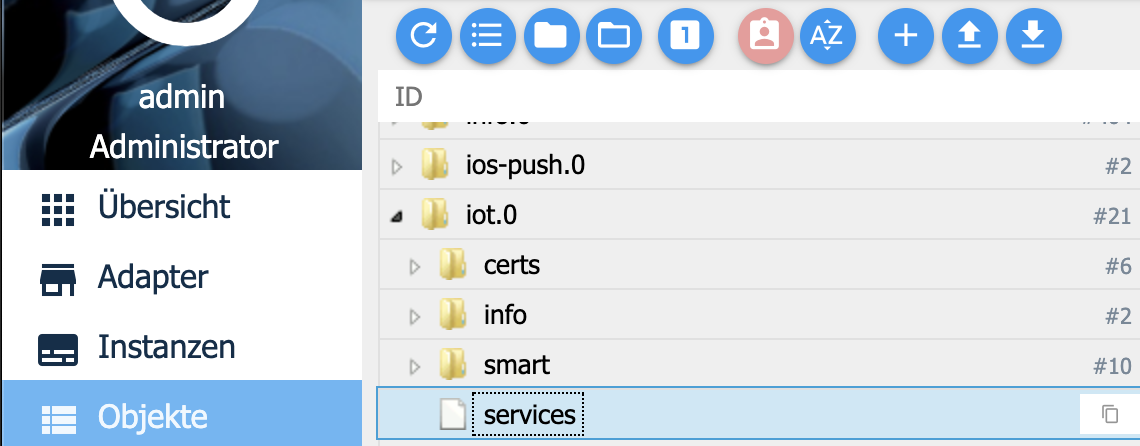
ganz rechts ist ein Papierkorb.
Aber nur wenn ein Fehler mit Certs kommt.Ich sehe bei dir kein Fehler es müssen auch nicht die url certs neu erstellt werden.
-
@tombox sagte in Google Home/Assistant ioBroker einrichten/nutzen:
Dann kommt das im log:
host.NUC 2019-07-27 00:29:39.603 warn instance system.adapter.iot.0 terminated due to SIGTERM
Caught 2019-07-27 00:29:39.603 error by controller[1]: (node:2868) [DEP0018] DeprecationWarning: Unhandled promise rejections are deprecated. In the future, promise rejections that are not handled will terminate the Node.js process with
Caught 2019-07-27 00:29:39.603 error by controller[1]: (node:2868) UnhandledPromiseRejectionWarning: Unhandled promise rejection. This error originated either by throwing inside of an async function without a catch block, or by rejectin
Caught 2019-07-27 00:29:39.603 error by controller[0]: at _readObjects.then.data (C:\iobroker\node_modules\iobroker.iot\lib\GoogleHome.js:468:38)
Caught 2019-07-27 00:29:39.603 error by controller[0]: at Array.forEach (<anonymous>)
Caught 2019-07-27 00:29:39.603 error by controller[0]: at Object.keys.forEach.id (C:\iobroker\node_modules\iobroker.iot\lib\GoogleHome.js:491:30)
Caught 2019-07-27 00:29:39.603 error by controller[0]: at GoogleHome.processState (C:\iobroker\node_modules\iobroker.iot\lib\GoogleHome.js:273:49)
Caught 2019-07-27 00:29:39.603 error by controller[0]: (node:2868) UnhandledPromiseRejectionWarning: TypeError: Cannot read property 'replace' of undefined -
@tombox sagte in Google Home/Assistant ioBroker einrichten/nutzen:
Dann kommt das im log:
host.NUC 2019-07-27 00:29:39.603 warn instance system.adapter.iot.0 terminated due to SIGTERM
Caught 2019-07-27 00:29:39.603 error by controller[1]: (node:2868) [DEP0018] DeprecationWarning: Unhandled promise rejections are deprecated. In the future, promise rejections that are not handled will terminate the Node.js process with
Caught 2019-07-27 00:29:39.603 error by controller[1]: (node:2868) UnhandledPromiseRejectionWarning: Unhandled promise rejection. This error originated either by throwing inside of an async function without a catch block, or by rejectin
Caught 2019-07-27 00:29:39.603 error by controller[0]: at _readObjects.then.data (C:\iobroker\node_modules\iobroker.iot\lib\GoogleHome.js:468:38)
Caught 2019-07-27 00:29:39.603 error by controller[0]: at Array.forEach (<anonymous>)
Caught 2019-07-27 00:29:39.603 error by controller[0]: at Object.keys.forEach.id (C:\iobroker\node_modules\iobroker.iot\lib\GoogleHome.js:491:30)
Caught 2019-07-27 00:29:39.603 error by controller[0]: at GoogleHome.processState (C:\iobroker\node_modules\iobroker.iot\lib\GoogleHome.js:273:49)
Caught 2019-07-27 00:29:39.603 error by controller[0]: (node:2868) UnhandledPromiseRejectionWarning: TypeError: Cannot read property 'replace' of undefined -
Ich habe aber nochmal ein Fehler korrigiert. Bitte nochmal via github neuinstallieren. und iobroker u iot ausführen
@thor1967
ganz rechts ist ein Papierkorb.
Aber nur wenn ein Fehler mit Certs kommt.Ich sehe bei dir kein Fehler es müssen auch nicht die url certs neu erstellt werden.
@tombox sagte in Google Home/Assistant ioBroker einrichten/nutzen:
Ich habe aber nochmal ein Fehler korrigiert. Bitte nochmal via github neuinstallieren. und iobroker u iot ausführen
@thor1967
ganz rechts ist ein Papierkorb.
Aber nur wenn ein Fehler mit Certs kommt.Ich sehe bei dir kein Fehler es müssen auch nicht die url certs neu erstellt werden.
ich bekomme diese log Meldung
iot.0 2019-07-26 22:49:16.737 error "[object Object]"
iot.0 2019-07-26 22:49:16.736 error Cannot fetch keys: "Internal server error"
iot.0 2019-07-26 22:49:15.477 error Cannot read URL key: Not exists
iot.0 2019-07-26 22:49:15.449 info Connecting with a18wym7vjdl22g.iot.eu-west-1.amazonaws.com
iot.0 2019-07-26 22:49:15.428 info starting. Version 1.0.0 in /opt/iobroker/node_modules/iobroker.iot, node: v8.16.0
host.io 2019-07-26 22:49:15.045 info instance system.adapter.iot.0 started with pid 6616
host.io 2019-07-26 22:49:12.547 info instance system.adapter.iot.0 terminated with code 0 (OK)
host.io 2019-07-26 22:49:12.531 info stopInstance system.adapter.iot.0 killing pid 6092
host.io 2019-07-26 22:49:12.531 info stopInstance system.adapter.iot.0
host.io 2019-07-26 22:49:12.530 info object change system.adapter.iot.0 -
In der google Home App erscheinen dann keine Geräte mehr und man kann iobroker nicht mehr verknüpfen.
-
@tombox sagte in Google Home/Assistant ioBroker einrichten/nutzen:
Ich habe aber nochmal ein Fehler korrigiert. Bitte nochmal via github neuinstallieren. und iobroker u iot ausführen
@thor1967
ganz rechts ist ein Papierkorb.
Aber nur wenn ein Fehler mit Certs kommt.Ich sehe bei dir kein Fehler es müssen auch nicht die url certs neu erstellt werden.
ich bekomme diese log Meldung
iot.0 2019-07-26 22:49:16.737 error "[object Object]"
iot.0 2019-07-26 22:49:16.736 error Cannot fetch keys: "Internal server error"
iot.0 2019-07-26 22:49:15.477 error Cannot read URL key: Not exists
iot.0 2019-07-26 22:49:15.449 info Connecting with a18wym7vjdl22g.iot.eu-west-1.amazonaws.com
iot.0 2019-07-26 22:49:15.428 info starting. Version 1.0.0 in /opt/iobroker/node_modules/iobroker.iot, node: v8.16.0
host.io 2019-07-26 22:49:15.045 info instance system.adapter.iot.0 started with pid 6616
host.io 2019-07-26 22:49:12.547 info instance system.adapter.iot.0 terminated with code 0 (OK)
host.io 2019-07-26 22:49:12.531 info stopInstance system.adapter.iot.0 killing pid 6092
host.io 2019-07-26 22:49:12.531 info stopInstance system.adapter.iot.0
host.io 2019-07-26 22:49:12.530 info object change system.adapter.iot.0 -
mit "Standard 1.0 Version kann ich ioBroker verknüpfen und man kann alles steuern. Mit neuer Version gehts nicht mehr. Hab ioBroker in der google Home App gelöscht, und dann wieder hinzugefügt, aber da kommt schon das er nicht verbinden kann und die Verknüpfung ist wieder weg,
-
mit "Standard 1.0 Version kann ich ioBroker verknüpfen und man kann alles steuern. Mit neuer Version gehts nicht mehr. Hab ioBroker in der google Home App gelöscht, und dann wieder hinzugefügt, aber da kommt schon das er nicht verbinden kann und die Verknüpfung ist wieder weg,

Hello! It looks like you're interested in this conversation, but you don't have an account yet.
Getting fed up of having to scroll through the same posts each visit? When you register for an account, you'll always come back to exactly where you were before, and choose to be notified of new replies (either via email, or push notification). You'll also be able to save bookmarks and upvote posts to show your appreciation to other community members.
With your input, this post could be even better 💗
Register Login591
Online32.8k
Users82.7k
Topics1.3m
Posts