
NEWS




Blink Camera System
-
Morgen,
anbei eine kurze Installationsanleitung (teilweise geklaut .. :-)):
1.) loggt euch in die Konsole ein
1a) EDIT 01.12.20: da viele weiter unten die Probleme mit wheel hatten, an dieser Stelle
ggf. vorher
sudo apt-get install gcc libpq-dev -y
sudo apt-get install python-dev python-pip -y
sudo apt-get install python3-dev python3-pip python3-venv python3-wheel -y
pip3 install wheel2.) sudo cp /home/pi/.local/bin/slugify /usr/bin
3.) cd ~git clone https://github.com/fronzbot/blinkpy.git cd blinkpy rm -rf build dist python3 setup.py bdist_wheel pip3 install --upgrade dist/*.whlJetzt solltet Ihr unter / ein Verzeichnis blinkpy vorfinden.
4.) cd /blinkpy
5.) python3.7
6.) from blinkpy import blinkpy
7.) blink = blinkpy.Blink(username='YOUR USER NAME', password='YOUR PASSWORD', refresh_rate=30)
8.) blink.start()Jetzt wird vermutlich nach einem Verifizierungscode gefragt, der an Eure E-Mailadresse gesendet wird. Diesen bestätigt Ihr in der E-Mail und danach drückt Ihr in der Konsole des Pi nur auf Enter !
Danach seid Ihr verifiziert mit blinky und habt Zugriff.
9.) Python ggf. mit exit() wieder verlassenZum Testen könnt Ihr folgendes Script verwenden - ich habe das unter /home/pi/blink abgelegt:
#!/usr/bin/python3

from blinkpy import blinkpy
blink = blinkpy.Blink(username='joerg........xx.@gmx.de', password='xxx..xx', refresh_rate=30)
blink.start()
blink.download_videos('/home/pi/blink', since='2018/07/04 09:34')
Speichert dieses Script ab und macht ein chmod + x DATEIname
Danach könnt Ihr es aufrufen und es lädt alle Videos nach /home/pi/blinkMore to come ...
-
hast du ein update von blink aus dem git gemacht ?
Das funktioniert nicht, da die syntax sich geändert hat.
Du musst die Version 15.1 beibehalten.
Gruss
Habs inzwischen geschafft, einen snapshot von der Blink kamera durch den Python script zu ergattern. Nun möchte ich mir das per Telegram senden lassen, jedoch führt er mir mein Python script nicht aus. Jemand eine Ahnung woran das liegt? In der Konsole funkts
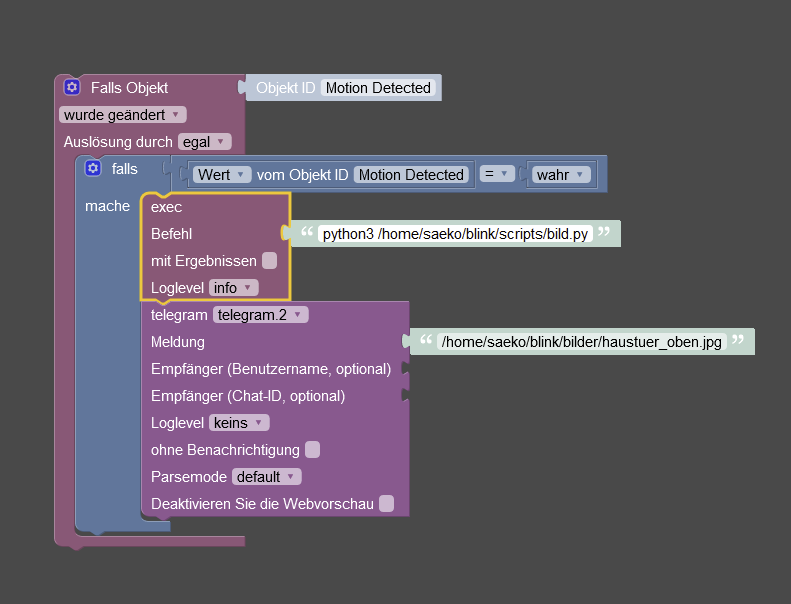
Edit: habe durch diesen Post rausgefunden, dass mir dinge fehlten und ich exec nicht in javascript aktiviert hatte.
jetzt komm ich hier nicht mehr weiter:
saeko@raspberrypi:~/blink/scripts $ sudo -u iobroker python3 /home/saeko/blink/scripts/bild.py
Traceback (most recent call last):
  File "/home/saeko/blink/scripts/bild.py", line 5, in <module>
    from blinkpy.auth import Auth
ModuleNotFoundError: No module named 'blinkpy.auth'
Edit2: habs nun soweit ohne error laufen, jedoch im blinkpy order und nicht in meinem eigenen /home/saeko/blink/scripts/bild.py . Was muss ich machen, damit das so auch funktioniert?
Trotzallem, möchte mir der javascript adapter kein Bild erstellen, auch mit sudo python3 'path' im exec baustein.
-
Habs inzwischen geschafft, einen snapshot von der Blink kamera durch den Python script zu ergattern. Nun möchte ich mir das per Telegram senden lassen, jedoch führt er mir mein Python script nicht aus. Jemand eine Ahnung woran das liegt? In der Konsole funkts
Edit: habe durch diesen Post rausgefunden, dass mir dinge fehlten und ich exec nicht in javascript aktiviert hatte.
jetzt komm ich hier nicht mehr weiter:
saeko@raspberrypi:~/blink/scripts $ sudo -u iobroker python3 /home/saeko/blink/scripts/bild.py
Traceback (most recent call last):
  File "/home/saeko/blink/scripts/bild.py", line 5, in <module>
    from blinkpy.auth import Auth
ModuleNotFoundError: No module named 'blinkpy.auth'
Edit2: habs nun soweit ohne error laufen, jedoch im blinkpy order und nicht in meinem eigenen /home/saeko/blink/scripts/bild.py . Was muss ich machen, damit das so auch funktioniert?
Trotzallem, möchte mir der javascript adapter kein Bild erstellen, auch mit sudo python3 'path' im exec baustein.
Servus,
das hast du aber auch gemacht ? Den Aufruf als root zu machen ist nicht gut !
sudo -H -u iobroker pip3 install blinkpyDiesen Aufruf aus dem blinkpy Verzeichnis ausführen, dann braucht es beim py Script Aufruf auch kein sudo.
-
Servus,
das hast du aber auch gemacht ? Den Aufruf als root zu machen ist nicht gut !
sudo -H -u iobroker pip3 install blinkpyDiesen Aufruf aus dem blinkpy Verzeichnis ausführen, dann braucht es beim py Script Aufruf auch kein sudo.
@pischleuder Hey, ja den code habe ich schon ausgeführt.
trotzallem erstellt er mir wie gesagt bloss ein bild in der konsole nicht jedoch per blockly :/hier mal noch mein pyton script vielleicht findet sich da was :neutral_face:
die letzten Zeilen habe ich auskommentiert, da sie auch nicht bei mir funktionieren....#!/usr/bin/python3 import requests from blinkpy.blinkpy import Blink from blinkpy.auth import Auth blink = Blink() # Can set no_prompt when initializing auth handler auth = Auth({"username": 'xxxxxx', "password": 'xxxxx'}, no_prompt=True) blink.auth = auth blink.start() auth.send_auth_key(blink, "xxxx") blink.setup_post_verify() ###### hier den Dateinamen/Pfad eintragen, den das snapshot Bild erhalten soll - bei mir Flur und Garten Kamera ##### bild = '/home/saeko/blink/bilder/haustuer_oben.jpg' for name, camera in blink.cameras.items(): print(name), print(camera.attributes) #### hier Eure Kamera 1 eintragen und weitere Einträge für mehr Kameras vornehmen #### camera = blink.cameras['Haustür'] camera.snap_picture() blink.refresh() camera.image_to_file(bild) #payload = {'value':bild} #r = requests.get("http://192.168.178.92:8081/set/0_userdata.0.snapcamera1", params=payload) -
@pischleuder Hey, ja den code habe ich schon ausgeführt.
trotzallem erstellt er mir wie gesagt bloss ein bild in der konsole nicht jedoch per blockly :/hier mal noch mein pyton script vielleicht findet sich da was :neutral_face:
die letzten Zeilen habe ich auskommentiert, da sie auch nicht bei mir funktionieren....#!/usr/bin/python3 import requests from blinkpy.blinkpy import Blink from blinkpy.auth import Auth blink = Blink() # Can set no_prompt when initializing auth handler auth = Auth({"username": 'xxxxxx', "password": 'xxxxx'}, no_prompt=True) blink.auth = auth blink.start() auth.send_auth_key(blink, "xxxx") blink.setup_post_verify() ###### hier den Dateinamen/Pfad eintragen, den das snapshot Bild erhalten soll - bei mir Flur und Garten Kamera ##### bild = '/home/saeko/blink/bilder/haustuer_oben.jpg' for name, camera in blink.cameras.items(): print(name), print(camera.attributes) #### hier Eure Kamera 1 eintragen und weitere Einträge für mehr Kameras vornehmen #### camera = blink.cameras['Haustür'] camera.snap_picture() blink.refresh() camera.image_to_file(bild) #payload = {'value':bild} #r = requests.get("http://192.168.178.92:8081/set/0_userdata.0.snapcamera1", params=payload)nimm mal das python3 in dem exec Befehl heraus.
-
nimm mal das python3 in dem exec Befehl heraus.
@pischleuder schon versucht.
versucht wurde
sudo python3 path, python path, python3.8 path, python 3.9 path
ohne sudo
/home/saeko/blinkpy/bilder.py
home/saeko/blinkpy/bilder.py
./home/saeko/blinkpy/bilder.pyAlles will nicht :/
edit: Pfadänderung des snapshots in den blinkpy ordner bringt auch nichts
-
@pischleuder schon versucht.
versucht wurde
sudo python3 path, python path, python3.8 path, python 3.9 path
ohne sudo
/home/saeko/blinkpy/bilder.py
home/saeko/blinkpy/bilder.py
./home/saeko/blinkpy/bilder.pyAlles will nicht :/
edit: Pfadänderung des snapshots in den blinkpy ordner bringt auch nichts
zeig doch einmal, welchem User Dein script zugeordnet ist.
Bei mir so im Verzeichnis /opt/iobroker:
ls -l ./blink-cameraflur.py -rwxrwxrwx+ 1 pi pi 1372 Apr 16 11:01 ./blink-cameraflur.py -
zeig doch einmal, welchem User Dein script zugeordnet ist.
Bei mir so im Verzeichnis /opt/iobroker:
ls -l ./blink-cameraflur.py -rwxrwxrwx+ 1 pi pi 1372 Apr 16 11:01 ./blink-cameraflur.py@pischleuder danke für deine Zeit!
saeko@raspberrypi:~/blinkpy $ ls -l ./bild.py
-rwxrwxrwx 1 saeko saeko 922 Jun  9 17:38 ./bild.py
habs auch versucht den Umlaut im script zu streichen, ohne erfolg
-
@pischleuder danke für deine Zeit!
saeko@raspberrypi:~/blinkpy $ ls -l ./bild.py
-rwxrwxrwx 1 saeko saeko 922 Jun  9 17:38 ./bild.py
habs auch versucht den Umlaut im script zu streichen, ohne erfolg
dann weiß ich erst einmal nicht weiter - bin auch gerade im Urlaub. Kann mich dazu erst Mitte nächster Woche melden.
-
dann weiß ich erst einmal nicht weiter - bin auch gerade im Urlaub. Kann mich dazu erst Mitte nächster Woche melden.
@pischleuder Geht klar! Danke!
saeko@raspberrypi:~/blinkpy $ sudo -u iobroker python3 /home/saeko/blinkpy/bild.py
Could not extract camera info: {'message': 'Camera not found', 'code': 500}
Expected json response from https://rest-e004.immedia-semi.com/network/unknown/camera/unknown/signals, but received: 406: Not Acceptable
Could not retrieve calibrated temperature.
Could not find thumbnail for camera unknown
Expected json response from https://rest-e004.immedia-semi.com/network/66328/camera/unknown/config, but received: 406: Not Acceptable
Could not extract camera info: None
Expected json response from https://rest-e004.immedia-semi.com/network/unknown/camera/unknown/signals, but received: 406: Not Acceptable
Could not retrieve calibrated temperature.
Could not find thumbnail for camera unknown
Traceback (most recent call last):
  File "/home/saeko/blinkpy/bild.py", line 27, in <module>
    camera.image_to_file(bild)
  File "/home/saeko/blinkpy/blinkpy/camera.py", line 241, in image_to_file
    with open(path, "wb") as imgfile:
PermissionError: [Errno 13] Permission denied: '/home/saeko/blinkpy/haustuer.jpg'
saeko@raspberrypi:~/blinkpy $ sudo -u iobroker sudo python3 /home/saeko/blinkpy/bild.py
[sudo] password for iobroker:
Could not extract camera info: {'message': 'Camera not found', 'code': 500}
Expected json response from https://rest-e004.immedia-semi.com/network/unknown/camera/unknown/signals, but received: 406: Not Acceptable
Could not retrieve calibrated temperature.
Could not find thumbnail for camera unknown
Expected json response from https://rest-e004.immedia-semi.com/network/66328/camera/unknown/config, but received: 406: Not Acceptable
Could not extract camera info: None
Expected json response from https://rest-e004.immedia-semi.com/network/unknown/camera/unknown/signals, but received: 406: Not Acceptable
Could not retrieve calibrated temperature.
Could not find thumbnail for camera unknown
um den script per iobroker starten zu können, brauch ich sudo, falls das was aussagt. Die anderen Fehlermeldungen kommen vermutlich von der Blink Doorbell, die wohl noch nicht integriert wurde.
-
@exmerci
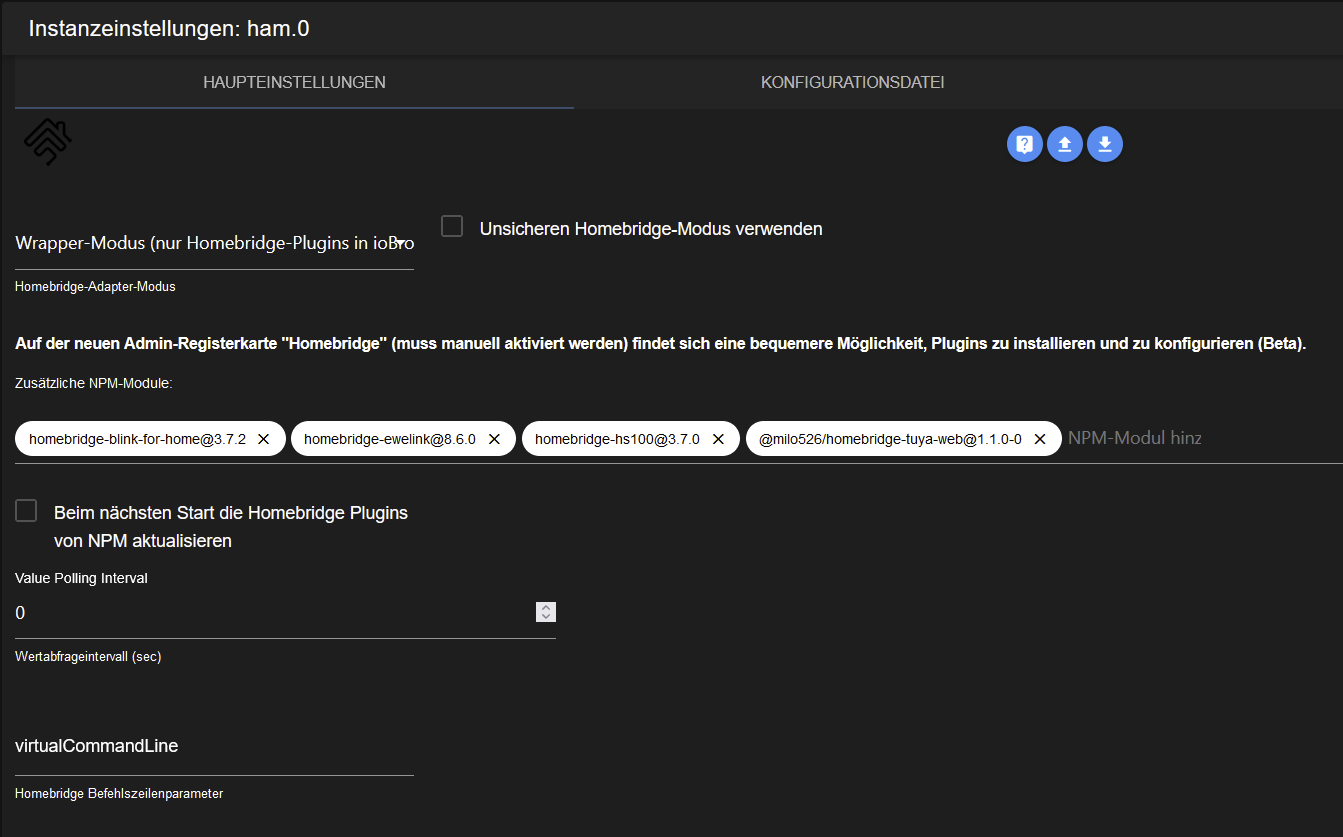
Hallo zusammen,ich habe es herausgefunden. Im Logfile vom Raspberry (/var/log/syslog) habe ich gesehen, dass das homebridge-blink-for-home plugin eine Abhängigkeit zu homebridge 1.4 hat (im ham-adapter ist 1.3.6 enthalten). Außerdem sieht man einen Absturz des Moduls.
Ich habe daraufhin das Modul in Version 3.7.6 installiert (Checkbox setzen für Aktualisierung beim nächsten Start) und jetzt funktioniert alles.Gruß,
Bernd@speridal sagte in Blink Camera System:
Ich habe daraufhin das Modul in Version 3.7.6 installiert (Checkbox setzen für Aktualisierung beim nächsten Start) und jetzt funktioniert alles.
Gruß,
Bernd@speridal Ich stehe vor der selben Herausforderung ... Wie installiert man denn diese "ältere" Version ? Immer wenn ich homebridge-blink-for-home eingebe, installiert er mir ja die neueste Version 3.9.1
-
@speridal sagte in Blink Camera System:
Ich habe daraufhin das Modul in Version 3.7.6 installiert (Checkbox setzen für Aktualisierung beim nächsten Start) und jetzt funktioniert alles.
Gruß,
Bernd@speridal Ich stehe vor der selben Herausforderung ... Wie installiert man denn diese "ältere" Version ? Immer wenn ich homebridge-blink-for-home eingebe, installiert er mir ja die neueste Version 3.9.1
-
dann weiß ich erst einmal nicht weiter - bin auch gerade im Urlaub. Kann mich dazu erst Mitte nächster Woche melden.
@pischleuder Möchte nicht aufdringlich wirken, aber hätten sie wieder zeit?
-
@pischleuder Möchte nicht aufdringlich wirken, aber hätten sie wieder zeit?
Hi,
versuche doch bitte einmal Dein script in den /opt/iobroker Ordner zu kopieren und starte das
in der Konsole normal, also ohne sudo und poste das Ergebnis. -
Hi,
versuche doch bitte einmal Dein script in den /opt/iobroker Ordner zu kopieren und starte das
in der Konsole normal, also ohne sudo und poste das Ergebnis.@pischleuder Hey,
inzwischen dies hier, aber wahrscheinlich wegen der neuen blink doorbell. bild2 ist ohne json credentials. 1 mit. Ist aber der gleiche text wie im blinkpy ordnersaeko@raspberrypi:/opt/iobroker $ python bild2.py Could not extract camera info: {'message': 'Camera not found', 'code': 500} Expected json response from https://rest-e004.immedia-semi.com/network/unknown/camera/unknown/signals, but received: 406: Not Acceptable Could not retrieve calibrated temperature. Could not find thumbnail for camera unknown Did not receive valid response from server. Could not extract camera info: {'message': 'Camera not found', 'code': 500} Expected json response from https://rest-e004.immedia-semi.com/network/unknown/camera/unknown/signals, but received: 406: Not Acceptable Could not retrieve calibrated temperature. Could not find thumbnail for camera unknown Haustür {'name': 'Haustür', 'camera_id': '68316', 'serial': 'G8T1GJ0003118F0H', 'temperature': 69, 'temperature_c': 20.6, 'temperature_calibrated': 69, 'battery': 'ok', 'battery_voltage': 168, 'thumbnail': 'https://rest-e004.immedia-semi.com/api/v3/media/accounts/62195/networks/66328/catalina/68316/thumbnail/thumbnail.jpg?ts=1655932081&ext=', 'video': None, 'motion_enabled': True, 'motion_detected': False, 'wifi_strength': -70, 'network_id': 66328, 'sync_module': 'Zuhause', 'last_record': None, 'type': 'catalina'} Türklingel {'name': 'unknown', 'camera_id': 'unknown', 'serial': None, 'temperature': None, 'temperature_c': None, 'temperature_calibrated': None, 'battery': None, 'battery_voltage': None, 'thumbnail': None, 'video': None, 'motion_enabled': 'unknown', 'motion_detected': False, 'wifi_strength': None, 'network_id': 66328, 'sync_module': 'Zuhause', 'last_record': None, 'type': None} Expected json response from https://rest-e004.immedia-semi.com/network/66328/camera/unknown/config, but received: 406: Not Acceptable Could not extract camera info: None Expected json response from https://rest-e004.immedia-semi.com/network/unknown/camera/unknown/signals, but received: 406: Not Acceptable Could not retrieve calibrated temperature. Could not find thumbnail for camera unknown saeko@raspberrypi:/opt/iobroker $ python bild.py Could not extract camera info: {'message': 'Camera not found', 'code': 500} Expected json response from https://rest-e004.immedia-semi.com/network/unknown/camera/unknown/signals, but received: 406: Not Acceptable Could not retrieve calibrated temperature. Could not find thumbnail for camera unknown Expected json response from https://rest-e004.immedia-semi.com/network/66328/camera/unknown/config, but received: 406: Not Acceptable Could not extract camera info: None Expected json response from https://rest-e004.immedia-semi.com/network/unknown/camera/unknown/signals, but received: 406: Not Acceptable Could not retrieve calibrated temperature. Could not find thumbnail for camera unknown saeko@raspberrypi:/opt/iobroker $saeko@raspberrypi:~/blinkpy $ saeko@raspberrypi:~/blinkpy $ python bild.py Could not extract camera info: {'message': 'Camera not found', 'code': 500} Expected json response from https://rest-e004.immedia-semi.com/network/unknown/camera/unknown/signals, but received: 406: Not Acceptable Could not retrieve calibrated temperature. Could not find thumbnail for camera unknown Expected json response from https://rest-e004.immedia-semi.com/network/66328/camera/unknown/config, but received: 406: Not Acceptable Could not extract camera info: None Expected json response from https://rest-e004.immedia-semi.com/network/unknown/camera/unknown/signals, but received: 406: Not Acceptable Could not retrieve calibrated temperature. Could not find thumbnail for camera unknown saeko@raspberrypi:~/blinkpy $ python bild2.py python3.8: can't open file 'bild2.py': [Errno 2] No such file or directory saeko@raspberrypi:~/blinkpy $ python bild2.py Could not extract camera info: {'message': 'Camera not found', 'code': 500} Expected json response from https://rest-e004.immedia-semi.com/network/unknown/camera/unknown/signals, but received: 406: Not Acceptable Could not retrieve calibrated temperature. Could not find thumbnail for camera unknown Did not receive valid response from server. Could not extract camera info: {'message': 'Camera not found', 'code': 500} Expected json response from https://rest-e004.immedia-semi.com/network/unknown/camera/unknown/signals, but received: 406: Not Acceptable Could not retrieve calibrated temperature. Could not find thumbnail for camera unknown Haustür {'name': 'Haustür', 'camera_id': '68316', 'serial': 'G8T1GJ0003118F0H', 'temperature': 69, 'temperature_c': 20.6, 'temperature_calibrated': 69, 'battery': 'ok', 'battery_voltage': 168, 'thumbnail': 'https://rest-e004.immedia-semi.com/api/v3/media/accounts/62195/networks/66328/catalina/68316/thumbnail/thumbnail.jpg?ts=1655932467&ext=', 'video': None, 'motion_enabled': True, 'motion_detected': False, 'wifi_strength': -70, 'network_id': 66328, 'sync_module': 'Zuhause', 'last_record': None, 'type': 'catalina'} Türklingel {'name': 'unknown', 'camera_id': 'unknown', 'serial': None, 'temperature': None, 'temperature_c': None, 'temperature_calibrated': None, 'battery': None, 'battery_voltage': None, 'thumbnail': None, 'video': None, 'motion_enabled': 'unknown', 'motion_detected': False, 'wifi_strength': None, 'network_id': 66328, 'sync_module': 'Zuhause', 'last_record': None, 'type': None} Expected json response from https://rest-e004.immedia-semi.com/network/66328/camera/unknown/config, but received: 406: Not Acceptable Could not extract camera info: None Expected json response from https://rest-e004.immedia-semi.com/network/unknown/camera/unknown/signals, but received: 406: Not Acceptable Could not retrieve calibrated temperature. Could not find thumbnail for camera unknown -
@pischleuder Hey,
inzwischen dies hier, aber wahrscheinlich wegen der neuen blink doorbell. bild2 ist ohne json credentials. 1 mit. Ist aber der gleiche text wie im blinkpy ordnersaeko@raspberrypi:/opt/iobroker $ python bild2.py Could not extract camera info: {'message': 'Camera not found', 'code': 500} Expected json response from https://rest-e004.immedia-semi.com/network/unknown/camera/unknown/signals, but received: 406: Not Acceptable Could not retrieve calibrated temperature. Could not find thumbnail for camera unknown Did not receive valid response from server. Could not extract camera info: {'message': 'Camera not found', 'code': 500} Expected json response from https://rest-e004.immedia-semi.com/network/unknown/camera/unknown/signals, but received: 406: Not Acceptable Could not retrieve calibrated temperature. Could not find thumbnail for camera unknown Haustür {'name': 'Haustür', 'camera_id': '68316', 'serial': 'G8T1GJ0003118F0H', 'temperature': 69, 'temperature_c': 20.6, 'temperature_calibrated': 69, 'battery': 'ok', 'battery_voltage': 168, 'thumbnail': 'https://rest-e004.immedia-semi.com/api/v3/media/accounts/62195/networks/66328/catalina/68316/thumbnail/thumbnail.jpg?ts=1655932081&ext=', 'video': None, 'motion_enabled': True, 'motion_detected': False, 'wifi_strength': -70, 'network_id': 66328, 'sync_module': 'Zuhause', 'last_record': None, 'type': 'catalina'} Türklingel {'name': 'unknown', 'camera_id': 'unknown', 'serial': None, 'temperature': None, 'temperature_c': None, 'temperature_calibrated': None, 'battery': None, 'battery_voltage': None, 'thumbnail': None, 'video': None, 'motion_enabled': 'unknown', 'motion_detected': False, 'wifi_strength': None, 'network_id': 66328, 'sync_module': 'Zuhause', 'last_record': None, 'type': None} Expected json response from https://rest-e004.immedia-semi.com/network/66328/camera/unknown/config, but received: 406: Not Acceptable Could not extract camera info: None Expected json response from https://rest-e004.immedia-semi.com/network/unknown/camera/unknown/signals, but received: 406: Not Acceptable Could not retrieve calibrated temperature. Could not find thumbnail for camera unknown saeko@raspberrypi:/opt/iobroker $ python bild.py Could not extract camera info: {'message': 'Camera not found', 'code': 500} Expected json response from https://rest-e004.immedia-semi.com/network/unknown/camera/unknown/signals, but received: 406: Not Acceptable Could not retrieve calibrated temperature. Could not find thumbnail for camera unknown Expected json response from https://rest-e004.immedia-semi.com/network/66328/camera/unknown/config, but received: 406: Not Acceptable Could not extract camera info: None Expected json response from https://rest-e004.immedia-semi.com/network/unknown/camera/unknown/signals, but received: 406: Not Acceptable Could not retrieve calibrated temperature. Could not find thumbnail for camera unknown saeko@raspberrypi:/opt/iobroker $saeko@raspberrypi:~/blinkpy $ saeko@raspberrypi:~/blinkpy $ python bild.py Could not extract camera info: {'message': 'Camera not found', 'code': 500} Expected json response from https://rest-e004.immedia-semi.com/network/unknown/camera/unknown/signals, but received: 406: Not Acceptable Could not retrieve calibrated temperature. Could not find thumbnail for camera unknown Expected json response from https://rest-e004.immedia-semi.com/network/66328/camera/unknown/config, but received: 406: Not Acceptable Could not extract camera info: None Expected json response from https://rest-e004.immedia-semi.com/network/unknown/camera/unknown/signals, but received: 406: Not Acceptable Could not retrieve calibrated temperature. Could not find thumbnail for camera unknown saeko@raspberrypi:~/blinkpy $ python bild2.py python3.8: can't open file 'bild2.py': [Errno 2] No such file or directory saeko@raspberrypi:~/blinkpy $ python bild2.py Could not extract camera info: {'message': 'Camera not found', 'code': 500} Expected json response from https://rest-e004.immedia-semi.com/network/unknown/camera/unknown/signals, but received: 406: Not Acceptable Could not retrieve calibrated temperature. Could not find thumbnail for camera unknown Did not receive valid response from server. Could not extract camera info: {'message': 'Camera not found', 'code': 500} Expected json response from https://rest-e004.immedia-semi.com/network/unknown/camera/unknown/signals, but received: 406: Not Acceptable Could not retrieve calibrated temperature. Could not find thumbnail for camera unknown Haustür {'name': 'Haustür', 'camera_id': '68316', 'serial': 'G8T1GJ0003118F0H', 'temperature': 69, 'temperature_c': 20.6, 'temperature_calibrated': 69, 'battery': 'ok', 'battery_voltage': 168, 'thumbnail': 'https://rest-e004.immedia-semi.com/api/v3/media/accounts/62195/networks/66328/catalina/68316/thumbnail/thumbnail.jpg?ts=1655932467&ext=', 'video': None, 'motion_enabled': True, 'motion_detected': False, 'wifi_strength': -70, 'network_id': 66328, 'sync_module': 'Zuhause', 'last_record': None, 'type': 'catalina'} Türklingel {'name': 'unknown', 'camera_id': 'unknown', 'serial': None, 'temperature': None, 'temperature_c': None, 'temperature_calibrated': None, 'battery': None, 'battery_voltage': None, 'thumbnail': None, 'video': None, 'motion_enabled': 'unknown', 'motion_detected': False, 'wifi_strength': None, 'network_id': 66328, 'sync_module': 'Zuhause', 'last_record': None, 'type': None} Expected json response from https://rest-e004.immedia-semi.com/network/66328/camera/unknown/config, but received: 406: Not Acceptable Could not extract camera info: None Expected json response from https://rest-e004.immedia-semi.com/network/unknown/camera/unknown/signals, but received: 406: Not Acceptable Could not retrieve calibrated temperature. Could not find thumbnail for camera unknownder Aufruf mit python vorab ist falsch, da das im script bereits definiert ist. Das script muss lokal (in /opt/iobroker) so ausgeführt werden:
./bild.pyAusserdem fehlt in Deinem script etwas:
from blinkpy.camera import BlinkCameraAnsonsten muss es sich um ein Rechteproblem des scriptes handeln, oder Du hast blink nicht für den user iobroker richtig installiert, da es mit sudo ja funktioniert. Dieses Problem hatte ich ja auch, wie in Deinem oben genannten Link erwähnt.
Also vergewissere Dich bitte, ob Du das bereits gemacht hast (aus dem blink git Ordner):als normaler user saeko
pip3 install blinkpymit sudo
sudo -H -u iobroker pip3 install blinkpy -
der Aufruf mit python vorab ist falsch, da das im script bereits definiert ist. Das script muss lokal (in /opt/iobroker) so ausgeführt werden:
./bild.pyAusserdem fehlt in Deinem script etwas:
from blinkpy.camera import BlinkCameraAnsonsten muss es sich um ein Rechteproblem des scriptes handeln, oder Du hast blink nicht für den user iobroker richtig installiert, da es mit sudo ja funktioniert. Dieses Problem hatte ich ja auch, wie in Deinem oben genannten Link erwähnt.
Also vergewissere Dich bitte, ob Du das bereits gemacht hast (aus dem blink git Ordner):als normaler user saeko
pip3 install blinkpymit sudo
sudo -H -u iobroker pip3 install blinkpy@pischleuder said in Blink Camera System:
der Aufruf mit python vorab ist falsch, da das im script bereits definiert ist. Das script muss lokal (in /opt/iobroker) so ausgeführt werden:
./bild.pyHabe folgendes probiert (mit python und ohne) und es hat sich leider nichts geändert:
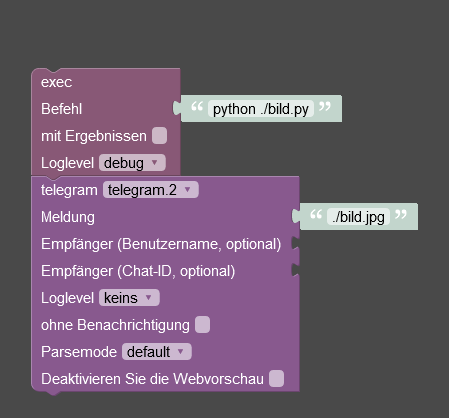
Ausserdem fehlt in Deinem script etwas:
from blinkpy.camera import BlinkCameraZeile wurde jetzt eingefügt.
mein script bis jetzt:
#!/usr/bin/python3
import requests

from blinkpy.blinkpy import Blink
from blinkpy.auth import Auth
from blinkpy.helpers.util import json_load
from blinkpy.camera import BlinkCamera

blink = Blink()
auth = Auth(json_load("/home/saeko/blink/cred.json"))
blink.auth = auth
blink.start()

#auth.send_auth_key(blink, "x")
#blink.setup_post_verify()

###### hier den Dateinamen/Pfad eintragen, den das snapshot Bild erhalten soll >

bild = './haustuer.jpg'
#bild2 = '/home/saeko/blinkpy/Tuerklingel.jpg'
#for name, camera in blink.cameras.items(): print(name), print(camera.attribute>

#### hier Eure Kamera 1 eintragen und weitere Einträge für mehr Kameras vornehm>

camera = blink.cameras['Haustür']
camera.snap_picture()
blink.refresh()
camera.image_to_file(bild)

#payload = {'value':bild}
#r = requests.get("http://192.168.178.92:8081/set/0_userdata.0.snapcamera1", pa>

#### hier Eure Kamera 2 eintragen und weitere Einträge für mehr Kameras vornehm>

#camera = blink.cameras['Türklingel']
#camera.snap_picture()
#blink.refresh()
#camera.image_to_file(bild2)

#payload = {'value':bild}
#r = requests.get("http://192.168.178.92:8081/set/0_userdata.0.snapcamera1", pa>
Ansonsten muss es sich um ein Rechteproblem des scriptes handeln, oder Du hast blink nicht für den user iobroker richtig installiert, da es mit sudo ja funktioniert. Dieses Problem hatte ich ja auch, wie in Deinem oben genannten Link erwähnt.
Also vergewissere Dich bitte, ob Du das bereits gemacht hast (aus dem blink git Ordner):als normaler user saeko
pip3 install blinkpymit sudo
sudo -H -u iobroker pip3 install blinkpyHatte dies schon installiert, leider auch keine Änderung :/
saeko@raspberrypi:~/blinkpy $ pip3 install blinkpy
Defaulting to user installation because normal site-packages is not writeable
Looking in indexes: https://pypi.org/simple, https://www.piwheels.org/simple
Requirement already satisfied: blinkpy in /home/saeko/.local/lib/python3.8/site-packages (0.20.0.dev0)
Requirement already satisfied: requests>=2.24.0 in /home/saeko/.local/lib/python3.8/site-packages (from blinkpy) (2.27.1)
Requirement already satisfied: python-dateutil>=2.8.1 in /home/saeko/.local/lib/python3.8/site-packages (from blinkpy) (2.8.2)
Requirement already satisfied: python-slugify>=4.0.1 in /home/saeko/.local/lib/python3.8/site-packages (from blinkpy) (6.1.2)
Requirement already satisfied: six>=1.5 in /home/saeko/.local/lib/python3.8/site-packages (from python-dateutil>=2.8.1->blinkpy) (1.16.0)
Requirement already satisfied: text-unidecode>=1.3 in /home/saeko/.local/lib/python3.8/site-packages (from python-slugify>=4.0.1->blinkpy) (1.3)
Requirement already satisfied: urllib3<1.27,>=1.21.1 in /home/saeko/.local/lib/python3.8/site-packages (from requests>=2.24.0->blinkpy) (1.26.9)
Requirement already satisfied: idna<4,>=2.5 in /home/saeko/.local/lib/python3.8/site-packages (from requests>=2.24.0->blinkpy) (3.3)
Requirement already satisfied: charset-normalizer~=2.0.0 in /home/saeko/.local/lib/python3.8/site-packages (from requests>=2.24.0->blinkpy) (2.0.12)
Requirement already satisfied: certifi>=2017.4.17 in /home/saeko/.local/lib/python3.8/site-packages (from requests>=2.24.0->blinkpy) (2022.5.18.1)
saeko@raspberrypi:~/blinkpy $ sudo -H -u iobroker pip3 install blinkpy
Looking in indexes: https://pypi.org/simple, https://www.piwheels.org/simple
Requirement already satisfied: blinkpy in /usr/local/lib/python3.9/dist-packages (0.20.0.dev0)
Requirement already satisfied: requests>=2.24.0 in /usr/local/lib/python3.9/dist-packages (from blinkpy) (2.27.1)
Requirement already satisfied: python-slugify>=4.0.1 in /usr/local/lib/python3.9/dist-packages (from blinkpy) (4.0.1)
Requirement already satisfied: python-dateutil>=2.8.1 in /usr/local/lib/python3.9/dist-packages (from blinkpy) (2.8.2)
Requirement already satisfied: six>=1.5 in /usr/lib/python3/dist-packages (from python-dateutil>=2.8.1->blinkpy) (1.16.0)
Requirement already satisfied: text-unidecode>=1.3 in /usr/local/lib/python3.9/dist-packages (from python-slugify>=4.0.1->blinkpy) (1.3)
Requirement already satisfied: idna<4,>=2.5 in /usr/lib/python3/dist-packages (from requests>=2.24.0->blinkpy) (2.10)
Requirement already satisfied: charset-normalizer~=2.0.0 in /usr/local/lib/python3.9/dist-packages (from requests>=2.24.0->blinkpy) (2.0.12)
Requirement already satisfied: urllib3<1.27,>=1.21.1 in /usr/local/lib/python3.9/dist-packages (from requests>=2.24.0->blinkpy) (1.25.11)
Requirement already satisfied: certifi>=2017.4.17 in /usr/lib/python3/dist-packages (from requests>=2.24.0->blinkpy) (2020.6.20)
saeko@raspberrypi:~/blinkpy $
Normaler aufruf per Konsole:
saeko@raspberrypi:/opt/iobroker $ python bild.py
Could not extract camera info: {'message': 'Camera not found', 'code': 500}
Expected json response from https://rest-e004.immedia-semi.com/network/unknown/camera/unknown/signals, but received: 406: Not Acceptable
Could not retrieve calibrated temperature.
Could not find thumbnail for camera unknown
Expected json response from https://rest-e004.immedia-semi.com/network/66328/camera/unknown/config, but received: 406: Not Acceptable
Could not extract camera info: None
Expected json response from https://rest-e004.immedia-semi.com/network/unknown/camera/unknown/signals, but received: 406: Not Acceptable
Could not retrieve calibrated temperature.
Could not find thumbnail for camera unknown
Per iobroker aufruf
sudo -u iobroker python3 ./bild.pykommt nun folgendes:saeko@raspberrypi:/opt/iobroker $ sudo -u iobroker python3 ./bild.py Traceback (most recent call last): File "/opt/iobroker/./bild.py", line 4, in <module> from blinkpy.blinkpy import Blink ModuleNotFoundError: No module named 'blinkpy' -
@pischleuder said in Blink Camera System:
der Aufruf mit python vorab ist falsch, da das im script bereits definiert ist. Das script muss lokal (in /opt/iobroker) so ausgeführt werden:
./bild.pyHabe folgendes probiert (mit python und ohne) und es hat sich leider nichts geändert:
Ausserdem fehlt in Deinem script etwas:
from blinkpy.camera import BlinkCameraZeile wurde jetzt eingefügt.
mein script bis jetzt:
#!/usr/bin/python3
import requests

from blinkpy.blinkpy import Blink
from blinkpy.auth import Auth
from blinkpy.helpers.util import json_load
from blinkpy.camera import BlinkCamera

blink = Blink()
auth = Auth(json_load("/home/saeko/blink/cred.json"))
blink.auth = auth
blink.start()

#auth.send_auth_key(blink, "x")
#blink.setup_post_verify()

###### hier den Dateinamen/Pfad eintragen, den das snapshot Bild erhalten soll >

bild = './haustuer.jpg'
#bild2 = '/home/saeko/blinkpy/Tuerklingel.jpg'
#for name, camera in blink.cameras.items(): print(name), print(camera.attribute>

#### hier Eure Kamera 1 eintragen und weitere Einträge für mehr Kameras vornehm>

camera = blink.cameras['Haustür']
camera.snap_picture()
blink.refresh()
camera.image_to_file(bild)

#payload = {'value':bild}
#r = requests.get("http://192.168.178.92:8081/set/0_userdata.0.snapcamera1", pa>

#### hier Eure Kamera 2 eintragen und weitere Einträge für mehr Kameras vornehm>

#camera = blink.cameras['Türklingel']
#camera.snap_picture()
#blink.refresh()
#camera.image_to_file(bild2)

#payload = {'value':bild}
#r = requests.get("http://192.168.178.92:8081/set/0_userdata.0.snapcamera1", pa>
Ansonsten muss es sich um ein Rechteproblem des scriptes handeln, oder Du hast blink nicht für den user iobroker richtig installiert, da es mit sudo ja funktioniert. Dieses Problem hatte ich ja auch, wie in Deinem oben genannten Link erwähnt.
Also vergewissere Dich bitte, ob Du das bereits gemacht hast (aus dem blink git Ordner):als normaler user saeko
pip3 install blinkpymit sudo
sudo -H -u iobroker pip3 install blinkpyHatte dies schon installiert, leider auch keine Änderung :/
saeko@raspberrypi:~/blinkpy $ pip3 install blinkpy
Defaulting to user installation because normal site-packages is not writeable
Looking in indexes: https://pypi.org/simple, https://www.piwheels.org/simple
Requirement already satisfied: blinkpy in /home/saeko/.local/lib/python3.8/site-packages (0.20.0.dev0)
Requirement already satisfied: requests>=2.24.0 in /home/saeko/.local/lib/python3.8/site-packages (from blinkpy) (2.27.1)
Requirement already satisfied: python-dateutil>=2.8.1 in /home/saeko/.local/lib/python3.8/site-packages (from blinkpy) (2.8.2)
Requirement already satisfied: python-slugify>=4.0.1 in /home/saeko/.local/lib/python3.8/site-packages (from blinkpy) (6.1.2)
Requirement already satisfied: six>=1.5 in /home/saeko/.local/lib/python3.8/site-packages (from python-dateutil>=2.8.1->blinkpy) (1.16.0)
Requirement already satisfied: text-unidecode>=1.3 in /home/saeko/.local/lib/python3.8/site-packages (from python-slugify>=4.0.1->blinkpy) (1.3)
Requirement already satisfied: urllib3<1.27,>=1.21.1 in /home/saeko/.local/lib/python3.8/site-packages (from requests>=2.24.0->blinkpy) (1.26.9)
Requirement already satisfied: idna<4,>=2.5 in /home/saeko/.local/lib/python3.8/site-packages (from requests>=2.24.0->blinkpy) (3.3)
Requirement already satisfied: charset-normalizer~=2.0.0 in /home/saeko/.local/lib/python3.8/site-packages (from requests>=2.24.0->blinkpy) (2.0.12)
Requirement already satisfied: certifi>=2017.4.17 in /home/saeko/.local/lib/python3.8/site-packages (from requests>=2.24.0->blinkpy) (2022.5.18.1)
saeko@raspberrypi:~/blinkpy $ sudo -H -u iobroker pip3 install blinkpy
Looking in indexes: https://pypi.org/simple, https://www.piwheels.org/simple
Requirement already satisfied: blinkpy in /usr/local/lib/python3.9/dist-packages (0.20.0.dev0)
Requirement already satisfied: requests>=2.24.0 in /usr/local/lib/python3.9/dist-packages (from blinkpy) (2.27.1)
Requirement already satisfied: python-slugify>=4.0.1 in /usr/local/lib/python3.9/dist-packages (from blinkpy) (4.0.1)
Requirement already satisfied: python-dateutil>=2.8.1 in /usr/local/lib/python3.9/dist-packages (from blinkpy) (2.8.2)
Requirement already satisfied: six>=1.5 in /usr/lib/python3/dist-packages (from python-dateutil>=2.8.1->blinkpy) (1.16.0)
Requirement already satisfied: text-unidecode>=1.3 in /usr/local/lib/python3.9/dist-packages (from python-slugify>=4.0.1->blinkpy) (1.3)
Requirement already satisfied: idna<4,>=2.5 in /usr/lib/python3/dist-packages (from requests>=2.24.0->blinkpy) (2.10)
Requirement already satisfied: charset-normalizer~=2.0.0 in /usr/local/lib/python3.9/dist-packages (from requests>=2.24.0->blinkpy) (2.0.12)
Requirement already satisfied: urllib3<1.27,>=1.21.1 in /usr/local/lib/python3.9/dist-packages (from requests>=2.24.0->blinkpy) (1.25.11)
Requirement already satisfied: certifi>=2017.4.17 in /usr/lib/python3/dist-packages (from requests>=2.24.0->blinkpy) (2020.6.20)
saeko@raspberrypi:~/blinkpy $
Normaler aufruf per Konsole:
saeko@raspberrypi:/opt/iobroker $ python bild.py
Could not extract camera info: {'message': 'Camera not found', 'code': 500}
Expected json response from https://rest-e004.immedia-semi.com/network/unknown/camera/unknown/signals, but received: 406: Not Acceptable
Could not retrieve calibrated temperature.
Could not find thumbnail for camera unknown
Expected json response from https://rest-e004.immedia-semi.com/network/66328/camera/unknown/config, but received: 406: Not Acceptable
Could not extract camera info: None
Expected json response from https://rest-e004.immedia-semi.com/network/unknown/camera/unknown/signals, but received: 406: Not Acceptable
Could not retrieve calibrated temperature.
Could not find thumbnail for camera unknown
Per iobroker aufruf
sudo -u iobroker python3 ./bild.pykommt nun folgendes:saeko@raspberrypi:/opt/iobroker $ sudo -u iobroker python3 ./bild.py Traceback (most recent call last): File "/opt/iobroker/./bild.py", line 4, in <module> from blinkpy.blinkpy import Blink ModuleNotFoundError: No module named 'blinkpy'Jep, du rufst das script mit dem json parameter auf und das wird nicht akzeptiert
Warum?
Was steht da drin ? --> Username und Passwort ? -
Jep, du rufst das script mit dem json parameter auf und das wird nicht akzeptiert
Warum?
Was steht da drin ? --> Username und Passwort ?@pischleuder
meinst duauth = Auth(json_load("/home/saeko/blink/cred.json"))da stehen die Kontodaten drin. Ich probiers mal ohne. sollte sich aber eigentlich nichts ändern
Was steht da drin ? --> Username und Passwort ?
japp
-
@pischleuder said in Blink Camera System:
der Aufruf mit python vorab ist falsch, da das im script bereits definiert ist. Das script muss lokal (in /opt/iobroker) so ausgeführt werden:
./bild.pyHabe folgendes probiert (mit python und ohne) und es hat sich leider nichts geändert:
Ausserdem fehlt in Deinem script etwas:
from blinkpy.camera import BlinkCameraZeile wurde jetzt eingefügt.
mein script bis jetzt:
#!/usr/bin/python3
import requests

from blinkpy.blinkpy import Blink
from blinkpy.auth import Auth
from blinkpy.helpers.util import json_load
from blinkpy.camera import BlinkCamera

blink = Blink()
auth = Auth(json_load("/home/saeko/blink/cred.json"))
blink.auth = auth
blink.start()

#auth.send_auth_key(blink, "x")
#blink.setup_post_verify()

###### hier den Dateinamen/Pfad eintragen, den das snapshot Bild erhalten soll >

bild = './haustuer.jpg'
#bild2 = '/home/saeko/blinkpy/Tuerklingel.jpg'
#for name, camera in blink.cameras.items(): print(name), print(camera.attribute>

#### hier Eure Kamera 1 eintragen und weitere Einträge für mehr Kameras vornehm>

camera = blink.cameras['Haustür']
camera.snap_picture()
blink.refresh()
camera.image_to_file(bild)

#payload = {'value':bild}
#r = requests.get("http://192.168.178.92:8081/set/0_userdata.0.snapcamera1", pa>

#### hier Eure Kamera 2 eintragen und weitere Einträge für mehr Kameras vornehm>

#camera = blink.cameras['Türklingel']
#camera.snap_picture()
#blink.refresh()
#camera.image_to_file(bild2)

#payload = {'value':bild}
#r = requests.get("http://192.168.178.92:8081/set/0_userdata.0.snapcamera1", pa>
Ansonsten muss es sich um ein Rechteproblem des scriptes handeln, oder Du hast blink nicht für den user iobroker richtig installiert, da es mit sudo ja funktioniert. Dieses Problem hatte ich ja auch, wie in Deinem oben genannten Link erwähnt.
Also vergewissere Dich bitte, ob Du das bereits gemacht hast (aus dem blink git Ordner):als normaler user saeko
pip3 install blinkpymit sudo
sudo -H -u iobroker pip3 install blinkpyHatte dies schon installiert, leider auch keine Änderung :/
saeko@raspberrypi:~/blinkpy $ pip3 install blinkpy
Defaulting to user installation because normal site-packages is not writeable
Looking in indexes: https://pypi.org/simple, https://www.piwheels.org/simple
Requirement already satisfied: blinkpy in /home/saeko/.local/lib/python3.8/site-packages (0.20.0.dev0)
Requirement already satisfied: requests>=2.24.0 in /home/saeko/.local/lib/python3.8/site-packages (from blinkpy) (2.27.1)
Requirement already satisfied: python-dateutil>=2.8.1 in /home/saeko/.local/lib/python3.8/site-packages (from blinkpy) (2.8.2)
Requirement already satisfied: python-slugify>=4.0.1 in /home/saeko/.local/lib/python3.8/site-packages (from blinkpy) (6.1.2)
Requirement already satisfied: six>=1.5 in /home/saeko/.local/lib/python3.8/site-packages (from python-dateutil>=2.8.1->blinkpy) (1.16.0)
Requirement already satisfied: text-unidecode>=1.3 in /home/saeko/.local/lib/python3.8/site-packages (from python-slugify>=4.0.1->blinkpy) (1.3)
Requirement already satisfied: urllib3<1.27,>=1.21.1 in /home/saeko/.local/lib/python3.8/site-packages (from requests>=2.24.0->blinkpy) (1.26.9)
Requirement already satisfied: idna<4,>=2.5 in /home/saeko/.local/lib/python3.8/site-packages (from requests>=2.24.0->blinkpy) (3.3)
Requirement already satisfied: charset-normalizer~=2.0.0 in /home/saeko/.local/lib/python3.8/site-packages (from requests>=2.24.0->blinkpy) (2.0.12)
Requirement already satisfied: certifi>=2017.4.17 in /home/saeko/.local/lib/python3.8/site-packages (from requests>=2.24.0->blinkpy) (2022.5.18.1)
saeko@raspberrypi:~/blinkpy $ sudo -H -u iobroker pip3 install blinkpy
Looking in indexes: https://pypi.org/simple, https://www.piwheels.org/simple
Requirement already satisfied: blinkpy in /usr/local/lib/python3.9/dist-packages (0.20.0.dev0)
Requirement already satisfied: requests>=2.24.0 in /usr/local/lib/python3.9/dist-packages (from blinkpy) (2.27.1)
Requirement already satisfied: python-slugify>=4.0.1 in /usr/local/lib/python3.9/dist-packages (from blinkpy) (4.0.1)
Requirement already satisfied: python-dateutil>=2.8.1 in /usr/local/lib/python3.9/dist-packages (from blinkpy) (2.8.2)
Requirement already satisfied: six>=1.5 in /usr/lib/python3/dist-packages (from python-dateutil>=2.8.1->blinkpy) (1.16.0)
Requirement already satisfied: text-unidecode>=1.3 in /usr/local/lib/python3.9/dist-packages (from python-slugify>=4.0.1->blinkpy) (1.3)
Requirement already satisfied: idna<4,>=2.5 in /usr/lib/python3/dist-packages (from requests>=2.24.0->blinkpy) (2.10)
Requirement already satisfied: charset-normalizer~=2.0.0 in /usr/local/lib/python3.9/dist-packages (from requests>=2.24.0->blinkpy) (2.0.12)
Requirement already satisfied: urllib3<1.27,>=1.21.1 in /usr/local/lib/python3.9/dist-packages (from requests>=2.24.0->blinkpy) (1.25.11)
Requirement already satisfied: certifi>=2017.4.17 in /usr/lib/python3/dist-packages (from requests>=2.24.0->blinkpy) (2020.6.20)
saeko@raspberrypi:~/blinkpy $
Normaler aufruf per Konsole:
saeko@raspberrypi:/opt/iobroker $ python bild.py
Could not extract camera info: {'message': 'Camera not found', 'code': 500}
Expected json response from https://rest-e004.immedia-semi.com/network/unknown/camera/unknown/signals, but received: 406: Not Acceptable
Could not retrieve calibrated temperature.
Could not find thumbnail for camera unknown
Expected json response from https://rest-e004.immedia-semi.com/network/66328/camera/unknown/config, but received: 406: Not Acceptable
Could not extract camera info: None
Expected json response from https://rest-e004.immedia-semi.com/network/unknown/camera/unknown/signals, but received: 406: Not Acceptable
Could not retrieve calibrated temperature.
Could not find thumbnail for camera unknown
Per iobroker aufruf
sudo -u iobroker python3 ./bild.pykommt nun folgendes:saeko@raspberrypi:/opt/iobroker $ sudo -u iobroker python3 ./bild.py Traceback (most recent call last): File "/opt/iobroker/./bild.py", line 4, in <module> from blinkpy.blinkpy import Blink ModuleNotFoundError: No module named 'blinkpy'@soukai sagte in Blink Camera System:
Per iobroker aufruf
sudo -u iobroker python3 ./bild.pykommt nun folgendes:saeko@raspberrypi:/opt/iobroker $ sudo -u iobroker python3 ./bild.py Traceback (most recent call last): File "/opt/iobroker/./bild.py", line 4, in <module> from blinkpy.blinkpy import Blink ModuleNotFoundError: No module named 'blinkpy'Wie gesagt, das ist komplett falsch und Du solltest das aus Deinen Gedanken streichen :-)
Support us
710
Online32.7k
Users82.4k
Topics1.3m
Posts