




Problem:Blockly Sendto lässt sich nicht anwählen
-
wenn ich das skript aufrufe sieht es so aus
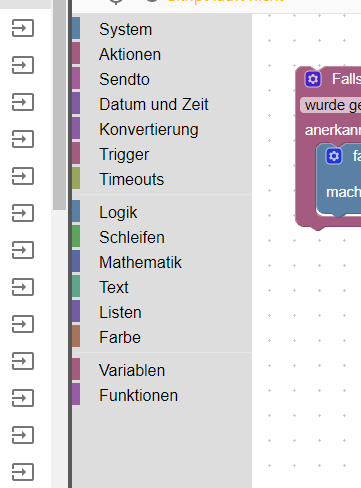
man kann alles anklicken und funktioniert, sobald ich aber Sendto an wähle, sieht es so aus, lässt sich aber nicht anwählen bzw rüberschieben
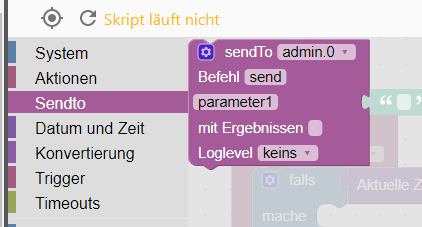
wechsle ich nun auf etwas anderes, bleibt der Balken bei Sendto hinterlegt
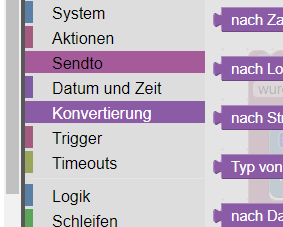
habe es auf Chromecast und Opera versucht
auf Microsoft Edge sieht es folgendermaßen aus, wenn ich Sendto anklick
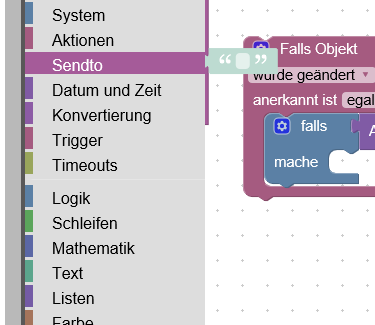
auch hier ein Darstellungsproblem
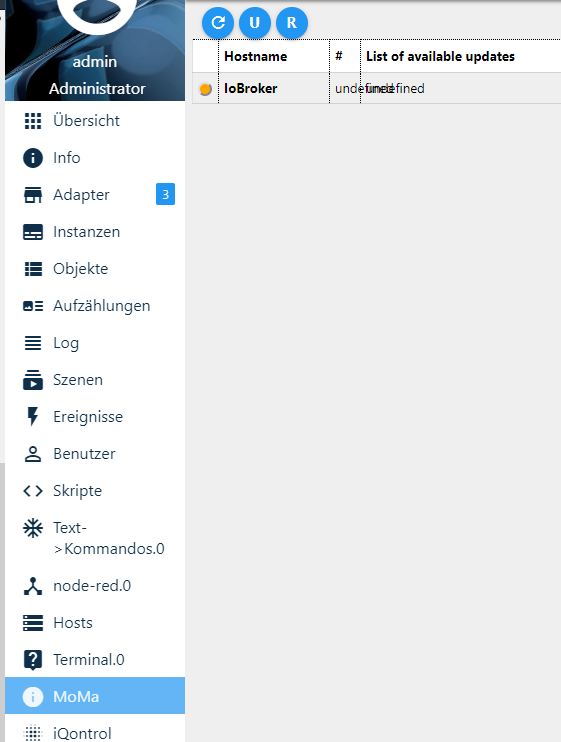
Admin 3.6.2
Node.js 8.16
Js-Controller 1.5.11
Script Engine 4.1.12 -
Jemand vllt eine Idee?
Rechner neu gestartet, Iobroker neu gestartet, Cache geleert. In allen Browsern das selbe Problem.
Sendto Befehl lässt sich nicht verwenden.umgestiegen von Proxmox auf Unraid
-
Jemand vllt eine Idee?
Rechner neu gestartet, Iobroker neu gestartet, Cache geleert. In allen Browsern das selbe Problem.
Sendto Befehl lässt sich nicht verwenden.@crunchip
Ist sayit installiert? -
Jemand vllt eine Idee?
Rechner neu gestartet, Iobroker neu gestartet, Cache geleert. In allen Browsern das selbe Problem.
Sendto Befehl lässt sich nicht verwenden.probier mal auf der console den javascript adapter "up zu loaden" - vorher iobroker stoppen - vielleicht gehts dann
evtl noch ein "npm cache clean --force " im iobroker verzeichnis vor iobrokers startnach einem gelösten Thread wäre es sinnvoll dies in der Überschrift des ersten Posts einzutragen [gelöst]-... Bitte benutzt das Voting rechts unten im Beitrag wenn er euch geholfen hat. Forum-Tools: PicPick https://picpick.app/en/download/ und ScreenToGif https://www.screentogif.com/downloads.html
-
@Homoran ja es läuft ja alles, wollte mir ein neues skript anlegen, kann da aber nichts anwählen. siehe Bilder oben
diejenigen, die schon angelegt sind funktionieren ja, also Adapter funktioniert ja -
probier mal auf der console den javascript adapter "up zu loaden" - vorher iobroker stoppen - vielleicht gehts dann
evtl noch ein "npm cache clean --force " im iobroker verzeichnis vor iobrokers start -
@liv-in-sky probier ich später mal, erstmal grillen:grin:
@crunchip viel spaß dabei
hab gesehen, du hast auch mit iqontrol ein installationsproblem - vielleicht solltest du mal ein "npm rebuild" im ioborker verzeichnis zusätlich ausführen - vorher alles backupen !
cd iobroker-verzeichnis
iobroker stop
npm rebuild
npm cache clean --force
iobroker startnach einem gelösten Thread wäre es sinnvoll dies in der Überschrift des ersten Posts einzutragen [gelöst]-... Bitte benutzt das Voting rechts unten im Beitrag wenn er euch geholfen hat. Forum-Tools: PicPick https://picpick.app/en/download/ und ScreenToGif https://www.screentogif.com/downloads.html
-
@crunchip viel spaß dabei
hab gesehen, du hast auch mit iqontrol ein installationsproblem - vielleicht solltest du mal ein "npm rebuild" im ioborker verzeichnis zusätlich ausführen - vorher alles backupen !
cd iobroker-verzeichnis
iobroker stop
npm rebuild
npm cache clean --force
iobroker start@liv-in-sky ein npm rebuild hatte ich heute schon :grinning: , nachdem ich nodejs v8.16 auf 10.16 wechseln wollte, habe da auch schon rein geschrieben, da ich danach Problem mit dem DASH und BLUETOOTH Adapter hatte.
umgestiegen von Proxmox auf Unraid
-
@liv-in-sky ein npm rebuild hatte ich heute schon :grinning: , nachdem ich nodejs v8.16 auf 10.16 wechseln wollte, habe da auch schon rein geschrieben, da ich danach Problem mit dem DASH und BLUETOOTH Adapter hatte.
@crunchip sorry - vergessen
dann nur den upload und den cache clean und javascript nochmal installieren über console
mehr fällt mir nicht ein
aber jetzt zur wurst und kotlett
nach einem gelösten Thread wäre es sinnvoll dies in der Überschrift des ersten Posts einzutragen [gelöst]-... Bitte benutzt das Voting rechts unten im Beitrag wenn er euch geholfen hat. Forum-Tools: PicPick https://picpick.app/en/download/ und ScreenToGif https://www.screentogif.com/downloads.html
-
@crunchip sorry - vergessen
dann nur den upload und den cache clean und javascript nochmal installieren über console
mehr fällt mir nicht ein
aber jetzt zur wurst und kotlett
@liv-in-sky sagte in Problem:Blockly Sendto lässt sich nicht anwählen:
aber jetzt zur wurst und kotlett
nene für mich nur feinstes Rind, zartrosa
werd ich mich heut abend mal dran setzen, wenn die Kinder im Bett sind
danke dir -
@crunchip viel spaß dabei
hab gesehen, du hast auch mit iqontrol ein installationsproblem - vielleicht solltest du mal ein "npm rebuild" im ioborker verzeichnis zusätlich ausführen - vorher alles backupen !
cd iobroker-verzeichnis
iobroker stop
npm rebuild
npm cache clean --force
iobroker start@liv-in-sky also ich hab das mit meiner aktuell laufenden Installation ausgeführt
die Fehlermeldungen am Ende normal?root@IoBroker:/opt/iobroker# npm rebuild > bluetooth-hci-socket@0.5.1 install /opt/iobroker/node_modules/bluetooth-hci-socket > node-gyp rebuild make: Verzeichnis „/opt/iobroker/node_modules/bluetooth-hci-socket/build“ wird betreten CXX(target) Release/obj.target/binding/src/BluetoothHciSocket.o ../src/BluetoothHciSocket.cpp: In member function ‘void BluetoothHciSocket::poll()’: ../src/BluetoothHciSocket.cpp:251:95: warning: ‘v8::Local<v8::Value> Nan::MakeCallback(v8::Local<v8::Object>, v8::Local<v8::String>, int, v8::Local<v8::Value>*)’ is deprecated [-Wdeprecated-declarations] Nan::MakeCallback(Nan::New<Object>(this->This), Nan::New("emit").ToLocalChecked(), 2, argv); ^ In file included from ../src/BluetoothHciSocket.cpp:8:0: ../../nan/nan.h:950:46: note: declared here NAN_DEPRECATED inline v8::Local<v8::Value> MakeCallback( ^~~~~~~~~~~~ ../src/BluetoothHciSocket.cpp: In member function ‘void BluetoothHciSocket::emitErrnoError()’: ../src/BluetoothHciSocket.cpp:275:72: warning: ‘v8::Local<v8::Object> v8::Function::NewInstance(int, v8::Local<v8::Value>*) const’ is deprecated: Use maybe version [-Wdeprecated-declarations] Local<Value> error = errorConstructor->NewInstance(1, constructorArgs); ^ In file included from /root/.node-gyp/8.16.0/include/node/v8.h:26:0, from /root/.node-gyp/8.16.0/include/node/node.h:63, from /root/.node-gyp/8.16.0/include/node/node_buffer.h:25, from ../src/BluetoothHciSocket.cpp:7: /root/.node-gyp/8.16.0/include/node/v8.h:3897:31: note: declared here Local<Object> NewInstance(int argc, Local<Value> argv[]) const); ^ /root/.node-gyp/8.16.0/include/node/v8config.h:318:3: note: in definition of macro ‘V8_DEPRECATED’ declarator __attribute__((deprecated(message))) ^~~~~~~~~~ ../src/BluetoothHciSocket.cpp:282:93: warning: ‘v8::Local<v8::Value> Nan::MakeCallback(v8::Local<v8::Object>, v8::Local<v8::String>, int, v8::Local<v8::Value>*)’ is deprecated [-Wdeprecated-declarations] Nan::MakeCallback(Nan::New<Object>(this->This), Nan::New("emit").ToLocalChecked(), 2, argv); ^ In file included from ../src/BluetoothHciSocket.cpp:8:0: ../../nan/nan.h:950:46: note: declared here NAN_DEPRECATED inline v8::Local<v8::Value> MakeCallback( ^~~~~~~~~~~~ SOLINK_MODULE(target) Release/obj.target/binding.node COPY Release/binding.node make: Verzeichnis „/opt/iobroker/node_modules/bluetooth-hci-socket/build“ wird verlassen > iobroker@1.1.2 install /opt/iobroker/node_modules/iobroker > node lib/prepareSetup.js && node lib/setup.js NPM version: 6.4.1 npm version >= 5: disabling package-lock npm install iobroker.discovery@stable --production --save > serialport@6.2.2 install /opt/iobroker/node_modules/iobroker.discovery/node_modules/serialport > prebuild-install || node-gyp rebuild npm WARN react-beautiful-dnd@9.0.2 requires a peer of react@^16.3.1 but none is installed. You must install peer dependencies yourself. npm WARN react-motion@0.5.2 requires a peer of react@^0.14.9 || ^15.3.0 || ^16.0.0 but none is installed. You must install peer dependencies yourself. npm WARN react-redux@5.0.7 requires a peer of react@^0.14.0 || ^15.0.0-0 || ^16.0.0-0 but none is installed. You must install peer dependencies yourself. npm WARN svg-inline-react@1.0.3 requires a peer of react@^0.14.0 || ^15.0.0 but none is installed. You must install peer dependencies yourself. npm WARN optional SKIPPING OPTIONAL DEPENDENCY: osx-temperature-sensor@1.0.3 (node_modules/osx-temperature-sensor): npm WARN notsup SKIPPING OPTIONAL DEPENDENCY: Unsupported platform for osx-temperature-sensor@1.0.3: wanted {"os":"darwin","arch":"any"} (current: {"os":"linux","arch":"x64"}) npm WARN optional SKIPPING OPTIONAL DEPENDENCY: xpc-connection@0.1.4 (node_modules/xpc-connection): npm WARN notsup SKIPPING OPTIONAL DEPENDENCY: Unsupported platform for xpc-connection@0.1.4: wanted {"os":"darwin","arch":"any"} (current: {"os":"linux","arch":"x64"}) + iobroker.discovery@1.3.0 removed 82 packages, updated 11 packages and audited 48111 packages in 84.666s found 156 vulnerabilities (75 low, 16 moderate, 65 high) run `npm audit fix` to fix them, or `npm audit` for details packet folder is: /opt/iobroker/node_modules/iobroker.discovery | exists: true npm install iobroker.admin@stable --production --save npm WARN react-beautiful-dnd@9.0.2 requires a peer of react@^16.3.1 but none is installed. You must install peer dependencies yourself. npm WARN react-motion@0.5.2 requires a peer of react@^0.14.9 || ^15.3.0 || ^16.0.0 but none is installed. You must install peer dependencies yourself. npm WARN react-redux@5.0.7 requires a peer of react@^0.14.0 || ^15.0.0-0 || ^16.0.0-0 but none is installed. You must install peer dependencies yourself. npm WARN svg-inline-react@1.0.3 requires a peer of react@^0.14.0 || ^15.0.0 but none is installed. You must install peer dependencies yourself. npm WARN optional SKIPPING OPTIONAL DEPENDENCY: xpc-connection@0.1.4 (node_modules/xpc-connection): npm WARN notsup SKIPPING OPTIONAL DEPENDENCY: Unsupported platform for xpc-connection@0.1.4: wanted {"os":"darwin","arch":"any"} (current: {"os":"linux","arch":"x64"}) npm WARN optional SKIPPING OPTIONAL DEPENDENCY: osx-temperature-sensor@1.0.3 (node_modules/osx-temperature-sensor): npm WARN notsup SKIPPING OPTIONAL DEPENDENCY: Unsupported platform for osx-temperature-sensor@1.0.3: wanted {"os":"darwin","arch":"any"} (current: {"os":"linux","arch":"x64"}) + iobroker.admin@3.6.2 removed 179 packages, updated 1 package and audited 48115 packages in 83.439s found 160 vulnerabilities (75 low, 18 moderate, 67 high) run `npm audit fix` to fix them, or `npm audit` for details packet folder is: /opt/iobroker/node_modules/iobroker.admin | exists: true npm install iobroker.js-controller@stable --production --save > iobroker.js-controller@1.5.11 preinstall /opt/iobroker/node_modules/iobroker.js-controller > node lib/preinstallCheck.js NPM version: 6.4.1 npm version >= 5: disabling package-lock > iobroker.js-controller@1.5.11 install /opt/iobroker/node_modules/iobroker.js-controller > node iobroker.js setup first npm WARN react-beautiful-dnd@9.0.2 requires a peer of react@^16.3.1 but none is installed. You must install peer dependencies yourself. npm WARN react-motion@0.5.2 requires a peer of react@^0.14.9 || ^15.3.0 || ^16.0.0 but none is installed. You must install peer dependencies yourself. npm WARN react-redux@5.0.7 requires a peer of react@^0.14.0 || ^15.0.0-0 || ^16.0.0-0 but none is installed. You must install peer dependencies yourself. npm WARN svg-inline-react@1.0.3 requires a peer of react@^0.14.0 || ^15.0.0 but none is installed. You must install peer dependencies yourself. npm WARN optional SKIPPING OPTIONAL DEPENDENCY: xpc-connection@0.1.4 (node_modules/xpc-connection): npm WARN notsup SKIPPING OPTIONAL DEPENDENCY: Unsupported platform for xpc-connection@0.1.4: wanted {"os":"darwin","arch":"any"} (current: {"os":"linux","arch":"x64"}) npm WARN optional SKIPPING OPTIONAL DEPENDENCY: osx-temperature-sensor@1.0.3 (node_modules/osx-temperature-sensor): npm WARN notsup SKIPPING OPTIONAL DEPENDENCY: Unsupported platform for osx-temperature-sensor@1.0.3: wanted {"os":"darwin","arch":"any"} (current: {"os":"linux","arch":"x64"}) + iobroker.js-controller@1.5.11 updated 1 package and audited 48115 packages in 84.43s found 160 vulnerabilities (75 low, 18 moderate, 67 high) run `npm audit fix` to fix them, or `npm audit` for details packet folder is: /opt/iobroker/node_modules/iobroker.js-controller | exists: true Write "./iobroker start" to start the ioBroker Auto-start was enabled. Write "update-rc.d -f iobroker.sh remove" to disable auto-start iobroker is started. Go to "http://ip-addr:8081" to open the admin UI. npm ERR! path /opt/iobroker/node_modules/iobroker.admin/node_modules/@types/iobroker/package.json npm ERR! code ENOENT npm ERR! errno -2 npm ERR! syscall open npm ERR! enoent ENOENT: no such file or directory, open '/opt/iobroker/node_modules/iobroker.admin/node_modules/@types/iobroker/package.json' npm ERR! enoent This is related to npm not being able to find a file. npm ERR! enoent npm ERR! A complete log of this run can be found in: npm ERR! /root/.npm/_logs/2019-06-02T17_58_32_639Z-debug.log root@IoBroker:/opt/iobroker# npm cache clean --force npm WARN using --force I sure hope you know what you are doing. root@IoBroker:/opt/iobroker# iobroker start Starting iobroker controller daemon... iobroker controller daemon started. PID: 24677 root@IoBroker:/opt/iobroker#sendto funktioniert immer noch nicht.
Hab den Adapter aufgerufen, jedoch wird mir da auch nichts angezeigt.
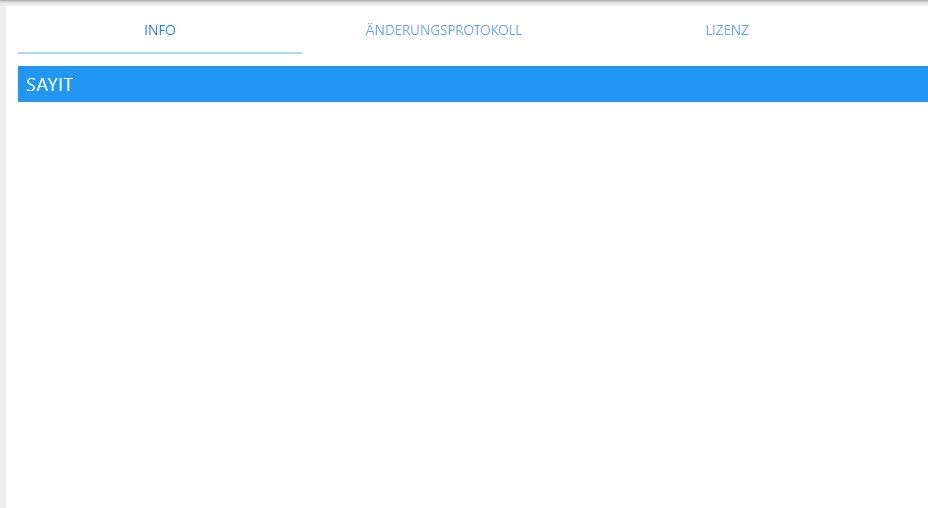
Ein upload des Adapters läuft und läuft, hab nach 10 min den Browser dann aktualisiert.
der Auszug aus der Log2019-06-02 20:13:14.993 - info: iobroker upload sayit 2019-06-02 20:13:15.709 - info: iobroker got /opt/iobroker/node_modules/iobroker.sayit/admin 2019-06-02 20:13:15.735 - info: iobroker upload [14] sayit.admin /opt/iobroker/node_modules/iobroker.sayit/admin/words.js words.js application/javascript 2019-06-02 20:13:15.833 - info: iobroker upload [13] sayit.admin /opt/iobroker/node_modules/iobroker.sayit/admin/sayit.png sayit.png image/png 2019-06-02 20:13:15.929 - info: iobroker upload [12] sayit.admin /opt/iobroker/node_modules/iobroker.sayit/admin/index_m.html index_m.html text/html 2019-06-02 20:13:15.999 - info: iobroker upload [11] sayit.admin /opt/iobroker/node_modules/iobroker.sayit/admin/index.html index.html text/html 2019-06-02 20:13:16.062 - info: iobroker upload [10] sayit.admin /opt/iobroker/node_modules/iobroker.sayit/admin/i18n/ru/translations.json i18n/ru/translations.json application/json 2019-06-02 20:13:16.125 - info: iobroker upload [9] sayit.admin /opt/iobroker/node_modules/iobroker.sayit/admin/i18n/pt/translations.json i18n/pt/translations.json application/json 2019-06-02 20:13:16.184 - info: iobroker upload [8] sayit.admin /opt/iobroker/node_modules/iobroker.sayit/admin/i18n/pl/translations.json i18n/pl/translations.json application/json 2019-06-02 20:13:16.245 - info: iobroker upload [7] sayit.admin /opt/iobroker/node_modules/iobroker.sayit/admin/i18n/nl/translations.json i18n/nl/translations.json application/json 2019-06-02 20:13:16.305 - info: iobroker upload [6] sayit.admin /opt/iobroker/node_modules/iobroker.sayit/admin/i18n/it/translations.json i18n/it/translations.json application/json 2019-06-02 20:13:16.374 - info: iobroker upload [5] sayit.admin /opt/iobroker/node_modules/iobroker.sayit/admin/i18n/fr/translations.json i18n/fr/translations.json application/json 2019-06-02 20:13:16.435 - info: iobroker upload [4] sayit.admin /opt/iobroker/node_modules/iobroker.sayit/admin/i18n/es/translations.json i18n/es/translations.json application/json 2019-06-02 20:13:16.494 - info: iobroker upload [3] sayit.admin /opt/iobroker/node_modules/iobroker.sayit/admin/i18n/en/translations.json i18n/en/translations.json application/json 2019-06-02 20:13:16.555 - info: iobroker upload [2] sayit.admin /opt/iobroker/node_modules/iobroker.sayit/admin/i18n/de/translations.json i18n/de/translations.json application/json 2019-06-02 20:13:16.615 - info: iobroker upload [1] sayit.admin /opt/iobroker/node_modules/iobroker.sayit/admin/engines.js engines.js application/javascript 2019-06-02 20:13:16.675 - info: iobroker upload [0] sayit.admin /opt/iobroker/node_modules/iobroker.sayit/admin/blockly.js blockly.js application/javascript 2019-06-02 20:13:16.803 - info: iobroker Update "system.adapter.sayit.0" 2019-06-02 20:13:16.821 - info: host.IoBroker object change system.adapter.sayit.0 2019-06-02 20:13:16.822 - info: host.IoBroker stopInstance system.adapter.sayit.0 2019-06-02 20:13:16.827 - info: sayit.0 stopping... 2019-06-02 20:13:16.878 - info: iobroker exit 0 2019-06-02 20:13:17.824 - info: host.IoBroker stopInstance timeout "1000 system.adapter.sayit.0 killing pid 24855 2019-06-02 20:13:17.826 - info: sayit.0 stopping... 2019-06-02 20:13:17.828 - info: sayit.0 stopping... 2019-06-02 20:13:17.867 - info: host.IoBroker instance system.adapter.sayit.0 terminated with code 0 (OK) 2019-06-02 20:13:20.353 - info: host.IoBroker instance system.adapter.sayit.0 started with pid 26101 2019-06-02 20:13:21.032 - info: sayit.0 starting. Version 1.8.0 in /opt/iobroker/node_modules/iobroker.sayit, node: v8.16.0 2019-06-02 20:13:21.059 - info: sayit.0 Upload announce mp3 files 2019-06-02 20:13:21.244 - info: sayit.0 All files uploaded 2019-06-02 20:15:00.029 - info: host.IoBroker instance system.adapter.daswetter.0 started with pid 26183 2019-06-02 20:15:01.194 - info: daswetter.0 starting. Version 2.8.0 in /opt/iobroker/node_modules/iobroker.daswetter, node: v8.16.0 2019-06-02 20:15:12.711 - info: host.IoBroker instance system.adapter.daswetter.0 terminated with code 11 (Desired termination) 2019-06-02 20:16:27.546 - info: tankerkoenig.0 Reading data from tankerkoenig ... 2019-06-02 20:19:02.159 - error: Caught by controller[0]: RangeError: Maximum call stack size exceeded 2019-06-02 20:19:02.159 - error: Caught by controller[0]: at Sender.frameAndSend (/opt/iobroker/node_modules/iobroker.web/node_modules/ws/lib/Sender.js:139:41) 2019-06-02 20:19:02.159 - error: Caught by controller[0]: at /opt/iobroker/node_modules/iobroker.web/node_modules/ws/lib/Sender.js:126:12 2019-06-02 20:19:02.159 - error: Caught by controller[0]: at Sender.applyExtensions (/opt/iobroker/node_modules/iobroker.web/node_modules/ws/lib/Sender.js:287:5) 2019-06-02 20:19:02.159 - error: Caught by controller[0]: at /opt/iobroker/node_modules/iobroker.web/node_modules/ws/lib/Sender.js:120:10 2019-06-02 20:19:02.160 - error: Caught by controller[0]: at Sender.flush (/opt/iobroker/node_modules/iobroker.web/node_modules/ws/lib/Sender.js:268:3) 2019-06-02 20:19:02.160 - error: Caught by controller[0]: at /opt/iobroker/node_modules/iobroker.web/node_modules/ws/lib/Sender.js:270:10 2019-06-02 20:19:02.160 - error: Caught by controller[0]: at /opt/iobroker/node_modules/iobroker.web/node_modules/ws/lib/Sender.js:127:7 2019-06-02 20:19:02.160 - error: Caught by controller[0]: at Sender.applyExtensions (/opt/iobroker/node_modules/iobroker.web/node_modules/ws/lib/Sender.js:287:5) 2019-06-02 20:19:02.160 - error: Caught by controller[0]: at /opt/iobroker/node_modules/iobroker.web/node_modules/ws/lib/Sender.js:120:10 2019-06-02 20:19:02.160 - error: Caught by controller[0]: at Sender.flush (/opt/iobroker/node_modules/iobroker.web/node_modules/ws/lib/Sender.js:268:3) 2019-06-02 20:19:02.160 - error: host.IoBroker instance system.adapter.web.0 terminated with code 0 (OK) 2019-06-02 20:19:02.160 - info: host.IoBroker Restart adapter system.adapter.web.0 because enabled 2019-06-02 20:19:32.182 - info: host.IoBroker instance system.adapter.web.0 started with pid 26400 -
sayit neu installiert und java upgrade/upload.
iobroker neu gestartet, meinen Laptop neu gestartet, funktioniert aber immer noch nicht.
jedoch probier ich mir hier nen Wolf...sendto da irgendwie ins skript zu bekommen.
siehe da, es klappt.
skript öffnen und auf sendto klicken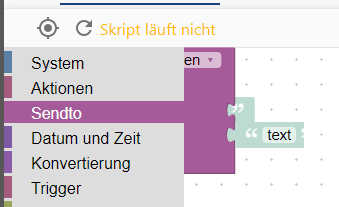
ein anderes Feld anwählen
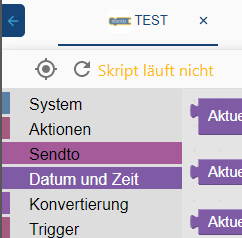
wieder auf sendto, dann wird der graue Rahmen mit angezeigt,jedoch lässt sich immer noch nichts auswählen, fahr ich mit der Maus drüber, erscheint kein gelber Rahmen.
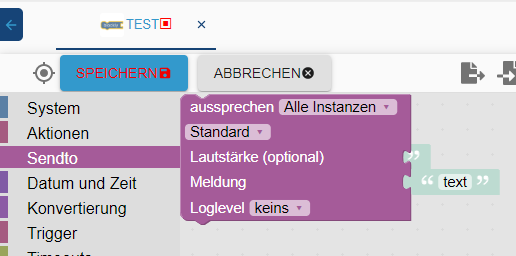
Jetzt muss ich mit der Maus in den lilanen Bereich, linke Maustaste, danach
in den grauen Bereich, linke Maustaste und nun hab ich den sendto Befehl eingefügt.
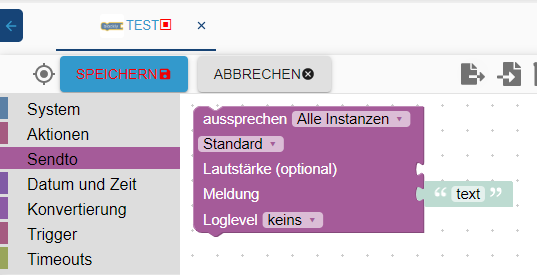
hab aber immer noch keinen Plan warum nur dieser Befehl spinnt, alles andere funktioniert.
Hat eventuell noch jemand ne Idee?umgestiegen von Proxmox auf Unraid
-
sayit neu installiert und java upgrade/upload.
iobroker neu gestartet, meinen Laptop neu gestartet, funktioniert aber immer noch nicht.
jedoch probier ich mir hier nen Wolf...sendto da irgendwie ins skript zu bekommen.
siehe da, es klappt.
skript öffnen und auf sendto klicken
ein anderes Feld anwählen
wieder auf sendto, dann wird der graue Rahmen mit angezeigt,jedoch lässt sich immer noch nichts auswählen, fahr ich mit der Maus drüber, erscheint kein gelber Rahmen.
Jetzt muss ich mit der Maus in den lilanen Bereich, linke Maustaste, danach
in den grauen Bereich, linke Maustaste und nun hab ich den sendto Befehl eingefügt.
hab aber immer noch keinen Plan warum nur dieser Befehl spinnt, alles andere funktioniert.
Hat eventuell noch jemand ne Idee?Was ist fas für ein Browser?
kein Support per PN! - Fragen im Forum stellen -
Benutzt das Voting rechts unten im Beitrag wenn er euch geholfen hat.
Das Forum freut sich über eine Spende. Benutzt dazu den Spendenbutton im Header. Danke!
der Installationsfixer: curl -fsL https://iobroker.net/fix.sh | bash - -
@Homoran arbeite mit chrome, in opera und edge ist aber das gleiche Problem
umgestiegen von Proxmox auf Unraid
-
@crunchip schade, wäre noch ne Möglichkeit gewesen.
kein Support per PN! - Fragen im Forum stellen -
Benutzt das Voting rechts unten im Beitrag wenn er euch geholfen hat.
Das Forum freut sich über eine Spende. Benutzt dazu den Spendenbutton im Header. Danke!
der Installationsfixer: curl -fsL https://iobroker.net/fix.sh | bash - -
@Homoran mal ne blöde Frage, kann es mit dem js-controller bzw node.js upgrade zusammen hängen? Zumindest hatte ich davor noch nicht dieses Problem.
-
event. den admin wieder eine version zurück ? wäre auch in versuch wert.
ich hatte vor kurzem auch soviele fehler bei jemanden den ich über teamviewer geholfen hatte - die fehler kamen nachdem ich node 10 , den admin und js upgrade machte - danach wieder auf node 8 - aber die fehler blieben
gelöst habe ich das folgendermaßen - meine annahme war, das ein alter adapter irgendwelche dependencies setzte und deshalb die anderen adapter bei einem rebuild ein problem bekommen.
ich habe alle alten und nichtgebrauchen adapter deinstalliert - bei dem user war das einfach, weil er sehr wenig adapter brauchte /beginner). am ende hatten wir nur noch ccu, admin,, vis,, widgets, cloud, und noch ein paar
dann waren aber die fehler erst mal weg und wir konnten wieder ohne fehler adapter installierennach einem gelösten Thread wäre es sinnvoll dies in der Überschrift des ersten Posts einzutragen [gelöst]-... Bitte benutzt das Voting rechts unten im Beitrag wenn er euch geholfen hat. Forum-Tools: PicPick https://picpick.app/en/download/ und ScreenToGif https://www.screentogif.com/downloads.html
-
event. den admin wieder eine version zurück ? wäre auch in versuch wert.
ich hatte vor kurzem auch soviele fehler bei jemanden den ich über teamviewer geholfen hatte - die fehler kamen nachdem ich node 10 , den admin und js upgrade machte - danach wieder auf node 8 - aber die fehler blieben
gelöst habe ich das folgendermaßen - meine annahme war, das ein alter adapter irgendwelche dependencies setzte und deshalb die anderen adapter bei einem rebuild ein problem bekommen.
ich habe alle alten und nichtgebrauchen adapter deinstalliert - bei dem user war das einfach, weil er sehr wenig adapter brauchte /beginner). am ende hatten wir nur noch ccu, admin,, vis,, widgets, cloud, und noch ein paar
dann waren aber die fehler erst mal weg und wir konnten wieder ohne fehler adapter installieren@liv-in-sky hatte zwar versucht auf node 10 zu wechseln, da es aber Probleme gab, hab ich ja wieder mein zuvor erstelltes Backup eingespielt, also sollten eventuelle entstandene Fehler durchs upgraden ja beseitigt sein. und dieses Problem mit sendto Bestand ja schon zuvor.
umgestiegen von Proxmox auf Unraid
-
@liv-in-sky hatte zwar versucht auf node 10 zu wechseln, da es aber Probleme gab, hab ich ja wieder mein zuvor erstelltes Backup eingespielt, also sollten eventuelle entstandene Fehler durchs upgraden ja beseitigt sein. und dieses Problem mit sendto Bestand ja schon zuvor.
@crunchip das dieses problem schon verher war, macht die fehlersuche nicht einfacher
sorry - mir fällt nix gutes mehr ein
nach einem gelösten Thread wäre es sinnvoll dies in der Überschrift des ersten Posts einzutragen [gelöst]-... Bitte benutzt das Voting rechts unten im Beitrag wenn er euch geholfen hat. Forum-Tools: PicPick https://picpick.app/en/download/ und ScreenToGif https://www.screentogif.com/downloads.html
-
@crunchip das dieses problem schon verher war, macht die fehlersuche nicht einfacher
sorry - mir fällt nix gutes mehr ein
@liv-in-sky deswegen hatte ich oben ja gefragt, ob es was mit js-controller bzw node.js upgrade zu tun haben kann...denn diese hatte ich vor paar tagen geändert
hab spasseshalber mal ein js-controller auf 1.5.12 angestoßen2019-06-02 23:15:06.915 - error: javascript.0 prebuild-install 2019-06-02 23:15:06.927 - info: tankerkoenig.0 Reading data from tankerkoenig ... 2019-06-02 23:15:06.918 - error: javascript.0 2019-06-02 23:15:06.920 - error: javascript.0 info begin Prebuild-install version 5.3.0 2019-06-02 23:15:06.950 - error: javascript.0 prebuild-install info looking for cached prebuild @ /root/.npm/_prebuilds/97a8e8-usb-v1.6.0-node-v57-linux-x64.tar.gz prebuild-install http request GET https://github.com/tessel/node-usb/releases/download/v1.6.0/usb-v1.6.0-node-v57-linux-x64.tar.gz 2019-06-02 23:15:07.847 - error: javascript.0 prebuild-install http 2019-06-02 23:15:07.847 - error: javascript.0 200 https://github.com/tessel/node-usb/releases/download/v1.6.0/usb-v1.6.0-node-v57-linux-x64.tar.gz 2019-06-02 23:15:07.850 - error: javascript.0 prebuild-install info 2019-06-02 23:15:07.850 - error: javascript.0 downloading to @ /root/.npm/_prebuilds/97a8e8-usb-v1.6.0-node-v57-linux-x64.tar.gz.3115-3936987488187.tmp 2019-06-02 23:15:08.056 - error: javascript.0 prebuild-install info 2019-06-02 23:15:08.057 - error: javascript.0 renaming to @ /root/.npm/_prebuilds/97a8e8-usb-v1.6.0-node-v57-linux-x64.tar.gz prebuild-install 2019-06-02 23:15:08.057 - error: javascript.0 info unpacking @ /root/.npm/_prebuilds/97a8e8-usb-v1.6.0-node-v57-linux-x64.tar.gz 2019-06-02 23:15:08.106 - error: javascript.0 prebuild-install info unpack resolved to /opt/iobroker/node_modules/iobroker.javascript/node_modules/usb/build/Release/usb_bindings.node 2019-06-02 23:15:08.118 - error: javascript.0 prebuild-install info 2019-06-02 23:15:08.119 - error: javascript.0 unpack required /opt/iobroker/node_modules/iobroker.javascript/node_modules/usb/build/Release/usb_bindings.node successfully prebuild-install info 2019-06-02 23:15:08.119 - error: javascript.0 install Successfully installed prebuilt binary! 2019-06-02 23:15:08.120 - info: host.IoBroker instance system.adapter.alexa2.0 started with pid 3133 2019-06-02 23:15:08.134 - info: javascript.0 > bluetooth-hci-socket@0.5.1 install /opt/iobroker/node_modules/iobroker.javascript/node_modules/bluetooth-hci-socket > node-gyp rebuild 2019-06-02 23:15:08.942 - info: alexa2.0 starting. Version 2.1.0 in /opt/iobroker/node_modules/iobroker.alexa2, node: v8.16.0 2019-06-02 23:15:09.308 - info: javascript.0 make: Verzeichnis „/opt/iobroker/node_modules/iobroker.javascript/node_modules/bluetooth-hci-socket/build“ wird betreten 2019-06-02 23:15:09.310 - info: javascript.0 CXX(target) Release/obj.target/binding/src/BluetoothHciSocket.o 2019-06-02 23:15:10.999 - error: javascript.0 ../src/BluetoothHciSocket.cpp: In member function ‘void BluetoothHciSocket::poll()’: ../src/BluetoothHciSocket.cpp:251:95: warning: ‘v8::Local Nan::MakeCallback(v8::Local, v8::Local, int, v8::Local*)’ is deprecated [-Wdeprecated-declarations] Nan::MakeCallback(Nan::New(this->This), Nan::New("emit").ToLocalChecked(), 2, argv); ^ In file included from ../src/BluetoothHciSocket.cpp:8:0: ../../nan/nan.h:1045:46: note: declared here NAN_DEPRECATED inline v8::Local MakeCallback( ^~~~~~~~~~~~ 2019-06-02 23:15:11.001 - error: javascript.0 ../src/BluetoothHciSocket.cpp: In member function ‘void BluetoothHciSocket::emitErrnoError()’: ../src/BluetoothHciSocket.cpp:275:72: warning: ‘v8::Local v8::Function::NewInstance(int, v8::Local*) const’ is deprecated: Use maybe version [-Wdeprecated-declarations] Local error = errorConstructor->NewInstance(1, constructorArgs); ^ In file included from /root/.node-gyp/8.16.0/include/node/v8.h:26:0, from /root/.node-gyp/8.16.0/include/node/node.h:63, from /root/.node-gyp/8.16.0/include/node/node_buffer.h:25, from ../src/BluetoothHciSocket.cpp:7: /root/.node-gyp/8.16.0/include/node/v8.h:3897:31: note: declared here Local NewInstance(int argc, Local argv[]) const); ^ /root/.node-gyp/8.16.0/include/node/v8config.h:318:3: note: in definition of macro ‘V8_DEPRECATED’ declarator __attribute__((deprecated(message))) ^~~~~~~~~~ 2019-06-02 23:15:11.003 - error: javascript.0 ../src/BluetoothHciSocket.cpp:282:93: warning: ‘v8::Local Nan::MakeCallback(v8::Local, v8::Local, int, v8::Local*)’ is deprecated [-Wdeprecated-declarations] Nan::MakeCallback(Nan::New(this->This), Nan::New("emit").ToLocalChecked(), 2, argv); ^ In file included from ../src/BluetoothHciSocket.cpp:8:0: ../../nan/nan.h:1045:46: note: declared here NAN_DEPRECATED inline v8::Local MakeCallback( ^~~~~~~~~~~~ 2019-06-02 23:15:12.340 - info: host.IoBroker instance system.adapter.chromecast.0 started with pid 3187 2019-06-02 23:15:12.387 - info: javascript.0 SOLINK_MODULE(target) Release/obj.target/binding.node 2019-06-02 23:15:12.610 - info: javascript.0 COPY Release/binding.node 2019-06-02 23:15:12.626 - info: javascript.0 make: Verzeichnis „/opt/iobroker/node_modules/iobroker.javascript/node_modules/bluetooth-hci-socket/build“ wird verlassen 2019-06-02 23:15:14.671 - error: javascript.0 npm 2019-06-02 23:15:14.672 - error: javascript.0 WARN optional SKIPPING OPTIONAL DEPENDENCY: xpc-connection@0.1.4 (node_modules/xpc-connection): npm WARN notsup 2019-06-02 23:15:14.672 - error: javascript.0 SKIPPING OPTIONAL DEPENDENCY: Unsupported platform for xpc-connection@0.1.4: wanted {"os":"darwin","arch":"any"} (current: {"os":"linux","arch":"x64"}) 2019-06-02 23:15:14.673 - error: javascript.02019-06-02 23:15:30.010 - error: javascript.0 npm 2019-06-02 23:15:30.012 - error: javascript.0 WARN optional SKIPPING OPTIONAL DEPENDENCY: xpc-connection@0.1.4 (node_modules/xpc-connection): npm WARN notsup SKIPPING OPTIONAL DEPENDENCY: Unsupported platform for xpc-connection@0.1.4: wanted {"os":"darwin","arch":"any"} (current: {"os":"linux","arch":"x64"})



Support us
454
Online32.7k
Users82.5k
Topics1.3m
Posts