




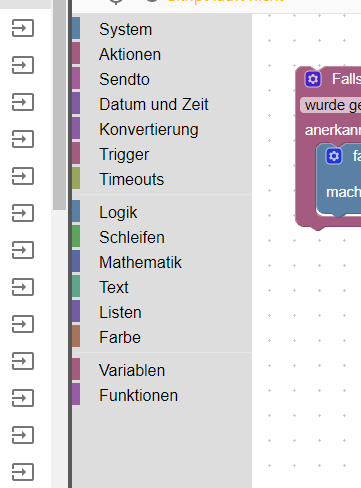
Problem:Blockly Sendto lässt sich nicht anwählen
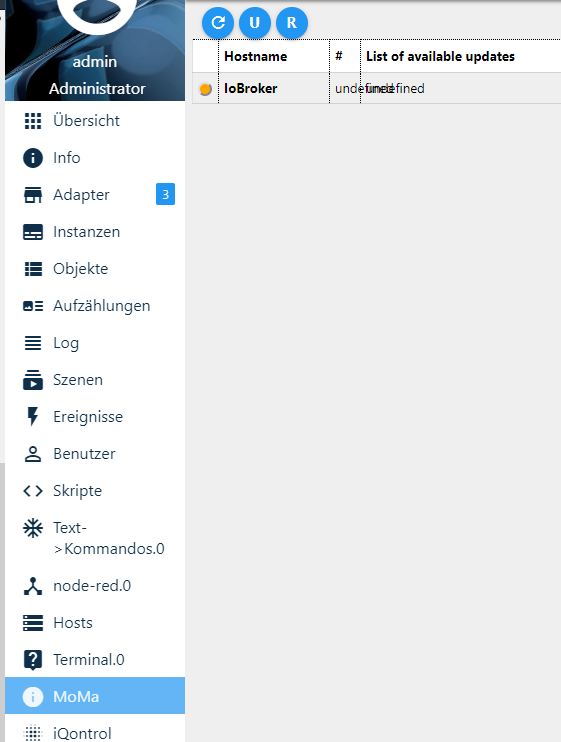
-
sayit neu installiert und java upgrade/upload.
iobroker neu gestartet, meinen Laptop neu gestartet, funktioniert aber immer noch nicht.
jedoch probier ich mir hier nen Wolf...sendto da irgendwie ins skript zu bekommen.
siehe da, es klappt.
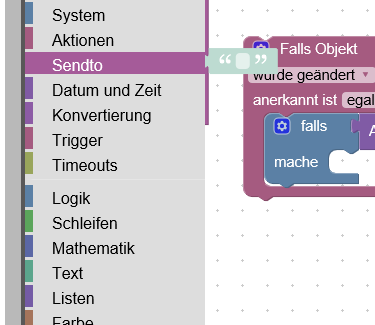
skript öffnen und auf sendto klicken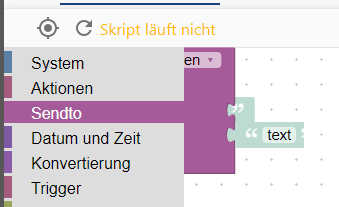
ein anderes Feld anwählen
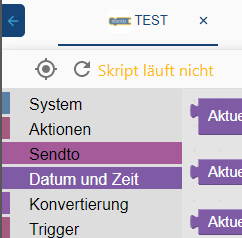
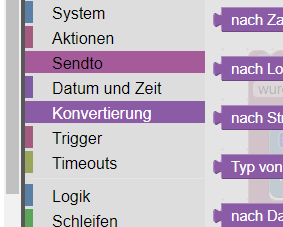
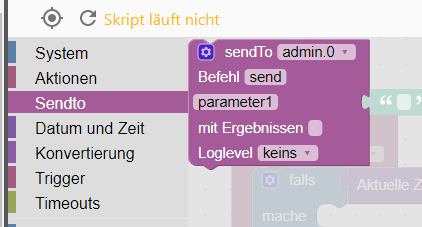
wieder auf sendto, dann wird der graue Rahmen mit angezeigt,jedoch lässt sich immer noch nichts auswählen, fahr ich mit der Maus drüber, erscheint kein gelber Rahmen.
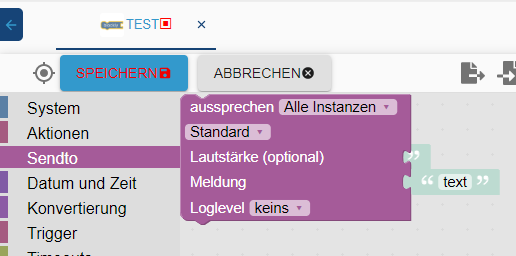
Jetzt muss ich mit der Maus in den lilanen Bereich, linke Maustaste, danach
in den grauen Bereich, linke Maustaste und nun hab ich den sendto Befehl eingefügt.
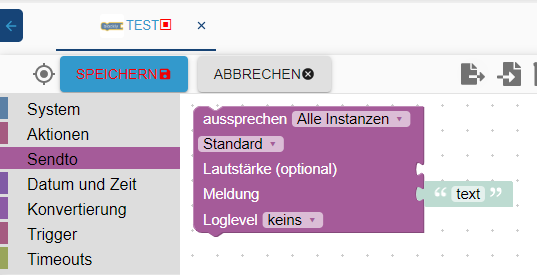
hab aber immer noch keinen Plan warum nur dieser Befehl spinnt, alles andere funktioniert.
Hat eventuell noch jemand ne Idee?umgestiegen von Proxmox auf Unraid
-
sayit neu installiert und java upgrade/upload.
iobroker neu gestartet, meinen Laptop neu gestartet, funktioniert aber immer noch nicht.
jedoch probier ich mir hier nen Wolf...sendto da irgendwie ins skript zu bekommen.
siehe da, es klappt.
skript öffnen und auf sendto klicken
ein anderes Feld anwählen
wieder auf sendto, dann wird der graue Rahmen mit angezeigt,jedoch lässt sich immer noch nichts auswählen, fahr ich mit der Maus drüber, erscheint kein gelber Rahmen.
Jetzt muss ich mit der Maus in den lilanen Bereich, linke Maustaste, danach
in den grauen Bereich, linke Maustaste und nun hab ich den sendto Befehl eingefügt.
hab aber immer noch keinen Plan warum nur dieser Befehl spinnt, alles andere funktioniert.
Hat eventuell noch jemand ne Idee?Was ist fas für ein Browser?
kein Support per PN! - Fragen im Forum stellen -
Benutzt das Voting rechts unten im Beitrag wenn er euch geholfen hat.
Das Forum freut sich über eine Spende. Benutzt dazu den Spendenbutton im Header. Danke!
der Installationsfixer: curl -fsL https://iobroker.net/fix.sh | bash - -
@Homoran arbeite mit chrome, in opera und edge ist aber das gleiche Problem
umgestiegen von Proxmox auf Unraid
-
@crunchip schade, wäre noch ne Möglichkeit gewesen.
kein Support per PN! - Fragen im Forum stellen -
Benutzt das Voting rechts unten im Beitrag wenn er euch geholfen hat.
Das Forum freut sich über eine Spende. Benutzt dazu den Spendenbutton im Header. Danke!
der Installationsfixer: curl -fsL https://iobroker.net/fix.sh | bash - -
@Homoran mal ne blöde Frage, kann es mit dem js-controller bzw node.js upgrade zusammen hängen? Zumindest hatte ich davor noch nicht dieses Problem.
-
event. den admin wieder eine version zurück ? wäre auch in versuch wert.
ich hatte vor kurzem auch soviele fehler bei jemanden den ich über teamviewer geholfen hatte - die fehler kamen nachdem ich node 10 , den admin und js upgrade machte - danach wieder auf node 8 - aber die fehler blieben
gelöst habe ich das folgendermaßen - meine annahme war, das ein alter adapter irgendwelche dependencies setzte und deshalb die anderen adapter bei einem rebuild ein problem bekommen.
ich habe alle alten und nichtgebrauchen adapter deinstalliert - bei dem user war das einfach, weil er sehr wenig adapter brauchte /beginner). am ende hatten wir nur noch ccu, admin,, vis,, widgets, cloud, und noch ein paar
dann waren aber die fehler erst mal weg und wir konnten wieder ohne fehler adapter installierennach einem gelösten Thread wäre es sinnvoll dies in der Überschrift des ersten Posts einzutragen [gelöst]-... Bitte benutzt das Voting rechts unten im Beitrag wenn er euch geholfen hat. Forum-Tools: PicPick https://picpick.app/en/download/ und ScreenToGif https://www.screentogif.com/downloads.html
-
event. den admin wieder eine version zurück ? wäre auch in versuch wert.
ich hatte vor kurzem auch soviele fehler bei jemanden den ich über teamviewer geholfen hatte - die fehler kamen nachdem ich node 10 , den admin und js upgrade machte - danach wieder auf node 8 - aber die fehler blieben
gelöst habe ich das folgendermaßen - meine annahme war, das ein alter adapter irgendwelche dependencies setzte und deshalb die anderen adapter bei einem rebuild ein problem bekommen.
ich habe alle alten und nichtgebrauchen adapter deinstalliert - bei dem user war das einfach, weil er sehr wenig adapter brauchte /beginner). am ende hatten wir nur noch ccu, admin,, vis,, widgets, cloud, und noch ein paar
dann waren aber die fehler erst mal weg und wir konnten wieder ohne fehler adapter installieren@liv-in-sky hatte zwar versucht auf node 10 zu wechseln, da es aber Probleme gab, hab ich ja wieder mein zuvor erstelltes Backup eingespielt, also sollten eventuelle entstandene Fehler durchs upgraden ja beseitigt sein. und dieses Problem mit sendto Bestand ja schon zuvor.
umgestiegen von Proxmox auf Unraid
-
@liv-in-sky hatte zwar versucht auf node 10 zu wechseln, da es aber Probleme gab, hab ich ja wieder mein zuvor erstelltes Backup eingespielt, also sollten eventuelle entstandene Fehler durchs upgraden ja beseitigt sein. und dieses Problem mit sendto Bestand ja schon zuvor.
@crunchip das dieses problem schon verher war, macht die fehlersuche nicht einfacher
sorry - mir fällt nix gutes mehr ein
nach einem gelösten Thread wäre es sinnvoll dies in der Überschrift des ersten Posts einzutragen [gelöst]-... Bitte benutzt das Voting rechts unten im Beitrag wenn er euch geholfen hat. Forum-Tools: PicPick https://picpick.app/en/download/ und ScreenToGif https://www.screentogif.com/downloads.html
-
@crunchip das dieses problem schon verher war, macht die fehlersuche nicht einfacher
sorry - mir fällt nix gutes mehr ein
@liv-in-sky deswegen hatte ich oben ja gefragt, ob es was mit js-controller bzw node.js upgrade zu tun haben kann...denn diese hatte ich vor paar tagen geändert
hab spasseshalber mal ein js-controller auf 1.5.12 angestoßen2019-06-02 23:15:06.915 - error: javascript.0 prebuild-install 2019-06-02 23:15:06.927 - info: tankerkoenig.0 Reading data from tankerkoenig ... 2019-06-02 23:15:06.918 - error: javascript.0 2019-06-02 23:15:06.920 - error: javascript.0 info begin Prebuild-install version 5.3.0 2019-06-02 23:15:06.950 - error: javascript.0 prebuild-install info looking for cached prebuild @ /root/.npm/_prebuilds/97a8e8-usb-v1.6.0-node-v57-linux-x64.tar.gz prebuild-install http request GET https://github.com/tessel/node-usb/releases/download/v1.6.0/usb-v1.6.0-node-v57-linux-x64.tar.gz 2019-06-02 23:15:07.847 - error: javascript.0 prebuild-install http 2019-06-02 23:15:07.847 - error: javascript.0 200 https://github.com/tessel/node-usb/releases/download/v1.6.0/usb-v1.6.0-node-v57-linux-x64.tar.gz 2019-06-02 23:15:07.850 - error: javascript.0 prebuild-install info 2019-06-02 23:15:07.850 - error: javascript.0 downloading to @ /root/.npm/_prebuilds/97a8e8-usb-v1.6.0-node-v57-linux-x64.tar.gz.3115-3936987488187.tmp 2019-06-02 23:15:08.056 - error: javascript.0 prebuild-install info 2019-06-02 23:15:08.057 - error: javascript.0 renaming to @ /root/.npm/_prebuilds/97a8e8-usb-v1.6.0-node-v57-linux-x64.tar.gz prebuild-install 2019-06-02 23:15:08.057 - error: javascript.0 info unpacking @ /root/.npm/_prebuilds/97a8e8-usb-v1.6.0-node-v57-linux-x64.tar.gz 2019-06-02 23:15:08.106 - error: javascript.0 prebuild-install info unpack resolved to /opt/iobroker/node_modules/iobroker.javascript/node_modules/usb/build/Release/usb_bindings.node 2019-06-02 23:15:08.118 - error: javascript.0 prebuild-install info 2019-06-02 23:15:08.119 - error: javascript.0 unpack required /opt/iobroker/node_modules/iobroker.javascript/node_modules/usb/build/Release/usb_bindings.node successfully prebuild-install info 2019-06-02 23:15:08.119 - error: javascript.0 install Successfully installed prebuilt binary! 2019-06-02 23:15:08.120 - info: host.IoBroker instance system.adapter.alexa2.0 started with pid 3133 2019-06-02 23:15:08.134 - info: javascript.0 > bluetooth-hci-socket@0.5.1 install /opt/iobroker/node_modules/iobroker.javascript/node_modules/bluetooth-hci-socket > node-gyp rebuild 2019-06-02 23:15:08.942 - info: alexa2.0 starting. Version 2.1.0 in /opt/iobroker/node_modules/iobroker.alexa2, node: v8.16.0 2019-06-02 23:15:09.308 - info: javascript.0 make: Verzeichnis „/opt/iobroker/node_modules/iobroker.javascript/node_modules/bluetooth-hci-socket/build“ wird betreten 2019-06-02 23:15:09.310 - info: javascript.0 CXX(target) Release/obj.target/binding/src/BluetoothHciSocket.o 2019-06-02 23:15:10.999 - error: javascript.0 ../src/BluetoothHciSocket.cpp: In member function ‘void BluetoothHciSocket::poll()’: ../src/BluetoothHciSocket.cpp:251:95: warning: ‘v8::Local Nan::MakeCallback(v8::Local, v8::Local, int, v8::Local*)’ is deprecated [-Wdeprecated-declarations] Nan::MakeCallback(Nan::New(this->This), Nan::New("emit").ToLocalChecked(), 2, argv); ^ In file included from ../src/BluetoothHciSocket.cpp:8:0: ../../nan/nan.h:1045:46: note: declared here NAN_DEPRECATED inline v8::Local MakeCallback( ^~~~~~~~~~~~ 2019-06-02 23:15:11.001 - error: javascript.0 ../src/BluetoothHciSocket.cpp: In member function ‘void BluetoothHciSocket::emitErrnoError()’: ../src/BluetoothHciSocket.cpp:275:72: warning: ‘v8::Local v8::Function::NewInstance(int, v8::Local*) const’ is deprecated: Use maybe version [-Wdeprecated-declarations] Local error = errorConstructor->NewInstance(1, constructorArgs); ^ In file included from /root/.node-gyp/8.16.0/include/node/v8.h:26:0, from /root/.node-gyp/8.16.0/include/node/node.h:63, from /root/.node-gyp/8.16.0/include/node/node_buffer.h:25, from ../src/BluetoothHciSocket.cpp:7: /root/.node-gyp/8.16.0/include/node/v8.h:3897:31: note: declared here Local NewInstance(int argc, Local argv[]) const); ^ /root/.node-gyp/8.16.0/include/node/v8config.h:318:3: note: in definition of macro ‘V8_DEPRECATED’ declarator __attribute__((deprecated(message))) ^~~~~~~~~~ 2019-06-02 23:15:11.003 - error: javascript.0 ../src/BluetoothHciSocket.cpp:282:93: warning: ‘v8::Local Nan::MakeCallback(v8::Local, v8::Local, int, v8::Local*)’ is deprecated [-Wdeprecated-declarations] Nan::MakeCallback(Nan::New(this->This), Nan::New("emit").ToLocalChecked(), 2, argv); ^ In file included from ../src/BluetoothHciSocket.cpp:8:0: ../../nan/nan.h:1045:46: note: declared here NAN_DEPRECATED inline v8::Local MakeCallback( ^~~~~~~~~~~~ 2019-06-02 23:15:12.340 - info: host.IoBroker instance system.adapter.chromecast.0 started with pid 3187 2019-06-02 23:15:12.387 - info: javascript.0 SOLINK_MODULE(target) Release/obj.target/binding.node 2019-06-02 23:15:12.610 - info: javascript.0 COPY Release/binding.node 2019-06-02 23:15:12.626 - info: javascript.0 make: Verzeichnis „/opt/iobroker/node_modules/iobroker.javascript/node_modules/bluetooth-hci-socket/build“ wird verlassen 2019-06-02 23:15:14.671 - error: javascript.0 npm 2019-06-02 23:15:14.672 - error: javascript.0 WARN optional SKIPPING OPTIONAL DEPENDENCY: xpc-connection@0.1.4 (node_modules/xpc-connection): npm WARN notsup 2019-06-02 23:15:14.672 - error: javascript.0 SKIPPING OPTIONAL DEPENDENCY: Unsupported platform for xpc-connection@0.1.4: wanted {"os":"darwin","arch":"any"} (current: {"os":"linux","arch":"x64"}) 2019-06-02 23:15:14.673 - error: javascript.02019-06-02 23:15:30.010 - error: javascript.0 npm 2019-06-02 23:15:30.012 - error: javascript.0 WARN optional SKIPPING OPTIONAL DEPENDENCY: xpc-connection@0.1.4 (node_modules/xpc-connection): npm WARN notsup SKIPPING OPTIONAL DEPENDENCY: Unsupported platform for xpc-connection@0.1.4: wanted {"os":"darwin","arch":"any"} (current: {"os":"linux","arch":"x64"}) -
bin jetzt erstmal wieder ganz zurück auf 1.4.2
falls wer noch irgendwelche Ideen oder Vorschläge hat, immer her damit. -
@liv-in-sky deswegen hatte ich oben ja gefragt, ob es was mit js-controller bzw node.js upgrade zu tun haben kann...denn diese hatte ich vor paar tagen geändert
hab spasseshalber mal ein js-controller auf 1.5.12 angestoßen2019-06-02 23:15:06.915 - error: javascript.0 prebuild-install 2019-06-02 23:15:06.927 - info: tankerkoenig.0 Reading data from tankerkoenig ... 2019-06-02 23:15:06.918 - error: javascript.0 2019-06-02 23:15:06.920 - error: javascript.0 info begin Prebuild-install version 5.3.0 2019-06-02 23:15:06.950 - error: javascript.0 prebuild-install info looking for cached prebuild @ /root/.npm/_prebuilds/97a8e8-usb-v1.6.0-node-v57-linux-x64.tar.gz prebuild-install http request GET https://github.com/tessel/node-usb/releases/download/v1.6.0/usb-v1.6.0-node-v57-linux-x64.tar.gz 2019-06-02 23:15:07.847 - error: javascript.0 prebuild-install http 2019-06-02 23:15:07.847 - error: javascript.0 200 https://github.com/tessel/node-usb/releases/download/v1.6.0/usb-v1.6.0-node-v57-linux-x64.tar.gz 2019-06-02 23:15:07.850 - error: javascript.0 prebuild-install info 2019-06-02 23:15:07.850 - error: javascript.0 downloading to @ /root/.npm/_prebuilds/97a8e8-usb-v1.6.0-node-v57-linux-x64.tar.gz.3115-3936987488187.tmp 2019-06-02 23:15:08.056 - error: javascript.0 prebuild-install info 2019-06-02 23:15:08.057 - error: javascript.0 renaming to @ /root/.npm/_prebuilds/97a8e8-usb-v1.6.0-node-v57-linux-x64.tar.gz prebuild-install 2019-06-02 23:15:08.057 - error: javascript.0 info unpacking @ /root/.npm/_prebuilds/97a8e8-usb-v1.6.0-node-v57-linux-x64.tar.gz 2019-06-02 23:15:08.106 - error: javascript.0 prebuild-install info unpack resolved to /opt/iobroker/node_modules/iobroker.javascript/node_modules/usb/build/Release/usb_bindings.node 2019-06-02 23:15:08.118 - error: javascript.0 prebuild-install info 2019-06-02 23:15:08.119 - error: javascript.0 unpack required /opt/iobroker/node_modules/iobroker.javascript/node_modules/usb/build/Release/usb_bindings.node successfully prebuild-install info 2019-06-02 23:15:08.119 - error: javascript.0 install Successfully installed prebuilt binary! 2019-06-02 23:15:08.120 - info: host.IoBroker instance system.adapter.alexa2.0 started with pid 3133 2019-06-02 23:15:08.134 - info: javascript.0 > bluetooth-hci-socket@0.5.1 install /opt/iobroker/node_modules/iobroker.javascript/node_modules/bluetooth-hci-socket > node-gyp rebuild 2019-06-02 23:15:08.942 - info: alexa2.0 starting. Version 2.1.0 in /opt/iobroker/node_modules/iobroker.alexa2, node: v8.16.0 2019-06-02 23:15:09.308 - info: javascript.0 make: Verzeichnis „/opt/iobroker/node_modules/iobroker.javascript/node_modules/bluetooth-hci-socket/build“ wird betreten 2019-06-02 23:15:09.310 - info: javascript.0 CXX(target) Release/obj.target/binding/src/BluetoothHciSocket.o 2019-06-02 23:15:10.999 - error: javascript.0 ../src/BluetoothHciSocket.cpp: In member function ‘void BluetoothHciSocket::poll()’: ../src/BluetoothHciSocket.cpp:251:95: warning: ‘v8::Local Nan::MakeCallback(v8::Local, v8::Local, int, v8::Local*)’ is deprecated [-Wdeprecated-declarations] Nan::MakeCallback(Nan::New(this->This), Nan::New("emit").ToLocalChecked(), 2, argv); ^ In file included from ../src/BluetoothHciSocket.cpp:8:0: ../../nan/nan.h:1045:46: note: declared here NAN_DEPRECATED inline v8::Local MakeCallback( ^~~~~~~~~~~~ 2019-06-02 23:15:11.001 - error: javascript.0 ../src/BluetoothHciSocket.cpp: In member function ‘void BluetoothHciSocket::emitErrnoError()’: ../src/BluetoothHciSocket.cpp:275:72: warning: ‘v8::Local v8::Function::NewInstance(int, v8::Local*) const’ is deprecated: Use maybe version [-Wdeprecated-declarations] Local error = errorConstructor->NewInstance(1, constructorArgs); ^ In file included from /root/.node-gyp/8.16.0/include/node/v8.h:26:0, from /root/.node-gyp/8.16.0/include/node/node.h:63, from /root/.node-gyp/8.16.0/include/node/node_buffer.h:25, from ../src/BluetoothHciSocket.cpp:7: /root/.node-gyp/8.16.0/include/node/v8.h:3897:31: note: declared here Local NewInstance(int argc, Local argv[]) const); ^ /root/.node-gyp/8.16.0/include/node/v8config.h:318:3: note: in definition of macro ‘V8_DEPRECATED’ declarator __attribute__((deprecated(message))) ^~~~~~~~~~ 2019-06-02 23:15:11.003 - error: javascript.0 ../src/BluetoothHciSocket.cpp:282:93: warning: ‘v8::Local Nan::MakeCallback(v8::Local, v8::Local, int, v8::Local*)’ is deprecated [-Wdeprecated-declarations] Nan::MakeCallback(Nan::New(this->This), Nan::New("emit").ToLocalChecked(), 2, argv); ^ In file included from ../src/BluetoothHciSocket.cpp:8:0: ../../nan/nan.h:1045:46: note: declared here NAN_DEPRECATED inline v8::Local MakeCallback( ^~~~~~~~~~~~ 2019-06-02 23:15:12.340 - info: host.IoBroker instance system.adapter.chromecast.0 started with pid 3187 2019-06-02 23:15:12.387 - info: javascript.0 SOLINK_MODULE(target) Release/obj.target/binding.node 2019-06-02 23:15:12.610 - info: javascript.0 COPY Release/binding.node 2019-06-02 23:15:12.626 - info: javascript.0 make: Verzeichnis „/opt/iobroker/node_modules/iobroker.javascript/node_modules/bluetooth-hci-socket/build“ wird verlassen 2019-06-02 23:15:14.671 - error: javascript.0 npm 2019-06-02 23:15:14.672 - error: javascript.0 WARN optional SKIPPING OPTIONAL DEPENDENCY: xpc-connection@0.1.4 (node_modules/xpc-connection): npm WARN notsup 2019-06-02 23:15:14.672 - error: javascript.0 SKIPPING OPTIONAL DEPENDENCY: Unsupported platform for xpc-connection@0.1.4: wanted {"os":"darwin","arch":"any"} (current: {"os":"linux","arch":"x64"}) 2019-06-02 23:15:14.673 - error: javascript.02019-06-02 23:15:30.010 - error: javascript.0 npm 2019-06-02 23:15:30.012 - error: javascript.0 WARN optional SKIPPING OPTIONAL DEPENDENCY: xpc-connection@0.1.4 (node_modules/xpc-connection): npm WARN notsup SKIPPING OPTIONAL DEPENDENCY: Unsupported platform for xpc-connection@0.1.4: wanted {"os":"darwin","arch":"any"} (current: {"os":"linux","arch":"x64"})@crunchip
bin mir nicht sicher, ob du dir damit einen gefallen tust - würde eher wieder runtergehen mit den versionenbei mir lief node 10 und js-cont 1.5.9 für 2 wochen prima - dann kam ein sql-adapter und der admin-adapter als update - danach stürzte der js-controller ohne logeinträge mehrmals täglich ab - alle anderen adapter waren noch in top zu sehen - aber ohne js-contr geht halt nix
habe dann node auf 8 und js-cont wieder auf 1.4.x gebracht - npm rebuilt, cache clean - danach ging wieder alles - dann wieder mysql update und auch js-contr. 1.5.11 - läuft wieder ohne probleme - mal schauen , wann ich node 10 wieder probieren werde - im moment lass ich es so
nach einem gelösten Thread wäre es sinnvoll dies in der Überschrift des ersten Posts einzutragen [gelöst]-... Bitte benutzt das Voting rechts unten im Beitrag wenn er euch geholfen hat. Forum-Tools: PicPick https://picpick.app/en/download/ und ScreenToGif https://www.screentogif.com/downloads.html
-
-
@crunchip Hast du den Cloud Adapter installiert?
@Knallochse nein den hab ich schon länger nicht mehr
-
@crunchip
bin mir nicht sicher, ob du dir damit einen gefallen tust - würde eher wieder runtergehen mit den versionenbei mir lief node 10 und js-cont 1.5.9 für 2 wochen prima - dann kam ein sql-adapter und der admin-adapter als update - danach stürzte der js-controller ohne logeinträge mehrmals täglich ab - alle anderen adapter waren noch in top zu sehen - aber ohne js-contr geht halt nix
habe dann node auf 8 und js-cont wieder auf 1.4.x gebracht - npm rebuilt, cache clean - danach ging wieder alles - dann wieder mysql update und auch js-contr. 1.5.11 - läuft wieder ohne probleme - mal schauen , wann ich node 10 wieder probieren werde - im moment lass ich es so
@liv-in-sky aktuell steh ich hier
Admin 3.6.2
Js-controller 1.4.2
Node.js v8.16.0
NPM 6.4.1umgestiegen von Proxmox auf Unraid
-
@liv-in-sky aktuell steh ich hier
Admin 3.6.2
Js-controller 1.4.2
Node.js v8.16.0
NPM 6.4.1@crunchip war wohl gedankenübertragung - hatte post schon geschrieben mit dieser frage? aber dann doch gelöscht, weil ich im moment total verwirt bin
in dem anderen thread sagt dignix er habe das selbe problem wie du - aber ich sehe keine permitt-prbleme in deinen fehlermeldungen - mach doch nochmal ein npm build mit dieser konstellation damit wir die fehler nochmal aktuell haben
nach einem gelösten Thread wäre es sinnvoll dies in der Überschrift des ersten Posts einzutragen [gelöst]-... Bitte benutzt das Voting rechts unten im Beitrag wenn er euch geholfen hat. Forum-Tools: PicPick https://picpick.app/en/download/ und ScreenToGif https://www.screentogif.com/downloads.html
-
@crunchip war wohl gedankenübertragung - hatte post schon geschrieben mit dieser frage? aber dann doch gelöscht, weil ich im moment total verwirt bin
in dem anderen thread sagt dignix er habe das selbe problem wie du - aber ich sehe keine permitt-prbleme in deinen fehlermeldungen - mach doch nochmal ein npm build mit dieser konstellation damit wir die fehler nochmal aktuell haben
@liv-in-sky mach ich mal, dauert nen moment
-
@Knallochse nein den hab ich schon länger nicht mehr
@crunchip Ich hatte das gleiche Problem, als ich den Cloud Adapter deinstalliert hatte. Dieser musste bei mir installiert sein, aber unter Instanzen nicht laufen (Pause)
-
event. den admin wieder eine version zurück ? wäre auch in versuch wert.
ich hatte vor kurzem auch soviele fehler bei jemanden den ich über teamviewer geholfen hatte - die fehler kamen nachdem ich node 10 , den admin und js upgrade machte - danach wieder auf node 8 - aber die fehler blieben
gelöst habe ich das folgendermaßen - meine annahme war, das ein alter adapter irgendwelche dependencies setzte und deshalb die anderen adapter bei einem rebuild ein problem bekommen.
ich habe alle alten und nichtgebrauchen adapter deinstalliert - bei dem user war das einfach, weil er sehr wenig adapter brauchte /beginner). am ende hatten wir nur noch ccu, admin,, vis,, widgets, cloud, und noch ein paar
dann waren aber die fehler erst mal weg und wir konnten wieder ohne fehler adapter installieren@liv-in-sky sagte in Problem:Blockly Sendto lässt sich nicht anwählen:
ich hatte vor kurzem auch soviele fehler bei jemanden den ich über teamviewer geholfen hatte - die fehler kamen nachdem ich node 10 , den admin und js upgrade machte - danach wieder auf node 8 - aber die fehler blieben
gelöst habe ich das folgendermaßen - meine annahme war, das ein alter adapter irgendwelche dependencies setzte und deshalb die anderen adapter bei einem rebuild ein problem bekommen.@crunchip der letzte post im anderen thread von apollon geht mit meiner these zusammen, dass alte adapter ein problem machen können
https://forum.iobroker.net/post/267287 -
@crunchip war wohl gedankenübertragung - hatte post schon geschrieben mit dieser frage? aber dann doch gelöscht, weil ich im moment total verwirt bin
in dem anderen thread sagt dignix er habe das selbe problem wie du - aber ich sehe keine permitt-prbleme in deinen fehlermeldungen - mach doch nochmal ein npm build mit dieser konstellation damit wir die fehler nochmal aktuell haben
root@IoBroker:/opt/iobroker# npm rebuild

> bluetooth-hci-socket@0.5.1 install /opt/iobroker/node_modules/bluetooth-hci-socket
> node-gyp rebuild

make: Verzeichnis „/opt/iobroker/node_modules/bluetooth-hci-socket/build“ wird betreten
 CXX(target) Release/obj.target/binding/src/BluetoothHciSocket.o
../src/BluetoothHciSocket.cpp: In member function ‘void BluetoothHciSocket::poll()’:
../src/BluetoothHciSocket.cpp:251:95: warning: ‘v8::Local<v8::Value> Nan::MakeCallback(v8::Local<v8::Object>, v8::Local<v8::String>, int, v8::Local<v8::Value>*)’ is deprecated [-Wdeprecated-declarations]
    Nan::MakeCallback(Nan::New<Object>(this->This), Nan::New("emit").ToLocalChecked(), 2, argv);
                                                                                              ^
In file included from ../src/BluetoothHciSocket.cpp:8:0:
../../nan/nan.h:950:46: note: declared here
  NAN_DEPRECATED inline v8::Local<v8::Value> MakeCallback(
                                             ^~~~~~~~~~~~
../src/BluetoothHciSocket.cpp: In member function ‘void BluetoothHciSocket::emitErrnoError()’:
../src/BluetoothHciSocket.cpp:275:72: warning: ‘v8::Local<v8::Object> v8::Function::NewInstance(int, v8::Local<v8::Value>*) const’ is deprecated: Use maybe version [-Wdeprecated-declarations]
  Local<Value> error = errorConstructor->NewInstance(1, constructorArgs);
                                                                       ^
In file included from /root/.node-gyp/8.16.0/include/node/v8.h:26:0,
                from /root/.node-gyp/8.16.0/include/node/node.h:63,
                from /root/.node-gyp/8.16.0/include/node/node_buffer.h:25,
                from ../src/BluetoothHciSocket.cpp:7:
/root/.node-gyp/8.16.0/include/node/v8.h:3897:31: note: declared here
                Local<Object> NewInstance(int argc, Local<Value> argv[]) const);
                              ^
/root/.node-gyp/8.16.0/include/node/v8config.h:318:3: note: in definition of macro ‘V8_DEPRECATED’
  declarator __attribute__((deprecated(message)))
  ^~~~~~~~~~
../src/BluetoothHciSocket.cpp:282:93: warning: ‘v8::Local<v8::Value> Nan::MakeCallback(v8::Local<v8::Object>, v8::Local<v8::String>, int, v8::Local<v8::Value>*)’ is deprecated [-Wdeprecated-declarations]
  Nan::MakeCallback(Nan::New<Object>(this->This), Nan::New("emit").ToLocalChecked(), 2, argv);
                                                                                            ^
In file included from ../src/BluetoothHciSocket.cpp:8:0:
../../nan/nan.h:950:46: note: declared here
  NAN_DEPRECATED inline v8::Local<v8::Value> MakeCallback(
                                             ^~~~~~~~~~~~
 SOLINK_MODULE(target) Release/obj.target/binding.node
 COPY Release/binding.node
make: Verzeichnis „/opt/iobroker/node_modules/bluetooth-hci-socket/build“ wird verlassen

> iobroker@1.1.2 install /opt/iobroker/node_modules/iobroker
> node lib/prepareSetup.js && node lib/setup.js

NPM version: 6.4.1
npm version >= 5: disabling package-lock
npm install iobroker.discovery@stable --production --save

> serialport@6.2.2 install /opt/iobroker/node_modules/iobroker.discovery/node_modules/serialport
> prebuild-install || node-gyp rebuild

npm WARN react-beautiful-dnd@9.0.2 requires a peer of react@^16.3.1 but none is installed. You must install peer dependencies yourself.
npm WARN react-motion@0.5.2 requires a peer of react@^0.14.9 || ^15.3.0 || ^16.0.0 but none is installed. You must install peer dependencies yourself.
npm WARN react-redux@5.0.7 requires a peer of react@^0.14.0 || ^15.0.0-0 || ^16.0.0-0 but none is installed. You must install peer dependencies yourself.
npm WARN svg-inline-react@1.0.3 requires a peer of react@^0.14.0 || ^15.0.0 but none is installed. You must install peer dependencies yourself.
npm WARN optional SKIPPING OPTIONAL DEPENDENCY: osx-temperature-sensor@1.0.3 (node_modules/osx-temperature-sensor):
npm WARN notsup SKIPPING OPTIONAL DEPENDENCY: Unsupported platform for osx-temperature-sensor@1.0.3: wanted {"os":"darwin","arch":"any"} (current: {"os":"linux","arch":"x64"})
npm WARN optional SKIPPING OPTIONAL DEPENDENCY: xpc-connection@0.1.4 (node_modules/xpc-connection):
npm WARN notsup SKIPPING OPTIONAL DEPENDENCY: Unsupported platform for xpc-connection@0.1.4: wanted {"os":"darwin","arch":"any"} (current: {"os":"linux","arch":"x64"})

+ iobroker.discovery@1.3.0
added 2 packages from 4 contributors, removed 82 packages, updated 11 packages and audited 48050 packages in 81.804s
found 142 vulnerabilities (64 low, 17 moderate, 61 high)
 run `npm audit fix` to fix them, or `npm audit` for details
packet folder is: /opt/iobroker/node_modules/iobroker.discovery | exists: true
npm install iobroker.admin@stable --production --save
npm WARN react-beautiful-dnd@9.0.2 requires a peer of react@^16.3.1 but none is installed. You must install peer dependencies yourself.
npm WARN react-motion@0.5.2 requires a peer of react@^0.14.9 || ^15.3.0 || ^16.0.0 but none is installed. You must install peer dependencies yourself.
npm WARN react-redux@5.0.7 requires a peer of react@^0.14.0 || ^15.0.0-0 || ^16.0.0-0 but none is installed. You must install peer dependencies yourself.
npm WARN svg-inline-react@1.0.3 requires a peer of react@^0.14.0 || ^15.0.0 but none is installed. You must install peer dependencies yourself.
npm WARN optional SKIPPING OPTIONAL DEPENDENCY: osx-temperature-sensor@1.0.3 (node_modules/osx-temperature-sensor):
npm WARN notsup SKIPPING OPTIONAL DEPENDENCY: Unsupported platform for osx-temperature-sensor@1.0.3: wanted {"os":"darwin","arch":"any"} (current: {"os":"linux","arch":"x64"})
npm WARN optional SKIPPING OPTIONAL DEPENDENCY: xpc-connection@0.1.4 (node_modules/xpc-connection):
npm WARN notsup SKIPPING OPTIONAL DEPENDENCY: Unsupported platform for xpc-connection@0.1.4: wanted {"os":"darwin","arch":"any"} (current: {"os":"linux","arch":"x64"})

+ iobroker.admin@3.6.2
updated 1 package and audited 48050 packages in 84.565s
found 142 vulnerabilities (64 low, 17 moderate, 61 high)
 run `npm audit fix` to fix them, or `npm audit` for details
packet folder is: /opt/iobroker/node_modules/iobroker.admin | exists: true
npm install iobroker.js-controller@stable --production --save

> iobroker.js-controller@1.5.11 preinstall /opt/iobroker/node_modules/iobroker.js-controller
> node lib/preinstallCheck.js

NPM version: 6.4.1
npm version >= 5: disabling package-lock

> ursa-optional@0.9.10 install /opt/iobroker/node_modules/ursa-optional
> node rebuild.js


> diskusage@0.2.6 install /opt/iobroker/node_modules/diskusage
> node-gyp rebuild

make: Verzeichnis „/opt/iobroker/node_modules/diskusage/build“ wird betreten
 CXX(target) Release/obj.target/diskusage/src/main.o
 CXX(target) Release/obj.target/diskusage/src/diskusage_posix.o
 SOLINK_MODULE(target) Release/obj.target/diskusage.node
 COPY Release/diskusage.node
make: Verzeichnis „/opt/iobroker/node_modules/diskusage/build“ wird verlassen

> iobroker.js-controller@1.5.11 install /opt/iobroker/node_modules/iobroker.js-controller
> node iobroker.js setup first

npm WARN react-beautiful-dnd@9.0.2 requires a peer of react@^16.3.1 but none is installed. You must install peer dependencies yourself.
npm WARN react-motion@0.5.2 requires a peer of react@^0.14.9 || ^15.3.0 || ^16.0.0 but none is installed. You must install peer dependencies yourself.
npm WARN react-redux@5.0.7 requires a peer of react@^0.14.0 || ^15.0.0-0 || ^16.0.0-0 but none is installed. You must install peer dependencies yourself.
npm WARN svg-inline-react@1.0.3 requires a peer of react@^0.14.0 || ^15.0.0 but none is installed. You must install peer dependencies yourself.
npm WARN optional SKIPPING OPTIONAL DEPENDENCY: osx-temperature-sensor@1.0.3 (node_modules/osx-temperature-sensor):
npm WARN notsup SKIPPING OPTIONAL DEPENDENCY: Unsupported platform for osx-temperature-sensor@1.0.3: wanted {"os":"darwin","arch":"any"} (current: {"os":"linux","arch":"x64"})
npm WARN optional SKIPPING OPTIONAL DEPENDENCY: xpc-connection@0.1.4 (node_modules/xpc-connection):
npm WARN notsup SKIPPING OPTIONAL DEPENDENCY: Unsupported platform for xpc-connection@0.1.4: wanted {"os":"darwin","arch":"any"} (current: {"os":"linux","arch":"x64"})

+ iobroker.js-controller@1.5.11
added 17 packages from 30 contributors, removed 2 packages, updated 3 packages and audited 48132 packages in 92.007s
found 160 vulnerabilities (75 low, 18 moderate, 67 high)
 run `npm audit fix` to fix them, or `npm audit` for details
packet folder is: /opt/iobroker/node_modules/iobroker.js-controller | exists: true
Write "./iobroker start" to start the ioBroker
Auto-start was enabled. Write "update-rc.d -f iobroker.sh remove" to disable auto-start
iobroker is started. Go to "http://ip-addr:8081" to open the admin UI.

> iobroker.amazon-dash@0.3.1 preinstall /opt/iobroker/node_modules/iobroker.amazon-dash
> apt install libpcap-dev -y || true

Paketlisten werden gelesen... Fertig
Abhängigkeitsbaum wird aufgebaut.
Statusinformationen werden eingelesen.... Fertig
libpcap-dev ist schon die neueste Version (1.8.1-3).
Das folgende Paket wurde automatisch installiert und wird nicht mehr benötigt:
 linux-image-4.9.0-7-amd64
Verwenden Sie »apt autoremove«, um es zu entfernen.
0 aktualisiert, 0 neu installiert, 0 zu entfernen und 3 nicht aktualisiert.

> socketwatcher@0.3.0 install /opt/iobroker/node_modules/iobroker.amazon-dash/node_modules/socketwatcher
> node-gyp rebuild

make: Verzeichnis „/opt/iobroker/node_modules/iobroker.amazon-dash/node_modules/socketwatcher/build“ wird betreten
 CXX(target) Release/obj.target/socketwatcher/socket_watcher.o
../socket_watcher.cpp: In static member function ‘static void SocketWatcher::Callback(uv_poll_t*, int, int)’:
../socket_watcher.cpp:77:60: warning: ‘v8::Local<v8::Value> Nan::MakeCallback(v8::Local<v8::Object>, v8::Local<v8::Function>, int, v8::Local<v8::Value>*)’ is deprecated [-Wdeprecated-declarations]
  Nan::MakeCallback(watcher->handle(), callback, argc, argv);
                                                           ^
In file included from ../socket_watcher.hpp:8:0,
                from ../socket_watcher.cpp:5:
../../nan/nan.h:959:46: note: declared here
  NAN_DEPRECATED inline v8::Local<v8::Value> MakeCallback(
                                             ^~~~~~~~~~~~
 SOLINK_MODULE(target) Release/obj.target/socketwatcher.node
 COPY Release/socketwatcher.node
make: Verzeichnis „/opt/iobroker/node_modules/iobroker.amazon-dash/node_modules/socketwatcher/build“ wird verlassen

> pcap@2.1.0 install /opt/iobroker/node_modules/iobroker.amazon-dash/node_modules/pcap
> node-gyp rebuild

make: Verzeichnis „/opt/iobroker/node_modules/iobroker.amazon-dash/node_modules/pcap/build“ wird betreten
 CXX(target) Release/obj.target/pcap_binding/pcap_binding.o
 CXX(target) Release/obj.target/pcap_binding/pcap_session.o
../pcap_session.cc: In static member function ‘static void PcapSession::PacketReady(u_char*, const pcap_pkthdr*, const u_char*)’:
../pcap_session.cc:85:102: warning: ‘v8::Local<v8::Value> Nan::MakeCallback(v8::Local<v8::Object>, v8::Local<v8::Function>, int, v8::Local<v8::Value>*)’ is deprecated [-Wdeprecated-declarations]
    Nan::MakeCallback(Nan::GetCurrentContext()->Global(), Nan::New(session->packet_ready_cb), 0, NULL);
                                                                                                     ^
In file included from ../pcap_session.h:4:0,
                from ../pcap_session.cc:7:
../../nan/nan.h:959:46: note: declared here
  NAN_DEPRECATED inline v8::Local<v8::Value> MakeCallback(
                                             ^~~~~~~~~~~~
 SOLINK_MODULE(target) Release/obj.target/pcap_binding.node
 COPY Release/pcap_binding.node
make: Verzeichnis „/opt/iobroker/node_modules/iobroker.amazon-dash/node_modules/pcap/build“ wird verlassen

> socketwatcher@0.3.0 install /opt/iobroker/node_modules/iobroker.amazon-dash/node_modules/socketwatcher
> node-gyp rebuild

make: Verzeichnis „/opt/iobroker/node_modules/iobroker.amazon-dash/node_modules/socketwatcher/build“ wird betreten
 CXX(target) Release/obj.target/socketwatcher/socket_watcher.o
../socket_watcher.cpp: In static member function ‘static void SocketWatcher::Callback(uv_poll_t*, int, int)’:
../socket_watcher.cpp:77:60: warning: ‘v8::Local<v8::Value> Nan::MakeCallback(v8::Local<v8::Object>, v8::Local<v8::Function>, int, v8::Local<v8::Value>*)’ is deprecated [-Wdeprecated-declarations]
  Nan::MakeCallback(watcher->handle(), callback, argc, argv);
                                                           ^
In file included from ../socket_watcher.hpp:8:0,
                from ../socket_watcher.cpp:5:
../../nan/nan.h:959:46: note: declared here
  NAN_DEPRECATED inline v8::Local<v8::Value> MakeCallback(
                                             ^~~~~~~~~~~~
 SOLINK_MODULE(target) Release/obj.target/socketwatcher.node
 COPY Release/socketwatcher.node
make: Verzeichnis „/opt/iobroker/node_modules/iobroker.amazon-dash/node_modules/socketwatcher/build“ wird verlassen

> usb@1.5.0 install /opt/iobroker/node_modules/iobroker.ble/node_modules/usb
> node-pre-gyp install --fallback-to-build

node-pre-gyp WARN Using request for node-pre-gyp https download
[usb] Success: "/opt/iobroker/node_modules/iobroker.ble/node_modules/usb/src/binding/usb_bindings.node" already installed
Pass --update-binary to reinstall or --build-from-source to recompile

> @abandonware/noble@1.9.2-2 install /opt/iobroker/node_modules/iobroker.ble/node_modules/@abandonware/noble
> node-gyp rebuild

make: Verzeichnis „/opt/iobroker/node_modules/iobroker.ble/node_modules/@abandonware/noble/build“ wird betreten
 SOLINK_MODULE(target) Release/obj.target/noble.node
 COPY Release/noble.node
make: Verzeichnis „/opt/iobroker/node_modules/iobroker.ble/node_modules/@abandonware/noble/build“ wird verlassen

> usb@1.5.0 install /opt/iobroker/node_modules/iobroker.ble/node_modules/usb
> node-pre-gyp install --fallback-to-build

node-pre-gyp WARN Using request for node-pre-gyp https download
[usb] Success: "/opt/iobroker/node_modules/iobroker.ble/node_modules/usb/src/binding/usb_bindings.node" already installed
Pass --update-binary to reinstall or --build-from-source to recompile

> @abandonware/bluetooth-hci-socket@0.5.3-1 preinstall /opt/iobroker/node_modules/iobroker.ble/node_modules/@abandonware/bluetooth-hci-socket
> npm install node-pre-gyp

+ node-pre-gyp@0.12.0
updated 6 packages and audited 95 packages in 4.815s
found 0 vulnerabilities

(node:31989) MaxListenersExceededWarning: Possible EventEmitter memory leak detected. 11 SIGINT listeners added. Use emitter.setMaxListeners() to increase limit

> @abandonware/bluetooth-hci-socket@0.5.3-1 install /opt/iobroker/node_modules/iobroker.ble/node_modules/@abandonware/bluetooth-hci-socket
> node-pre-gyp install --fallback-to-build

node-pre-gyp WARN Using request for node-pre-gyp https download
[@abandonware/bluetooth-hci-socket] Success: "/opt/iobroker/node_modules/iobroker.ble/node_modules/@abandonware/bluetooth-hci-socket/lib/binding/binding.node" already installed
Pass --update-binary to reinstall or --build-from-source to recompile
npm ERR! path /opt/iobroker/node_modules/iobroker.discovery/node_modules/@types/iobroker/package.json
npm ERR! code ENOENT
npm ERR! errno -2
npm ERR! syscall open
npm ERR! enoent ENOENT: no such file or directory, open '/opt/iobroker/node_modules/iobroker.discovery/node_modules/@types/iobroker/package.json'
npm ERR! enoent This is related to npm not being able to find a file.
npm ERR! enoent

npm ERR! A complete log of this run can be found in:
npm ERR!     /root/.npm/_logs/2019-06-03T07_11_55_104Z-debug.log
root@IoBroker:/opt/iobroker#
umgestiegen von Proxmox auf Unraid
-
root@IoBroker:/opt/iobroker# npm rebuild > bluetooth-hci-socket@0.5.1 install /opt/iobroker/node_modules/bluetooth-hci-socket > node-gyp rebuild make: Verzeichnis „/opt/iobroker/node_modules/bluetooth-hci-socket/build“ wird betreten CXX(target) Release/obj.target/binding/src/BluetoothHciSocket.o ../src/BluetoothHciSocket.cpp: In member function ‘void BluetoothHciSocket::poll()’: ../src/BluetoothHciSocket.cpp:251:95: warning: ‘v8::Local<v8::Value> Nan::MakeCallback(v8::Local<v8::Object>, v8::Local<v8::String>, int, v8::Local<v8::Value>*)’ is deprecated [-Wdeprecated-declarations] Nan::MakeCallback(Nan::New<Object>(this->This), Nan::New("emit").ToLocalChecked(), 2, argv); ^ In file included from ../src/BluetoothHciSocket.cpp:8:0: ../../nan/nan.h:950:46: note: declared here NAN_DEPRECATED inline v8::Local<v8::Value> MakeCallback( ^~~~~~~~~~~~ ../src/BluetoothHciSocket.cpp: In member function ‘void BluetoothHciSocket::emitErrnoError()’: ../src/BluetoothHciSocket.cpp:275:72: warning: ‘v8::Local<v8::Object> v8::Function::NewInstance(int, v8::Local<v8::Value>*) const’ is deprecated: Use maybe version [-Wdeprecated-declarations] Local<Value> error = errorConstructor->NewInstance(1, constructorArgs); ^ In file included from /root/.node-gyp/8.16.0/include/node/v8.h:26:0, from /root/.node-gyp/8.16.0/include/node/node.h:63, from /root/.node-gyp/8.16.0/include/node/node_buffer.h:25, from ../src/BluetoothHciSocket.cpp:7: /root/.node-gyp/8.16.0/include/node/v8.h:3897:31: note: declared here Local<Object> NewInstance(int argc, Local<Value> argv[]) const); ^ /root/.node-gyp/8.16.0/include/node/v8config.h:318:3: note: in definition of macro ‘V8_DEPRECATED’ declarator __attribute__((deprecated(message))) ^~~~~~~~~~ ../src/BluetoothHciSocket.cpp:282:93: warning: ‘v8::Local<v8::Value> Nan::MakeCallback(v8::Local<v8::Object>, v8::Local<v8::String>, int, v8::Local<v8::Value>*)’ is deprecated [-Wdeprecated-declarations] Nan::MakeCallback(Nan::New<Object>(this->This), Nan::New("emit").ToLocalChecked(), 2, argv); ^ In file included from ../src/BluetoothHciSocket.cpp:8:0: ../../nan/nan.h:950:46: note: declared here NAN_DEPRECATED inline v8::Local<v8::Value> MakeCallback( ^~~~~~~~~~~~ SOLINK_MODULE(target) Release/obj.target/binding.node COPY Release/binding.node make: Verzeichnis „/opt/iobroker/node_modules/bluetooth-hci-socket/build“ wird verlassen > iobroker@1.1.2 install /opt/iobroker/node_modules/iobroker > node lib/prepareSetup.js && node lib/setup.js NPM version: 6.4.1 npm version >= 5: disabling package-lock npm install iobroker.discovery@stable --production --save > serialport@6.2.2 install /opt/iobroker/node_modules/iobroker.discovery/node_modules/serialport > prebuild-install || node-gyp rebuild npm WARN react-beautiful-dnd@9.0.2 requires a peer of react@^16.3.1 but none is installed. You must install peer dependencies yourself. npm WARN react-motion@0.5.2 requires a peer of react@^0.14.9 || ^15.3.0 || ^16.0.0 but none is installed. You must install peer dependencies yourself. npm WARN react-redux@5.0.7 requires a peer of react@^0.14.0 || ^15.0.0-0 || ^16.0.0-0 but none is installed. You must install peer dependencies yourself. npm WARN svg-inline-react@1.0.3 requires a peer of react@^0.14.0 || ^15.0.0 but none is installed. You must install peer dependencies yourself. npm WARN optional SKIPPING OPTIONAL DEPENDENCY: osx-temperature-sensor@1.0.3 (node_modules/osx-temperature-sensor): npm WARN notsup SKIPPING OPTIONAL DEPENDENCY: Unsupported platform for osx-temperature-sensor@1.0.3: wanted {"os":"darwin","arch":"any"} (current: {"os":"linux","arch":"x64"}) npm WARN optional SKIPPING OPTIONAL DEPENDENCY: xpc-connection@0.1.4 (node_modules/xpc-connection): npm WARN notsup SKIPPING OPTIONAL DEPENDENCY: Unsupported platform for xpc-connection@0.1.4: wanted {"os":"darwin","arch":"any"} (current: {"os":"linux","arch":"x64"}) + iobroker.discovery@1.3.0 added 2 packages from 4 contributors, removed 82 packages, updated 11 packages and audited 48050 packages in 81.804s found 142 vulnerabilities (64 low, 17 moderate, 61 high) run `npm audit fix` to fix them, or `npm audit` for details packet folder is: /opt/iobroker/node_modules/iobroker.discovery | exists: true npm install iobroker.admin@stable --production --save npm WARN react-beautiful-dnd@9.0.2 requires a peer of react@^16.3.1 but none is installed. You must install peer dependencies yourself. npm WARN react-motion@0.5.2 requires a peer of react@^0.14.9 || ^15.3.0 || ^16.0.0 but none is installed. You must install peer dependencies yourself. npm WARN react-redux@5.0.7 requires a peer of react@^0.14.0 || ^15.0.0-0 || ^16.0.0-0 but none is installed. You must install peer dependencies yourself. npm WARN svg-inline-react@1.0.3 requires a peer of react@^0.14.0 || ^15.0.0 but none is installed. You must install peer dependencies yourself. npm WARN optional SKIPPING OPTIONAL DEPENDENCY: osx-temperature-sensor@1.0.3 (node_modules/osx-temperature-sensor): npm WARN notsup SKIPPING OPTIONAL DEPENDENCY: Unsupported platform for osx-temperature-sensor@1.0.3: wanted {"os":"darwin","arch":"any"} (current: {"os":"linux","arch":"x64"}) npm WARN optional SKIPPING OPTIONAL DEPENDENCY: xpc-connection@0.1.4 (node_modules/xpc-connection): npm WARN notsup SKIPPING OPTIONAL DEPENDENCY: Unsupported platform for xpc-connection@0.1.4: wanted {"os":"darwin","arch":"any"} (current: {"os":"linux","arch":"x64"}) + iobroker.admin@3.6.2 updated 1 package and audited 48050 packages in 84.565s found 142 vulnerabilities (64 low, 17 moderate, 61 high) run `npm audit fix` to fix them, or `npm audit` for details packet folder is: /opt/iobroker/node_modules/iobroker.admin | exists: true npm install iobroker.js-controller@stable --production --save > iobroker.js-controller@1.5.11 preinstall /opt/iobroker/node_modules/iobroker.js-controller > node lib/preinstallCheck.js NPM version: 6.4.1 npm version >= 5: disabling package-lock > ursa-optional@0.9.10 install /opt/iobroker/node_modules/ursa-optional > node rebuild.js > diskusage@0.2.6 install /opt/iobroker/node_modules/diskusage > node-gyp rebuild make: Verzeichnis „/opt/iobroker/node_modules/diskusage/build“ wird betreten CXX(target) Release/obj.target/diskusage/src/main.o CXX(target) Release/obj.target/diskusage/src/diskusage_posix.o SOLINK_MODULE(target) Release/obj.target/diskusage.node COPY Release/diskusage.node make: Verzeichnis „/opt/iobroker/node_modules/diskusage/build“ wird verlassen > iobroker.js-controller@1.5.11 install /opt/iobroker/node_modules/iobroker.js-controller > node iobroker.js setup first npm WARN react-beautiful-dnd@9.0.2 requires a peer of react@^16.3.1 but none is installed. You must install peer dependencies yourself. npm WARN react-motion@0.5.2 requires a peer of react@^0.14.9 || ^15.3.0 || ^16.0.0 but none is installed. You must install peer dependencies yourself. npm WARN react-redux@5.0.7 requires a peer of react@^0.14.0 || ^15.0.0-0 || ^16.0.0-0 but none is installed. You must install peer dependencies yourself. npm WARN svg-inline-react@1.0.3 requires a peer of react@^0.14.0 || ^15.0.0 but none is installed. You must install peer dependencies yourself. npm WARN optional SKIPPING OPTIONAL DEPENDENCY: osx-temperature-sensor@1.0.3 (node_modules/osx-temperature-sensor): npm WARN notsup SKIPPING OPTIONAL DEPENDENCY: Unsupported platform for osx-temperature-sensor@1.0.3: wanted {"os":"darwin","arch":"any"} (current: {"os":"linux","arch":"x64"}) npm WARN optional SKIPPING OPTIONAL DEPENDENCY: xpc-connection@0.1.4 (node_modules/xpc-connection): npm WARN notsup SKIPPING OPTIONAL DEPENDENCY: Unsupported platform for xpc-connection@0.1.4: wanted {"os":"darwin","arch":"any"} (current: {"os":"linux","arch":"x64"}) + iobroker.js-controller@1.5.11 added 17 packages from 30 contributors, removed 2 packages, updated 3 packages and audited 48132 packages in 92.007s found 160 vulnerabilities (75 low, 18 moderate, 67 high) run `npm audit fix` to fix them, or `npm audit` for details packet folder is: /opt/iobroker/node_modules/iobroker.js-controller | exists: true Write "./iobroker start" to start the ioBroker Auto-start was enabled. Write "update-rc.d -f iobroker.sh remove" to disable auto-start iobroker is started. Go to "http://ip-addr:8081" to open the admin UI. > iobroker.amazon-dash@0.3.1 preinstall /opt/iobroker/node_modules/iobroker.amazon-dash > apt install libpcap-dev -y || true Paketlisten werden gelesen... Fertig Abhängigkeitsbaum wird aufgebaut. Statusinformationen werden eingelesen.... Fertig libpcap-dev ist schon die neueste Version (1.8.1-3). Das folgende Paket wurde automatisch installiert und wird nicht mehr benötigt: linux-image-4.9.0-7-amd64 Verwenden Sie »apt autoremove«, um es zu entfernen. 0 aktualisiert, 0 neu installiert, 0 zu entfernen und 3 nicht aktualisiert. > socketwatcher@0.3.0 install /opt/iobroker/node_modules/iobroker.amazon-dash/node_modules/socketwatcher > node-gyp rebuild make: Verzeichnis „/opt/iobroker/node_modules/iobroker.amazon-dash/node_modules/socketwatcher/build“ wird betreten CXX(target) Release/obj.target/socketwatcher/socket_watcher.o ../socket_watcher.cpp: In static member function ‘static void SocketWatcher::Callback(uv_poll_t*, int, int)’: ../socket_watcher.cpp:77:60: warning: ‘v8::Local<v8::Value> Nan::MakeCallback(v8::Local<v8::Object>, v8::Local<v8::Function>, int, v8::Local<v8::Value>*)’ is deprecated [-Wdeprecated-declarations] Nan::MakeCallback(watcher->handle(), callback, argc, argv); ^ In file included from ../socket_watcher.hpp:8:0, from ../socket_watcher.cpp:5: ../../nan/nan.h:959:46: note: declared here NAN_DEPRECATED inline v8::Local<v8::Value> MakeCallback( ^~~~~~~~~~~~ SOLINK_MODULE(target) Release/obj.target/socketwatcher.node COPY Release/socketwatcher.node make: Verzeichnis „/opt/iobroker/node_modules/iobroker.amazon-dash/node_modules/socketwatcher/build“ wird verlassen > pcap@2.1.0 install /opt/iobroker/node_modules/iobroker.amazon-dash/node_modules/pcap > node-gyp rebuild make: Verzeichnis „/opt/iobroker/node_modules/iobroker.amazon-dash/node_modules/pcap/build“ wird betreten CXX(target) Release/obj.target/pcap_binding/pcap_binding.o CXX(target) Release/obj.target/pcap_binding/pcap_session.o ../pcap_session.cc: In static member function ‘static void PcapSession::PacketReady(u_char*, const pcap_pkthdr*, const u_char*)’: ../pcap_session.cc:85:102: warning: ‘v8::Local<v8::Value> Nan::MakeCallback(v8::Local<v8::Object>, v8::Local<v8::Function>, int, v8::Local<v8::Value>*)’ is deprecated [-Wdeprecated-declarations] Nan::MakeCallback(Nan::GetCurrentContext()->Global(), Nan::New(session->packet_ready_cb), 0, NULL); ^ In file included from ../pcap_session.h:4:0, from ../pcap_session.cc:7: ../../nan/nan.h:959:46: note: declared here NAN_DEPRECATED inline v8::Local<v8::Value> MakeCallback( ^~~~~~~~~~~~ SOLINK_MODULE(target) Release/obj.target/pcap_binding.node COPY Release/pcap_binding.node make: Verzeichnis „/opt/iobroker/node_modules/iobroker.amazon-dash/node_modules/pcap/build“ wird verlassen > socketwatcher@0.3.0 install /opt/iobroker/node_modules/iobroker.amazon-dash/node_modules/socketwatcher > node-gyp rebuild make: Verzeichnis „/opt/iobroker/node_modules/iobroker.amazon-dash/node_modules/socketwatcher/build“ wird betreten CXX(target) Release/obj.target/socketwatcher/socket_watcher.o ../socket_watcher.cpp: In static member function ‘static void SocketWatcher::Callback(uv_poll_t*, int, int)’: ../socket_watcher.cpp:77:60: warning: ‘v8::Local<v8::Value> Nan::MakeCallback(v8::Local<v8::Object>, v8::Local<v8::Function>, int, v8::Local<v8::Value>*)’ is deprecated [-Wdeprecated-declarations] Nan::MakeCallback(watcher->handle(), callback, argc, argv); ^ In file included from ../socket_watcher.hpp:8:0, from ../socket_watcher.cpp:5: ../../nan/nan.h:959:46: note: declared here NAN_DEPRECATED inline v8::Local<v8::Value> MakeCallback( ^~~~~~~~~~~~ SOLINK_MODULE(target) Release/obj.target/socketwatcher.node COPY Release/socketwatcher.node make: Verzeichnis „/opt/iobroker/node_modules/iobroker.amazon-dash/node_modules/socketwatcher/build“ wird verlassen > usb@1.5.0 install /opt/iobroker/node_modules/iobroker.ble/node_modules/usb > node-pre-gyp install --fallback-to-build node-pre-gyp WARN Using request for node-pre-gyp https download [usb] Success: "/opt/iobroker/node_modules/iobroker.ble/node_modules/usb/src/binding/usb_bindings.node" already installed Pass --update-binary to reinstall or --build-from-source to recompile > @abandonware/noble@1.9.2-2 install /opt/iobroker/node_modules/iobroker.ble/node_modules/@abandonware/noble > node-gyp rebuild make: Verzeichnis „/opt/iobroker/node_modules/iobroker.ble/node_modules/@abandonware/noble/build“ wird betreten SOLINK_MODULE(target) Release/obj.target/noble.node COPY Release/noble.node make: Verzeichnis „/opt/iobroker/node_modules/iobroker.ble/node_modules/@abandonware/noble/build“ wird verlassen > usb@1.5.0 install /opt/iobroker/node_modules/iobroker.ble/node_modules/usb > node-pre-gyp install --fallback-to-build node-pre-gyp WARN Using request for node-pre-gyp https download [usb] Success: "/opt/iobroker/node_modules/iobroker.ble/node_modules/usb/src/binding/usb_bindings.node" already installed Pass --update-binary to reinstall or --build-from-source to recompile > @abandonware/bluetooth-hci-socket@0.5.3-1 preinstall /opt/iobroker/node_modules/iobroker.ble/node_modules/@abandonware/bluetooth-hci-socket > npm install node-pre-gyp + node-pre-gyp@0.12.0 updated 6 packages and audited 95 packages in 4.815s found 0 vulnerabilities (node:31989) MaxListenersExceededWarning: Possible EventEmitter memory leak detected. 11 SIGINT listeners added. Use emitter.setMaxListeners() to increase limit > @abandonware/bluetooth-hci-socket@0.5.3-1 install /opt/iobroker/node_modules/iobroker.ble/node_modules/@abandonware/bluetooth-hci-socket > node-pre-gyp install --fallback-to-build node-pre-gyp WARN Using request for node-pre-gyp https download [@abandonware/bluetooth-hci-socket] Success: "/opt/iobroker/node_modules/iobroker.ble/node_modules/@abandonware/bluetooth-hci-socket/lib/binding/binding.node" already installed Pass --update-binary to reinstall or --build-from-source to recompile npm ERR! path /opt/iobroker/node_modules/iobroker.discovery/node_modules/@types/iobroker/package.json npm ERR! code ENOENT npm ERR! errno -2 npm ERR! syscall open npm ERR! enoent ENOENT: no such file or directory, open '/opt/iobroker/node_modules/iobroker.discovery/node_modules/@types/iobroker/package.json' npm ERR! enoent This is related to npm not being able to find a file. npm ERR! enoent npm ERR! A complete log of this run can be found in: npm ERR! /root/.npm/_logs/2019-06-03T07_11_55_104Z-debug.log root@IoBroker:/opt/iobroker#@crunchip schau ich mir gleich mal an





Support us
528
Online32.7k
Users82.5k
Topics1.3m
Posts