Skip to content
  • Home
  • Recent
  • Tags
  • 0 Unread 0
  • Categories
  • Unreplied
  • Popular
  • GitHub
  • Docu
  • Hilfe
Skins
  • Light
  • Brite
  • Cerulean
  • Cosmo
  • Flatly
  • Journal
  • Litera
  • Lumen
  • Lux
  • Materia
  • Minty
  • Morph
  • Pulse
  • Sandstone
  • Simplex
  • Sketchy
  • Spacelab
  • United
  • Yeti
  • Zephyr
  • Dark
  • Cyborg
  • Darkly
  • Quartz
  • Slate
  • Solar
  • Superhero
  • Vapor

  • Default (No Skin)
  • No Skin
Collapse
ioBroker Logo

Community Forum

donate donate
  1. ioBroker Community Home
  2. Deutsch
  3. Tester
  4. Test Adapter lovelace v0.2.x

NEWS

  • Monatsrückblick Januar/Februar 2026 ist online!
    BluefoxB
    Bluefox
    12
    1
    135

  • Jahresrückblick 2025 – unser neuer Blogbeitrag ist online! ✨
    BluefoxB
    Bluefox
    17
    1
    4.3k

  • Neuer Blogbeitrag: Monatsrückblick - Dezember 2025 🎄
    BluefoxB
    Bluefox
    13
    1
    1.3k

Test Adapter lovelace v0.2.x
Scheduled Pinned Locked Moved Tester
testcall for actionlovelacevisualisierung
1.1k Posts 131 Posters 403.8k Views 99 Watching
  • Oldest to Newest
  • Newest to Oldest
  • Most Votes
Reply
  • Reply as topic
Log in to reply
This topic has been deleted. Only users with topic management privileges can see it.
  • thehero9999T Offline
    thehero9999T Offline
    thehero9999
    wrote on last edited by thehero9999
    #537

    Hallo zusammen,
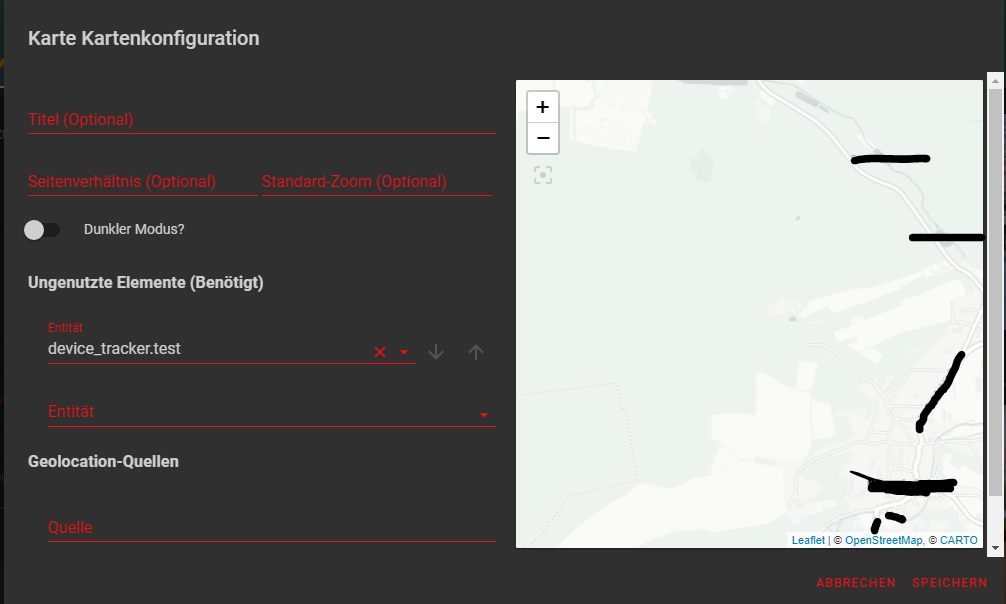
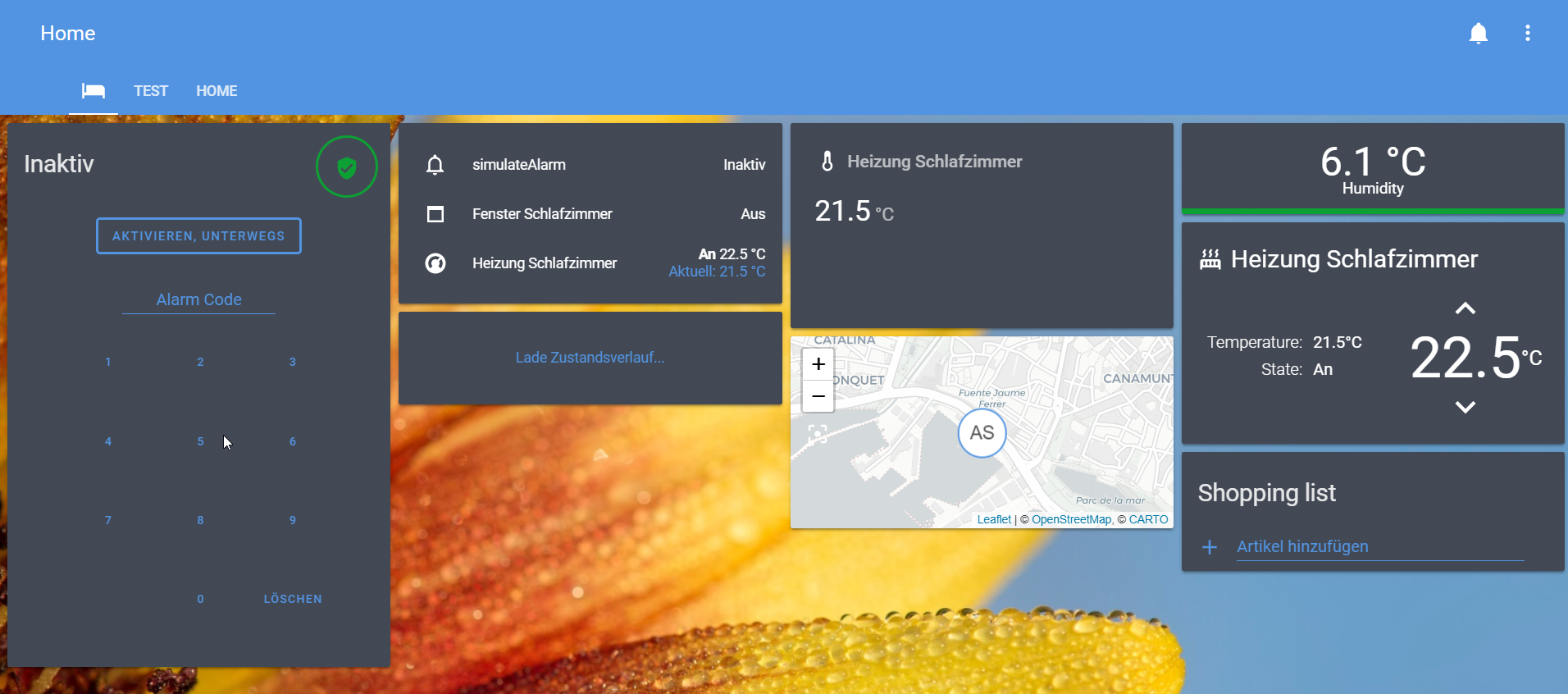
    ich brauche mal Unterstützung bei der map card, ich bekomme einfach keine GPS Koordinaten in der Karte angezeigt. Das Objekt habe ich wie beschrieben angelegt:

    createState('location', '39.5681295;2.6432632', false, {
    "name": "location",
    "role": "value.gps",
    "type": "string",
    "read": true,
    "write": false,
    "desc": "Gps Coordinates"
    });

    1212bc01-3956-451b-8320-cb446cc9609d-image.png

    a180d407-4cb2-4550-9d3c-b9618b8b15d6-image.png

    Kann mir jemand sagen, was ich falsch mache?

    1 Reply Last reply
    0
    • G Offline
      G Offline
      g.polat
      wrote on last edited by
      #538

      Habe heute AccuWeather Card endlich hinbekommen.
      Für alle die Probleme haben wie folgt vorgehen:

      1. accuweather.0.Summary Raum "Any" und Function "Wetter" zuordnen.

      2. ioBroker.type-detector für AccuWeather : /opt/iobroker/node_modules/iobroker.lovelace/node_modules/iobroker.type-detector/index.js
        ersetzten durch : https://github.com/algar42/ioBroker.type-detector/blob/master/index.js

      Lovelace neustarten fertig.

      W R A 3 Replies Last reply
      0
      • G g.polat

        Habe heute AccuWeather Card endlich hinbekommen.
        Für alle die Probleme haben wie folgt vorgehen:

        1. accuweather.0.Summary Raum "Any" und Function "Wetter" zuordnen.

        2. ioBroker.type-detector für AccuWeather : /opt/iobroker/node_modules/iobroker.lovelace/node_modules/iobroker.type-detector/index.js
          ersetzten durch : https://github.com/algar42/ioBroker.type-detector/blob/master/index.js

        Lovelace neustarten fertig.

        W Offline
        W Offline
        WW1983
        wrote on last edited by
        #539

        @g-polat
        Danke für den Hinweis. Habe es zwar auch versucht, aber wohl den falschen Typ-Detector ersetzt und deshalb nicht funktioniert. Werde ich heute Abend testen.

        Habe aber auch schon ein Issue aufgemacht, damit es fest eingebaut wird:
        https://github.com/ioBroker/ioBroker.lovelace/issues/69

        1 Reply Last reply
        0
        • G g.polat

          Habe heute AccuWeather Card endlich hinbekommen.
          Für alle die Probleme haben wie folgt vorgehen:

          1. accuweather.0.Summary Raum "Any" und Function "Wetter" zuordnen.

          2. ioBroker.type-detector für AccuWeather : /opt/iobroker/node_modules/iobroker.lovelace/node_modules/iobroker.type-detector/index.js
            ersetzten durch : https://github.com/algar42/ioBroker.type-detector/blob/master/index.js

          Lovelace neustarten fertig.

          R Offline
          R Offline
          rumpelstilzche
          wrote on last edited by
          #540

          @g-polat Danke hat super funktioniert, aber jetzt:anguished: , wo ich falsch geschrieben habe?
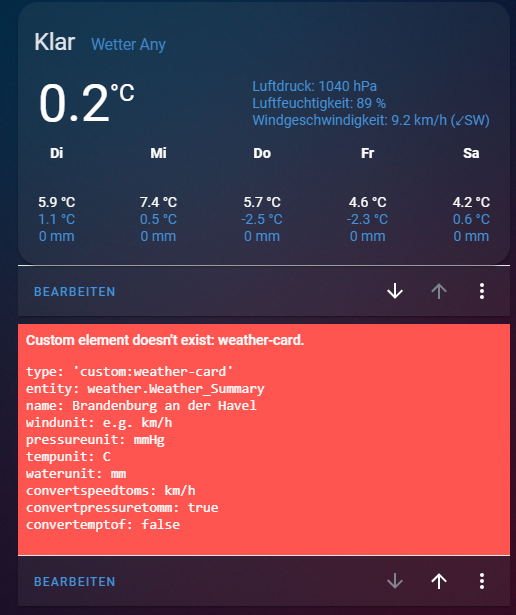
          Bild Text

          W 1 Reply Last reply
          0
          • R rumpelstilzche

            @g-polat Danke hat super funktioniert, aber jetzt:anguished: , wo ich falsch geschrieben habe?
            Bild Text

            W Offline
            W Offline
            WW1983
            wrote on last edited by
            #541

            @rumpelstilzche
            Die Card heißt accuweather-card.js

            Der Eintrag sollte also heißen 'custom:accuweather-card'

            R 1 Reply Last reply
            0
            • W WW1983

              @rumpelstilzche
              Die Card heißt accuweather-card.js

              Der Eintrag sollte also heißen 'custom:accuweather-card'

              R Offline
              R Offline
              rumpelstilzche
              wrote on last edited by
              #542

              @WW1983 sagte in Test Adapter lovelace v0.2.x:

              custom:accuweather-card
              Trotzdem, funktioniert immer noch nicht 😥
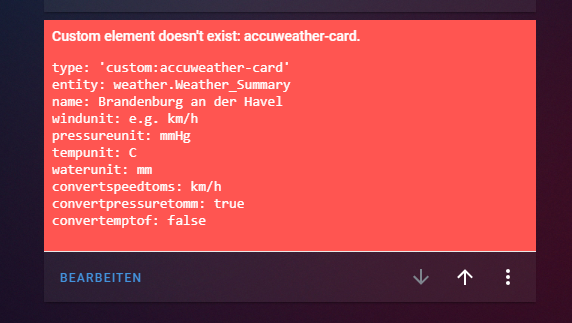
              d0d57a3c-30cd-4721-89e4-ce00c0b541ce-image.png
              83070809-d66f-436f-a6b1-e7575c09d9d0-image.png

              W G 3 Replies Last reply
              0
              • R rumpelstilzche

                @WW1983 sagte in Test Adapter lovelace v0.2.x:

                custom:accuweather-card
                Trotzdem, funktioniert immer noch nicht 😥
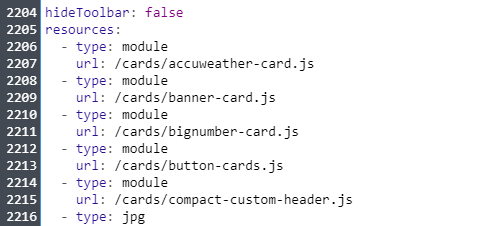
                d0d57a3c-30cd-4721-89e4-ce00c0b541ce-image.png
                83070809-d66f-436f-a6b1-e7575c09d9d0-image.png

                W Offline
                W Offline
                WW1983
                wrote on last edited by
                #543

                @rumpelstilzche
                komisch. Zur not mal die Card selber nochmal hochladen und Lovelace neu starten.

                R 1 Reply Last reply
                0
                • W WW1983

                  @rumpelstilzche
                  komisch. Zur not mal die Card selber nochmal hochladen und Lovelace neu starten.

                  R Offline
                  R Offline
                  rumpelstilzche
                  wrote on last edited by rumpelstilzche
                  #544

                  @WW1983
                  Ich habe es schon mal gemacht, aber funktioniert immer noch nich 😅

                  root@area51:~$ sudo rm -rf accuweather-card.js
                  root@area51:~$ wget https://github.com/algar42/IoB.lovelace.accuweather-card/blob/master/dist/accuweather-card.js
                  --2020-01-21 09:47:57--  https://github.com/algar42/IoB.lovelace.accuweather-card/blob/master/dist/accuweather-card.js
                  Resolving github.com (github.com)... 140.82.118.3
                  Connecting to github.com (github.com)|140.82.118.3|:443... connected.
                  HTTP request sent, awaiting response... 200 OK
                  Length: unspecified [text/html]
                  Saving to: ‘accuweather-card.js’
                  
                  accuweather-card.js                                     [  <=>                                                                                                              ] 191,93K   592KB/s    in 0,3s
                  
                  2020-01-21 09:47:58 (592 KB/s) - ‘accuweather-card.js’ saved [196537]
                  
                  root@area51:~$ iobroker file write accuweather-card.js /lovelace.0/cards/accuweather-card.js
                  File "accuweather-card.js" stored as "cards/accuweather-card.js"
                  root@area51:~$
                  
                  
                  W 1 Reply Last reply
                  0
                  • R rumpelstilzche

                    @WW1983
                    Ich habe es schon mal gemacht, aber funktioniert immer noch nich 😅

                    root@area51:~$ sudo rm -rf accuweather-card.js
                    root@area51:~$ wget https://github.com/algar42/IoB.lovelace.accuweather-card/blob/master/dist/accuweather-card.js
                    --2020-01-21 09:47:57--  https://github.com/algar42/IoB.lovelace.accuweather-card/blob/master/dist/accuweather-card.js
                    Resolving github.com (github.com)... 140.82.118.3
                    Connecting to github.com (github.com)|140.82.118.3|:443... connected.
                    HTTP request sent, awaiting response... 200 OK
                    Length: unspecified [text/html]
                    Saving to: ‘accuweather-card.js’
                    
                    accuweather-card.js                                     [  <=>                                                                                                              ] 191,93K   592KB/s    in 0,3s
                    
                    2020-01-21 09:47:58 (592 KB/s) - ‘accuweather-card.js’ saved [196537]
                    
                    root@area51:~$ iobroker file write accuweather-card.js /lovelace.0/cards/accuweather-card.js
                    File "accuweather-card.js" stored as "cards/accuweather-card.js"
                    root@area51:~$
                    
                    
                    W Offline
                    W Offline
                    WW1983
                    wrote on last edited by
                    #545

                    @rumpelstilzche
                    Ich teste es mal wenn ich zuhause bin.

                    1 Reply Last reply
                    0
                    • R rumpelstilzche

                      @WW1983 sagte in Test Adapter lovelace v0.2.x:

                      custom:accuweather-card
                      Trotzdem, funktioniert immer noch nicht 😥
                      d0d57a3c-30cd-4721-89e4-ce00c0b541ce-image.png
                      83070809-d66f-436f-a6b1-e7575c09d9d0-image.png

                      W Offline
                      W Offline
                      WW1983
                      wrote on last edited by
                      #546

                      @rumpelstilzche
                      Aber eine andere Frage. Was für ein Theme ist das? Kannst du andere Bilder Zeigen wo auch Schalter zu sehen sind?

                      R 1 Reply Last reply
                      1
                      • W WW1983

                        @rumpelstilzche
                        Aber eine andere Frage. Was für ein Theme ist das? Kannst du andere Bilder Zeigen wo auch Schalter zu sehen sind?

                        R Offline
                        R Offline
                        rumpelstilzche
                        wrote on last edited by
                        #547

                        @WW1983
                        ist mein Testserver Es sieht so aus
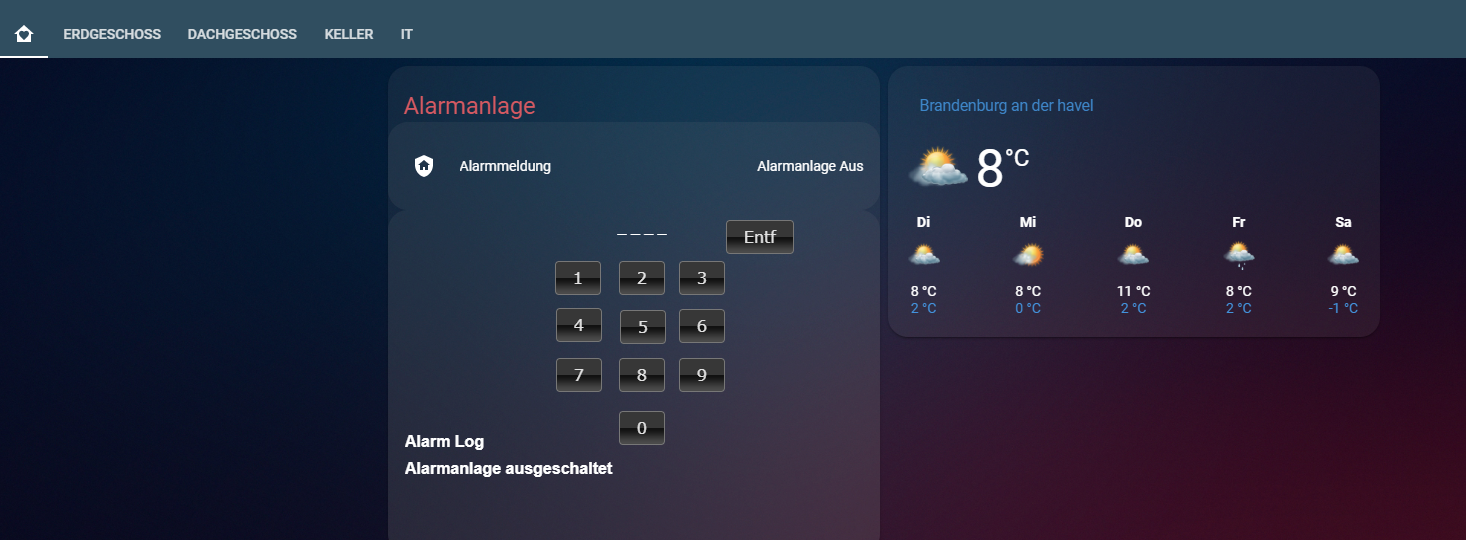
                        Bild Text

                        W 1 Reply Last reply
                        0
                        • R rumpelstilzche

                          @WW1983
                          ist mein Testserver Es sieht so aus
                          Bild Text

                          W Offline
                          W Offline
                          WW1983
                          wrote on last edited by
                          #548

                          @rumpelstilzche
                          Danke dir :)

                          1 Reply Last reply
                          0
                          • R rumpelstilzche

                            @WW1983 sagte in Test Adapter lovelace v0.2.x:

                            custom:accuweather-card
                            Trotzdem, funktioniert immer noch nicht 😥
                            d0d57a3c-30cd-4721-89e4-ce00c0b541ce-image.png
                            83070809-d66f-436f-a6b1-e7575c09d9d0-image.png

                            G Offline
                            G Offline
                            g.polat
                            wrote on last edited by
                            #549

                            @rumpelstilzche sagte in Test Adapter lovelace v0.2.x:

                            @WW1983 sagte in Test Adapter lovelace v0.2.x:

                            custom:accuweather-card
                            Trotzdem, funktioniert immer noch nicht 😥
                            d0d57a3c-30cd-4721-89e4-ce00c0b541ce-image.png
                            83070809-d66f-436f-a6b1-e7575c09d9d0-image.png

                            Postete mal den Inhalt deiner custom:accuweather-card

                            1 Reply Last reply
                            0
                            • thehero9999T Offline
                              thehero9999T Offline
                              thehero9999
                              wrote on last edited by
                              #550

                              @rumpelstilzche das Problem ist, dass du dir die Website heruntergeladen hast mit
                              wget https://github.com/algar42/IoB.lovelace.accuweather-card/blob/master/dist/accuweather-card.js und nicht die Datei selbst.

                              R 1 Reply Last reply
                              1
                              • thehero9999T thehero9999

                                @rumpelstilzche das Problem ist, dass du dir die Website heruntergeladen hast mit
                                wget https://github.com/algar42/IoB.lovelace.accuweather-card/blob/master/dist/accuweather-card.js und nicht die Datei selbst.

                                R Offline
                                R Offline
                                rumpelstilzche
                                wrote on last edited by
                                #551

                                @thehero9999
                                dankeeee:kissing_closed_eyes: , es funktioniert:fist: :blush: :joy:

                                type: 'custom:weather-card'
                                entity: weather.Weather_Summary
                                name: Berlin
                                windunit: km/h
                                pressureunit: mmHg
                                tempunit: C
                                waterunit: mm
                                convertspeedtoms: km/h
                                convertpressuretomm: false
                                convertemptof: false
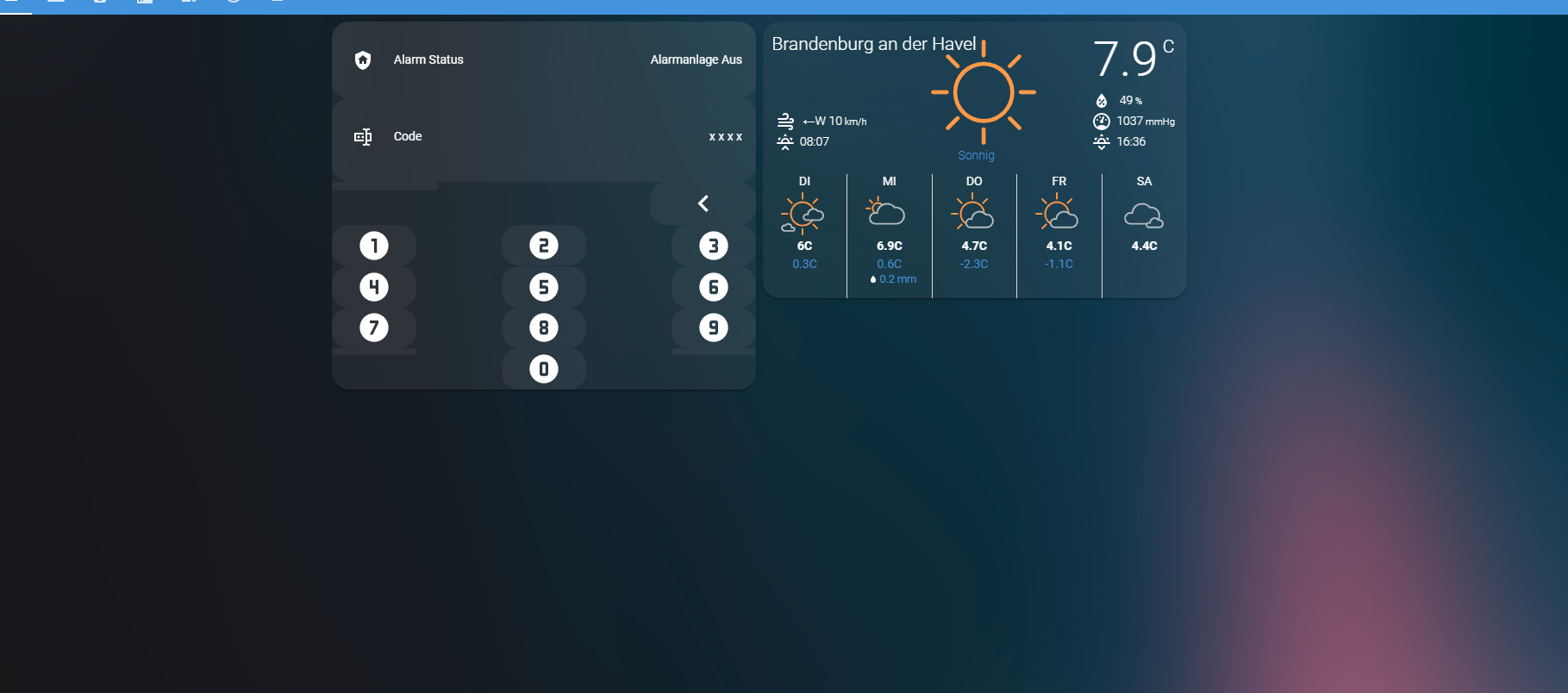
                                

                                4.png

                                G smarthome-tricks.deS 2 Replies Last reply
                                0
                                • R rumpelstilzche

                                  @thehero9999
                                  dankeeee:kissing_closed_eyes: , es funktioniert:fist: :blush: :joy:

                                  type: 'custom:weather-card'
                                  entity: weather.Weather_Summary
                                  name: Berlin
                                  windunit: km/h
                                  pressureunit: mmHg
                                  tempunit: C
                                  waterunit: mm
                                  convertspeedtoms: km/h
                                  convertpressuretomm: false
                                  convertemptof: false
                                  

                                  4.png

                                  G Offline
                                  G Offline
                                  g.polat
                                  wrote on last edited by
                                  #552

                                  @rumpelstilzche sagte in Test Adapter lovelace v0.2.x:

                                  @thehero9999
                                  dankeeee:kissing_closed_eyes: , es funktioniert:fist: :blush: :joy:

                                  type: 'custom:weather-card'
                                  entity: weather.Weather_Summary
                                  name: Berlin
                                  windunit: km/h
                                  pressureunit: mmHg
                                  tempunit: C
                                  waterunit: mm
                                  convertspeedtoms: km/h
                                  convertpressuretomm: false
                                  convertemptof: false
                                  

                                  4.png

                                  Kannst du dein Hintergrund und dein theme teilen?

                                  R 1 Reply Last reply
                                  0
                                  • F Offline
                                    F Offline
                                    fd_samdi
                                    wrote on last edited by
                                    #553

                                    Ahhh bin ich verliebt was mit lovelace alles möglich ist.
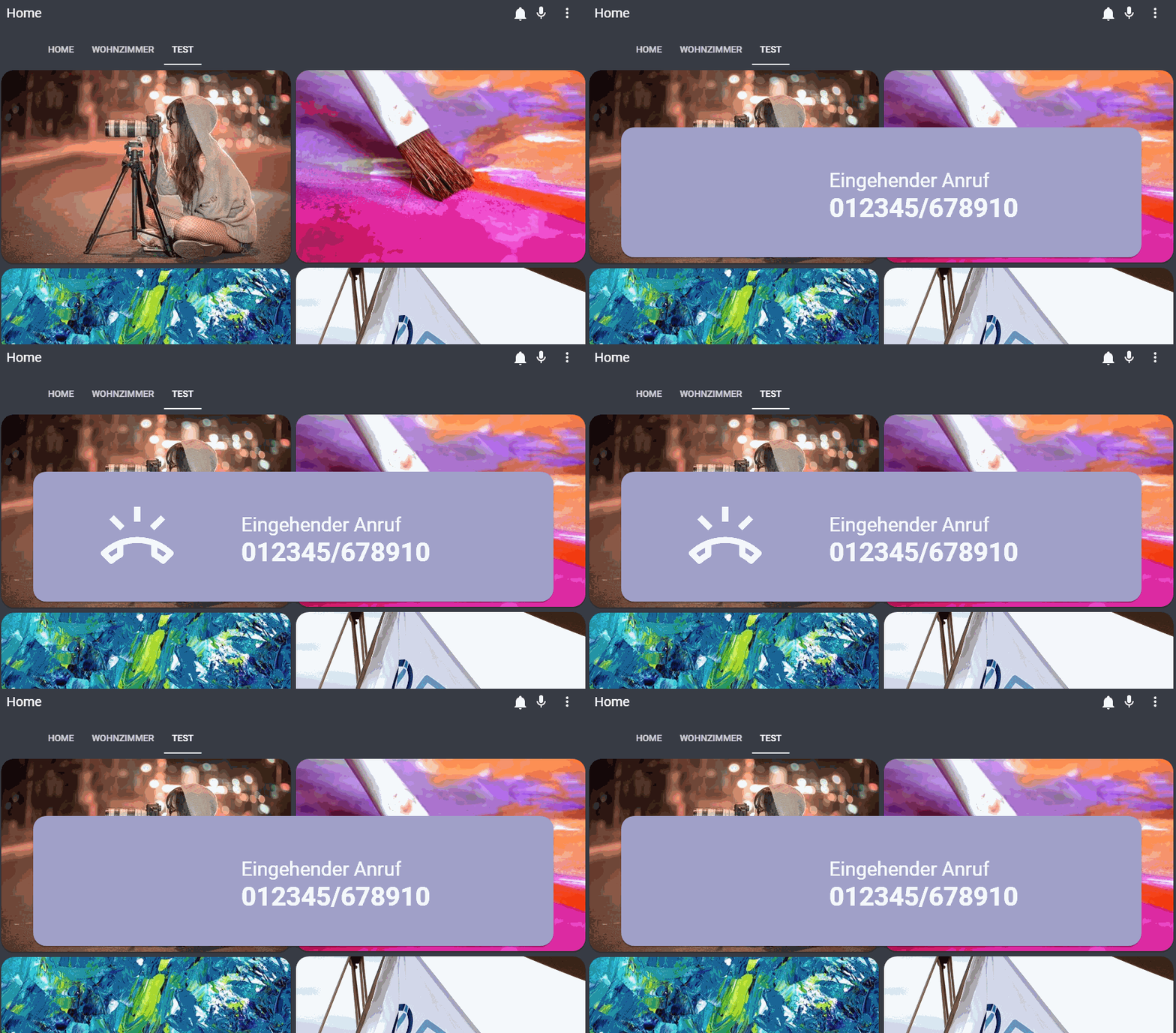
                                    lovelace_gif.gif

                                    Ich weiß, gehört hier nicht in den Test Thread, aber wer es nachbauen will:
                                    http://gsf.diphda.uberspace.de/smarthome/2020/01/21/iobroker-tr064-lovelace-anruferkennung-per-popup-auf-dashboard/
                                    Bin gerade mit der ganzen Anleitung fertig geworden.

                                    1 Reply Last reply
                                    3
                                    • W Offline
                                      W Offline
                                      WW1983
                                      wrote on last edited by
                                      #554

                                      Hat zufällig jemand schon geschafft den Header transparent zu machen. Bei diesem Theme gibt es zwar eine Anleitung, aber habs bisher nicht geschafft:

                                      theme-overview.jpg

                                      https://github.com/basnijholt/lovelace-ios-dark-mode-theme

                                      1 Reply Last reply
                                      0
                                      • G g.polat

                                        @rumpelstilzche sagte in Test Adapter lovelace v0.2.x:

                                        @thehero9999
                                        dankeeee:kissing_closed_eyes: , es funktioniert:fist: :blush: :joy:

                                        type: 'custom:weather-card'
                                        entity: weather.Weather_Summary
                                        name: Berlin
                                        windunit: km/h
                                        pressureunit: mmHg
                                        tempunit: C
                                        waterunit: mm
                                        convertspeedtoms: km/h
                                        convertpressuretomm: false
                                        convertemptof: false
                                        

                                        4.png

                                        Kannst du dein Hintergrund und dein theme teilen?

                                        R Offline
                                        R Offline
                                        rumpelstilzche
                                        wrote on last edited by rumpelstilzche
                                        #555

                                        @g-polat
                                        Ja gerne :blush: Hintergrund
                                        5.jpg
                                        4.jpg

                                        Area51:
                                           # Main colors
                                           primary-color: '#5294E2'                                                        # Header
                                           accent-color: '#E45E65'                                                         # Accent color
                                           dark-primary-color: 'var(--accent-color)'                                       # Hyperlinks                                         
                                           light-primary-color: 'var(--accent-color)'                                      # Horizontal line in about
                                           ha-card-border-radius: '20px'   
                                           ha-card-background: 'rgba(150, 150, 150, 0.1)'


                                           # Text colors                                                                  
                                           primary-text-color: 'white'                                                   # Primary text colour, here is referencing dark-primary-color
                                           text-primary-color: 'var(--primary-text-color)'                                 # Primary text colour
                                           secondary-text-color: '#5294E2'                                                 # For secondary titles in more info boxes etc.
                                           disabled-text-color: '#7F848E'                                                  # Disabled text colour
                                           label-badge-border-color: 'green'                                               # Label badge border, just a reference value   


                                           # Background colors                                                            
                                           primary-background-color: '#383C45'                                             # Settings background
                                           secondary-background-color: '#383C45'                                           # Main card UI background  
                                           divider-color: 'rgba(0, 0, 0, .12)'                                             # Divider 


                                           # Table rows                                                                   
                                           table-row-background-color: '#353840'                                           # Table row
                                           table-row-alternative-background-color: '#3E424B'                               # Table row alternative


                                           # Nav Menu                                                                   
                                           paper-listbox-color: 'var(--primary-color)'                                     # Navigation menu selection hoover
                                           paper-listbox-background-color: '#2E333A'                                       # Navigation menu background
                                           paper-grey-50: 'var(--primary-text-color)'                                   
                                           paper-grey-200: '#414A59'                                                       # Navigation menu selection


                                           # Paper card                                                               
                                           paper-card-header-color: 'var(--accent-color)'                                  # Card header text colour
                                           paper-card-background-color: 'rgba(150, 150, 150, 0.1)'                         # Card background colour
                                           paper-dialog-background-color: '#434954'                                        # Card dialog background colour
                                           paper-item-icon-color: 'var(--primary-text-color)'                              # Icon color
                                           paper-item-icon-active-color: '#F9C536'                                         # Icon color active
                                           paper-item-icon_-_color: 'green'           
                                           paper-item-selected_-_background-color: '#434954'                               # Popup item select                      
                                           paper-tabs-selection-bar-color: 'green'


                                           # Labels 
                                           label-badge-red: 'var(--accent-color)'                                          # References the brand colour label badge border
                                           label-badge-text-color: 'var(--primary-text-color)'                             # Now same as label badge border but that's a matter of taste
                                           label-badge-background-color: '#2E333A'                                         # Same, but can also be set to transparent here
                                           label-badge-background: 'rgba(255, 255, 255, 0.1)'


                                           # Switches
                                           paper-toggle-button-checked-button-color: 'var(--accent-color)'
                                           paper-toggle-button-checked-bar-color: 'var(--accent-color)'
                                           paper-toggle-button-checked-ink-color: 'var(--accent-color)'
                                           paper-toggle-button-unchecked-button-color: 'var(--disabled-text-color)'
                                           paper-toggle-button-unchecked-bar-color: 'var(--disabled-text-color)'
                                           paper-toggle-button-unchecked-ink-color: 'var(--disabled-text-color)'  


                                           # Sliders
                                           paper-slider-knob-color: 'var(--accent-color)'
                                           paper-slider-knob-start-color: 'var(--accent-color)'
                                           paper-slider-pin-color: 'var(--accent-color)'
                                           paper-slider-active-color: 'var(--accent-color)'
                                           paper-slider-container-color: 'linear-gradient(var(--primary-background-color), var(--secondary-background-color)) no-repeat'
                                           paper-slider-secondary-color: 'var(--secondary-background-color)'
                                           paper-slider-disabled-active-color: 'var(--disabled-text-color)'
                                           paper-slider-disabled-secondary-color: 'var(--disabled-text-color)'


                                           # Google colors
                                           google-red-500: '#E45E65'
                                           google-green-500: '#39E949'
                                        

                                        1 Reply Last reply
                                        0
                                        • P Offline
                                          P Offline
                                          Ph4t0n
                                          wrote on last edited by Ph4t0n
                                          #556

                                          Moin zusammen,
                                          kann mir jemand verraten warum mein ChromecastUltra als geo_location. Entity erkannt wird anstatt media_player.?
                                          Die Attribute sehen ja gut aus, wie man auf dem Screenshot sehen kann.
                                          Ich hatte schonmal als Rolle "media.state" eingetragen beim Chromcast, das hat aber leider nicht geholfen.
                                          Habt ihr einen Tip was ich noch ausporbieren kann?

                                          Danke im Voraus!
                                          chromecast.png

                                          1 Reply Last reply
                                          0
                                          Reply
                                          • Reply as topic
                                          Log in to reply
                                          • Oldest to Newest
                                          • Newest to Oldest
                                          • Most Votes


                                          Support us

                                          ioBroker
                                          Community Adapters
                                          Donate

                                          558

                                          Online

                                          32.7k

                                          Users

                                          82.4k

                                          Topics

                                          1.3m

                                          Posts
                                          Community
                                          Impressum | Datenschutz-Bestimmungen | Nutzungsbedingungen | Einwilligungseinstellungen
                                          ioBroker Community 2014-2025
                                          logo
                                          • Login

                                          • Don't have an account? Register

                                          • Login or register to search.
                                          • First post
                                            Last post
                                          0
                                          • Home
                                          • Recent
                                          • Tags
                                          • Unread 0
                                          • Categories
                                          • Unreplied
                                          • Popular
                                          • GitHub
                                          • Docu
                                          • Hilfe