




ASTRO function. Does not work again
-
Re: Is there problem with Blockly after last update?
After testing for many weeks I came to a conclusion that ASTRO function does not work continuously, meaning it works ones after controller physical reboot and then never execute, see my simple Blockly script in reference post. I use all latest Linux, controller and adapters updates and 8.16.0 Node.js. Any idea what is going on?
-
Please show your Blockly Script here, i think there is an errror in it.
The Astro funktion works fine in my Blocklys.Enrico
-
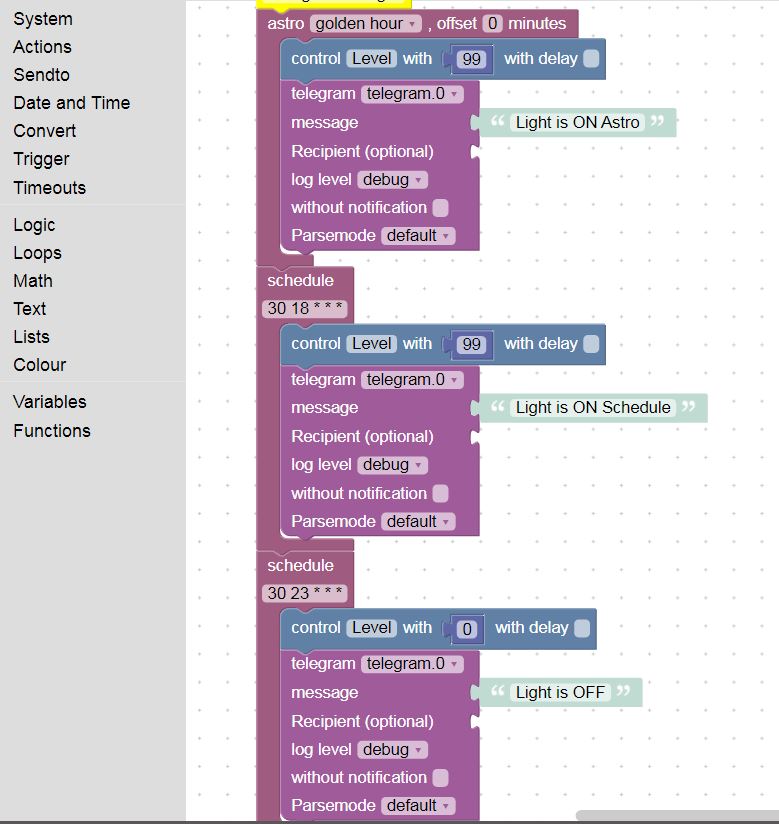
Please see my script attachedLight Script.txt
-
What does not work, set the control level to 99 or 0, or the telegram message, or both?
You can use debug-blocks to control the trigger-blocks.Enrico
-
What does not work, set the control level to 99 or 0, or the telegram message, or both?
You can use debug-blocks to control the trigger-blocks.Enrico
@RappiRN As you see, I use telegram for debugging, so schedule block works all the time (the light goes on, then off and I am getting notification from telegram), while astro works only once in a while, it works for sure once after restarting RPI by interrupting the power
-
What does not work, set the control level to 99 or 0, or the telegram message, or both?
You can use debug-blocks to control the trigger-blocks.Enrico
-
Ok, in the settings from the javascript-Adapter you must set your location, or check to use the ioBroker location.
Enrico
-
Ok, in the settings from the javascript-Adapter you must set your location, or check to use the ioBroker location.
Enrico
-
The right once working, is it also at the right time?
Which location settings you are using, from the adapter or from ioBroker? Sometimes it was a problem to use the ioBroker settings instead the adapter settings.
Sorry i have not really an idea what the matter with your astro-function.Enrico
-
The right once working, is it also at the right time?
Which location settings you are using, from the adapter or from ioBroker? Sometimes it was a problem to use the ioBroker settings instead the adapter settings.
Sorry i have not really an idea what the matter with your astro-function.Enrico
-
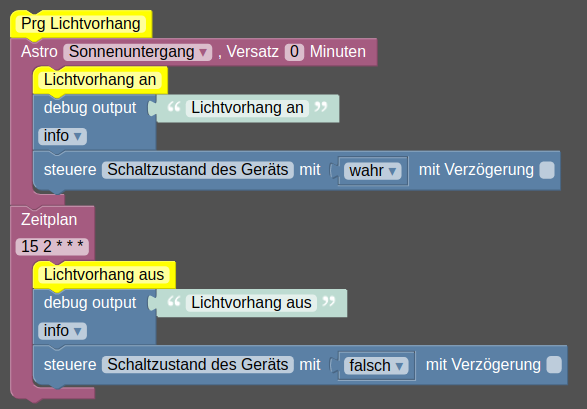
@ap2017 for debuging use debug, not telegram.
substitute telegram whith debug to see what's going on.
Look at the LOG.
mine works:
 ,
,
Do you wanna Post an export of your Blockly? -
@ap2017 for debuging use debug, not telegram.
substitute telegram whith debug to see what's going on.
Look at the LOG.
mine works:
,
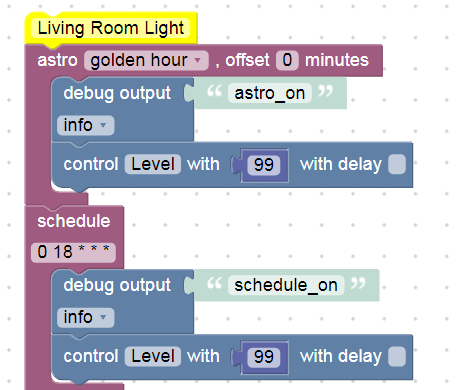
Do you wanna Post an export of your Blockly?@iomountain Thank you for your response. I changed my script as you suggested, where do I find debugging log?
-
Try Log at main screen Admin
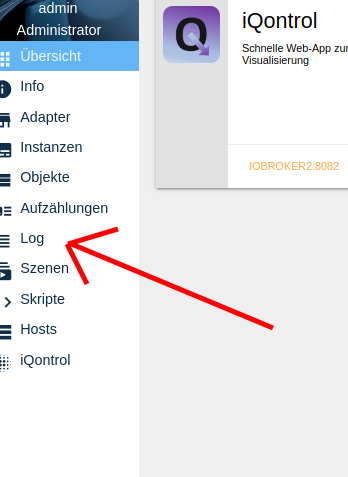
There you will find your "debug output" Messages -
Try Log at main screen Admin
There you will find your "debug output" Messages@iomountain I think that after long time of straggling I am getting close to resolving the issue with ASTRO function that I am experiencing. It looks like ASTRO algorithm does not like GEO coordinates in North America since it started to work fine after I set ASTRO for Berlin, Germany. Maybe negative value of Longitude confuses the algorithm?
Could you do me a favor and try your script with GEO set to Hartford CT in USA? Thank you.
-
It works, United States Hartford 41.76 -72.68
If you wanna see all astro times try the Script@ap2017
Do you wanna Post an export of your Blockly? -
It works, United States Hartford 41.76 -72.68
If you wanna see all astro times try the Script@ap2017
Do you wanna Post an export of your Blockly?@iomountain I will try to set ASTRO back to US, thanks
-
@ap2017 don't forget to restart iobroker. Like "iobroker stop" and "iobroker start"
-
@ap2017 don't forget to restart iobroker. Like "iobroker stop" and "iobroker start"
@iomountain Day I switched to US the ASTRO stopped working (no ASTRO string in LOG file). I restarted computer after I made a change. I will try your ASTRO script
Here is my script:
-
@ap2017 don't forget to restart iobroker. Like "iobroker stop" and "iobroker start"

Hey! Du scheinst an dieser Unterhaltung interessiert zu sein, hast aber noch kein Konto.
Hast du es satt, bei jedem Besuch durch die gleichen Beiträge zu scrollen? Wenn du dich für ein Konto anmeldest, kommst du immer genau dorthin zurück, wo du zuvor warst, und kannst dich über neue Antworten benachrichtigen lassen (entweder per E-Mail oder Push-Benachrichtigung). Du kannst auch Lesezeichen speichern und Beiträge positiv bewerten, um anderen Community-Mitgliedern deine Wertschätzung zu zeigen.
Mit deinem Input könnte dieser Beitrag noch besser werden 💗
Registrieren AnmeldenSupport us
425
Online33.1k
Benutzende83.9k
Themen1.4m
Beiträge