




"Adapter verfügbar" wird nicht mehr angezeigt
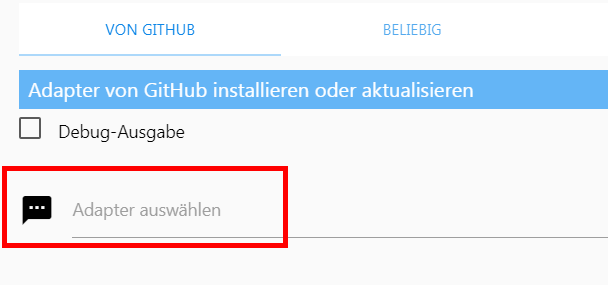
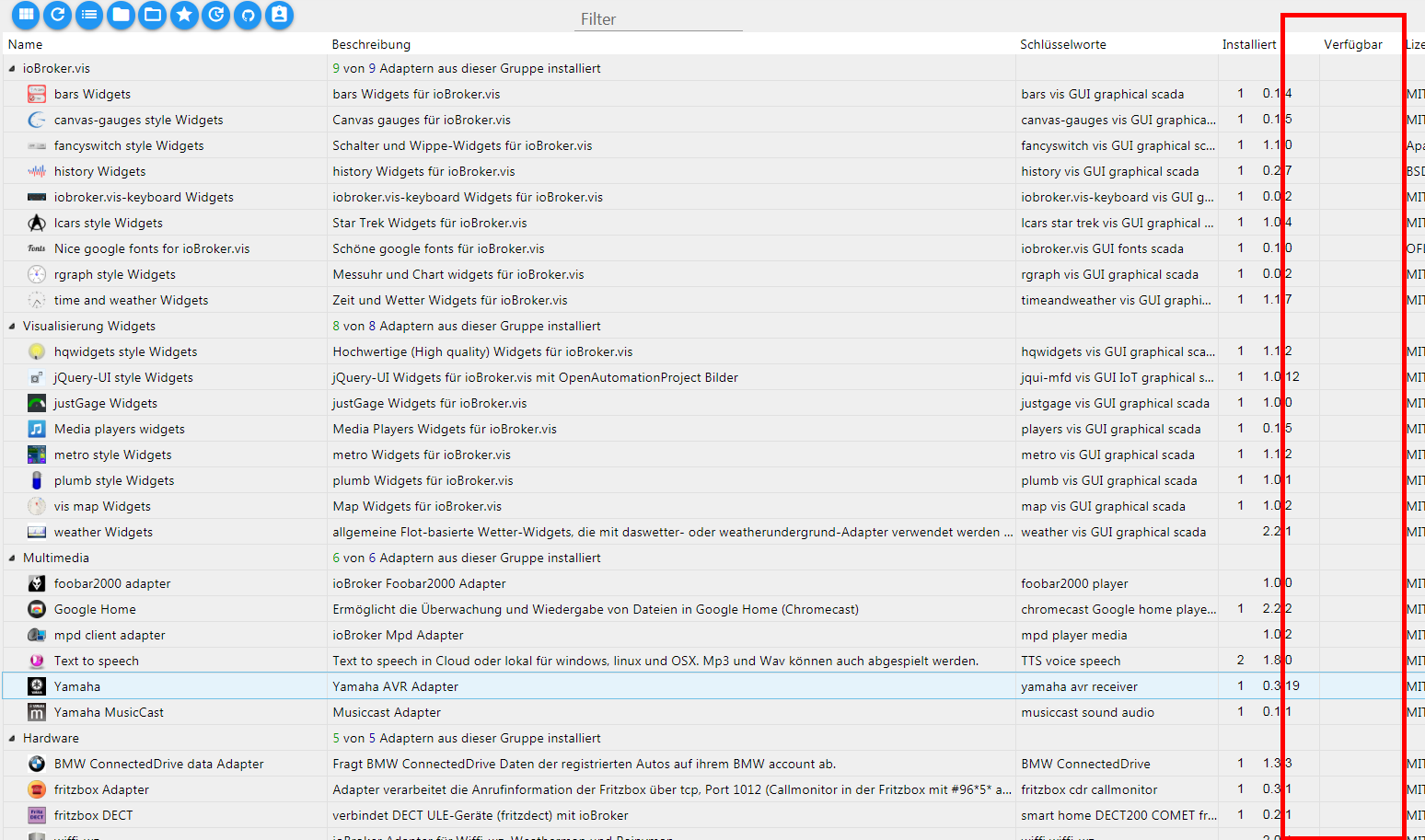
-
-
zur Info für andere:
Jetzt geht der alte Link wieder:
-
Inzwischen wurden die json-Dateien auf ein CDN (Contend Delivery Network) umgezogen. Damit wurde der mittlerweile stark gestiegenen ioBroker-Verbreitung Rechnung getragen.
Die Adressen für die Repositories sind jetzt wieder die alten (und damit wieder die, die im Admin als Standard eingetragen sind):
Stable: http://download.iobroker.net/sources-dist.json
Latest: http://download.iobroker.net/sources-dist-latest.json -
Hallo allerseits.
Bei mir funktioniert beides nicht.
Bringe immer die Warnung im Logwarning: empty repo received! warning: Cannot read "http://download.iobroker.net/sources-dist.jsonAuch die "live" Adressen bringen denselben Fehler .
Ist da aktuell was in der Mache ?Gruß
-
Es sollte (wieder) funktionieren. Danke.
-
Hallo,
habe derzeit genau das gleiche Problem. Kann die Adapterliste nicht aktualisieren und im Log steht folgendes:
host.iobroker	2020-07-13 16:33:42.507	warn	warning: empty repo received!
host.iobroker	2020-07-13 16:33:42.507	warn	warning: Cannot read "http://download.iobroker.net/sources-dist.json"
Habe dann noch diese getestet:
http://repo.iobroker.live/sources-dist.jsonleider das selbe Problem:
host.iobroker	2020-07-13 16:46:25.949	warn	warning: empty repo received!
host.iobroker	2020-07-13 16:46:25.948	warn	warning: Cannot read "http://repo.iobroker.live/sources-dist.json"
host.iobroker	2020-07-13 16:46:15.380	info	Update repository "default" under "http://repo.iobroker.live/sources-dist.json"
Mein Iobroker ist frisch installiert und läuft unter proxmox auf debain.
Per SSH verbunden sind beide URLs erreichbar:timo@iobroker:~$ ping download.iobroker.net PING download.iobroker.net (79.143.182.215) 56(84) bytes of data. 64 bytes from m0855.contabo.host (79.143.182.215): icmp_seq=1 ttl=54 time=25.9 ms 64 bytes from m0855.contabo.host (79.143.182.215): icmp_seq=2 ttl=54 time=19.4 ms 64 bytes from m0855.contabo.host (79.143.182.215): icmp_seq=3 ttl=54 time=17.8 ms 64 bytes from m0855.contabo.host (79.143.182.215): icmp_seq=4 ttl=54 time=17.5 ms 64 bytes from m0855.contabo.host (79.143.182.215): icmp_seq=5 ttl=54 time=17.2 ms 64 bytes from m0855.contabo.host (79.143.182.215): icmp_seq=6 ttl=54 time=18.2 ms 64 bytes from m0855.contabo.host (79.143.182.215): icmp_seq=7 ttl=54 time=16.4 ms 64 bytes from m0855.contabo.host (79.143.182.215): icmp_seq=8 ttl=54 time=17.4 ms 64 bytes from m0855.contabo.host (79.143.182.215): icmp_seq=9 ttl=54 time=17.3 ms ^C --- download.iobroker.net ping statistics --- 9 packets transmitted, 9 received, 0% packet loss, time 20ms rtt min/avg/max/mdev = 16.370/18.576/25.917/2.712 ms timo@iobroker:~$ ping repo.iobroker.live PING repo.iobroker.live.cdn.cloudflare.net (172.67.180.22) 56(84) bytes of data. 64 bytes from 172.67.180.22 (172.67.180.22): icmp_seq=1 ttl=56 time=22.4 ms 64 bytes from 172.67.180.22 (172.67.180.22): icmp_seq=2 ttl=56 time=23.6 ms 64 bytes from 172.67.180.22 (172.67.180.22): icmp_seq=3 ttl=56 time=23.8 ms 64 bytes from 172.67.180.22 (172.67.180.22): icmp_seq=4 ttl=56 time=21.9 ms 64 bytes from 172.67.180.22 (172.67.180.22): icmp_seq=5 ttl=56 time=20.6 ms 64 bytes from 172.67.180.22 (172.67.180.22): icmp_seq=6 ttl=56 time=22.6 ms 64 bytes from 172.67.180.22 (172.67.180.22): icmp_seq=7 ttl=56 time=22.5 ms 64 bytes from 172.67.180.22 (172.67.180.22): icmp_seq=8 ttl=56 time=20.8 ms 64 bytes from 172.67.180.22 (172.67.180.22): icmp_seq=9 ttl=56 time=21.8 ms ^C --- repo.iobroker.live.cdn.cloudflare.net ping statistics --- 9 packets transmitted, 9 received, 0% packet loss, time 22ms rtt min/avg/max/mdev = 20.639/22.225/23.844/1.053 ms timo@iobroker:~$JS-Controller: 3.1.6
Admin: 4.0.10
Node.js: v12.18.2
NPM: 6.14.6Pi-Hole habe ich schon komplett deaktiviert und die DNS Weiterleitung aus der FritzBox rausgenommen.
Gruß
-
Hallo,
habe derzeit genau das gleiche Problem. Kann die Adapterliste nicht aktualisieren und im Log steht folgendes:
host.iobroker	2020-07-13 16:33:42.507	warn	warning: empty repo received!
host.iobroker	2020-07-13 16:33:42.507	warn	warning: Cannot read "http://download.iobroker.net/sources-dist.json"
Habe dann noch diese getestet:
http://repo.iobroker.live/sources-dist.jsonleider das selbe Problem:
host.iobroker	2020-07-13 16:46:25.949	warn	warning: empty repo received!
host.iobroker	2020-07-13 16:46:25.948	warn	warning: Cannot read "http://repo.iobroker.live/sources-dist.json"
host.iobroker	2020-07-13 16:46:15.380	info	Update repository "default" under "http://repo.iobroker.live/sources-dist.json"
Mein Iobroker ist frisch installiert und läuft unter proxmox auf debain.
Per SSH verbunden sind beide URLs erreichbar:timo@iobroker:~$ ping download.iobroker.net PING download.iobroker.net (79.143.182.215) 56(84) bytes of data. 64 bytes from m0855.contabo.host (79.143.182.215): icmp_seq=1 ttl=54 time=25.9 ms 64 bytes from m0855.contabo.host (79.143.182.215): icmp_seq=2 ttl=54 time=19.4 ms 64 bytes from m0855.contabo.host (79.143.182.215): icmp_seq=3 ttl=54 time=17.8 ms 64 bytes from m0855.contabo.host (79.143.182.215): icmp_seq=4 ttl=54 time=17.5 ms 64 bytes from m0855.contabo.host (79.143.182.215): icmp_seq=5 ttl=54 time=17.2 ms 64 bytes from m0855.contabo.host (79.143.182.215): icmp_seq=6 ttl=54 time=18.2 ms 64 bytes from m0855.contabo.host (79.143.182.215): icmp_seq=7 ttl=54 time=16.4 ms 64 bytes from m0855.contabo.host (79.143.182.215): icmp_seq=8 ttl=54 time=17.4 ms 64 bytes from m0855.contabo.host (79.143.182.215): icmp_seq=9 ttl=54 time=17.3 ms ^C --- download.iobroker.net ping statistics --- 9 packets transmitted, 9 received, 0% packet loss, time 20ms rtt min/avg/max/mdev = 16.370/18.576/25.917/2.712 ms timo@iobroker:~$ ping repo.iobroker.live PING repo.iobroker.live.cdn.cloudflare.net (172.67.180.22) 56(84) bytes of data. 64 bytes from 172.67.180.22 (172.67.180.22): icmp_seq=1 ttl=56 time=22.4 ms 64 bytes from 172.67.180.22 (172.67.180.22): icmp_seq=2 ttl=56 time=23.6 ms 64 bytes from 172.67.180.22 (172.67.180.22): icmp_seq=3 ttl=56 time=23.8 ms 64 bytes from 172.67.180.22 (172.67.180.22): icmp_seq=4 ttl=56 time=21.9 ms 64 bytes from 172.67.180.22 (172.67.180.22): icmp_seq=5 ttl=56 time=20.6 ms 64 bytes from 172.67.180.22 (172.67.180.22): icmp_seq=6 ttl=56 time=22.6 ms 64 bytes from 172.67.180.22 (172.67.180.22): icmp_seq=7 ttl=56 time=22.5 ms 64 bytes from 172.67.180.22 (172.67.180.22): icmp_seq=8 ttl=56 time=20.8 ms 64 bytes from 172.67.180.22 (172.67.180.22): icmp_seq=9 ttl=56 time=21.8 ms ^C --- repo.iobroker.live.cdn.cloudflare.net ping statistics --- 9 packets transmitted, 9 received, 0% packet loss, time 22ms rtt min/avg/max/mdev = 20.639/22.225/23.844/1.053 ms timo@iobroker:~$JS-Controller: 3.1.6
Admin: 4.0.10
Node.js: v12.18.2
NPM: 6.14.6Pi-Hole habe ich schon komplett deaktiviert und die DNS Weiterleitung aus der FritzBox rausgenommen.
Gruß
@FuLLHDvs480p
Habe genau dasselbe Problem. Auch frisch installiert und hatte erst nur veraltete Versionen, dann auf latest kurz die aktuellen Versionen und jetzt bekomm ich gar keine Verbindung mehr hin. -
@FuLLHDvs480p
Habe genau dasselbe Problem. Auch frisch installiert und hatte erst nur veraltete Versionen, dann auf latest kurz die aktuellen Versionen und jetzt bekomm ich gar keine Verbindung mehr hin.@Againstyou diese 3 hab ich bei mir drin
1 default http://download.iobroker.net/sources-dist.json 2 latest http://download.iobroker.net/sources-dist-latest.json 3 live http://iobroker.live/repo/sources-dist-latest.json -
@Againstyou diese 3 hab ich bei mir drin
1 default http://download.iobroker.net/sources-dist.json 2 latest http://download.iobroker.net/sources-dist-latest.json 3 live http://iobroker.live/repo/sources-dist-latest.json@crunchip sagte in "Adapter verfügbar" wird nicht mehr angezeigt:
Hallo,
die ersten beiden sind ja die Standart die schon drin sind, einmal default (stable) und einmal latest. Bei denen kam es immer zum Fehler, siehe oben.
Die letzte live hat bei mir funktioniert, ist jedoch auch latest.
Gruß
-
@Againstyou diese 3 hab ich bei mir drin
1 default http://download.iobroker.net/sources-dist.json 2 latest http://download.iobroker.net/sources-dist-latest.json 3 live http://iobroker.live/repo/sources-dist-latest.json@crunchip Ich hab alle 3 drin. Aktuell funktioniert keine.
Zwischendurch ging mal die latest. Hab hier schon öfter von Problemen mit Unitymedia/Vodafone Kabel im Zusammenhang mit DS-Lite gelesen. kA ob es daran liegt. Per direktlink im Browser erreiche ich alle. Nur der IOBroker will sich auf keinen verbinden...Vielleicht kann @Stabilostick helfen?
/e: Ok jetzt geht es gerade wieder mit dem live link. Hoffe das es so bleibt..




Support us
325
Online32.7k
Users82.5k
Topics1.3m
Posts