Skip to content
  • Home
  • Recent
  • Tags
  • 0 Unread 0
  • Categories
  • Unreplied
  • Popular
  • GitHub
  • Docu
  • Hilfe
Skins
  • Light
  • Brite
  • Cerulean
  • Cosmo
  • Flatly
  • Journal
  • Litera
  • Lumen
  • Lux
  • Materia
  • Minty
  • Morph
  • Pulse
  • Sandstone
  • Simplex
  • Sketchy
  • Spacelab
  • United
  • Yeti
  • Zephyr
  • Dark
  • Cyborg
  • Darkly
  • Quartz
  • Slate
  • Solar
  • Superhero
  • Vapor

  • Default (No Skin)
  • No Skin
Collapse
ioBroker Logo

Community Forum

donate donate
  1. ioBroker Community Home
  2. Deutsch
  3. Skripten / Logik
  4. Blockly
  5. Ausfal IP erst melden wenn mehr als 2 Minuten nicht erreichbar!
NEWS

  • Neuer ioBroker-Blog online: Monatsrückblick März/April 2026
    BluefoxB
    Bluefox
    6
    1
    229

  • Verwendung von KI bitte immer deutlich kennzeichnen
    HomoranH
    Homoran
    8
    1
    223

  • Monatsrückblick Januar/Februar 2026 ist online!
    BluefoxB
    Bluefox
    18
    1
    896

Ausfal IP erst melden wenn mehr als 2 Minuten nicht erreichbar!

Scheduled Pinned Locked Moved Blockly
32 Posts 4 Posters 2.6k Views 4 Watching
  • Oldest to Newest
  • Newest to Oldest
  • Most Votes
Reply
  • Reply as topic
Log in to reply
This topic has been deleted. Only users with topic management privileges can see it.
  • MyzerATM Offline
    MyzerATM Offline
    MyzerAT
    wrote on last edited by
    #19

    nee da kommen fehler im log

    lg Rudi

    Master Debian 12 (Wien)
    Intel NUC6CAYH 16GB RAM, 500 GB SSD & auf Proxmox 8. 7. als VM

    Slave Debian 12. (TULLN) --> OpenVPN to Vienna
    Intel NUC6CAYH 16GB RAM, 500 GB SSD & auf Proxmox 8.7. als VM

    Node 20.19.0
    Nodejs 20.19.0
    npm 10.8.2
    js-controller 7.0.6

    1 Reply Last reply
    0
    • MyzerATM MyzerAT

      meinst du so?

      dd1df459-d19e-4439-b105-50b8598d2287-grafik.png

      paul53P Offline
      paul53P Offline
      paul53
      wrote on last edited by
      #20

      @MyzerAT
      Nein, so:

      ```
      <xml xmlns="http://www.w3.org/1999/xhtml">
      <block type="procedures_defnoreturn" id="QcHn*};aes=*M[62[T_" x="-287" y="-912"> <mutation> <arg name="name"></arg> <arg name="onoff"></arg> </mutation> <field name="NAME">Meldung</field> <comment pinned="false" h="80" w="160">Beschreibe diese Funktion …</comment> <statement name="STACK"> <block type="control" id="Do1*(d;FPVdH~jRHrS{">
      <mutation delay_input="false"></mutation>
      <field name="OID">alexa2.0.Echo-Devices.G090U61084851BG7.Commands.speak</field>
      <field name="WITH_DELAY">FALSE</field>
      <value name="VALUE">
      <block type="text_join" id="FlKSls!iLkoww%{/oGK">
      <mutation items="2"></mutation>
      <value name="ADD0">
      <block type="variables_get" id="p-zuzzRM0dn;3q6]ZXUt">
      <field name="VAR">name</field>
      </block>
      </value>
      <value name="ADD1">
      <block type="variables_get" id="avU1Hb)TNf@#D~#iC?h-">
      <field name="VAR">onoff</field>
      </block>
      </value>
      </block>
      </value>
      <next>
      <block type="telegram" id="dZNtV^dV-qDs6eotVJJ"> <field name="INSTANCE">.0</field> <field name="LOG">log</field> <value name="MESSAGE"> <shadow type="text" id="cJ_.dZ/@?4%P(]3=)]"> <field name="TEXT">text</field> </shadow> <block type="text_join" id="o.6x{#j+oDiK_78Ko-.*"> <mutation items="2"></mutation> <value name="ADD0"> <block type="variables_get" id="LLD9mGN)Su%b@r#6.Tqs"> <field name="VAR">name</field> </block> </value> <value name="ADD1"> <block type="variables_get" id="?:%CEN8{}h/wX)sV;y%">
      <field name="VAR">onoff</field>
      </block>
      </value>
      </block>
      </value>
      </block>
      </next>
      </block>
      </statement>
      </block>
      <block type="on" id="wN;UvwDV@#P(A[|y2/s." x="-287" y="-637">
      <field name="OID">ping.1.RDJL_Home.192_168_0_64</field>
      <field name="CONDITION">ne</field>
      <field name="ACK_CONDITION"></field>
      <statement name="STATEMENT">
      <block type="controls_if" id="@ec_w
      anU[C5_:,q!@u6">
      <mutation else="1"></mutation>
      <value name="IF0">
      <block type="on_source" id="}}|XsyQ@;d%Qa*P8MP"> <field name="ATTR">state.val</field> </block> </value> <statement name="DO0"> <block type="timeouts_cleartimeout" id="A{9nUa,_OgF[Kk%e1?=]"> <field name="NAME">timeout</field> <next> <block type="procedures_callnoreturn" id="V#,#{?LCEl=]otxJ:bR?" inline="false"> <mutation name="Meldung"> <arg name="name"></arg> <arg name="onoff"></arg> </mutation> <value name="ARG0"> <block type="on_source" id="}?{-v*u;R@:1CN2rC1Xj"> <field name="ATTR">common.name</field> </block> </value> <value name="ARG1"> <block type="text" id="?m;9gH%m,/WoimPO):w">
      <field name="TEXT"> ist wieder online</field>
      </block>
      </value>
      </block>
      </next>
      </block>
      </statement>
      <statement name="ELSE">
      <block type="timeouts_settimeout" id=".7u4Jf,98)qr,a7{wnQ!">
      <field name="NAME">timeout</field>
      <field name="DELAY">120</field>
      <field name="UNIT">sec</field>
      <statement name="STATEMENT">
      <block type="procedures_callnoreturn" id="%cW2F!J99yEG-GB,y2p-">
      <mutation name="Meldung">
      <arg name="name"></arg>
      <arg name="onoff"></arg>
      </mutation>
      <value name="ARG0">
      <block type="on_source" id="C^c@O
      hX=FfH5JVUwY+w">
      <field name="ATTR">common.name</field>
      </block>
      </value>
      <value name="ARG1">
      <block type="text" id="G;p)5ufI}S0vLSaQ/%@R">
      <field name="TEXT"> ist offline</field>
      </block>
      </value>
      </block>
      </statement>
      </block>
      </statement>
      </block>
      </statement>
      </block>
      </xml>

      Bitte verzichtet auf Chat-Nachrichten, denn die Handhabung ist grauenhaft !
      Produktiv: RPi 2 mit S.USV, HM-MOD-RPI und SLC-USB-Stick mit root fs

      1 Reply Last reply
      0
      • AsgothianA Asgothian

        @rantanplan sagte in Ausfal IP erst melden wenn mehr als 2 Minuten nicht erreichbar!:

        Namensgebung: "timeout" als lokale Variable UND als Timername macht die ganze Sache unübersichtlich.

        Da bin ich anderer Meinung. Die Variable timeout und die Variable die den timeout selber steuert ist ein und die selbe. Es sind eben nicht 2 Variablen

        timeout = null
        "null" ist nicht gleich "0".
        Mit "null" setzt Du eine Variable in einen undefinierten Zustand zurück. Diese muss dann jedesmal, bei Benutzung, neu initialisiert werden. Wird das vergessen gibt es "error".

        Das ist Absicht.. Ich prüfe diese Variable ja explizit auf NULL ab. Einzig das clear timeout könnte zu einem Problem werden. Das könnte man aber auch in ein "else" packen, so das es nur gemacht wird wenn timeout nicht null ist, und damit der Timeout noch läuft.

        Nachtrag: da ich nicht weiss was fuer ein Typ die Variable timeout hat wenn sie durch das setTimeout gesetzt wird, kann ich halt nicht einfach auf bool oder int prüfen. Ein Vergleich mit NULL ist aber immer erlaubt und führt so wie ich den nutze nicht zu Fehlern.

        rantanplanR Online
        rantanplanR Online
        rantanplan
        wrote on last edited by
        #21

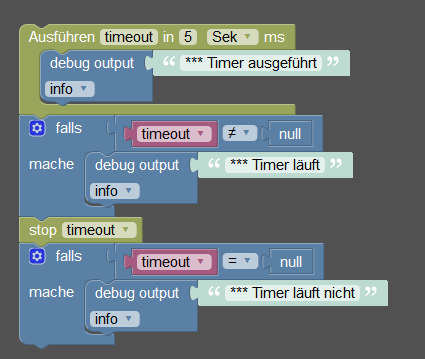
        @Asgothian Die Varible "timeout" hat nichts mit dem Timer "timeout" zutun.
        Probiere das mal und beobachte das Log.
        timer.png

        Rantanplan

        CCU3 / MS Server 2019(VM) / Scripten mit Blockly

        paul53P 1 Reply Last reply
        1
        • MyzerATM Offline
          MyzerATM Offline
          MyzerAT
          wrote on last edited by
          #22

          ich muss kurz weg zum arzt, mach dann weiter, thx an alle einstwelien!

          lg Rudi

          Master Debian 12 (Wien)
          Intel NUC6CAYH 16GB RAM, 500 GB SSD & auf Proxmox 8. 7. als VM

          Slave Debian 12. (TULLN) --> OpenVPN to Vienna
          Intel NUC6CAYH 16GB RAM, 500 GB SSD & auf Proxmox 8.7. als VM

          Node 20.19.0
          Nodejs 20.19.0
          npm 10.8.2
          js-controller 7.0.6

          1 Reply Last reply
          0
          • rantanplanR rantanplan

            @Asgothian Die Varible "timeout" hat nichts mit dem Timer "timeout" zutun.
            Probiere das mal und beobachte das Log.
            timer.png

            paul53P Offline
            paul53P Offline
            paul53
            wrote on last edited by
            #23

            @rantanplan sagte:

            Die Varible "timeout" hat nichts mit dem Timer "timeout" zutun.

            Doch: Wenn die Variable timeout auf null gesetzt wird, kann der Timer nicht mehr mit clearTimeout(timeout) gestoppt werden, denn die Variable timeout "addressiert" den Timer.

            Bitte verzichtet auf Chat-Nachrichten, denn die Handhabung ist grauenhaft !
            Produktiv: RPi 2 mit S.USV, HM-MOD-RPI und SLC-USB-Stick mit root fs

            rantanplanR 1 Reply Last reply
            0
            • paul53P paul53

              @rantanplan sagte:

              Die Varible "timeout" hat nichts mit dem Timer "timeout" zutun.

              Doch: Wenn die Variable timeout auf null gesetzt wird, kann der Timer nicht mehr mit clearTimeout(timeout) gestoppt werden, denn die Variable timeout "addressiert" den Timer.

              rantanplanR Online
              rantanplanR Online
              rantanplan
              wrote on last edited by
              #24

              @paul53 sagte in Ausfal IP erst melden wenn mehr als 2 Minuten nicht erreichbar!:

              @rantanplan sagte:

              Die Varible "timeout" hat nichts mit dem Timer "timeout" zutun.

              Doch: Wenn die Variable timeout auf null gesetzt wird, kann der Timer nicht mehr mit clearTimeout(timeout) gestoppt werden, denn die Variable timeout "addressiert" den Timer.

              ??? Und warum läuft mein Beispiel durch?

              Rantanplan

              CCU3 / MS Server 2019(VM) / Scripten mit Blockly

              AsgothianA 1 Reply Last reply
              0
              • rantanplanR rantanplan

                @paul53 sagte in Ausfal IP erst melden wenn mehr als 2 Minuten nicht erreichbar!:

                @rantanplan sagte:

                Die Varible "timeout" hat nichts mit dem Timer "timeout" zutun.

                Doch: Wenn die Variable timeout auf null gesetzt wird, kann der Timer nicht mehr mit clearTimeout(timeout) gestoppt werden, denn die Variable timeout "addressiert" den Timer.

                ??? Und warum läuft mein Beispiel durch?

                AsgothianA Offline
                AsgothianA Offline
                Asgothian
                Developer
                wrote on last edited by
                #25

                @rantanplan sagte in Ausfal IP erst melden wenn mehr als 2 Minuten nicht erreichbar!:

                ??? Und warum läuft mein Beispiel durch?

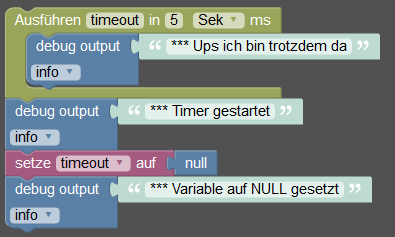
                Steht da doch. Wenn du die Variable timeout auf null setzt, dann macht das clear timeout nichts, sprich der Timer läuft durch.
                Fehler gibt es (zumindest bei mir) keine. Dein Log sollte also die Meldungen in der folgenden Reihenfolge liefern:
                Timer gestartet
                Variable auf NULL gesetzt
                Ups, ich bin trotzdem da

                ioBroker auf RPi4 - Hardware soweit wie möglich via Zigbee.
                "Shit don't work" ist keine Fehlermeldung, sondern ein Fluch.

                rantanplanR 1 Reply Last reply
                0
                • AsgothianA Asgothian

                  @rantanplan sagte in Ausfal IP erst melden wenn mehr als 2 Minuten nicht erreichbar!:

                  ??? Und warum läuft mein Beispiel durch?

                  Steht da doch. Wenn du die Variable timeout auf null setzt, dann macht das clear timeout nichts, sprich der Timer läuft durch.
                  Fehler gibt es (zumindest bei mir) keine. Dein Log sollte also die Meldungen in der folgenden Reihenfolge liefern:
                  Timer gestartet
                  Variable auf NULL gesetzt
                  Ups, ich bin trotzdem da

                  rantanplanR Online
                  rantanplanR Online
                  rantanplan
                  wrote on last edited by
                  #26

                  @Asgothian sagte in Ausfal IP erst melden wenn mehr als 2 Minuten nicht erreichbar!:

                  Steht da doch. Wenn du die Variable timeout auf null setzt, dann macht das clear timeout nichts, sprich der Timer läuft durch.

                  Hmmm, der Sinn des Ganzen bleibt mir bleibt mir momentan noch verschlossen🙄

                  Rantanplan

                  CCU3 / MS Server 2019(VM) / Scripten mit Blockly

                  AsgothianA 1 Reply Last reply
                  0
                  • rantanplanR rantanplan

                    @Asgothian sagte in Ausfal IP erst melden wenn mehr als 2 Minuten nicht erreichbar!:

                    Steht da doch. Wenn du die Variable timeout auf null setzt, dann macht das clear timeout nichts, sprich der Timer läuft durch.

                    Hmmm, der Sinn des Ganzen bleibt mir bleibt mir momentan noch verschlossen🙄

                    AsgothianA Offline
                    AsgothianA Offline
                    Asgothian
                    Developer
                    wrote on last edited by
                    #27

                    @rantanplan sagte in Ausfal IP erst melden wenn mehr als 2 Minuten nicht erreichbar!:

                    Hmmm, der Sinn des Ganzen bleibt mir bleibt mir momentan noch verschlossen

                    Jo.. mir auch. In dieser Reihenfolge macht es keinen Sinn.

                    Wenn Du dir aber das Scriptbeispiel von mir oben anschaust, dann setze ich die Variable auf NULL in genau 3 Fällen

                    • am Anfang
                    • wenn der Timeout sauber durchgelaufen ist
                    • wenn der Timeout gelöscht wurde.

                    Und all das mit dem Ziel das ich über if timeout == NULL sicher prüfen kann ob der Timeout noch läuft, ohne eine Hilfsvariable zu spendieren.

                    A.

                    ioBroker auf RPi4 - Hardware soweit wie möglich via Zigbee.
                    "Shit don't work" ist keine Fehlermeldung, sondern ein Fluch.

                    paul53P rantanplanR 2 Replies Last reply
                    0
                    • AsgothianA Asgothian

                      @rantanplan sagte in Ausfal IP erst melden wenn mehr als 2 Minuten nicht erreichbar!:

                      Hmmm, der Sinn des Ganzen bleibt mir bleibt mir momentan noch verschlossen

                      Jo.. mir auch. In dieser Reihenfolge macht es keinen Sinn.

                      Wenn Du dir aber das Scriptbeispiel von mir oben anschaust, dann setze ich die Variable auf NULL in genau 3 Fällen

                      • am Anfang
                      • wenn der Timeout sauber durchgelaufen ist
                      • wenn der Timeout gelöscht wurde.

                      Und all das mit dem Ziel das ich über if timeout == NULL sicher prüfen kann ob der Timeout noch läuft, ohne eine Hilfsvariable zu spendieren.

                      A.

                      paul53P Offline
                      paul53P Offline
                      paul53
                      wrote on last edited by paul53
                      #28

                      @Asgothian sagte in:

                      wenn der Timeout sauber durchgelaufen ist

                      Das ist die einzige Stelle, wo es sinnvoll ist, denn den Rest macht die Blockly-Funktion stop timeout bereits:

                      (function () {if (timeout) {clearTimeout(timeout); timeout = null;}})();
                      

                      Bitte verzichtet auf Chat-Nachrichten, denn die Handhabung ist grauenhaft !
                      Produktiv: RPi 2 mit S.USV, HM-MOD-RPI und SLC-USB-Stick mit root fs

                      AsgothianA rantanplanR 2 Replies Last reply
                      1
                      • AsgothianA Asgothian

                        @rantanplan sagte in Ausfal IP erst melden wenn mehr als 2 Minuten nicht erreichbar!:

                        Hmmm, der Sinn des Ganzen bleibt mir bleibt mir momentan noch verschlossen

                        Jo.. mir auch. In dieser Reihenfolge macht es keinen Sinn.

                        Wenn Du dir aber das Scriptbeispiel von mir oben anschaust, dann setze ich die Variable auf NULL in genau 3 Fällen

                        • am Anfang
                        • wenn der Timeout sauber durchgelaufen ist
                        • wenn der Timeout gelöscht wurde.

                        Und all das mit dem Ziel das ich über if timeout == NULL sicher prüfen kann ob der Timeout noch läuft, ohne eine Hilfsvariable zu spendieren.

                        A.

                        rantanplanR Online
                        rantanplanR Online
                        rantanplan
                        wrote on last edited by
                        #29

                        @Asgothian sagte in Ausfal IP erst melden wenn mehr als 2 Minuten nicht erreichbar!:

                        Und all das mit dem Ziel das ich über if timeout == NULL sicher prüfen kann ob der Timeout noch läuft, ohne eine Hilfsvariable zu spendieren.

                        Das muss ich mal verinnerlichen. Grundsätzlich gefällt mir die Idee Hilfsvariablen zu sparen.
                        Ich bin allerdings auch nicht so der Optimierungs-Freak, wenn es auf Kosten der Lesbarkeit geht. Werde es aber auf jeden Fall mal ausprobieren.

                        Rantanplan

                        CCU3 / MS Server 2019(VM) / Scripten mit Blockly

                        1 Reply Last reply
                        0
                        • paul53P paul53

                          @Asgothian sagte in:

                          wenn der Timeout sauber durchgelaufen ist

                          Das ist die einzige Stelle, wo es sinnvoll ist, denn den Rest macht die Blockly-Funktion stop timeout bereits:

                          (function () {if (timeout) {clearTimeout(timeout); timeout = null;}})();
                          
                          AsgothianA Offline
                          AsgothianA Offline
                          Asgothian
                          Developer
                          wrote on last edited by
                          #30

                          @paul53 sagte in Ausfal IP erst melden wenn mehr als 2 Minuten nicht erreichbar!:

                          Das ist die einzige Stelle, wo es sinnvoll ist, denn den Rest macht die Blockly-Funktion stop timeout bereits:

                          Und da zeigt sich das ich Blockly schlecht kenne. Ich baue alle meine Scripte direkt inJS. Deswegen hab ich zur Sicherheit den Punkt mal mit eingebaut. Um so besser (und lesbarer) wenn es gar nicht notwendig ist.

                          ioBroker auf RPi4 - Hardware soweit wie möglich via Zigbee.
                          "Shit don't work" ist keine Fehlermeldung, sondern ein Fluch.

                          1 Reply Last reply
                          0
                          • paul53P paul53

                            @Asgothian sagte in:

                            wenn der Timeout sauber durchgelaufen ist

                            Das ist die einzige Stelle, wo es sinnvoll ist, denn den Rest macht die Blockly-Funktion stop timeout bereits:

                            (function () {if (timeout) {clearTimeout(timeout); timeout = null;}})();
                            
                            rantanplanR Online
                            rantanplanR Online
                            rantanplan
                            wrote on last edited by
                            #31

                            @paul53 sagte in Ausfal IP erst melden wenn mehr als 2 Minuten nicht erreichbar!:

                            Das ist die einzige Stelle, wo es sinnvoll ist, denn den Rest macht die Blockly-Funktion stop timeout bereits:

                            (function () {if (timeout) {clearTimeout(timeout); timeout = null;}})();
                            

                            Danke!
                            Jetzt wird ein Schuh daraus☺
                            timer2.png

                            Rantanplan

                            CCU3 / MS Server 2019(VM) / Scripten mit Blockly

                            1 Reply Last reply
                            1
                            • MyzerATM Offline
                              MyzerATM Offline
                              MyzerAT
                              wrote on last edited by
                              #32

                              so wieder da bin und dank @rantanplan, weiß ich jetzt auch wie man Debug Bausteine einsetzt 👍

                              so ich mahc mich mal wieder an script, mal sehen ob ich das jetzt zusammen bekomme!

                              lg Rudi

                              Master Debian 12 (Wien)
                              Intel NUC6CAYH 16GB RAM, 500 GB SSD & auf Proxmox 8. 7. als VM

                              Slave Debian 12. (TULLN) --> OpenVPN to Vienna
                              Intel NUC6CAYH 16GB RAM, 500 GB SSD & auf Proxmox 8.7. als VM

                              Node 20.19.0
                              Nodejs 20.19.0
                              npm 10.8.2
                              js-controller 7.0.6

                              1 Reply Last reply
                              0

                              Hello! It looks like you're interested in this conversation, but you don't have an account yet.

                              Getting fed up of having to scroll through the same posts each visit? When you register for an account, you'll always come back to exactly where you were before, and choose to be notified of new replies (either via email, or push notification). You'll also be able to save bookmarks and upvote posts to show your appreciation to other community members.

                              With your input, this post could be even better 💗

                              Register Login
                              Reply
                              • Reply as topic
                              Log in to reply
                              • Oldest to Newest
                              • Newest to Oldest
                              • Most Votes


                              Support us

                              ioBroker
                              Community Adapters
                              Donate

                              636

                              Online

                              32.8k

                              Users

                              82.8k

                              Topics

                              1.3m

                              Posts
                              Community
                              Impressum | Datenschutz-Bestimmungen | Nutzungsbedingungen | Einwilligungseinstellungen
                              ioBroker Community 2014-2025
                              logo
                              • Login

                              • Don't have an account? Register

                              • Login or register to search.
                              • First post
                                Last post
                              0
                              • Home
                              • Recent
                              • Tags
                              • Unread 0
                              • Categories
                              • Unreplied
                              • Popular
                              • GitHub
                              • Docu
                              • Hilfe