




ioBroker.upnp - please test
-
@Bluefox Danke für das Update, schon etwas besser, der Adapter läuft durch, allerdings schreibt er keine Werte in die Objekte, und meine 3 Octopi-Raspis mag er einfach nicht, solange diese online sind, hängt er bei den in einer Schleife und erkennt sie jedesmal wieder als neues Device - und kommt dann natürlich zu nix anderes mehr..
Habe die drei jetzt mal runtergefahren, und siehe da, es werden noch mehr Geräte erkannt ( ich hab in den Settings alle 3 Haken an) jetzt keine Schleife mehr, aber noch keine Werte in den Objekten.Logfileauszug von der Schleife:
2019-02-21 23:15:33.713  - debug: upnp.0 Started processTasks with 1 tasks
2019-02-21 23:15:33.713  - debug: upnp.0 firstDevLookup for http://192.168.178.32:80/plugin/discovery/discovery.xml
2019-02-21 23:15:33.745  - debug: upnp.0 Positive answer for request of the XML file for http://192.168.178.32:80/plugin/discovery/discovery.xml
2019-02-21 23:15:33.746  - debug: upnp.0 Parsing the XML file for http://192.168.178.32:80/plugin/discovery/discovery.xml
2019-02-21 23:15:33.746  - debug: upnp.0 Creating objects for http://192.168.178.32:80/plugin/discovery/discovery.xml
2019-02-21 23:15:33.746  - debug: upnp.0 TypeOfDevice Basic
2019-02-21 23:15:33.746  - debug: upnp.0 Can not find a icon for 192.168.178.32
2019-02-21 23:15:33.746  - debug: upnp.0 Creating root element for device: OctoPrint_instance_on_berrymotion
2019-02-21 23:15:33.746  - debug: upnp.0 Cannot parse answer from 192.168.178.32: TypeError: Cannot read property 'length' of undefined
2019-02-21 23:15:33.749  - debug: upnp.0 All tasks processed
2019-02-21 23:15:33.792  - info: upnp.0 Found new device: http://192.168.178.28:80/plugin/discovery/discovery.xml
2019-02-21 23:15:33.792  - debug: upnp.0 Started processTasks with 1 tasks
2019-02-21 23:15:33.792  - debug: upnp.0 firstDevLookup for http://192.168.178.28:80/plugin/discovery/discovery.xml
2019-02-21 23:15:33.817  - debug: upnp.0 Positive answer for request of the XML file for http://192.168.178.28:80/plugin/discovery/discovery.xml
2019-02-21 23:15:33.817  - debug: upnp.0 Parsing the XML file for http://192.168.178.28:80/plugin/discovery/discovery.xml
2019-02-21 23:15:33.817  - debug: upnp.0 Creating objects for http://192.168.178.28:80/plugin/discovery/discovery.xml
2019-02-21 23:15:33.817  - debug: upnp.0 TypeOfDevice Basic
2019-02-21 23:15:33.817  - debug: upnp.0 Can not find a icon for 192.168.178.28
2019-02-21 23:15:33.817  - debug: upnp.0 Creating root element for device: OctoPrint_instance__Octopi
2019-02-21 23:15:33.818  - debug: upnp.0 Cannot parse answer from 192.168.178.28: TypeError: Cannot read property 'length' of undefined
2019-02-21 23:15:33.821  - debug: upnp.0 All tasks processed
2019-02-21 23:15:33.851  - info: upnp.0 Found new device: http://192.168.178.34:80/plugin/discovery/discovery.xml
2019-02-21 23:15:33.851  - debug: upnp.0 Started processTasks with 1 tasks
2019-02-21 23:15:33.851  - debug: upnp.0 firstDevLookup for http://192.168.178.34:80/plugin/discovery/discovery.xml
2019-02-21 23:15:33.904  - debug: upnp.0 Positive answer for request of the XML file for http://192.168.178.34:80/plugin/discovery/discovery.xml
2019-02-21 23:15:33.904  - debug: upnp.0 Parsing the XML file for http://192.168.178.34:80/plugin/discovery/discovery.xml
2019-02-21 23:15:33.904  - debug: upnp.0 Creating objects for http://192.168.178.34:80/plugin/discovery/discovery.xml
2019-02-21 23:15:33.904  - debug: upnp.0 TypeOfDevice Basic
2019-02-21 23:15:33.904  - debug: upnp.0 Can not find a icon for 192.168.178.34
2019-02-21 23:15:33.904  - debug: upnp.0 Creating root element for device: OctoPrint_instance_on_gymberry
2019-02-21 23:15:33.904  - debug: upnp.0 Cannot parse answer from 192.168.178.34: TypeError: Cannot read property 'length' of undefined
2019-02-21 23:15:33.908  - debug: upnp.0 All tasks processed
2019-02-21 23:15:39.112  - debug: upnp.0 Started processTasks with 8 tasks
2019-02-21 23:15:39.127  - debug: upnp.0 All tasks processed
2019-02-21 23:15:43.729  - info: upnp.0 Found new device: http://192.168.178.32:80/plugin/discovery/discovery.xml
2019-02-21 23:15:43.730  - debug: upnp.0 Started processTasks with 1 tasks
2019-02-21 23:15:43.730  - debug: upnp.0 firstDevLookup for http://192.168.178.32:80/plugin/discovery/discovery.xml
2019-02-21 23:15:43.780  - debug: upnp.0 Positive answer for request of the XML file for http://192.168.178.32:80/plugin/discovery/discovery.xml
2019-02-21 23:15:43.782  - debug: upnp.0 Parsing the XML file for http://192.168.178.32:80/plugin/discovery/discovery.xml
2019-02-21 23:15:43.782  - debug: upnp.0 Creating objects for http://192.168.178.32:80/plugin/discovery/discovery.xml
2019-02-21 23:15:43.782  - debug: upnp.0 TypeOfDevice Basic
2019-02-21 23:15:43.782  - debug: upnp.0 Can not find a icon for 192.168.178.32
2019-02-21 23:15:43.783  - debug: upnp.0 Creating root element for device: OctoPrint_instance_on_berrymotion
2019-02-21 23:15:43.783  - debug: upnp.0 Cannot parse answer from 192.168.178.32: TypeError: Cannot read property 'length' of undefined
2019-02-21 23:15:43.785  - debug: upnp.0 All tasks processed
2019-02-21 23:15:43.828  - info: upnp.0 Found new device: http://192.168.178.28:80/plugin/discovery/discovery.xml
2019-02-21 23:15:43.828  - debug: upnp.0 Started processTasks with 1 tasks
2019-02-21 23:15:43.828  - debug: upnp.0 firstDevLookup for http://192.168.178.28:80/plugin/discovery/discovery.xml
2019-02-21 23:15:43.853  - debug: upnp.0 Positive answer for request of the XML file for http://192.168.178.28:80/plugin/discovery/discovery.xml
2019-02-21 23:15:43.853  - debug: upnp.0 Parsing the XML file for http://192.168.178.28:80/plugin/discovery/discovery.xml
2019-02-21 23:15:43.853  - debug: upnp.0 Creating objects for http://192.168.178.28:80/plugin/discovery/discovery.xml
2019-02-21 23:15:43.853  - debug: upnp.0 TypeOfDevice Basic
2019-02-21 23:15:43.853  - debug: upnp.0 Can not find a icon for 192.168.178.28
2019-02-21 23:15:43.853  - debug: upnp.0 Creating root element for device: OctoPrint_instance__Octopi
2019-02-21 23:15:43.853  - debug: upnp.0 Cannot parse answer from 192.168.178.28: TypeError: Cannot read property 'length' of undefined
2019-02-21 23:15:43.857  - debug: upnp.0 All tasks processed
2019-02-21 23:15:43.878  - info: upnp.0 Found new device: http://192.168.178.34:80/plugin/discovery/discovery.xml
2019-02-21 23:15:43.878  - debug: upnp.0 Started processTasks with 1 tasks
und das ging solange so weiter, bis ich die drei runtergefahren hab ( Drucke gerade nicht, daher gings..).
Nehme an, es hat vielleicht damit was zu tun:
019-02-21 23:15:33.818 - debug: upnp.0 Cannot parse answer from 192.168.178.28: TypeError: Cannot read property 'length' of undefinedУчастник @ilovegym написал в ioBroker.upnp - please test:
Kannst du http://192.168.178.28:80/plugin/discovery/discovery.xml Datei zeigen?
-
Участник @ilovegym написал в ioBroker.upnp - please test:
Kannst du http://192.168.178.28:80/plugin/discovery/discovery.xml Datei zeigen?
@Bluefox ja, der ist hier im Büro, bei den anderen müsste ich jetzt in den Keller laufen.. sind ja aus.. ;-)
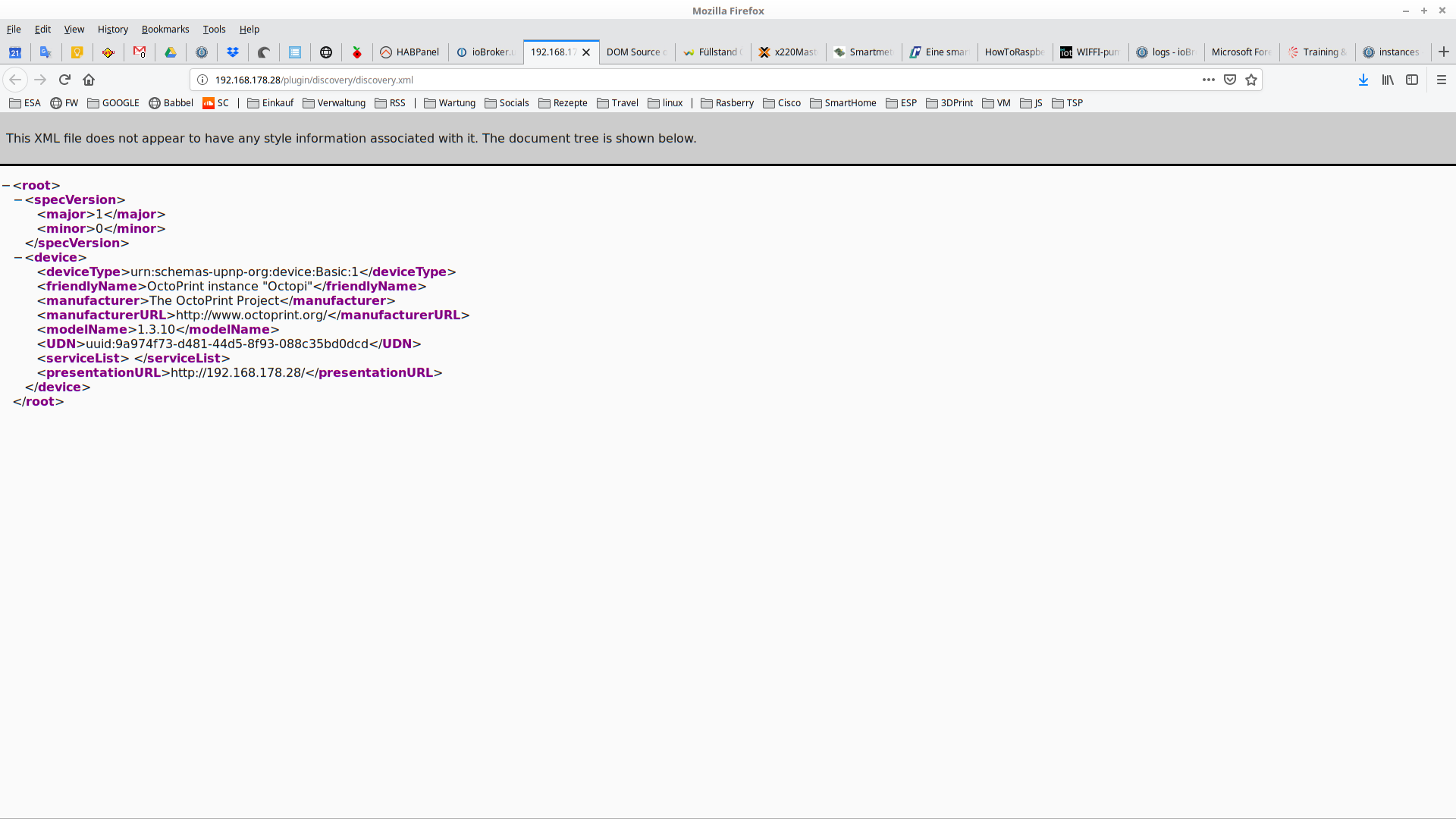
XML:<root><specVersion><major>1</major><minor>0</minor></specVersion><device><deviceType>urn:schemas-upnp-org:device:Basic:1</deviceType><friendlyName>OctoPrint instance "Octopi"</friendlyName><manufacturer>The OctoPrint Project</manufacturer><manufacturerURL>http://www.octoprint.org/</manufacturerURL><modelName>1.3.10</modelName><UDN>uuid:9a974f73-d481-44d5-8f93-088c35bd0dcd</UDN><serviceList> </serviceList><presentationURL>http://192.168.178.28/</presentationURL></device></root>Source:
http://www.w3.org/1999/xhtml" id="top"><link rel="stylesheet" href="chrome://global/content/xml/XMLPrettyPrint.css" /><div id="header" dir="ltr"><p> This XML file does not appear to have any style information associated with it. The document tree is shown below. </p></div><main id="tree" class="highlight"><div><details open="" class="expandable-body"><summary class="expandable-opening"><<span class="start-tag">root</span>></summary><div class="expandable-children"><div><details open="" class="expandable-body"><summary class="expandable-opening"><<span class="start-tag">specVersion</span>></summary><div class="expandable-children"><div><<span class="start-tag">major</span>><span class="text">1</span></<span class="end-tag">major</span>></div><div><<span class="start-tag">minor</span>><span class="text">0</span></<span class="end-tag">minor</span>></div></div></details><span class="expandable-closing"></<span class="end-tag">specVersion</span>></span></div><div><details open="" class="expandable-body"><summary class="expandable-opening"><<span class="start-tag">device</span>></summary><div class="expandable-children"><div><<span class="start-tag">deviceType</span>><span class="text">urn:schemas-upnp-org:device:Basic:1</span></<span class="end-tag">deviceType</span>></div><div><<span class="start-tag">friendlyName</span>><span class="text">OctoPrint instance "Octopi"</span></<span class="end-tag">friendlyName</span>></div><div><<span class="start-tag">manufacturer</span>><span class="text">The OctoPrint Project</span></<span class="end-tag">manufacturer</span>></div><div><<span class="start-tag">manufacturerURL</span>><span class="text">http://www.octoprint.org/</span></<span class="end-tag">manufacturerURL</span>></div><div><<span class="start-tag">modelName</span>><span class="text">1.3.10</span></<span class="end-tag">modelName</span>></div><div><<span class="start-tag">UDN</span>><span class="text">uuid:9a974f73-d481-44d5-8f93-088c35bd0dcd</span></<span class="end-tag">UDN</span>></div><div><<span class="start-tag">serviceList</span>><span class="text"> </span></<span class="end-tag">serviceList</span>></div><div><<span class="start-tag">presentationURL</span>><span class="text">http://192.168.178.28/</span></<span class="end-tag">presentationURL</span>></div></div></details><span class="expandable-closing"></<span class="end-tag">device</span>></span></div></div></details><span class="expandable-closing"></<span class="end-tag">root</span>></span></div></main></div>Screenshot:
-
@Bluefox sagte in ioBroker.upnp - please test:
@SBorg UNd bitte noch mal vom git testen.
:+1: funktioniert supi, call stack ist weg und UPNP läuft wieder ohne Probleme, Danke :)
-
@Bluefox sagte in ioBroker.upnp - please test:
@SBorg UNd bitte noch mal vom git testen.
:+1: funktioniert supi, call stack ist weg und UPNP läuft wieder ohne Probleme, Danke :)
-
@SBorg hast du es gut.. bei mir nicht.. 3 Systeme, überall das Gleiche.. muss an meinen Devices liegen.. :-( vor allem werden die Datenpunkte nicht beschrieben, sind zwar da, aber steht nix drin..
@ilovegym sagte in ioBroker.upnp - please test:
@SBorg ...sind zwar da, aber steht nix drin..
Sollte da überhaupt was drin stehen? IMHO schickt UPNP von Hause aus doch nix von selbst? Ich schick per UPNP eine Anfrage an das Device, dann schickt es mir die gewünschten Daten.
Soll heißen, starte ich UPNP sind z.B. bei meiner FritzBox auch alle DPs leer, schick ich dann ein "send", bekomme ich die gewünschten Daten in die entsprechenden DPs übermittelt.EDIT auch richtig zitieren will gelernt sein...
LG SBorg ( SBorg auf GitHub)
Projekte: Lebensmittelwarnung.de | WLAN-Wetterstation | PimpMyStation -
@ilovegym sagte in ioBroker.upnp - please test:
@SBorg ...sind zwar da, aber steht nix drin..
Sollte da überhaupt was drin stehen? IMHO schickt UPNP von Hause aus doch nix von selbst? Ich schick per UPNP eine Anfrage an das Device, dann schickt es mir die gewünschten Daten.
Soll heißen, starte ich UPNP sind z.B. bei meiner FritzBox auch alle DPs leer, schick ich dann ein "send", bekomme ich die gewünschten Daten in die entsprechenden DPs übermittelt.EDIT auch richtig zitieren will gelernt sein...
@SBorg sagte in ioBroker.upnp - please test:
@ilovegym sagte in ioBroker.upnp - please test:
@SBorg ...sind zwar da, aber steht nix drin..
Sollte da überhaupt was drin stehen? IMHO schickt UPNP von Hause aus doch nix von selbst? Ich schick per UPNP eine Anfrage an das Device, dann schickt es mir die gewünschten Daten.
Soll heißen, starte ich UPNP sind z.B. bei meiner FritzBox auch alle DPs leer, schick ich dann ein "send", bekomme ich die gewünschten Daten in die entsprechenden DPs übermittelt.So ist es, habe ein Skrip laufen das mir die Werte holt.......von der Fritz Box
schedule("*/10 * * * * *", function () { setState( "upnp.0.FRITZ!Box_6590_Cable.WANDevice.WANCommonInterfaceConfig.GetCommonLinkProperties"/*GetCommonLinkProperties*/,'send'); setState( "upnp.0.FRITZ!Box_6590_Cable.WANDevice.WANCommonInterfaceConfig.GetAddonInfos"/*GetAddonInfos*/,'send'); }); -
@SBorg sagte in ioBroker.upnp - please test:
@ilovegym sagte in ioBroker.upnp - please test:
@SBorg ...sind zwar da, aber steht nix drin..
Sollte da überhaupt was drin stehen? IMHO schickt UPNP von Hause aus doch nix von selbst? Ich schick per UPNP eine Anfrage an das Device, dann schickt es mir die gewünschten Daten.
Soll heißen, starte ich UPNP sind z.B. bei meiner FritzBox auch alle DPs leer, schick ich dann ein "send", bekomme ich die gewünschten Daten in die entsprechenden DPs übermittelt.So ist es, habe ein Skrip laufen das mir die Werte holt.......von der Fritz Box
schedule("*/10 * * * * *", function () { setState( "upnp.0.FRITZ!Box_6590_Cable.WANDevice.WANCommonInterfaceConfig.GetCommonLinkProperties"/*GetCommonLinkProperties*/,'send'); setState( "upnp.0.FRITZ!Box_6590_Cable.WANDevice.WANCommonInterfaceConfig.GetAddonInfos"/*GetAddonInfos*/,'send'); });@sigi234 :face_palm: danke, ich hatte zwar ein Script, aber auf dem Testsystem war der Javascriptadapter deaktiviert, damit mir die Scripte keinen durcheinander machen... und ohne das Script geht ja nix.. oh Mann..
-
Hab den upnp seit ein paar Stunden im Produktivsystem laufen, und bis auf die Fehler mit den Octopi's funktioniert er auch ( Daten werden auch eingetragen, da läuft ja mein Javascriptadapter ;-))
Hat noch irgendeiner hier OctoPi's im Netzwerk und kann das nachvollziehen?
-
Ich habe noch mal upnp upgedatet (für den Octopus fall)
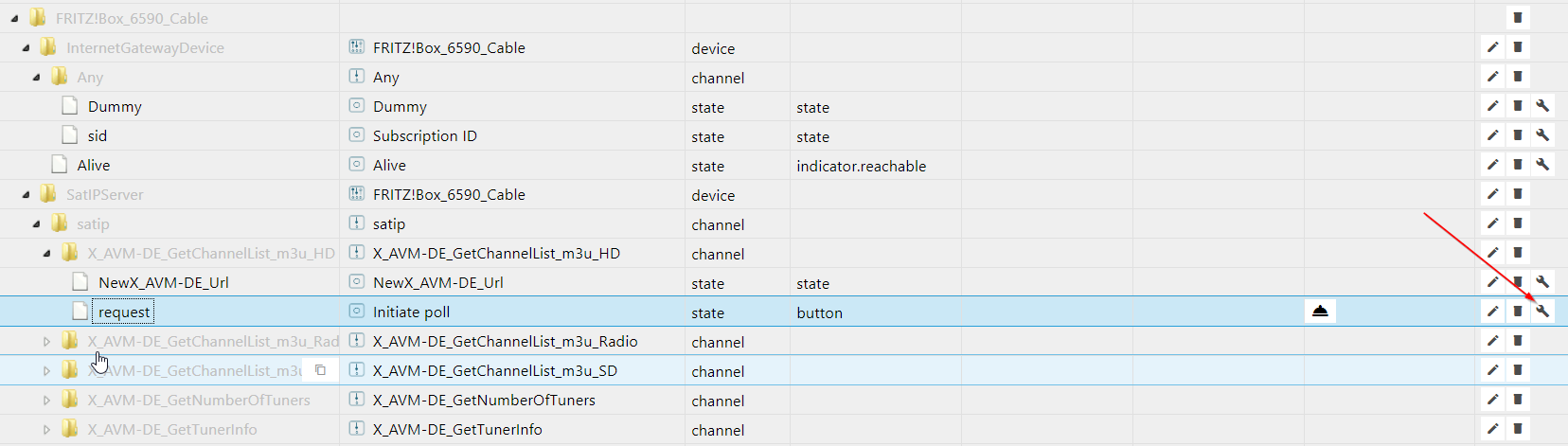
ABER: Da ich bemerkt habe, dass Object Tree total falsch war, habe ich die Struktur geändert.
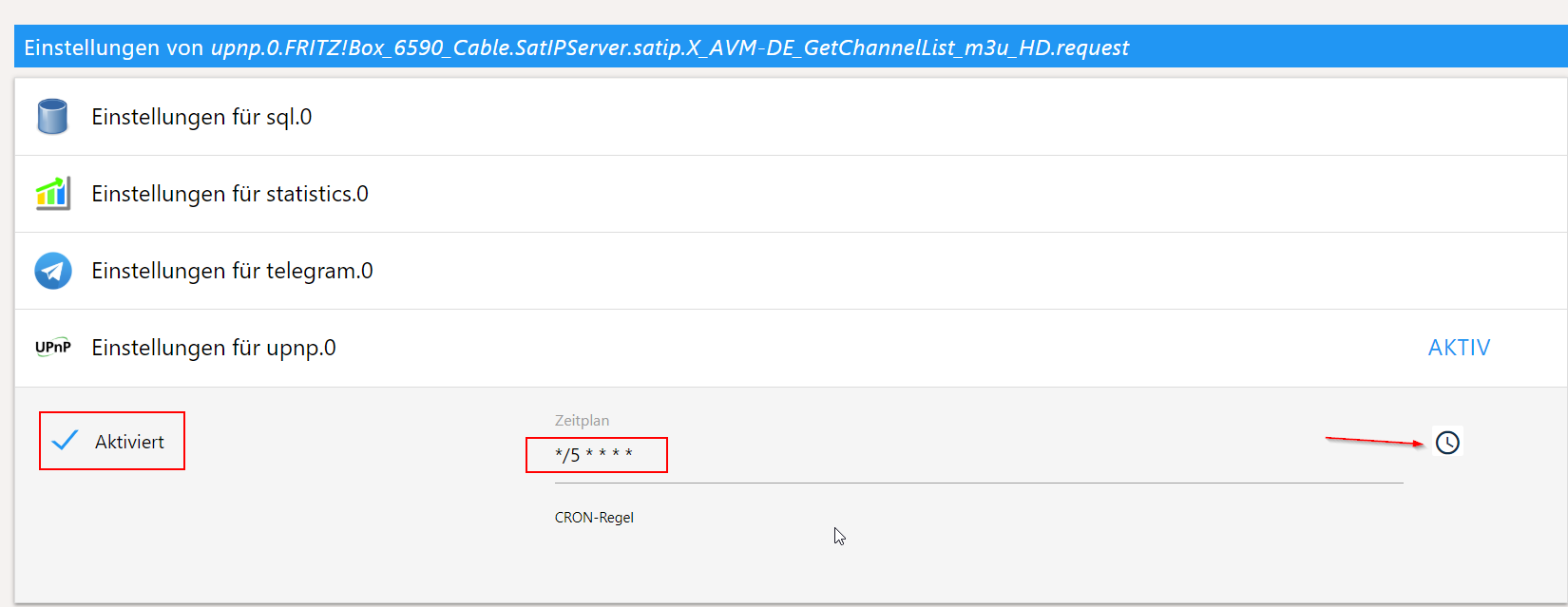
Dazu habe ich schedule Funktionalität eingebaut, so dass man bei "request" variablen CRON Regel setzen kann und man braucht kein JScript mehr um die Variable zu pollen.
Bitte Beachten: Dabei alte JS Scripte werden nicht funktionieren! -
Eben getestet, will bei mir nicht, kommen keine Daten.
Habe zwar "upnp.0 2019-02-24 10:29:51.958 info enabled polling of upnp.0.WANDevice_-FRITZ!Box_7490(UI).WANDevice.WANCommonInterfaceConfig.GetCommonLinkProperties.request with schedule */20 * * * * *" im Log, kommen aber keine Daten. Auch beim druck auf den Button kommt nix.
Sicherheitshalber hatte ich alle Datenpunkte gelöscht und Broker neu gestartet. -
Kann jemand bei upnp ja/nein sagen? Das ist einzige was js-controller 1.5.7 vom Release abhält...
es kommen keine Daten.............
Ich bin wieder auf die Alte Version umgestiegen.....da funktioniert es. -
Kann jemand bei upnp ja/nein sagen? Das ist einzige was js-controller 1.5.7 vom Release abhält...
@Bluefox Hi, Danke fürs Update, keine Fehler im Log, gute Idee mit dem Cron da!
Leider holt der Adapter keine Werte, auch wenn der request button manuell ausgeführt wird.
Die Schleife new device... bei den Octopis ist behoben, super!Hier mein Log ( debug ):
logfile.txt -
@Bluefox Hi, Danke fürs Update, keine Fehler im Log, gute Idee mit dem Cron da!
Leider holt der Adapter keine Werte, auch wenn der request button manuell ausgeführt wird.
Die Schleife new device... bei den Octopis ist behoben, super!Hier mein Log ( debug ):
logfile.txtwenn man den request button betätigt, kommt im Log nur das hier:
2019-02-24 17:36:15.516 - debug: upnp.0 Send Command for upnp.0.WANDevice_-_FRITZ!Box_7590.WANDevice.WANCommonInterfaceConfig.GetAddonInfos.request
2019-02-24 17:36:15.743 - debug: upnp.0 response -
Ich habe einen Fehler bei request gefunden.
Bitte noch mal probieren, jetzt aber direkt vom master und nicht vom Branch:cd /<dein Verzeichnis>/iobroker iobroker upnp stop npm i https://github.com/iobroker-community-adapters/ioBroker.upnp/tarball/master --production iobroker u upnp iobroker upnp restart -
Ich habe einen Fehler bei request gefunden.
Bitte noch mal probieren, jetzt aber direkt vom master und nicht vom Branch:cd /<dein Verzeichnis>/iobroker iobroker upnp stop npm i https://github.com/iobroker-community-adapters/ioBroker.upnp/tarball/master --production iobroker u upnp iobroker upnp restart@Bluefox sagte in ioBroker.upnp - please test:
Super, läuft, Werte kommen jetzt. Keine Fehler im Log. Werte werden auch automatisch aktualisiert ganz ohne Script!
Danke! -
@Bluefox sagte in ioBroker.upnp - please test:
Super, läuft, Werte kommen jetzt. Keine Fehler im Log. Werte werden auch automatisch aktualisiert ganz ohne Script!
Danke!@ilovegym sagte in ioBroker.upnp - please test:
@Bluefox sagte in ioBroker.upnp - please test:
Super, läuft, Werte kommen jetzt. Keine Fehler im Log. Werte werden auch automatisch aktualisiert ganz ohne Script!
Danke!Ja, funktioniert auch bei mir! V 1.0.5
Danke:+1:Bitte benutzt das Voting rechts unten im Beitrag wenn er euch geholfen hat.
Immer Daten sichern! -
@ilovegym sagte in ioBroker.upnp - please test:
@Bluefox sagte in ioBroker.upnp - please test:
Super, läuft, Werte kommen jetzt. Keine Fehler im Log. Werte werden auch automatisch aktualisiert ganz ohne Script!
Danke!Ja, funktioniert auch bei mir! V 1.0.5
Danke:+1:@sigi234 sagte in ioBroker.upnp - please test:
@ilovegym sagte in ioBroker.upnp - please test:
@Bluefox sagte in ioBroker.upnp - please test:
Super, läuft, Werte kommen jetzt. Keine Fehler im Log. Werte werden auch automatisch aktualisiert ganz ohne Script!
Danke!Ja, funktioniert auch bei mir! V 1.0.5
Danke:+1:Ok, bekomme noch ständig folgende Info:
upnp.0 2019-02-25 11:01:12.827 info Found new device: http://192.168.178.23:49152/nasdevice.xml<root xmlns="urn:schemas-upnp-org:device-1-0"> <specVersion> <major>1</major> <minor>0</minor> </specVersion> <device> <pnpx:X_hardwareId xmlns:pnpx="http://schemas.microsoft.com/windows/pnpx/2005/11">VEN_011A&DEV_0064&REV_01</pnpx:X_hardwareId> <pnpx:X_deviceCategory xmlns:pnpx="http://schemas.microsoft.com/windows/pnpx/2005/11">Storage.NAS</pnpx:X_deviceCategory> <pnpx:X_compatibleId xmlns:pnpx="http://schemas.microsoft.com/windows/pnpx/2005/11">urn:www-wdc-com:device:NetworkAttachedStorage</pnpx:X_compatibleId> <df:X_modelId xmlns:df="http://schemas.microsoft.com/windows/2008/09/devicefoundation">{02BF98D2-1B50-4a1f-83D9-A85402782702}</df:X_modelId> <df:X_containerId xmlns:df="http://schemas.microsoft.com/windows/2008/09/devicefoundation">{73656761-7465-7375-636b-0090a9f64500}</df:X_containerId> <modelURL>http://www.wdc.com/wdmycloud</modelURL> <deviceType>urn:schemas-wd-com:device:WdNAS-DEV_0064:1</deviceType> <friendlyName>WDMyCloud</friendlyName> <manufacturer>Western Digital Corporation</manufacturer> <manufacturerURL>http://www.wdc.com</manufacturerURL> <modelDescription>WD My Cloud</modelDescription> <modelName>WDMyCloud</modelName> <modelNumber>sq</modelNumber> <serialNumber>xxxxxxxxx</serialNumber> <UDN>uuid:xxxxx-7465-7375-636b-0090a9d57f26</UDN> <serviceList> <service> <serviceType>urn:schemas-microsoft-com:service:NULL:1</serviceType> <serviceId>urn:microsoft-com:serviceId:NULL</serviceId> <SCPDURL>/empty.xml</SCPDURL> <controlURL>/UD/?0</controlURL> <eventSubURL/> </service> </serviceList> <presentationURL>http://192.168.178.23</presentationURL> </device> </root>Ist eine Nas von WD, ich glaube das hat was mit der Anmeldung an der Nas zu tun.



Support us
476
Online32.7k
Users82.4k
Topics1.3m
Posts